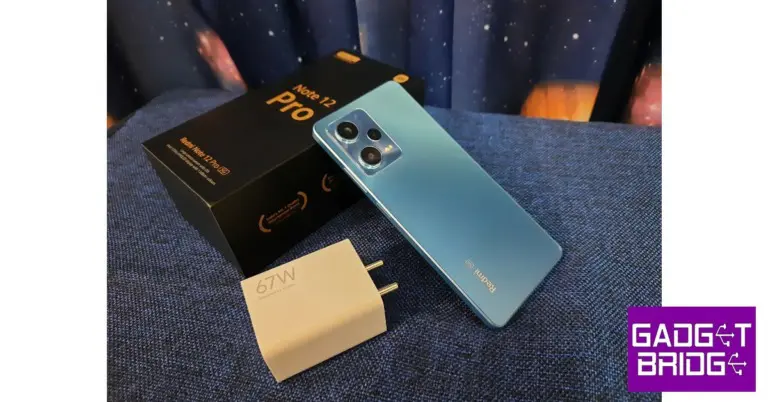
Redmi Note 12 Pro Review: Powerful performance at a reasonable price

Redmi kicked off the proceedings early this year, releasing its Note series in the first week of January. While the Redmi Note 12 Pro+ gathered all the headlines for its exquisite 200MP primary camera, Redmi has also launched a Pro and non-Pro version of the Note alongside it. The Note 12 Pro has the specs to match the performance of its Pro+ counterpart and comes at a slightly more affordable price. We got our hands on the smartphone before the release and have been using it as our primary driver for more than a week. So, without further ado, here is our Redmi Note 12 Pro review. 

Read Also: EZVIZ launched its first Outdoor Pan and Tilt Camera in India

Redmi Note 12 Pro review: Design and Display

Inside the box, you get the Note 12 Pro handset, a clear plastic case, a SIM ejector tool, a quick start guide, USB Type C charging cable, and a 67W power adapter. The Note 12 Pro+ comes with a 120W charging brick. There are three colour options available for the Note 12 Pro – Stardust Purple, Glacier Blue, and Onyx Black. We used the Glacier Blue version for this review.
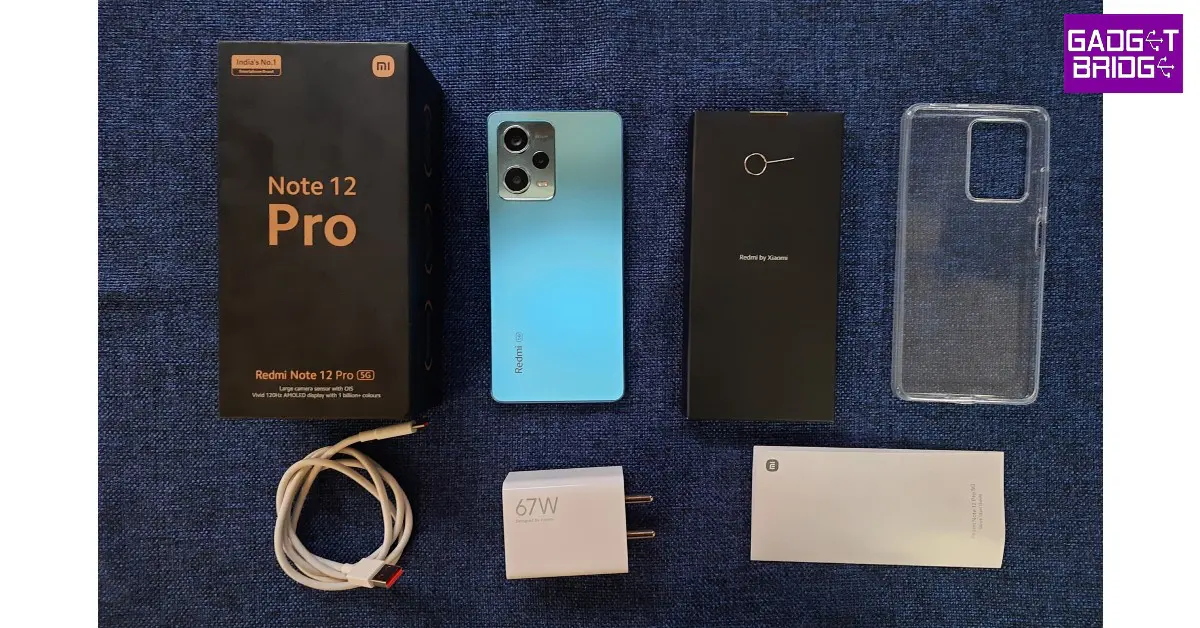
Redmi Note 12 Pro review: Design and Display

In terms of design, Redmi has kept things quite simple. The shiny glass back has a smooth texture to it but can be a bit of a fingerprint magnet. You may want to keep a microfiber cloth handy for this one. 

The back panel and the edges are completely flat, unlike the slightly curved back design of the Pro+. The camera island is made out of the same material as the rest of the back panel. The materials used here give the smartphone a premium feel, something that will surely set it apart from its midrange peers.

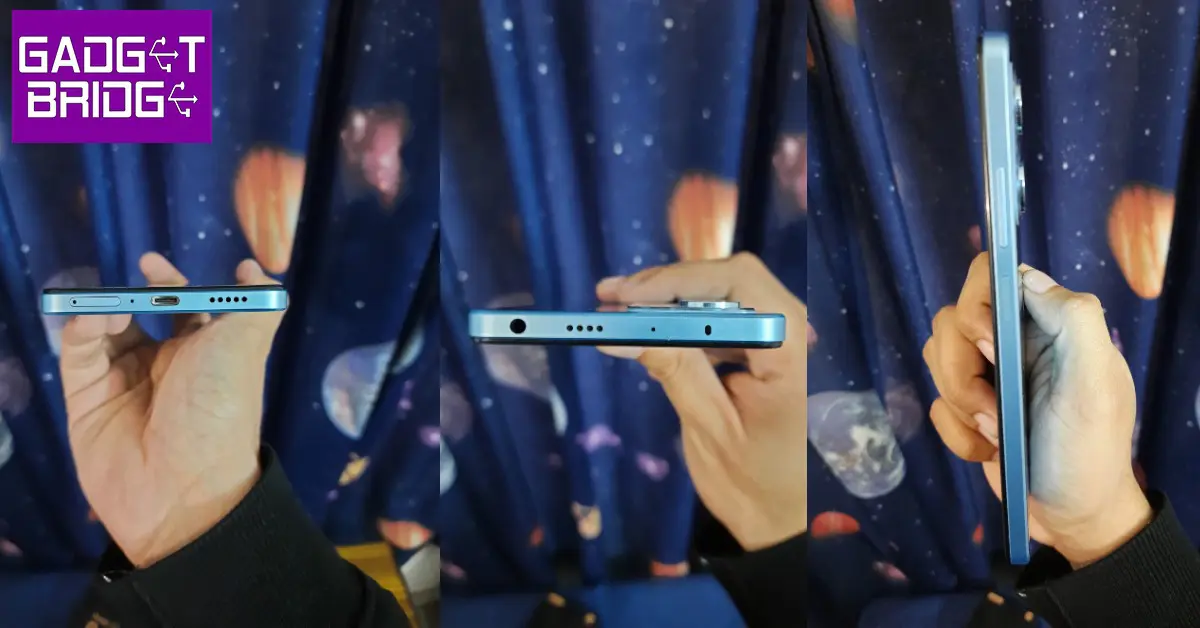
Redmi Note 12 Pro review: Design and Display

At the top of the frame, you will find the 3.5mm headphone jack, secondary speaker and microphone, and an IR blaster. The bottom of the smartphone houses the SIM card tray, the USB port, and the speaker grill. The right side of the frame holds the volume rocker keys and the power key that also doubles as the fingerprint sensor. There are no additions on the left side of the frame.
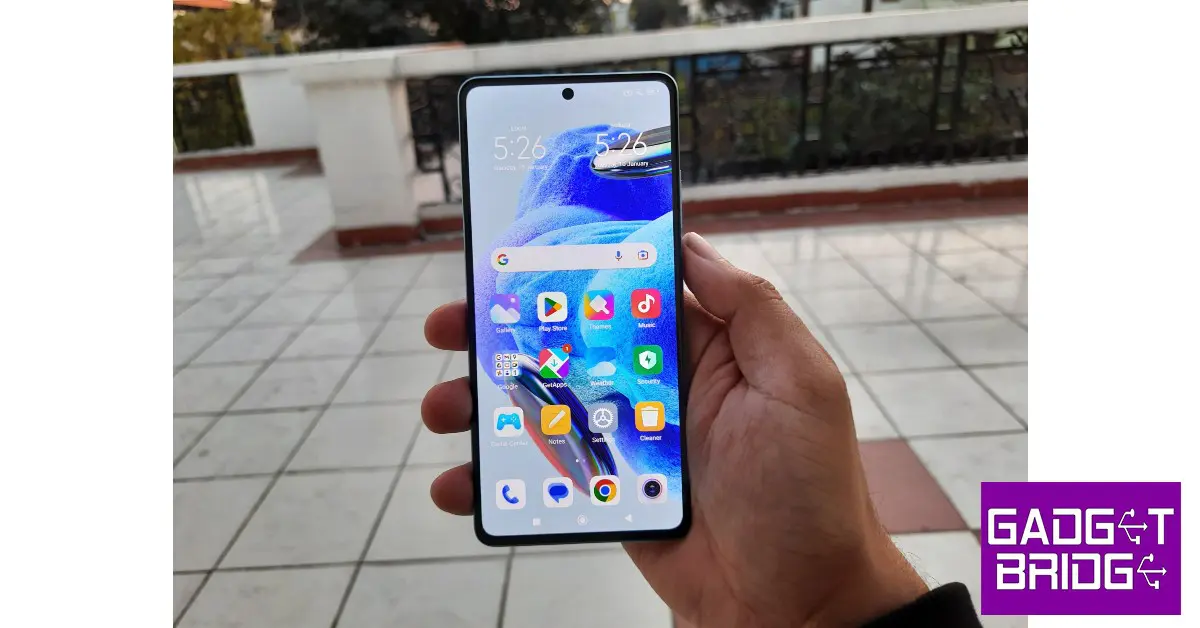
Moving on, the 6.67-inch OLED display has a screen-to-body ratio of 86.7%, 395ppi pixel density, and a maximum refresh rate of 120Hz. The bezels are slim but noticeable, without turning to be too much of a distraction. The selfie camera is housed in a punch-hole cutout at the centre of the screen. The display is protected by Corning Gorilla Glass 5 which is quite adequate, but you will need a case for added protection for the back. The phone is rated IP53, which is an additional benefit for smartphones in this range.
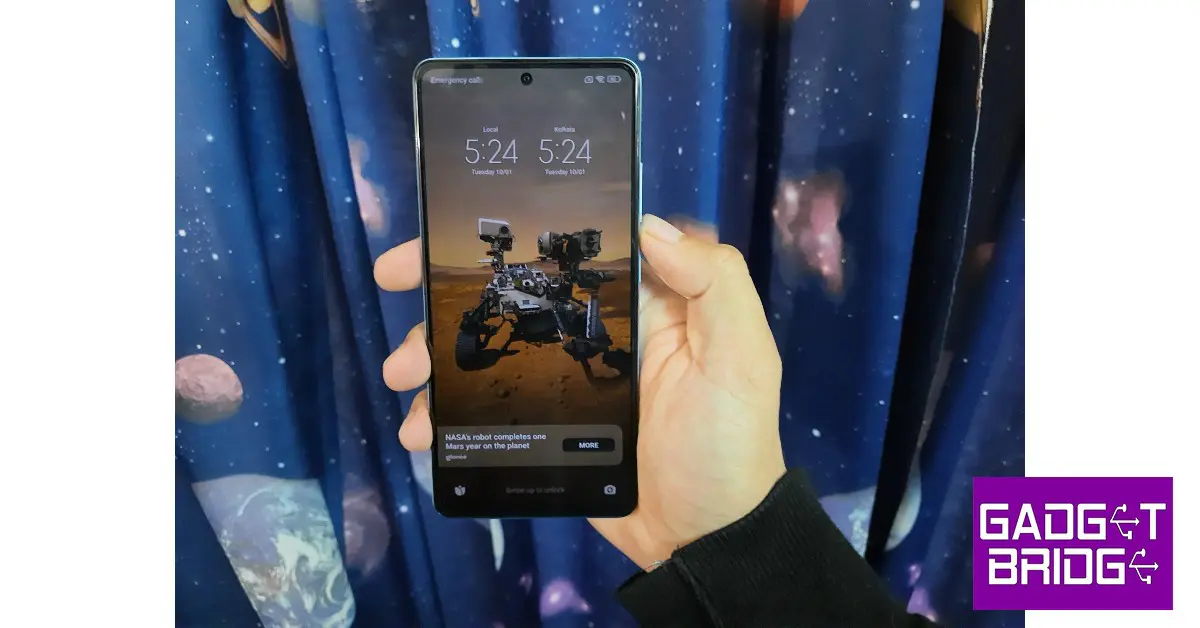
Redmi Note 12 Pro review: Design and Display

The 120Hz refresh rate produces a stellar touch response rate. The smartphone is set to adaptive refresh rate settings out of the box, but it can later be switched to 120Hz from the settings. There is no option for a 90Hz refresh rate, so if you want to save battery you will have to switch back to 60Hz. Brightness has been capped at 900 nits, which is optimum for using the smartphone outdoors in direct sunlight as well as indoors. The OLED display does a good job of presenting well-balanced images and colours while streaming HD content. The audio output is helped by the stereo speakers and Dolby Atmos surround.

One thing we found pretty helpful was the video toolbox which can be accessed by swiping right from the edge of the screen. This toolbox gives you quick access to the screen recording, screenshot, and screencasting options. You can also choose to turn the screen off while the video plays in the background, something that will come in quite handy while listening to music on YouTube. You can also apply different video filters and toggle the Dolby Atmos surround from this toolbox.

Redmi Note 12 Pro review: Performance and Cameras

The Redmi Note 12 Pro is powered by the MediaTek Dimensity 1080 SoC with Mali -G86 MC4 handling the graphics. The phone comes in three storage and RAM options – 128GB + 6GB, 128GB + 8GB, and 256GB + 8GB which we used for this review. Unlike its predecessor, there is no expandable memory option on the Redmi Note 12 Pro. OS duties are handled by Android 12 with MIUI 13 on top. The smartphone will be receiving the Android 13 update soon. Like all Redmi phones, there is a significant amount of bloatware on the Note 12 Pro. We’d suggest clearing all the bloatware apps before using the phone or the unnecessary notifications may hamper your experience with this device.
Redmi Note 12 Pro review: Performance and Cameras

Bloatware aside, we were quite pleased with the performance delivered by the Note 12 Pro. The apps took minimal time to load, even with multiple tasks running in the background. While Xiaomi loyalists may be used to the software, new users may take some time to adapt to the notification slider and the quick toolbar. Xiaomi has promised two years of software updates along with four years of security patches for the Redmi Note 12 Pro.

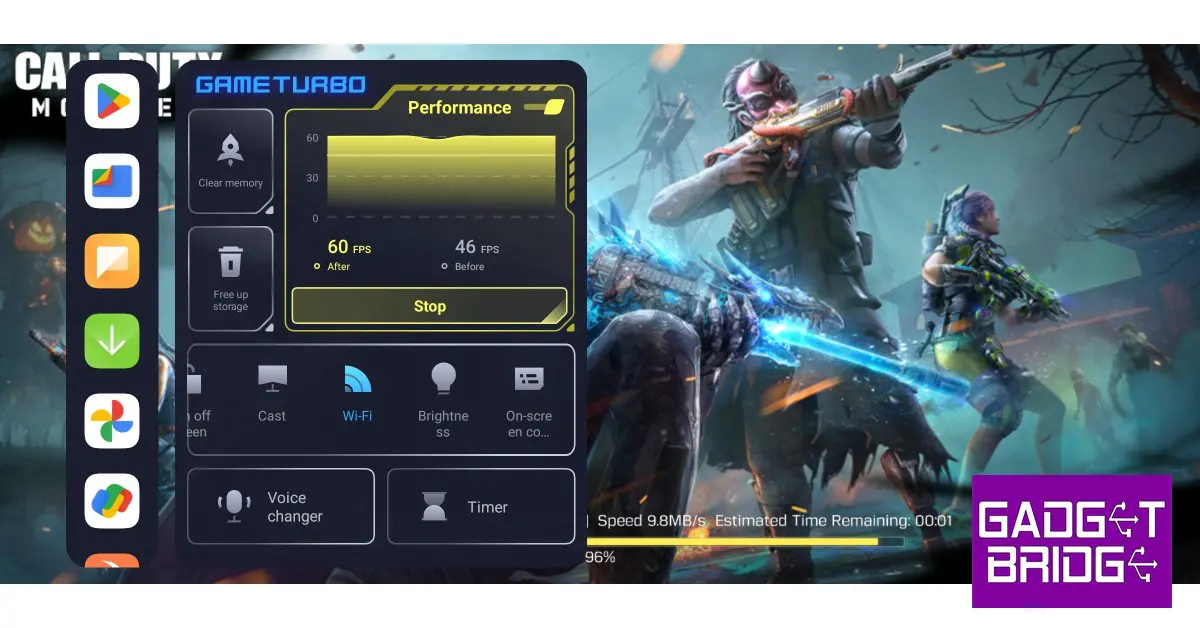
We played Call of Duty and Garena Free Fire Max at the highest graphics and did not have any complaints about the smartphone’s performance. There were no frame drops or stutters and while the processor was firing on all cylinders, the phone did not overheat after 30-40 mins of gaming. The ‘Game Turbo’ toolbar offers helpful features like voice changer, timer, screen recorder, screencast and more while gaming. You can also view the performance metrics with just one quick swipe.
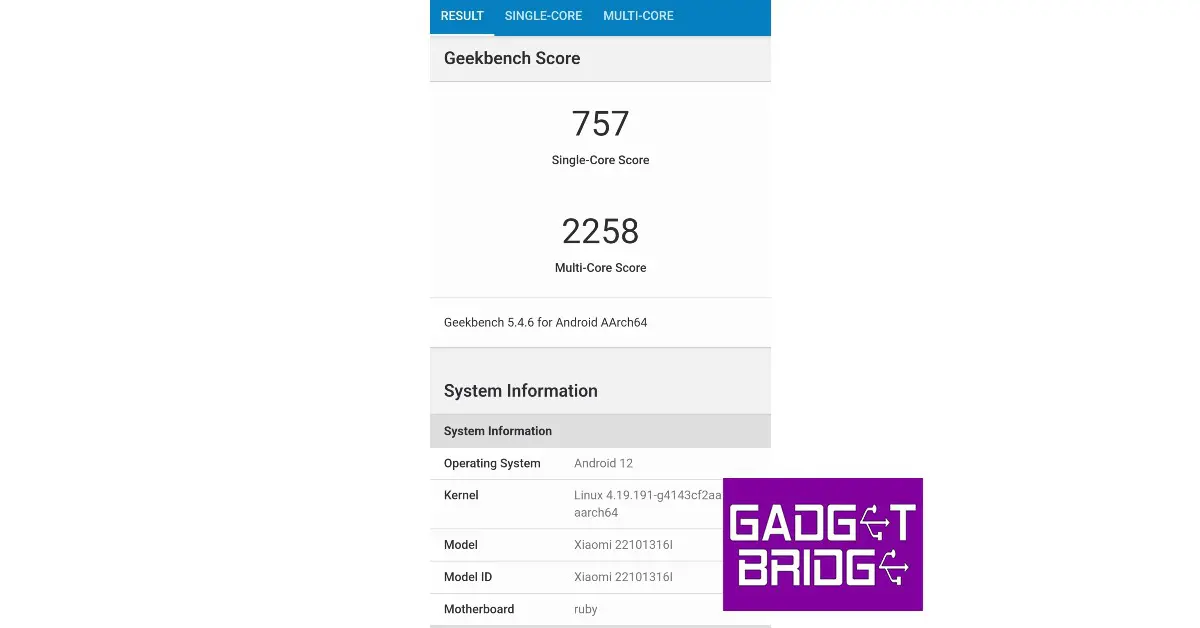
On the Geekbench 5 test, the Redmi Note 12 Pro achieved a single-core score of 757 and a multi-core score of 2258 points. These scores place it with the likes of Samsung Galaxy S20 FE, Xiaomi Poco F3, and Samsung Galaxy Note 20 Ultra

Geekbench Test

The Redmi Note 12 Pro received a 5,000mAh battery which is more than enough to last an entire day. With moderate to heavy daily usage which included browsing social media, watching multiple hours of content, and about an hour of gaming, the smartphone got us through the day with about 25-30% charge to spare. The 67W charger replenishes the battery from 10-50% in under 20 minutes, with a full charge taking up to 50 minutes.
Redmi Note 12 Pro review: Performance and Cameras

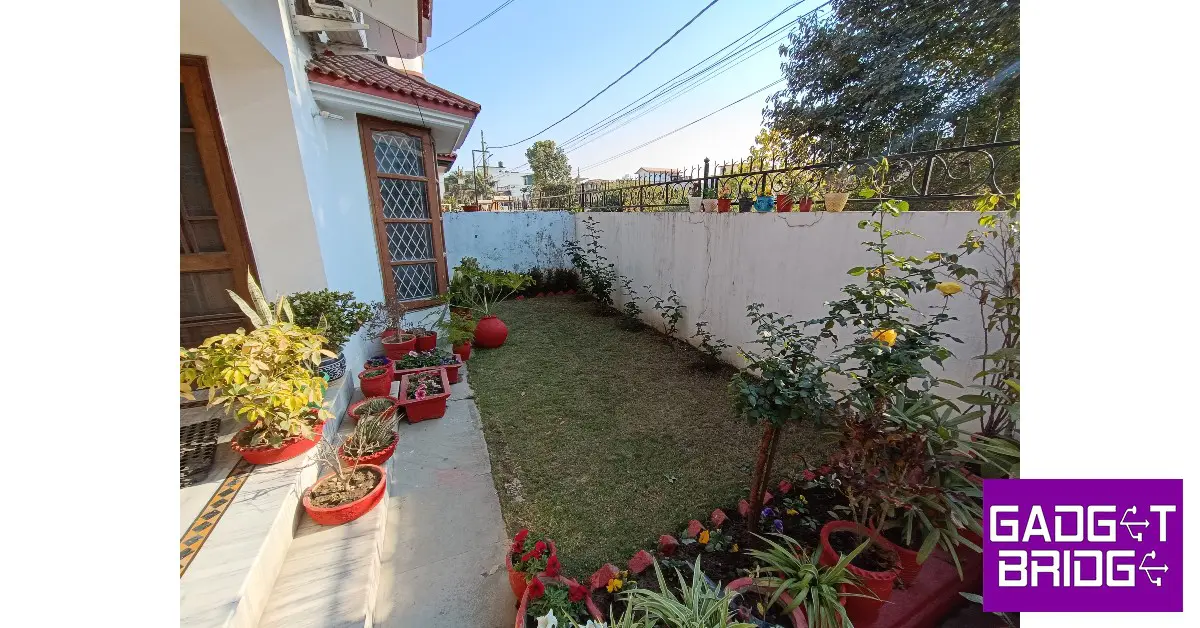
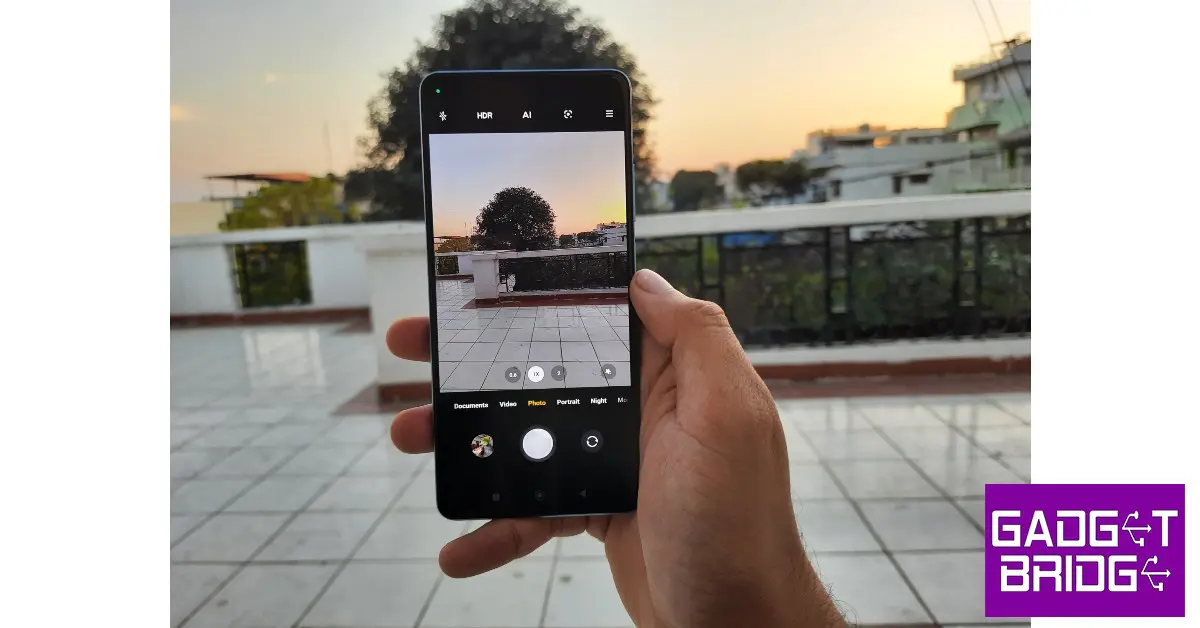
Moving on to the camera, the Redmi Note 12 Pro (as mentioned earlier) may not boast a 200MP primary sensor like its Pro+ counterpart, but it definitely doesn’t deserve to be completely written off. In daylight conditions, the 50MP primary sensor delivered a great performance. The image stabilisation was on point with OIS and the smartphone processed the images nicely to produce well-balanced, vivid images. The colours were close to real life, without any unnecessary overprocessing.

As you can see in the images below, the colour tones when it comes to the day sky are very close to real. The processor also makes sound choices in treating the objects depending on the amount of natural light hitting them. The objects in shadowy areas are balanced out pretty well. The overall contrast is pleasing to the eye and you won’t have to work too much to find the ideal shot. We were also pleased by the minimal drop-off in colour when taking pictures with the ultrawide lens.


Redmi Note 12 Pro review: Performance and Cameras

Ultrawide Lens

Edge detection in portrait mode was satisfactory, but what we found really impressive was the range of details captured. The colours truly ‘popped’ in this mode and the resulting images were processed to near perfection. The night mode also produced decent results with optimum illumination and noise reduction. The only minor complaint we have is with the 16MP selfie camera which continues the Xiaomi tradition of brightening the skin tone of the subject. We also feel it could have performed better results in limited lighting conditions. 

Redmi Note 12 Pro review: Performance and Cameras
Portrait Mode
Low Light Photography
Night Mode

Read Also: WhatsApp users will soon be able to save disappearing chats as “Kept Messages”

Verdict

The Redmi Note 12 Pro goes on sale tomorrow with a price tag of Rs 24,999. While it may miss out on the 200MP primary sensor of the Pro+ variant, it still is a brilliant camera smartphone with a processor that can easily handle any task you throw at it. While the Note 12 Pro+ is priced at Rs 29,999, the Note 12 Pro would make a great value-for-money option in this lineup.

Pros

Great display

Brilliant camera unit

Fast charging

Cons

Back design looks a bit too simple

Can attract a lot of fingerprints

Bloatware

For the latest gadget and tech news, and gadget reviews, follow us on Twitter, Facebook and Instagram. For newest tech & gadget videos subscribe to our YouTube Channel. You can also stay up to date using the Gadget Bridge Android App. You can find the latest car and bike news here.
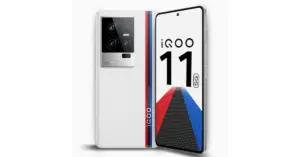
iQoo 11 5G with Snapdragon 8 Gen 2 SoC launched in India

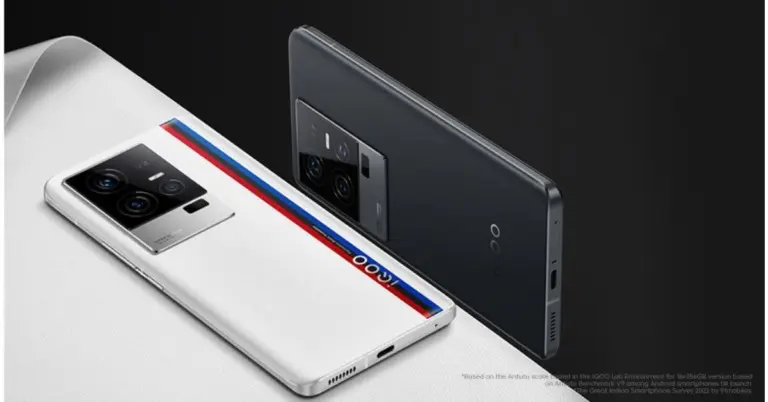
Today Vivo’s sub-brand iQoo announced the launch of its new smartphone in the Indian market.  The company has introduced iQoo 11 5G which is the first device in the country to be powered by the Snapdragon 8 Gen 2 SoC. Also, there will be two variants, Legend and Alpha. The phone features 120W fast charging support. In addition to this, the handset comes with a 2K E6 AMOLED display.

iQoo 11 5G price in India and availability details

iQoo 11 5G will be offered in two variations: the Legend edition and an Alpha version. The Legend edition has a matte glass finish and a BMW M Motorsport series strip on the rear while the Alpha variant comes with a leather finish.

The 8GB RAM with 256GB storage option will come with a price tag of Rs 59,999 whereas the 16GB RAM with 256GB memory option is priced at Rs 64,999.

In terms of availability, the device will go on sale on January 13 via Amazon. The phone will exclusively be available for Prime members from January 12 in the country.

Also Read: Top upcoming smartphones with Qualcomm Snapdragon 8 Gen 2

iQoo 11 5G price in India and availability details

iQoo 11 5G specifications

The iQoo 11 smartphone’s 6.78-inch Samsung E6 AMOLED display features a 1440 x 3200 pixel resolution. The smartphone’s screen sports a refresh rate of 144Hz. The screen also supports a built-in optical fingerprint sensor. Funtouch OS 13 powered by Android 13 powers this device. For this phone, the manufacturer has promised to provide up to four years of security upgrades in addition to up to three years of Android updates. It has up to 16GB of UFS 4.0 RAM and an octa-core Qualcomm Snapdragon 8 Gen 2 CPU. Thanks to the Extended RAM 3.0 functionality, users of the series can expand RAM by up to 8GB. 256GB of UFS 4.0 storage space is available on the phone.

A 50MP Samsung GN5 primary sensor, a 13MP portrait sensor, and an 8MP ultra-wide sensor make up the iQoo 11 phone’s camera configuration. For selfies, the phone houses a 16MP camera sensor.

The iQoo 11 5G smartphone is powered by a 5,000mAh battery with 120-watt rapid charging capability.

A stereo speaker setup, a USB Type-C connection, and an IR blaster with a universal remote control option are also included. Additionally, the phone includes NFC, Wi-Fi 6, and Bluetooth 5.3.

For the latest gadget and tech news, and gadget reviews, follow us on TwitterFacebook and Instagram. For newest tech & gadget videos subscribe to our YouTube Channel. You can also stay up to date using the Gadget Bridge Android App. You can find the latest car and bike news here.
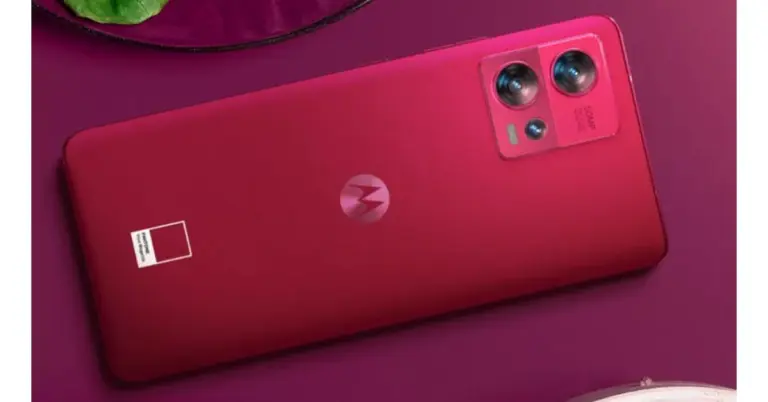
Limited-edition Motorola Edge 30 Fusion Viva Magenta launched in India

In India, Motorola has released its limited-edition Motorola Edge 30 Fusion Viva Magenta. The smartphone is identical to the current smartphone model, which was introduced in September 2022. The new colour options will be available in two colour options of Cosmic Grey and Solar Gold In India, Motorola has released its limited-edition Motorola Edge 30 Fusion Viva Magenta. The smartphone is identical to the current smartphone model

According to the company the Pantone Color Institute, the world’s leading authority on colour accuracy and consistency, has been announcing the Pantone Color of the Year for more than 20 years to emphasise the symbolic aspect of colour and demonstrate how our colour preferences reflect the current state of our civilization. The Pantone Color of the Year is chosen after careful consideration of many facets of society, including fashion, marketing, social media, and even politics, and analysis of annual worldwide trends and themes.

Expressing her delight on the Motorola edge 30 fusion in Viva Magenta, Bollywood celebrity Mrunal Thakur said, “It feels great to see a smartphone brand coming up with something so high on fashion and trend. The Motorola edge 30 fusion in Viva Magenta looks uber stylish with that leather finish at the back and trendy to carry with almost all that one wears. Getting a hand-on experience with this device has given my styling an edge, making something as important as your smartphone a fashion accessory or I should call it a fashion statement.”

Motorola Edge 30 Fusion Viva Magenta limited edition Price

Motorola Edge 30 Fusion Viva Magenta limited edition Price

Priced at 39,999, the Motorola Edge 30 Fusion Viva Magenta limited edition will be available from January 12, 2023 on Flipkart and in the company’s authorised retail locations. Additionally, Reliance Digital stores would be the only places to buy the smartphone at retail.

The launch promotion offers a Rs 3,500 Instant Discount / Cashback on IndusInd Bank Credit Card EMI Transactions, bringing the device’s actual price down to just Rs. 36,499 (after the discount).

Additionally, the company would provide Reliance Jio perks worth Rs 7,699

Motorola Edge 30 Fusion Viva Magenta limited edition Specifications

The 6.55-inch full-HD+ curved Endless Edge pOLED display on the Motorola Edge 30 Fusion sports a 144Hz refresh rate. The display also has a maximum brightness of 1,100 nits and supports HDR10+. It utilises the My UX user interface and runs Android 12. The smartphone is powered by a Snapdragon 888+ SoC and 8GB of LPDDR5 RAM. Additionally, a 128GB internal UFS 3.1 storage device is supplied.

Also Read: Motorola Edge 30 Ultra and Motorola Edge 30 Fusion released in India

The highlight of the triple rear camera system of the Motorola Edge 30 Fusion is the 50-megapixel primary sensor with Quad Pixel Technology, optical image stabilisation (OIS), and Omni-directional PDAF. Additionally featured are a 13-megapixel sensor, an ultra-wide angle lens with a 120-degree field of view, an f/2.2 aperture, and a 13-megapixel sensor. It also includes a 32-megapixel sensor with Quad Pixel Technology on the front for taking selfies.

The gadget’s 4,400mAh battery is compatible with 68W TurboPower rapid charging. The smartphone features a 4,400mAh battery and 68W TurboPower rapid charging is supported. As connectivity choices, the smartphone has Wi-Fi 6E, 5G, 4G LTE, Bluetooth v5.2, NFC, and a USB Type-C connector. A fingerprint sensor is integrated into the display, and it enables face unlock technology.

For the latest gadget and tech news, and gadget reviews, follow us on TwitterFacebook and Instagram. For newest tech & gadget videos subscribe to our YouTube Channel. You can also stay up to date using the Gadget Bridge Android App. You can find the latest car and bike news here.

6 Easy Ways to Loop YouTube Videos on Android and iOS

0

Playing a song or video on repeat may be a pretty basic function on every music streaming app, but YouTube has always had its reservations when it comes to implementing this feature. This is because YouTube generates its revenue primarily through ads. Every page refresh reloads the ads on the video as well but simply looping the video from the website’s media player does not achieve that. It took YouTube years to first introduce looping videos for its desktop site, and the feature only recently made its way to the mobile app. So, without further ado, here are 6 easy ways to loop YouTube videos on Android and iOS.

Read Also: WhatsApp users will soon be able to save disappearing chats as “Kept Messages”

Here’s how you can use the loop feature on the YouTube app

Step 1: Go to the video on YouTube.

Step 2: Tap the Settings icon on the top right corner of the video window.

Step 2: Tap the Settings icon on the top right corner of the video window.

Step 3: Tap on ‘Loop video’ and select ‘On’.

Step 3: Tap on ‘Loop videos’ and select ‘On’.

Use the YouTube desktop site on your mobile web browser

Step 1: Launch Google Chrome and go to YouTube.

Step 2: Tap the ellipses at the top right corner of the screen.

Step 3: Scroll down and select ‘desktop site’.

Step 3: Scroll down and select ‘desktop site’.

Step 4: Long press anywhere on the video and select ‘loop video’.

Step 4: Long press anywhere on the video and select ‘loop video’. 4 easy Ways to Loop YouTube Videos on Android and iOS

Loop videos on the YouTube app using Playlists

While the YouTube app may not have a loop option, YouTube playlists certainly do. So if you want to loop a song or video, simply put it in a new playlist by itself and play the playlist on loop.

Step 1: Open the video you want to loop and select ‘Save’.

Step 2: Select ‘New Playlist’. Give the playlist a name.

Step 2: Select ‘New Playlist’. Give the playlist a name. 4 easy Ways to Loop YouTube Videos on Android and iOS

Step 3: Tap the play icon on the playlist and select the loop option from the playlist menu.

Step 3: Tap the play icon on the playlist and select the loop option from the playlist menu. 4 easy Ways to Loop YouTube Videos on Android and iOS

Use a third-party app

Before YouTube introduced the loop videos feature for its app, users had no choice but to download a third-party app if they wanted to listen to a song on repeat. If you’re using an older version of the YouTube app and dont want to update it, this may still be a good option for you. The ‘Listen On Repeat’ app was created for the sole purpose of listening to music on YouTube on repeat. Not only can you loop YouTube videos using this app, but it also automatically saves your recent repeats.

Use a Chrome extension

Use a Chrome extension

The ‘Looper for YouTube‘ Chrome extension is designed to carry out the simple task of putting a YouTube video on repeat. This extension works on the desktop version of Chrome as well as Chromium-based mobile web browsers. Using this extension, you can set the number of times you want a video to repeat. You can also loop a portion of the video. It places the loop icon right below the YouTube player, making it convenient to loop any video.

Use LoopTube

Use LoopTube

LoopTube is a third-party website that lets you play any YouTube video on repeat for as long as you want. All you need to do is paste the URL of the YouTube video in the box and hit play. LoopTube also offers a very handy notes section where you can jot down your takeaways from the video. This is super helpful on occasions when you’re watching online lectures and need to take quick notes.

Frequently Asked Questions (FAQs)

How do I play a YouTube video on repeat on Android?

Launch a YouTube video, hit the settings icon, and turn on ‘Loop Video’ to play the video on repeat on the YouTube app.

How do I play a YouTube video on repeat on the website?

To play a YouTube video on repeat, simply right-click on the video player (if you’re on PC) or long-press it (if you’re on mobile) and select ‘Loop’.

How can I get a dedicated loop button on the YouTube player?

The Looper for YouTube Chrome extension adds a loop/repeat icon right below the YouTube player, allowing you to easily put any video on repeat.

Read Also: Best easy ways to Empty the Recycle Bin on Samsung Galaxy Smartphones

Conclusion

These are the top 6 easy ways to loop YouTube videos on Android or iOS. You can also download a YouTube video on your device and loop it using your smartphone’s media player. While you cannot do this for every video you want to play on repeat, if you find yourself coming back to a video multiple times, you may want to save it locally on your device. Here’s an article that shows how to download a YouTube video on your smartphone.

For the latest gadget and tech news, and gadget reviews, follow us on Twitter, Facebook and Instagram. For newest tech & gadget videos subscribe to our YouTube Channel. You can also stay up to date using the Gadget Bridge Android App. You can find the latest car and bike news here.

iQoo 11 5G India launch to take place today: How to watch the live stream

iQoo 11 5G is scheduled to launch in India today. Recall that the iQoo 11 series, which includes the standard model and the iQoo 11 Pro, was introduced in China. At this time, iQOO is skipping the iQOO 11 Pro 5G. Several fresh details about the smartphone, such as its RAM options, price, and colour variations for the India launch, have been made public by the company days before its debut. The hardware and design of the iQOO 11 that will be sold in India will be pretty identical. A Snapdragon 8 Gen 2 SoC is believed to be installed in the smartphone, which is an interesting first for India. It will also include 256GB of inbuilt storage.

iQoo 11 5G India launch and expected pricing details

The iQoo 11 5G India launch will be streamed live starting at noon today. Visit the company’s official YouTube account and social media channels if you wish to watch the event live. An iQoo 11 Legend Edition with a BMW M Motorsport-themed design will be released, as the business previously announced.

Also Read: Top upcoming smartphones with Qualcomm Snapdragon 8 Gen 2

The device will go on sale in India starting January 13 after its January 10 unveiling. The company has disclosed that the iQoo 11 5G base model will cost between Rs 55,000 and Rs 60,000 in India at launch. The smartphone will be available in the colours Alpha and Legend and has been advertised for sale on the iQoo and Amazon websites.

iQoo 11 5G expected specifications

According to the manufacturer, the iQoo 11 5G will be the first smartphone to be released using the Snapdragon 8 Gen 2 SoC. The device will be offered in two variations: 8GB RAM with 256GB internal storage and 16GB RAM with 256GB internal storage, the business has disclosed. Along with 8GB of expandable RAM, the iQoo 11 5G will support it. It is now the greatest score ever for a smartphone after it received a score of 1.3 million on Antutu.

The 6.78-inch Samsung E6 AMOLED screen on the iQoo 11 smartphone has a resolution of 1440×3200 pixels. The smartphone’s display boasts a 144Hz refresh rate. It is equipped with an octa-core Qualcomm Snapdragon 8 Gen 2 CPU and up to 16GB of UFS 4.0 RAM. Users of the series can increase RAM by up to 8GB thanks to the Extended RAM 3.0 functionality. The phone has 512GB of UFS 4.0 storage capacity.

The iQoo 11 phone’s camera setup consists of a 50MP Samsung GN5 primary sensor, a 13MP portrait sensor, and an 8MP ultra-wide sensor. A 5,000mAh battery with 120-watt rapid charging capabilities powers the iQoo 11 smartphone.

For the latest gadget and tech news, and gadget reviews, follow us on TwitterFacebook and Instagram. For newest tech & gadget videos subscribe to our YouTube Channel. You can also stay up to date using the Gadget Bridge Android App. You can find the latest car and bike news here.

Garena Free Fire Redeem Codes Today 10 January 2023: Here is how to claim them

Garena Free Fire is a battle royale game with regular awards and tournaments to keep players interested. If you play Garena Free Fire, you should be aware of the redeem codes that are released on a daily basis. However, because the battle royale game is banned in India, players from other countries can use the Free Fire Redeem codes daily. If you’re unfamiliar with the Garena Free Fire redeem codes or don’t know how to get them, we’ve put together a step-by-step guide to help you redeem them. Check out Garena Free Fire Redeem Codes for 10 January 2023.

The Free Fire redeem codes are a great way to get free stuff. These are 12-digit codes that contain alphabets and numbers, as well as an expiration date and time. Because the Garena FF redeem codes cannot be used more than once, you should hurry to the redemption page to claim your free reward before someone else does. To get a free reward, all you have to do is go to reward.ff.garena.com/en, which is the official redemption page. Also, keep an eye on this space for daily updates on Garena Free Fire redemption codes and rewards.

Garena Free Fire Redeem Codes Today 10 January 2023

  • FFCMCPSJ99S3
  • 3IBBMSL7AK8G
  • J3ZKQ57Z2P2P
  • GCNVA2PDRGRZ
  • MCPW3D28VZD6
  • ZZZ76NT3PDSH
  • XZJZE25WEFJJ
  • V427K98RUCHZ
  • FFCMCPSUYUY7E
  • EYH2W3XK8UPG

How to Get Free Fire Redeem Codes for Garena on 10 January 2023?

  • Visit the Garena Free Fire game’s official website at reward.ff.garena.com.
  • Use your Facebook, Google, VK, Apple ID, Huawei ID, or Twitter account to log in.
  • You’ll be taken to a valid redemption code (s)
  • Copy and paste the 12-digit redemption code into the text box.
  • On the screen, a dialogue box will appear.
  • ‘Ok’ should be selected.

For the latest gadget and tech news, and gadget reviews, follow us on TwitterFacebook and Instagram. For newest tech & gadget videos subscribe to our YouTube Channel. You can also stay up to date using the Gadget Bridge Android App. You can find the latest car and bike news here.

Amazon Quiz Answers Today 10 January 2023: Participate to win Rs 1,000 Amazon Pay Balance

10 January 2023 Amazon Quiz has gone live on its mobile app platform. Customers from different parts of the country are participating in the daily quiz. The daily quiz is conducted by the company brings an opportunity for the customers to win exciting prizes. The quiz begins from 12 AM to 11:59 PM. In today’s quiz participants have a chance to win Rs 1,000 Amazon Pay Balance by answering all the questions correctly.

Every day Amazon brings a fresh set of questions for its customers that contains five easy questions. Amazon quiz brings an opportunity for its customers to win Amazon Pay Balance ranging from Rs 1,000 to Rs 50,000. which consists of five questions related to general knowledge and current affairs.

The participants need to answer all the questions correctly and their names will be selected for a lucky draw. The winner will be announced at the end of the month. One wrong answer could eliminate you from the quiz. If you manage to answer all the questions correctly you can stand a chance to win Rs 1,000 Amazon Pay Balance today. Only app users are eligible to participate in the Quiz. Check Out 10 January 2023 Amazon Quiz Answers.

Amazon Quiz Today Prize – Rs 1,000 Amazon Pay Balance

Quiz Date – 10 January 2023

Daily Timing – 12 AM to 11:59 PM

Winner Announcement – Today at 12 PM

Amazon Quiz Answers Today 10 January 2023

Question 1: A single piece of coiled DNA is called ____.

Answer: Chromosome

Question 2: Which is the closest planet to the sun?

Answer: Mercury

Question 3: Who won the Golden Boot for being the highest goal scorer at the 2022 FIFA World Cup?

Answer: Kylian Mbappe

Question 4: This is a picture taken at which national park, known for its population of this animal?

Answer: Kaziranga National Park

Question 5: Which of these is a famous song by the singer in picture?

Answer: Rolling in the Deep

How To Play Amazon Quiz

Only app users are eligible to play the Amazon quiz every morning from 12 AM to 11:59 PM. The quiz is not available on the desktop. For those who are unaware of how to play the Amazon quiz below are the steps, you can follow to take the quiz.

  • Firstly download the Amazon app from Google Play Store or App Store
  • Now fill in the required information through the Sign Up option.
  • You need to log in to the Amazon app and scroll down on the home screen to find the Amazon Quiz banner.
  • Tap on the Amazon Quiz banner and tap on the Start button to start the Quiz.
  • Now you will get 5 questions and you need to answer them correctly. One wrong answer will eliminate you from the Quiz.
  • After answering all the questions correctly you are now eligible for a Lucky Draw.
  • The winner’s name will be announced today at 12 PM.

For the latest gadget and tech news, and gadget reviews, follow us on TwitterFacebook and Instagram. For newest tech & gadget videos subscribe to our YouTube Channel. You can also stay up to date using the Gadget Bridge Android App. You can find the latest car and bike news here.

Three Android Data Recovery Solutions to Make Android Data Recovery Without Rooting 2023

Are you looking for Android data recovery without root? It is quite common to accidentally delete your important videos or favourite photos from your Android phone. However, retrieving deleted Android data without root access is quite challenging as you don’t have the administrative rights to install an app for data recovery. But by far, it is not impossible. This blog will share the best Android data recovery software with steps to make Android file recovery without root access.

FAQs About Android Data Recovery Without Rooting

1.    Is It Possible to Retrieve Deleted Android Data Without Root?

Yes, it’s possible to make an Android file recovery with Android smartphones without root access. There is a plethora of reliable Android data recovery software available in the market that can recover data from Android devices without needing root access to work.

2.    Can I Recover Deleted Videos From an Unrooted Android by Myself?

Yes, you can easily retrieve deleted Android data without root access. But only if you pick a credible Android data recovery software to work with. You can not only get your videos and photos back but can also recover WhatsApp Business files and WeChat contacts and messages from your unrooted Huawei or Xiaomi device.

When You Need to Recover Android Data

Rooting access to your phone permits you to modify everything in its operating system. In the past, rooting an Android phone was the key to saving wasted resources like battery life by restricting or allowing permissions for apps to work.

As Android runs on Linux Kernel, it has the ability to give users root access. Moreover, rooting allows users to resolve issues or remove pre-installed apps on their Android phones. But, with evolving technology, Android devices now don’t require rooting access as they used to do before. Therefore, they either provide limited privileges or don’t offer permissions for installing apps or customizing their phone’s appearance on a deeper system level. It’s better in a way because having no root access means your phone’s integrity will remain safe.

But an unrooted device raises a problem when you want to recover data from your Android phone. That’s where you’ll need professional video and photo recovery software that can provide data recovery or restore data in an Android phone that has no root access.

Three Android Data Recovery Solutions Without Root You Must Explore

Here we’ve listed the top data or photo recovery software that doesn’t require root access. Check these three options in terms of their features, ease of use, and high data recovery rate:

Solution 1:Tenorshare Ultdata for Android

Tenorshare UltData for Android is the best data and photo recovery app for Android without root access that you can get your hands on. It can recover contacts, messages, WhatsApp, WeChat, photos, and video files.

This tool has an easy-to-use interface so you can search for different categories of data to recover. In addition, it supports a wide range of Android devices and languages.

Here’s what UltData for Android can do:

  • It provides Android data recovery without root access and backup.
  • It recovers WhatsApp and WhatsApp business data such as photos, videos, documents, and history.
  • Allows you to preview WhatsApp files and download their backup from Google Drive.
  • It restores WeChat messages, contacts, and videos, from Android phones like Samsung, Nexus, Huawei, and Xiaomi.

Below are the steps for Android file recovery without root access using UltData for Android:

  1. Download and install the UltData for Android tool on your PC or Mac. Launch it and choose “Recover Lost Data.”

2. Connect your unrooted Android phone to your computer. Next, follow the instructions given on the screen to “enable USB debugging” on your Android phone.

3. Once the UltData for Android tool is able to detect your phone, choose the file types you want to recover. Hit “Start,” and the tool will start looking for data to recover on your Android phone.

4. After the tool completes the data recovery process, preview the files you want to save. Hit “Recover” to save the files on your computer.

Follow the steps, you will know Tenorshare UltData for Android is at the top of our list for Android file recovery without root access because it is a handy tool to recover a wide variety of file types.

Solution 2: Android Data Recovery App

Can Android file recovery be made from an unrooted Android device without PC? Yes, it is, the second data recovery Android software in the list is Tenorshare UltData for Android data recovery app.

Don’t have a computer nearby you. Don’t worry. You can still recover your contacts, messages, photos, and videos from your unrooted Android phone. The Tenorshare UltData for Android app is easy to download and free to use. It can efficiently recover deleted photos, videos, contacts, and messages from your unrooted Android device if you want to make android data recovery without PC. Here’s how to recover deleted data using the UltData video and photo recovery app for Android without root access:

  1. Download the Tenorshare UltData for Android app from Google Play and install it on your Android phone.
  2. Open the app and scan for files you want to recover.
  3. Once the app finishes scanning for deleted data on your phone, choose the files you want to recover.

Solution 3: The Last Backup File

Last but not least solution for data recovery or restore data doesn’t need a video and photo recovery app. If you keep a regular backup of your Android phone, you can easily make data recovery Android without root access.

However, one thing to remember here is that you cannot use this solution if you don’t have a backup of your Android device. Follow the steps below to retrieve deleted data without using any video or photo recovery app from your cloud backup:

  1. Navigate to the “Settings” app on your Android phone.
  2. Click on your name mentioned at the top of the screen.
  3. Click on “Samsung Cloud.” Next, press “Restore data.
  4. Choose the files you wish to recover and press “Restore” at the bottom of the screen.
  5. If you are prompted to install the backed-up apps, click “Install.”
  6. The backup will download from the cloud.

The above options can change slightly depending on the specifications of your phone. But the core process of downloading Android data from the backup will remain the same.

To Sum Up

Deleting your valuable photos, videos, or documents from your Android phone is a common occurrence. However, you can always recover data if you keep a regular backup of your Android device. But if you don’t have a backup and your phone is unrooted Android data recovery without root access can be challenging. Luckily, the best Android data recovery software is Tenorshare UltData for Android. Not only allows you to recover your Android data but also to restore WhatsApp, WhatsApp Business, and WeChat contacts, messages, photos, and documents.

For the latest gadget and tech news, and gadget reviews, follow us on TwitterFacebook and Instagram. For newest tech & gadget videos subscribe to our YouTube Channel. You can also stay up to date using the Gadget Bridge Android App. You can find the latest car and bike news here.

EZVIZ launched its first Outdoor Pan and Tilt Camera in India

The all-new EZVIZ C8C, an “Outdoor Pan/Tilt Camera” with special capabilities, has been unveiled by EZVIZ. The C8C was developed to answer challenges in outside surveillance and protection and delivers amazing features like panoramic monitoring, AI-powered human shape detection, colour night vision, and event-triggered active defence. The CCTV camera also comes with 3-night vision modes.

The EZVIZ C8C’s attractive orb design and small size allow it to fit in any space of the house as well as retail establishments. The camera can easily catch views of large outdoor regions where other conventional outdoor cameras cannot due to its 360-degree field of vision. A single outdoor Pan Tilt camera can monitor a vast area from multiple angles, making it a more cost-effective investment than the multi-camera setups that many families still employ to accomplish the same goal.

Like all other EZVIZ products, the C8C enables straightforward control, live monitoring, and video playback via the free EZVIZ app. All videos are captured in 1080p high quality and are effectively compressed using the H.265 standard. Users have the choice of joining up for EZVIZ’s CloudPlay, which offers a free trial period of up to 30 days, or using the camera’s built-in micro-SD card to record video locally.

Also Read: WhatsApp users will soon be able to save disappearing chats as “Kept Messages”

The EZVIZ C8C also features a noise-cancelling microphone. Users may easily control the C8C using the EZVIZ App on their smartphone to see and hear what’s going on. The C8C also comes with two external antennas for better Wi-Fi connectivity. Additionally, it features a weatherproof enclosure, which enables it to keep working well even in adverse weather situations like wind, rain, or snow.

It contains two built-in lamps and a full-color night vision mode. The EZVIZ C8C produces bright images even at night by lighting the surroundings.

The Full Color night vision mode is illuminated and brilliantly restored to full colour owing to two built-in spotlights and professional optical lenses.

The EZVIZ C8C comes with 3-night vision modes. When you don’t need additional lighting, you can use the EZVIZ App to turn the camera to black and white night vision and still see up to 30 metres (100 feet) away. The third is a smart night vision mode that, when motion is detected, converts the video display from monochrome to full colour.

In order to provide an active defence system while reducing false or unnecessary notifications, EZVIZ has sought solutions. To do this, EZVIZ put its smart human motion detection AI algorithm inside the C8C camera, allowing it to recognise and distinguish human shapes specifically rather than providing warnings on moving vehicles, animals, insects, leaves, or even house curtains. When intruders access the premises, notifications will be sent to users’ mobile devices, and a strobe light will switch on as a deterrent.

The cost of the EZVIZ C8C Outdoor Pan/Tilt Wi-Fi Camera is Rs. 6999. It will be offered in offline stores all over India and on Amazon. in

For the latest gadget and tech news, and gadget reviews, follow us on TwitterFacebook and Instagram. For newest tech & gadget videos subscribe to our YouTube Channel. You can also stay up to date using the Gadget Bridge Android App. You can find the latest car and bike news here.

WhatsApp users will soon be able to save disappearing chats as “Kept Messages”

For an upcoming software update, WhatsApp is developing a bookmark icon to show which messages have been saved. According to reports, the messaging platform is working on this feature namely Kept Messages. It is revealed that a kept message has a unique visual clue to distinguish it from other chats. All users will still be able to see the kept messages even after their expiration date because they won’t be immediately removed from the chat. The chats will be removed for all if a user chooses to un-keep them at any point.

A kept message is what? It is a disappearing message that has been momentarily saved, so it will not be immediately removed from the chat and is still visible to everyone participating in the conversation. The message can still be “un-kept” at any moment, in which case it will permanently vanish from the chat, but users still have control over the chat.

Users can recognise a kept message in WhatsApp by looking for the bookmark icon, which shows in the message bubble of disappearing messages, according to a screenshot posted by WABetaInfo. Even if the disappearing messages feature is enabled and the message has already expired, this icon acts as a visual cue that the message has been “kept” and will not be removed from the chat. Users may quickly differentiate between messages that are kept and those that completely disappear from the chat thanks to this functionality. It’s important to remember that everyone in the chat has the ability to remove these messages at any time.

In addition, WhatsApp is presently developing a chat transfer capability for an upcoming app version. According to rumours, WhatsApp is working on a new feature called “Chat Transfer” that will enable users to transfer data from one Android device to another, making switching between devices easier without having to update the cloud backup.

WhatsApp is reportedly working on the procedure to transfer the chat history to a new Android device. As the functionality is still being developed, the new function will be added in a future version.

For the latest gadget and tech news, and gadget reviews, follow us on TwitterFacebook and Instagram. For newest tech & gadget videos subscribe to our YouTube Channel. You can also stay up to date using the Gadget Bridge Android App. You can find the latest car and bike news here.

Best easy ways to Empty the Recycle Bin on Samsung Galaxy Smartphones

0

Whenever you delete an image, text, or any other file from your Samsung Galaxy smartphone, it gets moved to the recycle bin before being permanently deleted. Contents of the recycle bin are automatically cleared out after 30 days. However, if you want to empty the recycle bin before that, you will have to visit the individual apps to clear the trash. There is no one centralised recycle bin for Galaxy smartphones. In this article, we bring you the easiest ways to empty the recycle bin on Samsung Galaxy smartphones.

Read Also: Google Pixel Buds Pro Review: Highest Quality TWS

Empty the Gallery’s Recycle Bin

Step 1: Open the Gallery on your Samsung Galaxy smartphone.

Step 2: Tap the hamburger menu at the bottom right corner of the screen.

Step 3: Select ‘Recycle Bin’.

Step 3: Select ‘Recycle Bin’.

Step 3: Select ‘Recycle Bin’.

Step 4: Tap the ellipses (three dots) at the top right corner of the screen.

Step 5: Select ‘Empty’.

Step 5: Select ‘Empty’.

The Gallery recycle bin will be emptied.

Empty the Messages’ Recycle Bin

Step 1: Go to Messages and tap the ellipses on the right side of the screen.

Step 1: Go to Messages and tap the ellipses on the right side of the screen.

Step 2: Select ‘Recycle Bin’.

Step 2: Select ‘Recycle Bin’. best ways to empty recycle bin on samsung galaxy smartphones

Step 3: Tap on ‘Empty’ at the top right corner of the screen.

Step 3: Tap on ‘Empty’ at the top right corner of the screen. best ways to empty recycle bin on samsung galaxy smartphones

The Messages recycle bin will be emptied.

Empty the Contacts’ Recycle Bin

Step 1: Open the Contacts app on your Samsung Galaxy smartphone.

Step 2: Tap the hamburger menu on the left.

Step 2: Tap the hamburger menu on the left. best ways to empty recycle bin on samsung galaxy smartphones

Step 3: Select ‘Recycle Bin’.

Step 3: Select ‘Recycle Bin’. best ways to empty recycle bin on samsung galaxy smartphones

Step 4: Tap the ellipses (three dots) at the top right corner of the screen.

Step 4: Tap the ellipses (three dots) at the top right corner of the screen.

Step 5: Select ‘Empty’.

The Contacts recycle bin will be emptied.

Empty Recycle Bins of all apps from one place

While you may not be able to clear the recycle bins of all the apps at once, you can find all the recycle bins at once place and clear them one by one. Here’s how.

Step 1: Go to Settings on your Samsung Galaxy Smartphone.

Step 2: Select ‘Battery and Device Care’.

Step 2: Select ‘Battery and Device Care’. best ways to empty recycle bin on samsung galaxy smartphones

Step 3: Tap on ‘Storage’.

Step 3: Tap on ‘Storage’. best ways to empty recycle bin on samsung galaxy smartphones

Step 4: Scroll down to the Recycle Bin section. This is where you will be able to view the deleted files from every app on your phone. If an app does not have any content in the recycle bin, it won’t be listed here. Go through every app individually to clear its recycle bin.

Scroll down to the Recycle Bin section. best ways to empty recycle bin on samsung galaxy smartphones

Read Also: OnePlus 11 5G and the OnePlus Buds Pro 2 launched: Pricing details

Conclusion

These are the best easy ways to empty the recycle bin on Samsung Galaxy smartphones. While it may seem like a very drawn-out process, your phone will be noticeably faster after you’ve relieved all the memory by clearing the trash. If you found this article helpful, let us know in the comments!

For the latest gadget and tech news, and gadget reviews, follow us on Twitter, Facebook and Instagram. For newest tech & gadget videos subscribe to our YouTube Channel. You can also stay up to date using the Gadget Bridge Android App. You can find the latest car and bike news here.

CES 2023 Highlights: Announcements, product reveals, and trends from the world’s biggest tech exhibit

0

After an online exhibit in 2023 and a controlled in-person event in 2022, CES was back to its previous glory this year. The tech exhibit saw everything from rolling foldable displays to flying cars. Now that the event has finally concluded, here are some of the interesting highlights from CES 2023.

Read Also: OnePlus 11 5G and the OnePlus Buds Pro 2 launched: Pricing details

Konkoni Sota – World’s fastest 3D printer

Konkoni Sota - World’s fastest 3D printer

Slow printing speed is one of the factors keeping 3D printers from becoming more commonplace. This may be for long though, as we saw a hyper-fast 3D printer make its debut at the CES 2023. With a maximum printing speed of 600mm/s and acceleration of 21,000mm/s2, the Konkani Sota is the world’s fastest 3D printer.  The inverted design implemented on this printer brings exceptional stability with minimal vibration. This also makes the Sota one of the quietest 3D printers around, with less than 30 decibels of printing sound.

Earable Frenz Brainband

Earable Frenz Brainband

Deep tech company Eartech Neuroscience launched the Frenz Brainband at this year’s CES. The Frenz Brainband uses neurofeedback signals and stimulates your brain accordingly to enhance your sleep. Not only that, but it also helps with focus and relaxation using bone-conduction speakers. The Frenz Brainband can be reserved at the product website, and the company will be delivering orders starting February 2023.

Samsung’s The Premiere Projector

Samsung’s The Premiere Projector. ces 2023 highlights

CES 2023 saw a range of TVs from the top brands across the spectrum. However, Samsung also brought something extra in the form of The Premiere, its updated 8K projector. While there’s no 8K content available right now, The Premiere is capable of upscaling 4K images to 8K. Unlike traditional projectors, you dont need to place The Premiere at a distance from the screen. Simply place the projector box a few inches from the screen at a suitable height, and it will project impeccable images with the help of its specially designed lenses.

JBL Tour Pro 2

JBL Tour Pro 2. ces 2023 highlights

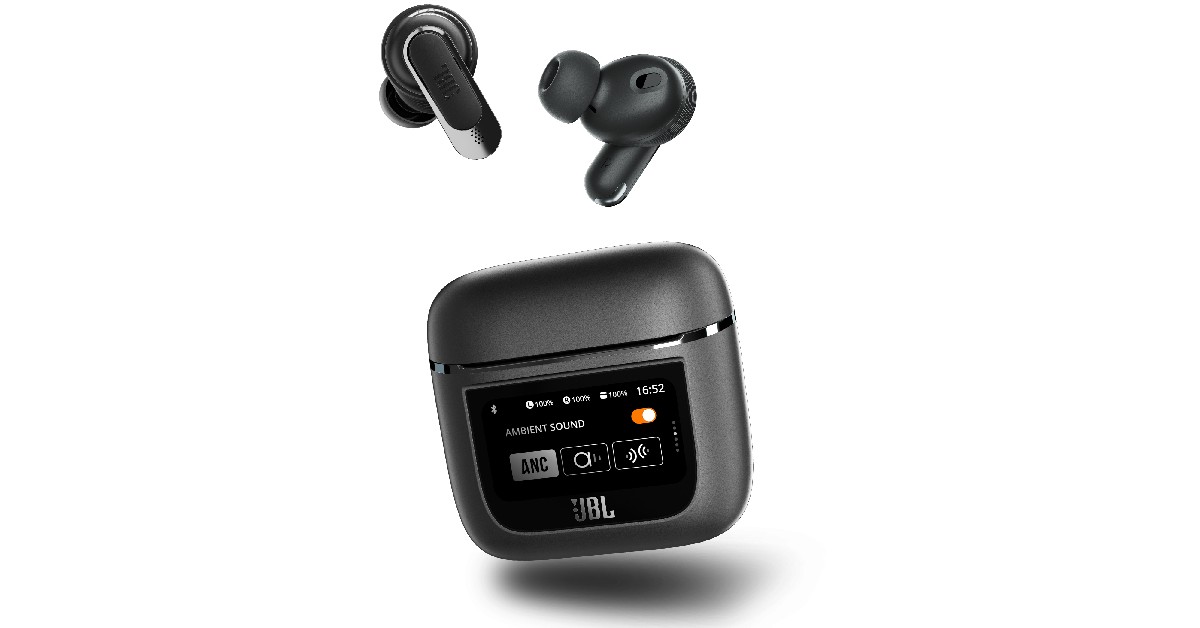
Among all the TWS showcased at CES 2023, the JBL Tour Pro 2 stood out with its touchscreen ‘smart’ case. The 1.4-inch LED touchscreen display on the charging case lets you control essential functions like ANC modes, equaliser, and volume while also showing the battery level. You can also get certain notifications from your phone, although you won’t be able to expand the details. 

Lenovo Yoga Book 9i

Lenovo Yoga Book 9i. ces 2023 highlights

Lenovo’s new Yoga Book 9i runs on the Intel Evo platform and comes with a dual-screen display for greater productivity. The Yoga Book also offers multi-mode functionality and superior entertainment options, featuring innovative software designed in collaboration with Microsoft. The two 13.3-inch 2.8K OLED PureSight displays offer 100% DCI-P3 colour accuracy and Dolby Vision HDR.

Read More: Qualcomm announces ‘Snapdragon Satellite’ at CES 2023, will offer Emergency messaging for Android

Conclusion 

These were some of the major highlights, announcements, and interesting gadgets from CES 2023. Make sure you read our daily round-up articles for all the important releases that came out of the exhibit. What were your favourite tech products and trends at CES this year? Let us know in the comments!

For the latest gadget and tech news, and gadget reviews, follow us on Twitter, Facebook and Instagram. For newest tech & gadget videos subscribe to our YouTube Channel. You can also stay up to date using the Gadget Bridge Android App. You can find the latest car and bike news here.

Demystified – What does each Symbol and Icon Mean on Instagram?

Instagram is notorious for frequently changing the icons and their layout on the app. You may remember the DM icon being changed to that of Facebook Messenger when the two platforms merged together. Recently, Instagram changed where you can access the sharing options from. In this article, we explain what each symbol and icon means on Instagram.

Read Also: OnePlus 11 5G and the OnePlus Buds Pro 2 launched: Pricing details

Home Screen Icons

Profile, Plus, and Messenger icons

Profile, Plus, and Messenger icons

The icon with your profile picture and plus symbol at the top left part of the screen can be used to add an Instagram Story or view a previously uploaded story that hasn’t expired yet. Stories vanish 24 hours after you upload them. This icon is followed by the stories uploaded by the people you follow. Tapping on your followers’ profile icons will display the stories they have uploaded.

The Plus icon at the top right corner of the screen can be used to create a new Instagram post, Story, Reel, or start a Livestream. The Messenger icon next to the plus icon lets you access your direct messages. You can also merge your Facebook Messenger with Instagram DMs. If the icon looks familiar it’s because it is the same one as Facebook Messenger.

Home, Magnifying Glass, Play, Heart, and Profile Picture icons

Home, Magnifying Glass, Play, Heart, and Profile Picture icons

These icons can be found at the bottom of the home screen. Tapping the home icon takes you back to your home feed from any page on the app. The magnifying glass icon lets you search anything on the app, from other accounts to videos, hashtags, places, and more. This is where you will also find the ‘Explore’ feed where you can view the suggested content based on your likes. 

The play icon takes you to Instagram Reels. This is where you can view Reels posted by your followers and other creators on the platform. Following the Reels icon is the heart icon. Tapping the heart icon opens up the activity page where you can see all the latest notifications. The profile picture icon takes you to your Instagram profile. If there are multiple profiles linked to your account, double-tap this icon to switch between them. 

Post Symbols and Icons

Heart, Chat Bubble, and Paper Plane icons

Heart, Chat Bubble, and Paper Plane icons

Tap the heart icon right below an Instagram post if you want to like it. Alternatively, you can also double-tap a post to like it. Pressing the chat bubble opens up the comments on the post. You post a new comment in the following window or like the previously posted comments by tapping the heart icon next to them. The paper plane icon can be used to share the post with your friends through DMs or your followers by adding it to your Story.

Ribbon, Ellipses, and Profile icons

The ribbon icon can be used to bookmark the post you’re viewing. You can access all the bookmarked posts from your profile. The little profile icon at the bottom left corner of the post shows all the people tagged in the post. The ellipses display further options like unfollowing, muting, or reporting the Original Poster.

Messaging Icons and Symbols

Arrow, Video Camera, and Plus icons

Arrow, Video Camera, and Plus icons

The arrow next to your Instagram username displays the other Instagram profiles linked to your account. You can easily switch between profiles by tapping on the arrow. The video camera icon can be used to start a video or audio with your Instagram contacts. Tap the plus icon to start a new end-to-end encrypted conversation with your Instagram followers. 

Camera and Profile icon

Camera and Profile icon Demystified - What does each Symbol and Icon mean on Instagram

The profile icon with the plus symbol can be used to leave a note attached to your Instagram profile. This note will show up in your friends’ DM window. The camera icon next to a DM thread can be used to send an image or video to the recipient(s) in that conversation. 

Profile icons

Arrow, Plus, and Hamburger icons

Arrow, Plus, and Hamburger icons. Demystified - What does each Symbol and Icon mean on Instagram

As mentioned earlier, the arrow icon next to your Instagram username can be used to switch between multiple profiles. The Plus icon can be used to create a new Instagram Post, Reel, Story, Story Highlight, Live, or Guide. The Hamburger icon opens up the menu containing Archives, Bookmarks, Settings, Activity history, and more.

Suggested followers, Grid, Highlights, and Tagged Posts icons

Suggested followers, Grid, Highlights, and Tagged Posts icons

Tapping the small profile icon next to the ‘Edit profile’ button reveals all the suggested profiles and accounts. The plus icon titled ‘New’ can be used to create a new Instagram Highlight. The grid icon gives you a look at your posts while the profile icon next to it displays all the posts you have been tagged in.

Read Also: BMW unveils the i Vision Dee concept at CES 2023

Conclusion 

These are all the symbols and icons you will find on Instagram. Sometimes, an icon may appear at different places, but it will carry out the same function. For example, the paper place icon appears below posts, stories, and Reels, but carries out the same function of sharing the content via DMs. If you found this article helpful, let us know in the comments!

For the latest gadget and tech news, and gadget reviews, follow us on Twitter, Facebook and Instagram. For newest tech & gadget videos subscribe to our YouTube Channel. You can also stay up to date using the Gadget Bridge Android App. You can find the latest car and bike news here.
Your backup won’t need to be updated if you use WhatsApp’s new capability to switch to a different device: Report

WhatsApp is currently working on a chat transfer feature, for a future update of the app. According to reports, WhatsApp is developing a new feature dubbed “Chat Transfer” that will let users transfer data from an Android device to another, therefore, making it simpler for users to swap devices without the need for updating the backup on the cloud.

According to a report by WAbetaInfo, WhatsApp is working on the process to move the chat history to a new Android device, for a future update of the app! The new function will be added in a later update as the feature is still being developed.

Your backup won't need to be updated if you use WhatsApp's new capability to switch to a different device: Report
Image Courtesy: WABetaInfo

The option will make it simple to migrate their chat history from the phone to another Android device in the future and may eliminate the need for users to back up their chat history on Google Drive before switching to a new device, according to screenshots shared by WAbetaInfo. The option will be visible within WhatsApp Settings > Chats. In the future, they could just move all of their discussions to their new phone using the new chat transfer feature.

Although you can easily move your conversation history to a new phone with the help of this function, it’s still advisable to routinely backup your talks to Google Drive so that you can still access them in case your phone is damaged. However, we believe that the conversation transfer option could be especially helpful for swiftly switching to a new Android phone without the need to update the cloud backup.

The chat transfer feature for Android smartphones is still in development, but WABetaInfo freshly reported that WhatsApp is actively working to further expand and improve upon it as a result of learning more about its capabilities from the WhatsApp beta for Android 2.23.1.26 update.

Your backup won't need to be updated if you use WhatsApp's new capability to switch to a different device: Report
Image Courtesy: WaBetaInfo

In another screenshot shared in the report, the method is simple and starts with downloading WhatsApp on the new Android handset. In order to start the chat history migration to the new Android device, we should open WhatsApp on the new phone and scan the QR code that is provided. This feature, which streamlines the procedure and enables a quicker migration, will, in our opinion, offer a practical and effective alternative for anyone looking to transfer their chat history to a new Android phone without first backing up their chats and material on Google Drive.

As you are aware a feature that allows users to finally transfer to a different phone without losing their chat history was made available by WhatsApp in July: the ability to convert talks from Android to iOS using the Move to iOS app.

For the latest gadget and tech news, and gadget reviews, follow us on TwitterFacebook and Instagram. For newest tech & gadget videos subscribe to our YouTube Channel. You can also stay up to date using the Gadget Bridge Android App. You can find the latest car and bike news here.

Garena Free Fire Redeem Codes Today 9 January 2023: Here is how to claim them

Garena Free Fire is a battle royale game with regular awards and tournaments to keep players interested. If you play Garena Free Fire, you should be aware of the redeem codes that are released on a daily basis. However, because the battle royale game is banned in India, players from other countries can use the Free Fire Redeem codes daily. If you’re unfamiliar with the Garena Free Fire redeem codes or don’t know how to get them, we’ve put together a step-by-step guide to help you redeem them. Check out Garena Free Fire Redeem Codes for 9 January 2023.

The Free Fire redeem codes are a great way to get free stuff. These are 12-digit codes that contain alphabets and numbers, as well as an expiration date and time. Because the Garena FF redeem codes cannot be used more than once, you should hurry to the redemption page to claim your free reward before someone else does. To get a free reward, all you have to do is go to reward.ff.garena.com/en, which is the official redemption page. Also, keep an eye on this space for daily updates on Garena Free Fire redemption codes and rewards.

Garena Free Fire Redeem Codes Today 9 January 2023

  • FFTC56S4DARTQX
  • F2DCF3V4BRTFO9
  • FI8HXUYGSE4RFI
  • FUYGB789BEHND
  • Q123RTGHNMUIY8
  • FKGMFCXSAQ34O
  • FP0FDETDRHTUIG
  • FDIS8U7YH4B3E4
  • FRATFCGQRTDRE
  • FIRWUF3NMHYTN
  • FSDQXFG2VGUU7
  • FHBESIHEJ6YHFT
  • FF2GVEFBIIJJAIQ
  • FF2ER3RFUHVTYH

How to Get Free Fire Redeem Codes for Garena on 9 January 2023?

  • Visit the Garena Free Fire game’s official website at reward.ff.garena.com.
  • Use your Facebook, Google, VK, Apple ID, Huawei ID, or Twitter account to log in.
  • You’ll be taken to a valid redemption code (s)
  • Copy and paste the 12-digit redemption code into the text box.
  • On the screen, a dialogue box will appear.
  • ‘Ok’ should be selected.

For the latest gadget and tech news, and gadget reviews, follow us on TwitterFacebook and Instagram. For newest tech & gadget videos subscribe to our YouTube Channel. You can also stay up to date using the Gadget Bridge Android App. You can find the latest car and bike news here.

Google Pixel Buds Pro Review: Highest Quality TWS

A number of flagship devices were introduced by Google at its Made by Google event. We got to see a few brand-new Pixel gadgets as well as the Google Pixel Buds Pro wireless earbuds. We shall discuss this device in-depth in this comprehensive review. The overall listening experience is improved by the 11 mm speaker drivers and Volume EQ that are included. There is a transparency mode in addition to the noise cancellation functions. So read the entire Pixel Buds Pro review to learn about even more incredible and cutting-edge features that come with the flagship TWS.

Google Pixel Buds Pro Review: Design

So let’s begin with the physical features, such as build quality and appearance. The buds and a few additional tips are included in the box. They arrive in a cute little case with two tips, one of which is already fitted. With the other tips, we didn’t actually need to use them because the default one was fine for us. The build quality is not an issue because the casing is fairly comparable to the ordinary Pixel Buds and is constructed of decent-grade plastic yet again. These are fairly small and will fit in your pocket with ease.

Google Pixel Buds Pro Review: Design

We appreciated the fact that the case also has a physical pairing button and that, fortunately, can link with two devices at once. The fact that many higher-quality TWS don’t offer this feature, makes these an exception.

Even though the case is attractive and has a design like a pebble, it locks in well. The Buds Pro form differs somewhat from that of conventional Pixel Buds. These are larger and have an in-ear detection sensor, so when you take them out, they automatically recognise you have removed them and the music pauses.

Also Read: Pixel 7 Pro Review: Why you should get the phone

The construction quality is also excellent. These are essentially touch-capacitive buttons; in fact, you can control a whole bunch of features with them, which we’ll be talking about later. The Buds Pro are a little bit bigger, which makes them less comfortable when worn for longer durations. These are comfortable to wear for 40 to 45 minutes, after which we had to adjust them because they continued to apply pressure on our ears.

Google Pixel Buds Pro Review: Design

You may be aware that we always receive extra ear tips with our headphones, but Google has now developed a feature for the Pixel buds that allows you to determine which one suits you the best and offers the finest noise cancellation. Therefore, if you swipe down on the notification panel, click and hold on Bluetooth, and then see your Pixel Buds pro, you can verify the ear tip seal in the settings. 


review of Google Pixel Buds Pro

review of Google Pixel Buds Pro

Naturally, you will put in your earbuds, and when you tap Start, a test song will begin to play. After the test, it will inform you whether you need to change your ear tips, or whether the fit is perfect and your noise cancellation will work great. ANC can be activated on your phone or by tapping and holding your the Buds Pro. The Transparency mode uses the microphone in your earbuds to take up all the various sounds around you so you can still hear them while wearing your headphones. This mode can also be used to relieve any pressure that has built in your ears, which is pretty darn cool.

Google Pixel Buds Pro Review: Performance

In this case, while describing the Bluetooth range, we would say that it is respectable but not exceptional. When you are in a room, everything works perfectly. When we moved to another room, everything worked again. But when we got to the balcony (2 rooms away), which is almost outside the range of the buds, everything stopped working. The Bluetooth range is therefore adequate, albeit currently among the finest we have observed.

We watched some Netflix shows, as well as Big Boss on Voot and YouTube videos, all without experiencing any lag. But there was a minor lag when it came to games.

The Pixel Buds Pro was put to use with a variety of phones, including the Pixel 7 Pro. Any Android phone can download the Pixel Buds software from the Google Play Store, but the Pixel phone already has it pre-installed. The user interface is quite straightforward; all you have to do is open it to learn how long each earbuds and case’s battery will last.

You also get some basic touch controls, which we really liked because they let you play, pause, and do other simple things. However, one feature we really liked on these earbuds—and many premium TWS have—is that you can also control the volume with them. Therefore, we rarely had to use our smartphone when wearing these earbuds because you can simply boost and reduce the volume with just a swipe, and it works incredibly well. 

Also Read: Google Pixel 7 review: Is this an all-rounder phone?

Additionally, the left bud can be customised. For example, you can set active noise cancellation or switch to transparency mode. You can personalise it in the app to assist you with your needs. In terms of audio, basic features in the app. It does have a volume equaliser, which marginally improved the equalisation.

The Pixel Buds Pro have active noise cancellation (ANC), which is a new and significant feature compared to the normal models. The ANC is good, and we tried it extensively; it provides rather effective noise cancellation so that music listening is more immersive, but it does not totally shut out outside traffic or other extreme external noises.

For calls, the microphone quality is once more excellent. The opposite side made no claims about their inability to hear us or similar. In that regard, it is decent and it does help to reduce background noise a little bit.

review of Google Pixel Buds Pro

Okay, so connecting your Pixel Buds Pro to your phone, another phone, or even your laptop at the same time is surprisingly simple. You’ll get a pop-up message to pair them as soon as you open the lid, but the cool thing is that if you open the lid and turn them around, then click and hold on the back button for a few seconds until you see the front light flashing, you can actually connect them to another device. Simply ensure that multi-point is enabled in settings, and then you can connect your buds to several devices.

Google Pixel Buds Pro performance

What if you misplace one of your Pixel Buds Pro? So, if you ever lose your device, here are two ways to locate it. The first method is to go into app settings and look for the ‘Find Device’ option if you have lost them anywhere close and they are still connected to your phone. If you tap on that, you’ll be given the option of ringing the left, right, or both buds. As you search for them, the volume steadily increases.

But what if they aren’t connected to your phone anymore? Then the second way is to open the Google Find My Device app, select your Buds, and then view the precise time and location of their most recent connection to your phone. So that’s how your phone locates your Pixel Buds Pro.

Google Pixel Buds Pro performance

Regarding the sound quality, we would describe it as wide and engulfing, which is excellent but could have been just a tiny bit better. These clearly increase the bass by default, even when the volume eq is turned off. And since the majority of you will undoubtedly enjoy that setting, we have to say the bass is excellent. Moving on to the vocals, these are also very well-produced and crystal-clear. Now coming to the  treble tones, we thought that the default sound signature, given the price range, was a little underwhelming.

Because of the EQ boosting, the higher tones now sound a little bit better and have the brilliance that was before lacking, but it also amplifies the bass, which is already on the high side. So, for some it maybe a catch-22 situation.

Google Pixel Buds Pro performance

We are quite happy with these in terms of battery life. The Google Pixel Buds Pro boasts a 7-hour battery life when using ANC, which is an improvement over the typical 5-hour lifespan of any premium TWS. It can continue for almost 11 hours if you disable ANC. 

Verdict

As a result, for everyday use—including when watching movies on smartphones—we had no problems. The case contains a wireless charging connector in addition to two USB charging ports. Besides good sound, the finest feature of the TWS is that you can easily adjust the volume with a swipe. We believe that every premium TWS should have this feature because it genuinely performed so well. It is excellent in terms of customization as well. In our honest view, the ANC is good but not among the finest.

While claiming that the battery life is undoubtedly among the greatest in its category. The majority of you will actually appreciate that good bass vibe while listening to music. Additionally, even at this price point, two devices being connected is uncommon.

Google Pixel Buds Pro pros

  • Comfortable
  • Long Battery life
  • Good Sound
  • Can adjust volume
  • Allows customization
  • Good bass

Google Pixel Buds Pro cons 

  • lacking proper equalizer adjustments
  • non-customization of ANC
  • works only with Android devices

For the latest gadget and tech news, and gadget reviews, follow us on TwitterFacebook and Instagram. For newest tech & gadget videos subscribe to our YouTube Channel. You can also stay up to date using the Gadget Bridge Android App. You can find the latest car and bike news here.

Amazon Quiz Answers Today 9 January 2023: Participate to win Rs 500

9 January 2023 Amazon Quiz has gone live. Customers from different parts of the country are participating in the daily quiz. The quiz begins from 12 AM to 11:59 PM. Those participating in the quiz can win exciting prizes by answering all the questions correctly. Today participants have a chance to win a Rs 500 Amazon Pay Balance.

Amazon quiz brings an opportunity for its customers to win Amazon Pay Balance ranging from Rs 1,000 to Rs 50,000. The Quiz can be played from 12 AM to 11:59 PM. The e-commerce platform brings a fresh quiz on a daily basis which consists of five questions related to general knowledge and current affairs. The participants need to answer all the questions correctly and their names will be selected for a lucky draw. The winner will be announced at the end of the month.

One wrong answer could eliminate you from the quiz. If you manage to answer all the questions correctly you can stand a chance to win a Rs 500 Amazon Pay Balance today. Only app users are eligible to participate in the Quiz. Check Out 9 January 2023 Amazon Quiz Answers.

Amazon Quiz Today Prize – Rs 500 Amazon Pay Balance

Quiz Date – 9 January 2023

Daily Timing – 12 AM to 11:59 PM

Winner Announcement – Today 12 PM

Amazon Quiz Answers Today 9 January 2023

Question 1: Basketball star Brittney Griner was freed in a prisoner exchange with Russia for which convicted arms dealer?

Answer: Viktor Bout

Question 2: The international airport serving Lucknow is named after which former Prime Minister?

Answer: Chaudhary Charan Singh

Question 3: In the movie ‘Ponniyin Selvan- 1’ what is the name of the character played by Aishwarya Rai?

Answer: Nandini

Question 4: In the movie ‘Black Adam’ who makes a cameo, playing this character?

Answer: Henry Cavill

Question 5: This breed of cat originated in which European country?

Answer: Great Britain

How To Play Amazon Quiz

Only app users are eligible to play the Amazon quiz every morning from 12 AM to 11:59 PM. The quiz is not available on the desktop. For those who are unaware of how to play the Amazon quiz below are the steps, you can follow to take the quiz.

  • Firstly download the Amazon app from Google Play Store or App Store
  • Now fill in the required information through the Sign Up option.
  • You need to log in to the Amazon app and scroll down on the home screen to find the Amazon Quiz banner.
  • Tap on the Amazon Quiz banner and tap on the Start button to start the Quiz.
  • Now you will get 5 questions and you need to answer them correctly. One wrong answer will eliminate you from the Quiz.
  • After answering all the questions correctly you are now eligible for a Lucky Draw.
  • The winner’s name will be announced today at 12 PM.

For the latest gadget and tech news, and gadget reviews, follow us on TwitterFacebook and Instagram. For newest tech & gadget videos subscribe to our YouTube Channel. You can also stay up to date using the Gadget Bridge Android App. You can find the latest car and bike news here.

OnePlus 11 5G and the OnePlus Buds Pro 2 launched: Pricing details

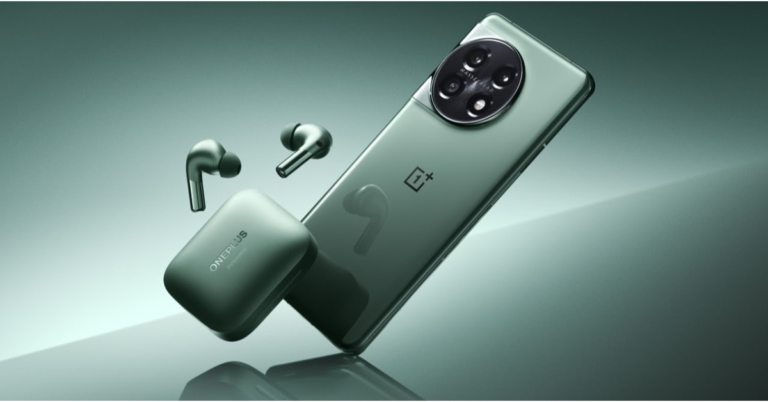
 The OnePlus 11 5G and the OnePlus Buds Pro 2 were both released in China. The smartphone features a 2K resolution 120Hz LTPO 3.0 AMOLED screen. It also comes with a 100W SuperVOOC rapid charging and is powered by the Qualcomm Snapdragon 8 Gen 2 SoC. Whereas the TWS includes MelodyBoost Dual Drivers, which Dynaudio co-developed. An 11mm woofer and 6mm tweeter are included in each earphone.

The starting pricing for the 12GB RAM with 256GB storage version of the OnePlus 11 5G is CNY 3,999, which is around Rs 48,000. The handset is also offered in a 16GB with 256GB option for CNY 4,399, which is equivalent to Rs 53,000. The cost of the 16GB with 512GB variant is CNY 4,899, or about Rs 59,000. It is presently available for pre-order and comes in the colours Endless Black and Instant Blue. In China, sales are expected to begin on January 9.

OnePlus Buds Pro 2 are available for CNY 899, or approximately Rs 11,000. The OnePlus TWS earbuds are presently up for pre-order in China and will be made available for purchase starting on January 9 at 10 AM local time.

Note that both of the devices will make their Indian premiere on February 7 at the OnePlus Cloud 11 Event.

OnePlus 11 5G specifications

The Samsung LTPO 3.0 AMOLED display on the OnePlus 11 5G is 6.7 inches and has a resolution of 1,440×3,216 pixels. With an adaptive refresh rate of up to 120Hz, the screen features a 20.1:9 aspect ratio. With 525 ppi and a maximum brightness of 1300 nits, the panel supports always-on displays. A Corning Gorilla Glass 7 is used as protection. Dolby Vision and HDR formats are supported by the display. In addition to ColorOS 13.0, the device runs Android 13. The new phone features the octa-core 4nm Snapdragon 8 Gen 2 SoC, 12GB and 16GB of LPDDR5x RAM, and an Adreno 740 GPU. The OnePlus 11 5G offers 512GB of UFS4.0 storage, at a maximum.

Also Read: CES 2023: Samsung unveils new range of Neo QLED, MICRO LED, and Samsung OLED

The OnePlus 11 5G comes with a 5,000mAh dual-cell battery. Fast 100W SuperVOOC charging is supported. There is also a fingerprint sensor built into the display. It has dual speakers and Dolby Atmos compatibility.

OnePlus 11 5G specifications

A 50-megapixel Sony IMX890 main sensor with optical image stabilisation (OIS) is one of three rear cameras on the OnePlus 11 5G. A 32-megapixel portrait sensor and a 48-megapixel Sony IMX58 extreme wide-angle sensor are also included in the camera unit. The front of the device has a 16-megapixel sensor for selfies and video calls.

5G, 4G LTE, Wi-Fi 6, Bluetooth v5.3, Beidou, Glonass, Galileo, GPS, NFC, and other connectivity options are also available. There are a number of sensors on board, including a proximity sensor, gyroscope, g-sensor, back colour temperature sensor, and Qualcomm sensor core.

OnePlus Buds Pro 2 specifications

The OnePlus Buds Pro 2 has an 11mm woofer and a 6mm tweeter. The Bluetooth v5.3 connectivity of the OnePlus Buds Pro 2 includes compatibility with the audio codecs LHDC, AAC, SBC, and LC3. Three microphones with AI noise-reduction technology are present on both earphones. Touch controls are also available on the OnePlus Buds Pro 2 for controlling music playback and taking calls. These earbuds have an IP55 rating for water and dust resistance.

According to claims, the ANC feature can block up to 48dB of ambient noise. For a realistic virtual surround sound experience, they also support spatial audio.

OnePlus Buds Pro 2 specifications

Their charging case has a 520mAh battery capacity, and it is said that it takes an hour to fully recharge. Additionally, they assist Qi wireless charging. The OnePlus Buds Pro 2 provides up to 39 hours of worry-free music playback with several additional charges in the case. The Buds Pro 2 series, on the other hand, guarantees that your Bluetooth streaming experience will be fast and smooth thanks to dual connection with Bluetooth 5.3 LE audio.

For the latest gadget and tech news, and gadget reviews, follow us on TwitterFacebook and Instagram. For newest tech & gadget videos subscribe to our YouTube Channel. You can also stay up to date using the Gadget Bridge Android App. You can find the latest car and bike news here.

BMW unveils the i Vision Dee concept at CES 2023

0

CES has been buzzing with EV announcements this year. While Sony and Honda announced their collaborative EV project ‘Afeela’, BMW unveiled its new concept EV ‘i Vision Dee’ which packs a lot of groundbreaking features. ‘Dee’ stands for ‘Digital emotional experience’, the digital companion within the EV that offers way more than other voice assistants.

Read Also: ASUS introduced new lineup of ROG Flow and Zephyrus laptops at CES 2023

BMW i Vision Dee: Changing colours, hyper-real tech, and more

The BMW i Vision Dee takes customisation to a whole new level with its 240 e-Ink panels. These panels are capable of changing the colour of the body surface of the EV within seconds. Not only that, you can program each e-Ink panel individually to display different patterns on the exterior body surface. This tech was featured in the BMW iX Flow at CES 2022 but has been fully utilised in the i Vision Dee. 

BMW i Vision DEE

The i Vision Dee features the classic BMW three-box sedan design. It also gets signature BMW elements like the kidney grille, twin circular headlights and the Hofmeister kink. These elements have been reimagined to fit a more futuristic vibe. The analogue parts have been replaced by phygital icons. 

Moving on, the most interesting feature of this concept EV is its digital personality, the Dee. This drive assistant can adapt to the driver’s habits, suggest destinations, and provides information, news, calendar entries and more. The BMW Mixed Reality Slider can be used to customise the Head-Up display and display content in five different levels – analogue, driving-related information, communication system content, augmented reality projection, and VR. This feature will be used in NEUE KLASSE models from 2025 onwards.

BMW i Vision Dee

As the name suggests, the Dee is also capable of displaying emotional intelligence, as it uses cameras and sensors to identify the rider as they approach the car. Once the identity of the rider is confirmed, Dee can automatically open up the doors and display a welcome graphic on the shut-off kidney grille at the front. The grille is also capable of displaying up to nine different facial expressions – from joy to approval to amazement. 

In his keynote address at CES 2023, Oliver Zipse, Chairman of the Board of Management of BMW AG, mentioned, “With the BMW i Vision Dee, we are showcasing what is possible when hardware and software merge. In this way, we are able to exploit the full potential of digitalisation to transform the car into an intelligent companion. That is the future for automotive manufacturers – and, also, for BMW: the fusion of the virtual experience with genuine driving pleasure.”

This story was first published on MotorBridge.com.

For the latest gadget and tech news, and gadget reviews, follow us on Twitter, Facebook and Instagram. For newest tech & gadget videos subscribe to our YouTube Channel. You can also stay up to date using the Gadget Bridge Android App. You can find the latest car and bike news here.
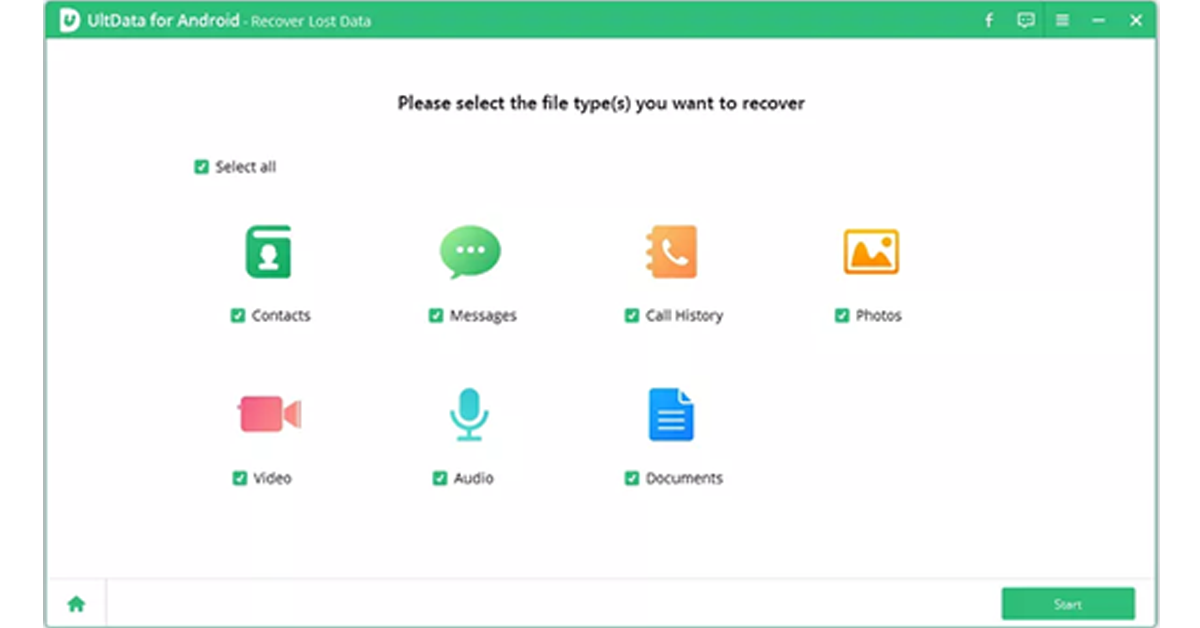
CES 2023: Samsung unveils new range of Neo QLED, MICRO LED, and Samsung OLED

At CES 2023, Samsung Electronics presented its new Neo QLED, MICRO LED, and Samsung OLED lineups in addition to lifestyle goods and accessories. Customers now have more control over how and when they use devices thanks to new lifestyle goods and features like The Premiere 8K and Smart EDGE Blending on The Freestyle. The product range for this year emphasises better connectivity and customised consumer experiences with cutting-edge, creative technologies. Quantum MiniLED-lit panels are used in the new Neo QLED models, which are available in 4K and 8K resolutions.

Neo QLED

Customers can choose from a wide range of high-end Neo QLED 8K and 4K televisions from Samsung’s most recent collection. Samsung’s cutting-edge Neural Quantum Processor, which supports the Quantum Mini LED-lit TV with 14-bit processing and AI upscaling, powers Neo QLED picture quality. This processor also enables features like Shape Adaptive Light Control and Real Depth Enhancer Pro for a three-dimensional, lifelike image.

The Samsung 2023 Neo QLEDs provide more than simply a clean image thanks to their high-resolution screen and unique technology, which fuel their new Auto HDR Remastering feature. It makes Standard Dynamic Range (SDR) content brighter and more vibrant for complete immersion by analysing and applying High Dynamic Range (HDR) effects in real-time on a scene-by-scene basis.

CES 2023: Samsung unveils new range of Neo QLED, MICRO LED, and Samsung OLED

Additionally, Zigbee and Thread devices can now be connected and controlled by SmartThings users without the need for a separate SmartThings dongle. The SmartThings Zigbee & Matter Thread One-Chip Module will be integrated directly into Samsung goods starting in 2023. Additionally, SmartThings automatically syncs devices for simpler control of not just Samsung devices but also third-party appliances and IoT device1 for seamless connectivity for the best-connected device experience.

MICRO LED and Samsung OLED

With new models in the 2023 MICRO LED lineup, users will have a wide range of options for unmatched picture quality and screen experience. These models range in size from 50 to 140 inches2. Due to its modular design, MICRO LED can be totally customised to meet a customer’s preferred setup because it is not constrained by shape, ratio, or size. Additionally, it comes without bezels, ensuring that no matter the configuration, there is no break between the screen and the outside world.

Also Read: GIGABYTE announced AORUS 15X, AORUS 17X with 13th Gen Intel Core CPUs and RTX 40 series GPUs at CES 2023

Additionally, Samsung’s 2023 OLED portfolio is now offered in 55, 65, and the brand-new ultra-large 77-inch versions, giving consumers even more viewing options. Quantum Dot technology and Neural Quantum Processors are included in Samsung’s most recent OLED lineup in order to maintain the core benefits of OLED technology while simultaneously addressing its current brightness and colour representation limitations. Quantum Dot technology was created for Samsung’s Neo QLEDs.

A 144Hz refresh rate and all of Samsung’s smart features, including Samsung Gaming Hub, are included in the extended lineup. The best OLED gaming experience is provided by Samsung OLED TVs, which have AMD’s FreeSync Premium Pro certification for the first time on an OLED TV.

Finally, Samsung offers Samsung TV Plus on all of its Smart TV models to increase viewing possibilities. The free ad-supported TV (FAST) and video-on-demand service reach 24 countries and 465 million devices globally across the company’s TV and mobile devices, providing over 1,800 channels worldwide, including over 50 owned & operated channels. There are no downloads, subscriptions, or other devices needed, and it is completely free.

Samsung Gaming Hub

Users can access thousands of their favourite games from partners including Xbox, NVIDIA GeForce NOW, Amazon Luna, and Utomik without downloads, storage restrictions, or consoles thanks to the Samsung Gaming Hub, the new home for gaming on Samsung Smart TVs. Furthermore, it offers the easiest gaming interface, allowing users to start playing as soon as their TVs are turned on.

Upgrades to GameBar 3.0 in 2023 such as MiniMap Sharing and Virtual Aim Point will improve the gaming experience for all types of players. While Virtual Aim Point, created for first-person shooters (FPS), allows players to view more apparent crosshairs in any game so they can make the ideal shot, MiniMap Sharing enables players to see the minimap of their game at-a-glance on any device.

The Odyssey range of Samsung smart monitors and gaming panels, among others, all have the Samsung Gaming Hub. In order to play immersive games with a 55-inch 1000R curved screen and great sound, gamers can tilt their screens vertically or horizontally using Odyssey Ark.

For the latest gadget and tech news, and gadget reviews, follow us on TwitterFacebook and Instagram. For newest tech & gadget videos subscribe to our YouTube Channel. You can also stay up to date using the Gadget Bridge Android App. You can find the latest car and bike news here.

How to Extract the APK File of Any App on Your Android smartphone: Three easy ways

When you download an app from Google Play Store, it gets installed on your smartphone automatically. While this works fine for the most part, it may not be ideal if you want to access the APK file of the app. The APK file allows you to share the app across multiple devices without needing to download it from the Google Play Store. In this article, we bring you the easiest ways to extract the APK file of any app on your Android smartphone.

Read Also: Qualcomm announces ‘Snapdragon Satellite’ at CES 2023, will offer Emergency messaging for Android

Extract the APK directly from Google Play Store

If you want the APK file of an app without installing it on your Android smartphone, simply follow these steps to extract it directly from Google Play Store.

Step 1: Open Google Play Store on your smartphone.
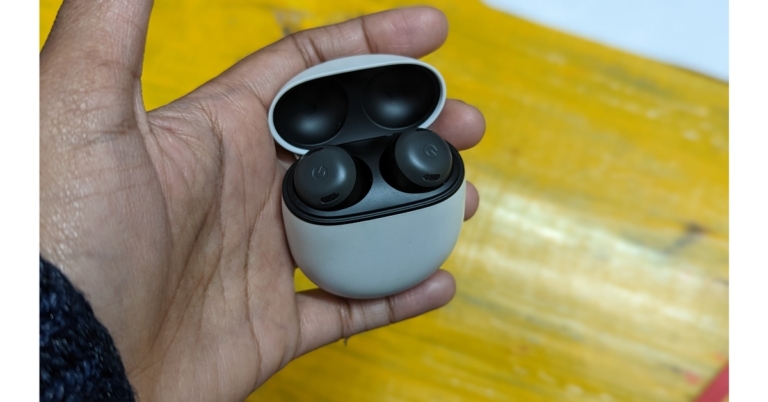
Step 2: Go to the page of the app you want to download.

Step 3: Tap on the ellipses (three dots) at the top right corner of the screen.

Step 4: Select ‘Share’.

Step 4: Select ‘Share’.

Step 5: Select ‘Copy URL’. This will copy the app’s Play Store URL to your phone’s clipboard.

Step 5: Select ‘Copy URL’.

Step 6: Now, open the web browser and go to https://apps.evozi.com/apk-downloader. You can also use https://apkcombo.com/apk-downloader.

Step 7: Paste the app URL you copied from the Play Store to the web tool’s download box.

Step 8: Tap on ‘Generate Download Link’. 

Step 8: Tap on ‘Generate Download Link’.  How to Extract the APK File of Any App on android

Step 9: Tap on ‘Click here to download’. The APK will be saved to your phone’s internal storage.

Extract the APK file of an app installed on your smartphone

You can also use the APK Extractor app to extract the APK file of an app installed on your smartphone. This is the method you should use when you need to extract the APK file of a system app.

Step 1: Install the APK Extractor app on your smartphone from the Google Play Store.

Step 2: Launch the APK Extractor and select your desired app.

Step 2: Launch the APK Extractor and select your desired app. How to Extract the APK File of Any App on android

Step 3: Tap ‘Save’.

Step 3: Tap ‘Save’. How to Extract the APK File of Any App on android

Step 4: Once the APK file is extracted you can share it directly from the app.

Use a third-party marketplace

Since Google Play Store directly installs the app on your smartphone, you can use other third-party marketplaces to download the APK file instead. Websites like APKPure, APKMirror, and F-droid have a vast collection of apps with the necessary security certificates. Here is our list of the 8 best sites for safe Android APK downloads.

Read Also: CES 2023: Media day roundup

Conclusion 

These are the easiest three ways to extract the APK file of any app on your Android smartphone. Each method listed in this article caters to a specific purpose. If you want the APK file of the app version installed on your smartphone, you can use the APK Extractor app. If you do not want to install the app on your smartphone, you can directly extract the APK file from Google Play Store using the web tool mentioned above. If you do not want to use a web tool, you can download the APK file directly from a third-party marketplace.

For the latest gadget and tech news, and gadget reviews, follow us on Twitter, Facebook and Instagram. For newest tech & gadget videos subscribe to our YouTube Channel. You can also stay up to date using the Gadget Bridge Android App. You can find the latest car and bike news here.

CES 2023 Day 1 Highlights: Here are some of the standout products

CES 2023 officially kicked off in Las Vegas yesterday and saw some major product announcements and product reveals on Day 1. These included products that will be launched in the coming months and fascinating prototypes and concepts that will be hitting production in the next few years. Here are the major highlights from Day 1 of CES 2023, featuring some of the highly anticipated products to be launched this year and trends that we will definitely be seeing in future.

Read Also: What is NightCafe AI Image Generator? How to use it properly?

Samsung Odyssey Neo G9

Samsung Odyssey Neo G9

With a massive 57-inch display that spans over four feet in width, the Samsung Odyssey Neo G9 is, without doubt, the final boss on curved gaming monitors. The 240Hz Ultra HD display has a ‘dual 4K’ resolution of 7,620 x 2,160. With VESA Display HDR 1000 specification and quantum micro LED technology, the Odyssey Neo G9 can achieve a peak brightness of up to 1,000 nits which is optimum to pull an outstanding performance in light and dark environments. The monitor is also equipped with Display Port 2.1 which transfers data twice as faster as the standard Display Port 1.4

Citizen CZ Smartwatch

Citizen CZ Smartwatch

The new Citizen CZ Smartwatch goes beyond just tracking your fitness activities and essential health functions. This smart wearable is able to determine patterns of fatigue and alertness, bringing a more personalised experience to the user. The YouQ app’s built-in self-care advisor recommends personalised strategies to the user to build better habits. The smartwatch also offers a custom-designed Alert Monitor test, which is the commercial version of NASA’s Psychomotor Vigilance Task Test (PVT+) that was designed to determine the mental acuity of astronauts.

Acer eKinekt Bike Desk

Acer eKinekt Bike Desk

Need something more than a standing desk to keep you mobile at work? Acer’s eKinekt Bike Desk does exactly what the name implies. Now you can pedal while you work while using the kinetic energy generated by the bike to power the electronic devices on your desk. One hour of constant cycling at 60 rpm on the Bike Desk generates 75 watts of power. Riders can also track their progress on the LCD screen or on the companion smartphone app.

Aska A5 flying car

Aska A5 flying car. ces 2023 day 1 highlights

The world’s first flying car may finally be here. The fully functional Aska A5 prototype is scheduled to go into production by 2026. The fully electric A5 can travel by road as well as up to 250 miles by air on a single charge. The vehicle is compact enough to fit inside existing parking spaces and requires the space of a helipad or vertiport to perform a vertical takeoff. This would require minimal updates to the existing transportation infrastructure. Preorders for the Aska A5 are currently open and the company is planning to roll out deliveries in major cities by 2026.

Snapdragon Satellite

Snapdragon Satellite. ces 2023 day 1 highlights

Qualcomm announced the Snapdragon Satellite at CES 2023, which will rival the satellite SOS services that debuted in the iPhone 14 last year. The two-way capable emergency messaging services will first be made available on premium Android smartphones running on the flagship Snapdragon 8 Gen 2 SoC. These services will later be opened to app developers and OEM manufacturers.

Samsung’s Sliding Display Prototype

Samsung’s Sliding Display Prototype. ces 2023 day 1 highlights

While people are still getting used to foldable displays, Samsung is already setting sights for the future with its new sliding display prototype. This new display from Samsung looks like something straight out of a sci-fi book. Once you unfold the display you can further stretch it out and expand the display size. Samsung is on top of the foldable smartphone category right now, and this new hybrid flex design will surely elevate things to a new level.

BMW i Vision DEE

BMW i Vision DEE. ces 2023 day 1 highlights

CES 2023 has been buzzing with EV announcements, first with Sony and Honda’s joint venture Afeela, and then later with BMW’s reveal of its ‘i Vision Dee’ prototype. The Dee takes customisation to a whole new level with its 240 e-Ink panels capable of changing the colour of the car within seconds. Not only that, you can program each e-Ink panel individually to display different patterns on the exterior body surface. Dee stands for ‘Digitial Emotional Experience’, which the car incorporates in several different aspects. Its facial recognition software is capable of recognising the driver as they approach the car. Once the car recognises the driver, it reacts accordingly, unlocking the door and displaying a welcome graphic on the closed-off grille. 

Read Also: 4 Great Grocery Shopping Apps You Need To Try On Android

Conclusion 

These were all the major highlights from Day 1 of CES 2023. Apart from the products mentioned above, multiple brands came out with their line of gaming laptops and monitors as well. We’ve been keeping a close watch on all the major announcements coming out of CES, keep checking our website for all the important updates!

For the latest gadget and tech news, and gadget reviews, follow us on Twitter, Facebook and Instagram. For newest tech & gadget videos subscribe to our YouTube Channel. You can also stay up to date using the Gadget Bridge Android App. You can find the latest car and bike news here.

GIGABYTE announced AORUS 15X, AORUS 17X with 13th Gen Intel Core CPUs and RTX 40 series GPUs at CES 2023

Under the gaming-focused AORUS brand, GIGABYTE unveiled its newest laptops. The top-of-the-line AORUS 17X and AORUS 15X gaming laptops feature 13th Generation Intel Core processors and NVIDIA GeForce RTX 40 GPUs. Both gaming laptops are built for a maximum TGP of 175W, enabling gamers to play games at incredibly high frame rates. With 240Hz refresh rate at 1440p resolution for both 17-inch and 15-inch models, the new AORUS laptops have significantly improved display performance.

A 15.6-inch display with quad-HD resolution and a refresh rate of 240Hz is available on the GIGABYTE AORUS 15X. On the other hand, the 17.3-inch quad-HD screen and 240Hz refresh rate of the AORUS 17X stand out. The TÜV Rheinland certification, which comprises a series of demanding tests confirming the product’s low blue light and free of flicker, has been obtained by all displays in the AORUS Series. The software team at GIGABYTE also introduces the AI Eyecare feature, which can timely alter screen brightness based on ambient illumination to provide players with the most eye-comforting pictures. Additionally, the displays have a wide colour range that can accurately represent all colours up to 100% of the DCI-P3 cinematic standard. They have an RGB lightbar and a customizable backlit keyboard.

GIGABYTE announced AORUS 15X, AORUS 17X with 13th Gen Intel Core CPUs and RTX 40 series GPUs at CES 2023

Also Read: ASUS introduced new lineup of ROG Flow and Zephyrus laptops at CES 2023

Up to 13th generation Intel Core i9 HX CPUs are included in the GIGABYTE AORUS 15X and AORUS 17X. The 17x has a 16GB GDDR5 GeForce RTX 4090 GPU while 15x has up to 8GB GDDR6 NVIDIA GeForce RTX 4070 GPU.

Up to 175W TGP enables users to play games at ultra-high frame rates. Both laptops include PCIe Gen4x4 SSD storage and up to 64GB DDR5 RAM. With the advent of Advanced Optimus: DDS, laptops may now switch output modes without the need for any further settings tweaks, significantly improving gaming performance. They have two fans, a vapour chamber, and WINDFORCE Infinity cooling technology for heat dissipation.

The Windows 11 OS is preinstalled on the GIGABYTE AORUS 15X and AORUS 17X. All laptop models have a 99Wh large capacity battery, which increases mobility by enabling longer usage. The laptops support a maximum of three monitors and have comprehensive I/O ports. The laptops’ Thunderbolt 4 ports can deliver 100W of power.

For the latest gadget and tech news, and gadget reviews, follow us on TwitterFacebook and Instagram. For newest tech & gadget videos subscribe to our YouTube Channel. You can also stay up to date using the Gadget Bridge Android App. You can find the latest car and bike news here.

7 Easy Methods to Find Out Which Chromebook Model You Own

Once you’ve been using a device for a while, it is not uncommon to forget all the product details and the finer specs. While all smartphones have an ‘About Page’ in the Settings allowing you to easily view all details related to the product, the same may not be the case for other devices. Your Chromebook’s model number is one detail that you should know since it is essential in finding out whether your device will receive any future security updates. It is also a unique product identifier, so you can use it while looking for more details about your Chromebook online. In this article, we bring you the 7 easy methods to find out your Chromebook model number and name.

Read Also: Easy ways to Clear Cache and Cookies in Chrome for Android Mobiles

Why you should know which Chromebook model you own

Your Chromebook’s model name and number may seem like a trivial bit of information, but it is important to be aware of it. If you intend to sell your device in the future, you will need to know the model name/number to list it on a selling platform. This is because it is the most unique identifier for your device. Using the model info, the buyer can get to know other details like the year of production, pending updates and security patches, and more.

If you don’t intend to sell your Chromebook, you’ll still need its model name and number while buying essential components and accessories. For example, if you want to replace your device’s battery, you will need to specify its model info to get an authentic unit that will work on it. The model name and number also come in handy when you run into software-related issues and need to look up possible fixes online. The easiest way to find out if someone else has encountered the issue before is by adding the model name/number of your Chromebook at the end of your query.

Use Chrome’s About Page

Chrome’s About Page contains all the essential information about your device. You can use this page to find the OS version, Chrome version, firmware details, devices connected to your Chromebook, and more. Here’s how you can find your Chromebook’s model number from the About Page.

Step 1: Launch Google Chrome, type chrome://system and hit Enter.

Step 1: Launch Google Chrome, type chrome://system and hit enter.

Step 2: Press Ctrl+F and search for ‘model_name’ to view your Chromebook’s model number.

Find the model name using its code name

Delete Chromebook apps from the launcher

Step 1: Press Ctrl + Search/Launcher key + Esc. If you’re using a Windows keyboard, press the Windows key instead of the Search/Launcher key.

Step 2: Note the code name mentioned at the top of the screen. You can find it next to the ChromeOS version number.

Step 3: Go to the Chromium Developer Library page and search for the code name. The name of the model will be listed next to the code name.

Use the Chromebook Recovery Utility extension

Step 1: Go to the Chrome Store and add the Chromebook Recovery Utility extension to Chrome.

Step 1: Go to the Chrome Store and add the Chromebook Recovery Utility extension to Chrome.

Step 2: Click on the extension once it’s installed and select Get Started.

Step 2: Click on the extension once it's installed and select ‘Get Started’. how to find out chromebook model number

Step 3: In the following window, you will be asked to enter your Chromebook’s model number. Click on the number that follows “For this Chromebook, enter…”.

Step 4: Your Chromebook’s model number will be displayed below the image of a laptop.

Use Cog – System Info Viewer

Step 1: Add the Cog – System Info Viewer extension to Chrome.

Step 1: Add the ‘Cog - System Info Viewer’ extension to Chrome. how to find out chromebook model number

Step 2: Launch the extension on your Chromebook.

Step 3: Note down the CPU name displayed in the system viewer.

Step 3: Note down the CPU name displayed in the system viewer. how to find out chromebook model number

Step 4: Search Google for the CPU name, RAM specs, and your Chromebook manufacturer’s name.

In the results that pop up, find the Chromebook by the manufacturer that matches the specs of your Chromebook. You will be able to find the model number in the details.

Check the retail box

Asus Chromebook C523

If you have preserved the retail box that your Chromebook came in, finding the model number won’t be so hard. Simply scan the box for product details, and you will be able to see the model number easily. You can also check the bill for the Chromebook’s model number. If you made an online purchase, look through your previous orders and go to your Chromebook’s product page. You will find the model number there.

Check the back of the Chromebook

Can’t find the retail box that your Chrome came in? You don’t need to worry. Some Chromebooks come with a product spec sticker at the bottom of the device. Check this sticker for the model number. You will find additional information about the product on this sticker as well. Since the serial number is also alphanumeric, do not confuse it with the model number of the device.

Perform a search on the Internet

If you’ve tried all the methods mentioned above but still can’t figure out the name of your Chromebook model, you will have to resort to the old hit-and-trial method. Go to the manufacturer’s website and browse through their Chromebook section. Look for devices with similar specs to your Chromebook. If you suspect that the manufacturer has discontinued the Chromebook you own, perform a Google search with your device’s specs. You can also ask online tech communities to help you figure out which Chromebook model you own.

Frequently Asked Questions

How do I check my Chromebook’s model name?

To find out your Chromebook’s model name, simply launch Google Chrome and enter chrome://system. On the following page, search for model_name.

Which Chromebook model do I own?

Install the Cog – System Info Viewer extension and run it on Chrome to find out which Chromebook model you own.

I can’t find the retail box of my Chromebook. How do I check its model number?

If you can’t find the retail box of your Chromebook, look under the device for a product spec sticker to find its model number.

How do I find my Chromebook’s model number from its code name?

Press Ctrl + Search/Launcher key + Esc and check the code name next to the ChromeOS version number at the top of the screen. Go to the Chromium Developer Information page and search for the code name. The model number will be mentioned next to it.

How do I update my Chromebook?

Go to Settings>About Chrome OS and click on ‘Check for Updates’. The latest OS version will start downloading automatically. Once it has downloaded, restart your device.

Read Also: CES 2023: Media day roundup

Conclusion

These are the 7 easy methods to find out which Chromebook model you own. Your Chromebook’s model number will help you find all the important details related to your device, like the official product name, year of production, pending security updates, and more. If you found this article helpful, let us know in the comments!

ASUS introduced new lineup of ROG Flow and Zephyrus laptops at CES 2023

ASUS Republic of Gamers (ROG) introduced its new 2023 laptop lineup, which includes updated AMD, Intel, and NVIDIA CPUs and GPUs at CES 2023. The company announced ROG Flow X13, Flow X16, and Flow X13 gaming laptops. Asus ROG Zephyrus M16, Zephyrus G16, Zephyrus G14, and ROG Flow X13 gaming laptops were also introduced. In addition to this the company also launched a new array of gaming laptops and desktops from the ROG Strix SCAR and ROG Strix G series.

Asus ROG Strix SCAR, Strix G specifications and price

The Strix SCAR lineup supports the larger 16-inch and 18-inch 16:10 aspect-ratio screens, the Strix SCAR 16 and 18 have been rebranded. They have been fitted with ROG’s revolutionary QHD, 240Hz Nebula HDR display with Mini LED technology. The Asus ROG Strix SCAR 18 has an 18-inch display with 2,560×1,660 quad-HD+ resolution and a 240Hz refresh rate.

Also Read: Acer announced Swift Go Series with the 13th Gen Intel Core CPUs at CES 2023

The top-of-the-line 13th Gen Intel Core i9 13980HX processor is included in the Strix SCAR 16 and 18. Maximum performance is achieved by using A Nvidia GeForce RTX 4090 GPU, up to 64 GB of DDR5, and up to 2 TB of PCIe 4.0 SSD storage are also included, which has thermal headroom to enable silicon to boost higher and longer than ever. The 13th Gen Intel Core i9 13980HX processor included in the new Strix G16 and Strix G18 is configured with up to an NVIDIA GeForce RTX 4080 Laptop GPU to provide great esports performance.

The Strix G17 and Strix SCAR 17 have both been updated with AMD’s Ryzen Zen 4 processor because it is an absolute beast for gaming and content creation alike with up to 16 full-performance cores.

ROG Zephyrus

The 2023 Zephyrus M16 to operate at 25 watts more than the model from the previous year, giving the Intel Core i9 13900H CPU and NVIDIA GeForce RTX 4090 Laptop GPU in this top gaming PC even more power through the use of a MUX Switch and NVIDIA Advanced Optimus. Additionally, the 2023 Zephyrus M16 is the first 16-inch device to have ROG’s renowned AniMe Matrix LED lighting array, enabling gamers to express their originality and creativity wherever they are.

Also Read: CES 2023: Media day roundup

The M16’s display has also been improved to a 16-inch, QHD Nebula HDR Display with Mini-LED technology with 1100 nits of peak brightness for an HDR image, 1,024 dimming zones and a 240 Hz refresh rate and 100% DCI-P3 coverage.

With an Intel Core i9 13900H CPU and up to an NVIDIA GeForce RTX 4070 Laptop GPU with a MUX Switch and NVIDIA Advanced Optimus, the brand-new Zephyrus G16 joins the portfolio. The G16 also has a 16-inch, QHD, 240 Hz panel with stunning colour and clarity, called the Nebula Display. A brand-new AMD Ryzen Zen 4 CPU and an NVIDIA GeForce RTX 4090 Laptop GPU with a MUX Switch and NVIDIA Advanced Optimus are among the internal components of the Zephyrus G14.

While the G14 debuts ROG’s first 14-inch Nebula HDR display, including 100% coverage of the DCI-P3 colour space, 504 dimming zones, 600 nits of peak brightness, and 600 nits of peak brightness for rich and immersive video.

The Zephyrus Duo 16 consists of a 16-inch Mini LED panel and a 4K touchscreen that glides to meet it automatically when the laptop is unlocked. The Duo 16 is equipped with an AMD Ryzen Zen 4 processor with 16 cores and an NVIDIA GeForce RTX 4090 Laptop GPU with a MUX Switch this year.

ROG FLOW

The 2023 Flow X13 now offers up to an AMD Ryzen 4 processor and up to an NVIDIA GeForce RTX 4070 Laptop GPU. The Flow X13 has up to 32 GB of extremely fast LPDDR5 RAM, which additionally boasts a 50% higher data rate than the model from the previous year. In addition to this, the battery capacity has been increased from 62 to 75 Wh. The machine is easy to unlock and navigate thanks to a bigger touchpad and an FHD IR camera with Windows Hello functionality. With the revolutionary touchscreen QHD, 165 Hz Nebula Display on a 360° hinge of the Flow X13, this amazing convertible tablet is prepared to game anywhere, at any time.

This year, the Flow Z13’s GPU was upgraded to an NVIDIA GeForce RTX 4060 Laptop GPU, which has a TGP of up to 65 W and is a 62% improvement over the Z13’s predecessor. Additionally, the Z13 features a dedicated MUX Switch that supports NVIDIA Advanced Optimus. This is made possible by liquid metal and vapour chamber technology, and the amazing 13-inch QHD 165 Hz refresh rate Nebula Display will truly highlight gamers’ favourite content.

A new Intel Core i9 13900H processor and an NVIDIA GeForce RTX 4070 Laptop GPU with a MUX Switch and NVIDIA Advanced Optimus are now available for the ROG Flow X16. With 1100 nits of peak brightness and a scorching 240 Hz refresh rate, the Nebula HDR Mini LED touchscreen display has been enhanced.

The brand-new XG Mobile has been added to the 2023 Flow family with the NVIDIA GeForce RTX 4090 Laptop GPU and a maximum TGP of 150 W. The compact XG Mobile, in contrast to other external graphics solutions.

For the latest gadget and tech news, and gadget reviews, follow us on TwitterFacebook and Instagram. For newest tech & gadget videos subscribe to our YouTube Channel. You can also stay up to date using the Gadget Bridge Android App. You can find the latest car and bike news here.