Nokia brand licensee HMD Global has officially announced the launch of its latest smartphone in the US. The company has introduced Nokia X100 in its mid-range portfolio. The device includes a Qualcomm Snapdragon 480 chipset. It comes with an FHD+ display with Gorilla Glass 3 protection and quad rear cameras. The device also has a dedicated button to wake up Google Assistant for hands-free operations.
Nokia X100 price and sale details
Nokia X100 has been launched in the US at a price tag of $252 that translates to Rs 18,700. The device will be available in a single 6GB RAM with a 128GB storage option. There is not much information about the newly launched smartphone but it will go on sale from November 9. The smartphone will come in a single Midnight Blue colour option only.
Nokia X100 tech specs and features
In terms of specification, Nokia X100 is powered by the Qualcomm Snapdragon 480 SoC offering 5G capabilities paired with 6GB of RAM and 128GB of internal storage. There is a dedicated MicroSD slot to expand the memory up to 1TB. On the software front, the device offers you a stock Android 11 experience. The Nokia X100 features a 6,67-inch FHD+ display with 1080×2400 pixels of resolution. The screen offers a 20:9 aspect ratio and is protected with Corning Gorilla Glass 3 layering. For taking photos and videos, Nokia X100 features a quad rear camera set up with ZEISS optics that includes a 48MP primary sensor.In addition to this, there is a secondary 5MP ultra-wide-angle lens, a 2MP depth sensor and a 2MP macro lens. Upfront there is a 16MP sensor for taking selfies and video calling.The device draws its power from a 4,470mAH battery which comes with an 18W charger and supports Qualcomm Quick Charge 3.0. For connectivity, there is 5G, Wi-Fi 802.11b/g/n/ac. Bluetooth version 5.1, GPS/AGPS, NFC, USB OTG, 3.5mm headphone jack and a USB Type C port for charging. The sensors on the phone include a side-mounted fingerprint sensor, proximity sensor, ambient light sensor, e-compass, gyroscope, accelerometer and barometer.
For the latest gadget and tech news, and gadget reviews, follow us on Twitter, Facebook and Instagram. For newest tech & gadget videos subscribe to our YouTube Channel. You can also stay up to date using the Gadget Bridge Android App. You can find the latest car and bike news here.
The popular Amazon Quiz is now live on the Amazon app. The 12 November 2021 Amazon Quiz gives a chance to win Rs 30,000 Amazon Pay Balance by answering all the questions correctly. The quiz can be played every day from 12 AM to 11:59. Only app users are eligible to participate in the Quiz as it is not accessible on the web platform.
The Amazon Quiz brings a fresh set of questions for its customers that contains five easy questions. The questionnaire consists of five questions related to general knowledge and current affairs. The participants need to answer all the questions correctly and their names will be selected for a lucky draw. The daily quiz brings an opportunity for the customers to win exciting prizes. They can win Amazon Pay Balance ranging from Rs 1,000 to Rs 50,000. The participants need to answer all the questions correctly and their names will be selected for a lucky draw. The winner will be announced at the end of the month. Check Out 12 November 2021 Amazon Quiz Answers.
12 November 2021 Amazon Quiz Answers
Question 1: Whose world record did Christiano Ronaldo break when he scored his 110th international goal in a match against Ireland recently?
Answer: Ali Daei
Question 2: Which automobile manufacturer unveiled India’s first electric smart scooter
Answer: Ather
Question 3:Which blockchain technology platform was conceived by programmer Vitalik Buterin?
Answer: Ethereum
Question 4: Which artist from this country painted the iconic piece The Scream?
Answer: Edward Munch
Question 5: Which team in this sport is known as The Red Devils?
Xiaomi’s sub-brand Redmi is now tipped to launch a revamped variant of the Redmi Note 11 Series for the global market. The new lineup is likely to be powered by a Snapdragon chipset. What’s more, it would come with a refreshed design compared to the Chinese variant which debuted later last month. To know more continue reading.The Pixel, a Vietnam based publisher came up with a new piece of information about the upcoming Redmi Note 11 Series. However, the devices have already been introduced in China but reports and leaks were already floating on the web that the company would be launching a fresh lineup of the Redmi Note 11 series for the global market.To support this the Vietnamese news website states that the upcoming global series will see major design changes. For the global market, the company is also said to go for the Qualcomm Snapdragon chipset instead of the MediaTek Dimensity ones available on the original smartphones.As reported, the Redmi Note 11 Series is likely to arrive in Vietnam in the Q1 of 2022. Not just this, the lineup was rebranded for global markets including Vietnam. It should be noted that just recently Poco M4 Pro 5G shares similar specs of the Redmi Note 11, meaning the company has introduced the phone with a different name. The device is yet to arrive in the Indian market. But some tipsters suggest that Redmi Note 11 5G is expected to arrive in India as Redmi Note 11T 5G. The device is expected to be codenamed evergo. The codename of the Poco M4 Pro 5G is revealed to have the codename evergreen on the other hand the Redmi Note 10T 5G could be codename evergoin. On the other hand, the remaining devices from the series namely Redmi Note 11 Pro and Redmi Note 11 Pro+ are said to arrive in India with Xiaomi’s branding. The devices are tipped to come as Xiaomi 11i and Xiaomi 11i HyperCharge respectively. Speculations suggest that the Redmi Note 11 lineup may include Qualcomm Snapdragon 778+ and Snapdragon 656 SoCs. Although the company has not yet confirmed it, as of now, you can take it with a pinch of salt till any official statement is made by the company. Poco M4 Pro 5G features a 6.5-inch full HD+ Dot display. The screen comes with a DCI-P3 wide colour gamut with a 90Hz refresh rate panel. It runs on MIUI 12.5 for Poco skinned on top of Android 11 and is powered by an octa-core MediaTek Dimensity 810 SoC paired with up to 6GB of RAM and 128GB of internal memory. There is Dynamic RAM Expansion technology that uses up to 8GB of internal storage for RAM expansion.For the optics, the phone includes a dual rear camera setup that includes a50-megapixel primary sensor and a secondary 8-megapixel ultra-wide-angle lens. For selfies, there is a 16-megapixel front-facing camera. The Poco M4 Pro 5G is fuelled by a 5,000mAh battery that comes with 33W Pro fast charging support.
For the latest gadget and tech news, and gadget reviews, follow us on Twitter, Facebook and Instagram. For newest tech & gadget videos subscribe to our YouTube Channel. You can also stay up to date using the Gadget Bridge Android App. You can find the latest car and bike news here.
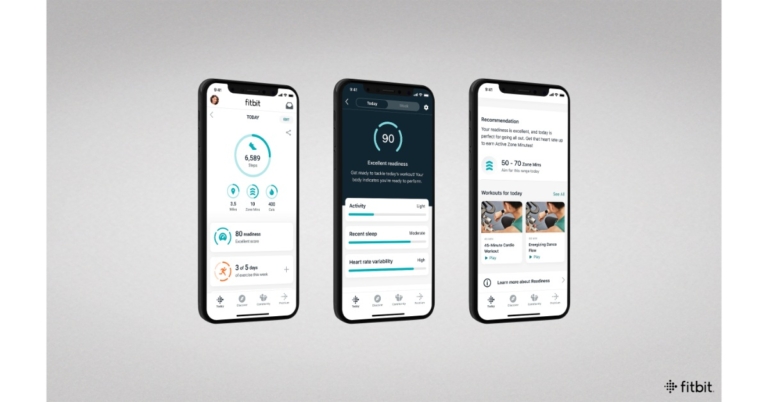
The Google acquired smart wearable company Fitbit has released a new update for its fitness tracker and application. Both the app and the smartwatches are now getting new health elements like the Daily Readiness Score. However, the new metric is now available in the Fitbit app for Premium members with compatible devices. In addition to this, the Fitbit Charge 5 will now be able to access the on-device electrocardiogram (ECG) app. Fitbit users in India living with diabetes will also be able to use a new blood glucose tracking tool in the Fitbit app.The Daily Readiness Score is a Fitbit Premium experience that uses proven research and insights from your Fitbit device- your activity, heart variability( HRV over your entire night’s sleep) and recent sleep patterns to help you decide whether to exercise or prioritise recovery. By wearing the Fitbit device on a daily basis, you will receive a personalised score each morning with details on what influenced it as well recommendations such as a recommended activity level and Premium content to help you make the best decisions for your body.Daily Readiness is now accessible in the Fitbit app’s Today dashboard for premium members who own a Sense, Versa 3, Versa 2, Charge 5, Luxe or Inspire 2 devices. Users of the Fitbit Sense and Versa 3 will also be able to see their scores on their wrists.Whereas Fitbit Charge 5 is the company’s first device to come with an on-device electrocardiogram (ECG) app, allowing you to assess your heart rhythm for atrial fibrillation while wearing it. Simply press your fingers against the stainless steel panels on the device’s sides for 30 seconds to receive a reading and gain deeper insights into your heart health.Apart from this Fitbit users in India who have diabetes will be able to use a new blood glucose tracking tool in the Fitbit app to see how their glucose levels change throughout the day and react to other health metrics such as physical activity, sleep and nutrition, allowing them to better manage their holistic health.
How to record your blood glucose level in the Fitbit app:
To easily measure your blood glucose levels in the Fitbit app. Using app notifications on your Fitbit device, you can receive helpful reminders to log your glucose levels and related symptoms. Examine how your loved glucose levels compared to the personalised target ranges you have established. Track your trends with the Fitbit app easy to read graphs to see how your daily habits, such as activity, sleep and food intake, affect your glucose levels over time. According to the company, the Fitbit Premium members will soon be able to see how frequently their glucose levels fall within their target range over a 20 day period as well as correlations and trends between when they take a reading and their levels. Fitbit Premium members can also see their blood glucose levels in their Wellness Report, which they can share with their healthcare provider.
For the latest gadget and tech news, and gadget reviews, follow us on Twitter, Facebook and Instagram. For newest tech & gadget videos subscribe to our YouTube Channel. You can also stay up to date using the Gadget Bridge Android App. You can find the latest car and bike news here.
Well, where to begin? These days, you rarely come across a flagship smartphone in India that has something very new and exciting to showcase. The Vivo X70 Pro Plus is not only a refreshing change from the run of the mill, but at the end of it, this smartphone left us speechless and as much as we love to talk, the silence was filled with happiness. This is the Vivo X70 Pro Plus review, which jots down every unique feature that makes up the new flagship by the company.
Vivo X70 Pro Plus review: Design and display
Right from the packaging to the smartphone, everything spells premium. You get it in a flat cardboard case that has everything put in well. You get a large power brick, long charging cable and a case too. Bring it out of the box and you will find the gorgeous Vivo X70 Pro Plus, the smartphone demands attention.
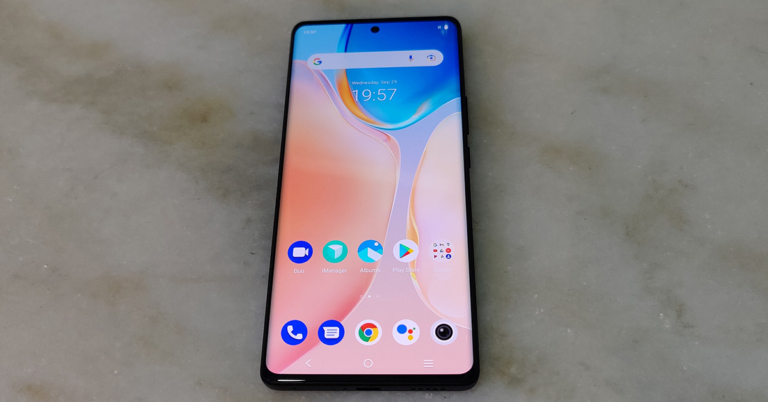
The front of the smartphone is dominated by a large 3D curved 6.78-inch AMOLED touch display that supports a 120Hz refresh rate, HDR 10+, 1,500 nits of peak brightness and 1,440×3,200 pixels resolution. The aspect ratio is set at 20:9 and PPI lies at 517. Put together, the screen of the Vivo X70 Pro Plus is superb. We watched a lot of videos on it, including FHD videos on YouTube and Netflix. The experience was extremely good.
The smartphone not only shows crisp text, but the colours do not wash out under direct sunlight. The gaming experience on it was superb too. We played games like Asphalt 9: Legends and BGMI and they looked extremely refined on the display of Vivo X70 Pro Plus. For day-to-day tasks, videos as well as gaming, the display will not disappoint at all.
Talking a bit more about the aesthetics of the Vivo X70 Pro Plus, it comes with a punch-hole front camera in the top middle which does not hinder the watching experience. The ear speaker is moved to the extreme top along with the rest of the sensors. So, you get a much more refined edge to edge display. The sideband is built of metal and has the volume rocker, power button on the right, while the USB Type-C charging port speaker grill and nano-SIM tray can be found at the bottom with the primary MIC.
Flip it around and you get to see the finest quality back panel with a larger than usual camera bump, which consists of four cameras. Vivo and Zeiss branding can also be found here. Overall, in the built and display department the Vivo X70 Pro Plus gets an A+ on our rankings, we loved every bit of it.
Vivo X70 Pro Plus review: Performance and Cameras
Let’s quickly get the technical specifications of the smartphone out of the way. The Vivo X70 Pro Plus comes with a Qualcomm Snapdragon 888+ 5G chipset that is the fastest in the current gen of CPUs. It is partnered with Adreno 660 for graphics, up to 12 GB of RAM and 512GB of fast UFS 3.1 storage. Together it makes up for a mean tech specs sheet.
For battery, the company has installed a 4,500 mAh one inside, which some might think is less, but on our tests, it lasted for a full day. Besides, it comes with a 55W faster charger in the box, that can recharge it in a jiffy. Just make and sip a cup of coffee and the phone will be recharged by the time you are finished with it. Over that, the Vivo X70 Pro Plus also supports up to 50W wireless charging and 10W reverse charging, in case you want to charge any other wireless device with it.
The operating system on the Vivo X70 Pro Plus is Android 11 that has the FunTouch OS 12 skin loaded on it. There is minimal bloatware on it and Vivo has done an excellent job of optimising it. The system boots quickly, apps open in a blink of an eye and the multitasking experience is best in class. A dedicated app drawer can also be found here. Combined with the 120Hz display the sheer smoothness of scrolling social media feeds and jogging through apps is immensely pleasurable.
Coming to its main attraction, its cameras, the Vivo X70 Pro Plus is by far one of the best we have seen this year. You get best in class Zeiss lenses here, with a gimble attached to it. This means you get super steady shots no matter what the situation is. Also, the primary shooter has a glass lens by Zeiss on it, which is much better than the usual plastic lenses found on most smartphones.
The four capturers on the back of the Vivo X70 Pro Plus consist of a 50MP wide-angle lens with laser AF and OIS. The next one is a 48MP ultrawide angle lens with Gimbal OIS, a 12 MP telephoto lens and an 8MP periscope lens with 5X optical zoom. There is Zeiss T* lens coating on it as well that enables the users to capture even better shots even when facing direct light.
We were able to produce some excellent shots during the day with all its lenses especially the primary wide-angle and ultrawide angle lenses. The colours were perfect and the clarity was very good. The amount of detail present in each shot is immense and you feel happy with your shot. In most cases, you click one shot and you are done. But the buck does not stop here, there is hyper zoom available in the Vivo X70 Pro Plus, which lets the users zoom up to 60X digitally and get exquisite shots even at that level.
We were impressed, but it further shocked us when we switched on the night photography mode. In the Vivo X70 Pro Plus, the maker has installed its proprietary V1 imaging chip that can take shots in almost no light. In almost dark conditions the camera was able to produce excellent colours and hues with crisp edges, better than what the eyes could see. The smartphone carries a remarkable set of cameras that not only make you happy but make you jump with joy!
Users can also capture brilliant videos in 8K at 30FPS, but 4K mode gets you 60FPS. You get life-like colours and stable videos in all the modes, except FHD (1080p) gets you super stabilisation mode. The cameras are great if you love to take videos or vlogging regularly. It can give some of the best DSLRs a run for their money. Yes, the cameras are that good.
Moving to the selfie camera, the Vivo X70 Pro Plus comes with 32MP wide-angle lens with f/2.5 aperture size. The story here is also very lively. We were able to squeeze out excellent selfies during the day, but quality fell a little in low light. So, our suggestion is to use the rear cameras if you are shooting at night. The front camera can also shoot videos in 4K at 60FPS, which as said is great for vloggers. The colours are very close to life and you do not see any ghosting or details lost here.
Verdict
All in all, we enjoyed our experience with this smartphone. There was not a single person we came across who did not enquire about the smartphone we were holding. The Vivo X70 Pro Plus is also all weather-ready with an IP68 rating making it dust and waterproof. Security features such as an under-display fingerprint sensor are also there that works nicely. The smartphone is 5G ready, so it is futureproof too.
WiFi 6, Bluetooth 5.2 and aptX HD are also part of the package. The smartphone is good in the sound department too as you get loud and crunchy sound from its loudspeaker. At Rs 79,990 Vivo has got themselves a winner. If you are in the market looking for a professional picture shooter with good battery life, best in class performance and good looks, your search ends here.
After a long wait PUBG: New State has finally arrived in the market to give a whole new Battle Royal experience to the survivors. Those unaware the new mobile game by Krafton was announced earlier this year and was under testing till now. Today a “stable version” of the original battle royal games has been made available for download for all Android and iOS users. On the very first day, the players are now complaining of bricking issues.The PUBG New State users took to Twitter to report about the bricking problem. Many users who have upgraded to Android 12 have encountered bricking soon after the battle royal game got launched. Not only this, other Android users are facing similar issues. 200 countries including India where the PUBG: New State debuted today devices got bricked. The users complain of the devices not booting up and some players reported that the issue arises when the PUBG New State users are asked to sign in as a guest or with a social media account. Gadget Bridge’s editor in chief during his testing also encounteredheating issues and glitches.
Just a few hours before the launch Krafton delayed the launch of PUBG: New state by two hours. The Battle royal game was earlier scheduled to launch at 9:30 AM but was made available after 11:30 AM IST today.The company via blog post informed the users about its then server issues. It said, “In order to look into some last-minute issues with the cloud servers and ensure that service is stable upon launch, the official launch of PUBG: NEW STATE will be delayed by 2 hours. The official launch will take place on November 11, 15:00 KST. We are working to resolve these issues and apologize to all of our Survivors for this delay. Updates regarding this issue will be posted here, so stay tuned! Thank you for your patience, and see you on the Battlegrounds soon!”
Is it safe to download PUBG: New State?
Addressing the PUBG: New State bricking issue, Krafton said, “We are aware of the login issues some Survivors are currently experiencing in PUBG: NEW STATE. We are working to resolve the issue and apologize for any inconvenience.”As a result, players are advised to avoid installing PUBG: New State on their Android device until the issue is resolved as there is a risk of bricking devices.
For the latest gadget and tech news, and gadget reviews, follow us on Twitter, Facebook and Instagram. For newest tech & gadget videos subscribe to our YouTube Channel. You can also stay up to date using the Gadget Bridge Android App. You can find the latest car and bike news here.
Entering passwords or authentication is an important step for any system or electronic device, especially the device holding your sensitive information. Thus we cannot think about a PC without being password protected. But there are many users who use the computer solely, without any sensitive information and want to avoid the authentication step. Want to remove the login password for Windows 10 and Windows 11? You cannot remove a password from Microsoft account due to security reasons but there are ways you can disable it. This article will cover how to disable the login password screen in Windows 10 and Windows 11.Read Also: How to remove saved passwords from Google Chrome browseStep 1 – Press start then search Run or alternatively press Win+R to open the Run prompt.Step 2 – Input netplwiz in the open panel then press OK.Step 3 – Select the account and uncheck Users must enter a user name and password to use this computer. Then press Apply then OK.Step 4 – Now enter your Username(email or username) and password of the system press ok to confirm.Now, whenever you restart your device you need not enter login details to enter. This is how to remove login password windows 10 or Windows 11.Read Also: How to recharge your prepaid mobile number using Facebook
Bonus solution
By using this solution you will completely remove the sign-in option (though it is not advisable). Before starting this method you will need to sacrifice all the sync and Microsoft features like Store, OneDrive etc. Now if you still want to do it, create a local account (do not set a password at all) on your device. Now remove the primary one, this will make the local account your primary one while removing the Microsoft features.
For the latest gadget and tech news, and gadget reviews, follow us on Twitter, Facebook and Instagram. For newest tech & gadget videos subscribe to our YouTube Channel. You can also stay up to date using the Gadget Bridge Android App. You can find the latest car and bike news here.
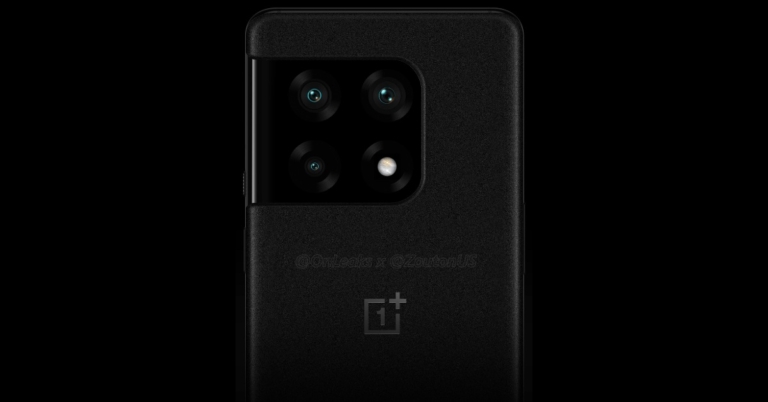
In a major leak, the renders of the upcoming OnePlus 10 Pro’s have been revealed. Not just this there is a lot of news out there. The specifications, availability details and the pricing of the company’s top of the line smartphone have also been leaked along with pricing. OnePlus 10 Series is tipped to debut in the market (namely the US and Canada) in the first half of 2022.
OnePlus 10 Pro design, specifications expected
The alleged leaked renders of the OnePlus 10 Pro suggests that the upcoming smartphone will see major design changes. The phone is said to bear a huge rectangular shaped camera module. The module will be consisting of three sensors alongside an LED flash. The tipster Stebe Hemmerstoffer, also popular as @OnLeaks along with a publisher Zouton, went ahead and spilled the beans by sharing the OnePlus 10 Pro images that are of very high quality.The leaked renders also show the company’s logo that appears beneath the camera module. The phone’s rear panel carries a matte finish with a sleek design-build of metal. The right side of the frame shows an alert slider along with a power button which also hints that the the handset will include an in-display fingerprint sensor. Image Courtesy: Twitter/@OnLeaksIf we talk about the OnePlus 10 Pro specifications reportedly it will be featuring a 6.7-inch LTPO Fluid 2 AMOLED screen. The display will have a resolution of 3,216×1,440 pixels. A pixel density of 526ppiwith a refresh rate of 120Hz and an aspect ratio of 20:9 is slated to be offered by the device.The report further reveals that the OnePlus 10 Pro is expected to have 8GB of RAM and 128GB of storage as the base variant that will go up to 12GB of RAM and 256GB of storage options. It will also come loaded with a huge 5,000mAh battery.
OnePlus 10 Pro price expected
As we mentioned earlier the OnePlus 10 Pro is suggested to arrive in most of the market in the first half of 2022 which is between the beginning of January to June. To recall, the company introduced its existing OnePlus 9 Series in India and globally late in March this year so one can expect that its next-generation may debut in March or in the early weeks of April. As far as the pricing is concerned the OnePlus 10 Pro is likely to stock the shelves for $1,069 which is somewhere around Rs 79,200 pitting it against other devices like iPhone 13 and the upcoming Samsung Galaxy S22 series.
For the latest gadget and tech news, and gadget reviews, follow us on Twitter, Facebook and Instagram. For newest tech & gadget videos subscribe to our YouTube Channel. You can also stay up to date using the Gadget Bridge Android App. You can find the latest car and bike news here.
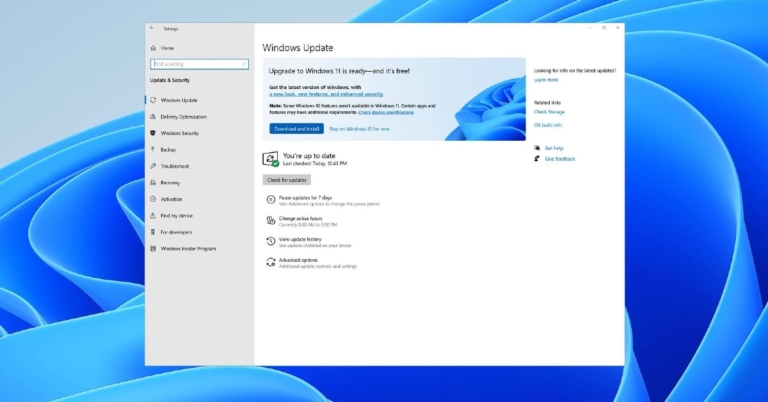
Updates are an important part of any technology to get new features and stay up to date with security. The latest updates also come with bugs and glitch fixes to improve performance. But there might be some users who don’t want these forced updates and update the system according to their time and convenience. Want to stop automatic updates on Windows 10 or Windows 11?There are many times that the new updates bring an even buggier user experience, which especially we can see from the current Windows 11. If you are also annoyed with Windows updates, worry not, here is how you can stop these updates.
Pausing auto-update
Step 1 – Press Start and search Windows update settings.Step 2 – Inside the opened settings head to pause update and select accordingly.This will also save some memory on your system along with the Internet as well.Read Also: How to pause and disable Windows 10 updates?
With Command Prompt
Step 1 – Press start and search run or alternatively press Win+R to open the Run box.Step 2 – Now enter services.msc on the open field and press OK.Step 3 – Search for Windows Update (usually at the end of the list).Step 4 – Right-click the option and head to properties.Step 5 – Here in the Startup type, make it disable.After pressing Ok restart your computer and your PC will no longer update automatically. To turn it back on follow the same route and either make it manually or set it automatic.
Using Registry editor
Before using it always be careful as doing something wrong with the registry will make your OS malfunction.Step 1 – Search for Registry Editor in the Start menu and open it.Step 2 – Copy the path from below in the registry editorHKEY_LOCAL_MACHINE\SOFTWARE\Policies\Microsoft\WindowsStep 3 – Right-click on the Windows folder and select New>Key (name it Windows Update).Step 4 – Inside the Windows Update folder right click and New > DWORD (32-bit) Value. (Name it NoAutoUpdate).Step 5 – Double click the file and set the Value Data to 1.This will permanently disable auto-update on your Windows 10/11 machine.
Use third party application
If doing these steps feel like a hassle to you you can always use a third-party application to solve your issue. The software of our choice for this work is Windows Update Blocker by Sordum. Though we advise you to not install any third-party application that can hinder your system settings. If you still want to use it you can download the application from here.Read Also: Top 5 ways to force uninstall programs in Windows 10
Bonus Tip for Pro users
If you are using Windows 11 or Windows 10 professional versions. There is a way you can easily stop system updates. Search gpedit.msc on the start menu and select. After that head to this path Computer Configuration > Administrative Templates > Windows Components > Windows Update. Here select Configure Automatic Update and select Disable. After clicking Ok your system running the professional version of OS will not automatically update.
For the latest gadget and tech news, and gadget reviews, follow us on Twitter, Facebook and Instagram. For newest tech & gadget videos subscribe to our YouTube Channel. You can also stay up to date using the Gadget Bridge Android App. You can find the latest car and bike news here.
Earlier there was a simple box in which we needed to move an antenna to receive some black and white signals of moving pictures. It was a joyous task trying to retrieve the signal rather than peacefully watching it. But now with the help of technology, things have changed. Want to buy some Best TVs in India?Now the TVs are smart, they have internet connectivity, smart controls to listen to your voice and operate and can run a bundle of OTT platforms. There is a smart TV available for each and everyone in the market. Here are our top picks in the segment of under 25K, under 60K and over 60K.
Top TV under Rs 25,000
Mi TV 4A Horizon Edition
The company recently updated the model of the Mi4A and made a Horizon edition in which the company has reduced the bezels of the TV giving users a full-screen experience. The panel is a full HD 1,920 x 1,080-pixel resolution with a 60 Hz refresh rate. Sound duties are done by 20-W speakers with DTH-HD support. Built-in Wi-Fi, Bluetooth and Google Chrome caste help to give a good wireless experience. The TV runs on a quad-core processor paired to 1GB RAM and 8GB onboard storage to take advantage of its Android TV capabilities. The OS installed is Android 9 out of the box with PatchWall 4 interface. Ports include 3 HDMI and 3 USB ports.Price: Rs 24,999Buy Here
Amazon Basic FireTV edition
If you don’t like the traditional Android OS on the smart TV and the support of Google Chromecast, this TV is a perfect alternative for you. The TV runs on Fire TV OS and the voice assistant uses Alexa. Powering the TV is a 1.5 GHz quad-core CPU with 1 GB ram. The FHD panel provides a 178-degree viewing angle and supports all the OTT platforms. Connectivity options include – 2 HDMI, 2 USB ports, Wi-Fi and Bluetooth. For sound Amazon used a 20W speaker with Dolby Audio and DTS TruSurround support. If you want to change the platform this can be the Best TV you can get in India.Price: Rs 24,999Buy HereRead Also: How to find and use frames on Facebook Stories
Top TV under 60,000
Sony Bravia KD-43X75
If you want a small TV with brilliant features and a good quality display, you cannot go wrong with Sony Bravia KD-43X75. The panel used is a 43-inches display with a resolution of 3,840 x 2,160 pixels (4K UHD) with a 60 Hz refresh rate. Out of the box, the TV has 2GB of ram and an X1 processor. As the TV rubs on Android TV OS, you get thousands of applications to make your life easy. For sound, the company used 20W speakers with Dolby Audio. It also sports 3 HDMI and 3 USB ports.Price: Rs 59,841Buy Here
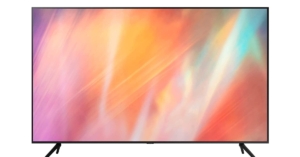
Samsung UA55AUE70AKLXL
If you want a bigger screen panel in the same price range you can try Samsung UA55AUE70AKLXL. The company offers a 55-inches display with a 4K Ultra HD resolution and a 60Hz refresh rate. Powering the TV is Samsung’s own Crystal 4K processor and unlike other TVs, the smart TV runs on Tizen OS which gives you variety to choose from. Even with different OS, there is no compromise with support for applications as it runs all the OTT platforms and manages them properly with 1.5GB onboard RAM. You get Bluetooth 4.2 and Wi-Fi support along with 3 HDMI ports and 2 USB ports. The Sound system used is 20W speakers with Dolby Digital Plus and Q Symphony support.Price: Rs 59,990Buy Here
Top TV Over 60,000
OnePlus Q1 Series
If you want something premium for your home, consider buying the OnePlus Q series TV. The TV seems baseless with its 55-inch UHD 4K QLED panel. Powering the devices is a fast Mali g51 along with 3 GB of RAM to give you a smooth performance. The Smart TV has Oxygen OS over Android Pie with smartphone control features. It is one of the best TVs in India and is featured richUnlike other modern TVs that have a double stand, this has a single Oval stand giving it a unique esthetic. The soundbar on the TV is cool and has a sliding feature that retracts when not in use. The same has an output of 50W with the support of Dolby Atmos. For richer images, the company has the support of gamma colour magic and HDR 10 plus technology.Price: Rs 84,899Buy HereRead Also: Netflix works the best on these 22 TVs: Here’s a look at the list
Samsung The Frame
Call it a photo frame or a TV, the device is perfect for people who want something unique for their home. Hang the TV on the wall and set it to art mode to make it look like a regular showpiece. To make it look seamless the panel uses a UHD 55-inch 4K panel with a 120 Hz refresh rate. The TV has 40 Watts sound output. The TV also runs on Tizen OS and supports all the OTT platforms. Consumers can also buy frames for covering bezels, which are sold separately to make the TV look more like a frame. The company gives solar rechargeable remote making it easy to operate. The memory on board is 16 GB with 2.5 GB of ram.Price: Rs 93,990Buy Here
Sony Bravia X80J
The most expensive TV on the list. It is for the enthusiast who wants to place the TV in their hall and have a theatre experience. The TV has a big 3,840 x 2,160 75-inch 4K UHD display with Triluminos Pro technology giving you an experience like never before. The TV is powered by X1 4K processor sporting 2GB RAM with 16 GB storage. The TV runs on Google TV OS giving you access to tons of apps. With the support of Dolby Vision and Atmos, your experience for entertainment and gaming is enhanced. The device also supports Quantum HDR and HDR 10 + out of the box. You also get 40W surround-sound speakers built into the TV making it one of the best TVs in India.Price: Rs 1,83,900Buy Here
For the latest gadget and tech news, and gadget reviews, follow us on Twitter, Facebook and Instagram. For newest tech & gadget videos subscribe to our YouTube Channel. You can also stay up to date using the Gadget Bridge Android App. You can find the latest car and bike news here.








 Talking a bit more about the aesthetics of the
  Flip it around and you get to see the finest quality back panel with a larger than usual camera bump, which consists of four cameras. Vivo and Zeiss branding can also be found here. Overall, in the built and display department the Vivo X70 Pro Plus gets an A+ on our rankings, we loved every bit of it.

 Coming to its main attraction, its cameras, the Vivo X70 Pro Plus is by far one of the best we have seen this year. You get best in class Zeiss lenses here, with a gimble attached to it. This means you get super steady shots no matter what the situation is. Also, the primary shooter has a glass lens by Zeiss on it, which is much better than the usual plastic lenses found on most smartphones.
The four capturers on the back of the Vivo X70 Pro Plus consist of a 50MP wide-angle lens with laser AF and OIS. The next one is a 48MP ultrawide angle lens with Gimbal OIS, a 12 MP telephoto lens and an 8MP periscope lens with 5X optical zoom. There is Zeiss T* lens coating on it as well that enables the users to capture even better shots even when facing direct light.
We were able to produce some excellent shots during the day with all its lenses especially the primary wide-angle and ultrawide angle lenses. The colours were perfect and the clarity was very good. The amount of detail present in each shot is immense and you feel happy with your shot. In most cases, you click one shot and you are done. But the buck does not stop here, there is hyper zoom available in the Vivo X70 Pro Plus, which lets the users zoom up to 60X digitally and get exquisite shots even at that level.
Coming to its main attraction, its cameras, the Vivo X70 Pro Plus is by far one of the best we have seen this year. You get best in class Zeiss lenses here, with a gimble attached to it. This means you get super steady shots no matter what the situation is. Also, the primary shooter has a glass lens by Zeiss on it, which is much better than the usual plastic lenses found on most smartphones.
The four capturers on the back of the Vivo X70 Pro Plus consist of a 50MP wide-angle lens with laser AF and OIS. The next one is a 48MP ultrawide angle lens with Gimbal OIS, a 12 MP telephoto lens and an 8MP periscope lens with 5X optical zoom. There is Zeiss T* lens coating on it as well that enables the users to capture even better shots even when facing direct light.
We were able to produce some excellent shots during the day with all its lenses especially the primary wide-angle and ultrawide angle lenses. The colours were perfect and the clarity was very good. The amount of detail present in each shot is immense and you feel happy with your shot. In most cases, you click one shot and you are done. But the buck does not stop here, there is hyper zoom available in the Vivo X70 Pro Plus, which lets the users zoom up to 60X digitally and get exquisite shots even at that level.
 We were impressed, but it further shocked us when we switched on the night photography mode. In the Vivo X70 Pro Plus, the maker has installed its proprietary V1 imaging chip that can take shots in almost no light. In almost dark conditions the camera was able to produce excellent colours and hues with crisp edges, better than what the eyes could see. The smartphone carries a remarkable set of cameras that not only make you happy but make you jump with joy!
 Users can also capture brilliant videos in 8K at 30FPS, but 4K mode gets you 60FPS. You get life-like colours and stable videos in all the modes, except FHD (1080p) gets you super stabilisation mode. The cameras are great if you love to take videos or vlogging regularly. It can give some of the best DSLRs a run for their money. Yes, the cameras are that good.
Moving to the selfie camera, the Vivo X70 Pro Plus comes with 32MP wide-angle lens with f/2.5 aperture size. The story here is also very lively. We were able to squeeze out excellent selfies during the day, but quality fell a little in low light. So, our suggestion is to use the rear cameras if you are shooting at night. The front camera can also shoot videos in 4K at 60FPS, which as said is great for vloggers. The colours are very close to life and you do not see any ghosting or details lost here.
Users can also capture brilliant videos in 8K at 30FPS, but 4K mode gets you 60FPS. You get life-like colours and stable videos in all the modes, except FHD (1080p) gets you super stabilisation mode. The cameras are great if you love to take videos or vlogging regularly. It can give some of the best DSLRs a run for their money. Yes, the cameras are that good.
Moving to the selfie camera, the Vivo X70 Pro Plus comes with 32MP wide-angle lens with f/2.5 aperture size. The story here is also very lively. We were able to squeeze out excellent selfies during the day, but quality fell a little in low light. So, our suggestion is to use the rear cameras if you are shooting at night. The front camera can also shoot videos in 4K at 60FPS, which as said is great for vloggers. The colours are very close to life and you do not see any ghosting or details lost here.


 Step 3 –
 Step 4

 Step 2 –



 Step 2 –
 Step 4 –