Transsion holding smartphone brands announced Tecno Spark 8 in India in September this year. Tecno Mobile introduced the device in a single configuration and is now a new variant with 3G RAM and MediaTek Helio G25 gaming chipset. To recall, the phone was earlier made available with MediTek Helio A25 with 2GB of RAM. The new variant comes with a couple of new changes like its display which is bigger and much thinner profile. Let’s see what’s more has changed this time.
Tecno Spark 8 smartphone specifications
The new variant of Tecno Spark 8 has an HD+ 6.56-inch HD+Dot Notch display. The screen offers 480 nits of peak brightness and a 20.15:9 aspect ratio. The device runs on HiOS on top of Android 11 Go Edition. Under the hood, there is a 2.0 GHz MediaTek Helio G25 gaming processor, which endures 8 cores for faster operations. Its HyperEngine technology provides a seamless performance during gaming. The phone is offered in a single 3GB of RAM and 32GB of internal storage option that can be expanded up to 256GB using a microSD card.The new Tecno Spark 8 comes with a dual rear camera set up inside a square-shaped camera module. The set-up consists of a 16-megapixel main camera and a QVGA secondary lens alongside the LED flash. Moreover, it supports various Proshooting modes like 1080P Time-lapse,Slow Motion, AR Shot, smile capture, AI Portrait and many more to help you click professional photos and videos. Upfront there is an 8-megapixel sensor for taking selfies and video calling with dual front flash, AI beauty and many other modes for perfect low light selfies. In addition to this, there is a 5,000mAh battery and a rear-mounted fingerprint sensor. For connectivity there is WiFi 802.11 a/b/g/n/ac, 2.4G+5G, Bluetooth 5.0, GPS, GNSS, Galileo, Beidou, 2G GSM EDGE, 3G WCDMA, 4G FDD_LTE, 4G TDD_LTE Support dual LTE. While the sensors onboard include an accelerometer and ambient light, distance.
The release of PUBG: New State is set for today. The new mobile game will also debut in India along with more than 200 countries on Android and iOS. Ahead of the launch the company also announced that it has received more than 50 million pre-registrations for the upcoming game. So if you have been eagerly waiting for the launch here are all the details from how to download to what are the system requirements and compatible handsets for the PUBG: New State.The PUBG New State will be available for download globally from today at 11:30 AM IST. Earlier the launch was scheduled to take place at 9:30 AM but it has been delayed by two hours due to some technical glitch. The company stated, In order to look into some last-minute issues with the cloud servers and ensure that service is stable upon launch, the official launch of PUBG: NEW STATE will be delayed by 2 hours. The official launch will take place on November 11, 15:00 KST. We are working to resolve these issues and apologize to all of our Survivors for this delay. Updates regarding this issue with be posted here, so stay tuned! Thank you for your patience, and see you on the Battlegrounds soon!”The mobile game will be open for download on both Google Play Store and App Store. So those who have already pre-registered on the Android platform and have chosen for auto-download which will automatically download the games immediately as it’s released. On the other hand, iOS users can go to the Apple store and search for the game. Now they should click on the game and mush tap on Get and approve the download.
About PUBG: New State
The PUBG: New State is set in the year 2051. The game will launch as a free-to-play next-generation mobile game in 17 different languages. The new mobile game is said to have inherited the core of the PUBG IP and will use the latest rendering technology and a gunplay system on par with what’s found in the PC version of PUBG: Battlegrounds.Furthermore, the game intends to advance the battle royale genre by introducing novel game elements such as weapon customisation, a drone store and one of a kind player recruitment system. It will also include four distinct maps- the futuristic Troi and franchise staple, Erangel. In addition, the PUBG: New State will be updated on a regular basis with new content, improved gameplay and a season based service focused on gameplay and fun.Krafton also stated that in order to prevent cheating and protect the game’s code, it prohibits the use of unauthorised programmes, emulators, keyboards, mice and actively detects and restricts hacks.
System Requirements for PUBG: New State
For a better gaming experience, Krafton has listed some of the bare systems requirements for PUBG: New State. As per the listing, the Android users must require 64-bit (ABI arm64 or higher) CPU, 2GB or higher RAM and open GL 3.1 or higher / Vulkan 1.1 or higher Whereas for iOS devices players should ensure that iPhones or iPads running iOS 13 or iPad OS 13 or higher with at least 1.2GB of storage.
For the latest gadget and tech news, and gadget reviews, follow us on Twitter, Facebook and Instagram. For newest tech & gadget videos subscribe to our YouTube Channel. You can also stay up to date using the Gadget Bridge Android App. You can find the latest car and bike news here.
11 November 2021 Amazon Quiz has gone live on its platform. The quiz timings are 12 AM to 11:59 PM. The interested users can participate in the Amazon daily quiz to win exciting prizes. The company puts up 5 questions based on general awareness. You can submit the correct answers from the four options. Today the participants have the chance to win Rs 1000 Amazon Pay Balance.
Daily the e-commerce platform Amazon brings a new set of a questionnaire that includes five easy questions. The Amazon Quiz can be played from 12 AM to 11:59. The users have to answer all the questions correctly to enter into a lucky draw. The result of today’s quiz will be announced at the end of the month and only one person is declared a winner. We at Gadget Bridge updates all the answers to the Amazon Quiz on our website for the convenience of our readers. Here are the answers of the 11 November 2021 Amazon Quiz that will make you win Rs 1000 Amazon Pay Balance.
11 November 2021 Amazon Quiz Answers
Question 1: Which company’s recent TV advertisements showed Rahul Dravid losing his temper and Venkatesh Prasad in a boy band?
Answer: Cred
Question 2: Apart from UAE and India, which other country has hosted the Indian Premier League?
Answer: South Africa
Question 3: Navil Noronha, one of the richest CEOs in Indi, heads which company?
Answer: DMart
Question 4: I love you 3000′ is a famous dialogue spoken by this character’s alter ego Tony Stark in which movie?
The South Korean video developer Krafton has announced that Indian players will be able to qualify for the 2022 Asian Games official esports programme through Battlegrounds Mobile India (BGMI). This will give Indian players an edge over other competitors for metals at the upcoming event that will be held in Hangzhou, China. The developer Krafton has also spent a total of $70 million in the Indian IT sector this year. The Games will take place from September 10 to September 25, 2022, with athletes from all over Asia competing for medals. The company said, “BGMI’s inclusion in the esports games bouquet exemplifies KRAFTON’s commitment to developing the esports ecosystem globally & in India. KRAFTON has been investing heavily in the development of Indian gaming, esports, and IT entertainment industries with the establishment of its Indian office.”Like we said earlier Krafton has invested a total of 70 million USD this year in the Indian IT sector including the leading Indian esports company Nodwin Gaming, the game streaming platform Loco, and India’s No.1 web novel platform Pratilipi.For those who are unfamiliar, the Asian Games are a four-year multi-sport event in which Asia’s best athletes perform. The International Olympic Committee recognises the event as the second-largest of its kind, trailing only the Olympics. With its inclusion as a demonstration sport in 2018, the Asian Games paved the way for e-sports representation. E-sports was added to the official programme in 2020 as it is now a medal-winning event in 2022. Krafton had recently announced BATTLEGROUNDS MOBILE INDIA SERIES 2021. This will be the first esports tournament hosted by the company in association with iQoo a Vivo sub-brand. The smartphone company will be the title sponsor for the e-sports tournament which is the biggest Battle Royale Esports event in India. The total prize pool for winners of this one of its kind tournament will be a whopping Rs 1 crore.Besides this BGMI Mega Modes were also announced for the Battlegrounds Mobile India. It offers a similar gaming experience to what is being offered to PUBG Mobile, which includes a total of seven modes consisting of Infection Mode, Metro Royale, Payload 2, Runic Power, Zombie: Survive Till Dawn, Titans: Last Stand andVikendi.
For the latest gadget and tech news, and gadget reviews, follow us on Twitter, Facebook and Instagram. For newest tech & gadget videos subscribe to our YouTube Channel. You can also stay up to date using the Gadget Bridge Android App. You can find the latest car and bike news here.
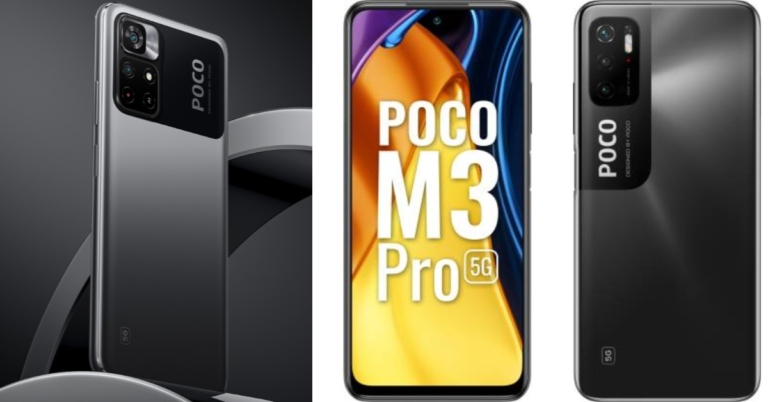
Poco has introduced its new 5G smartphone in the market. The company has globally launched the Poco M4 Pro 5G that is powered byMediaTek Dimensity 810 SoC. The device includes a dual rear camera set up and a 5,000mAh battery that comes with 33W Pro fast charging support. With all of these features, the device can compete effectively with its predecessor the Poco M3 Pro 5G. So here is our comparison of Poco M4 Pro 5G vs Poco M3 Pro 5G. This comparison will help you understand which is a better smartphone and how both the phones stand against each other.
Poco M4 Pro 5G vs Poco M3 Pro 5G
Display
Poco M4 Pro 5G: 6.5-inch full HD+ Dot displayPoco M3 Pro 5G: 6.5-inch full-HD+ Dot Display
Poco M4 Pro 5G: Dual rear camera setup consisting of a50-megapixel primary sensor and a secondary 8-megapixel ultra-wide-angle lens offering 119 degrees of field of view.Poco M3 Pro 5G: Triple rear camera setup that consists of a 48MP main camera with an f/1.79 aperture. Further assisted by a 2MP macro camera with f/2.4 aperture and a 2MP depth sensor with f/2.4.
Selfie camera
Poco M4 Pro 5G: 16-megapixel selfie cameraPoco M3 Pro 5G: 8MP front-facing camera
RAM and storage
Poco M4 Pro 5G: 4GB RAM with 64GB storage and 6GB RAM with 128GB variantPoco M3 Pro 5G: 4GB RAM with 64GB storage and 6GB RAM with 128GB storage model
Battery
Poco M4 Pro 5G: 5,000mAh batteryPoco M3 Pro 5G: 5,000mAh battery
Operating system
Poco M4 Pro 5G: MIUI 12.5 for Poco skinned on top of Android 11Poco M3 Pro 5G: MIUI 12 based on Android 11
Price
Poco M4 Pro 5G: EUR 229 that translates to Rs 19,600Poco M3 Pro 5G: Rs 13,999
Verdict
The cameras on the Poco M4 Pro 5G have been downgraded from triple set up to dual rear cameras. But the camera of the Poco M4 Pro 5G will offer better resolution when it comes to both the rear and the front shooters. Although both are 5G handsets, the latest one includes a more powerful chipset. The latest generation of the Poco 5G smartphone comes with NFC enabled for wireless payments. The previous generation also did not have the RAM expansion option, but the new one offers this feature. However, Poco has not yet announced the phone for the Indian market, but considering the pricing, the newly launched mobile can be more expensive than its predecessor. Nonetheless in other aspects, Poco M4 Pro 5G has a better position over the Poco M3 Pro 5G.
For the latest gadget and tech news, and gadget reviews, follow us on Twitter, Facebook and Instagram. For newest tech & gadget videos subscribe to our YouTube Channel. You can also stay up to date using the Gadget Bridge Android App. You can find the latest car and bike news here.
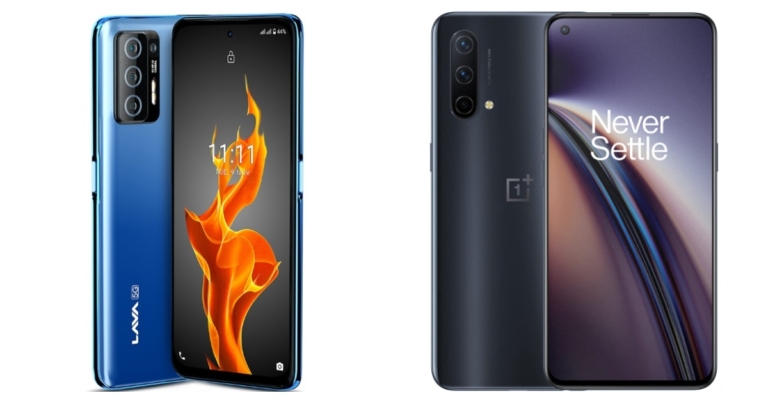
Lava Agni 5G is the first Indian 5G smartphone by any Indian smartphone brand in the country. The device comes loaded with all the features at better pricing than any other device being offered at similar pricing. You get a 5,000mAh battery, 5G connectivity and 64MP main camera sensor. So considering the pricing we have put together the Lava Agni 5G against the OnePlus Nord CE 5G to help you decide which offers all the features at the best price.
Lava Agni 5G vs OnePlus Nord CE 5G
Display
Lava Agni 5G: 6.78-inch FHD+ IPS punch-hole displayOnePlus Nord CE 5G: 6.43-inch 90Hz Fluid AMOLED display
Lava Agni 5G: Quad rear camera set up that includes a 64-megapixel primary sensor. Furthermore, there is a 5-megapixel wide-angle lens, a 2-megapixel depth lens and a 2-megapixel macro sensor.OnePlus Nord CE 5G: Triple rear camera set up on its back featuring a 64-megapixel primary camera sensor, an 8-megapixel ultra-wide camera with 119 degrees of FoV and a 2-megapixel depth sensor.
Selfie camera
Lava Agni 5G: 16-megapixel selfie cameraOnePlus Nord CE 5G:16-megapixel selfie sensor
RAM and storage
Lava Agni 5G: 8GB RAM with 128GB storageOnePlus Nord CE 5G: 6GB RAM with 128GB/ 8GB RAM with 128GB/12GB RAM with 256GB
Battery
Lava Agni 5G:5,000mAh batteryOnePlus Nord CE 5G: 4,500mAh battery
Operating system
Lava Agni 5G: Android 11OnePlus Nord CE 5G: OxygenOS 11 on top of Android 11
Starting Price
Lava Agni 5G:Rs 19,999OnePlus Nord CE 5G:Rs 22,999
Our Take
Both Lava and the OnePlus devices share similar specs except for the processor and the display. Lava Agni 5G comes with an FHD+ display. OnePlus Nord CE offers you a Fluid AMOLED display. The Chinese company offers a 33W fast charger but Lava provides a 5,000mAh battery with 30W fast charging tech. Also, the MediaTek processor is faster than the Qualcomm chipset. So all in all Lava is a feature-packed smartphone and it is worth considering at the price point.
For the latest gadget and tech news, and gadget reviews, follow us on Twitter, Facebook and Instagram. For newest tech & gadget videos subscribe to our YouTube Channel. You can also stay up to date using the Gadget Bridge Android App. You can find the latest car and bike news here.
Batch files are .bat extension files that have a special command line to perform a specific task. Once run, there is a sequence of commands that take action with the command prompt. You can either perform specific tasks or change the system setting by using a batch file. Though there is a one time hassle of typing it. To get a seamless experience one should have a grip over the command line. This article will act as a push start for interested readers.Note – This article will only teach how to start and execute a batch file as the topic is very vast and needs some level of coding experience to master.
How to create a batch file
The process is fairly easy. All you need is a text editor to start with. You must also have some basic knowledge to create and craft command prompt executables. Follow the below steps.Step 1 – Press start Step 2 – Search for a notepad or use professional coding tools like Notepad ++.Step 3 – Type in the below program @ECHO OFFECHO Your first batch file was executed successfully.PAUSERead Also:Top 5 ways to force uninstall programs in Windows 10
Meaning of keywords:
@ECHO OFF – Display the content in a clean line disabling the display prompt.
ECHO – Prints the text after a space on the screen.
PAUSE – The CMD will still be running even after the command has been successfully executed.
Step 4 – Click on File and then Save AsStep 5 – Save the extension as .bat. (Example – First.bat)
How to run the batch file
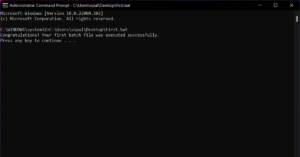
Step 1 – Press Start and search command prompt (Run as administrator).Step 2 – Now input the path of your bat file for our case the file is on the desktop so we will input the following command.C:\Users\vipul\Desktop\First.batStep 3 – Press enter to execute the fileRead Also: How to batch rename files on your Android mobile?Another alternative is to right-click the bat file and run as administrator. It will ask the permission of the Command prompt to grant it to gain similar results. With this, we come to the end of this article. There are a lot of uses for a batch file like scheduling to perform a particular task at a particular time or enabling system setting at a particular course of action. One can also create batch file to run command. but for that, one must have a grasp over CMD commands.
For the latest gadget and tech news, and gadget reviews, follow us on Twitter, Facebook and Instagram. For newest tech & gadget videos subscribe to our YouTube Channel. You can also stay up to date using the Gadget Bridge Android App. You can find the latest car and bike news here.
The winter season is one of the best seasons for some and for others who cannot stand the temperature, a perfect nightmare. The constant mood of the season is to stay in the warm cosy bed and enjoy the day. But yes obviously work calls and you have to step up and fight laziness. Well, we have some exciting winter gadgets for you which you can try this winter season to make your life easy and keep you toasty either indoors or outdoors. Now without any further ado, let’s get started.
Dyson Pure Hot+Cool air purifier
If you live in a place where there is a big requirement for Air purifiers this product is ideal for you. Dyson Pure not only has the capability of purifying the air but it can also blow warm air in the room which doubles up as a heater. The purifier has a built-in LCD screen to display the real time air quality reports including PM2.5, PM10, VOCs and NO2 levels of the place you are living in. For filtration, the device uses a 360 degree Glass HEPA with active carbon filters.Buy Here
Rotibox Bluetooth beanie
Beanies are one of the major checklists during the winter season. They provide warmth to your head and ears while looking stylish. Heard of “Bluetooth makes everything better”? The company applied this to this beanie hat. The hat has Bluetooth compatibility that supports both Android and iPhone. Inside the hat are two stereo speakers ideal for lightning music on the go. Want to attend calls? Rotibox added a mic on the hat as well. There are three buttons present on the hat’s surface. One is for controlling music and the other two are volume buttons.Buy Here
TORMETI hot plate and mug
What’s better than a hot coffee or tea in the winter season. Usually, any hot beverage tends to cool down faster during winters. The situation becomes very irritating and no one wants to drink cold tea. Try the Tormeti cup and hotplate set which will keep your beverage warm. The cap which is included with the set is made up of Ceramic which needs to be placed over the hotplate. If you want to use your favourite cup and it is made of Ceramic, you can use it as well. The device has an auto shut off feature so your hot beverage is not bowling and getting overflow.Buy HereRead Also: Game of Thrones Winter is Coming browser game is out now
Dr.warm heated insole
Feet are the place where most people feel cold as the feet are a very sensitive part of the human body. If you are one of them and can’t tolerate the cold on your feet, Try using a heated inside by Dr.warm. They come in a pair of two with a rechargeable battery so there is no hassle for wires. These soles can be operated by remote which is included in the box. The company avails them in different shapes and sizes for your convenience. Just put the sole inside your foot ware and enjoy the cold winters.Buy Here
HIVER Touchscreen Winter Gloves
Technology has become an important part of our day to day life. Smartphones are the most essential among them. But to keep our hands warm we need to wear gloves and the problem with them is that you cannot use your touch screen device after that. If this is the case, you are up for a treat. Get yourself a pair of Hiver touchscreen winter gloves that are waterproof as well. Now you can use your touch screen devices while keeping your fingers warm.Buy Here
Heated USB mouse pad
Work from home has made everyone vulnerable and to sit in front of their systems all day. Wearing gloves and handling the mouse can be a tough job as you won’t get accurate scrolls. But worry not, try these heated USB mouse pads. It’s just plug and play. Plug it into your system and keep the mouse under the heated pad. It will keep your hand warm while you do your work peacefully.Buy HereRead Also: Realme Winter sale is now live: Discount and other details
Anself electric heated shawl
Shawls in India especially are going to solutions on a cold winter day. People prefer them as they are light and warm. Now imagine adding a heater to it. Anself electric shawl is what it is. Just plug the wire in a normal wall socket and get rid of cold shivers. The remote in the shawl also has a timer function which will automatically turn off the heat after the time is up. There are 3 heat modes to choose from for everyone. If you like shawls and want a tech solution in them, do try this gadget.Buy Here
For the latest gadget and tech news, and gadget reviews, follow us on Twitter, Facebook and Instagram. For newest tech & gadget videos subscribe to our YouTube Channel. You can also stay up to date using the Gadget Bridge Android App. You can find the latest car and bike news here.
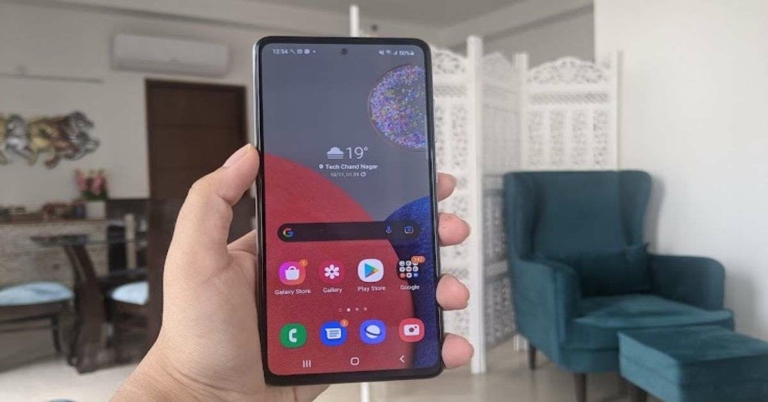
Samsung Galaxy A52s is priced at Rs 35,999 in India and is an upgrade to Galaxy A52. The smartphone comes with 5G, a display with 120Hz refresh rate, and Qualcomm’s Snapdragon 778G SoC. But how worthy is the upgrade? Read our Samsung Galaxy A52s review to find out more.
Samsung Galaxy A52s review: Design and Display
We really liked the design and the look and feel of the Samsung Galaxy A52s. The handset sports a polycarbonate back panel that has a matte finish coupled with a plastic frame. The matte finish of the back panel didn’t take away from the premium looks of the device and at the same time, it was efficient enough to not get any fingerprints. Since the colour of the back of the smartphone we got for review was white, it sometimes looked like it was made of marble. The camera module of the device is placed on the back too and it houses four lenses and an LED flash. Besides that, there is Samsung branding in Silver colour present on it. The right edge of Samsung Galaxy A52s houses the Power and the Volume Rocker keys, while SIM tray and the secondary microphone are on the top. The speaker grill, Type-C port, microphone and the 3.5mm headphone jack are on the bottom edge of the device. Flip over and you’ll see the 6.5-inch display of the smartphone that is outlined with rather thick bezels and has an even thicker chin at the bottom. There is a selfie camera on the top of the screen and there is a tiny earpiece placed between the display and the frame of the phone. It is worth mentioning that Samsung Galaxy A52s comes with an IP67 rating and is hence, dust and water-resistant. Coming to the screen of the smartphone, it comes with a 6.5-inch full-HD+ Super AMOLED display that is protected with a layer of Gorilla Glass 5 and has a refresh rate of 120Hz. The colours projected on the display are accurate and stay consistent at different viewing angles. The images displayed are sharp, clear and the experience of watching videos was decent. It could have been better had the phone had support for HDR10. The sunlight readability of the device was good too and the screen did not catch our fingerprints during our time with the handset.In a nutshell, we can easily say that Samsung Galaxy A52s has a beautiful design and a vibrant display – both of which impressed us.
Samsung Galaxy A52s review: Performance and cameras
Before we begin speaking about the performance of the Samsung Galaxy A52s, let’s take a minute to discuss its specifications. The handset is powered by Qualcomm’s Snapdragon 778G SoC clubbed with 8GB of RAM and 128GB of internal storage. Other than this, the device can also hold a microSD card of up to 1TB. The smartphone runs Android 11 skinned with Samsung’s own One UI 3.1. The software on the phone is very customized and comes with a number of pre-installed apps including Byju’s, PhonePe, Josh, Koo, Moj, etc, and even some apps from Samsung’s own suite. The only upside here is that most of these can be uninstalled in case you decide not to keep them. Galaxy Store cannot be uninstalled, but then, it didn’t bother us with too many notifications so it was fine. Coming to the performance of Samsung Galaxy A52s, the smartphone performed most of the daily tasks well. We even used it for multitasking and opened multiple tabs of Chrome and apps together and switched between them, but the device handled most of it pretty well. We played a number of games on the handset and during our time with it, we didn’t face any major issues or lags. The device did heat up a bit when we played Asphalt 9: Legends, but it wasn’t too much of a problem. We do recommend going to the Game Launcher app and tweaking the settings to get the best experience out of the handset. The 4,500mAh battery of Samsung Galaxy A52s takes around an hour and a half to charge completely and it lasts more than a day with usage involving gaming, watching videos and an active Instagram account. Finally, let’s talk about the cameras of the smartphone. Samsung Galaxy A52s comes with a 64MP primary lens, a 12MP ultra-wide sensor, and a macro and a depth sensor with 5MP lenses. There is also a 32MP selfie camera on the device. Most images that we took during the day using the primary lens turned out to be great. The image quality was very clear and the colours were vibrant too. The good quality of images remained consistent indoors as well as outdoors. The ultra-wide sensor did an average job and obviously the quality of pictures wasn’t as great as it was in the ones taken by the primary sensor. There was a little distortion that we noticed in some shots too. The macro camera and the depth sensor both managed to click decent shots. We should point out that the pictures we took in low light didn’t turn out too great in terms of details and clarity. Enabling the Night Mode would help, but only to a certain extent. The selfie camera did a good job, but only in well-lit areas.
Verdict
Samsung Galaxy A52s at Rs 29,300 (on Amazon) is a good buy and it comes with a beautiful design, a vibrant 120Hz display, IP rating, and a lasting battery. The cameras don’t really impress and the smartphone also lacks HDR10+ support, which could have enhanced the video experience on it. Also, the device competes with a lot of smartphones in the same range that offer more. If the pros of the smartphone look appealing to you, we recommend you to buy it during the ongoing sales where you’re likely to find a few discounts on it. Pros
The Google ecosystem is quite large with millions of users on it. Its cloud service which is named Drive is one of the most popular and widely used cloud storage across the globe. Consumers use the Drive storage for storing images, documents and videos. It often happens that the users feel like playing the uploaded video natively. There is no denying that the native video player of google Drive is buggy and laggy and sometimes glitches out while using. From blank screen to error messages, you might surely have encountered a video player problem on G Drive. Here is how you can fix it.
Avoid pirated content
Let’s face it, many users use drive links or uploads to share pirated content from either one device to another or share the same with your friends or family. Initially, the content will play as the upload is fresh for the Google updates. But sooner or later either Google will not let you play it or delete the uploaded content. The Google servers use a smart file hashing function to find such content and either ban, block or remove it.
Exceeding max supported resolution
You can indeed upload any file with any format on your Google drive if the available storage for your plan is available. But if you want to play a video more than the supported playback resolution the Drive won’t allow it. The maximum set video resolution supported by Google Drive is 1,920×1,080. To play a higher resolution video you need to download it and play it natively on the system.
Large file size
Google Drive is generous enough to let you upload a video with a size up to 5TB (if you have that much available storage). Well, it’s more than enough for most of the users, but are you trying to upload and play a video of more than 5TB? Wow, but don’t do that the Drive won’t let you upload or playback the video. A solution to this can be if you split the video into multiple parts and then upload it one by one.
Video Corrupted
If you face the “Video cannot be played” error there is a chance that the video you are trying to play has been corrupted. Try downloading the file and playing the video offline if that works for you.Read Also: How to fix the USB drive format error message in Windows
Unsupported file type
There are some video file formats that Google Drive does not support. To know the file formats supported, head to the Supported formats tab to check if the file you are trying to play is covered in the list. If the file format is not present we advise you to convert the file format and try again.
Try Incognito mode
Sometimes extensions installed on your browser hinders the video playback in Drive natively. To solve this try opening the file in the incognito/private mode, which is supported by most of the latest browsers. The incognito mode disables all the extensions and will eliminate the error caused by any add ons.
Open the video in the new tab
Try opening the video in a new tab to do so right-click on the video and press preview. Inside the tab press three-dot on the right top corner and select open in a new window. Try playing the video now to check if the problem persists.
Make a copy
Your video file might have been stuck on a bad cache sector and thus resulted in not playing. To solve it right-click on the video file and select make a copy, try playing the copy of the video file to see if your problem is solved.
Toggle off block cookies
Open the browser setting and head to the security section. Here you will find settings related to cookies. Ensure that the cookies are enabled(Google Chrome image used for reference)Read Also: How can you block Google trackers on Chrome?
Sign out of multiple accounts
While Google allows you to sign in to multiple accounts, many users have reported that this creates an issue. To solve it tap on the profile photo on the top right corner, then press sign out.


 The new Tecno Spark 8 comes with a dual rear camera set up inside a square-shaped camera module. The set-up consists of a 16-megapixel main camera and a QVGA secondary lens alongside the LED flash. Moreover, it supports various Pro shooting modes like 1080P Time-lapse, Slow Motion, AR Shot, smile capture, AI Portrait and many more to help you click professional photos and videos.
Upfront there is an 8-megapixel sensor for taking selfies and video calling with dual front flash, AI beauty and many other modes for perfect low light selfies.
In addition to this, there is a 5,000mAh battery and a rear-mounted fingerprint sensor. For connectivity there is WiFi 802.11 a/b/g/n/ac, 2.4G+5G, Bluetooth 5.0, GPS, GNSS, Galileo, Beidou, 2G GSM EDGE, 3G WCDMA, 4G FDD_LTE, 4G TDD_LTE Support dual LTE. While the sensors onboard include an accelerometer and ambient light, distance.
The new Tecno Spark 8 comes with a dual rear camera set up inside a square-shaped camera module. The set-up consists of a 16-megapixel main camera and a QVGA secondary lens alongside the LED flash. Moreover, it supports various Pro shooting modes like 1080P Time-lapse, Slow Motion, AR Shot, smile capture, AI Portrait and many more to help you click professional photos and videos.
Upfront there is an 8-megapixel sensor for taking selfies and video calling with dual front flash, AI beauty and many other modes for perfect low light selfies.
In addition to this, there is a 5,000mAh battery and a rear-mounted fingerprint sensor. For connectivity there is WiFi 802.11 a/b/g/n/ac, 2.4G+5G, Bluetooth 5.0, GPS, GNSS, Galileo, Beidou, 2G GSM EDGE, 3G WCDMA, 4G FDD_LTE, 4G TDD_LTE Support dual LTE. While the sensors onboard include an accelerometer and ambient light, distance.





 Read Also:
 Read Also:






 Read Also: