


Get ready to participate in the 9 November 2021 Amazon Quiz, as it is live on its mobile platform. In today’s quiz participants have a chance to win Rs 15,000 Amazon Pay Balance by answering all the questions correctly. The quiz can be played every day from 12 AM to 11:59.
Vivo V23e with 44W fast charging solution launched: Here are all the details
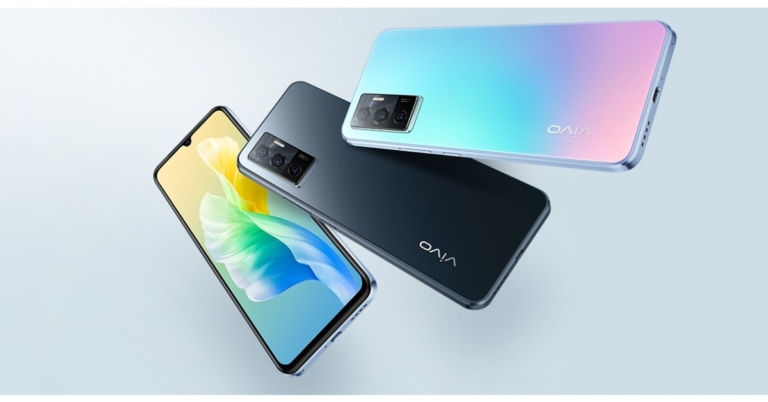
Vivo has finally announced the launch of its next-gen V-Series smartphone. Yes, we are talking about the successor of Vivo V21. The company has introduced Vivo V23e that is the successor of Vivo V21e. The device has debuted in Vietnam and it features a slim form factor. It comes with a 44W fast charging support and equips a 50-megapixel selfie camera. In addition to this, it is powered by MediaTek Helio G96 SoC.
Vivo V23e price and availability
The Vivo V23e has been rolled out in Vietnam at VND 8,490,000 that translates to Rs 27,900. The device comes in Moonlight Shadow and Sunshine Coast. As of now, the phone is available in Vietnam but it has also been spotted listed on the Chinese website suggesting launching soon as Vivo has not officially revealed the launch date of the upcoming smartphone.Vivo V23e technical specifications
In terms of specifications, Vivo V23e features a 6.44-inch full HD AMOLED display having a resolution of 2,400×1,080. It comes with a standard 60Hz panel. The handset runs on FunTouch 12 on top of Android 11. Under the hood, there is a MediaTek Helio G96 chipset paired with 8GB of RAM and 128GB of internal storage. The chipset has two Arm Cortex-A76 cores clocked at 2.05GHz along with six Arm Cortex-A55 cores. In terms of photos and videos, Vivo V23e comes with a triple rear camera setup that comes equipped with a 64-megapixel primary sensor with an f/1.79 aperture. The camera set-up further includes an 8-megapixel ultra-wide-angle lens and a 2-megapixel macro lens. In addition to this, the device sports a 50-megapixel selfie shooter with an f/2.0 aperture. The camera app offers you features like eye focus, night mode, portrait eraser, live photo, slow-mo and others. In terms of endurance, Vivo V23e houses a 4050mAh battery that offers 44W fast charging support that is claimed to charge up to 69 percent in 30 minutes. For connectivity, the handset includes dual-band Wifi, Wi-Fi, Bluetooth V5.2. USB type-c port, GPS, BEIDOU, GALILEO, GLONASS lastly a 3.5mm headphone jack. In addition to this, the mobile phone comes with an in-display fingerprint sensor for phone unlock. While other sensors on the device include. light sensor, gyroscope, compass and gravity sensor. For the latest gadget and tech news, and gadget reviews, follow us on Twitter, Facebook and Instagram. For newest tech & gadget videos subscribe to our YouTube Channel. You can also stay up to date using the Gadget Bridge Android App. You can find the latest car and bike news here.Oppo A16K budget smartphone with MediaTek Helio G35 SoC launched
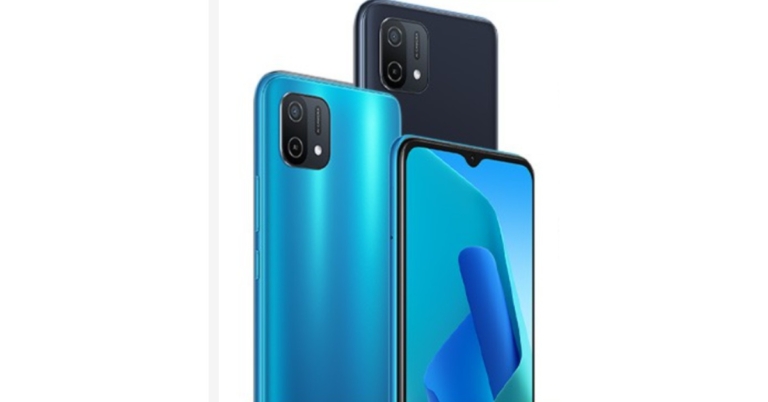
Chinese smartphone company Oppo has announced the launch of its latest smartphone Oppo A16K. The device that has been released is the Philippines and is a water down variant of Oppo A16. The new smartphone features a single 13-megapixel sensor and an HD+ display. It is powered by MediaTek Helio G35 SoC and houses a 4,230mAh battery.

Oppo A16K price and sale details
Oppo A16K has been launched in the Philippines with a price tag of PHP 6,999 for the single 3GB RAM and 32GB storage option that translates to Rs 10,300. The device is being offered in two colour options of Black and Blue. The budget smartphone is now being sold via Shopee and Lazada.
Oppo A16K tech specs
Oppo A16K comes with a 6.52-inch HD+ IPS LCD display with 1,600×720 pixels of resolution. It offers a standard 60Hz refresh rate and 269ppi. The mobile phone runs on ColorOS 11.1 Lite on top of Android 11 out of the box. Under the hood, there is an octa-core MediaTek Helio G35 SoC coupled with 3GB of RAM and 32GB of storage option which can be expanded up to 256GB using a microSD card. In terms of photography, Oppo A16K features a single 13-megapixel camera sensor on the back of the phone. For the selfies, there is a 5-megapixel front-facing camera. On the connectivity front, there is dual-band WiFi, Bluetooth version 5, USB Type C port and a 3.5mm audio jack. The device packs a 4,230mAh battery and supports 5v charging. Like we said earlier Oppo A16K is water down variant of Oppo A16 which was launched in India in September this year. It features a similar display as well as a processor. But on the camera front, the handset features a triple rear camera set-up that includes a 13-megapixel primary sensor, a 2-megapixel depth sensor, and a 2-megapixel macro sensor. Upfront there is an 8-megapixel selfie camera. It is also backed by a 5,000mAh battery with Smart Temperature Control that monitors the heat that is generated while the device is on charge and reduces the charging current if it is found to be too high. For the latest gadget and tech news, and gadget reviews, follow us on Twitter, Facebook and Instagram. For newest tech & gadget videos subscribe to our YouTube Channel. You can also stay up to date using the Gadget Bridge Android App. You can find the latest car and bike news here.Top 10 fixes for Facebook notifications not working on iPhone
Facebook is one of the biggest social media platforms with millions of active users. Imagine having lots of likes and comments on your photos and the application is not pushing notifications about it. If this is the problem you are facing, you are not alone.
Such complaints surfaced in bulk while the company was testing its dark mode. And now the consumers have started facing it again. There can be many reasons, which can cause this problem. But worry not here are fixes that you can try.
 Hold the button for 2-3 seconds. This will make the iPhone force restart. Wait for the phone to start and see if the problem persists.
 If the notification is already turned on try turning it off and turning it back on again. After the process, see if the application is putting out a notification.
 Read Also: Top 5 ways to fix if you are unable to download apps
Step 2 – Scroll to the bottom to find the transfer and reset option and press Reset, and then press Reset all Settings.
Read Also: Guide on how to enable hidden game mode in Android 12 beta
Read Also: Top 5 ways to fix if you are unable to download apps
Step 2 – Scroll to the bottom to find the transfer and reset option and press Reset, and then press Reset all Settings.
Read Also: Guide on how to enable hidden game mode in Android 12 beta
-
Force restart the device
 Hold the button for 2-3 seconds. This will make the iPhone force restart. Wait for the phone to start and see if the problem persists.
-
Check Wi-Fi connection
-
Check notification in setting
 If the notification is already turned on try turning it off and turning it back on again. After the process, see if the application is putting out a notification.
-
Turn off do not disturb
- If running iOS 15: Settings>Focus>Do not disturb
- If running iOS 14 or earlier: Setting>Do not disturb
 Read Also: Top 5 ways to fix if you are unable to download apps
-
Check in-app setting

-
Update the application

-
Check for smart devices connection
-
Reinstall the application
-
Reset setting
 Step 2 – Scroll to the bottom to find the transfer and reset option and press Reset, and then press Reset all Settings.
Read Also: Guide on how to enable hidden game mode in Android 12 beta
Step 2 – Scroll to the bottom to find the transfer and reset option and press Reset, and then press Reset all Settings.
Read Also: Guide on how to enable hidden game mode in Android 12 beta
-
Reset iPhone
Motorola Edge X teased to launch soon, could be a gaming smartphone
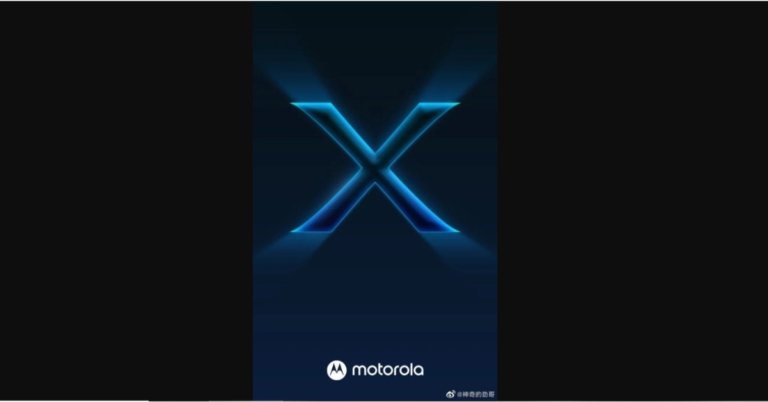
Lenovo owned Chinese smartphone company Motorola is getting ready to release its next flagship smartphone in the market. The company is set to introduce a new device in its Edge Series. It has started teasing the Motorola Edge X smartphone. The device is the third smartphone to make its debut after Motorola Edge S Pro and Edge Lite arrived in China just a few months ago.
Motorola’s executive took to Weibo to break the news. He has posted the first teaser of the flagship Motorola Edge X. The Weibo poster does not divulge much information related to its availability and specification. But it is slated to be a gaming-centric phone.
Besides this, a Motorola smartphone bagged a 3C certification. It was spotted with model number XT2175-2 that is believed to be Motorola Edge X. The phone is listed to come with 33W fast charging support. But a handset with a similar model number also got listed on Wifi Alliance suggesting a 30W fast charging support for the phone.
To recall Motorola Edge S Pro and Motorola Edge Lite were rebranded for India as Motorola Edge 20 Pro and Edge 20.
Motorola Edge 20 specifications
Motorola Edge 20 has a 6.7-inch OLED Max Vision display with 1,080×2,400 pixels of resolution and a 144Hz refresh rate. The device runs MyUX on top of Android 11 and is powered by an octa-core Qualcomm Snapdragon 778G SoC. The device features a triple camera setup that includes a 108-megapixel Samsung ISOCELL HM2 sensor, a 16-megapixel ultra-wide-angle sensor and a macro lens, and an 8-megapixel sensor with a 3x high-res optical zoom and 30X Super Zoom telephoto lens. There is a 32-megapixel front-facing camera on the front. Furthermore, there is a 4,000mAh battery that also supports 30W TurboPower fast charging.Motorola Edge 20 Pro specifications
Motorola Edge 20 Pro is highlighted with a 6.7-inch full HD+ Max Vision AMOLED display which supports a 144Hz refresh rate. The device runs on My UX on top of Android 11 and is powered by octa-core Qualcomm Snapdragon 870 SoC with Adreno 650 GPU for graphics. For the optics, there is a triple rear camera set-up that includes a 108MP primary sensor with an f/1.9 aperture. It further includes a 16MP ultra-wide-angle lens with a macro sensor and an 8MP periscope shaped telephoto lens with f/3.4 aperture offering 50x superzoom and 5x macro vision. The phone also includes a 32MP selfies camera with an f/2.25 aperture on the front. Additionally, it comes with a 4,500mAh battery on board with 30W fast charging tech support. For the latest gadget and tech news, and gadget reviews, follow us on Twitter, Facebook and Instagram. For newest tech & gadget videos subscribe to our YouTube Channel. You can also stay up to date using the Gadget Bridge Android App. You can find the latest car and bike news here.Melbet App Guide – How to download apk for Android and iOS

Melbet is a bookmaker known for its excellent sports betting service. Present in the betting industry since its founding in 2012, Melbet is licensed in Curacao and is gaining a solid Indian customer base.
In the Melbet bookmaker review, we will talk about all the points on the site, analyze each of the functions and find out if you can use it for betting.
The Melbet website is an extremely simple platform with all the essential features at your fingertips without looking far. It is made in white-black-yellow colours, thanks to which the site looks very presentable and pleases the eye. To the left of the live events, you will find in the centre at the top the main site themes, promotions, sports, live betting, and more.
 Melbet offers the ability to place bets from anywhere using a mobile phone or tablet because the bookmaker offers a mobile version of the website, as well as applications for Android and IOS, the two most popular operating systems.
IOS users will be able to easily find the Melbet app in the App Store, however, Android users need to access the website at home and download the APK in order for them to install and get the app.
All of the mobile betting methods offered by Melbet are of excellent quality, you can choose what to do and you will have access to a wide range of games and services.
Melbet offers the ability to place bets from anywhere using a mobile phone or tablet because the bookmaker offers a mobile version of the website, as well as applications for Android and IOS, the two most popular operating systems.
IOS users will be able to easily find the Melbet app in the App Store, however, Android users need to access the website at home and download the APK in order for them to install and get the app.
All of the mobile betting methods offered by Melbet are of excellent quality, you can choose what to do and you will have access to a wide range of games and services.
Melbet software is supported by most Android devices. You can download the Melbet app for Android from the official website by download link or on other specialized resources. The Melbet apk will not take up much space on your device. But make sure that your device meets certain system requirements.
Melbet allows you to register both via its mobile app and mobile version of its main website. Check the instruction below for creating an account:
For all new players, Melbet offers two types of bonuses: a Casino bonus and a Betting bonus. In the first case, you will get a bonus of up to 20,000 INR into your account, in the second case – up to 15,000 INR.
With Melbet, players can place bets on champions of football, basketball, ice hockey, cricket tournaments and more. Special bets are offered for individual teams, which you can see on the website. You can even place bets on transfers, coach appointments, the future success of young athletes and the end of a legend’s career. The number and variety of options allow Melbet to delight sports betting in a new direction.
Melbet is developing very dynamically and has its own permanent audience. It is a competitive participant in the betting business, providing high-quality betting services.
Problems for players here are relatively rare, but if they arise, you can contact the technical support service, which works around the clock.
Melbet Mobile App for Indians Users
 Melbet offers the ability to place bets from anywhere using a mobile phone or tablet because the bookmaker offers a mobile version of the website, as well as applications for Android and IOS, the two most popular operating systems.
IOS users will be able to easily find the Melbet app in the App Store, however, Android users need to access the website at home and download the APK in order for them to install and get the app.
All of the mobile betting methods offered by Melbet are of excellent quality, you can choose what to do and you will have access to a wide range of games and services.
Melbet offers the ability to place bets from anywhere using a mobile phone or tablet because the bookmaker offers a mobile version of the website, as well as applications for Android and IOS, the two most popular operating systems.
IOS users will be able to easily find the Melbet app in the App Store, however, Android users need to access the website at home and download the APK in order for them to install and get the app.
All of the mobile betting methods offered by Melbet are of excellent quality, you can choose what to do and you will have access to a wide range of games and services.
Melbet app information
| Operating system | Android, iOS |
| App file size: | 4 MB |
| Installed client size: | 42 MB |
| Live Streaming Support | Cricket, Football, Gold |
| Currencies | USD, CAD, INR, EUR |
| Gambling Opportunities | Sports Betting, Live Betting, Live Casino, Toto, Virtual Betting |
Melbet App for Android (APK)
 Melbet software is supported by most Android devices. You can download the Melbet app for Android from the official website by download link or on other specialized resources. The Melbet apk will not take up much space on your device. But make sure that your device meets certain system requirements.
Step-by-step instruction on how to download Melbet Apk:
- Follow the Melbet apk download link;
- Tap the button and download the app;
- Click on the apk icon in your smartphone and run the installation;
- Launch the app and complete the registration;
- Start Betting.
Android Smartphones where the Melbet APK is Available:
- Xiaomi
- Huawei
- Samsung
- Poco
- Asus
- Oppo
- ZTE
- Meizu
Download Melbet for iOS
The Melbet app is also available for iOS gadgets. The Melbet app can be downloaded exactly in the same way as other Apple software. To do this, go to the App Store and search for the program you are looking for. Then you need to click on the “Download” button next to the bookmaker’s image and wait until the software is installed.How to register in the Melbet Application?
 Melbet allows you to register both via its mobile app and mobile version of its main website. Check the instruction below for creating an account:
- Download the app and click the registration button;
- Fill in the required fields, accept the rules of the site and confirm the registration;
- If you have registered using your phone number, confirm your number.
- When registering make sure to use promo code DHANA (which will give you an extra bonus on your deposit)
 For all new players, Melbet offers two types of bonuses: a Casino bonus and a Betting bonus. In the first case, you will get a bonus of up to 20,000 INR into your account, in the second case – up to 15,000 INR.
What should be done?
- Complete the registration (using DHANA promo code) on the site or in the app;
- Make a deposit of up to 20,000 INR and get 100% cashback;
- Start betting;
- Get your winnings and withdraw them using the preferred payment system.
 With Melbet, players can place bets on champions of football, basketball, ice hockey, cricket tournaments and more. Special bets are offered for individual teams, which you can see on the website. You can even place bets on transfers, coach appointments, the future success of young athletes and the end of a legend’s career. The number and variety of options allow Melbet to delight sports betting in a new direction.
Melbet is developing very dynamically and has its own permanent audience. It is a competitive participant in the betting business, providing high-quality betting services.
Problems for players here are relatively rare, but if they arise, you can contact the technical support service, which works around the clock.
With Melbet, players can place bets on champions of football, basketball, ice hockey, cricket tournaments and more. Special bets are offered for individual teams, which you can see on the website. You can even place bets on transfers, coach appointments, the future success of young athletes and the end of a legend’s career. The number and variety of options allow Melbet to delight sports betting in a new direction.
Melbet is developing very dynamically and has its own permanent audience. It is a competitive participant in the betting business, providing high-quality betting services.
Problems for players here are relatively rare, but if they arise, you can contact the technical support service, which works around the clock.
Advantages of using Melbet app
If you like the idea of being able to place bets and watch championships anywhere, then the app is the best choice. Melbet decided to offer more than just a beautiful and quality website. They also decided to create an application that will make the gamer’s life even more interesting. Pay attention to the three main advantages that we have highlighted:- Practical and efficient
- Safe alternative
- Equal opportunity
What else does Melbet have to offer?
You can spend time with pleasure and benefit for your wallet with Melbet not only by placing bets. Among other things, the bookmaker offers six more game sections:- Slots
- Live Casino
- Live-Slots
- TV games
- Bingo
- Toto
Samsung Galaxy A22s 5G with 5,000mAh battery launched
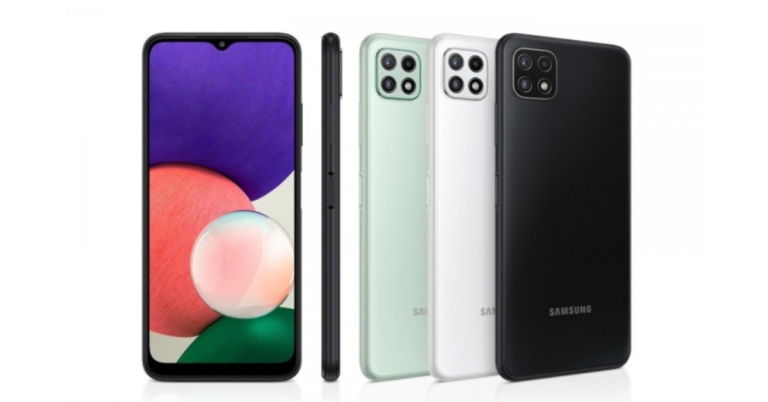
Samsung has officially announced the launch of its next 5G smartphone. The Company has expanded its A-series lineup with the launch of the Samsung Galaxy A22s 5G. The device has debuted in Russia. The phone features an LCD display. It comes with a triple rear camera set up and a 5,000mAh battery. The handset is powered by MediaTek Dimensity 700 SoC. Read on to know the pricing and specifications of the newly launched mobile phone.

Samsung Galaxy A22s 5G price and availability
The price and the availability details of the Samsung Galaxy A22s are yet to be confirmed. However, when it goes on sale it would come in two different configurations of 4GB RAM with 64GB storage and 4GB RAM with 128GB internal memory. The device will be available in three colour options of Mint, Gray and White.
Samsung Galaxy A22s 5G technical specification
In terms of specification, the Samsung Galaxy A22s 5G is highlighted with a 6.6 inch full HD+TFT LCD display with 1,080×2,408 pixels of resolution. It has a dewdrop notch, supports a 90Hz refresh rate and 20:9 aspect ratio. The device runs on OneUI 3.1 on top of Android 11 OS. The mobile phone is powered by MediaTek Dimensity 700 SoC paired with 4GB of RAM and up to 128GB of internal storage options. The memory can be expanded up to 1TB using a microSD card. On the camera front, there is a triple camera set up on the back of the Samsung Galaxy A22s 5G. It houses a 48-megapixel primary sensor with an aperture of f/1.8. A secondary 8-megapixel ultra-wide lens and a 2-megapixel macro lens. The rear camera set-up supports 10x digital zoom and HD video resolution. Upfront there is an 8-megapixel selfie camera with f/2.0 aperture. The Samsung Galaxy A22s 5G is fueled by a 5,000mAh battery that comes with 15W fast charging support. The device further includes Wi-Fi 802.11 ac, Wi-Fi Direct, Bluetooth v5.0, NFC, USB Type-C port and a 3.5mm headphone jack for connectivity. Apart from the smartphone features a side-mounted fingerprint sensor for biometrics. For the latest gadget and tech news, and gadget reviews, follow us on Twitter, Facebook and Instagram. For newest tech & gadget videos subscribe to our YouTube Channel. You can also stay up to date using the Gadget Bridge Android App. You can find the latest car and bike news here.How to fix missed call notifications not showing in Android? 9 best ways
The notification drop-down option in the Android smartphone makes life easy in day-to-day life. At a glance, you can view all the notifications pushed via applications. This comes really handy, especially for the call and messaging applications. Want to fix the ‘missed call notifications not showing on Android’ issue even when they are turned on? Keep reading. This issue might happen when the UI glitches or the bug in the application gets triggered and does not prompt the notification. If this is the issue you are facing, worry not we have fixes for you.
Read Also: Vivo Y100 and Vivo Y100A prices dropped again: Price cut details inside
The golden rule is applied to all the techs if they malfunction. Just restart to fix minor bugs and issues. Once you restart your phone your smartphone’s UI will get a fresh start eliminating the temporary glitches and solving the UI related problems. This will also make the dialer application restart, which will ultimately result in starting the application from ground zero. Most of the minor bugs are fixed with a simple restart.
A bad cache file can cause issues related to notification, to eliminate that all you have to do is clear the catch and try to use the application again. To do this first long-press the application and head to App info. Inside, head to Cache and storage, then press Clear cache. Try using the application, if it does not work, do the same steps and instead of clearing the cache, press clear data. Most probably this will fix the issue.
Read Also: Apple approves TRAI’s DND app to avoid iPhone ban in India
Step 2: In Advanced, head to Default apps.
Step 3: Check for the Phone app.
After changing, see if the problem is solved for you, if not don’t worry, try the next step.
Step 2: Inside, go to Notification
Step 3: Turn it on, especially check for the Missed calls notification.
Read Also: How to join missed Whatsapp video calls?
 Step 3: Select Settings.
Step 4: Turn off the toggle switch for Caller ID and spam protection.
Step 2: Tap on Reset.
Step 3: Select Factory data reset.
Step 3: Select Settings.
Step 4: Turn off the toggle switch for Caller ID and spam protection.
Step 2: Tap on Reset.
Step 3: Select Factory data reset.
 Step 4: Scroll down and tap on Reset.
Restart Phone
 The golden rule is applied to all the techs if they malfunction. Just restart to fix minor bugs and issues. Once you restart your phone your smartphone’s UI will get a fresh start eliminating the temporary glitches and solving the UI related problems. This will also make the dialer application restart, which will ultimately result in starting the application from ground zero. Most of the minor bugs are fixed with a simple restart.
Clear cache and data of the phone application
 A bad cache file can cause issues related to notification, to eliminate that all you have to do is clear the catch and try to use the application again. To do this first long-press the application and head to App info. Inside, head to Cache and storage, then press Clear cache. Try using the application, if it does not work, do the same steps and instead of clearing the cache, press clear data. Most probably this will fix the issue.
Read Also: Apple approves TRAI’s DND app to avoid iPhone ban in India
A bad cache file can cause issues related to notification, to eliminate that all you have to do is clear the catch and try to use the application again. To do this first long-press the application and head to App info. Inside, head to Cache and storage, then press Clear cache. Try using the application, if it does not work, do the same steps and instead of clearing the cache, press clear data. Most probably this will fix the issue.
Read Also: Apple approves TRAI’s DND app to avoid iPhone ban in India
Change default application
There are many third-party applications, which include a dialer part built-in. The prime example of this is the Truecaller app which many people use. The application often asks to make it the default dialer application. If it is done, you won’t be receiving the notification from the phone application. To check and undo follow these steps. Step 1: Open Settings and head to App and notification. Step 2: In Advanced, head to Default apps.
 Step 3: Check for the Phone app.
 After changing, see if the problem is solved for you, if not don’t worry, try the next step.
Check for notification
There is a good chance that the notification option faces a bug and if it is switched off due to some reason, it is very easy to turn it back on. Step 1: Hold the application and select App info. Step 2: Inside, go to Notification
 Step 3: Turn it on, especially check for the Missed calls notification.
 Read Also: How to join missed Whatsapp video calls?
Turn off DND
The Do Not Disturb feature prevents applications from showing you notifications and saves the pop-ups in the background. If your DND option is switched on the phone won’t show you missed call notification. To check bring down the notification hub check for the do not disturb option and make sure it is turned off.
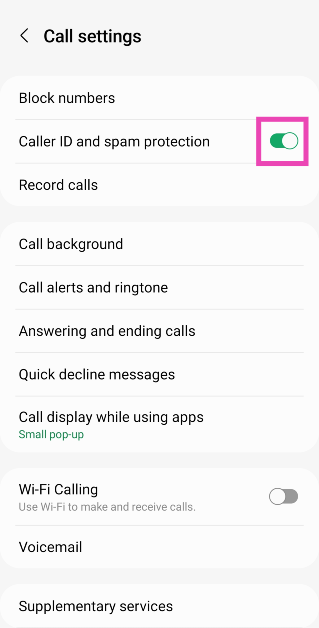
Turn off Caller ID and spam protection
Step 1: Launch the native Phone app on your Android smartphone. Step 2: Hit the ellipses at the top right corner of the screen.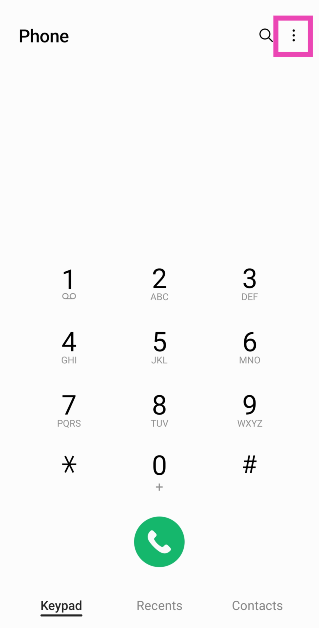 Step 3: Select Settings.
 Step 4: Turn off the toggle switch for Caller ID and spam protection.
Reset App Preferences
Resetting the app preferences restores their settings to the factory without deleting any data. If you recently changed a setting on the Phone app but can’t remember it, resetting the app preferences will restore everything to the factory default, eliminating the notification issue caused by the change of settings. The one thing that you should keep in mind is that resetting app preferences will restore the settings of all apps to the factory default, not just the Phone app. Go to Settings>Apps, tap the ellipses, and select Reset App Preferences from the list of options.Disable third-party device management apps
If you use third-party device management apps on your smartphone, they may be obstructing the notifications from the default phone app. Most management apps have a spam notification blocker that prevents unwanted ads from clogging up your device. Sometimes, the notifications from the Phone app can get caught in the spam filter. To prevent this situation, disable the management app or exclude the Phone app from its spam filter.Perform a Factory Reset
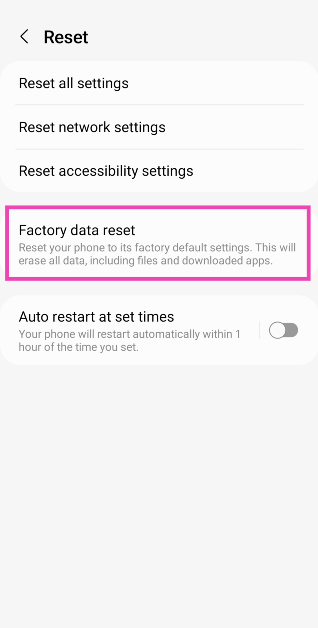
If nothing works, you can factory reset your device as a last-ditch measure. This will erase all your personal data so make sure you create a backup beforehand. Step 1: Go to Settings, scroll down and select General management.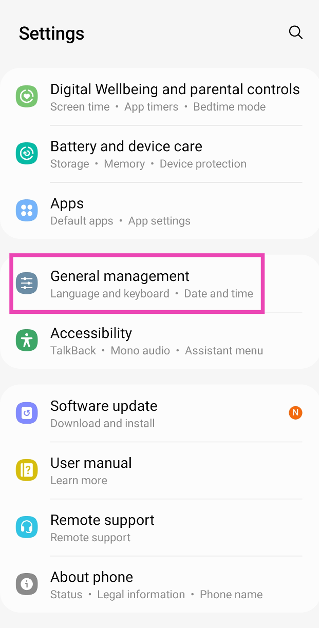 Step 2: Tap on Reset.
 Step 3: Select Factory data reset.
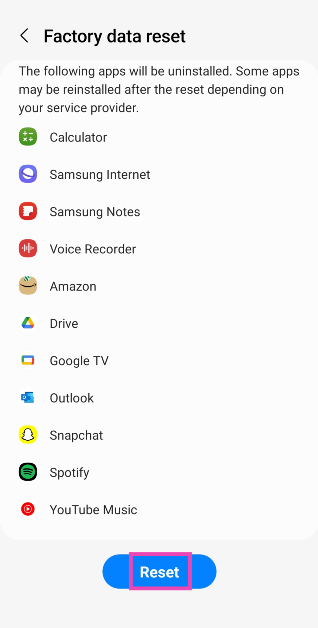
 Step 4: Scroll down and tap on Reset.
Frequently Asked Questions (FAQs)
Why are the missed call notifications not showing on my Android phone and how do I fix it?
You may not receive missed call notifications on your device if some other app is interfering with the native phone app. To fix this, restore the native phone app as the default calling app and remove all third-party management apps from your device.What does resetting the app preferences do?
Resetting app preferences restores the settings of all the apps on your phone to their factory defaults. Go to Settings>Apps, tap the ellipses, and select Reset App Preferences from the list of options.How do I pause missed call notifications on my Android device?
To pause missed call notifications, go to Apps>Phone>Notifications>Notification categories and turn off the toggle switch for Missed calls. Read Also: How to install iOS 17 on your iPhone? Which iPhones are getting the new software update?Conclusion
This is for how to fix missed call notifications not showing in Android. Make sure your phone is updated to its latest OS version to reduce the possibility of bug-related issues. Know any other methods to fix this problem? Let us know in the comments!Samsung Galaxy Watch 4 Review: A perfect fitness tracker
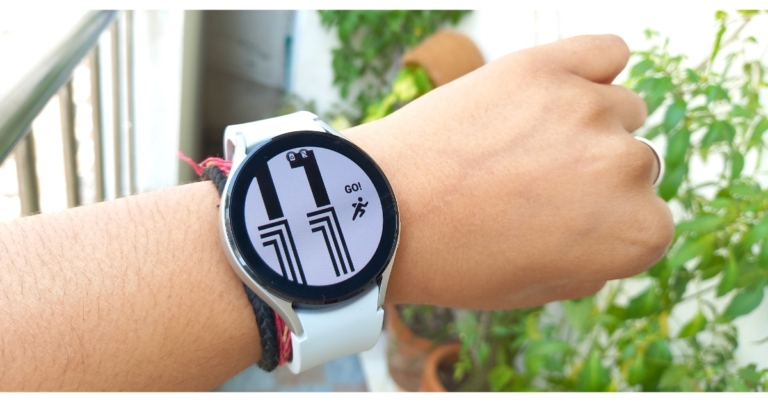
Samsung recently introduced the Galaxy Watch 4 with the new WearOS platform based on its custom OneUI, effectively killing off its TysonOS platform. The new Galaxy Watch Series is one of the most exciting wearables this year. The Watch 4 Classic and the Watch 4 are the two models announced by the company. The regular Watch 4 has a sporty appearance and feels like a follow-up to the Watch Active 2 that was released a few months ago. So there you have it, our review of Samsung Galaxy Watch 4 is below and you should go through it if you are planning to buy it.
 As previously stated, it has a soft silicone band that causes no skin irritation or allergies when worn all day.
 It should be observed that the company has redesigned the navigation buttons on the sides, as compared to the circular ones found on the previous year’s models. The most recent ones are spaced widely apart, rectangular in shape, and are equipped with BioActive Sensors. This device has three useful health features, including optical heart rate, bioelectrical impedance analysis, and the ability to assess blood pressure, AFib irregular heartbeat, blood oxygen level, and, most saliently, body composition.
The Samsung Galaxy Watch 4’s display is circular in shape. It has a 1.4 – inch SAMOLED display with a resolution of 450 x 450 pixels and a pixel density of 330 PPI. The watch’s display is protected by Gorilla Glass DX +. The wearable is 5ATM + IP68 certified, as well as MIL-STD-810G certified. The screen on the Galaxy smartwatch is of high quality, with vibrant colours and a high contrast ratio. The viewing angles are perfect and the brightness level is flawless. Not only that, the screen has an auto-brightness adjustment, which is excellent.
The Galaxy Watch 4 does, however, provide a selection of customisable watch faces to choose from. You can also download over a hundred watch faces from the play store using the wearable.
A single tap of the home button introduces you to the home screen, where you can customise the actions with double and long presses. Similarly, the back key can be set to return to the previous screen or to display a list of recently opened apps. As previously stated, the superior Galaxy Watch 4 Classic has a rotating bezel design; however, the regular model provides similar digital capabilities by touching and rotating the screen clockwise or anticlockwise.
Swiping down brings up the control panel, while swipes to the left and right bring up notifications and widgets. You can now host the app launcher by swiping up from the edge. In addition to English, the incoming notifications support Hindi and emojis. While the Galaxy Watch 4’s haptic feedback and vibration are quite good.
Now, let’s talk about the Galaxy Watch 4’s fitness and health features. As said, the smartwatch provides body composition measurement, which is not available on any other device. Other features of the new three-in-one bioactive sensor include optical heart rate, electrical heart rate, and a bioelectrical impedance analysis sensor. This enables it to detect AFIB irregular heartbeat, blood oxygen level, blood pressure, and body composition.
The button contains electrodes that measure various metrics such as skeletal muscle, basal metabolic rate, body water, and body fat percentage. With just two fingers, you can now easily calculate your body composition from your wrist. The watch’s sensor will collect 2,400 data points in about 15 seconds. This feature provides you with a more in-depth understanding of your overall health and fitness.
Aside from that, there are a plethora of wellness features to track your daily activities such as sleep, women’s health, SpO2, and stress level. By connecting your Galaxy Watch 4 to a compatible Samsung Smart TV, you can choose from a variety of guided workouts, participate in Group Challenges with your friends and family, or set up a home gym. The Samsung Watch can continuously or manually record heart rate and stress levels. The SpO2 and sleep tracking have also been accurate.
It should be observed that the company has redesigned the navigation buttons on the sides, as compared to the circular ones found on the previous year’s models. The most recent ones are spaced widely apart, rectangular in shape, and are equipped with BioActive Sensors. This device has three useful health features, including optical heart rate, bioelectrical impedance analysis, and the ability to assess blood pressure, AFib irregular heartbeat, blood oxygen level, and, most saliently, body composition.
The Samsung Galaxy Watch 4’s display is circular in shape. It has a 1.4 – inch SAMOLED display with a resolution of 450 x 450 pixels and a pixel density of 330 PPI. The watch’s display is protected by Gorilla Glass DX +. The wearable is 5ATM + IP68 certified, as well as MIL-STD-810G certified. The screen on the Galaxy smartwatch is of high quality, with vibrant colours and a high contrast ratio. The viewing angles are perfect and the brightness level is flawless. Not only that, the screen has an auto-brightness adjustment, which is excellent.
The Galaxy Watch 4 does, however, provide a selection of customisable watch faces to choose from. You can also download over a hundred watch faces from the play store using the wearable.
A single tap of the home button introduces you to the home screen, where you can customise the actions with double and long presses. Similarly, the back key can be set to return to the previous screen or to display a list of recently opened apps. As previously stated, the superior Galaxy Watch 4 Classic has a rotating bezel design; however, the regular model provides similar digital capabilities by touching and rotating the screen clockwise or anticlockwise.
Swiping down brings up the control panel, while swipes to the left and right bring up notifications and widgets. You can now host the app launcher by swiping up from the edge. In addition to English, the incoming notifications support Hindi and emojis. While the Galaxy Watch 4’s haptic feedback and vibration are quite good.
Now, let’s talk about the Galaxy Watch 4’s fitness and health features. As said, the smartwatch provides body composition measurement, which is not available on any other device. Other features of the new three-in-one bioactive sensor include optical heart rate, electrical heart rate, and a bioelectrical impedance analysis sensor. This enables it to detect AFIB irregular heartbeat, blood oxygen level, blood pressure, and body composition.
The button contains electrodes that measure various metrics such as skeletal muscle, basal metabolic rate, body water, and body fat percentage. With just two fingers, you can now easily calculate your body composition from your wrist. The watch’s sensor will collect 2,400 data points in about 15 seconds. This feature provides you with a more in-depth understanding of your overall health and fitness.
Aside from that, there are a plethora of wellness features to track your daily activities such as sleep, women’s health, SpO2, and stress level. By connecting your Galaxy Watch 4 to a compatible Samsung Smart TV, you can choose from a variety of guided workouts, participate in Group Challenges with your friends and family, or set up a home gym. The Samsung Watch can continuously or manually record heart rate and stress levels. The SpO2 and sleep tracking have also been accurate.
 The sleep score, on the other hand, assists you in analyzing your sleep quality. The device can monitor your blood pressure and ECG levels, but this feature is not available in India.
The Galaxy Watch 4 can also track up to 95 different workout modes, including cycling, running, hiking, swimming, and many others. There is, however, an automatic workout detection system that is both accurate and slow. The workout details can be viewed on your smartphone’s Health App.
Surprisingly, the smart wearable can also monitor your snoring, but in this case, you must sleep with your smartphone on your side while it charges. Also, you can also participate in group challenges with your friends and family.
In terms of battery life, the Watch is outfitted with a standard 361mAh battery. The company claims that its smartwatch has a battery life of up to 40 hours and can last for 10 hours with only 30 minutes of charging. However, we were able to achieve a battery life that was comparable to that claimed by Samsung. The company includes a 5W WPC base Qi wireless charger that takes more than two hours to fully charge.
When it comes to calling quality, the receivers had no trouble hearing us, but the speaker on this device is not very loud.
The sleep score, on the other hand, assists you in analyzing your sleep quality. The device can monitor your blood pressure and ECG levels, but this feature is not available in India.
The Galaxy Watch 4 can also track up to 95 different workout modes, including cycling, running, hiking, swimming, and many others. There is, however, an automatic workout detection system that is both accurate and slow. The workout details can be viewed on your smartphone’s Health App.
Surprisingly, the smart wearable can also monitor your snoring, but in this case, you must sleep with your smartphone on your side while it charges. Also, you can also participate in group challenges with your friends and family.
In terms of battery life, the Watch is outfitted with a standard 361mAh battery. The company claims that its smartwatch has a battery life of up to 40 hours and can last for 10 hours with only 30 minutes of charging. However, we were able to achieve a battery life that was comparable to that claimed by Samsung. The company includes a 5W WPC base Qi wireless charger that takes more than two hours to fully charge.
When it comes to calling quality, the receivers had no trouble hearing us, but the speaker on this device is not very loud.
Samsung Galaxy Watch 4 Review: Design and Display
The Samsung Galaxy Watch 4 is available in two sizes: 40mm and 44mm, and we have the latter for review. In terms of construction, the regular Watch 4 has an aluminum frame and weighs 30gm. The smartwatch has a soft silicon band that comes in a variety of colour options. We reviewed the silver shade with an aluminum frame on the unit. As previously stated, it has a soft silicone band that causes no skin irritation or allergies when worn all day.
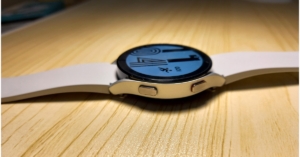 It should be observed that the company has redesigned the navigation buttons on the sides, as compared to the circular ones found on the previous year’s models. The most recent ones are spaced widely apart, rectangular in shape, and are equipped with BioActive Sensors. This device has three useful health features, including optical heart rate, bioelectrical impedance analysis, and the ability to assess blood pressure, AFib irregular heartbeat, blood oxygen level, and, most saliently, body composition.
 The Samsung Galaxy Watch 4’s display is circular in shape. It has a 1.4 – inch SAMOLED display with a resolution of 450 x 450 pixels and a pixel density of 330 PPI. The watch’s display is protected by Gorilla Glass DX +. The wearable is 5ATM + IP68 certified, as well as MIL-STD-810G certified. The screen on the Galaxy smartwatch is of high quality, with vibrant colours and a high contrast ratio. The viewing angles are perfect and the brightness level is flawless. Not only that, the screen has an auto-brightness adjustment, which is excellent.
 The Galaxy Watch 4 does, however, provide a selection of customisable watch faces to choose from. You can also download over a hundred watch faces from the play store using the wearable.
Samsung Galaxy Watch 4 Review: Performance
After that, the Samsung Galaxy Watch 4 is powered by the Exynos W920 Dual-core 1.18GHz 5nm processor, which is said to be a 20% faster CPU, 50% more RAM, and a GPU that is 10 times faster than its predecessor. It has an impressive 16GB of memory, which is enough space to save content such as apps, music, photos, and other files that are too secure with Samsung’s Knox Security. A single tap of the home button introduces you to the home screen, where you can customise the actions with double and long presses. Similarly, the back key can be set to return to the previous screen or to display a list of recently opened apps. As previously stated, the superior Galaxy Watch 4 Classic has a rotating bezel design; however, the regular model provides similar digital capabilities by touching and rotating the screen clockwise or anticlockwise.
 Swiping down brings up the control panel, while swipes to the left and right bring up notifications and widgets. You can now host the app launcher by swiping up from the edge. In addition to English, the incoming notifications support Hindi and emojis. While the Galaxy Watch 4’s haptic feedback and vibration are quite good.
Now, let’s talk about the Galaxy Watch 4’s fitness and health features. As said, the smartwatch provides body composition measurement, which is not available on any other device. Other features of the new three-in-one bioactive sensor include optical heart rate, electrical heart rate, and a bioelectrical impedance analysis sensor. This enables it to detect AFIB irregular heartbeat, blood oxygen level, blood pressure, and body composition.
Swiping down brings up the control panel, while swipes to the left and right bring up notifications and widgets. You can now host the app launcher by swiping up from the edge. In addition to English, the incoming notifications support Hindi and emojis. While the Galaxy Watch 4’s haptic feedback and vibration are quite good.
Now, let’s talk about the Galaxy Watch 4’s fitness and health features. As said, the smartwatch provides body composition measurement, which is not available on any other device. Other features of the new three-in-one bioactive sensor include optical heart rate, electrical heart rate, and a bioelectrical impedance analysis sensor. This enables it to detect AFIB irregular heartbeat, blood oxygen level, blood pressure, and body composition.
 The button contains electrodes that measure various metrics such as skeletal muscle, basal metabolic rate, body water, and body fat percentage. With just two fingers, you can now easily calculate your body composition from your wrist. The watch’s sensor will collect 2,400 data points in about 15 seconds. This feature provides you with a more in-depth understanding of your overall health and fitness.
Aside from that, there are a plethora of wellness features to track your daily activities such as sleep, women’s health, SpO2, and stress level. By connecting your Galaxy Watch 4 to a compatible Samsung Smart TV, you can choose from a variety of guided workouts, participate in Group Challenges with your friends and family, or set up a home gym. The Samsung Watch can continuously or manually record heart rate and stress levels. The SpO2 and sleep tracking have also been accurate.
The button contains electrodes that measure various metrics such as skeletal muscle, basal metabolic rate, body water, and body fat percentage. With just two fingers, you can now easily calculate your body composition from your wrist. The watch’s sensor will collect 2,400 data points in about 15 seconds. This feature provides you with a more in-depth understanding of your overall health and fitness.
Aside from that, there are a plethora of wellness features to track your daily activities such as sleep, women’s health, SpO2, and stress level. By connecting your Galaxy Watch 4 to a compatible Samsung Smart TV, you can choose from a variety of guided workouts, participate in Group Challenges with your friends and family, or set up a home gym. The Samsung Watch can continuously or manually record heart rate and stress levels. The SpO2 and sleep tracking have also been accurate.

 The sleep score, on the other hand, assists you in analyzing your sleep quality. The device can monitor your blood pressure and ECG levels, but this feature is not available in India.
 The Galaxy Watch 4 can also track up to 95 different workout modes, including cycling, running, hiking, swimming, and many others. There is, however, an automatic workout detection system that is both accurate and slow. The workout details can be viewed on your smartphone’s Health App.
 Surprisingly, the smart wearable can also monitor your snoring, but in this case, you must sleep with your smartphone on your side while it charges. Also, you can also participate in group challenges with your friends and family.
 In terms of battery life, the Watch is outfitted with a standard 361mAh battery. The company claims that its smartwatch has a battery life of up to 40 hours and can last for 10 hours with only 30 minutes of charging. However, we were able to achieve a battery life that was comparable to that claimed by Samsung. The company includes a 5W WPC base Qi wireless charger that takes more than two hours to fully charge.
When it comes to calling quality, the receivers had no trouble hearing us, but the speaker on this device is not very loud.
In terms of battery life, the Watch is outfitted with a standard 361mAh battery. The company claims that its smartwatch has a battery life of up to 40 hours and can last for 10 hours with only 30 minutes of charging. However, we were able to achieve a battery life that was comparable to that claimed by Samsung. The company includes a 5W WPC base Qi wireless charger that takes more than two hours to fully charge.
When it comes to calling quality, the receivers had no trouble hearing us, but the speaker on this device is not very loud.
Conclusion
To summarise, the Samsung Galaxy Watch 4 is unquestionably the greatest blessing in the Android wearable technology sector. The combination of the company’s hardware and classy user interface design, combined with Android Store compatibility, results in an unforgettable experience. So, whether you have an Android device and just want the finest fitness tracker available, go here.Samsung Galaxy Watch 4 pros and cons
Pros
- Sturdy
- Eye-catching design
- Vibrant display
- Supports Google Play Store
Cons
- No support for ECG and Blood Pressure support for the Indian market
- Lacks iOS support
- Battery life could have been better
WhatsApp’s multi-device support now available for users: Here is how to access the feature
In July this year, WhatsApp multi-device support was spotted under testing. Now finally the company has rolled out the most speculated feature to its users. The WhatsApp users can not access the instant messaging app on a secondary device without having to get connected to an internet connection.
To enhance the user’s experience, and after several testings, the much-awaited WhatsApp’s multi-device support is now accessible for the users even without the need for the device to stay connected to the internet. This feature is now accessible to both Android and iOS users.
The WhatsApp multi-device support will allow you to access the application on your desktop or laptop via the WhatsApp web even if you do not have a smartphone.
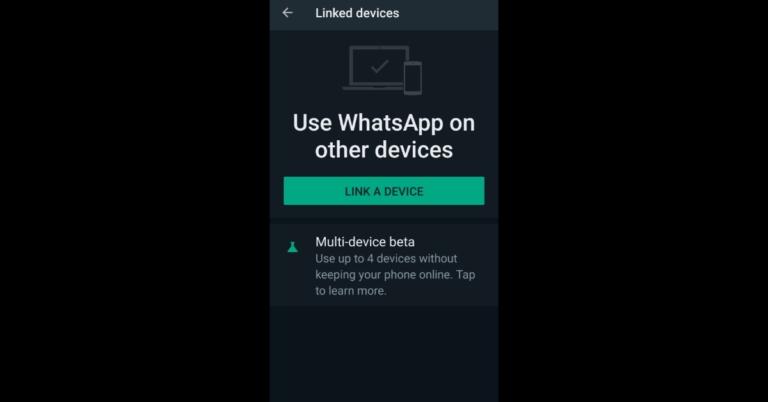
As of now, users can link up to four additional devices without keeping their phones online. It should be noted that the new multi-device support is only available for beta users and can be enabled in the app’s Linked Devices section. All you need to do is tap on the three dots icon shown on the top right corner of your screen.
Remember the functionality is still under Beta testing and you need to opt into that option in order to get access to the feature. When you tap on the Linked devices pop up screen will appear saying, “ Join the multi-device beta! Use WhatsApp on up to 4 additional devices at once without keeping your phone online.” So when you enable it you will be inaccessible from all devices you are re-linked to a new one.
Here is how you can enable your WhatsApp account to a secondary device without an internet connection
- First things first, simply launch WhatsApp and tap on the three-dot icon at the top right corner of the screen.
- You Now tap on Linked Devices and then OK
- After this click on Link a Device.
- You will then be asked to scan a QR code from web.whatsapp.com.
- Because WhatsApp’s Multi-device feature is still in beta, you are required to opt for Join Multi-Device Beta.
- Then using the WhatsApp app, scan the QR code and you are good to go.