How to schedule tasks in Windows 10?

Tired of performing a particular task at a specific time again and again? A handy feature (schedule tasks in Windows 10) has been readily available to users of Windows 10 by Microsoft for years and yet only a handful of people know about it. Windows has many such gems and in the coming articles, we will tell you all about it. Today we are going to talk about the task scheduler in Windows 10. It will help you perform a particular task and will be like your extension and a time saver. We for one have started using it and it makes a world of difference. Below is a step by step guide on how to use a task scheduler that will make your life easy if you are a Windows 11 user.

Step 1 

Press start > then search for the control panel in search bar > open control panel. schedule tasks in Windows 10

Step 2

Firstly click on the view by the menu on the top right corner and select a small view to see the administrator tools and other options, next click on the administrator tools. Steps

Step 3

Select the task scheduler from all the options. Task Scheduler

Step 4

From the left top corner select create basic task CBT After naming the task select triggers like on what day, time or action it needs to be triggered. In action, the menu selects how the trigger will perform and at the last click finish to complete the task scheduling.  Read Also: Motorola one fusion review – The complete package in a budget For the latest gadget and tech news, and gadget reviews, follow us on Twitter, Facebook and Instagram. For newest tech & gadget videos subscribe to our YouTube Channel. You can also stay up to date using the Gadget Bridge Android App. You can find the latest car and bike news here.

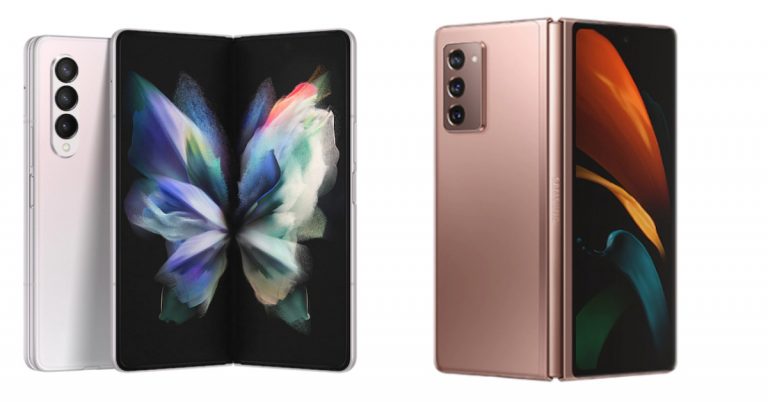
Samsung Galaxy Z Fold 3 Vs Samsung Galaxy Z Fold 2: What’s different this time?

Now that Samsung Galaxy Z Fold 3 has officially made it to the stores and if you are planning to buy one read our comparison of Samsung Galaxy Z Fold 3 Vs Galaxy Z Fold 2. The latest foldable phone is more sturdy as it includes an IP8X rating, Gorilla Glass Victus protection and an aluminium hinge area. We think the device is definitely going to take over the second generation.

Display

Samsung Galaxy Z Fold 3: 7.6-inch foldable QXGA+ AMOLED 2X Infinity Flex main display and 6.2-inch HD+ AMOLED display on the outside Samsung Galaxy Z Fold 2: Primary display of 7.6-inch Infinity-O Display, Secondary Display- 6.2-inch Infinity-O Super AMOLED Infinity Flex Display

Processor

Samsung Galaxy Z Fold 3: 5nm octa-core Snapdragon 888 SoC  Samsung Galaxy Z Fold 2: Qualcomm Snapdragon 865+ SoC

Rear camera(s)

Samsung Galaxy Z Fold 3: 12-megapixel primary sensor, along with a 12-megapixel secondary telephoto lens and a 12-megapixel ultra-wide lens. Samsung Galaxy Z Fold 2: 12-megapixel sensor with f/1.8 aperture, 12-megapixel ultra-wide-angle lens with f/2.2 aperture, and a 2-megapixel telephoto lens with f/2.4 aperture.

Selfie camera

Samsung Galaxy Z Fold 3: 4-megapixel under-display camera and a 10-megapixel selfie camera Samsung Galaxy Z Fold 2: two 10-megapixel sensors with an f/2.2 aperture on the display as well as on the cover for taking selfies.

RAM and storage

Samsung Galaxy Z Fold 3: 2GB + 256GB as well as 12GB + 512GB storage configurations Samsung Galaxy Z Fold 2: 12GB RAM and 512GB internal storage

Battery

Samsung Galaxy Z Fold 3: 4,400mAh battery Samsung Galaxy Z Fold 2: 4,500mAh battery

Operating system

Samsung Galaxy Z Fold 3: Android 11 on top of One UI Samsung Galaxy Z Fold 2: Android 10

Price

Samsung Galaxy Z Fold 3: $1,799 (Rs 1,33,600 approx) in the US Samsung Galaxy Z Fold 2: Rs 1,49,999

Our Verdict

In terms of design both the foldables come with a similar form factor, however, the latest one comes with an IPX8 rating and this time the company has incorporated an under-display camera on the primary display of the Samsung Galaxy Z Fold 3. The refresh rate has been upgraded to 120Hz and well as S Pen support.  The punch hole is almost not nonexistent and the screen comes with Gorilla Glass Victus protection. On the hardware front, Samsung has included the latest Snapdragon 888 SoC. With the S Pen support, we see that the device could easily replace the Galaxy Note series. So we would definitely be going to recommend you to go for the latest Galaxy Z Fold 3. For the latest gadget and tech news, and gadget reviews, follow us on TwitterFacebook and Instagram. For newest tech & gadget videos subscribe to our YouTube Channel. You can also stay up to date using the Gadget Bridge Android App. You can find the latest car and bike news here.

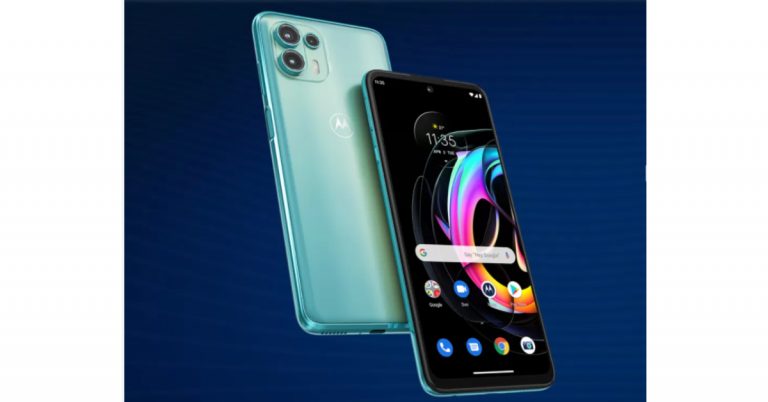
Motorola Edge 20 Series Indian pricing tipped ahead of the official launch

Motorola Edge 20 Series is all set to launch in India on August 17. The company is going to introduce the Edge 20 and Edge 20 Fusion smartphones in the country. Ahead of the official launch, the Indian pricing of both devices have been leaked on the web. The pricing is expected to start at Rs 21,499 for the base model which goes up to Rs 29,999.  As of now, the company has not shared the pricing of both of its upcoming handsets. Motorola Edge is said to come in a single 8GB of RAM with 128GB of storage variant that is likely to be priced at Rs 29,999. Whereas Motorola Edge 20 Fusion is tipped to come to India in two different configurations of 6GB RAM with 128GB storage and 8GB RAM with 128GB onboard storage. The former one is expected to be priced at Rs 21,499 whereas the latter is tipped to come with a price tag of Rs 23,999. Ahead of the official announcement, the lineup has been listed on Flipkart to tease its availability. According to the social media channel and listing both the devices. The dedicated microsite highlights the key specs of the upcoming smartphones that include a 10-bit AMOLED display that would come with a 90Hz refresh rate. The device is going to be powered by MediaTek Dimensity 800U SoC. The listing also reveals that the phone will feature a triple rear camera setup. Motorola Edge 20 specifications  Motorola Edge 20 will feature a 6.7-inch full-HD+OLED display with 1,080×2,400 pixels of resolution and a 144Hz refresh rate. It will run on My UX on top of Android 11 and is powered by an octa-core Qualcomm Snapdragon 778G SoC, paired with 8GB of RAM and 256GB of storage option. For the cameras, there will be a triple rear camera setup that includes a 108-megapixel primary sensor, a 16-megapixel ultra-wide and macro lens, and an 8-megapixel telephoto lens with 3x high-res optical zoom and 30X Super Zoom. Upfront there is a  32-megapixel camera sensor for taking selfies and video calling. The device will include a 4,000mAh battery with support for TurboPower 30 fast charging. For connectivity, there is 5G, LTE, Wi-Fi 6, GPS, and Bluetooth and more. The device includes a 4,000mAh battery with support for TurboPower 30 fast. Also Read: Motorola Edge 20 Pro, Edge 20, Edge 20 Lite unveiled: Pricing and specification details
Motorola Edge 20 Fusion specifications 
Reports suggest that Motorola Edge 20 Fusion is going to be a rebranded variant of  Motorola Edge 20 Lite that will feature a 6.7-inch OLED display with 90Hz refresh rate support. The upcoming phone will run on My UX based on top of Android 11. Under the hood, it will include a MediaTek Dimensity 800U SoC paired with 6GB of RAM and 128GB of storage option.  For the photos and videos, the handset will come with a  triple rear camera set up that includes a 108-megapixel primary sensor, an 8-megapixel sensor with an ultra-wide-angle lens with Macro Vision, and a 2-megapixel depth sensor. For selfies, there will be a 32-megapixel front-facing camera  The phone may also include a 5,000mAh battery with 30W TurboPower fast charging support. For the latest gadget and tech news, and gadget reviews, follow us on TwitterFacebook and Instagram. For newest tech & gadget videos subscribe to our YouTube Channel. You can also stay up to date using the Gadget Bridge Android App. You can find the latest car and bike news here.

13 August 2021 Flipkart Daily Trivia Quiz Answers: Answer to win exciting prizes

The e-commerce website Flipkart is hosting Daily Trivia Quiz. Every day it brings a bunch of new questions for its users. By answering them correctly you can win exciting prizes. The questionnaire is based on questions related to general knowledge. Also, the users can win free vouchers and super coins, among other offers via the daily quiz. 13 August 2021 Flipkart Daily Trivia Quiz Answers has already gone live on its platform. The participant should be at least 18 years old and should have a valid login ID. The Quiz is available on the mobile platform and not the web version. E-commerce conducts the quiz on daily basis and goes live at 12:00 AM IST and runs till 11:59 PM IST.  The winners are announced within 15 days from the date of participation that can be viewed under the Gems/Rewards section in the app.

How to participate in the Flipkart Daily Trivia Quiz

To participate download the Flipkart app on your phone. Then open the Flipkart app then head to Game Zone. Now click on the Daily Trivia Banner or search for Daily Trivia. Enter the game and answer all 5 questions with correct answers.

13 August 2021 Flipkart Daily Trivia Quiz Answers

Question 1: Which of these is a book written by the Congress leader Shashi Tharoor? Answer: Why I am Hindu Question 2: Which of these creatures performs two kinds of dances – the round and the waggle? Answer: Honeybees Question 3: The original Lifebuoy jingle was composed and sung by? Answer: Jagjit Singh Question 4: Who was the first teenager to score a goal in a FIFA World Cup final? Answer: Pele Question 5: Which planet was named by 11-year old Venetia after the Roman god of the underworld? Answer: Pluto For the latest gadget and tech news, and gadget reviews, follow us on TwitterFacebook and Instagram. For newest tech & gadget videos subscribe to our YouTube Channel. You can also stay up to date using the Gadget Bridge Android App. You can find the latest car and bike news here.

13 August 2021 Amazon Quiz: Participate and win Rs 10,000 Amazon Pay Balance 

Get ready to answer a new set of questions as the 13 August 2021 Amazon Quiz is live on its platform. The e-commerce platform brings a daily quiz on its mobile platform, which every day gives chance to millions of people across the country to win exciting prizes. The quiz goes live from 12 AM to 11:59 PM. Today’s Amazon Quiz prize is Rs 10,000 Amazon Pay Balance.

By participating in Amazon Quiz every day you can stand a chance to win prizes such as iPhone X, iPhone Xs, Seagate HDD, GoPro Hero 8 Camera, LG Smartphones, Samsung Galaxy S20, Air Purifier, Oppo smartphones, Amazon Pay Balance among others. Every day Amazon brings a fresh new quiz on its app, here we would like to mention that the quiz is not available for desktop users, only app users can participate in the daily quiz.
The company puts 5 questions based on general knowledge and current affairs to which the contestants have to answer all the questions correctly. A wrong answer will eliminate you from the quiz. After giving correct answers to all the questions, your name will get further selected for a lucky draw. The results of the lucky draw will be announced at the end of the month. So today’s quiz winner’s name will be declared at the end of the month. We have updated today’s five questions with their correct answers below so that you can win Amazon Quiz and get a Rs 10,000 Amazon Pay Balance.

13 August 2021 Amazon Quiz Answers

Question 1: Crocodiles were relocated for the safety of tourists to do boat rides in the Panchmuli lake located in which state of India? The answer is- A) Gujarat Question 2: Which actor, who passed away recently, won the Filmfare Award for Best Actor a record 8 times? The answer is- B) Dilip Kumar Question 3: The World Health Organisation estimates that half of the world’s population will deal with which eye ailment by 2050? The answer is- B) Myopia Question 4: Identify the sport played on this court. The answer is- C) Tennis Question 5: Which Animal Class do they belong to? The answer is- B) Mammalia

Oppo collaborates with Spotify to offer personalised playlist to Oppo Reno 6 Series users

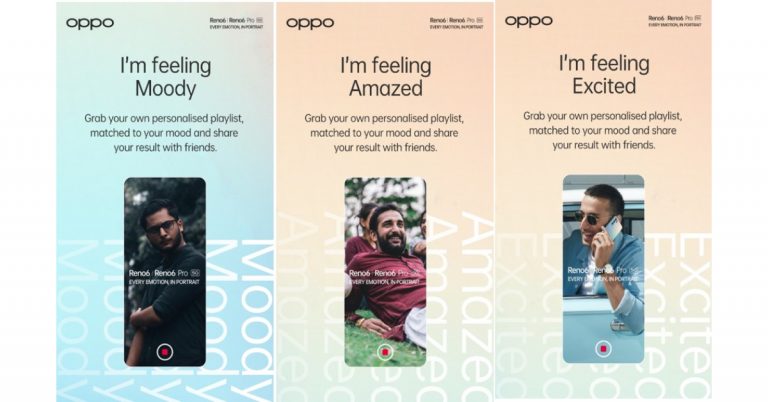
Oppo the Chinese smartphone manufacturer today announced its tie-up with the Sweden-based music streaming platform Spotify. This collaboration is in accordance with the newly launched Oppo Reno 6 series that allows users to capture “every emotion in the portrait” with industry-first Bokeh Flare Portrait Video in professional-grade quality. Together with Spotify, the company has launched their latest campaign “Every Emotion In Portrait” to bring personalized playlists to users that suit their moods and emotions.  Speaking on the partnership, Damyant Singh Khanoria, Chief Marketing Officer, Oppo India, commented, “We are excited to associate with Spotify, the world’s largest music streaming app, to deepen our relationship with consumers by providing a personalized listening experience. This partnership will allow users to capture their emotions in portrait and listen to their favourite music curated to their moods. Music transcends boundaries and speaks to your deepest emotions and that is what this personalised playlist is designed to do. By understanding how exactly you’re feeling, it fetches music that truly resonates with you.” From now onwards the owner of the Oppo Reno 6 Series smartphones will be able to listen to their favourite songs, along with fresh selections, curated on the basis of moods and emotions. New users are introduced to new playlists and songs that are gradually fine-tuned to the listener’s tastes. To curate your own playlist as per your current mood and emotion all you need to do is link Spotify to your Oppo Reno 6 Series. Then go to https://opporeno6series.withspotify.com. After this, you will be asked to Log in/Sign up to your Spotify account. If you access this page from your computer, you also get an option to skip this step. Then you will be able to choose from a table of four primary emotions: Happy, Low, Sensitive and Passionate as per your mood.  As you slide your cursor between these, you get access to 27 moods like amused, triumphant, calm, satisfied, amazed, affectionate, grateful, romantic, and others—that are fine-tuned to suit exactly how you feel. After you have chosen the mood you will be able to see the percentage of other listeners who are feeling the same as you at that point; you can also share your emotion captured in a portrait with friends. Also, the Oppo Reno 6 users will be presented with a personalized playlist that matches the mood they chose. You can listen to the songs on your computer, and if you have signed in with your login credentials, the playlist will also appear in the ‘Your Library’ section of your Spotify app on your mobile device. For the latest gadget and tech news, and gadget reviews, follow us on TwitterFacebook and Instagram. For newest tech & gadget videos subscribe to our YouTube Channel. You can also stay up to date using the Gadget Bridge Android App. You can find the latest car and bike news here.
Top 5 speech to text apps for your Android smartphone

As covid has hit the world pretty hard people have leaned towards the online medium a lot more than before. The following apps will not only help you convert your speech to text but will also help to make your day to day life easy. Today we are bringing you 5 speech to text apps, which you can download from the Google Play Store. 

1. Speechnotes

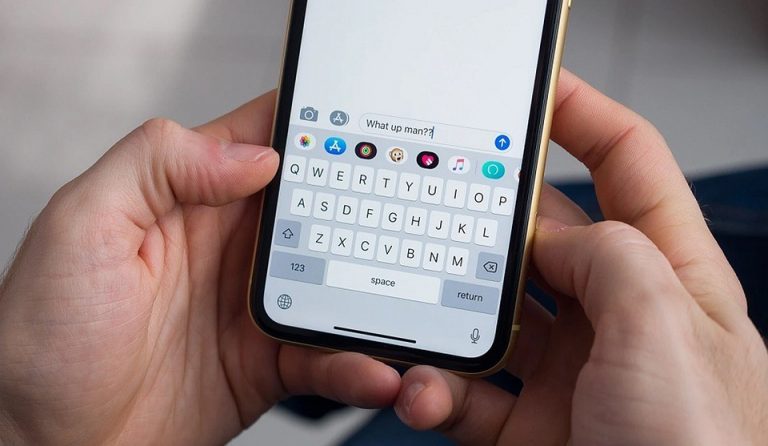
Speech Notes Speech notes handily converts your speech to text with ease. The major feature that makes it stand out against its rivals is the keyboard it offers. Generally, it’s very difficult to add punctuations and emojis during a speech to text conversion, but with its keyboard, it gets really easy for users to add them. It comes with a continuous recording feature thus one saves a lot of time. You can just go on speaking and the app will convert all your golden words to text. Bluetooth and widget support make this app one of the best in this segment.  Download from here Read Also: Apple Music released the ‘Saylists’ feature to assist people with Speech Sound Disorder (SSD)

2. Voice Notes

Voice Notes Voice Notes specializes in short note taking. It basically records the audio first, then saves the file, and then converts it. This two-way process helps the user to either read the text or listen to the audio on the go. The app has tons of editing and customization options like it can edit text and mark them separately. Also, the theme of the app can be customised. Download from here

3. Speech to Text

  Speech to Text It is the most basic app in the list and does what it says, converts the speech into text. The user interface is minimalistic and the app is really very easy to use. In case you are looking for an app with no extra confusing features, minimalistic looks, and design, which performs the only basic conversion process, then your search ends here. This app is highly recommended. Download from here

4. Voice Notebook

Voice Notebook   Voice Notebook is a full-fledged smart speech to words conversion app with tons of smart features like changing the punctuation and words from its local dictionary. It automatically capitalises the first letter of the speech and also works well offline. It accepts the input with a trigger button and the converted data can be shared online on all platforms. Download from here Read Also: 15 Microsoft Word keyboard shortcuts every beginner should know and use

5. Google Assistant

Google Assistant Google assistant is the smartest AI assistant in the market with top of the class features. Google Assistant is not an application just for the specific reason of converting speech to text, but for many other things. However, it is understandable how good a job it does when it comes to accepting your voice commands and properly executing them into text. Not only does Google Assistant accept voice commands it can also make notes for you, set reminders, and will be helpful for you to perform day to day tasks without ever pressing a button on the keyboard. Download from here  For the latest gadget and tech news, and gadget reviews, follow us on Twitter, Facebook and Instagram. For newest tech & gadget videos subscribe to our YouTube Channel. You can also stay up to date using the Gadget Bridge Android App. You can find the latest car and bike news here.
Samsung Galaxy A12 powered by Exynos 850 SoC launched in India

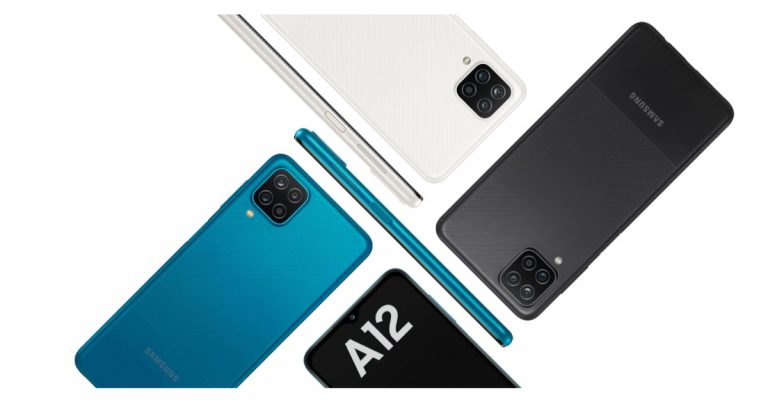
The all-new model of Samsung Galaxy A12 with the company’s own Exynos mobile processor has been launched today in India. To recall, the South Korean mobile manufacturer introduced the smartphone with a similar name but with a MediaTek processor. The new variant is powered by Exynos 850 SoC and it was earlier launched in Russia with different branding namely Galaxy A12 Nacho. The phone runs on One UI core on top of Android 11. It has a quad rear camera setup and packs a  5,000mAh battery.

Samsung Galaxy A12 price and availability

The price of the Samsung Galaxy A12 is set at Rs 13,999 for the base 4Gb RAM with a 64GB storage variant. Whereas the 6GB RAM with 128GB storage comes at Rs 16,499. The device will be available in three colour options of Black, Blue, and White and can be purchased via the company’s official website in the country. Samsung Galaxy A12 powered by Exynos 850 SoC launched in India To recollect, Samsung Galaxy A12 debuted in India in February this year. It was launched in two different configurations of 4GB RAM with 64GB storage option and 4GB RAM with 128GB storage option which is now available at Rs 13,999 and Rs 14,999 respectively.

Samsung Galaxy A12 tech specs

Samsung Galaxy A12 features a 6.5-inch HD+ TFT Infinity-V Display with 720×1,600 pixels of resolution. It runs on One UI Core on top of Android 11. Under the hood, there is an octa-core Exynos 850 SoC paired with 6GB of RAM and 128GB of storage  The internal storage can be expanded up to 1TB using a microSD card. Also Read: Samsung Galaxy A12 Review: A good day to day budget handset 
For the cameras, Samsung Galaxy A12 features a quad rear camera setup that includes a 48-megapixel primary sensor with f/2.0 aperture. In addition to this, there is a 5-megapixel ultra-wide-angle lens with  f/2.2 aperture, a 2-megapixel macro lens with  f/2.4 aperture and lastly a  2-megapixel depth sensor with an f/2.4 aperture. On the front, there is an 8-megapixel selfie sensor with an f/2.2 aperture.
The new handset is backed by a 5,000mAh battery with a 15W fast charging via a USB Type-C port. In terms of connectivity, there is LTE, Wi-Fi, Bluetooth, GPS, and a 3.5mm headphone jack. The sensors on the phone include a side-mounted fingerprint sensor, an accelerometer, ambient light, magnetometer, and proximity sensor.  For the latest gadget and tech news, and gadget reviews, follow us on TwitterFacebook and Instagram. For newest tech & gadget videos subscribe to our YouTube Channel. You can also stay up to date using the Gadget Bridge Android App. You can find the latest car and bike news here.

How to join missed Whatsapp video calls?

Whatsapp owned by Facebook is the most popular messenger app in the world with billions of people using it. It has a new feature up its sleeve (called missed Whatsapp video calls), which many people were eagerly waiting for. They have a habit of upgrading their platform and re-joining missed video calls is one of the latest.

About the feature

Earlier, if the user’s call dropped on WhatsApp for some reason he/she had to ask other members in the call to add them again. But after this new update, things have changed. In this case, now If the user missed a video call or a voice call or for some, the call is dropped, the user can simply rejoin if the ongoing session is still active. This is a great feature and we for one quite like it. This is how you can join a missed video call on WhatsApp.

How to use the missed Whatsapp video calls feature:

Step 1 – Head to the calls panel in WhatsApp, the ongoing calls will be highlighted

Step 2 – select the call you want to join, a panel consisting of the information of the call like people who are currently active and who are yet to join will be mentioned

WhatsApp Call

Step 3 – click the “join” button and you will be able to re-enter the session.

missed Whatsapp video calls Whatsapp has been really listening to its consumers and adding these great useful features. These features seem to be following the online meeting apps and software approach and would be really helpful especially during this pandemic time. There are more new features like disappearing messages etc, also being added to WhatsApp. They are still in beta stages and will be out soon. Do keep a lookout for that if you want SnapChat like features in your WhatsApp.  For the latest gadget and tech news, and gadget reviews, follow us on Twitter, Facebook and Instagram. For newest tech & gadget videos subscribe to our YouTube Channel. You can also stay up to date using the Gadget Bridge Android App. You can find the latest car and bike news here

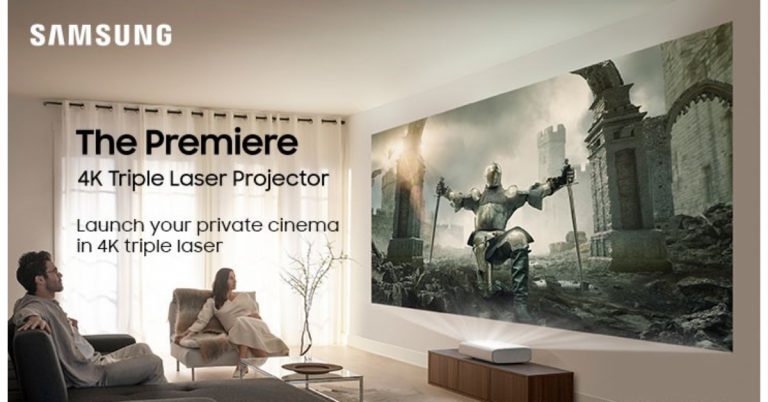
Samsung launched The Premiere 4K Ultra Short Throw Laser Projector in India

The South Koran electronics brand, Samsung, has introduced a premium range of The Premiere projector keeping in mind the growing demand for projectors in India. The range includes two models Samsung LSP7T and LSP9T. To recall Samsung The Premiere projector was launched last year and is now being brought to the country. This will offer you a big-screen private cinema experience in the comfort of your home during pandemic times.  The Premiere’ 4K Ultra Short Throw Laser Projector has been ergonomically designed which comes with a compact form factor and space-saving design that blends perfectly into a variety of settings and arrangements in your living space. You can place it on a   coffee table or chest of drawers at just a fist-sized distance (11.3 cm) away from the wall to project a high-quality screen of up to 130-inch creating a big-screen private cinema experience anywhere in your home. In addition to this, it has rounded edges and a fabric finish to give it an aesthetic look and the Samsung projector is easy to install and comes with built-in woofers and built-in room-filling surround sound experience with Acoustic Beam technology so that no additional sound devices are required for an immersive experience. The feature provides up to 40W and 4.2 channel sound for the LSP9T and an output of 30W and 2.2 channel experience for the LSP7T.   The Premiere will be available in up to 130-inch and 120-inch screen size models – LSP9T(Triple Laser-enabled model) and LSP7T (a Single Laser-enabled model) respectively. It supports a laser-powered 4K picture resolution. The former is an HDR10+ certified projector with triple laser technology which delivers revolutionary contrast details as the user watches from bright to dark scenes with a peak brightness of up to 2,800 ANSI lumens. The Premiere The Premiere comes with a full smart TV experience through access to all kinds of content when connected to the Internet such as Netflix, YouTube and Amazon Prime, and music streaming services where popular sports podcasts can be found including Apple Music and Spotify. One can even search for the content you want to watch using voice recognition. The Projectors also work with Bixby, Amazon Alexa and Google Assistant to make your life easier. According to the company, the LSP9T model of The Premiere is available at Rs 6,29,900 while the LSP7T is available at Rs 3,89,900. The Samsung projectors can be purchased via the company’s official online store, Samsung Shop and at select Samsung Smart Plazas. Early bird consumers will get complimentary Amazon Echo Plus when buying any of the two models from Samsung’s official online store.  For the latest gadget and tech news, and gadget reviews, follow us on TwitterFacebook and Instagram. For newest tech & gadget videos subscribe to our YouTube Channel. You can also stay up to date using the Gadget Bridge Android App. You can find the latest car and bike news here.