In This Article
Display
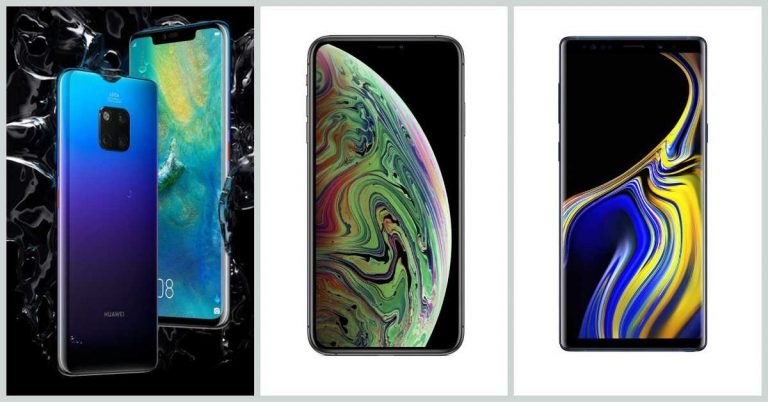
 Huawei Mate 20 Pro: 6.39-inch QHD+ curved OLED display
Apple iPhone XS Max: 6.5-inch OLED HDR Super Retina display
Samsung Galaxy Note 9: 6.4-inch Super AMOLED Quad HD+ Infinity screen
Huawei Mate 20 Pro: 6.39-inch QHD+ curved OLED display
Apple iPhone XS Max: 6.5-inch OLED HDR Super Retina display
Samsung Galaxy Note 9: 6.4-inch Super AMOLED Quad HD+ Infinity screen
Processor
 Huawei Mate 20 Pro: HiSilicon Kirin 980 processor
Apple iPhone XS Max: A12 Bionic processor
Samsung Galaxy Note 9: Qualcomm Snapdragon 845 processor
Huawei Mate 20 Pro: HiSilicon Kirin 980 processor
Apple iPhone XS Max: A12 Bionic processor
Samsung Galaxy Note 9: Qualcomm Snapdragon 845 processor
Primary camera
 Huawei Mate 20 Pro: 40MP primary wide-angle sensor + 20MP ultra wide angle sensor + 8MP 3X telephoto sensor
Apple iPhone XS Max: 12MP wide-angle lens + 12MP telephoto lens
Samsung Galaxy Note 9: Dual rear camera setup with 12MP telephoto and wide angle sensors
Huawei Mate 20 Pro: 40MP primary wide-angle sensor + 20MP ultra wide angle sensor + 8MP 3X telephoto sensor
Apple iPhone XS Max: 12MP wide-angle lens + 12MP telephoto lens
Samsung Galaxy Note 9: Dual rear camera setup with 12MP telephoto and wide angle sensors
Selfie camera
 Huawei Mate 20 Pro: 24MP RGB selfie camera
Apple iPhone XS Max: 7MP TrueDepth camera
Samsung Galaxy Note 9: 8MP autofocus camera
Huawei Mate 20 Pro: 24MP RGB selfie camera
Apple iPhone XS Max: 7MP TrueDepth camera
Samsung Galaxy Note 9: 8MP autofocus camera
RAM and storage
 Huawei Mate 20 Pro: 6GB of RAM and 128GB of onboard storage.
Apple iPhone XS Max: 64GB, 256GB, and 512GB storage options.
Samsung Galaxy Note 9: 6GB RAM/128GB internal storage and 8GB RAM/512GB onboard storage.
Huawei Mate 20 Pro: 6GB of RAM and 128GB of onboard storage.
Apple iPhone XS Max: 64GB, 256GB, and 512GB storage options.
Samsung Galaxy Note 9: 6GB RAM/128GB internal storage and 8GB RAM/512GB onboard storage.
Support for microSD card
 Huawei Mate 20 Pro: Up to 256GB (nano memry card).
Apple iPhone XS Max: No microSD card slot
Samsung Galaxy Note 9: Up to 512GB
Huawei Mate 20 Pro: Up to 256GB (nano memry card).
Apple iPhone XS Max: No microSD card slot
Samsung Galaxy Note 9: Up to 512GB
Battery
 Huawei Mate 20 Pro: 4,200mAh battery
Apple iPhone XS Max: Lasts up to one and a half hours longer than iPhone X.
Samsung Galaxy Note 9: 4,000mAh battery
Huawei Mate 20 Pro: 4,200mAh battery
Apple iPhone XS Max: Lasts up to one and a half hours longer than iPhone X.
Samsung Galaxy Note 9: 4,000mAh battery
Operating system
 Huawei Mate 20 Pro: Android 9.0 Pie skinned with EMUI 9.0.
Apple iPhone XS Max: iOS 12
Samsung Galaxy Note 9: Android 8.1 Oreo
Huawei Mate 20 Pro: Android 9.0 Pie skinned with EMUI 9.0.
Apple iPhone XS Max: iOS 12
Samsung Galaxy Note 9: Android 8.1 Oreo
Price
 Huawei Mate 20 Pro: Rs 69,990
Apple iPhone XS Max: The 64GB storage variant costs Rs 1,09,900, 256GB variant is available at Rs 1,24,900 and 512GB variant is priced at Rs 1,44,900.
Samsung Galaxy Note 9: The 6GB RAM/128GB internal storage version costs Rs 67,900 and the 8GB RAM/512GB storage variant is priced at Rs 84,900.
For the latest gadget and tech news, and gadget reviews, follow us on Twitter, Facebook and Instagram. For newest tech & gadget videos subscribe to our YouTube Channel.
[td_smart_list_end]
Huawei Mate 20 Pro: Rs 69,990
Apple iPhone XS Max: The 64GB storage variant costs Rs 1,09,900, 256GB variant is available at Rs 1,24,900 and 512GB variant is priced at Rs 1,44,900.
Samsung Galaxy Note 9: The 6GB RAM/128GB internal storage version costs Rs 67,900 and the 8GB RAM/512GB storage variant is priced at Rs 84,900.
For the latest gadget and tech news, and gadget reviews, follow us on Twitter, Facebook and Instagram. For newest tech & gadget videos subscribe to our YouTube Channel.
[td_smart_list_end] 



 This one is already very popular and chances are that you may have tried it. On downloading the app, you can be a part of a live trivia game quiz where you have to answer questions in real time. If you answer a question incorrectly, you get eliminated. However, if you don’t and you do answer all the questions correctly, you win cash that is directly added to your Paytm wallet.
 With Google Opinion Rewards, the technology giant sends out a survey to you every few days and you get paid for answering questions. Once a survey is rolled out, you have 24 hours to answer it. However, you should know that the first survey is made to test if the user is answering questions attentively or not. So do read the questions carefully before you answer. Once you complete a survey you will get rewarded with money in the form of credit that you can spend on the Google Play Store.
 This is actually a keyboard app. Once you install it, you will get a push notification to view ads. And each time you view an advertisement, the app adds Re 1 in your Keettoo account. You can link your Paytm or Mobikwik wallet with the app to redeem the cash there.
 This app pays you to see promoted content on your locked screen. Yes, you read that right. But on the upside, once you sign up, you can actually select your lockscreen theme. After this, each time your phone is locked, you will see promoted content related to the theme you picked. You can then either swipe right to unlock your device and left to get more information about the ad. You get Carats each time you see an ad, which can be redeemed via PayPal every fifteen days. (1000 Carats = $1).
 If you read news and like to keep yourself updated, or you just happen to browse the interest every now and then, you would be happy to know that you can actually get paid for it. Yes, you read that right. Mcent actually pays you if you its browser instead of the one on your phone and for reading articles and watching videos curated by it. You can use the points that you collect to get your phone number recharged.
 CashKaro is an app that is popular for the kind of cashbacks that it gives its users. So if you are an avid online shopper, visit the website you want to shop on via CashKaro. When you complete your shopping, CashKaro will credit you with cashback in your account.
 CashApp is an app with which you can make money online easily by trying out new apps, completing surveys, giving opinions testing new services, etc. The app doesn’t give any gift cards or discounts, but transfers money directly in your PayPal account.
 This one is for the gamer in you. You can participate in tournaments of your favourite games via the app and earn money when you win. There are a number of games that you can choose from if you download the app. Furthermore, you can withdraw the money directly in your bank account or Paytm.
 If you love photography, then you should definitely download Clashot. You can sell your photos to Depositphotos via the app and make money out of it. The app also at times sends offers to click and upload photos on a particular theme. These can be profitable for users as the price users get for uploading photos of a specific theme is higher than what they normally get.


![[Video] This Week In Tech: Episode 5 (November 19 – November 25)](https://www.gadgetbridge.com/wp-content/uploads/2018/11/maxresdefault-5-768x432.jpg "[Video] This Week In Tech: Episode 5 (November 19 – November 25)")


 The first change that you should know about the Season 4 of PUBG Mobile is the fact that it makes all the players start from the beginning. So, it doesn’t matter if you are a newbie or a pro, you would have to start achieving your ranks from the start.
 A new Royale Pass has been introduced in the game. On purchasing it, players can get additional benefits like firearm finishes, character faces, hairstyles and some rare outfit rewards.
 The season 4 has added a new rifle called M762. It is the first ever rifle to use 7.62mm rounds and can be found in all maps of the game.
 The maps of PUBG Mobile have been upgraded for season 4 of the game. They now come with dynamic weather, so they’ll randomly shift between sunny, foggy and rainy. The developers have also added a new scooter which can be found in the Sanhok map.
 In PUBG Mobile Season 4, you will also find a new Hadcore Mode. In order to go to this mode, you can head to the Arcade Mode. There, the new Hardcore Mode is made available periodically in the form of ‘Hardcore Week’. The mode takes the difficulty of the game to a different level by removing all the audio cues for footsteps.
 In order to access the season four of PUBG Mobile, you will have to download a new update of the game that is available. Look for the version 0.9.5 update of PlayerUnknowns’ Battlegrounds if you want to play the new season of the game.
 A good thing about the update of the game is that it has reached both Android and iOS devices at the same time. So no one would feel like they are lagging behind.
 If you wish to download the update to PUBG Mobile, visit Google Play Store or Apple App store. There, search for PUBG Mobile and then click for the game’s listing. On clicking it, you will be taken to the page that has been dedicated for the game. After reaching there, you should click ‘Install’ and the game will be downloaded on your device.
 It is worth noticing that PUBG’s 0.9.5 update is 138MB in size. So you should make sure that you download it on Wi-Fi, or else you will end up losing a lot of mobile data.
 Heavy discounts are available for players during Black Friday. In fact, if you are an Elite Pass holder, you can pay for the discounted items using BP or RP points.