![Best YouTube Editing Software for Windows, Mac and Mobile Devices [2022 Round-Up]](https://www.gadgetbridge.com/wp-content/uploads/2022/09/video-editing-768x402.jpg "Best YouTube Editing Software for Windows, Mac and Mobile Devices [2022 Round-Up]")
In This Article
Best YouTube Editing software for Windows
Beginning our discussion with the best YouTube editing software for Windows, let us check out a few prime options that can prove to be handy.Filmora Video Editor
 As a powerful option to assist you in creating wonderful YouTube videos, Filmora video editor is quite impressive and a captivating tool that can handle a wide range of video editing tasks. Simply drag and drop feature makes it a perfect choice for beginners to get started, and the built-in features like Split Screen, Motion Tracking, Auto Reframe, and Green Screen on Filmora video editor make it stand apart from the competition.
The video effects from Boris FX Continuum and NewBlue FX should make it a great addition, along with a rich library of effects in Filmstock. The new add-ons can provide you full-fledged professional video effects and enhance your creativity levels & production value.
Moreover, the feature- Speed ramping lets you change the speed of your video in tune with the keyframes. This can go a long way in helping you in creating unique cinematic effects. The professional speed effects on Filmora include Montage, Hero moment, Bullet Time, Jumper, and Flash in.
Filmora can be the best choice for YouTube creators and editors who are just starting out and do not have any video editing skills. With Instant Mode in Filmora, you can simply add media and it takes care of all the tasks involved. In addition, the speech-to-text function allows transcribing voice to subtitles directly, which saves much time.
As a powerful option to assist you in creating wonderful YouTube videos, Filmora video editor is quite impressive and a captivating tool that can handle a wide range of video editing tasks. Simply drag and drop feature makes it a perfect choice for beginners to get started, and the built-in features like Split Screen, Motion Tracking, Auto Reframe, and Green Screen on Filmora video editor make it stand apart from the competition.
The video effects from Boris FX Continuum and NewBlue FX should make it a great addition, along with a rich library of effects in Filmstock. The new add-ons can provide you full-fledged professional video effects and enhance your creativity levels & production value.
Moreover, the feature- Speed ramping lets you change the speed of your video in tune with the keyframes. This can go a long way in helping you in creating unique cinematic effects. The professional speed effects on Filmora include Montage, Hero moment, Bullet Time, Jumper, and Flash in.
Filmora can be the best choice for YouTube creators and editors who are just starting out and do not have any video editing skills. With Instant Mode in Filmora, you can simply add media and it takes care of all the tasks involved. In addition, the speech-to-text function allows transcribing voice to subtitles directly, which saves much time.
Sony Vegas Pro
 If you are a Windows user looking for one of the advanced video editing tools, Sony Vegas Pro can be a good option. The interface of the tool is not much intuitive, and that can be a concern for beginners. However, you would find Sony Vegas Pro comes with plenty of advanced video editing options. The multi-cam video editing on the tool should further make it the right one for YouTube videos. The features such as Auto White Balance and Masking tools help you make creative videos.
The less modern look on the video editor for Windows may make it less suited when compared to the effects and options on Filmora. The tool has several advanced features, but understanding them and figuring out each of them takes some time.
If you are a Windows user looking for one of the advanced video editing tools, Sony Vegas Pro can be a good option. The interface of the tool is not much intuitive, and that can be a concern for beginners. However, you would find Sony Vegas Pro comes with plenty of advanced video editing options. The multi-cam video editing on the tool should further make it the right one for YouTube videos. The features such as Auto White Balance and Masking tools help you make creative videos.
The less modern look on the video editor for Windows may make it less suited when compared to the effects and options on Filmora. The tool has several advanced features, but understanding them and figuring out each of them takes some time.
Adobe Premier Pro
 Adobe Premier Pro is one of the excellent options for helping you in terms of an advanced YouTube video editing tool. Known to be the industry’s standard option, Adobe Premier Pro is used by professional filmmakers for creating and editing their videos. Thus, it might not be a good choice for quick and simple edits. You would find it a little harder and tougher choice for the on-the-go edits, especially without any editing skills.
The improved mercury engine for playing your videos would make it stand apart from the rest. The latest and advanced video editing options available on the tool would make it truly wonderful. But, the expensive price tag can perhaps make it a little disappointing for the YouTubers who may not be able to afford it.
Adobe Premier Pro is one of the excellent options for helping you in terms of an advanced YouTube video editing tool. Known to be the industry’s standard option, Adobe Premier Pro is used by professional filmmakers for creating and editing their videos. Thus, it might not be a good choice for quick and simple edits. You would find it a little harder and tougher choice for the on-the-go edits, especially without any editing skills.
The improved mercury engine for playing your videos would make it stand apart from the rest. The latest and advanced video editing options available on the tool would make it truly wonderful. But, the expensive price tag can perhaps make it a little disappointing for the YouTubers who may not be able to afford it.
The best YouTube editing software for Mac
Moving on to Mac, we will handpick a few good YouTube editing software options available on Mac.iMovie
 iMovie has been one of the prime options for YouTube editing software on Mac and iOS devices. The fact that it is free for the Mac systems makes it one of the most popular video editors ever. You can have a few basic video editing features, and that may not make it the right option for those of you looking for advanced YouTube video editing. The free video editing software can even fix a shaky video perfectly enough.
iMovie is available only for Mac and iOS users, and that can make it a little limited in terms of its application. If you are on Windows, you will be left out. Moreover, it also lacks support for a few formats.
iMovie has been one of the prime options for YouTube editing software on Mac and iOS devices. The fact that it is free for the Mac systems makes it one of the most popular video editors ever. You can have a few basic video editing features, and that may not make it the right option for those of you looking for advanced YouTube video editing. The free video editing software can even fix a shaky video perfectly enough.
iMovie is available only for Mac and iOS users, and that can make it a little limited in terms of its application. If you are on Windows, you will be left out. Moreover, it also lacks support for a few formats.
Final Cut Pro
 Final Cut Pro is a professional YouTube video editor for Mac users. The high-end video editing capabilities on the tool would make it stand apart from the rest. It is known explicitly for nonlinear and non-destructive video editing. The latest version even supports 4K and 5K recordings on your Mac.
The video editor definitely comes with an advanced set of features. Still, the only shortcoming is that it is available only on Mac devices and is not supported on Windows.
Final Cut Pro is a professional YouTube video editor for Mac users. The high-end video editing capabilities on the tool would make it stand apart from the rest. It is known explicitly for nonlinear and non-destructive video editing. The latest version even supports 4K and 5K recordings on your Mac.
The video editor definitely comes with an advanced set of features. Still, the only shortcoming is that it is available only on Mac devices and is not supported on Windows.
The best YouTube editing software for Android & iOS
Having gone through the best YouTube video editing tools for Windows and Mac devices, let us check out the best options available on smartphones.Filmora Go
 Filmora Go is a suitable solution for both Android and iOS devices alike, making it a complete solution for your YouTube video editing efforts. Designed to make video editing excellently easy everywhere and anywhere, FilmoraGo should definitely make it a truly powerful choice ever. It offers you a very simplified process wherein you can shoot, edit, share and do everything on a single app.
The transitions available on FilmoraGo would make it easy to edit your YouTube videos on the move. A good range of tools, multiplatform compatibility, and storage options are a few features that would make it stand apart from the rest of the tools in its genre.
Filmora Go is a suitable solution for both Android and iOS devices alike, making it a complete solution for your YouTube video editing efforts. Designed to make video editing excellently easy everywhere and anywhere, FilmoraGo should definitely make it a truly powerful choice ever. It offers you a very simplified process wherein you can shoot, edit, share and do everything on a single app.
The transitions available on FilmoraGo would make it easy to edit your YouTube videos on the move. A good range of tools, multiplatform compatibility, and storage options are a few features that would make it stand apart from the rest of the tools in its genre.



 Step 3:
 Step 4:
 Step 3:
 Step 4:
 Step 5:















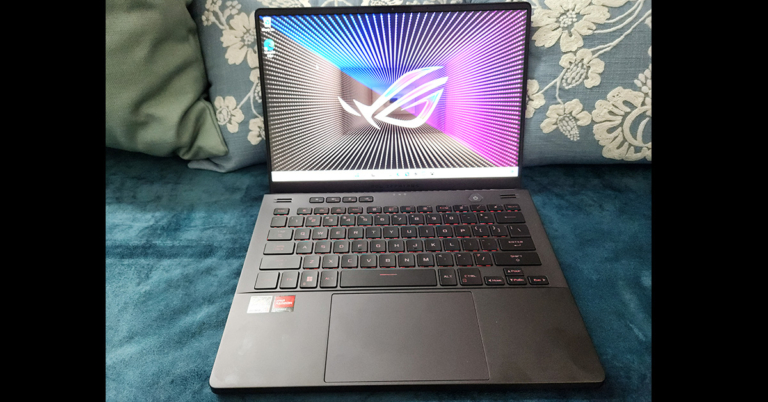
 With the large keyboard users also get a big trackpad. This is very comfortable to use and responds well to every click, swipe and tap. Since it is a ROG laptop, the trackpad does not double up as the NUM Pad, which is the case with the ZenBook series from Asus.
Moving to its display,
With the large keyboard users also get a big trackpad. This is very comfortable to use and responds well to every click, swipe and tap. Since it is a ROG laptop, the trackpad does not double up as the NUM Pad, which is the case with the ZenBook series from Asus.
Moving to its display,  Asus has also put an HD Web Cam on the laptop, which is a welcomed change. As for the ports, the Asus ROG Zephyrus G14 2022 gaming notebook comes with two USB 3.2, two USB Type-C gen 2, one HDMI, one audio/mic combo and a MicroSD card reader located on the left and right sides.

 Over that, the machine also sports quad speakers. Two are upward-firing speakers located just above the keyboard and two are downward-firing speakers that are located at the front bottom. These are tuned by Dolby Atmos and the sound is very very good with them. We would not be wrong if we call them twice as loud over the last generation of G14 by Asus.

 Together, the machine can put some of the best gaming computers shy away in shame. Asus has managed to put so much firepower in such a small form factor. To put it to the ultimate test we played Battlefield 2042 on the machine at the highest settings and to our amazement, it performed just right. There was hardly any frame drop and we got consistent 60-70 frames per second.
 Read Also:
  But hey, most of us will not be gaming on it without using the power supply (240W). Which, can fast charge it to 50% in under 30 minutes. On the flip side, this machine is very luggable at just 1.72Kg. Many would just want to pick it up as a work cum gaming buddy on the fly. For the OS needs, Windows 11 Home edition is what users will get. We were hoping to see the Pro version in it. Also in the box, you get a nice ZIP pouch to carry it around. And lastly, it is available in two colours – white or black. You can pick the one you like the best.