In This Article
Poco F4 Review: Design and Display
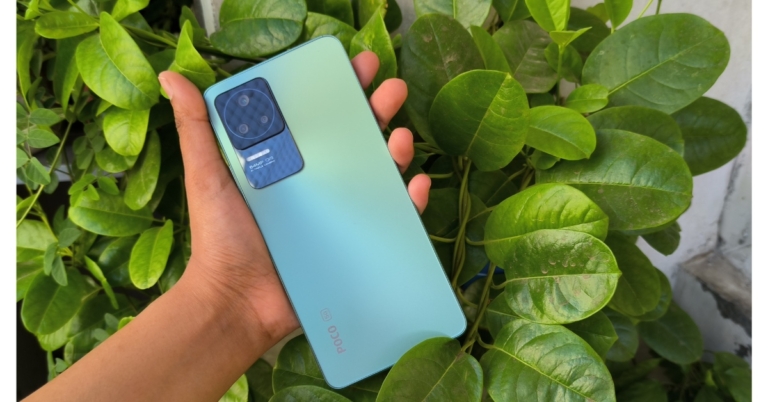
The Poco F4 design is similar to the Redmi Note 11 Pro and several current Vivo phones. The plastic frames, boxy form, and glass panels are all comparable. The grip is also fairly great because of the build, which also makes the in-hand feel quite comfortable. It has square edges and a flat form factor. The phone appears to be light and compact, and unlike other Poco phones, it does not sport a significantly large camera module. It has a very minimalistic design that is really attractive. The Poco F4 lacks a headphone jack, but the business offers a 3.5 headphone dongle in the box. Along with a volume rocker, a side-mounted fingerprint sensor is integrated inside the power button. The fingerprint sensor functions properly. But considering its cost, we would have appreciated an in-display sensor. We also observed that the vibration strength was somewhat skimpy.
 The 6.67-inch full-HD+ E4 AMOLED screen on the Poco F4 5G stands out thanks to its 1,080 x 2,400-pixel resolution. In order to reduce response latency, the screen has a refresh rate of 120Hz and a touch sampling rate of 360Hz. 1,300 nit maximum screen brightness, 5,000,000:1 contrast ratio. DCI-P3 colour gamut, HDR10+ on Amazon Prime Video, Dolby Vision support on Netflix, and Corning Gorilla Glass 5 protection is also included with the panel.
 In addition to the design, the Poco F4’s display is another feature we particularly enjoyed. The contrast is excellent, the colours are vibrant, and the touch sensitivity is excellent. Even outside in the direct sun, we have not experienced any problems with brightness levels. While the auto brightness sensor performs excellently, the display is also loaded with many features.
 As we’ve already mentioned, the E4 panel is supported by MEMC. (For those who don’t know, MEMC is a feature that artificially increases the overall number of frames in a scene, making the content you’re seeing look smooth. It does this by artificially adding frames in the middle of two other frames.)
We had a terrific time using this phone to listen to music because of its dual speakers, which sound great. It is a really pleasant experience to watch content on this screen because they are loud, the voices are clear, and there is no distortion at the greatest volume.
As we’ve already mentioned, the E4 panel is supported by MEMC. (For those who don’t know, MEMC is a feature that artificially increases the overall number of frames in a scene, making the content you’re seeing look smooth. It does this by artificially adding frames in the middle of two other frames.)
We had a terrific time using this phone to listen to music because of its dual speakers, which sound great. It is a really pleasant experience to watch content on this screen because they are loud, the voices are clear, and there is no distortion at the greatest volume.
Poco F4 Review: Performance and Cameras
The performance on the Poco F4 is up next, and it was rather fascinating. Poco F4 5G’s Snapdragon 870 SoC and up to 12GB of LPDDR5 RAM are its power sources. The device offers UFS 3.1 storage with a maximum capacity of 256GB. This is the same chipset that was used on the Poco F3, which was unsuccessful in entering the Indian market. The highly dependable Snapdragon 870 chipset delivers quick performance on phones in the upper mid-range price range. Almost all difficult tasks can be handled with Poco F4 without any problems. Call of Duty plays without a hitch at mid-high settings, and even playing graphically demanding games is not a problem. The phone does become warm, but that is not much of a problem because it comes with a new vapour chamber that is doing a pretty good job here. So our gaming sessions with the Poco F4 were top-notch.
The Poco F4’s operating system is Android 12 with MIUI 13 on top. We occasionally experienced UI stutters while using it, but nothing that can be called as a con.
Almost all difficult tasks can be handled with Poco F4 without any problems. Call of Duty plays without a hitch at mid-high settings, and even playing graphically demanding games is not a problem. The phone does become warm, but that is not much of a problem because it comes with a new vapour chamber that is doing a pretty good job here. So our gaming sessions with the Poco F4 were top-notch.
The Poco F4’s operating system is Android 12 with MIUI 13 on top. We occasionally experienced UI stutters while using it, but nothing that can be called as a con.
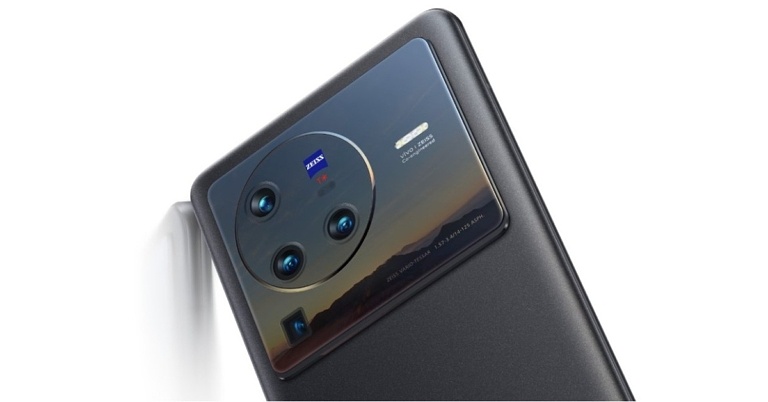
 The smartphone has three back cameras. First with a 64-megapixel main sensor and optical image stabilisation (OIS), and an f/1.8 aperture. The camera setup also includes an 8-megapixel ultra-wide camera and a 2-megapixel macro camera. For selfies and video calls, it also boasts a 20-megapixel front camera sensor with an f/2.4 lens.
 OIS enables the 64-megapixel primary sensor to produce extremely sharp photos. With adequate lighting, this phone can produce some great quality images. The Poco F4’s output will satisfy you if you prefer images with good contrast.
 Portraits taken with a phone are very Instagram-worthy. Nonetheless, the human subject does appear to have been slightly smoothened in some shots. Overall, you will generally receive great pics.

 Although the ultra-wide images have not particularly pleased us. The prevalent colour reproductions and detail levels are just about ok, and we did note some distortion at the corners.
Given its pricing and the bracket it is in, its selfies are could have been better. They appear a little too dull and overly smoothed in our opinion. Hope the next software update will take care of this.
Poco F4 does not let down in terms of videography. The primary lens can capture video up to 4K@60 frames per second. Despite the fact that the videos are of decent quality, they are not particularly stable. Therefore, if you like results that are more stable, we advise switching to 4K 30FPS or 1080p resolution. Here the results are much-much better.
As for the battery life, we found it to be quite decent. We were able to acquire a bit more than 5 hours of screen on time, which is above normal for a 5,400mah battery phone. The 67W fast charger that is included in the box allows the phone to charge in about 50 minutes. Which is a brilliant thing to have, as some of its competitors are omitting the charger and you have to buy them separately, but not with Poco.
Although the ultra-wide images have not particularly pleased us. The prevalent colour reproductions and detail levels are just about ok, and we did note some distortion at the corners.
Given its pricing and the bracket it is in, its selfies are could have been better. They appear a little too dull and overly smoothed in our opinion. Hope the next software update will take care of this.
Poco F4 does not let down in terms of videography. The primary lens can capture video up to 4K@60 frames per second. Despite the fact that the videos are of decent quality, they are not particularly stable. Therefore, if you like results that are more stable, we advise switching to 4K 30FPS or 1080p resolution. Here the results are much-much better.
As for the battery life, we found it to be quite decent. We were able to acquire a bit more than 5 hours of screen on time, which is above normal for a 5,400mah battery phone. The 67W fast charger that is included in the box allows the phone to charge in about 50 minutes. Which is a brilliant thing to have, as some of its competitors are omitting the charger and you have to buy them separately, but not with Poco.
Verdict
Although there are a few software glitches here and there, those should be fixed in a future update. Further, the smartphone delivers a pretty wonderful display and multimedia experience in addition to having a sufficiently good overall photography and gaming performance. As a result, it’s almost a mid-range phone for everyone. After weighing the Poco F4’s advantages and disadvantages, we would unquestionably suggest it to anyone searching for a mid-range phone, very suitable for gaming and daily needs.Poco F4 Pros
- Good Cameras
- Excellent display
- Handles graphically demanding games well
- No heating issue found
Poco F4 Cons
- Some Software glitches
- Dull Selfies


 Step 3:
 Step 2:
 Step 3:
 Step 4:



 Wondershare Recoverit is a powerful data recovery tool that assists you in restoring deleted, formatted, lost and corrupted files with ease. Available on Windows and Mac, the tool has been regarded as one of the most prominent options ever.
Some of the prime factors offered by Recoverit Data Recovery can include
Wondershare Recoverit is a powerful data recovery tool that assists you in restoring deleted, formatted, lost and corrupted files with ease. Available on Windows and Mac, the tool has been regarded as one of the most prominent options ever.
Some of the prime factors offered by Recoverit Data Recovery can include

 You can even select the specific file type or file path as per your preferences. If you know the exact location of the file you want to recover, you can choose the right file or folder.
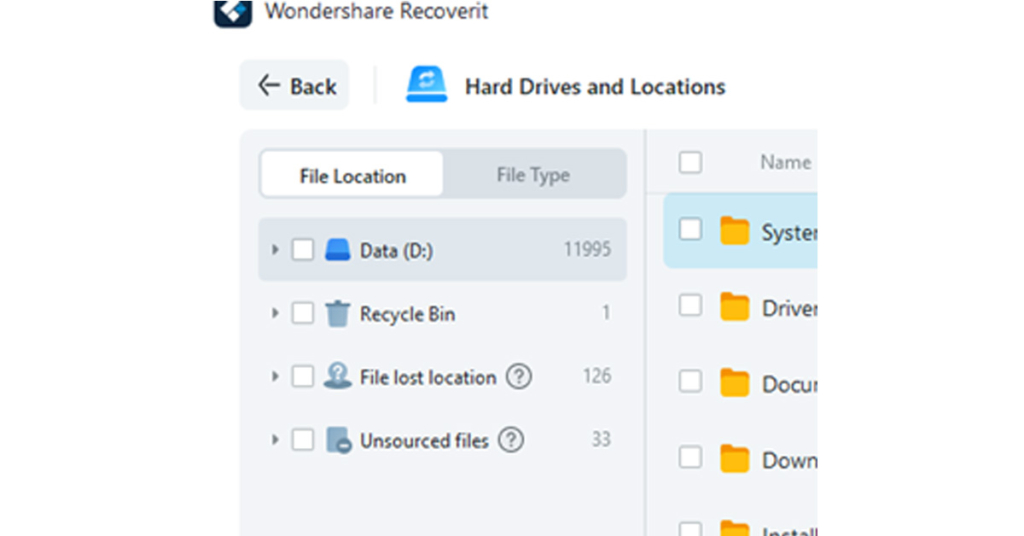
 You can also decide to choose multiple files to recover and restore simultaneously.









 Step 2:
 Step 3:
 Step 3:
 Step 4:

 Step 2:
 Step 3:
 Step 4:



 Step 1:
 Step 3:
 Step 4:
 Step 5:
 Step 6:

 Step 2:
 Step 3:
 Step 4:

 Restarting your phone can fix any temporary glitches or background issues that may be preventing Snapchat (or other apps) from working properly. This should be the first step you take towards fixing any issue with your phone. To restart your phone, long press the side key and select ‘Restart’ from the power options menu. If the side key triggers Google Assistant on your device, press and hold the side key and volume up button together to access the power options.

 If there’s nothing wrong with your internet connection or Snapchat’s servers, you may want to try logging out and then logging back into Snapchat. Don’t worry, this won’t clear any of your saved messages. If there’s a glitch in your account, this method will fix it. To log out of Snapchat, tap on your Bitmoji at the top right corner of the screen. Then, tap on the gear icon to go to settings, scroll all the way down and select ‘Log Out’. You can log back in using your Snapchat username, phone number (if registered), or email address.


 This method is only useful if you’re unable to send messages or snaps to a particular user. If the messages are stuck on ‘Pending’, it may mean that the user has blocked you. Check out this article to know more. However, if your messages are stuck in the process of being sent, clearing the conversation may help. To do so, tap on your Bitmoji at the top right corner of the screen and go to settings. Scroll down and select ‘Clear Conversations’, then tap the cross icon next to the conversation you want to clear. This won’t delete any saved messages, but unread and unsaved messages will be cleared.