Microsoft Outlook is one of the best email clients around. You probably already use it to manage your work or business email. Users often report that the Outlook app keeps shutting down on their PCs without any reason. Diagnosing this problem can be tedious as there may be several reasons behind it. In this article, we bring you the top 8 ways to fix the ‘Microsoft Outlook keeps crashing issue’ on your PC. Read Also:Top 3 Ways To Check the FPS in any Game or Video on Android
Restart your PC
Restarting your device is one of the first steps you should take to fix any problem you’re facing on it. This includes frequent app crashes and glitches. To restart your PC, hit the Windows icon on the taskbar, then click on the power button and select Restart. It will take a few minutes for your PC to restart. Launch the Microsoft Outlook app again to check if it is working as intended.
End Microsoft’s Outlook process
You can also try restarting Microsoft Outlook to keep it from crashing. In order to do this, you need to end its process first. Here’s how you can do that.Step 1:Right-click anywhere on the taskbar and select Task Manager.Step 2: Switch to the Processes tab and select Microsoft Outlook.Step 3: Click on End Task.Step 4: Now, relaunch the Microsoft Outlook app from your desktop.
Update the Microsoft Outlook
If the Microsoft Outlook app on your PC still keeps crashing, you may want to check if you are using an older version of the app. Older versions may have bugs causing these unexpected malfunctions. Developers are quick to fix these bugs with an update. Follow these steps to update the Microsoft Outlook app on your PC.Step 1: Launch the Microsoft Outlook app on your PC.Step 2: Click on File and select Office Account.Step 3: Click on Update Options and select Update Now.
Disable Hardware Acceleration
Step 1:Launch Outlook on your PC and click on File.
Step 2: Select Options.
Step 3: Select Advanced from the sidebar.
Step 4: Tick the checkbox for Disable Hardware Acceleration.
Run Microsoft Outlook in Safe Mode
Running Microsoft Outlook in Safe Mode helps in finding out the cause of the malfunction. If the app runs perfectly in Safe Mode, it means that one of the add-ins is causing it to crash. Here’s how you can Outlook in Safe Mode.Step 1: Press Windows Key + R. This will launch the Run dialogue box.Step 2: Type Outlook.exe/Safe and hit Enter.Use Outlook in Safe Mode. If it does not cause any complications, it means the problem lies with the add-ins.
Delete malfunctioning add-ins
If the Microsoft Outlook app on your PC started crashing after you installed an add-in, remove it to restore the app to normalcy. Here’s how.Step 1: Launch the Microsoft Outlook app on your PC.Step 2: Click on File and select Manage Add-ins.Step 3:Uncheck the box for the Add-in you want to turn off.Step 4: Click on Remove to delete the add-in.
Use Microsoft Repair Tool
Step 1: Launch the Control Panel app and select Programs.Step 2: Click on Programs and Features.Step 3: Select Microsoft 365 and click on Change.Step 4: Select Quick Repair, then click on Repair.
Create a new Outlook Profile
If your Outlook profile is compromised, you may need to create a new one to restore normalcy. Here’s how you can go about it.Step 1: Launch the Control Panel app.Step 2: Click on View by and select Large icons.Step 3: Select Mail (Microsoft Outlook).Step 4: In the following window, select Show Profiles.Step 5: Click on Add.Step 6: Enter a name for your profile and hit OK.Step 7: Now, enter your account credentials and hit Next.Step 8: Click the box for Always use this profile under When starting Microsoft Outlook.Step 9:Save your changes.
Frequently Asked Questions (FAQs)
Why does the Microsoft Outlook app keep crashing on my PC?
The Outlook app on your PC may be crashing because of a malfunctioning add-in or because you are using a bug-ridden older version.
How do I keep Microsoft Outlook from crashing on my PC?
Update the app and restart your PC. If it keeps crashing, run the Windows Repair Tool and change your profile.
This is how you can fix the Microsoft Outlook app if it keeps crashing on your PC. If these fixes do not work, you may want to consider uninstalling the entire Microsoft 365 package and then reinstalling it from the Microsoft Store. If you found this article helpful, let us know in the comments!
If you ever end up in a situation where you need to use emergency services, your Android smartphone has you covered. Not only can you access your emergency contact without needing to unlock your phone, but you can also enter your medical information so first responders and medical professionals have an easier time tending to your condition. In this article, we show you how to add medical information to your Android phone. Read Also:Changing the Risk Landscape: The Impact of AI on Trading
Add your medical information to your Android phone
Step 1: Go to Settings and select Safety and Emergency.Step 2: Scroll down and select Medical Info.Step 3: Tap on Medical Info.Step 4: Switch on the toggle bar for Show info when locked.Step 5: Enter basic personal details like your Name, Height, Weight, Address, Sex, Blood Type, and Date of Birth. Also, specify whether you are an organ donor or not.Step 6: Now, enter your health details like Medical conditions, Medications, Allergies & reactions, and other remarks.Step 7: To save the details hit the tick icon at the top right corner of the screen.
Add an emergency contact on your Android phone
Step 1: Go to Settings and select Safety and emergency.Step 2: Tap Emergency Contacts.Step 3: Tap on the pencil icon on the right side of the screen.Step 4: Tap on Add member.Step 5: Select a person from your phonebook as an emergency contact.Step 6: Hit Save.
How to add an emergency contact to your phone’s lock screen
Once you save an emergency contact on your phone, they can only be reached by tapping the ‘Emergency Call’ option on the lock screen. It is possible that the first responders going through your phone may not know where to look for the emergency contact. To avoid this situation, you can add the contact to your phone’s lock screen. You can also use this space to display any urgent medical information. Here’s how.Step 1: Go to Settings and select Lock screen.Step 2: Tap on Contact information.Step 3: Add the phone number of your emergency contact in the popup box.Step 4: Hit Done. The contact will show up on your lock screen.
Use a third-party app (Medical ID)
If your smartphone does not have the option to file your medical information, use a third-party app like Medical ID.
Step 1:Download and install the Medical ID app on your smartphone.
Step 2:Launch the app and give it the necessary permissions.
Step 3: Fill in information like your full name, birth date, gender, blood group, height, weight, medical conditions, allergies, medications, and more.
Step 4: Hit the tick icon in the top right corner of the screen.
Step 5: Tap Yes on the banner at the top of the screen. This will install a lock screen widget for the app on your phone.
Step 6: In the Accessibility menu, tap on Medical ID.
Step 7: Turn on the toggle switch next to Use Medical ID.
Step 8: Hit Allow in the popup box.
Step 9: The Medical ID widget will appear on your lock screen. Tapping it twice will open your medical profile.
Frequently Asked Questions (FAQs)
How do I add my medical information to my Android phone?
To enter your medical information on your Android phone, go to Settings>Safety and Emergency>Medical info and enter your health-related details.
How do I set an emergency contact on Android?
To set an emergency contact on Android, go to Settings>Safety and Emergency and select Emergency Contact.
This is how you can add your medical information to your Android phone. To call an emergency contact, simply tap on Emergency Call on the lock screen. To use other emergency services, hit the SOS icon in the power menu. You can use the emergency services to flash SOS and ring a siren.
Expanding its Odyssey Neo lineup Samsung has announced the launch of another monitor in India. The company has introduced Samsung Odyssey Neo G9 the world’s first Dual UHD display measuring 57 inches. The newly launched monitor has 1000R curvature. The device comes with a 240Hz refresh rate and a swift 1ms response time.
Samsung Odyssey Neo G9 price in India, sale details
The price of the 57-inch Odyssey Neo G9 is set at Rs 2,25,000. The Samsung monitor is only available in a single white colour option. The Dual UHD display can be purchased via Samsung’s official online store Samsung Shop, Amazon, and all leading retail stores in the country.Odyssey Neo G9 will be available at a no-cost EMI with an instant cart discount of Rs 10000 when purchasing from Samsung E-store till 31st and Rs 3500 on credit and debit cards of leading Banks.Also Read:NO! Honor mobiles is not coming back to India [Exclusive]
Samsung Odyssey Neo G9 features
The Odyssey Neo G9 with Dual UHD display comes with an ergonomic stand that enables users to tilt or raise the monitor to the ideal viewing height. The monitor’s sleek form is loaded with Core Lighting+ & CoreSync, which create an immersive experience for gaming. The monitor’s rear panel changes in accordance with the colours on the screen and resembles gaming situations.The 140PPI (Pixels per inch) high density is supported by the Samsung Odyssey Neo G9. With a 35% greater active surface than a 49-inch panel, it offers the same resolution as a 32-inch monitor. Users can observe more action on the screen thanks to the 32:9 aspect ratio’s broad field of view. The 1000R curved screen reduces side distractions and improves depth perception.Quantum Matrix Technology and Quantum Mini-LED, which produce controlled brightness and ideal contrast for high-definition picture quality, are installed in the Dual UHD display. Every scene appears vivid and real thanks to the monitor’s VESA Display HDR 1000, which also has a peak brightness of 1000 nits and a contrast ratio of 1000000:1 for improved colour expression and depth in the images. A matte display that absorbs both artificial and natural light is included with the screen. On the Odyssey Neo G9, sAGAR (Super Anti-Glare, Anti-Reflection) film eliminates glare.In order to give ultra-smooth gameplay, the display has a faster refresh rate of 240Hz. This eliminates any latency or motion blur. Odyssey Neo G9 users won’t have to worry about choppy images or screen tearing during intense gaming periods thanks to AMD FreeSync Premium Pro and an optimised 1ms response time. The low latency in not only SDR but also HDR, supports meticulous colour and luminance certification.The new Odyssey Neo G9 is equipped with DisplayPort 2.1, HDMI 2.1, and a USB Hub on the connectivity front. The display has Auto Source Switch+ built in. This function eliminates the inconvenience of manually switching sources every time by detecting when connected devices are turned on and switching to the new signal immediately.
For the latest gadget and tech news, and gadget reviews, follow us on Twitter, Facebook and Instagram. For newest tech & gadget videos subscribe to our YouTube Channel. You can also stay up to date using the Gadget Bridge Android App. You can find the latest car and bike news here.
There has been a lot of false buzz in India that Honor Smartphones from Honor Global are making a comeback in India under a previous Realme employee Sheth as Honor Tech. It has been made clear by Honor Global that the business, the above-mentioned ex-Realme employee, is opening to India is not in any way connected to Honor Global.
It is just the name they are trying to use, bank on by calling them Honor Tech, which might give a wrong illusion that Honor Smartphones from the global company is making a comeback in India.
Few Honor smartphones have been selling in India through its distributor PSAV, in small quantities.
Sheth has joined hands with PSAV to bring H90 a smartphone with Honor Tech branding giving the wrong illusion that it is from Honor Global.
Honor Global has sent out a statement which reads:
HONOR is currently operating in India through local partners and does not own nor intend to establish a subsidiary in the country. There are no plans in place to proceed with any form of technology transfer, including but not limited to aspects relating to hardware, software and service management, to any entity in India. PSAV is HONOR’s distributor in India. As per HONOR’s distributor agreement, PSAV is authorized to import, distribute and resell HONOR products, as well as perform promotional activities for such products in India. PSAV is prohibited from using the HONOR brand outside of the scope stipulated in the distributor agreement. HONOR Device Co. Ltd. and its subsidiaries are not connected nor associated with the Honor Tech company mentioned in recent media coverage.
Honor had stopped its operations in India a few years ago (pre-pandemic) but it continued to sell a few models of Honor smartphones through its local distributor PSAV. Who now seem to have shaken hands with ex-Realme employees and have created a brand Honor Tech playing on the popular Honor brand. The name Honor Tech might also be under scrutiny and is being used right now just to create a buzz. It will likely be changed to something else in the coming months, too.
Read Also:Android and Google Play commit to the growth of India’s app ecosystem
As of now, Honor Global has no plans to revive its operations in India. Whatever Honor Tech smartphones you will see in India are part of a rebranding exercise, which we have already seen Micromax and other Indian companies do in the past.
They purchase smartphones at wholesale price from China, put their own stamp on them and sell them in India. There might be an assembly plant setup in India, but again that is not part of the Honor Global business or Huawei (Honors parent company). There is no good talk of aftersales and good customer sales ethics/other metrics at the moment.
Seems like Honor Tech is, at the moment, just playing on the hugely popular Honor Brand, which once existed in India at the corporate level. So, yes, Honor Global is not Honor Tech. These are two very different brands owned and run by different people.
Honor Global right now does its business in China, the UK, Europe, UAE etc. But are not in India at a company/corporate level.
For the latest gadget and tech news, and gadget reviews, follow us on Twitter, Facebook and Instagram. For newest tech & gadget videos subscribe to our YouTube Channel. You can also stay up to date using the Gadget Bridge Android App. You can find the latest car and bike news here.
If you’ve been using your smartphone for a few years, it may be time to get a new one. Most smartphone manufacturers offer major OS upgrades for 2-3 years, after which you need to get a new device to stay on top of things. Once the security patches stop coming in, it is advised that you switch to a new device. If you don’t want to spend a whole lot of money on your new phone, you can always choose to sell your current device. In this article, we bring you the top 7 things to keep in mind before trading in or selling your phone.Read Also:Changing the Risk Landscape: The Impact of AI on Trading
Create a backup of your personal data
The first thing you should do before trading in or selling your phone is create a complete backup of all your personal data on the device. This may be a bit trickier than you think. Start with the media on your phone. You can choose to back them up on an external storage device like a memory card, hard disk, or even a pen drive. If you don’t have a lot of media on your phone, we’d suggest using an online storage service like Google Drive or Dropbox.Once that is taken care of, start backing up your contacts. This is an essential part of the process since manually saving contacts on your new phone can prove to be an arduous task. Your phone contacts can be stored in a VCF file. After that, go through all your instant messengers and make sure all your chats and conversation media are backed up. Read this article to find out how you can back up your WhatsApp messages.Next, you need to back up the miscellaneous data on your device. This includes documents, files, music, ebooks, and other stuff. Go to your phone’s file manager and back up all your downloads.If you get a new phone before selling your current device, you can use its default file transfer interface to restore your data from your previous phone. Using this interface will also help you restore all your apps on the new device.
Remove your memory card
If your current device has a memory card slot, remember to make sure its empty before you sell it. People often forget to pull out the memory card before switching to a new device. You may also want to take out the card before performing a factory reset of the device. This preserves all your data and ensures that the new owner does not get access to your personal stuff. Newer smartphones come with a hybrid SIM card slot, which means your SIM card and memory card are housed in the same tray. This makes it easier for users to remember to pull out the micro SD card.
Perform a factory reset
Once your data is backed up and you have pulled out the memory card from your device, it’s time to perform a factory reset. Resetting your phone to its factory settings clears all the data on your device and logs out all the accounts you are signed into. Your phone will be restored to the condition it was in when you pulled it out of its retail box for the first time. Here’s how you can perform a factory reset on your Android device.Step 1: Go to Settings, scroll down and select General Management.Step 2: Tap on Reset.Step 3: Select Factory data reset.Step 4: Scroll down and tap on Reset.
Make sure the accessories are intact
If your phone came with additional stuff like a power adapter, USB charging cable, or even a soft cover, make sure you put them in the retail box while selling your phone. If those accessories are still intact and in usable shape, you can sell your phone for a higher price. Most smartphones these days do not come with a power adapter. So, you can easily bump up the selling price if you have it in the retail box. If your smartphone is still under warranty, make sure you include the bill in the package as well. Phones that are under warranty can fetch a higher price than regular phones with no warranty cover.
Check your phone’s model number
Your phone’s model number is different than its model name. The former is an alphanumeric string while the latter is the name that is used to market the phone. A phone can have several model numbers but only one model name. This is because its specifications and internal components may vary from region to region. For example, Samsung Galaxy S23 Ultra (model name) has several model numbers – SM-S918B, SM-S918B/DS, SM-S918U, SM-S918U1, and more. While trading in your phone, you need to know the exact model number for your device. This makes it easier for the buyer to give you an estimation of the value of your device.Here’s how you can find the model number of your smartphone.Step 1: Go to Settings.Step 2: Select About Phone.Step 3: The model name, model number, and the serial number of your smartphone will be displayed in the following page.Step 4: In some smartphones, you may have to open Regulatory Information in the About Phone section to view the model number.
Give it a good wipe
If you use a solid case or a soft cover on your smartphone, chances are that its back panel has patches of dust or grime. Take off the cover and clean the back panel with isopropyl alcohol. Use a microfibre cloth to wipe the back clean and let it dry out for a bit. If the screen protector for the display has scratches on it, peel it off and install a new one. These small changes can bump up the value of your device.
Get a price estimation from online resellers
Before selling your smartphone to another party, it is always a good idea to check its value online. Online platforms like OLX give you an accurate estimation of the resale value of your device. We’d also suggest looking up the model number of your smartphone on different platforms to gauge what other sellers are asking for it. A thorough market research can get you the best price possible for your device.Read Also:Xiaomi Uniblade Trimmer confirmed to launch in India next month, launch date announced
Conclusion
These are the top 7 things you need to keep in mind before trading in or selling your phone. We’d also suggest checking out the exchange offers for new flagship devices instead of selling your phone to another buyer. These offers can earn you significant discounts on products that would otherwise be out of your budget. Last week, Flipkart was offering huge exchange discounts on iPhone 14 Plus. You can read more about it here. Keep a watch on our website for such offers!For the latest gadget and tech news, and gadget reviews, follow us on Twitter, Facebook and Instagram. For newest tech & gadget videos subscribe to our YouTube Channel. You can also stay up to date using the Gadget Bridge Android App. You can find the latest car and bike news here.
If you’re a tech enthusiast and like to know the ins and outs of your device, you’re probably interested in finding out the maximum refresh rate your phone’s display can reach in different situations. Most smartphones have an adaptive refresh rate, which helps them conserve the battery. When the phone is resting, its refresh rate can drop down to 1Hz. While gaming, it can be anywhere between 60-90Hz. You may also be interested in checking the frame rate of a random video you shot. In this article, we bring you the top 4 ways to check the FPS in any game or video on Android.Read Also:Xiaomi Uniblade Trimmer confirmed to launch in India next month, launch date announced
Enable the native FPS meter from Developer Options
Step 1: Go to Settings and select About Phone.Step 2: Select Software information.Step 3: Tap on the build number seven times to enable Developer Mode.Step 4: Go back to Settings and scroll all the way to Developer Options.Step 5: Scroll down and switch on the toggle bar for Show refresh rate. The FPS counter will now appear on the top left corner of the screen.
Check the FPS in a game on your Android phone
Every smartphone comes with its own in-game toolbar that lets you toggle between different gaming modes, receive notifications, optimise the network, view the internal temperature of the phone, check the frame rate of the display, and much more. Every smartphone has a different gesture to trigger this toolbar. Try swapping from the side or the top of the screen to reveal it. Once revealed, you will be able to view the FPS on its main panel.
Use the Real-time Display FPS Meter app
If your smartphone has no native method to check the FPS, there are several third-party apps for Android that you can use to accomplish the same task. Our favourite app is the Real-time Display FPS Meter. Here’s how you can use it.Step 1:Download the Real-time Display FPS Meter app from the Google Play Store.Step 2: Give the app permission to display over other apps.Step 3: Switch on the toggle bar.Step 4: Adjust the positioning of the meter. You can also select your desired font size.
Use the FPS Test app
Use this app if you suspect that your phone isn’t hitting the maximum refresh rate that it is capable of.
Step 1:Download and install the FPS Test app on your smartphone.
Step 2:Launch the app and tap on Start Test.
Step 3: The app will play an animation to check the display’s refresh rate.
Step 4: The refresh rate will be displayed on the screen.
Frequently Asked Questions (FAQs)
How do I check the FPS in a game on Android?
You can use your phone’s default in-game toolbar to check the frame rate in video games. Depending on your smartphone, you can trigger the gaming toolbar by swiping from the side or the top of the screen. Once the toolbar is revealed, the FPS counter will be visible on the main panel.
How do I overlay the FPS counter on my phone’s screen?
Go to Developer Options and switch on the toggle bar for ‘Show refresh rate’ to view the FPS directly on the display.
Are there any third-party apps to check the FPS on my Android phone?
These are the top 4 ways to check the FPS in any game or video on your Android phone. One of the downsides of relying on the default in-game toolbar is that it does not overlay the frame counter on the screen. While you can get your phone to display it all the time from Developer Options, you may not be able to change its positioning or size. Third-party apps are able to fix this issue by giving you more control over the positioning and size of the counter.
Samsung unveiled its most anticipated foldable phones, the Galaxy Z Fold 5 and Galaxy Z Flip 5, at its Galaxy Unpacked event last month. Both fifth-generation foldable phones are becoming more affordable. The details are given below:The major obstacle preventing foldable phones from gaining greater popularity is their high cost, which is still regarded as a significant expense. The good news is Samsung is assisting buyers in overcoming this obstacle by providing exclusive discounts on Galaxy Z Fold 5 and Galaxy Z Flip 5 in India.The pricing of the Galaxy Z Fold 5 for the 256 GB model has now been reduced to Rs 1,38,999 from its initial cost of Rs 1,64,999. Additionally, the price of the Galaxy Z Flip 5 256 GB variant has decreased to Rs 85,999. The device was launched in India at Rs 99,999.Also Read:Top 10 Apps for Samsung Galaxy Z Fold 5Note that this pricing can only be obtained through a number of promotional offers including bank cashback. The company is also offering an upgrade bonus along with no-cost EMI options.Samsung is offering a bank cashback of Rs 7,000 on the Galaxy Z Fold 5 and Galaxy Z Flip 5. In addition to this, there will be an upgrade bonus of Rs 9,000 for the Galaxy Z Flip 5.On the other hand, the company will provide Rs 9,000 bank cashback for the Galaxy Z Flip 5(this discount is only applicable if you do not choose EMIs). There will be an upgrade bonus of Rs 7,000 on the Flip phone.The HDFC bank customers can also take advantage of no-cost EMI options for up to 9 months on the foldable phones.
Samsung Galaxy Z Fold 5, Galaxy Z Flip 5 Price in India
After being banned for nearly ten months, Battleground Mobile India, aka BGMI, is officially available again in India. BGMI fans are looking for ways to improve their game experience and one such method is the usage of redemption codes, which offers a variety of rewards and advantages using BGMI redeem codes players can gain access to new skins, outfits, loot crates, weapons and free UC and diamonds.As mentioned earlier, these codes give users the chance to earn unique rewards and gain extra benefits while playing the game. This includes GUN SKINS (M4, AKM, M416, AWM, M24, UZI, KAR98K), free character voucher, Andy, Carlo, Sara, Victor character for free, free Anna Character on completing the mission and UC or Royal Pass Discount. So here we have gathered a list of the most recent BGMI redeem codes as of 25 August 2023. Also, redeem these codes asap as these are only valid for a limited duration.
Garena Free Fire is a battle royale game with regular awards and tournaments to keep players interested. If you play Garena Free Fire, you should be aware of the redeem codes that are released on a daily basis. However, because the battle royale game is banned in India, players from other countries can use the Free Fire Redeem codes daily. If you’re unfamiliar with the Garena Free Fire redeem codes or don’t know how to get them, we’ve put together a step-by-step guide to help you redeem them. Check out Garena Free Fire Redeem Codes for 25 August 2023.The Free Fire redeem codes are a great way to get free stuff. These are 12-digit codes that contain alphabets and numbers, as well as an expiration date and time. Because the Garena FF redeem codes cannot be used more than once, you should hurry to the redemption page to claim your free reward before someone else does. To get a free reward, all you have to do is go to reward.ff.garena.com/en, which is the official redemption page. Also, keep an eye on this space for daily updates on Garena Free Fire redemption codes and rewards.
With the rise of artificial intelligence (AI), the world of trading has undergone a dramatic transformation. AI has revolutionized the way we approach and manage risk, creating new opportunities and challenges for traders. In this article, we will explore the basics of AI and trading, its application in risk management, and examine successful case studies as well as emerging trends and potential challenges in the future.
Understanding the Basics: AI and Trading
Before diving into the impact of AI on trading, it is essential to understand what AI is and how it has evolved over time.
Artificial Intelligence, or AI, refers to the simulation of human intelligence in machines. It encompasses various technologies that enable machines to understand, learn, and perform tasks that would typically require human intervention.
The concept of AI has been around for decades, but it is in recent years that we have witnessed significant advancements in this field. With the exponential growth of computing power and the availability of vast amounts of data, AI has become more accessible and powerful than ever before.
AI can be categorized into two main types: narrow AI and general AI. Narrow AI, also known as weak AI, is designed to perform specific tasks, such as speech recognition or image classification. On the other hand, general AI, also known as strong AI, aims to replicate human intelligence across a wide range of tasks.
The Evolution of Trading
Trading has come a long way from manual transactions to computerized systems. Over the years, advancements in technology have reshaped the trading landscape, leading to increased speed, efficiency, and accuracy.
In the early days of trading, transactions were conducted manually, with traders physically exchanging assets on trading floors. This process was time-consuming and prone to human error. However, with the advent of computers and electronic trading platforms, the trading process became more streamlined and efficient.
Computerized trading systems, also known as algorithmic trading or automated trading, revolutionized the financial markets. These systems use pre-programmed algorithms to execute trades automatically based on predefined rules and market conditions. By eliminating human intervention, algorithmic trading minimizes the impact of emotions and human biases on trading decisions.
With the rise of AI, trading systems have become even more sophisticated. AI algorithms can analyze vast amounts of data, including market trends, news articles, social media sentiment, and even satellite imagery, to make informed trading decisions. These algorithms can identify patterns and correlations that may not be apparent to human traders, enabling them to capitalize on market opportunities and mitigate risks.
Moreover, AI-powered trading systems can adapt and learn from past experiences. Through a process called machine learning, these systems can improve their performance over time by continuously analyzing data and refining their algorithms.
AI is also transforming other areas of trading, such as risk management and compliance. AI algorithms can analyze large volumes of data to identify potential risks and anomalies, helping traders and regulators make more informed decisions.
However, it is important to note that AI is not a magic bullet. While it has the potential to enhance trading strategies and improve outcomes, it is not immune to limitations and risks. AI algorithms are only as good as the data they are trained on, and they can be susceptible to biases and errors.
In conclusion, AI has revolutionized the trading landscape, enabling faster, more efficient, and more data-driven decision-making. As technology continues to advance, we can expect AI to play an increasingly prominent role in the future of trading.
The Intersection of AI and Trading
AI has found its way into the trading world and is being utilized in various aspects of the trading process. The integration of artificial intelligence (AI) technology in trading has brought about significant advancements and transformed the way financial markets operate.
One of the key areas where AI is used in trading is for tasks such as data analysis, prediction, and automation. Machine learning algorithms can analyze vast amounts of data to identify market patterns and trends, aiding in making informed trading decisions. These algorithms can process data from various sources, including financial news, social media, and historical price data, to detect patterns that might not be apparent to human traders.
Machine learning, a subset of AI, plays a vital role in trading. By continuously analyzing data and adapting algorithms, machine learning models can make predictions about market conditions and identify potential trading opportunities. These models can learn from historical data to recognize patterns and trends, enabling traders to anticipate market movements and make more accurate predictions.
Moreover, predictive analytics, powered by AI, provides traders with valuable insights into market behavior. It involves analyzing historical data, identifying patterns, and using statistical models to forecast future market trends. This enables traders to make data-driven decisions and develop effective trading strategies.
Another area where AI is revolutionizing trading is automation. AI-powered trading systems can execute trades automatically based on pre-defined rules and algorithms. These systems can monitor market conditions in real-time, identify trading signals, and execute trades with minimal human intervention. This not only saves time but also eliminates the potential for human error.
Furthermore, AI has enabled the development of algorithmic trading strategies that can adapt to changing market conditions. These strategies can automatically adjust their parameters and trading rules based on real-time market data, ensuring optimal performance in dynamic trading environments.
In conclusion, the intersection of AI and trading has opened up new possibilities for traders. AI technology, with its ability to analyze vast amounts of data, make accurate predictions, and automate trading processes, has transformed the way financial markets operate. As AI continues to evolve, it is expected to play an even more significant role in shaping the future of trading.
Changing the Risk Landscape
The introduction of AI in trading has brought about significant changes in how risks are managed.
Quantum ai trading represents a paradigm shift in the risk landscape of modern financial markets. By harnessing the principles of quantum computing, it enables the analysis of massive data sets in a fraction of the time traditional algorithms would take. These ultra-fast calculations allow for the prediction of market trends with a level of precision and efficiency previously unseen.
The implications of this technology are profound, reshaping risk management strategies and challenging existing trading paradigms. As quantum AI trading becomes more pervasive, understanding its impact is crucial for investors, regulators, and market participants, who must adapt to a rapidly changing risk environment.
Risk Management in Traditional Trading
In traditional trading, risk management relied heavily on human judgment and experience. Traders would manually assess risk factors and implement strategies to mitigate potential losses.
How AI is Transforming Risk Management
AI is revolutionizing risk management by automating processes and providing real-time analysis of market conditions. AI algorithms can detect patterns and anomalies in data, enabling traders to identify and respond promptly to potential risks.
Case Studies: AI in Trading
Examining successful implementations and learning from failures is crucial in understanding the impact of AI in trading.
Successful Implementations of AI in Trading
Several companies have successfully implemented AI in their trading strategies. By incorporating AI-based models, these firms have achieved improved accuracy, increased profitability, and reduced risks.
Lessons Learned from AI Failures in Trading
While many have found success with AI in trading, there have also been notable failures. It is essential to understand the factors that contributed to these failures and learn from them to avoid similar pitfalls.
The Future of AI in Trading
As AI continues to evolve, its impact on trading is poised to grow further. Here, we will discuss emerging trends and potential challenges that lie ahead.
Emerging Trends in AI and Trading
New developments such as natural language processing, deep learning, and reinforcement learning are transforming the field of AI in trading. These advancements are likely to enhance trading strategies and refine risk management techniques.
Potential Challenges and Solutions for AI in Trading
As with any technological advancement, AI in trading comes with its own set of challenges. Issues like data quality, model interpretability, and ethical considerations need to be addressed to ensure the responsible and effective use of AI in the trading world.
In conclusion, AI has significantly impacted the risk landscape in trading. By leveraging AI technologies such as machine learning and predictive analytics, traders can make more informed decisions and optimize risk management strategies. Analyzing successful implementations and learning from failures provide valuable insights for the trading community. With emerging trends and potential challenges on the horizon, the future of AI in trading holds promising opportunities for those willing to embrace this transformative technology.
For the latest gadget and tech news, and gadget reviews, follow us on Twitter, Facebook and Instagram. For newest tech & gadget videos subscribe to our YouTube Channel. You can also stay up to date using the Gadget Bridge Android App. You can find the latest car and bike news here.
After expanding its affordable smartphone lineup, Xiaomi is all set to upgrade its lifestyle product ecosystem next. The company is setting the stage to launch Xiaomi Uniblade Trimmer in the country in the first week of September. The grooming product comes with a 40-degree three-way blade. In addition to this, there is support for wireless charging as well.Xiaomi India has announced that the Xiaomi Uniblade Trimmer will be launched in India on September 4. While teasing its upcoming launch the company said, “Say goodbye to the ordinary and embrace the extraordinary with the #XiaomiUnibladeTrimmer. Stay tuned to witness the future of grooming on 4.09.2023.”Also Read:Philips OneBlade Pro QP6550 electric shaver review: All in one for men’s groomingXiaomi has also created a separate microsite to tease the key details of the Uniblade trimmer. For those who are unaware the device has already been launched globally. According to the teasers, the grooming device will come with a rotary dial. Along with having a new design the device will include a type-C charging port.
Xiaomi Uniblade Trimmer features
As already mentioned Xiaomi Uniblade Trimmer has already been launched worldwide so we know the features of the trimmer. Xiaomi UniBlade Trimmer has a matte finish housed in a waterproof body with an IPX7 classification. It includes a three-way blade mechanism with self-sharpening capabilities. There is a 360° Omnidirectional Floating Shaver Heads that use High-Frequency Sonic Cavitation Bubbles. In addition to this, it is driven by a Linear Magnetic Suspension Motor that vibrates at an amazing rate of 15,000 times per minuteAlso Read:Asus Marshmallow Keyboard KW100 and Marshmallow Mouse MD100 launched in IndiaUsers can easily customise their grooming preferences with an astounding 14 range of settings.The trimmer has a 2000mAh battery in terms of its battery. It has a USB Type-C charging interface and can run continuously for more than 90 minutes on a single charge. The trimmer now supports wireless charging, and has a convenient travel lock option.
For the latest gadget and tech news, and gadget reviews, follow us on Twitter, Facebook and Instagram. For newest tech & gadget videos subscribe to our YouTube Channel. You can also stay up to date using the Gadget Bridge Android App. You can find the latest car and bike news here.
PlayStation enthusiasts should be happy as Sony has announced a short-term special deal for the PS5 console that promises savings of up to Rs 7,500 in India. Notably, this offer is only valid for the console’s 4K Blu-ray-equipped disc edition. The price reduction comes after Sony increased the prices for its current-gen consoles by 10% for the disc version and 12.5 % for the digital variant in November 2022.After the discount of Rs 7,500, PS5 will cost Rs 47,490 during the sale. Note that this is a temporary price cut. It is going to be a nine-day sale, which will end on September 2. As per the company, the Rs 7,500 off PS5 promotion will be available at Amazon, Flipkart, Shopatsc, Reliance, Croma, Vijay Sales and select retailers.For those who are unaware this offer is coming for the second time within a month. So if you could not benefit from the July sale deal this would be an excellent opportunity to get a PS5, given the drop is identical to that event.Also Read:Asus Marshmallow Keyboard KW100 and Marshmallow Mouse MD100 launched in IndiaIn addition, Marvel’s Spider-Man 2 will debut on Friday, October 20, 2023, exclusively for the PlayStation 5 console, according to a statement from Insomniac Games. The production team has worked tirelessly for years to produce the eagerly awaited third installment in the franchise, which follows the enormous success of its predecessors Marvel’s Spider-Man in 2018 and Marvel’s Spider-Man: Miles Morales in 2020.Microsoft, the parent company of Xbox, said earlier this month, during the lawsuit between it and the US FTC over the purchase of Activision Blizzard, that Sony was preparing to produce a PS5 Slim model later this year, with an expected price of $399.99 about Rs 32,764.The new, thinner console will reportedly have a new chassis and a detachable disc drive. A leaked video from earlier this month showed a thinner version of the console with a redesigned cover, two USB Type-C ports up front, and what appeared to be space for a removable disc drive in the bulge on the side.
For the latest gadget and tech news, and gadget reviews, follow us on Twitter, Facebook and Instagram. For newest tech & gadget videos subscribe to our YouTube Channel. You can also stay up to date using the Gadget Bridge Android App. You can find the latest car and bike news here.
Asus, a pioneer in the production of gaming-focused smartphones and laptops, has announced the release of two new products in India: the Marshmallow Keyboard KW100 and Marshmallow Mouse MD100. A small, wireless keyboard with quiet switches that can cut noise by up to 90% is the KW100. Additionally, a 2-level adjustable kickstand is included so you can find the ideal typing angle. The MD100 is a perfect mouse for use in any setting because it is compact, light, and silent. Additionally, the MD100 has quiet switches that can cut noise by up to 90%. It is therefore perfect for use in offices, classrooms, and other peaceful settings.
Marshmallow Keyboard KW100 and Marshmallow Mouse MD100 price and availability
The new Marshmallow Keyboard KW100 costs Rs 2899, while the MD100 mouse costs Rs 1499. The most recent Marshmallow Range may be purchased offline at ASUS Exclusive Stores, ROG Stores, Croma, Vijay Sales, and Reliance Digital as well as online at ASUS e-shop, Amazon, and Flipkart.Also Read:Sennheiser Ambeo Soundbar Plus and Ambeo Sub launched in India
Asus Marshmallow Keyboard KW100 features
Marshmallow Keyboard KW100 is a small, wireless keyboard with a gentle appearance that works in any setting. The device’s 10 million click lifespan ensures longevity despite its small size and portability. You may move from a notebook to this keyboard without a tedious learning curve because of the scissor keys‘ similarity to the notebook layout. The KW100 will ensure a quiet working environment thanks to its almost silent typing experience and silent switches that can cut noise by up to 90%. Due to its small size and two-level adjustable kickstand for the ideal typing angle, the keyboard is also quite comfortable to use.The Asus Keyboard comes with 12 hotkeys and the ability to connect to multiple devices. It supports Windows, Chrome, MacOS, and iOS operating systems and can connect up to three devices. Up to 24 months of battery life are available to users.
Asus Marshmallow Mouse MD100 features
The ASUS Marshmallow Mouse MD100, on the other hand, is a colourful, portable mouse. It has a whimsical feel thanks to its vibrant and adaptable design. Its symmetrical form ensures that both left- and right-handed people can use it without discomfort. It is very portable because it just weighs 56g and is 3 cm tall.The quiet-click buttons on the Marshmallow Mouse MD100 guarantee noise reduction of 20 dB or less, are tested for 10 million clicks and have an extended lifespan of several years. Because of its small weight and customizable DPI, you may customise the sensitivity to your taste. Additionally, it comes with a strap and simply latching the mouse with one finger on the strap makes it easy to carry. By preventing bacterial growth on the surface, the antimicrobial guard ensures cleanliness. Mouse feet made entirely of PTFE allow easy sliding across any surface. In order to accommodate different device preferences, the MD100 is compatible with Windows, Chrome, and macOS.You may swap between multiple colour palettes and a magnetic top cover. The battery life offers a comfortable 12 months of use.
For the latest gadget and tech news, and gadget reviews, follow us on Twitter, Facebook and Instagram. For newest tech & gadget videos subscribe to our YouTube Channel. You can also stay up to date using the Gadget Bridge Android App. You can find the latest car and bike news here.
After being banned for nearly ten months, Battleground Mobile India, aka BGMI, is officially available again in India. BGMI fans are looking for ways to improve their game experience and one such method is the usage of redemption codes, which offers a variety of rewards and advantages using BGMI redeem codes players can gain access to new skins, outfits, loot crates, weapons and free UC and diamonds.As mentioned earlier, these codes give users the chance to earn unique rewards and gain extra benefits while playing the game. This includes GUN SKINS (M4, AKM, M416, AWM, M24, UZI, KAR98K), free character voucher, Andy, Carlo, Sara, Victor character for free, free Anna Character on completing the mission and UC or Royal Pass Discount. So here we have gathered a list of the most recent BGMI redeem codes as of 24 August 2023. Also, redeem these codes asap as these are only valid for a limited duration.
BGMI Redeem Codes for 24 August2023
updating…
How to get free Redeem Codes for BGMI on 24 August2023?
Launch BGMI on your device.
Then select the Redeem Code option from the main menu.
Next, click on the Redeem code tab.
A new window will open, requesting the redemption code.
Now enter your BGMI code.
Confirm and click on the “Redeem” tab.
If your redeem code is valid then you will get a message confirming that your rewards were successfully redeemed.
Garena Free Fire is a battle royale game with regular awards and tournaments to keep players interested. If you play Garena Free Fire, you should be aware of the redeem codes that are released on a daily basis. However, because the battle royale game is banned in India, players from other countries can use the Free Fire Redeem codes daily. If you’re unfamiliar with the Garena Free Fire redeem codes or don’t know how to get them, we’ve put together a step-by-step guide to help you redeem them. Check out Garena Free Fire Redeem Codes for 24 August 2023.The Free Fire redeem codes are a great way to get free stuff. These are 12-digit codes that contain alphabets and numbers, as well as an expiration date and time. Because the Garena FF redeem codes cannot be used more than once, you should hurry to the redemption page to claim your free reward before someone else does. To get a free reward, all you have to do is go to reward.ff.garena.com/en, which is the official redemption page. Also, keep an eye on this space for daily updates on Garena Free Fire redemption codes and rewards.
Step 1:Install the Sellinam app on your Android device.Step 2: Go to Settings and select General Management.Step 3: Select Keyboard list & default.Step 4: Switch on the toggle bar for Sellinam.Step 5: Go to the previous page and select Sellinam settings.Step 6: Tap on Languages.Step 7: Switch off the toggle bar for Use system languages. Switch on the toggle bar for Tamil (Murasu Anjal) and Tamil (Tamil99 Mobile).Step 8: Open the keyboard on any messenger app.Step 9: Change the language to Tamil.Step 10: Tap the microphone icon at the top right corner of the keyboard.Step 11: Hit the gear icon.Step 12: Select Languages under Voice typing languages.Step 13: Select Tamil from the list of languages.You will be able to voice type in Tamil on your Android smartphone.
Frequently Asked Questions (FAQs)
How do I voice type on my Android smartphone?
Tap the microphone icon at the top right corner of the keyboard to begin voice typing on your Android smartphone.
How do I get the Tamil keyboard on Android?
The Sellinam app offers a great Tamil keyboard for Android. Once you have downloaded the app, add it to the list of the keyboard from Settings.
Sennheiser Ambeo Soundbar Plus and Ambeo Sub have been launched in India. Both the speakers were first introduced at IFA 2022 and have now arrived in India. The AMBEO Soundbar Plus is the first freestanding 7.1.4 soundbar in the world. It is smaller in size and a sibling of Ambeo Soundbar Max, formerly known as the AMBEO Soundbar. The device be paired with the Ambeo Sub, an optional wireless subwoofer.
Sennheiser Ambeo Soundbar Plus, Ambeo Sub price in India, availability
Sennheiser Ambeo Soundbar Plus has a 7.1.4-channel setup and uses the same ground-breaking 3D audio technology as the Ambeo Soundbar Max, which was created in partnership with the Fraunhofer Institute for Integrated Circuits IIS. The system’s overall sound output is rated at 400W. AMBEO Self-Calibration places seven virtual speakers around the listener and four more overhead after reading the acoustic characteristics of the environment. According to the company, the depth, impact, and spaciousness of a movie theatre may be enjoyed at home by users without the hassle of additional connections or satellite speakers.The Ambeo Soundbar Plus can automatically adjust its sound to the currently playing content. The Smart Control App also includes customizable presets, an equaliser, and other features. Dolby ATMOS, DTS:X, 360 Reality Audio, and MPEG-H Audio all offer immersive 3D sound. Users can also combine stereo and 5.1 content to produce exhilarating 3D sound effects that simulate the presence of the performer.The AMBEO OS platform is used by the Sennheiser AMBEO Soundbar Plus. This supports a number of music streaming services, including Google Assistant-enabled devices with Chromecast built-in, Apple AirPlay 2, Spotify Connect, and TIDAL Connect. Additionally, it offers smooth connectivity with Apple Siri and Alexa Built-in. System connectivity choices include HDMI eARC, HDMI pass-through, Optical Audio (S/PDIF), and Stereo RCA.
Sennheiser Ambeo Sub
Sennheiser Ambeo Sub is a wireless subwoofer. The Ambeo Sub is an upgrade that can be utilised with the Ambeo Plus. The subwoofer is capable of producing 350W of sound and integrates with the Sennheiser Smart Control app, which offers customization features. In order to scale bass performance and tune each subwoofer separately for the best sound, users can connect up to four subwoofers using multi-sub array technology.An 8-inch high-end proprietary woofer and a 350W Class-D amplifier work together to produce unrivalled natural and immersive sound, while the exceptionally deep bass is powered by AMBEO virtualization technology. An audiophile-grade bass down to 27Hz is guaranteed by a closed enclosure with a design that matches its exceptional sound quality.
For the latest gadget and tech news, and gadget reviews, follow us on Twitter, Facebook and Instagram. For newest tech & gadget videos subscribe to our YouTube Channel. You can also stay up to date using the Gadget Bridge Android App. You can find the latest car and bike news here.
Redmi A2+ now comes with a new RAM and storage option in India. The smartphone was previously only offered with a single 4GB RAM and 64GB storage capacity. However, a new variant that offers more options has just been announced. The MediaTek Helio G36 SoC powers the phone. It has a 5,000mAh battery and a 6.52-inch HD+ LCD screen. For those who are unaware Redmi A2+ was launched alongside Redmi A2 in March of this year.
Redmi A2+ price in India sale details
The company has introduced a new 4GB RAM with a 128GB storage option priced at Rs 8,499 in India. The new variant will be available for purchase alongside the existing 4GB RAM with 64GB storage option via Amazon.in, Mi.com, Mi Home and all retail partners. The 64GB storage option comes with a price tag of Rs 7,999. The handset will come in three different colour options of Black, Light Green, and Light Blue.Also Read:Top 3 Ways To Clone or Install the Same App Twice On Android
Redmi A2+ specifications
The 6.52-inch HD+ LCD screen of the Redmi A2+ (Review) features a resolution of 1600 x 720 pixels. The screen has a 20:9 aspect ratio and a waterdrop-shaped notch that houses the selfie camera. The new lineup includes a touch sampling rate of 120Hz. The device comes pre-installed with Android 13. The MediaTek Helio G36 SoC powers the device, along with up to 4GB of RAM (with the option of 3GB virtual RAM) and up to 128GB of storage that can be expanded to 512GB via microSD card.Redmi A2+ has a dual back camera arrangement with an 8-megapixel primary sensor and a QVGA camera for pictures and videos. Additionally, the phone has a 5-megapixel selfie camera.The smartphone also includes a 5,000mAh battery with 10W fast charging capabilities. Additionally, the Redmi A2+ has a fingerprint reader for phone unlocking. The Redmi smartphone has a variety of connectivity features, including a Dual-SIM, 4G, 2.4GHz Wi-Fi, Bluetooth 5.0, GPS, Glonass, and Galileo, as well as a 3.5mm audio socket, a USB type-C connector, and an FM radio app built right into the device.
For the latest gadget and tech news, and gadget reviews, follow us on Twitter, Facebook and Instagram. For newest tech & gadget videos subscribe to our YouTube Channel. You can also stay up to date using the Gadget Bridge Android App. You can find the latest car and bike news here.
Most social media apps allow users to save multiple accounts on the same app and seamlessly switch between them. Unfortunately, the same cannot be said about the major Instant Messaging apps. WhatsApp, Telegram, and Snapchat do not allow only one account per device. Luckily, Android users can get around this loophole using a special feature on their phones. In this article, we bring you the top 4 ways to clone or install the same app twice on your Android smartphone.Read Also:International Dog Day 2023: Best gadgets for your pet dog
Use Dual Messenger (Samsung)
Step 1: Go to Settings and select Advanced Features.Step 2: Scroll down and tap on Dual Messenger.Step 3:Turn on the toggle switch for the app you want to clone.Step 4: Hit Install in the pop-up box.A copy/clone of the selected app will be installed on your phone. You can log into this copy of the app using your throwaway account.
Use App Cloner (OnePlus)
Step 1: Go to Settings and select Apps.Step 2: Select App Cloner.Step 3:Select the app you want to clone.Step 4: Switch on the toggle bar for Create app clone.
Use System Cloner for apps not covered by App Cloner
The only drawback of using App Cloner/Dual Messenger on your phone is that it doesn’t cover non-messenger apps like Google Chrome, True Caller, etc. To get around this issue, you can clone the entire system instead. As of now, this feature is only offered by OnePlus smartphones. Once you clone your phone’s system, you will be greeted by an entirely new interface which you can use like a separate phone. You can install any app you like and register on them using a different account. You can also lock this interface using a different password. Here’s how you can clone your phone’s system.Step 1: On your OnePlus smartphone, go to Settings and select Privacy.Step 2: Switch to the Privacy tab.Step 3: Tap on System Cloner.Step 4: Tap on Get Started.Step 5: Set a password for the clone.Step 6: Once the clone has been created, tap on Enter System Clone.Step 7: On the cloned system, go to Settings and select Privacy.Step 8: Switch to the Privacy tab.Step 9: Select System Cloner.Step 10: Scroll down and select Clone Apps.Step 11: Select the apps you want to clone and tap on Start Cloning.
Use Parallel App
If your Android smartphone does not have a native cloner tool for third-party apps, use Parallel App. Parallel App can clone any app on your phone. The only catch is that the cloned app can only be accessed within Parallel App’s interface. Here’s how you can use it.
Step 1:Download and installParallel App on your phone.
Step 2: Tap the plus icon.
Step 3: Hit Add next to the app you wish to clone.
Step 4: Parallel App will download the app and add it to its library. Tap on the app’s icon to open it.
Frequently Asked Questions (FAQs)
How do I make a copy of WhatsApp on my phone?
Go to Settings>Advanced Features>Dual Messenger and switch on the toggle bar for WhatsApp. Locate the copy of the app on your phone’s home screen and log in using a different number.
How do I make a clone of an app that is not a messaging app?
OnePlus smartphones allow you to close your phone’s system. This means you can clone all the apps on your phone, including the ones that aren’t IMs. To clone your phone’s system go to Settings>Privacy>System Cloner> Get Started.
Does WhatsApp let you use two accounts on one phone?
This is how you can clone or install the same app twice on your Android phone. If you’re looking for a smartphone with high-end privacy features, you should consider buying a OnePlus device. Features like app locker, system cloner, and app cloner make OnePlus devices safe and secure.
Using a VPN app is one of the best things you can do to protect your cyber anonymity and keep your personal data safe from prying eyes. One of the added features of using a VPN is that it lets you access OTT libraries from different locations. While this trick works fine on laptops and mobile devices, you may run into a conundrum when you’re trying to do the same on your TV. If you don’t own a Smart TV, it may not have an app store to download your preferred VPN app. In this situation, your best bet is to use your phone’s VPN connection on your TV. In this article, we show you how to share an Android VPN connection with other devices over a hotspot.Read Also:4 Best Educational Apps for a Busy Student
Use Every Proxy to share Android VPN Connection over Mobile Hotpot
Step 1:Install the Every Proxy app from Google Play Store.Step 2:Launch the VPN app on your Android phone and connect to a server. Don’t have a VPN app? Check out this list and select one.Step 3: Launch the Every Proxy app and switch on the toggle bar for HTTP/HTTPS server.Step 4:Swipe down from the status bar and tap the Mobile Hotspot tile.Step 5: Unlock the other device and turn on the WiFi.Step 6:Connect to the mobile hotspot network you just created.Step 7: Once you’re connected to the mobile hotspot, go to Settings and select WiFi.Step 8: Select the active WiFi network.Step 9: Scroll down to Advanced Options.Step 10: Tap on Proxy and select Manual.Step 11: In the Host Name field, enter the Host Address from the Every Proxy app.Step 12: In the Port field, enter the port number from the Every Proxy app.Step 13:Save the settings.Your Android VPN Connection will be shared over a hotspot with a secondary device.
Frequently Asked Questions (FAQs)
Can I share my Android phone’s VPN connection over a hotspot?
Apps like Every Proxy and Connectify allow you to share your Android phone’s VPN connection with another device over a hotspot.
Do I need to root my device in order to share its VPN connection?
While rooting your device can help you share its VPN connection with another device, there are several third-party apps that can accomplish the same task without requiring root access.
How do I cover all my devices with a VPN connection?
You can use a VPN router for your home or get a premium subscription for a VPN app to cover all your devices with a protected connection.Read Also:How to play Wordle twice in one day?
Conclusion
This is how you can share an Android VPN Connection with other devices over a hotspot connection. If you’re looking for a better solution to extend the VPN connection to all your devices, we’d suggest getting a VPN router for your home. You can also look into premium VPN apps for your home router. Installing a router VPN has its own advantages. For instance, it provides a protected network for devices (Smart TVs) that cannot run a VPN app on their platform.For the latest gadget and tech news, and gadget reviews, follow us on Twitter, Facebook and Instagram. For newest tech & gadget videos subscribe to our YouTube Channel. You can also stay up to date using the Gadget Bridge Android App. You can find the latest car and bike news here.
Acer has announced the launch of two new Android tablets in India. The company has introduced Acer One 10 and Acer One 8 powered by an octa-core MediaTek MT8768 SoC. The Acer One 8 sports a compact 8.7-inch WXGA+ IPS screen while the Acer One 10 boasts a larger 10.1-inch WUXGA IPS Incell Panel Technology display. In addition to this, there is a 5,100mAh battery and a 7,000mAh battery on the devices respectively.
Acer One 8, Acer One 10 price in India, sale details
The price of the Acer One 8 is set at Rs 12,990 for the single 3GB RAM with 32GB storage option. The device will be available in a lone Silver colour option. Whereas Acer One 10 will come with a price tag of Rs 17,990 for the 4GB RAM with 64GB storage variant. The tablet will be offered in a single grey colour option.
Acer One 8, Acer One 10 specifications
Acer One 8 has an 8.7-inch WXGA+ IPS screen. The Acer One 10 has a bigger 10.1-inch WUXGA IPS Incell Panel Technology display, though. The Mediatek MT8768 Octa-Core Processor powers both tablets, which run Android 12 and are powered by it. 32GB of flash memory (64GB optional) and 3 GB of LPDDR4 RAM are both provided by the Acer One 8. However, the Acer One 10 comes standard with 64GB of flash memory and 4 GB of LPDDR4 RAM (with an additional option for 6 GB).A micro-SD card can add up to 1TB of additional capacity. The Acer One 10 has a 13 MP dual rear camera with a Sony IMX Sensor and a 5 MP fixed-focus front camera, while the Acer One 8 has an 8 MP rear camera and a 2 MP fixed-focus front camera. Autofocus and digital zoom are features of the back camera.Also Read:Redesigned editing tools are now available in Google Photos for webBoth tablets are compatible with 4G (SIM), Wi-Fi 5, Bluetooth 5.0, USB Type-C, and GPS. In addition, the Acer One 8 has a battery capacity of 5,100mAh, while the Acer One 10 has a battery capacity of 7,000mAh.“We are thrilled to introduce the Acer One 8 and Acer One 10 tablets, our latest tablets that offer an exciting combination of performance, versatility, and stylish design. These tablets aim to empower users with seamless productivity and immersive entertainment experiences while on the move. They feature powerful processors, ample storage, and vibrant displays, striking a perfect balance between functionality and portability,” said Sudhir Goel, Chief Business Officer at Acer India. “Whether you’re a professional aiming to stay productive or a multimedia enthusiast seeking an engaging content consumption experience, these tablets are designed to exceed your expectations. We are confident that the Acer One 8 and Acer One 10 will become the preferred devices for users seeking an exceptional tablet experience,” he added.
For the latest gadget and tech news, and gadget reviews, follow us on Twitter, Facebook and Instagram. For newest tech & gadget videos subscribe to our YouTube Channel. You can also stay up to date using the Gadget Bridge Android App. You can find the latest car and bike news here.
We recently caught up with Vickram Bedi, (Senior Director), Personal Systems at HP India to understand what the company is up to in the Indian sub-continent. He was kind enough to take us through the recent journey and what is in store for the consumers in the coming quarters. There is something coming for regular users as well as gamers from the brand HP. Here is his full commentary.
The Indian PC gaming market has witnessed remarkable growth over the last few years. Could you share some insights into the factors driving this growth and the potential you see for further expansion in the near future?
The gaming landscape in India has undergone a remarkable transformation, evolving from professional gamers to a broader mainstream audience. In 2016, the country sold approximately 40,000 gaming notebooks annually. However, the numbers took a leap to nearly one million units by 2022, showcasing an overwhelming growth rate of around 2000% in just a span of 6-7 years.
Despite softness in the overall PC market, the sales of gaming PCs are continuing the momentum. Following robust expansion in 2022, gaming PC sales have continued to demonstrate year-on-year growth in the initial quarter of 2023. Over the past 4-5 years, the market for gaming PCs has displayed robust double-digit expansion, and this pattern is anticipated to persist in the long term.
While India has always stood as a significant hub for mobile gaming, a notable transition from mobile gamers to experience PC gaming is currently unfolding. A substantial number of Indian gamers are actively seeking ways to elevate their gaming experiences, prompting their shift towards PC gaming.
Read Also:HP Omen 17 (2023) laptop with 13th Gen Intel i9 Core processor launched in India
With the transformation of the gaming audience from mainly professional gamers to a more mainstream crowd, how does HP plan to position itself as a frontrunner in providing cutting-edge gaming solutions to cater to this evolving gaming community?
Gaming has transcended beyond only serious gamers. It now spans across diverse groups of people including mainstream audiences. Our aim is to make gaming mainstream and create a gaming ecosystem that appeals to all types of audiences. This has led us to expand and diversify our gaming portfolio. Our introduction of OMEN and Victus laptops and desktops stands as a testament to this commitment. These offerings have been meticulously crafted not only to cater to the varied preferences of different types of gamers but also to create an environment of deep immersion, heightened engagement, and enriched gameplay.
Our new Victus 16 laptops are built for mainstream gamers, offering high performance in an affordable budget. It comes with 13th Gen Intel Core i7 mobile processor and up to NVIDIA GeForce RTX 4060 Laptop GPUs for strong performance. Elevated through OMEN Dynamic Power, users can start their gaming journeys with the flexibility for schoolwork, entertainment, and content creation. Victus now features HP’s robust OMEN Tempest Cooling solution as well as an IR thermopile sensor to accurately manage temperatures.
HP has expressed a strategic focus on catering to casual gamers. Could you elaborate on the comprehensive vision and strategy behind creating a gaming ecosystem that addresses the diverse needs of casual gamers across India?
In recent conversations with our customers, we noticed a significant shift in the preferences of casual gamers. They no longer seek devices exclusively tailored for gaming purposes. Instead, they are moving towards a more versatile approach that is a blend of work and entertainment. This emerging trend emphasizes the seamless integration of various activities. Rather than toggling between distinct devices for separate tasks, casual gamers now express a desire for laptops that effortlessly transition between gaming, productivity, and more. Our latest laptops including Omen Transcend 16, Omen 16 and Victus 16 are all built with this in mind.
Moreover, our strategy involves integrating premium features from our flagship OMEN lineup into more affordable options like the Victus laptops. In essence, HP is democratizing technology by bridging the gap between high-end and accessible devices. This innovative approach ensures that individuals with budget constraints are empowered to access cutting-edge components and features, thereby enhancing their experiences and day-to-day activities alike. Our focus lies in creating opportunities for consumers to engage with technology at its best.
Could you provide more details about HP’s latest gaming portfolio? We’re particularly interested in learning about the ground-breaking laptops, cutting-edge monitors, and immersive headphones that are part of this new offering.
Today, gamers are looking for devices that are a combination of slimness, lightweight design, robust power, and portability. Moreover, they need devices that can seamlessly adapt to both work and play, creating a hybrid environment that caters to their diverse needs. Our recently unveiled range of PCs, which comprises the OMEN Transcend 16, OMEN 16, Victus 16, and the HyperX 27-inch gaming monitor, has been crafted to cater to the shifting demands of consumers in this evolving landscape.
Omen Transcend 16 is HP’s thinnest and lightest gaming PC at under 2.1kg and 19.9 mm, with strong performance capabilities with NVIDIA GeForce RTX 4070 series graphics and 13th Gen Intel Core i9-13900HX processor. It is built for gaming and creation with a cutting-edge screen, premium slim chassis, and high-end internal components. Additionally, the advanced Omen 16 laptop is the most powerful version of the device yet, with upgrades across the board in CPU, GPU, and display speeds.
It comes with 13th Gen Intel Core i7 mobile processor and up to NVIDIA GeForce RTX 4080 GPUs for an elevated gaming experience. With up to 32 GB DDR5-5600 MHz RAM, users will experience insanely quick load times for seamless gaming. The OMEN Transcend 16 Laptop is available at a starting price of Rs 1,59,999 and the OMEN 16 is available at starting price of Rs 1,04,999.
The HyperX 27-inch gaming monitor is built for enthusiast gamers, offering 165Hz refresh rate along with 1ms response time and 1440p QHD display. The monitor also offers customizable monitor setup to suit the different needs of gamers. Every device in our lineup comes equipped with OMEN Tempest Cooling, ensuring better cooling performance to keep your gaming sessions running smoothly. In collaboration with HyperX, we have even engineered the world’s first gaming laptops with an embedded module for intuitive audio pairing.
All our newly announced products come enhanced with powerful features from the OMEN Gaming Hub. These features are designed to optimize and personalize your PC experiences, whether you are a passionate gamer or a creative professional. With our latest PC portfolio, we are confident that we have created devices that not only meet but exceed the expectations of gamers and creators alike.
As the gaming market becomes increasingly competitive, what unique features or innovations does HP’s gaming portfolio bring to the table that differentiates it from other offerings in the market?
We are determined to stand out in the gaming hardware industry, not just as another company, but as a complete gaming solution company for our consumers. Gaming has become more mainstream than ever, and we wanted to be the ones leading the charge in serving this larger audience.
The OMEN Tempest Cooling is a feature implemented in our new lineup of Omen laptops and desktops to enhance their thermal performance. It is designed to effectively dissipate heat generated by high-performance components, such as powerful CPUs and GPUs, during intense gaming sessions or resource-intensive tasks. It incorporates a thoughtful design that optimizes airflow within the device.
It utilizes strategically placed vents, air intakes, and exhausts to facilitate the intake of cool air and the expulsion of hot air, thus improving overall thermal management. Moreover, the cooling system integrates multiple heat pipes, which are responsible for transferring heat away from the critical components. Heat pipes efficiently conduct heat from the heat sources to the heat sinks, where it can be dissipated more effectively.
Additionally, with the HyperX headphones integration and software upgrades such as Omen Gaming Hub, we aim to provide a holistic gaming experience to our consumers.
Building a strong gaming ecosystem involves not just hardware, but also software and services. How is HP approaching the holistic gaming experience, ensuring that gamers have access to a well-rounded set of tools and resources?
Our newly launched gaming portfolio is enhanced with the powerful new OMEN Gaming Hub. This software is specifically designed to optimize your gaming performance and ensure you get the most out of your PC and games. It offers a range of tools for performance optimization, personalized controls to customize your setup according to your preferences, and the flexibility to play all your favourite games effortlessly.
The Processor Core Affinity Optimization within OMEN Optimizer helps in up to a 10 percent improvement in FPS. ECO Mode yields up to 20 percent longer battery life and up to a 7 dB reduction in fan noise in OMEN and Victus Laptops for quieter gaming sessions. Combined with other features such as Performance Mode, Network Booster, System Vitals, OMEN Gaming Hub enables gaming devices to work better together for a more enjoyable experience.
We are proud to share that we currently have 2 million monthly active users with 40 million games boosted on Omen Gaming Hub.
The gaming industry often experiences rapid technological advancements. How does HP plan to stay ahead of the curve and continue to provide relevant and up-to-date gaming solutions to the Indian market?
Being the foremost brand for Gaming PCs in India, we consistently listen to the gaming community, enabling us to constantly enhance our range of products. Our focus resides in providing solutions to the evolving preferences of gamers. We also understand that gamers come from various backgrounds, whether they are transitioning from mobile gaming to PC, passionate enthusiasts, or professional players.
That’s why we offer a diverse selection of gaming devices to cater to all types of gamers. This approach has proven to be highly successful for us, as we continue to meet the needs and preferences of our valued customers.
The gaming community has diverse preferences and requirements. Could you share some insights into how HP plans to engage with gamers, gather feedback, and iterate on its gaming products and services accordingly?
According to user inputs, gamers wanted devices that support a strong cooling system while playing AAA games. Cooling technology, storage, RAM, and battery life are unique and crucial features for gaming devices, and a whopping 89% of consumers are willing to pay extra for these features.
Our market research has shown us that customers often underestimate the importance of thermal management when purchasing a gaming machine. That’s why we have focused on improving the thermal with Omen Tempest Cooling to our entire new gaming portfolio with Omen Transcend and Omen 16 being 34 percent and 29 percent better respectively, on thermals than their predecessors.
We achieved this by redesigning our devices with a new airflow system and thinner blades. We also incorporated a square venting design to allow more air to flow in and out, and we made sure that the top hinge trunk doesn’t block the rear venting.
In addition to this, we have introduced the ECO Mode in the Omen Gaming Hub. This feature can reduce fan noise by up to 7 dB in OMEN and Victus Laptops, providing a more peaceful environment for intense gaming sessions.
We have also learnt from our insights that gamers are looking for an elevated gaming experience. As I mentioned above, we integrated our gaming ecosystem with HyperX peripherals.
Read Also:HP launches the world’s first dual-screen gaming laptop in India
Inclusivity and accessibility are important aspects of any gaming ecosystem. How is HP ensuring that its gaming solutions are accessible to a wide range of gamers, including those with varying levels of experience and ability who come from smaller towns and cities?
Like I mentioned above, we are focused on making gaming mainstream and creating an ecosystem that appeals to all types of gamers. Our vision is to democratize gaming and we have introduced a range of gaming products for each audience segment, keeping this in mind. Our Omen Transcend 16 caters to gamers and creators, Omen 16 is focused on serious gamers and Victus 16 is built for mainstream gamers in an affordable budget.
HP has a strong legacy in India and as a brand, we are focused on making technology accessible. We are present across India and have our sales and service footprints everywhere including remote areas such as Leh, Daman and Nagercoil. We have 750+ exclusive stores and provide onsite customer support in 1,800+ cities. HP has been leading the Indian PC market with over 30% share (IDC), and this is a testament to customers’ confidence in us.
For the latest gadget and tech news, and gadget reviews, follow us on Twitter, Facebook and Instagram. For newest tech & gadget videos subscribe to our YouTube Channel. You can also stay up to date using the Gadget Bridge Android App. You can find the latest car and bike news here.
The most recent version of Google Photos for the web is available. The new Google Photos update brings the ability for everyone and Google One users to access a variety of advanced editing tools with the help of redesigned web editor right in their web browser. Preset colour options and granular image adjustments are just a couple of the new features added to Google Photos. Note that with the exception of the Dynamic option, which is only accessible to Google One subscribers, the improved web editor is now available to all users.Google is currently rolling out new editing features for Google Photos users. However, some of the features are exclusive to Google One members only. Interestingly now Android users can use these editing tools on their PCs, earlier this was only possible on the phone. Also, you get the revamped web editor with a new ‘suggestions tab’ offering a total of four preset settings.Out of four three Enhance, Warm, and Cool are available to everyone while the Dynamic option can only be accessed by Google One members. In addition to this Google One members will get some additional features like portrait light, Blur, Sky, Color, and HDR.One can easily adjust the lighting placement in portraits, background blur and adjust the colour and contrast of the sky. Moreover, users can also do background desaturation as well as adjust HDR brightness and contrast.Keep a look out for the new editing capabilities if you’re a Google One subscriber because they should be available soon.These features were first spotted by 9to5Google. Users will now have access to preset ratios under the ‘Aspect Ratio tab’, making it simpler to crop photographs for various platforms and purposes. You can choose from the following aspect ratio options rather than launching a fullscreen crop tool: Free, Original, Square, 16:9 (9:16), 5:4 (4:5), 4:3 (3:4), and 3:2 (2:3). Compared to the traditional dropdown menu method, these settings are simpler to access. After that, you can drag to modify, and at the bottom, rotation controls and Reset are visible. The image can be altered in more detail on the following tab, which includes controls for brightness, contrast, highlights, saturation, and other features.The ‘Adjust now’ tab is the third on the list in Google Photos, however, displays all sliders at once rather than grouping them by Light, Colour, and Pop. Each has a corresponding Android or iOS app icon. Note that the first tab ‘Filters’ is now the last tab on the list. For the latest gadget and tech news, and gadget reviews, follow us on Twitter, Facebook and Instagram. For newest tech & gadget videos subscribe to our YouTube Channel. You can also stay up to date using the Gadget Bridge Android App. You can find the latest car and bike news here.
August 26 is celebrated as International Dog Day. While you don’t need a reason to give your dog an extra treat, this day can be a great opportunity to get some good deals on dog accessories. Apart from regular toys, there are several other gadgets you can look into for your pet. In this article, we bring you the best gadgets for your pet dog for International Dog Day 2023!Read Also:Infinix GT 10 Pro Review: The best gaming smartphone under Rs 20,000?
iFetch Interactive Ball Launcher for Dogs
Buy on AmazonThe iFetch Interactive Ball Launcher is one of our favourite toys for dogs. Nothing compares to playing fetch with your dog, but for times when you don’t wanna get out of bed, the iFetch Ball Launcher has got you covered. It can launch tennis balls up to 10, 20, or even 30 feet, making it suitable for indoor and outdoor use. Once your pet fetches the dog, they can feed it to the machine for another throw.
Apple AirTag
Buy on Apple.comApple’s button-sized location tracker can also be used to track your dog. Simply attach it to your pet’s collar and you’re good to go. With the AirTag on your dog at all times, you don’t have to worry about your pet sneaking out and getting lost. You can keep a tab on the location of the tracker using the Find My app on your iPhone. AirTag’s battery lasts for about a year.
WOpet Smart Pet Camera and Treat Dispenser
Buy on AmazonWOpet’s smart camera not only keeps an eye on your pet but also lets you communicate with them. It has a full HD camera with night vision and a two-way audio communication channel. The camera connects to your home’s WiFi network, allowing you to watch the live feed on your phone, wherever you are. Using the app, you can also toss your pet their favourite feed from the smart camera. This device is perfect for owners that spend long hours at work.
Dog Water Bottle
Buy on AmazonWhen you take your dog out on long walks, you have to got to take their hydration needs into account. If you don’t want to carry a cup around with you at all times, try this dog water bottle from JB Export. It has a capacity of 350ml and comes with a 2.76-inch trough at the top, making it very convenient for dogs to drink out of. The bottle is portable, lead-free, and FDA-approved. At Rs 279 it is a bargain and a solid gadget you can buy for your pet on International Dog Day 2023!
Cooling Bandana
Buy on AmazonThis cooling bandana by Talltalk is meant for those hot summer days when your dog can’t stop panting. If you like taking your dog out for hikes, you have to take their cooling needs into consideration. Dogs get warm very easily. While hydration is a good thing, wrapping a cool bandana around their chest does wonders in cooling them down. This bandana absorbs sweat at a very rapid pace and dissipates the heat effectively, bringing the temperature of your dog down.
QPets Automatic Food Feeder
Buy on AmazonThis 2-in-1 automatic food feeder from QPets dispenses dog food and water at the same time. It is an essential gadget for people that leave their pets alone at home for long periods of time. This device has a food storage capacity of 3 litres and can also store up to 1 litre of water. Rocking a gravity design, this feeder does not need a power source to dispense food. The see-through panels let you know when you are running out of dog food. This automatic pet feeder is a great gadget you can get for your dog on International Dog Day 2023!
Yeti dog bowl
Buy on AmazonIf you want the very best dog bowl for your pet, look no further than Yeti. Yes, it is ridiculously priced, but it is also a buy-it-for-life type product. It is made out of 18/8 stainless steel which is puncture & rust-resistant and can handle any knocks. Its weight makes it very hard to get knocked over. Its bearfoot non-slip ring makes it impossible to toss around by your pets no matter how enthusiastic they are about eating their food. A 64-ounce capacity makes it ideal for storing the perfect quantity of food.Read Also:Top 3 Ways to Make a WhatsApp Group Call
After being banned for nearly ten months, Battleground Mobile India, aka BGMI, is officially available again in India. BGMI fans are looking for ways to improve their game experience and one such method is the usage of redemption codes, which offers a variety of rewards and advantages using BGMI redeem codes players can gain access to new skins, outfits, loot crates, weapons and free UC and diamonds.As mentioned earlier, these codes give users the chance to earn unique rewards and gain extra benefits while playing the game. This includes GUN SKINS (M4, AKM, M416, AWM, M24, UZI, KAR98K), free character voucher, Andy, Carlo, Sara, Victor character for free, free Anna Character on completing the mission and UC or Royal Pass Discount. So here we have gathered a list of the most recent BGMI redeem codes as of 23 August 2023. Also, redeem these codes asap as these are only valid for a limited duration.
BGMI Redeem Codes for 23 August2023
JJCZCDZJ9U
UKUZBZGWF
TIFZBHZK4A
RNUZBZ9QQ
PGHZDBTFZ95U
R89FPLM9S
BTOQZHZ8CQ
TQIZBZ76F
TQIZBz76F
BMTFZBZQNC
SD14G84FCC
RNUZBZ9QQ
5FG10D33
GPHZDBTFZM24U
KARZBZYTR
BMTCZBZMFS
5FG10D33
How to get free Redeem Codes for BGMI on 23 August2023?
Launch BGMI on your device.
Then select the Redeem Code option from the main menu.
Next, click on the Redeem code tab.
A new window will open, requesting the redemption code.
Now enter your BGMI code.
Confirm and click on the “Redeem” tab.
If your redeem code is valid then you will get a message confirming that your rewards were successfully redeemed.



 Restarting your device is one of the first steps you should take to fix any problem you’re facing on it. This includes frequent app crashes and glitches. To restart your PC, hit the Windows icon on the taskbar, then click on the power button and select Restart. It will take a few minutes for your PC to restart. Launch the Microsoft Outlook app again to check if it is working as intended.
 Step 2: Switch to the Processes tab and select Microsoft Outlook.
 Step 3: Click on End Task.
 Step 4: Now, relaunch the Microsoft Outlook app from your desktop.
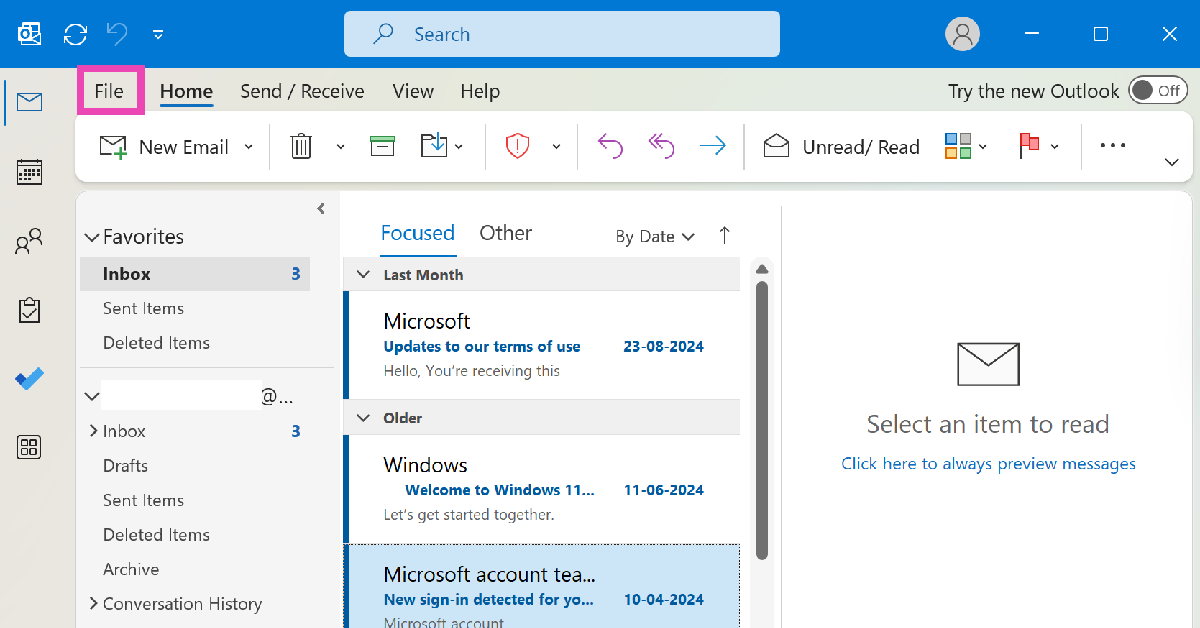 Step 2: Select Options.
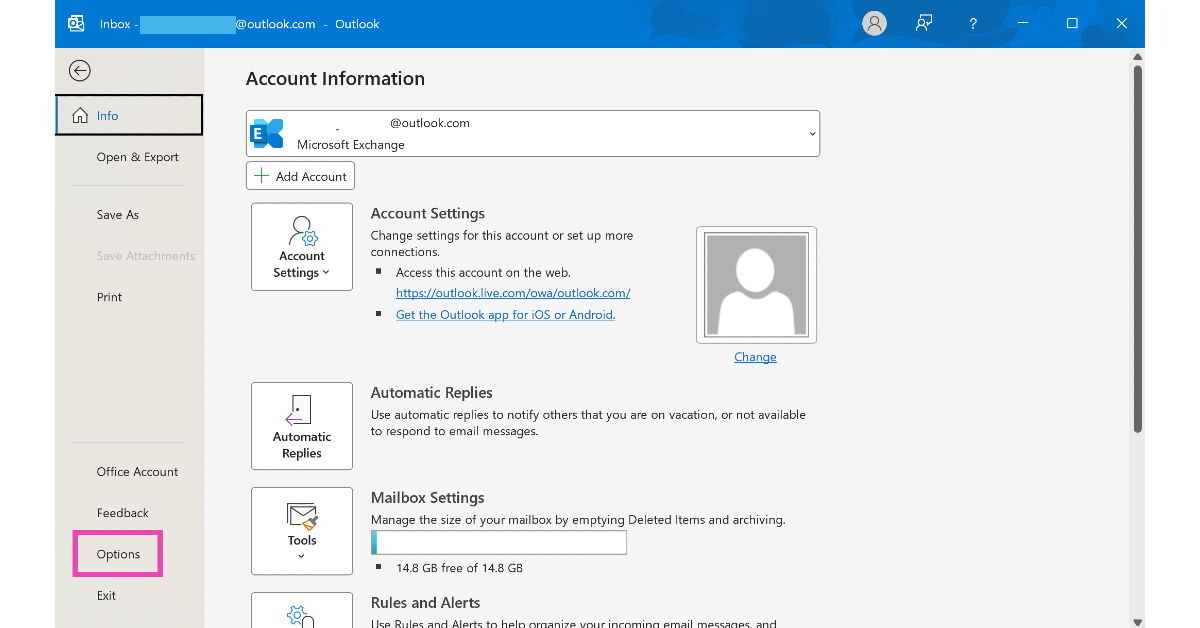 Step 3: Select Advanced from the sidebar.
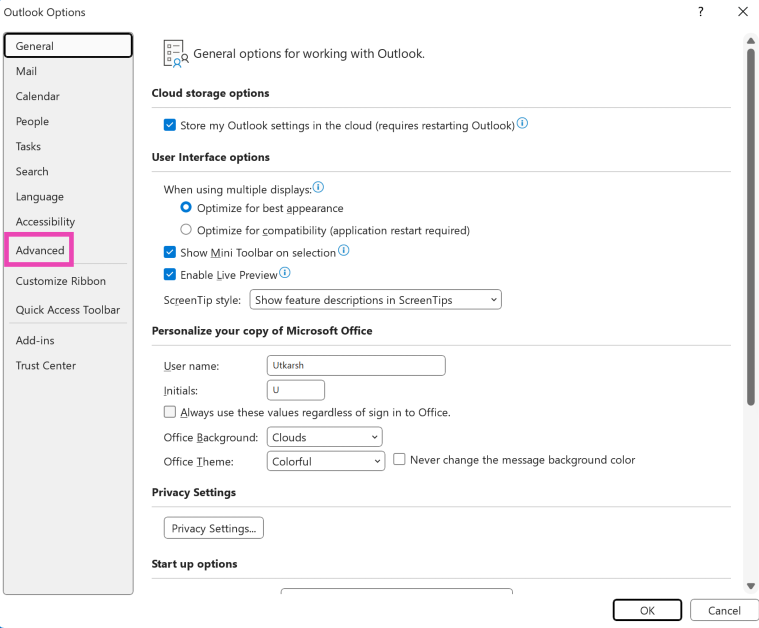 Step 4: Tick the checkbox for Disable Hardware Acceleration.
 Step 2: Type Outlook.exe/Safe and hit Enter.
Use Outlook in Safe Mode. If it does not cause any complications, it means the problem lies with the add-ins.
Step 2: Type Outlook.exe/Safe and hit Enter.
Use Outlook in Safe Mode. If it does not cause any complications, it means the problem lies with the add-ins.
 Step 3: Select Mail (Microsoft Outlook).
 Step 4: In the following window, select Show Profiles.
 Step 5: Click on Add.
 Step 6: Enter a name for your profile and hit OK.
 Step 7: Now, enter your account credentials and hit Next.
 Step 8: Click the box for Always use this profile under When starting Microsoft Outlook.
Step 9: Save your changes.
Step 8: Click the box for Always use this profile under When starting Microsoft Outlook.
Step 9: Save your changes.
 Step 2:
 Step 3:
 Step 4:
 Step 6:
 Step 2:
 Step 3:
 Step 4:
 Step 5:
 Step 6:
 Step 2:
 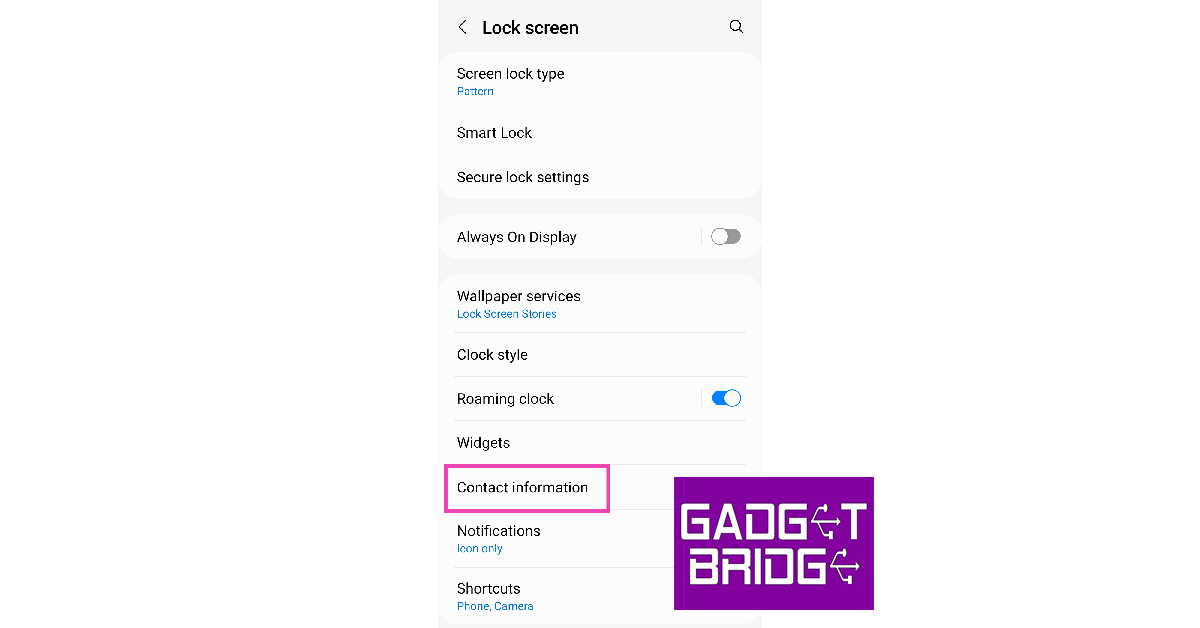 Step 3:
 Step 4:
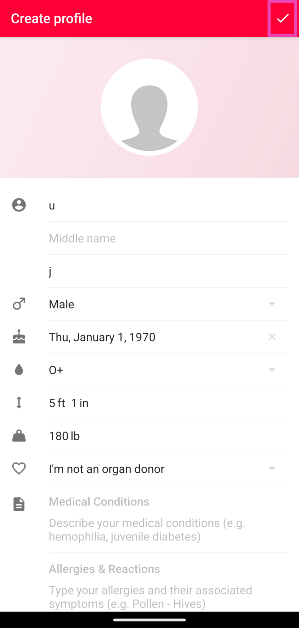 Step 4: Hit the tick icon in the top right corner of the screen.
Step 5: Tap Yes on the banner at the top of the screen. This will install a lock screen widget for the app on your phone.
Step 4: Hit the tick icon in the top right corner of the screen.
Step 5: Tap Yes on the banner at the top of the screen. This will install a lock screen widget for the app on your phone.
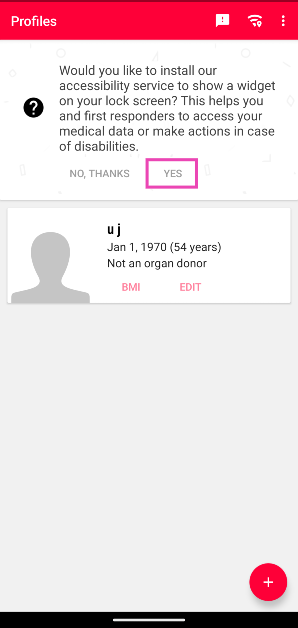 Step 6: In the Accessibility menu, tap on Medical ID.
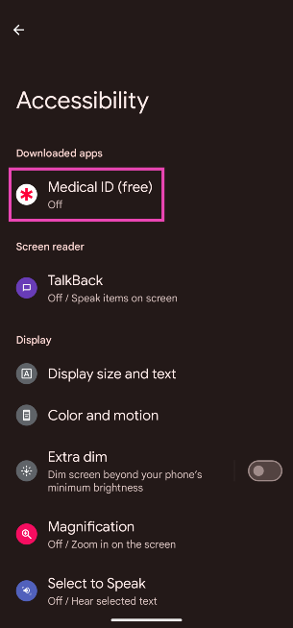 Step 7: Turn on the toggle switch next to Use Medical ID.
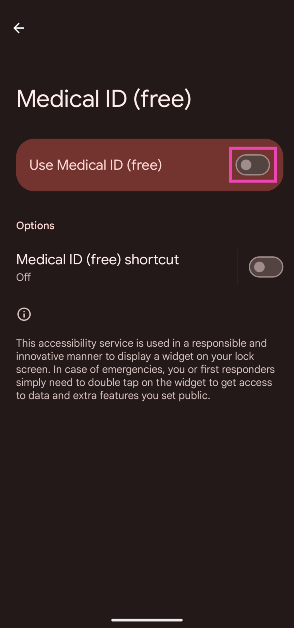 Step 8: Hit Allow in the popup box.
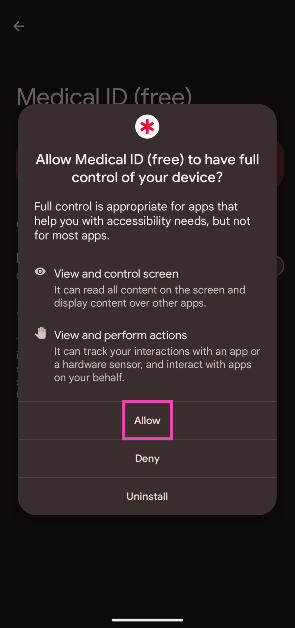 Step 9: The Medical ID widget will appear on your lock screen. Tapping it twice will open your medical profile.
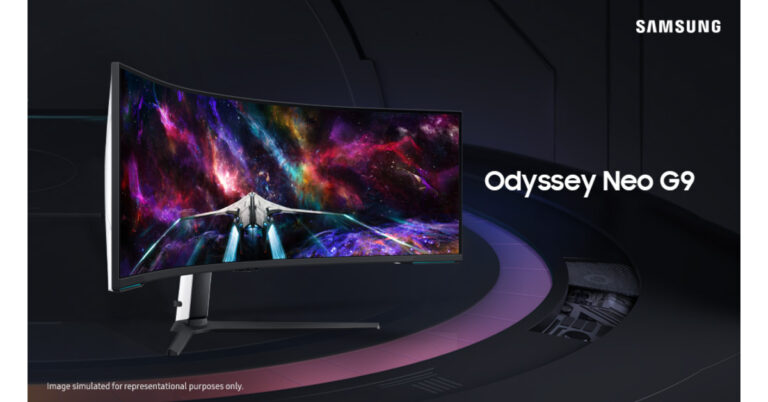
![NO! Honor mobiles is not coming back to India [Exclusive]](https://www.gadgetbridge.com/wp-content/uploads/2023/08/Honor-mobiles-is-not-coming-back-to-India-768x402.jpg "NO! Honor mobiles is not coming back to India [Exclusive]")
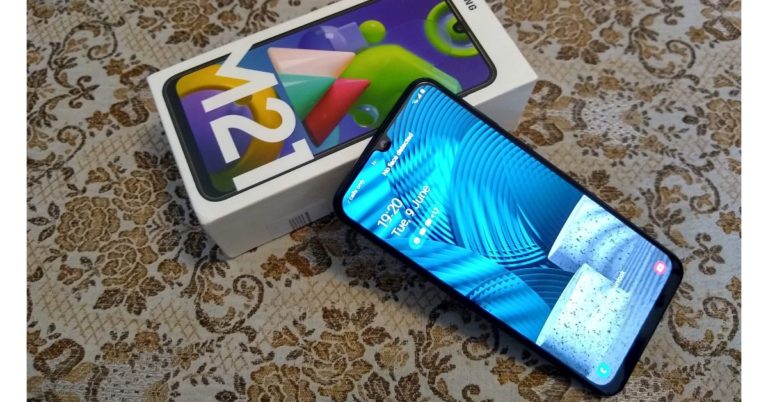


 Step 2:
 Step 3:
 Step 4:

 Step 3:
 Step 4: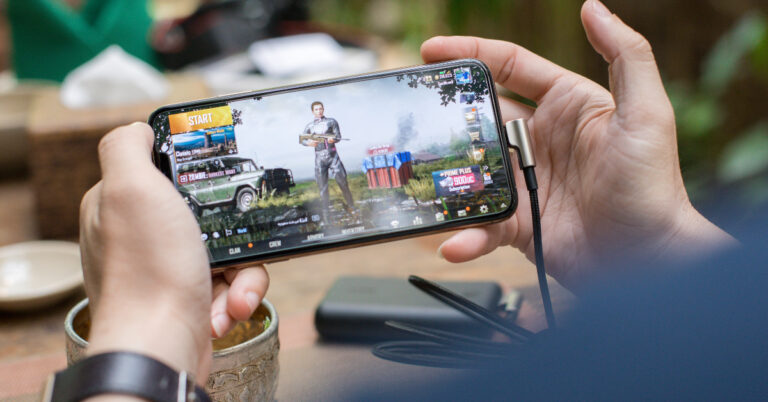
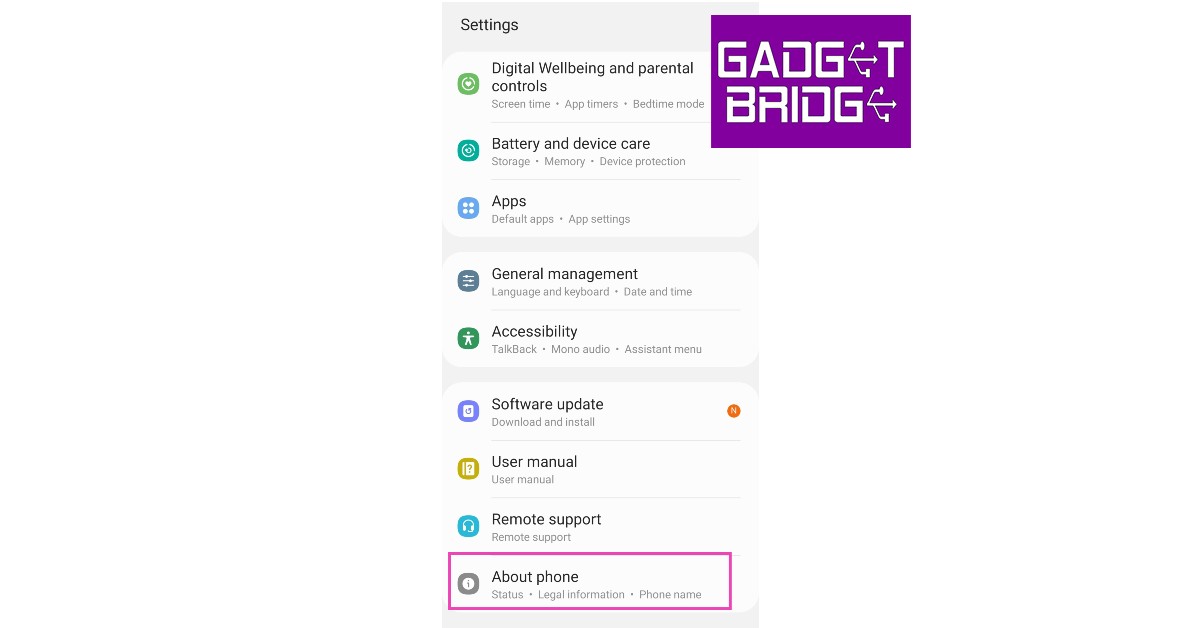 Step 2:
 Step 3:
 Step 4:
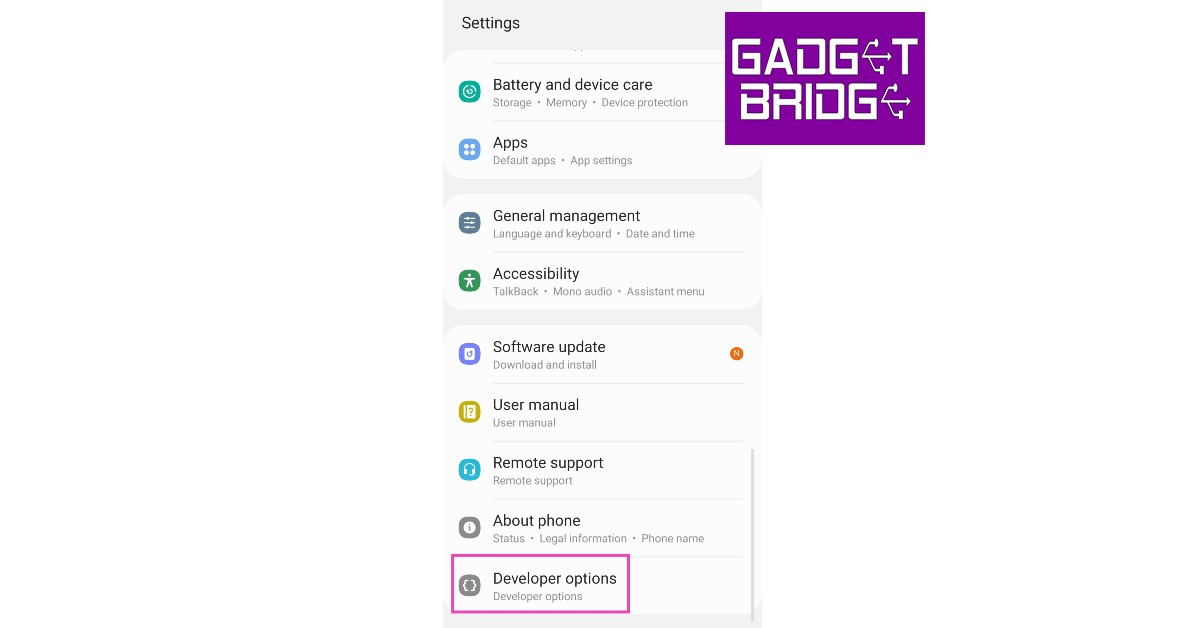 Step 5:

 Step 3:
 Step 4:
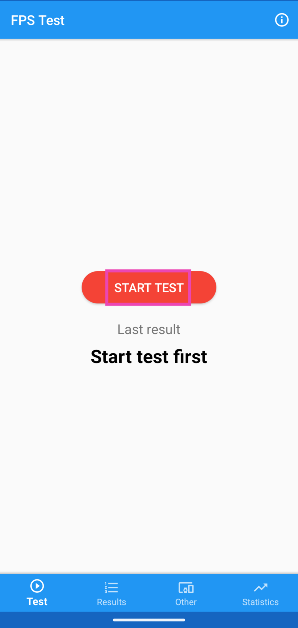 Step 3: The app will play an animation to check the display’s refresh rate.
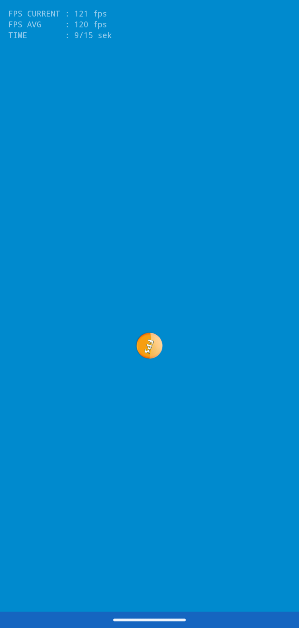 Step 4: The refresh rate will be displayed on the screen.
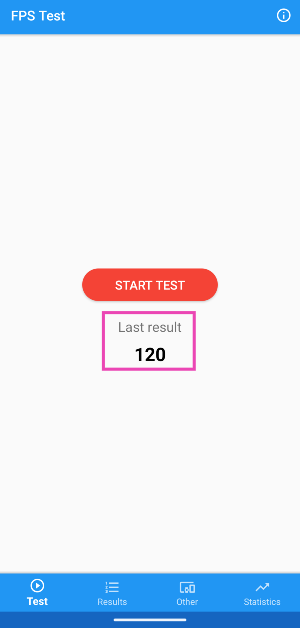
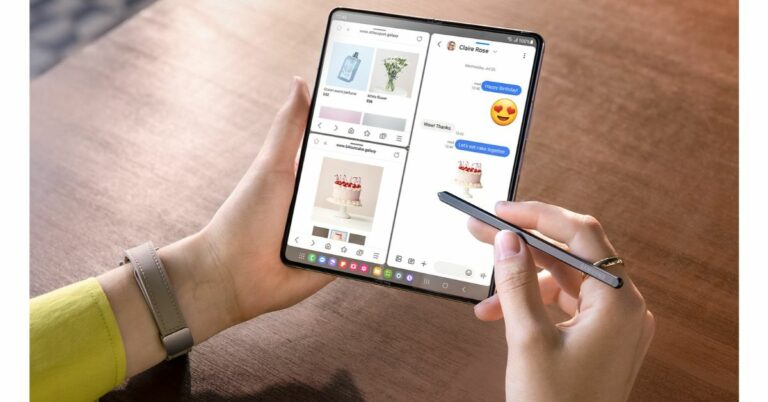




 The introduction of AI in trading has brought about significant changes in how risks are managed.
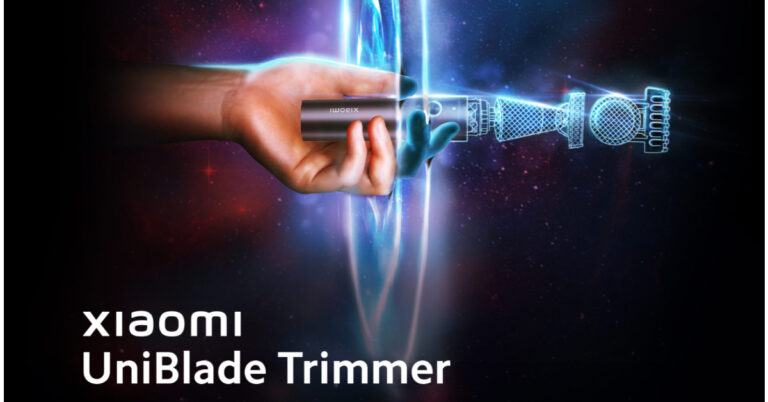



 Also Read:



 Step 3:
 Step 4:
 Step 5:
 Step 6:
 Step 8:
 Step 11:
 Step 12:
 Step 13: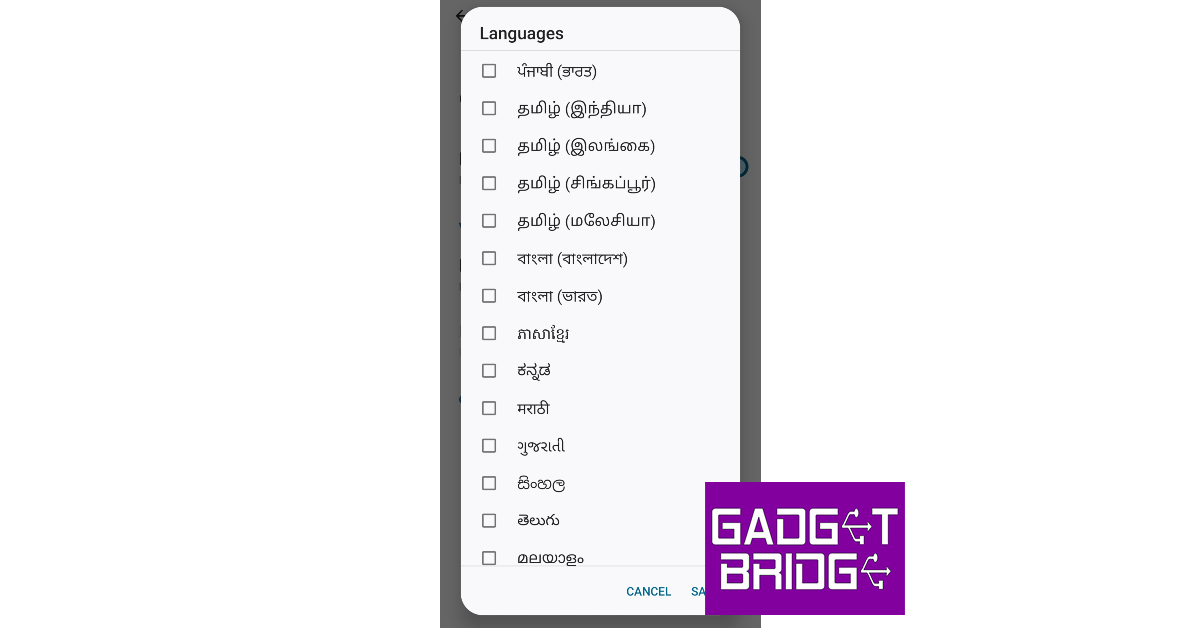
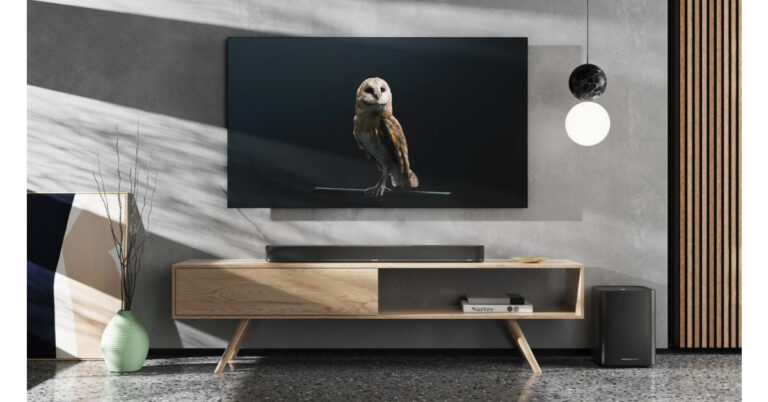


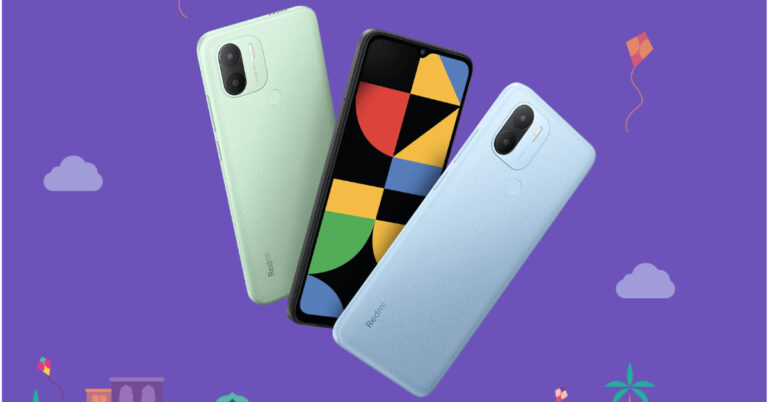
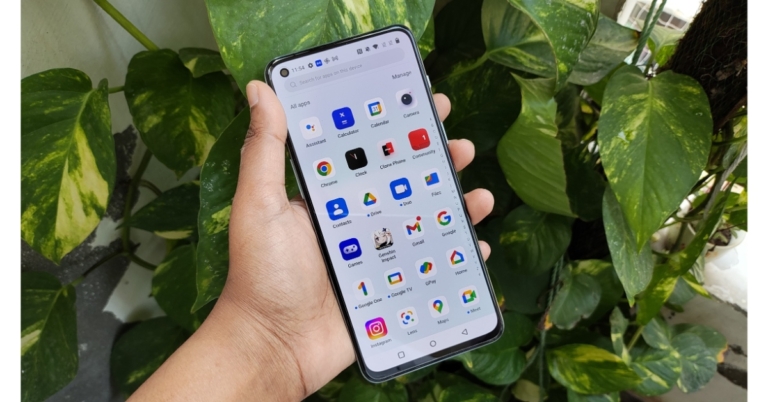
 Step 2:
 Step 3: Turn on the toggle switch
 Step 4:
 Step 2:
 Step 3: Select the app
 Step 4:
 Step 2:
 Step 3:
 Step 4:
 Step 5:
 Step 6:
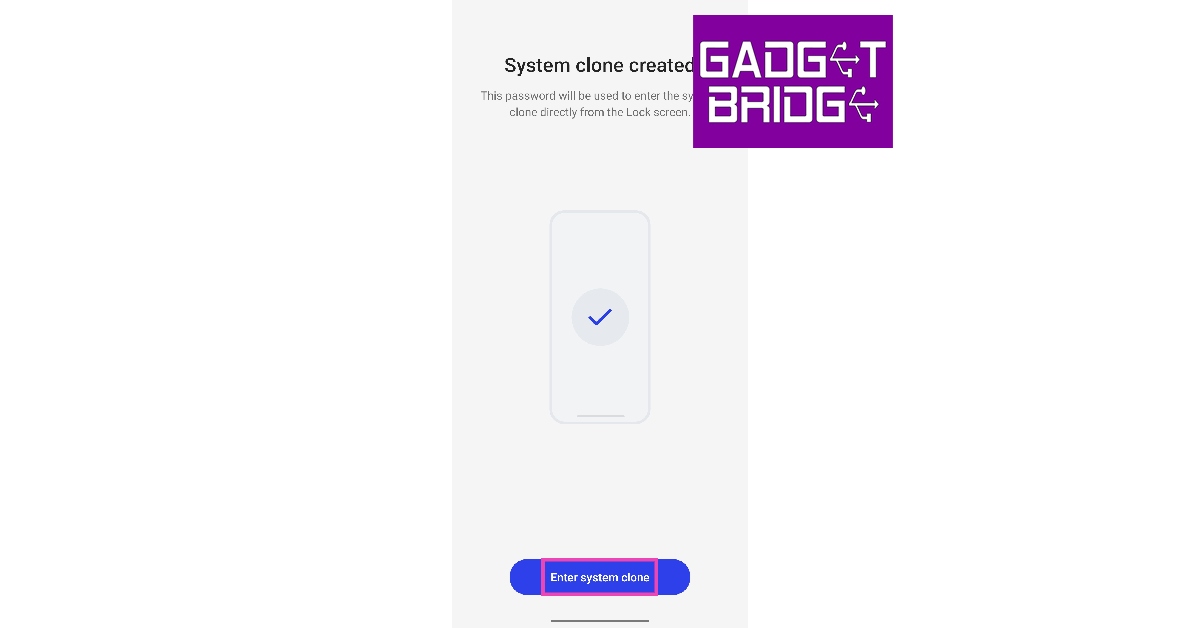 Step 7:
 Step 10:
 Step 11:
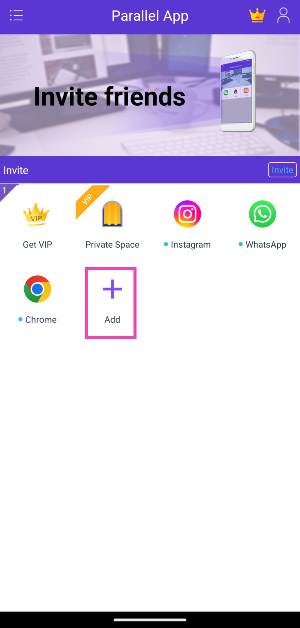 Step 3: Hit Add next to the app you wish to clone.
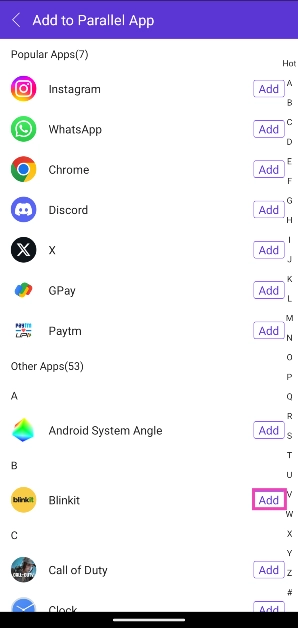 Step 4: Parallel App will download the app and add it to its library. Tap on the app’s icon to open it.
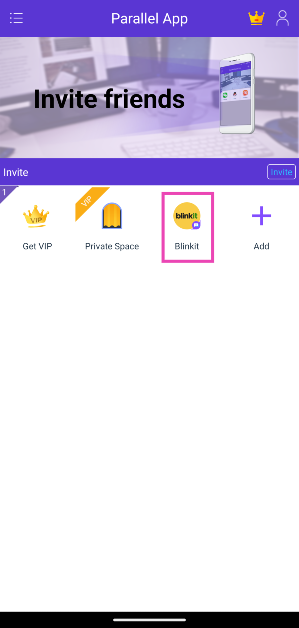
 Step 3:
 Step 4: Swipe down
 Step 5:
 Step 8:
 Step 9:
 Step 11:
 Step 13: Save