Ways to identify, verify Your iPhone or iPad model and version

Apple is an aspirational brand and everyone wants to have an Apple product in their homes or their pocket. But, it is not easy for everyone to get hands-on with an Apple product. In India, there is a huge fan following of iPhones and iPads. Due to their high price especially in India, most people get an iPhone or iPad from the second-hand market. But it does come with some trust issues. If you are going to get an iPhone or iPad from a second-hand market and want to check if it is a real deal then this article is for you where we will tell you the best ways to identify, verify Your iPhone or iPad model and version. So, after reading this article you will be able to make a sound decision. Just look at the ways given below:

Identify and Verify iPhone

If you are going to get an iPhone for you then follow these steps:
  1. Open Settings on your iPhone.
  2. Click on General and then go to About.
  3. You can look for the Model Number over here.
  4. Tap on the identifier next to Model Number, and you will see the model no. of the iPhone that will start with the letter A.
Read also: Google introduces two new features to protect its Android An alternative way to check the model no of the iPhone is to check the backside of the iPhone (for models older than iPhone8). If you have the latest series of iPhones that comes with a notch. You have to remove the sim tray and check the model no from there. With these methods, you can find which iPhone you have and if you want to check the origin of your iPhone you can check the list from here If you want to know the condition of your iPhone then check the identifier text. You can find out the condition of your iPhone by the first letter of the text. If it starts with: M then it is a brand new iPhone F is a refurbished device. N  means Replacement device. P means Personalised device. 

Identify and Verify iPad

If you are using an iPad or going to get one then follow these steps:
  1. Open Settings on your iPad.
  2. Click on General and go to About.
  3. You can look for the Model Number over here.
  4. Tap on the identifier next to Model Number, and you will see the model no. of the iPad.
The alternative option is to check the backplate of the iPad on the bottom. With these methods, you can find which iPad you have and if you want to check the origin of your iPad you can check the list from here. And this is how you can check if you have got a legit iPhone or iPad or not. Read also: How to get your Instagram account verified? For the latest gadget and tech news, and gadget reviews, follow us on Twitter, Facebook and Instagram. For newest tech & gadget videos subscribe to our YouTube Channel. You can also stay up to date using the Gadget Bridge Android App. You can find the latest car and bike news here.

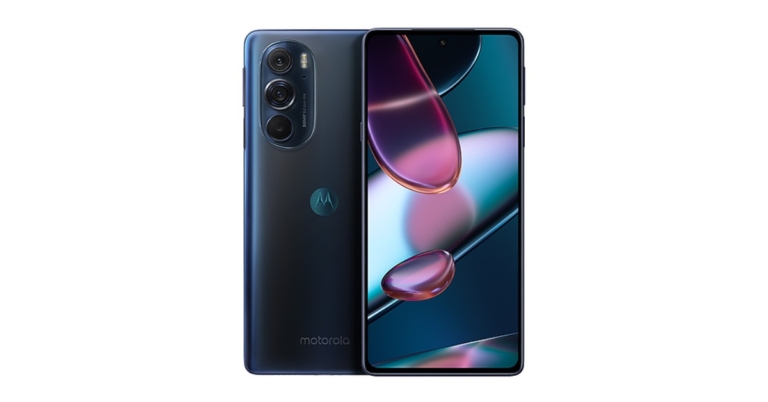
Moto Edge X30 India launch expected in January or February

Reportedly Moto Edge X30 could be released in India by the end of January or the beginning of February. To recall the device debuted in China earlier this month. The smartphone is powered by Qualcomm’s Snapdragon 8 Gen 1 SoC and features a 144Hz OLED display. In addition to this, the phone supports 68W fast charging.  According to a report, the Moto Edge X30 is expected to get launched in January or February. Also in a few weeks, Motorola should announce the exact date of the launch and other details. Speaking about the specifications we know the Moto Edge X30 specs because it has already been released in China. The Moto Edge X30 has a 6.8-inch full-HD+ POLED display with 1,080×2,400 pixels of resolution. The screen also offers a 144Hz refresh rate, 20:9 aspect ratio, 144Hz refresh rate, and HDR10+ support. The device is the first smartphone to be powered by Qualcomm Snapdragon 8 Gen 1 SoC paired with up to 12GB of LPDDR5 RAM and 256GB of onboard UFS 3.1 storage. The smartphone comes preloaded with Android 12 based MYUI 3.0. For the photos and videos, Moto Edge X30 features a triple rear camera setup with a 50-megapixel OmniVision’s OV50A40 primary sensor. A 50-megapixel wide-angle camera and a 2-megapixel depth sensor are also included. The handset also has a front-facing 60-megapixel camera for selfies and video calls.  For connectivity, it includes 5G, 4G LTE, Wi-Fi 6, Bluetooth v5.2, and a USB Type-C port. The phone has a fingerprint sensor on the side. A 5,000mAh battery with 68W TurboPower fast charging is included.

Moto Edge X30 price in India (expected)

Moto Edge X30 was launched in China at a starting price of CNY 3,199 that translates to Rs 38,000 for the base 8GB RAM with a 128GB storage option. Whereas the 8GB RAM with 256GB and 12GB RAM with 256GB models, which cost CNY 3,399 and CNY 3,599 translates to Rs 40,400 and Rs 42,800 respectively.   For the latest gadget and tech news, and gadget reviews, follow us on TwitterFacebook and Instagram. For newest tech & gadget videos subscribe to our YouTube Channel. You can also stay up to date using the Gadget Bridge Android App. You can find the latest car and bike news here.

Samsung Galaxy Tab A8 gets listed on Amazon, launching soon

In India, the Samsung Galaxy Tab A8 is expected to arrive soon. Recently the device’s support page went live. In a new development, the tablet got listed on Amazon as well on the company’s official website in the country. The company has created a microsite to tease its availability as the key details of the upcoming tablet. It is a low-cost option with a variety of features, including quad speakers powered by Dolby Atmos and more. The Samsung Tablet is a mid-range tablet with an octa-core processor and a long battery life. The Amazon microsite for the Samsung Galaxy Tab A8 makes no mention of its Indian price. But it does reveal the key specification of the device. The Tablet, however, is the same model as the Galaxy Tab that was released in Europe a few weeks ago. The company did not reveal the price but it did declare that the tab will be available in the United States and other regions beginning in January 2022. According to reports, the Samsung Galaxy Tab A8 costs EUR 229 that translates to Rs 19,300 for the 3GB RAM with 32GB Wi-Fi model and EUR 359 that converts to Rs 30,300 for the 4GB RAM with 128GB storage LTE model in Europe. Samsung Galaxy Tab A8 officially announced: Specifications and price details inside The Samsung Galaxy Tab A8 features a 10.4-inch TFT display with a resolution of 1,920 by 1,200 pixels and a resolution of 1,920 by 1,200 pixels. It has an 80 percent screen-to-body ratio and a 16:10 common aspect ratio. One UI, which is built on top of Android 11, powers the tablet. Under the hood, there’s an octa-core processor, as well as up to 4GB of RAM and 128GB of storage. The device has a dedicated micro SD card slot for up to 1TB of memory expansion. An 8-megapixel rear camera and a 5-megapixel front camera for selfies are included in the Galaxy Tab A8’s camera capabilities. The device comes with a 7,040mAh battery as well as a 15W charger. Connectivity options include dual-band Wi-Fi, LTE, Bluetooth 5.0, a 3.5mm headphone jack, and a USB Type-C port. In addition, Dolby Atmos is supported by a quad-speaker set up. For the latest gadget and tech news, and gadget reviews, follow us on TwitterFacebook and Instagram. For newest tech & gadget videos subscribe to our YouTube Channel. You can also stay up to date using the Gadget Bridge Android App. You can find the latest car and bike news here.

Top 6 Ways to Play Audio or Video in the Background on Android (2024)

So you use your smartphone to listen to a lot of music or podcasts on audio platforms like Spotify, Jio Saavan, etc, and to videos also. If your answer is yes then you might be in search of how you can make that time more productive and use some other apps at that time as well, well we will tell you that. In this article, we bring you the top 6 ways to play audio or video in the background on Android. Read Also: The new mobile tab of Netflix can make it easier to find things and watch

A common method for all audio apps

Okay, so this method will work on all the audio streaming apps that exist whether the native music app or any other audio streaming app. Just follow the steps given below: Step 1: Open any music app where the music is stored/available that you want to listen to. Step 2: Just play the music on the app. Step 3: Now that you have played the music, you just have to hit the home button on your phone or swipe up from the centre if you have enabled gestures, and that is it. This method works on both Android and iPhones and with all the music apps, whether they are pre-installed or you download them like Spotify

Use YouTube premium

YouTube Premium is a paid service from YouTube that stops ads from coming in between your videos. It also opens access to exclusive videos on YouTube and allows for the downloading of videos in HD quality. Apart from these features, YouTube Premium also allows videos to run in the background. So if you have a Premium membership from YouTube then you are good to go. There are no steps involved in turning on this setting, it is enabled by default. Just follow these steps to run videos in the background from the YouTube app: Step 1: Open the YouTube app on your Android or iOS device and log in with the account which holds premium membership. Step 2: Play any video that you like and just hit the home button or swipe up from the bottom, the video will be played in the background. And that is how you can run YouTube videos in the background with the official YouTube app itself. Read also: 5 free camera apps for Android users and why to use them

Use MX Player

MX Player is an audio/video platform player that lets you play locally stored media and also stream web series available on the platform. You can use this app to play videos and audio in the background. Just follow the steps given. Step 1: Open MX Player on your phone Step 2: Open Settings by tapping on the three-line menu on the top left of the screen. Step 3: Scroll down and tap local player settings Step 4: Scroll down and look for the background play option and check the option, and that is it. Now you will be able to run videos and audio in the background.

Use split or pip window mode

Another way to play video while doing your work is to play videos in either pip mode or split-screen mode. Both modes allow users to shrink the size of the window so that they can focus on other work while the video is playing. There are different ways for every phone to enable PiP and split-screen functionality so, just have a look on the internet and you are good to go.

Play YouTube videos in the background of your Android phone without using any app

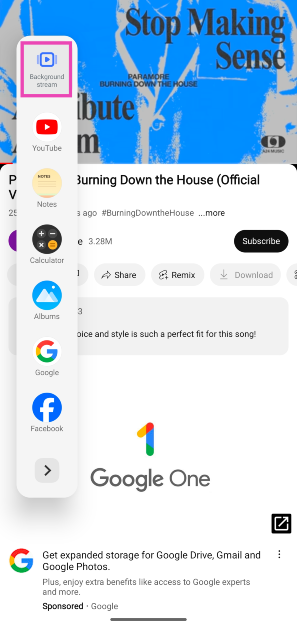
Certain Android smartphones have a ‘background stream’ feature which is natively built into the sidebar. You can use this feature to play YouTube videos in the background. The only catch is that you won’t be able to see the video in PiP mode. However, it is ideal for listening to music on the YouTube app. Here’s how you can use it. Step 1: Launch the YouTube app on your Android phone and play a video. Step 2: Swipe open the sidebar and select Background Stream. Step 2: Swipe open the sidebar and select Background Stream. The video will start playing in the background.

Use Desktop Mode in Google Chrome

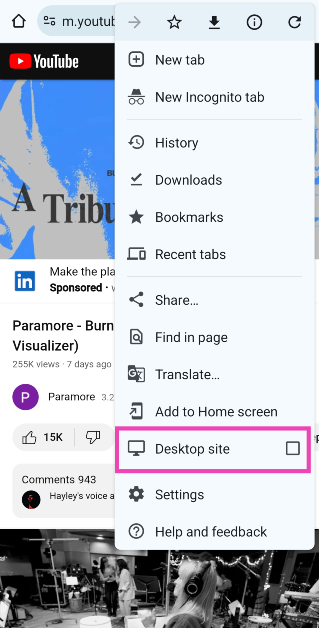
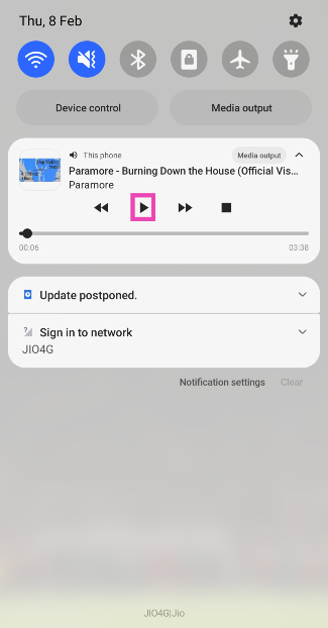
Another easy way to play YouTube videos in the background is by opening them in desktop mode on the Chrome browser. Simply follow these steps. Step 1: Open YouTube in Google Chrome and play any video. Step 2: Hit the ellipses at the top right corner of the screen. Step 2: Hit the ellipses at the top right corner of the screen. Top 6 Ways to Play Audio or Video in the Background on Android (2024) Step 3: Hit Desktop Mode. Step 3: Hit Desktop Mode. Top 6 Ways to Play Audio or Video in the Background on Android (2024) Step 4: Minimise the browser. Step 5: Swipe down from the status bar and hit the Play button in the video player. Step 5: Swipe down from the status bar and hit the Play button in the video player. Top 6 Ways to Play Audio or Video in the Background on Android (2024) The video will start playing in the background.

Frequently Asked Questions (FAQs)

How do I play YouTube videos in the background of my Android phone without using any app?

Some Android smartphones have a ‘background stream’ option on the sidebar that allows them to play any video in the background. You can also run YouTube in Desktop Mode on the Chrome browser and then minimise it to play the video in the background.

Which apps should I use to play YouTube videos in the background of my phone?

Apps like PlayTube, Playback, and ProTube let you play YouTube videos in the background of your phone.

How do I download a YouTube video on my phone?

Go to the SSYouTube downloader, paste the link to the video, and hit download in the results. Read also: Top 2 ways to fix YouTube PiP (Picture in Picture) not working on Android(Opens in a new browser tab)

Conclusion

These are the top 6 ways to play videos and audio in the background of your Android phone. If you can manage the task natively, there is no need to install third-party apps and share your YouTube login info with them. If you know any other way to play videos and audio in the background of your device, let us know in the comments!

Prices and specifications for the Vivo V23 5G and Vivo V23 Pro 5G leaked ahead of the launch

The Vivo V23 5G Series will be released in India on January 5th. Vivo V23 5G and Vivo V23 Pro 5G are expected to be released by the company. The price of the upcoming devices has surfaced online as a result of this announcement. However, the official pricing and specifications of the smartphones are yet to be revealed, but based on what has been leaked on the internet, the phones are expected to cost between Rs 29,000 and Rs 40,000 in India. Along with the pricing, the device’s specifications have also been leaked. Continue reading to learn more about the Vivo V23 5G series price.

Vivo V23 5G price, specifications (expected)

On Twitter, tipster Yogesh Brar revealed the price and specifications of the Vivo V23. According to him, the vanilla variant is expected to be between Rs. 26,000 and Rs. 29,000 in India. The smartphone is said to be offered in two shades of sunshine Gold and Stardust Black. Vivo V23 Series In terms of specifications, the device is likely to equip the MediaTek Dimensity 920 SoC coupled with 12GB of RAM and 256GB of UFS 2.2 storage. Vivo’s Funtouch OS 12 is expected to be installed on top of Android 12. It may feature a 6.44-inch full-HD+ AMOLED display with a 90Hz refresh rate. Also, it is expected to house a 4,200mAh battery with 44W fast charging support. Also Read: Vivo V23 5G series India launch confirmed for January 5, to feature 50MP dual selfie camera In addition to this Vivo V23 is tipped to have a triple rear camera set up that will include a 64-megapixel primary camera, an 8-megapixel ultra-wide camera, and a 2-megapixel macro lens. According to the tipster, the smartphone will have a 50-megapixel sensor and an 8-megapixel camera on the front.

Vivo V23 Pro 5G price, specifications (expected)

On the other hand, Vivo V23 Pro 5G price in India is slated to fall between Rs 37,000 and Rs 40,000 in India. This phone will come in Sunshine Gold and Stardust Black colour schemes. Furthermore, the smartphone may feature a 3D curved screen with a 6.56-inch AMOLED display and a refresh rate of 90Hz. It is likely to be powered by MediaTek Dimensity 1200 SoC with up to 12GB of RAM and 256GB of storage. Vivo’s Funtouch OS 12 based on Android 12 is said to power the phone. In addition to this, the phone is expected to come with a 4,300mAh battery with 44W fast charging support. Vivo V23 Pro might also include a triple camera setup, with a 108-megapixel primary camera, an 8-megapixel ultra-wide lens, and a 2-megapixel macro sensor, according to the tipster. The device could also equip a dual selfie camera set up that will include a 50-megapixel and an 8-megapixel sensor. For the latest gadget and tech news, and gadget reviews, follow us on TwitterFacebook and Instagram. For newest tech & gadget videos subscribe to our YouTube Channel. You can also stay up to date using the Gadget Bridge Android App. You can find the latest car and bike news here.

4 Ways to record Clubhouse audio conversations

The Clubhouse app has been on Android and iOS devices for a while. It is an audio chat platform that got a lot of attention during the last few months. The app allows users to make, enter and interact with public and private audio rooms. So, you can join public or private chat rooms and can deep dive into the given topic. If you are using the Clubhouse app a lot and you want to record all the important talk that is going on, then you are in the right place. Today we will show you 4 Ways to record Clubhouse audio conversations. So, now you need not take notes in order to remember important things in conversations. Just follow the ways/hacks given below:

Use native Screen recorder on Android

So, most Android phones now have a native screen recorder baked into the system itself. If you want to record conversations that are happening on Clubhouse just record the screen of your phone and that’s it. Follow the steps given to use a native screen recorder.
  1. Pull down the quick settings menu.Screen recording android
  2. Navigate and find the shortcut for screen recording, if not then look into the app drawer.
  3. Now, just enter the chat room and start recording.
Read also: How to enable YouTube PiP mode on your iOS device like iPhone or

Use a third-party screen recording app

If you are unable to record your screen with the built-in screen recorder or you do not have a screen recorder in your phone. You can just head over to PlayStore and find a screen recorder that you like. We have an article on How to do screen recording in your Android smartphone. You can check that out for help.

Use native Screen recorder on iPhone

All the modern iPhones have a native screen recorder app in them. If you use an iPhone and want to record the conversation taking place in Clubhouse just use the screen recorder present on your iPhone. To record conversations on an iPhone just follow the steps:
  1. Open the Clubhouse app on your iPhone and join the chat you want to record.
  2. Swipe up from the bottom or swipe down from the top right (on older iPhones with TouchID) to open the control center. Record on iPhone- Ways to record Clubhouse
  3. Press and hold the screen record button in the control center to record the screen and that’s it. 
If you want to record your voice as well you need to make a few changes in the settings of screen recording and turn on the mic option. This is for both Android and iOS

Record screen in your PC

OBS Studio- Ways to record ClubhouseIf you use Clubhouse on your PC then you can use any screen recording software to record all the conversation on Twitter spaces, if you are on a Mac you can use QuickTime and if you are on Windows PC you can use OBS, or stream labs or any other software that records the PC screen. Just open and join the Clubhouse on PC and record the screen. If you do not know how to record a screen on a windows pc then click here and in case you don’t know how to use Clubhouse on PC click here So, if you use Clubhouse app a lot then using these hacks you can record the audio conversations that you wanted. Read also: Now you can link your Instagram and Twitter accounts to your For the latest gadget and tech news, and gadget reviews, follow us on Twitter, Facebook and Instagram. For newest tech & gadget videos subscribe to our YouTube Channel. You can also stay up to date using the Gadget Bridge Android App

Xiaomi Watch S1 launched along with Xiaomi Buds 3

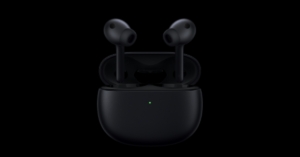
Xiaomi on Tuesday made a slew of announcements at its Mainland China event. Xiaomi Watch S1 is one of the devices that got unveiled at the launch event. The device is the company’s most high-end smart wearable that comes with a polished stainless-steel frame with sapphire glass for safety. In addition to this, the company also introduced Xiaomi Buds 3 truly wireless stereo (TWS) earbuds featuring active noise cancellation (ANC) and HiFi audio.

Xiaomi Watch S1 price, specifications

Xiaomi Watch S1 has been introduced in two variants- with a Viton wristband (Obsidian Black with Black Viton Strap) and leather wristband (Streamer Silver with Brown and Blue Leather) options. The one with the Viton wristband option is priced at CNY 1,049 that translates to Rs 12,300. Whereas the Xiaomi Watch S1 with leather wristband is priced at CNY 1,099. The device is scheduled to go on sale in China starting December 31. Xiaomi Watch S1 price, specifications Speaking of specifications, the Xiaomi Watch S1 has a 1.43-inch circular AMOLED display with a resolution of 466 x 466 pixels. The display is protected by Sapphire Glass. The smartwatch works with Android 6.0 or iOS 10.0 devices. It can be used to navigate messages and notifications when paired with a compatible phone. The Xiaomi Smartwatch supports 117 different sports modes. It’s also water-resistant to 5 metres. The Watch S1 is equipped with a 470mAh battery and a single charge offers up to 12 days of regular usage and up to 24 days of standby time. It also has a microphone and speaker, allowing users to answer phone calls without having to take their phone out of their pocket. Blood oxygen saturation (SpO2) and heart rate tracking are both supported by the Xiaomi Watch S1. The smartwatch also includes GNSS positioning for accurate location tracking and NFC for contactless payments. Wi-Fi 802.11 b/g/n and Bluetooth v5.2 are two other connectivity options on the Xiaomi Watch S1.

Xiaomi Buds 3 price, specifications

The Xiaomi Buds 3 will be available in Black Jade and First Snow White colours and cost CNY 449 that translates to Rs 5,300. Beginning December 31 the TWS earphones will be available for purchase in China. Both the devices are said to be made available globally including India but a specific date has been set. Moving to the specifications, Xiaomi Buds 3 feature an ultra-dynamic dual-magnetic driver unit and Hi-Fi audio. Whereas a separate back chamber, as well as a metal mesh, allow for direct regulation of reduced dynamics. These have an IP55 dust and water resistance rating, and touch gestures are also supported for attending voice calls and adjusting audio output on the earbuds. Xiaomi Buds 3 price, specifications It also features up to 40dB noise cancellation and three ANC modes for different scenarios. Mild Noise Reduction, Balanced Noise Reduction, and Deep Noise Reduction are the three different types of ANC modes available that can be selected based on the surrounding conditions as well as the level of noise reduction desired. In addition to this Xiaomi Buds 3 also come with a specialised transparency mode that facilitates interaction with others or listening to background sound while you enjoy listening to music. Apart from this, a single charge provides up to 7 hours of music playback and 32 hours of total usage with the case. For connectivity, there is Bluetooth v5.2 and supports both wired USB Type-C and wireless charging. For the latest gadget and tech news, and gadget reviews, follow us on TwitterFacebook and Instagram. For newest tech & gadget videos subscribe to our YouTube Channel. You can also stay up to date using the Gadget Bridge Android App. You can find the latest car and bike news here.

Interwinning tech and gaming Industries are amping up the game

The impact of user-phase technology and its application over a vast repertoire of industries have turned the trend for businesses from simply viewing its application as a transformational phase to now considering it a must to move forward in a highly competitive, fast-paced world. The gaming industry is founded on the pillars of building a fast and effective link between users and the overall gaming platform each independent business opts for. Whether reviewing a series of Esports events, iGaming options go deep by checking Vegas NFL odds to prepare an upcoming wager. Users need to be engaged as technology continues to become the top ally for big players in the industry.

Enhanced Mobile Sports Betting Platforms Arrive

Not only is there a need to present a diversified offering of games, Esports, table games, and general sports to keep users engaged, but sometimes simple layouts and formats will go a long way in achieving this primary goal. Mobile and desktop betting apps and platforms need to display everything for users to quickly and easily view extensive selections of alternatives. That is why the focus of major players in the game has been first to restructure their platforms to offer users everything they need and place it in the palm of their hands. From making their platforms more dynamic to graphically rearranging options to make them more appealing and making their overall interface faster and more efficient, these are now the top priorities in the playbook for mobile betting providers.

IoT, AI, and Complex Algorithms Turn into Bettors’ Top Allies

On one end lies the offer of gaming and betting options, all wrapped in an interactive application or platform. On the other hand, online gaming providers have identified the need to also layout updated stats and data for bettors to consider as part of their process to make the most of their bets. That is why tech providers have partnered with multiple gaming industry suppliers and offer an array of alternatives that incorporate Internet of Things (IoT) solutions for bettors to stay informed on all updates and sports-related topics. The offer has also favoured the adoption of Artificial Intelligence as part of an inclusive facet that can personalize and narrow down gamers’ selective tastes for sports, games, and types of bets. As for betting, complex algorithms continue to dominate the infrastructure built below odds, money lines, and various betting dynamics to keep users engaged with the platform and all that it has to offer. These, again, are some of the top trends that large-scale providers like are now beginning to implement.

Digital from VR and AR Solutions Added

Although some are still satisfied with HD and 4K screens to watch and appreciate sports, some are also engaged in virtual and augmented realities to enjoy the sport from different scopes. Some leagues, such as the NFL, explore ways to offer fans the best alternatives to appreciate and view the game. For example, some leagues have already begun experimenting with Virtual Reality (VR) solutions. Viewers can engage by watching play-by-play action from different viewpoints, including on-the-field player perspectives and others that better assimilate video game angles. Augmented reality (AR) is expected to also appear by taking simplified displays, which viewers appreciate on their computer or phone screens. It transforms them into life-sized 3D visualizations that users can enjoy with special glasses or phone screens. To the gaming industry, these alternatives will offer a new creative way to deliver play-to-play bets and trend connections, all at the sight of viewers who will then be introduced into a submerged sports appreciation and betting experience. For the latest gadget and tech news, and gadget reviews, follow us on TwitterFacebook and Instagram. For newest tech & gadget videos subscribe to our YouTube Channel. You can also stay up to date using the Gadget Bridge Android App. You can find the latest car and bike news here.

MIUI 13 was officially unveiled alongside Xiaomi 12 series: MIUI 13 availability details

With the launch of Xiaomi 12, Xiaomi 12 Pro, and Xiaomi 12X in China Xiaomi has also launched the stable version of MIUI 13 during the Mainland China launch. On the Xiaomi 12, Xiaomi 12 Pro, and Xiaomi 12X, the new version will come pre-installed. The new MIUI version is said to be more user-friendly than the MIUI 12.5 Enhanced Version.  It is said to provide a comprehensive upgrade for a snappy and stable software experience. The new operating system comes with enhanced privacy features that include face verification protection, privacy watermarking, and electronic fraud protection. In addition to this, the stable MIUI now brings new widgets for a better experience.  Also Read: Xiaomi 12, Xiaomi 12 Pro, Xiaomi 12X with MIUI 13 goes official This OS will now be extended beyond smartphones and tablets to AIoT devices like smartwatches, speakers, and televisions, enhancing connectivity. With a 52 percent increase in overall fluidity, MIUI 13 focuses on improving core functions. The new system focuses on optimising computing capabilities for core apps during heavy usage, building on its self-developed Focused Algorithms, Atomized Memory, and Liquid Storage technologies. MIUI 13 uses Atomized Memory and Liquid Storage technology to prevent and reduce read-write deterioration by 5% over the course of 36 months, extending device life. MIUI 13 will debut the beta of Mi Smart Hub, which will aid in the realisation of a more connected experience between smart devices while continuing to lead the industry with its smart hardware portfolio. Users can use Mi Smart Hub to locate nearby devices and share and access content such as music, video, and apps across multiple devices with a simple gesture. Apart from connectivity, MIUI 13 includes notable features for further personalization, such as new widgets, dynamic wallpapers, and more, to provide a unique OS experience.

MIUI 13 availability

On the Xiaomi 12, Xiaomi 12 Pro, and Xiaomi 12X, the new version will come pre-installed. Only a few features will be available in MIUI 13’s global versions.  Starting in Q1 2022, users around the world can expect OTA updates for MIUI 13. Mi 11, Mi 11 Ultra, Mi 11i, Mi 11X Pro, Mi 11X, Xiaomi Pad 5, Redmi 10, Redmi 10 Prime, Xiaomi 11 Lite 5G NE, Xiaomi 11 Lite NE, Redmi Note 8 (2021), Xiaomi 11T Pro, Xiaomi 11T, Redmi Note 10 Pro, Redmi Note 10 Pro Max, Redmi Note 10, Mi 11 Lite 5G, Mi 11 Lite, and Redmi Note 10 JE are among the first models to receive an upgrade. For the latest gadget and tech news, and gadget reviews, follow us on TwitterFacebook and Instagram. For newest tech & gadget videos subscribe to our YouTube Channel. You can also stay up to date using the Gadget Bridge Android App. You can find the latest car and bike news here.
Xiaomi 12, Xiaomi 12 Pro, Xiaomi 12X with MIUI 13 goes official

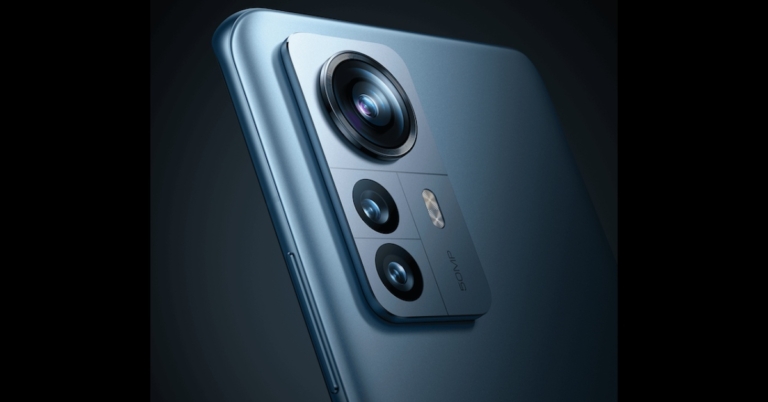
Xiaomi has officially announced the launch of its flagship Xiaomi 12 Series. The new lineup has been introduced in China and contains a total of three devices — Xiaomi 12, Xiaomi 12 Pro, and Xiaomi 12X. All the smartphones run on the newly announced MIUI 13 and octa-core Snapdragon 8 Gen 1 SoC.  The devices also feature a triple rear camera setup and a hole-punch design display with Corning Gorilla Glass Victus protection. All three mobile phones come with 5G connectivity.

Xiaomi 12 price, specifications

Xiaomi 12 will come in three different configurations of 8GB RAM with 128GB storage priced at CNY 3,699 that is approx Rs 43,400. Whereas the price of the 8GB RAM with 256GB variant has been set at CNY 3,999 which is around Rs 46,900 and the 12GB RAM with 256GB model comes with a price tag of CNY 4,399 that converts to Rs 51,600. Xiaomi 12 has a 6.28-inch full-HD+ AMOLED display offering 1,080×2,400 pixels of resolution with a 20:9 aspect ratio. The screen comes with a peak brightness of 1,100 nits, a refresh rate of 120Hz, Dolby Vision support and Corning Gorilla Glass Victus protection on top. 
Xiaomi 12 price, specifications
Xiaomi 12
On the software front, it runs on MIUI 13 based upon Android OS and is powered by an octa-core Snapdragon 8 Gen 1 SoC and up to 12GB of LPDDR5 RAM and up to 256GB of UFS 3.1 onboard storage. The mobile phone features a triple rear camera setup with a 50-megapixel primary Sony IMX766 sensor, an f/1.88 aperture and optical image stabilisation (OIS) support. A 13-megapixel ultra-wide lens with a field of view of 123 degrees and f/2.4 aperture is also included in the camera setup.  These are paired with a 5-megapixel macro camera. A proprietary CyberFocus technology supports the rear camera setup for improved focus-locking. On the front, the Xiaomi 12 has a 32-megapixel selfie camera sensor. It supports Stagger HDR and beautification features based on artificial intelligence (AI). The device includes a 4,500mAh battery that supports 67W fast charging and 50W wireless charging. In addition, the phone supports 10W reverse wireless charging. 5G, 4G LTE, Wi-Fi 6E, Bluetooth v5.2, GPS/ A-GPS, NFC, Infrared (IR), and a USB Type-C port are among the connectivity options.  Accelerometer, ambient light, gyroscope, magnetometer, and proximity sensor are among the sensors onboard. The Xiaomi 12 supports Dolby Atmos and features Harman Kardon-tuned stereo speakers. HiRes audio is also supported by the phone.

Xiaomi 12 Pro price, specifications

Xiaomi 12 Pro has been launched in an 8GB RAM with 128GB storage option which is priced at CNY 4,699 that translates to Rs 55,100. On the other hand, the 8GB RAM with 256GB storage model comes with a price tag of CNY 4,999 which converts to Rs 58,600 and the 12GB RAM with 256GB model price is set at CNY 5,399 which is approx. Rs 63,300. Coming to the specs, Xiaomi 12 Pro is highlighted with a 6.73-inch WQHD+ E5 AMOLED display with 1,440×3,200 pixels of resolution. The screen offers a 120Hz dynamic refresh rate with 1,500 nits of peak brightness. 
Xiaomi 12 Pro price, specifications
Xiaomi 12 Pro
The display also features Apple’s low-temperature polycrystalline oxide (LTPO) backplane technology and has Corning Gorilla Glass Victus protection and a 480Hz touch sampling rate. Under its hood, there is a Snapdragon 8 Gen 1 SoC paired with up to 12GB of LPDDR5 RAM and up to 256GB of UFS 3.1 storage. The Xiaomi 12 Pro has a triple rear camera setup that includes a 50-megapixel primary Sony IMX707 sensor with an OIS-supported wide-angle and f/1.9 aperture, a 50-megapixel portrait sensor, and a 50-megapixel ultra-wide-angle lens. A 32-megapixel selfie camera sensor is also included on the front of the phone. The smartphone has a quad-speaker set up with a dedicated tweeter and the speakers are powered by Harman Kardon. In addition to this, there is a 4,600mAh battery with 120W fast wired charging capability.  The phone also supports wireless charging at a rate of 50 watts and reverse wireless charging at a rate of 10 watts. 5G, 4G LTE, Wi-Fi 6E, Bluetooth v5.2, GPS/ A-GPS, NFC, IR, and a USB Type-C port are among the connectivity options available.

Xiaomi 12X price, specifications

Xiaomi 12X price has been set at CNY 3,199 which translates to Rs 37,500 for the 8GB RAM with 128GB storage model. The phone also comes in an 8GB with 256GB model for CNY 3,499 which is approx Rs 41,000 and the 12GB RAM with 256GB model for CNY 3,799 that converts to Rs 44,500.
Xiaomi 12X price, specifications
Xiaomi 12X
The Xiaomi 12X is a slightly modified version of the vanilla variant. The display, battery and speaker systems are the same. Also, the triple camera set-up is similar to what is found on Xiaomi 12.  The phone is equipped with an octa-core Qualcomm Snapdragon 870 SoC and up to 12GB of RAM, which sets it apart from its other two siblings Xiaomi 12, Xiaomi 12 Pro, Xiaomi 12X availability In terms of availability, the Xiaomi 12, Xiaomi 12 Pro, and Xiaomi 12X will all be available in China starting December 31. All the phones are now up for pre-orders. Xiaomi has not yet announced when the Xiaomi 12 series will be available in other countries including India. For the latest gadget and tech news, and gadget reviews, follow us on TwitterFacebook and Instagram. For newest tech & gadget videos subscribe to our YouTube Channel. You can also stay up to date using the Gadget Bridge Android App. You can find the latest car and bike news here.