The e-commerce platform is back with another new quiz on its platform. The 11 September 2021 Amazon Quiz can be played on the mobile app. All you need to do is answer all the questions correctly and win free products and goodies such as gadgets and Amazon Pay Balance up to Rs 50,000, today you have a chance to win Rs 5,000 Pay Balance.
11 September 2021 Amazon Quiz has gone live and a new set of questions have also been updated. The daily quiz on the Amazon app has become the hottest topic as it gives a chance to win exciting free gifts. In today’s Amazon quiz you have a chance to win Rs 5,000 Pay Balance. The quiz contains only five questions that are based on current affairs and general knowledge. Answering all the questions correctly will get your name selected for a lucky draw. Only one person will be selected as the winner and the results are announced at the end of every month. The lucky ones might win something by answering all the questions correctly, and the wrong answers will get you eliminated from the quiz. To participate and win check out today’s answers of the Amazon Quiz.
11 September 2021 Amazon Quiz Answers
Question 1: Mirabai Chanu won India’s first medal at the Tokyo Olympics in which sport?
The answer is- D) Weightlifting
Question 2: Which veteran athlete was known as “miracle mom” from Chandigarh?
The answer is- C) Mann Kaur
Question 3: At age 82, which Mercury 13 astronaut candidate became the oldest person to fly into space aboard Jeff Bezos’ Blue Origin rocket?
The answer is- B) Wally Funk
Question 4: Identify this animal whose name is derived from the Sanskrit word meaning “spotted one”.
The answer is- A) Cheetah
Question 5: Who discovered the four largest moons of this planet?
The answer is- D) Galileo Galilei
The Chinese electronics company, TCL, has announced the TCL TV Days Sale on Amazon. The company will be offering most of its Television at discounted prices including Mini LED, 4K QLED and smart TV. The sale has commenced and will run till September 13 in the country. There will be up to 60% off on the newly launched Mini LED along with other 4K QLED TVs and smart TVs as well. C825 Mini LEDAlthough the C825 Mini LED is available in different sizes, the company will be putting up 55-inch and 65-inch models of Mini LED TV. They can be purchased for Rs 1,05,999 and Rs 1,47,999 respectively. TCL Mini LED QLED 4K C825 supports Dolby Vision IQ and packs 120Hz MEMC. There is a Game Master with a dedicated HDMI 2.1 port for gamers. The TV promises wide colour gamut performance coupled with high contrast ratio and HDR. It has a Magnetic Camera that lets you make and take video calls via the Google Duo app.C815 4K QLEDNow you can purchase the 55-inch and 65-inch C815 4K QLED at Rs 66,999 and Rs 89,999 respectively. It has been incorporated with Quantum Dot Technology, Dolby Vision, HDR 10+, and IPQ engine for a truly immersive viewing experience. TCL Television includes ONKYO Soundbars powered by Dolby Atmos. There is a Motion Estimation/Motion Compensation (MEMC) that eliminates blurring from videos. There is built-in Google Assistant and Chromecast for hands-free voice control. C715 4K QLEDThe C715 4K QLED comes with similar specs as the C815. The 50-inch, 55-inch and 65-inch models will be available at Rs 46,999, Rs 52,999 and Rs 92,999 respectively.P725 4K LEDP725 4K LED comes with iPQ Engine, MEMC, and Dolby Vision for superior video quality. There is support for Dolby Atmos and there is a video call camera and hands-free voice control as well. The 65-inch model is now up for sale at Rs 87,999 during the TCL TV Days Sale.P715 AI-Enabled 4K LEDAll four models of P715 AI-Enabled 4K LED TV will be available for sale. The 43-inch is priced at Rs 31,999 whereas the 50-inch model will be available at Rs 34,999. Additionally, the price of the 55-inch has been set at 41,999, and 65-inch at Rs 63,999. This model supports micro dimming, dynamic colour enhancement, 4K upscaling and more. These TCL televisions come integrated with hands-free voice control, AI-integrated systems, Google Play Services. P615 4K LED The P615 4K LED smart TV will now be available with a discounted price of Rs 29,999 for the 43-inch model, Rs 33,999 for the 50-inch variant, Rs 39,999 for the 55-inches model. Whereas the 65-inch TV will be available at Rs 57,499. Other models like P30FS, P30S HD Ready, FHD S6500FS, S6500S and S65A HD Ready LED will also be up for sale during TCL TV Days.
For the latest gadget and tech news, and gadget reviews, follow us on Twitter, Facebook and Instagram. For newest tech & gadget videos subscribe to our YouTube Channel. You can also stay up to date using the Gadget Bridge Android App. You can find the latest car and bike news here.
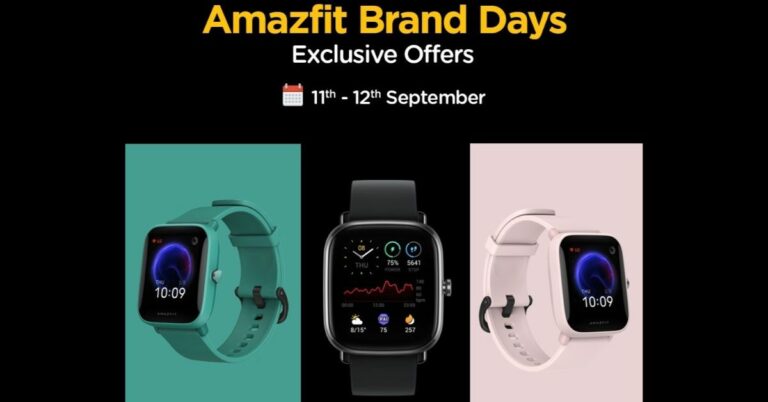
Huami backed Chinese smart wearable company Amazfit is hosting a Brand Day Sale where it will be offering its fitness wearables in India at discounted prices. It is going to be a two days sale which is to be held tomorrow and September 12.During the Brand Day Sale, there will be deals and offers on the top-selling smartwatches along with the strap. This will include GTS 2 Mini, Bip U and Bip U Pro from the affordable Bip series and GT flagship series. All of these offers can be availed via Amazon,in.amazfit.com whereas offers and deals on Bip U and Bip U Pro will also be available on Flipkart.
Amazfit GTS 2 Mini
Amazfit GTS 2 mini was launched in India last year. The device was launched in India at Rs 4,999 but during the sale, it will be available at Rs 4,799. The smartwatch comes with a 1.55-inch AMOLED display that has a 301 ppi resolution. The GTS 2 mini is capable to track heart rate, blood oxygen saturation, sleep quality, stress levels and female cycles, and an array of other health and fitness metrics. In addition to this, there is Blood Oxygen Saturation measurement, powered by Huami self-developed oxygen data AI engine.
Amazfit Bip U Pro
Amazfit Bip U Pro features a 1.43-inch IPS LCD with a resolution of 302 x 320 pixels. It offers more than 50 unique watch faces and 60 sports and workout modes including running, swimming, hiking, and cycling. Thesmartwatch is capable of measuring your heart rate, blood oxygen level, stress level, and sleep pattern. The smartwatch also supports GPS and Alexa for voice control. Earlier Bip U Pro was available at Rs 4,999 but can now be purchased for Rs 4,799 during the Brand Day Sale.
Amazfit Bip U
Amazfit Bip U which was launched at 3,999 will be available at Rs 3,799 during the sale. The smartwatch comes with more than 50 watch faces and offers stress tracking, menstrual cycle and breathing exercises. The watch features a 1.43-inch HD TFT-LCD colour display with 2.5D Corning Gorilla Glass 3 protection. There are 60 sports modes on the Amazfit Bip U including running, cycling, yoga, dancing, skating, kickboxing, and many more. Besides this, the smartwatch has two PPG bio-tracking optical sensors to monitor heart rate 24×7, SpO2 blood oxygen saturation levels, menstrual cycles, ovulation period.
For the latest gadget and tech news, and gadget reviews, follow us on Twitter, Facebook and Instagram. For newest tech & gadget videos subscribe to our YouTube Channel. You can also stay up to date using the Gadget Bridge Android App. You can find the latest car and bike news here.
The folding smartphones culture started a few years ago with Samsung and Huawei bringing foldable phones in the same year. Sadly, Huawei went out of the race here, however, Samsung is still strong as it has received a good ovation from the consumers. Samsung Galaxy Z Fold 2 got a lot of accolades and it was a winner in Gadget Bridge Awards 2020 as well. Now the third iteration of the smartphone is available in the form of Samsung Galaxy Z Fold 3 and we spent more than a week with this folding device. This is the Samsung Galaxy Z Fold 3 review we want all of you to read if you are in the market to buy a folding smartphone.
Samsung Galaxy Z Fold 3 review: Design and Display
This time the Samsung Galaxy Z Fold 3 is available in three colours: Phantom Black, Phantom Green ad Phantom Pink. We got to play around with the black version that is subtle yet brings a sense of masculinity with it. This time the more premium Gold colour is missing, but something tells us we might see a special appearance by the colour in the months to come.
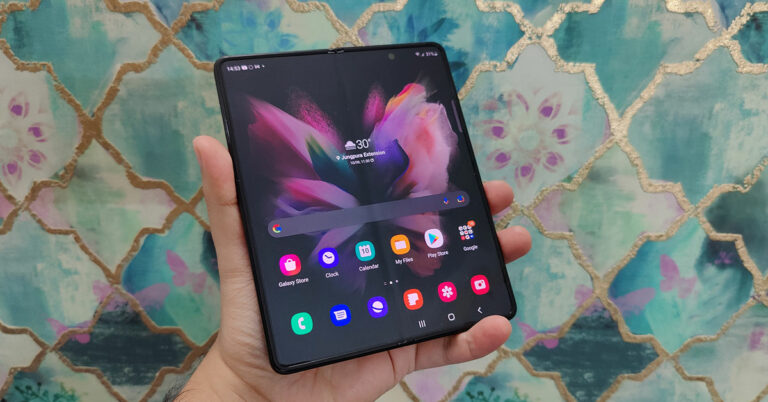
So, let’s talk more about the design and aesthetics of the Samsung Galaxy Z Fold 3. When folded it becomes a regular smartphone (yes, a bit fat but still feels good), which can be accessed with one hand. The screen here measure 6.2-inches and is edge to edge with Corning Gorilla Glass Victus protection on top of it. With that, the company has put a screen protector over it to defend it against those nasty scratches. Here you will find the primary selfie camera as well in a cut-out on top.
The outside screen curves from two of its outer sides and is flat on the inside, that is how good the engineering of this smartphone is. There is a lot of aluminium metal used on this smartphone. The spine is also made of a metal plate where you can see the Samsung branding. Flip it around you will find a triple rear camera setup with the LED flash.
Now time to unfold it. As soon as you do that, you are greeted with a large 7.6-inch AMOLED touchscreen. Both touchscreens support 120Hz refresh rate and HDR10+. The peak brightness of the screen is 1,200 nits and the inside screen is almost edge to edge. Since it is a folding screen it cannot fully edge to edge as a frame needs to hold it. The dig is still there in the middle, but it is not a problem. The experience is seamless when watching movies, videos or playing games. Samsung also provides an in-display secondary selfie camera in the inside screen, which is one of the first we have seen in a smartphone.
As far as more physical features of the phone are concerned, the Samsung Galaxy Z Fold 3 (when unfolded) has power cum fingerprint sensor and the volume rocker keys on the right, USB Type-C charging port, a speaker grille and primary MIC at the bottom, while the SIM tray and another speaker grille with few additional MICs are present on the left and top (respectively). Folding and unfolding the device is quite simple and the level of flimsiness has come down to zero when compared to the first variation of the Z Fold series. This smartphone feels rock-solid and like the rest of them reminds us of the good old Nokia communicator, but much more advanced.
We played games like Asphalt 9: Legends, BGMI, COD: Mobile on this smartphone and we loved every bit of it (on both screens). Watching YouTube Videos, Netflix and our own videos on the device was a pleasant experience, too. The phone seamlessly transforms the content you are grasping on the external screen to the internal screen, the transformation is seamless. Both screens do not wash out under the direct sun and portray great colours. The system-wide dark mode is available, which does help in saving a bit of battery since you are using multiple screens on the same device. Overall, we were quite happy with what we saw in Samsung Galaxy Z Fold 3 and with the great screens, the stereo speakers do well too. The sound is very loud and clear on this device.
Samsung Galaxy Z Fold 3 review: Performance and Cameras
Let’s quickly talk about the tech specs of the Samsung Galaxy Z Fold 3 and get it out of the way. The smartphone comes with a Qualcomm 888 chipset that has an octa-core CPU with a max clock speed of 2.84GHz. The graphics are provided by Adreno 660 GPU and it comes in two models. One model sports 12GB RAM with 256GB storage and the other has 12GB RAM with 512GB storage. Both support UFS 3.1 for faster performance of storage and better power efficiency. There is a 4,400 mAh battery inside, which does keep the phone alive for more than 21.5 hours under nominal use, which includes few hours of calling an hour of gaming and 1-2 hours of social media and YouTube browsing and playback.
Sadly, there is no charger in the box but only a Type-C charging cable. Fast Charging of up to 25W is supported with 11W wireless charge support and 4.5W reverse charging capability. On Geekbench 5 the Samsung Galaxy Z Fold 3 scored 607 points in the single-core CPU test, 2,252 in the multi-core CPU test and 4,067 points in the compute test. In the 3D Mark Wildlife test the smartphone scored 5,126 points. All of it indicating good performance and this mobile device is high-end games and power-hungry apps ready.
The operating system on the Samsung Galaxy Z Fold 3 is Android 11 with Samsung UI 3.1 skin on top of it. Thanks to the 12 GB RAM and the latest Snapdragon 888 chipset, we hardly came across any lag. The apps and games open in a jiffy and the 120Hz browsing and scrolling experience is top-notch. There is minuscule bloatware and whatever we could find is uninstallable. You get a lot of quick options in the drop-down quick settings menu and users can quickly access recently used apps from the sideswipe menu. We love an app drawer in a smartphone, and this mobile device also has one, so that everything on the home screen looks neat and not cluttered.
During the Samsung Galaxy Z Fold 3 review, we found some neat things. This includes its cameras, there are a total of 5 on this device. The primary cameras at the back consist of triple 12MP cameras (wide, telephoto and ultrawide). Images taken from the main 12MP wide-angle lens came out to be really good and we loved the sharpness along with the colour gamut. During the day all three lenses performed well. However, the quality fell a little in low light and dark areas. The quality becomes much better in night mode, but one can see noise in shots taken in ultra-wide mode during the night.
There are a lot of modes available in the native camera app. These include food, panorama, night, portrait, single take and the more useful pro mode that gives more power to the user. With that, there is an addition of pro video mode as well, which is great for vloggers who want more control over the shot. Videos can be recorded in 4K at 60FPS, but image stabilisation is not there in this mode. For that to kick in you have to drop the FPS level to 30.
Talking about the selfie cameras, there are two present in the Samsung Galaxy Z Fold 3. One is placed on the external screen that has a 10MP wide sensor (in a cut-out) and the other one is under the unfolded internal screen. This has a 4MP sensor with a 1.8 aperture size. The images clicked by the external 10MP sensor gave us much better results than the internal one. The colours were accurate, and we found the images to be good during low light as well. Considering a 4MP camera under the display we found the camera to be pretty decent in good indoor lights as well as daylight. But it suffered under low light or night. However, we do not consider it as a negative, as it is the first of its type and over time this tech will also become better.
Talking about which, the under-display camera does not hinder the movie or UI experience. Unless you look at it closely or point towards it then it is a distraction. However, when we asked few people in the family to watch a video on it, 4 out 5 people did not even realise that there is a dot there. The Samsung Galaxy Z Fold 3 also is water-resistant with an IPX8 rating. If you drop it in up to 1.5m of water, nothing with happen to it for 30 minutes. With that, the phone also supports the S-pen. Since there is no Note series now, the S-pen compatibility is shifted to the Fold series. But one would need to shell out extra if they want the S-pen experience with this handheld. And finally, Wi-Fi 6, 5G and Bluetooth 5.2 connectivity are also part of the package.
Verdict
Overall, we were quite happy with the Samsung Galaxy Z Fold 3. The starting price of this marvel is Rs 1,49,990, which does seem like a hefty amount. The smartphone is not made for everyone, only but for a chosen few. We love it because it brings new-age techniques and combines them in a phenomenal shell. Over that, the split-screen experience is like none other. It is the best of both worlds, a smartphone that doubles up as a tablet. If you are an executive or businessman (or a person who can afford it) that needs security, good cameras, and a very good-looking device, this is the smartphone to get.
Pros
Dual large display
Good primary (wide) and external selfie cameras
Excellent performance
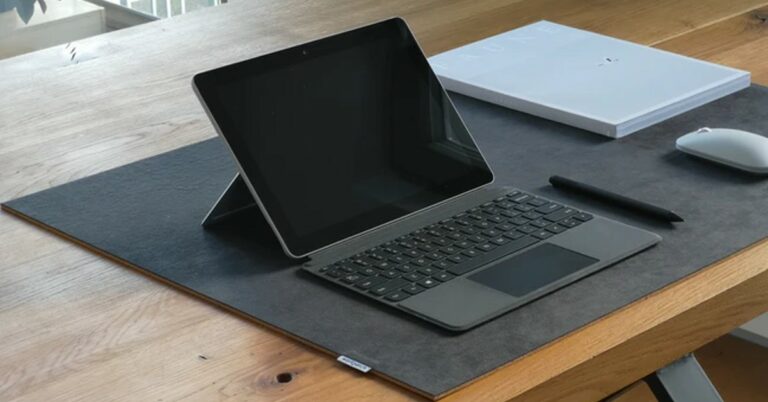
Microsoft has scheduled the surface event for September 22. We can expect the new Surface Go to be released in an online event with a new set of internal hardware. The design language is expected to be the same as its predecessor Surface Go 2. There is no news of Microsoft switching to AMD and we can say that the company will still be using Intel chips on their new generation of tablets.We can expect Microsoft to release Surface Go 3 in two variants and both will be having Intel chipset inside. The first model will be powered by an Intel Pentium Gold 6500Y processor paired with 4GB RAM with multiple storage options to choose from. The other model will be a tier above this one and will be powered by an Intel Core i3-10100Y processor paired with 8GB RAM. This information was sourced from the tablet’s leaked listing found on Geekbench.Read Also: Microsoft Surface Pro 7, Surface Laptop 3, and Surface Pro X gest listed on Microsoft India websiteIntel Pentium Gold 6500Y achieves a single-core score of 3,197, and a multi-core score of 5,643, which is higher than its previous model the Surface Go 2 that hover around 2,200, with multi-core results of around 4,300. For the Intel Core i3-10100Y model, the single-core score can be seen as 4,359 and 7,643 for multi-core. That’s again better than the previous-gen Intel Core m3-8100Y that scored around 4,100 for single-core and 6,800 for multi-core performance. The Surface Go reportedly will feature a 10.5-inch full-HD display just as the previous model and the housing is expected to be made of magnesium alloy.Read Also: Microsoft Surface 3 will be available for $499 in a monthIt is also rumoured that at the same event Surface Duo 2 might also make a debut. We can expect the same dual-screen design from the device that was introduced on its predecessor. The screen will be a dual OLED display mounted on a dual 360-degree hinge mechanism. The device will be running Android 11 with Snapdragon 888. The updated model will be 5G ready as well.More details about what exactly the company has in wraps will be revealed at the Microsoft event to be held virtually at 11 am ET (8:30 pm IST) on September 22. It will be exciting to see what new tech the company is planning for its customers.For the latest gadget and tech news, and gadget reviews, follow us on Twitter, Facebook and Instagram. For newest tech & gadget videos subscribe to our YouTube Channel. You can also stay up to date using the Gadget Bridge Android App. You can find the latest car and bike news here.
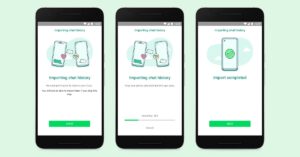
Whatsapp announced that it has rolled out a new feature to transfer chat history data directly from your iPhone to select Android (Samsung) smartphones. The way to enable this is via Samsung’s SmartSwitch app by physically connecting a Samsung phone with an iPhone via a Lightning to USB-C cable. Before this make sure to check the compatibility of your devices. Be sure you’ve got the latest version of the Samsung SmartSwitch app 3.7.22.1 or higher. The device should be running Android 10 or higher. WhatsApp application on iOS should be version 2.21.160.17 or higher and version 2.21.16.20 or higher on Android (Samsung) devices. Now follow the below steps to start the transfer.Step 1 – Connect both the devices using Lightning to USB-C cable and wait for the notification to appear on the screen.Step 2 – Follow the steps mentioned in the Samsung Smart Switch application.Step 3 – After setting it up the phone will ask you to scan a QR code from your connected iPhone.Read Also: Transferring file between Samsung smartphone and Windows 10 Step 4 – Once done successfully the above screen will be displayed on the phone.Step 5 – Press start to begin the process.Step 6 – Now login to WhatsApp on your Samsung phone using the same phone number, which was being used in the other phone.Step 7 – Whatsapp will ask you to “Import“ data soon after you are successfully logged in.Step 8 – After the importing process is complete you are good to go and can view older chats in the Android smartphone. Following these steps is an easy way to transfer your WhatsApp data from an iOS device directly to your android smartphone. Talking about the support for other devices, the company is constantly adding new models of phones to its list to be able to use this feature. Till that time one can always use the old traditional way of backing up the WhatsApp data by heading to Settings>Chats>Chat backup and transferring the chats directly on the new phone via the internet (but this internet method, at the moment, only supports Android to Android or iOS to iOS).For the latest gadget and tech news, and gadget reviews, follow us on Twitter, Facebook and Instagram. For newest tech & gadget videos subscribe to our YouTube Channel. You can also stay up to date using the Gadget Bridge Android App. You can find the latest car and bike news here.
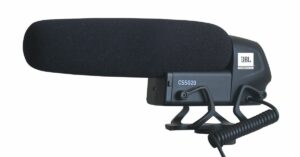
Earlier this year JBL introduced its first commercial lavalier microphone in India and it was followed by the Commercial CSUM10 and then Commercial CSSM100 studio condenser microphone. Now the company has arrived with the JBL Commercial CSSG20 on-camera shotgun microphone in India. The latest offering is designed for professionals, content creators, news reporters, videographers and vloggers for recording professional-quality sound. Speaking on the launch, Senior Director, Sales and Marketing, HARMAN Professional Solutions in India and SAARC, Aditya Todi said “As content creation booms, people are experimenting with what they create. We see many Indian content developers coming out with news-centric videos and interesting interactions. Audio plays a vital role in these creations, hence, JBL Commercial has designed a handy, functional and quality microphone that delivers the message accurately without any distortion.” According to Harman professionals, the JBL Commercial CSSG20 on-camera shotgun microphone is lightweight and convenient to use. The microphone is designed for professional applications that enable you to ‘Sound Your Best’. The JBL microphone is built for recording news, Vlogging, Youtube Videos or Instagram Reels, and for recording Interviews, wedding or party videography, and more.The JBL Commercial CSSG20 on-camera shotgun microphone is capable of capturing sound at its best and delivers pristine audio ensuring great recording outputs. Also, it is a high sensitivity condenser capsule with a super-cardioid pickup pattern. The micro[one comes with a built-in high pass filter that cancels out noise below 200Hz. Whereas the three-step gain adjustment feature -10db/0db/+10db can be used to reduce ambient noise. The JBL Commercial CSSG20 microphone can be connected with a cable that has a 3.5mm connector to compatible devices like smartphones, tablets, DSLR and other cameras. It is retailed with a windscreen, a 3.5mm Splitter Cable and also bundles a discount coupon that can be used for the customer’s next purchase of JBL Commercial microphone via the company’s official website in the country.Speaking of the pricing, the JBL Commercial CSSG20 on-camera shotgun microphone will be available at an introductory price of Rs 4,999 via the e-commerce website Amazon. It comes in a single black colour option.Separately, last month Harman professional also introduced the JBL Commercial CSSM100 microphone in India, which is ideal for both voice recording and instrumental sound. The hyper-cardioid pickup pattern makes it sensitive to sounds in its surroundings while the wide frequency response paired with high headroom cuts any distortion. This microphone can be connected with a 3 pin XLR male connector and a stand adapter. The mic is now available through Flipkart at Rs 4,999.
For the latest gadget and tech news, and gadget reviews, follow us on Twitter, Facebook and Instagram. For newest tech & gadget videos subscribe to our YouTube Channel. You can also stay up to date using the Gadget Bridge Android App. You can find the latest car and bike news here.
Magic is an interesting phenomenon that has experienced so much change in the last 10 years. Many of us feel it’s interesting to know what exactly the illusionist is working on. In order to learn magic one needs to start with the basics. There are quite a few online lessons that are mainly dedicated to show and tell. Irrespective of your level of experience in magic, there are many lessons that will help you start performing magic or teach you how to improve your existing skills. These lessons are provided by well-known magicians who are popular around the world for their skills. Here is a list of the Best websites to learn magic where you can grasp the knowledge of trickery.
Penn and Teller teach the art of magic – MasterClass
Penn & Teller Teach The Art of Magic is a special lesson that is centred on showing the techniques and trick psychology that are easy to learn. The course involves over 14 different lessons with each lesson having about 12 minutes of intensive lectures. They also offer a downloadable book that offers detailed information showcasing various magic tricks. Some of the tricks will include rope tricks, card magic, coin magic, and cup method for the basics. One can pay Rs 1,295 per month, which will be charged annually and one can access these lessons on any device with an internet connection.Visit Website
Magic Course on Udemy
Currently, there are more than 1,400 courses running on Udemy not only for magic but many more. The learning platform has tons of courses uniquely designed to teach different tricks. The courses focus on teaching you a wide range of magic techniques that can be used for professional performances or beginners. The best part about Udemy is that one need not pay for any monthly subscription, consumers can pay for each course respectively. From magic tricks to magic poses there are lots of options to choose from. The company also provides courses for free as well.Visit WebsiteRead Also: Top 10 most useful websites on the internet
Magic Lessons on Skillshare.
Skillshare is an online learning platform with thousands of creative classes taught by experts and professionals to help you learn new skills. The platform offers you more than 35,000+ classes and many of them are free as well. One can also become a teacher after they are skilled enough and can earn according to people interested in your class. One of the best lessons on the site is Taught by Tim Domsky, in which thousands of students have enrolled already to learn new magic tricks and illusions. One can take a Skillshare subscription with a variety of discounts provided by the company.Visit Website
Superprof
Another in the list of best websites to learn magic from is Supeprof. It is an excellent online portal where one can take tuitions from professional magicians via webcam to nurture your hobby. This platform has many tricks to learn and enhance your magic with the use of coin magic, sleight of hand, and card magic. Using Superprof is easy, just search for the magic tutor that is within your neighbourhood. Consider the distance, price, and level you want and start learning magic at your convenience. One can take webcam lessons from anywhere in the world as well.Visit WebsiteRead Also: AI-based teachers could soon be seen in classrooms
Ellusionist
The site teaches you the rudiments of magic. Ellusionist has a lot of magic tricks to teach like move objects without any physical contact, reveal any word or phrase that other people have thought, make a cigarette disappear, guess hidden numbers, and so on, with more than a hundred tricks to select from. The website also has a selection of magic kits for which they provide shipping worldwide. The website is ideal for both beginners and professionals with a subscription fee charged monthly. Visit WebsiteTake your time to browse these best websites to learn magic and go through some exciting lessons to nurture your skills. Select the availability, prices, interests, lessons involved according to your need and you are good to go. Remember Magic is a skill and the more you practice the better you will get.
For the latest gadget and tech news, and gadget reviews, follow us on Twitter, Facebook and Instagram. For newest tech & gadget videos subscribe to our YouTube Channel. You can also stay up to date using the Gadget Bridge Android App. You can find the latest car and bike news here.
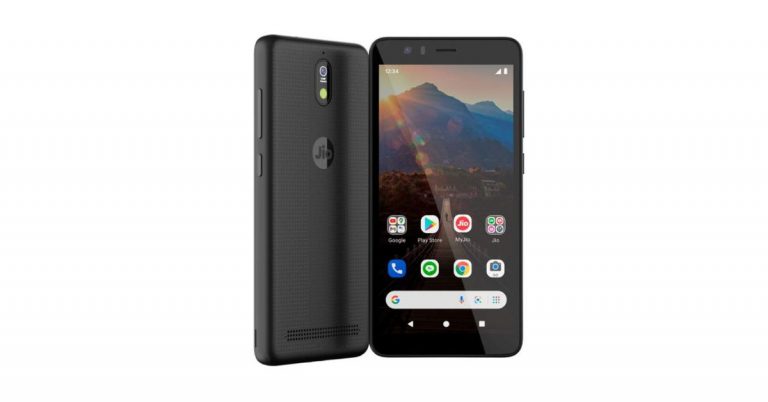
At this year’s 44th Reliance Annual General Meeting (AGM) the company introduced a budget 4G smartphone called JioPhone Next. The device has been developed in collaboration with Google. The smartphone was earlier announced to go on sale in India on September 10 but now it has been rescheduled as it is currently under advanced trials.According to the latest information sent by the company, the JioPhone Next rollout in India will start before Diwali, which is before November 4. Originally the sale was planned to happen on September 10, 2021 that is from today but instead, the company has postponed the launch. There are several key factors that are responsible for the delay and the biggest recent global shortage of the chipsets are said to be the biggest contributor besides pandemic. However, Reliance Jio is yet to confirm the actual cause instead it says that the advanced trials are the reason for the postponement of the JioPhone Next Sale.While announcing the delay, both the companies Jio and Google have released a joint statement stating, “Both companies have begun testing JioPhone Next with a limited set of users for further refinement and are actively working to make it available more widely in time for the Diwali festive season. This additional time will also help mitigate the current industry-wide, global semiconductor shortages.”In the statement, the company has not openly confessed the hardware shortage as the core reason for the delay but it indicated the time duration taken during the advanced trial will give its additional time to lessen the current industry-wide, global semiconductor shortages.On the other hand, Qualcomm is also struggling to meet the demands. As of now, the company has not yet confirmed the pricing of its upcoming handset but the JioPhone Next is suggested to be priced at $50 which translates to Rs 3, 673. Speaking of the specifications, the JioPhone Next has been designed by Google for Jio. It comes with a smart camera and will support AI filters, which are said to offer clearer photos at night and in low-light situations to HDR mode that brings out the wider colour and dynamic range in photos. In addition to this, Google has also partnered with Snap to integrate Indian-specific Snapchat Lenses directly into the phone’s camera, and we will continue to update this experience. The device will also support the latest Android releases and security updates. While the Google Play Protect will provide protection against and other cyber threats, there will be a dedicated Listen button when tapped allows you to listen to any content on your phone screen. Users who might not be able to read content in their language, with a tap of a button, can now translate what’s on their screen and even have the mobile read it back to them in their language.
For the latest gadget and tech news, and gadget reviews, follow us on Twitter, Facebook and Instagram. For newest tech & gadget videos subscribe to our YouTube Channel. You can also stay up to date using the Gadget Bridge Android App. You can find the latest car and bike news here.
Taking screenshots is an important task and is essential for a user to capture a lot of information or memories. On its competitors like MS Windows, it’s fairly easy and has multiple ways to do it. Looking at this and the importance of the feature Apple recently updated on ways to take screenshots on your macOS. Here are the ways and steps to do so.
Taking a Screenshot
Taking a simple screenshot is easy on macOS now Step 1 – Be on the screen you want to take a screenshot of.Step 2 – Hold Shift + command + 3 together.Step 3 – If you see a thumbnail in the corner of your screen, click it to edit the screenshot.Step 4 – If the thumbnail doesn’t appear, wait for the screenshot to save to your desktop.Read Also: Apple’s new patent provides a solution for foldable phones
Capturing Portion of the screen
Step 1 – Be on the screen you want to capture the portion ofStep 2 – Press Shift + command + 4Step 3 – Drag the crosshair on-screen to select the area you want to capture on macOS.Step 4 – To move selection press and hold the space bar while dragging. To cancel press Esc.Step 5 – Release the mouse or trackpad to take a screenshot.Read Also: How to take a screenshot on Windows 10 Step 6 – If you see a thumbnail in the corner of your screen, click it to edit the screenshot.Step 7 – If the thumbnail doesn’t appear, wait for the screenshot to save on to your desktop.
Capturing a window or menu
Step 1 – Open the window you want to capture.Step 2 – Press and hold Shift + command + 4. Step 3 – The pointer will change to a camera icon.Step 4 – Click the window or menu to capture it.Step 5 – For hiding the capture shadow and to align properly hold the Options key.Step 6 – If you see a thumbnail in the corner of your screen, click it to edit the screenshot.Step 7 – If the thumbnail doesn’t appear, wait for the screenshot to save to your desktop.This is an easy way to capture screenshots that will come in handy. One can locate the captured screenshot on the desktop with the name ”Screenshot [date] at [time].png.”. In macOS Mojave or later, you can change the default location of saved screenshots from the Options menu in the Screenshot app.For the latest gadget and tech news, and gadget reviews, follow us on Twitter, Facebook and Instagram. For newest tech & gadget videos subscribe to our YouTube Channel. You can also stay up to date using the Gadget Bridge Android App. You can find the latest car and bike news here.




 So, let’s talk more about the design and aesthetics of the Samsung Galaxy Z Fold 3. When folded it becomes a regular smartphone (yes, a bit fat but still feels good), which can be accessed with one hand. The screen here measure 6.2-inches and is edge to edge with Corning Gorilla Glass Victus protection on top of it. With that, the company has put a screen protector over it to defend it against those nasty scratches. Here you will find the primary selfie camera as well in a cut-out on top.
The outside screen curves from two of its outer sides and is flat on the inside, that is how good the engineering of this smartphone is. There is a lot of aluminium metal used on this smartphone. The spine is also made of a metal plate where you can see the Samsung branding. Flip it around you will find a triple rear camera setup with the LED flash.
So, let’s talk more about the design and aesthetics of the Samsung Galaxy Z Fold 3. When folded it becomes a regular smartphone (yes, a bit fat but still feels good), which can be accessed with one hand. The screen here measure 6.2-inches and is edge to edge with Corning Gorilla Glass Victus protection on top of it. With that, the company has put a screen protector over it to defend it against those nasty scratches. Here you will find the primary selfie camera as well in a cut-out on top.
The outside screen curves from two of its outer sides and is flat on the inside, that is how good the engineering of this smartphone is. There is a lot of aluminium metal used on this smartphone. The spine is also made of a metal plate where you can see the Samsung branding. Flip it around you will find a triple rear camera setup with the LED flash.

 Now time to unfold it. As soon as you do that, you are greeted with a large 7.6-inch AMOLED touchscreen. Both touchscreens support 120Hz refresh rate and HDR10+. The peak brightness of the screen is 1,200 nits and the inside screen is almost edge to edge. Since it is a folding screen it cannot fully edge to edge as a frame needs to hold it. The dig is still there in the middle, but it is not a problem. The experience is seamless when watching movies, videos or playing games. Samsung also provides an in-display secondary selfie camera in the inside screen, which is one of the first we have seen in a smartphone.
 As far as more physical features of the phone are concerned, the Samsung Galaxy Z Fold 3 (when unfolded) has power cum fingerprint sensor and the volume rocker keys on the right, USB Type-C charging port, a speaker grille and primary MIC at the bottom, while the SIM tray and another speaker grille with few additional MICs are present on the left and top (respectively). Folding and unfolding the device is quite simple and the level of flimsiness has come down to zero when compared to the first variation of the Z Fold series. This smartphone feels rock-solid and like the rest of them reminds us of the good old Nokia communicator, but much more advanced.
 We played games like Asphalt 9: Legends, BGMI, COD: Mobile on this smartphone and we loved every bit of it (on both screens). Watching YouTube Videos, Netflix and our own videos on the device was a pleasant experience, too. The phone seamlessly transforms the content you are grasping on the external screen to the internal screen, the transformation is seamless. Both screens do not wash out under the direct sun and portray great colours. The system-wide dark mode is available, which does help in saving a bit of battery since you are using multiple screens on the same device. Overall, we were quite happy with what we saw in Samsung Galaxy Z Fold 3 and with the great screens, the stereo speakers do well too. The sound is very loud and clear on this device.
 The operating system on the Samsung Galaxy Z Fold 3 is
  Talking about the selfie cameras, there are two present in the Samsung Galaxy Z Fold 3. One is placed on the external screen that has a 10MP wide sensor (in a cut-out) and the other one is under the unfolded internal screen. This has a 4MP sensor with a 1.8 aperture size. The images clicked by the external 10MP sensor gave us much better results than the internal one. The colours were accurate, and we found the images to be good during low light as well. Considering a 4MP camera under the display we found the camera to be pretty decent in good indoor lights as well as daylight. But it suffered under low light or night. However, we do not consider it as a negative, as it is the first of its type and over time this tech will also become better.
 Talking about which, the under-display camera does not hinder the movie or UI experience. Unless you look at it closely or point towards it then it is a distraction. However, when we asked few people in the family to watch a video on it, 4 out 5 people did not even realise that there is a dot there. The Samsung Galaxy Z Fold 3 also is water-resistant with an IPX8 rating. If you drop it in up to 1.5m of water, nothing with happen to it for 30 minutes. With that, the phone also supports the S-pen. Since there is no Note series now, the S-pen compatibility is shifted to the Fold series. But one would need to shell out extra if they want the S-pen experience with this handheld. And finally, Wi-Fi 6, 5G and Bluetooth 5.2 connectivity are also part of the package.

 Read Also:




 Step 3 –
 Step 3 –
 Read Also:
  Step 5 –