

HBO Max India plan details leaked ahead of the official launch

HBO Max by Warner Media is trying to set its foot in the Indian market. The company is prepping up to enter India to make a direct consumer presence in the country. The firm recently appointed Disney veteran executive Amit Malhotra as the Managing Director of HBO Max in Southeast Asia and India. Ahead of the official launch HBO Max’s plans and pricing details have been leaked. The tariff may start from Rs 69 per month and would go up to Rs 329.
As per the latest report by OnlyTech, the Indian plans and pricing details of the HBO Max has been revealed ahead of its unannounced launch. Citing information shared among a group of users under an online pre-launch survey conducted by ‘Nepa’ reveals the go-to-market strategy of HBO Max in India and offers an insight into its makeshift plans and pricing.
Those who are unaware HBO Max is an OTT streaming service that offers a variety of big titles of movies and TV shows just like other platforms such as Amazon Prime Video, Disney+ Hotstar, and Netflix. The service is likely to enter India soon; however, the exact launch details are yet to be revealed.
Reportedly, HBO Max conducted an online pre-launch survey that revealed its strategy and plans for the potential future launch in India. In the country, the company plans to offer users its service at as low as Rs 69 per month. This will be ad-supported and will contain 2 concurrent streams across various devices which can be streamed in SD video quality. In addition to this, the content release will include late release content like series episodes when the whole season is available and movies one year after the theatrical run/digital release.
After the first plan, HBO Max India may also offer a second plan called Mobile which would be available at Rs 139 per month. The Mobile plan will include ad-free content which may be streamed in SD quality and would be available in a single concurrent stream viewable on mobile and tablets only. The users will be able to access regular releases like series episodes 2 to 3 weeks after the global release and movies 6-8 months after the theatrical run/digital release.
Lastly, the Standard plan will be available at Rs 329 a month. This will include ad-free content in UHD 4K resolution with three concurrent streams that would include early release directly after global/theatrical run/digital release.
Moreover, all three tiers will allow users to create up to five profiles with access to content in all languages. Besides monthly plans, HBO Max is also likely to offer annual subscriptions for its Mobile and Standard subscription plans. The Mobile plan with an annual subscription will get 40 percent discounts over the monthly plan priced at Rs 1001. On the other hand, the annual subscription of the standard plan will see a 50% discount over the monthly plan cost priced at Rs 1974 yearly. It should be noted that these plans tend to change when they originally release so you can take it with a pinch of salt.
UPDATE: Reply from HBO
“We routinely conduct market research with consumers in countries around the world that test a wide range of possible offers and price points for our services. Those being reported that suggest a future launch of HBO Max in India are amongst many being tested and evaluated and do not reflect any current plans.”
For the latest gadget and tech news, and gadget reviews, follow us on Twitter, Facebook and Instagram. For newest tech & gadget videos subscribe to our YouTube Channel. You can also stay up to date using the Gadget Bridge Android App. You can find the latest car and bike news here.
Top 3 Ways to Find Downloaded Files on Your Android Device (2024)
It’s incredibly simple to use an Android device. Earlier a lost file on your Android smartphone was very hard to locate, as when the smartphone OS first launched it didn’t even have a file explorer. The times have changed now and it has become very easy to find downloaded files on your Android phone. Here is how you can do it.
 Read Also: How to find downloaded files and videos on your iOS device
Read Also: Apple Event: Apple confirms California Streaming event for September 14, may unveil iPhone 13 series
There is also a sharing feature on Files named “Share”, which works like AirDrop for sharing files and folders instantly to another local device.
These file explorers will come in handy to find the files that are downloaded locally on your device. One can directly play multimedia from there and also install the downloaded application. There is also a possibility that a specific format is not supported by the file explorer on your smartphone. To overcome this issue the consumer can connect the smartphone to a PC/ laptop via USB and find the file there.
Read Also: How to find downloaded files and videos on your iOS device
Read Also: Apple Event: Apple confirms California Streaming event for September 14, may unveil iPhone 13 series
There is also a sharing feature on Files named “Share”, which works like AirDrop for sharing files and folders instantly to another local device.
These file explorers will come in handy to find the files that are downloaded locally on your device. One can directly play multimedia from there and also install the downloaded application. There is also a possibility that a specific format is not supported by the file explorer on your smartphone. To overcome this issue the consumer can connect the smartphone to a PC/ laptop via USB and find the file there.
 Step 3: Select Downloads.
 Step 4: This is where you’ll find your recently downloaded files.

File manager
This is the best way to find all your downloaded files in one go. The name of your smartphone’s file manager may differ depending on the brand one uses. Step 1: Locate the file manager in the app drawer. One can also find the application on the search bar above the drawer to locate it. Step 2: Inside the file manager head towards the download tab. All the recently downloaded files, be it an application, PDF or any other multimedia file will be stored there in chronological order of newer to older files for most smartphones. Users can change the order in the Sort by option available by pressing the three-dot option and setting it accordingly. Step 3: After locating the file of your need just tap on it for opening or one can also long-press to get more options related to the file. Read Also: How to find downloaded files and videos on your iOS device
Using Third-party file explorer
What if for the odd chance, some user’s phone does not have a built-in file explorer or the consumer doesn’t like the default file explorer? Well, the Play Store has got you covered with tons of third-party applications available for its users to download for free. Files by Google is our top pick for file explorers as it has smart features to arrange files properly and can also be used to tidy up your storage and give suggestions to clean up the clutter on your device. Step 1: Install Files by Google from Playstore on your Android device. Step 2: Head to the browse tab at the end of the phone screen between share and clean. Step 3: Tap on downloads to view all the downloaded files, applications or other multimedia files. Read Also: Apple Event: Apple confirms California Streaming event for September 14, may unveil iPhone 13 series
There is also a sharing feature on Files named “Share”, which works like AirDrop for sharing files and folders instantly to another local device.
These file explorers will come in handy to find the files that are downloaded locally on your device. One can directly play multimedia from there and also install the downloaded application. There is also a possibility that a specific format is not supported by the file explorer on your smartphone. To overcome this issue the consumer can connect the smartphone to a PC/ laptop via USB and find the file there.
Read Also: Apple Event: Apple confirms California Streaming event for September 14, may unveil iPhone 13 series
There is also a sharing feature on Files named “Share”, which works like AirDrop for sharing files and folders instantly to another local device.
These file explorers will come in handy to find the files that are downloaded locally on your device. One can directly play multimedia from there and also install the downloaded application. There is also a possibility that a specific format is not supported by the file explorer on your smartphone. To overcome this issue the consumer can connect the smartphone to a PC/ laptop via USB and find the file there.
Use Google Chrome to find recently downloaded files
Can’t find a document or APK that you recently downloaded on your phone using Google Chrome? Well, you can always find it in the web browser’s download tab. Here’s how. Step 1: Launch the Google Chrome app on your phone. Step 2: Hit the ellipses at the top right corner of the screen. Step 3: Select Downloads.
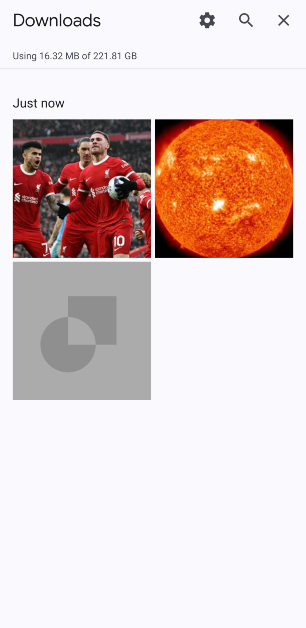
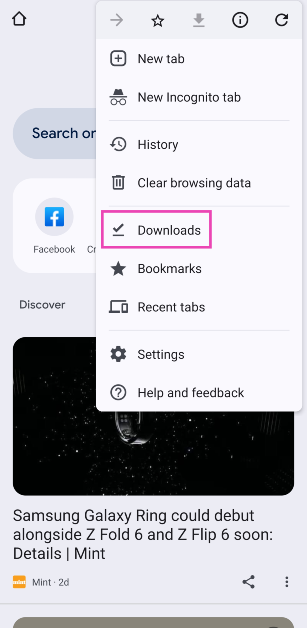 Step 4: This is where you’ll find your recently downloaded files.
Frequently Asked Questions (FAQs)
Where is the Downloads folder on my phone?
You can access the Downloads folder on your phone from the default File Manager app. Google’s Files app can also carry out this task.Where do I find my downloaded images?
All images downloaded from the web browser can be found in the ‘Downloads’ folder in the gallery. If you downloaded an image from an app, browse to that app’s folder in the gallery.How do I find my recently downloaded files on Chrome?
Launch Chrome, hit the ellipses, and select ‘Downloads’ to view the recently downloaded files. Read Also: Korean Tech Giants Samsung And LG Pause US Construction Amid Cost Surge, India Can Be A Good Alternate OptionConclusion
These are the top 3 ways to find downloaded files on your Android device. To change the destination folder for new downloads, go to Chrome>Downloads and hit the settings icon. If you know any other way to go about this task, let us know in the comments!How to find downloaded files and videos on your iOS device
iOS has been the most versatile operating system offered by Apple. It is famous for its simplicity and easy to use interface. It has happened often that you have downloaded some files, but are unable to locate them on your iPhone. There is also a chance that it got downloaded in some other location. Here are some easy ways to locate your downloaded files on your iOS devices.
This is typically where you’ll find downloaded files, such as PDFs, documents, audio files, and images you didn’t save to your Photos app. If one has selected a photos application for saving photos it will be available on the application.
Read Also: Apple Event: Apple confirms California Streaming event for September 14, may unveil iPhone 13 series
Step 3 – Tap on the Downloaded Music category on the Library page.
Step 4 – This displays another list of categories one can choose from: Artist, genre or all music according to their convenience.
These are some easy steps to find any type of file on your iOS device, be it an iPad or iPhone. Also, if none of the steps works we recommend connecting the phone or tab to the computer and locating the file there as the file format might not be supported resulting in not displaying the file on the iPad or iPhone.
For the latest gadget and tech news, and gadget reviews, follow us on Twitter, Facebook and Instagram. For newest tech & gadget videos subscribe to our YouTube Channel. You can also stay up to date using the Gadget Bridge Android App. You can find the latest car and bike news here.
Find Downloaded Files
Step1 – Open the files application from the home screen, which will be a blue-white icon. When you tap the Save to Files option on a file, the phone will prompt you to choose a saving location. Depending on your settings or selection, you’ll have the option to save to On My iPhone, iCloud Drive, and possibly other cloud drives. By downloading a file this way, you’ll find it in the Files app. Step 2 – Tap on the “browse” button located at the bottom right corner. Step 3 – Head to the On My iPhone option under the “Location” header. This option will hold the file depending on how you downloaded your file if it’s for the default setting it will be stored in the “On My iPhone” option. If you selected a third-party cloud service or default one to store the file it will be stored on Another folder named “iCloud Drive”. Step 4 – Head to the download folder that will be a blue folder pointing downwards. This is typically where you’ll find downloaded files, such as PDFs, documents, audio files, and images you didn’t save to your Photos app. If one has selected a photos application for saving photos it will be available on the application.
Read Also: Apple Event: Apple confirms California Streaming event for September 14, may unveil iPhone 13 series
This is typically where you’ll find downloaded files, such as PDFs, documents, audio files, and images you didn’t save to your Photos app. If one has selected a photos application for saving photos it will be available on the application.
Read Also: Apple Event: Apple confirms California Streaming event for September 14, may unveil iPhone 13 series
Locate Downloaded Music
Downloaded a Music file and were unable to locate it? These steps will easily help you to locate the lost files. Step 1 – Open the app library and head to the Music application. Step 2 – Tap the library option on the bottom part of the screen. Step 3 – Tap on the Downloaded Music category on the Library page.
Step 4 – This displays another list of categories one can choose from: Artist, genre or all music according to their convenience.
Step 3 – Tap on the Downloaded Music category on the Library page.
Step 4 – This displays another list of categories one can choose from: Artist, genre or all music according to their convenience.
Missing Downloaded Application on iOS?
The home screen of iOS is a cluster of applications together. It often happens that the downloaded application is right in front of our eyes but we are unable to locate it. Following this simple trick will come in handy. Step 1 – Swipe left across to find the app library(one might have to swipe left multiple times to find the end of the line) Step 2 – Tap on the search bar of the app library Step 3 – Input the name of the application you want to search and it will be displayed right away. Read Also: Rumoured Specifications, release date and price for MacBook Pro 16 These are some easy steps to find any type of file on your iOS device, be it an iPad or iPhone. Also, if none of the steps works we recommend connecting the phone or tab to the computer and locating the file there as the file format might not be supported resulting in not displaying the file on the iPad or iPhone.
For the latest gadget and tech news, and gadget reviews, follow us on Twitter, Facebook and Instagram. For newest tech & gadget videos subscribe to our YouTube Channel. You can also stay up to date using the Gadget Bridge Android App. You can find the latest car and bike news here.
These are some easy steps to find any type of file on your iOS device, be it an iPad or iPhone. Also, if none of the steps works we recommend connecting the phone or tab to the computer and locating the file there as the file format might not be supported resulting in not displaying the file on the iPad or iPhone.
For the latest gadget and tech news, and gadget reviews, follow us on Twitter, Facebook and Instagram. For newest tech & gadget videos subscribe to our YouTube Channel. You can also stay up to date using the Gadget Bridge Android App. You can find the latest car and bike news here. Apple Event: Apple confirms California Streaming event for September 14, may unveil iPhone 13 series

It’s that time of the year when the Cupertino based tech firm Apple usually makes its biggest announcement of the year. Yes, you guessed it right we are talking about the most anticipated Apple iPhone 13 series. The good news is that the company has officially announced its upcoming event- California Streaming on September 14.
The last time when Apple hosted its event it titled it ‘Spring Loaded’ but this time the company has titled it ‘California Streaming’. The Apple event will take place on September 14 at 10 am PDT, or 10.30 pm IST. As the tagline says, it is going to be another virtual event that will be streamed live from Apple Park. Traditionally the company never reveals anything about what products it is going to present at its upcoming event and going by its tradition this time also the Apple has not revealed anything. But speculations suggest we might see the new lineup of iPhone that is iPhone 13 and it might also be possible that Watch Series 7, and the AirPods 3 are likely to make an appearance.
 At its previous Apple event, the company unveiled the new iPad Pro lineup but at the California Streaming event, Apple may introduce the iPhone 13 series because at the moment lots of rumours and leaks around the upcoming iPhone lineup are doing the rounds on the internet. Normally Apple announces its new iPhone at the fall event to recall the last time it was held in October but things might change this time as the delay last time was due to the production delay during the pandemic. Also, the company’s event poster usually gives out some hints but looking at the glowing Apple logo an-always-on display is expected. Moreover, the poster also shows the low light scenario which benefits from improved nighttime photography.
To give a better perspective Apple’s SVP of worldwide marketing has shared a video on Twitter that also shows the glowing logo while the glowing stars also indicate the upcoming iPhone 13 series might include astrophotography mode similar to what we have seen on the Google Pixel devices. The devices are also tipped to get a satellite connectivity feature that will provide connectivity even without cellular coverage but that is to be expected to be available in select markets only.
At its previous Apple event, the company unveiled the new iPad Pro lineup but at the California Streaming event, Apple may introduce the iPhone 13 series because at the moment lots of rumours and leaks around the upcoming iPhone lineup are doing the rounds on the internet. Normally Apple announces its new iPhone at the fall event to recall the last time it was held in October but things might change this time as the delay last time was due to the production delay during the pandemic. Also, the company’s event poster usually gives out some hints but looking at the glowing Apple logo an-always-on display is expected. Moreover, the poster also shows the low light scenario which benefits from improved nighttime photography.
To give a better perspective Apple’s SVP of worldwide marketing has shared a video on Twitter that also shows the glowing logo while the glowing stars also indicate the upcoming iPhone 13 series might include astrophotography mode similar to what we have seen on the Google Pixel devices. The devices are also tipped to get a satellite connectivity feature that will provide connectivity even without cellular coverage but that is to be expected to be available in select markets only.
 At its previous Apple event, the company unveiled the new iPad Pro lineup but at the California Streaming event, Apple may introduce the iPhone 13 series because at the moment lots of rumours and leaks around the upcoming iPhone lineup are doing the rounds on the internet. Normally Apple announces its new iPhone at the fall event to recall the last time it was held in October but things might change this time as the delay last time was due to the production delay during the pandemic. Also, the company’s event poster usually gives out some hints but looking at the glowing Apple logo an-always-on display is expected. Moreover, the poster also shows the low light scenario which benefits from improved nighttime photography.
To give a better perspective Apple’s SVP of worldwide marketing has shared a video on Twitter that also shows the glowing logo while the glowing stars also indicate the upcoming iPhone 13 series might include astrophotography mode similar to what we have seen on the Google Pixel devices. The devices are also tipped to get a satellite connectivity feature that will provide connectivity even without cellular coverage but that is to be expected to be available in select markets only.
At its previous Apple event, the company unveiled the new iPad Pro lineup but at the California Streaming event, Apple may introduce the iPhone 13 series because at the moment lots of rumours and leaks around the upcoming iPhone lineup are doing the rounds on the internet. Normally Apple announces its new iPhone at the fall event to recall the last time it was held in October but things might change this time as the delay last time was due to the production delay during the pandemic. Also, the company’s event poster usually gives out some hints but looking at the glowing Apple logo an-always-on display is expected. Moreover, the poster also shows the low light scenario which benefits from improved nighttime photography.
To give a better perspective Apple’s SVP of worldwide marketing has shared a video on Twitter that also shows the glowing logo while the glowing stars also indicate the upcoming iPhone 13 series might include astrophotography mode similar to what we have seen on the Google Pixel devices. The devices are also tipped to get a satellite connectivity feature that will provide connectivity even without cellular coverage but that is to be expected to be available in select markets only.
If that is to be believed then along with the next generation of the Apple iPhone the company could also announce the timeline for the release of iOS 15 at the Apple Event. This time as well Apple is stated to present four devices iPhone 13, iPhone 13 Mini, iPhone 13 Pro and iPhone 13 Max that will come with a new design upgrade, improved battery life, cameras and more. At this year’s WWDC Apple spoke about the upcoming WatchOS 8 operating system for its smartwatches. The company could also include this at its upcoming event. The Apple Watch Series 7 will be succeeding the Watch Series 6 that will bring new features, sleek design and improved battery life. The device is also expected to have a blood glucose monitoring sensor. For the latest gadget and tech news, and gadget reviews, follow us on Twitter, Facebook and Instagram. For newest tech & gadget videos subscribe to our YouTube Channel. You can also stay up to date using the Gadget Bridge Android App. You can find the latest car and bike news here.We’re California Streaming on September 14th. See you real soon. 🏞 #AppleEvent pic.twitter.com/OjOvJFXlHd
— Greg Joswiak (@gregjoz) September 7, 2021
8 September 2021 Flipkart Daily Trivia Quiz Answers: Answer to win exciting prizes

The e-commerce website Flipkart is hosting Daily Trivia Quiz. Every day it brings a bunch of new questions for its users. By answering them correctly you can win exciting prizes. The questionnaire is based on questions related to general knowledge. Also, the users can win free vouchers and super coins, among other offers via the daily quiz. 8 September 2021 Flipkart Daily Trivia Quiz Answers has already gone live on its platform.
The participant should be at least 18 years old and should have a valid login ID. The Quiz is available on the mobile platform and not the web version. E-commerce conducts the quiz on daily basis and goes live at 12:00 AM IST and runs till 11:59 PM IST. The winners are announced within 15 days from the date of participation that can be viewed under the Gems/Rewards section in the app.
How to participate in the Flipkart Daily Trivia Quiz
To participate download the Flipkart app on your phone. Then open the Flipkart app then head to Game Zone. Now click on the Daily Trivia Banner or search for Daily Trivia. Enter the game and answer all 5 questions with correct answers.8 September 2021 Flipkart Daily Trivia Quiz Answers
Question 1: In which Madhya Pradesh city is the Holkar Cricket Stadium located?
Answer: Indore
Question 2: Which country hosted the South Asian Games 2019?
Answer: Nepal
Question 3: Who won the Dilip Sardesai Award for taking the most wickets in Test cricket in 2018-19?
Answer: Jasprit Bumrah
Question 4: Who recently set the Indian record for the longest gap between 2 T20I matches?
Answer: Sanju Samson
Question 5: Who recently became the first New Zealand cricketer to hit six sixes in an over?
Answer: Leo Carter
For the latest gadget and tech news, and gadget reviews, follow us on Twitter, Facebook and Instagram. For newest tech & gadget videos subscribe to our YouTube Channel. You can also stay up to date using the Gadget Bridge Android App. You can find the latest car and bike news here.
8 September 2021 Amazon Quiz: Answer all the questions to win Rs 20000 Amazon Pay Balance

Get ready to answer a new set of questions as the 8 September 2021 Amazon Quiz is live on its platform. The quiz can be played every day from 12 AM to 11:59 PM. Today you can stand a chance to win Rs 20000 Amazon Pay Balance.
By participating in Amazon Quiz every day you can stand a chance to win prizes such as iPhone X, iPhone Xs, Seagate HDD, GoPro Hero 8 Camera, LG Smartphones, Samsung Galaxy S20, Air Purifier, Oppo smartphones, Amazon Pay Balance among other exciting free gifts. The E-commerce platform brings a daily quiz on its mobile platform which every day gives chances to millions of people across the country to win gadgets and goodies. The quiz goes live on the Amazon app but the quiz is not available for desktop users only app users can participate in the daily quiz.
The quiz contains 5 questions based on general knowledge and current affairs to which the contestants have to answer all the questions correctly. Any wrong answer will eliminate you from the quiz. Further, your name will be selected for a lucky draw and the company will announce the results at the end of the month. We have updated all five questions with their correct answers below for the 8 September 2021 Amazon Quiz so that you can win Rs 20000 Amazon Pay Balance.
8 September 2021 Amazon Quiz Answers
Question 1: In July 2021, the world’s first 3D-printed steel bridge was opened to the public in which city? The answer is- A) Amsterdam Question 2: The Olympic motto was amended in 2021 by adding what English word to the old motto? The answer is- D) Together Question 3: The US Air Force released an artistic rendering of its new B-21 stealth bomber, known by which nickname? The answer is- C) Raider Question 4: Complete the tagline for this place – “The ____ place on earth”. The answer is- C) Happiest Question 5: When this fountain is open, roughly ______ is thrown into it every day. Fill in the blanks The answer is- C) 3000 Euros For the latest gadget and tech news, and gadget reviews, follow us on Twitter, Facebook and Instagram. For newest tech & gadget videos subscribe to our YouTube Channel. You can also stay up to date using the Gadget Bridge Android App. You can find the latest car and bike news here.Itel Vision 2S budget smartphone with 5000mAh battery launched in India
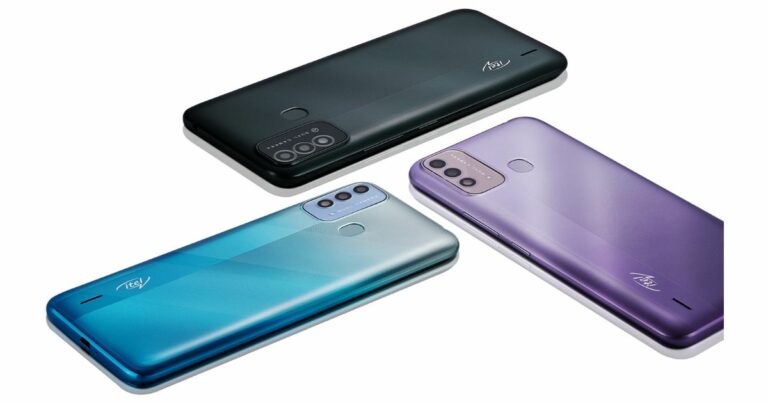
The Chinese smartphone company, Itel, owned by Transsion Holding has announced the launch of the latest budget smartphone in the Indian market. The company has introduced Itel Vision 2S which is a follow-up device of Vision 2 that was introduced in India in April this year. The latest edition of the phone is backed by a 5000mAh battery. It is powered by a 1.6 GHz octa-core processor and operates on Android 11 (Go Edition). The device also features an HD+ IPS display.
 To recall, the Itel Vision 2 was also launched in India in a single 2GB RAM with a 32GB storage option priced at Rs 7,499. The phone is available in colour options of Deep Blue and Gradation Green.
Itel Vision 2S price and availability details
Itel Vision 2S has been launched in India with a price tag of Rs 6,999 for the lone 2GB RAM with 32GB storage. The device will come in three colour options of Gradation Purple, Gradation Blue, and Deep Blue. The company will be offering the VIP customers a free one-time screen replacement facility within 100 days of purchase of the smartphone without having to pay any service charge. To recall, the Itel Vision 2 was also launched in India in a single 2GB RAM with a 32GB storage option priced at Rs 7,499. The phone is available in colour options of Deep Blue and Gradation Green.
Itel Vision 2S tech specs
Itel Vision 2S features a 6.52-inch HD+ IPS display with 720×1,600 pixels of resolution. The screen offers a 90 percent screen-to-body ratio, 269ppi pixel density with a 20:9 aspect ratio and is protected with 2.5D curved glass. The mobile phone runs the Android 11 (Go Edition) operating system out of the box. Under the hood, there is a 1.6 GHz octa-core Unisoc SC9863A processor coupled with 2GB of RAM and 32GB of storage. The Itel Vision 2S comes with a dual-camera setup on its back. This includes an 8-megapixel primary sensor and is assisted by a VGA camera. Upfront there is a 5-megapixel selfie camera that is housed inside a waterdrop notch on the display. Itel Vision 2S includes a rear-mounted fingerprint sensor and face unlock for authentication. It is backed by a 5000mAh battery which the company touts to offer 24 days standby and 25 hours of talk time. The phone includes a G sensor and a proximity sensor. For the latest gadget and tech news, and gadget reviews, follow us on Twitter, Facebook and Instagram. For newest tech & gadget videos subscribe to our YouTube Channel. You can also stay up to date using the Gadget Bridge Android App. You can find the latest car and bike news here.Acer Swift X laptop with AMD Ryzen 5000 Series Mobile Processors and NVIDIA GeForce RTX 3050 Ti graphics launched in India

The Taiwanese computer manufacturing giant, Acer, today expanded its Swift line up with the introduction of Acer Swift X. The device is powered by AMD Ryzen 5000 Series Mobile Processors. It has been further paired with the latest NVIDIA GeForce RTX 3050 Ti graphics. The Acer laptop features a 14-inch FHD IPS display and it comes with an all-metal chassis.
Acer Swift X laptop price and availability
Acer Swift X laptop has been launched in India with a starting price of Rs 84,999. The device will be available for purchase via Acer Online Store, Flipkart, Acer Exclusive stores, Vijay Sales and other authorized retail stores in the country.
 Acer Swift X laptop technical specifications
Acer Swift X laptop features a 14-inch FHDQuad HD IPS LED Backlit TFT Acer ComfyView Display. The screen offers 1920 x 1080 pixels of resolution 85.73% screen-to-body ratio, 300 nits brightness, 100% sRGB and 16:9 aspect ratio. The laptop is powered by AMD Ryzen 5 5600U Hexa-core processor and is paired with NVIDIA GeForce RTX 3050 GPU for graphics with 4GB of GDDR6 VRAM and up to 4.4 GHz, 8 cores, and 16 processing threads The Acer laptop comes with 16 GB of onboard LPDDR4X system memory and up to 2TB SSD, PCIe Gen3 8 Gb/s, NVMe (upgradable up to 1TB ).
The Acer Swift X laptop operates on Windows 10 Home. It carries a 59Wh battery which can deliver up to 15 hours of battery life and fast charging support. The computing device includes all the necessary connectivity ports including USB Type-C (Thunderbolt 4), USB 3.2 Gen 1 ports, HDMI Port and 3.5mm headphone jack. Along with Wi-FI 6, there will be other features like a fingerprint sensor that uses Windows Hello for sign-in. There is AI-enhanced noise suppression for smoother video calls, and Acer BlueLightShield technology to help lessen eye strain during long editing sessions.
Apart from this, the Swift X includes a fan of 59 blades, 0.3mm, and dual D6 copper heat pipes to maximize cooling efficiency. The stereo ring with an inclined plane on the fan top brings in more volume of air combined with a wider air vent, this design efficiently intakes more air and delivers up to 5- 10% improvement in airflow. Also, the Air inlet keyboard design upgrades its thermal performance and expels 8- 10% more heat compared to the keyboard without an air inlet.
For the latest gadget and tech news, and gadget reviews, follow us on Twitter, Facebook and Instagram. For newest tech & gadget videos subscribe to our YouTube Channel. You can also stay up to date using the Gadget Bridge Android App. You can find the latest car and bike news here.
Acer Swift X laptop technical specifications
Acer Swift X laptop features a 14-inch FHDQuad HD IPS LED Backlit TFT Acer ComfyView Display. The screen offers 1920 x 1080 pixels of resolution 85.73% screen-to-body ratio, 300 nits brightness, 100% sRGB and 16:9 aspect ratio. The laptop is powered by AMD Ryzen 5 5600U Hexa-core processor and is paired with NVIDIA GeForce RTX 3050 GPU for graphics with 4GB of GDDR6 VRAM and up to 4.4 GHz, 8 cores, and 16 processing threads The Acer laptop comes with 16 GB of onboard LPDDR4X system memory and up to 2TB SSD, PCIe Gen3 8 Gb/s, NVMe (upgradable up to 1TB ).
The Acer Swift X laptop operates on Windows 10 Home. It carries a 59Wh battery which can deliver up to 15 hours of battery life and fast charging support. The computing device includes all the necessary connectivity ports including USB Type-C (Thunderbolt 4), USB 3.2 Gen 1 ports, HDMI Port and 3.5mm headphone jack. Along with Wi-FI 6, there will be other features like a fingerprint sensor that uses Windows Hello for sign-in. There is AI-enhanced noise suppression for smoother video calls, and Acer BlueLightShield technology to help lessen eye strain during long editing sessions.
Apart from this, the Swift X includes a fan of 59 blades, 0.3mm, and dual D6 copper heat pipes to maximize cooling efficiency. The stereo ring with an inclined plane on the fan top brings in more volume of air combined with a wider air vent, this design efficiently intakes more air and delivers up to 5- 10% improvement in airflow. Also, the Air inlet keyboard design upgrades its thermal performance and expels 8- 10% more heat compared to the keyboard without an air inlet.
For the latest gadget and tech news, and gadget reviews, follow us on Twitter, Facebook and Instagram. For newest tech & gadget videos subscribe to our YouTube Channel. You can also stay up to date using the Gadget Bridge Android App. You can find the latest car and bike news here.
 Acer Swift X laptop technical specifications
Acer Swift X laptop features a 14-inch FHDQuad HD IPS LED Backlit TFT Acer ComfyView Display. The screen offers 1920 x 1080 pixels of resolution 85.73% screen-to-body ratio, 300 nits brightness, 100% sRGB and 16:9 aspect ratio. The laptop is powered by AMD Ryzen 5 5600U Hexa-core processor and is paired with NVIDIA GeForce RTX 3050 GPU for graphics with 4GB of GDDR6 VRAM and up to 4.4 GHz, 8 cores, and 16 processing threads The Acer laptop comes with 16 GB of onboard LPDDR4X system memory and up to 2TB SSD, PCIe Gen3 8 Gb/s, NVMe (upgradable up to 1TB ).
The Acer Swift X laptop operates on Windows 10 Home. It carries a 59Wh battery which can deliver up to 15 hours of battery life and fast charging support. The computing device includes all the necessary connectivity ports including USB Type-C (Thunderbolt 4), USB 3.2 Gen 1 ports, HDMI Port and 3.5mm headphone jack. Along with Wi-FI 6, there will be other features like a fingerprint sensor that uses Windows Hello for sign-in. There is AI-enhanced noise suppression for smoother video calls, and Acer BlueLightShield technology to help lessen eye strain during long editing sessions.
Apart from this, the Swift X includes a fan of 59 blades, 0.3mm, and dual D6 copper heat pipes to maximize cooling efficiency. The stereo ring with an inclined plane on the fan top brings in more volume of air combined with a wider air vent, this design efficiently intakes more air and delivers up to 5- 10% improvement in airflow. Also, the Air inlet keyboard design upgrades its thermal performance and expels 8- 10% more heat compared to the keyboard without an air inlet.
For the latest gadget and tech news, and gadget reviews, follow us on Twitter, Facebook and Instagram. For newest tech & gadget videos subscribe to our YouTube Channel. You can also stay up to date using the Gadget Bridge Android App. You can find the latest car and bike news here.
Acer Swift X laptop technical specifications
Acer Swift X laptop features a 14-inch FHDQuad HD IPS LED Backlit TFT Acer ComfyView Display. The screen offers 1920 x 1080 pixels of resolution 85.73% screen-to-body ratio, 300 nits brightness, 100% sRGB and 16:9 aspect ratio. The laptop is powered by AMD Ryzen 5 5600U Hexa-core processor and is paired with NVIDIA GeForce RTX 3050 GPU for graphics with 4GB of GDDR6 VRAM and up to 4.4 GHz, 8 cores, and 16 processing threads The Acer laptop comes with 16 GB of onboard LPDDR4X system memory and up to 2TB SSD, PCIe Gen3 8 Gb/s, NVMe (upgradable up to 1TB ).
The Acer Swift X laptop operates on Windows 10 Home. It carries a 59Wh battery which can deliver up to 15 hours of battery life and fast charging support. The computing device includes all the necessary connectivity ports including USB Type-C (Thunderbolt 4), USB 3.2 Gen 1 ports, HDMI Port and 3.5mm headphone jack. Along with Wi-FI 6, there will be other features like a fingerprint sensor that uses Windows Hello for sign-in. There is AI-enhanced noise suppression for smoother video calls, and Acer BlueLightShield technology to help lessen eye strain during long editing sessions.
Apart from this, the Swift X includes a fan of 59 blades, 0.3mm, and dual D6 copper heat pipes to maximize cooling efficiency. The stereo ring with an inclined plane on the fan top brings in more volume of air combined with a wider air vent, this design efficiently intakes more air and delivers up to 5- 10% improvement in airflow. Also, the Air inlet keyboard design upgrades its thermal performance and expels 8- 10% more heat compared to the keyboard without an air inlet.
For the latest gadget and tech news, and gadget reviews, follow us on Twitter, Facebook and Instagram. For newest tech & gadget videos subscribe to our YouTube Channel. You can also stay up to date using the Gadget Bridge Android App. You can find the latest car and bike news here. Philips Fresh Air Mask review: Now breathe easy
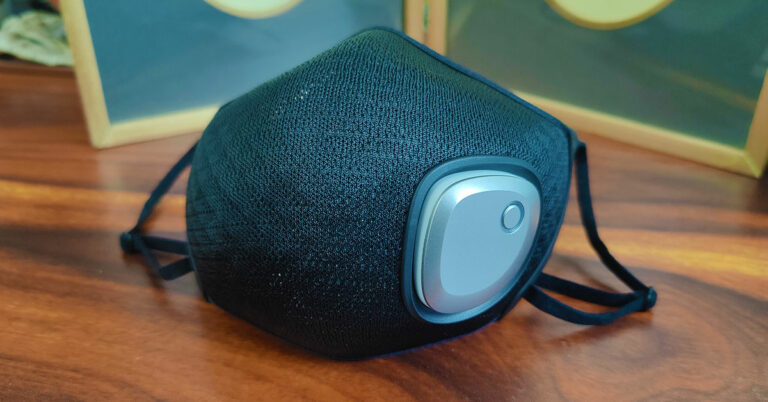
With the pandemic lot of Indian and international companies started to think better and went to the drawing board to build better masks and breathing products. One such company is Philips that innovated and come out with a new digital face mask. It is called Philips Fresh Air Mask and we have been using it every time we step out of the house. What is its main USP? It has a rechargeable exhaust fan within. This is our review of the Philips Fresh Air Mask and should you buy it?
 The filter you get with the Philips Fresh Air Mask is very easy to fit into the main head of the mask and comes with an adjustable nose pin. You can plug the circular exhaust window (in the filter) over the fan magnetically and the sides get attached neatly to the hooks on the left and right sides of the inside of the mask. The straps on this digital face mask are adjustable and you can tighten and loosen them up with ease. The material used all around the Philips Fresh Air Mask is very nice and has a premium, rich feel to it.
The Philips Fresh Air Mask can filter out 95% 3um particles, as the company says, and we did feel a difference when we started using this mask over the regular masks you get in the market. To clean the mask, one must remove the battery with the fan unit, which pushes out easily. The same way you can place it in, which again clicks in easily. If the filter (which by the way is 4 layered) is getting old and dirty one can purchase more from Philips for Rs 2,990. The battery of the mask lasted us for 3.5 hours at medium speed. Even without the fan, the mask is very useable, as it is light in weight and well built. But it will not push out the hot air and carbon die oxide as easily.
The filter you get with the Philips Fresh Air Mask is very easy to fit into the main head of the mask and comes with an adjustable nose pin. You can plug the circular exhaust window (in the filter) over the fan magnetically and the sides get attached neatly to the hooks on the left and right sides of the inside of the mask. The straps on this digital face mask are adjustable and you can tighten and loosen them up with ease. The material used all around the Philips Fresh Air Mask is very nice and has a premium, rich feel to it.
The Philips Fresh Air Mask can filter out 95% 3um particles, as the company says, and we did feel a difference when we started using this mask over the regular masks you get in the market. To clean the mask, one must remove the battery with the fan unit, which pushes out easily. The same way you can place it in, which again clicks in easily. If the filter (which by the way is 4 layered) is getting old and dirty one can purchase more from Philips for Rs 2,990. The battery of the mask lasted us for 3.5 hours at medium speed. Even without the fan, the mask is very useable, as it is light in weight and well built. But it will not push out the hot air and carbon die oxide as easily.
Philips Fresh Air Mask review: Design
The Philips Fresh Air Mask comes in a perfect square navy-blue box. When opened, the first thing you see is a black mask with a silver contraption attached to it. Next, you will find the interchangeable air filter, a USB Type-C charging cable and a manual. The main front end of the mask is built of a mesh-like tough cloth material, which is washable. The silver contraption we spoke about earlier is actually the removable exhaust fan unit. This is connected to a small rechargeable battery inside. The battery compartment also has a USB charging port on it. The filter you get with the Philips Fresh Air Mask is very easy to fit into the main head of the mask and comes with an adjustable nose pin. You can plug the circular exhaust window (in the filter) over the fan magnetically and the sides get attached neatly to the hooks on the left and right sides of the inside of the mask. The straps on this digital face mask are adjustable and you can tighten and loosen them up with ease. The material used all around the Philips Fresh Air Mask is very nice and has a premium, rich feel to it.

Philips Fresh Air Mask review: Performance
Now, coming to the performance of the Philips Fresh Air Mask. We found it to be fine for women but slightly small for men or people with large faces. A square inch larger would have been perfect. Nonetheless, that does not mean that the face mask is not good. It is very-very good. It does what Philips intended it to do. It pushes out all the CO2 and hot air from within. The fan has 3-speed modes, which can be accessed with the LED-lit button on the fan panel from the outside. Sweat is the biggest problem of any facemask, but with this one (thanks to the fan) you hardly find any sweat drops on your face even when you are in hot temperatures. Charging the Philips Fresh Air Mask is also very easy and one can do that with any USB charger using the supplied cable. The Philips Fresh Air Mask can filter out 95% 3um particles, as the company says, and we did feel a difference when we started using this mask over the regular masks you get in the market. To clean the mask, one must remove the battery with the fan unit, which pushes out easily. The same way you can place it in, which again clicks in easily. If the filter (which by the way is 4 layered) is getting old and dirty one can purchase more from Philips for Rs 2,990. The battery of the mask lasted us for 3.5 hours at medium speed. Even without the fan, the mask is very useable, as it is light in weight and well built. But it will not push out the hot air and carbon die oxide as easily.
Verdict
So, is the Philips Fresh Air Mask at Rs 6,990 (available on Amazon) worth buying? On most counts yes. It is the latest in face mask technology, hence Philips is asking for a premium. Put it this way, you cannot put a price on saving yourself from the deadly coronavirus. And in the process, if you can keep your face cool and fresh then it is a good deal. With the black version, a pink version is also available for the ladies. It can be a good gym companion as well, as it will keep your face cool during a hot workout.Pros
Comfortable Exhaust pushes out CO2 swiftly Washable and reusableCons
Slightly small for people with large faces Some might find it expensive Battery life could have been betterHow to enable YouTube PiP mode on your iOS device like iPhone or iPad
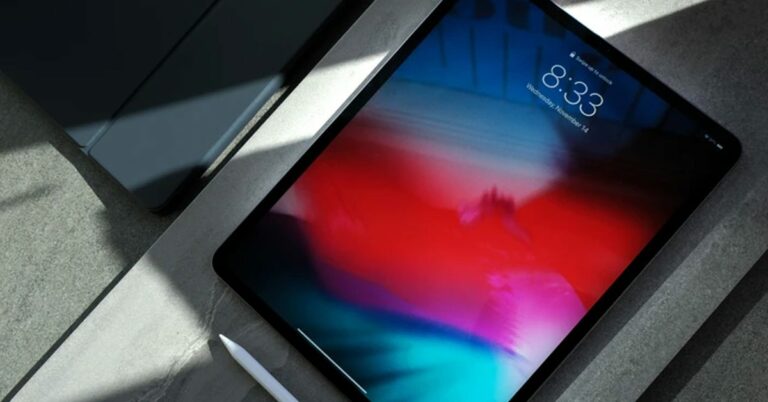
PIP is a great feature used by many people who like to consume a lot of content on YoutTube and want to multitask along with it. Up till recently the picture in picture mode was only available for Android users. But now with recent updates, iOS users can as well indulge in this feature natively or by using the following tricks.
Once the feature is activated the user can swipe up to go to the home screen. The video will keep playing in a mini window. The video will pause as soon as you lock the screen but can be controlled via media controls on the lock screen.
Read Also: How to record WhatsApp voice calls?
After following the steps you are good to go and play any video or your favourite music in PiP mode easily.
Read Also: Top ways to edit, crop and add text to a screenshot on Android
By following this step one can easily play YouTube videos in a small window over other apps and windows in iOS. The best part about this application is that it’s completely free and the process is hassle-free.
These are a few easy steps that will allow users to easily enable PiP mode in their iPhone or iPad. The official release for picture in picture mode integrated into the Application is unknown. But as the feature is up for testing we can hope that it will be released by Google anytime soon.
For the latest gadget and tech news, and gadget reviews, follow us on Twitter, Facebook and Instagram. For newest tech & gadget videos subscribe to our YouTube Channel. You can also stay up to date using the Gadget Bridge Android App. You can find the latest car and bike news here.
1. Native Application
For now, the native support on the YouTube application for iPad and iPhone users is limited. One can still use this feature if he/she has a premium subscription of YouTube. Here is how you can use this feature if you have YouTube premium.On application
Step 1 – Open the YouTube app. Step 2 – Tap on the profile icon in the top right corner. Step 3 – Go to Settings > Try new features. Step 4 – Here, scroll down and tap Try it out for Picture-in-picture. The feature is available to test for a limited time till October 31st.
On browser
Open your browser and head to – youtube.com/new. Step 1 – Sign in with your Google account if not already. Step 2 – Scroll down and look for Picture-in-picture on iOS. Step 3 – Click on Try it out. Once the feature is activated the user can swipe up to go to the home screen. The video will keep playing in a mini window. The video will pause as soon as you lock the screen but can be controlled via media controls on the lock screen.
Read Also: How to record WhatsApp voice calls?
Once the feature is activated the user can swipe up to go to the home screen. The video will keep playing in a mini window. The video will pause as soon as you lock the screen but can be controlled via media controls on the lock screen.
Read Also: How to record WhatsApp voice calls?
2. Safari Browser
Before Google natively added this feature this was the most common way to use PiP mode in iOS. Step 1 – Search YouTube in the Safari browser. Step 2 – Tap Aa at the bottom left. Step 3 – Select the Request Desktop Site option from the menu. Step 4 – Once the desktop site loads, start playing a video and make it full screen. Step 5 – Tap the PiP button on the top left corner of the display. After following the steps you are good to go and play any video or your favourite music in PiP mode easily.
Read Also: Top ways to edit, crop and add text to a screenshot on Android
After following the steps you are good to go and play any video or your favourite music in PiP mode easily.
Read Also: Top ways to edit, crop and add text to a screenshot on Android
3. Third-party application
If due to some issue any of the above steps are not working or for some reason you are not satisfied with the experience. It’s better to use a third-party application. We advise using X.app for this. Step 1 – Head to the app store and search for X.app Step 2 – Install X.app from the App Store on your iPhone or iPad. Step 3 – Now, open YouTube and play a video. Step 4 – Click on Share, select More. Step 5 – In the share menu, select X: Video> Picture-in-Picture. Step 6 – Click on Picture-in-Picture at the bottom By following this step one can easily play YouTube videos in a small window over other apps and windows in iOS. The best part about this application is that it’s completely free and the process is hassle-free.
These are a few easy steps that will allow users to easily enable PiP mode in their iPhone or iPad. The official release for picture in picture mode integrated into the Application is unknown. But as the feature is up for testing we can hope that it will be released by Google anytime soon.
For the latest gadget and tech news, and gadget reviews, follow us on Twitter, Facebook and Instagram. For newest tech & gadget videos subscribe to our YouTube Channel. You can also stay up to date using the Gadget Bridge Android App. You can find the latest car and bike news here.
By following this step one can easily play YouTube videos in a small window over other apps and windows in iOS. The best part about this application is that it’s completely free and the process is hassle-free.
These are a few easy steps that will allow users to easily enable PiP mode in their iPhone or iPad. The official release for picture in picture mode integrated into the Application is unknown. But as the feature is up for testing we can hope that it will be released by Google anytime soon.
For the latest gadget and tech news, and gadget reviews, follow us on Twitter, Facebook and Instagram. For newest tech & gadget videos subscribe to our YouTube Channel. You can also stay up to date using the Gadget Bridge Android App. You can find the latest car and bike news here.