In This Article
Samsung Galaxy A53 5G Review: Design And Display
 The Samsung Galaxy A53 5G comes sitting in a modest-looking rectangular box with a palm-sized length. It is offered in pastel shades of blue, black, peach and white, out of which we were able to get our hands on its pastel blue model. Supporting the smartphone comes along a SIM ejector pin as well as a quick-start guide. The brand continues its eco-friendly adapter less packaging tradition with this latest A5X series smartphone model. However, they do send along a Type-C to Type-C USB cable with the device.
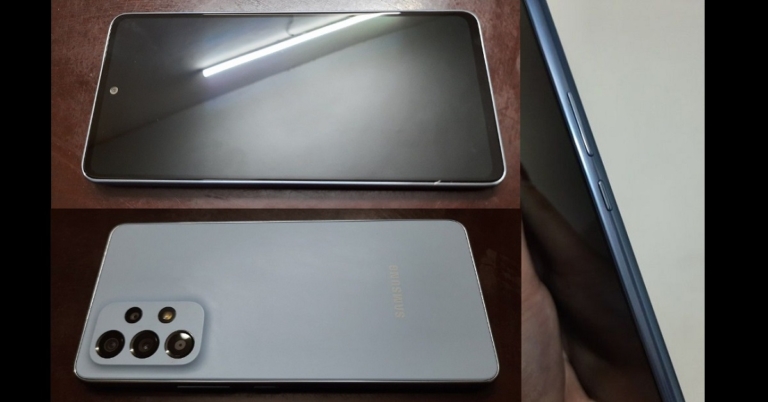
 Upon picking up the brand-new smartphone in hand, you are able to feel its weight distributed perfectly throughout its body. Running your fingers over its shiny black screen gives you a silky smooth feel. Flip the phone over and you are greeted with its premium-looking pastel shade plastic back cover that has a matt finish to it. The symmetrical arrangement of its quad-camera system along with the rear flash (all mounted on a clearly defined raised platform) is hard to miss. The Samsung logo on the lower back is engraved in off-white ever so subtly.
 The spine of the Galaxy A53 5G appears to be made of plastic with a glossy finishing. The power button and the volume button can be found on its right side while the SIM card tray, microphone and a Type-C USB port are located at its bottom. Unlike its predecessor Samsung Galaxy A52 5G, this iteration misses an audio jack in it.
 Upon bringing the phone to life, you are welcomed by a Super AMOLED display with a 120Hz refresh rate. The display size is about 6.5-inches and the smartphone has an 85.4% screen-to-body ratio approximately. With a 1,080 x 2,400 pixel resolution, the Galaxy A53 display has a 405ppi density, a 20:9 aspect ratio and a Corning Gorilla Glass 5 screen protection.
The display can light up with more than 800 nits of brightness levels. Hence, when taken in sunlight, you won’t face much trouble viewing the smartphone screen. The Samsung Galaxy A53 5G has an ultra-soft and silky touch experience. Its in-display fingerprint sensor gives you a ripple effect when touched. Facial Recognition unlocking and Always-On display are also offered along with other usual display and smart-lock settings.
Upon bringing the phone to life, you are welcomed by a Super AMOLED display with a 120Hz refresh rate. The display size is about 6.5-inches and the smartphone has an 85.4% screen-to-body ratio approximately. With a 1,080 x 2,400 pixel resolution, the Galaxy A53 display has a 405ppi density, a 20:9 aspect ratio and a Corning Gorilla Glass 5 screen protection.
The display can light up with more than 800 nits of brightness levels. Hence, when taken in sunlight, you won’t face much trouble viewing the smartphone screen. The Samsung Galaxy A53 5G has an ultra-soft and silky touch experience. Its in-display fingerprint sensor gives you a ripple effect when touched. Facial Recognition unlocking and Always-On display are also offered along with other usual display and smart-lock settings.
 The colours appear quite vivid, with great contrast and saturation. You will find yourself getting deeply immersed in the world of gaming while playing high-end multiplayer games like Asphalt 9 Legends. The smartphone offers premium quality gaming graphics that are quite bold, and have super-fine clarity and higher vibrance in colours. Although the picture quality offered via Youtube is almost life-like, videos can be streamed in up to 1080 pixels only. Even Samsung’s new Galaxy M series models provide streaming quality options up to 2,160 pixels.
Overall, the Samsung Galaxy A53 5G mobile device has a decent-looking design with a good quality display.
Read also: OnePlus Nord CE 2 Review: Super Stylish Design With Excellent Performance
The colours appear quite vivid, with great contrast and saturation. You will find yourself getting deeply immersed in the world of gaming while playing high-end multiplayer games like Asphalt 9 Legends. The smartphone offers premium quality gaming graphics that are quite bold, and have super-fine clarity and higher vibrance in colours. Although the picture quality offered via Youtube is almost life-like, videos can be streamed in up to 1080 pixels only. Even Samsung’s new Galaxy M series models provide streaming quality options up to 2,160 pixels.
Overall, the Samsung Galaxy A53 5G mobile device has a decent-looking design with a good quality display.
Read also: OnePlus Nord CE 2 Review: Super Stylish Design With Excellent Performance
Samsung Galaxy A53 5G Review: Performance And Cameras
Elaborating upon its technical specifications, the all-new Samsung Galaxy A53 5G comes with an Octa-core processor (2x 2.4GHz Cortex-A78 and 6×2.0GHz Cortex-A55). It is built upon an Exynos 1280 (5nm) chipset coupling Mali-G68 GPU. The smartphone comes pre-installed with Android 12 OS and is offered with combinations of 4GB/6GB/8GB RAM and 128GB/256GB internal memory. The Galaxy A53 is a hybrid dual-SIM (nano-SIM) supporting model, which means that you would have to choose whether to use the second slot for putting another SIM card or a microSD card. The smartphone can either act as a dual-SIM or a single-SIM plus microSD one, but not both at the same time. The Samsung Galaxy A53 supports 5G network connectivity, Wi-Fi, Bluetooth 5.1 and is powered by a 5,000mAh battery. It has the capacity to withhold operations for more than one day in case of extensive usage (involving continuous video streaming and heavy mobile gaming) and for more than 2 days upon mild to mediocre usage. It is also supported by Samsung’s 25W fast charging technology (but as said the charger is not part of the package). The home screen, app drawer and applications come with the standard Samsung format, looks and bubble icons. The Samsung folder comes with some additional applications like SmartThings, Samsung Pay, Smart Switch, Samsung TV Plus, Samsung Health and more. Additionally, in the quick-swipe control panel are provided two new settings toggles, namely Link to Windows and Screen recorder. While the former is used to link your smartphone to your laptop or PC, the latter helps you to directly record your screen activity.
 Multiple applications can be run without facing any lag from the system. The smartphone has a stereo audio output, which provides a decent sound experience in terms of loudness. The gaming experience on the smartphone was found quite thrilling. The colours have a sharp contrast and vibrance while the stereo sound support pulls you completely into the gaming dimension. However, a slight lag was observed in the touch response to stimulus while playing games like Shadow Fight 2 and Asphalt 9 Legends, although it may seem insignificant.
Speaking of watching movies and TV shows on OTT platforms like Netflix, the streaming quality along with the audio experience is fine. You are able to binge-watch your favourite shows on the smartphone comfortably. After hours of streaming videos and playing heavy games for reviewing the Samsung Galaxy A53 5G, it still does not get heated up even in hot weather conditions.
Multiple applications can be run without facing any lag from the system. The smartphone has a stereo audio output, which provides a decent sound experience in terms of loudness. The gaming experience on the smartphone was found quite thrilling. The colours have a sharp contrast and vibrance while the stereo sound support pulls you completely into the gaming dimension. However, a slight lag was observed in the touch response to stimulus while playing games like Shadow Fight 2 and Asphalt 9 Legends, although it may seem insignificant.
Speaking of watching movies and TV shows on OTT platforms like Netflix, the streaming quality along with the audio experience is fine. You are able to binge-watch your favourite shows on the smartphone comfortably. After hours of streaming videos and playing heavy games for reviewing the Samsung Galaxy A53 5G, it still does not get heated up even in hot weather conditions.


Verdict
 Overall, the Samsung Galaxy A53 5G offers a decent and sober-looking design. Its Super AMOLED display is certainly eye-pleasing, but the quality options available for streaming Youtube videos are limited. The smartphone operating system works fine and the battery life offered is commendable. Geekbench 5 gives it a single-core score of 745 and a multi-core score of 1865 for CPU benchmarking, with several smartphones (including that from Samsung itself) getting a higher score.
Cameras are a spot Samsung could have done better, but we are sure in the next software update they will make them better. Weighing its pros and cons along with the various features that it has to offer, the Samsung Galaxy A53 5G price seems a tad bit costly. Its starts at Rs 34,499.
Overall, the Samsung Galaxy A53 5G offers a decent and sober-looking design. Its Super AMOLED display is certainly eye-pleasing, but the quality options available for streaming Youtube videos are limited. The smartphone operating system works fine and the battery life offered is commendable. Geekbench 5 gives it a single-core score of 745 and a multi-core score of 1865 for CPU benchmarking, with several smartphones (including that from Samsung itself) getting a higher score.
Cameras are a spot Samsung could have done better, but we are sure in the next software update they will make them better. Weighing its pros and cons along with the various features that it has to offer, the Samsung Galaxy A53 5G price seems a tad bit costly. Its starts at Rs 34,499.
Samsung Galaxy A53 5G Pros
- Decent body design and a good display
- Great battery life
- Does not get heated up easily
Samsung Galaxy A53 5G Cons
- The camera quality could have been better
- Youtube videos can be streamed in up to 1080p only
- Costly price, mediocre value for money


 For the latest

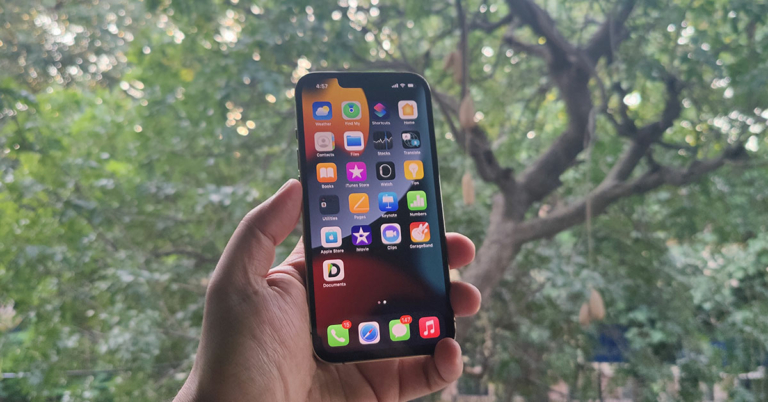
 Step 2: After this, you need to reset your iPhone. This will remove everything that is present in your device. So, make sure that you have taken a backup of all your stuff.
Go to Settings > General > Transfer or Reset iPhone > Erase All Content and Settings.
Step 2: After this, you need to reset your iPhone. This will remove everything that is present in your device. So, make sure that you have taken a backup of all your stuff.
Go to Settings > General > Transfer or Reset iPhone > Erase All Content and Settings.
 Your phone will ask for confirmation about whether you want to take an iCloud backup before you erase. Click on Erase Now as we will be using the older backup where the deleted messages are located.
Step 3: This process will reboot your iPhone 13. After that, it will start the setup process.
Your phone will ask for confirmation about whether you want to take an iCloud backup before you erase. Click on Erase Now as we will be using the older backup where the deleted messages are located.
Step 3: This process will reboot your iPhone 13. After that, it will start the setup process.
 Once you select the device language, it will ask you how you want to transfer apps and data to your iPhone. Click on Restore from iCloud Backup.
Then log in to your Apple account and select the backup where the deleted messages are located.
Note: If you want to recover deleted photos from iPhone 13 without erasing all your data and content, then you need to recover them using iCloud.com.
Once you select the device language, it will ask you how you want to transfer apps and data to your iPhone. Click on Restore from iCloud Backup.
Then log in to your Apple account and select the backup where the deleted messages are located.
Note: If you want to recover deleted photos from iPhone 13 without erasing all your data and content, then you need to recover them using iCloud.com.
 Step 3: A new window will open up, where you will see the list of backups that are present on your iCloud. Select the suitable backup and click on the Restore option. The process will take a few minutes to complete, and you will get a message after completion.
Now, this procedure will allow you to keep both your existing and deleted messages. However, the process is long, and it won’t work if your iCloud has been backed up recently. This is because if you have taken too many backups after you have deleted your messages, then the older backups might not be present on icloud.com, and you won’t be able to recover deleted data from iPhone 13. Also, deleted photos stay in iCloud for just 30 days. So, if you are too late, you may lose those photos.
Step 3: A new window will open up, where you will see the list of backups that are present on your iCloud. Select the suitable backup and click on the Restore option. The process will take a few minutes to complete, and you will get a message after completion.
Now, this procedure will allow you to keep both your existing and deleted messages. However, the process is long, and it won’t work if your iCloud has been backed up recently. This is because if you have taken too many backups after you have deleted your messages, then the older backups might not be present on icloud.com, and you won’t be able to recover deleted data from iPhone 13. Also, deleted photos stay in iCloud for just 30 days. So, if you are too late, you may lose those photos.
 Step 2: Next, it will show you the list of backups that are present in iCloud. Choose the backup that was done before you deleted your messages. Click on Restore and confirm the action.
 It is going to ask for your password before it restores all your data. Plus, once all the data is restored, your iPhone will restart once.
 Step 2: Connect your iPhone to the computer. Make sure that the USB connection is secure and you have all the necessary drivers installed on your PC.
 Step 3: Click on Recover iOS Data. Then, click on the scan option.
 It will start scanning to recover deleted data from iPhone 13. The time taken to scan will depend on the storage size.
Step 4: Once the scanning process is complete, it will show you all the files that Dr.Fone was able to recover from your iPhone. Now, if you want to recover messages, go to the Messages tab on the right side. If you want to recover contacts from iPhone 13, go to the Contacts section. The same goes for recovering photos.
Step 5: Once you have selected the files or messages that you want to recover, click on Restore to Device. If you want, you can even save these messages and photos on your computer.
It will take a few minutes for Dr.Fone to recover all your files to your iPhone.
It will start scanning to recover deleted data from iPhone 13. The time taken to scan will depend on the storage size.
Step 4: Once the scanning process is complete, it will show you all the files that Dr.Fone was able to recover from your iPhone. Now, if you want to recover messages, go to the Messages tab on the right side. If you want to recover contacts from iPhone 13, go to the Contacts section. The same goes for recovering photos.
Step 5: Once you have selected the files or messages that you want to recover, click on Restore to Device. If you want, you can even save these messages and photos on your computer.
It will take a few minutes for Dr.Fone to recover all your files to your iPhone.
















 Read also:
  Read also: