Amazon Quiz Answers Today 24 January 2023: Participate to win Rs 2,500

Amazon hosts a Quiz session for its customers daily. Its app platform brings a quiz on a daily basis, which begins at 12 AM and ends at 11:59 PM daily. The participants stand a chance to win cash prizes on a daily basis. Today’s 24 January 2023 will let you win Rs 2,500 Amazon Pay Balance.

By participating in the Amazon Quiz the participants can win Amazon Pay Balance ranging from Rs 1,000 to Rs 50,000 every day while sitting at home. To win the participants must answer five questions correctly that are based on current events and general knowledge. One wrong answer can eliminate you from the quiz. The results will be announced at the end of the month. Today’s question will let you win Rs 2,500 Amazon Pay Balance. Check below for today’s Amazon quiz answers.

Amazon Quiz Today Prize – Rs 2,500 Amazon Pay Balance

Quiz Date – 24 January 2023

Daily Timing – 12 AM to 11:59 PM

Winner Announcement – Today 12 PM

Amazon Quiz Answers Today 24 January 2023

Question 1: Which is the hottest desert in the world?

Answer: The Sahara Desert

Question 2: Which country is both an island and a continent?

Answer: Australia

Question 3: How many planets are there in our Solar System?

Answer: 8

Question 4: First woman of Indian origin to go to space

Answer: Kalpana Chawla

Question 5: Who is she, an Indian political activist, feminist and poet?

Answer: Sarojini Naidu

How To Play Amazon Quiz

Only app users are eligible to play the Amazon quiz every morning from 12 AM to 11:59 PM. The quiz is not available on the desktop. For those who are unaware of how to play the Amazon quiz below are the steps, you can follow to take the quiz.

  • Firstly download the Amazon app from Google Play Store or App Store
  • Now fill in the required information through the Sign Up option.
  • You need to log in to the Amazon app and scroll down on the home screen to find the Amazon Quiz banner.
  • Tap on the Amazon Quiz banner and tap on the Start button to start the Quiz.
  • Now you will get 5 questions and you need to answer them correctly. One wrong answer will eliminate you from the Quiz.
  • After answering all the questions correctly you are now eligible for a Lucky Draw.
  • The winner’s name will be announced today at 12 PM.

For the latest gadget and tech news, and gadget reviews, follow us on TwitterFacebook and Instagram. For newest tech & gadget videos subscribe to our YouTube Channel. You can also stay up to date using the Gadget Bridge Android App. You can find the latest car and bike news here.

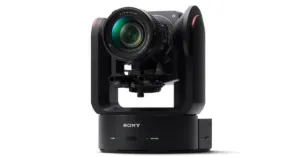
Sony ILME-FR7 cinema camera with E-mount launched

Sony has announced the launch of ILME-FR7, a full-frame interchangeable lens camera. It comes with an E-mount and integrated pan/tilt/zoom (PTZ) capabilities. The cinema camera comes with up to 100 preset camera positions and Real-time Eye AF/Tracking. The Sony camera has a built-in electronically controlled Variable ND filter. It also has internal XAVC recording and external RAW output.

Sony ILME-FR7 price and availability

Prices for the Sony ILME-FR7 camera in India will be available upon request starting on January 31, 2023.

Sony ILME-FR7 features

For the first time in a pan tilt zoom (PTZ) camera, the Sony ILME-FR7 offers a back-illuminated 35mm full-frame CMOS picture sensor with about 10.3 effective megapixels and wide 15+ stop latitude. This incredible sensor not only offers a wide dynamic range, low noise, and cinematic full frame bokeh but also excellent sensitivity, enabling ISO to be increased up to 409600 while shooting in low light.

Also Read: Sony India announced fantastic deals on their products for Republic Day

A broad variety of E-mount lenses, including the G Master series with amazing resolution and bokeh effect, may be mounted on the FR7 thanks to its Sony E-mount. Users have complete creative control thanks to a selection of focal lengths that range from 12 mm to 1200 mm.

Sony ILME-FR7 cinema camera with E-mount launched

S-Cinetone, which provides the soft colours and lovely highlights necessary for healthy-looking skin tones, as well as other preset scene files, are included. To adjust the base sensitivity in the Cine EI mode to the lighting circumstances and reduce noise while preserving a consistent look, choose between ISO 800 and ISO 12800. Because it supports Sony’s original S-Log3 gamma, broad S-Gamut3, and S-Gamut3. Cine colour spaces, this mode is excellent for post-production. It is possible to shoot in up to 4K 120p slow-motion.

Pan, tilt, zoom, focus, record, playback, and all camera settings may be easily managed from a tablet or computer web browser with the help of a new dedicated online application. Remote viewing of FR7 footage is possible for several users at once. Additionally enabled is multi-camera monitoring, which enables remote viewing of several cameras from a single device. For multi-camera production, it is also compatible with Sony’s RM-IP500 remote controller, which increases creative potential while lowering the demand for specialised people in production studios and other shooting environments.

Up to 100 PTZ cameras can be remotely managed by a single RM-IP500 unit, which also offers useful joystick-controlled pan, tilt, and zoom functionality. From 0.02 degrees per second to 60 degrees per second, pan and tilt speed can be continually adjusted to allow a variety of steady and fluid camera motions. The tilt angle range is between -30° and +195°, and the pan angle range is between -170° and +170°.

Up to 100 camera position presets may be retrieved using the integrated web application and optional RM-IP500 remote controller. With a firmware upgrade, the Sony ILME-FR7 will also support the S700 protocol over Ethernet, enabling control of this product from Sony’s Master Setup Unit (MSU) and Remote Control Panel (RCP).

Also Read: WhatsApp is working on the ability to block contacts from the chat list and notifications: Report

Even when people are looking at subjects at steep angles, the integrated BIONZ XR engine realises detection performance for perfect eye focus, allowing the operator to focus on framing the greatest photo. When utilising the web application for the FR7, Touch Focus can be used to begin focusing using Real-time Tracking on the selected target, along with Real-time Eye AF if an eye is detected.

The electronic variable ND filter that is built-in allows for seamless ND modification. By automatically adapting the ND filter to the changing light, an auto ND function maintains exposure stability. Additionally, remote control is an option, enabling exposure control away from the camera.

The FR7 also has dual media slots that handle CFexpress Type A and SDXC memory cards. Due to its high-speed write capabilities, which guarantee stable recording of data at high volumes and frame rates, CFexpress Type A cards are especially well suited for high-bitrate 4K video production. Additionally supported are simultaneous recording, relay recording, interval recording, and proxy recording. A suitable external recorder can receive a 16-bit RAW stream from the SDI output (sold separately).

There are video output ports for HDMI Type A and 12G-SDI as well as optical output for lengthy transmission. The signal from an external microphone or audio device will be received using the AUDIO IN (XLR type 5-pin) connector. A single connector is used by AUDIO CH-1 and CH-2.

For the latest gadget and tech news, and gadget reviews, follow us on TwitterFacebook and Instagram. For newest tech & gadget videos subscribe to our YouTube Channel. You can also stay up to date using the Gadget Bridge Android App. You can find the latest car and bike news here.

A Guide to How Crypto Gaming Works?

Crypto casinos are becoming more popular, like the UFC predictions, as they offer more secure, anonymous, and convenient ways to bet on various casino games. Crypto casinos are online versions that use cryptocurrencies such as Bitcoin and Ethereum as the primary payment methods for deposits, withdrawals, and jackpots.

Unlike traditional online casinos, crypto casinos provide unprecedented privacy, anonymity, and flexibility for their users.

Below is a guide to how the crypto casino works.

What is Crypto Casino?

A crypto casino refers to an online casino that accepts cryptocurrency as payment. It is a type of online gambling that uses cryptocurrency, such as Bitcoin and Ethereum, as the main currency.

It is different from other online casinos because it requires no registration or KYC (Know Your Customer) checks before you gamble with its funds.

Crypto casinos are similar to regular online casinos in many respects but with specific vital differences. It is important to note that crypto casinos are not licensed by any government and do not have traditional banking accounts.

However, they have various measures to ensure the funds’ safe and secure transfer.

How Does a Crypto Casino Work?

As all crypto tokens get exchanged on the blockchain, crypto casinos also rely on blockchain technology.

All transactions at a crypto casino get recorded on a blockchain, providing transparency and security for players.

Crypto Casino Wallet

You’ll need a cryptocurrency wallet to use a crypto casino. A cryptocurrency wallet store sends and receives cryptocurrencies like Bitcoin, Ethereum, and Litecoin.

The wallets can be either online or online, and each type has pros and cons. It’s essential to choose a wallet that is secure and reliable.

The Advantages of Crypto Casinos

There are several advantages of using crypto casinos over traditional online gaming sites. The main benefits include the following:

Provides anonymity

Crypto casinos provide unprecedented levels of privacy and anonymity. You do not need to sweat about the government or anyone else tracing your transactions.

Secure and fast transactions

Crypto casinos use distributed networks to store and process transactions, so you can be sure your transactions are secure and fast.

Wide variety of payment options

Crypto casinos offer various payment options for making deposits or withdrawals. You can also use a range of different cryptocurrencies.

Attractive bonuses and promotions

Crypto casinos often offer attractive bonuses and promotions to attract new players, give back to loyal players, and encourage high-stakes betting.

Types of Crypto Gambling Games

Crypto gambling sites offer a wide range of different gaming options. These include slot machines, video poker, table games, and other classic casino games.

Slots

Slots are the most popular type of gambling game in crypto casinos. They are simple to play and usually feature exciting bonus features and progressive jackpots.

Video Poker

Video poker is another popular option for crypto gamblers. It is similar to a slot machine but gets played against an AI dealer instead of a random number generator.

Table Games

Table games such as blackjack, baccarat, craps, and roulette are famous sights in crypto casinos. These games provide a more social experience than slots and video poker.

Sports Betting

Some crypto casinos offer sports betting, allowing players to bet on the outcomes of various sports matches.

Lotteries

These are popular forms of gambling, and crypto casinos also offer players the opportunity to participate in lottery draws.

How to Maximize Your Profits

Crypto gambling involves inherent risks, so it’s essential to understand them before betting. Various ways to maximize your profits when you gamble with cryptocurrency exist. Below are several tips to get you started:

Set your Limits

It is essential to set a budget when playing with crypto gambling and to stick to it. Make sure you don’t overspend, and only use what you can afford to lose.

Choose the Right Games

Different games will offer different chances of success, so make sure you pick the games that best suit your gaming style and budget.

Take Advantage of Promotions

Crypto casinos often offer a variety of exciting promotions and bonuses, so make sure you take advantage of them to maximize your profits.

Manage your Bankroll

Managing your bankroll is a crucial factor in making sure you make a profit from crypto gambling. Make sure you keep track of your spending and set limits for yourself.

Verdict

Crypto casinos are growing in popularity in the online gambling industry. They offer players a secure, fast, and affordable gambling experience using cryptocurrencies like Bitcoin, Ethereum, and Litecoin.

Players can enjoy various games, promotions, bonuses, and, best of all, provably fair games. A crypto casino may be your best option if you’re looking for a secure, private, fast way to gamble online.

For the latest gadget and tech news, and gadget reviews, follow us on TwitterFacebook and Instagram. For newest tech & gadget videos subscribe to our YouTube Channel. You can also stay up to date using the Gadget Bridge Android App. You can find the latest car and bike news here.

10 Easy Methods to Fix Xbox App Not Downloading Games on Windows 10 or 11 (2024)

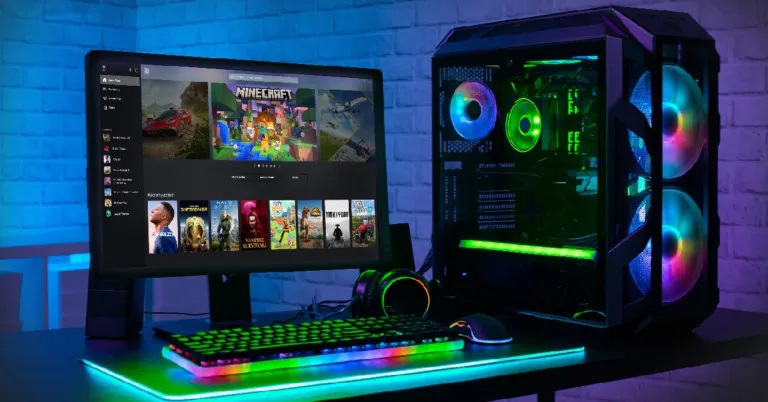
The Xbox app is a one-stop destination for all PC gaming enthusiasts to download the latest games using their PC Game Pass subscription. While the app works great for the most part, it is not uncommon for users to encounter certain issues from time to time. Luckily, there are some common fixes for all kinds of situations. In this article, we bring you 10 easy methods to fix the ‘Xbox app not downloading games’ issue on a Windows 10 or 11 PC.

Read Also: WhatsApp plans to enable sending of photos in their original quality: Report

Check your internet connection 

A faulty internet connection is one of the likely reasons why the Xbox app is not downloading games on your Windows 10 or 11 PC. Tap on the Wi-Fi icon on the bottom right corner of the toolbar and see if you are currently connected to a network. Also, check the status of the connection for ‘internet access’. You can also try loading a webpage on Chrome to check whether the internet connection is functional. Run a speed test to further check the strength of the connection.

Check if your PC Game Pass subscription has expired

An active PC Game Pass subscription is necessary to download games using the Xbox app. Usually, the subscription is auto-renewed every month, but a lack of funds or other bank account-related issues may have prevented Microsoft from renewing your subscription. To rectify this issue and subscribe to the PC Game Pass, go to your Microsoft account page and select ‘Payment Options’ under ‘Payment and billing’.

Use Windows Troubleshoot

Here’s how you can use the Windows troubleshooter to fix common app issues. 

Step 1: Go to Settings and select Update & Security.

Step 1: Go to Settings and select Update & Security. 

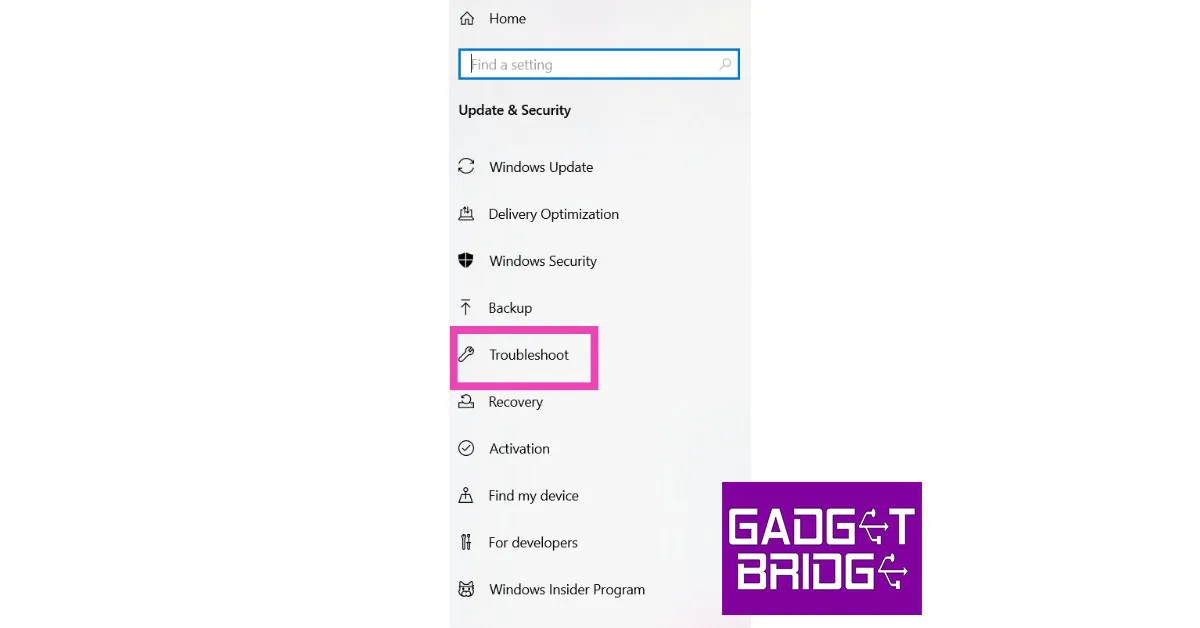
Step 2: Select ‘Troubleshoot’ on the side menu.

Step 2: Select ‘Troubleshoot’ on the side menu.

Step 3: Click on ‘Additional Troubleshooters’ and select Windows Store apps.

Step 3: Click on ‘Additional Troubleshooters’ and select Windows Store apps. how to fix apps not downloading in microsoft store

Sign out and Sign back in

One of the most common fixes to fix any malfunctioning app is signing out of it and then signing back in. This will fix any temporary issue with your account. To sign out of the Xbox app, click the profile icon at the top left corner of the screen and select ‘Sign out’. Close the app and launch it again. Sign in using the appropriate credentials.

Check your PC’s storage space

The Xbox will not download any game on your PC if it is running at full storage capacity. Use the file explorer to check the capacity of each drive. You can also change the download location to a drive that has free storage space. To do this simply open the Xbox app and go to Settings>General and change the destination folder under game install options.

Check if Xbox servers are down

Check if Xbox servers are down 10 Easy methods to Fix Xbox App Not Downloading Games on Windows 10 or 11 (2024)

The Xbox app may be refusing to download a game due to an issue with its servers. To check if the Xbox servers are running, go to the Xbox status page. If the servers are down, you will have to wait until they are back up and running. If there is nothing wrong with the servers, try other fixes on this list.

Repair and Reset the Xbox app

Reset Microsoft Store 10 Easy methods to Fix Xbox App Not Downloading Games on Windows 10 or 11 (2024)

‘Repairing’ the Xbox app takes care of the minor issues within the app that may be keeping it from functioning properly. You can also try resetting the app, which will clear all app data and log you out of the app. You will need to log in again to continue using the app. To repair and reset the Xbox app, go to Settings>Apps>Microsoft Store>Advanced Options.

Check your PC’s date and time

If the date and time on your PC are off, it can render several internet-related apps unusable. This includes WhatsApp, certain web browsers, and even the Xbox app. Make sure your PC is displaying the correct date and time. Go to Settings>Time & language>Date & time and select your region’s time zone.

Update the Xbox app

It is possible that an unexpected bug is keeping you from downloading games using the Xbox app. Usually, these bugs are fixed with a quick update from the developer. To update the Xbox app, simply open its page on the Microsoft Store and select ‘Update’.

Contact Xbox Support

Contact Xbox Support 10 Easy methods to Fix Xbox App Not Downloading Games on Windows 10 or 11 (2024)

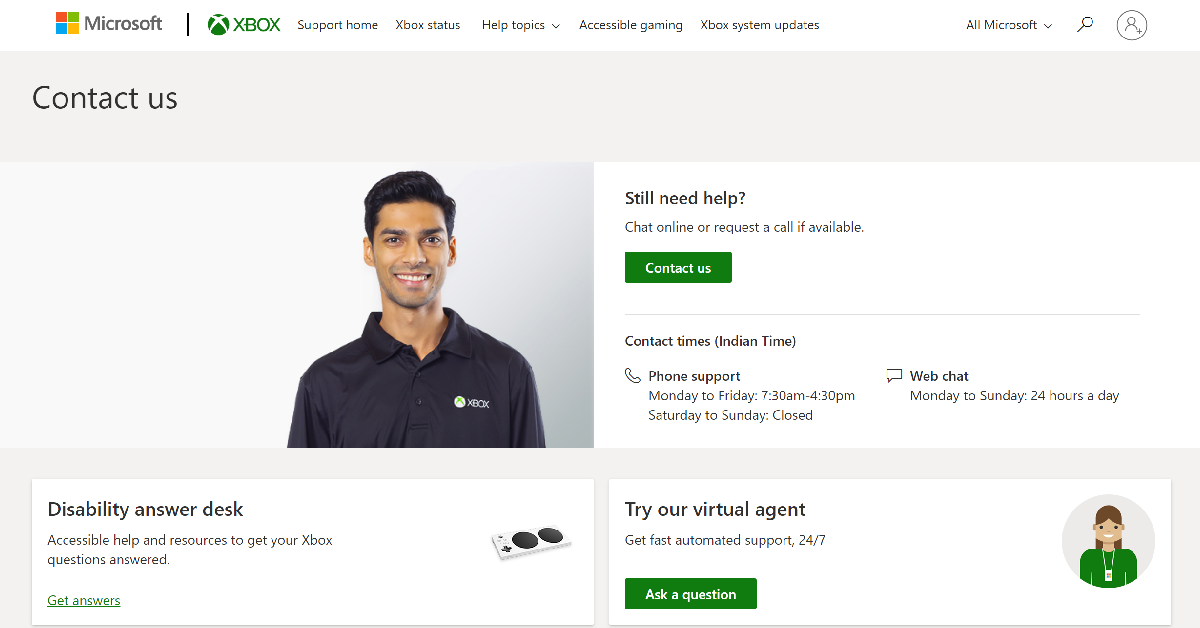
If the fixes mentioned above did not work out for you, try contacting Xbox support. Go to the Xbox Support Page, sign into your account, and select Contact Us. You can choose to call the support staff or have a chat over the Internet.

Frequently Asked Questions (FAQs)

How do I fix the Xbox app if it’s not downloading games?

If your Xbox is not downloading games, make sure your Game Pass subscription has not expired. Additionally, check your internet connection and run Windows troubleshooter for the Xbox app.

Where can I download the Xbox app for my Windows PC?

Windows users can download the Xbox app from the Microsoft Store.

How do I repair the Xbox app on my PC?

To repair and reset the Xbox app, go to Settings>Apps>Microsoft Store>Advanced Options.

Read Also: BharOS indigenous mobile operating system developed by IIT Madras announced

Conclusion

These are the 10 easy methods to fix the ‘Xbox app not downloading games’ issue on a Windows 10 and 11 PC. If you’ve tried all these fixes and still are unable to download a game from the Xbox app, try uninstalling and reinstalling the app. Additionally, you can also try restarting your PC to fix any background glitches. If you found this article helpful, let us know in the comments!

8 Simple Ways to Fix YouTube Thumbnails Not Showing (2024)

0

YouTube thumbnails give a quick glimpse into what the video is about and what you can expect from it. A lot of creators spend a lot of time crafting the perfect thumbnails as good thumbnails increase the chances of viewers clicking on the videos. YouTube itself promotes videos with interesting thumbnails. However, sometimes users report that they cannot see the video thumbnails on the YouTube app. In this article, we bring you 8 simple ways to fix the ‘YouTube thumbnails not showing’ issue on your smartphone.

Read Also: Samsung Galaxy A34 5G gets certified by BIS, also listed on FCC site

Check your Internet connection 

Fast and simple methods to Check Internet Speed on Your Android Smartphone (2022)

Low signal strength or an unstable internet connection can often lead to parts of the YouTube app not loading properly. If you cannot see the thumbnails on the YouTube app and the videos take time to load and buffer, the issue most likely lies with your internet connection. You can try using the Chrome web browser instead of the YouTube app to verify this further. Additionally, you can run a speed test on your smartphone to check the strength of the connection.

Clear app cache

In order to increase the load time, apps store certain files in the cache memory so they don’t have to download them every time you open the app. YouTube does this with thumbnails as well. Once a file is stored in the cache memory, it can get corrupted if it stays there too long. This may cause the app to malfunction. It is a good idea to clear the cache every once in a while. Here’s how you can clear YouTube’s app cache.

Step 1: Go to Settings and select Apps.

Step 2: Scroll down and select Apps.

Step 2: Select YouTube.

Step 2: Select YouTube.

Step 3: Tap on Storage.

Step 3: Tap on Storage.

Step 4: Select ‘Clear cache’ from the bottom toolbar.

Step 4: Select ‘Clear cache’ from the bottom toolbar. 

If you use YouTube on a web browser, clear the browser cache. This article explains how you can clear Google Chrome’s cache.

Force stop the YouTube app

Apart from clearing the cache, you can also try force-stopping the YouTube app and launching it again. Here’s how.

Step 1: Go to Settings and select Apps.

Step 2: Scroll down and select Apps. how to fix youtube thumbnails not showing

Step 2: Select YouTube.

Step 2: Select YouTube. how to fix youtube thumbnails not showing

Step 3: Tap on the ‘Force Stop’ option at the bottom of the screen and confirm your selection in the following dialogue box.

Tap on the ‘Force Stop’ option. how to fix youtube thumbnails not showing

Restart your phone

Restart Your Phone

Sometimes, background glitches can cause an app on your phone to malfunction. The good news is that most of these background issues can be resolved by restarting your device. Long-press the side key and select ‘Restart’ from the power menu. If long-pressing the side key triggers the voice assistant, press it along with the volume-up key to access the power menu.

Check if a browser extension is causing trouble

Google TV update released: Improves GTV UI loading time at startup, Live tab loading speed and more

If you use a YouTube-specific extension for Google Chrome, it may be interfering with the website’s functioning. To check this, open YouTube in an incognito window and see if you are able to view the video thumbnails. If you can see the thumbnails in incognito mode, it is possible that an extension may be the cause of the problem. Pause any YouTube-related extensions on Chrome and check if the thumbnails are able to load.

Update the YouTube app

Youtube testing a Twitch like clipping tool called Clips to share a small portion of a Creator’s video. how to fix youtube thumbnails not showing

It is not uncommon for certain bugs to pop up within the app software. Google routinely updates its apps to fix these bugs. To update the YouTube app, go to the Google Play Store and search for YouTube. On the app page, select ‘Update’. The new app version will most likely not have this issue.

Uninstall and reinstall the app

Top 5 Ways to Download YouTube Shorts on Android (2024)

Sometimes an update can install improperly on your device, causing the app to malfunction. Uninstall the app and then reinstall it from the Play Store (or any other app marketplace) to fix this issue. Most OEMs have their independent app stores which can be used to install YouTube if you don’t want to rely on the Google Play Store. Third-party app marketplaces like APKMirror and APKPure will also do the trick.

Install a VPN

Install a VPN. how to fix youtube thumbnails not showing

It is possible that a certain video has been withheld in your country, which is why you aren’t able to view its thumbnail. To fix this, install a VPN app and select a server outside of your country. Connect to the server and reload the YouTube app to see if you can access the video. Here is our list of the best VPNs you can use right now.

Frequently Asked Questions (FAQs)

Why can’t I see the video thumbnails on my YouTube feed?

Lack of a strong internet connection, malfunctioning extensions, corrupt cache, and outdated app version can be the reasons behind YouTube not displaying video thumbnails on your feed.

How do I clear YouTube’s app cache on Android?

Go to Settings>Apps>YouTube>Storage and select ‘Clear cache’.

Where can I find my YouTube downloads?

Tap on the ‘You’ tab in the YouTube app and select the Downloads folder to find your saved videos. On PC, click on Downloads in the left sidebar.

Read Also: How Smartphones Are Changing the Gaming World

Conclusion

These are the 8 simple ways to fix the ‘YouTube thumbnails not showing’ issue on your smartphone. If you’ve tried all the fixes listed above and the problem still persists, try checking if anyone else is facing this problem as well. If that is the case, then the issue lies on YouTube’s end and will be rectified soon. If you found this article helpful, let us know in the comments!

HP Envy x360 15 gets refreshed with OLED touch display

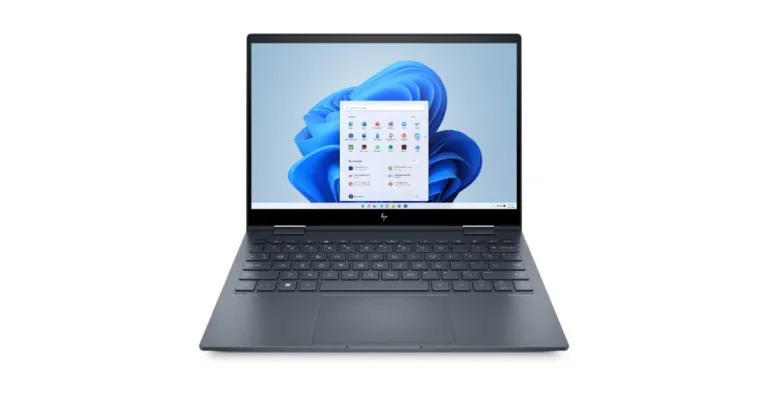
HP has just released a new line of HP Envy x360 15 laptops in India. With a 15.6-inch OLED touch display with a 360-degree hinge mechanism that puts you in the ideal position for working, writing, watching, and playing, the laptops are designed for content creators. The new HP Envy x360 15 lineup features up to a 12th Gen Intel Core EVO i7 processor coupled with Intel Iris Xe Graphics. The convertible laptop includes a 5MP IR camera with smart features like Auto frame Technology and AI Noise reduction for improved privacy, as well as an Emoji Keyboard for quicker communication.

HP Envy x360 15 feature

The new Envy x360 15 portfolio features recycled aluminium and plastic. The 15.6-inch OLED touch screen with 100% DCI P3 colour calibration and Eyesafe certification. With an 88% screen-to-body ratio, there is more screen space, allowing for less scrolling and more screen viewing. When VESA Trueback HDR 500 is activated, the display generates colours with greater vibrancy and depth. With the magnetic pen attached, you may write, draw, or edit with a smoother transition between colours for finer details thanks to improved latency and increased sensitivity.

HP Envy x360 15 gets refreshed with OLED touch display


Also Read: Poco C50 budget smartphone with a 5,000mAh battery launched in India

Up to 12th Gen Intel Core i7 processors and up to Intel Iris Xe integrated graphics power the new HP Envy x360 15. Bang & Olufsen speakers are included with the convertible laptops. The device also includes an Emoji menu with a single key for quicker expression, and HP QuickDrop makes file transfers more convenient.

A high-quality audio experience is produced by Bang & Olufsen. HP Palette software, which includes Concepts for sketching and HP Photo Match for swiftly discovering and organising images, is pre-installed on the device. The Intel Wi-Fi 6E (2×2) and Bluetooth 5.2 combination provides quicker connectivity.

Also Read: Samsung Galaxy A34 5G gets certified by BIS, also listed on FCC site

HP Envy x360 15 price and availability details

HP Envy x360 15’s 12th Gen Intel Core i5 variant with 8GB of RAM and 512GB of storage is priced at Rs 82,999. The price of the full-HD model with 16GB RAM and 512GB storage is Rs 86,999. The model with an OLED touch display is available at Rs 94,999. The variant with 12th Gen Intel Core i7 CPU, 16GB of RAM and 1TB of storage, costs Rs 1,149,99.

For the latest gadget and tech news, and gadget reviews, follow us on TwitterFacebook and Instagram. For newest tech & gadget videos subscribe to our YouTube Channel. You can also stay up to date using the Gadget Bridge Android App. You can find the latest car and bike news here.

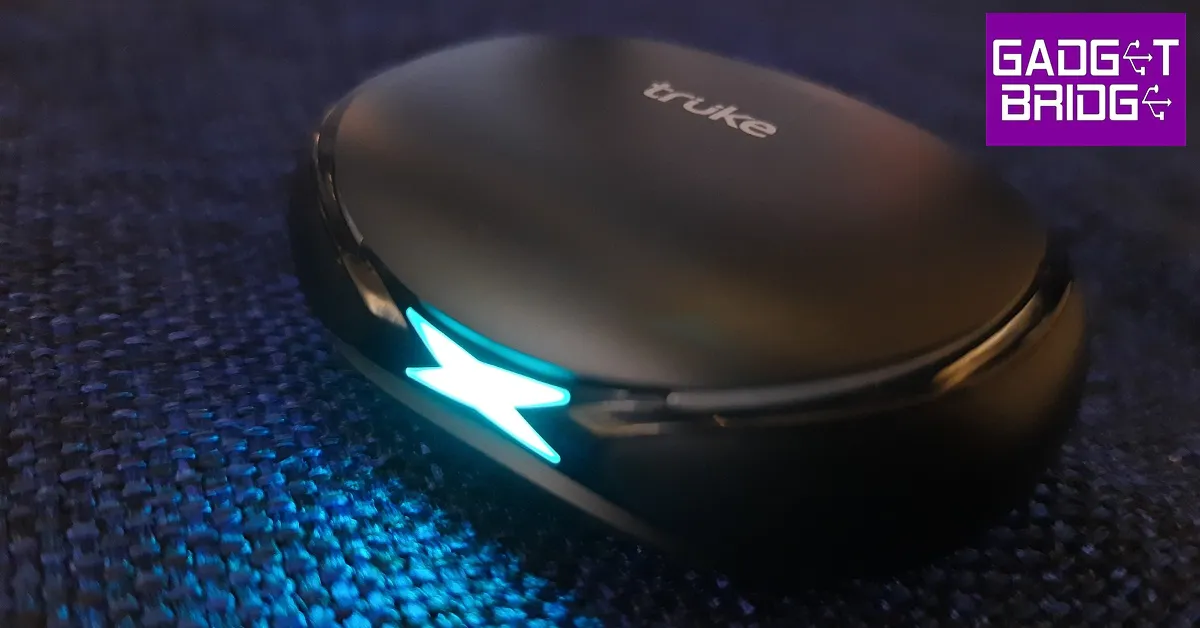
Truke BTG X1 Review: Great looks with a performance to match!

At the turn of the new year, Truke came out with their new gaming TWS, the BTG X1. The wireless gaming earbuds were launched at an introductory price of Rs 999. Currently, the TWS is listed at Rs 1,299 on Amazon. Nevertheless, the BTG X1 still competes in the entry-level segment, a category that is easy to gloss over given how wired earphones are still favoured over wireless earbuds in this price range. That may not be for long, though, as affordable TWS keep getting better with every new release. So what does Truke have in store for us with its newest TWS? We used the Truke BTG X1 for over a week, here is our review.

Read Also: How Smartphones Are Changing the Gaming World

Truke BTG X1 review: Design 

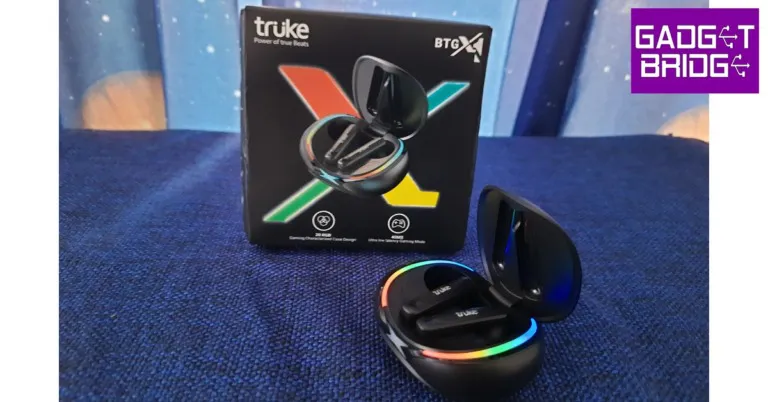
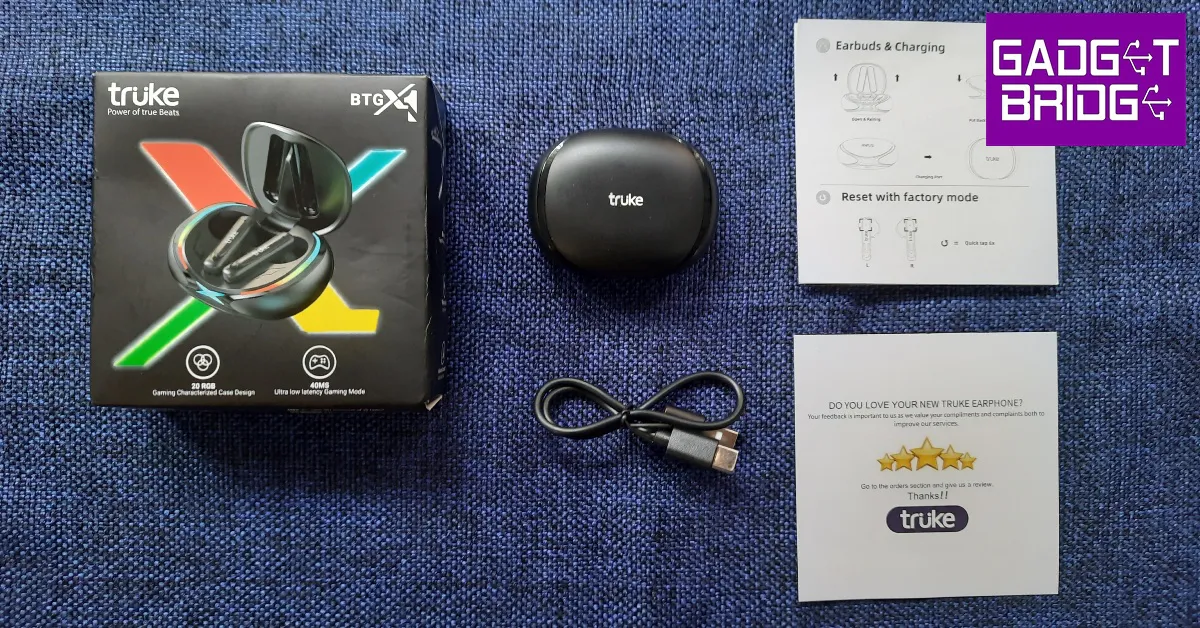
Inside the box, you will find the wireless earbuds, a charging case, a USB Type-C charging cable, a quick start guide, and a warranty card. The plastic tray used to house these contents is quite flimsy, and the charging cable falls out as soon as you pull it out. The earbuds aren’t placed inside the charging case but have a separate cutout for them in the packaging. Given the affordable price of the TWS, cutting corners in the packaging material seems like an understandable choice.

Truke BTG X1 review: Design 

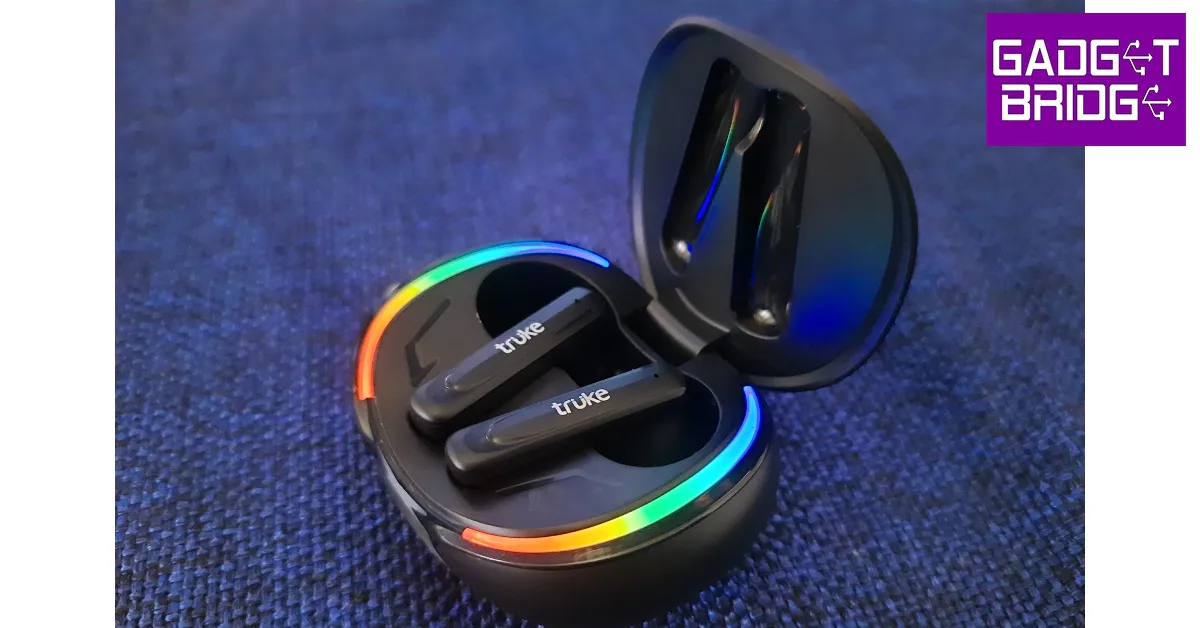
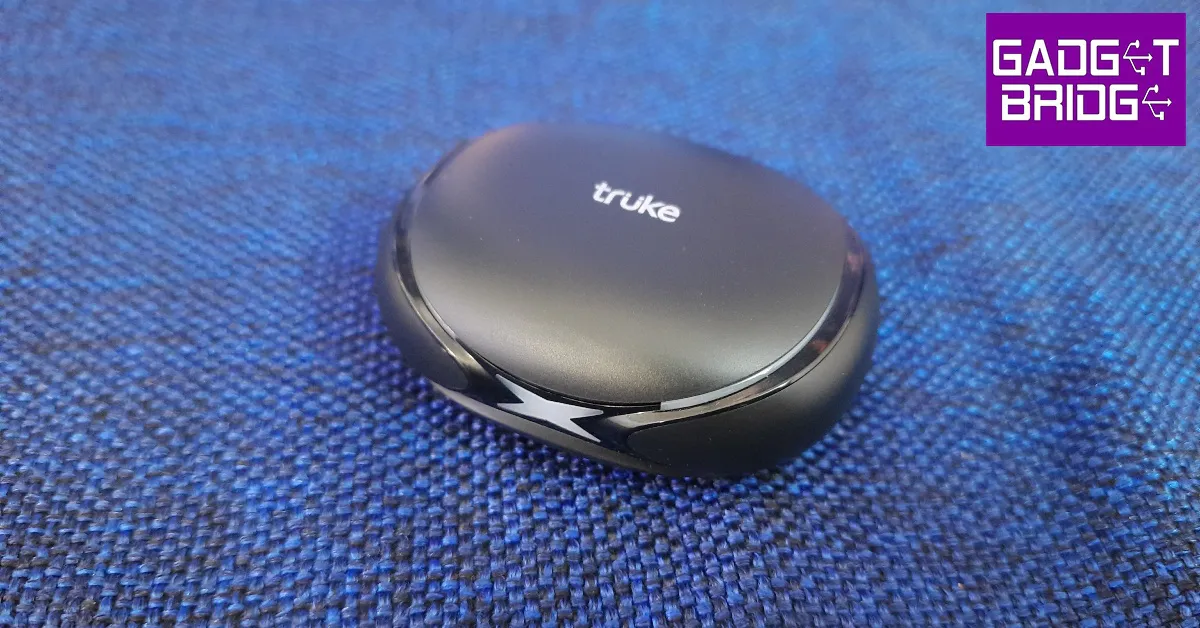
What Truke did not compromise on is the look and overall design of the BTG X1. The oval-shaped plastic charging case is quite compact and fits easily inside a pocket. The charging case lid is bordered with RGB lighting strips on both sides along with an illuminated ‘X’ sign at the front. The ‘X’ design theme seems to be the running theme as the illuminated sign gives way to glossy strips that run across the sides of the case before merging into an ‘X’ at the back. This is also where the charging port has been placed.

Truke BTG X1 review: Design 

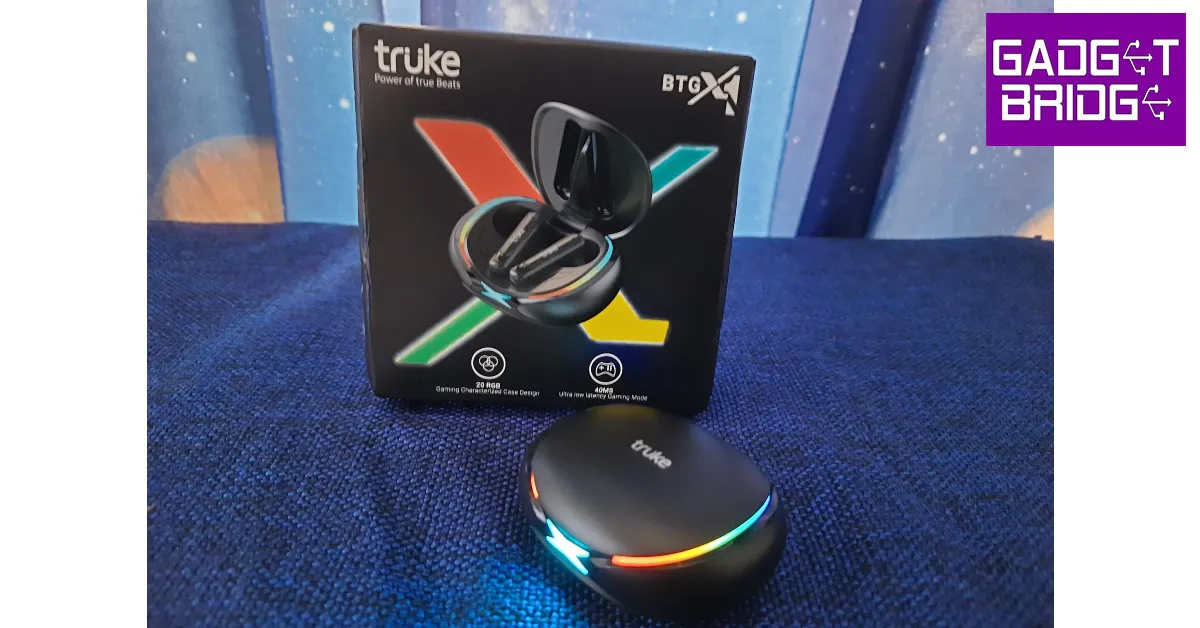
The main feature of the charging case is the RGB lighting. As a gaming TWS, the BTG X1 definitely looks the part. Truke has equipped the TWS with 20+ RGB LEDs which light up every time you flip open the lid. The ‘X’ sign at the front starts blinking every time the case is put on charge. The plastic body can withstand a few knocks and doesn’t attract fingerprints, but the lid may loosen up over a period of time.

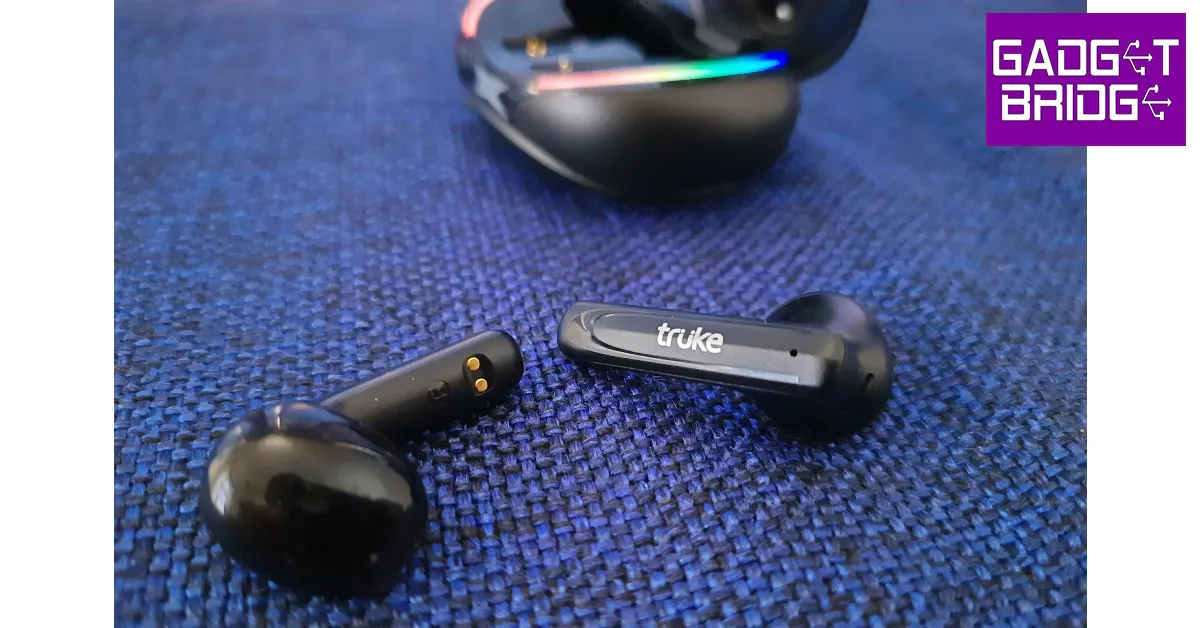
The earbuds have a plastic body as well and sport an open in-ear design. This means they do not come with silicone ear tips and have a ‘one size fits all’ design. The fit is quite snug, but the absence of silicone ear tips means a lot of outside noise will seep in. The earbud stems have a small notification light along with the touch controls. We were impressed with the touch sensitivity and found it very easy to access the essential functions. Since a single touch on either earbud either raises or lowers the volume, accidental touches won’t be too big of an issue.

The TWS packaging or product info doesn’t mention the IP rating, but we used the BTG X1 on light workouts and did not experience any performance issues. However, due to the lack of ear tips, the buds have a tendency to slip out in sweaty conditions. 

Truke BTG X1 review: Performance

The Truke BTG X1 is equipped with 12mm Titanium audio drivers and supports both SBC and AAC codecs. The headset pairs instantly upon flipping open the lid, thanks to Bluetooth 5.3 connectivity. The earbuds blare a soundbite every time the TWS connects to a device. This can get pretty annoying, and the audio recording of this notification alert is quite rough. You will also hear similar alerts upon disconnecting the TWS or switching to gaming or music mode.

Truke BTG X1 review: Performance

Shoddy notification alerts aside, the Truke BTG X1 has a thoroughly impressive sound profile. We weren’t expecting this level of clarity in an entry-level headset but Truke seems to have raised the bar here. We played music from different genres like Bollywood pop, classic rock, indie, and hip hop, and the TWS held up very well across the board. The higher frequencies did not sound shrill, which is the case with most entry-level TWS, but were mixed pretty well with the lows and the mids. There is very minor ‘boxiness’ to the sound, but all things considered, the BTG X1 surely punches above its weight. Even when played at 100% volume, the sound showed very little signs of distortion.

Being a gaming TWS, the BTG X1 also offers a 40ms low latency mode. The gaming mode can be turned on with three touches to the right earbud stem. We played Call of Duty Mobile with the BTG X1 on, and it delivered a decent performance. The sound aligned perfectly with the gameplay and the in-game sounds were relayed very well. After a week of testing, we did not come across any audio lags.

Touch controls on the BTG X1 are very accessible to use but cannot be customised as there is no app support for the TWS. A single tap on the step alters the volume while a double tap pauses or resumes the music playback. As mentioned earlier, you can switch to gaming mode or music mode with three taps on the right stem. The earbuds are also equipped with voice assistant support, which can be activated with three taps on the left earbud stem. Any incoming call can be accepted with a single tap on either earbud. Hanging up the phone requires a double tap. In order to mute the call, press and hold either earbud for one second. 6 quick taps factory resets the TWS.

The calling experience was heavily improved with Quad-Mic Environmental Noise Cancellation (ENC). The TWS was successfully able to isolate our voice from the surrounding noise and relay it to the caller without a significant loss in quality. While this level of ENC works well to filter out the noises in a relatively quiet environment (inside of your home, workplace, etc.), it is not sufficient to reduce the overwhelming noises in an outdoor setting. The same applies to in-game voice calls.

Moving on to the battery performance, the 300mAh charging case holds enough charge to power the headset for 48 hours. The 40mAh earbuds offer a music payback of up to 10 hours. After charging for 10 minutes, the earbuds can be used for up to 10 hours. The case takes just under 2 hours to fully charge.

Read Also: WhatsApp plans to enable sending of photos in their original quality: Report

Verdict

At Rs 1,299, the Truke BTG X1 are easily one of the best entry-level TWS headsets out there. The sound quality delivered is very impressive for a TWS within this price bracket. To add to that, the RGB lighting gives it a spectacular ‘gaming headset’ look. The low latency mode works as intended, and will certainly appeal to gamers. The open in-ear design may not be for everyone, but if these earbuds fit you perfectly, there isn’t much else to complain about.

Pros

RGB lighting 

Great design 

Impressive sound quality

Low latency mode for gaming

Cons

Open in-ear design may not be for everyone 

No app support to customise touch controls

For the latest gadget and tech news, and gadget reviews, follow us on Twitter, Facebook and Instagram. For newest tech & gadget videos subscribe to our YouTube Channel. You can also stay up to date using the Gadget Bridge Android App. You can find the latest car and bike news here.

Vivo X90 and Vivo X90 Pro likely to launch in India and globally soon, launch date tipped

February 3rd is most likely the date for the global release of the Vivo X90 and Vivo X90 Pro. To recall, the Vivo X90, X90 Pro, and X90 Pro+ were the three smartphones that were introduced in China first last year. The latest flagship series from the Chinese tech giant is also speculated to hit Indian shores as well however the company is yet to confirm about the release officially.

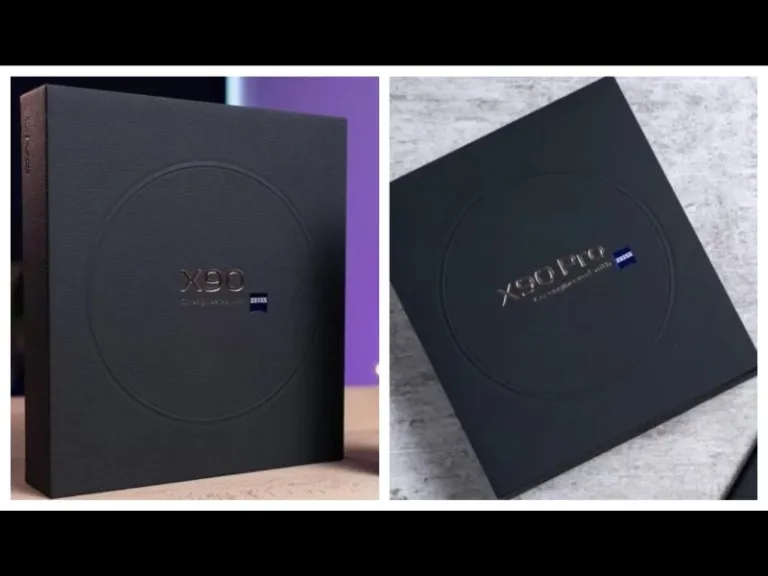
The tipster Paras Guglani claims that pre-sales for the Vivo X90 and Vivo X90 Pro will begin on January 27. Whereas the devices will go on sale starting on February 3. The tipster has also shared images of the retail box of the Vivo X90 Pro. Zeiss optics are mentioned on the retail box.

The specifications are known because the phones have already arrived in China.

Also Read: Samsung Galaxy A34 5G gets certified by BIS, also listed on FCC site

Vivo X90 specifications

The Vivo X90’s 6.78-inch AMOLED display features a 1,260 x 2,800-pixel resolution. It boasts a 20:09 aspect ratio, a refresh rate of up to 120Hz, and a screen-to-body ratio of 93.53 percent. The DCI-P3 colour gamut is supported by the display, according to certification. The system is driven by Android 13 and OriginOS 3. The smartphone is powered by an octa-core 4nm MediaTek Dimensity 9200 SoC, up to 12GB of LPDDR5, and a G715 GPU. Internal storage on the Vivo X90 is expandable to 512GB UFS4.0.

Three cameras on the back of the X90, a 12-megapixel ultra-wide-angle camera with an f/2.0 aperture, a 12-megapixel portrait camera with a 50mm lens, and a 50-megapixel primary sensor with an f/1.75 aperture are all featured. It has a selfie camera with a 32-megapixel resolution and an f/2.45 aperture.

It has a 4,810mAh battery and 120W fast charging is supported.

Vivo X90 Pro specifications

The MediaTek Dimensity 9200 CPU, up to 12GB of LPDDR5 RAM, and up to 512GB of UFS 3.1 internal storage that can be expanded further with a microSD card are all included in the Vivo X90 Pro. The smartphone’s remaining features are comparable to those of the regular model. Its 4,870mAh battery is compatible with both wireless charging at 50W and quick charging at 120W.

Also Read: WhatsApp is working on the ability to block contacts from the chat list and notifications: Report

The Vivo X90 Pro has a triple rear camera setup, with the primary camera being a 50-megapixel Zeiss 1-inch sensor with an f/1.75 aperture. Additionally incorporated are two 50-megapixel secondary 50mm sensors with an f/1.6 aperture each and a 12-megapixel ultra-wide-angle sensor. On the front, it sports a 32-megapixel selfie camera with an f/2.45 aperture.

For the latest gadget and tech news, and gadget reviews, follow us on TwitterFacebook and Instagram. For newest tech & gadget videos subscribe to our YouTube Channel. You can also stay up to date using the Gadget Bridge Android App. You can find the latest car and bike news here.

WhatsApp is working on the ability to block contacts from the chat list and notifications: Report

WhatsApp is offering an alternate method of blocking contacts. Some WhatsApp beta testers are getting the ability to block contacts directly from the chat list and notifications. The first option to block a contact on WhatsApp will be accessible in the chat option while the notification option will only be accessible when getting messages from contacts you don’t know.

According to a report by WaBetaInfo for certain beta testers, WhatsApp is now introducing the ability to block users directly from the chat list and notifications. The feature is currently being rolled out through WhatsApp beta for the Android 2.23.2.10 update for some beta testers.

Also Read: Samsung Galaxy A34 5G gets certified by BIS, also listed on FCC site

The shared screenshot indicates that WhatsApp is introducing two new access points for blocking users. You may easily block a contact without opening the chat by accessing the first entry point in the chat list by opening the chat options (in some circumstances, it might also be present within the app header). The second shortcut can be found in notifications and shows up in particular specific circumstances when getting messages from contacts you don’t know.

WhatsApp is working on the ability to block contacts from the chat list and notifications: Report
Image Courtesy: WaBetaInfo

These options to block WhatsApp contacts make it simpler to block contacts without having to view their chat history, especially if you frequently receive messages from strangers or people you don’t want to interact with. It should be noted that a function that enables users to instantly block numerous contacts at once from the chat list is not currently planned.

As per the report, some beta testers who installed the most recent version from the Google Play Store have access to the option to remove contacts from the chat list and notifications, and it will be made accessible to even more users over the next few days.

Also Read: iQoo Neo 7 is scheduled to launch in India on February 16

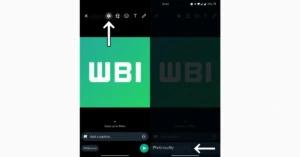
Another new feature that WhatsApp is developing would let users share photos in their original quality. The new development is included in the most recent WhatsApp beta for the Android 2.23.2.11 upgrade.

WhatsApp plans to include a new icon in the drawing tool header that would allow users to adjust the image quality of any photo. This feature will eventually allow users to select to send photographs in their original quality. We feel that this feature will provide consumers more control over the image quality they are sending in situations where delivering a photo in its original quality is necessary.

For the latest gadget and tech news, and gadget reviews, follow us on TwitterFacebook and Instagram. For newest tech & gadget videos subscribe to our YouTube Channel. You can also stay up to date using the Gadget Bridge Android App. You can find the latest car and bike news here.
Top 6 ways to fix apps not downloading from Microsoft Store in Windows 10 or 11 (2024)

1

Microsoft Store is the official marketplace for apps in the Windows ecosystem. If you’re looking to download a new videogame or the latest version of any utility app, Microsoft Store is the first place you should be looking. Oftentimes, users report that Microsoft Store refuses to download any app to their desktops. This can get pretty annoying if it happens frequently but luckily there are a few fixes you can employ to get rid of the issue. In this article, we bring you the top 6 ways to fix the ‘apps now downloading from Microsoft Store’ issue in Windows 10 or 11.

Read Also: WhatsApp plans to enable sending of photos in their original quality: Report

Clear Microsoft Store app cache

Clear Microsoft Store app cache

The temporary files in the app cache can get corrupted from time to time and keep the Microsoft Store from working properly. Clear the cache to fix any temporary issues. To clear Microsoft Store’s cache, all you need to do is press Windows Key+R and enter ‘wsreset.exe’ in the Run dialogue box. A command prompt window will appear and then close itself after the cache has been cleared. Once the cache has been cleared, Microsoft Store will open on your desktop.

Use Windows Troubleshooter

Windows‘ built-in troubleshooter is a handy tool to fix any minor issues with the apps on your desktop. You can run the troubleshooter for Microsoft Store to diagnose and fix any problem you may be encountering with it. Here’s how.

Step 1: Go to Settings and select Update & Security.

Step 1: Go to Settings and select Update & Security. 

Step 2: Select Troubleshoot on the side menu.

Step 2: Select ‘Troubleshoot’ on the side menu.

Step 3: Click on Additional Troubleshooters and select Windows Store apps.

Step 3: Click on ‘Additional Troubleshooters’ and select Windows Store apps. how to fix apps not downloading in microsoft store

The Windows Troubleshooter will run and try to detect a problem with the Microsoft Store and the apps you downloaded from it. It is not a guarantee that the troubleshooter will fix the issue, but it is worth a shot.

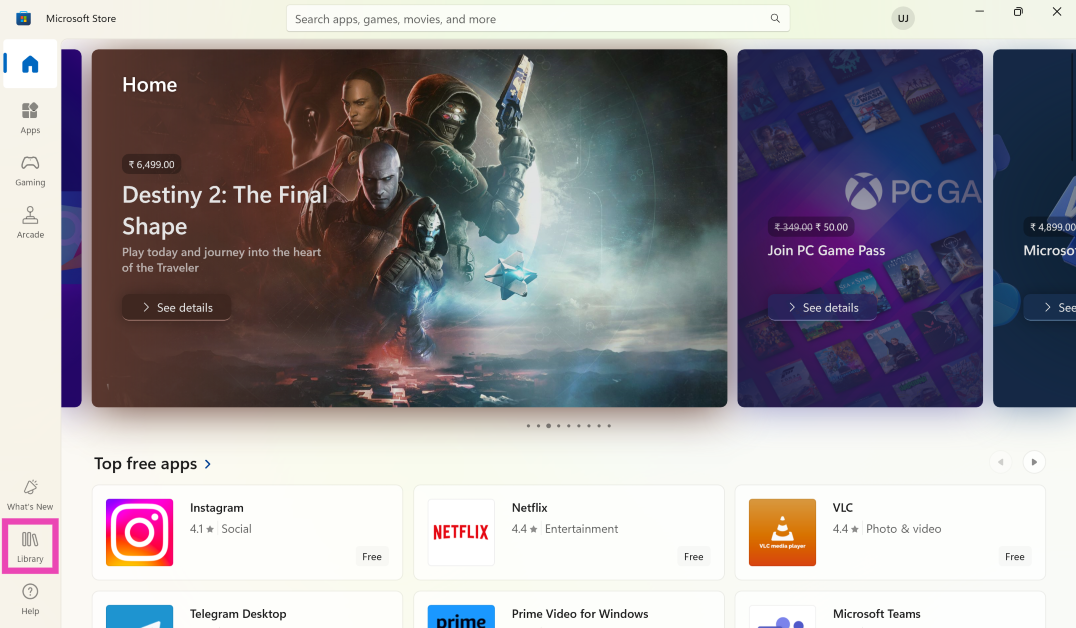
Update the Microsoft Store

Step 1: Launch the Microsoft Store on your Windows PC or laptop.

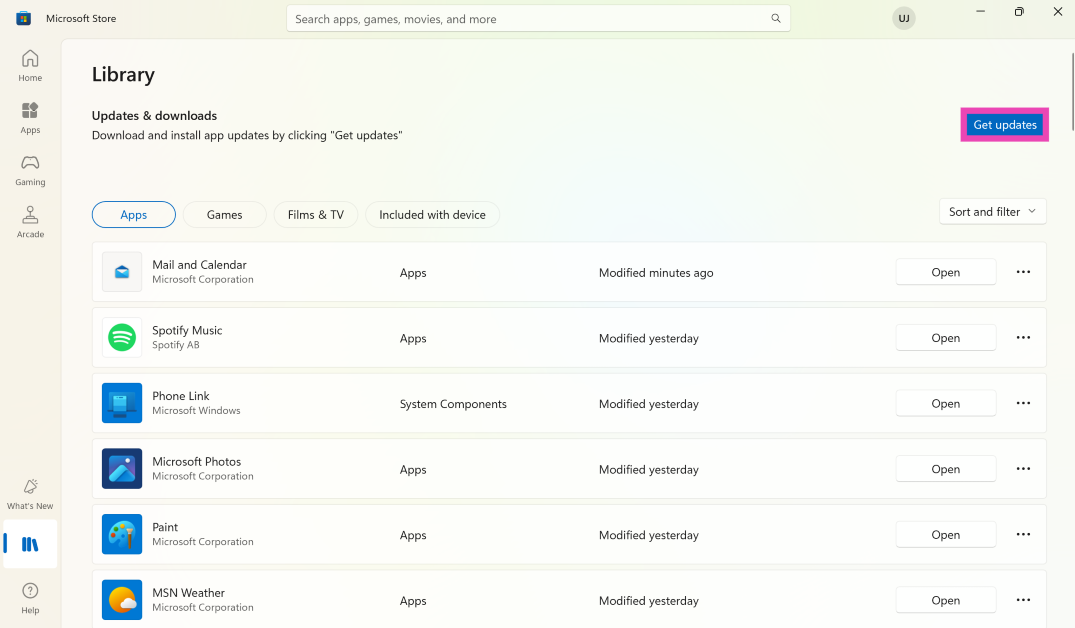
Step 2: Switch to the Library tab.

Step 2: Switch to the Library tab.

Step 3: Click on Get Updates. This is where you’ll find pending updates for the apps as well as the Microsoft Store.

Step 3: Click on Get Updates. This is where you'll find pending updates for the apps as well as the Microsoft Store.

Check your computer’s date and time

Microsoft Store will refuse to download any app on your desktop if its date and time are not up to date. Luckily, it can be fixed pretty easily. Here’s how.

Step 1: Go to Settings and select Time & Language.

Step 1: Go to Settings and select Time & Language. how to fix apps not downloading in microsoft store

Step 2: Turn the toggle bar for ‘Set time automatically’ off.

Step 2: Turn the toggle bar for ‘Set time automatically’ off. how to fix apps not downloading in microsoft store

Step 3: Click on ‘Change’ under ‘Set date and time manually’. Enter the correct date and time.

If you do not want to manually set the date and time, you can sync your time with the Windows time server, or set your time zone manually. Once you’ve ensured that the date and time on your desktop are correct, go back to Microsoft Store and see if it’s working correctly.

Reset Microsoft Store

Reset Microsoft Store

If none of the fixes mentioned above work for you, you can try resetting Microsoft Store as a final effort to fix the download issue. Resetting the Microsoft Store will clear the app data and log you out of the Store. It will not delete any of your previous downloads or purchases. In order to reset the Windows Store go to Settings>Apps>Microsoft Store>Advanced Options and select Reset.

Reset Microsoft Store using Command Prompt

Step 1: Launch the Command Prompt on your Windows PC or laptop.

Step 2: Type wereset and hit Enter.

Frequently Asked Questions (FAQs)

Why are new apps not downloading from the Microsoft Store?

New apps may fail to download from the Microsoft Store if your PC is facing connection issues or there are apps queued up for updates.

How do I view app updates on the Microsoft Store?

Launch the Microsoft Store, go to the Library tab, and hit Get Updates to view pending updates for apps.

How do I reset the Microsoft Store app?

To reset the Windows Store go to Settings>Apps>Microsoft Store>Advanced Options and select Reset.

Read Also: BharOS indigenous mobile operating system developed by IIT Madras announced

Conclusion

These are the top 6 ways to fix the ‘apps not downloading from Microsoft Store’ issue in Windows 10 or 11. As an additional tip, you should also check if your Windows OS is up to date, as previous versions may contain some bugs. If you found this article helpful, let us know in the comments!

Garena Free Fire Redeem Codes Today 23 January 2023: Here is how to claim them

Garena Free Fire is a battle royale game with regular awards and tournaments to keep players interested. If you play Garena Free Fire, you should be aware of the redeem codes that are released on a daily basis. However, because the battle royale game is banned in India, players from other countries can use the Free Fire Redeem codes daily. If you’re unfamiliar with the Garena Free Fire redeem codes or don’t know how to get them, we’ve put together a step-by-step guide to help you redeem them. Check out Garena Free Fire Redeem Codes for 23 January 2023.

The Free Fire redeem codes are a great way to get free stuff. These are 12-digit codes that contain alphabets and numbers, as well as an expiration date and time. Because the Garena FF redeem codes cannot be used more than once, you should hurry to the redemption page to claim your free reward before someone else does. To get a free reward, all you have to do is go to reward.ff.garena.com/en, which is the official redemption page. Also, keep an eye on this space for daily updates on Garena Free Fire redemption codes and rewards.

Garena Free Fire Redeem Codes Today 23 January 2023

  • X99TK56XDJ4X
  • FF7MUY4ME6SC
  • WEYVGQC3CT8Q
  • 3IBBMSL7AK8G
  • J3ZKQ57Z2P2P
  • FFDBGQWPNHJX
  • TDK4JWN6RD6
  • 4TPQRDQJHVP4
  • GCNVA2PDRGRZ
  • XFW4Z6Q882WY
  • HFNSJ6W74Z48
  • HHNAT6VKQ9R7
  • 2FG94YCW9VMV
  • 4ST1ZTBE2RP9
  • 8F3QZKNTLWBZ
  • V44ZZ5YY7CBS
  • WD2ATK3ZEA55
  • E2F86ZREMK49
  • B3G7A22TWDR7X
  • MCPW3D28VZD6
  • FFCMCPSGC9XZ
  • FFCMCPSEN5MX
  • ZZZ76NT3PDSH
  • EYH2W3XK8UPG
  • FFCMCPSUYUY7E
  • NPYFATT3HGSQ
  • MCPW2D2WKWF2
  • V427K98RUCHZ
  • MCPW2D1U3XA3
  • FFCMCPSJ99S3
  • 6KWMFJVMQQYG
  • BR43FMAPYEZZ
  • UVX9PYZV54AC
  • XZJZE25WEFJJ
  • HNC95435FAGJ

How to Get Free Fire Redeem Codes for Garena on 23 January 2023?

  • Visit the Garena Free Fire game’s official website at reward.ff.garena.com.
  • Use your Facebook, Google, VK, Apple ID, Huawei ID, or Twitter account to log in.
  • You’ll be taken to a valid redemption code (s)
  • Copy and paste the 12-digit redemption code into the text box.
  • On the screen, a dialogue box will appear.
  • ‘Ok’ should be selected.

For the latest gadget and tech news, and gadget reviews, follow us on TwitterFacebook and Instagram. For newest tech & gadget videos subscribe to our YouTube Channel. You can also stay up to date using the Gadget Bridge Android App. You can find the latest car and bike news here.
Amazon Quiz Answers Today 23 January 2023: Participate to win Rs 5,000

Amazon Quiz for 23 January 2023 has gone live on the company’s mobile platform. The daily quiz contest brings an opportunity for Amazon users to win exciting prizes. In today’s Amazon Quiz the participants have the chance to win Rs 5,000 Amazon Pay Balance. All they have to do is answer all the questions correctly.

A fresh question is posted on the Amazon app daily which consists of five simple questions based on general knowledge and current events. The quiz can be played on the Amazon App from 12 AM to 11:59 PM. You have to answer all the questions correctly. Then the participants will be shortlisted for a lucky draw. The result of the lucky draw will be announced at the end of the month. The participants can win Amazon Pay Balance to up to Rs 50,000. Check out the 12 September 2022 Amazon Quiz question and their answers to win Rs 5,000 Amazon Pay Balance.

Amazon Quiz Today Prize – Rs 5,000 Amazon Pay Balance

Quiz Date – 23 January 2023

Daily Timing – 12 AM to 11:59 PM

Winner Announcement – Today 12 PM

Amazon Quiz Answers Today 23 January 2023

Question 1: In 2022, who became the first woman president of Indian Olympic Association?

Answer- PT Usha

Question 2: What is the plural of sheep?

Answer- Sheep

Question 3: How many grams is a kilogram?

Answer- 1000

Question 4: Which is this wonder of the world located in Egypt?

Answer- The pyramid of Giza

Question 5: One of the seven wonders, Petra is located where?

Answer- Jordan

How To Play Amazon Quiz

Only app users are eligible to play the Amazon quiz every morning from 12 AM to 11:59 PM. The quiz is not available on the desktop. For those who are unaware of how to play the Amazon quiz below are the steps, you can follow to take the quiz.

  • Firstly download the Amazon app from Google Play Store or App Store
  • Now fill in the required information through the Sign Up option.
  • You need to log in to the Amazon app and scroll down on the home screen to find the Amazon Quiz banner.
  • Tap on the Amazon Quiz banner and tap on the Start button to start the Quiz.
  • Now you will get 5 questions and you need to answer them correctly. One wrong answer will eliminate you from the Quiz.
  • After answering all the questions correctly you are now eligible for a Lucky Draw.
  • The winner’s name will be announced today at 12 PM.

For the latest gadget and tech news, and gadget reviews, follow us on TwitterFacebook and Instagram. For newest tech & gadget videos subscribe to our YouTube Channel. You can also stay up to date using the Gadget Bridge Android App. You can find the latest car and bike news here.

Samsung Galaxy A34 5G gets certified by BIS, also listed on FCC site

It appears that Samsung is getting ready to introduce the Samsung Galaxy A34 5G smartphone in India. The alleged smartphone has bagged BIS certification as it was spotted listed on the Indian regulatory site. The listing implies that the forthcoming handset will be released soon. The upcoming phone will replace the existing Galaxy A33. The anticipated Samsung Galaxy A34 5G has now been discovered on the FCC database under the model name SM-A346M.

Although the Galaxy A34 5G characteristics and features haven’t been fully disclosed by the BIS listing except for the model number which is with the model number SM-A346E. The FCC’s listing reveals that the upcoming phone will feature 25W fast charging. The charger with the model number EP-TA800 was utilised during the testing. Samsung’s Type-C charging adapter with the aforementioned model number supports USB-PD and PPS standards.

Also Read: iQoo Neo 7 is scheduled to launch in India on February 16

Indicating some of its main specifications, the phone has also been discovered on other testing websites including Geekbench and the Bluetooth SIG database. The phone was identified as having the model number SM-A346N in a recent Geekbench listing. A MediaTek Dimensity 1080 SoC and 6GB of RAM are included inside the smartphone. Furthermore, the Samsung Galaxy A34 5G’s processor has six efficiency cores clocked at 2.0GHz and two performance cores operating at 2.20GHz. It’s expected that Android 13 will power the phone, with Samsung’s One UI 5.0 user interface sitting on top. According to the listing, the phone received 2,322 points on the multi-core test and 778 points for the single-core test on Geekbench.

The smartphone will also enable Bluetooth 5.3 wireless communication, according to the Bluetooth SIG database.Samsung Galaxy A33 5G

Also Read: Samsung rolls out update for Galaxy A33 5G, A53 5G, A73 5G, bringing Voice Focus and One UI 5.0

The Samsung Galaxy A33 5G smartphone has a 6.4-inch Full HD+ Super AMOLED Infinity O display with a refresh rate of 90Hz and Corning Gorilla Glass 5 protection. OneUI 4.1 is installed on top of Android 12 on the phone. A 5nm Exynos 1280 SoC with 6GB or 8GB of RAM and 128GB or 256GB of internal storage powers the phone. The storage can be increased by up to 1TB using a microSD card.

A 48MP primary sensor with OIS, an 8MP ultra-wide sensor, a 2MP depth sensor, and a 5MP macro lens are the four cameras that make up the quad-camera system on the rear of the A33. A 13MP front-facing camera on the phone is available for selfies and video calls.

The device has an IP67 rating, making it resistant to water and dust. A 5,000mAh battery with 25W quick charging capacity is also included in the phone.

For the latest gadget and tech news, and gadget reviews, follow us on TwitterFacebook and Instagram. For newest tech & gadget videos subscribe to our YouTube Channel. You can also stay up to date using the Gadget Bridge Android App. You can find the latest car and bike news here.
How Smartphones Are Changing the Gaming World

One thing that’s outstanding about the development of modern technology is just how far mobile phones have come. It wasn’t too long ago that phones were only capable of providing a 2D, low-resolution experience that wasn’t at all comparable to the video game consoles of the time. However, the quality of mobile games has increased dramatically, and heavy hitters such as Dead Trigger, Real Steel, and Shadowgun are taking over the industry.

The Changing Face of Mobile Gaming

One of the biggest developments we’ve seen in mobile gaming is the sheer diversity of its gaming titles. In the early days of mobile gaming, games were limited to simple titles that could fit on a smaller screen. Common examples of this are puzzle games and sports titles – players could see enough to work out what was going on, but that’s about it. However, fast forward to today, and mobile gaming has a diverse library of games, ranging from platformers to first-person shooters. The quality of these games has dramatically increased, with the graphics of many of these games rivalling that of console gaming. The best part is that many of the best titles are available on Android and iOS devices, meaning you’re not as limited by your phone choice as you are by your console choice.

Crowdfunding Smartphone Games

Mobile gaming used to be a monopoly, with only a handful of developers having the tools, skills, and reach to create popular games. Companies like Supercell and King had dedicated studios that professionally developed mobile games, which didn’t give anyone else a chance at getting their foot in the door. That’s all changed in the modern era, as the ability to crowdfund a game means that small-time developers can get help from fans to acquire the resources needed to create high-quality mobile games. As these games are created by auteurs with a vision, rather than soulless corporations looking to make a quick buck, they have a lot more creativity and are a better experience for the gamer.

Mobile Devices Make Gaming More Accessible

Arguably the biggest change that smartphones have made in the gaming world is to make them more accessible. Nowadays, almost everyone has a smartphone capable of playing games, whether it’s a fun, snacky game like Fruit Ninja, exciting casino games like online scratchcards, or big mobile titles like Real Steel. This means it’s much easier for everyone to enjoy the gaming experience. Most consoles cost upwards of £300-£400, and that’s without any games! You need to add another £30-£60 for each game you want to play, making gaming a very expensive hobby that not everyone can afford. However, you can buy a smartphone for as little as £100, with mobile games being a fraction of the cost of traditional games. The lower barrier to entry and the greater utility of a smartphone makes gaming much more accessible than it used to be.

Conclusion

It’s scary how far the mobile gaming industry has come in the past ten to twenty years. The rate of development has been exponential as mobile games have caught up with the console industry to be a bonafide alternative to traditional video game consoles. What’s more, there’s no sign that this growth is slowing down, and we can’t wait to see in what other ways the smartphone will change the gaming world.

For the latest gadget and tech news, and gadget reviews, follow us on TwitterFacebook and Instagram. For newest tech & gadget videos subscribe to our YouTube Channel. You can also stay up to date using the Gadget Bridge Android App. You can find the latest car and bike news here.

Immerse Yourself in the Game by taking it up

In the current era, betting is everywhere in ads, billboards, cereal boxes, and social media feeds. It has even engrained itself into the broadcast now, with all the commentators and analysts making picks in real-time for the viewers as the competition gets going.

If you’re going to watch hoops, you may as well make college basketball predictions. The games will always mean more if something is at stake. No true fan of any team or sport can have an allegiance to more than one team. So on those off-nights, give yourself something else to watch for, to cling to.

It Keeps Things Exciting

Unfortunately, but also accurately, teams in every sport are just not competitive. Whether they’re going through a rebuild, short-handed, or for a different reason, winning is not always in the cards. So, when that type of team plays a juggernaut, there is still a way to yell and scream during the contest.

Let’s say the Pistons are +14.5 against the Celtics. Maybe you believe they’re going to cover. Perhaps you don’t. But you go for it, throwing some money on Detroit to lose by fewer points. Or maybe there is an extreme amount of confidence, and the money line pick comes into play.

By doing this, you’re creating a buzz for yourself around the contest. To provide another incentive to watch. A financial incentive at that, because should that wind up (surprisingly) hitting, that’s free money right there. That’s dinner. That’s money to spend at the casino or you’re favourite restaurant.

There won’t be a snoozefest if there is something at stake. Not every game can provide the joy or excitement of your favourite team playing. Or a playoff battle. And so, this adds another layer to the cake. Another one could be added when you make college basketball picks today for upcoming matches. It definitely makes it more intense.

Incentivizing Victory

When your team is about to play a big game, like the Ravens take on the Steelers, it’s always exciting if there is more on the line. Because this game might be in Week 2, the season is just fresh and getting going. So, why not make things a little juicier and throw money on your team to come out with the victory?

By doing that, there is a chance to record one victory and two. The Steelers may win, and it’s great to knock off a rival and get into the win column. But how about making some profit from the game finishing a certain way? That’s always better. Sure, there’s risk involved in the case of a loss. But that’s where the thrill of it comes in.

It’s all about the thrill of the game—the thrill of the wager. Maybe Lamar Jackson has a wild game. But then, on the last play, he throws an INT, and Pittsburgh holds on to get it done. If that should actually happen, it’s a victory for the team, the fan, and the wallet. Who doesn’t love padding their wallet after their team gets a win? Free drinks and food following the game and cash out. Nice.

Maybe after the game, the craving is still there. Make some college basketball picks. The seasons overlap. It’s perfect.

Prove Your Knowledge

The old saying “put your money where your mouth is” has never faded from relevance and is still commonly thrown around. In today’s wagering age, it is literally perfect. That is what it stems from, but nonetheless. Doing it around a game proves you know what you say you do. For all the knowledge of the game somebody could have, they could be horrible at predicting outcomes.

Suppose there is thought that the #8 LA Kings could win in a series against the #1 Red Wings. Especially after being down 0-3. And then they put money on them to win the series and the entire Stanley Cup Playoff. Imagine how crazy that is. That’s winning 101. Taking a wild underdog and actually backing it with money.

All anyone wants in life is some credit for their work. It’s true in every area, and no different here. Stake a claim. Back it with some dough. Win. It’s the best way to show you know the ball.

For the latest gadget and tech news, and gadget reviews, follow us on TwitterFacebook and Instagram. For newest tech & gadget videos subscribe to our YouTube Channel. You can also stay up to date using the Gadget Bridge Android App. You can find the latest car and bike news here.
WhatsApp plans to enable sending of photos in their original quality: Report

WhatsApp is constantly updating its features to provide the best possible user experience. A new upgrade to WhatsApp’s 2.23.2.11 version is being pushed via the Google Play Beta Program. For an upcoming app update, WhatsApp is planning on allowing users to share photos in their original quality.

A WaBetaInfo report claims that WhatsApp is now developing a new feature that will enable users to share photos in their original quality. The latest WhatsApp beta for Android 2.23.2.11 update includes the new development.

Also Read: iQoo Neo 7 is scheduled to launch in India on February 16

According to the screenshot that was provided, WhatsApp intends to add a new setting icon to the drawing tool header that would let users control the image quality of any photo. With the help of this function, it will eventually be possible to choose to send photos in their original quality. In circumstances where sending a photo in its original quality is required, we believe that this functionality will provide customers more control over the image quality they are sending.

WhatsApp plans to enable sending of photos in their original quality: Report
Image Courtesy: WaBetaInfo

Currently, under development, the ability to send photos in their original quality will be available in a future app update.

Apart from this WhatsApp update 2.23.2.8 is now being distributed via the Google Play Beta Program. The function allows you to send voice status updates to a certain group of persons that you specify in your privacy settings, according to a report from WaBetaInfo. These voice status updates are restricted to the same 24-hour period as the video, photo, and text updates. The ability to send voice notes through status updates will soon be available to some lucky WhatsApp beta users.

Also Read: Everything about the brand new Vivo X90, Vivo X90 Pro, and Vivo X90 Pro+

According to the shared screenshot, those who were lucky enough to have the feature turned on may now send voice notes as status updates by going to the text status section and selecting that option. WhatsApp gives users additional control over their voice recordings by enabling users to delete a recording before sharing it. Voice notes can only be recorded for a maximum of 30 seconds, and users must update their WhatsApp version in order to hear voice notes submitted as a status update.

For the latest gadget and tech news, and gadget reviews, follow us on TwitterFacebook and Instagram. For newest tech & gadget videos subscribe to our YouTube Channel. You can also stay up to date using the Gadget Bridge Android App. You can find the latest car and bike news here.

BharOS indigenous mobile operating system developed by IIT Madras announced

Indian Institute of Technology Madras (IIT Madras) has officially announced that it has developed a brand-new mobile operating system “BharOS”. The indigenous mobile operating system has been created for countrywide cell phone users that is claimed to prioritise privacy. The mobile OS comes with no default apps and automatic updates.

An IIT Madras-incubated company JandK Operations (JandKops) has created an indigenous mobile operating system named “BharOS.” Commercially available handsets can have the system loaded on them. The newly developed Indian OS is said to benefit 100 crore mobile phone users in the country.

Also Read: OnePlus 11R price in India tipped, could be available in two variants

Indian Institute of Technology Madras (IIT Madras) in its announcement said, “Called ‘BharOS,’ this software can be installed on commercial off-the-shelf handsets. It provides a secure environment for users and is a significant contribution towards ‘Atmanirbhar Bharat.'”

The institute claims that BharOS Services are now being offered to organisations with tight privacy and security standards whose users handle sensitive information and who need confidential interactions on limited mobile apps. Such consumers require private 5G networks with access to private cloud services.

BharOS has no default apps (NDA). Accordingly, consumers are not compelled to utilise programmes that they may not be familiar with or trustworthy. Additionally, this system gives users more control over the permissions that apps have access to on their device because they can decide to only give trusted apps access to certain functions or data.

Furthermore, it has come to light that BharOS was created by JandK Operations Private Limited (JandKops), a Section 8 (Not for Profit) Company founded by IIT Madras & fostered by IIT Madras Pravartak Technologies Foundation. The National Mission on Interdisciplinary Cyber-Physical Systems of the Government of India’s Department of Science and Technology (DST) provides funding for the Foundation (NMICPS). It aims to put India on par with the select few nations that already have these capabilities.

Access to reliable apps from organisation-specific Private App Store Services is made possible by BharOS (PASS). Access to a carefully curated list of apps that have passed strict security and privacy standards set by organisations is made available through a PASS. Users can be certain that the apps they are installing are secure to use and have been reviewed for any potential privacy or security issues.

Addressing a Press Conference to announce this Indian Mobile Operating System, Prof. V. Kamakoti, Director, IIT Madras, said, “BharOS Service is a Mobile Operating System built on a foundation of trust, with a focus on providing users more freedom, control, and flexibility to choose and use only the apps that fit their needs. This innovative system promises to revolutionise the way users think about security and privacy on their mobile devices.”

Also Read: iQoo Neo 7 is scheduled to launch in India on February 16

Further, Prof. Kamakoti added, “IIT Madras looks forward to working closely with many more private industry, Government agencies, Strategic agencies and Telecom Service Providers to increase the usage and adoption of BharOS in our Country.”

Elaborating further, Mr. Karthik Ayyar, Director, JandK Operations Pvt Ltd., the start-up that developed this Mobile Operating System, said, “In addition, BharOS offers ‘Native Over The Air’ (NOTA) updates that can help to keep the devices secure. NOTA updates are automatically downloaded and installed on the device, without the need for the user to manually initiate the process. This ensures that the device is always running the latest version of the operating system, which includes the latest security patches and bug fixes. With NDA, PASS, and NOTA, BharOS ensures that Indian mobile phones are trustworthy.”

For the latest gadget and tech news, and gadget reviews, follow us on TwitterFacebook and Instagram. For newest tech & gadget videos subscribe to our YouTube Channel. You can also stay up to date using the Gadget Bridge Android App. You can find the latest car and bike news here.

OnePlus 11R price in India tipped, could be available in two variants

The OnePlus 11 is scheduled to make its way into the Indian market next month however the device has already hit the Chinese market earlier this month. Before its India debut rumours related to the less potent OnePlus 11R have started doing the rounds on the web. The company has not yet confirmed the alleged smartphone but this week it has been spotted on certification platforms. The device has been listed on both Indian and Chinese regulatory sides namely BIS and CQC. In the latest development, the OnePlus 11R’s storage options and price in India have now been revealed by a tipster.

The potential price and storage options for the OnePlus 11R in India have been revealed by @stufflistings’ Tipster Mukul Sharma. He estimates that the pricing of an 8GB RAM with a 128GB storage model in the nation might range between Rs 35,000 and Rs 40,000. Another 16GB RAM with 512GB storage option is also speculated to arrive which is likely to be priced at about Rs 45,000.

Also Read: Smartphone comparison: Vivo V25 Pro Vs OnePlus 10R

By April or May, it’s anticipated that the device will make its Indian debut.

Previously, the OnePlus 11R was spotted on regulatory websites of the Bureau of Indian Standards (BIS) and China Quality Centre (CQC). Reportedly, the OnePlus Ace 2, was just discovered on the official OnePlus China website. This device is thought to be the OnePlus 11R’s Chinese variant. As per the tipster, the OnePlus 11R might make its Indian debut in April or May.

Although OnePlus has not yet officially announced that a model to replace the OnePlus 10R is in the works, the OnePlus 11R’s full set of specifications have already appeared online.

The smartphone would, according to the leak, have a 6.7-inch full-HD+ AMOLED screen with a resolution of 1,080 x 2,412 pixels and a refresh rate of 120Hz. The forthcoming device is said to run on a Qualcomm Snapdragon 8+ Gen 1 SoC and up to 16GB of RAM.

Also Read: OnePlus 10R 5G Review: Sophisticated Design And Good Quality Cameras, worth buying?

According to reports, there are two RAM (8GB and 16GB) and two storage (128GB and 256GB) options for the OnePlus 11R. OnePlus is rumoured to include a 5000mAh battery that supports 100W SuperVOOC charging. The phone is expected to have three cameras on the back, including a 50-megapixel primary sensor, an 8-megapixel super-wide-angle sensor, and a 2-megapixel macro lens. A 16-megapixel selfie camera might be located at the front for taking selfies.

The OnePlus Ace 2 was recently discovered on the China Quality Centre (CQC) regulatory website with model number OnePlus PHK110, as we previously mentioned, while the speculated OnePlus 11R has appeared on BIS certification having model number CPH2487.

For the latest gadget and tech news, and gadget reviews, follow us on TwitterFacebook and Instagram. For newest tech & gadget videos subscribe to our YouTube Channel. You can also stay up to date using the Gadget Bridge Android App. You can find the latest car and bike news here.

Garena Free Fire Redeem Codes Today 21 January 2023: Here is how to claim them

Garena Free Fire is a battle royale game with regular awards and tournaments to keep players interested. If you play Garena Free Fire, you should be aware of the redeem codes that are released on a daily basis. However, because the battle royale game is banned in India, players from other countries can use the Free Fire Redeem codes daily. If you’re unfamiliar with the Garena Free Fire redeem codes or don’t know how to get them, we’ve put together a step-by-step guide to help you redeem them. Check out Garena Free Fire Redeem Codes for 21 January 2023.

The Free Fire redeem codes are a great way to get free stuff. These are 12-digit codes that contain alphabets and numbers, as well as an expiration date and time. Because the Garena FF redeem codes cannot be used more than once, you should hurry to the redemption page to claim your free reward before someone else does. To get a free reward, all you have to do is go to reward.ff.garena.com/en, which is the official redemption page. Also, keep an eye on this space for daily updates on Garena Free Fire redemption codes and rewards.

Garena Free Fire Redeem Codes Today 21 January 2023

  • FGDTFVXHJUUAH
  • F4JI5K6JMKOYKH
  • FKLFPOI876T5WR
  • FDVFAGTQ5RED1S
  • FC2VG3HERUFYVT
  • FCFXVSBJDEKROT
  • FIK7JMUKLOPH0O
  • FG8IU7FYTXGFVA
  • FGT2RED3C4VRB
  • FHNTJKGIH8U7YV
  • FCJDER5T6YUHT5

How to Get Free Fire Redeem Codes for Garena on 21 January 2023?

  • Visit the Garena Free Fire game’s official website at reward.ff.garena.com.
  • Use your Facebook, Google, VK, Apple ID, Huawei ID, or Twitter account to log in.
  • You’ll be taken to a valid redemption code (s)
  • Copy and paste the 12-digit redemption code into the text box.
  • On the screen, a dialogue box will appear.
  • ‘Ok’ should be selected.

For the latest gadget and tech news, and gadget reviews, follow us on TwitterFacebook and Instagram. For newest tech & gadget videos subscribe to our YouTube Channel. You can also stay up to date using the Gadget Bridge Android App. You can find the latest car and bike news here.
12 Simple Methods to Fix WhatsApp Not Sending Messages

0

There is nothing more annoying than your WhatsApp messages not sending when you are in the middle of a conversation. There may be multiple reasons why your messages stopped sending. You may have run out of mobile data, or maybe WhatsApp is experiencing a server outage. In this article, we bring you 12 simple methods to fix the ‘WhatsApp not sending messages’ issue on iOS and Android.

Read Also: Apple releases new Black Unity collection and content to celebrate Black History Month

Why is WhatsApp not sending messages?

A wide range of underlying issues can cause WhatsApp to stop sending messages. Here are the most common culprits.

  • Poor network coverage
  • Choppy internet connection
  • Do Not Disturb is enabled on your phone
  • WhatsApp doesn’t have access to mobile data
  • Data saver is limiting WhatsApp to use mobile data
  • WhatsApp’s app cache is corrupted
  • WhatsApp is experiencing a server outage
  • Background software issues
  • Check if your Internet is working

What Happens When you Reset Network Settings on an Android smartphone?

The most likely reason your messages aren’t sending on WhatsApp is a faulty internet connection. Make sure you are connected to the WiFi or have your mobile data turned on. Try opening a webpage on your web browser to check if the internet is functioning. If you are experiencing network issues, try resetting the network settings by going to Settings>System>Advanced>Reset Options>Reset Network Settings.

Make sure WhatsApp is using mobile data

You may have turned off WhatsApp’s access to background data and forgotten about it. Ensure that WhatsApp is allowed to use mobile data for background tasks. Here’s how you can do that. 

Step 1: Go to Settings.

Step 2: Select Apps.

Step 2: Scroll down and select Apps.

Step 3: Select WhatsApp.

Step 3: Select WhatsApp.

Step 4: Tap on Mobile Data under Usage.

Step 4: Tap on ‘Mobile Data’ under ‘Usage’.

Step 5: Turn the toggle bar on for Allow background data usage and Allow data usage while Data saver is on.

‘Allow background data usage’

Disable Data Saver on your device

Step 1: Go to Settings and select Connections.

Step 1: Go to Settings and select ‘Connections’.

Step 2: Tap on Data Usage and select Data saver.

Step 2: Tap on ‘Data Usage’ and select ‘Data saver’.

Step 3: Turn off the toggle switch for Turn on now.

Step 3: Select ‘Turn on now’.

Turn off battery saver mode

Turn off battery saver mode how to fix whatsapp not sending messages

When your smartphone’s battery goes below a certain level, it automatically restricts some background activities to conserve power. This can conflict with WhatsApp and may keep your messages from being sent. You can disable the battery saver mode by simply opening the drop-down menu and deselecting ‘Power Saver’. You can also disable it by going to Settings>Battery and device care>Battery>Power saver.

Update WhatsApp

Soon your WhatsApp chat history and media backup to occupy your Google Account storage

You may be using an older version of WhatsApp that is now dysfunctional. Or your messages may not be sent because of a software bug that got patched in a later update. To fix this, you need to update the WhatsApp app. In order to update WhatsApp, go to the Google Play Store, search for WhatsApp, and select ‘Update’.

Clear app cache

Sometimes the temporary files in the app cache may get corrupted and keep it from functioning properly. This is why you should periodically clear the cache memory of your phone. Here’s how you can clear WhatsApp’s cache memory. 

Step 1: Go to Settings.

Step 2: Select Apps.

Step 2: Scroll down and select Apps. how to fix whatsapp not sending messages

Step 3: Select WhatsApp.

Step 3: Select WhatsApp. how to fix whatsapp not sending messages

Step 4: Tap on Storage.

Step 4: Tap on Storage. how to fix whatsapp not sending messages

Step 5: Select Clear Cache.

Step 5: Select ‘Clear Cache’. how to fix whatsapp not sending messages

Restart your phone 

Restart Your Phone

Sometimes, a temporary glitch in your phone can keep certain apps from functioning properly. There is nothing to be worried about, as a simple restart can fix this problem. Simply press the power key of your smartphone and tap ‘Restart’. Once your phone has rebooted, check if your messages are sending on WhatsApp.

Toggle Airplane Mode

Turon airplane mode on and off

Turning Airplane Mode on and off performs a quick network refresh on your device. If you’re facing network-related issues, your phone will not be able to send messages over WhatsApp. To enable Airplane Mode, swipe down from the status bar and tap on the Airplane Mode tile in the Quick Settings Menu. Wait for a few seconds, then tap the tile again to turn off Airplane Mode.

Check if WhatsApp is down

Check if WhatsApp is down

It is not uncommon for WhatsApp’s servers to go down every now and then. Once the servers go down, all functionality on the app ceases. You won’t be able to send any texts or make any calls. Any texts you send will get stuck in pending. To check if others are experiencing this issue as well, go to DownDetector.in and search for WhatsApp. This is where you can see whether other users are reporting any active server outages as well.

Leave the WhatsApp Beta Program

WhatsApp’s Beta Program allows selected users to become beta testers and try out the new updates before they are rolled out for a larger audience. These updates can often be bug-ridden, which is why developers prefer beta testing them first. If you suspect you’re unable to send messages on WhatsApp due to the new update, you may want to leave the Beta Program and go back to using the regular app. Go to WhatsApp’s page on the Google Play Store, scroll down, and opt out of the Beta Program.

Uninstall and reinstall the app

How to restore a deleted message on WhatsApp? 12 Simple Methods to Fix WhatsApp Not Sending Messages (2024)

As a last-ditch measure, you can uninstall and reinstall WhatsApp on your phone to fix the issue at hand. However, before you delete WhatsApp, make sure you back up all your chats and media, as you will lose them when the app is removed. Once the app has been uninstalled, go to the Google Play Store and reinstall it. Log in to your account using your phone number and check if you’re able to send messages again.

Update your phone’s OS

Step 1: Go to Settings and select Software update.

12 Simple Methods to Fix WhatsApp Not Sending Messages (2024)

Step 2: Tap on Download and install.

12 Simple Methods to Fix WhatsApp Not Sending Messages (2024)

Step 3: Select Install now.

Select Install now. Top 8 ways to fix the ‘SIM not provisioned MM2’ error on Android 12 Simple Methods to Fix WhatsApp Not Sending Messages (2024)

Read Also: Best entry-level wired earphones under Rs 1,000

Frequently Asked Questions (FAQs)

How do I confirm that my message has been delivered on WhatsApp?

The double tick symbol next to a WhatsApp message denotes that it has been delivered to the recipient’s device. When the double tick turns blue, it means the recipient has read the message.

Why are my messages not getting sent on WhatsApp?

Unstable connection, server outage, outdated app, and account suspension are some of the reasons why your messages may not be getting sent on WhatsApp.

What do I do to fix ‘WhatsApp not sending messages’ issue?

If you aren’t able to send messages on WhatsApp, switch to a stronger network connection, disable the data saver on your device, and clear WhatsApp’s cache to fix the issue.

Why is my WhatsApp status stuck on pending?

If your phone is not receiving proper internet coverage, the WhatsApp status will get stuck on pending. This may also be the case when the file you’re trying to upload as your status is too large for WhatsApp or not compatible with it.

Why is the WhatsApp app stuck on my phone?

Bugs and software issues can cause WhatsApp to freeze. Update the app and restart it to fix this issue.

Conclusion

These are 12 simple methods to fix the ‘WhatsApp not sending messages’ issue on iOS or Android. If the problem still persists after trying all these fixes, you can try performing a factory reset on your smartphone as a last-ditch effort. Make sure you’ve backed up all your data beforehand, as a factory reset will wipe your phone’s internal storage memory.

Amazon Quiz Answers Today 21 January 2023: Participate to win Rs 500

21 January 2023 Amazon Quiz has gone live on its mobile app platform. The quiz can be played from 12 AM to 11:59. All you need to do is just answer five easy questions that the e-commerce website puts before you. Today you can stand a chance to win Rs 500 Amazon Pay Balance.

Every day Amazon posts a new questionnaire that consists of five simple questions about general knowledge and current events. To enter a lucky draw, participants must correctly answer the questions. One incorrect answer will result in your elimination from the quiz. Each month, only one person will be declared the winner and the results will be announced at the end of the month. Amazon customers who submit correct answers can win an Amazon Pay Balance worth up to Rs 50,000. To ensure that you answer all five questions correctly, Gadget Bridge updates all of the correct answers on a daily basis. Take a look at today’s answers:

Amazon Quiz Today Prize – Rs 500 Amazon Pay Balance

Quiz Date – 21 January 2023

Daily Timing – 12 AM to 11:59 PM

Winner Announcement – Today 12 PM

Amazon Quiz Answers Today 21 January 2023

Question 1: What are Olympic medals made of?

Answer: All of the above

Question 2: The northern lights are also known as the aurora borealis, occur in which location?

Answer: Norway

Question 3: What is the hardest natural substance in the world?

Answer: Diamond

Question 4: Who is this female, an education activist in Pakistan who became the youngest Nobel Peace Prize winner?

Answer: Malala Yousafzai

Question 5: Who is this famous climate activist?

Answer: Greta Thunberg

How To Play Amazon Quiz

Only app users are eligible to play the Amazon quiz every morning from 12 AM to 11:59 PM. The quiz is not available on the desktop. For those who are unaware of how to play the Amazon quiz below are the steps, you can follow to take the quiz.

  • Firstly download the Amazon app from Google Play Store or App Store
  • Now fill in the required information through the Sign Up option.
  • You need to log in to the Amazon app and scroll down on the home screen to find the Amazon Quiz banner.
  • Tap on the Amazon Quiz banner and tap on the Start button to start the Quiz.
  • Now you will get 5 questions and you need to answer them correctly. One wrong answer will eliminate you from the Quiz.
  • After answering all the questions correctly you are now eligible for a Lucky Draw.
  • The winner’s name will be announced today at 12 PM.

For the latest gadget and tech news, and gadget reviews, follow us on TwitterFacebook and Instagram. For newest tech & gadget videos subscribe to our YouTube Channel. You can also stay up to date using the Gadget Bridge Android App. You can find the latest car and bike news here.

iQoo Neo 7 is scheduled to launch in India on February 16

Before it makes its debut in India, the company has announced the iQoo Neo 7 launch date. After making its debut in China in October 2022 the device will be unveiled in India next month on February 16. It is powered by OriginOS Ocean, which is based on Android 13. The company has revealed that the upcoming smartphone will come equipped with Dimensity 8200 processor. It will also support 120W fast charging.

The launch of the iQoo Neo 7 in India has been scheduled for February 16 according to Vivo’s subsidiary iQoo. The phone will only be sold through Amazon and iQOO e-store in India, according to information provided by the business. The phone had previously been introduced in China in October of the previous year.

Also Read: iQoo Neo 6 Review: Performs flawlessly, but should you buy it?

The company in its announcement said, “iQOO witnessed immense love and excitement for its products across segments last year. One such smartphone was the iQOO Neo 6 which was not only the consumer’s favorite but also the #1 bestseller and highest-rated smartphone on Amazon. The smartphone was a class apart and had many bells and whistles, which made it the best smartphone in the segment. To continue to delight its consumers with the same synergy, iQOO is ready to launch the successor to Neo 6 — iQOO Neo 7 in India on 16th February 2023. The smartphone promises exceptionally powerful performance and an ultra-rich gaming experience for day-to-day multi-tasking and much more.”

iQoo Neo 7 is scheduled to launch in India on February 16

According to the manufacturer, the MediaTek Dimensity 8200 chip within the iQOO Neo 7 will aid consumers with the same and boost performance beyond and above expectations. The Neo 7 delivers the top 7 advantages of the MTK 8200 CPU, including the most recent 4nm technology, high frame rate gaming, MTK Hyper Engine 6.0, a potent AI processor, MTK Imagiq 7.0, and speedier performance.

Also Read: iQOO 11 Review: A real beast

Also supported by the iQOO Neo 7 is 120W flash charging. The company went on to say that in order to deliver a powerful and unparalleled smartphone experience, the CPU was throttled at 77% of its maximum speed (325104GIPS). The smartphone also has a number of features designed specifically to give Gen Z users a distinctive gaming experience, such as full coverage 3D Cooling System, ultra-game mode, etc. Customers will also be surprised by the iQOO Neo 7’s highest AnTuTu score of 890K+. It will also feature a 6.78-inch E5 AMOLED Display with 120Hz refresh rate support.

For the latest gadget and tech news, and gadget reviews, follow us on TwitterFacebook and Instagram. For newest tech & gadget videos subscribe to our YouTube Channel. You can also stay up to date using the Gadget Bridge Android App. You can find the latest car and bike news here.

Tips On How To Choose The Best Online Gaming Parlour

The online casino industry is developing every day. Casino news shows the industry is competitive since it is worth billions of dollars. The industry is ever-evolving with new technologies. They include artificial intelligence, blockchain, mobile apps, and virtual and augmented reality.

Online casinos have a variety of games like baccarat, roulette, slots, and blackjack. More people have turned to online gambling. This move has made the industry more popular and increased revenue.

Most online casinos have live dealer rooms where players interact with real dealers through video streaming technology. Players experience the thrill of playing in a real casino environment right from their homes.

Live dealers ensure fairness during games by providing security for transactions. With so many choices, knowing which online casino is best for you can be challenging.

Below are vital tips to consider before choosing an online casino.

Licensing, Registration, and Regulation for Gambling

Check the licensing of an online gambling site when choosing an online casino site. Besides, the site should have regulation by a reputable authority.

Moreover, the licensing should be from an accredited licensing jurisdiction. This licensing ensures that the casino meets certain standards of fairness and safety. Confirm that the casino’s website has this license on display.

Besides, check whether a reputable gaming commission regulates the casino. Such institutions test games for accuracy and fairness. You should also look for approval seals from other independent testing bodies.

Promotions and Bonuses

Consider whether the online casino offers promotional offers or bonuses for new players. Promotions and bonuses can be a great way to start an online casino. These promotions motivate you to continue playing.

Offers like cash-back rewards, free spins, and slot machines could be part of the promotion.

You should be keen to read the terms and conditions of each bonus before taking advantage of it. This keenness prevents you from unnecessary restrictions that could affect your gaming experience.

It would help if you also were keen on expiry dates for promotions and bonuses to take advantage of them.

Mode of Payment

You should check the available payment method option before registering for online casinos. Check the fees associated with each payment method before selecting which one to use.

Most online casinos offer different payment methods, such as bank transfers, cryptocurrency, debit and credit cards, and e-wallets. A regulated and licensed online casino will secure your funds.

Support For Customers

Good customer service is vital for any successful business. When it comes to an online casino, you may have technical issues and queries. Choose an online casino that will have a 24/7 customer service provision to address your needs.

The casino can offer the service via phone, live chat, or email support channels. You should also know the competence of the service agents. this knowledge will inform their ability to handle different challenges.

Privacy And Safety Of Your Personal Information

Before signing up for any online casino platform, ensure the site is safe and secure. A secure site includes having secure payment methods that ensure your personal information is safe.

Check that the casino has a privacy policy. The policy will protect your data from misuse and unauthorized access.

The promotions and bonuses the casino offers shouldn’t share your personal information confidential. When this information gets to a third party, you become vulnerable to attack. By so doing, you have an assurance of the safety and privacy of your personal information.

Look Out For The Competition

Online casinos do compete to attract new players like you. This competition can sometimes be to your advantage.

But it would be best if you were very careful since some casinos make offers they can’t fulfill. For example, some casinos may limit the amount you can withdraw from their bonus wins. Such a move can be to your disadvantage.

Check for the wagering need. It will give you the amount you must bet before releasing your bonuses as cash.

Conclusion

You should do enough research before signing up with any online casino. Consider the casino’s licensing, promotions, and bonuses as outlined. Customer support, payment mode, privacy, and personal information safety are key.

All these tips can help you make an informed decision when selecting an online casino.

For the latest gadget and tech news, and gadget reviews, follow us on TwitterFacebook and Instagram. For newest tech & gadget videos subscribe to our YouTube Channel. You can also stay up to date using the Gadget Bridge Android App. You can find the latest car and bike news here.

Top 8 methods to Fix ‘iPhone Dictation Not Working’ on iOS 16 (2023)

0

Your iPhone has a powerful speech-to-text feature called ‘Dictation’ that transcribes whatever you say into the microphone. This feature comes in incredibly handy when your hands are occupied with a certain task and you need to shoot a quick text. However, users often report issues with this feature, especially since updating to iOS 16. In this article, we bring you the top 8 methods to fix the ‘iPhone dictation not working issue’ on iOS 16.

Read Also: Best entry-level wired earphones under Rs 1,000

Check the microphone

A malfunctioning microphone is the most likely reason that iPhone Dictation stopped working out of the blue. To check your iPhone’s microphone, send a voice note to a friend on any messaging app like WhatsApp and hear it back. If you cannot make out what you said or if your voice is muffled, the fault likely lies with your microphone. Since speech-to-text heavily relies on taking voice input through the microphone, it may have stopped working correctly because of the malfunctioning mic. Take your iPhone to the service centre to get its mic repaired. 

Check if Dictation is enabled

Here’s how you can check if Dictation is enabled on your iPhone. Use this fix if you do not see the microphone icon on your keyboard at all.

Step 1: Go to Settings and select General.

Step 1: Go to Settings and select General.

Step 2: Select ‘Keyboard’.

Step 2: Select ‘Keyboard’.

Step 3: Turn the toggle bar on for ‘Enable Dictation’. Confirm your choice in the popup box.

Step 3: Turn the toggle bar on for ‘Enable Dictation’. Confirm your choice in the popup box.

Restart Siri

Restarting Siri may fix some of the temporary glitches that your iPhone may be facing. 

Step 1: Go to Settings and select ‘Siri & Search’.

Step 1: Go to Settings and select ‘Siri & Search’.

Step 2: Turn off all the toggle bars and then turn them back on.

Step 2: Turn off all the toggle bars and then turn them back on.

Add the dictation language

If you are dictating in a language that is not enabled in the Apple Keyboard, it won’t be able to recognise it. Simply enable the language in Apple Keyboard and try again. Here’s how.

Step 1: Go to Settings and select General.

Step 1: Go to Settings and select General. how to fix iphone dictation not working on ios 16

Step 2: Select Keyboard.

Step 2: Select ‘Keyboard’. how to fix iphone dictation not working on ios 16

Step 3: Tap on ‘Keyboards’.

Step 4: Select ‘Add new keyboard…’

Step 4: Select ‘Add new keyboard…’ how to fix iphone dictation not working on ios 16

Step 5: Add the language you want to dictate it. 

Step 6: Go back to Settings>General>Keyboard and tap on ‘Dictation languages’.

Step 7: Select the languages you want the dictation feature to recognise. 

Reset Network Settings

For Dictation to work, you need an active and stable internet connection. The microphone icon for Dictation greys out when your iPhone is not connected to the Internet. Sometimes your iPhone may be connected to a Wi-Fi network or running mobile data yet the microphone icon may turn grey. This means something is wrong with the network. You can try resetting your iPhone’s network setting to fix this. Here’s how.

Step 1: Go to Settings and select General. 

Step 1: Go to Settings and select General. how to fix iphone dictation not working on ios 16

Step 2: Scroll down and select ‘Transfer or reset iPhone’. 

Step 3: Select ‘Reset’ followed by ‘Reset Network Settings’.

Step 3: Select ‘Reset’ followed by ‘Reset Network Settings’.

Ensure Siri and Dictation aren’t restricted

Use this fix if you do not see the microphone icon on your keyboard at all.

Step 1: Go to Settings and select Screen Time. 

Step 1: Go to Settings and select Screen Time.  how to fix iphone dictation not working on ios 16

Step 2: Tap on ‘Content and privacy restrictions’.

Step 3: Select ‘Allowed Apps’ and make sure that the toggle bar for Siri & Dictation is turned on.

Step 3: Select ‘Allowed Apps’ and make sure that the toggle bar for Siri & Dictation is turned on. how to fix iphone dictation not working on ios 16

Turn off Low Power Mode

Once your iPhone’s battery level drops down a certain threshold, it automatically turns on Low Power Mode. Some functions of your iPhone may stop working in Low Power Mode. If Dictation is one of them, you can try turning off Low Power Mode. Here’s how.

Step 1: Go to Settings and select Battery.

Step 2: Turn the toggle bar off for Low Power Mode.

Step 2: Turn the toggle bar off for Low Power Mode. how to fix iphone dictation not working on ios 16

Update the iOS version

Go to Settings>General>Software update. how to fix iphone dictation not working on ios 16

Oftentimes, some features of your iPhone may experience unexpected issues because of bugs and other glitches. These issues are quickly resolved in the next update. Simply go to Settings>General>Software Update to update the software version.

Read Also: Apple releases new Black Unity collection and content to celebrate Black History Month

Conclusion 

These are the top 8 methods to fix the ‘iPhone Dictation not working’ issue on iOS 16. If the issue still persists after trying all those fixes, try performing a factory reset on your iPhone. Make sure you back up all your personal data because a factory reset will clear your phone’s memory entirely. If you found this article helpful, let us know in the comments!

For the latest gadget and tech news, and gadget reviews, follow us on Twitter, Facebook and Instagram. For newest tech & gadget videos subscribe to our YouTube Channel. You can also stay up to date using the Gadget Bridge Android App. You can find the latest car and bike news here.
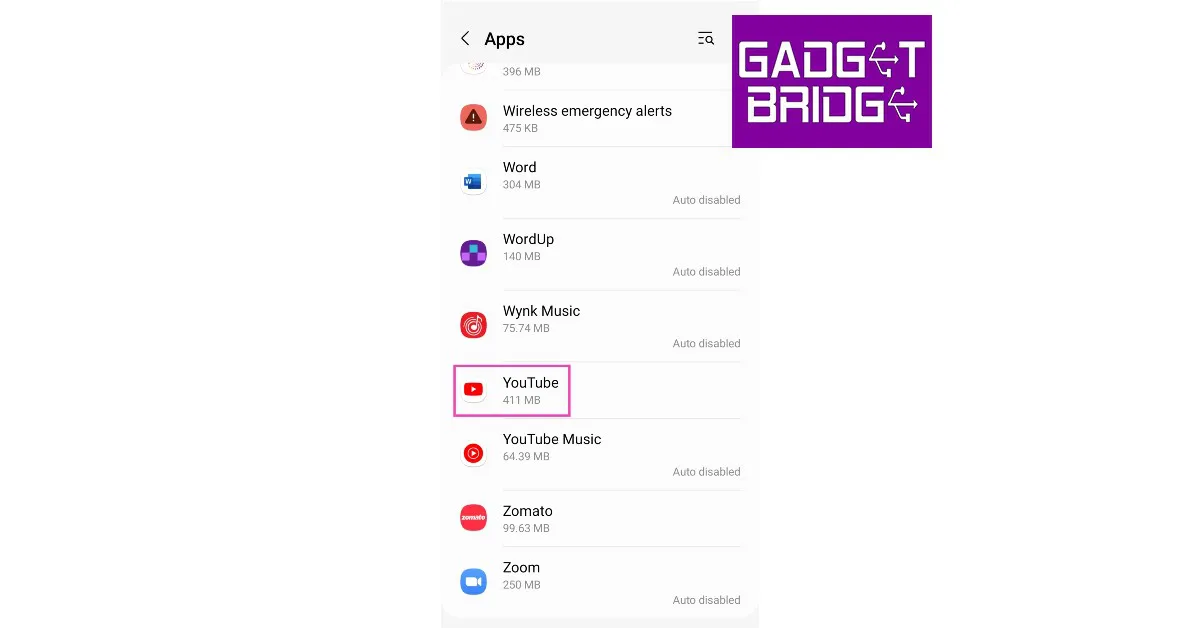
Instagram updated with a new Quiet mode

To promote setting boundaries with friends and followers and to aid in focus, Meta introduced Quiet mode on Instagram. The function is intended specifically for its teenage users. Users will not get any notifications once it’s enabled, but it will send an auto-reply whenever someone sends a direct message (DM). Moreover, the profile’s activity status will also change to let people know.

Meta via its blog post announced the new Instagram features. It said, “Today, we’re launching Quiet mode on Instagram to help people focus and to encourage people to set boundaries with their friends and followers. Once it’s enabled, you won’t receive any notifications, your profile’s activity status will change to let people know and we’ll automatically send an auto-reply when someone sends you a DM.”

Instagram updated with a new Quiet mode

According to the social networking site, teenagers have stated that they occasionally want to take time for themselves and maybe seeking more ways to concentrate at night, when studying, and at school. Now that the Quiet mode hours can be readily customised to meet a user’s schedule, Instagram will briefly summarise all alerts after the feature is disabled so that you may catch up on anything you missed.

Also Read: Eight new nations will have access to the Samsung Wallet app including India

Despite being specifically designed for its teenage users, the Quiet mode is accessible to all users. But Instagram will remind teenagers to do it after they spend a certain amount of time online at night on Instagram. Starting today, everyone can use quiet mode in the US, UK, Ireland, Canada, Australia, and New Zealand. The photo-sharing app intends to expand the availability of quiet mode to other nations.

It is introducing new features that allow people to tell what content they don’t want to be recommended to them. In addition, if you choose Not Interested in a post that you saw in Explore, it will try to avoid displaying similar content to you in the future in other places where it makes recommendations, such as Reels, Search, and other locations.

Additionally, while you can currently block DMs and comments that contain certain terms, Instagram is now extending this option to include any recommended posts that you could see on the platform. It will stop recommending content with phrases like “fitness” or “recipes” in the caption or the hashtag once you add a word or list of words, emojis, or hashtags that you want to avoid. This is accessible in the Privacy settings’ Hidden Words section.

Also Read: Apple launched HomePod (2nd generation) in India: Details inside

Instagram has also updated its Parental Supervison tools. is working to make parents more aware of the decisions their children make and to make it simpler for them to have conversations with their children about their settings through the Family Center and other supervision tools, in addition to giving teens more tools to manage their time and experiences on the platform.

It just launched a feature that allows parents to view their teen’s Instagram privacy and account settings. Parents will be notified if their kid updates a setting so they may chat to their teen about the change. Now, parents may see accounts that their adolescent has blocked.
For the latest gadget and tech news, and gadget reviews, follow us on TwitterFacebook and Instagram. For newest tech & gadget videos subscribe to our YouTube Channel. You can also stay up to date using the Gadget Bridge Android App. You can find the latest car and bike news here.