Amazon Quiz Answers Today 3 April 2023: Participate to win Rs 500

3 April 2023 Amazon Quiz has gone live on its mobile app platform. The quiz can be played from 12 AM to 11:59. All you need to do is just answer five easy questions that the e-commerce website puts before you. Today you can stand a chance to win Rs 500 Amazon Pay Balance. Every day Amazon posts a new questionnaire that consists of five simple questions about general knowledge and current events. To enter a lucky draw, participants must correctly answer the questions. One incorrect answer will result in your elimination from the quiz. Each month, only one person will be declared the winner and the results will be announced at the end of the month. Amazon customers who submit correct answers can win an Amazon Pay Balance worth up to Rs 50,000. To ensure that you answer all five questions correctly, Gadget Bridge updates all of the correct answers on a daily basis. Take a look at today’s answers: Amazon Quiz Today Prize – Rs 500 Amazon Pay Balance Quiz Date – 3 April 2023 Daily Timing – 12 AM to 11:59 PM Winner Announcement – Today 12 PM

Amazon Quiz Answers Today 3 April 2023

Question 1: What cricket item appears on the logo of the newly launched production house ‘Dhoni Entertainment’?

Answer: Ball

Question 2: In 2022, who became the first South African batter to hit a century in an ICC T20 World Cup event?

Answer: Rilee Rossouw

Question 3: Who is replacing Henry Cavill in the role of Geralt of Rivia in the series ‘The Witcher’?

Answer: Liam Hemsworth

Question 4: What is the most populated area with these conditions?

Answer: Thar Desert

Question 5: This river is formed by which river?

Answer: Fish River

How To Play Amazon Quiz

Only app users are eligible to play the Amazon quiz every morning from 12 AM to 11:59 PM. The quiz is not available on the desktop. For those who are unaware of how to play the Amazon quiz below are the steps, you can follow to take the quiz.
  • Firstly download the Amazon app from Google Play Store or App Store
  • Now fill in the required information through the Sign Up option.
  • You need to log in to the Amazon app and scroll down on the home screen to find the Amazon Quiz banner.
  • Tap on the Amazon Quiz banner and tap on the Start button to start the Quiz.
  • Now you will get 5 questions and you need to answer them correctly. One wrong answer will eliminate you from the Quiz.
  • After answering all the questions correctly you are now eligible for a Lucky Draw.
  • The winner’s name will be announced today at 12 PM.
For the latest gadget and tech news, and gadget reviews, follow us on TwitterFacebook and Instagram. For newest tech & gadget videos subscribe to our YouTube Channel. You can also stay up to date using the Gadget Bridge Android App. You can find the latest car and bike news here.

Amazon Quiz Answers Today 2 April 2023: Participate to win Rs 2,500

Have you participated in the Amazon Quiz today? If not then participate in the 2 April 2023 Amazon Quiz as it has already gone live on the app. The daily quiz can be played from 12 AM to 11:59 every day on the mobile app platform. Today e-commerce is giving the chance to win Rs 2,500 Amazon Pay Balance. Every day Amazon brings a fresh quiz for its customers. By participating in the quiz the participants can win an Amazon Pay Balance of up to Rs 50,000. The quiz can only be played on the mobile app as it is not available for the desktop platform. The quiz contains five easy questions and you have to answer all the questions correctly. The participants will then be shortlisted for a lucky draw to select a winner. Whereas the results are declared at the end of the month. Check out today’s Amazon quiz answers to win Rs 2,500. Amazon Quiz Today Prize – Rs 2,500 Amazon Pay Balance Quiz Date – 2 April 2023 Daily Timing – 12 AM to 11:59 PM Winner Announcement – Today 12 PM

Amazon Quiz Answers Today 2 April 2023

Question 1: Which means of transport is considered the fastest? Answer: Air Question 2: Germany has launched the world’s first fleet of passenger trains powered by what? Answer: Hydrogen Question 3: Who was the most famous ruler of the Mughals? Answer: Akbar Question 4: Guess This Place Answer: Colosseum Question 5: Guess This Place Answer: Grand Canyon

How To Play Amazon Quiz

Only app users are eligible to play the Amazon quiz every morning from 12 AM to 11:59 PM. The quiz is not available on the desktop. For those who are unaware of how to play the Amazon quiz below are the steps, you can follow to take the quiz.
  • Firstly download the Amazon app from Google Play Store or App Store
  • Now fill in the required information through the Sign Up option.
  • You need to log in to the Amazon app and scroll down on the home screen to find the Amazon Quiz banner.
  • Tap on the Amazon Quiz banner and tap on the Start button to start the Quiz.
  • Now you will get 5 questions and you need to answer them correctly. One wrong answer will eliminate you from the Quiz.
  • After answering all the questions correctly you are now eligible for a Lucky Draw.
  • The winner’s name will be announced today at 12 PM.
For the latest gadget and tech news, and gadget reviews, follow us on TwitterFacebook and Instagram. For newest tech & gadget videos subscribe to our YouTube Channel. You can also stay up to date using the Gadget Bridge Android App. You can find the latest car and bike news here.

Search chips added to Google Drive, will make it easier to narrow down user’s search results

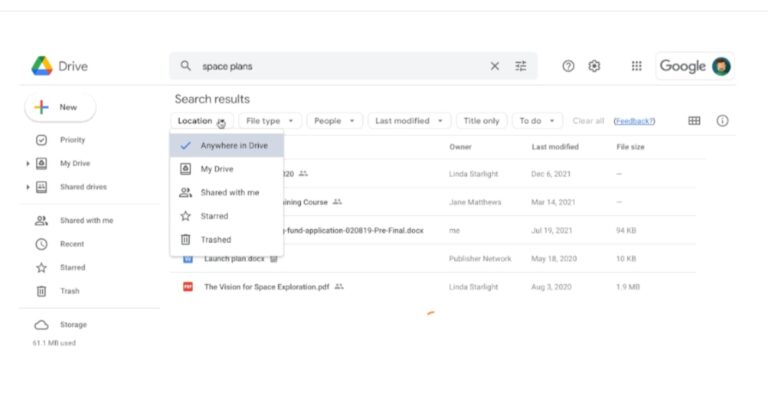
With Drive, Google has added a “search chips” feature. This functionality will allow users to filter content across the entire web app by criteria including file type, owner, and last edited date. According to the company, this feature will let users to more quickly refine their search and locate pertinent files across all Drive views. For those who are unaware the “search chips” feature was formerly accessible in Google Drive search, however, this function is now accessible “across Drive.” This is similar to the functionality available in Gmail. So now onwards users don’t have to do multiple or repeated searches or filter through unnecessary results since Google Drive’s search chips make it simpler for them to identify relevant files more quickly. According to Google all users can now generally access search chips. This includes all Google Workspace users, as well as previous G Suite Basic and Business users. drive search chips “In November 2021, we announced a beta for search chips in Google Drive, which makes it easier for users to find relevant files faster and eliminates the need to perform multiple searches or sort through irrelevant results. Search chips are now generally available for all users,” while announcing the feature Google said. A few keywords are generally used when searching in Drive to try to find the file such as “marketing plan” or “sales report,” which may return results that are too broad. Users can now use search chips to surface more relevant results based on File type, such as a Google Doc, PDF, or image, People, or Location, such as a shared drive or specific folder, When the document was last modified File titles only, Shared labels and Tasks after a query is entered. The company in its blog post said that users will notice various other improvements like spelling suggestions along with search chips. Users can clear search chips on their own, or together with the query and additional date options for the “Last modified” chip. For the latest gadget and tech news, and gadget reviews, follow us on TwitterFacebook and Instagram. For newest tech & gadget videos subscribe to our YouTube Channel. You can also stay up to date using the Gadget Bridge Android App. You can find the latest car and bike news here.

Released in India: Redmi Note 12 5G new higher storage variant will be available from April 6

Redmi has announced the launch of a new storage option for the Redmi Note 12 5G. The device will soon be offered in a third storage option according to the company. The phone debuted in India in two different configurations alongside other models Note 12 Pro 5G and the Note 12 Pro+ 5G earlier this year. Let’s find out in this post how much the new, higher-end smartphone will cost and when it will be available for purchase in the country.

Redmi Note 12 5G new storage price in India and sale details

The Redmi Note 12 5G will now be available in a new 8GB RAM and 256GB, priced at Rs 21,999. Before this, the Redmi Note 12 5G was only offered in India in two storage options: 4GB RAM with 128GB storage which costs Rs 17,999, and 6GB RAM and 128GB storage, which cost Rs 19,999. The phone comes in three colour options of Frosted Green, Matte Black, and Mystique Blue. The new high-end storage option is scheduled to go on sale on April 6 in India at noon via Amazon and official Mi stores, and offline retail stores. Also Read: Redmi Note 12 5G, Redmi Note 12 Pro 5G, and Redmi Note 12 Pro+ 5G goes official in India

Redmi Note 12 5G specifications

The Redmi Note 12 5G features 6.67 inches and with a 1,080 x 2,400-pixel resolution. The screen has a touch sampling rate of 240 Hz and a 120Hz refresh rate. The display offers 1200 nits of peak brightness. The phone runs on MIUI 13 based on Android 12 and is powered by Qualcomm Snapdragon 4 Gen 1 octa-core SoC and up to 6GB of RAM is included in the smartphone. It includes an internal memory of 128GB UFS 2.2 and supports microSD cards that can be increased up to 512GB. The Note 12 5G comes with a 48-megapixel primary sensor and a 2-megapixel depth sensor. There is an 8-megapixel front camera for selfies. It also houses a 5,000mAh battery that comes with 33W fast charging support. For the latest gadget and tech news, and gadget reviews, follow us on TwitterFacebook and Instagram. For newest tech & gadget videos subscribe to our YouTube Channel. You can also stay up to date using the Gadget Bridge Android App. You can find the latest car and bike news here.

Mivi Commando X9 TWS with up to 72 hours of playtime launched in India

Mivi, a homegrown electronics firm has announced the launch of the world’s first gaming TWS earbuds with Dual RGB- Mivi Commando X9. The device also allows users to customize both the case and the earbuds, which take inspiration from the Aurora Lights, and lets gamers adjust their earbuds to suit their gaming sets. It is the first product in Mivi’s Commando line to be built entirely in India. The gaming TWS has a low latency of 35MS and offers ENC for an uninterrupted gaming experience.

Mivi Commando X9 price in India and availability

The Mivi Commando X9 has been launched in India with a price tag of Rs 1,499. The gaming earphones come in five distinct shades of Black, White, Red, Yellow and Grey. The TWS can be purchased via Flipkart and the company’s official website in the country. Mivi Commando X9 price in India and availability

Mivi Commando X9 specs, features

As mentioned earlier the Mivi Commando X9 is first TWS in the Commando lineup and the first gaming TWS with Dual RGB. Games can customise both the case and the pods for the first time ever. The Commando X9, which is inspired by the Aurora Lights gives players the option to tailor their experience to suit their gaming setups. The X9, has seven different built-in colour effects namely- static, breathing, waves, quick fade, ficker, cycle and metamorphosis. Also Read: Apple iPhone 14 available with discounts of up to Rs 15,000 on Flipkart Mivi Commando X9 features 13mm drivers offering a broad frequency range of 20Hz to 20KHz. The X9 offers 72 hours of playtime. With just 10 minutes of quick charge, it is claimed to provide 15 hours of uninterrupted music, games and calls. Moreover, its 35ms ultra-low latency ensures that there is no lag between a player’s actions and the associated feedback on the screen or audio output. AAC and SBC codecs are built into the device to guarantee uncompromised compatibility with iOS and Android users. The Bluetooth 5.3 technology on the Mivi earphones offers a connectivity range of 10 meters (30 feet). Lastly, Environmental Noise Cancellation (ENC) technology makes sure that there are no interruptions. The Commando X9 has an IPX 4 rating, making it resistant to sweat, water splashes, and dust For the latest gadget and tech news, and gadget reviews, follow us on TwitterFacebook and Instagram. For newest tech & gadget videos subscribe to our YouTube Channel. You can also stay up to date using the Gadget Bridge Android App. You can find the latest car and bike news here.
Garena Free Fire Redeem Codes Today 1 April 2023: Here is how to claim them

Garena Free Fire is a battle royale game with regular awards and tournaments to keep players interested. If you play Garena Free Fire, you should be aware of the redeem codes that are released on a daily basis. However, because the battle royale game is banned in India, players from other countries can use the Free Fire Redeem codes daily. If you’re unfamiliar with the Garena Free Fire redeem codes or don’t know how to get them, we’ve put together a step-by-step guide to help you redeem them. Check out Garena Free Fire Redeem Codes for 1 April 2023. The Free Fire redeem codes are a great way to get free stuff. These are 12-digit codes that contain alphabets and numbers, as well as an expiration date and time. Because the Garena FF redeem codes cannot be used more than once, you should hurry to the redemption page to claim your free reward before someone else does. To get a free reward, all you have to do is go to reward.ff.garena.com/en, which is the official redemption page. Also, keep an eye on this space for daily updates on Garena Free Fire redemption codes and rewards.

Garena Free Fire Redeem Codes Today 1 April 2023

  • FFCMCPSBN9CU
  • FFBBCVQZ4MWA
  • BR43FMAPYEZZ
  • NPYFATT3HGSQ
  • FFCMCPSGC9XZ
  • FFCMCPSUYUY7E
  • MCPW3D28VZD6
  • EYH2W3XK8UPG
  • MCPW2D2WKWF2
  • ZZZ76NT3PDSH
  • FFCMCPSEN5MX
  • HNC95435FAGJ
  • 6KWMFJVMQQYG
  • XZJZE25WEFJJ
  • V427K98RUCHZ
  • MCPW2D1U3XA3
  • FFAC2YXE6RF2

How to Get Free Fire Redeem Codes for Garena on 1 April 2023?

  • Visit the Garena Free Fire game’s official website at reward.ff.garena.com.
  • Use your Facebook, Google, VK, Apple ID, Huawei ID, or Twitter account to log in.
  • You’ll be taken to a valid redemption code (s)
  • Copy and paste the 12-digit redemption code into the text box.
  • On the screen, a dialogue box will appear.
  • ‘Ok’ should be selected.
For the latest gadget and tech news, and gadget reviews, follow us on TwitterFacebook and Instagram. For newest tech & gadget videos subscribe to our YouTube Channel. You can also stay up to date using the Gadget Bridge Android App. You can find the latest car and bike news here.
Amazon Quiz Answers Today 1 April 2023: Participate to win Rs 5,000

Have you participated in the Amazon Quiz today? If not then participate in the 1 April 2023 Amazon Quiz as it has already gone live on the app. The daily quiz can be played from 12 AM to 11:59 every day on the mobile app platform. Today e-commerce is giving the chance to win Rs 5,000 Amazon Pay Balance. Every day Amazon brings a fresh quiz for its customers. By participating in the quiz the participants can win an Amazon Pay Balance of up to Rs 50,000. The quiz can only be played on the mobile app as it is not available for the desktop platform. The quiz contains five easy questions and you have to answer all the questions correctly. The participants will then be shortlisted for a lucky draw to select a winner. Whereas the results are declared at the end of the month. Check out today’s Amazon quiz answers to win Rs 5,000. Amazon Quiz Today Prize – Rs 5,000 Amazon Pay Balance Quiz Date – 1 April 2023 Daily Timing – 12 AM to 11:59 PM Winner Announcement – Today 12 PM

Amazon Quiz Answers Today 1 April 2023

Question 1: Delhi was declared as the Capital of India in the year __? Answer: 1911 Question 2: Who was discovered by American record executive Scooter Braun and signed with RBMG Records in 2008 as a teen idol? Answer: Justin Bieber Question 3: The word “November” comes from a Latin word meaning what? Answer: Nine Question 4: She is Dexter’s sister. Can you recall her name? Answer: Dee Dee Question 5: In the cartoon ‘Scooby Doo’ what was the name of this van? Answer: The Mystery Machine

How To Play Amazon Quiz

Only app users are eligible to play the Amazon quiz every morning from 12 AM to 11:59 PM. The quiz is not available on the desktop. For those who are unaware of how to play the Amazon quiz below are the steps, you can follow to take the quiz.
  • Firstly download the Amazon app from Google Play Store or App Store
  • Now fill in the required information through the Sign Up option.
  • You need to log in to the Amazon app and scroll down on the home screen to find the Amazon Quiz banner.
  • Tap on the Amazon Quiz banner and tap on the Start button to start the Quiz.
  • Now you will get 5 questions and you need to answer them correctly. One wrong answer will eliminate you from the Quiz.
  • After answering all the questions correctly you are now eligible for a Lucky Draw.
  • The winner’s name will be announced today at 12 PM.

Quick Smartphone Games to Play When You Need a Break

It’s common to have a little pocket of free time that you don’t know what to do with. Perhaps you’re on public transportation, waiting in line at the store, or you’ve arrived at a meeting early and want to take your mind off work for a bit. Having your smartphone pre-loaded with games is an excellent way to occupy this time. Here are some timeless games you can play on your smartphone whenever you want a break for a few minutes.

Chess and Checkers

People have been playing checkers and chess for more than a millennium. The clear rules, infinite possibilities, and strategic challenge make this a game you’ll love putting your mind toward. Since the ruleset is pretty standard across the board, choose a version to download that you find the most graphically impressive, with various options for pieces. You might also choose based on multiplayer options, the difficulty of artificial intelligence (AI), piece animation, and other criteria.

Poker, Roulette, and Other Casino Games

Casinos also feature some of the most timeless and engaging games you’ll find. The speed and processing power of today’s smartphones has allowed developers to make some impressive casino games of all your favorites. If you’re a poker fan, consider an app or site that has different variations of poker, such as Omaha, Texas Hold ‘Em, and Five Card Stud. Consider whether you’d like to play limit or no limit, and explore offline and online multiplayer options. Study your smartphone specs to make sure the hardware is up to the task. Learn your phone’s processor speed so that your casino games are seamless and without slowdown. Today, there are live roulette online variations like Speed Roulette that require you to place your bets quickly. Other fast-paced casino game variations include Speed Blackjack and Speed Bacarrat. Knowing that your smartphone is ready will let you confidently participate in these sorts of games. No matter the game speed, familiarize yourself with the odds and different types of bets.

Math and Word Games

These games are like mental reps that can keep you sharp. There are countless math and word games you can try out to see what you enjoy. Math games that feature timed drills of addition, subtraction, multiplication, division, algebra, and other areas of the subject. Others involve different combinations of numbers and calculations as part of the game board or rule set. These games are excellent for your brain, as Stanford Medicine prizes the development of number sense over memorization. Word games are also excellent brain teasers. You might have to search for hidden words, create combinations of words, or take on numerous spelling challenges.

Bits of Fun at a Time

Get whatever phone package and data plan you need to play all your favorite games whenever you’d like. If you start with the games above, you will always have some fun options that you can use to fill dead time. Work on your strategy and you might just become quite skilled in the process. For the latest gadget and tech news, and gadget reviews, follow us on TwitterFacebook and Instagram. For newest tech & gadget videos subscribe to our YouTube Channel. You can also stay up to date using the Gadget Bridge Android App. You can find the latest car and bike news here.

How to watch IPL 2023 online for free?

0
IPL 2023 is set to begin today with the Gujarat Titans taking on Chennai Super Kings in the inaugural clash of the season. Unlike the previous seasons, there is one important change that has been made to the coverage of the Indian Premier League. The cricket tournament will no longer be live-streamed on Hotstar. In case you missed it, Viacom 18 acquired the streaming rights for IPL from BCCI, paying a whopping Rs 20,500 crore for online coverage of the tournament in India. The good news for cricket lovers is that IPL 2023 can be streamed online for free. Here’s how. Read Also: Top Five Business Tools To Help Save You Money in 2023

How to stream IPL 2023 online for free?

IPL 2023 can be streamed online for free on the Jio Cinema app. You don’t need to create an account to watch IPL 2023 on Jio Cinema. The tournament will be broadcasted in 12 languages including English, Hindi, Tamil, Bengali, Bhojpuri, Telugu, and more. All matches can be streamed in 4K resolution. Jio Cinema will also provide multiple camera angles and special ‘fanzone’ commentary for all participating teams. JioCinema While the streaming rights may have gone to Viacom 18, Star Network still retains the TV broadcasting rights for IPL 2023. Star Network will continue to broadcast IPL on television for the next 5 years, paying Rs 23,575 crores for the coverage rights. TV audiences can watch IPL 2023 on the Star Sports Network. Jio has also been rolling out its 5G network coverage across the country. To switch to Jio 5G, read our article here. As of now, you can enjoy 5G network on your current 4G data plan without paying any extra costs. Jio has also launched three new ‘Cricket’ data plans at an attractive pricing of Rs 219, Rs 399, and Rs 999. These data plans provide 3GB of mobile data per day for 14 days, 19 days, and 84 days respectively. Apart from the daily 3GB mobile data allowance, you also get an additional 2GB, 6GB, and 40GB data on these prepaid subscription plans. Read Also: Motorola G13 with 50MP quad pixel camera launched at Rs 9,499

Frequently Asked Questions

Where can I watch IPL 2023 for free online?

You can watch IPL 2023 on the Jio Cinema app for free. You don’t need to make an account to enjoy the IPL 2023 coverage.

Where can I watch IPL 2023 on TV?

You can watch IPL 2023 on the Star Sports Network on TV.  For the latest gadget and tech news, and gadget reviews, follow us on Twitter, Facebook and Instagram. For newest tech & gadget videos subscribe to our YouTube Channel. You can also stay up to date using the Gadget Bridge Android App. You can find the latest car and bike news here.

Apple iPhone 14 available with discounts of up to Rs 15,000 on Flipkart

0
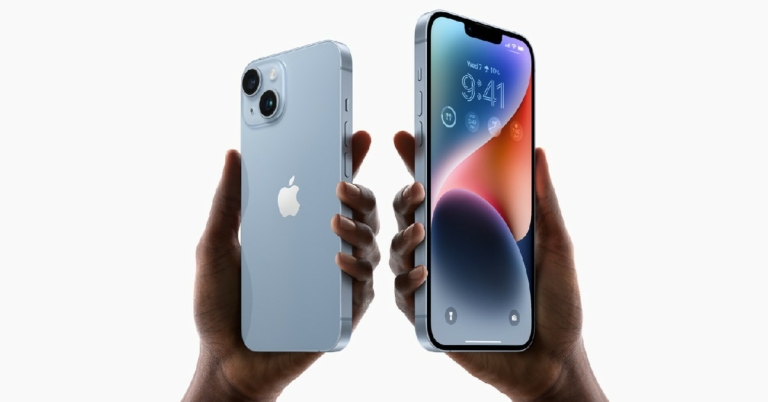
Flipkart is offering massive discounts on the new Apple iPhone 14, which can now be purchased for as low as Rs 65,000. The e-commerce platform has listed the smartphone at Rs 68,999, bringing the price down from Rs 79,990. Buyers can also get an instant discount worth Rs 4,000 by using an HDFC Bank credit or debit card, bringing the total price down to Rs 64,999. The only catch here is that these offers are only applicable to the red-coloured variant of the iPhone 14. Read Also: Samsung Galaxy A54 5G Review: A great mid-ranger for everyday use

Apple iPhone 14 discount offers on Flipkart

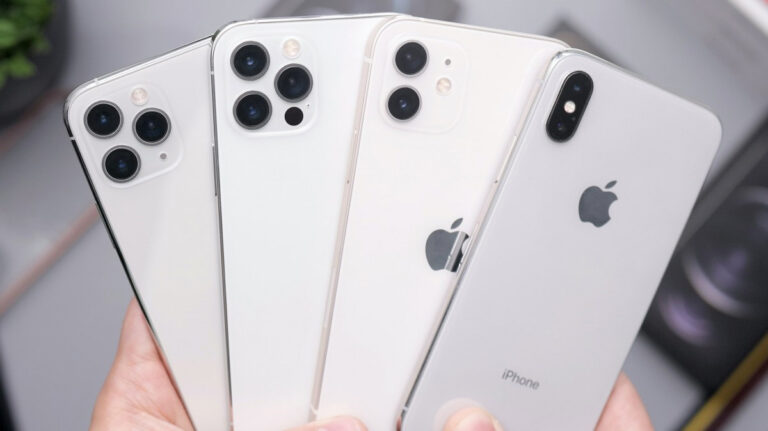
While the red iPhone 14 gets the highest discount, Flipkart has also slashed prices for other colour variants of the iPhone 14. The 128GB Starlight variant is now priced at Rs 70,999 while the Blue, Midnight, and Purple shades are listed at Rs 71,999 on the website. The recently launched Yellow iPhone 14 is available at Rs 72,999. Buyers can also avail of an additional discount of Rs 4,000 on the Starlight, Midnight, Purple, and Blue iPhone 14 variants by using an HDFC bank credit or debit card for the purchase. There are no instant discount bank offers for the yellow iPhone 14, but buyers can 10% off on EMI transactions made using Bank of Baroda, IDFC, and IndusInd Bank credit cards. iPhone 14 and iPhone 14 Plus Yellow colour variant now available for purchase in India The iPhone 14 comes with a 6.1-inch Super Retina XDR OLED display with 1,200 nits of brightness. The smartphone is rated IP68 for dust and water protection. The iPhone 14 retains the A15 Bionic chip, with Apple deciding to make the new A16 Bionic chipset available only for the Pro and Pro Max variants. The rear camera array of the iPhone 14 consists of a 12MP primary shooter along with a 12MP ultrawide lens. Up front, you get a 12MP selfie camera which is housed in a prominent notch. The new pill-shaped cutout has been reserved for the Pro and Pro Max variants of iPhone 14. The new ‘Action’ mode allows users to shoot stable footage even with rapid movement and shaking. Read Also: Top 9 Ways to Fix ‘Android Connected To WiFi But No Internet’ issue These discounts are available for a limited period on Flipkart. Prices for the 256GB and 128GB variants of iPhone 14 have also been slashed by Rs 8,000. Flipkart has also reduced prices for the Pro and Pro Max variants of iPhone 14. For the latest gadget and tech news, and gadget reviews, follow us on Twitter, Facebook and Instagram. For newest tech & gadget videos subscribe to our YouTube Channel. You can also stay up to date using the Gadget Bridge Android App. You can find the latest car and bike news here.

Apple delays mass production for Mixed Reality Headset, WWDC 2023 reveal unlikely

0
Apple’s Worldwide Developer’s Conference is set to return this year on June 5. Despite certain rumours and teasers, the highly anticipated Apple Mixed Reality Headset will not be making an appearance at WWDC 2023. This news comes after Apple reportedly demoed the headset to several executives at the Steve Jobs Theatre earlier this month. While many predicted a June reveal for the MR Headset, it seems that audiences will have to wait some more. Read Also: Samsung Galaxy A54 5G Review: A great mid-ranger for everyday use

Apple not too optimistic about MR Haadset’s market reception

According to Apple analyst Ming-Chi Kuo, Apple has pushed back the mass production of Mixed Reality Headsets by 1-2 months. The tech giant isn’t optimistic about the MR Headset’s announcement at WWDC 2023 creating another ‘iPhone moment’, says Kuo. This casts a serious shadow over the MR headset announcement that many were expecting to happen at this year’s WWDC. Kuo also revealed that due to the delay in mass production, the shipment forecast for the Mixed Reality Headset this year is between 200,000 – 300,000 units, which is lower than the market consensus of 500,000 units. Apple’s mixed-reality headsets are expected to arrive in 2022: Everything we know so far Apple is also concerned about the market feedback that the MR Headset will receive upon its announcement. The economic downturn along with the hardware and ecosystem challenges related to the headset contribute to Apple’s pessimism regarding the potential announcement. A high selling price, which is expected to be anywhere between $3,000-4,000, could also influence the market feedback of the MR Headset. Read Also: Samsung launches Bespoke Jet and Robotic Vacuum Cleaner lineup starting at Rs 65,900 According to certain reports, Apple’s senior executives had doubts regarding the MR Headset’s popularity with the audiences. While they do not expect it to be a hit right out of the gate, the senior staff at Apple believes that the product will perform better over time. This isn’t the first time that Apple’s Mixed Reality Headset has hit a roadblock. The headset has been in the works for almost half a decade. While the Mixed Reality Headset may not feature at WWDC 2023, Apple users can still expect the new iOS 17 reveal at the event. For the latest gadget and tech news, and gadget reviews, follow us on Twitter, Facebook and Instagram. For newest tech & gadget videos subscribe to our YouTube Channel. You can also stay up to date using the Gadget Bridge Android App. You can find the latest car and bike news here.

Top Smart Gadgets for Smart Homes

If you’re trying to assemble smart gadgets for your home but don’t know where to start, you have come to the right place. Major companies like Samsung, Philps, Wipro, and Godrej have an impressive smart appliance portfolio. With SmartThings, Samsung is also trying to push an enclosed ecosystem for all its gadgets and home appliances, much like Apple. If you don’t know where to begin your smart home journey, here is our list of the top smart gadgets you can buy right now for smart homes. Read Also: Samsung Galaxy A54 5G Review: A great mid-ranger for everyday use

Godrej Solus 7” Video Door Phone

Price: Rs 6,554 Godrej Solus 7” Video Door Phone This versatile video doorbell from Godrej offers one-way video and two-way audio communication. The visitors to your home are captured by the pinhole camera at the door and the video feed is relayed to the 7-inch TFT display inside your home. The Godrej Solus Video Door Phone allows two-way audio communication between the visitor and the homeowner. The 120-degree wide-angle camera covers the optimum area outside your doorstep to gather all the necessary details. The camera has an LED to help with night vision as well. The outdoor unit is weather resistant and the indoor display gives you easy access to all the controls.

Apple HomePod

Price: Rs 32,900 Apple launched HomePod (2nd generation) in India: Details inside Apple HomePod offers a lot more than your average home speaker. The HomePod has a built-in sensor that can accurately tell the temperature and humidity in your room. On top of playing music, you can also use voice commands for internet searches, read and respond to your messages, set the alarm, and carry out other basic tasks. With five tweeters on board, the Apple HomePod provides high-end enveloping audio for your room. Need a smaller, more compact device? The HomePod mini will be right up your alley.

Philips Wiz Wi-Fi enabled LED Bulb

Price: Rs 769 Philips Wiz Wi-Fi enabled LED Bulb With the Philips Wiz Wi-Fi-enabled LED Bulb, you get a range of 16 million colours with several customisation options. Wipro’s Wiz app lets you switch between the ‘warm’ and ‘cool’ colour temperatures and also lets you remotely control the light bulb when you are out. This smart bulb can also be paired with an Echo device. Google Assistant and IFTTT support has also been made available on this bulb for smarter access. All you need is a secured 2.4GHz WiFi connection to make this smart LED bulb work.

LAVNA Smart Door Lock

Price: Rs 8,080 LAVNA Smart Door Lock This smart door lock by LAVNA offers six modes of entry for different situations: fingerprint access, mobile app access, PIN access, RFID card access, and mechanical key access. Users can register up to 100 fingerprints for the lock and delete access for any prints through the mobile app. You get 2 RFID cards and 2 mechanical keys inside the package. For the lock to install correctly, the door must be at least 30mm in thickness. You can generate OTPs through the mobile app in case you are expecting a guest and you are not at home.

Wipro Smart Plug

Price: Rs 999 Wipro Smart Plug The 16A WiFi Smart Plug by Wipro is suitable for heavy appliances like AC, geysers, and electric motors. Using the Wipro Smart app, you can control your home appliances from anywhere. The smart plug allows you to monitor the energy consumed by the appliance connected to it. You can also set schedules and control the plug with Google Assistant and Amazon Alexa. The Wipro Smart Plug requires a 2.4GHz WiFi network to function.  

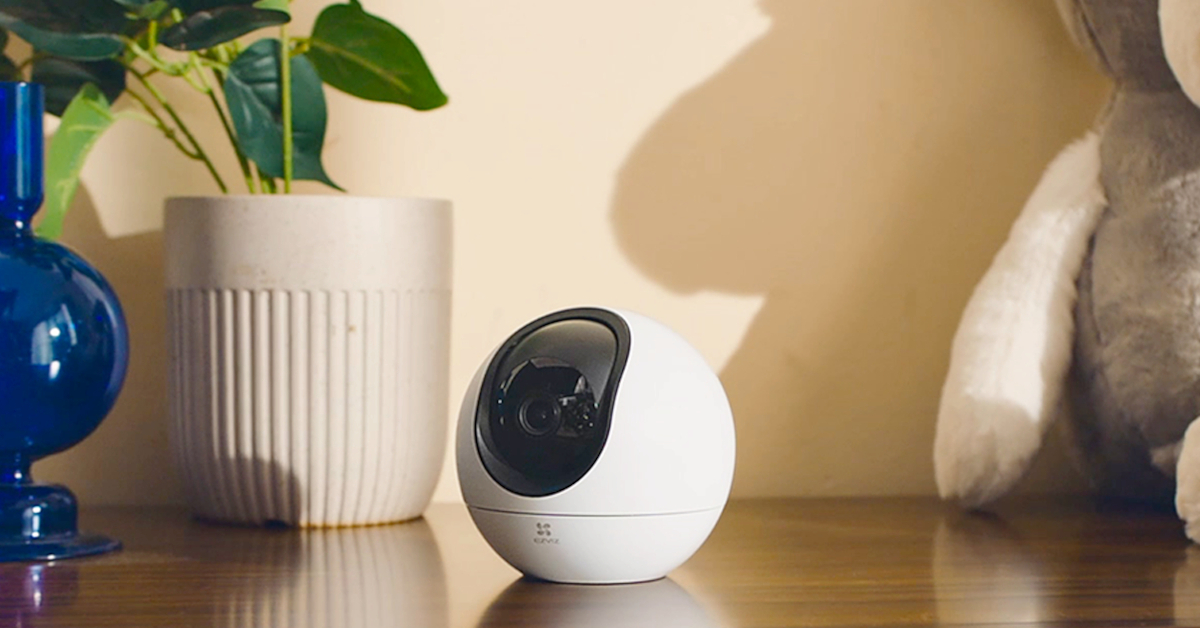
EZVIZ C6 Indoor Camera

Price: Rs 6,000 EZVIZ C6 2K available now at Rs 6,000 The newly launched EZVIZ C6 indoor camera can record video footage in 2K resolution and retains colour vision in low light conditions. This camera can track a subject and zoom up to 4 times. It can also recognise alarm sounds and other sudden noises like a baby crying. The EZVIZ also offers certain AI-powered features like hand-waving call alert and human & pet detection. The indoor camera also comes with Google Assistant, Amazon Alexa, and IFTTT connectivity.

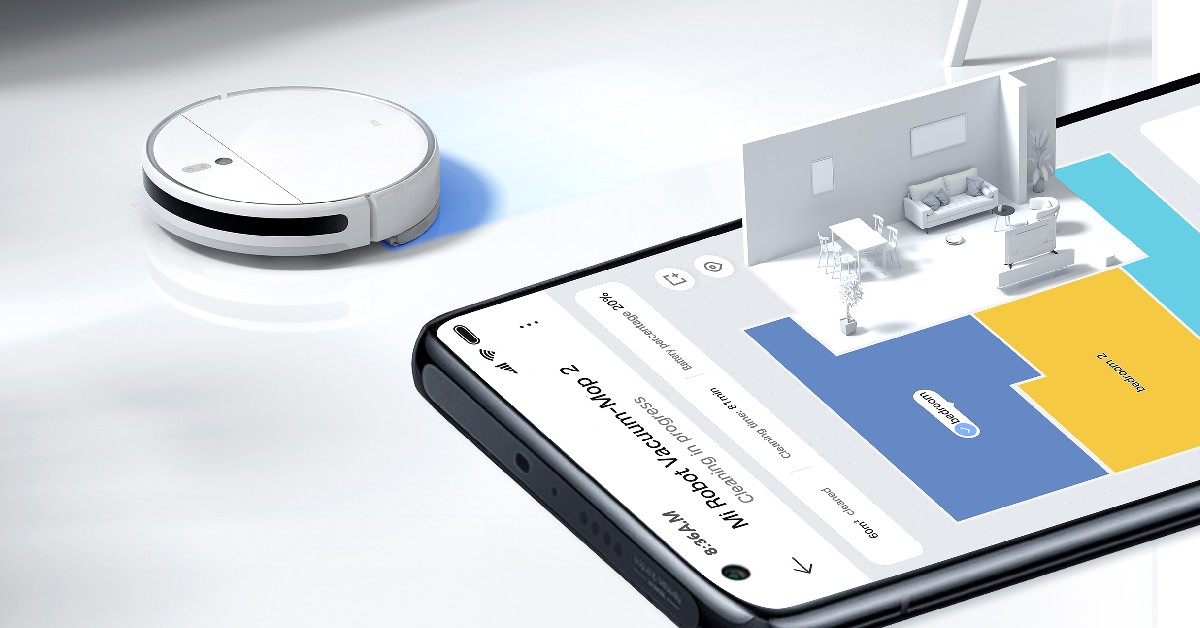
Xiaomi Robot Vacuum Mop 2

Price: Rs 29,999 Xiaomi Robot Vacuum-Mop 2: Features and Specifications This 2-in-1 vacuum and mop combo from Xiaomi takes care of all your home cleaning needs. The Xiaomi Robot Vacuum Mop 2 offers 3,000Pa of suction that can effectively remove any kind of dirt from your floor. The mop can generate 10,000 vibrations/minute to remove different kinds of stains. The Xiaomi Robot Vacuum Mop 2 is also able to scan and map the environment and plan efficient cleaning routes. The 5,200mAh battery offers a runtime of 170 minutes. The Robot Vacuum can be controlled through Xiaomi’s Home app and is compatible with Google Assistant and Amazon Alexa, making it one of the best smart gadgets for smart homes you can buy right now.

Philips Airfryer XL

Price: Rs 17,995   Philips Airfryer XL Connected price If you’re looking for a handy smart appliance for your kitchen, start with the Philips Airfryer XL. This smart airfryer can be tracked, monitored, and controlled from any smartphone or tablet. The Philips Airfryer XL Connected and NutriU app deliver intelligent content recommendations while bringing greater accessibility to the user. You can also link the Philips Airfryer to your Amazon Echo Dot device. The 6.2L pan and 1.2kg capacity basket allow you to prepare up to 5 pieces of food for your family and guests at once.

Samsung Side-by-Side Refrigerator

Price: Rs 1,13,000 Samsung Introduces brand new 2023 Side-by-Side Refrigerator Range in India Samsung introduced its top-of-the-line Side-by-Side Refrigerator to the Indian market this year. This smart fridge is specially designed to match the needs of Indian consumers and comes with Samsung’s proprietary technologies like Convertible 5-in-1, FamilyHub, and Curd Maestro+. The FamilyHub 7.0 function lets users have a peek inside the fridge without opening it. It can also turn into a makeshift bulletin board, where users can leave messages for other members of the family or play videos or a slideshow of images. This smart fridge can be managed through Samsung’s SmartThings app. The Curd Maestro+ functionality lets users make curd at home using the fridge’s curd-making compartment. When not in use, this compartment can be turned into extra storage.

Ottomate Prime Lumen Smart Fan

Price: Rs 11,399 Ottomate Prime Lumen Smart Fan The Ottomate Lumen Smart Fan has special blades that significantly reduce the noise when the fan is in function. Prime Lumen offers 100 fan speeds and a 24-watt smart LED bulb that can be dimmed and customised according to your needs. This fan also comes with a dedicated remote control and offers app connectivity as well. You can also control the Prime Lumen through Alexa or Google Home. There are three preset modes that you can utilise from the remote control: TV Mode, Relax Mode, and Party Mode.

Infinix 43Y1 Smart TV

Price: Rs 13,999 Infinix 43Y1: Specs, features, and additional details  Closing out this list is the new budget TV from Infinix. This 43-inch Smart TV offers a Full HD display with 300 nits of peak brightness. The audio is handled by 20W Dolby Stereo Speakers that offer a home theatre-like experience. Powering the Infinix 43Y1 is a Quad-processor. The Smart TV has 4GB of storage capacity. It comes with pre-loaded OTT apps like Prime Video, Youtube, SonyLiv, Zee5, ErosNow, AajTak etc. The TV remote has dedicated buttons for Prime Video and YouTube.  Read Also: Samsung launches Bespoke Jet and Robotic Vacuum Cleaner lineup starting at Rs 65,900

Conclusion 

These are the top smart gadgets for smart homes you can buy right now. All of these gadgets and appliances are compatible with Google Home or an Amazon Echo device. Which smart gadget is your pick of the lot? Let us know in the comments! For the latest car and bike news, car reviews/bike reviews, and auto features follow us on Twitter and Facebook. You can find the latest gadget and tech news, and gadget reviews here.

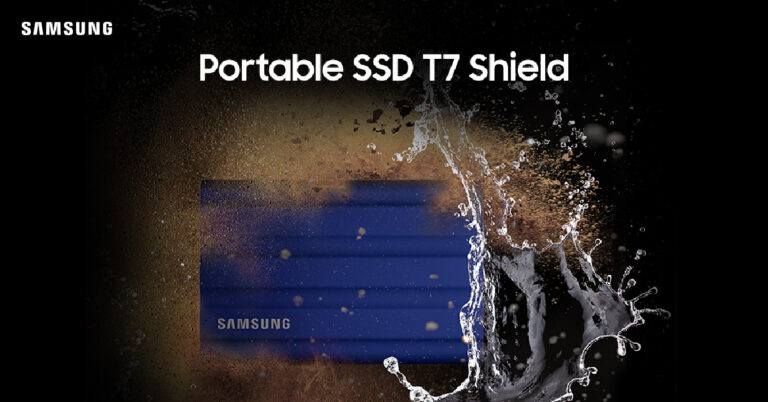
Samsung launches 4TB T7 Shield Portable SSD starting at Rs 30,000

Samsung has launched a new T7 Shield Portable SSD with 4TB storage capacity in India, with prices starting at Rs 30,000. Designed for professional creators and outdoor users, the T7 Shield SSD is up to 9.5 times faster than an average external hard disk drive. The portable SSD weighs just 98 grams and can easily be carried around in a pocket. Read Also: Samsung launches Bespoke Jet and Robotic Vacuum Cleaner lineup starting at Rs 65,900

Samsung T7 Shield Portable SSD 4TB: Key specifications

The 4TB Samsung T7 Shield Portable SSD weighs 98 grams and has dimensions of 88mm x 59mm x 13mm, which makes it as compact as a credit card. The SSD is powered by USB 3.2 Gen2 (10 Gbps) and embedded PCI NVMe Technology. The portable external storage offers a sequential read speed of 1,050 MB/s and a sequential write speed of 1,000 MB/s. As mentioned earlier, the Samsung T7 Shield Portable SSD is up to 9.5 faster than external hard disk drives. For a 4K video up to 4.8GB, the download time from a laptop is reduced to 8.0 seconds. For an FHD 3GB video, this duration drops to 4.4 seconds. This 4TB PSSD is also suitable for recording HD video content. A 12K resolution video takes only 22 minutes to transfer from the source to another device. Samsung T7 Shield Portable SSD 4TB: Key specifications The Samsung T7 Shield Portable SSD is compatible with smartphones, tablets, and cameras, making it an ideal portable device. The PSSD is rated IP65 for dust and water resistance. It is shock resistant from drops of up to three metres. Consumers also get a 3-year warranty with the purchase of the T7 Shield PSSD. The 4TB Samsung T7 Shield PSSD is available at all Samsung retail stores, major online platforms, offline retail stores, and Samsung’s official online store. Samsung has priced the 4TB T7 Shield Portable SSD between the range of Rs 30,000 and Rs 35,000. Read Also: Top 8 ways to Free up Space on Your iPhone and Android Phone (2023) “The upgraded PSSD T7 Shield offers premium experience and convenience with increased 4 terabytes storage capacity. This storage device has been developed after considering various metrics and use cases and is the ultimate storage device for today’s dynamos and go-getters who seek enhanced performance and low-latency during data transfer,” said Puneet Sethi, Vice President, Consumer Electronics Enterprise Business, Samsung India. For the latest gadget and tech news, and gadget reviews, follow us on Twitter, Facebook and Instagram. For newest tech & gadget videos subscribe to our YouTube Channel. You can also stay up to date using the Gadget Bridge Android App. You can find the latest car and bike news here.

Top Five Business Tools To Help Save You Money in 2023

Whether you’re running a startup or an established business, you’re just as likely to want to find new ways to save money this year, especially with the costs of just about everything going up. One of the best ways to cut down on business costs is to implement the right business tools to help you get more done in less time and potentially reduce the number of professional tools you and your team need to get essential things done.

Why You Should Reevaluate the Business Tools You’re Using

Using just a few efficient business tools will give you more time to actually do business efficiently, thereby reducing operating costs and adding to your bottom line. If you’re already using a bunch of different apps and platforms to do business, narrowing them down to just a few will also put time — one of your most valuable resources — back in your pocket by reducing how much time you spend switching back and forth between dozens of different tools. Lastly, using a limited number of powerful business tools also ensures you’re not paying expensive subscription fees for a whole bunch of different apps and software programs you don’t need.

Try These Five Business Tools To Save Money and Time

1. Spike

Spike is a conversational email client that will change how you and your team communicate and collaborate for the better. When you sign up for Spike and sync it with your existing business email account, the app automatically converts your traditional email threads into chat-style conversations. This is hugely beneficial for your company’s productivity because it removes the clutter from email threads, so you’re not scrolling through endless, repetitive content to find key replies and information. Instead, emailing back and forth via Spike is as natural as an instant messaging or text conversation. Additionally, Spike provides a range of other ways to communicate and collaborate, including integrated video meetings, voice messages, shared notes, tasks and to-do lists, and more. This means you can potentially eliminate a fair number of apps you might have been using to do certain work-related activities and unify all your professional communication and collaboration in Spike.

2. FreshBooks

FreshBooks is an accounting software platform that you can use for all your payroll and bookkeeping needs. The platform is easy to set up and use, and allows you to track expenses, send estimates and proposals, set up recurring billing, and receive payments via bank transfers and cards. FreshBooks can work for a variety of business types and sizes, but it is especially ideal for entrepreneurs and startups looking for a simple way to start managing their accounting. When you’re tracking your expenses simply and effectively, with a tool like this, you’re much more likely to notice problems and fix them before you’ve wasted a bunch of money.

3. Canva

Canva is a design app that can save you time and money on your graphic design tasks. You can use Canva to do everything from designing logos and social media posts to creating website graphics and infographics. Canva is very intuitive to use, and you don’t need any design experience to get started. Alternatively, designers on your team can use Canva’s wide range of graphic assets to save time and pump out simple designs at a faster rate.

4. HubSpot

HubSpot is a powerful CRM platform that you can use to manage your sales and marketing operations. This business tool allows you to manage every step of your customer’s journey, improving the overall customer experience and helping your team members build better customer relationships. HubSpot is a collection of several different products for sales, marketing, content management, customer service, and operations, and is highly customizable. This lets you choose the features you and your business need to attract, engage, and satisfy your customers, ultimately leading to business and revenue growth.

5. Hootsuite

Having an effective social media strategy is an essential part of growing any type of business. But, with so many other things to do, it’s easy to let social media fall to the side. Hootsuite is a social media management platform that lets you plan, schedule, and post content simultaneously across all your company’s different social media channels. This helps cut down on costs when it comes to managing your social presence, as you don’t need to have someone dedicated to doing it or spend too many hours on it every week. With Hootsuite, you can just plan out your social media posting for a week or a month ahead of time, and let the platform take care of the actual posting for you.

Final Words

Every business is different, but at their cores, most businesses have a lot of the same basic needs. Communication and collaboration, accounting, graphic design, marketing and sales operations, and social media management are some of the needs that almost all businesses have. And, with the right set of business tools, like those mentioned above, you can save a lot of time and money when executing these essential business tasks. For the latest gadget and tech news, and gadget reviews, follow us on TwitterFacebook and Instagram. For newest tech & gadget videos subscribe to our YouTube Channel. You can also stay up to date using the Gadget Bridge Android App. You can find the latest car and bike news here.
Motorola G13 with 50MP quad pixel camera launched at Rs 9,499

0
Motorola has launched the new G13 smartphone in India at the price of Rs 9,499. This new addition to the G series comes at an affordable price and features an ultra-thin design with an acrylic glass (PMMA) body. Motorola G13 will go on sale starting 5th April 2023 on Flipkart, Motorola.in, and all major retail stores across the country. The 128GB storage variant has been priced at Rs 9,999 while the 64GB base variant fetches Rs 9,499. The smartphone is available in two colour options – Matte Charcoal and Lavender Blue. Read Also: Microsoft warns rival AI chatbots against using Bing’s search index

Motorola G13: Specifications, pricing, and offers

Motorola G13 is powered by the  MediaTek Helio G85 processor with a 2.0 GHz octa-core CPU. The smartphone is available in two storage variants – 64GB and 128GB, with 4GB LPDDR4X RAM. OS duties are handled by stock Android 13. Motorola has promised one major OS upgrade along with 3 years of security updates. Motorola G13: Specification, pricing, and offers The G13 gets a 6.5-inch IPS LCD display with a maximum refresh rate of 90Hz. The touch sampling rate has been capped at 576Hz for a fluid gaming experience. The fingerprint sensor is mounted to the side. The rear camera array features a 50MP primary shooter with Quad Pixel Technology, a 2MP macro lens, and a 2MP depth sensor. Motorola claims 4x better low light sensitivity on the primary camera. An 8MP selfie camera is housed in a punch-hole cutout up front. The selfies captured using this camera are social media ready. Motorola G13: Specification, pricing, and offers Motorola G13 also gets two stereo speakers which are tuned by Dolby Atmos. On top of that, the smartphone is equipped with a massive 5,000 mAh battery with 10W charging support. In terms of protection, the smartphone is rated IP52 for water and dust resistance. The 613 also gets ‘Thinkshield for Mobile’, Motorola’s proprietary business-grade security. Read Also: Top 8 ways to Free up Space on Your iPhone and Android Phone (2023) As mentioned earlier, prices for the Motorola G13 start at Rs 9,499 for the 64GB variant, while the 128GB variant costs Rs 500 more. Jio users can get additional benefits worth up to Rs 2,500 with the purchase of Motorola G13. These benefits come in the form of cashback vouchers up to Rs 2,000 and a Myntra gift voucher worth Rs 500. For the latest gadget and tech news, and gadget reviews, follow us on Twitter, Facebook and Instagram. For newest tech & gadget videos subscribe to our YouTube Channel. You can also stay up to date using the Gadget Bridge Android App. You can find the latest car and bike news here.

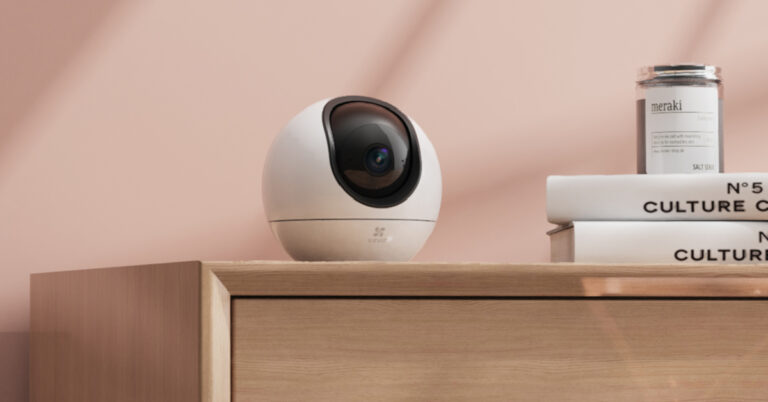
EZVIZ C6 indoor WiFi camera launched in India, comes with AI-powered human & pet detection

Home security specialist EZVIZ has launched the new C6 2K indoor WiFi camera in India at the price of Rs 6,000. The indoor camera is available on Amazon and offline retail stores. The camera is capable of recording in 2K resolution and comes with unique AI-powered features like hand waving call alert and human & pet detection. Read Also: Microsoft warns rival AI chatbots against using Bing’s search index

EZVIZ C6 2K available now at Rs 6,000

Equipped with a powerful starlight lens, the EZVIZ C6 indoor camera can retain its colour vision even in low light conditions. Where other cameras may switch to a black-and-white profile, the EZVIZ C6 is able to produce a consistent level of image clarity and quality with its colour vision. EZVIZ C6 2K available now at Rs 6,000 The EZVIS C6 can also carry out routine tasks like tracking and zooming. The camera can follow moving objects and zoom in up to 4 times, providing more details. With the AI function enabled, the camera can track human movements exclusively. The camera can also detect sudden noises like a baby crying or the sound of a fire alarm. Users can also enable the waving hand recognition feature, which initiates a video call on their phone as soon as they wave their hands in front of the camera. EZVIZ C6 2K available now at Rs 6,000 Users can also opt for a panoramic view for a wider look at the surveilled area. There is also a privacy shutter option on hand. The EZVIZ C6 supports 2.4/5 GHz Dualband WiFi and has a dedicated slot for a microSD card to store all the recordings. An option to use EZVIZ cloud storage is also available. The camera is also integrated with voice commands which support Google Assistant, Amazon Alexa, and IFTTT. Read Also: WhatsApp working on a new ‘Audio Chats’ feature for Android Commenting on the launch of the new products, Mr Bipin Gupta, Product Manager, EZVIZ said, – “Our goal has always been to provide consumers with unmatched home security options that are tailored to their requirements. We are pleased to bring forth C6 as a part of our latest product presentation with an aim to deliver exquisite products that ease security concerns of the customers. We are optimistic that EZVIZ C6 will outperform consumer expectations, offer a comprehensive experience, and successfully meet their needs.” For the latest gadget and tech news, and gadget reviews, follow us on Twitter, Facebook and Instagram. For newest tech & gadget videos subscribe to our YouTube Channel. You can also stay up to date using the Gadget Bridge Android App. You can find the latest car and bike news here.

Top 9 Ways to Fix ‘Android Connected To WiFi But No Internet’ issue

0
Typically, we don’t think much about our home WiFi network until it is time to renew its subscription plan or when it suddenly stops working. Usually, your WiFi only ever stops working when it is time to pay its bills. But what are you supposed to do when you have enough data and validity left yet the WiFi network won’t give you access to the Internet? Today, we bring you the top 9 ways to fix the ‘Android connected to WiFi but no Internet’ issue.  Read Also: WhatsApp working on a new ‘Audio Chats’ feature for Android

Check if other devices are facing the same issue

Best ways to fix Android connected to WiFi but no internet issue Connect another device to the WiFi network and see if you are able to access the Internet on it. This should be the first step in diagnosing the issue at hand. It will help you figure out whether the issue lies with your device or the Router/ISP. If you cannot access the Internet on the other device either, then the issue lies with the WiFi router or the Internet Service Provider.

Login to the WiFi network

If you’re using public WiFi, there is usually an extra step you need to carry out after establishing connection with the network. Depending on the WiFi network, it may require you to log in using a portal or simply agree to the terms and conditions of the service. You can access this portal by tapping on the notification that pops up on your phone as soon as you connect to the WiFi. Ignore this step if you’re using a home WiFi network.

Restart the Router

A quick restart can fix any background glitches or issues with your WiFi router. Some routers may have a notification light for when the Internet is down. To restart your router, simply turn off its power switch from the wall outlet and turn it back on. Wait for a couple of minutes and try connecting your device to the network again.

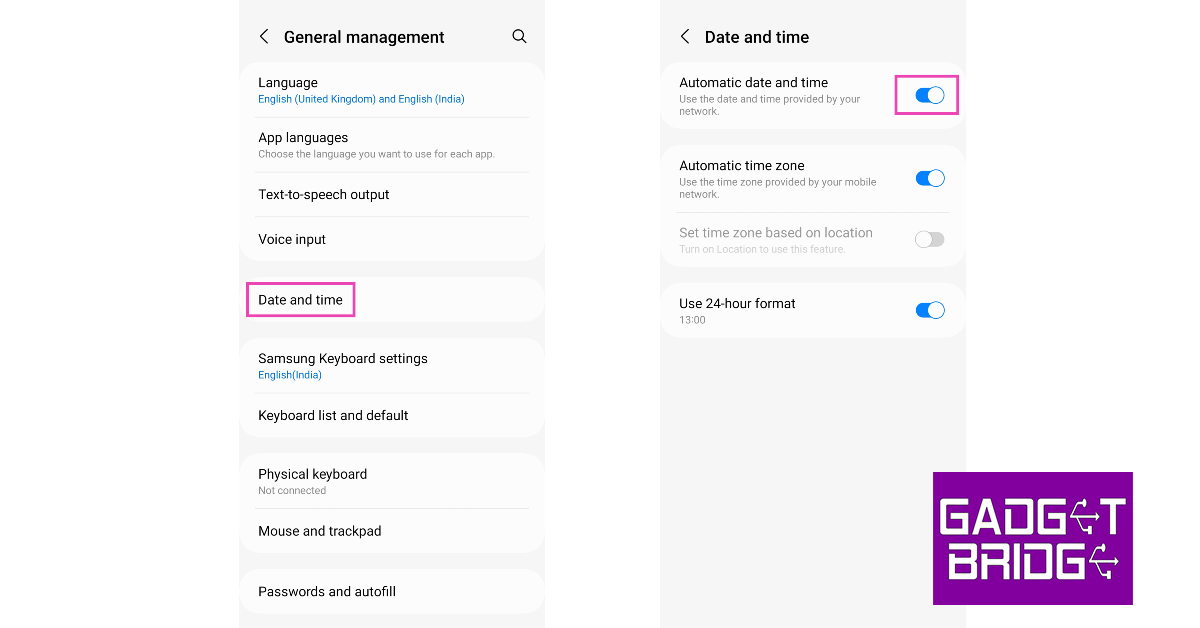
Change Date & Time Settings

Your phone updates the date and time automatically without ever needing any manual calibration. However, if you have turned off the automatic updates, an incorrect date or time can prevent you from using a WiFi network. Here’s how you can change the date and time settings to automatic on your smartphone. Step 1: Go to Settings and select ‘General Management’. Step 1: Go to Settings, scroll down and select General management. Step 2: Tap on ‘Date and time’ and turn the toggle bar on for ‘Automatic date and time’. Step 2: Tap on ‘Date and time’ and turn the toggle bar on for ‘Automatic date and time’.

Make sure mobile data is turned off

While your smartphone always prioritises a WiFi connection over mobile data, some phones make the switch to mobile data every time there is a minor lag with the WiFi connection. In this scenario, your phone stays connected to the WiFi network but uses mobile data. Turn off mobile data to stay connected to the WiFi network. 

Forget your WiFi network and add it again

One of the easiest fixes for any WiFi-related issue is forgetting the network and adding it again. Here’s how you can do it. Step 1: Go to Settings and select Connections. Step 1: Go to Settings and select Connections. Step 2: Tap on WiFi, then tap on the gear icon next to your WiFi network. Step 2: Tap on WiFi, then tap on the gear icon next to your WiFi network. Step 3: Tap on ‘Forget’ at the bottom of the screen. Step 3: Tap on ‘Forget’ at the bottom of the screen. Now, go to the previous page and connect the WiFi again.

Treat WiFi Connection as Unmetered

Your phone has the option to monitor the data it consumes and pause all internet activity after it hits a certain predetermined limit. If your WiFi isn’t working, it may be because you may have set it as a metered connection. Here’s how you can fix it. Step 1: Go to Settings and select Connections. Step 1: Go to Settings and select Connections. Step 2: Tap on WiFi, then tap on the gear icon next to your WiFi network. Step 2: Tap on WiFi, then tap on the gear icon next to your WiFi network. Step 3: Tap on ‘View More’. Step 3: Tap on ‘View More’. Step 4: Tap on ‘Metered Network’ and select ‘Treat as unmetered’. Step 4: Tap on ‘Metered Network’ and select ‘Treat as unmetered’.

Change the DNS

It is possible that your Internet Service Provider’s DNS is at fault here. Try switching to Google’s DNS and check if the Internet activity has returned to normalcy. Step 1: Go to Settings and select Connections. Step 1: Go to Settings and select Connections. Step 2: Tap on ‘More connection settings’ at the bottom of the screen. Android Connected To WiFi But No Internet Step 3: Select ‘Private DNS’. Step 3: Select ‘Private DNS’. Android Connected To WiFi But No Internet Step 4: Tap on ‘Private DNS provider hostname’ and type in dns.google in the hostname field to access Google’s DNS. Hit ‘Save’ once you’re done. Tap on ‘Private DNS provider hostname’ and type in dns.google in the hostname field to access Google’s DNS. Android Connected To WiFi But No Internet

Reset Network Settings

Resetting your phone’s network settings restores them to the factory default. All saved connections on your device will be forgotten and all your custom configurations will be restored to their default settings. Here’s how you can reset network settings on an Android smartphone. Step 1: Go to Settings and select ‘General Management’. Step 1: Go to Settings, scroll down and select General management. Step 2: Scroll down and select ‘Reset’. Step 2: Tap on ‘Reset.’ Android Connected To WiFi But No Internet Step 3: Tap on ‘Reset Network Settings’. Step 3: Tap on ‘Reset Network Settings’. Android Connected To WiFi But No Internet Step 4: Select ‘Reset Settings’. Step 4: Select ‘Reset Settings’. Step 5: Enter your PIN to confirm your selection. Read Also: Top 6 ways to Play Android Games and Run Apps on PC

Conclusion

These are the top 9 ways to fix the ‘Android connected to WiFi but no Internet’ issue. The first step to fixing any WiFi-related issues is figuring out whether the issue lies with the router, ISP, or your Android device. Once you’ve determined where the problematic area is, fixing it won’t take much time. For the latest gadget and tech news, and gadget reviews, follow us on Twitter, Facebook and Instagram. For newest tech & gadget videos subscribe to our YouTube Channel. You can also stay up to date using the Gadget Bridge Android App. You can find the latest car and bike news here.

Samsung Galaxy A54 5G Review: A great mid-ranger for everyday use

After unveiling its flagship Galaxy S series in February, Samsung turned its focus to the midrange segment in March, expanding its A series portfolio. The Samsung Galaxy A54 and A34 are finally here, competing in a segment full of flagship killers and value-for-money smartphones. The higher-priced Galaxy A54 locks horns with the OnePlus 11R (review here) and Vivo V27 Pro (review here). While the 11R brings a powerful processor (Snapdragon 8+ Gen 1) to the table, the V27 Pro offers a stellar camera performance. Needless to say, the Galaxy A54 has its task cut out for it. We used the Samsung Galaxy A54 5G for about a week, here is our in-depth review. Read Also: Redmi A2, A2+ with MediaTek Helio G36 & 500mAh battery launched

Samsung Galaxy A54 5G review: Design and Display

The Samsung Galaxy A54 ships inside the signature compact rectangular Samsung box, which is a dead giveaway that there isn’t a power adapter in there. The contents have been kept to a minimum. Inside the box, you will find the smartphone, a USB Type-C to Type-C charging cable, a SIM ejector tool, and a quick start guide. The phone does not come with a plastic case neither there is any protective covering on the display out of the box. Samsung Galaxy A54 5G review: Design and Display Pulling the device out of its plastic covering, you’ll notice that Samsung has made some noticeable upgrades on the build and form factor. You may remember last year’s Galaxy A53 (review here) sporting a plastic back. Well, that’s not the case with the A54 as it gets a flat glossy glass back panel. This dramatically elevates the in-hand feel of the device, something that you expect when you’re paying almost Rs 40,000 for a smartphone. Samsung Galaxy A54 5G review: Design and Display In terms of design, Samsung seems to be sticking with S23’s camera array setup on this year’s A series. We saw this earlier with the Galaxy A14 (review here) as well. A welcome addition, although some may argue it robs the smartphone of its uniqueness. The design in itself is pretty minimal, the three camera lenses are arranged vertically on the top left section of the back panel. While the lenses stick out a bit further compared to the S23 series, the smartphone doesn’t wobble while resting on a flat surface.  The plastic material used on the frame is a stark departure from the premium feel of the glass back. The frame is quite chunky, and if you move your finger from the display to the edges, you will be able to feel the raised borders of the frame. Having said that, the matte-like texture on the frame provides a nice grip. The volume rocker and the power key are positioned on the right side of the frame while the left side has been left empty. The USB port, speaker grille, and microphones are housed at the bottom of the phone. The secondary speaker and SIM tray are placed at the top. Samsung continues to knock it out of the park with its stellar displays. The 6.4-inch Super AMOLED display has a 120Hz refresh rate and a peak brightness of 1000 nits. Even under bright sunlight, the display is perfectly legible. The touch receptivity is as smooth as it gets, which makes the browsing experience extremely satisfying. The under-display fingerprint works fine but could have been a bit quicker. The sizeable bezels around the display are a disappointment, especially when you consider that the A54 costs Rs 39,000. Samsung Galaxy A54 5G review: Design and Display Once you get past the bezels, the Samsung Galaxy A54 is pretty good when it comes to watching content. The images produced on the screen are vibrant, well-composed, and pack a lot of details. While Samsung doesn’t mention HDR support for this display, the YouTube app is able to play HDR videos. The same doesn’t apply to Netflix. Another aspect where the Galaxy A54 pulls ahead of its competitors is dust and water resistance. With an IP67 rating, you don’t have to worry about any water damage in case you accidentally spill something on the phone or take it out in rainy conditions. While we’re talking about protection, the Corning Gorilla Glass 5 is also a pretty good piece of hardware to have.

Samsung Galaxy A54 5G review: Performance and Cameras

Let us get the specs out of the way first. The Samsung Galaxy A54 5G is powered by the new Exynos 1380 SoC and comes with Android 13 out of the box. The OS is skinned with One UI 5.1. GPU duties are handled by the Mali G-68 MP5. The smartphone comes in two storage variants (128GB and 256GB) with 8GB RAM. The 256GB variant has been priced at Rs 40,999. Samsung Galaxy A54 5G review: Performance and Cameras The new Exynos 1380 SoC is a decent chip on paper, but it is certainly a step behind its Snapdragon counterparts. In this price segment, a better SoC would’ve made all the difference. Compare this to the OnePlus 11R which comes with last year’s flagship Snapdragon 8+ Gen 1 SoC, which is a tremendous processor on all accounts. This isn’t to say that the Exynos 1380 is a bad chip by any means, but it pales in comparison to the competition.  The Exynos 1380 SoC handles the basics pretty well. Browsing through the apps is met with no delays or lags, although a slight dip in performance is noticeable when you overload the system with multiple apps running in the background. While this scenario may not present itself in everyday use, the other processors in this price range are able to handle it pretty well. Talking about benchmarks, the Samsung Galaxy A14 scored 1010 points on the single-core Geekbench 6 test. The multi-core test returned 2820 points. In comparison, the OnePlus 11R scored 888 points and the Vivo V27 Pro scored 1151 points. Samsung Galaxy A54 5G review: Performance and Cameras We played Call of Duty Mobile on the Samsung Galaxy A54 5G and the performance was decent. The only drawback when it comes to gaming is that some games, including Call of Duty, do not run in the maximum graphics setting. This may not bother casual gamers but if you’re looking for a serious gaming smartphone, there are better options out there. While playing COD we noticed slight overheating around the camera array after 30 minutes of gameplay. The gaming performance was not affected right away, but as the back panel got hotter, frame drops also increased in frequency. Samsung’s One UI remains one of the best Android skins out there. The A54 gets the full One UI experience, with only a few premium features (like Samsung Dex) held back. There is some bloatware on the phone, which isn’t a good look at this price point. One UI comes with integrated ‘Link to Windows’ connectivity, which makes it easy to remotely access your phone’s functions from your PC. Samsung’s Secure Folder and Maintenance Mode are two great privacy features that we liked on this device. Samsung has promised 4 years of major OS updates along with 5 years of security updates with the A54, which is incredible to see. Samsung Galaxy A54’s battery performance is quite satisfactory. Packed with a 5,000 mAh battery unit, the smartphone can easily last a day with 5-6 hours of screen-on time. On moderate to heavy usage, we were consistently left with a 15-20% charge by the end of the day. With 25W charging support, the smartphone takes around 90 minutes to fully juice up. Faster charging would have been ideal here. Moving on, the camera performance is one of the bigger highlights of this device. Samsung seems to have done its homework and presented a well-rounded camera unit that doesn’t leave much room for complaints. The rear camera array sports a 50MP primary shooter, a 12MP ultrawide lens, and a 5MP macro lens. Samsung Galaxy A54 5G review: Performance and Cameras The primary 50MP camera produces some beautiful images for us in daylight conditions. We were particularly impressed by the perfect exposure level on the images. The camera managed to capture the sky in its ideal tone without overexposing it. Even the background objects were captured with a good amount of detail. Samsung Galaxy A54 5G review: Performance and Cameras
Samsung Galaxy A54 5G review: Performance and Cameras
Ultrawide Shot
The colours produced in the images are simply amazing. The saturation levels are on point and the colours are punchy. The camera manages to capture the full range of dynamic colours and the smartphone nails the image processing aspect perfectly. Even the ultrawide lens did not compromise on the colour profile. Samsung Galaxy A54 5G review: Performance and Cameras
Ultrawide Shot
This exceptional camera performance continues in lowlight conditions. With the Night Mode on, the A54 reduced the grain on the images and brightened them up pretty well. The colours were well-balanced and close to real even with the Night Mode on. We were impressed that the brightening effect did not mess with the colour of the subject.
Without Night Mode vs With Night Mode
Samsung Galaxy A54 5G review: Performance and Cameras
Night Mode
Night Mode
Portrait Mode
In Portrait Mode, the smartphone did a great job of recognising the edges and isolating the subject from the background. The results are stunning, especially when there’s an optimum amount of light falling on the subject. The 32MP selfie camera produces good results as well. The skin tone of the subject is aptly reproduced in the images and the overlaying effects have been kept to a minimum. The selfie camera can record videos in 4K resolution as well. Read Also: Explained: Why do smartphones with big batteries offer average battery life?

Verdict

With Samsung Galaxy A54 you get a stunning display that you simply can’t put down. The glass back panel brings an exquisite in-hand feel to the smartphone, something that is only matched by flagship devices. The camera performance is delightful and matches some of the best camera-centric phones in this category. However, when you’re paying Rs 39,000 for a smartphone, you expect slimmer bezels around the display. We would have preferred this smartphone with a Snapdragon SoC, but casual users will not mind the Exynos processor. Having said that, certain features like an IP76 rating and four years of major OS updates make the Samsung Galaxy A54 an attractive device for everyday users.

Samsung Galaxy A54: Pros

  • Brilliant display
  • Great camera performance
  • IP67 rating
  • Four years of major OS upgrades + 5 years of security patches

Samsung Galaxy A54: Cons

  • Prominent bezels around the display
  • Average SoC
  • Slow charging 
For the latest gadget and tech news, and gadget reviews, follow us on Twitter, Facebook and Instagram. For newest tech & gadget videos subscribe to our YouTube Channel. You can also stay up to date using the Gadget Bridge Android App. You can find the latest car and bike news here.
Samsung launches Bespoke Jet and Robotic Vacuum Cleaner lineup starting at Rs 65,900

Samsung launched its new range of premium house cleaning products in India today. This new lineup of vacuum cleaners features two variants of the Bespoke Jet along with the new Jet Bot+. Designed for Indian households, Samsung’s new range of vacuum cleaners claims a 99.99% dust-free cleaning experience with its Multi-layered Filtration System.  Read Also: Top 6 ways to Play Android Games and Run Apps on PC

Samsung Bespoke Jet and Jet Bot+ offer efficient cleaning with cutting-edge looks

Under its ‘Bespoke’ monicker, Samsung puts out home appliances with a special focus on design and aesthetics. Initially limited to refrigerators and microwaves, Samsung has now added vacuum cleaners under the Bespoke banner. Samsung Bespoke Jet Pet has been priced at Rs 79,900 while the Bespoke Jet Pro Extra costs Rs 89,900. The Jet Bot+ fetches Rs 65,900. The Bespoke Jet comes in two variants: Bespoke Jet Pet and Bespoke Jet Pro Extra. Both variants offer a suction capacity of 210W  for deep cleaning. The 2-unit battery ensures that the Bespoke Jets last for up to 2 hours at one stretch. The Bespoke Jet Pro Extra comes with a vacuum as well as a mop. The Bespoke Jet Pet is a dry vacuum. The former is available in Midnight Blue colour while the latter comes in Woody Green shade. Samsung Bespoke Jet and Jet Bot+ offer efficient cleaning with cutting-edge looks The ‘All-in-One Clean Station’ charges the Bespoke Jet and automatically empties its dustbin using Samsung’s Air Pulse technology. The multi-layered filtration system ensures only clean is released from the station. The display on the Bespoke Jet shows important info like the charging level, suction power, running time, maintenance, and error guides. The dustbin on this vacuum cleaner is fully washable.  Read Also: Redmi A2, A2+ with MediaTek Helio G36 & 500mAh battery launched The new Jet Bot+ is Samsung’s first robotic vacuum cleaner in India. The cleaning bot comes with the same All-in-One cleaning station as the Bespoke Jet, along with other smart features like smartphone connectivity, voice recognition, and LiDAR sensor-based navigation. The Jet Bot+ can be remotely controlled through Samsung’s SmartThings app. Users can assign no-go zones and view live cleaning reports through the app. “Consumer focus towards a hygienic lifestyle has increased multi-folds. Our new line-up of vacuum cleaners has been designed to address consumer needs for hygiene and convenience along with great aesthetics, and best-in-class technology. An all-in-one clean station, 99.999% multi-layered filtration system, Wi-Fi connectivity, voice control, and LiDAR sensor-based navigation make our vacuum cleaners the best choice for modern consumers. With our Bespoke Jet™ and Jet Bot+ vacuum cleaners, we are confident to improve the lifestyle of consumers by making cleaning more convenient,” said Mohandeep Singh, Senior Vice President, Consumer Electronics Business, at Samsung India. For the latest gadget and tech news, and gadget reviews, follow us on Twitter, Facebook and Instagram. For newest tech & gadget videos subscribe to our YouTube Channel. You can also stay up to date using the Gadget Bridge Android App. You can find the latest car and bike news here.

Top 8 ways to Free up Space on Your iPhone and Android Phone (2023)

0
If you find yourself running out of storage space on your smartphone, we don’t blame you. As smartphone cameras and processors get more powerful, the size of the apps and media files is rapidly increasing too. A single 4K video can easily occupy hundreds of megabytes worth of storage on your device. This is why you’ll see smartphone variants with up to 1TB of storage space these days. Apart from having access to higher storage, there are a few other things you can do to manage the storage capacity of your device. In this article, we bring you the top 8 ways to free up space on your iPhone and Android phone. Read Also: Easily protect yourself from Instagram scams: Best 6 ways

Clear the cache

Clearing the cache memory on your device can help you free up a significant chunk of space. The web browser and apps store temporary files in the cache memory to speed up the load time. Individually delete the cache of each app to increase the available storage on your smartphone. Here’s how.

Clear cache on Android

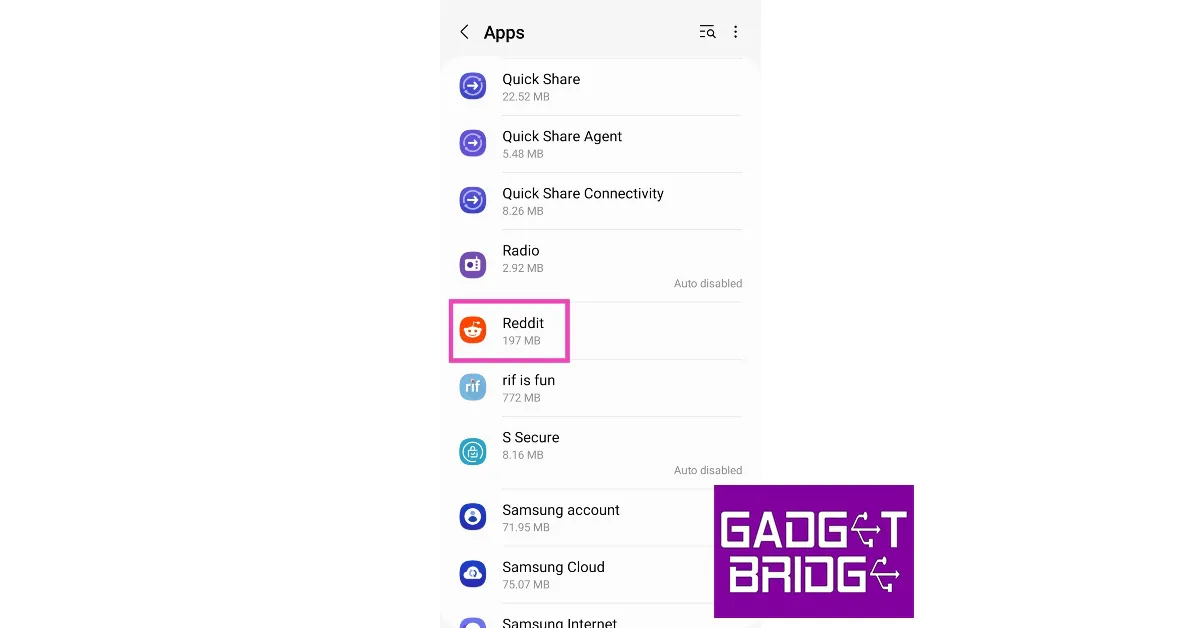
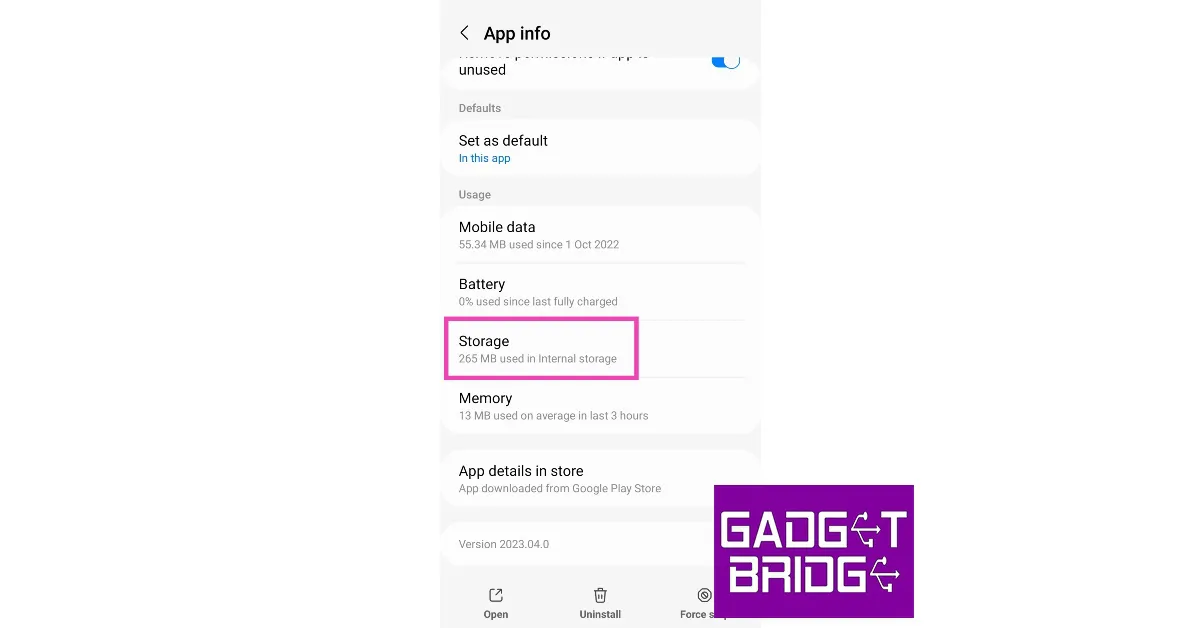
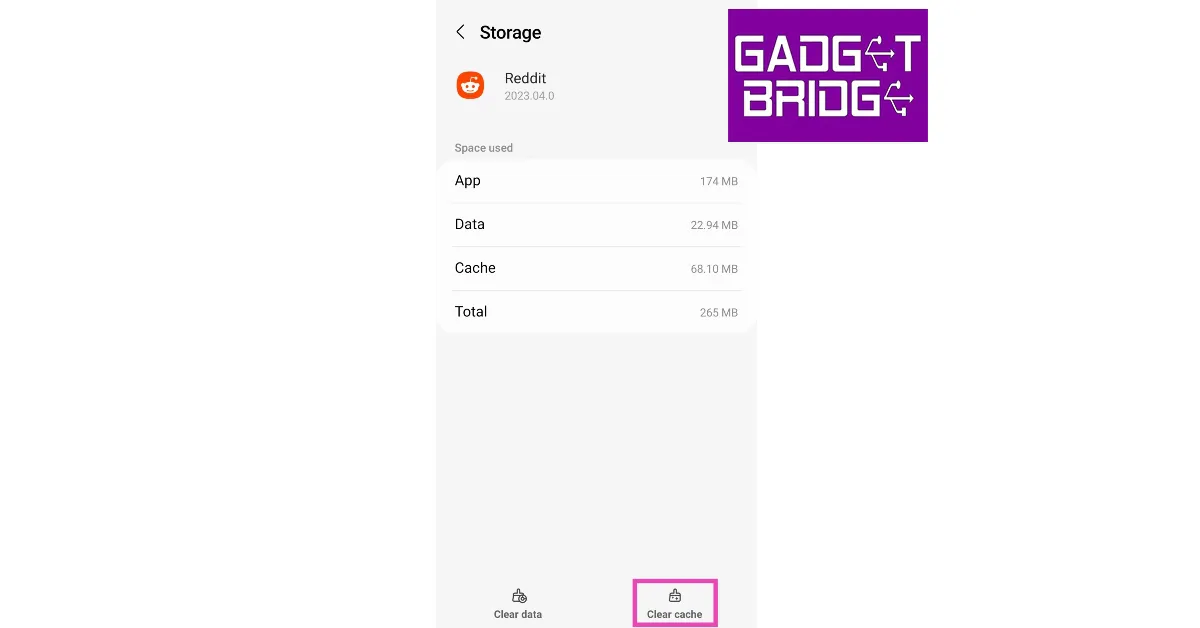
Step 1: Go to Settings and select Apps. Step 2: Scroll down and select Apps. how to fix sound not working on reddit videos Step 2: Scroll down and select an app. Step 2: Scroll down and select Reddit. how to fix sound not working on reddit videos Step 3: Tap on Storage. Step 3: Tap on Storage. how to fix sound not working on reddit videos Step 4: Select ‘Clear cache’. Step 4: Select ‘Clear cache’. how to fix sound not working on reddit videos

Clear browser cache on iPhone

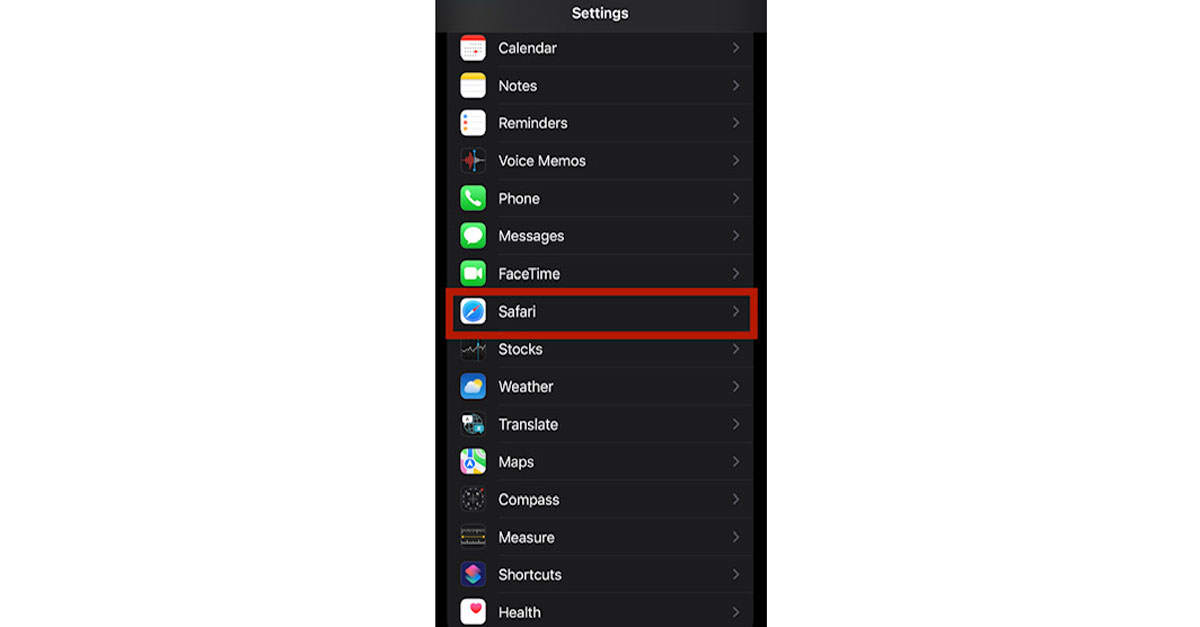
Step 1: Go to Settings and select Safari. Safari cannot find server- safari cannot find server mac Step 2: Select ‘Clear history and website data’. Safari cannot find server issue The browser cache will be cleared.

Clear app data

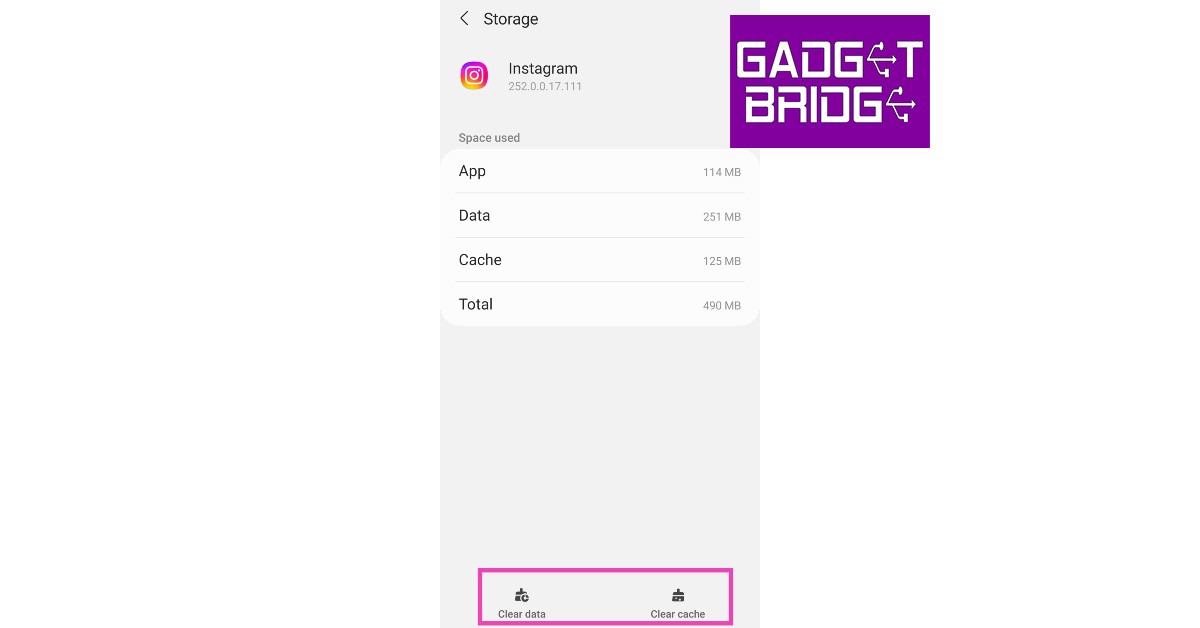
Have you ever wondered why the size of a particular app rises dramatically over a period of time? This is because the apps on your smartphone store a lot of personal data like account information, database, files, and preference settings. If you don’t use an app all that much, you may want to cleat its data to save some storage space. Here’s how. Step 1: Go to Settings and select Apps. Step 2: Scroll down and select ‘Apps’. how to fix can't accept instagram collab invite. how to fix instagram direct messages not working Step 2: Select the app from which you want the data cleared. Step 3: Scroll down and tap on ‘Instagram’. Top 4 Easy Methods to Fix Can't Accept Instagram Collab Invite Step 3: Tap on Storage. Top 4 Easy Methods to Fix Can't Accept Instagram Collab invite. how to fix instagram direct messages not working Step 4: Select ‘Clear data’ at the bottom. Top 4 Easy Methods to Fix Can't Accept Instagram Collab invite. how to fix instagram direct messages not working

Free up space using the Files app on Android

Android’s native Google Files app has a clean-up tool that can help you remove redundant and old data on your device. Here’s how you can free up storage space using the Files app.  Step 1: Launch the Files app and tap on the ‘Clean’ tab. Step 1: Launch the Files app and tap on the ‘Clean tab’. Top 8 ways to Free up Space on Your iPhone and Android Phone (2023) Step 2: Go through the cleaning suggestions. Delete duplicate images and old apps on your device. Step 3: Tap on ‘Select files’ under a particular category to choose which files you want to delete. Step 4: Tap on ‘Move to bin’ to clear the file and free up space. Step 4: Tap on ‘Move to bin’ to clear the file and free up space. Top 8 ways to Free up Space on Your iPhone and Android Phone (2023) clean my phone storage

Delete unused apps on your device

There’s no point in keeping apps that you hardly ever use. Deleting an app can help you recover some much-needed space on your device’s storage. Here’s how you can delete unused apps on your device.

Delete unused apps on Android

Step 1: Go to Google Play Store and tap on your profile icon at the top right corner of the screen. Step 2: Select ‘Manage apps and device’. Step 2: Select ‘Manage apps and device’. clean my phone storage Step 3: Switch to the ‘Manage’ tab. Step 3: Switch to the ‘Manage’ tab. Top 8 ways to Free up Space on Your iPhone and Android Phone (2023) Step 4: Tap on the filer options and select ‘Least Used’. Step 4: Tap on the filer options and select ‘Least Used’. Step 5: Mark the apps you want to remove and tap the delete icon at the top right corner of the screen. Step 5: Mark the apps you want to remove and tap the delete icon at the top right corner of the screen.

Offload unused apps on iPhone

iPhone’s ‘Offload unused apps’ feature routinely checks your phone for inactive apps and deletes them from the system. You will still see the app icon on your home screen, but it will need to be downloaded before you can use it. You can check how much space you can save by offloading apps by going to Settings>General>iPhone Storage and checking the ‘Recommended’ section. Here’s how you can enable app offloading on your iPhone. Step 1: Go to Settings and select App Store. Step 1: Go to Settings and select App Store. Top 8 ways to Free up Space on Your iPhone and Android Phone (2023) Step 2: Turn the toggle bar on for ‘Offload Unused Apps’. Step 2: Turn the toggle bar on for ‘Offload Unused Apps’. Top 8 ways to Free up Space on Your iPhone and Android Phone (2023). clean my phone storage

Create a backup of your media

For most smartphone users, photos and videos take up most of the storage space on their devices. Your smartphone camera can capture a lot of detail in the images and videos it shoots. While the output may be great, even a regular image can take up to 5MB of storage space. Videos can take up more space depending on their resolution and duration. It is a good idea to create a backup of the media on your device and delete the older images and videos that you don’t view frequently. You can back up your data using a cloud service like iCloud and Google Drive or create a local backup on a memory card or an external hard drive.

Optimize photo storage on your iPhone

While most users are on board with creating a backup of media files, they still don’t want to part with the images and videos on their iPhones. This is understandable as having local access to the media is very convenient and one of the reasons why people enjoy using smartphones in the first place. But what if you could back up images to the cloud while also accessing a version of the image that doesn’t take up much space on your phone? Well, your iPhone can do precisely that. Here’s how you can optimise photo storage on your iPhone. Step 1: Go to Settings and select Photos. Step 1: Go to Settings and select Photos. Top 8 ways to Free up Space on Your iPhone and Android Phone (2023) Step 2: Under iCloud, select the option to optimise iPhone storage. Step 2: Under iCloud, select the option to optimise photo storage. Top 8 ways to Free up Space on Your iPhone and Android Phone (2023)

Frequently Asked Questions

How do I free up space on my phone?

The easiest way to free up space on your phone is by deleting duplicate files and unused apps.

Why is my phone storage always full?

Your phone’s storage can fill up over a period of time. This is because the apps on your device are always accumulating data. Clear app data to restore storage space.

How do I clear space on my phone without losing data?

Delete redundant and duplicate files from your phone. Back up large files to cloud storage and remove them from your device. Read Also: Redmi A2, A2+ with MediaTek Helio G36 & 500mAh battery launched

Conclusion

These are the top 8 ways you can free up storage space on your iPhone and Android phone. It is a good idea to view the full breakdown of storage space on your device in order to gauge its storage status. Routinely clear the cache and redundant files on your device to manage its memory. For the latest gadget and tech news, and gadget reviews, follow us on Twitter, Facebook and Instagram. For newest tech & gadget videos subscribe to our YouTube Channel. You can also stay up to date using the Gadget Bridge Android App. You can find the latest car and bike news here.

Non Gamstop Slot Providers: Who’s Who in the Industry

Slot providers are an essential part of the online gambling industry. They provide players with games they can play on their favourite casino sites via a game software solution. Since significant gaming companies like Playtech, Microgaming, and NetEnt produce the games, slot providers play an important role by offering them on the market. However, many slot providers are active on the market. Finding out which is best suited for your needs and whichever might offer unfair conditions for casinos or suppliers can be challenging. This guide will provide the essential facts about slots providers in service today and make recommendations based on that.

Major Non-Gamstop Casino Providers

Here is a list of some of the industry’s most well-known non Gamstop casino providers.

NetEnt

It is a Swedish online casino software provider. NetEnt company was founded in 1996, headquartered in Stockholm, Sweden. NetEnt operates under the license of the Malta Gaming Authority. Furthermore, Its portfolio includes over 500 games that gamblers can access through desktop or mobile platforms. The company also offers live dealer games, which Evolution Gaming and Betsoft Gaming provide. NetEnt has been among the biggest gaming companies in the industry and continues to maintain its position as one of the top providers of online slots.

Microgaming

It is among the oldest slot providers in the world. Microgaming was founded in 1994 and has ever been leading in online gaming. They offer high-quality games, graphics and excellent customer service. There are over 400 Microgaming games available to play online, so you can always find something that suits your tastes. Their games are available on desktop computers, mobile phones, tablets, and television screens. They also have several different payment options, so players can deposit money into their accounts using various methods, including credit cards, debit cards, and PayPal accounts.

Playtech

Playtech is based in Gibraltar and provides its services to players across the globe. It has operated since 1999, providing services to players from over 150 countries. It is among the leaders in online gambling software development and has evolved operating systems for some of the biggest names in online gambling. The company offers slots, video poker, and table games. They also offer live dealer games, becoming popular with players who prefer an interactive online gambling experience. Furthermore, the company works with regulators and has taken measures to ensure all its customers can access fair play.

Popular Non-Gamstop Slot Games

Starburst From NetEnt

Starburst is among the popular non-Gamstop slot games that are easy to play and have a simple, colourful design, making it attractive to all players. The game has ten pay lines, so you can choose how much to bet per spin. All you need to do is choose your bet, hit the spin, and land three or more matching symbols across a line. Your rewards will be greater if you use more pay lines.

Mega Moolah From Microgaming

The Mega Moolah slot games’ unique theme and innovative features have made them a massive hit among players, and they’re still going strong even after all these years. The games range from classic slots to progressive jackpot slots, each with a unique style. The graphics are top-notch, with high-quality animations and characters that will keep you entertained for hours. The sound effects are also significant, so if you like listening to bells ringing in your ears while you play, these games are worth checking out.

Age of the Gods From Playtech

Age of the Gods is a mini-game from Playtech. It is based on Greek mythology and has a multi-level progressive jackpot that you can win by landing three or more scatter symbols on reels 1, 3, and 5 in addition to any other combination of symbols. You can win the jackpot when you land five scattered ‘Minos’ symbols. Age of the Gods also offers a chance at winning one of four progressive jackpots. These are pooled between all Age of the Gods games for even bigger payouts.

Bonanza From Big Time Gaming

Big Time Gaming’s Bonanza slot game features state-of-the-art graphics and seamless HTML5 technology, enabling a single game build for desktops and mobiles. Players can enjoy the same experience across desktop, tablet, and big panel TVs using Google Apps or Apple TV Airplay. Bonanza has incredible features, including many pay line options and multiple bonus rounds. It is a great game for new players looking for something to keep them entertained and for more experienced players who want something interesting to play at home or on the go.

Discover the Top Online Casino Slot Providers

From classic to themed slots, non-Gamstop providers offer variants with impressive RTP. Providers such as Playtech, Microgaming, and NetEnt have had studios making games for decades. Furthermore, what’s more important, is their technical knowledge and experience in casino gaming. The gambling industry is a competitive environment, and the quality of slot games must be current. It is where these three providers are miles ahead of their competitors in the quality of graphics and slot types available. For the latest gadget and tech news, and gadget reviews, follow us on TwitterFacebook and Instagram. For newest tech & gadget videos subscribe to our YouTube Channel. You can also stay up to date using the Gadget Bridge Android App. You can find the latest car and bike news here.

Microsoft warns rival AI chatbots against using Bing’s search index

1
Fresh rivalries are being forged in the AI chatbot sphere as the competition for giants like Open AI, Microsoft, and Google seems to be strengthening with the emergence of new players. According to a recent Bloomberg report, Microsoft warned two search engines that it will cut off access to Bing’s search data if they continue to use it for their AI tools. The report did not reveal which search engines received this warning. Read Also: Redmi A2, A2+ with MediaTek Helio G36 & 500mAh battery launched

AI chatbot rivalries are beginning to take shape

Microsoft currently licenses Bing’s search data to other search engines like DuckDuckGo, You.com, Neeva, and even Yahoo. These search engines utilise Bing’s data to save resources and pull faster results from the web. By issuing this warning, Microsoft has made it clear that the license to use Bing’s index doesn’t extend to feeding search data to rival AI tools and chatbots. Flouting this new guideline could result in Microsoft cutting access to its search engine altogether.  While the report does not make it clear which search engines received this warning, DuckDuckGo, You.com, and Neeva have put out AI tools recently. DuckDuckGo launched ‘Duck Assist’ earlier this month, an AI tool that provides natural language responses to search queries using Wikipedia. You.com’s YouWrite lets users write short content for blog posts and emails. Neeva’s AI tool provides short summaries for your search queries and cites all the sources used in its response. AI chatbot rivalries are beginning to take shape Microsoft’s AI-powered Bing chatbot offers the same natural language query response as its competition. The tech giant seems determined to gain a stronghold in the chatbot sphere even if it means terminating existing licenses. Microsoft also remains one of the biggest stakeholders in Open AI, investing more than $1 billion in the artificial intelligence project. Read Also: Top 7 ways to Add Extra Storage to Your Android and iOS devices The new AI-powered Bing and Edge were launched last month, in a bid to recover some of the market share that the company has lost to Google over the years. Speaking on the launch, Satya Nadella, Chairman and CEO, Microsoft, said, “AI will fundamentally change every software category, starting with the largest category of all – search. Today, we’re launching Bing and Edge powered by AI copilot and chat, to help people get more from search and the web.” For the latest gadget and tech news, and gadget reviews, follow us on Twitter, Facebook and Instagram. For newest tech & gadget videos subscribe to our YouTube Channel. You can also stay up to date using the Gadget Bridge Android App. You can find the latest car and bike news here.

WhatsApp working on a new ‘Audio Chats’ feature for Android

0
Instant Messaging app WhatsApp is working on a new ‘Audio Chats’ feature for Android and could release it in a future update. The new feature was spotted during the beta tests of the 2.23.7.12 version of the app. While there’s not much known about this new feature yet, it seems to be WhatsApp’s version of Twitter Spaces. Read Also: Top 7 ways to Add Extra Storage to Your Android and iOS devices

How are WhatsApp ‘Audio Chats’ different from voice calls?

In the recently surfaced screenshots, the waveform icon for audio chats finds its way to the chat header, right next to the video call icon. Tapping on the waveform icon reveals the option to call the group or open the ‘audio chat’. Another screenshot shows the ‘end call’ icon on top of the chat header. There is some free space on the left side of the icon and will likely be filled out with some graphics. It is believed that this could the audio chat toolbar, where a live waveform would be visible during an ongoing audio chat. Users will be able to browse the app while the toolbar stays fixed on top of the screen.
How are WhatsApp ‘Audio Chats’ different from voice calls?
Image Source: WABetaInfo
So how are audio chats different from regular voice calling on WhatsApp? While a voice call makes every single group member an active call participant, audio chats will allow group members to listen to a conversation without joining it. Listeners will be able to drop in and out of the conversation at any time. This is similar to how Twitter Spaces and Clubhouse work. Unlike a regular group voice call, you won’t receive a constant ringing notification for an audio chat. As of now, the feature seems to be in its early stages of development. It is evident from the screenshots that the UI isn’t close to being finished. The toolbar still needs some additions and WhatsApp may even reposition certain functions on the chat header. It is also possible that this feature may not see an official release. WhatsApp could very well scrap it in the beta testing phase. Read Also: Explained: Why do smartphones with big batteries offer average battery life? While there is a lot of speculation around this new feature, it makes sense to integrate it with the Communities section that was introduced recently by WhatsApp. While voice calls will remain the staple form of audio conversations among small groups, audio chats will cater to large communities where moderating a group voice call can prove to be a tedious effort. For the latest gadget and tech news, and gadget reviews, follow us on Twitter, Facebook and Instagram. For newest tech & gadget videos subscribe to our YouTube Channel. You can also stay up to date using the Gadget Bridge Android App. You can find the latest car and bike news here.

Best ways to Manually Update an Android Device Operating System

1
Keeping your smartphone updated at all times is essential in ensuring its security. Not only do you get new OS features with every major update, smartphone manufacturers routinely push minor security patches to fix any vulnerable areas of your device. Newer security patches make it hardware for malware and viruses to infiltrate your device. In this article, we bring you the best ways to manually update an Android device’s OS. Read Also: Explained: Why do smartphones with big batteries offer average battery life?

Manually update your Samsung smartphone from Settings

It is recommended you connect your phone to a WiFi network before proceeding to download an update. Step 1: Go to Settings and select ‘Software updates’. Step 2: Scroll down and select Software Update. Step 2: Tap on ‘Download and Install’. Your smartphone will check for any new updates. Step 3: Tap on ‘Download and Install’. Step 3: If an update is available, tap on ‘Install Now’. You can also schedule the update for a later time. Step 4: Select ‘Install now’.

Manually update your Samsung smartphone using your computer

Step 1: Download Kies, Samsung’s desktop software, from the official Samsung website. Click here for the quick download link. manually update android os Step 3: Download the Android update package from Samsung’s official website. Step 2: Connect your Samsung smartphone to your PC and launch the Kies software. Step 3: Click on ‘Tools’ on the top menu and select ‘Update’. Download Kies Step 4: Open the software update package you previously downloaded from Samsung’s website. Step 5: Follow the onscreen instructions to install the update on your Samsung smartphone. 

Manually update your Xiaomi smartphone from Settings

Step 1: Go to Settings and select ‘About Phone’. Step 1: Go to Settings and select ‘About Phone’. manually update android os Step 2: Tap on the MIUI version icon. Step 2: Tap on the MIUI version icon. manually update android os Step 3: Select ‘Check for updates’. Your Xiaomi smartphone will check for any pending updates. Step 3: Select ‘Check for updates’. Your Xiaomi smartphone will check for any pending updates. manually update android os Step 4: Download the latest package of updates on your phone.

Frequently Asked Questions

How can I update my smartphone?

You can update your smartphone locally from device settings, or use the manufacturer’s PC suite to install an update using your computer.

Why is my phone not updating?

If your phone’s software update is stuck midway, check your internet connection and try again. It is recommended you connect to a WiFi network while downloading an update.

Why do I not see any OS updates for my device?

Older devices stop receiving updates after 3-4 years depending on the manufacturer. It is also possible that the manufacturer has not rolled out the new update for your new device yet. Read Also: Canon launches 16 new advanced printers in India: Prices start at Rs 10,325

Conclusion 

This is how you can manually update your Android device’s OS. You can locally update your smartphone from device settings or use a PC application to upgrade the firmware and the OS. You can find the desktop suite of your smartphone on the manufacturer’s website. For the latest gadget and tech news, and gadget reviews, follow us on Twitter, Facebook and Instagram. For newest tech & gadget videos subscribe to our YouTube Channel. You can also stay up to date using the Gadget Bridge Android App. You can find the latest car and bike news here.
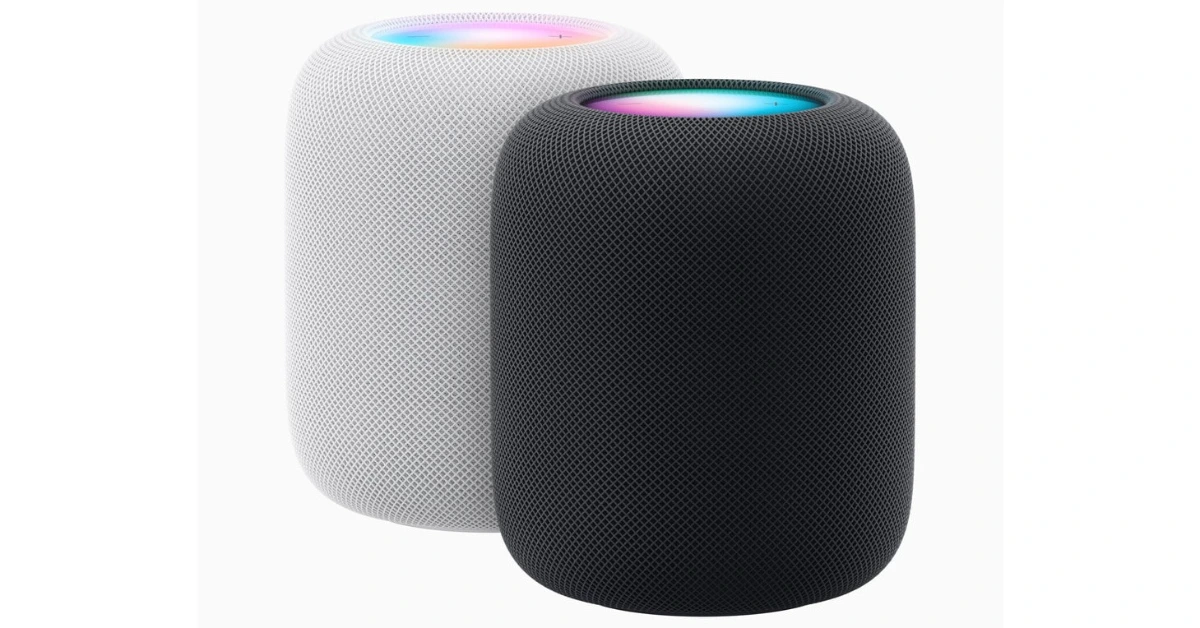
Top 6 ways to Play Android Games and Run Apps on PC

0
Mobile gaming has seen a huge surge in popularity over the last few years. While first-person shooter games were always popular among PC and console users, strategy games like Clash of Clans have cultivated a smartphone-exclusive following for themselves. If you want to experience mobile gaming on a bigger screen, there are a bunch of options you can try that won’t require much effort. Not too keen on downloading a third-party tool? There are some ways to play Android games on a PC without using an emulator. In this article, we bring you the top 6 ways to play Android games and run apps on your PC.  Read Also: Canon launches 16 new advanced printers in India: Prices start at Rs 10,325

Use an Android Emulator

The best way to run Android games and apps on your PC is by using an Android emulator. Since Google Play Store isn’t directly available on Windows OS yet, an emulator is your closest alternative for playing Android games on your computer. Android emulators like Android Studio and MuMu Player allow you to effectively simulate the Android experience on your PC. But of all the emulators, Bluestacks is undoubtedly the best of the lot. Here’s how you can run Android games and apps on your PC using Bluestacks. Step 1: Download the Bluestacks emulator on your PC from the official website. Step 2: Install the Bluestacks application on your PC. Step 3: Sign in to Google Play Store using a Google Account. You will need a Google Account to use Bluestacks. Step 4: Search for a game or an app on Google Play Store. Step 5: Install the app or game on your PC using Bluestacks.

Mirror your smartphone’s display on your PC

If you don’t want to go through the hassle of downloading an emulator but still want to enjoy your Android games and apps on the big screen, mirroring your phone’s display on your PC is your best option. Here’s how you can go about it. First, you need to enable USB debugging on your smartphone from developer settings. Here’s how. Step 1: Go to Settings and select About Phone. Step 1: Go to Settings and select About Phone. how to fix can't delete apps on android. how to delete pre-installed apps on android Step 2: Select ‘Software Information’. Step 2: Select ‘Software Information’. how to fix can't delete apps on android. how to remove an app that wont uninstall. how to delete pre-installed apps on android Step 3: Tap on ‘Build Number’ 7 times to enter Developer Mode. Step 3: Tap on ‘Build Number’ 7 times to enter Developer Mode. how to fix can't delete apps on android Step 4: Go back to Settings, scroll all the way down, and select ‘Developer options’. Step 4: Go back to Settings, scroll all the way down, and select ‘Developer options’. how to fix can't delete apps on android. how to delete pre-installed apps on android Step 5: Scroll down to the Debugging section and turn the toggle bar on for ‘USB debugging’. Step 5: Scroll down to the Debugging section and turn the toggle bar on for ‘USB debugging’. how to fix can't delete apps on android. how to delete pre-installed apps on android Now that you’ve enabled USB debugging on your smartphone, you can proceed with the rest of the steps. Step 6: Download the Scrcpy file on your PC or laptop from its GitHub page here. Step 7: Connect your Android smartphone to your Windows device via USB. Step 8: Extract the Scrcpy file on your Windows device. Step 9: Run the Scrcpy application. Step 9: Run the Scrcpy application. Step 10: Confirm USB debugging on the window that pops up in your phone. Step 11: Scrcpy will detect your Android smartphone and mirror its display on your Windows device. Step 10: Confirm USB debugging on the window that pops up in your phone. For more ways to cast your Android phone’s display on your PC or laptop, read our article here.

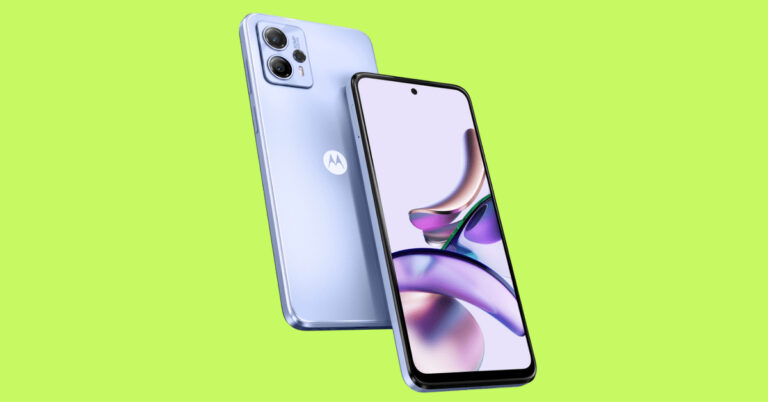
Use Microsoft’s Phone Link app

Use Microsoft’s Phone Link app. Top 6 ways to Play Android Games and Run Apps on PC Most Samsung smartphones have Microsoft’s Phone Link app natively embedded in their OS. You can access it from the quick settings menu by swiping down from the status bar. If your Android phone doesn’t have this functionality then download Microsoft’s Link to Windows app from Google Play Store. Once the app is installed on your smartphone, open the ‘Phone Link’ app on your PC and scan the QR code using your phone. Once your phone is linked, select the apps tab on the Phone Link app on your PC.

Download apps and games from Microsoft Store

6 steps that will help you make Microsoft Store error-free. Top 6 ways to Play Android Games and Run Apps on PC While they may not be running on an Android platform, Microsoft Store has several Android apps that are designed to be used on your PC. Apps like WhatsApp, Telegram, Netflix, Spotify, Instagram, and more can be found on the Microsoft Store. This is the closest ‘native’ way to run Android apps and games on your PC.

Use Amazon Appstore

Use Amazon Appstore. Top 6 ways to Play Android Games and Run Apps on PC Amazon Appstore is currently only available to Windows 11 users. The collection of apps on the Amazon Appstore is still growing, it is nowhere close to Play Store’s library. But if you find what you are looking for, it will bypass the need for an emulator and save you the hassle of mirroring your phone’s display. Download the Amazon Appstore on your PC from here.

Use Google Play Games on PC

Install Google Play Games on your PC. Top 6 ways to Play Android Games and Run Apps on PC While it may not be publicly available yet, you can still sign up to use the beta version of Google Play Games. Currently, Google Play Games is only available in Australia, Brazil, Canada, Hong Kong, Indonesia, South Korea, Malaysia, Taiwan, Thailand, Mexico, the Philippines, and the USA. Once you sign up, you will be put on a waitlist. After you’ve been cleared to test the beta version, go to https://play.google.com/googleplaygames to play your favourite Android games on PC. Currently, over 100 games are available on Google Play Games.

Frequently Asked Questions

Are Android Emulators safe to use?

Emulators like BlueStacks and Android Studio are safe to use on your PC.

When will Google Play Games be released officially?

Right now Google is testing Google Play Games in different regions. The official release will be carried out in a phased manner across the world.

My phone does not have the Link to Windows app. What should I do?

If your phone does not have the Link to Windows app, you can download it from Google Play Store. Read Also: Explained: Why do smartphones with big batteries offer average battery life?

Conclusion 

These are the top 6 ways to play Android games and run Android apps on your PC. If you can’t find a particular app on the official Microsoft Store for PC, you can try visiting the developer’s website to see if they have a Windows version of their app. Want to play Android games on your PC but don’t want to use an emulator? Linking or phone or mirroring its display on your PC is your best option. If you found this article helpful, let us know in the comments!