Because safety and security are so important when driving a car, the demand for Dash Cams for personal and professional use has skyrocketed in recent years. Hero Electronix’s brand Qubo has entered the Auto Tech space with the launch of their new product, Qubo Smart Dash Cam in India. It has a 1080p sensor with 30 frames per second video recording and live feed. It features a built-in 6-axis G-sensor that can detect and record a sudden shake or collision.Smart Dash Cam, the first in a series of Auto Tech products adds to the company’s smart product line, allowing you to connect and smarten up your vehicle. Qubo’s smart automotive device is said to address a variety of consumer needs such as personal and occupant safety as well as vehicle health and theft prevention. The Qubo Dash Cam is one such product that was created specifically for the unexpected events that occur on Indian roads.The Dash Cam from Qubo, which can be easily mounted on the dashboard, is designed to record images and videos while driving, making it the ideal security device for your car. The all-new Qubo Dash Cam comes with an easy-to-use mobile app (both iOS and android). For recording and live view, the dash cam has a 1080p@30FPS HD Video Quality. It auto-detects a sudden shake/collision with a built-in 6-axis G-sensor and saves the footage to a ‘Event File’ that you can access on your phone through the Qubo App. Its Artificial Intelligence-based alerts ensure that no important information is overlooked. In terms of image quality, the camera’s Wide Dynamic Range (WDR) technology provides superior low-light performance, allowing it to capture details clearly in both poorly and strongly illuminated areas of its field of view. The Dash Cam from Qubo has a wide-angle field of view (FOV) that reduces blind spots and gives you access to more than 6 lanes.The Qubo Smart Dash Cam, which costs Rs 4,290, will be available to a wide range of users across India starting today. The product will be available through all channels, including leading online portals such as Amazon, Quboworld.com, and a large network of Dealer outlets.Commenting on the announcement, Ujjwal Munjal, Vice Chairman, Hero Electronix said: “Keeping in line with our broader vision of creating customer-centric connected devices, Qubo has come a long way in the last 2 years. Today Qubo has a wide range of connected smart home products that are enriching the lives of Indian consumers. With the addition of Auto Tech products to our existing product portfolio, we are a step closer to our aspiration of reaching a million homes.”
For the latest gadget and tech news, and gadget reviews, follow us on Twitter, Facebook and Instagram. For newest tech & gadget videos subscribe to our YouTube Channel. You can also stay up to date using the Gadget Bridge Android App. You can find the latest car and bike news here.
With triple rear cameras, a 50MP sensor, 5,050mAh battery (on paper), Nokia G21 sounds like a promising smartphone. But how does it perform? We spent a few days with the device and have shared all the pros and cons in our Nokia G21 review below, check it out:
In This Article
Nokia G21 review: Design and display
It’s a good thing that we get to talk about the design of the Nokia G21 first. Even though the smartphone sports a plastic body, it comes with a sturdy build. For the price range, it also looks pretty good. The back panel of the device has a patterned texture that actually enhances the grip and ensures that the phone doesn’t catch any smudges.
It houses the camera module that has three lenses and an LED flash, and besides this, there is ‘Nokia‘ branding right in the centre of the back. In contrast to the back panel, the edges of the Nokia G21 are not textured and the corners are rounded. While the right edge comes with Volume Rocker keys and the Power button, the left one has the Google Assistant button and the SIM tray.
At the bottom, the Type-C port, speaker grill and microphone are placed, and the top edge houses the 3.5mm headphone jack and the secondary microphone. It is worth noticing that the Power button of the device also has the fingerprint scanner embedded on it. Nokia G21 is available in two colours – Nordic Blue and Dusk, and the one that we got for review was dressed in Blue.
Flip it over, and you will see the 6.5-inch screen of the smartphone, which is outlined by a not-exactly-very-thin bezel and an even thicker chin. There is a waterdrop-shaped notch in the middle of the top edge of the display to house the selfie camera of the phone. The earpiece of the device is concealed between the top edge and the screen and is barely visible.
Coming to the 6.5-inch LCD, HD+ display of the Nokia G21 smartphone, it worked decently, but we expected something better than an HD+ resolution. Most other devices in this range do come with higher-resolution displays, so it isn’t like we are asking for a lot. Coming back to the screen of the Nokia G21, it comes with a refresh rate of 90Hz, which did make our usage seem smooth.
The colours showcased on the screen of the device were accurate and they stayed consistent at different viewing angles. The brightness of the display was decent too, but sunlight readability was a problem. The images showcased could have been sharper too, and this in turn meant an average video-watching experience on the likes of YouTube. In a nutshell, we would say that while the design of Nokia G21 impressed us, we don’t think that the display is among the smartphone’s best qualities.
Nokia G21 review: Performance and Cameras
Before we begin talking about the performance of the Nokia G21, let’s take a minute to discuss its specifications. The smartphone is powered by a 1.6GHz octa-core Unisoc T606 processor, clubbed with 4GB/6GB RAM and 64GB/128GB internal storage. It can also hold a microSD card of up to 512GB. The device runs Android 11 and houses a 5,050mAh battery. For imaging duties, there is a 50MP primary camera, a 2MP macro lens and a 2MP depth sensor, while the front panel has an 8MP selfie camera.
Now, coming to the performance, the Unisoc T606 processor does a good job with basic, day to day tasks. We opened and switched between multiple apps and tabs of Chrome, and never faced any lag or frame drops. Just don’t overdo the multitasking. Use it for listening to music and navigation simultaneously, but it’s best to not put two heavy tasks like navigation and gaming together.
Speaking of gaming, we played a number of games on the device, while lighter ones like Alto’s Odyssey ran well, our experience with heavy-graphic ones like Asphalt 9: Legends could have been better.
The fingerprint scanner worked well and never failed to unlock our device. However, we faced one rather peculiar issue with our review unit – it took multiple attempts to read our SIM card. It went undetected by the phone the first 2-3 times we tried to put it on for some reason.
The 5,050mAh battery of the smartphone was definitely among the plus points. It gave us two days of juice on a single charge with usage that involved gaming, browsing the internet, watching videos, an active Instagram account, clicking pictures and more. However, some tasks – like Zoom meetings and gaming – drained the battery sooner than others. With the charger in the box, it takes almost 3 hours to charge the device completely, which is painfully slow in our opinion.
Finally, let’s talk about the cameras of the Nokia G21. During the day, in well- areas, the smartphone manages to take some good images that have ample brightness and the colours seem accurate too. However, in some shots that we took, the sharpness, as well as the details, were not as good as they could be, especially with a 50MP primary camera onboard. It also takes a while to focus with the device’s camera, particularly if the object is in motion. In shots that we took in dimly lit areas, the quality of the image falls further and there was some visible noise in the pictures we took. The other two cameras also did an average job at best.
The macro camera managed to take some decent shots exclusively in well-lit areas, but we cannot say the same about the depth sensor. The 8MP selfie camera did a good job too, but don’t expect too much from it.
Verdict
At a starting price of Rs 12,999, Nokia G21 makes a decent buy for first-time users and people graduating from feature phones. You can go for it if you are looking for a smartphone to do basic, everyday tasks with good battery life and sturdy built. If cameras or handling heavy usage are among your priorities, you should look at other options in the same range because there are plenty, else this one will serve you well.
30 May 2022 Amazon Quiz has gone live on its mobile app platform. The quiz can be played from 12 AM to 11:59. All you need to do is just answer five easy questions that the e-commerce website puts before you. Today you can stand a chance to win Rs 1,000 Amazon Pay Balance.Every day Amazon posts a new questionnaire that consists of five simple questions about general knowledge and current events. To enter a lucky draw, participants must correctly answer the questions. One incorrect answer will result in your elimination from the quiz. Each month, only one person will be declared the winner and the results will be announced at the end of the month. Amazon customers who submit correct answers can win an Amazon Pay Balance worth up to Rs 50,000. To ensure that you answer all five questions correctly, Gadget Bridge updates all of the correct answers on a daily basis. Take a look at today’s answers:Amazon Quiz Today Prize – Rs 1,000 Amazon Pay BalanceQuiz Date – 30 May 2022Daily Timing – 12 AM to 11:59 PMWinner Announcement – Today 12 PM
In This Article
Amazon Quiz Answers Today 30 May 2022
Question 1: Which film won the Best Film (Drama) award at the Golden Globes 2022?Answer: The Power of the DogQuestion 2: Which city has the world’s longest metro network?Answer: ShanghaiQuestion 3: Kazhuveli Wetland was recently declared as the 16th Bird Sanctuary of which state?Answer: Tamil NaduQuestion 4: This is the famous Jacques Cartier bridge in which city?Answer: MontrealQuestion 5: Which national park of India is known to have the highest population of this animal?Answer: Kaziranga
How To Play Amazon Quiz
Only app users are eligible to play the Amazon quiz every morning from 12 AM to 11:59 PM. The quiz is not available on the desktop. For those who are unaware of how to play the Amazon quiz below are the steps, you can follow to take the quiz.
Firstly download the Amazon app from Google Play Store or App Store
Now fill in the required information through the Sign Up option.
You need to log in to the Amazon app and scroll down on the home screen to find the Amazon Quiz banner.
Tap on the Amazon Quiz banner and tap on the Start button to start the Quiz.
Now you will get 5 questions and you need to answer them correctly. One wrong answer will eliminate you from the Quiz.
After answering all the questions correctly you are now eligible for a Lucky Draw.
The winner’s name will be announced today at 12 PM.
One of the latest entries of Oppo into the world of audio is its Enco Air2 Pro true wireless earbuds. The TWS earphones are powered by 12.4mm titanised diaphragm drivers promising an enriching sound experience with deeper bass, wider sound field, and clearer vocals. Moreover, it comes equipped with dual microphones and has the support of active noise cancellation (ANC). The earbuds also come with touch control and offer a battery life of up to 28 hours together with its case. We tested the device thoroughly on multiple devices with many applications, from music to movies and video streaming to gaming. Here is the Oppo Enco Air2 Pro review with all its features.
In This Article
Oppo Enco Air2 Pro Review: Design
The Oppo Enco Air2 Pro comes riding in a neat square package. Lifting the lid of the box, you would find its sleek pebble-shaped plastic case staring at you silently. The truly wireless earbuds come in two different colours, Grey and White. Out of which we were able to get our hands on the latter. Accompanying the earbuds comes a short USB-A to Type-C charging cable as well as a guide booklet. Picking up the glossy white-coloured bubble case in our hand, it feels quite light in weight and would fit easily into the pocket of your jeans. If you take a moment to observe its top carefully, it has a refractive translucent jelly lid. Right below the neckline of the lid lies a tiny LED indicator. At the bottom lies a Type-C charging port, while at its back lies (gracefully) the Oppo brand engraving. The entire surface of the case is smooth to touch and seems fingerprint-resistant. Whatever minimal fingerprints attracted to it cannot be seen easily by the naked eye.Once you flip the lid open, its magnetic nature immediately comes to notice. The LED indicator turns green upon opening up the jelly lid and turns yellowish-orange when closed. When in pairing mode, the LED blinks in white colour. Inside the case sit the two TWS earbuds, fitted perfectly into their respective cavities. The ‘L’ for left and ‘R’ for right engravings, highlighted in grey over their small white bodies, are the first thing visible to you. The leg or the stem of the earbuds is also magnetic in nature so it automatically gets pulled back into its place without you having to put any force. All you need to do is just position the leg over its cavity and it snaps in. At the back of each earbud on its spine lies its touch interface, which also comes in body colour, but is slightly translucent and hence, differentiable. At the bottom of the spine seem to lie the sensors of the earbuds, which help it in determining whether the earbuds are worn or not, so it can start or stop the audio accordingly. The tip of the earbud comes with a classic round-shaped silicone cover while the body between the top and the spine is of a slightly tilted spherical shape in order to fit exactly into our ears. Overall, the design of the Oppo Enco Air2 Pro seems quite elegant and favourable for usage, especially during travel. Read also: OnePlus Nord Buds review: Inexpensive resonance
Oppo Enco Air2 Pro Review: Performance
Elaborating further upon the Oppo Enco Air2 Pro specifications, the truly wireless noise cancelling earbuds come equipped with 12.4mm diaphragm drivers with titanium coatings for increased rigidity. The diaphragm drivers have a vibrating area of 89% larger than that of a typical 9mm driver, according to the company. Moreover, they have a frequency response range of 20Hz to 20kHz. The TWS earbuds are fitted with dual microphones, both of which support active noise cancelling (ANC) and AI noise-cancelling for phone calls. They also support Bluetooth v5.2 and are IP54 rated dust and water-resistant.The Enco Air2 Pro comes with a 43mAh battery in each earbud, which lasts up to seven hours with ANC and up to 5 hours without ANC, upon a single charge. Housing the earbuds come the charging case, which has a 440mAh battery. Overall, the device can last up to 28hrs when ANC is turned off and up to 20 hours when it is turned on. The earbuds fit well into the ears. Some may complain that after wearing them for a while, the ears start to pain slightly. However, this issue may be tackled right away. That is why the brand provides 3 sizes for its silicone tips that are included within the package. So you might need to dig into the box and choose the size that is comfortable for your ears. Another point on the brighter side is that the earbuds have an ‘Instant Connection’ feature. As soon as you open the lid of the case, the earbuds automatically get connected with the paired device. The touch interface also works pretty smoothly. Double-tapping on the back of either of the two earbuds will play the next track (while using music streaming applications), play the next episode (while watching TV shows on OTT platforms like Netflix), or forward to 10 seconds while streaming videos on Youtube. In case you are pairing the earbuds for the first time with your smartphone or any other device, you just need to tap and hold on the back of both the earbuds for about 4 seconds, after which they enter the pairing mode. The earbuds have two audio modes, Noice Cancelation and Transparency. For switching between these two modes, you just have to tap and hold for a second or two on either of the two earbuds.Speaking of the sound quality, the Enco Air2 Pro delivers its promise pretty effectively. The loudness and clarity of the audio are quite commendable while the bass is thumping. Turning up the volume a little over 50% takes you completely to musical heavens. The audio experience of the earbuds while streaming movies and TV shows on Netflix and videos on Youtube were also great. Even the minute background noises playing in the videos were crystal clear. But what needs thorough appreciation is the Oppo Enco Air2 Pro’s active noise cancellation feature. When turned on, you will not be able to hear a person sitting at a two-arm distance from you. You would just notice their lips moving. Yes, the ANC is that good.However, on playing Asphalt 9 Legends to test the performance of the earbuds while gaming (when paired with a smartphone), there was a lag of about 1 to 2 seconds noticed, variable in nature. So, we will not fully recommend it for gaming.Another cool feature of the Oppo Enco Air2 Pro earbuds is that they support smart in-ear detection. This feature automatically pauses playback when you take them out of your ears and resumes playback when you put them back on. This works even when you take just one out of the two earbuds (since both have sensors). A noteworthy thing to mention here is that this in-ear detection system functions very well, as the sensors are highly sensitive in nature. Even if you move one earbud piece away from your ear ever so slightly, the audio will stop automatically without the delay of even a second. Overall, the performance of the Oppo Enco Air2 Pro earbuds is delightful. Read also: Vivo TWS 2 ANC and Vivo TWS 2e TWS earbuds launched in India
Verdict
To sum up, the Oppo Enco Air2 Pro TWS earbuds provide you with an enjoyable experience. They come nestled within a sleek designer case, whose compact size and lightweight structure makes it slide right into your pocket enhancing portability. Ensuring a truly immersive sound experience are its large-diaphragm drivers supported via its praiseworthy ANC mechanism. All its features make Oppo Enco Air2 Pro apt for usage when travelling. You may be navigating your way through the busy cities and noisy crowds, but would still be relaxed and enjoying your favourite tunes. The earbuds might need a few tweaks for providing a better gaming audio experience, in terms of being more in sync with the in-game commands. It also may have a slight scope of improvement in its battery life. But all in all, it can be said that its pros weigh more than its cons. Hence, we would gladly recommend it at its price range. The Oppo Enco Air2 Pro in India can be bought for Rs 3,499.
Hasn’t each one of us crossed this situation at least once, wherein we were required to share our Wi-Fi passwords with our friends, family members, or guests at home? Now, most of us are guilty of keeping quirky passwords for our network connections, right? So either you awkwardly ask the next person to pass over their device so you can fill in the password directly (you know, to save yourself from the embarrassment of course), or dare to say it out loud and raise a few chuckles. But what if we told you that this hassle could be avoided altogether? Yes, a device can connect to a Wi-Fi network today by simply scanning its QR code. Here is a step-by-step guide on how to share Wi-Fi passwords using QR codes on Android and iPhone devices.
In This Article
Share Wi-Fi Passwords Using QR Codes On Android
Sharing Wi-Fi passwords through QR codes on Android devices is possible if your device is running on Android 10 OS or later versions. You have to then make sure that your Android device is connected to the network whose password you want to share as a QR code. Step 1: Go to Settings > Connections.Step 2: Tap on Wi-Fi. Step 3: You will see the Settings (gear) icon displayed next to the Wi-Fi network that your device is connected to. Click on that gear icon. Step 4: In the network settings screen that is displayed next, tap on the QR code icon given at the bottom left corner. Step 5: The QR code for that Wi-Fi network gets displayed on your screen. You can directly scan the given QR code from another device, which you want to connect with this network, without having to enter its password. You can also save the QR code as an image or share it directly with another person’s device.
Connect to a Wi-Fi network using a QR Code
Once you have opened the QR code on a device, this is how you can use it to connect to the Wi-Fi network.
Step 1: Go to Settings and tap on Connections.
Step 2: Select WiFi.
Step 3: Tap on the QR icon at the top right corner of the screen. On some devices, you may need to select ‘Add New Network‘.
Step 4: Once the scanner pops up, point your phone’s camera to the QR code.
Your smartphone will be connected to the WiFi network.
Read also: How To Eject Water From Your iPhone Using Siri (2022)?
Share Wi-Fi Passwords Between Apple Devices
Wi-Fi passwords can be shared between Apple devices in a flash. But first, you have to ensure that each device is updated with the latest iOS, iPad OS, or macOS software. Also, make sure that Wi-Fi and Bluetooth are turned on for both devices and that they are well within each other’s network range. You may also have to sign in to iCloud on both devices with your Apple ID(s) and make sure that both the IDs are saved in each other’s contacts.Step 1: Ensure that the sharing device is connected to the network whose password you want to share with the receiving device. Then from the Apple device that needs to connect with the required Wi-Fi network, go to Settings > Wi-Fi. Step 2: Choose the network that the sharing device is currently connected to. Then bring the two devices within each other’s range. Step 3: On the sharing device, a pop-up appears asking for sharing the Wi-Fi password. Tap on Share Password. That’s it! The Apple device on the receiving end gets the password and automatically connects to the Wi-Fi. Read also: How To Turn On AirDrop On iPhone (2022)?
Share Wi-Fi Passwords Using QR Code On iPhone
Wi-Fi passwords can also be shared from an iPhone to other devices by setting up a QR code for your Wi-Fi using the Shortcuts app. Just follow the steps below. Step 1: Download the Shortcuts app on your iPhone, open it and tap on Gallery at the lower right corner of the screen.Step 2: Go to Shortcuts for Accessibility > QR Your Wi-Fi > Add Shortcut.Step 3: Tap on My Shortcuts on the bottom left corner of the screen and tap on QR Your Wi-Fi from your list of shortcuts.Step 4: Enter your Wi-Fi name and tap on Done. Then enter your password and again click on Done.Step 5: You will see a QR code appear on the screen. You can then choose to directly scan this QR code from another device, save it as an image or share it via AirDrop, social media, and more. That’s it!
Frequently Asked Questions (FAQs)
How do I share my WiFi password without revealing it?
If you are not comfortable with revealing your WiFi password to someone, you can share it via a QR code. The password will remain hidden and the device will get connected to the network.
How do I share my WiFi password via a QR code?
Go to Settings>Connections>WiFi, tap on the WiFi network you are connected to, and hit the QR code icon to share your password.
How do I connect to a WiFi network using a QR code?
Go to Settings>Connections>WiFi and hit the QR icon at the top right corner of the screen to connect to a network by scanning a QR code.
Read Also:Poco X6 Pro Review: A step ahead in its category
Conclusion
These are the best ways to easily share Wi-Fi passwords using QR codes on Android and iOS devices. Pretty straightforward and hassle-free, isn’t it? In case you know of any methods on how to share Wi-Fi passwords on Android or iPhone, do let us know in the comments section below.
Are you working from home as a student or a professional? And do you happen to own a pair of good-quality headphones with a mic that fulfils your audio and vocal needs? If you still don’t have one yet or are looking for better replacements for the existing ones at hand, then you are well in luck. We have specially handpicked for you the top 15 best headphones that come with a mic for under Rs 5000 and are best for not just working from home but also for your entertainment needs as well. From wired to wireless, in-ear or on-ear headphones, we have provided options from a range of categories for you to select from.
In This Article
Wireless Headphones With Mic
Boat Rockerz 450
The first one on our list of the top 10 best headphones with a mic under Rs 5000 is from the popular brand Boat. The Boat Rockerz 450 are wireless on-ear headphones that offer up to 15 hours of playback time. It has 40mm dynamic drivers which help in providing an immersive HD audio experience to the users. It is ergonomically designed for on-ear usage with ear cushions for comfort. You can not only connect to it via Bluetooth but also through an AUX as well. It allows you to communicate easily using its built-in mic and also provides access to voice assistance. The headphones are priced at Rs 999.Buy from here.
Infinity (JBL) Glide 510
Next on our list is the Infinity Glide 510 model, which provides up to 72 hours of playback time under optimum audio settings. It comes with dual equalizer modes for normal and deep bass output. Within 10 minutes of charging, the headphones provide a playback time of about 2 hours. You get the facility of hands-free calling with the 3-button remote. Moreover, it is lightweight, foldable, and also provides ear cushions for comfort as well as voice assistant integration. It is priced at Rs 1,499.Buy from here.
boAt Rockerz 558
boAt Rockerz sound just as good as they look. The headphones feature an over-ear design with soft padded ear cushions and a headband. Delivering the sound output are powerful 50mm dynamic drivers on each earcup. Equipped with a 500mAH battery unit, these headphones can offer a playback time of up to 20 hours. There is also a handy port for an AUX cable for the times when the battery runs out. Juicing these headphones takes up to 2.5 hours with micro USB charging. boAt Rockerz 558 are priced at Rs 1,799.
Buy from here.
JBL T460BT By Harman
The JBL T460BT Wireless on-ear headphones come with a mic and provide 11 hours of playback time under optimal audio settings. It is flat foldable, lightweight, and comfortable to wear. The headphones offer wireless Bluetooth streaming and ensure a superior listening experience for its users through the JBL Pure Bass sound. The JBL T460BT comes at Rs 2,499.Buy from here.Read also: Sony WH-1000XM5 wireless noise-canceling headphones with 30mm drivers announced
Sony WH-CH520
Next on our list of the top 10 best headphones with a mic for under Rs 5,000 that are best for working from home is the Sony WH-CH520 wireless headphones. It is lightweight and provides up to 50 hours of playtime (without noise cancelling). A 3-minute quick charge will provide you with up to 60 minutes of playtime. It is designed with swivel earcups so that you can safely pack them in your backpack. The built-in beamforming microphones with Precise Voice Pickup technology allow efficient hands-free calling. It is priced at Rs 4,490. Buy from here.
Wired Headphones With Mic
JBL Quantum 100
Moving on to the next section in our list, the first one amongst the top wired headphones with a mic under Rs 5000 is the JBL Quantum 100. It comes with 40mm dynamic drivers that deliver the JBL Quantum Sound Signature. The length of the cable provided with the headphones is 120cm. It is lightweight and comes with a durable headband with memory foam cushioning. One of the most unique features of the headphone is that it comes with a detachable mic. Moreover, it is compatible with all gaming platforms, including PC gaming, Xbox, Playstation, Nintendo, Switch, Mobile, Mac, VR, and Windows Sonic Spatial Sound. It comes at Rs 1,999.Buy from here.
Boat BassHeads 900
The Boat BassHeads 900 on-ear wired headphones are sleek, lightweight, and compact in design. These are pretty easy to carry and also come with swivel earcups to offer flexible wearing. Its 40mm Neodymium drivers ensure to provide a dynamic sound experience to the users, with punchy bass and crystal clear vocals. Its tangle-resistant cable comes with a 3.5mm audio jack and an inbuilt microphone for calls and playback. The headphones come at Rs 599. Buy from here.
HP B4B09PA
Next on our list of the top 10 headphones with a mic for under Rs 5000 that are best for working from home, comes this one. The HP B4B09PA wired headphone model comes with 35mm drivers and an inbuilt noise-cancelling mic. It is foldable, has an adjustable headband, and is compact and durable. It is ideal for long hours of listening, as claimed by the brand. It is priced at Rs 649.Buy from here.
Lenovo 110
The Lenovo 110 Stereo headset comes with a 1.8m USB-A cable. It is lightweight and has a minimalistic design. The earcups are made up of protein leather and memory foam to ensure premium comfort to the users. It comes with a 180-degree rotatable boom microphone with passive noise cancellation that makes sure that calls are crisp and clear. The Lenovo 110 wired headphones come at Rs 1,785.Buy from here.
Sennheiser HD 400S
Sennheiser’s HD series has some of the best headphones you’ll find in every price category. The Sennheiser HD 400S is no exception. These headphones sport a simple yet beautiful design with plain swivelling earcups and a cushioned headband. The HD 400S can be folded, making them ideal to carry around and take meetings on the go. A smart button on the cable lets you control the music and pick up calls. The Sennheiser HD 400S is currently priced at Rs 4,490.
Buy from here.
Read also: Sennheiser HD 400 PRO Studio headphones launched in India
Neckbands With Mic
boAt Rockerz 255 Pro+
boAt Rockerz 255 Pro+ has a lot of good things going for it. This neckband offers up to 40 hours of playback with a battery capacity of 300mAh. A 10-minute quick charge is enough to power the neckband for 10 hours. Fully charging the neckband takes up to 1.5 hours. Sound output is delivered through 10mm drivers. This neckband from boAt also features multi-point connectivity, voice assistant support, and an IPX7 rating all at the price of Rs 1,499.
Buy from here.
Boult Audio ZCharge
Priced at just Rs 1,199, Boult Audio ZCharge is one of the most affordable neckbands out there that doesn’t compromise on audio quality. The neckband features 14.2mm dynamic drivers which is pretty impressive at this price point. It also has an Environmental Noise Cancellation chip inside it, which is super helpful for crystal-clear phone calls. On a full charge, Boult Audio ZCharge offers 40 hours of playtime. Bluetooth 5.2 support is also on offer here.
Buy from here.
Audio-Technica CLR100BT
Audio-Technica CLR100BT is currently going for Rs 1,399 on Amazon, and it is a deal you simply cannot miss. The in-ear design of the earbuds offers a secure, comfortable fit. The 8.7mm dynamic driver delivers a deep, enveloping bass and a rich sound output. The inbuilt mic is ideal for taking calls anywhere. The neckband has integrated controls for music and phone calls. The CLR100BT gets fully charged in 2 hours and offers playback of 7 hours.
Buy from here.
OnePlus Bullets Z2
The OnePlus Bullets Z2 wireless in-ear headphones come with a mic and offer up to 30 hours of playback upon a single charge. A quick 10-minute charge delivers about 20 hours of playtime. The headphones are IP55 water and sweat-resistant and come with anti-distortion audio technology that ensures a smooth audio experience for the customers. Its large 12.4mm bass driver delivers a deep bass for thumping beats. It is priced at Rs 1,999.Buy from here.
MI Neckband Pro
The final one on our list of the top 10 headphones with a mic for under Rs 5000 is from the well-known MI brand. The MI Neckband Pro offers up to 20 hours of battery life, is IPX5 splash and sweat-proof, and comes with 10mm dynamic drivers that let you enjoy the extra bass. Its anti-cerumen design helps keep the earbuds clean and wax-free while its anti-blockage speaker net keeps minute particles away from seeping into the device via the speaker net. Moreover, the neckband comes with intelligent noise cancellation and an inbuilt microphone with voice assistant support so you can enjoy a convenient hands-free calling experience. The MI Neckband Pro comes at Rs 1,798. Buy from here.
Conclusion
So those were our top picks for the 15 best headphones under Rs 5000 that come with a mic and are perfect for work-from-home usage. Whether you prefer wireless headphones, wired ones, or the latest neckband styles, you can select an option from any category you want. You won’t be disappointed for sure. We would love to hear about your experience of using these headphones. Do share with the rest of us in the comments section below. For the latest gadget and tech news, and gadget reviews, follow us on Twitter, Facebook and Instagram. For newest tech & gadget videos subscribe to our YouTube Channel. You can also stay up to date using the Gadget Bridge Android App. You can find the latestcar and bike news here.
Launched in July 2015, Windows 10 quickly became one of the most popular operating systems in the world. Back at that time, it did offer all the Windows users to upgrade their system to the new Windows 10 OS for free. But the offer was available only for a brief one-year period. However, in case you weren’t able to get your hands on the software upgrade, there’s no need to worry. Even though the Windows 10 licenses are pretty infamous for being expensive, there are multiple ways through which you can still get it for free or cheap. Of course, we would never recommend any illegitimate means to you. So here are the best ways how to legally get a Windows 10 key for free or cheap in 2022.
In This Article
Upgrade From Windows 7 Or 8
If you missed the Windows 10 free upgrade period and use a Windows 7 or 8 PC, you are well in luck. You can use your Windows 7 or 8 activation keys to upgrade to Windows 10. You just need to download the Media Creation Tool, run it, and choose “Upgrade this PC now”. That’s it! It will upgrade your older Windows OS to Windows 10 without requiring a Windows 10 license key.Download from here.
Get The Windows 10 Free Version From Microsoft
Another way to try out before buying a new license for Windows 10 is to use its free version. The Windows 10 free version works no different from its paid version and comes with all the features that the latter offers. The only difference between the two is that you won’t be able to personalize the Windows appearance through the free version. Also, an “Activate Windows” watermark would constantly appear on the bottom right corner of the screen. To get the free version of Windows 10, all you need to do is just download the Media Creation Tool from the Microsoft website and run it, just like before. But this time, choose the “Create installation media” option. All you would need to do after that is download the ISO file and create a bootable Windows USB.Read also:How to use Android apps on Windows 10
Buy Windows 10 OEM License From Microsoft
The next best option that we recommend is purchasing a Windows 10 OEM license. There are multiple Windows license types. Out of these, the most common ones available to any home user are retail and OEM licenses. An OEM license is available at a comparatively lower price than the retail one. Both the versions work the same. The only difference is that a retail license key is transferable to a different PC whereas an OEM one is not.
Windows 10 Volume Licensing
The Volume Licensing approach is best for those who run a business or need Windows 10 installed on multiple computers. Through this method, you can get Windows 10 keys in bulk and at a much more affordable rate. The cost is said to get reduced by more than half. There is no fixed price for getting volume licenses and you would have to negotiate with Microsoft for it. Read also: How to disable the login password screen in Windows 10 and Windows 11?
Download Windows 10 Enterprise Evaluation
Finally comes the option of trying out the Windows 10 Enterprise Evaluation. Although it is available for free, the Enterprise Evaluation version has been custom designed for mid-size to large organizations, and therefore is slightly different from a regular Windows 10 Home or Pro version which is meant for individual users. Moreover, it is said to be specially built for IT professionals for managing complex business networks and more. It has a free trial period of about 90 days. So these were the best ways how to get Windows 10 license key for free or cheap (legally) in 2022. There are many other ways how one can procure a Windows 10 key, such as through online resellers. However, using such means has its own risks and therefore, is not recommended. If you know of any more clean and legal ways how to get Windows 10 key for free or cheap in 2022, we would be delighted to hear about it. Do let us know in the comments section below. For the latest gadget and tech news, and gadget reviews, follow us on Twitter, Facebook and Instagram. For newest tech & gadget videos subscribe to our YouTube Channel. You can also stay up to date using the Gadget Bridge Android App. You can find the latestcar and bike news here.
A new 4K ultra-short-throw laser home theatre projector from ViewSonic has been released in India. The company has also launched the Lamp-Free X1000-4K+ LED Soundbar Projector. One can stream videos or movies wirelessly using their compatible smartphones, tablets, and other devices through Wi-Fi. Keep on reading to know more.
In This Article
ViewSonic X1000-4K+ Ultra Short Throw Smart LED Soundbar Projector
The Viewsonic X1000-4K+ LED Soundbar Projector is an Ultra Short Throw Smart LED projector that is designed ergonomically and seamlessly. Additionally, the product includes a Harman Kardon-customised 40W soundbar that delivers room-filling, crystal clear audio ideal for music and movies. The projector, which combines a projector and a soundbar in a package that blends interior design elements with high-tech appeal, has enhanced brightness and superior colour display (125 percent Rec. 709), as well as a 30,000-hour lifespan.These user-friendly smart projectors are perfect for any room, large or small. The projectors’ superior features include 4K UHD HDR, Harman Kardon Speakers, Instant On/Off, and Supercolor technology, which provide a complete audiovisual experience at home.
ViewSonic X2000B-4K HDR Ultra Short Throw Smart Laser Projector
The projector has high-speed Wi-Fi, which allows users to wirelessly share and stream videos and movies from compatible smart devices, giving them a theatre-like experience at home.Laser projector X2000B-4K Built-in 50W Harman Kardon customised speakers (x2 10W tweeter and 15W woofer) deliver room-filling audio, while Dolby and DTS support provides intense, resonant audio reproduction (5.1 channel recommended). which features true 4K UHD resolution, HDR/HLG support, and Rec.709 cinematic colours in their entirety. This projector is made with the most up-to-date laser phosphor technology and can last up to 20,000 hours.
ViewSonic X11-4KP HDR Short Throw Smart Portable LED Projector
The ViewSonic X11- 4KP UHD Portable Projector is lightweight and portable, with HDR/HLG support and advanced 3rd generation LED technology. The projector is easy to set up and comes with features like instant autofocus, H/V keystone, and four corner adjustments for side projection. The projector is environmentally friendly, energy-efficient, mercury-free, and has a longer life span thanks to 3rd generation LED technology. It also features true 4K UHD resolution, cinematic colours that cover 125 percent of Rec.709, and exceptional sound quality thanks to 16W Harman Kardon integrated speakers with customised tweeters and hoopers.
ViewSonic X1- Smart LED home projector
The ViewSonic X1 is a Full HD LED projector is the company’s first high-brightness smart LED home projector. It is powered by 3rd generation LED technology and has a 30,000-hour lifespan, obviating the need for mercury-containing lamps to be replaced on a regular basis. The projector has a brightness of 3,000 LED lumens and a colour accuracy of 125 percent Rec. 709, delivering bright and stunning cinematic colours for big-screen entertainment. With 12W Harman Kardon speakers and an easy-to-setup feature, the product also provides excellent audio.
For the latest gadget and tech news, and gadget reviews, follow us on Twitter, Facebook and Instagram. For newest tech & gadget videos subscribe to our YouTube Channel. You can also stay up to date using the Gadget Bridge Android App. You can find the latest car and bike news here.
Google Photos is starting to roll out new Real Tone filters this week, according to the company. The new filters are available on Android, iOS, and the web, and can be found in Google Photos’ image editor’s ‘Filters’ tab. The Real Tone filters were announced at this year’s annual developers conference.The company took to Twitter to announce the upcoming feature, “The new Real Tone filters in Google Photos are starting to roll out today on Android, iOS, and web. These filters were designed by professional image-makers to work well across skin tones, so you can choose the filter that reflects your style.”For those who are unaware, Real Tone for Pixel was announced last year to improve the representation of diverse skin tones across Google products. The feature was developed in partnership with Harvard professor and sociologist Dr. Ellis Monk. The new skin tone scale is designed to be more inclusive of the spectrum of skin tones we see in our society. Dr. Monk has been studying how skin tone and colourism affect people’s lives for more than 10 years. The culmination of Dr. Monk’s research is the Monk Skin Tone (MST) Scale, a 10-shade scale that will be incorporated into various Google products over the coming months.“We’re openly releasing the scale so anyone can use it for research and product development. Our goal is for the scale to support inclusive products and research across the industry — we see this as a chance to share, learn and evolve our work with the help of others,” the company noted.The scale can be used to evaluate and improve models that detect faces in images, for example. Using the MST Scale new features to make it easier for people of all backgrounds to find more relevant and useful results. For example, when you use Google Images to search for makeup-related queries, you can now refine your results by skin tone. So, if you’re looking for “everyday eyeshadow” or “bridal makeup looks,” you’ll be able to find more relevant results.Google is rolling out improvements to show a wider range of skin tones in image results for broad searches about people or ones where people appear in the results.The MST Scale will also be used to improve Google Photos. Last year, in collaboration with professional image makers Google improved its auto-enhance feature. Real Tone filters that are designed to work well with a wide range of skin tones and are rated on the MST Scale. To evaluate, test, and build these filters, we worked with a diverse group of renowned image-makers, including Kennedi Carter and Joshua Kissi, who are known for their beautiful and accurate depictions of their subjects. These new Real Tone filters give you more options for finding a look that matches your personal style. In the coming months, Real Tone filters will be available on Google Photos for Android, iOS, and the web.
For the latest gadget and tech news, and gadget reviews, follow us on Twitter, Facebook and Instagram. For newest tech & gadget videos subscribe to our YouTube Channel. You can also stay up to date using the Gadget Bridge Android App. You can find the latest car and bike news here.
Garena Free Fire is a battle royale game with regular awards and tournaments to keep players interested. If you play Garena Free Fire, you should be aware of the redeem codes that are released on a daily basis. However, because the battle royale game is banned in India, players from other countries can use the Free Fire Redeem codes daily. If you’re unfamiliar with the Garena Free Fire redeem codes or don’t know how to get them, we’ve put together a step-by-step guide to help you redeem them. Check out Garena Free Fire Redeem Codes for May 27.The Free Fire redeem codes are a great way to get free stuff. These are 12-digit codes that contain alphabets and numbers, as well as an expiration date and time. Because the Garena FF redeem codes cannot be used more than once, you should hurry to the redemption page to claim your free reward before someone else does. To get a free reward, all you have to do is go to reward.ff.garena.com/en, which is the official redemption page. Also, keep an eye on this space for daily updates on Garena Free Fire redemption codes and rewards.
In This Article
Garena Free Fire Redeem Codes Today 27 May 2022
SAR4-QFD2-VB3N
4JRK-TGHO-BI87
V6CT-DRSF-7V3E
FC6X-T5RS-AF7V
F7VX-BH8J-SW76
76T5-S1FG-BE56
Y98C-7XI6-YTQ4
F7C6-X5TA-RQFD
2V3B-4NRT-KGIV
YTG4-RT7N-GJ2H
BI87-V6YD-TFW3
VB4N-5M6K-YL7U
FG5W-I876-YTG6
FB4N-56KY-HIV7
C65A-4REQ-7D1F
V2B3-J4RF-IGVS
F0J9-N8B7-V6C5
F4RN-5TMY-KLHJ
ON98-V5BJ-IR8F
87C6-X5TR-4AED
Q1CV-2G7T-S4ZY
F6KL-YOH9-876H
5SRW-FDAE-4QE1
F2G3-4TB5-HYT5
W2B3-N4M5-KTLY
OHB9-8V7C-Y3TS
GEBN-RMTG-LOBV
How to Get Free Fire Redeem Codes for Garena on May 27?
The Redmi Note 11T Pro+ and Redmi Note 11T Pro smartphones were released in China recently. There are now rumours that both of these smartphones will be released under different names in India and around the world. According to a source, the Note 11T Pro will be released in India as the Redmi K50i, with the Pro+ model being released as the Redmi K50i Pro. Moreover, the phones will be known as the Poco X4 GT and Poco X4 GT Pro in the global market, according to the source.According to a recent tweet by tipster Kacper Skrzypek the Note 11T Pro+ and Note 11T Pro are likely to arrive in India and global makers under different monikers, according to the codenames hinted in the tweet. The tweet also contains codenames for Note 11T Pro+, Note 11T Pro rumoured Redmi K50i and Redmi K50i Pro, as well as the Poco X4 GT and Poco X4 GT Pro. As per the tipster the codename for the Note 11T Pro+ is ‘xagapro,’ whereas the codename for the Note 11T Pro is ‘xaga.’ The Poco X4 GT Pro and Poco X4 GT will have the same codenames, according to him. He also mentions that the rumoured Redmi K50i Pro will be known as ‘xagainpro,’ while the Redmi K50i will be known as ‘xagain.’ The codenames containing ‘IN’ are thought to refer to models that will be released in India.In addition to this, instead of a 64-megapixel ISOCELL GW1 primary sensor on the Note 11T Pro+ the refreshed Redmi K50i Pro and Poco X4 GT Pro are said to have 108-megapixel primary sensors. However, the 64-megapixel cameras are expected to be found on the Poco X4 GT and Redmi K50i.To recall, Xiaomi announced the Note 11T Pro+ and Note 11T Pro smartphones in China earlier this week. Both of the new Redmi Note smartphones have triple rear cameras and feature 144Hz displays. The octa-core MediaTek Dimensity 8100 SoC is also found in the Note 11T Pro+ and Note 11T Pro.
For the latest gadget and tech news, and gadget reviews, follow us on Twitter, Facebook and Instagram. For newest tech & gadget videos subscribe to our YouTube Channel. You can also stay up to date using the Gadget Bridge Android App. You can find the latest car and bike news here.
Minosha India Ltd, Ricoh’s authorised distributor for imaging solutions and digital services, has introduced the Ricoh P502 LED printer in India. The new printer is said to offer speed, quality, and reliability over long runs. It provides 1,200 x 1,200 dpi quality and is stated to produce the first page under 5 seconds. Users of iOS and Android devices can print directly from their phones.Minosha India has unveiled its cutting-edge product exposition at Booth No. -28, Hall No. 9D, during the 15th Edition of Print Pack India 2022, which will take place at the India Expo Centre & Mart in Greater Noida, Uttar Pradesh, from May 26th to May 30th, 2022.The Intel processor in the P502 printers effortlessly processes complex jobs and eliminates bottlenecks by printing the first 1,200 x 1,200 dpi print in less than 5 seconds and multi-page document sets at a blistering 45 pages per minute. The RICOH P 502 is a fast, easy-to-use 43 PPM printer that can meet all enterprise black and white print needs. Employees can print directly from their iOS and Android devices, with easy password protection to lock confidential documents, thanks to the intuitive PCL and PostScript 3 drivers. The intelligent platform also supports the use of integrated workflow solutions, such as RICOH Streamline NX, to ensure business security.Along with the RICOH P 502, the Print Pack 2022 also features the Pro C7200X, a high-end colour production printer; Pro C5300S, an affordable high-speed colour production printer; Pro 8300, an affordable high-speed B&W production printer; and DD 3344, a high-speed digital duplicator/copy printer suitable for education and small jobber and copy shops.Commenting on the launch, Mr. Atul Thakker, Managing Director, Minosha India Ltd. said- “The unveiling of our new product RICOH P 502 will mark a new stage in the company’s development. It is a significant launch for Minosha India to increase its reconditioning capacity to offer our customers reliable and affordable tech-savvy printing solutions with unmatched satisfaction. This new launch integrates the company’s best know-how and establishes its ambition to offer a more virtuous model of compact, precise and economical office solutions.”
For the latest gadget and tech news, and gadget reviews, follow us on Twitter, Facebook and Instagram. For newest tech & gadget videos subscribe to our YouTube Channel. You can also stay up to date using the Gadget Bridge Android App. You can find the latest car and bike news here.
Have you participated in the Amazon Quiz today? If not then participate in the 27 May 2022 Amazon Quiz as it has already gone live on the app. The daily quiz can be played from 12 AM to 11:59 every day on the mobile app platform. Today e-commerce is giving the chance to win Rs 10,000 Amazon Pay Balance.Every day Amazon brings a fresh quiz for its customers. By participating in the quiz the participants can win an Amazon Pay Balance of up to Rs 50,000. The quiz can only be played on the mobile app as it is not available for the desktop platform. The quiz contains five easy questions and you have to answer all the questions correctly. The participants will then be shortlisted for a lucky draw to select a winner. Whereas the results are declared at the end of the month. Check out today’s Amazon quiz answers to win Rs 10,000.Amazon Quiz Today Prize – Rs 10,000 Amazon Pay BalanceQuiz Date – 27 May 2022Daily Timing – 12 AM to 11:59 PMWinner Announcement – Today 12 PM
In This Article
Amazon Quiz Answers Today 27 May 2022
Question 1: Discovered in 2022, what name did astronomers give to the largest radio galaxy ever discovered?Answer: AlcyoneusQuestion 2: Vinay Mohan Kwatra has been recently appointed to which important post in India?Answer: Foreign SecretaryQuestion 3: By clinching the Rio Open tennis title in 2022, who became the youngest ATP 500 winner since the category was created in 2009?Answer: Carlos AlcarazQuestion 4: The largest capital production of this fruit is done in which country?Answer: BrazilQuestion 5: Which of these is a movie based on this sport?Answer: Mid90s
How To Play Amazon Quiz
Only app users are eligible to play the Amazon quiz every morning from 12 AM to 11:59 PM. The quiz is not available on the desktop. For those who are unaware of how to play the Amazon quiz below are the steps, you can follow to take the quiz.
Firstly download the Amazon app from Google Play Store or App Store
Now fill in the required information through the Sign Up option.
You need to log in to the Amazon app and scroll down on the home screen to find the Amazon Quiz banner.
Tap on the Amazon Quiz banner and tap on the Start button to start the Quiz.
Now you will get 5 questions and you need to answer them correctly. One wrong answer will eliminate you from the Quiz.
After answering all the questions correctly you are now eligible for a Lucky Draw.
The winner’s name will be announced today at 12 PM.
Today Instagram has added a new music feature to its Instagram Reels called “1 Minute Music.” It is a collection of music tracks and videos that are only available on its platform and can be used on Reels and Stories. This includes music from 200 Indian artists that will enhance your Instagram content and inspire other artists to release one-minute music on the platform as well.Instagram has launched a new music property called ‘1 Minute Music,’ which is a set of music tracks and videos, exclusively available on its platform, for use on Reels and Stories. This includes music from 200 Indian artists, including Dhvani Bhanushali, Neeti Mohan, Shaan, Himanshi Khurana, Aniruth, and GV Prakaash Kumar, that will enhance your Instagram content and inspire other musicians to release one-minute music on the platform as well.Paras Sharma, Director, Content & Community Partnerships, Facebook India (Meta), says, “Music is a catalyst for trends on Instagram today. In fact, Reels is becoming the platform for people to discover music and artists too. With ‘1 Minute Music’, we’re now giving people access to an exclusive set of tracks they could use to make their reels more entertaining. We’re also hoping this platform serves as a paradigm for established and emerging artists to share their own music and create their own videos, all on Reels.”The property will feature music from artists all over India, so it will appeal to everyone in India who uses Instagram. This includes Dhvani Bhanushali, Neeti Mohan, and Shaan from Hindi, Jassie Gill, Himashi Khurana, and Gurnaam Bhullar from Punjabi, and Aniruth, Sivaangi, and GV Prakaash Kumar from Tamil. The music will be accompanied by music videos that will be exclusively available on Instagram. Himanshi Khurana, Kaur B, and Gurnazar Chattha have all released music in the last ten days.Believe, a music distribution and artist services company collaborated with Instagram on this project. “Reels is a core part of our plans, as we look to engage audiences for our artists and immerse their songs in pop culture,” says Vivek Raina, Managing Director – India, Believe. I’m glad Instagram recognised this artist’s behaviour and came up with #1MinMusic, which is a very relevant, new-age music genre today. We hope that this gives emerging and established artists the structure they need to understand how to think about short-form videos. We’re happy to have collaborated on this with Instagram.”
For the latest gadget and tech news, and gadget reviews, follow us on Twitter, Facebook and Instagram. For newest tech & gadget videos subscribe to our YouTube Channel. You can also stay up to date using the Gadget Bridge Android App. You can find the latest car and bike news here.
Watergen, an Israeli company announced a strategic joint venture with SMV Jaipuria Group. The entities will introduce their Atmospheric Water Generators (AWG) product categories in India through this partnership, which create high quality, mineralized, safe-drinking water from ambient air anywhere. In addition, the companies shared their plans to open a manufacturing unit in India within a year of starting operations, in order to support the government’s ‘Make in India’ vision by expanding job opportunities.Watergen – GEN-M1 (1)The company displayed its extensive Watergen product line, which included the GENNY, GEN-M1, GEN-M PRO, and GEN-L. The pricing of these products is expected to start at INR 2.5 lakhs, with capacities ranging from 30 to 6,000 litres per day. These products will be ideal for use in schools, hospitals, parks, resorts, construction sites, temporary localities, villages, residential buildings, homes, and offices, as well as any other location where drinking water is required. Its plug-and-play technology can be easily installed using either a standard electrical connection or alternative energy sources. Watergen eliminates the need for infrastructure, water transportation, and commuting traffic, reducing plastic waste and eliminating carbon-intensive water supply systems.The following are some of the highlights of the product:The Watergen products are capable of creating water from the humidity in the air, providing an endless and completely free supply of water. Offering mineralized drinking water of superior quality. Creates a completely new drinking water source from the air around us, preserving natural water sources while also adding to the world’s water supply. The GENius heat exchanger is a patented heat exchanger that can be configured to any size and can meet a wide range of water production needs.Watergen – GEN-M PRO (1)The GENius technology from Watergen allows for the production of 5 litres of mineralized drinking water with 1 KWH in a wide range of climatic conditions, starting at 20% humidity. The products are environmentally friendly, as they reduce reliance on plastic water bottles, provide a 5-gallon solution, and eliminate the need for infrastructure, water transportation, and commuting traffic, saving on logistics and storage costs.
For the latest gadget and tech news, and gadget reviews, follow us on Twitter, Facebook and Instagram. For newest tech & gadget videos subscribe to our YouTube Channel. You can also stay up to date using the Gadget Bridge Android App. You can find the latest car and bike news here.
The Xiaomi OLED Vision TV will be available for purchase for the first time in India today. The OLED TV was launched in India last month for the first time. The 55-inch television has an OLED display with a 4K resolution. Dolby Vision IQ, IMAX Enhanced, and 30W speaker output are among the other features of the Xiaomi Vision TV.
In This Article
Xiaomi OLED Vision TV price in India and sale details
In India, the Xiaomi Vision TV costs Rs 89,999. Xiaomi Vision TV goes on sale for the first time on May 26th, 2022 at 12 p.m. via mi.com, Mi Home, Flipkart, Amazon.in, and all retail outlets. HDFC Bank cardholders can also get an instant discount of up to INR 6,000 as part of the deal.
Xiaomi OLED Vision TV specifications
The Xiaomi Vision TV features a 55-inch 4K with 3840 x 2160 pixels of resolution screen. It uses a 10-bit display panel with a contrast ratio of 15,00,000:1. The screen has 178 degrees of viewing angles and a DCI-P3 colour gamut of 98.5 percent.Apart from this Dolby Vision IQ, Imax Enhanced, HDR10+, and HLG are all supported by the Xiaomi Vision TV. The Xiaomi Vision TV is equipped with a quad-core Cortex A73 processor and a Mali G52 MC1 GPU. It comes with 3 GB of RAM and 32 GB of internal storage. Patchwall 4.0, which is based on Android TV 11, is included in the software.It has an eight-speaker setup with a total output of 30 watts. There are four passive and four active drivers in total. It also has Dolby Atmos and DTS-X audio support.The Xiaomi Vision TV has 2.4GHz/5GHz WiFi 6 802.11ax and Bluetooth 5.0 for wireless connectivity. Moreover, it includes two USB ports, three HDMI 2.1 ports, Ethernet, Optical, AV, and a 3.5mm audio jack.
For the latest gadget and tech news, and gadget reviews, follow us on Twitter, Facebook and Instagram. For newest tech & gadget videos subscribe to our YouTube Channel. You can also stay up to date using the Gadget Bridge Android App. You can find the latest car and bike news here.
Answer this honestly. When you hear the word ‘projector’, the image of a big white rectangular box comes to mind, doesn’t it? However, let us tell you that gone are the days when projectors used to be of substantial sizes. The design of projectors has evolved over time such that the latest models can even fit inside the pocket of your jeans. They are compact, lightweight, easily portable, and even come equipped with some latest tech features such as an integrated Android TV OS, Google Play Store, voice assist, wireless Chrome Cast, AirPlay, and much more. Whether you have a presentation at your office or a movie night planned with your family at home, they are optimal for all your needs. Hence, we bring to you the 5 best portable projectors of 2022 that we have specially handpicked for you.
In This Article
The Freestyle From Samsung
The first one on our list of the best portable projectors of 2022 for your office and entertainment needs is from the popular Samsung brand. Called ‘The Freestyle’, it can project screens from 30-inches up to a 100-inches. It has a smart interface with inbuilt OTT apps like Netflix, Hotstar, and more, and has an omnidirectional 360-degree sound with Dolby Digital Plus. It projects in 1080p FHD resolution and is also HDR compatible. Moreover, it comes with Alexa and Bixby voice assist, smart remote, mobile mirroring, and Bluetooth connectivity. The most interesting and highlighted features of The Freestyle include Auto Keystone for correcting skewed images automatically, Auto Focus for sharper and clearer images, and Auto Leveling for ensuring the screen stays level on any surface. It is priced at Rs 84,990. Buy from here.
LG HF80LG
The LG HF80LG is a Full HD portable laser projector that is compact in size and projects with 2000 lumens of brightness. It has a claimed 20,000hrs life and projects a 120-inch screen. Moreover, it also supports wireless screen sharing with mobiles and PC as well as Bluetooth connectivity. It has an easy USB plug-and-play system. You can get it at a price of Rs 1,34,492. Buy from here.Read also:Top 3 4K Projectors You Can Buy Under Rs 50,000 in 2022
BenQ GV30
The next one comes from the well-known BenQ brand. The BenQ GV30 projects with 720p HD resolution and supports up to 4K resolution with the HDMI port. The screen brightness is 300 ANSI Lumens. It is lightweight and comes with a handy strap as well as a trendy carrying bag. Moreover, the GV30 projector comes along with Android TV 9.0 and Google Play Store as well as 2.1 channel Bluetooth speakers with extra bass which include 2 4W midrange tweeters and an 8W woofer. The device is compatible with AirPlay and Chromecast wireless casting, built-on Wi-Fi hotspot, HDMI, and Bluetooth connectivity. It comes at a price of Rs 52,500.Buy from here.
BenQ GS2
Yet another one from the BenQ brand to make it to our list of the best portable projectors of 2022 is its GS2 model. This portable LED projector comes with Full HD support, built-in 4W Bluetooth speakers, wireless casting, autofocus and keystone correction, HDMI and USB connectivity as well as a splash and drop-proof design. It also comes with an adjustable hinge, eye-protection sensor, a parental timer, and many more features. It is priced at Rs 32,990.Buy from here.Read also: Viewsonic M2e Instant Smart 1080p Portable LED Projector launched in India
ViewSonic M1
Finally, we come to the last item on our list, the ViewSonic M1 portable projector which has a compact size such that it can fit right into your pocket. It projects a screen of up to 100 inches with 854x480p resolution and also has 1080p support. For an immersive audio experience, it comes integrated with JBL speakers. It has a simple USB plug-and-play system and a built-in battery which provides about 2.5 hours of power. It is priced at Rs 20,990. Buy from here.So those were our top picks for the 5 best portable LED projectors of 2022 that are best for your office and entertainment needs. We would love to hear your suggestions as well. Do share with us in the comments section below. For the latest gadget and tech news, and gadget reviews, follow us on Twitter, Facebook and Instagram. For newest tech & gadget videos subscribe to our YouTube Channel. You can also stay up to date using the Gadget Bridge Android App. You can find the latestcar and bike news here.
Garena Free Fire is a battle royale game with regular awards and tournaments to keep players interested. If you play Garena Free Fire, you should be aware of the redeem codes that are released on a daily basis. However, because the battle royale game is banned in India, players from other countries can use the Free Fire Redeem codes daily. If you’re unfamiliar with the Garena Free Fire redeem codes or don’t know how to get them, we’ve put together a step-by-step guide to help you redeem them. Check out Garena Free Fire Redeem Codes for May 26.The Free Fire redeem codes are a great way to get free stuff. These are 12-digit codes that contain alphabets and numbers, as well as an expiration date and time. Because the Garena FF redeem codes cannot be used more than once, you should hurry to the redemption page to claim your free reward before someone else does. To get a free reward, all you have to do is go to reward.ff.garena.com/en, which is the official redemption page. Also, keep an eye on this space for daily updates on Garena Free Fire redemption codes and rewards.
In This Article
Garena Free Fire Redeem Codes Today 26 May 2022
3ANG MEEJ Y8FJ
FFCO 8BS5 JW2D
FFAC 2YXE 6RF2
FFIC JGW9 NKYT
FF11 64XN JZ2V
FF11 WFNP P956
FF10 GCGX RNHY
FF10 617K GUF9
FF11 HHGC GK3B
FF11 9MB3 PFA5
FF11 NJN5 YS3E
FFIC JGW9 NKYT
FF9M J31C XKRG
How to Get Free Fire Redeem Codes for Garena on May 26?
Samsung’s India’s website now has a support page for the Galaxy Tab S6 Lite 2022. The upcoming tablet is a refreshed model of the Galaxy Tab S6 Lite that was announced in 2020. The 2022 version has reached Italy ahead of the India launch. The fact that it has been listed on Samsung’s India website suggests that it will be released soon. A Snapdragon 720G SoC and a 7,040mAh battery will be included in the upcoming tablet.
In This Article
Galaxy Tab S6 Lite 2022 India launch details
The Galaxy Tab S6 Lite 2022 support page is now live on Samsung’s website in India, indicating that the tablet will be released soon. The tablet’s model number is displayed on the website as SM-P613. The tablet is an updated version of the Samsung Galaxy Tab S6 Lite, which was first released in India in 2020.
Galaxy Tab S6 Lite 2022 price in India expected
The tablet, which is a refresh of the 2020 Galaxy Tab S6 Lite, was recently released in Italy. There it was released for EUR 399.90 which translates to Rs 33,100. It came with 4GB of RAM and 64GB of internal storage at launch. An Oxford Gray colour option was available for the tablet.To recall, in 2020 Galaxy Tab S6 Lite was launched at Rs 27,900. Angora Blue, Chiffon Pink, and Oxford Gray were the three colour options for the older Galaxy Tab
Galaxy Tab S6 Lite 2022 specifications expected
One UI 4.1, based on Android 12, is used. The new tablet featured a 10.4-inch WUXGA TFT display, which was identical to the 2020 model. According to its specifications, the Galaxy Tab S6 Lite 2022 is equipped with an octa-core Snapdragon 720G SoC. It had 4GB of RAM and 64GB of internal storage when it was first released.An 8-megapixel rear camera sensor with an auto-focus lens is included in the tablet. The tablet has a 5-megapixel selfie camera on the front. It has a USB Type-C port and a 7,040mAh battery. AKG-tuned speakers, Dolby Atmos support, and a 3.5mm headphone jack round out the tablet’s features. It weighs 465 grams and supports the S Pen.
For the latest gadget and tech news, and gadget reviews, follow us on Twitter, Facebook and Instagram. For newest tech & gadget videos subscribe to our YouTube Channel. You can also stay up to date using the Gadget Bridge Android App. You can find the latest car and bike news here.
Daily Amazon brings a fresh quiz for its customers with exciting rewards on its platform. The Amazon quiz can be played every day from 12 AM to 11:59. 26 May 2022 Amazon Quiz has gone live on its platform and the e-commerce platform Amazon is today giving you a chance to win Rs 5,000 Amazon Pay Balance.To participate all you need to do is log in to your Amazon app on your device and give answers. Daily a new set of questions are presented to the participants which gives them a chance to win exciting prizes. The questionnaire consists of five easy questions that are usually based on general knowledge and current affairs. You can submit the correct answers and can win an Amazon Pay Balance of up to Rs 50,000. It should be noted that the quiz is not accessible on the web platform instead you have to participate only through the dedicated app.Amazon Quiz Today Prize – Rs 5,000 Amazon Pay BalanceQuiz Date – 26 May 2022Daily Timing – 12 AM to 11:59 PMWinner Announcement – Today 12 PM
In This Article
Amazon Quiz Answers Today 26 May 2022
Question 1: Who has been appointed India’s first National Maritime Security Coordinator?Answer: G Ashok KumarQuestion 2: Which of these neighbouring countries have decided to adopt India’s UPI system?Answer: NepalQuestion 3: Rameshbabu Praggnanandhaa grabbed headlines after defeating world No. 1 & five-time world champion in which sport?Answer: ChessQuestion 4: Who is the current CEO of this tech company?Answer: Shou Zi ChewQuestion 5: Name this animalAnswer: Pangolin
How To Play Amazon Quiz
Only app users are eligible to play the Amazon quiz every morning from 12 AM to 11:59 PM. The quiz is not available on the desktop. For those who are unaware of how to play the Amazon quiz below are the steps, you can follow to take the quiz.
Firstly download the Amazon app from Google Play Store or App Store
Now fill in the required information through the Sign Up option.
You need to log in to the Amazon app and scroll down on the home screen to find the Amazon Quiz banner.
Tap on the Amazon Quiz banner and tap on the Start button to start the Quiz.
Now you will get 5 questions and you need to answer them correctly. One wrong answer will eliminate you from the Quiz.
After answering all the questions correctly you are now eligible for a Lucky Draw.
The winner’s name will be announced today at 12 PM.
Apple ensures quick and efficient transfer of images, videos, or documents between iPhone and other iOS devices through its AirDrop feature. Be it sharing fun memories with your family or sharing your travel pictures with your nagging friends, AirDrop simplifies the whole transfer process to the next level. However, since it leverages the smartphone’s Wi-Fi and Bluetooth connectivity for the same, it requires the person to whom you are sending the file to be within the Wi-Fi or Bluetooth range. Another point to keep in mind is that both the devices need to keep their Wi-Fi and Bluetooth turned on, for a successful transfer between the two. Here are the two ways how to turn on AirDrop on your iPhone in 2022.
In This Article
Turn On AirDrop Using The iPhone Settings
Step 1: Go to Settings > Screen Time.Step 2: Tap on Content & Privacy Restrictions.Step 3: Tap on Allowed Apps and makes sure that AirDrop is turned on. Read also: How To Eject Water From Your iPhone Using Siri (2022)?
Turn On AirDrop Using The Control Centre
Step 1: If you possess iPhone X or later models, then swipe down from the top-right corner of the screen to open the Control Centre. If you possess iPhone 8 or earlier model, swipe up from the bottom of the screen for accessing the same. Step 2: Touch and hold the Network Settings card in the upper left corner.Step 3: Touch and hold the AirDrop button. You are provided with a list containing 3 options.
Receiving Off: This means you won’t receive any AirDrop requests.
Contacts Only: This means that only your contacts can see your device.
Everyone: This means that all nearby Apple devices using AirDrop can see your device.
You might already be a master at taking screenshots on your Android or iOS smartphone. But do you know how to take a screenshot on your PC? You might be a student who needs to take a screen capture during one of your online classes or a professional working from home, who needs a screenshot of an important presentation during a meeting. No matter how critical a situation you are in, fortunately, taking a screenshot on your PC is a matter of only milliseconds today. Here are the quickest and smartest 7 ways how to take a screenshot on Windows 11 in 2023.
In This Article
Using The PrintScreen Key
The easiest method to take a screenshot on your Windows 11 PC is by pressing the PrintScreen key (PrtScn or PrtScr) on your keyboard. When you press the PrintScreen key solely, the system takes a snapshot of your current screen and copies it to the clipboard. The screenshot gets stored temporarily in your PC’s memory. You can then directly go to the document, file, or space where you want to attach the screenshot and press Ctrl+V to paste it. However, remember that if you press the PrtScn key once and then press it again without pasting or saving the previous screenshot in a document, the former capture would be lost. This means that you would only be able to retrieve the screenshot taken from your latest PrtScn button press. Every time you press the PrintScreen key, you have to manually store it at the required place. Hence, do not forget to save the screen capture before you head on to take the next screenshot and press the PrtScn key again. Read also: How To Take A Screenshot On Your iPad (2022)? Top 3 Best Ways
Using PrintScreen + Windows Key
An even faster method to take a screenshot on your Windows 11 PC is by pressing the Windows key along with the PrintScreen key simultaneously. By using the Windows + PrtScn shortcut, the captured screenshot automatically gets stored in the Screenshots folder within the Pictures folder on your system, so you won’t have to worry about data loss. You can easily access these by going to File Explorer > Pictures > Screenshots. Note that in case you haven’t used this shortcut before, the Screenshots folder might not be visible to you at first. However, once you press the Windows + PrtScn keys, the folder automatically gets created, storing the capture within it. From here, you can access all your Windows 11 screenshots anytime you want.
Using The Snipping Tool
Windows 11 also provides its users with a built-in Snipping Tool. You can use this Snipping Tool in case you want a screenshot of only a specific part of the screen and not the entire screen itself. To access the Snipping toolbar, you need to press Windows Key + Shift + S keys together. You are provided with a couple of tools which help you with selecting the required area you want to snip, in the required shape. All you need to do is select the required tool, drag your mouse and release when you are satisfied with the results.Once you’ve created your screenshot, a thumbnail of the capture appears on the bottom right corner of your Windows screen for a couple of seconds. You can click on it for editing it further or saving it at the required location. Read also: How To Highlight, Draw And Write On Android Smartphone Screenshots
Using The PrintScreen Key For Screen Snipping
If pressing a combination of keys sounds a little complicated to you, you still don’t have to worry. Windows 11 allows you to set the PrtScn key as the button for directly opening up the Snipping Tool. All you have to do is go to Start > Settings > Accessibility > Keyboard and toggle on the ‘Use the Print Screen button to open screen snipping’ option. That’s it!Now you can get a refined screenshot via the Snipping Tool anytime you want, straight away by pressing the PrtScn button on the keyboard.
Use the Xbox Gamebar
You may not be familiar with the Xbox Gamebar if you’re not a gamer, but it is a great tool to take quick screenshots and record your PC’s screen. Press Windows + G to launch the Gamebar, or simply search for it on the taskbar. Once launched, use the camera icon to open the ‘Capture’ toolbar. Click the camera icon in the Capture toolbar to take a quick screenshot.
Use a third-party app
If you can’t get the Snipping Tool or Xbox Gamebar to work on your PC, there are plenty of third-party apps in the Microsoft Store that will help you take a quick screenshot. Nimble Screenshots and Screenshot Easy are two of the best apps you can use to take a screenshot on a Windows PC.
Take a screenshot on Microsoft Surface
Since Microsoft Surface’s keyboard attachment does not have a PrtScn key, users often wonder how to take a quick screenshot on the tablet. The answer is quite simple. Windows Surface follows the same method as most Android tablets. Simply press the power key and volume up button simultaneously to take a quick screenshot.
Frequently Asked Questions (FAQs)
How do I take a quick screenshot on a Windows 11 PC?
Press the Windows + PrtScn keys to take a quick screenshot of the entire screen on your Windows 11 PC. To take a screenshot of a portion of the screen, press Windows + Shift + S keys together.
How do I take a screenshot on Windows 11 without using the PrtScn key?
Press Windows + Shift + S to take a screenshot or use third-party apps like Nimble Screenshot and Screenshot Easy to capture the screen without using the PrtScn key.
How do I take a screenshot on Microsoft Surface?
To take a screenshot on Microsoft Surface, simply press the Volume Up + Power buttons together.
Recently the London-based company Nothing announced Flipkart as its key sales partner for Nothing Phone 1 in India. Today the company has released a sneak peek of the design inspiration and approach for its first smartphone phone (1).In an interview, Tom Howard, Nothing’s Head of Design discussed about the design and build of the upcoming smartphone Nothing Phone 1. According to the interview, the device will carry transparent design language similar to Nothing Ear 1 TWS earphones that was released last year. As per the company its aim is to reintroduce excitement and optimism to the industry. And their distinct design identity is consistent across all products and plays with transparency, but designers and engineers are fighting an uphill battle. Apart from that, the phone will support wireless charging. “we started to sketch different layouts that broke away from typical Android phones, choosing the wireless charging coil as our hero among the hundreds of components, and played with it like a puzzle,” he said.The phone’s manufacturing process was described by Howard as a “jigsaw puzzle,” with cameras, charging coils, and other components being highlighted. Custom wallpapers, widgets, sounds, and Nothing OS, which includes a custom launcher, are expected to be included in the smartphone.‘There are over 400 components in a smartphone, assembled in layers. We wanted to celebrate the “good ones”, the things we thought were really interesting to emphasise’ he quoted.The design is said to be inspired by Massimo Vignelli’s New York subway map and the way he connected a complex system and made it look like art.Ahead of the official announcement of Nothing Phone (1) a new leak suggests that Nothing Phone 1 will be released on July 21. The smartphone’s price has also been revealed. The Nothing Phone 1 will most likely be a mid-range device. The smartphone could cost around EUR 500, according to the report (roughly Rs 41,400).Nothing previously announced the first of many partnerships for its highly anticipated smartphone phone in the United Kingdom, Europe, and India (1). Nothing Phone 1 will be available in India through Flipkart. Following the success of ear (1), the company’s highly anticipated smartphone product phone (1) will launch in Summer 2022, according to Nothing (1). This is the continuation of a fruitful collaboration that began in 2021. (when Nothing announced its entry into India). In Germany, Telekom Deutschland will be the sole provider of phone (1), which will be available for purchase online and in select stores.
For the latest gadget and tech news, and gadget reviews, follow us on Twitter, Facebook and Instagram. For newest tech & gadget videos subscribe to our YouTube Channel. You can also stay up to date using the Gadget Bridge Android App. You can find the latest car and bike news here.
The WWDC22 programme is now available, with a full schedule of events available online and for free to the world’s more than 30 million Apple developers. The 2022 edition of the WorldWide Developers Conference (WWDC) will take place from June 6 to June 10. This year’s Cupertino-based company confirmed that its upcoming tech event will be held entirely online. Apple is expected to present new software, including iOS 16, at the conference.Apple today announced the keynote and Platforms State of the Union speakers for its annual Worldwide Developers Conference, as well as more details about what developers will learn and experience. WWDC22 is a free event for developers and designers to learn about the latest technologies, tools, and frameworks for iOS, iPadOS, macOS, tvOS, and watchOS. Developers will be able to speak directly with Apple engineers and designers in labs and Digital Lounges throughout the week for advice on creating innovative and platform-differentiating apps and games.
In This Article
Apple Keynote
June 6, 10 a.m. PDTWWDC22 kicks off with a sneak peek at some of the most significant updates coming to Apple platforms later this year. The keynote address will be streamed live and on-demand on apple.com, the Apple Developer app, the Apple TV app, and YouTube, with on-demand playback available after the stream ends.
Platforms State of the Union
June 6, 2 p.m. PDTDevelopers will learn how to take their apps to the next level by diving deeper into Apple’s new tools, technologies, and advancements. The Apple Developer app and website will stream State of the Union.
Apple Design Awards
June 6, 5 p.m. PDTEvery year, the Apple Design Awards honour and celebrate Apple developers’ art, craft, creativity, and technical expertise. The Apple Design Awards will be broadcast live on the Apple Developer app and website.
Access to Experts
Members of the Apple Developer Program, Apple Developer Enterprise Program members, and winners of the 2022 Swift Student Challenge can schedule one-on-one lab appointments with Apple experts for advice on implementing the latest technologies, following best practices, and designing their apps.Daily session videos will be available on the Apple Developer app and the Apple Developer website starting June 7.
Activities
Apple engineers and designers will host activities in Digital Lounges throughout the week to help developers engage in technical discussions, get answers to their questions, and connect with the community, in addition to sessions and lab consultations. Take part in a coding or design challenge, ask questions of the presenters, and more.
Swift Student Challenge
Apple continues to honour student developers from around the world by announcing the Swift Student Challenge winners today. Students of all ages can participate in the event by creating their own Swift Playgrounds app project to show off their coding skills.
Developer App
Developers can browse content by topic, sign up for Digital Lounges and one-on-one lab consultations, use SharePlay to watch videos with their peers, copy code directly from session videos, read feature stories, and more.Developers can also go to developer.apple.com for all WWDC content, registration, news, feature stories, and documentation.
For the latest gadget and tech news, and gadget reviews, follow us on Twitter, Facebook and Instagram. For newest tech & gadget videos subscribe to our YouTube Channel. You can also stay up to date using the Gadget Bridge Android App. You can find the latest car and bike news here.
OnePlus has come a long way. From being just another Chinese company that is trying to make it big in the smartphone market to now a powerful brand that has a good footing in the audio and TV segment too. The latest to enter its audio series are the OnePlus Nord Buds. We got our hands on these entry-level earbuds and checked them for quite a few days. This is the OnePlus Nord Buds review you need to go through, before purchasing.
In This Article
OnePlus Nord Buds review: Design
Unboxed, the OnePlus Nord Buds come inside a flat head and bottom charging case. Construct is somewhat similar to a makeup kit, which you see in western movies. Available in two colours black and white, we played around with the white version. The white case looks quite nice. It has the OnePlus branding in silver on top. A LED indicator can be seen on the front and a USB Type-C charging point can be seen at the back with a BT (Bluetooth) connection button.
Flip the sturdy lid open and you will find the shiny pearly white OnePlus Nord Buds. The design of these earphones is something we have not seen before. The stem of the earphones is flat like a pill but flatter. On it, you will find the silver feather touch buttons that can be used to play/pause music, skip tracks and take or reject calls. They respond well to each tap.
12.4mm Titanium Audio drivers are placed within a robust conch-type enclosure attached to the stem at one end and has a silicone tip at the other. Two additional silicone tips are also available for different ear cavity types. The charging points and sensors can also be found on the audio driver’s enclosure. The MICs can be found on the stems. Each earbud weighs 4.8 grams, and the charging case has a weight of 41.7 grams. All in all, we quite liked the whole outlook of the OnePlus Nord Buds and they fit in well.
Read Also:OnePlus Nord now unveiled in India for Rs 24,999, open sale to
OnePlus Nord Buds review: Performance
Coming to the performance of the OnePlus Nord Buds, we were impressed on many counts. To start with, the sound is quite nice, and the vocals are very crisp. These are tuned with Dolby Atmos, so we enjoyed most listening experiences from various genres. The treble is at par with the industry. However, the bass could have been thumpy-er.
To get to the best bass point, we tested it at two levels. Once, when connected to a laptop using BT. Here the bass was average. But when we moved to case 2, when connected with a smartphone, the equaliser options enabled us to boost the bass (using the Hey Melody app, bass mode). So, the results were much better here. Still, we felt a little bit more would have been superb. Something OnePlus can pick from the Oppo Enco counterparts.
To cancel wind and other noise, the OnePlus Nord Buds comes with AI noise cancellation. Since there are 4 MICs on these audio earplugs, it uses the AI method of noise reduction when making voice calls. It works well in most cases and when testing it, the other side hardly heard anything besides our lovely voice. Not bad for sub 3K wireless earphones.
Moving to the battery life, the company claims OnePlus Nord Buds can last for 7 hours. On our test, we got about 6.5 hours from them. This is great as each earbud has just a 41mAh battery inside. The hours can be extended using the supplied charging case, which holds an additional 480mAh battery inside. So, the total playback hours can be extended to up to 30 hours. Over that, in case you run out of battery juice in the OnePlus Nord Buds, just put them back in the charging case and after 10 minutes of charge can use them again for 4.5-5 hours.
Read Also:OnePlus Nord 2 5G with triple rear cameras goes on sale for the first
Verdict
The OnePlus Nord Buds are dust and water-resistant. These come with an IP55 rating for that. We took them out for a cycle run and we never felt that they will drop out. They are very comfortable to wear and supporting BT version 5.2 they can be paired with a plethora of devices. We tried our hands at BGMI mobile game too and the shot to sound latency here was very decent. So, we can recommend them for entry-level gaming as well. All in all, these are a neat buy for Rs 2,799. If you are looking for a good pair of trendy wireless earphones under Rs 3K, these are an excellent purchase.
Nord Buds Pros
Good to look at
AI Noise cancellation
Long battery life
Inexpensive


 The Dash Cam from Qubo, which can be easily mounted on the dashboard, is designed to record images and videos while driving, making it the ideal security device for your car. The all-new Qubo Dash Cam comes with an easy-to-use mobile app (both iOS and android). For recording and live view, the dash cam has a 1080p@30FPS HD Video Quality. It auto-detects a sudden shake/collision with a built-in 6-axis G-sensor and saves the footage to a ‘Event File’ that you can access on your phone through the Qubo App. Its Artificial Intelligence-based alerts ensure that no important information is overlooked. In terms of image quality, the camera’s Wide Dynamic Range (WDR) technology provides superior low-light performance, allowing it to capture details clearly in both poorly and strongly illuminated areas of its field of view. The Dash Cam from Qubo has a wide-angle field of view (FOV) that reduces blind spots and gives you access to more than 6 lanes.
The Qubo Smart Dash Cam, which costs Rs 4,290, will be available to a wide range of users across India starting today. The product will be available through all channels, including leading online portals such as Amazon, Quboworld.com, and a large network of Dealer outlets.
Commenting on the announcement, Ujjwal Munjal, Vice Chairman, Hero Electronix said: “Keeping in line with our broader vision of creating customer-centric connected devices, Qubo has come a long way in the last 2 years. Today Qubo has a wide range of connected smart home products that are enriching the lives of Indian consumers. With the addition of Auto Tech products to our existing product portfolio, we are a step closer to our aspiration of reaching a million homes.”
For the latest gadget and tech news, and gadget reviews, follow us on Twitter, Facebook and Instagram. For newest tech & gadget videos subscribe to our YouTube Channel. You can also stay up to date using the Gadget Bridge Android App. You can find the latest car and bike news here.
The Dash Cam from Qubo, which can be easily mounted on the dashboard, is designed to record images and videos while driving, making it the ideal security device for your car. The all-new Qubo Dash Cam comes with an easy-to-use mobile app (both iOS and android). For recording and live view, the dash cam has a 1080p@30FPS HD Video Quality. It auto-detects a sudden shake/collision with a built-in 6-axis G-sensor and saves the footage to a ‘Event File’ that you can access on your phone through the Qubo App. Its Artificial Intelligence-based alerts ensure that no important information is overlooked. In terms of image quality, the camera’s Wide Dynamic Range (WDR) technology provides superior low-light performance, allowing it to capture details clearly in both poorly and strongly illuminated areas of its field of view. The Dash Cam from Qubo has a wide-angle field of view (FOV) that reduces blind spots and gives you access to more than 6 lanes.
The Qubo Smart Dash Cam, which costs Rs 4,290, will be available to a wide range of users across India starting today. The product will be available through all channels, including leading online portals such as Amazon, Quboworld.com, and a large network of Dealer outlets.
Commenting on the announcement, Ujjwal Munjal, Vice Chairman, Hero Electronix said: “Keeping in line with our broader vision of creating customer-centric connected devices, Qubo has come a long way in the last 2 years. Today Qubo has a wide range of connected smart home products that are enriching the lives of Indian consumers. With the addition of Auto Tech products to our existing product portfolio, we are a step closer to our aspiration of reaching a million homes.”
For the latest gadget and tech news, and gadget reviews, follow us on Twitter, Facebook and Instagram. For newest tech & gadget videos subscribe to our YouTube Channel. You can also stay up to date using the Gadget Bridge Android App. You can find the latest car and bike news here. 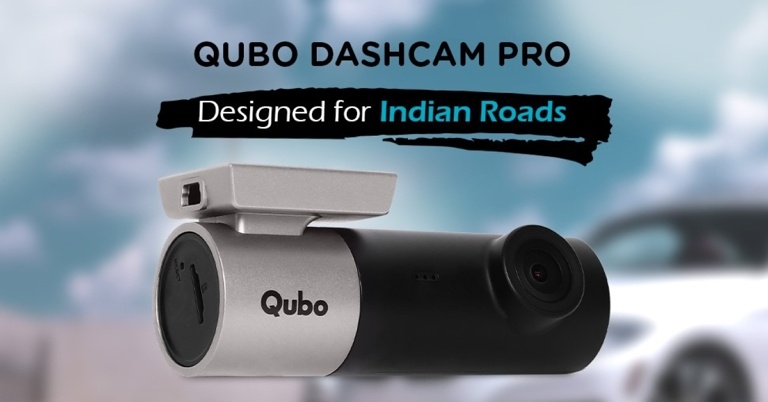
 The Dash Cam from Qubo, which can be easily mounted on the dashboard, is designed to record images and videos while driving, making it the ideal security device for your car. The all-new Qubo Dash Cam comes with an easy-to-use mobile app (both iOS and android). For recording and live view, the dash cam has a 1080p@30FPS HD Video Quality. It auto-detects a sudden shake/collision with a built-in 6-axis G-sensor and saves the footage to a ‘Event File’ that you can access on your phone through the Qubo App. Its Artificial Intelligence-based alerts ensure that no important information is overlooked. In terms of image quality, the camera’s Wide Dynamic Range (WDR) technology provides superior low-light performance, allowing it to capture details clearly in both poorly and strongly illuminated areas of its field of view. The Dash Cam from Qubo has a wide-angle field of view (FOV) that reduces blind spots and gives you access to more than 6 lanes.
The Qubo Smart Dash Cam, which costs Rs 4,290, will be available to a wide range of users across India starting today. The product will be available through all channels, including leading online portals such as Amazon, Quboworld.com, and a large network of Dealer outlets.
Commenting on the announcement, Ujjwal Munjal, Vice Chairman, Hero Electronix said: “Keeping in line with our broader vision of creating customer-centric connected devices, Qubo has come a long way in the last 2 years. Today Qubo has a wide range of connected smart home products that are enriching the lives of Indian consumers. With the addition of Auto Tech products to our existing product portfolio, we are a step closer to our aspiration of reaching a million homes.”
For the latest gadget and tech news, and gadget reviews, follow us on Twitter, Facebook and Instagram. For newest tech & gadget videos subscribe to our YouTube Channel. You can also stay up to date using the Gadget Bridge Android App. You can find the latest car and bike news here.
The Dash Cam from Qubo, which can be easily mounted on the dashboard, is designed to record images and videos while driving, making it the ideal security device for your car. The all-new Qubo Dash Cam comes with an easy-to-use mobile app (both iOS and android). For recording and live view, the dash cam has a 1080p@30FPS HD Video Quality. It auto-detects a sudden shake/collision with a built-in 6-axis G-sensor and saves the footage to a ‘Event File’ that you can access on your phone through the Qubo App. Its Artificial Intelligence-based alerts ensure that no important information is overlooked. In terms of image quality, the camera’s Wide Dynamic Range (WDR) technology provides superior low-light performance, allowing it to capture details clearly in both poorly and strongly illuminated areas of its field of view. The Dash Cam from Qubo has a wide-angle field of view (FOV) that reduces blind spots and gives you access to more than 6 lanes.
The Qubo Smart Dash Cam, which costs Rs 4,290, will be available to a wide range of users across India starting today. The product will be available through all channels, including leading online portals such as Amazon, Quboworld.com, and a large network of Dealer outlets.
Commenting on the announcement, Ujjwal Munjal, Vice Chairman, Hero Electronix said: “Keeping in line with our broader vision of creating customer-centric connected devices, Qubo has come a long way in the last 2 years. Today Qubo has a wide range of connected smart home products that are enriching the lives of Indian consumers. With the addition of Auto Tech products to our existing product portfolio, we are a step closer to our aspiration of reaching a million homes.”
For the latest gadget and tech news, and gadget reviews, follow us on Twitter, Facebook and Instagram. For newest tech & gadget videos subscribe to our YouTube Channel. You can also stay up to date using the Gadget Bridge Android App. You can find the latest car and bike news here. 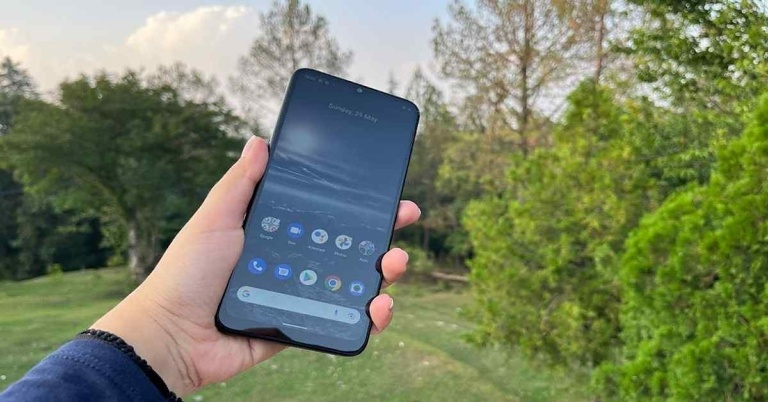
 Flip it over, and you will see the 6.5-inch screen of the smartphone, which is outlined by a not-exactly-very-thin bezel and an even thicker chin. There is a waterdrop-shaped notch in the middle of the top edge of the display to house the selfie camera of the phone. The earpiece of the device is concealed between the top edge and the screen and is barely visible.
Coming to the 6.5-inch LCD, HD+ display of the Nokia G21 smartphone, it worked decently, but we expected something better than an HD+ resolution. Most other devices in this range do come with higher-resolution displays, so it isn’t like we are asking for a lot. Coming back to the screen of the Nokia G21, it comes with a refresh rate of 90Hz, which did make our usage seem smooth.
The colours showcased on the screen of the device were accurate and they stayed consistent at different viewing angles. The brightness of the display was decent too, but sunlight readability was a problem. The images showcased could have been sharper too, and this in turn meant an average video-watching experience on the likes of YouTube. In a nutshell, we would say that while the design of Nokia G21 impressed us, we don’t think that the display is among the smartphone’s best qualities.
Flip it over, and you will see the 6.5-inch screen of the smartphone, which is outlined by a not-exactly-very-thin bezel and an even thicker chin. There is a waterdrop-shaped notch in the middle of the top edge of the display to house the selfie camera of the phone. The earpiece of the device is concealed between the top edge and the screen and is barely visible.
Coming to the 6.5-inch LCD, HD+ display of the Nokia G21 smartphone, it worked decently, but we expected something better than an HD+ resolution. Most other devices in this range do come with higher-resolution displays, so it isn’t like we are asking for a lot. Coming back to the screen of the Nokia G21, it comes with a refresh rate of 90Hz, which did make our usage seem smooth.
The colours showcased on the screen of the device were accurate and they stayed consistent at different viewing angles. The brightness of the display was decent too, but sunlight readability was a problem. The images showcased could have been sharper too, and this in turn meant an average video-watching experience on the likes of YouTube. In a nutshell, we would say that while the design of Nokia G21 impressed us, we don’t think that the display is among the smartphone’s best qualities.
 Speaking of gaming, we played a number of games on the device, while lighter ones like Alto’s Odyssey ran well, our experience with heavy-graphic ones like Asphalt 9: Legends could have been better.
The fingerprint scanner worked well and never failed to unlock our device. However, we faced one rather peculiar issue with our review unit – it took multiple attempts to read our SIM card. It went undetected by the phone the first 2-3 times we tried to put it on for some reason.
The 5,050mAh battery of the smartphone was definitely among the plus points. It gave us two days of juice on a single charge with usage that involved gaming, browsing the internet, watching videos, an active Instagram account, clicking pictures and more. However, some tasks – like Zoom meetings and gaming – drained the battery sooner than others. With the charger in the box, it takes almost 3 hours to charge the device completely, which is painfully slow in our opinion.
Speaking of gaming, we played a number of games on the device, while lighter ones like Alto’s Odyssey ran well, our experience with heavy-graphic ones like Asphalt 9: Legends could have been better.
The fingerprint scanner worked well and never failed to unlock our device. However, we faced one rather peculiar issue with our review unit – it took multiple attempts to read our SIM card. It went undetected by the phone the first 2-3 times we tried to put it on for some reason.
The 5,050mAh battery of the smartphone was definitely among the plus points. It gave us two days of juice on a single charge with usage that involved gaming, browsing the internet, watching videos, an active Instagram account, clicking pictures and more. However, some tasks – like Zoom meetings and gaming – drained the battery sooner than others. With the charger in the box, it takes almost 3 hours to charge the device completely, which is painfully slow in our opinion.
 Finally, let’s talk about the cameras of the Nokia G21. During the day, in well- areas, the smartphone manages to take some good images that have ample brightness and the colours seem accurate too. However, in some shots that we took, the sharpness, as well as the details, were not as good as they could be, especially with a 50MP primary camera onboard. It also takes a while to focus with the device’s camera, particularly if the object is in motion. In shots that we took in dimly lit areas, the quality of the image falls further and there was some visible noise in the pictures we took. The other two cameras also did an average job at best.
 The macro camera managed to take some decent shots exclusively in well-lit areas, but we cannot say the same about the depth sensor. The 8MP selfie camera did a good job too, but don’t expect too much from it.
 Flip it over, and you will see the 6.5-inch screen of the smartphone, which is outlined by a not-exactly-very-thin bezel and an even thicker chin. There is a waterdrop-shaped notch in the middle of the top edge of the display to house the selfie camera of the phone. The earpiece of the device is concealed between the top edge and the screen and is barely visible.
Coming to the 6.5-inch LCD, HD+ display of the Nokia G21 smartphone, it worked decently, but we expected something better than an HD+ resolution. Most other devices in this range do come with higher-resolution displays, so it isn’t like we are asking for a lot. Coming back to the screen of the Nokia G21, it comes with a refresh rate of 90Hz, which did make our usage seem smooth.
The colours showcased on the screen of the device were accurate and they stayed consistent at different viewing angles. The brightness of the display was decent too, but sunlight readability was a problem. The images showcased could have been sharper too, and this in turn meant an average video-watching experience on the likes of YouTube. In a nutshell, we would say that while the design of Nokia G21 impressed us, we don’t think that the display is among the smartphone’s best qualities.
Flip it over, and you will see the 6.5-inch screen of the smartphone, which is outlined by a not-exactly-very-thin bezel and an even thicker chin. There is a waterdrop-shaped notch in the middle of the top edge of the display to house the selfie camera of the phone. The earpiece of the device is concealed between the top edge and the screen and is barely visible.
Coming to the 6.5-inch LCD, HD+ display of the Nokia G21 smartphone, it worked decently, but we expected something better than an HD+ resolution. Most other devices in this range do come with higher-resolution displays, so it isn’t like we are asking for a lot. Coming back to the screen of the Nokia G21, it comes with a refresh rate of 90Hz, which did make our usage seem smooth.
The colours showcased on the screen of the device were accurate and they stayed consistent at different viewing angles. The brightness of the display was decent too, but sunlight readability was a problem. The images showcased could have been sharper too, and this in turn meant an average video-watching experience on the likes of YouTube. In a nutshell, we would say that while the design of Nokia G21 impressed us, we don’t think that the display is among the smartphone’s best qualities.
 Speaking of gaming, we played a number of games on the device, while lighter ones like Alto’s Odyssey ran well, our experience with heavy-graphic ones like Asphalt 9: Legends could have been better.
The fingerprint scanner worked well and never failed to unlock our device. However, we faced one rather peculiar issue with our review unit – it took multiple attempts to read our SIM card. It went undetected by the phone the first 2-3 times we tried to put it on for some reason.
The 5,050mAh battery of the smartphone was definitely among the plus points. It gave us two days of juice on a single charge with usage that involved gaming, browsing the internet, watching videos, an active Instagram account, clicking pictures and more. However, some tasks – like Zoom meetings and gaming – drained the battery sooner than others. With the charger in the box, it takes almost 3 hours to charge the device completely, which is painfully slow in our opinion.
Speaking of gaming, we played a number of games on the device, while lighter ones like Alto’s Odyssey ran well, our experience with heavy-graphic ones like Asphalt 9: Legends could have been better.
The fingerprint scanner worked well and never failed to unlock our device. However, we faced one rather peculiar issue with our review unit – it took multiple attempts to read our SIM card. It went undetected by the phone the first 2-3 times we tried to put it on for some reason.
The 5,050mAh battery of the smartphone was definitely among the plus points. It gave us two days of juice on a single charge with usage that involved gaming, browsing the internet, watching videos, an active Instagram account, clicking pictures and more. However, some tasks – like Zoom meetings and gaming – drained the battery sooner than others. With the charger in the box, it takes almost 3 hours to charge the device completely, which is painfully slow in our opinion.
 Finally, let’s talk about the cameras of the Nokia G21. During the day, in well- areas, the smartphone manages to take some good images that have ample brightness and the colours seem accurate too. However, in some shots that we took, the sharpness, as well as the details, were not as good as they could be, especially with a 50MP primary camera onboard. It also takes a while to focus with the device’s camera, particularly if the object is in motion. In shots that we took in dimly lit areas, the quality of the image falls further and there was some visible noise in the pictures we took. The other two cameras also did an average job at best.
 The macro camera managed to take some decent shots exclusively in well-lit areas, but we cannot say the same about the depth sensor. The 8MP selfie camera did a good job too, but don’t expect too much from it.

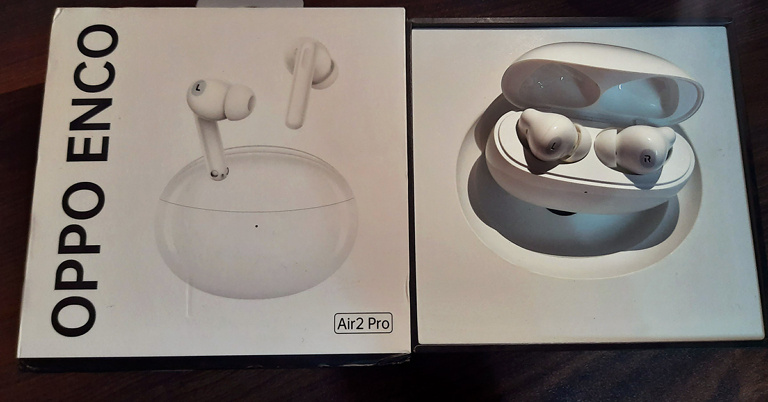
 The Oppo Enco Air2 Pro comes riding in a neat square package. Lifting the lid of the box, you would find its sleek pebble-shaped plastic case staring at you silently. The truly wireless earbuds come in two different colours, Grey and White. Out of which we were able to get our hands on the latter. Accompanying the earbuds comes a short USB-A to Type-C charging cable as well as a guide booklet.
 The Oppo Enco Air2 Pro comes riding in a neat square package. Lifting the lid of the box, you would find its sleek pebble-shaped plastic case staring at you silently. The truly wireless earbuds come in two different colours, Grey and White. Out of which we were able to get our hands on the latter. Accompanying the earbuds comes a short USB-A to Type-C charging cable as well as a guide booklet.
 Picking up the glossy white-coloured bubble case in our hand, it feels quite light in weight and would fit easily into the pocket of your jeans. If you take a moment to observe its top carefully, it has a refractive translucent jelly lid. Right below the neckline of the lid lies a tiny LED indicator.
 At the bottom lies a Type-C charging port, while at its back lies (gracefully) the Oppo brand engraving. The entire surface of the case is smooth to touch and seems fingerprint-resistant. Whatever minimal fingerprints attracted to it cannot be seen easily by the naked eye.
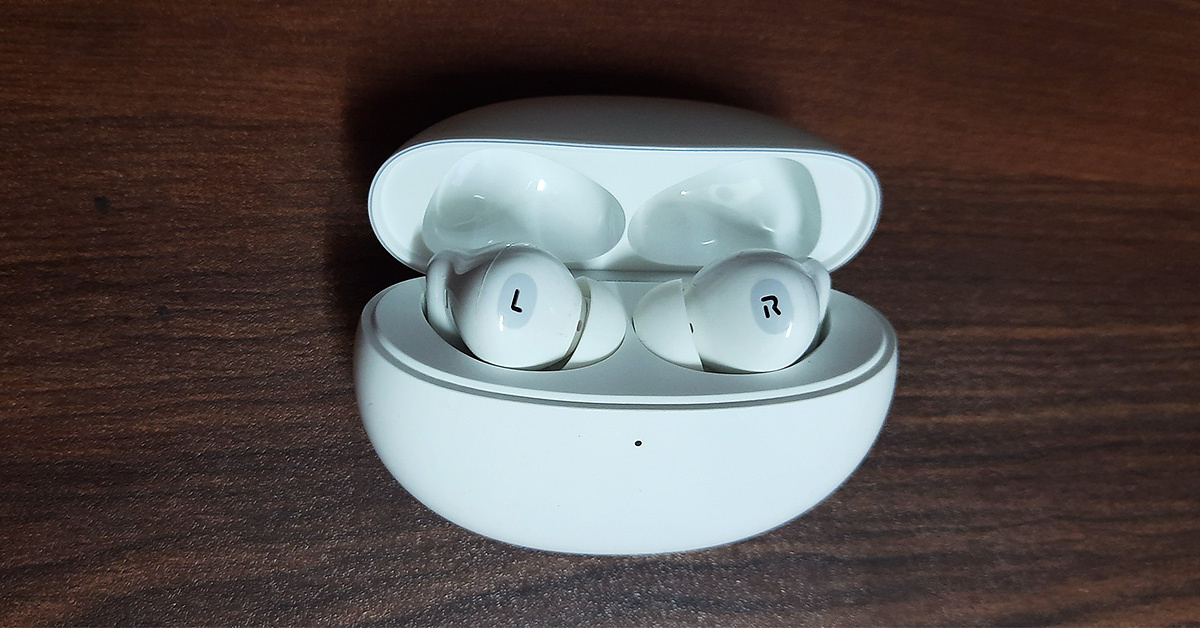 Once you flip the lid open, its magnetic nature immediately comes to notice. The LED indicator turns green upon opening up the jelly lid and turns yellowish-orange when closed. When in pairing mode, the LED blinks in white colour. Inside the case sit the two TWS earbuds, fitted perfectly into their respective cavities. The ‘L’ for left and ‘R’ for right engravings, highlighted in grey over their small white bodies, are the first thing visible to you. The leg or the stem of the earbuds is also magnetic in nature so it automatically gets pulled back into its place without you having to put any force. All you need to do is just position the leg over its cavity and it snaps in.
 At the back of each earbud on its spine lies its touch interface, which also comes in body colour, but is slightly translucent and hence, differentiable. At the bottom of the spine seem to lie the sensors of the earbuds, which help it in determining whether the earbuds are worn or not, so it can start or stop the audio accordingly. The tip of the earbud comes with a classic round-shaped silicone cover while the body between the top and the spine is of a slightly tilted spherical shape in order to fit exactly into our ears.
Overall, the design of the Oppo Enco Air2 Pro seems quite elegant and favourable for usage, especially during travel.
Read also: OnePlus Nord Buds review: Inexpensive resonance
At the back of each earbud on its spine lies its touch interface, which also comes in body colour, but is slightly translucent and hence, differentiable. At the bottom of the spine seem to lie the sensors of the earbuds, which help it in determining whether the earbuds are worn or not, so it can start or stop the audio accordingly. The tip of the earbud comes with a classic round-shaped silicone cover while the body between the top and the spine is of a slightly tilted spherical shape in order to fit exactly into our ears.
Overall, the design of the Oppo Enco Air2 Pro seems quite elegant and favourable for usage, especially during travel.
Read also: OnePlus Nord Buds review: Inexpensive resonance
 The Enco Air2 Pro comes with a 43mAh battery in each earbud, which lasts up to seven hours with ANC and up to 5 hours without ANC, upon a single charge. Housing the earbuds come the charging case, which has a 440mAh battery. Overall, the device can last up to 28hrs when ANC is turned off and up to 20 hours when it is turned on.
The earbuds fit well into the ears. Some may complain that after wearing them for a while, the ears start to pain slightly. However, this issue may be tackled right away. That is why the brand provides 3 sizes for its silicone tips that are included within the package. So you might need to dig into the box and choose the size that is comfortable for your ears. Another point on the brighter side is that the earbuds have an ‘Instant Connection’ feature. As soon as you open the lid of the case, the earbuds automatically get connected with the paired device.
The touch interface also works pretty smoothly. Double-tapping on the back of either of the two earbuds will play the next track (while using music streaming applications), play the next episode (while watching TV shows on OTT platforms like Netflix), or forward to 10 seconds while streaming videos on Youtube.
In case you are pairing the earbuds for the first time with your smartphone or any other device, you just need to tap and hold on the back of both the earbuds for about 4 seconds, after which they enter the pairing mode. The earbuds have two audio modes, Noice Cancelation and Transparency. For switching between these two modes, you just have to tap and hold for a second or two on either of the two earbuds.
The Enco Air2 Pro comes with a 43mAh battery in each earbud, which lasts up to seven hours with ANC and up to 5 hours without ANC, upon a single charge. Housing the earbuds come the charging case, which has a 440mAh battery. Overall, the device can last up to 28hrs when ANC is turned off and up to 20 hours when it is turned on.
The earbuds fit well into the ears. Some may complain that after wearing them for a while, the ears start to pain slightly. However, this issue may be tackled right away. That is why the brand provides 3 sizes for its silicone tips that are included within the package. So you might need to dig into the box and choose the size that is comfortable for your ears. Another point on the brighter side is that the earbuds have an ‘Instant Connection’ feature. As soon as you open the lid of the case, the earbuds automatically get connected with the paired device.
The touch interface also works pretty smoothly. Double-tapping on the back of either of the two earbuds will play the next track (while using music streaming applications), play the next episode (while watching TV shows on OTT platforms like Netflix), or forward to 10 seconds while streaming videos on Youtube.
In case you are pairing the earbuds for the first time with your smartphone or any other device, you just need to tap and hold on the back of both the earbuds for about 4 seconds, after which they enter the pairing mode. The earbuds have two audio modes, Noice Cancelation and Transparency. For switching between these two modes, you just have to tap and hold for a second or two on either of the two earbuds.
 Speaking of the sound quality, the Enco Air2 Pro delivers its promise pretty effectively. The loudness and clarity of the audio are quite commendable while the bass is thumping. Turning up the volume a little over 50% takes you completely to musical heavens. The audio experience of the earbuds while streaming movies and TV shows on Netflix and videos on Youtube were also great.
Even the minute background noises playing in the videos were crystal clear. But what needs thorough appreciation is the Oppo Enco Air2 Pro’s active noise cancellation feature. When turned on, you will not be able to hear a person sitting at a two-arm distance from you. You would just notice their lips moving. Yes, the ANC is that good.
However, on playing Asphalt 9 Legends to test the performance of the earbuds while gaming (when paired with a smartphone), there was a lag of about 1 to 2 seconds noticed, variable in nature. So, we will not fully recommend it for gaming.
Another cool feature of the Oppo Enco Air2 Pro earbuds is that they support smart in-ear detection. This feature automatically pauses playback when you take them out of your ears and resumes playback when you put them back on. This works even when you take just one out of the two earbuds (since both have sensors). A noteworthy thing to mention here is that this in-ear detection system functions very well, as the sensors are highly sensitive in nature. Even if you move one earbud piece away from your ear ever so slightly, the audio will stop automatically without the delay of even a second.
Overall, the performance of the Oppo Enco Air2 Pro earbuds is delightful.
Read also: Vivo TWS 2 ANC and Vivo TWS 2e TWS earbuds launched in India
Speaking of the sound quality, the Enco Air2 Pro delivers its promise pretty effectively. The loudness and clarity of the audio are quite commendable while the bass is thumping. Turning up the volume a little over 50% takes you completely to musical heavens. The audio experience of the earbuds while streaming movies and TV shows on Netflix and videos on Youtube were also great.
Even the minute background noises playing in the videos were crystal clear. But what needs thorough appreciation is the Oppo Enco Air2 Pro’s active noise cancellation feature. When turned on, you will not be able to hear a person sitting at a two-arm distance from you. You would just notice their lips moving. Yes, the ANC is that good.
However, on playing Asphalt 9 Legends to test the performance of the earbuds while gaming (when paired with a smartphone), there was a lag of about 1 to 2 seconds noticed, variable in nature. So, we will not fully recommend it for gaming.
Another cool feature of the Oppo Enco Air2 Pro earbuds is that they support smart in-ear detection. This feature automatically pauses playback when you take them out of your ears and resumes playback when you put them back on. This works even when you take just one out of the two earbuds (since both have sensors). A noteworthy thing to mention here is that this in-ear detection system functions very well, as the sensors are highly sensitive in nature. Even if you move one earbud piece away from your ear ever so slightly, the audio will stop automatically without the delay of even a second.
Overall, the performance of the Oppo Enco Air2 Pro earbuds is delightful.
Read also: Vivo TWS 2 ANC and Vivo TWS 2e TWS earbuds launched in India

 Step 2: Select WiFi.
 Step 3: Tap on the QR icon at the top right corner of the screen. On some devices, you may need to select ‘Add New Network‘.
 Your smartphone will be connected to the WiFi network.
Read also: How To Eject Water From Your iPhone Using Siri (2022)?
Your smartphone will be connected to the WiFi network.
Read also: How To Eject Water From Your iPhone Using Siri (2022)?
 Step 2: Tap on Wi-Fi.
 Step 3: You will see the Settings (gear) icon displayed next to the Wi-Fi network that your device is connected to. Click on that gear icon.
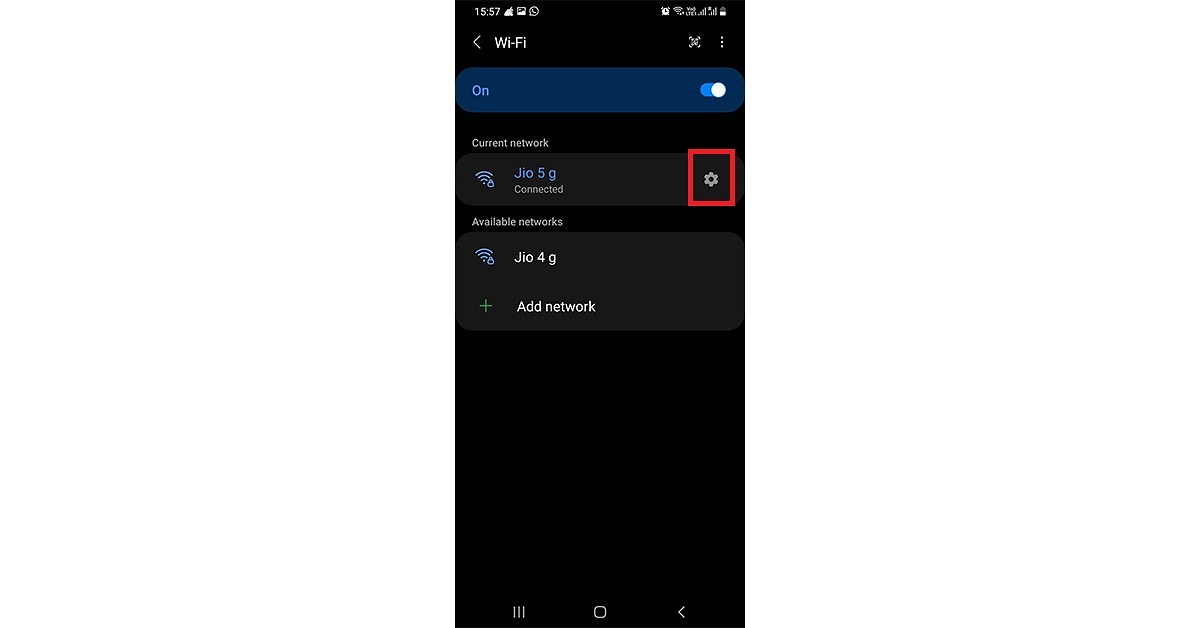 Step 4: In the network settings screen that is displayed next, tap on the QR code icon given at the bottom left corner.
 Step 5: The QR code for that Wi-Fi network gets displayed on your screen.
 You can directly scan the given QR code from another device, which you want to connect with this network, without having to enter its password. You can also save the QR code as an image or share it directly with another person’s device.
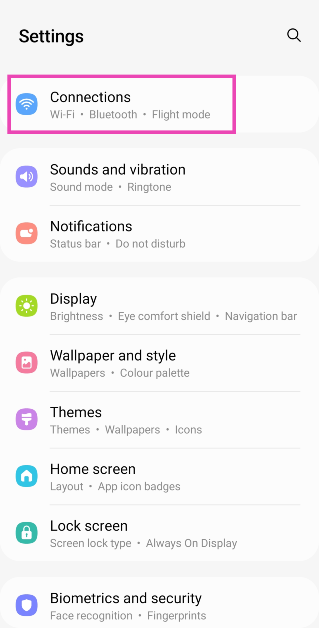 Step 2: Select WiFi.
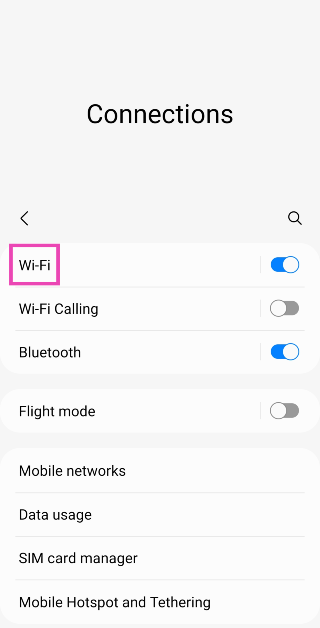 Step 3: Tap on the QR icon at the top right corner of the screen. On some devices, you may need to select ‘Add New Network‘.
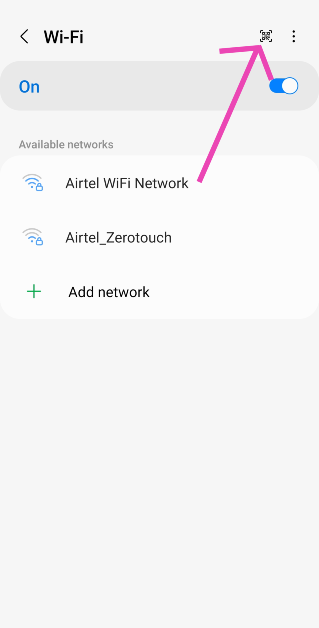 Step 4: Once the scanner pops up, point your phone’s camera to the QR code.
 Your smartphone will be connected to the WiFi network.
Read also: How To Eject Water From Your iPhone Using Siri (2022)?
Your smartphone will be connected to the WiFi network.
Read also: How To Eject Water From Your iPhone Using Siri (2022)?
 Step 1: Ensure that the sharing device is connected to the network whose password you want to share with the receiving device. Then from the Apple device that needs to connect with the required Wi-Fi network, go to Settings > Wi-Fi.
Step 2: Choose the network that the sharing device is currently connected to. Then bring the two devices within each other’s range.
Step 3: On the sharing device, a pop-up appears asking for sharing the Wi-Fi password. Tap on Share Password. That’s it! The Apple device on the receiving end gets the password and automatically connects to the Wi-Fi.
Read also: How To Turn On AirDrop On iPhone (2022)?
Step 1: Ensure that the sharing device is connected to the network whose password you want to share with the receiving device. Then from the Apple device that needs to connect with the required Wi-Fi network, go to Settings > Wi-Fi.
Step 2: Choose the network that the sharing device is currently connected to. Then bring the two devices within each other’s range.
Step 3: On the sharing device, a pop-up appears asking for sharing the Wi-Fi password. Tap on Share Password. That’s it! The Apple device on the receiving end gets the password and automatically connects to the Wi-Fi.
Read also: How To Turn On AirDrop On iPhone (2022)?
 Step 1: Download the Shortcuts app on your iPhone, open it and tap on Gallery at the lower right corner of the screen.
Step 2: Go to Shortcuts for Accessibility > QR Your Wi-Fi > Add Shortcut.
Step 3: Tap on My Shortcuts on the bottom left corner of the screen and tap on QR Your Wi-Fi from your list of shortcuts.
Step 4: Enter your Wi-Fi name and tap on Done. Then enter your password and again click on Done.
Step 5: You will see a QR code appear on the screen. You can then choose to directly scan this QR code from another device, save it as an image or share it via AirDrop, social media, and more. That’s it!
Step 1: Download the Shortcuts app on your iPhone, open it and tap on Gallery at the lower right corner of the screen.
Step 2: Go to Shortcuts for Accessibility > QR Your Wi-Fi > Add Shortcut.
Step 3: Tap on My Shortcuts on the bottom left corner of the screen and tap on QR Your Wi-Fi from your list of shortcuts.
Step 4: Enter your Wi-Fi name and tap on Done. Then enter your password and again click on Done.
Step 5: You will see a QR code appear on the screen. You can then choose to directly scan this QR code from another device, save it as an image or share it via AirDrop, social media, and more. That’s it!
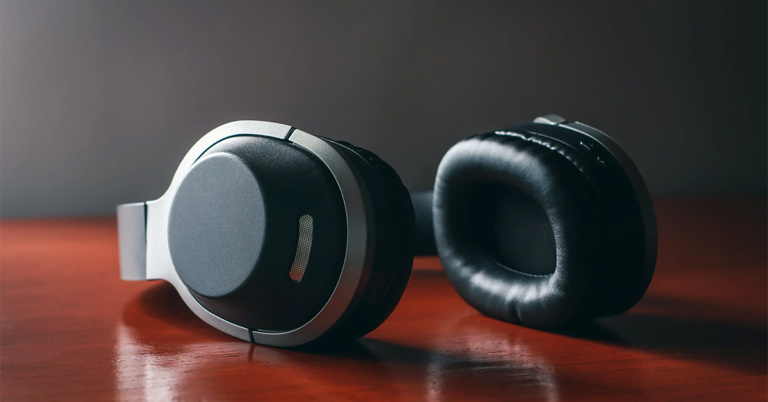
 The first one on our list of the top 10 best headphones with a mic under Rs 5000 is from the popular brand Boat. The Boat Rockerz 450 are wireless on-ear headphones that offer up to 15 hours of playback time. It has 40mm dynamic drivers which help in providing an immersive HD audio experience to the users. It is ergonomically designed for on-ear usage with ear cushions for comfort. You can not only connect to it via Bluetooth but also through an AUX as well. It allows you to communicate easily using its built-in mic and also provides access to voice assistance. The headphones are priced at Rs 999.
Buy from here.
The first one on our list of the top 10 best headphones with a mic under Rs 5000 is from the popular brand Boat. The Boat Rockerz 450 are wireless on-ear headphones that offer up to 15 hours of playback time. It has 40mm dynamic drivers which help in providing an immersive HD audio experience to the users. It is ergonomically designed for on-ear usage with ear cushions for comfort. You can not only connect to it via Bluetooth but also through an AUX as well. It allows you to communicate easily using its built-in mic and also provides access to voice assistance. The headphones are priced at Rs 999.
Buy from here.
 Next on our list is the Infinity Glide 510 model, which provides up to 72 hours of playback time under optimum audio settings. It comes with dual equalizer modes for normal and deep bass output. Within 10 minutes of charging, the headphones provide a playback time of about 2 hours. You get the facility of hands-free calling with the 3-button remote. Moreover, it is lightweight, foldable, and also provides ear cushions for comfort as well as voice assistant integration. It is priced at Rs 1,499.
Buy from here.
Next on our list is the Infinity Glide 510 model, which provides up to 72 hours of playback time under optimum audio settings. It comes with dual equalizer modes for normal and deep bass output. Within 10 minutes of charging, the headphones provide a playback time of about 2 hours. You get the facility of hands-free calling with the 3-button remote. Moreover, it is lightweight, foldable, and also provides ear cushions for comfort as well as voice assistant integration. It is priced at Rs 1,499.
Buy from here.
 boAt Rockerz sound just as good as they look. The headphones feature an over-ear design with soft padded ear cushions and a headband. Delivering the sound output are powerful 50mm dynamic drivers on each earcup. Equipped with a 500mAH battery unit, these headphones can offer a playback time of up to 20 hours. There is also a handy port for an AUX cable for the times when the battery runs out. Juicing these headphones takes up to 2.5 hours with micro USB charging. boAt Rockerz 558 are priced at Rs 1,799.
Buy from here.
boAt Rockerz sound just as good as they look. The headphones feature an over-ear design with soft padded ear cushions and a headband. Delivering the sound output are powerful 50mm dynamic drivers on each earcup. Equipped with a 500mAH battery unit, these headphones can offer a playback time of up to 20 hours. There is also a handy port for an AUX cable for the times when the battery runs out. Juicing these headphones takes up to 2.5 hours with micro USB charging. boAt Rockerz 558 are priced at Rs 1,799.
Buy from here.
 The JBL T460BT Wireless on-ear headphones come with a mic and provide 11 hours of playback time under optimal audio settings. It is flat foldable, lightweight, and comfortable to wear. The headphones offer wireless Bluetooth streaming and ensure a superior listening experience for its users through the JBL Pure Bass sound. The JBL T460BT comes at Rs 2,499.
Buy from here.
Read also: Sony WH-1000XM5 wireless noise-canceling headphones with 30mm drivers announced
The JBL T460BT Wireless on-ear headphones come with a mic and provide 11 hours of playback time under optimal audio settings. It is flat foldable, lightweight, and comfortable to wear. The headphones offer wireless Bluetooth streaming and ensure a superior listening experience for its users through the JBL Pure Bass sound. The JBL T460BT comes at Rs 2,499.
Buy from here.
Read also: Sony WH-1000XM5 wireless noise-canceling headphones with 30mm drivers announced
 Next on our list of the top 10 best headphones with a mic for under Rs 5,000 that are best for working from home is the Sony WH-CH520 wireless headphones. It is lightweight and provides up to 50 hours of playtime (without noise cancelling). A 3-minute quick charge will provide you with up to 60 minutes of playtime. It is designed with swivel earcups so that you can safely pack them in your backpack. The built-in beamforming microphones with Precise Voice Pickup technology allow efficient hands-free calling. It is priced at Rs 4,490.
Buy from here.
Next on our list of the top 10 best headphones with a mic for under Rs 5,000 that are best for working from home is the Sony WH-CH520 wireless headphones. It is lightweight and provides up to 50 hours of playtime (without noise cancelling). A 3-minute quick charge will provide you with up to 60 minutes of playtime. It is designed with swivel earcups so that you can safely pack them in your backpack. The built-in beamforming microphones with Precise Voice Pickup technology allow efficient hands-free calling. It is priced at Rs 4,490.
Buy from here.
 Moving on to the next section in our list, the first one amongst the top wired headphones with a mic under Rs 5000 is the JBL Quantum 100. It comes with 40mm dynamic drivers that deliver the JBL Quantum Sound Signature. The length of the cable provided with the headphones is 120cm. It is lightweight and comes with a durable headband with memory foam cushioning.
One of the most unique features of the headphone is that it comes with a detachable mic. Moreover, it is compatible with all gaming platforms, including PC gaming, Xbox, Playstation, Nintendo, Switch, Mobile, Mac, VR, and Windows Sonic Spatial Sound. It comes at Rs 1,999.
Buy from here.
Moving on to the next section in our list, the first one amongst the top wired headphones with a mic under Rs 5000 is the JBL Quantum 100. It comes with 40mm dynamic drivers that deliver the JBL Quantum Sound Signature. The length of the cable provided with the headphones is 120cm. It is lightweight and comes with a durable headband with memory foam cushioning.
One of the most unique features of the headphone is that it comes with a detachable mic. Moreover, it is compatible with all gaming platforms, including PC gaming, Xbox, Playstation, Nintendo, Switch, Mobile, Mac, VR, and Windows Sonic Spatial Sound. It comes at Rs 1,999.
Buy from here.
 The Boat BassHeads 900 on-ear wired headphones are sleek, lightweight, and compact in design. These are pretty easy to carry and also come with swivel earcups to offer flexible wearing. Its 40mm Neodymium drivers ensure to provide a dynamic sound experience to the users, with punchy bass and crystal clear vocals. Its tangle-resistant cable comes with a 3.5mm audio jack and an inbuilt microphone for calls and playback. The headphones come at Rs 599.
Buy from here.
The Boat BassHeads 900 on-ear wired headphones are sleek, lightweight, and compact in design. These are pretty easy to carry and also come with swivel earcups to offer flexible wearing. Its 40mm Neodymium drivers ensure to provide a dynamic sound experience to the users, with punchy bass and crystal clear vocals. Its tangle-resistant cable comes with a 3.5mm audio jack and an inbuilt microphone for calls and playback. The headphones come at Rs 599.
Buy from here.
 Next on our list of the top 10 headphones with a mic for under Rs 5000 that are best for working from home, comes this one. The HP B4B09PA wired headphone model comes with 35mm drivers and an inbuilt noise-cancelling mic. It is foldable, has an adjustable headband, and is compact and durable. It is ideal for long hours of listening, as claimed by the brand. It is priced at Rs 649.
Buy from here.
Next on our list of the top 10 headphones with a mic for under Rs 5000 that are best for working from home, comes this one. The HP B4B09PA wired headphone model comes with 35mm drivers and an inbuilt noise-cancelling mic. It is foldable, has an adjustable headband, and is compact and durable. It is ideal for long hours of listening, as claimed by the brand. It is priced at Rs 649.
Buy from here.
 The Lenovo 110 Stereo headset comes with a 1.8m USB-A cable. It is lightweight and has a minimalistic design. The earcups are made up of protein leather and memory foam to ensure premium comfort to the users. It comes with a 180-degree rotatable boom microphone with passive noise cancellation that makes sure that calls are crisp and clear. The Lenovo 110 wired headphones come at Rs 1,785.
Buy from here.
The Lenovo 110 Stereo headset comes with a 1.8m USB-A cable. It is lightweight and has a minimalistic design. The earcups are made up of protein leather and memory foam to ensure premium comfort to the users. It comes with a 180-degree rotatable boom microphone with passive noise cancellation that makes sure that calls are crisp and clear. The Lenovo 110 wired headphones come at Rs 1,785.
Buy from here.
 Sennheiser’s HD series has some of the best headphones you’ll find in every price category. The Sennheiser HD 400S is no exception. These headphones sport a simple yet beautiful design with plain swivelling earcups and a cushioned headband. The HD 400S can be folded, making them ideal to carry around and take meetings on the go. A smart button on the cable lets you control the music and pick up calls. The Sennheiser HD 400S is currently priced at Rs 4,490.
Buy from here.
Read also: Sennheiser HD 400 PRO Studio headphones launched in India
Sennheiser’s HD series has some of the best headphones you’ll find in every price category. The Sennheiser HD 400S is no exception. These headphones sport a simple yet beautiful design with plain swivelling earcups and a cushioned headband. The HD 400S can be folded, making them ideal to carry around and take meetings on the go. A smart button on the cable lets you control the music and pick up calls. The Sennheiser HD 400S is currently priced at Rs 4,490.
Buy from here.
Read also: Sennheiser HD 400 PRO Studio headphones launched in India
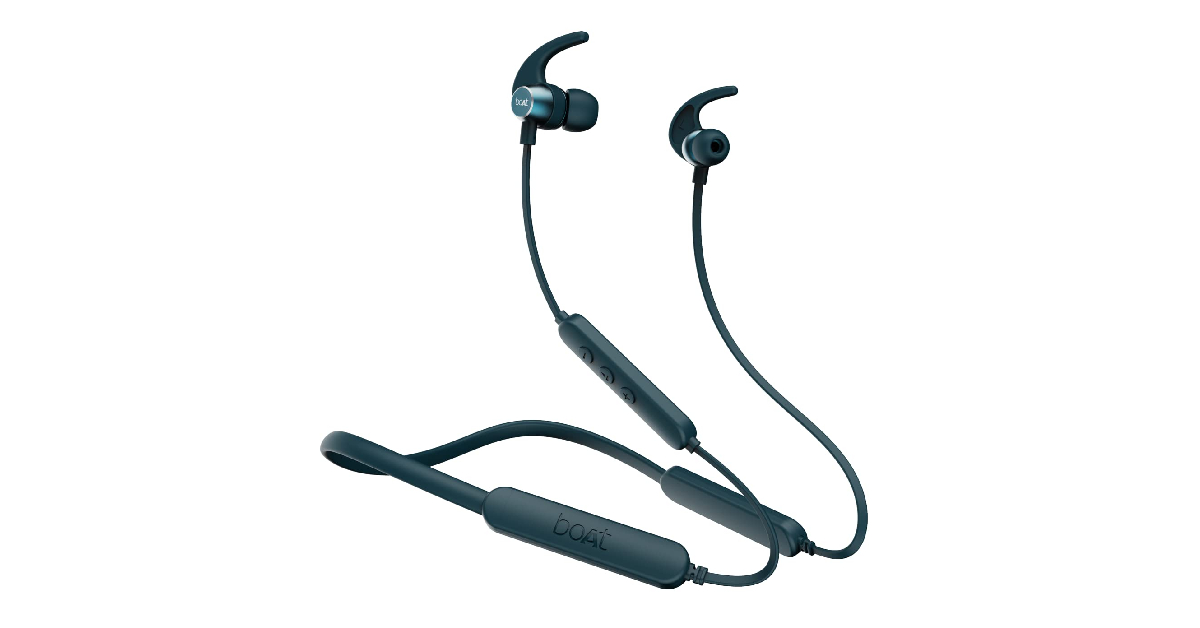 boAt Rockerz 255 Pro+ has a lot of good things going for it. This neckband offers up to 40 hours of playback with a battery capacity of 300mAh. A 10-minute quick charge is enough to power the neckband for 10 hours. Fully charging the neckband takes up to 1.5 hours. Sound output is delivered through 10mm drivers. This neckband from boAt also features multi-point connectivity, voice assistant support, and an IPX7 rating all at the price of Rs 1,499.
Buy from here.
boAt Rockerz 255 Pro+ has a lot of good things going for it. This neckband offers up to 40 hours of playback with a battery capacity of 300mAh. A 10-minute quick charge is enough to power the neckband for 10 hours. Fully charging the neckband takes up to 1.5 hours. Sound output is delivered through 10mm drivers. This neckband from boAt also features multi-point connectivity, voice assistant support, and an IPX7 rating all at the price of Rs 1,499.
Buy from here.
 Priced at just Rs 1,199, Boult Audio ZCharge is one of the most affordable neckbands out there that doesn’t compromise on audio quality. The neckband features 14.2mm dynamic drivers which is pretty impressive at this price point. It also has an Environmental Noise Cancellation chip inside it, which is super helpful for crystal-clear phone calls. On a full charge, Boult Audio ZCharge offers 40 hours of playtime. Bluetooth 5.2 support is also on offer here.
Buy from here.
Priced at just Rs 1,199, Boult Audio ZCharge is one of the most affordable neckbands out there that doesn’t compromise on audio quality. The neckband features 14.2mm dynamic drivers which is pretty impressive at this price point. It also has an Environmental Noise Cancellation chip inside it, which is super helpful for crystal-clear phone calls. On a full charge, Boult Audio ZCharge offers 40 hours of playtime. Bluetooth 5.2 support is also on offer here.
Buy from here.
 Audio-Technica CLR100BT is currently going for Rs 1,399 on Amazon, and it is a deal you simply cannot miss. The in-ear design of the earbuds offers a secure, comfortable fit. The 8.7mm dynamic driver delivers a deep, enveloping bass and a rich sound output. The inbuilt mic is ideal for taking calls anywhere. The neckband has integrated controls for music and phone calls. The CLR100BT gets fully charged in 2 hours and offers playback of 7 hours.
Buy from here.
Audio-Technica CLR100BT is currently going for Rs 1,399 on Amazon, and it is a deal you simply cannot miss. The in-ear design of the earbuds offers a secure, comfortable fit. The 8.7mm dynamic driver delivers a deep, enveloping bass and a rich sound output. The inbuilt mic is ideal for taking calls anywhere. The neckband has integrated controls for music and phone calls. The CLR100BT gets fully charged in 2 hours and offers playback of 7 hours.
Buy from here.
 The OnePlus Bullets Z2 wireless in-ear headphones come with a mic and offer up to 30 hours of playback upon a single charge. A quick 10-minute charge delivers about 20 hours of playtime. The headphones are IP55 water and sweat-resistant and come with anti-distortion audio technology that ensures a smooth audio experience for the customers. Its large 12.4mm bass driver delivers a deep bass for thumping beats. It is priced at Rs 1,999.
Buy from here.
The OnePlus Bullets Z2 wireless in-ear headphones come with a mic and offer up to 30 hours of playback upon a single charge. A quick 10-minute charge delivers about 20 hours of playtime. The headphones are IP55 water and sweat-resistant and come with anti-distortion audio technology that ensures a smooth audio experience for the customers. Its large 12.4mm bass driver delivers a deep bass for thumping beats. It is priced at Rs 1,999.
Buy from here.
 The final one on our list of the top 10 headphones with a mic for under Rs 5000 is from the well-known MI brand. The MI Neckband Pro offers up to 20 hours of battery life, is IPX5 splash and sweat-proof, and comes with 10mm dynamic drivers that let you enjoy the extra bass. Its anti-cerumen design helps keep the earbuds clean and wax-free while its anti-blockage speaker net keeps minute particles away from seeping into the device via the speaker net.
Moreover, the neckband comes with intelligent noise cancellation and an inbuilt microphone with voice assistant support so you can enjoy a convenient hands-free calling experience. The MI Neckband Pro comes at Rs 1,798.
Buy from here.
The final one on our list of the top 10 headphones with a mic for under Rs 5000 is from the well-known MI brand. The MI Neckband Pro offers up to 20 hours of battery life, is IPX5 splash and sweat-proof, and comes with 10mm dynamic drivers that let you enjoy the extra bass. Its anti-cerumen design helps keep the earbuds clean and wax-free while its anti-blockage speaker net keeps minute particles away from seeping into the device via the speaker net.
Moreover, the neckband comes with intelligent noise cancellation and an inbuilt microphone with voice assistant support so you can enjoy a convenient hands-free calling experience. The MI Neckband Pro comes at Rs 1,798.
Buy from here.

 Another way to try out before buying a new license for Windows 10 is to use its free version. The Windows 10 free version works no different from its paid version and comes with all the features that the latter offers. The only difference between the two is that you won’t be able to personalize the Windows appearance through the free version. Also, an “Activate Windows” watermark would constantly appear on the bottom right corner of the screen.
To get the free version of Windows 10, all you need to do is just download the Media Creation Tool from the Microsoft website and run it, just like before. But this time, choose the “Create installation media” option. All you would need to do after that is download the ISO file and create a bootable Windows USB.
Read also: How to use Android apps on Windows 10
Another way to try out before buying a new license for Windows 10 is to use its free version. The Windows 10 free version works no different from its paid version and comes with all the features that the latter offers. The only difference between the two is that you won’t be able to personalize the Windows appearance through the free version. Also, an “Activate Windows” watermark would constantly appear on the bottom right corner of the screen.
To get the free version of Windows 10, all you need to do is just download the Media Creation Tool from the Microsoft website and run it, just like before. But this time, choose the “Create installation media” option. All you would need to do after that is download the ISO file and create a bootable Windows USB.
Read also: How to use Android apps on Windows 10
 Finally comes the option of trying out the Windows 10 Enterprise Evaluation. Although it is available for free, the Enterprise Evaluation version has been custom designed for mid-size to large organizations, and therefore is slightly different from a regular Windows 10 Home or Pro version which is meant for individual users. Moreover, it is said to be specially built for IT professionals for managing complex business networks and more. It has a free trial period of about 90 days.
So these were the best ways how to get Windows 10 license key for free or cheap (legally) in 2022. There are many other ways how one can procure a Windows 10 key, such as through online resellers. However, using such means has its own risks and therefore, is not recommended.
If you know of any more clean and legal ways how to get Windows 10 key for free or cheap in 2022, we would be delighted to hear about it. Do let us know in the comments section below.
For the latest gadget and tech news, and gadget reviews, follow us on Twitter, Facebook and Instagram. For newest tech & gadget videos subscribe to our YouTube Channel. You can also stay up to date using the Gadget Bridge Android App. You can find the latest car and bike news here.
Finally comes the option of trying out the Windows 10 Enterprise Evaluation. Although it is available for free, the Enterprise Evaluation version has been custom designed for mid-size to large organizations, and therefore is slightly different from a regular Windows 10 Home or Pro version which is meant for individual users. Moreover, it is said to be specially built for IT professionals for managing complex business networks and more. It has a free trial period of about 90 days.
So these were the best ways how to get Windows 10 license key for free or cheap (legally) in 2022. There are many other ways how one can procure a Windows 10 key, such as through online resellers. However, using such means has its own risks and therefore, is not recommended.
If you know of any more clean and legal ways how to get Windows 10 key for free or cheap in 2022, we would be delighted to hear about it. Do let us know in the comments section below.
For the latest gadget and tech news, and gadget reviews, follow us on Twitter, Facebook and Instagram. For newest tech & gadget videos subscribe to our YouTube Channel. You can also stay up to date using the Gadget Bridge Android App. You can find the latest car and bike news here. 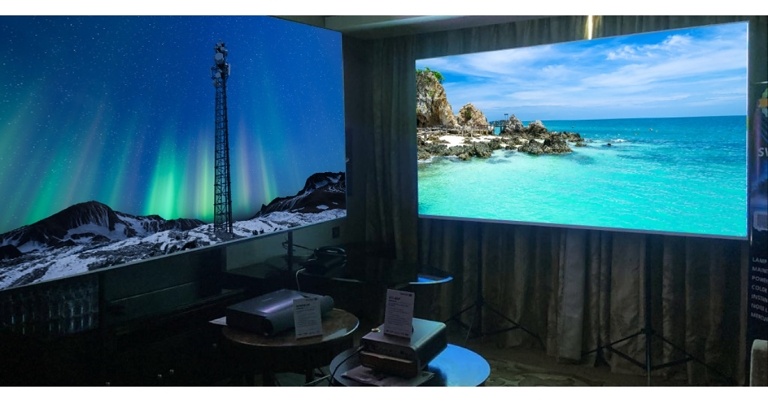
 These user-friendly smart projectors are perfect for any room, large or small. The projectors’ superior features include 4K UHD HDR, Harman Kardon Speakers, Instant On/Off, and Supercolor technology, which provide a complete audiovisual experience at home.
 These user-friendly smart projectors are perfect for any room, large or small. The projectors’ superior features include 4K UHD HDR, Harman Kardon Speakers, Instant On/Off, and Supercolor technology, which provide a complete audiovisual experience at home.
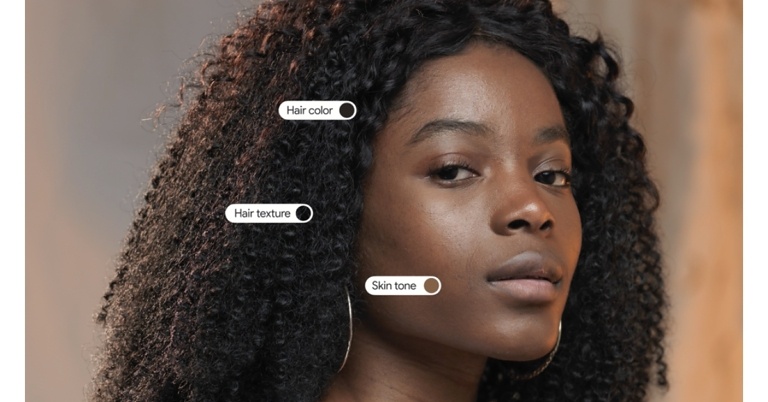
 “We’re openly releasing the scale so anyone can use it for research and product development. Our goal is for the scale to support inclusive products and research across the industry — we see this as a chance to share, learn and evolve our work with the help of others,” the company noted.
The scale can be used to evaluate and improve models that detect faces in images, for example. Using the MST Scale new features to make it easier for people of all backgrounds to find more relevant and useful results. For example, when you use Google Images to search for makeup-related queries, you can now refine your results by skin tone. So, if you’re looking for “everyday eyeshadow” or “bridal makeup looks,” you’ll be able to find more relevant results.
Google is rolling out improvements to show a wider range of skin tones in image results for broad searches about people or ones where people appear in the results.
The MST Scale will also be used to improve Google Photos. Last year, in collaboration with professional image makers Google improved its auto-enhance feature. Real Tone filters that are designed to work well with a wide range of skin tones and are rated on the MST Scale. To evaluate, test, and build these filters, we worked with a diverse group of renowned image-makers, including Kennedi Carter and Joshua Kissi, who are known for their beautiful and accurate depictions of their subjects. These new Real Tone filters give you more options for finding a look that matches your personal style. In the coming months, Real Tone filters will be available on Google Photos for Android, iOS, and the web.
For the latest gadget and tech news, and gadget reviews, follow us on Twitter, Facebook and Instagram. For newest tech & gadget videos subscribe to our YouTube Channel. You can also stay up to date using the Gadget Bridge Android App. You can find the latest car and bike news here.
“We’re openly releasing the scale so anyone can use it for research and product development. Our goal is for the scale to support inclusive products and research across the industry — we see this as a chance to share, learn and evolve our work with the help of others,” the company noted.
The scale can be used to evaluate and improve models that detect faces in images, for example. Using the MST Scale new features to make it easier for people of all backgrounds to find more relevant and useful results. For example, when you use Google Images to search for makeup-related queries, you can now refine your results by skin tone. So, if you’re looking for “everyday eyeshadow” or “bridal makeup looks,” you’ll be able to find more relevant results.
Google is rolling out improvements to show a wider range of skin tones in image results for broad searches about people or ones where people appear in the results.
The MST Scale will also be used to improve Google Photos. Last year, in collaboration with professional image makers Google improved its auto-enhance feature. Real Tone filters that are designed to work well with a wide range of skin tones and are rated on the MST Scale. To evaluate, test, and build these filters, we worked with a diverse group of renowned image-makers, including Kennedi Carter and Joshua Kissi, who are known for their beautiful and accurate depictions of their subjects. These new Real Tone filters give you more options for finding a look that matches your personal style. In the coming months, Real Tone filters will be available on Google Photos for Android, iOS, and the web.
For the latest gadget and tech news, and gadget reviews, follow us on Twitter, Facebook and Instagram. For newest tech & gadget videos subscribe to our YouTube Channel. You can also stay up to date using the Gadget Bridge Android App. You can find the latest car and bike news here.  “We’re openly releasing the scale so anyone can use it for research and product development. Our goal is for the scale to support inclusive products and research across the industry — we see this as a chance to share, learn and evolve our work with the help of others,” the company noted.
The scale can be used to evaluate and improve models that detect faces in images, for example. Using the MST Scale new features to make it easier for people of all backgrounds to find more relevant and useful results. For example, when you use Google Images to search for makeup-related queries, you can now refine your results by skin tone. So, if you’re looking for “everyday eyeshadow” or “bridal makeup looks,” you’ll be able to find more relevant results.
Google is rolling out improvements to show a wider range of skin tones in image results for broad searches about people or ones where people appear in the results.
The MST Scale will also be used to improve Google Photos. Last year, in collaboration with professional image makers Google improved its auto-enhance feature. Real Tone filters that are designed to work well with a wide range of skin tones and are rated on the MST Scale. To evaluate, test, and build these filters, we worked with a diverse group of renowned image-makers, including Kennedi Carter and Joshua Kissi, who are known for their beautiful and accurate depictions of their subjects. These new Real Tone filters give you more options for finding a look that matches your personal style. In the coming months, Real Tone filters will be available on Google Photos for Android, iOS, and the web.
For the latest gadget and tech news, and gadget reviews, follow us on Twitter, Facebook and Instagram. For newest tech & gadget videos subscribe to our YouTube Channel. You can also stay up to date using the Gadget Bridge Android App. You can find the latest car and bike news here.
“We’re openly releasing the scale so anyone can use it for research and product development. Our goal is for the scale to support inclusive products and research across the industry — we see this as a chance to share, learn and evolve our work with the help of others,” the company noted.
The scale can be used to evaluate and improve models that detect faces in images, for example. Using the MST Scale new features to make it easier for people of all backgrounds to find more relevant and useful results. For example, when you use Google Images to search for makeup-related queries, you can now refine your results by skin tone. So, if you’re looking for “everyday eyeshadow” or “bridal makeup looks,” you’ll be able to find more relevant results.
Google is rolling out improvements to show a wider range of skin tones in image results for broad searches about people or ones where people appear in the results.
The MST Scale will also be used to improve Google Photos. Last year, in collaboration with professional image makers Google improved its auto-enhance feature. Real Tone filters that are designed to work well with a wide range of skin tones and are rated on the MST Scale. To evaluate, test, and build these filters, we worked with a diverse group of renowned image-makers, including Kennedi Carter and Joshua Kissi, who are known for their beautiful and accurate depictions of their subjects. These new Real Tone filters give you more options for finding a look that matches your personal style. In the coming months, Real Tone filters will be available on Google Photos for Android, iOS, and the web.
For the latest gadget and tech news, and gadget reviews, follow us on Twitter, Facebook and Instagram. For newest tech & gadget videos subscribe to our YouTube Channel. You can also stay up to date using the Gadget Bridge Android App. You can find the latest car and bike news here. 
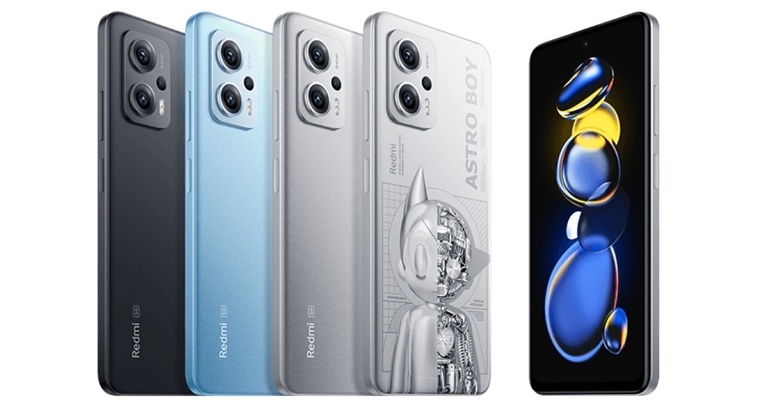
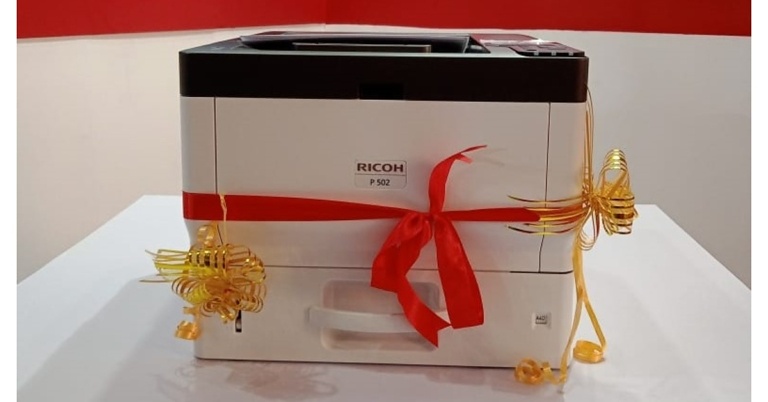
 The Intel processor in the P502 printers effortlessly processes complex jobs and eliminates bottlenecks by printing the first 1,200 x 1,200 dpi print in less than 5 seconds and multi-page document sets at a blistering 45 pages per minute. The RICOH P 502 is a fast, easy-to-use 43 PPM printer that can meet all enterprise black and white print needs. Employees can print directly from their iOS and Android devices, with easy password protection to lock confidential documents, thanks to the intuitive PCL and PostScript 3 drivers. The intelligent platform also supports the use of integrated workflow solutions, such as RICOH Streamline NX, to ensure business security.
Along with the RICOH P 502, the Print Pack 2022 also features the Pro C7200X, a high-end colour production printer; Pro C5300S, an affordable high-speed colour production printer; Pro 8300, an affordable high-speed B&W production printer; and DD 3344, a high-speed digital duplicator/copy printer suitable for education and small jobber and copy shops.
Commenting on the launch, Mr. Atul Thakker, Managing Director, Minosha India Ltd. said- “The unveiling of our new product RICOH P 502 will mark a new stage in the company’s development. It is a significant launch for Minosha India to increase its reconditioning capacity to offer our customers reliable and affordable tech-savvy printing solutions with unmatched satisfaction. This new launch integrates the company’s best know-how and establishes its ambition to offer a more virtuous model of compact, precise and economical office solutions.”
For the latest gadget and tech news, and gadget reviews, follow us on Twitter, Facebook and Instagram. For newest tech & gadget videos subscribe to our YouTube Channel. You can also stay up to date using the Gadget Bridge Android App. You can find the latest car and bike news here.
The Intel processor in the P502 printers effortlessly processes complex jobs and eliminates bottlenecks by printing the first 1,200 x 1,200 dpi print in less than 5 seconds and multi-page document sets at a blistering 45 pages per minute. The RICOH P 502 is a fast, easy-to-use 43 PPM printer that can meet all enterprise black and white print needs. Employees can print directly from their iOS and Android devices, with easy password protection to lock confidential documents, thanks to the intuitive PCL and PostScript 3 drivers. The intelligent platform also supports the use of integrated workflow solutions, such as RICOH Streamline NX, to ensure business security.
Along with the RICOH P 502, the Print Pack 2022 also features the Pro C7200X, a high-end colour production printer; Pro C5300S, an affordable high-speed colour production printer; Pro 8300, an affordable high-speed B&W production printer; and DD 3344, a high-speed digital duplicator/copy printer suitable for education and small jobber and copy shops.
Commenting on the launch, Mr. Atul Thakker, Managing Director, Minosha India Ltd. said- “The unveiling of our new product RICOH P 502 will mark a new stage in the company’s development. It is a significant launch for Minosha India to increase its reconditioning capacity to offer our customers reliable and affordable tech-savvy printing solutions with unmatched satisfaction. This new launch integrates the company’s best know-how and establishes its ambition to offer a more virtuous model of compact, precise and economical office solutions.”
For the latest gadget and tech news, and gadget reviews, follow us on Twitter, Facebook and Instagram. For newest tech & gadget videos subscribe to our YouTube Channel. You can also stay up to date using the Gadget Bridge Android App. You can find the latest car and bike news here.  The Intel processor in the P502 printers effortlessly processes complex jobs and eliminates bottlenecks by printing the first 1,200 x 1,200 dpi print in less than 5 seconds and multi-page document sets at a blistering 45 pages per minute. The RICOH P 502 is a fast, easy-to-use 43 PPM printer that can meet all enterprise black and white print needs. Employees can print directly from their iOS and Android devices, with easy password protection to lock confidential documents, thanks to the intuitive PCL and PostScript 3 drivers. The intelligent platform also supports the use of integrated workflow solutions, such as RICOH Streamline NX, to ensure business security.
Along with the RICOH P 502, the Print Pack 2022 also features the Pro C7200X, a high-end colour production printer; Pro C5300S, an affordable high-speed colour production printer; Pro 8300, an affordable high-speed B&W production printer; and DD 3344, a high-speed digital duplicator/copy printer suitable for education and small jobber and copy shops.
Commenting on the launch, Mr. Atul Thakker, Managing Director, Minosha India Ltd. said- “The unveiling of our new product RICOH P 502 will mark a new stage in the company’s development. It is a significant launch for Minosha India to increase its reconditioning capacity to offer our customers reliable and affordable tech-savvy printing solutions with unmatched satisfaction. This new launch integrates the company’s best know-how and establishes its ambition to offer a more virtuous model of compact, precise and economical office solutions.”
For the latest gadget and tech news, and gadget reviews, follow us on Twitter, Facebook and Instagram. For newest tech & gadget videos subscribe to our YouTube Channel. You can also stay up to date using the Gadget Bridge Android App. You can find the latest car and bike news here.
The Intel processor in the P502 printers effortlessly processes complex jobs and eliminates bottlenecks by printing the first 1,200 x 1,200 dpi print in less than 5 seconds and multi-page document sets at a blistering 45 pages per minute. The RICOH P 502 is a fast, easy-to-use 43 PPM printer that can meet all enterprise black and white print needs. Employees can print directly from their iOS and Android devices, with easy password protection to lock confidential documents, thanks to the intuitive PCL and PostScript 3 drivers. The intelligent platform also supports the use of integrated workflow solutions, such as RICOH Streamline NX, to ensure business security.
Along with the RICOH P 502, the Print Pack 2022 also features the Pro C7200X, a high-end colour production printer; Pro C5300S, an affordable high-speed colour production printer; Pro 8300, an affordable high-speed B&W production printer; and DD 3344, a high-speed digital duplicator/copy printer suitable for education and small jobber and copy shops.
Commenting on the launch, Mr. Atul Thakker, Managing Director, Minosha India Ltd. said- “The unveiling of our new product RICOH P 502 will mark a new stage in the company’s development. It is a significant launch for Minosha India to increase its reconditioning capacity to offer our customers reliable and affordable tech-savvy printing solutions with unmatched satisfaction. This new launch integrates the company’s best know-how and establishes its ambition to offer a more virtuous model of compact, precise and economical office solutions.”
For the latest gadget and tech news, and gadget reviews, follow us on Twitter, Facebook and Instagram. For newest tech & gadget videos subscribe to our YouTube Channel. You can also stay up to date using the Gadget Bridge Android App. You can find the latest car and bike news here. 
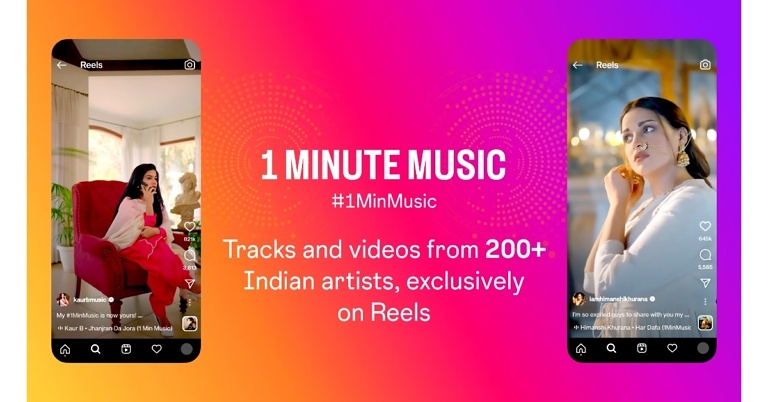
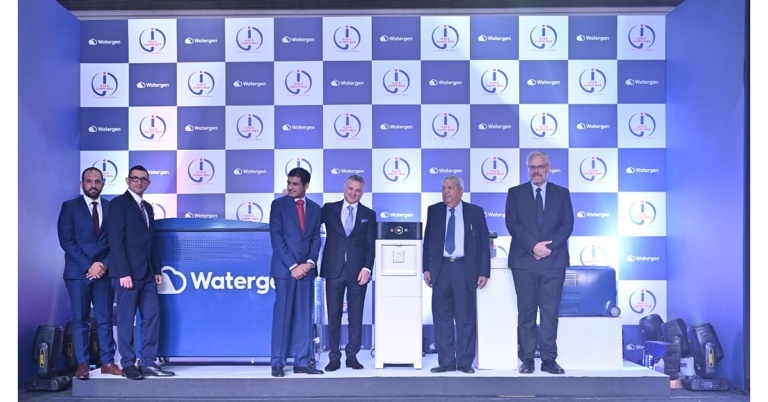


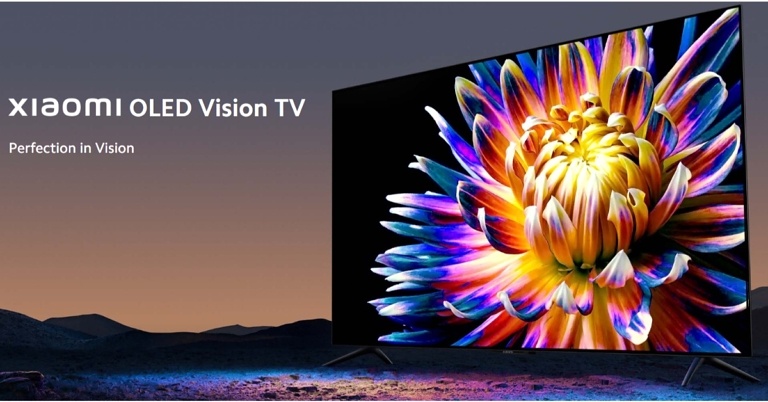


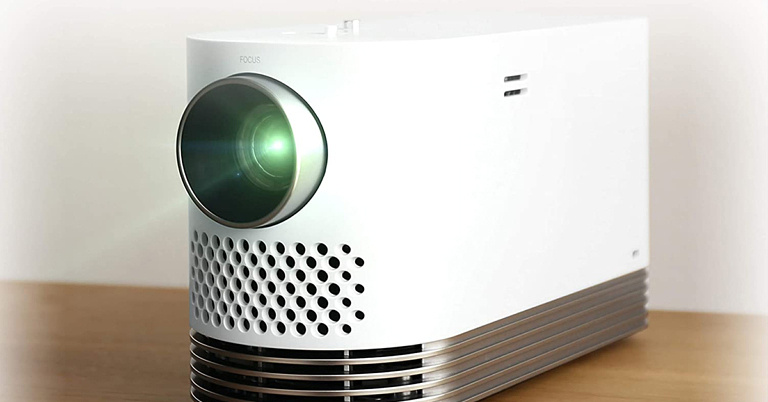
 The first one on our list of the best portable projectors of 2022 for your office and entertainment needs is from the popular Samsung brand. Called ‘The Freestyle’, it can project screens from 30-inches up to a 100-inches. It has a smart interface with inbuilt OTT apps like Netflix, Hotstar, and more, and has an omnidirectional 360-degree sound with Dolby Digital Plus. It projects in 1080p FHD resolution and is also HDR compatible. Moreover, it comes with Alexa and Bixby voice assist, smart remote, mobile mirroring, and Bluetooth connectivity.
The most interesting and highlighted features of The Freestyle include Auto Keystone for correcting skewed images automatically, Auto Focus for sharper and clearer images, and Auto Leveling for ensuring the screen stays level on any surface. It is priced at Rs 84,990.
Buy from here.
The first one on our list of the best portable projectors of 2022 for your office and entertainment needs is from the popular Samsung brand. Called ‘The Freestyle’, it can project screens from 30-inches up to a 100-inches. It has a smart interface with inbuilt OTT apps like Netflix, Hotstar, and more, and has an omnidirectional 360-degree sound with Dolby Digital Plus. It projects in 1080p FHD resolution and is also HDR compatible. Moreover, it comes with Alexa and Bixby voice assist, smart remote, mobile mirroring, and Bluetooth connectivity.
The most interesting and highlighted features of The Freestyle include Auto Keystone for correcting skewed images automatically, Auto Focus for sharper and clearer images, and Auto Leveling for ensuring the screen stays level on any surface. It is priced at Rs 84,990.
Buy from here.
 The LG HF80LG is a Full HD portable laser projector that is compact in size and projects with 2000 lumens of brightness. It has a claimed 20,000hrs life and projects a 120-inch screen. Moreover, it also supports wireless screen sharing with mobiles and PC as well as Bluetooth connectivity. It has an easy USB plug-and-play system. You can get it at a price of Rs 1,34,492.
Buy from here.
Read also: Top 3 4K Projectors You Can Buy Under Rs 50,000 in 2022
The LG HF80LG is a Full HD portable laser projector that is compact in size and projects with 2000 lumens of brightness. It has a claimed 20,000hrs life and projects a 120-inch screen. Moreover, it also supports wireless screen sharing with mobiles and PC as well as Bluetooth connectivity. It has an easy USB plug-and-play system. You can get it at a price of Rs 1,34,492.
Buy from here.
Read also: Top 3 4K Projectors You Can Buy Under Rs 50,000 in 2022
 The next one comes from the well-known BenQ brand. The BenQ GV30 projects with 720p HD resolution and supports up to 4K resolution with the HDMI port. The screen brightness is 300 ANSI Lumens. It is lightweight and comes with a handy strap as well as a trendy carrying bag. Moreover, the GV30 projector comes along with Android TV 9.0 and Google Play Store as well as 2.1 channel Bluetooth speakers with extra bass which include 2 4W midrange tweeters and an 8W woofer. The device is compatible with AirPlay and Chromecast wireless casting, built-on Wi-Fi hotspot, HDMI, and Bluetooth connectivity. It comes at a price of Rs 52,500.
Buy from here.
The next one comes from the well-known BenQ brand. The BenQ GV30 projects with 720p HD resolution and supports up to 4K resolution with the HDMI port. The screen brightness is 300 ANSI Lumens. It is lightweight and comes with a handy strap as well as a trendy carrying bag. Moreover, the GV30 projector comes along with Android TV 9.0 and Google Play Store as well as 2.1 channel Bluetooth speakers with extra bass which include 2 4W midrange tweeters and an 8W woofer. The device is compatible with AirPlay and Chromecast wireless casting, built-on Wi-Fi hotspot, HDMI, and Bluetooth connectivity. It comes at a price of Rs 52,500.
Buy from here.
 Yet another one from the BenQ brand to make it to our list of the best portable projectors of 2022 is its GS2 model. This portable LED projector comes with Full HD support, built-in 4W Bluetooth speakers, wireless casting, autofocus and keystone correction, HDMI and USB connectivity as well as a splash and drop-proof design. It also comes with an adjustable hinge, eye-protection sensor, a parental timer, and many more features. It is priced at Rs 32,990.
Buy from here.
Read also: Viewsonic M2e Instant Smart 1080p Portable LED Projector launched in India
Yet another one from the BenQ brand to make it to our list of the best portable projectors of 2022 is its GS2 model. This portable LED projector comes with Full HD support, built-in 4W Bluetooth speakers, wireless casting, autofocus and keystone correction, HDMI and USB connectivity as well as a splash and drop-proof design. It also comes with an adjustable hinge, eye-protection sensor, a parental timer, and many more features. It is priced at Rs 32,990.
Buy from here.
Read also: Viewsonic M2e Instant Smart 1080p Portable LED Projector launched in India
 Finally, we come to the last item on our list, the ViewSonic M1 portable projector which has a compact size such that it can fit right into your pocket. It projects a screen of up to 100 inches with 854x480p resolution and also has 1080p support. For an immersive audio experience, it comes integrated with JBL speakers. It has a simple USB plug-and-play system and a built-in battery which provides about 2.5 hours of power. It is priced at Rs 20,990.
Buy from here.
So those were our top picks for the 5 best portable LED projectors of 2022 that are best for your office and entertainment needs. We would love to hear your suggestions as well. Do share with us in the comments section below.
For the latest gadget and tech news, and gadget reviews, follow us on Twitter, Facebook and Instagram. For newest tech & gadget videos subscribe to our YouTube Channel. You can also stay up to date using the Gadget Bridge Android App. You can find the latest car and bike news here.
Finally, we come to the last item on our list, the ViewSonic M1 portable projector which has a compact size such that it can fit right into your pocket. It projects a screen of up to 100 inches with 854x480p resolution and also has 1080p support. For an immersive audio experience, it comes integrated with JBL speakers. It has a simple USB plug-and-play system and a built-in battery which provides about 2.5 hours of power. It is priced at Rs 20,990.
Buy from here.
So those were our top picks for the 5 best portable LED projectors of 2022 that are best for your office and entertainment needs. We would love to hear your suggestions as well. Do share with us in the comments section below.
For the latest gadget and tech news, and gadget reviews, follow us on Twitter, Facebook and Instagram. For newest tech & gadget videos subscribe to our YouTube Channel. You can also stay up to date using the Gadget Bridge Android App. You can find the latest car and bike news here. 
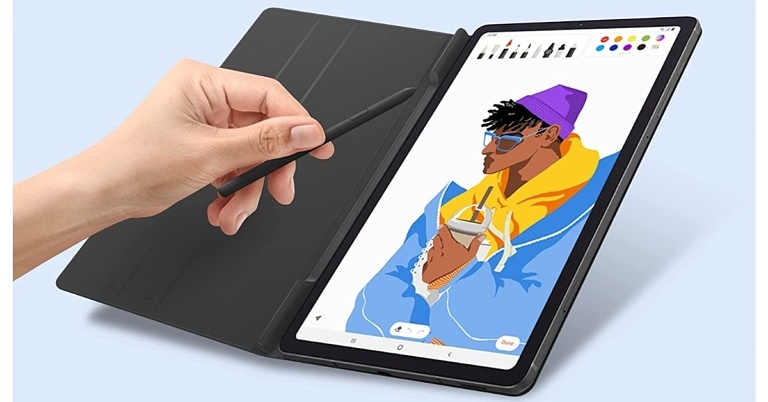
 To recall, in 2020 Galaxy Tab S6 Lite was launched at Rs 27,900. Angora Blue, Chiffon Pink, and Oxford Gray were the three colour options for the older Galaxy Tab

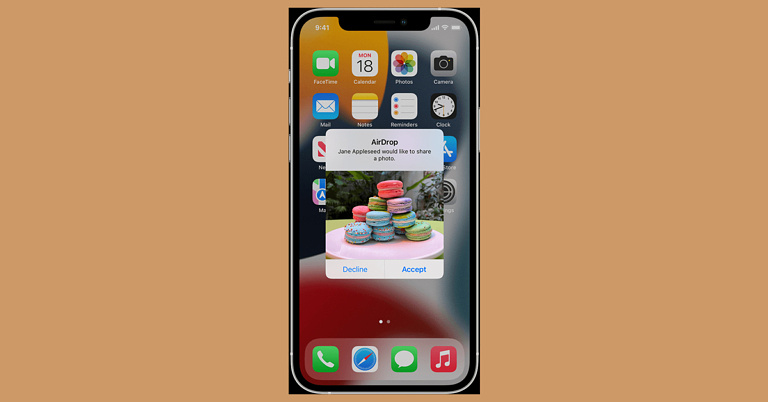
 Step 1: Go to Settings > Screen Time.
Step 2: Tap on Content & Privacy Restrictions.
Step 3: Tap on Allowed Apps and makes sure that AirDrop is turned on.
Read also: How To Eject Water From Your iPhone Using Siri (2022)?
Step 1: Go to Settings > Screen Time.
Step 2: Tap on Content & Privacy Restrictions.
Step 3: Tap on Allowed Apps and makes sure that AirDrop is turned on.
Read also: How To Eject Water From Your iPhone Using Siri (2022)?
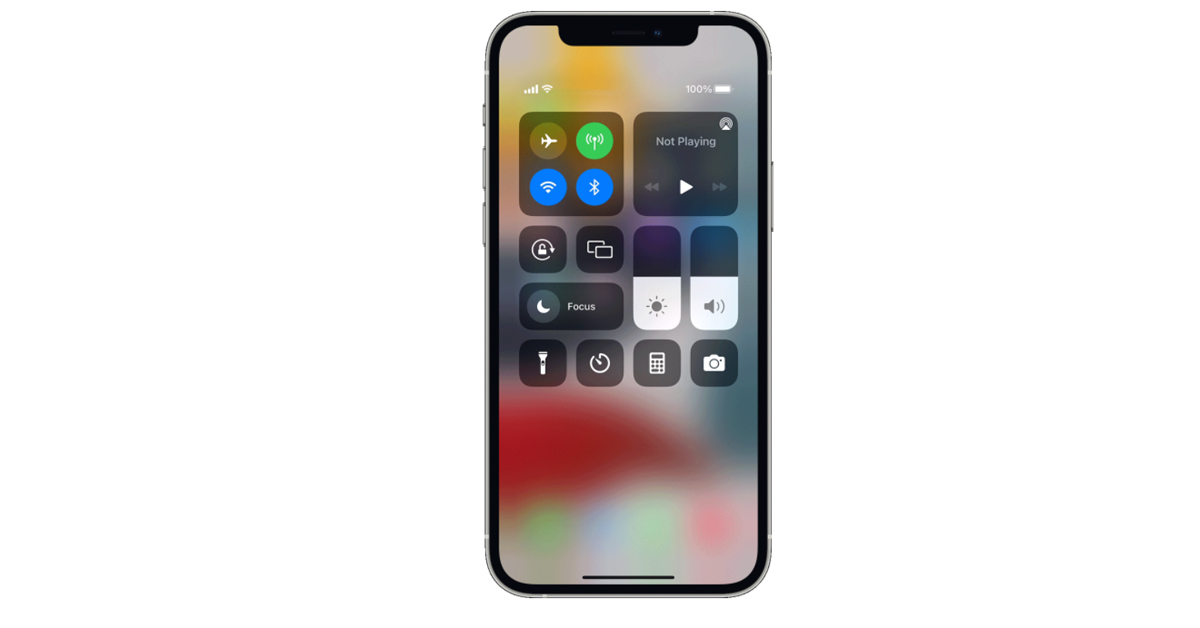 Step 3: Touch and hold the AirDrop button. You are provided with a list containing 3 options.
 Step 4: If the Receiving Off option is selected, change it by tapping on either of the other two options as per your requirement, and you’re all set.
 Read also: How To Hard Reset iPhone 13 (2022)? A Quick And Easy Stepwise Guide
In this way, you can easily turn on AirDrop on your iPhone, no matter whichever model you are using. And it is just a matter of a couple of clicks, isn’t it?
If you know of any other ways or means how to turn on AirDrop on iPhone in 2022, we would be delighted to hear about it. Do share with the rest of us in the comments section below.
For the latest gadget and tech news, and gadget reviews, follow us on Twitter, Facebook and Instagram. For newest tech & gadget videos subscribe to our YouTube Channel. You can also stay up to date using the Gadget Bridge Android App. You can find the latest car and bike news here.
Read also: How To Hard Reset iPhone 13 (2022)? A Quick And Easy Stepwise Guide
In this way, you can easily turn on AirDrop on your iPhone, no matter whichever model you are using. And it is just a matter of a couple of clicks, isn’t it?
If you know of any other ways or means how to turn on AirDrop on iPhone in 2022, we would be delighted to hear about it. Do share with the rest of us in the comments section below.
For the latest gadget and tech news, and gadget reviews, follow us on Twitter, Facebook and Instagram. For newest tech & gadget videos subscribe to our YouTube Channel. You can also stay up to date using the Gadget Bridge Android App. You can find the latest car and bike news here. 
 The easiest method to take a screenshot on your Windows 11 PC is by pressing the PrintScreen key (PrtScn or PrtScr) on your keyboard. When you press the PrintScreen key solely, the system takes a snapshot of your current screen and copies it to the clipboard. The screenshot gets stored temporarily in your PC’s memory. You can then directly go to the document, file, or space where you want to attach the screenshot and press Ctrl+V to paste it.
However, remember that if you press the PrtScn key once and then press it again without pasting or saving the previous screenshot in a document, the former capture would be lost. This means that you would only be able to retrieve the screenshot taken from your latest PrtScn button press. Every time you press the PrintScreen key, you have to manually store it at the required place. Hence, do not forget to save the screen capture before you head on to take the next screenshot and press the PrtScn key again.
Read also: How To Take A Screenshot On Your iPad (2022)? Top 3 Best Ways
The easiest method to take a screenshot on your Windows 11 PC is by pressing the PrintScreen key (PrtScn or PrtScr) on your keyboard. When you press the PrintScreen key solely, the system takes a snapshot of your current screen and copies it to the clipboard. The screenshot gets stored temporarily in your PC’s memory. You can then directly go to the document, file, or space where you want to attach the screenshot and press Ctrl+V to paste it.
However, remember that if you press the PrtScn key once and then press it again without pasting or saving the previous screenshot in a document, the former capture would be lost. This means that you would only be able to retrieve the screenshot taken from your latest PrtScn button press. Every time you press the PrintScreen key, you have to manually store it at the required place. Hence, do not forget to save the screen capture before you head on to take the next screenshot and press the PrtScn key again.
Read also: How To Take A Screenshot On Your iPad (2022)? Top 3 Best Ways
 An even faster method to take a screenshot on your Windows 11 PC is by pressing the Windows key along with the PrintScreen key simultaneously. By using the Windows + PrtScn shortcut, the captured screenshot automatically gets stored in the Screenshots folder within the Pictures folder on your system, so you won’t have to worry about data loss. You can easily access these by going to File Explorer > Pictures > Screenshots.
Note that in case you haven’t used this shortcut before, the Screenshots folder might not be visible to you at first. However, once you press the Windows + PrtScn keys, the folder automatically gets created, storing the capture within it. From here, you can access all your Windows 11 screenshots anytime you want.
An even faster method to take a screenshot on your Windows 11 PC is by pressing the Windows key along with the PrintScreen key simultaneously. By using the Windows + PrtScn shortcut, the captured screenshot automatically gets stored in the Screenshots folder within the Pictures folder on your system, so you won’t have to worry about data loss. You can easily access these by going to File Explorer > Pictures > Screenshots.
Note that in case you haven’t used this shortcut before, the Screenshots folder might not be visible to you at first. However, once you press the Windows + PrtScn keys, the folder automatically gets created, storing the capture within it. From here, you can access all your Windows 11 screenshots anytime you want.
 Windows 11 also provides its users with a built-in Snipping Tool. You can use this Snipping Tool in case you want a screenshot of only a specific part of the screen and not the entire screen itself. To access the Snipping toolbar, you need to press Windows Key + Shift + S keys together. You are provided with a couple of tools which help you with selecting the required area you want to snip, in the required shape. All you need to do is select the required tool, drag your mouse and release when you are satisfied with the results.
Once you’ve created your screenshot, a thumbnail of the capture appears on the bottom right corner of your Windows screen for a couple of seconds. You can click on it for editing it further or saving it at the required location.
Read also: How To Highlight, Draw And Write On Android Smartphone Screenshots
Windows 11 also provides its users with a built-in Snipping Tool. You can use this Snipping Tool in case you want a screenshot of only a specific part of the screen and not the entire screen itself. To access the Snipping toolbar, you need to press Windows Key + Shift + S keys together. You are provided with a couple of tools which help you with selecting the required area you want to snip, in the required shape. All you need to do is select the required tool, drag your mouse and release when you are satisfied with the results.
Once you’ve created your screenshot, a thumbnail of the capture appears on the bottom right corner of your Windows screen for a couple of seconds. You can click on it for editing it further or saving it at the required location.
Read also: How To Highlight, Draw And Write On Android Smartphone Screenshots
 If pressing a combination of keys sounds a little complicated to you, you still don’t have to worry. Windows 11 allows you to set the PrtScn key as the button for directly opening up the Snipping Tool. All you have to do is go to Start > Settings > Accessibility > Keyboard and toggle on the ‘Use the Print Screen button to open screen snipping’ option. That’s it!
Now you can get a refined screenshot via the Snipping Tool anytime you want, straight away by pressing the PrtScn button on the keyboard.
If pressing a combination of keys sounds a little complicated to you, you still don’t have to worry. Windows 11 allows you to set the PrtScn key as the button for directly opening up the Snipping Tool. All you have to do is go to Start > Settings > Accessibility > Keyboard and toggle on the ‘Use the Print Screen button to open screen snipping’ option. That’s it!
Now you can get a refined screenshot via the Snipping Tool anytime you want, straight away by pressing the PrtScn button on the keyboard.
 You may not be familiar with the Xbox Gamebar if you’re not a gamer, but it is a great tool to take quick screenshots and record your PC’s screen. Press Windows + G to launch the Gamebar, or simply search for it on the taskbar. Once launched, use the camera icon to open the ‘Capture’ toolbar. Click the camera icon in the Capture toolbar to take a quick screenshot.
 If you can’t get the Snipping Tool or Xbox Gamebar to work on your PC, there are plenty of third-party apps in the Microsoft Store that will help you take a quick screenshot. Nimble Screenshots and Screenshot Easy are two of the best apps you can use to take a screenshot on a Windows PC.
 Since Microsoft Surface’s keyboard attachment does not have a PrtScn key, users often wonder how to take a quick screenshot on the tablet. The answer is quite simple. Windows Surface follows the same method as most Android tablets. Simply press the power key and volume up button simultaneously to take a quick screenshot.

 In an interview, Tom Howard, Nothing’s Head of Design discussed about the design and build of the upcoming smartphone Nothing Phone 1. According to the interview, the device will carry transparent design language similar to Nothing Ear 1 TWS earphones that was released last year. As per the company its aim is to reintroduce excitement and optimism to the industry. And their distinct design identity is consistent across all products and plays with transparency, but designers and engineers are fighting an uphill battle. Apart from that, the phone will support wireless charging. “we started to sketch different layouts that broke away from typical Android phones, choosing the wireless charging coil as our hero among the hundreds of components, and played with it like a puzzle,” he said.
 The phone’s manufacturing process was described by Howard as a “jigsaw puzzle,” with cameras, charging coils, and other components being highlighted. Custom wallpapers, widgets, sounds, and Nothing OS, which includes a custom launcher, are expected to be included in the smartphone.
‘There are over 400 components in a smartphone, assembled in layers. We wanted to celebrate the “good ones”, the things we thought were really interesting to emphasise’ he quoted.
The design is said to be inspired by Massimo Vignelli’s New York subway map and the way he connected a complex system and made it look like art.
The phone’s manufacturing process was described by Howard as a “jigsaw puzzle,” with cameras, charging coils, and other components being highlighted. Custom wallpapers, widgets, sounds, and Nothing OS, which includes a custom launcher, are expected to be included in the smartphone.
‘There are over 400 components in a smartphone, assembled in layers. We wanted to celebrate the “good ones”, the things we thought were really interesting to emphasise’ he quoted.
The design is said to be inspired by Massimo Vignelli’s New York subway map and the way he connected a complex system and made it look like art.
 Ahead of the official announcement of Nothing Phone (1) a new leak suggests that Nothing Phone 1 will be released on July 21. The smartphone’s price has also been revealed. The Nothing Phone 1 will most likely be a mid-range device. The smartphone could cost around EUR 500, according to the report (roughly Rs 41,400).
Nothing previously announced the first of many partnerships for its highly anticipated smartphone phone in the United Kingdom, Europe, and India (1). Nothing Phone 1 will be available in India through Flipkart. Following the success of ear (1), the company’s highly anticipated smartphone product phone (1) will launch in Summer 2022, according to Nothing (1). This is the continuation of a fruitful collaboration that began in 2021. (when Nothing announced its entry into India). In Germany, Telekom Deutschland will be the sole provider of phone (1), which will be available for purchase online and in select stores.
For the latest gadget and tech news, and gadget reviews, follow us on Twitter, Facebook and Instagram. For newest tech & gadget videos subscribe to our YouTube Channel. You can also stay up to date using the Gadget Bridge Android App. You can find the latest car and bike news here.
Ahead of the official announcement of Nothing Phone (1) a new leak suggests that Nothing Phone 1 will be released on July 21. The smartphone’s price has also been revealed. The Nothing Phone 1 will most likely be a mid-range device. The smartphone could cost around EUR 500, according to the report (roughly Rs 41,400).
Nothing previously announced the first of many partnerships for its highly anticipated smartphone phone in the United Kingdom, Europe, and India (1). Nothing Phone 1 will be available in India through Flipkart. Following the success of ear (1), the company’s highly anticipated smartphone product phone (1) will launch in Summer 2022, according to Nothing (1). This is the continuation of a fruitful collaboration that began in 2021. (when Nothing announced its entry into India). In Germany, Telekom Deutschland will be the sole provider of phone (1), which will be available for purchase online and in select stores.
For the latest gadget and tech news, and gadget reviews, follow us on Twitter, Facebook and Instagram. For newest tech & gadget videos subscribe to our YouTube Channel. You can also stay up to date using the Gadget Bridge Android App. You can find the latest car and bike news here.  In an interview, Tom Howard, Nothing’s Head of Design discussed about the design and build of the upcoming smartphone Nothing Phone 1. According to the interview, the device will carry transparent design language similar to Nothing Ear 1 TWS earphones that was released last year. As per the company its aim is to reintroduce excitement and optimism to the industry. And their distinct design identity is consistent across all products and plays with transparency, but designers and engineers are fighting an uphill battle. Apart from that, the phone will support wireless charging. “we started to sketch different layouts that broke away from typical Android phones, choosing the wireless charging coil as our hero among the hundreds of components, and played with it like a puzzle,” he said.
 The phone’s manufacturing process was described by Howard as a “jigsaw puzzle,” with cameras, charging coils, and other components being highlighted. Custom wallpapers, widgets, sounds, and Nothing OS, which includes a custom launcher, are expected to be included in the smartphone.
‘There are over 400 components in a smartphone, assembled in layers. We wanted to celebrate the “good ones”, the things we thought were really interesting to emphasise’ he quoted.
The design is said to be inspired by Massimo Vignelli’s New York subway map and the way he connected a complex system and made it look like art.
The phone’s manufacturing process was described by Howard as a “jigsaw puzzle,” with cameras, charging coils, and other components being highlighted. Custom wallpapers, widgets, sounds, and Nothing OS, which includes a custom launcher, are expected to be included in the smartphone.
‘There are over 400 components in a smartphone, assembled in layers. We wanted to celebrate the “good ones”, the things we thought were really interesting to emphasise’ he quoted.
The design is said to be inspired by Massimo Vignelli’s New York subway map and the way he connected a complex system and made it look like art.
 Ahead of the official announcement of Nothing Phone (1) a new leak suggests that Nothing Phone 1 will be released on July 21. The smartphone’s price has also been revealed. The Nothing Phone 1 will most likely be a mid-range device. The smartphone could cost around EUR 500, according to the report (roughly Rs 41,400).
Nothing previously announced the first of many partnerships for its highly anticipated smartphone phone in the United Kingdom, Europe, and India (1). Nothing Phone 1 will be available in India through Flipkart. Following the success of ear (1), the company’s highly anticipated smartphone product phone (1) will launch in Summer 2022, according to Nothing (1). This is the continuation of a fruitful collaboration that began in 2021. (when Nothing announced its entry into India). In Germany, Telekom Deutschland will be the sole provider of phone (1), which will be available for purchase online and in select stores.
For the latest gadget and tech news, and gadget reviews, follow us on Twitter, Facebook and Instagram. For newest tech & gadget videos subscribe to our YouTube Channel. You can also stay up to date using the Gadget Bridge Android App. You can find the latest car and bike news here.
Ahead of the official announcement of Nothing Phone (1) a new leak suggests that Nothing Phone 1 will be released on July 21. The smartphone’s price has also been revealed. The Nothing Phone 1 will most likely be a mid-range device. The smartphone could cost around EUR 500, according to the report (roughly Rs 41,400).
Nothing previously announced the first of many partnerships for its highly anticipated smartphone phone in the United Kingdom, Europe, and India (1). Nothing Phone 1 will be available in India through Flipkart. Following the success of ear (1), the company’s highly anticipated smartphone product phone (1) will launch in Summer 2022, according to Nothing (1). This is the continuation of a fruitful collaboration that began in 2021. (when Nothing announced its entry into India). In Germany, Telekom Deutschland will be the sole provider of phone (1), which will be available for purchase online and in select stores.
For the latest gadget and tech news, and gadget reviews, follow us on Twitter, Facebook and Instagram. For newest tech & gadget videos subscribe to our YouTube Channel. You can also stay up to date using the Gadget Bridge Android App. You can find the latest car and bike news here. 
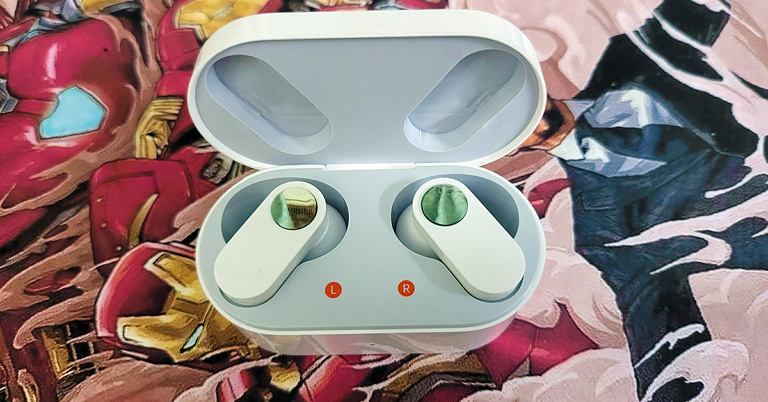
 Flip the sturdy lid open and you will find the shiny pearly white OnePlus Nord Buds. The design of these earphones is something we have not seen before. The stem of the earphones is flat like a pill but flatter. On it, you will find the silver feather touch buttons that can be used to play/pause music, skip tracks and take or reject calls. They respond well to each tap.
 12.4mm Titanium Audio drivers are placed within a robust conch-type enclosure attached to the stem at one end and has a silicone tip at the other. Two additional silicone tips are also available for different ear cavity types. The charging points and sensors can also be found on the audio driver’s enclosure. The MICs can be found on the stems. Each earbud weighs 4.8 grams, and the charging case has a weight of 41.7 grams. All in all, we quite liked the whole outlook of the OnePlus Nord Buds and they fit in well.
 Read Also: OnePlus Nord now unveiled in India for Rs 24,999, open sale to
 To cancel wind and other noise, the OnePlus Nord Buds comes with AI noise cancellation. Since there are 4 MICs on these audio earplugs, it uses the AI method of noise reduction when making voice calls. It works well in most cases and when testing it, the other side hardly heard anything besides our lovely voice. Not bad for sub 3K wireless earphones.
 Moving to the battery life, the company claims OnePlus Nord Buds can last for 7 hours. On our test, we got about 6.5 hours from them. This is great as each earbud has just a 41mAh battery inside. The hours can be extended using the supplied charging case, which holds an additional 480mAh battery inside. So, the total playback hours can be extended to up to 30 hours. Over that, in case you run out of battery juice in the OnePlus Nord Buds, just put them back in the charging case and after 10 minutes of charge can use them again for 4.5-5 hours.
Read Also: OnePlus Nord 2 5G with triple rear cameras goes on sale for the first
Moving to the battery life, the company claims OnePlus Nord Buds can last for 7 hours. On our test, we got about 6.5 hours from them. This is great as each earbud has just a 41mAh battery inside. The hours can be extended using the supplied charging case, which holds an additional 480mAh battery inside. So, the total playback hours can be extended to up to 30 hours. Over that, in case you run out of battery juice in the OnePlus Nord Buds, just put them back in the charging case and after 10 minutes of charge can use them again for 4.5-5 hours.
Read Also: OnePlus Nord 2 5G with triple rear cameras goes on sale for the first