In This Article
OnePlus Nord Buds review: Design
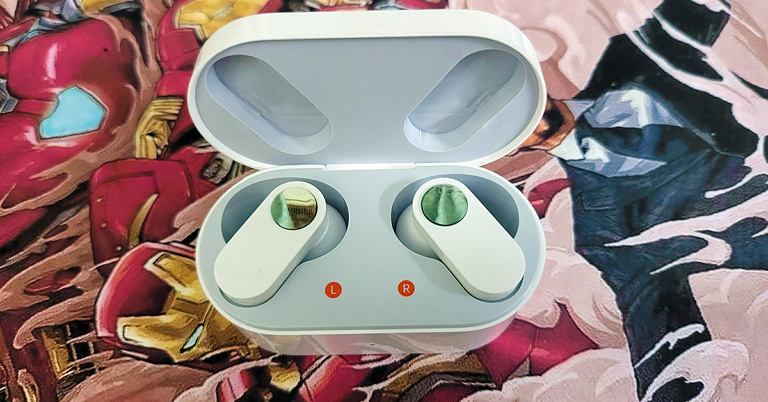
Unboxed, the OnePlus Nord Buds come inside a flat head and bottom charging case. Construct is somewhat similar to a makeup kit, which you see in western movies. Available in two colours black and white, we played around with the white version. The white case looks quite nice. It has the OnePlus branding in silver on top. A LED indicator can be seen on the front and a USB Type-C charging point can be seen at the back with a BT (Bluetooth) connection button. Flip the sturdy lid open and you will find the shiny pearly white OnePlus Nord Buds. The design of these earphones is something we have not seen before. The stem of the earphones is flat like a pill but flatter. On it, you will find the silver feather touch buttons that can be used to play/pause music, skip tracks and take or reject calls. They respond well to each tap.
 12.4mm Titanium Audio drivers are placed within a robust conch-type enclosure attached to the stem at one end and has a silicone tip at the other. Two additional silicone tips are also available for different ear cavity types. The charging points and sensors can also be found on the audio driver’s enclosure. The MICs can be found on the stems. Each earbud weighs 4.8 grams, and the charging case has a weight of 41.7 grams. All in all, we quite liked the whole outlook of the OnePlus Nord Buds and they fit in well.
 Read Also: OnePlus Nord now unveiled in India for Rs 24,999, open sale to
OnePlus Nord Buds review: Performance
Coming to the performance of the OnePlus Nord Buds, we were impressed on many counts. To start with, the sound is quite nice, and the vocals are very crisp. These are tuned with Dolby Atmos, so we enjoyed most listening experiences from various genres. The treble is at par with the industry. However, the bass could have been thumpy-er. To get to the best bass point, we tested it at two levels. Once, when connected to a laptop using BT. Here the bass was average. But when we moved to case 2, when connected with a smartphone, the equaliser options enabled us to boost the bass (using the Hey Melody app, bass mode). So, the results were much better here. Still, we felt a little bit more would have been superb. Something OnePlus can pick from the Oppo Enco counterparts. To cancel wind and other noise, the OnePlus Nord Buds comes with AI noise cancellation. Since there are 4 MICs on these audio earplugs, it uses the AI method of noise reduction when making voice calls. It works well in most cases and when testing it, the other side hardly heard anything besides our lovely voice. Not bad for sub 3K wireless earphones.
 Moving to the battery life, the company claims OnePlus Nord Buds can last for 7 hours. On our test, we got about 6.5 hours from them. This is great as each earbud has just a 41mAh battery inside. The hours can be extended using the supplied charging case, which holds an additional 480mAh battery inside. So, the total playback hours can be extended to up to 30 hours. Over that, in case you run out of battery juice in the OnePlus Nord Buds, just put them back in the charging case and after 10 minutes of charge can use them again for 4.5-5 hours.
Read Also: OnePlus Nord 2 5G with triple rear cameras goes on sale for the first
Moving to the battery life, the company claims OnePlus Nord Buds can last for 7 hours. On our test, we got about 6.5 hours from them. This is great as each earbud has just a 41mAh battery inside. The hours can be extended using the supplied charging case, which holds an additional 480mAh battery inside. So, the total playback hours can be extended to up to 30 hours. Over that, in case you run out of battery juice in the OnePlus Nord Buds, just put them back in the charging case and after 10 minutes of charge can use them again for 4.5-5 hours.
Read Also: OnePlus Nord 2 5G with triple rear cameras goes on sale for the first











 Step 1:



 There are multiple occasions on which one might need to take a screenshot. You may be a professor who is explaining a procedure to their students digitally, or you may be a friend helping another friend or a family member navigate through their brand-new iPad and understand its functions, that too sitting at your home. Whatever the situation is, in case you’re not sure how to take a screenshot on an