The South Korean electronics giant, Samsung, has officially announced that it will host the Samsung Galaxy MWC Virtual Event on June 28. The company has less openness about the Mobile World Congress event, but the firm is expected to showcase its upcoming device at the tech event. It is likely to introduce its next iteration of foldable devices along with Galaxy smartwatches at the MWC 2021.Samsung has the tradition of hosting Galaxy Unpacked events to announce its new devices. Not going by tradition, the company has new plans to go with at the Samsung Galaxy MWC Virtual Event that is scheduled to happen on June 28. The tech event will be held in Spain, which is going to be its global mobile exhibition to kickstart at 07:15 pm CET (10:45 pm IST). The Mobile World Congress event will be hosted online and live-streamed through the company’s YouTube channel and the Samsung Newsroom site. The announcement on the company’s official website reads, “Samsung Electronics will hold the ‘Samsung Galaxy Virtual Event’ at the Mobile World Congress (MWC), a global mobile exhibition that opens on the 28th (local time in Spain).” The company further added, “This online event can be viewed live on theSamsung Electronics Newsroom andSamsung YouTube channel from 3:15 a.m. on the 29th of Korea time.”The information is very scarce but the teaser hints at announcing a foldable phone, tablet and a new smartwatch. While making the announcement the company said, “Samsung Electronics introduces the ever-expanding Galaxy device ecosystem. It also presents a vision for the future of smartwatches that will provide new experiences for users and new opportunities for developers. It also plans to present the latest technologies and innovation efforts of the company in relation to the growing importance of smart device security.”(translated to English).Besides this Samsung Galaxy Z Fold 3, Galaxy Z Flip 3, Galaxy Watch 4, and Galaxy Watch Active 4 are the new upcoming devices that are tipped to launch at the company’s next Galaxy Unpacked event, which is likely to be held on August 3.The Samsung Galaxy Watch 4 is said to arrive in two sizes 42mm and 46mm. On the other hand, Samsung Galaxy Watch Active 4 will be available in 40mm and 44mm sizes.
For the latest gadget and tech news, and gadget reviews, follow us on Twitter, Facebook and Instagram. For newest tech & gadget videos subscribe to our YouTube Channel. You can also stay up to date using the Gadget Bridge Android App
The updates on Google Meet to blur background before a meeting or during a meeting have been finally rolled out. And now you can toggle it on or off easily to blur the image. It may be that messy day right before that meeting, or that unexpected meeting when you are not in a private space. The blurred background is designed to make your work more convenient and comfortable with the new feature. Find out how to toggle on the feature in the steps below.
Click on or off before a meeting:
The feature will help you work in many ways. The blurred background will limit the unwanted distraction and it will also make that background more focused with you just on the screen and all the other things out of focus. Before enabling the blur feature you should know that users who are not logged into Google accounts and have joined the video call can only change the background once. So it is better if you log in from your Google account and make use of the blur feature. Follow the steps for more
The bright side of the feature is you can make use of the blur feature even when you are on a video call. The steps are not very different from the above and it is easy and simple. Check the steps below to know how to change to the blurred background in Google Meet when it has started.
During the video call meeting on the screen go to more on the bottom
With the windows open up select Change background
Now with the side panel option choose the two option: Slightly blur the background or blur your background
You can also use pre-uploaded images or your own image in the background
Click on blur your background to completely blur the background
You can also download the Background blur for the Google Meet extension on your browser. The extension will blur the background during a Google Meet or Hangout video call. The extension also allows you to control your desired level of blur. Download this free Chrome extension and blur your background during the meeting. Check the guide below to know how to download the extension and add it to Chrome.
Open Google Chrome browser and click the three-dot icon on the top right corner
Go to settings and on the side panel find the extension
Now click on the three horizontal lines on the top right corner and scroll down to the bottom
Select Open Chrome Web store
And on the Search the Store tab: Type Background Blur for Google Meet
Now on the left side with the blue icon Add to Chrome: Select it
When you have added the extension now you turn on/off the blur option at the top of the screen with the click turn on/off button
With remote work and education gaining popularity, Zoom has rolled out another feature. With the latest 5.5.0 update Zoom has introduced the blur background feature. So you can now blur everything in the background except you on the video call. The feature will encourage privacy and a distraction-free video calling experience. Follow the steps to know how to use the new feature
Enable blur background before the Zoom meeting:
First of all, to enable this blur background feature you need to make sure the Zoom client version is updated to 5.5.0. The new feature on Zoom video call will give you a new level of privacy without making you choose a virtual backdrop that needs to be downloaded. Now with the new option, you do not have to show your private space or your room; the blurred background will take care of it. Check the steps below to blur the background before your Zoom meeting.
The first step, open the Zoom client on your device
Go to the setting icon on the top right corner and click the icon
And on the side panel that comes out find Background & Filters
Select the Virtual background option and Click the pointer on Blur
Now enable the blur feature so when the meeting starts except yourself everything goes out of focus
ZooRanging from messy rooms to unable to find proper privacy maintaining space for a meeting the new feature from Zoom Client video will cover it all. Before the feature was rolled out the background had to be dealt with the virtual background, which does not work well without proper lighting. Follow the below steps and find out how to enable blur background during a Zoom meeting.
Navigate to the stop icon on the button left corner and click on the up arrow on it
Now select the Choose Virtual Background option
The sidebar will open and go to Background & Filter’s
Now you can Tap on Blur and make the effect appear on your screen
The feature will be applied and focus will go out on the background except you
WhatsApp updates the feature regularly and this time they have updated the feature to mute videos. The instant messaging app has rolled out this new awaited feature for Android users recently. Now you can mute the videos before sharing them on the status as well. Follow to know how to enable the new feature.
Read more: How to do WhatsApp video calls on the web?
Mute videos before sending them on WhatsApp
What are the features that WhatsApp is working on to enhance expression?The mute feature was introduced recently for Android users, the mute feature is already available on Instagram, and Facebook now it is time for Whatsapp to make use of this feature. The feature works very well in situations where the audio of the video is not required to be shared. Find out how to use this feature and mute videos before sending them on WhatsApp below.
For you to start sending muted videos, first you have to make sure you have updated to the latest version of WhatsApp. The feature will only work with the latest version it has been updated with.
Open your WhatsApp: Log in if you are not
Start by opening the contact chat window
Now find the paperclip icon near the type bar
And go to the gallery to attach a video
If you want to record a video, go back to the camera and record a video. Or if you send an existing video select the video from the gallery
The video you have selected from the gallery or the one that has captured will appear on the screen
You have the option to alter it or edit the video
On the same page, you will find a speaker icon on the top left corner
You have to click on the speaker icon to mute the video you are sharing on the WhatsApp
Now click on the send button and you have muted the video
Read also: Know how WhatsApp users can send Payments in IndiaTo use some more advanced features you can crop a video from the frame and change it to GIF, but you have to decrease the video to 6 seconds or less. You can convert your video into a GIF of 6 seconds by clicking on the GIF option in the top right corner. And for more information about the mute video feature on WhatsApp as of now, the feature is available for just Android users the timeline of when this feature will be featured on the iOS Whatsapp app has not been revealed but it is rumored to be coming soon.
For the latest gadget and tech news, and gadget reviews, follow us on Twitter, Facebook and Instagram. For newest tech & gadget videos subscribe to our YouTube Channel. You can also stay up to date using the Gadget Bridge Android App.
Mi 11 Lite and Mi Watch Revolve Active are set to make their official debut today in India. Mi 11 Lite second device to join the Mi 11 series that already includes Mi 11 Ultra and now the toned-down variant will join the mix. However, the company has not introduced the Pro variant from the Series in the country, which has already debuted in China with both the other two siblings in March this year. On the other hand, Mi Watch Revolve Active is the follow up of the Mi Watch Revolve that was launched in India last year.How to watch the Livestream of Mi 11 Lite and Mi Watch Revolve ActiveMi 11 Lite and Mi Watch Revolve Active are scheduled to launch in India today The launch event of the device will kickstart at 12 noon onwards and will be live-streamed via the company’s official YouTube channel including its social media accounts. We have embedded the link below for your convenience.
After the official launch in the country, Mi 11 Lite will be available for purchase via Flipkart whereas Mi Watch Revolve Active will go on sale via Amazon. Ahead of the official launch, the upcoming smartphone was teased to be made available in three colour options of Jazz Blue, Tuscany Coral, and Vinyl Black. All the three colour variants are said to be inspired by a region in Italy, a music genre & phonographic records.Mi 11 Lite specificationsMi 11 Lite will come with a 6.55-inch full-HD+ AMOLED display with 1,080×2,400 pixels of resolution and 90Hz refresh rate support. The Mi 11 Lite 4G runs MIUI 12 on top of Android 11 out of the box. It will be powered by Qualcomm Snapdragon 732G SoC with up to 8GB of LPDDR4X RAM and up to 128GB of UFS 2.2 storage. For the optics, the smartphone will be highlighted with a triple camera set up on the rear panel that includes a 64-megapixel primary sensor. Further assisted by an 8-megapixel ultra-wide-angle lens and a 5-megapixel tele macro camera. For taking photos and videos there is a 16-megapixel front-facing camera.In terms of connectivity, there will be Wi-Fi, 4G, Bluetooth v5.1, NFC, GPS, and a USB Type-C port. The sensors on the phone include a proximity sensor, ambient light sensor, accelerometer, gyroscope, electronic compass, linear motor, IR Blaster and a side-mounted fingerprint scanner. It comes with a 4,250mAh battery that supports 33W fast charging.Mi Watch Revolve Active expected specificationAmazon has listed out some key specs of the Mi Watch Revolve Active. As per the dedicated microsite, the smartwatch will come with built-in GPS, Glonass, Galileo and BDS as connectivity options. Furthermore, there will be a blood oxygen saturation (SpO2) monitor, VO2 Max, Body Energy Monitor and HR Monitor. It would also include a maximum sports mode along with other features such as sleep management Amazon Alexa enabled for voice control, calls, app notification and more.
For the latest gadget and tech news, and gadget reviews, follow us on Twitter, Facebook and Instagram. For newest tech & gadget videos subscribe to our YouTube Channel. You can also stay up to date using the Gadget Bridge Android App.
If you are a YouTuber, or Travel blogger the list of best 5 drones is meant for you. Capturing 4K video has become a trend and buying the best 4K camera drone is a necessity. The eagle view that a drone shoots gets more stunning with the 4K camera it supports. Check out the list below.
DJI Mavic 2 Pro: 4K Video Adjustable
This drone by DJI comes with a remote control to adjust that 4K video experience. The Mavic 2 Pro is equipped with a smart controller and Hasselblad L1D-20c camera supporting a 20 MP 1-inch CMOS sensor. The drone has a flight time of 31 minutes, 44 mph max speed and 907G take off weight. It also features a 3-axis gimbal for steady shots for better aerial view. And supports memory of upto 128 GB. The screen is of 5.5-inch supporting 1080p display and of course can capture videos supporting 4K full HD.Price: Rs 1, 53,000Buy on Amazon.com
Read more: 5 best projectors you can buy under Rs 50,000
DJI Mavic 2 Zoom: 12 MP 1/ 2.3” CMOS
The Mavic 2 zoom is all about that dynamic zoom camera. The drone has a 1/ 2.3 inch 12 MP sensor with its main feature of 4x zoom including 2x optical zoom. It comes with 31 minute of flight time, 44 mph max speed, and 905 G take off weight. And also featuring 3-axis gimbal steady shots and support SD card up to 128 GB. The main attractions of this drone included ActiveTrack 2.0, Omnidirectional obstacle sensing, Hyperlapse Low-noise design, and Dolly zoom. Price: Rs 78,000Buy at Amazon.com
EVO Ⅱ: Autel Robotics: 6K Drones cameras
The amazing EVO Ⅱ not only can capture up to 6K resolution but it is portable folding aircraft. The drone comes with 20 MP and 1-inch sensor image quality for more reliability. The flight time of the drone is 40 minutes, which gives you the required time for capturing stunning 4K videos. This lightweight drone can be deployed in 30 second with 2.5lb (Pounds). Evo Ⅱ also has an 3.3 inch OLED screen.Price: Rs 1,45,000Buy from Amazon.com
Read also: Oppo Reno 4 Pro review: The stunner
Yuneec Typhoon H Plus: Hexacopter
The drone can capture 4K video and comes with a 20MP camera. It also features 360-Degree Image and Video capture feature, and a 3-Axis sensor driven Image stabilisation. The Yuneec Typhoon H Plus can give you up to 30 minutes of flight time. The drone also has Intelligent Autonomous Flight Modes. And also a Flight Controller with a 7-inch Touch Screen. Price: Rs 1, 86,000Buy now on Amazon.com
TATHASTU ENTERPRISE drone: 4K Camera
This drone is on the list for those who want to buy on Amazon.in. The Tathastu enterprise has many features to offer. It comes with a foldable design and a 120 Degree wide Angle camera. The drone also features WiFi FPV for app control through WiFi. The flight height of the drone is about 40-50 meters with very less flight time than on the above list. The drones also have other amazing features you can explore.Price: 6,000Available on Amazon. in
For the latest gadget and tech news, and gadget reviews, follow us on Twitter, Facebook and Instagram. For newest tech & gadget videos subscribe to our YouTube Channel. You can also stay up to date using the Gadget Bridge Android App.
The e-commerce website Flipkart is hosting Daily Trivia Quiz. Every day it brings a bunch of new questions for its users. By answering them correctly you can win exciting prizes. The questionnaire is based on questions related to general knowledge. Also, the users can win free vouchers and super coins, among other offers via the daily quiz. June 22 Flipkart Daily Trivia Quiz Answers has already gone live on its platform.
The participant should be at least 18 years old and should have a valid login ID. The Quiz is available on the mobile platform and not the web version. E-commerce conducts the quiz on daily basis and goes live at 12:00 AM IST and runs till 11:59 PM IST. The winners are announced within 15 days from the date of participation that can be viewed under the Gems/Rewards section in the app.
How to participate in the Flipkart Daily Trivia Quiz
To participate download the Flipkart app on your phone. Then open the Flipkart app then head to Game Zone. Now click on the Daily Trivia Banner or search for Daily Trivia. Enter the game and answer all 5 questions with correct answers.
June 22 Flipkart Daily Trivia Quiz Answers
Question 1: Which is the most mobile and powerful piece in chess?
Answer: Queen
Question 2: What is the nickname of Zimbabwe’s national men’s cricket team?
Answer: Chevrons
Question 3: Against which team did India record their highest successful T20 run chase?
Answer: West Indies
Question 4: Which is the only club this season to win all their group games in UEFA Champions League?
Answer: Bayern Munich
Question 5: To which country does former world number one tennis player Caroline Wozniacki belong?
Answer: Denmark
Amazon Quiz is getting more popular these days as more people have started participating in the quiz in the hope to win free gadgets as well as Amazon Pay Balance. The e-commerce platform brings Amazon Quiz on its mobile platform every day. The quiz can be played every day from 12 AM to 11:59 PM. Today you can stand a chance to win Rs 10,000 Amazon Pay Balance.
The Amazon Quiz has gone live on its platform. Every day it brings a new questionnaire to which the participants have to answer correctly. It consists of a total of five questions to which you have to answer correctly to enter the lucky draw. All the questions are based on general knowledge and current affairs. Amazon will announce the result of the quiz at the end of the month. Only app users are eligible to participate in the Quiz. To help our readers to clear the Amazon Quiz successfully, every day we update all the Amazon Quiz questions with their correct answers on our website to let you win Rs 10,000 Amazon Pay Balance. You can increase your chances of winning prizes by daily participating from 12 AM to 11:59 PM. We have already updated all the answers to today’s quiz below.
June 22 Amazon Quiz Answers
Question 1: Which organisation outlines the global strategy on occupational safety and health?
The answer is- ILO
Question 2: Whereabouts’ is the latest book released by which famous author of Indian origin?
The answer is- Jhumpa Lahiri
Question 3: Microsoft entered into a partnership with whom to build the world’s most powerful weather and climate forecasting supercomputer by 2022?
The answer is- UK Met Office
Question 4: These towers are located in which Asian country?
The answer is- Kuwait
Question 5: Identify the person.
The answer is- Walt Disney
On the special occasion of World Music Day, Sony India and India mobile maker Lava has introduced new audio products in the Indian market. Sony has introduced the SRS-XB13 Extra Bass portable wireless speaker that comes with an IP67 rating for dust and water resistance and is powered by Bluetooth for connectivity. On the other hand, Lava has announced its entry into the true wireless segment with the launch of its first-ever true wireless earphones- Lava Probuds.Sony SRS-XB13 Extra Bass portable wireless speaker price and specificationsSony SRS-XB13 Extra Bass portable wireless speaker has been launched in India with a price tag of Rs 3,990. It will be available for purchase at Sony retail stores (Sony Center and Sony Exclusive),www.ShopatSC.com portal, major electronic stores and on Amazon and Flipkart portal in India from today onwards.Coming to the features the new Sony SRS-XB13 Extra Bass portable wireless speaker comes with an Extra Bass and passive radiator that enhances low-end tones, boosting the bass. With Sound Diffusion Processor and has a single 46mm speaker driver. With its DSP technology, the Sound Diffusion Processor expands sound to fill up any space.The device is ideal for the outdoors and comes with a rugged design having an IP67 rating for protection from water and dust resistance. It has a multi-way strap that can be hung anywhere, whether that be on your backpack or on your wrist or even from a parasol. The Sony SRS-XB13 delivers up to 16-hours battery life with a battery indicator on your phone that shows the amount of charge left. It can be connected with other devices via Bluetooth and is incorporated with Google’s Fast Pair technology that allows you to quickly connect compatible Android smartphones or tablets.This Bluetooth speaker from Sony will be available in Black, Light Blue, Pink, Powder Blue, Taupe, and Yellow colour options.Lava Probuds price and specificationsLava Probuds have been launched in India at a retail price of Rs 2,199. The device will be available for sale starting June 24 via Lava e-store, Amazon, and Flipkart in the country. The company has also introduced a special introductory offer in which the earbuds can be grabbed for just Rs. 1. The special offer is valid from 24th June 12.00 pm onwards, until stocks last.Speaking of the features the Lava Probuds come with 11.6mm advanced drivers and MediaTek Airoha chipset to provide an immersive audio experience with powerful sound with deep bass and ensure no voice distortion during calls. The TWS earphones offer 25-hour long music playtime which is backed by a 55 mAh (each bud) battery and 500 mAh case battery.There is an instant ‘Wake and Pair Technology’ which power on the earbuds and enter connection mode as soon as charging case lid is opened. The Lava Probuds uses Bluetooth v5.0 which offers seamless as well as instant connectivity. In addition to this, the TWS earphones come with an IPX5 rating for water and sweat resistance. Additionally, Probuds enable users to directly access the voice assistant function by gently tapping twice on the right earbud.
Now you will be able to watch YouTube while using other apps with the new PiP mode in Apple products. YouTube is introducing this feature to iPhone and iPad users. The feature will be available for YouTube premium subscriptions. When you close the YouTube app the video you were watching will be displayed in a small window, which you will be able to move on the screen. Here is everything you need to know about picture-in-picture by YouTube.
Compatibility of OS
The picture-in-picture mode is already available for Android, but it is coming soon for iPhone and iPad users who have a YouTube subscription. An iPad with IOS 14 update or later, and iPhones with iOS 14 or later will be able to feature this mode. The PiP mode lets you watch YouTube videos in a mini player while simultaneously browsing other apps on the mobile. The mini player can move across the screen and also let you resize by pinching two fingers.
Read also: Twitter’s new feature will allow users to play YouTube videos in tweets within the app
Multitasking while using the phone
Now while you are watching YouTube you can Facetime also with the picture-in-picture mode. Multitasking on iPhone and iPad is made possible with the new feature. PiP will work even when you are using YouTube from Safari. You will still be able to multitask with a small window over other apps.
Read more: Microsoft released EA Play on Xbox Game Pass for PC and Auto HDR Preview for Windows
How to use PiP (picture-in-picture)
Before learning how to enable picture-in-picture mode you must have a Youtube premium subscription. And the mode should be enabled from any browser Chrome or Safari.
Open the Web browser from your iPhones or iPad.
Log in to your account which has a YouTube premium subscription.
Now search for any video you want to watch on the search bar and click the video.
Once you play the video, put the video on fullscreen by tapping the square icon.
Now tap on the video that is playing and you can view the controls.
Click the picture-in-picture button from the top-left side which is just next to the close button.
You can also use double tap or swipe up to enable the picture-in-picture mode.
Once you are in the picture-in-picture mode you can drag the mini window or resize it and use other apps while still playing YouTube video.
And you can exit the picture-in-picture mode by clicking on its icon from the top-right side in the small window.
You can also go to full screen by double-tapping on the video that is playing.




 The feature will help you work in many ways. The blurred background will limit the unwanted distraction and it will also make that background more focused with you just on the screen and all the other things out of focus. Before enabling the blur feature you should know that users who are not logged into Google accounts and have joined the video call can only change the background once. So it is better if you log in from your Google account and make use of the blur feature. Follow the steps for more
 The bright side of the feature is you can make use of the blur feature even when you are on a video call. The steps are not very different from the above and it is easy and simple. Check the steps below to know how to change to the blurred background in Google Meet when it has started.
 You can also download the Background blur for the Google Meet extension on your browser. The extension will blur the background during a Google Meet or Hangout video call. The extension also allows you to control your desired level of blur. Download this free Chrome extension and blur your background during the meeting. Check the guide below to know how to download the extension and add it to Chrome.
 The feature will help you work in many ways. The blurred background will limit the unwanted distraction and it will also make that background more focused with you just on the screen and all the other things out of focus. Before enabling the blur feature you should know that users who are not logged into Google accounts and have joined the video call can only change the background once. So it is better if you log in from your Google account and make use of the blur feature. Follow the steps for more
 The bright side of the feature is you can make use of the blur feature even when you are on a video call. The steps are not very different from the above and it is easy and simple. Check the steps below to know how to change to the blurred background in Google Meet when it has started.
 You can also download the Background blur for the Google Meet extension on your browser. The extension will blur the background during a Google Meet or Hangout video call. The extension also allows you to control your desired level of blur. Download this free Chrome extension and blur your background during the meeting. Check the guide below to know how to download the extension and add it to Chrome.

 First of all, to enable this blur background feature you need to make sure the Zoom client version is updated to 5.5.0. The new feature on Zoom video call will give you a new level of privacy without making you choose a virtual backdrop that needs to be downloaded. Now with the new option, you do not have to show your private space or your room; the blurred background will take care of it. Check the steps below to blur the background before your Zoom meeting.
 First of all, to enable this blur background feature you need to make sure the Zoom client version is updated to 5.5.0. The new feature on Zoom video call will give you a new level of privacy without making you choose a virtual backdrop that needs to be downloaded. Now with the new option, you do not have to show your private space or your room; the blurred background will take care of it. Check the steps below to blur the background before your Zoom meeting.
 ZooRanging from messy rooms to unable to find proper privacy maintaining space for a meeting the new feature from Zoom Client video will cover it all. Before the feature was rolled out the background had to be dealt with the virtual background, which does not work well without proper lighting. Follow the below steps and find out how to enable blur background during a Zoom meeting.




 This drone by DJI comes with a remote control to adjust that 4K video experience. The Mavic 2 Pro is equipped with a smart controller and Hasselblad L1D-20c camera supporting a 20 MP 1-inch CMOS sensor. The drone has a flight time of 31 minutes, 44 mph max speed and 907G take off weight. It also features a 3-axis gimbal for steady shots for better aerial view. And supports memory of upto 128 GB. The screen is of 5.5-inch supporting 1080p display and of course can capture videos supporting 4K full HD.
Price: Rs 1, 53,000
Buy on Amazon.com
Read more: 5 best projectors you can buy under Rs 50,000
This drone by DJI comes with a remote control to adjust that 4K video experience. The Mavic 2 Pro is equipped with a smart controller and Hasselblad L1D-20c camera supporting a 20 MP 1-inch CMOS sensor. The drone has a flight time of 31 minutes, 44 mph max speed and 907G take off weight. It also features a 3-axis gimbal for steady shots for better aerial view. And supports memory of upto 128 GB. The screen is of 5.5-inch supporting 1080p display and of course can capture videos supporting 4K full HD.
Price: Rs 1, 53,000
Buy on Amazon.com
Read more: 5 best projectors you can buy under Rs 50,000
 The Mavic 2 zoom is all about that dynamic zoom camera. The drone has a 1/ 2.3 inch 12 MP sensor with its main feature of 4x zoom including 2x optical zoom. It comes with 31 minute of flight time, 44 mph max speed, and 905 G take off weight. And also featuring 3-axis gimbal steady shots and support SD card up to 128 GB. The main attractions of this drone included ActiveTrack 2.0, Omnidirectional obstacle sensing, Hyperlapse Low-noise design, and Dolly zoom.
Price: Rs 78,000
Buy at Amazon.com
The Mavic 2 zoom is all about that dynamic zoom camera. The drone has a 1/ 2.3 inch 12 MP sensor with its main feature of 4x zoom including 2x optical zoom. It comes with 31 minute of flight time, 44 mph max speed, and 905 G take off weight. And also featuring 3-axis gimbal steady shots and support SD card up to 128 GB. The main attractions of this drone included ActiveTrack 2.0, Omnidirectional obstacle sensing, Hyperlapse Low-noise design, and Dolly zoom.
Price: Rs 78,000
Buy at Amazon.com
 The amazing EVO Ⅱ not only can capture up to 6K resolution but it is portable folding aircraft. The drone comes with 20 MP and 1-inch sensor image quality for more reliability. The flight time of the drone is 40 minutes, which gives you the required time for capturing stunning 4K videos. This lightweight drone can be deployed in 30 second with 2.5lb (Pounds). Evo Ⅱ also has an 3.3 inch OLED screen.
Price: Rs 1,45,000
Buy from Amazon.com
Read also: Oppo Reno 4 Pro review: The stunner
The amazing EVO Ⅱ not only can capture up to 6K resolution but it is portable folding aircraft. The drone comes with 20 MP and 1-inch sensor image quality for more reliability. The flight time of the drone is 40 minutes, which gives you the required time for capturing stunning 4K videos. This lightweight drone can be deployed in 30 second with 2.5lb (Pounds). Evo Ⅱ also has an 3.3 inch OLED screen.
Price: Rs 1,45,000
Buy from Amazon.com
Read also: Oppo Reno 4 Pro review: The stunner
 The drone can capture 4K video and comes with a 20MP camera. It also features 360-Degree Image and Video capture feature, and a 3-Axis sensor driven Image stabilisation. The Yuneec Typhoon H Plus can give you up to 30 minutes of flight time. The drone also has Intelligent Autonomous Flight Modes. And also a Flight Controller with a 7-inch Touch Screen.
Price: Rs 1, 86,000
Buy now on Amazon.com
The drone can capture 4K video and comes with a 20MP camera. It also features 360-Degree Image and Video capture feature, and a 3-Axis sensor driven Image stabilisation. The Yuneec Typhoon H Plus can give you up to 30 minutes of flight time. The drone also has Intelligent Autonomous Flight Modes. And also a Flight Controller with a 7-inch Touch Screen.
Price: Rs 1, 86,000
Buy now on Amazon.com
 This drone is on the list for those who want to buy on Amazon.in. The Tathastu enterprise has many features to offer. It comes with a foldable design and a 120 Degree wide Angle camera. The drone also features WiFi FPV for app control through WiFi. The flight height of the drone is about 40-50 meters with very less flight time than on the above list. The drones also have other amazing features you can explore.
Price: 6,000
Available on Amazon. in
For the latest gadget and tech news, and gadget reviews, follow us on Twitter, Facebook and Instagram. For newest tech & gadget videos subscribe to our YouTube Channel. You can also stay up to date using the Gadget Bridge Android App.
This drone is on the list for those who want to buy on Amazon.in. The Tathastu enterprise has many features to offer. It comes with a foldable design and a 120 Degree wide Angle camera. The drone also features WiFi FPV for app control through WiFi. The flight height of the drone is about 40-50 meters with very less flight time than on the above list. The drones also have other amazing features you can explore.
Price: 6,000
Available on Amazon. in
For the latest gadget and tech news, and gadget reviews, follow us on Twitter, Facebook and Instagram. For newest tech & gadget videos subscribe to our YouTube Channel. You can also stay up to date using the Gadget Bridge Android App.
 This drone by DJI comes with a remote control to adjust that 4K video experience. The Mavic 2 Pro is equipped with a smart controller and Hasselblad L1D-20c camera supporting a 20 MP 1-inch CMOS sensor. The drone has a flight time of 31 minutes, 44 mph max speed and 907G take off weight. It also features a 3-axis gimbal for steady shots for better aerial view. And supports memory of upto 128 GB. The screen is of 5.5-inch supporting 1080p display and of course can capture videos supporting 4K full HD.
Price: Rs 1, 53,000
Buy on Amazon.com
Read more: 5 best projectors you can buy under Rs 50,000
This drone by DJI comes with a remote control to adjust that 4K video experience. The Mavic 2 Pro is equipped with a smart controller and Hasselblad L1D-20c camera supporting a 20 MP 1-inch CMOS sensor. The drone has a flight time of 31 minutes, 44 mph max speed and 907G take off weight. It also features a 3-axis gimbal for steady shots for better aerial view. And supports memory of upto 128 GB. The screen is of 5.5-inch supporting 1080p display and of course can capture videos supporting 4K full HD.
Price: Rs 1, 53,000
Buy on Amazon.com
Read more: 5 best projectors you can buy under Rs 50,000
 The Mavic 2 zoom is all about that dynamic zoom camera. The drone has a 1/ 2.3 inch 12 MP sensor with its main feature of 4x zoom including 2x optical zoom. It comes with 31 minute of flight time, 44 mph max speed, and 905 G take off weight. And also featuring 3-axis gimbal steady shots and support SD card up to 128 GB. The main attractions of this drone included ActiveTrack 2.0, Omnidirectional obstacle sensing, Hyperlapse Low-noise design, and Dolly zoom.
Price: Rs 78,000
Buy at Amazon.com
The Mavic 2 zoom is all about that dynamic zoom camera. The drone has a 1/ 2.3 inch 12 MP sensor with its main feature of 4x zoom including 2x optical zoom. It comes with 31 minute of flight time, 44 mph max speed, and 905 G take off weight. And also featuring 3-axis gimbal steady shots and support SD card up to 128 GB. The main attractions of this drone included ActiveTrack 2.0, Omnidirectional obstacle sensing, Hyperlapse Low-noise design, and Dolly zoom.
Price: Rs 78,000
Buy at Amazon.com
 The amazing EVO Ⅱ not only can capture up to 6K resolution but it is portable folding aircraft. The drone comes with 20 MP and 1-inch sensor image quality for more reliability. The flight time of the drone is 40 minutes, which gives you the required time for capturing stunning 4K videos. This lightweight drone can be deployed in 30 second with 2.5lb (Pounds). Evo Ⅱ also has an 3.3 inch OLED screen.
Price: Rs 1,45,000
Buy from Amazon.com
Read also: Oppo Reno 4 Pro review: The stunner
The amazing EVO Ⅱ not only can capture up to 6K resolution but it is portable folding aircraft. The drone comes with 20 MP and 1-inch sensor image quality for more reliability. The flight time of the drone is 40 minutes, which gives you the required time for capturing stunning 4K videos. This lightweight drone can be deployed in 30 second with 2.5lb (Pounds). Evo Ⅱ also has an 3.3 inch OLED screen.
Price: Rs 1,45,000
Buy from Amazon.com
Read also: Oppo Reno 4 Pro review: The stunner
 The drone can capture 4K video and comes with a 20MP camera. It also features 360-Degree Image and Video capture feature, and a 3-Axis sensor driven Image stabilisation. The Yuneec Typhoon H Plus can give you up to 30 minutes of flight time. The drone also has Intelligent Autonomous Flight Modes. And also a Flight Controller with a 7-inch Touch Screen.
Price: Rs 1, 86,000
Buy now on Amazon.com
The drone can capture 4K video and comes with a 20MP camera. It also features 360-Degree Image and Video capture feature, and a 3-Axis sensor driven Image stabilisation. The Yuneec Typhoon H Plus can give you up to 30 minutes of flight time. The drone also has Intelligent Autonomous Flight Modes. And also a Flight Controller with a 7-inch Touch Screen.
Price: Rs 1, 86,000
Buy now on Amazon.com
 This drone is on the list for those who want to buy on Amazon.in. The Tathastu enterprise has many features to offer. It comes with a foldable design and a 120 Degree wide Angle camera. The drone also features WiFi FPV for app control through WiFi. The flight height of the drone is about 40-50 meters with very less flight time than on the above list. The drones also have other amazing features you can explore.
Price: 6,000
Available on Amazon. in
For the latest gadget and tech news, and gadget reviews, follow us on Twitter, Facebook and Instagram. For newest tech & gadget videos subscribe to our YouTube Channel. You can also stay up to date using the Gadget Bridge Android App.
This drone is on the list for those who want to buy on Amazon.in. The Tathastu enterprise has many features to offer. It comes with a foldable design and a 120 Degree wide Angle camera. The drone also features WiFi FPV for app control through WiFi. The flight height of the drone is about 40-50 meters with very less flight time than on the above list. The drones also have other amazing features you can explore.
Price: 6,000
Available on Amazon. in
For the latest gadget and tech news, and gadget reviews, follow us on Twitter, Facebook and Instagram. For newest tech & gadget videos subscribe to our YouTube Channel. You can also stay up to date using the Gadget Bridge Android App.


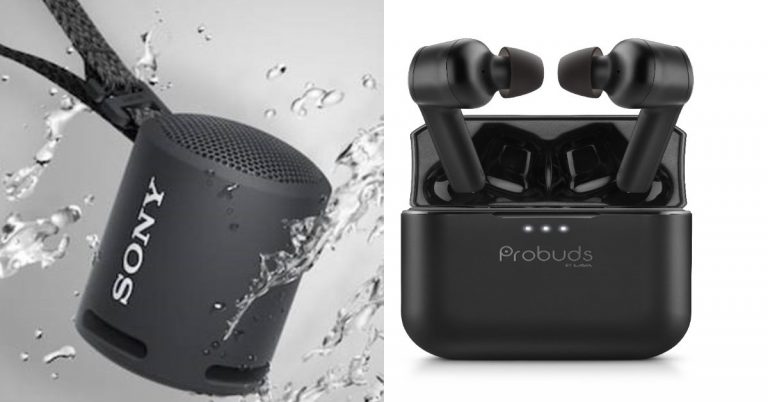
 The device is ideal for the outdoors and comes with a rugged design having an IP67 rating for protection from water and dust resistance. It has a multi-way strap that can be hung anywhere, whether that be on your backpack or on your wrist or even from a parasol.
The Sony SRS-XB13 delivers up to 16-hours battery life with a battery indicator on your phone that shows the amount of charge left. It can be connected with other devices via Bluetooth and is incorporated with Google’s Fast Pair technology that allows you to quickly connect compatible Android smartphones or tablets.
This Bluetooth speaker from Sony will be available in Black, Light Blue, Pink, Powder Blue, Taupe, and Yellow colour options.
Lava Probuds price and specifications
Lava Probuds have been launched in India at a retail price of Rs 2,199. The device will be available for sale starting June 24 via Lava e-store, Amazon, and Flipkart in the country. The company has also introduced a special introductory offer in which the earbuds can be grabbed for just Rs. 1. The special offer is valid from 24th June 12.00 pm onwards, until stocks last.
The device is ideal for the outdoors and comes with a rugged design having an IP67 rating for protection from water and dust resistance. It has a multi-way strap that can be hung anywhere, whether that be on your backpack or on your wrist or even from a parasol.
The Sony SRS-XB13 delivers up to 16-hours battery life with a battery indicator on your phone that shows the amount of charge left. It can be connected with other devices via Bluetooth and is incorporated with Google’s Fast Pair technology that allows you to quickly connect compatible Android smartphones or tablets.
This Bluetooth speaker from Sony will be available in Black, Light Blue, Pink, Powder Blue, Taupe, and Yellow colour options.
Lava Probuds price and specifications
Lava Probuds have been launched in India at a retail price of Rs 2,199. The device will be available for sale starting June 24 via Lava e-store, Amazon, and Flipkart in the country. The company has also introduced a special introductory offer in which the earbuds can be grabbed for just Rs. 1. The special offer is valid from 24th June 12.00 pm onwards, until stocks last.
 Speaking of the features the Lava Probuds come with 11.6mm advanced drivers and MediaTek Airoha chipset to provide an immersive audio experience with powerful sound with deep bass and ensure no voice distortion during calls. The TWS earphones offer 25-hour long music playtime which is backed by a 55 mAh (each bud) battery and 500 mAh case battery.
There is an instant ‘Wake and Pair Technology’ which power on the earbuds and enter connection mode as soon as charging case lid is opened. The Lava Probuds uses Bluetooth v5.0 which offers seamless as well as instant connectivity. In addition to this, the TWS earphones come with an IPX5 rating for water and sweat resistance. Additionally, Probuds enable users to directly access the voice assistant function by gently tapping twice on the right earbud.
Speaking of the features the Lava Probuds come with 11.6mm advanced drivers and MediaTek Airoha chipset to provide an immersive audio experience with powerful sound with deep bass and ensure no voice distortion during calls. The TWS earphones offer 25-hour long music playtime which is backed by a 55 mAh (each bud) battery and 500 mAh case battery.
There is an instant ‘Wake and Pair Technology’ which power on the earbuds and enter connection mode as soon as charging case lid is opened. The Lava Probuds uses Bluetooth v5.0 which offers seamless as well as instant connectivity. In addition to this, the TWS earphones come with an IPX5 rating for water and sweat resistance. Additionally, Probuds enable users to directly access the voice assistant function by gently tapping twice on the right earbud.
 The device is ideal for the outdoors and comes with a rugged design having an IP67 rating for protection from water and dust resistance. It has a multi-way strap that can be hung anywhere, whether that be on your backpack or on your wrist or even from a parasol.
The Sony SRS-XB13 delivers up to 16-hours battery life with a battery indicator on your phone that shows the amount of charge left. It can be connected with other devices via Bluetooth and is incorporated with Google’s Fast Pair technology that allows you to quickly connect compatible Android smartphones or tablets.
This Bluetooth speaker from Sony will be available in Black, Light Blue, Pink, Powder Blue, Taupe, and Yellow colour options.
Lava Probuds price and specifications
Lava Probuds have been launched in India at a retail price of Rs 2,199. The device will be available for sale starting June 24 via Lava e-store, Amazon, and Flipkart in the country. The company has also introduced a special introductory offer in which the earbuds can be grabbed for just Rs. 1. The special offer is valid from 24th June 12.00 pm onwards, until stocks last.
The device is ideal for the outdoors and comes with a rugged design having an IP67 rating for protection from water and dust resistance. It has a multi-way strap that can be hung anywhere, whether that be on your backpack or on your wrist or even from a parasol.
The Sony SRS-XB13 delivers up to 16-hours battery life with a battery indicator on your phone that shows the amount of charge left. It can be connected with other devices via Bluetooth and is incorporated with Google’s Fast Pair technology that allows you to quickly connect compatible Android smartphones or tablets.
This Bluetooth speaker from Sony will be available in Black, Light Blue, Pink, Powder Blue, Taupe, and Yellow colour options.
Lava Probuds price and specifications
Lava Probuds have been launched in India at a retail price of Rs 2,199. The device will be available for sale starting June 24 via Lava e-store, Amazon, and Flipkart in the country. The company has also introduced a special introductory offer in which the earbuds can be grabbed for just Rs. 1. The special offer is valid from 24th June 12.00 pm onwards, until stocks last.
 Speaking of the features the Lava Probuds come with 11.6mm advanced drivers and MediaTek Airoha chipset to provide an immersive audio experience with powerful sound with deep bass and ensure no voice distortion during calls. The TWS earphones offer 25-hour long music playtime which is backed by a 55 mAh (each bud) battery and 500 mAh case battery.
There is an instant ‘Wake and Pair Technology’ which power on the earbuds and enter connection mode as soon as charging case lid is opened. The Lava Probuds uses Bluetooth v5.0 which offers seamless as well as instant connectivity. In addition to this, the TWS earphones come with an IPX5 rating for water and sweat resistance. Additionally, Probuds enable users to directly access the voice assistant function by gently tapping twice on the right earbud.
Speaking of the features the Lava Probuds come with 11.6mm advanced drivers and MediaTek Airoha chipset to provide an immersive audio experience with powerful sound with deep bass and ensure no voice distortion during calls. The TWS earphones offer 25-hour long music playtime which is backed by a 55 mAh (each bud) battery and 500 mAh case battery.
There is an instant ‘Wake and Pair Technology’ which power on the earbuds and enter connection mode as soon as charging case lid is opened. The Lava Probuds uses Bluetooth v5.0 which offers seamless as well as instant connectivity. In addition to this, the TWS earphones come with an IPX5 rating for water and sweat resistance. Additionally, Probuds enable users to directly access the voice assistant function by gently tapping twice on the right earbud.

 Now while you are watching YouTube you can Facetime also with the picture-in-picture mode. Multitasking on iPhone and iPad is made possible with the new feature. PiP will work even when you are using YouTube from Safari. You will still be able to multitask with a small window over other apps.
Read more: Microsoft released EA Play on Xbox Game Pass for PC and Auto HDR Preview for Windows
Now while you are watching YouTube you can Facetime also with the picture-in-picture mode. Multitasking on iPhone and iPad is made possible with the new feature. PiP will work even when you are using YouTube from Safari. You will still be able to multitask with a small window over other apps.
Read more: Microsoft released EA Play on Xbox Game Pass for PC and Auto HDR Preview for Windows
 Before learning how to enable picture-in-picture mode you must have a Youtube premium subscription. And the mode should be enabled from any browser Chrome or Safari.
 Now while you are watching YouTube you can Facetime also with the picture-in-picture mode. Multitasking on iPhone and iPad is made possible with the new feature. PiP will work even when you are using YouTube from Safari. You will still be able to multitask with a small window over other apps.
Read more: Microsoft released EA Play on Xbox Game Pass for PC and Auto HDR Preview for Windows
Now while you are watching YouTube you can Facetime also with the picture-in-picture mode. Multitasking on iPhone and iPad is made possible with the new feature. PiP will work even when you are using YouTube from Safari. You will still be able to multitask with a small window over other apps.
Read more: Microsoft released EA Play on Xbox Game Pass for PC and Auto HDR Preview for Windows
 Before learning how to enable picture-in-picture mode you must have a Youtube premium subscription. And the mode should be enabled from any browser Chrome or Safari.