

A woman detected her pregnancy even before the clinical test, thanks to Apple Watch
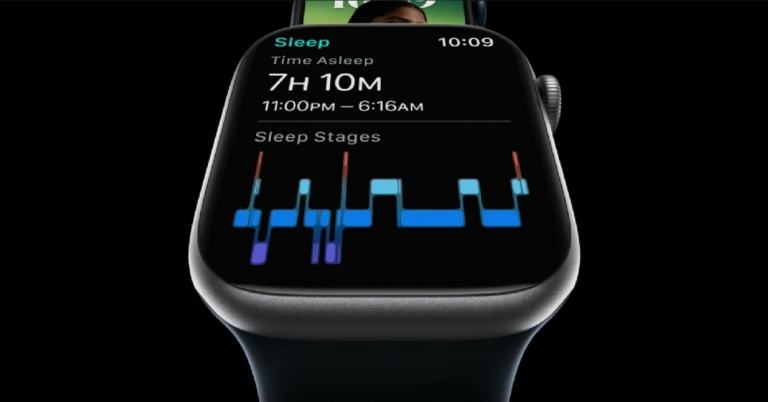
One more time, albeit for good reasons, the Apple Watch is making headlines. Before any medical exam, Apple Watch purportedly detected a woman’s pregnancy. The lady took to social media platforms to make people aware of how the fitness tracker helped her spot pregnancy even before clinical tests. She claims in the post that she initially thought something was strange because the device had been displaying her normal heart rate for days.
With its features, Apple Watch has regularly been praised for helping to save lives. Early heart attack symptoms have been successfully identified, saving countless lives. The smartwatch has apparently also detected a pregnancy in an expectant mother. Before any clinical test, Apple Watch purportedly detected a woman’s pregnancy. According to a 34 years old woman’s post on Reddit, she became suspicious that something was wrong when her Apple Watch alerts showed that her average resting heart rate had dramatically increased over the previous few days. However many different things could cause someone’s heart rate to significantly rise.
The woman initially believed she had COVID-19 because one of the symptoms was an increased heart rate. A COVID test, however, revealed that this was untrue. Additionally, it did not appear to be a typical cold.
She wrote, Usually, my resting heart rate is about 57 and my heart rate has increased to 72. It’s not a big jump, but it showed up on an alert that it’s been higher for 15 days. I started trying to figure out why.”
After discovering a number of online articles that stated that pregnant women can also suffer an elevated heart rate in the very first weeks of pregnancy. A doctor confirmed the woman was four weeks along after the woman took a pregnancy test at a clinic.
“The watch knew I was pregnant before I knew it! I would have never ever tested without wearing my watch because I have not had a period to be late on one,” she further added.
For the latest gadget and tech news, and gadget reviews, follow us on Twitter, Facebook and Instagram. For newest tech & gadget videos subscribe to our YouTube Channel. You can also stay up to date using the Gadget Bridge Android App. You can find the latest car and bike news here.
Garena Free Fire Redeem Codes Today 11 October 2022: Here is how to claim them

Garena Free Fire is a battle royale game with regular awards and tournaments to keep players interested. If you play Garena Free Fire, you should be aware of the redeem codes that are released on a daily basis. However, because the battle royale game is banned in India, players from other countries can use the Free Fire Redeem codes daily. If you’re unfamiliar with the Garena Free Fire redeem codes or don’t know how to get them, we’ve put together a step-by-step guide to help you redeem them. Check out Garena Free Fire Redeem Codes for October 11.
The Free Fire redeem codes are a great way to get free stuff. These are 12-digit codes that contain alphabets and numbers, as well as an expiration date and time. Because the Garena FF redeem codes cannot be used more than once, you should hurry to the redemption page to claim your free reward before someone else does. To get a free reward, all you have to do is go to reward.ff.garena.com/en, which is the official redemption page. Also, keep an eye on this space for daily updates on Garena Free Fire redemption codes and rewards.
In This Article
Garena Free Fire Redeem Codes Today 11 October 2022
- DTSRAEDQF12
- GHU4RTGYVFVB
- RNJ6YI7JCXKI
- 5QRD12F3BH4J
- 5IGUYH1NMKO9
- IHYGVXSA234T
- YGHBVDXFVBHJ
- IOI7Y6RFJMLO
- OI9TRDATFDCV
- HRJTGHBJ2VBG
How to Get Free Fire Redeem Codes for Garena on October 11?
- Visit the Garena Free Fire game’s official website at reward.ff.garena.com.
- Use your Facebook, Google, VK, Apple ID, Huawei ID, or Twitter account to log in.
- You’ll be taken to a valid redemption code (s)
- Copy and paste the 12-digit redemption code into the text box.
- On the screen, a dialogue box will appear.
- ‘Ok’ should be selected.
Amazon Quiz Answers Today 11 October 2022: Participate to win Rs 500

11 October 2022 Amazon Quiz has gone live on its mobile app platform. The quiz can be played from 12 AM to 11:59. All you need to do is just answer five easy questions that the e-commerce website puts before you. Today you can stand a chance to win Rs 500 Amazon Pay Balance.
Every day Amazon posts a new questionnaire that consists of five simple questions about general knowledge and current events. To enter a lucky draw, participants must correctly answer the questions. One incorrect answer will result in your elimination from the quiz. Each month, only one person will be declared the winner and the results will be announced at the end of the month. Amazon customers who submit correct answers can win an Amazon Pay Balance worth up to Rs 50,000. To ensure that you answer all five questions correctly, Gadget Bridge updates all of the correct answers on a daily basis. Take a look at today’s answers:
Amazon Quiz Today Prize – Rs 500 Amazon Pay Balance
Quiz Date – 11 October 2022
Daily Timing – 12 AM to 11:59 PM
Winner Announcement – Today 12 PM
In This Article
Amazon Quiz Answers Today 11 October 2022
Question 1: The 2022 U17 FIFA Women’s World Cup being held in India, features how many teams?
Answer: 16Question 2: The movie ‘Godfather’ starring Chiranjeevi is directed by whom?
Answer: Mohan RajaQuestion 3: The Indian navy recently signed an agreement with the navy of which country on ‘White Shipping Information Exchange’?
Answer: New ZealandQuestion 4: This is a photograph of which city, also the title of a Camilla Cabello song?
Answer: HavanaQuestion 5: This is a humanoid robot from which company?
Answer: HondaHow To Play Amazon Quiz
Only app users are eligible to play the Amazon quiz every morning from 12 AM to 11:59 PM. The quiz is not available on the desktop. For those who are unaware of how to play the Amazon quiz below are the steps, you can follow to take the quiz.- Firstly download the Amazon app from Google Play Store or App Store
- Now fill in the required information through the Sign Up option.
- You need to log in to the Amazon app and scroll down on the home screen to find the Amazon Quiz banner.
- Tap on the Amazon Quiz banner and tap on the Start button to start the Quiz.
- Now you will get 5 questions and you need to answer them correctly. One wrong answer will eliminate you from the Quiz.
- After answering all the questions correctly you are now eligible for a Lucky Draw.
- The winner’s name will be announced today at 12 PM.

 Step 3:
 Step 5:
  Step 3:
  Read Also:
 How to get Jio 5G network on your smartphone?

Jio is slowly rolling out its 5G services for the general public after the showcase at India Mobile Congress 2022. The rollout started on October 5, and Jio plans on expanding the services to multiple cities by Diwali. As of now, Jio users in four cities – Delhi, Mumbai, Kolkata, and Varanasi can avail of the 5G services upon receiving a special invite. In this article, we explain how you can get the Jio 5G invite and what you need to do to start using the 5G network on your smartphone.
Read Also: Google Pixel Tablet coming in 2023: Everything about new Google tab
 Like every preceding network rollout, Jio has launched a welcome offer for its 5G service. But first, you need an invite to avail of the 5G network. If you are located in one of the four cities where Jio has rolled out its True 5G network, you may be eligible for the service. Secondly, you need to have a 5G-enabled smartphone to use the network. Here is our list of the cheapest 5G-enabled smartphones you can buy right now.
If you meet the two prerequisites mentioned above, head over to the MyJio app to see if you’ve received an invite to the welcome offer. For the initial phase of the rollout, Jio is keeping the service invitational based. The larger rollout will take place in the coming months, with Jio planning on pan-India 5G coverage by December.
If you’re one of the lucky Jio users that received the 5G invite, you can make use of the Jio 5G Welcome Offer. As a part of the Welcome Offer, users with invites can use the 5G network as a part of their current data plan without any extra costs. Jio has not announced its 5G pricing and data plans yet. Right now, the only requirement to use 5G network on your smartphone is that you need to have an active base plan of Rs 239 minimum.
Here’s how you can switch to 5G network on your smartphone once you’ve got the invite.
Step 1: Go to Settings and select Connections.
Like every preceding network rollout, Jio has launched a welcome offer for its 5G service. But first, you need an invite to avail of the 5G network. If you are located in one of the four cities where Jio has rolled out its True 5G network, you may be eligible for the service. Secondly, you need to have a 5G-enabled smartphone to use the network. Here is our list of the cheapest 5G-enabled smartphones you can buy right now.
If you meet the two prerequisites mentioned above, head over to the MyJio app to see if you’ve received an invite to the welcome offer. For the initial phase of the rollout, Jio is keeping the service invitational based. The larger rollout will take place in the coming months, with Jio planning on pan-India 5G coverage by December.
If you’re one of the lucky Jio users that received the 5G invite, you can make use of the Jio 5G Welcome Offer. As a part of the Welcome Offer, users with invites can use the 5G network as a part of their current data plan without any extra costs. Jio has not announced its 5G pricing and data plans yet. Right now, the only requirement to use 5G network on your smartphone is that you need to have an active base plan of Rs 239 minimum.
Here’s how you can switch to 5G network on your smartphone once you’ve got the invite.
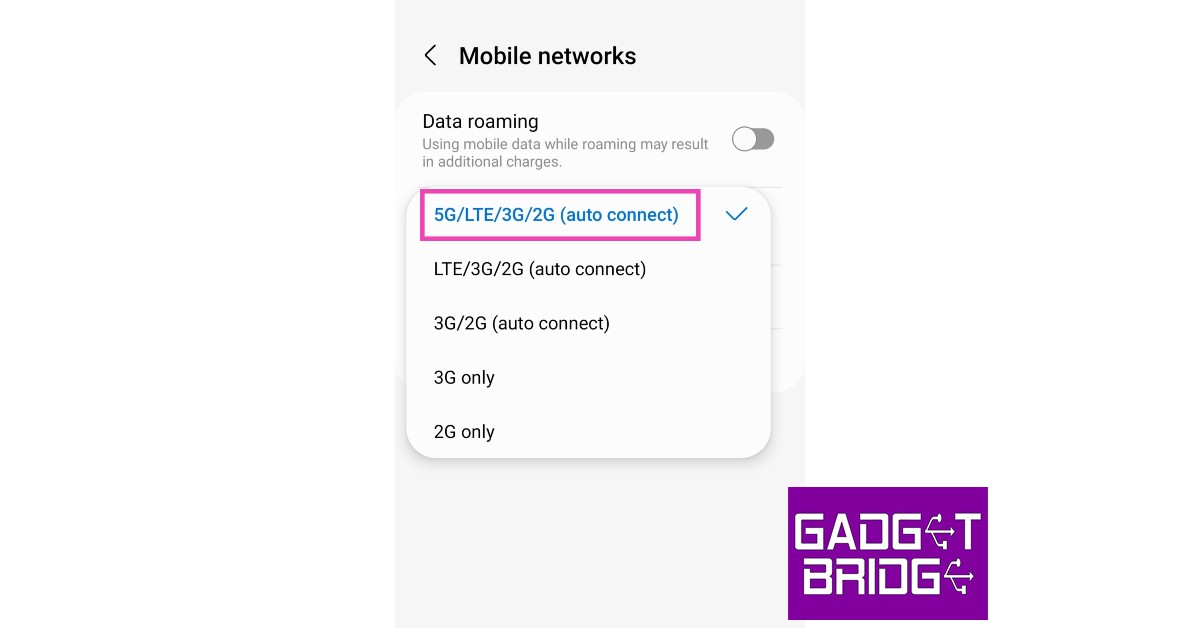
Step 1: Go to Settings and select Connections.
 Step 2: Tap on Mobile Network and select Network Mode.
Step 3: Choose 5G/LTE/3G/2G (autoconnect).
Your smartphone will switch to 5G network.
Read Also: Sony India announces exciting festive offers on new range of Bravia televisions
Step 2: Tap on Mobile Network and select Network Mode.
Step 3: Choose 5G/LTE/3G/2G (autoconnect).
Your smartphone will switch to 5G network.
Read Also: Sony India announces exciting festive offers on new range of Bravia televisions
In This Article
Jio 5G Welcome Offer: Experience incredible 5G speeds on your smartphone
 Like every preceding network rollout, Jio has launched a welcome offer for its 5G service. But first, you need an invite to avail of the 5G network. If you are located in one of the four cities where Jio has rolled out its True 5G network, you may be eligible for the service. Secondly, you need to have a 5G-enabled smartphone to use the network. Here is our list of the cheapest 5G-enabled smartphones you can buy right now.
If you meet the two prerequisites mentioned above, head over to the MyJio app to see if you’ve received an invite to the welcome offer. For the initial phase of the rollout, Jio is keeping the service invitational based. The larger rollout will take place in the coming months, with Jio planning on pan-India 5G coverage by December.
If you’re one of the lucky Jio users that received the 5G invite, you can make use of the Jio 5G Welcome Offer. As a part of the Welcome Offer, users with invites can use the 5G network as a part of their current data plan without any extra costs. Jio has not announced its 5G pricing and data plans yet. Right now, the only requirement to use 5G network on your smartphone is that you need to have an active base plan of Rs 239 minimum.
Here’s how you can switch to 5G network on your smartphone once you’ve got the invite.
Step 1: Go to Settings and select Connections.
Like every preceding network rollout, Jio has launched a welcome offer for its 5G service. But first, you need an invite to avail of the 5G network. If you are located in one of the four cities where Jio has rolled out its True 5G network, you may be eligible for the service. Secondly, you need to have a 5G-enabled smartphone to use the network. Here is our list of the cheapest 5G-enabled smartphones you can buy right now.
If you meet the two prerequisites mentioned above, head over to the MyJio app to see if you’ve received an invite to the welcome offer. For the initial phase of the rollout, Jio is keeping the service invitational based. The larger rollout will take place in the coming months, with Jio planning on pan-India 5G coverage by December.
If you’re one of the lucky Jio users that received the 5G invite, you can make use of the Jio 5G Welcome Offer. As a part of the Welcome Offer, users with invites can use the 5G network as a part of their current data plan without any extra costs. Jio has not announced its 5G pricing and data plans yet. Right now, the only requirement to use 5G network on your smartphone is that you need to have an active base plan of Rs 239 minimum.
Here’s how you can switch to 5G network on your smartphone once you’ve got the invite.
Step 1: Go to Settings and select Connections.
 Step 2: Tap on Mobile Network and select Network Mode.
 Step 3: Choose 5G/LTE/3G/2G (autoconnect).
 Your smartphone will switch to 5G network.
Read Also: Sony India announces exciting festive offers on new range of Bravia televisions
Your smartphone will switch to 5G network.
Read Also: Sony India announces exciting festive offers on new range of Bravia televisions











 Step 3:
 Step 4:
 Step 3:





















 Step 3:
 Step 3:
 Step 4:
 Step 5:
 Step 6:
 Step 3:
 Step 4: