10 best apps compatible with Android Auto (2022)

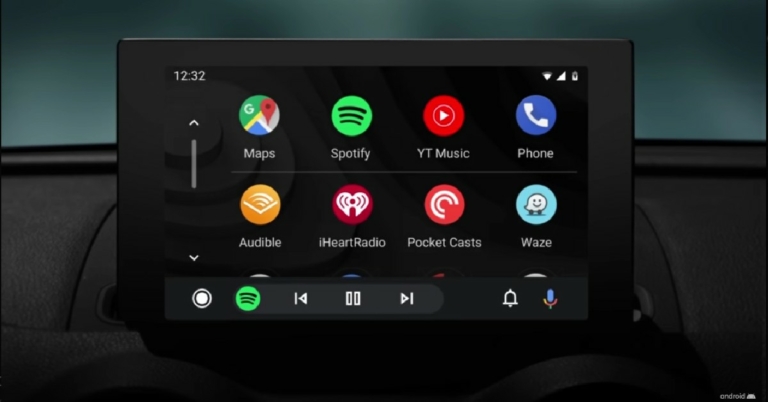
Launched in 2015, Android Auto provides greater car connectivity by mirroring your smartphone in your car’s infotainment system. The apps you use in Android Auto are designed to offer fewer distractions while driving. At the same time, they carry out the essential functions and offer multiple informational and entertainment options while you’re on the road. In this article, we bring you the 10 best apps that are compatible with Android Auto in 2022. Read Also: Pros and cons of mobile casino gaming

Google Maps

Google Maps Google Maps is the most popular Navigation app for mobile devices. Since it is a Google app, it works perfectly with Android Auto. A lot of people use Android Auto exclusively for navigation and there aren’t any better apps than Google Maps that can provide that service. The Google Maps app also offers voice navigation so you don’t even have to look at the screen while driving to your destination. You can access Google Maps by simply selecting Navigation on Android Auto.

Spotify 

How To See Your Stats On Spotify In 2022? Spotify is one of the biggest music platforms in the world. With access to millions of artists, you will rarely ever come across an artist that is not available on Spotify. Spotify is also the perfect app to listen to music on the go. With simple controls and ease of access, Spotify’s design for Android Auto is intuitive and seamless. You can even Spotify with Google’s voice commands. You can listen to music for free on Spotify for Android Auto but you will need to subscribe to the premium service in order to use more functions.

Facebook Messenger

Meta is introducing new shortcut commands to its Facebook Messenger app Android Auto supports almost all of the major messaging apps, with Facebook Messenger being one of them. You can listen to the messages you get on Facebook Messenger using Android Auto and reply to them using the voice assistant. However, Android Auto doesn’t support VoIP yet, so you won’t be able to make or receive calls using Facebook Messenger.

Stitcher

Stitcher If you like listening to podcasts on the go, Stitcher is the perfect app for you. You can choose from over 100,000 podcasts on Stitcher including NPR, This American Life, Radiolab, and more. You can simply resume playing the podcast you were listening to by connecting to Android Auto. The Stitcher app is free to use but requires a premium subscription if you want to use the advanced features.

Autovaras: The car assistant

Autovaras: The car assistant Autovaras is one of the more helpful apps for Android Auto that actually covers the details about your car. Autovaras reminds you of the periodic vehicle inspection, road tax, insurance, and other services like fast tag and much more. The details of all the services and the expiration can easily be accessed on your car’s infotainment screen. Autovaras is free to use and comes with no in-app purchases.

Scanner Radio

Scanner Radio Scanner Radio lets you listen to police scanners in your car, so you can look out for any accidents or other incidents while making your commute. You can stay up to date with any emergencies happening in your locality while also avoiding any accident-struck spots. While there are a lot of apps that report traffic congestion on your commute, Scanner Radio is more instantaneous and takes data directly from the police authorities. 

TuneIn

TuneIn Radio: News, Sports & Online Music Stations. 10 best android auto apps Want to listen to old-school radio while driving around? TuneIn has got you covered. One of the most popular internet radio apps on Android, TuneIn is now available for Android Auto as well. Using the TuneIn app you can listen to over 100,000 AM and FM radio stations across different genres like music, news, sport, and talk radio. TuneIn also allows podcast support which you can easily switch using Android Auto. 

Audible

Audible. 10 best android auto apps You cant read a book while driving, or can you? Audible is the largest and most popular library of audiobooks. With the Audible app, you can enjoy listening to an audiobook while on the go. While this app is extremely beneficial to the driver, passengers who suffer from motion sickness while reading will enjoy it just as much. Now you don’t need to stay away from your book while you’re on the road. Apart from audiobooks, Audible also offers an impressive collection of podcasts.

Waze

Waze. 10 best android auto apps While most people stick to Google Maps for navigation, Waze offers some exclusive features that may make you reconsider your choice. Apart from offering a great navigation service that is on par with Google Maps, Waze also lets you know about any accidents that may have taken place on the road. Waze is a crowdsourced app, so its users report any accidents or other happening on the road. Apart from that, Waze also gives you additional information about your route like the gas stations on the way, police checks, and traffic status.

WhatsApp

How to Block or Unblock Someone on WhatsApp? (2022). 10 best android auto apps Closing out this list is the most popular instant messaging platform in the world. WhatsApp is one of the most commonly used messaging apps by people worldwide so it is no surprise it comes with Android Auto support. You can use the voice assistant to listen to any new messages and even respond to them using voice-to-text. Making and receiving calls is still not possible as Android Auto does not have support for VoIP yet. Read Also: Top easy ways to earn Reddit Karma: Full Guide

Conclusion

This is our list of the 10 best apps compatible with Android Auto in 2022. We’ve specially curated this list to include picks from navigation apps, music apps, radio apps, and more. If you think there’s any app worthy of being on this list, let us know in the comments below!
For the latest gadget and tech news, and gadget reviews, follow us on TwitterFacebook and Instagram. For newest tech & gadget videos subscribe to our YouTube Channel. You can also stay up to date using the Gadget Bridge Android App. You can find the latest car and bike news here.
A blur tool for photos is now being made available to some WhatsApp Desktop beta testers: Report

Users of WhatsApp Desktop Beta will soon be able to blur photos. Before sending images, users can modify them and apply stickers using these tools and it will enable users to blur out any unnecessary or delicate information in images prior to actually sharing them. However, the Blur photo feature is currently available to Desktop Beta version users. For those who are unaware, this feature was exclusively available for the mobile app. A blur tool for photographs is reportedly being made available to some WhatsApp Desktop beta testers, according to a report by WAbetaInfo. You may easily and effectively remove private information from your photographs with the help of the blur tool.
A blur tool for photos is now being made available to some WhatsApp Desktop beta testers: Report
Image Courtesy: WABetaInfo
You can use a blur tool on your photographs, as shown in this screenshot. WhatsApp created two blur tools as part of the feature’s development so you may modify your photographs using a different blur effect. Additionally, you may pick the blur size so that the effect can be applied precisely. Try sending an image to see if the blur button appears to see if the functionality is already enabled for your account. If it does, you can start utilising the new drawing tool. If you still don’t have the blur tool despite it having been made available to certain beta testers, you’ll need to wait for a subsequent update because it will be made available to additional users over the next few weeks. WhatsApp plans to include a label stating if the message has been edited within the chat bubble in a future update of the app. Recent developments, according to WABetaInfo, suggest that the content will be accompanied by a label that reads “edited.” Users have 15 minutes to edit a message after it has been sent. Expect the feature to take some time to make an appearance in WhatsApp’s stable version as it is currently under testing. The “edit message” option simply provides a little time window for the sender to change the wording. “The feature is still under development, but due to the most recent WhatsApp beta for Android 2.22.22.14 update, we discovered that there is finally news about how messages are marked as edited within a chat,” WABetaInfo stated. It looks like the newly added edited feature has taken the place of the “remove message” feature. For the latest gadget and tech news, and gadget reviews, follow us on TwitterFacebook and Instagram. For newest tech & gadget videos subscribe to our YouTube Channel. You can also stay up to date using the Gadget Bridge Android App. You can find the latest car and bike news here.

How to buy and redeem a Steam Gift Card or Wallet Code?

0
Hugely popular among PC gamers, Steam is one of the biggest video game digital stores in the world. Owned by Valve, Steam is considered to be the one-stop destination for PC video games. Steam also offers features like updating games, cloud backup, messaging, and more. Like many other distribution platforms, Steam offers gift cards of its own that can be used to make purchases on the website. In this article, we show you how to buy and redeem a Steam Gift Card or Wallet Code. Read Also: Top easy ways to earn Reddit Karma: Full Guide

Here’s how you can redeem a Steam Gift Card or Wallet Code

Step 1: Log in to your Steam account and click on the Profile icon. Step 1: Log in to your Steam account and click on the Profile icon. Step 2: Select ‘Account details’. Step 2: Select ‘Account details’. Step 3: Click on ‘Add funds to your Steam Wallet’ under Store and Purchase History. Step 3: Click on ‘Add funds to your Steam Wallet’ under Store and Purchase History. Step 4: Select ‘Redeem a Steam Gift Card or Wallet Code’ on the left side of the screen. Step 4: Select ‘Redeem a Steam Gift Card or Wallet Code’ on the left side of the screen. Step 5: Enter the Steam Wallet Code in the relevant field and click on continue.  Step 5: Enter the Steam Wallet Code in the relevant field and click on continue.  Step 6: Enter your address. Your Steam Gift Card will be redeemed and the balance will be added to your Account. You can use the gift card balance on checkout. Simply select Steam Wallet as your Payment Method. After you’ve made the purchase, the order amount will be deducted from your Steam Wallet.

How to buy a Steam Gift Card

You can purchase a digital Steam Gift Card directly from the Steam website. Simply click on ‘Now available on Steam’ under the Gift Card section on the left menu. You can send a digital gift card of any amount to a Steam friend. Your friend will receive the code which can be redeemed following the steps mentioned above.  You can also buy a physical Gift Card from various outlets in your location. The most reliable way of ordering a physical Steam Gift Card is by ordering it from Amazon. You can order a Steam Gift Card on Amazon here. If you do not wish to order from Amazon, you can also purchase a Gift Card from Digistore and Gamers Gift. Make sure that you order the gift card from an authorised store in your country. Adding a gift card from another country may cause some issues in availing the card balance, as Steam is trying to limit scams on its platform.

Frequently Asked Questions

How do I view my Steam Wallet balance?

To view your Steam Wallet balance all you need to do is log in to your Steam account and look at the top right corner of the screen. Your Steam Wallet balance will be listed next to your Profile name.

Can I send my Steam balance to another Steam account?

No, your Steam balance cannot be transferred to another Steam account. Once a Steam wallet code or gift card has been redeemed, the amount cannot be transferred anywhere else. To send funds to another account, you will have to send them a Steam gift card.

Can I add a Steam Wallet Code from another country to my account?

No. Steam restricts adding Wallet Codes from other countries to reduce the scams on the platform.

What should I do if the funds did not appear on my Steam balance after redeeming the gift card?

Log out and log in to your Steam account again. Oftentimes, the gift card balance can take some time to get added to your account. If it still does not appear after a considerable amount of time, contact Steam Support. Read Also: 10 Best Free Music Download Sites to Legally Download Any Type of Music

Conclusion

This is how you can buy and redeem a Steam Gift Card or Wallet Code. You can use your account balance to purchase new games on Steam. You can also gift a digital or physical Steam Gift Card to a loved one. If you purchased some games on Steam recently, let us know in the comments!
For the latest gadget and tech news, and gadget reviews, follow us on TwitterFacebook and Instagram. For newest tech & gadget videos subscribe to our YouTube Channel. You can also stay up to date using the Gadget Bridge Android App. You can find the latest car and bike news here.
Smartphone Upgrade Days goes live on Amazon, up to 40% off on smartphones and accessories

The Great Indian Festival Sale has come to an end, and Amazon has announced Smartphone Upgrade Days. It includes a variety of discounts and offers on the newest smartphones and their accessories. Customers may receive discounts of up to 40% on their preferred smartphones from manufacturers such as OnePlus, Xiaomi, Samsung, iQOO, realme, and Tecno, among others. The most recent Redmi 10 series, iQOO Neo 6 5G, OnePlus Nord CE 2, realme Narzo 50i, and other smartphones will be offered with enticing bank and exchange incentives. The Smartphone Upgrade Days sale will run through October 28, 2022. Customers can get a 10% instant discount by using their AU Bank, Federal Bank, RBL Bank, or Axis Bank credit cards till October 28, 2022. For a minimum transaction of Rs 5,000, customers will get a 10% discount on credit cards for smartphones, up to Rs 750. Additionally, they can get their preferred smartphones through easy No-Cost EMI for up to 9 months and tempting exchange deals. With Advantage just for Prime, you may save up to Rs 20,000 and receive perks like 6 months of Free Screen Replacement and an additional 3 months of No Cost EMI when you use an HDFC bank card. iQOO smartphones With great offers from banks and EMI options, there will be some incredible deals on iQOO smartphones. The prices of the iQOO Z6 5G and iQOO Z6 Lite 5G will be Rs 14,999 and Rs 13,249, respectively, with discounts of up to Rs 1,000 and Rs 750 on specific bank credit and debit cards. The price of the iQOO Neo 6 5G will start at Rs 25,999. OnePlus smartphones On OnePlus models, amazing discounts and EMI options will be available during the Upgrade days. With up to Rs 1,500 and Rs 3,000 in bank cashback, the beginning prices for the OnePlus Nord CE 2 and OnePlus 10R Prime, respectively, are Rs 23,499 and Rs 29,499. Xiaomi Smartphones For the Upgrade Days, Xiaomi devices will also be offered additional bank offers, which will sweeten the deals even more. The Redmi Note 11T 5G costs Rs 14,999, the Redmi 10A Rs 6,996, and the Redmi Note 11 Pro + 5G Rs 18,499, respectively. The prices for the Redmi 9 Activ, Redmi A1, and Redmi K50i are Rs 7,299, Rs 5,489, and Rs 19,999, respectively. Samsung Smartphones The Samsung Galaxy M13 5G will cost Rs 12,999, including Rs 1,000 in cashback on specific bank credit and debit cards. A free EMI option for 3, 6, or 12 months is also included. Tecno Smartphones During the Smartphone Upgrade Days, receive great discounts on Tecno smartphones. The price of the Tecno Pop 6 Pro will be Rs 5,399 with a cashback of Rs 599 on specific bank credit and debit cards. Additionally, there is a 6-month EMI-free period. For the latest gadget and tech news, and gadget reviews, follow us on TwitterFacebook and Instagram. For newest tech & gadget videos subscribe to our YouTube Channel. You can also stay up to date using the Gadget Bridge Android App. You can find the latest car and bike news here.

Top 3 strong reasons to buy and use the Mkeke clear case with your new iPhone 14 Pro

We have been using the Apple iPhone 14 pro for quite some time and even though Apple claims that the new iPhones are more robust than before, we must get a strong case for the iPhone 14 Pro. The case not only will protect the iPhone 14 pro from bumps and unintentional scratches, but it will also help you fetch more money when you plan to sell off the device in the second-hand market. We have seen iPhones with a good clear case snapped onto them and get their owners more money than iPhones that are not kept within a strong case. Recently, we saw quite a few clear cases and zeroed in on one that checks all the boxes. Our choice is the Mkeke Clear case for iPhone 14 pro. Mkeke specialises in designing iPhone cases and has become a top iPhone cases brand since 2015 and has already got 1000,000+ good ratings, too. And have best Seller, Climate Pledge Friendly and Amazon Choice on Amazon.

Why do we think it will suit you well is below:

Strong and durable

The Mkeke Clear case for iPhone 14 pro not just looks good but is extremely strong and durable. It has raised 3.9mm edges around the rear camera module that protects them from touching the surface when kept on its back. Over that, the inside of the case is soft and keeps the iPhone 14 pro safe from any scratches. Also, the case fetches protective airbags on six corners which keep the iPhone 14 safe from any accidental bumps or drops. mkeke clear case

You get to enjoy the colours

Since the Mkeke Clear case for iPhone 14 Pro is transparent, the users get to enjoy the actual colours of the smartphone. Apple made these new trendy colours to flaunt and with the Mkeke clear case, you can just do that. Users can easily show off the beautiful iPhone 14 Pro’s side and back even when it is safely within the confines of the Mkeke clear case.

The perfect fit

We have seen in the past because of a slight misfit of the smartphone case, the smartphone gets damaged when someone drops it or gets scratched as dust seeps in. Mkeke has made sure that its clear cases for iPhone 14 Pro and Pro Max have the perfect tight fit, even on the side buttons. This not only protects the iPhone from any bumps but also does not let dust get in.

Conclusion

After seeing so many other clear cases, we beamed in on the Mkeke Clear case for iPhone 14 Pro as it is great value for money and most of all will protect your iPhone 14 Pro for a very long time. The Mkeke Clear case for iPhone 14 pro product is available on Amazon and the best part is unlike most cases, which give only 6 months to 1 year of warranty, this smartphone clear case provides its users with 2 years of warranty. If you want to protect your new iPhone 14 Pro and keep it looking like brand new for a long time then your search for the right case ends with the Mkeke Clear case for iPhone 14 Pro and Pro Max. For the latest gadget and tech news, and gadget reviews, follow us on TwitterFacebook and Instagram. For newest tech & gadget videos subscribe to our YouTube Channel. You can also stay up to date using the Gadget Bridge Android App. You can find the latest car and bike news here.

Garena Free Fire Redeem Codes Today 26 October 2022: Here is how to claim them

Garena Free Fire is a battle royale game with regular awards and tournaments to keep players interested. If you play Garena Free Fire, you should be aware of the redeem codes that are released on a daily basis. However, because the battle royale game is banned in India, players from other countries can use the Free Fire Redeem codes daily. If you’re unfamiliar with the Garena Free Fire redeem codes or don’t know how to get them, we’ve put together a step-by-step guide to help you redeem them. Check out Garena Free Fire Redeem Codes for October 26. The Free Fire redeem codes are a great way to get free stuff. These are 12-digit codes that contain alphabets and numbers, as well as an expiration date and time. Because the Garena FF redeem codes cannot be used more than once, you should hurry to the redemption page to claim your free reward before someone else does. To get a free reward, all you have to do is go to reward.ff.garena.com/en, which is the official redemption page. Also, keep an eye on this space for daily updates on Garena Free Fire redemption codes and rewards.

Garena Free Fire Redeem Codes Today 26 October 2022

Updating soon…

How to Get Free Fire Redeem Codes for Garena on October 26?

  • Visit the Garena Free Fire game’s official website at reward.ff.garena.com.
  • Use your Facebook, Google, VK, Apple ID, Huawei ID, or Twitter account to log in.
  • You’ll be taken to a valid redemption code (s)
  • Copy and paste the 12-digit redemption code into the text box.
  • On the screen, a dialogue box will appear.
  • ‘Ok’ should be selected.
For the latest gadget and tech news, and gadget reviews, follow us on TwitterFacebook and Instagram. For newest tech & gadget videos subscribe to our YouTube Channel. You can also stay up to date using the Gadget Bridge Android App. You can find the latest car and bike news here.

Amazon Quiz Answers Today 26 October 2022: Participate to win Rs 2,500

26 October 2022 Amazon Quiz has gone live. Customers from different parts of the country are participating in the daily quiz. The quiz begins from 12 AM to 11:59 PM. Those participating in the quiz can win exciting prizes by answering all the questions correctly. Today participants have a chance to win a Rs 2,500 Amazon Pay Balance. Amazon quiz brings an opportunity for its customers to win Amazon Pay Balance ranging from Rs 1,000 to Rs 50,000. The Quiz can be played from 12 AM to 11:59 PM. The e-commerce platform brings a fresh quiz on a daily basis which consists of five questions related to general knowledge and current affairs. The participants need to answer all the questions correctly and their names will be selected for a lucky draw. The winner will be announced at the end of the month. One wrong answer could eliminate you from the quiz. If you manage to answer all the questions correctly you can stand a chance to win a Rs 2,500 Amazon Pay Balance today. Only app users are eligible to participate in the Quiz. Check Out 26 October 2022 Amazon Quiz Answers. Amazon Quiz Today Prize – Rs 2,500 Amazon Pay Balance Quiz Date – 26 October 2022 Daily Timing – 12 AM to 11:59 PM Winner Announcement – Today 12 PM

Amazon Quiz Answers Today 26 October 2022

Question 1: Leg spinner Karthik Meiyappan took the first hat-trick of the 2022 T20 World Cup. He represents which side? Answer: UAE Question 2: The movie ‘Goodbye’ starring Amitabh Bachchan has which family as the centrepiece of the story? Answer: Bhalla Question 3: Which country recently elected Ulf Kristersson as the Prime Minister? Answer: Sweden Question 4: This is a picture of the famous twin towers in which city? Answer: Kuala Lumpur Question 5: What is this type of sushi called? Answer: Nigiri

How To Play Amazon Quiz

Only app users are eligible to play the Amazon quiz every morning from 12 AM to 11:59 PM. The quiz is not available on the desktop. For those who are unaware of how to play the Amazon quiz below are the steps, you can follow to take the quiz.
  • Firstly download the Amazon app from Google Play Store or App Store
  • Now fill in the required information through the Sign Up option.
  • You need to log in to the Amazon app and scroll down on the home screen to find the Amazon Quiz banner.
  • Tap on the Amazon Quiz banner and tap on the Start button to start the Quiz.
  • Now you will get 5 questions and you need to answer them correctly. One wrong answer will eliminate you from the Quiz.
  • After answering all the questions correctly you are now eligible for a Lucky Draw.
  • The winner’s name will be announced today at 12 PM.
For the latest gadget and tech news, and gadget reviews, follow us on TwitterFacebook and Instagram. For newest tech & gadget videos subscribe to our YouTube Channel. You can also stay up to date using the Gadget Bridge Android App. You can find the latest car and bike news here.

Pros and cons of mobile gaming

Online casino gaming saw a surge in popularity during the difficult times of 2020 and 2021 when land-based casinos were closed or operating under restrictions. Today, with things back to normal, many players have continued to play online. It’s been particularly noticeable in Canada, to the extent that lawmakers in Ontario and Nova Scotia rushed through online casino legislation in a rush to keep at least some of that gambling revenue at home, providing domestic alternatives to the offshore casino sites. For the majority of players, gambling online means visiting the casino sites from their smartphones. Mobile devices are now the most popular way to get online, and iGaming companies adopt a mobile-first strategy when designing their platforms – Gamble Online provides a whole host of examples. But there are still many players who prefer to use a traditional desktop for casino gaming. Here we look at the pros and cons of each.  

Benefits of mobile casino gaming

Some of the key advantages of playing casino games from your smartphone are plain for all to see. Others might come as something of a surprise. Convenience is the number one benefit, and that applies to most aspects of mobile internet. You can play what you want, when you want, where you want. A potentially more surprising benefit of mobile casinos is that some offer slightly superior payout rates when you use their mobile platforms. This is to encourage new players, who are most likely to be attracted to mobile play. An advantage that cannot be overstated is customer support. This is not a hard and fast rule, but mobile platforms tend to be more responsive if you need help, providing instant access to customer service via chat, telephone or other messenger services. That’s not always the case when you play from your desktop.

Downsides of mobile casinos

The factor most likely to put players off mobile casino gaming is screen size. Of course, you can see what is going on more clearly when you have a desktop monitor. That, however, is the cost of any mobile internet activity, and also applies to viewing photos, streaming movies and so on. A bigger issue can be security. That’s not the fault of the casino, it’s simply a fact that people do not take security so seriously on their phones as they do on their desktops. It goes beyond hackers – too many of us make it easy for criminals by leaving our phones lying around with the screens unlocked so anyone can access our gambling accounts or whatever else is on there. Connectivity can also be an issue when you are out and about. Coverage in general is far better today than it was a decade ago, but there are still patchy spots and nothing is more frustrating than losing your connection mid-game. On the whole, however, the 5G rollout is consigning these issues to history. As long as your eyesight is ok and you take sensible security precautions, mobile casino gaming has more pros than cons. For the latest gadget and tech news, and gadget reviews, follow us on TwitterFacebook and Instagram. For newest tech & gadget videos subscribe to our YouTube Channel. You can also stay up to date using the Gadget Bridge Android App. You can find the latest car and bike news here.

WhatsApp was down today, the app’s longest outage has been resolved now

After more than an hour of downtime, WhatsApp service became operational. This is said to be the longest period of downtime reported by users in India and elsewhere where users were not able to access the well-known messaging service owned by Facebook parent Meta. This was the longest outage that WhatsApp has ever experienced, lasting for approximately two hours. Android, iOS, and desktop users were not able to send messages in chats or in groups, or make phone and video conversations starting around noon. Additionally, the WhatsApp Web apps were affected by the outage, and some WhatsApp settings, such as privacy and status settings, were also inaccessible. Additionally, users have gone to Twitter to voice their complaints about the service’s outages using the hashtag #whatsappdown. Over 27,000 users reported an outage of WhatsApp, according to the website tracking service Downdetector. Meta spokesperson in a statement to ANI said, “We’re aware that some people are currently having trouble sending messages and we’re working to restore WhatsApp for everyone as quickly as possible.” According to Downdetector, at about 12:30 PM on Tuesday, users in India started to report problems using WhatsApp, with about 2,610 incidents. The messaging service took some time to be restored but complaints didn’t stop for another hour even after the fix. The issues affecting WhatsApp had no impact on Meta’s other platforms, including Facebook, Messenger, and Instagram. According to Downdetector, users in Mumbai, Delhi, Kolkata, Bengaluru, Chennai, Hyderabad, and other areas in India were found to be most affected by the outages. What specifically triggered today’s interruption of WhatsApp’s services remains unknown. A portal that monitors WhatsApp’s progress, WaBetaInfo, has earlier speculated on the details of the outage. They sent an update and explained that they had to wait for a remote fix because the problem was server-side. For the latest gadget and tech news, and gadget reviews, follow us on TwitterFacebook and Instagram. For newest tech & gadget videos subscribe to our YouTube Channel. You can also stay up to date using the Gadget Bridge Android App. You can find the latest car and bike news here.

YouTube announced new design elements and product features, gets pinch-to-zoom and more

YouTube has introduced a new design and also rolled out a number of features that are said to enhance how people watch videos while also providing a more contemporary and immersive viewing experience. Previously it was said to be under testing and is now being rolled out to the public. The dark mode has improved, links in the videos have transformed and have received other capabilities like pinch-to-zoom and more. The company via blog post made the announcement which said, ” YouTube just celebrated its 17th birthday earlier this year and we wondered if it was time to give it a small makeover. So we gathered input from thousands of viewers around the world and heard there was a desire for a cleaner, more lively design that better represents what we’re all about. Starting today, we are rolling out a new look and several features that offer a more modern and immersive viewing experience while also improving how users watch videos. But don’t worry, the same YouTube you know and love is still at our core.” Ambient mode uses dynamic colour sampling to add a subtle effect so that the app background colour changes to match the video. In order to lure users into the content and make the video even more prominent on the watch page, YouTube claimed that it was inspired by the light that screens put out in a darker environment. Both the web and mobile versions of this feature will support a dark theme. The dark theme has been updated to be even darker after receiving a lot of feedback, allowing the colours to stand out on your screen. It will launch on the web, mobile devices, and smart TVs. Additionally, Video playlists will use the same colour scheme and now provide additional information about each playlist so that viewers can easily get started. The watch page on YouTube is now simpler to read, Links to YouTube will now appear as buttons in video descriptions, and frequent actions like “like,” “share,” and “download” have been formatted to reduce clutter. The subscribe button is also receiving a makeover, while it’s no longer red, it’s easier to spot and far more accessible to everyone on both watch sites and channel pages thanks to its new shape and high contrast. Pinch to zoom and precise seeking have also been made available to all users of YouTube as of right now, following the introduction and testing of many new product features on youtube.com/new earlier this year. You may now effortlessly zoom in and out of a video while using your iOS or Android phone thanks to pinch to zoom. The video stays to be zoomed in after you let go, allowing you to view the rest of it in more detail. With Precise Seeking, you can make precise adjustments to jump to the precise section in each video whether you’re on a desktop or mobile device by simply dragging or swiping up while seeking to display a row of thumbnails in the video player. Long pressing anywhere on the video on YouTube gives you the option to search, and double tapping with two fingers lets you skip chapters. Additionally, a graph that displays commonly watched sections of videos has been included. For the latest gadget and tech news, and gadget reviews, follow us on TwitterFacebook and Instagram. For newest tech & gadget videos subscribe to our YouTube Channel. You can also stay up to date using the Gadget Bridge Android App. You can find the latest car and bike news here.

Top easy ways to earn Reddit Karma: Full Guide

0
Reddit is one of the biggest link aggregator websites in the world. Like Facebook and Twitter, Reddit has a ‘like’ counter of its own. A ‘like’ on Reddit is called an ‘upvote’. Reddit also allows its users to ‘downvote’ a post, unlike Facebook or Twitter. This means that the content that makes it to the front page on Reddit is decided by the net score received by the post. Reddit profiles also have a net cumulative score for all the upvotes and downvotes that the user receives on every post or comment they make. This is called Reddit ‘Karma’. In this article, we show you the top easy ways to earn Karma on Reddit. Read Also: Top Simple Ways to Use Chrome Extensions on an Android Mobile Browser

How is Reddit Karma calculated?

Most users think that your Reddit Karma is the direct reflection of your net upvotes and downvotes. This is only partly true. Once your post starts getting upvotes, the net score (after calculating the downvotes) is added directly to your Karma. However, after a post hits a certain number of upvotes, not every upvote counts as one Karma point. You will need a certain number of upvotes to increase the Karma count by one. Reddit does this to make sure bots do not game the system by reposting popular content on the website. 

How can I earn Reddit Karma?

Here are some of the easy ways you can earn Karma on Reddit.

Comment or post in r/FreeKarma4You

Comment or post in r/FreeKarma4You If you have just made a Reddit profile, you may have noticed that your comments get removed by the Automoderator on most subreddits simply because you don’t have enough Karma required to post on that subreddit. Most subreddits take this measure to avoid comments from bots and banned users who use a fake account to get around the ban.  If you’re a new user, this may come across as annoying since you cannot gain Karma without participating in the first place. Communities like r/FreeKarma4You exist to help new users reach a certain amount of Karma so they can participate in whichever subreddit they want to. You can get immediate upvotes simply by commenting on any post on that subreddit or making a post of your own.

Comment in Rising posts

Comment in Rising posts Now that you’ve got the minimum karma required to participate in larger subreddits, you can freely comment and post whatever you like as long as follow the subreddit rules and Reddit Etiquette. Commenting on ‘Rising’ posts increases the chances of your comments being seen by a greater number of people, leading to more upvotes. Simply switch to the ‘Rising’ tab and you’ll be able to see which posts are getting the most traction on the subreddit. Commenting on older posts severely decreases the chances of your comment being seen as all the upvoted comments have already made their way to the top. Since Rising posts are almost always new, your comments get more visibility leading to a greater chance of gaining more Karma.

Post meaningful comments

If you want your comments to get upvoted, make sure they contribute something of substance to the post. Instead of making cursory comments, post something that either expands on the subject or starts a discourse. On the flip side, going into too many unnecessary details can discourage other users from reading your comment. If you’re about to post a long comment, make sure you attach a tl;dr (short summary of what you wrote) with it. 

Participate in larger subreddits

Participate in larger subreddits Larger subreddits like r/askreddit, r/music, and r/videos get a lot of regular traffic at all times of the day. Your comments and posts will reach a larger number of users if you participate in those subreddits. Since they are large communities, make sure you read the rules and content guidelines before posting, to prevent Automoderator from flagging your post. 

Post unique and original content

Since there are millions of daily active users on Reddit, reposts are far too common. Unique and original posts are more appreciated by the users and have a greater chance of getting upvoted. Make sure the content you post is relevant to the subreddit. Browse through the ‘Hot’ and ‘Top’ posts of the subreddit first to get an idea of what kind of content is typically popular within that community. 

Frequently Asked Questions

Can I buy Reddit Karma?

No, you cannot buy Reddit Karma. You can only gain it by participating on the website. You can participate by posting a comment or creating a new Reddit post.

What can I do with Reddit Karma?

Outside of Reddit, you cannot do anything with Reddit Karma. Even within the platform, Reddit Karma serves no purpose other than making your comments a little credible. Comments from a profile with a negatively Karma score may not be taken seriously by other Reddit users. Read Also: Best ways to Fix ‘Sleep Tracking Not Working’ on Apple Watch

Conclusion

These are the top easy ways to earn Reddit Karma. If a recent comment or post you made on Reddit gained a lot of upvotes, it can take some time for it to reflect on your Karma. This is because, after a certain number of upvotes, the Reddit algorithm limits the effect it can have on your net Karma. Downvotes are capable of lowering your Karma score, so make sure you always follow the Reddit Etiquettes while posting or commenting on Reddit.
For the latest gadget and tech news, and gadget reviews, follow us on TwitterFacebook and Instagram. For newest tech & gadget videos subscribe to our YouTube Channel. You can also stay up to date using the Gadget Bridge Android App. You can find the latest car and bike news here.

10 Best Free Music Download Sites to Legally Download Any Type of Music

With the rise of giant music streaming platforms like Spotify and Amazon Music, websites catering exclusively to mp3 downloads have gone obsolete. With the wide availability of network data and WiFi, most people prefer to stream music instead of downloading it. If you’re not a fan of streaming, you have limited options when it comes to downloading music. Luckily, there are still some websites that host a large library of music. In this article, we bring you the 10 best websites that let you legally download music for free. Read Also: Top Simple Ways to Use Chrome Extensions on an Android Mobile Browser

The Internet Archive

The Internet Archive Known for its enormous collection of books and other texts, The Internet Archive is also home to more than 14 million audio recordings, all of which can be accessed for free from the digital library. The Internet Archive is a non-profit project that is aimed at providing access to historians, researchers, academics, people with print disabilities, and the general public. The ‘Live Music Archive’ section of the website hosts free music from a variety of leading artists. The music downloaded from The Internet Archive cannot be used for commercial purposes. If you’re looking for background music for your video or vlog, you will need to look somewhere else. However, if you simply want to download music for personal listening, The Internet Archive is a great place to check out. 

YouTube Audio Library

YouTube Audio Library To help content creators make videos on its platform, YouTube provides a collection of free music and audio recordings that can be used for free as background music on the videos hosted on the platform. You can use the music listed on YouTube Audio Library on your monetised videos without having to worry about being copy-striked. Hit the play icon to preview the sample and click on download to save the music on your device. 

Jamendo

Jamendo Jamendo is one of the best websites to discover and listen to indie and unsigned artists for free. With over 240,000 songs and 40,000 artists, Jamendo is one of the biggest music platforms on the Internet. You can also find free royalty music on Jamendo, which can be used for videos and any video content you want to publish online. You can browse music by genre and discover new, unsigned artists. In order to download a song you need to register and create a profile on Jamendo first.

Amazon Digital Music

Amazon Digital Music Most people do not know this, but Amazon allows users to download some music for free. Currently, there are over 4000 music recordings that users can download from the Amazon website for free. You can even find some popular artists like Foo Fighters and Carole King in Amazon’s free music library. The songs can be directly downloaded to your device for free, but you will have to dig through the entire catalogue to find what you like. Amazon does not have a ‘Search by genre’ anymore.

SoundCloud

SoundCloud Most music enthusiasts and audiophiles are probably already well-aware of SoundCloud. One of the biggest music platforms in the world, SoundCloud hosts indie and unsigned artists. You can directly download a song from the artist’s page if the artist has enabled that option. You do not need to register or create a profile on SoundCloud to download a song. SoundCloud is also an excellent website to discover new artists from a variety of genres.

Bandcamp

Bandcamp Like SoundCloud, Bandcamp hosts a large number of independent artists that still haven’t been signed by a big label. Bandcamp allows you to download music for free, and you can even tip the artist any amount you deem fit. In order to download the music for free, all you need to do is enter ‘0’ in the tipping amount. You will need to create an account on Bandcamp before downloading any music.

Free Music Archive

Free Music Archive. 10 best websites to legally download music Free Music Archive provides royalty-free music to content creators and video producers. The website hosts millions of royalty-free recordings and soundtracks. You can choose from a multitude of genres and find the perfect soundtrack for your content. The music listed on this platform is protected by the Creative Commons license, allowing creators to use the music without the hassle of any copyright issues.

Musopen

Musopen. 10 best websites to legally download music Musopen is a website that exclusively publishes classical, orchestra, and chamber music. You can download music from composers like Bach, Mozart, Beethoven, Chopin, and more for free. Apart from letting users download music for free, Musopen also provides access to sheet music and other educational resources related to music. The website is easy to navigate and provides a bunch of search filters to find the music you want.

CCTrax

CCTrax. 10 best websites to legally download music CCTrax also publishes music that is protected by the Creative Commons license. Unlike Free Music Archive, CCTrax exclusively focuses on electronic music. The music you download from CCTrax is royalty-free and can be used as background music on the videos you publish online. Some music may come with a ‘BY license’ which only allows them to be used as embedded files on other websites.

NoiseTrade

NoiseTrade. 10 best websites to legally download music Unlike most websites on this list, NoiseTrade hosts music from some well-known popular artists that you can download for free. You can find music from Phoebe Bridgers, Wilco, Alabama Shakes, and other popular artists on this platform. The only catch is that you have to register from a valid email address, which the artists will use to send you promotional material. If you’re willing to get past that, you can find lots of interesting music available for free download on this platform. Read Also: Best ways to Fix ‘Sleep Tracking Not Working’ on Apple Watch

Conclusion

These are the 10 best websites that let you legally download music for free. Depending on the website, you can use the music for personal listening or for commercial purposes. If you are a content creator there are tons of other royalty-free music websites that you can look up with a simple Google search. The only downside is that you will not find any popular music on those websites. If you want to download music for personal listening, the websites in this article are excellent resources for free and legal downloads.
For the latest gadget and tech news, and gadget reviews, follow us on TwitterFacebook and Instagram. For newest tech & gadget videos subscribe to our YouTube Channel. You can also stay up to date using the Gadget Bridge Android App. You can find the latest car and bike news here.

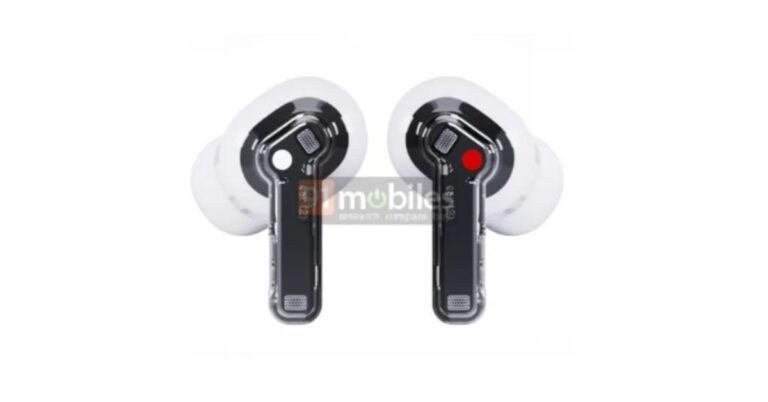
Nothing Ear 2 TWS Earbuds leaked images suggested a semi-transparent design

Nothing’s first product which was TWS earbuds, the Nothing Ear (1) was introduced last year. The device achieved wide acceptance thanks to its distinctive transparent design. The company recently announced to launch of Nothing Stick truly wireless stereo earbuds (TWS). Ahead of the official announcement images of the Nothing Ear 2 earbuds have been posted online suggesting another upcoming announcement. The alleged rendering of the upcoming Nothing Ear 2 truly wireless stereo (TWS) earphones has revealed their appearance and a few of their features. Nothing is apparently getting ready to introduce a new set of earphones that are expected to replace the Nothing Ear 1. Online renderings of the upcoming TWS earbuds have appeared, revealing some of their features and design. It is important to note that the company has not yet disclosed its plans for releasing the Nothing Ear 2 earphones.
Nothing Ear 2 TWS Earbuds leaked images suggested a semi-transparent design
Image Courtesy: Kuba Wojciechowski
According to the renders, the alleged TWS earbuds have a semi-transparent design. The Nothing Ear 2 TWS earphones leaked images further suggest the TWS will have a partially transparent case and the logo on the stem which says Nothing replaced with “Ear (2)”. Additionally, a partially translucent design for the charging case is displayed.

Nothing ear (1) TWS earbuds specifications

Advanced bass, midrange, and treble performance is provided by the 1.6mm dynamic driver and spacious air chamber of the Nothing ear (1) TWS earbuds. The device has vents for pressure relief and a transparent design. The earbuds have two ANC modes: max mode and light mode. Three high-definition microphones are also included in the Ear 1 to improve audio quality. 5 hours of listening time and an extra 34 hours of playtime with the case are provided by Nothing Ear 1 runs. The power case quickly charges the earbud and supports wireless charging. The Nothing earphone has received IPX4 certification for resistance to sweat and dust. Additionally, Google Fast Pair functionality is available, which establishes an immediate connection with supported devices. The ear (1) app, which is available for both iOS and Android devices, provides access to a customised equaliser, gesture control, and the Find My Earbuds functionality. For the latest gadget and tech news, and gadget reviews, follow us on TwitterFacebook and Instagram. For newest tech & gadget videos subscribe to our YouTube Channel. You can also stay up to date using the Gadget Bridge Android App. You can find the latest car and bike news here.

How to redeem an Amazon Gift card?

0
Amazon Gift Cards are a quick and easy substitute for a gift. An Amazon Gift Card can be used to purchase anything from the e-commerce website. Some services outside of Amazon accept their gift cards as well. Amazon lets you send gift cards of varying amounts either physically or via email. You can even choose your own amount and send it as a gift card. In this article, we show you how to redeem an Amazon Gift Card. Read Also: Redmi A1 review: Setting the benchmark for entry-level smartphones

Here’s how you can redeem an Amazon Gift Card on the website

Step 1: Go to www.amazon.com and click on ‘Gift Cards’ from the top menu. Step 1: Go to the Amazon website and select ‘Gift cards’ from the top menu. Step 2: Select ‘Redeem Gift Cards’. Step 2: Select ‘Redeem Gift Cards’. Step 3: Enter the claim code and click on ‘Apply to your balance’. Step 3: Enter the claim code and click on ‘Apply to your balance’. The amount will be added to your gift card balance.

Here’s how you can redeem a Gift Card on the Amazon app

Step 1: Open the Amazon app and tap on the hamburger menu icon at the bottom right corner of the screen. Step 1: Open the Amazon app and tap on the hamburger menu icon at the bottom right corner of the screen. Step 2: Select ‘Amazon Pay’. Step 2: Select ‘Amazon Pay’. Step 3: Scroll down and select ‘Add a gift card’. Step 3: Scroll down and select ‘Add a gift card’. Step 4: Enter the gift card code and tap on ‘Add to your balance’. Step 4: Enter the gift card code and tap on ‘Add to your balance’. The amount will be added to your Amazon balance. You can also redeem your Gift Card during checkout. Simply enter the gift card code in the ‘Gift Cards and promotional codes’ field on the ‘Review your order’ page. 

Frequently Asked Questions

What happens if my order total is more than my Gift Card balance?

If your order total is more than your gift card balance, Amazon will deduct the remaining amount of your order from your default payment method. If you use your debit card to make the payments, you will need to use it in order to pay the remaining amount. This does not work for Cash on Delivery.

How long does my Gift Card balance last?

Once you’ve redeemed your Amazon Gift Card, the balance lasts forever. However, in some cases, the Gift Card expires if it hasn’t been redeemed for a year.  Read Also: WhatsApp is making it possible to create an avatar similar to one on Facebook

Conclusion

This is how you can redeem an Amazon Gift Card. Once you’ve redeemed an Amazon Gift Card, it cannot be passed forward to someone else. If your order amount is less than your gift card balance, the remaining amount will be saved to your Amazon account and can be used later. 
For the latest gadget and tech news, and gadget reviews, follow us on TwitterFacebook and Instagram. For newest tech & gadget videos subscribe to our YouTube Channel. You can also stay up to date using the Gadget Bridge Android App. You can find the latest car and bike news here.

Snapchat+ gets new features for a customized experience

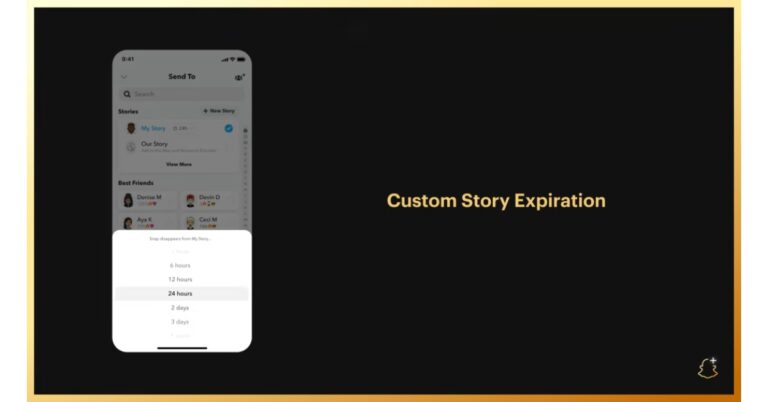
Snap Inc. has introduced a number of new features for subscribers to its premium Snapchat+ service. One of these features is Custom Story Expiration, as the name suggests Snapchatters can choose manually how long a story remains publicly visible. Not just that Snapchat+ subscription can also be gifted to a friend through the app. “Speaking of new feature drops, look out, because today we’re adding four new ways to truly customise your Snapchat experience,” the company said in its announcement. The Social media platform now has now made it simple to present a Snapchat+ subscription to a friend through the app, just in time for the holiday season. “Already, more than one million Snapchatters are loving Snapchat+, so this holiday season we’re making it easy to gift a subscription to a friend right there in the app,” the company added. Set Snaps on your story to expire after an hour or up to a week using the recently introduced Custom Story Expiration feature. You may make sure your friends see your exceptional Snaps worth sharing for a longer period of time with this new function, or you can keep them coming back for your most enjoyable and fleeting moments. Snapchat users may set distinct notification tones for different friends using Custom Notification Sounds so that they can distinguish who snapped them without having to glance at their phone. Additionally, the business has unveiled Custom Camera Color Borders, which let you project your preferred colour onto the screen while you’re recording information. Additionally, you can dress up your Snapchat profile for Halloween with three brand-new, limited-edition Bitmoji Backgrounds! Snapcat+ premium service was launched in India in August. At that time the company introduced six new features Snapchat+ Badge, Custom App Icons, Rewatch Indicator, Best Friends Forever, Ghost Trails on Snap Map, and Solar System. In India, Snapchat+, a collection of distinct, upcoming, and experimental features, costs 49 per month. The app will be able to provide some of the most devoted members of our community with priority support in addition to new Snapchat features thanks to this subscription. For the latest gadget and tech news, and gadget reviews, follow us on TwitterFacebook and Instagram. For newest tech & gadget videos subscribe to our YouTube Channel. You can also stay up to date using the Gadget Bridge Android App. You can find the latest car and bike news here.

Garena Free Fire Redeem Codes Today 25 October 2022: Here is how to claim them

Garena Free Fire is a battle royale game with regular awards and tournaments to keep players interested. If you play Garena Free Fire, you should be aware of the redeem codes that are released on a daily basis. However, because the battle royale game is banned in India, players from other countries can use the Free Fire Redeem codes daily. If you’re unfamiliar with the Garena Free Fire redeem codes or don’t know how to get them, we’ve put together a step-by-step guide to help you redeem them. Check out Garena Free Fire Redeem Codes for October 25. The Free Fire redeem codes are a great way to get free stuff. These are 12-digit codes that contain alphabets and numbers, as well as an expiration date and time. Because the Garena FF redeem codes cannot be used more than once, you should hurry to the redemption page to claim your free reward before someone else does. To get a free reward, all you have to do is go to reward.ff.garena.com/en, which is the official redemption page. Also, keep an eye on this space for daily updates on Garena Free Fire redemption codes and rewards.

Garena Free Fire Redeem Codes Today 25 October 2022

  • F56K JNK5 I8UY
  • 6TGH QU27 YT3G
  • B4NR 5TKG IUCX
  • YTFA WVB4 J5KT
  • IY8G UYHG D9EN
  • 567Y UO98 7UQ6
  • 52R3 F45J 6K7J
  • HG6H 59U6 T8IG
  • 7USA 6Q51 4E2R
  • 34RI TG8U 7CYH
  • XSNE JMKR O5T6
  • Y79U H8B7 UY9T

How to Get Free Fire Redeem Codes for Garena on October 25?

  • Visit the Garena Free Fire game’s official website at reward.ff.garena.com.
  • Use your Facebook, Google, VK, Apple ID, Huawei ID, or Twitter account to log in.
  • You’ll be taken to a valid redemption code (s)
  • Copy and paste the 12-digit redemption code into the text box.
  • On the screen, a dialogue box will appear.
  • ‘Ok’ should be selected.
For the latest gadget and tech news, and gadget reviews, follow us on TwitterFacebook and Instagram. For newest tech & gadget videos subscribe to our YouTube Channel. You can also stay up to date using the Gadget Bridge Android App. You can find the latest car and bike news here.

Amazon Quiz Answers Today 25 October 2022: Participate to win Rs 5,000 Amazon Pay Balance

25 October 2022 Amazon Quiz has gone live on its mobile app platform. Customers from different parts of the country are participating in the daily quiz. The daily quiz is conducted by the company brings an opportunity for the customers to win exciting prizes. The quiz begins from 12 AM to 11:59 PM. In today’s quiz participants have a chance to win Rs 5,000 Amazon Pay Balance by answering all the questions correctly. Every day Amazon brings a fresh set of questions for its customers that contains five easy questions. Amazon quiz brings an opportunity for its customers to win Amazon Pay Balance ranging from Rs 1,000 to Rs 50,000. which consists of five questions related to general knowledge and current affairs. The participants need to answer all the questions correctly and their names will be selected for a lucky draw. The winner will be announced at the end of the month. One wrong answer could eliminate you from the quiz. If you manage to answer all the questions correctly you can stand a chance to win Rs 5,000 Amazon Pay Balance today. Only app users are eligible to participate in the Quiz. Check Out 25 October 2022 Amazon Quiz Answers. Amazon Quiz Today Prize – Rs 5,000 Amazon Pay Balance Quiz Date – 25 October 2022 Daily Timing – 12 AM to 11:59 PM Winner Announcement – Today at 12 PM

Amazon Quiz Answers Today 25 October 2022

Question 1: Which Grand Prix did Max Verstappen win to seal the 2022 Formula 1 World Championship? Answer: Japanese Grand Prix Question 2: The upcoming movie Uunchai starring Amitabh Bachchan, Danny Denzongpa, Boman Irani and Anupam Kher is directed by whom? Answer: Sooraj Barjatya Question 3: Liz Truss resigned as the Prime Minister of UK after how many days in office? Answer: 45 Question 4: This is the largest hot spring in the USA. It is called the Grand ________ Spring. Fill in the blanks Answer: Prismatic Question 5: This famous fort was built in which of these time periods? Answer: The 1600s

How To Play Amazon Quiz

Only app users are eligible to play the Amazon quiz every morning from 12 AM to 11:59 PM. The quiz is not available on the desktop. For those who are unaware of how to play the Amazon quiz below are the steps, you can follow to take the quiz.
  • Firstly download the Amazon app from Google Play Store or App Store
  • Now fill in the required information through the Sign Up option.
  • You need to log in to the Amazon app and scroll down on the home screen to find the Amazon Quiz banner.
  • Tap on the Amazon Quiz banner and tap on the Start button to start the Quiz.
  • Now you will get 5 questions and you need to answer them correctly. One wrong answer will eliminate you from the Quiz.
  • After answering all the questions correctly you are now eligible for a Lucky Draw.
  • The winner’s name will be announced today at 12 PM.
For the latest gadget and tech news, and gadget reviews, follow us on TwitterFacebook and Instagram. For newest tech & gadget videos subscribe to our YouTube Channel. You can also stay up to date using the Gadget Bridge Android App. You can find the latest car and bike news here.

Redmi A1 review: Setting the benchmark for entry-level smartphones

It wouldn’t be far-fetched to say that Xiaomi has had a major influence on the entry-level smartphone market in India. A category which was previously glossed over in favour of affordable, midrange, and premium smartphones, has now had new life breathed into it ever since the arrival of Xiaomi. Xiaomi’s Redmi range of smartphones is known to offer incredible specs for the price along with striking design elements. The Redmi A1 is no different. Priced at just Rs 6,499, we had to see for ourselves what one of the most affordable smartphones in the market has to offer. Here is our Redmi A1 review. Read Also: iQoo Neo 7 powered by MediaTek Dimensity 9000+ SoC launched

Redmi A1 review: Design and Display

Inside the box, you get the smartphone, a 10W power adapter, a micro USB cable, a SIM ejector tool, and a Quick Start Guide. Taking it out of the box, this is not a compact smartphone by any means. With dimensions of 164.9 x 76.8 x 9.1 mm, the Redmi A1 matches even midrange smartphones in size. Holding the phone in your hand, it doesn’t feel like one of the cheapest ones on the market. Perhaps a sign of how far the entry-level category has come. Redmi A1 review: Design and Display The overall design has been dialled down and kept simple. The back panel is made out of plastic and has a textured finish which feels pretty nice while holding the phone in your palm. The dual cameras are housed in a small squarish unit at the top right part of the back panel along with a dual-LED flash. The Redmi A1 is available in three colours – light green, light blue, and black. We used the light green variant for this review and the rustic colour goes well with the minimal design of the smartphone.  The micro USB port and the 3.5mm headphone jack are housed at the bottom of the phone. On the ride side, you’ll find the volume rocker along with the power key. The SIM tray finds its way to the left. The speaker grille is placed at the top of the phone. There is no fingerprint sensor on the device.  Moving on, the Redmi A1 boasts a 6.52-inch IPS LCD display that has a resolution of 700 x 1600p. A lot of people who upgrade from a feature phone look for a big display, and Redmi A1 cuts no corners when it comes to that. Redmi could have easily provided a smaller display while slightly bumping up other specs, but they went for a 6.5-inch screen size. The display is quite satisfactory if you want to watch SD content on it. There is a ceiling that the display hits quite early and there’s not a lot more you can get out of it. We watched content on YouTube, Netflix, and Hotstar, and the results were on par for an entry-level smartphone. Nothing too special, but great for the price.  display The display also has a refresh rate of 60Hz and a peak brightness of 400 nits. The scrolling experience is decent but the haptic feedback has been dialled up quite a bit. You may have to spend some time customising the phone to sort that out. 

Redmi A1 review: Performance and Cameras

The Redmi A1 is powered by the MediaTek MT6761 Helio A22 processor. This processor delivers a decent performance when it comes to basic tasks like browsing the internet, making video calls, using navigation, and more. The storage space offered is 32 GB along with an option of 2/3 GB RAM. We used the 32 GB + 2 GB model for this review.  One of the things to note here is that the Redmi A1 runs on Android 12 GO, which is an OS specially designed by Google for low-end smartphones. You’ll barely find traces of MIUI on top of this OS. The UI is pretty clean and there are no bloatware apps on the phone apart from Facebook Lite.  The smartphone is also equipped with a PowerVR GE8320 GPU, and we put it to the test by playing some light games like Candy Crush, Subway Surfers, and Clash Royale. After being pleased with the smartphone’s performance, we played Garena Free Fire Max on it. While there were some expected lags, the phone did well to provide a satisfactory gaming experience. You won’t get the smoothest controls or high-quality graphics on the Redmi A1, but that is to be expected from a smartphone at this price point. On the Geekbench Test, the smartphone returned a score of 140 points on the Single-core test and 501 points on the Multi-core test. Redmi A1 review: Performance and Cameras Moving on, the Redmi A1 receives a 5,000 mAh battery pack, which on a phone with minimal hardware and a stripped-down OS lasts a long time. The smartphone easily lasted two days on moderate use which included taking pictures, watching almost two hours of content every day, texting on WhatsApp, browsing the web, and listening to music. More conservative use can easily push the battery backup to 3 days. The 10W charger can fully charge the smartphone in under 3 hours. When it comes to cameras, the Redmi A1 offers an 8MP primary shooter along with a depth sensor. You also get dual-LED flash housed in the rear camera unit and a 5MP selfie camera in the waterdrop notch on the display.  Redmi A1 review: Performance and Cameras Redmi A1 review: Performance and Cameras The rear camera unit performs well in well-lit conditions but is certainly not up to the task in limited lighting. We won’t hold it against the Redmi A1, as no other entry-level smartphone can provide that feature. The pictures we took in natural daylight came out pretty well. The colours were vibrant, and the camera did a pretty good job of capturing the essential details. However, the pictures of subjects taken in direct sunlight came out a bit overexposed and we were not able to make out the sky in the background at all.  Redmi A1 review: Performance and Cameras The Redmi A1 can also record 1080p videos at 30fps from the rear as well as the front camera. You can also record time-lapse videos. There is also an option to record a ‘Short Video’, which is essentially there for shooting videos meant to be uploaded on TikTok or Instagram. The 5MP front camera captures decent selfies without adding any artificial effects on top, which is a good thing. Overall, we were quite pleased with the camera performance, given that it is an entry-level smartphone.  Read Also: JioBook is now available for purchase via Reliance Digital’s website at Rs 15,799

Verdict

After a week of thorough use, the Redmi A1 held up quite well. We would strongly suggest it to buyers who are making the switch from a feature phone. Xiaomi has managed to squeeze in all the essential features buyers expect from an entry-level smartphone without compromising on performance. At Rs 6,499, the Redmi A1 could be the ideal buy. 

Pros

Camera performance Battery life Clean design

Cons

The display could have been a little more fluid Micro USB charging 
For the latest gadget and tech news, and gadget reviews, follow us on TwitterFacebook and Instagram. For newest tech & gadget videos subscribe to our YouTube Channel. You can also stay up to date using the Gadget Bridge Android App. You can find the latest car and bike news here.

How to buy a gift card on Amazon?

0
If you can’t figure out what gift you should give to a loved one, Amazon gives you an incredible way out. You can simply send an Amazon gift card of any amount as a gift, which the recipient can use to buy anything from the website. You can send an e-gift card through email, or a physical one that can be customised however you like. You can attach personalised messages to gift cards as well. In this article, we show you how to buy a gift card on Amazon. Read Also: How to Use Vanish Mode on Instagram? When should you use it?

Here’s how you can buy an Amazon gift card

Step 1: Go to the Amazon website and select ‘Gift cards’ from the top menu. Step 1: Go to the Amazon website and select ‘Gift cards’ from the top menu. Step 2: Choose the type of gift card you want.  Step 2: Choose the type of gift card you want.  Step 3: Select the gift card amount. You can also enter the amount of your choice. Step 3: Select the gift card amount. You can also enter the amount of your choice. Step 4: Fill in other details like Your Name, Recipient’s email, Date of Delivery, Quantity, and additional message.  Step 5: Click on ‘Add to cart’ and then select ‘Proceed to checkout.’ Step 5: Click on ‘Add to cart’ and then select ‘Proceed to checkout.’ Step 6: Fill in the payment information and select ‘Continue’. Step 7: Select ‘Place your order.’ After you’ve made the payment, the gift card will be delivered to the recipient. Read Also: Best ways to Fix ‘Sleep Tracking Not Working’ on Apple Watch

Frequently Asked Questions

How will I know if the recipient has received the e-gift card?

Amazon will notify you with an email when the recipient receives your e-gift card. You can also check the order status on the Your Orders page.

I sent the e-gift card to the wrong email address what should I do?

You can always update the email address as long as the recipient has not redeemed the gift card. Once the gift card has been redeemed, there is nothing you can do. Amazon does not provide refunds for gift cards.

How long does it take an e-gift card to deliver? 

Typically, it takes 5 minutes to deliver an e-gift card. You can always check the gift card delivery status on the Your Orders page.

Do Amazon gift cards have an expiry date?

No, Amazon gift cards do not have an expiry date and carry no fees. You can redeem them any time you want. 

Can I use the Amazon gift card to buy someone from Amazon in another country?

No. Your Amazon gift card is only valid for the Amazon website of the country it is issued in.  Read Also: Top Simple Ways to Use Chrome Extensions on an Android Mobile Browser

Conclusion

This is how you can buy a gift card on Amazon. Once you’ve made a gift card purchase you cannot change it. Only Print-at-Home gift card orders can be cancelled. After you’ve made the purchase, make sure the gift card gets delivered to the recipient by checking the Your Orders page.
For the latest gadget and tech news, and gadget reviews, follow us on TwitterFacebook and Instagram. For newest tech & gadget videos subscribe to our YouTube Channel. You can also stay up to date using the Gadget Bridge Android App. You can find the latest car and bike news here.

WhatsApp is making it possible to create an avatar similar to one on Facebook

WhatsApp allegedly rolled out avatars for a select group of Android beta testers. According to a WABetaInfo report, WhatsApp users can now use Facebook-like avatars as their profile pictures and stickers thanks to the upgrade. WhatsApp has updated to version 2.22.23.9 with the introduction of a new beta update for Android users. A new way to express oneself on WhatsApp, avatars are now being sent out to a select group of lucky beta testers on WhatsApp beta for Android. According to WABetaInfo, you can customise your identity with avatars by creating a digital expression in WhatsApp Settings. Some fortunate beta testers can now create an avatar with WhatsApp beta for Android version 2.22.23.9.
WhatsApp is making it possible to create an avatar similar to one on Facebook
Image Courtesy: WABetaInfo
According to the screenshot included in the article, after customising an avatar, WhatsApp will instantly create a new sticker pack so that you can share stickers with your friends and family. You can also select an avatar to use as your WhatsApp profile picture. Open WhatsApp Settings if you want to check if the feature is accessible for your account. If you find a new section here named “Avatar,” it means you may immediately start generating an avatar right now. According to the report, since this function has only recently been made available to select users, you might run into a few minor difficulties when setting an avatar. If this happens, try again until you’ve chosen the avatar’s ideal appearance. Some privileged beta testers have received the option to create an avatar after updating WhatsApp beta for Android from the Play Store. As always, don’t panic if you don’t have this capability; more users will be able to configure an avatar over the next several weeks, so keep your WhatsApp version updated in the meanwhile. For the latest gadget and tech news, and gadget reviews, follow us on TwitterFacebook and Instagram. For newest tech & gadget videos subscribe to our YouTube Channel. You can also stay up to date using the Gadget Bridge Android App. You can find the latest car and bike news here.

Amazon Quiz Answers Today 22 October 2022: Participate to win Rs 2500

22 October 2022 Amazon Quiz has gone live. Customers from different parts of the country are participating in the daily quiz. The quiz begins from 12 AM to 11:59 PM. Those participating in the quiz can win exciting prizes by answering all the questions correctly. Today participants have a chance to win a Rs 2500 Amazon Pay Balance. Amazon quiz brings an opportunity for its customers to win Amazon Pay Balance ranging from Rs 1,000 to Rs 50,000. The Quiz can be played from 12 AM to 11:59 PM. The e-commerce platform brings a fresh quiz on a daily basis which consists of five questions related to general knowledge and current affairs. The participants need to answer all the questions correctly and their names will be selected for a lucky draw. The winner will be announced at the end of the month. One wrong answer could eliminate you from the quiz. If you manage to answer all the questions correctly you can stand a chance to win a Rs 2500 Amazon Pay Balance today. Only app users are eligible to participate in the Quiz. Check Out 22 October 2022 Amazon Quiz Answers. Amazon Quiz Today Prize – Rs 2500 Amazon Pay Balance Quiz Date – 22 October 2022 Daily Timing – 12 AM to 11:59 PM Winner Announcement – Today 12 PM

Amazon Quiz Answers Today 22 October 2022

Question 1: Leandro Trossard recently scored a hat-trick in a Premier League game against which club, in a match that ended 3-3? Answer: Liverpool Question 2: Who would be seen returning in the character of Neytiri in the movie Avatar 2? Answer: Zoe Saldana Question 3: The airport in which city was recently renamed after Bhagat Singh? Answer: Chandigarh Question 4: This statue represents which famous explorer? Answer: Christopher Colombus Question 5: This is the flag of which US state? Answer: Texas

How To Play Amazon Quiz

Only app users are eligible to play the Amazon quiz every morning from 12 AM to 11:59 PM. The quiz is not available on the desktop. For those who are unaware of how to play the Amazon quiz below are the steps, you can follow to take the quiz.
  • Firstly download the Amazon app from Google Play Store or App Store
  • Now fill in the required information through the Sign Up option.
  • You need to log in to the Amazon app and scroll down on the home screen to find the Amazon Quiz banner.
  • Tap on the Amazon Quiz banner and tap on the Start button to start the Quiz.
  • Now you will get 5 questions and you need to answer them correctly. One wrong answer will eliminate you from the Quiz.
  • After answering all the questions correctly you are now eligible for a Lucky Draw.
  • The winner’s name will be announced today at 12 PM.
For the latest gadget and tech news, and gadget reviews, follow us on TwitterFacebook and Instagram. For newest tech & gadget videos subscribe to our YouTube Channel. You can also stay up to date using the Gadget Bridge Android App. You can find the latest car and bike news here.

Garmin Venu Sq 2 series with 11 days of battery life and improved health sensors launched in India

Garmin Venu Sq 2 series has officially debuted in India. Two variants of the new Venu Sq 2 series are available from the firm- Garmin Venu Sq 2 Music Edition and Garmin Venu Sq 2. Both the smartwatches come with touchscreen AMOLED displays and can be synced with Spotify or Amazon Music playlists. The Music Edition is said to store up to 500 songs.

Garmin Venu Sq 2 Series price in India

The regular variant of the Garmin Venu Sq 2 costs Rs 27,990 in India. Whereas the Garmin Venu Sq 2 Music Edition comes at Rs 33,490. The standard model will be available in the colours Cool Mint, Shadow Grey, and White while the Music edition will come in French Grey, Black, and Ivory shades. Garmin Venu Sq 2 Series price in India In terms of availability, beginning on October 28, both variants will be sold in India via Flipkart, Amazon, Tata Cliq, Nykaa, and Synergizer. The fitness tracker will also be sold through Croma, Helio Watch, and Garmin brand stores in the country.

Garmin Venu Sq 2 Series specifications

The Garmin Venu Sq 2 Series is made of aluminium and has a square-shaped dial. A 1.43-inch touchscreen AMOLED display with a 320 × 360 pixel resolution is featured on the watches. The screen size is said to be bigger than last year’s model. Several watch faces are already pre-installed on it. In addition, customers have the choice to design their own watch face using the Garmin Connect software. There is a new 4th gen heart rate monitoring sensor included in the Garmin Venu Sq 2 for accuracy. In addition, users may track their sleep and stress levels, with data available in the Garmin Connect app. Additionally, Garmin has added a new Health Snapshot feature that records vital statistics for a 2-minute period, including heart rate, heart rate variability, blood oxygen saturation (SpO2), respiration, and stress, either directly on the watch or through the Garmin Connect app. Over 25 built-in sports modes are supported, including HIIT, cardio, swimming in a pool, jogging, and cycling. More than 1,600 exercises can be used to design one’s own custom programme, which can then be downloaded directly to the watch from a selection of additional predefined workouts. Users of the Garmin Venu Sq 2 Music Edition can save 500 songs on the gadget. According to the company, users may also link the Garmin Venu Sq 2 with their Spotify or Amazon Music playlists. According to claims, the Garmin Venu Sq 2’s battery life can last up to 11 days on a single charge. The Battery Saver Smartwatch mode will offer an extra day’s worth of power. For the latest gadget and tech news, and gadget reviews, follow us on TwitterFacebook and Instagram. For newest tech & gadget videos subscribe to our YouTube Channel. You can also stay up to date using the Gadget Bridge Android App. You can find the latest car and bike news here.

iQoo Neo 7 powered by MediaTek Dimensity 9000+ SoC launched

0
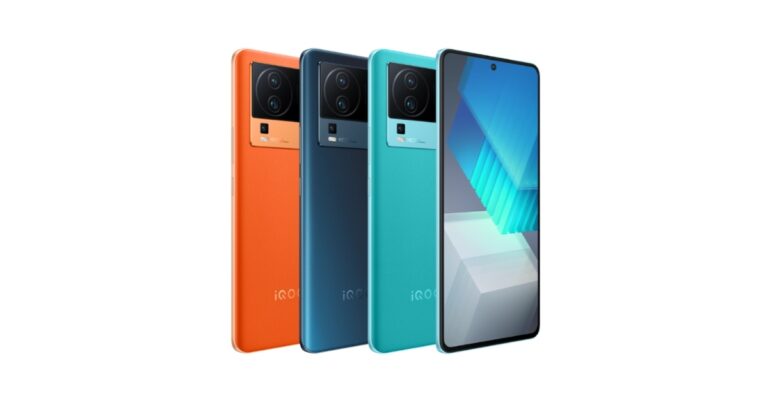
The iQoo Neo 7, was unveiled in China as the company’s latest premium smartphone. The device features a Samsung E5 AMOLED display with a 120Hz refresh rate. In addition to this, it is powered by MediaTek Dimensity 9000+ SoC. The smartphone packs a 5,000mAh battery and supports 120W flash charging. There is a 50MP Sony IMX766V primary sensor with OIS on the phone as well.

iQoo Neo 7 price details

iQoo Neo 7 comes in four variants, the 8GB RAM with 128GB storage model is priced at CNY 2,699, or around Rs 30,800. The 8GB RAM and 256GB of storage cost CNY 2,799 which converts to Rs 32,000. The price of the 12GB RAM with 256GB storage model is set at CNY 2,999 which comes to around Rs 34,000. Lastly, the most expensive 12GB RAM with 512GB storage option will be available with a price tag of CNY 3,299 which is around Rs 37,700. The device will come in three colour options of Geometric Black, Impression Blue, and Pop Orange. Pre-orders can be placed for it at the moment in China. iQoo Neo 7 powered by MediaTek Dimensity 9000+ SoC launched

iQoo Neo 7 specifications

iQoo Neo 7 is highlighted with a 6.78-inch full-HD+ Samsung E5 AMOLED display. The screen supports up to 120Hz refresh rate, a 20:8 aspect ratio, and a 93.11 percent screen-to-body ratio. The display supports HDR and has a max brightness of 1500 nits. The device runs on OriginOS Ocean, an Android 13-based operating system. Under the hood, there is an octa-core 4nm MediaTek Dimensity 9000+ SoC with a Mali-G710 GPU and up to 12GB of LPDDR5 RAM. Additionally, the phone has 512GB of UFS3.1 internal storage. The new iQoo Neo 7 has a triple rear camera configuration with an OIS-enabled 50-megapixel Sony IMX766V main sensor. A 2-megapixel macro camera with an f/2.4 aperture and an 8-megapixel ultra-wide lens are also included in the camera arrangement. There is a 16-megapixel selfie camera with an f/2.45 aperture A 5,000mAh battery within the iQoo Neo 7 supports 120W flash charging. Additionally, the phone has a dual X-axis linear motor. Additionally, it incorporates a liquid cooling system for controlling heat and an independent display chip Pro+. The iQoo Neo 7 offers 4G, Wi-Fi, Bluetooth v5.3, OTG, NFC, GPS, and a USB Type-C port as choices for connectivity. An accelerometer, ambient light sensor, in-display fingerprint sensor, e-compass, gyroscope, proximity sensor, infrared remote control, and pressure sensor are among the sensors provided on the phone. For the latest gadget and tech news, and gadget reviews, follow us on TwitterFacebook and Instagram. For newest tech & gadget videos subscribe to our YouTube Channel. You can also stay up to date using the Gadget Bridge Android App. You can find the latest car and bike news here.

Top Simple Ways to Use Chrome Extensions on an Android Mobile Browser

0
If you use Google Chrome on your desktop, you probably cannot imagine browsing the Internet without the helpful Chrome extensions that come along with the browser. There are tons of extensions that you can download from the Chrome Web Store. Unfortunately, Google Chrome does not offer extensions along with its Android browser. However, there are a few workarounds to this issue. In this article, we bring you the top simple ways to use Chrome extensions on an Android mobile browser. Read Also: Samsung announced the launch of the Pickle Mode Microwave in India

Use Chrome extensions on your Android mobile using Kiwi Browser

While you may not be able to use extensions on Google Chrome for Android, there are several Chromium-based browsers that offer that feature. A Chromium-based browser makes use of the open-source code for Chrome listed publicly by Google. This means that a Chromium browser will function like Chrome and may provide some additional features of its own. Kiwi Browser is one of the top-rated Chromium-based browsers for Android and lets its users use extensions on its platform. Here’s how you can use it. Step 1: Install the Kiwi Browser on your Android smartphone from the Google Play Store. Step 2: Open the browser, tap the ellipses (three dots) at the top right corner of the screen, and select Extensions. Step 2: Open the browser, tap the ellipses (three dots) at the top right corner of the screen, and select Extensions. Step 3: Make sure the toggle bar for ‘Developer Mode’ is turned on. Tap on ‘+ (from store)’. You will be redirected to the Chrome Web Store. You can also type and enter https://chrome.google.com/webstore/category/extensions to go to the Chrome Web Store Directly.  Make sure the toggle bar for ‘Developer Mode’ is turned on. Step 4: Once you’re at the Chrome Web Store, search for the Extension you want to use. Enter the name of the Extension in the search box at the top right part of the window. search for the Extension you want to use Step 5: Tap on the Extension you want and select ‘Add to Chrome’. You will be asked to confirm your choice. Tap OK. Tap on the Extension you want and select ‘Add to Chrome’. Your extension will be installed and can be managed from the Extensions tab in the menu.

Get Chrome Extensions on your Android mobile using Yandex Browser

Get Chrome Extensions on your Android mobile using Yandex Browser Yandex is another popular Chromium-based Android browser that allows you to use Chrome Extensions. The process to use extensions on Yandex is similar to Kiwi’s. The only difference is that Yandex does not have a dedicated Extensions tab in its menu like Kiwi. So, to download an extension you will need to type https://chrome.google.com/webstore/category/extensions in the address bar. Everything else is similar to the process mentioned above.  Read Also: Comparing PC and mobile online casino play

Conclusion

These are the top simple ways to use Chrome extensions on an Android mobile browser. You can download Adblock to have an ad-less web browsing experience on your mobile browser. Adblock also works on YouTube as well, so you will not need to subscribe to YouTube Premium to get rid of the annoying ads. If any of these methods worked out for you, let us know in the comments!
For the latest gadget and tech news, and gadget reviews, follow us on TwitterFacebook and Instagram. For newest tech & gadget videos subscribe to our YouTube Channel. You can also stay up to date using the Gadget Bridge Android App. You can find the latest car and bike news here.