In This Article
Design And Display
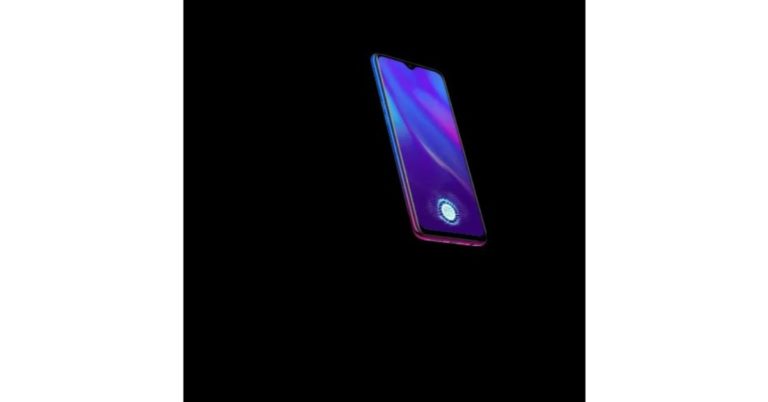
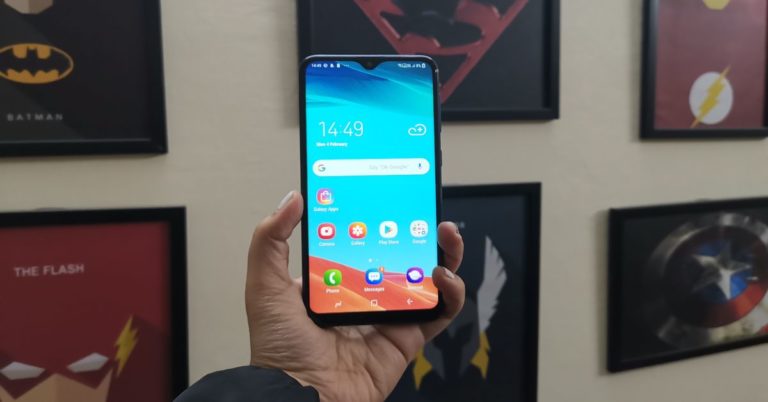
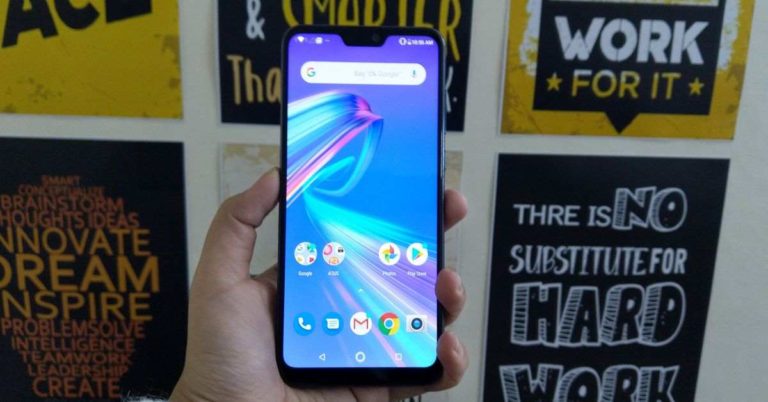
Let’s begin by talking about the design of the Samsung Galaxy M10. The key highlight of the smartphone is its display that comes with a waterdrop-shaped notch on the top to house the front camera. This is the first smartphone by Samsung that comes with this type of design. And right above it, the earpiece of the device is placed. Thin bezels outline the entire screen of the Samsung Galaxy M10. Only the chin is slightly broader than the rest of the bezels, but we have to say, the Infinity-V display looks really appealing. The rest of the body of Samsung Galaxy M10 is made of plastic, but in no way does it make the smartphone’s quality look bad. The curved edges and corners of the handset make one-handed usage very easy and the smartphone’s compact design just helps further. On flipping over, you will see the plastic back panel of the Samsung Galaxy M10 that houses the dual rear cameras, LED flash and Samsung branding. It is worth noticing that the speaker grille of the smartphone is also placed on its back panel. The audio doesn’t sound clear when the phone is lying on its back because of the speaker grille being placed on the rear panel. This problem is not there in its elder sibling the M20 since its speaker lies next to the charging port at the bottom. The plastic body of the Samsung Galaxy M10 also means that it is prone to getting smudges and fingerprints, however, it wasn’t too noticeable an issue for us. The right edge of the device has the power and volume rocker buttons sandwiched on it and the left edge has the SIM tray. The bottom edge has the microUSB port, the 3.5mm headphone jack and the microphone and the top edge only has the secondary microphone placed on it.
Another thing we should mention is that Samsung Galaxy M10 does not have a fingerprint scanner and it only comes with a Face Unlock feature. However, considering that its face unlock works very accurately – even in the dark – we didn’t miss the fingerprint sensor at all.
To conclude, we would say that Samsung Galaxy M10 has a simple, minimalistic design, yet is good to look at. Maybe it’s not for someone who likes their smartphone to have a flashy look, but we personally found it appealing to look at especially considering the price range.
Coming to the 6.22-inch HD+ TFT display of the smartphone, it is another aspect of the Samsung Galaxy M10 we liked. The images projected were reasonably sharp and the colours were accurate. They remained consistent when we viewed them from different viewing angles. For the price point, watching YouTube videos and playing games on Samsung Galaxy M10 wasn’t a bad experience, but don’t expect too much from it either. The sunlight readability of the device could definitely be better than what it is. The smartphone does give the option of turning on the Bluelight Filter for the display, but the tones became too warm for our taste when we enabled it.
The plastic body of the Samsung Galaxy M10 also means that it is prone to getting smudges and fingerprints, however, it wasn’t too noticeable an issue for us. The right edge of the device has the power and volume rocker buttons sandwiched on it and the left edge has the SIM tray. The bottom edge has the microUSB port, the 3.5mm headphone jack and the microphone and the top edge only has the secondary microphone placed on it.
Another thing we should mention is that Samsung Galaxy M10 does not have a fingerprint scanner and it only comes with a Face Unlock feature. However, considering that its face unlock works very accurately – even in the dark – we didn’t miss the fingerprint sensor at all.
To conclude, we would say that Samsung Galaxy M10 has a simple, minimalistic design, yet is good to look at. Maybe it’s not for someone who likes their smartphone to have a flashy look, but we personally found it appealing to look at especially considering the price range.
Coming to the 6.22-inch HD+ TFT display of the smartphone, it is another aspect of the Samsung Galaxy M10 we liked. The images projected were reasonably sharp and the colours were accurate. They remained consistent when we viewed them from different viewing angles. For the price point, watching YouTube videos and playing games on Samsung Galaxy M10 wasn’t a bad experience, but don’t expect too much from it either. The sunlight readability of the device could definitely be better than what it is. The smartphone does give the option of turning on the Bluelight Filter for the display, but the tones became too warm for our taste when we enabled it.
 To sum it up, we would say that there are more positive points about Samsung Galaxy M10’s display than the far and few adverse ones. And whatever the downsides are, they didn’t create too much trouble for the user, so one can easily live with them.
Performance And Cameras
Coming to the specifications, Samsung Galaxy M10 is powered by an octa-core Exynos 7870 SoC processor coupled with up to 3GB of RAM and 32GB of internal storage. The smartphone houses a 3,400mAh battery and comes with 5W charger in the box. The device runs Android 8.1 Oreo skinned with Samsung Experience 9.5 UI. Samsung Galaxy M10 comes with some pre-installed apps like the company’s native apps, some apps from Microsoft and Daily Hunt. We should mention that not all of these can be uninstalled, which is some might not like. You can use two versions of popular apps like WhatsApp on the smartphone as it comes with a dual-messenger feature. Another very interesting feature is the lock-screen Stories, which shows you different photos when the device’s screen is locked. Speaking of Samsung Galaxy M10’s performance, it mostly worked well when used for day to day tasks. The apps launched quickly and it was easy to toggle between multiple apps. Even when we used the device for simultaneous tasks at a time, it could take it. And considering the price point of the device, it is definitely a plus.
For instance, we often used the device for gaming and navigation simultaneously while we were on our way to work. And in spite of being used for both, it did not show any lag and didn’t heat up, too. For gaming duties, this smartphone could have definitely could do better. Games like Alto: Odysee ran well, however graphical hungry game like Asphalt 9, did show signs of stress at times. Nevertheless, we enjoyed most of it thanks to its superb screen.
The battery of the device was among its best features. With usage that involved clicking photos, watching YouTube videos, playing games and some rather long phone calls, it lasted more than a day. We didn’t have to charge it again till the next afternoon, which is very impressive.
Speaking of Samsung Galaxy M10’s performance, it mostly worked well when used for day to day tasks. The apps launched quickly and it was easy to toggle between multiple apps. Even when we used the device for simultaneous tasks at a time, it could take it. And considering the price point of the device, it is definitely a plus.
For instance, we often used the device for gaming and navigation simultaneously while we were on our way to work. And in spite of being used for both, it did not show any lag and didn’t heat up, too. For gaming duties, this smartphone could have definitely could do better. Games like Alto: Odysee ran well, however graphical hungry game like Asphalt 9, did show signs of stress at times. Nevertheless, we enjoyed most of it thanks to its superb screen.
The battery of the device was among its best features. With usage that involved clicking photos, watching YouTube videos, playing games and some rather long phone calls, it lasted more than a day. We didn’t have to charge it again till the next afternoon, which is very impressive.
 Coming to Samsung Galaxy M10’s cameras, they left us with a bag of mixed feelings. The 13MP primary sensor works reasonably well, but you shouldn’t expect anything too great from it. The photos are decent with accurate colours, but at times they appeared too sharp. The shots that we actually liked were the ones in which the Live Focus mode was on. If you try to zoom in and click a picture, it may turn out to be too grainy. We managed to take some interesting shots with the 5MP wide-angle lens, but they too seemed too sharp at times.
 We should also mention that the images taken in lowly lit areas lacked some clarity. The front camera of the device worked well most of the times and managed to spew some decent selfies in well-lit conditions. In dimly lit conditions, the selfies became a bit grainy.

Verdict And Final Thoughts
Samsung Galaxy M10’s starting price is Rs 7,990. And at this price, it is definitely a very good buy. The smartphone has an elegant design, a very powerful battery which easily lasts more than a day, an accurate face unlock feature and a reasonably good display. For most day to day tasks, it works well. The cameras and the gaming experience could have been better, but then, we have repeatedly said that at this price point, we can’t expect the device to be great in all departments and it’s not fair to expect too much from it. If your usage is too heavy, you may want to expand your budget a bit and go for its bigger sibling the Samsung Galaxy M20, but if you are a moderate user looking to buy a budget smartphone with good battery life and great touchscreen, Samsung Galaxy M10 is a very good option to consider. Pros- Modern design
- Long lasting battery
- Accurate face unlock
- Average cameras
- Average gaming experience
- Cannot handle heavy usage








 You can skip the introduction of a YouTube video by the number of seconds you wish to, by simply changing the URL of the video. However, we should mention that you cannot specify minutes for doing this and it only works for seconds. So, if you want to skip 1 minute and 30 seconds, you have to mention ’90’ in the URL instead. Coming to the URL trick, let’s say you wish to skip the first 10 seconds of a YouTube video, so you will add ‘&start=10’ to the end of the URL of that particular video. Similarly, if you wish to skip 50 seconds, you would add ‘&start=50’ to the end of the URL.
 Do you want to show your friend something really cool that you saw on YouTube but don’t want them to waste their time watching the entire video? You can send them the link which makes the video start exactly where you want it to. You can do this by pausing the video at that particular time and then right-click on your mouse to choose Copy video URL at current time.
 There are a number of keyboard shortcuts that you can use on YouTube. For instance, ‘k’ can be used to play/pause videos, ‘j’ can be used to rewind 10 seconds, ‘1’ can be used to fast-forward 10 seconds, and ‘m’ can be used to mute. Furthermore, hitting any number between 1 and 9 will take you to the respective percentage of the video (like 6 will take you to the spot where 60% of the video has been played).
 If you have come across an age restricted video in YouTube, but still want to go ahead and watch it, you can do so by removing ‘/watch?v=’ from the video’s URL and then open it without logging in.
 If you like a YouTube video too much and would like to download it, you can do it just by a very simple URL trick. Just add ‘pwn’ before the URL of the YouTube video and press enter. You will be taken to a service that will let you download the video in a number of formats. While this trick is a very simple one and can be used for any and every video, we should also say that one shouldn’t download any copyrighted videos.
 You can play any video on YouTube in an indefinite loop. For doing this, you have to press the right click button on your mouse and select the ‘Loop’ option. The video will start repeating itself indefinitely.
 In case you have a slow internet connection at home, you can avoid having to wait for the video to buffer. For doing this, go to ‘www.youtube.com/account_playback’ and click on ‘I have a slow internet connection. Never play higher-quality video’.
 By searching for your favourite artist with a hashtag in YouTube’s search bar (Eg- #beyonce), you will get a collection of videos related to them. You can do this on desktop, mobile website as well as the YouTube app.
 Do you love to sing along YouTube videos of your favourite songs but you can’t remember the lyrics? Install the Musixmatch browser extension, which will add lyrics to YouTube videos as they play. So now you know what to do to have a superb karaoke party at your place!
 Did you just come across a YouTube video that is worth making a GIF of? You can actually do this by adding ‘gif’ before the URL of the YouTube video. You will then be taken to gifs.com, where you can create gifs with a variety of effects. The service also allows you to directly share the GIF on your social media profiles or to download it. However, we should mention that videos that are too long may not work too well with this shortcut.
For the latest
Did you just come across a YouTube video that is worth making a GIF of? You can actually do this by adding ‘gif’ before the URL of the YouTube video. You will then be taken to gifs.com, where you can create gifs with a variety of effects. The service also allows you to directly share the GIF on your social media profiles or to download it. However, we should mention that videos that are too long may not work too well with this shortcut.
For the latest