Do you like something on the screen of your Android device? are an easy way to capture what you see on your mobile or tablet screens. Good things are better when they are shared. But what if you want to hide or want to add text before sending the screenshot to others? This simple guide will tell you some easy steps on how to add text, edit and crop your screenshot swiftly.
1. Using the native app
Smartphone companies also saw this problem very early. Nowadays almost all smartphone manufacturing companies have a photo editor in their UI itself. Here is how to use it.Step 1 – Take a screenshot of the content you like.Step 2 – Head to the gallery and then to the screenshot folder.Step 3 – Tap on the image, below you will find an option to edit, discard and share.Step 4 – Tap the edit button and you are good to go.Step 5 – Edit your image, add text etc accordingly.
2. Google Photos
Google Photos is a part of the G suit and is very popular when it comes to photos. You can also use this application as a substitute for your native gallery application. Google Photos also provides you with the option to backup your photos and videos. Using Google Photos for editing your screenshots is very easy, here is how.Step 1 – Download Google photos from the Play Store.Step 2 – Open Google Photos and head to the screenshot folder.Step 3 – Tap on the screenshot you want to edit.Step 4 – Below you will see 4 options of share, edit, lens and delete.Step 5 – Press edit and edit your image as per your liking.Read Also: 5 best photo editing apps for Android devices
3. PicsArt
Want to do more than just basic editing of your screenshots? PicsArt is the perfect application for you as it provides you with not only just editing but much more. It’s like a community of professional photographers and photo editors. There are tons of features available in the application for free. You can also pay a subscription to get extra features unlocked. Here is how you can edit your screenshots in PicsArt.Step 1 – Download PicsArt from the Play StoreStep 2 – Open PicsArt.Step 3 – Tap on the purple + symbol on the bottom of the screen.Step 4 – Select the “Edit a Photo” option.Step 5 – Tap on the screenshot you want to edit.Step 6 – Choose from tons of features and editing options.Step 7 – After completing the editing you can either download the image or share it directly to your desired social media platform.Note – This app needs some learning and is used for professional editing, which requires some time to go through. These apps are the top picks for our readers to edit, crop and add text to their screenshots. These applications will readily help you and come in handy to increase productivity.For the latest gadget and tech news, and gadget reviews, follow us on Twitter, Facebook and Instagram. For newest tech & gadget videos subscribe to our YouTube Channel. You can also stay up to date using the Gadget Bridge Android App. You can find the latest car and bike news here.
YouTube is rolling out a new update for its search feature to make the user experience much better. The company has announced that the search function on the platform will allow them to easily find content and access information faster. This will make the searches more visual and more content will be available to everyone by showing chapter thumbnails and better recommendations for translated videos. While announcing the new ways to help people more easily search and find content on YouTube Neal Mohan, Chief Product Officer said, YouTube’s enormous library of content has always set us apart as a platform. No matter what you’re looking for, there’s a good chance we have it on YouTube. But we know viewers need to easily find the videos they’re looking for, and quickly access the information they need. Our teams have invested significantly in improving that search experience over the years, and in today’s instalment of ourInnovation Series, we’re excited to share the latest technology to help you find what you’re looking for, from how-tos to DIYs. This complements the work we’re doing toraise videos from authoritative sources when people come to YouTube looking for news and health information.”Until now when users used to browse videos on YouTube they would see a thumbnail image of each video, which allowed you to gather a quick snapshot of the video’s content. On public demand for easier ways to see what a video is about, YouTube will make the search page even more visual to help people get a better glimpse of what’s inside a video. To make a more informed decision whether to watch the video or not, YouTube will now show what you’re going to watch through video chapters directly on the search page. When available, these time-stamped images detail the different topics covered in videos and let you better evaluate the video you’re about to watch. You can also jump directly to the section most relevant to your specific interest. So now when you search for a recipe of a cake on YouTube with these new search results, you can see all the steps in the video, from feeding the starter to pulling the bread out of the oven – and skip right to the chapter on kneading. YouTube will show some snippets of each video on its platform while on the desktop the users can scroll over a video and begin to see a snippet of the content on the search page. As of now, the Google-owned video-sharing platform is rolling out the mobile version of this feature to help you easily preview different videos and decide if it’s what you’re looking for.Other than this in order to improve content searches across the globe, Youtube started showing search results from other languages with automatically translated captions, titles and descriptions when relevant content in the local language isn’t available. “We’ll start supplementing search results with English videos and plan to expand to more languages. Our hope is that all global content will become more accessible through translated captions and help creators reach a more global audience,” the blog post said.Youtube has also started testing a new feature to complement search results with website links and other formats from Google Search when you don’t get enough high-quality or relevant video content to fully address what you’re looking for. This feature is currently available on mobile devices in India and Indonesia.
For the latest gadget and tech news, and gadget reviews, follow us on Twitter, Facebook and Instagram. For newest tech & gadget videos subscribe to our YouTube Channel. You can also stay up to date using the Gadget Bridge Android App. You can find the latest car and bike news here.
The e-commerce website Flipkart is hosting Daily Trivia Quiz. Every day it brings a bunch of new questions for its users. By answering them correctly you can win exciting prizes. The questionnaire is based on questions related to general knowledge. Also, the users can win free vouchers and super coins, among other offers via the daily quiz. 20 August 2021 Flipkart Daily Trivia Quiz Answers has already gone live on its platform.
The participant should be at least 18 years old and should have a valid login ID. The Quiz is available on the mobile platform and not the web version. E-commerce conducts the quiz on daily basis and goes live at 12:00 AM IST and runs till 11:59 PM IST. The winners are announced within 15 days from the date of participation that can be viewed under the Gems/Rewards section in the app.
How to participate in the Flipkart Daily Trivia Quiz
To participate download the Flipkart app on your phone. Then open the Flipkart app then head to Game Zone. Now click on the Daily Trivia Banner or search for Daily Trivia. Enter the game and answer all 5 questions with correct answers.
20 August 2021 Flipkart Daily Trivia Quiz Answers
Question 1: Which of these films depicts how love existed in the past, and how it is in the present?
Answer: Love Aaj Kal
Question 2: ______ is a 2008 thriller film starring Rajeev Khandelwal?
Answer: Aamir
Question 3: Donald Trump appeared in the 2nd of which film series?
Answer: Home Alone
Question 4: Which singer was seen in the films like Love in Nepal, Pyara Dushman and Taqdeer?
Answer: Sonu Nigam
Question 5: Which movie was sent as India’s official entry for Oscar Aw?
Answer: Visaranai
For the latest gadget and tech news, and gadget reviews, follow us on Twitter, Facebook and Instagram. For newest tech & gadget videos subscribe to our YouTube Channel. You can also stay up to date using the Gadget Bridge Android App. You can find the latest car and bike news here.
Amazon Quiz has gone live on its platform. The quiz timings are daily from 12 AM to 11:59 PM. By submitting correct answers, millions of Amazon customers can win free gadgets as well as Amazon Pay Balance. By participating in the 20 August 2021 Amazon Quiz today you can stand a chance to win Rs 20,000 Amazon Pay Balance.
Daily the e-commerce platform brings a fresh questionnaire to which the contestants have to answer correctly to enter into a lucky draw. The quiz can be played daily from 8 AM to 12 noon. The Amazon Quiz contains five easy questions that are based on current affairs and general knowledge. Only one person is declared as a winner and the results are announced at the end of every month. Answering all the questions correctly might let you win something and a wrong answer will get you eliminated from the quiz. To make sure you answer all the questions correctly Gadget Bridge everyday updates all the correct answers to all 5 questions. check out 20 August 2021 answers for the Quiz to win a Rs 20,000 Amazon Pay Balance.
20 August 2021 Amazon Quiz Answers
Question 1: Who will be the flag bearer for the Indian contingent at the closing ceremony of the Tokyo Games?
The answer is- A) Bajrang Punia
Question 2: Who among these, often referred to as ‘the loneliest man in history’, passed away in April 2021?
The answer is- D) Michael Collins
Question 3: In May 2021, which pop star got married to real estate agent Dalton Gomez?
The answer is- C) Ariana Grande
Question 4: Under which dynasty was this monument built?
The answer is- B) Qutb Shahi
Question 5: Identify the fruit
The answer is- D) Avocado
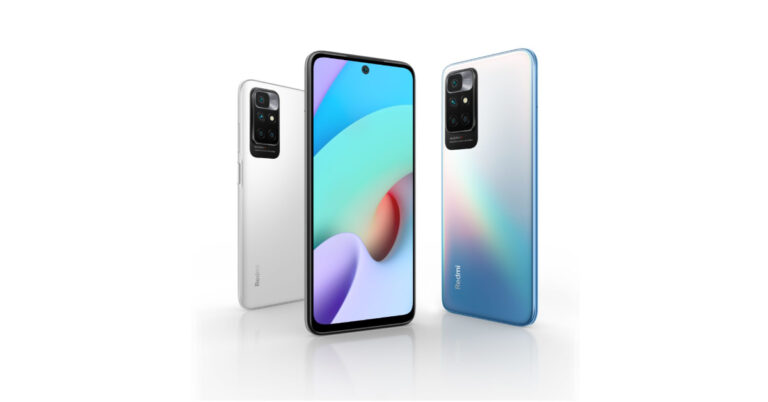
Recently, Redmi teased to launch Redmi 10 in India. But before it arrived in the country the company’s latest smartphone debuted in Malaysia. Now in a blog post, the company has revealed all the specifications and pricing of the handset however it did not mention in which market it will arrive. The key highlights of the smartphone include a 50-megapixel quad rear camera setup, a 90Hz display and a 5,000mAh battery onboard. The phone is powered by a MediaTek Helio G88 SoC and includes a side-mounted fingerprint sensor as well.
Redmi 10 price and availability
Redmi 10 has been launched in three different configurations. The device is available in 4GB RAM with a 64GB storage option priced at $179 that translates to Rs 13,300 approx. The 4G RAM with 128GB will come with a price tag of $199 that comes around Rs 14,800 and the 6GB RAM with 128GB storage will retail at $219 translating to Rs 16,300 approx. The device is mentioned to come in three colour options of Carbon Grey, Pebble White, and Sea Blue. The availability details are yet to be revealed.To recall, in Malaysia Redmi 10 is available in two variants 4GB RAM with 64GB storage and 64GB RAM with 128GB storage model priced at MYR 649 and MYR 749 respectively. This converts to Rs 11,400 and Rs 13,100 respectively as per Indian currency.
Redmi 10 specifications
Speaking of the specifications, Redmi 10 features a 6.5-inch full-HD+ AdaptiveSync display with 1,080×2,400 pixels of resolution. It will run on Android 11 with MIUI 12.5 on top. The device is powered by MediaTek Helio G88 SoC coupled with up to 6GB of RAM and up to 128GB of onboard storage options. In terms of cameras, Redmi 10 comes with a quad rear camera setup that houses a 50-megapixel primary sensor along with an 8-megapixel ultra-wide-angle sensor. There is a 2-megapixel macro and a 2-megapixel depth sensor. For taking selfies and video calling the device includes an 8-megapixel front-facing camera.The handset is backed by a 5,000mAh battery that comes with 18W fast charging support but the company is shipping a 22.5W fast charger inside the retail box. Also, there is a side-mounted fingerprint sensor along with an AI face unlock. The further includes a 3.5mm headphone jack and dual speakers.
For the latest gadget and tech news, and gadget reviews, follow us on Twitter, Facebook and Instagram. For newest tech & gadget videos subscribe to our YouTube Channel. You can also stay up to date using the Gadget Bridge Android App. You can find the latest car and bike news here.
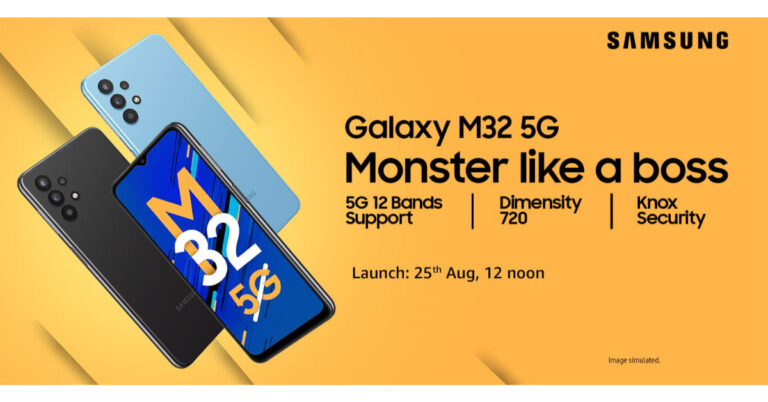
Samsung is all set to expand its 5G lineup with the launch of a new M-series smartphone in the Indian market. The company has officially announced to launch Samsung Galaxy M32 5G on August 25. The phone also comes in a 4G variant, which was launched a few months back in the country. The Korean major has also confirmed its availability on Amazon by listing it on the e-commerce platform. The upcoming 5G smartphone is speculated to be a rebranded variant of Galaxy A32 5G, which arrived in the European market earlier this year.According to the company, it has scheduled to launch Samsung Galaxy M32 5G in India on August 25 at 12 noon. The company says that the device will get 12 bands’ 5G support (the bands being – N1, N3, N5, N7, N8, N20, N28, N38, N40, N41, N66, N78) and OS upgrades for 2 years. In addition to this, the phone will be powered by MediaTek Dimensity 720 processor. The handset will also ensure optimized performance, smooth multitasking and reduced power consumption even while browsing and using multiple apps. Galaxy M32 5G will come with Samsung’s defence grade Knox Security that ensures greater privacy and enhanced security all packed within a slim and sleek smartphone boasting a premium design.Like we said above, the company has listed Samsung Galaxy M32 5G on Amazon to tease its availability. The dedicated microsite has also shared some additional details about the forthcoming phone like it will feature a 48-megapixel quad-rear camera setup. For selfies, the device will come with a 13-megapixel front-facing camera. In addition, the 5G smartphone will be fuelled by a 5,000mAh battery. It should be noted that the 4G variant was loaded with a massive 6,000mAh battery. Other than this the Amazon listing shares the design of the mobile phone which looks similar to its sibling.Speculations suggest that Galaxy M32 5G will be a rebranded variant of Samsung Galaxy A32 5G. Most of the detailed specifications of the device share similarities with the A32 5G. If that is to be believed then apart from the 48-megapixel primary sensor the quad-camera set up will include an 8-megapixel ultra-wide-angle sensor with f/2.2, a 5-megapixel macro lens with f/2.4 aperture and a 2-megapixel depth sensor with an f/2.4 camera. The battery will also support 15W fast charging.
For the latest gadget and tech news, and gadget reviews, follow us on Twitter, Facebook and Instagram. For newest tech & gadget videos subscribe to our YouTube Channel. You can also stay up to date using the Gadget Bridge Android App. You can find the latest car and bike news here.
Google Doc is a part of the G Suite. It is the most convenient way to share documents with anyone. A person can review a document and edit it if you give them permission. Remember, a person can take a screenshot of your document and miss use it. Watermark is the way to go about it, but there is no native option of the watermark your Google Docs. This guide will help you to add watermarks to your documents and keep your documents safe. Follow these steps.Insert an Image in your Document.Step 1- Click on Image Options to open a panel on your right.Step 2- Set Text Wrapping to ‘In front of text’.Step 3 – Scroll down to Image options to find AdjustmentsStep 4 – Adjust the transparency of the imageStep 5 – Adjust Brightness and Contrast accordingly, make sure you adjust your image properly as it will be difficult to move from behind the texts.Step 6- Share your documents with others by making them read only. Read Also: 10 must-know Hidden Features of Microsoft WordThis was a simple do it yourself way to add a watermark on your Google Docs. This method is only a one time hassle and your document is secured. Also, we hope that Google soon adds an option to add watermarks natively. Till that time Gadget Bridge hasgot you covered.For the latest gadget and tech news, and gadget reviews, follow us on Twitter, Facebook and Instagram. For newest tech & gadget videos subscribe to our YouTube Channel. You can also stay up to date using the Gadget Bridge Android App. You can find the latest car and bike news here.
Instagram and Facebook are the leading social media websites/apps in the world. With users growing in these social media platforms day by day, it’s important to keep up the privacy. Some people want to keep their personal life limited to only a few people. Facebook and Instagram try hard to improve privacy related issues and listen to users to bring out new updates. Recently the company announced on their blog page that they announced an update for hiding the like count.Here is a guide, which will help you on how to use this feature and hide ‘like counts’ in Facebook and Instagram posts.
1.On Instagram
Step 1 – Head to your profile and click on the three-line burger icon on the top right corner.Step 2 – Tap on setting and then go to the Privacy tab. Step 3 – Under posts, tap Hide Like and View Counts.You can also head to your current post and hide your likes and views. It can be done by following these steps.Step 1 – Head to the post you want to hide likes of.Step 2 – Tap on the three dots of the post.Step 3 – Select Hide Like Count.Read Also: How to hide your telegram profile picture from others?
2.On Facebook.
This feature was rolled out recently on Facebook and is very easy to toggle on.Step 1 – Tap on the 3 line burger icon on the top right corner of the screen.Step 2 – Head to setting and Privacy tab.Step 3 – Select the setting tab under its subcategory.Step 4 – Under preferences tap on Reaction Preferences.Step 5 – Select your preference accordingly.This step by step guide will really help you to take care of your privacy if you wish and hide your like count. The post for Hiding the views is on the way and as soon as the update rolls out you will surely find it in Gadget Bridge.For the latest gadget and tech news, and gadget reviews, follow us on Twitter, Facebook and Instagram. For newest tech & gadget videos subscribe to our YouTube Channel. You can also stay up to date using the Gadget Bridge Android App. You can find the latest car and bike news here.
YouTube is one of the leading video streaming platforms in the world. Pattern Video consumption by the current generation has changed. Everyone is in a hurry, they want to consume content fast. With the rise in fame of TikTok, even YouTube followed the trend and released shorts. As it is very early there are few issues that consumers face.Today, we will specifically focus on how to fix YouTube shorts not appearing in the feed.
1.Update your app
Shorts dedicated panel was introduced in the latest update. There might be a strong chance that you are running on an older version of YouTube. It’s very easy to fix this.Step 1 – Head to Google Play Store and search YouTube.Step 2 – You will see an update button if your application is not up to date.Step 3 – Click on the update button and wait for it to finish.Step 4 – Open YouTube, now you will be able to see the reels panel at the bottom.
2.Clear cache and data
If your application is up to date and yet YT Shorts are not showing up in the application, there might be an issue with a bad cache file. A bad cache file can make an application misbehave and cause unexpected crashes. The below instructions will help you to clear those files.Step 1 – Go to Settings on your phone.Step 2 – Either go to apps or search for it in the search bar.Step 3 – Tap on all apps.Step 4 – Select YouTube from the list.Step 5 – Head to storage in the app settings.Step 6 – Clear cache and data.Step 7 – After this step, your app will be back to stock settings. Relaunch the app and enjoy.Also Read: How to declutter your Facebook news feed?
3. Use VPN
Currently, YT Shorts are available specifically in only 2 countries: India and the USA. If you are either travelling or are in a different country and you wish to enjoy YouTube Shorts. There is a simple solution for you. Just head to the Google Play Store and Search VPN on the search bar. It will show you a list of the best VPNs in the market. Select one accordingly and set the country to either USA or India.These steps will surely fix your problem related to YouTube Shorts. unless it’s a technical issue from YouTube’s side. Also, consider reinstalling the app once if none of these ideas works.For the latest gadget and tech news, and gadget reviews, follow us on Twitter, Facebook and Instagram. For newest tech & gadget videos subscribe to our YouTube Channel. You can also stay up to date using the Gadget Bridge Android App. You can find the latest car and bike news here.
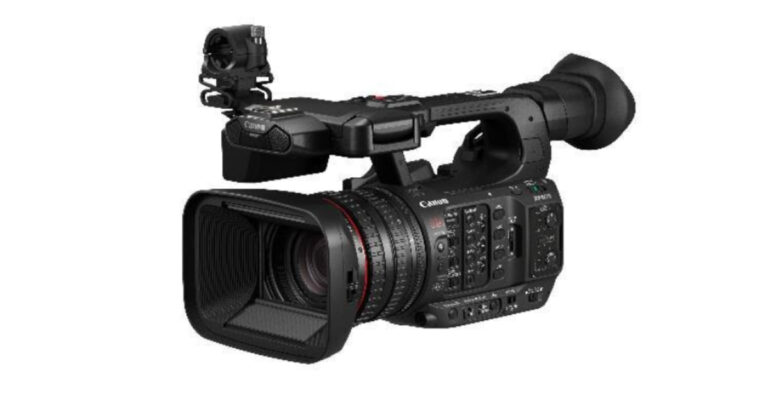
Canon recently announced the launch of a new XF-series professional-use camcorder namely XF605 in the market. The Canon XF605 features the company’s L Series lens offering 15X zoom along with 3 ring operation. There is a 1.0-inch CMOS sensor and is powered by a DIGIC DV7 image processor. The camcorder comes with head and eye detection and 5-axis stabilisation.Canon XF605 comes with a compact body that brings portability while retaining three lens rings for enhanced operability. The new XF-series professional-use camcorder weighs approximately 600 grams less than the XF705. The device is claimed to deliver improved AF and transmission functionality, making it ideal for genres such as broadcast journalism, documentary films and event coverage that demands immediate responsiveness and single-operator shooting styles.The Canon XF605 professional-use camcorder features a 1.0-inch CMOS sensor. It is powered by a DIGIC DV7 image processor, enabling users to capture high-quality 4K/50p/4:2:2/10-bit HDR video. The camcorder also allows for recording in HDR and high-frame-rate 120 FPS recording in Full HD. Along with the L (Luxury) Series lens, the Canon video recorder comes with an autofocus technology called Dual Pixel CMOS AF. This feature allows each effective pixel on the CMOS sensor to perform both phase-difference autofocusing and imaging functions, therefore, allowing high-speed and high-accuracy focusing. The XF605 is the company’s first to offer eye and head AF as well as improved face detection AF, enabling more accurate and stable tracking of subjects. The camcorder also offers intuitive operation and for this, it includes touch-panel menu operations and a replay mode.The company has also launched the new CTM mobile app which allows Canon XF605 professional-use camcorder to connect and transfer recorded video data via cable. It also allows wireless transfer of data to iOS devices and to FTP servers at broadcast stations or other locations, thus enabling faster and more efficient workflows for video operations.
For the latest gadget and tech news, and gadget reviews, follow us on Twitter, Facebook and Instagram. For newest tech & gadget videos subscribe to our YouTube Channel. You can also stay up to date using the Gadget Bridge Android App. You can find the latest car and bike news here.


 Read Also: 5 best photo editing apps for Android devices
 Note – This app needs some learning and is used for professional editing, which requires some time to go through.
These apps are the top picks for our readers to edit, crop and add text to their screenshots. These applications will readily help you and come in handy to increase productivity.
For the latest gadget and tech news, and gadget reviews, follow us on Twitter, Facebook and Instagram. For newest tech & gadget videos subscribe to our YouTube Channel. You can also stay up to date using the Gadget Bridge Android App. You can find the latest car and bike news here.
Note – This app needs some learning and is used for professional editing, which requires some time to go through.
These apps are the top picks for our readers to edit, crop and add text to their screenshots. These applications will readily help you and come in handy to increase productivity.
For the latest gadget and tech news, and gadget reviews, follow us on Twitter, Facebook and Instagram. For newest tech & gadget videos subscribe to our YouTube Channel. You can also stay up to date using the Gadget Bridge Android App. You can find the latest car and bike news here. 






 Step 3 –
 Step 5 –
 Step 6-


 Step 4 –
  Step 4 –
 Step 6 –
 Step 7 –