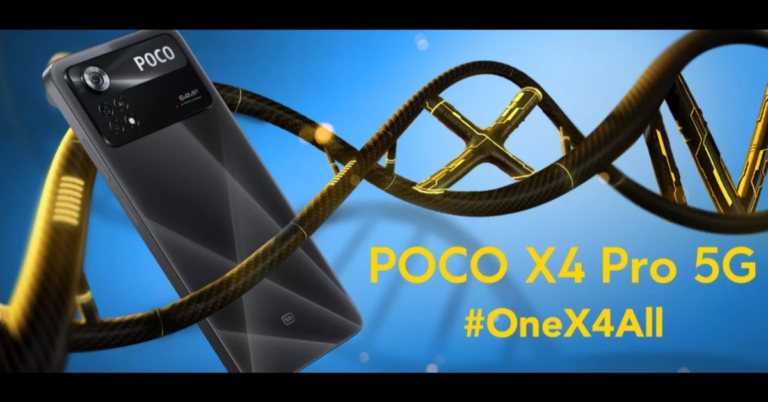
The Poco X4 Pro 5G has officially made its debut in India today. The device is a successor to last year’s Poco X3 Pro. The phone is powered by Snapdragon 695 SoC and features a 120Hz Super AMOLED display. In addition to this, there is a 64MP triple rear camera set up and supports 67W fast charging. Continue reading to learn more about the technical specifications and pricing.
In This Article
Poco X4 Pro 5G price in India, availability
In India, the price of the Poco X4 Pro 5G begins at Rs 18,999 for the 6GB RAM with 64GB storage option. The 6GB RAM with 128GB storage and the 8GB RAM with 128GB storage variant is priced at Rs 19,999 and Rs 21,999 respectively. The device will be available in Laser Black, Laser Blue, and Poco Yellow colours. The new smartphone will be available for purchase on Flipkart beginning April 5.Users of HDFC Credit/Debit cards can also get a flat Rs 1,000 instant discount. Users can also exchange their Poco X-series smartphones, Poco X2, Poco X3, and Poco X3 Pro for the Poco X4 Pro 5G and save an additional Rs 3,000.
Poco X4 Pro 5G specifications
The Poco X4 Pro 5G‘s global version features a 6.67-inch full-HD+ AMOLED display with a resolution of 1,0802,400 pixels. The maximum brightness of the display is 1200 nits, with a refresh rate of 120Hz and a touch sampling rate of 360Hz. Corning Gorilla Glass 5 protects the display as well. The phone runs Android 11 with the MIUI 13 skin on top. The handset is powered by a Snapdragon 695 SoC, an Adreno 619 GPU, and up to 8GB of LPDDR4x RAM. The phone has an internal storage capacity of 128GB that can be expanded to 1TB via a microSD card slot.the Poco X4 Pro 5G will have a 64-megapixel primary sensor with an f/1.8 aperture. Among the other sensors are an 8-megapixel ultra-wide-angle sensor and a 2-megapixel macro sensor. For selfies, a 16-megapixel front-facing camera is available.It has a 5,000mAh battery and supports 67W fast charging. There is also a fingerprint sensor on the side. 5G, 4G LTE, Wi-Fi 802.11ac, Bluetooth v5.1, GPS/ A-GPS, Infrared (IR) blaster, USB Type-C, and a 3.5mm headphone jack are among the connectivity options on the phone. An accelerometer, ambient light, gyroscope, magnetometer, and proximity sensor are among the sensors onboard.
For the latest gadget and tech news, and gadget reviews, follow us on Twitter, Facebook and Instagram. For newest tech & gadget videos subscribe to our YouTube Channel. You can also stay up to date using the Gadget Bridge Android App. You can find the latest car and bike news here.
Hey, all you Facebook users! Ever heard about Facebook Touch, anyone? If not, that’s alright. We are here to knock on the doors of your curiosity and resolve your queries at the same time. To tell you for starters, it has been around for more than a decade now. Here is all we know about what Facebook Touch is, how it is different from the usual Facebook app that we use today, what are its features, benefits and limitations as well as whether is it worth using or not. You might want to put your exploration hats on for this one.
In This Article
What is Facebook Touch?
Facebook Touch was introduced to the market in 2009, in order to make smartphone users more accustomed to touchscreen devices. It’s said to be a simplified mobile version of the Facebook website, that is offered as a more efficient alternative to the Facebook Android and iOS app, due to its smoother user interface and better graphics. It also runs faster than the latter. Even though the Facebook app has been a huge market hit, however, the Touch version is still kept available as an option with the idea of providing variety to the customers.
Difference Between Facebook and Facebook Touch
The main difference between Facebook and Facebook Touch is that the latter offers a better user interface to its customers. When you enter Facebook Touch, you are immediately able to notice the images being of higher quality and the display being more enhanced. It comes with an overall advanced functionality as compared to the typical Facebook app, which constitutes less data, lower quality imaging and display.Read also:How to Block or Unblock Someone on Facebook?
Features & Benefits of Facebook Touch
It is the most ideal for users who have a busy smartphone with too many apps taking up your storage and battery life since it consumes less energy.
It delivers a sleek experience to its users with higher resolution images and display loading at a faster rate.
There is no limit for the width of the posts, and one can see them in a very large size, convenient for the eye even from a distance.
Provides much easier access to most of the features of Facebook with a hassle-free experience.
Limitations of Facebook Touch
While providing better performance than Facebook, there are also some factors that can be looked upon as limitations of Facebook Touch.
Appearance-wise, there isn’t much of a difference between the two.
If you are already pretty comfortable with Facebook and don’t have any complaints on the front of its quality and performance, then there won’t be much need for you to switch to Facebook Touch.
The desktop version of Facebook Touch may not function as efficiently as its mobile or web version.
Facebook has also has launched other versions for touchscreen devices which may be better than even Facebook Touch.
The answer to whether is it worth using or not would depend upon person to person, honestly. If you are someone who is in favour of a faster and more efficient performance targeted specifically for mobile usage, with a higher resolution display and easier access to tools and services, then you would make a great team with Facebook Touch.But if you’re already pretty comfortable using Facebook at its current quality and efficiency that it provides, and switching to Facebook Touch doesn’t seem very tempting to you even with the advanced productivity that is offered with it, then it may not be necessary for you. However, we would still recommend everyone to give it at least one chance, run it yourself and see if it fits your preferences and is it worth using or not.We would love to hear about your experience with Facebook Touch and your opinion about it in the comments section below. For the latest gadget and tech news, and gadget reviews, follow us on Twitter, Facebook and Instagram. For newest tech & gadget videos subscribe to our YouTube Channel. You can also stay up to date using the Gadget Bridge Android App. You can find the latestcar and bike news here.
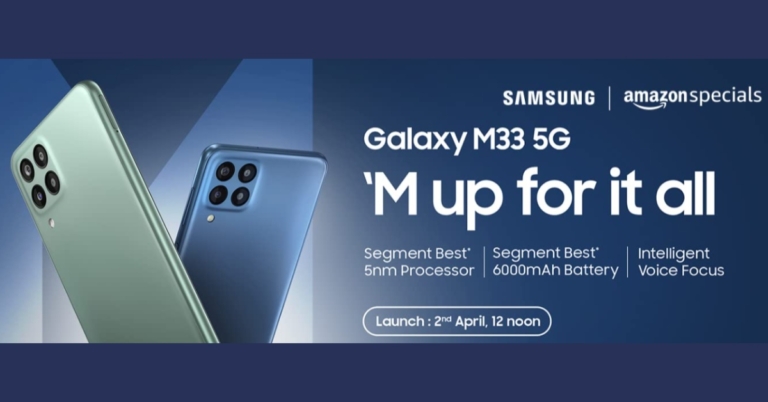
After the successful launch of the Samsung Galaxy A53 5G in India Samsung is all set to introduce another 5G smartphone in the country under its popular M-Series. The Samsung Galaxy M33 5G India launch is now set for April 2. The company has confirmed this through an Amazon listing. The device will feature a quad rear camera set up, a 120Hz LCD display and a 6,000mAh battery. The handset also comes pre-installed with Android 12. The phone was announced earlier this month along with other A-Series smartphones.
In This Article
Samsung Galaxy M33 5G India launch details
Samsung Galaxy M33 5G India launch is scheduled to take place on April 2 at 12 noon. The smartphone has also been listed on the Amazon India website to tease its availability and highlight its key features. Keen customers can sign up for an alert when the mobile phone goes up for sale by clicking the ‘Notify Me’ button on the e-commerce platform.
Samsung Galaxy M33 5G: Tech specifications
The dedicated microsite indicates that the Samsung Galaxy M33 5G will be available in two colours: blue and green. The phone will also have a USB Type-C port and a 3.5mm headphone jack. On the right side of the frame, a fingerprint scanner is also visible. Furthermore, the listing reveals the phone will come with a 6,000mAh battery and 25W fast charging support. The smartphone will be offered in two different configurations: 6GB RAM with 128GB storage and 8GB RAM with 128GB memory options. According to an Amazon listing Galaxy M33 5G will feature a quad rear camera setup.The Samsung Galaxy M33 5G has a 6.6-inch TFT Infinity-V full-HD+ display with a resolution of 1,080,408 pixels. The refresh rate of the screen is 120Hz. The phone will also be powered by OneUI 4.1, which is based on Android 12. There is an unknown octa-core SoC with up to 8GB of RAM and 128GB of storage under the hood.The Galaxy M33 5G features a quad rear camera setup with a 50-megapixel primary sensor and an f/1.8 aperture. There is also a 5-megapixel ultra-wide angle lens with an f/2.2 aperture, as well as dual 2-megapixel macro and depth sensors with an f/2.4 aperture. The front-facing camera on the phone is an 8-megapixel unit with an f/2.2 aperture.The Galaxy M33 5G has a 6,000mAh battery and a fingerprint sensor on the side. An accelerometer, gyroscope, ambient light sensor, and proximity sensor are among the onboard sensors.
For the latest gadget and tech news, and gadget reviews, follow us on Twitter, Facebook and Instagram. For newest tech & gadget videos subscribe to our YouTube Channel. You can also stay up to date using the Gadget Bridge Android App. You can find the latest car and bike news here.
Poco X4 Pro 5G India launch is set to take place today. The new smartphone debuted globally at MWC 2022 last month. The company is going to host a virtual launch event and has also listed the phone on Flipkart to tease the availability. The upcoming handset will feature a 64MP triple camera set up in India whereas the global version has a 108MP camera lens while the majority of the specifications remain unchanged.
In This Article
Poco X4 Pro 5G India Launch Livestream details
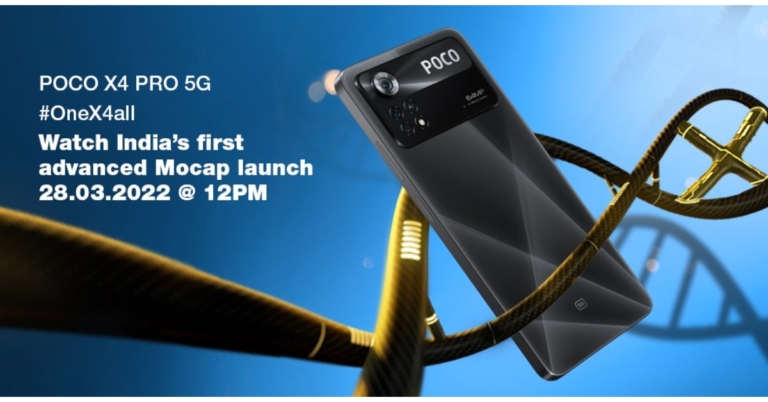
The Poco X4 Pro 5G will be launching in India at 12 p.m. IST today. Users can view the launch Livestream by visiting the company’s website and YouTube channel. You can, however, watch it live on our website by clicking on the link below.
Poco X4 Pro 5G price in India expected
The Poco X4 Pro 5G, as previously stated, was unveiled at MWC 2022. The 6GB RAM with 128GB storage variant costs EUR 299 (approximately Rs 25,300) globally, while the 8GB RAM with 256GB storage model costs EUR 349. (approximately Rs 29,500). The phone is available in three different colours: Laser Black, Laser Blue, and Poco Yellow.As previously stated, the smartphone will have a 64MP camera lens rather than a 108MP sensor, which may reduce the price. The smartphone is expected to cost less than Rs 20,000.
Poco X4 Pro 5G India variant specifications
The Poco X4 Pro 5G‘s global version features a 6.67-inch full-HD+ AMOLED display with a resolution of 1,0802,400 pixels. The maximum brightness of the display is 1200 nits, with a refresh rate of 120Hz and a touch sampling rate of 360Hz. The phone is powered by an 8GB RAM Snapdragon 695 SoC and runs Android 11 with the MIUI 13 skin on top. The phone has an internal storage capacity of 256GB that can be expanded to 1TB via a microSD card slot.According to a rumour, the Poco X4 Pro 5G will have a 64-megapixel primary sensor rather than the 108-megapixel primary sensor found on the global model. Among the other sensors are an 8-megapixel ultra-wide-angle sensor and a 2-megapixel macro sensor.For selfies, a 16-megapixel front-facing camera is available. It has a 5,000mAh battery and supports 67W fast charging.
For the latest gadget and tech news, and gadget reviews, follow us on Twitter, Facebook and Instagram. For newest tech & gadget videos subscribe to our YouTube Channel. You can also stay up to date using the Gadget Bridge Android App. You can find the latest car and bike news here.
28 March 2022 Amazon Quiz has gone live on its platform. The quiz timings are 12 AM to 11:59 PM. The interested users can participate in the Amazon daily quiz to win exciting prizes. The company puts up 5 questions based on general awareness. You can submit the correct answers from the four options. Today the participants have the chance to win a Rs 30,000 Amazon Pay Balance.Daily the e-commerce platform Amazon brings a new set of questionnaires that includes five easy questions. The Amazon Quiz can be played from 12 AM to 11:59. The users have to answer all the questions correctly to enter into a lucky draw. The result of today’s quiz will be announced at the end of the month and only one person is declared a winner. We at Gadget Bridge update all the answers to the Amazon Quiz on our website for the convenience of our readers. Here are the answers of the 28 March 2022 Amazon Quiz that will make you win Rs 30,000 Amazon Pay Balance.Amazon Quiz Today Prize – Rs 30,000 Amazon Pay BalanceQuiz Date – 28 March 2022Daily Timing – 12 AM to 11:59 PMWinner Announcement – Today 12 PM
In This Article
Amazon Quiz Answers Today 28 March 2022
Question 1: Appointed in January 2022, Alikhan Smailov is the new Prime Minister of which country?
Answer: Kazakhstan
Question 2: Which recently became the first Union Territory to introduce a District Good Governance Index in India?
Answer: Jammu & Kashmir
Question 3: Who won the Rachael Heyhoe-Flint Trophy for being the ICC’s Women’s Cricketer of the Year 2021?
Answer: Smriti Mandhana
Question 4: Why did this statue turn gree in colour?
Answer: Oxidisation
Question 5: This man was the husband of which British monarch?
Answer: Elizabeth II
How To Play Amazon Quiz
Only app users are eligible to play the Amazon quiz every morning from 12 AM to 11:59 PM. The quiz is not available on the desktop. For those who are unaware of how to play the Amazon quiz below are the steps, you can follow to take the quiz.
Firstly download the Amazon app from Google Play Store or App Store
Now fill in the required information through the Sign Up option.
You need to log in to the Amazon app and scroll down on the home screen to find the Amazon Quiz banner.
Tap on the Amazon Quiz banner and tap on the Start button to start the Quiz.
Now you will get 5 questions and you need to answer them correctly. One wrong answer will eliminate you from the Quiz.
After answering all the questions correctly you are now eligible for a Lucky Draw.
The winner’s name will be announced today at 12 PM.
If you’re a newbie into the world of iOS and are still in the process of exploring the far ends of the utility of your brand new Apple device, it’ll definitely take you a while to get along with it. However, as always, we are and will always be here for your assistance. In case you’re wondering how to pay someone with Apple Pay, you can directly send money to them through the Messages app. There is no separate app for Apple Pay that needs to be downloaded since it is built into your iPhone, Apple Watch or Mac already. Below are the steps on how to use Apple Pay through your iPhone. You can also use it to pay someone through your Apple Watch or Mac, as mentioned before. Read also: How to reset Apple ID password?Step 1: Open the Messages app and start a new conversation or continue with an existing one.Step 2: Tap the Apple Pay button and enter the amount that you want to send.Step 3: Tap on Pay, then tap on the Send button. By default, Apple Cash comes as your first payment method, that is if you’ve not turned it off as your default option. You would also have the option to pay with your debit card, in case the balance in your Apple Cash wallet is low. Step 4: Choose the required option and confirm the payment by authenticating with your Face ID, Touch ID or your passcode. That’s it!Read also:How To Start Or Stop Screen Recording On A Mac?Wasn’t it easy? In just 4 simple steps, you can quickly pay anyone with Apple Pay on iPhone. If you know of any other method for paying someone via iPhone, we would be delighted to hear about it in the comments section below. For the latest gadget and tech news, and gadget reviews, follow us on Twitter, Facebook and Instagram. For newest tech & gadget videos subscribe to our YouTube Channel. You can also stay up to date using the Gadget Bridge Android App. You can find the latestcar and bike news here.
It’s not necessary that you’d face a need to check the caller ID of a person only if it’s spam or a fraudulent call. Sometimes we may already know the person but might not recall them or have their number saved. At other times, it may be a fellow colleague or a classmate at the other end calling you for the first time, regarding an important matter. Wouldn’t it be beneficial for you to check their identity and save their contact number in such a situation? And what about when you yourself need to find a person of whom you do not have the contact info? Well, that’s where we enter. There are many websites that offer reverse phone number lookup services for caller identification and spam reporting purposes. We have provided below the top 6 sites for you to identify the owner of a phone number online, anytime, anywhere, quick and for absolutely free.
In This Article
Truecaller
The one to make it to the numero uno position in our list of the top 5 phone number identifying sites had to be Truecaller. Being one of the most efficient and widely popular caller identification, spam and fraud reporting applications, it surely doesn’t require any introduction. Truecaller today is so advanced that it reports the identity of the caller a couple of seconds before you receive the call!Visit the Truecaller website.Read also:How To Remove Your Name and Number From Truecaller on Android?
Whitepages
If you are someone located in the US, the best site for you to identify the owner of a phone number is Whitepages. Whether it is a landline or a mobile number, Whitepages is at your service in locating who’s who at the other end of the line. And not just with reverse phone number lookup, but Whitepages also helps you with reverse address, business search, neighbour details and much more. It is an all-rounder assistant in your pocket. Visit Whitepages website.
CocoFinder
CocoFinder is another one of the best free reverse phone number lookup tools available on the internet. You type in the phone number, and it immediately pulls out the record associated with the same number. One can get an array of data from the phone number of another person, including their identity, alternate phone numbers, area code, state, country and the type of phone used by them. Visit the CocoFinder website.
Our final list item in the top 5 sites for phone number identification is Numlooker. Being another free reverse phone number lookup tool, however, it doesn’t disclose any personal information of the person who’s making the call, other than their name and a few more details, if publicly available. Also, if you’re a business owner, it’ll help you keep a track of any employee who may be misusing their business cell phone. Visit Numlooker website.
Information.com
Information.com makes it incredibly easy to get all the details you need on someone with minimal information, since their powerful reverse lookup tool allows you to search someone by name, address, phone number, or email. They collect data from multiple places at once, including public records and social media accounts. This makes it a breeze to find out anything from who sent you a spam email to if you’re being catfished on a dating site.
Visit the Information.com website.
So those were our top picks for the 5 best sites to identify the owner of a phone number online. In case you already use another reverse phone number lookup website that is not in our list above, we would be delighted to know more about it. Do write to us in the comments section below. For the latest gadget and tech news, and gadget reviews, follow us on Twitter, Facebook and Instagram. For newest tech & gadget videos subscribe to our YouTube Channel. You can also stay up to date using the Gadget Bridge Android App. You can find the latestcar and bike news here.
Noise, an Indian connected lifestyle brand, has released the ColorFit Pro 3 Alpha smartwatch. It is Noise’s first smartwatch to include TWS compatibility as well as music storage. In addition to this, the device supports Bluetooth voice-calling function, 100 sports modes and supports a variety of health and activity trackers.
In This Article
Noise ColorFit Pro 3 Alpha price in India and availability
Noise ColorFit Pro 3 Alpha smartwatch is available at an introductory price of INR 5499/- on Noise’s website, Amazon, Flipkart, and other online and offline retailers. It is also available in five different strap colours of Black, Green, Grey, Pink, and Teal. The original cost of the low-cost smartwatch is priced at Rs 8,999.
Noise ColorFit Pro 3 specifications
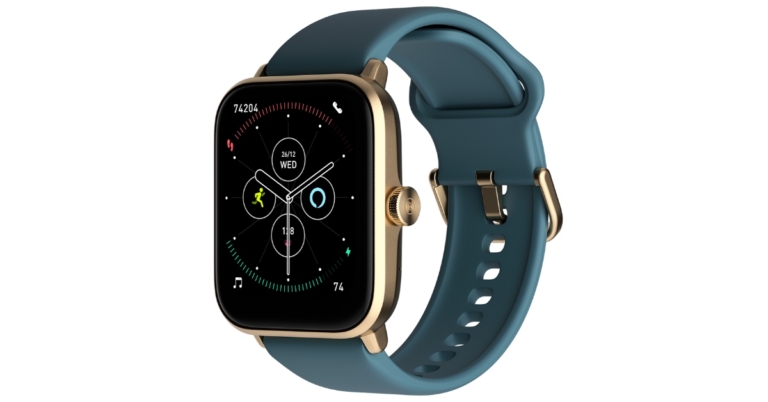
The Noise ColorFit Pro 3 Alpha has a 43mm rectangular dial in Golden colour and silicone straps featuring a 1.69-inch TFT LCD display. The screen comes with 240×280 pixels of resolution and a peak brightness of 500 nits. The wearable comes with 100+ cloud-based and customizable watch functions.Users can use the built-in Alexa feature to ask anything and get voice responses to their questions. Along with Alexa support the device also supports music storage, Bluetooth voice calling and TWS compatibility, which connects the earbuds to the watch directly. This feature allows users to listen to music hands-free and store up to 80 songs. The Noise ColorFit Pro 3 Alpha works with both iPhone and Android devices. The smartwatch also has smart notifications, an alarm clock, and calendar alerts.Noise ColorFit Pro 3 Alpha also includes a blood oxygen monitor, a stress monitor, a sleep monitor, a heart rate monitor that works around the clock, calories burned, distance and a female cycle tracker. Noise has added two new features to the suite: a temperature sensor and 24-hour noise detection. Furthermore, there are over 100 sports modes on the watch and 5ATM water resistance.Talking about the launch, Amit Khatri, Co-founder at Noise, said “Smartwatch is more than a lifestyle accessory, especially for fitness enthusiasts. With the unlocking of the cities, people are hopping back on the active lifestyle of the pre-COVID era. ColorFit Pro 3 Alpha is a perfect match for the people with these synergies. This smartwatch brings a plethora of features including built-in Alexa, music storage feature, and Bluetooth voice calling in one device which will keep Noisemakers ahead. True to its best-selling portfolio at Noise, we believe ColorFit Pro 3 Alpha is going to be the next choice of a smartwatch for customers.”
For the latest gadget and tech news, and gadget reviews, follow us on Twitter, Facebook and Instagram. For newest tech & gadget videos subscribe to our YouTube Channel. You can also stay up to date using the Gadget Bridge Android App. You can find the latest car and bike news here.
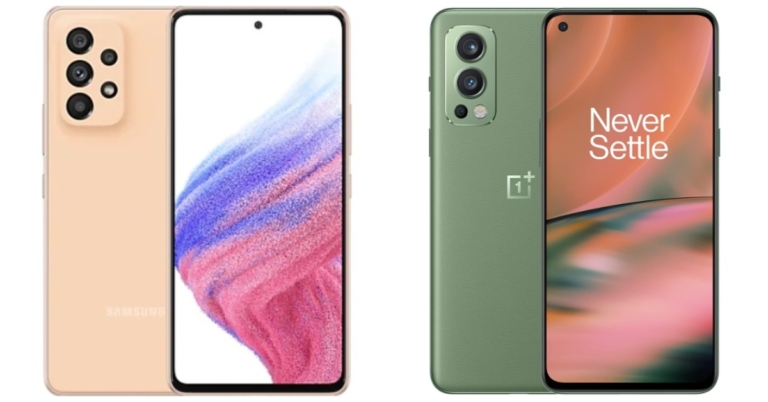
A lot of mid-range smartphones have been launching in India these days. Samsung also refreshed its A-Series portfolio with the launch of the Samsung Galaxy A53 5G in the Indian market. The Exynos 1280 SoC powers the device, which has a quad rear camera setup. In addition, the handset has an IP67 rating and a 120Hz refresh rate display. with these high-end specs, the device directly competes with the OnePlus Nord 2 5G which was launched last year. A detailed comparison of the Samsung Galaxy A53 5G Vs OnePlus Nord 2 5G is provided below to help you understand the differences and decide which to purchase.
In This Article
Display
Samsung Galaxy A53 5G: 6.5-inch Full HD+ Super AMOLED Infinity O displayOnePlus Nord 2 5G: 6.43-inch full-HD+ Fluid AMOLED display
Samsung Galaxy A53 5G:A quad rear camera setup that includes a 64MP main sensor with OIS, a 12MP ultra-wide sensor, a 5MP depth sensor, and a 5MP macro lens.OnePlus Nord 2 5G: Triple rear camera set-up that includes a 50-megapixel IMX766 primary sensor with OIS. In addition, there is an 8-megapixel secondary sensor and a 2-megapixel tertiary sensor
Selfie camera
Samsung Galaxy A53 5G: 32MP front-facing cameraOnePlus Nord 2 5G: 32-megapixel selfie camera
RAM and storage
Samsung Galaxy A53 5G: 6GB/8GB of RAM and 128GB of internal storageOnePlus Nord 2 5G: 6GB RAM with 128GB/ 8GB RAM with 128GB/ 12GB RAM with 256GB
The Samsung Galaxy A53 5G appears similar to its predecessor, the A52, but the camera bump appears more refined this time, making it appear more modern, which we preferred. For the price, the A53 offers high-end features that elevate it to the status of a premium device, such as a bezel-less Super AMOLED edge-to-edge display with 120Hz refresh rate support. Nord, on the other hand, has a smaller AMOLED screen with a refresh rate of 90Hz.In terms of predecessors, the Samsung Galaxy A53 5G is powered by the Exynos 1280 SoC, which makes it faster than the Nord 2, which is equipped with the MediaTek Dimensity 900 5G. In terms of optics, the Galaxy A53 has an advantage over the Nord 2 thanks to a 64MP quad-camera setup with an additional depth sensor for portrait capture, which the competitor lacks. In terms of software, we prefer cutter free Samsung’s OneUI because it is more user friendly and the best Android skin available. The phone also runs the most recent Android 12 operating system.Similarly, OxygenOS for OnePlus phones is comparable, but Samsung once again takes the lead by providing four years of major Android update support and five years of security updates, whereas OnePlus only includes two years of core Android updates. On the battery front, the A53 has a 5,000mAh battery that supports 25W fast charging, whereas the Nord 2 has a 4500mAh battery that supports 65W fast charging.The Samsung Galaxy A53 5G is undeniably a feature-rich device, but it is also quite pricey, whereas OnePlus has a pricing advantage over the Galaxy A53. As a result, the outcome is a tie.
For the latest gadget and tech news, and gadget reviews, follow us on Twitter, Facebook and Instagram. For newest tech & gadget videos subscribe to our YouTube Channel. You can also stay up to date using the Gadget Bridge Android App. You can find the latest car and bike news here.
Ever wondered what exactly does this term ‘cache’ mean after all? Let us elaborate. The various applications or even the web browser that you use on your smartphone, tablet or desktop take up some storage of your device for storing temporary data in it in the form of files. These files are known as cache files. These cache files are used by their respective applications for their own smooth functioning so that you are provided with a more seamless experience. For example, music apps may keep as cache the list of your most frequently played songs or albums, so that every time you open the app, it doesn’t have to load the entire song or album list again and again, and instead can directly pull up the list of your favourite songs, thus saving time and data. But the catch here is that cache files tend to constantly keep piling up and end up taking more space on your device. Hence, to help you regain some of your storage space back, we bring to you a step-by-step guide on how toclear the cache of any app on Android and when should you do it.
In This Article
How To Clear Cache Of Any App On Android
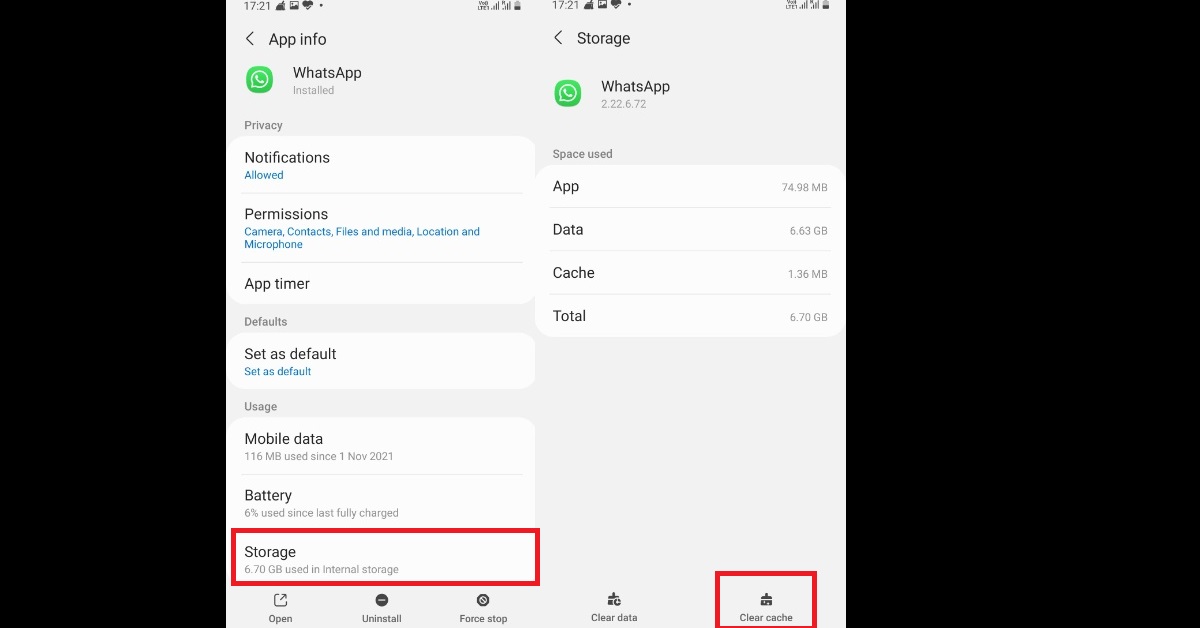
Step 1: From your Android smartphone, go to Settings > Apps. The list of apps on your device gets displayed within the Apps window.Read also: Instagram Block Vs Restrict: What Does Each One Do And When To Use It?Step 2: If you want, you can click on the sort icon as highlighted below, and order the apps based on the size they take up on your system so that you can start with the one taking up maximum space. Click on the app whose cache you want to delete. Step 3: Click on the Storage option and tap on the Clear cache button at the bottom right corner of the interface. That’s it! Therefore, in just a couple of clicks, you can clear the cache of any app on your Android device. But to remind you, cache files are there for enhancing your user experience of the applications that you use, as well as saving time and data. Moreover, even after clearing the cache once, it will still keep on piling up starting afresh, although you’ll regain some storage space for a while. So now the big question that comes up is when should you actually clear your cache? Read also: How to Back Up and Reset an Android Phone Before Selling It
When To Clear Cache
You should clear your cache in case you face any of the following instances:
When your app’s cache files get corrupted and the app starts acting up.
When you want to delete files that contain your private information since cache files sometimes tend to store them.
When you want some immediate storage space on your device, but also do not want to delete other storage data like photos, videos, etc.
Hope we solved your confusion as to when to clear the cache of any application on your Android device. In case you know of any other means or ways how to clear the cache of any app on Android, or if you know of any other reasons for when to do it, do notify us in the comments section below. For the latest gadget and tech news, and gadget reviews, follow us on Twitter, Facebook and Instagram. For newest tech & gadget videos subscribe to our YouTube Channel. You can also stay up to date using the Gadget Bridge Android App. You can find the latestcar and bike news here.


 Users of HDFC Credit/Debit cards can also get a flat Rs 1,000 instant discount. Users can also exchange their Poco X-series smartphones, Poco X2, Poco X3, and Poco X3 Pro for the Poco X4 Pro 5G and save an additional Rs 3,000.


 Read also:

 Step 2:
  Step 4:


 Information.com makes it incredibly easy to get all the details you need on someone with minimal information, since their powerful reverse lookup tool allows you to search someone by name, address, phone number, or email. They collect data from multiple places at once, including public records and social media accounts. This makes it a breeze to find out anything from who sent you a spam email to if you’re being catfished on a dating site.


 Step 2:
  Step 3: