Cooking is regarded as one of the oldest forms of art. The passion to cook also releases dopamine and keeps you calm and focused. Moreover in this time of isolation due to pandemic cooking should be a trade to learn and practice. Now we can use our Android phones to learn how to cook and also check the recipes for the best meals. Below are some of the top rated apps for the chef in you.
Whisk: Recipe Saver, Meal Planner & Grocery List
The first benefit of downloading this app is you can create your personal cookbook. It is very simple to search for recipes on the Web and add them to your personal list on the cookbook or edit them. Now you will never need a paper or memorise them. The app also features a Whisk Meal Planner for you to plan your meal in advance and the option is entirely free to access. The most interesting part is you can copy recipes from any website you have visited and liked the recipe. You can edit the copied recipe and add comments to it. Download the app and make cooking more exciting. Download from Play Store
Cheftap: Recipe Clipper, Planner and Grocery list
Cheftap is the most organised coking app you will find. It allows you to use tags, search and sorting to help find recipes easily. You can easily take out the recipe from any blog and also use the app as a meal planner effortlessly. The app’s unique feature lets you create menus of food and meals you cook regularly. Over that, it also offers you to make copies of recipes and let you create your own. The meal planner of this app is of great help; it will help you track what is in stock and what is not. Use the app and enjoy cooking effortlessly. Download the app on Play Store
Read more: Apple to unveil its online store in India on September 23
Cookpad: Create your own recipe:
The app is like using social media for people who love cooking. You can have access to thousands of recipe ideas, and cooking experiences are shared by people on the app. You will never run out of recipes in this app. The app lets you browse a collection of recipes or search by specifics via ingredients, seasonal dishes, and more. The app will not just provide cooking knowledge but will let you share all your recipes with others. Download it from Google Play Store
Read also: World Food Day: Top gadgets that will help you prepare great food at home
Tasty
The next best app for cooking is Tasty, which has some unique features. The app will not only give you access to more than 3,000 recipes but also be a coach with the all-new-step-step instruction mode. The app will also keep your screen awake during your cooking so you don’t have to check your phone often making it so convenient. Tasty lets you search the recipe on the app according to social plans, ingredients, dietary needs, difficulty, speed, cuisine, and more making your recipe search more easy and simple. Check out the app on Google Play Store.Download it on the Play Store.
For the latest gadget and tech news, and gadget reviews, follow us on Twitter, Facebook and Instagram. For newest tech & gadget videos subscribe to our YouTube Channel. You can also stay up to date using the Gadget Bridge Android App.
The popular microblogging site, Twitter, is seeking applications to test Super Follows content subscription and ticketing features on its platform. The social media platform has opened up the application and if you are a user then you can be the first one to test the feature. Twitter keeps working on finding different ways for people to earn money from the audience support and engage their followers in a new way. As per the latest blog post, it is taking applications from users to be one of the first to get access to Ticketed Spaces and Super Follows with your audience that will help you earn some bucks. The blog post reads, “Starting today, you can apply to be one of the first to try Ticketed Spaces and Super Follows with your audience.”With Ticketed Spaces, Twitter users will be able to monetize their audience, can host more intimate conversions as well as promote Spaces. To monetize your audience, Ticketed Spaces will let you create unique and exclusive live audio experiences in Twitter Spaces, ones your audience is willing to pay for. Ticketed SpacesWith Ticketed Spaces, you have flexibility in setting the ticket price, which can be as low as $1 and as high as $999. You will also be capable of setting the size of your Ticketed Space, inviting 100 people, or just 5. Additionally will also have the ability to remind your attendees that your Space is happening with push and in-app notifications sent directly to their devices and share your Space details directly to your Home Timeline.As per the microblogging website, Super Follows will let you earn revenue by offering an extra level of content and interaction as a monthly subscription. This will offer a direct relationship with your most engaged followers that can generate monthly revenue. Also, you can provide bonus content and interaction to your biggest supporter, therefore, building a strong relationship. The users can also customize what you offer and choose from price points of $2.99, $4.99 or $9.99 per month.Super FollowsAbove all, you will be able to earn up to 97% of the revenue from Spaces ticket purchases and Super Follows subscriptions. And Twitter will not take more than a 3% share until you exceed $50,000 in lifetime earnings on both products. After this point, Twitter’s share increases to up to 20% of future earnings.
Who is eligible?
So to be one of the first to try Ticketed Spaces and Super Follows all you need to do is apply for both Ticketed Spaces (iOS and Android) and Super Follows (iOS only). There is a separate application to test out each product but right now the testing will be carried out in the US only and is open for the mobile platform only.To apply to be part of the test groups, open Twitter and navigate to the sidebar, then tap Monetization to learn more and see if you’re eligible. If you have at least 10,000 followers on Twitter then you are eligible to apply for Super Follows. Whereas to apply first for Ticketed Spaced then Twitter users should at least have 1,000 followers.
For the latest gadget and tech news, and gadget reviews, follow us on Twitter, Facebook and Instagram. For newest tech & gadget videos subscribe to our YouTube Channel. You can also stay up to date using the Gadget Bridge Android App.
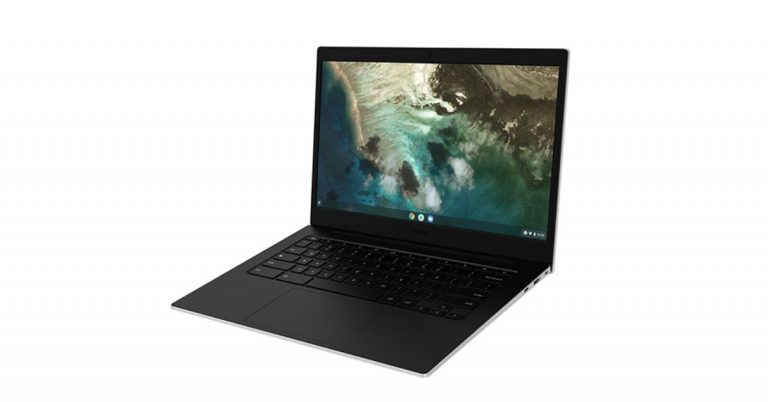
The South Korean giant Samsung has quietly launched Galaxy Chromebook Go in the market. This Chrome-OS based laptop is cheaper than the Galaxy Chromebook 2 that arrived in 2020. The new device features a 14-inch display and is powered by a dual-core Intel Celeron CPU.
Samsung Galaxy Chromebook Go pricing and availability
As of now, the device has only been listed on the website whereas the availability details are yet to be revealed which is expected to be announced at Samsung Galaxy Mobile World Congress virtual event on June 28. But the Samsung Galaxy Chromebook Go is expected to come with a starting price of $350 or lower. To recall, the original Galaxy Chromebook was released in 2020 at a starting price tag of $1,000.
Samsung Galaxy Chromebook Go specifications and features
Talking about the specs, the budget-friendly Galaxy Chromebook Go has a 14-inch TFT HD display instead of a 4K OLED screen though it is larger than its predecessor. It comes with a resolution of 1366×768 pixels. The new Samsung laptop is powered by a Celeron N4500 processor with Intel UHD integrated graphics. It should be noted that its predecessor Galaxy Chromebook 2 offers a Core i5 processor. It will be available with 4GB RAM and 8GB RAM LPDDR4X RAM as options and 32GB, 64GB and 128GB storage variants. The storage can be expanded via a microSD card. It runs on Google’s Chrome operating system.In addition to this, the Samsung Galaxy Chromebook Go includes a webcam on top with an HD resolution of 720p along with a digital microphone. There are 1.5W dual speakers onboard as well. In terms of connectivity, there is Wi-Fi 6 and Bluetooth v5.1 wireless operation along with other options such as USB Type-C ports, a USB 3.2 port, and a 3.5mm headphone-microphone combo jack. The new Chromebook is backed by a 42.3Wh battery that comes with a 5W USB Type-C charger. The laptop measures 327.1×225.6×15.9mm and weighs at just 1.45Kg.
For the latest gadget and tech news, and gadget reviews, follow us on Twitter, Facebook and Instagram. For newest tech & gadget videos subscribe to our YouTube Channel. You can also stay up to date using the Gadget Bridge Android App.
Recently a UI feature briefly appeared as a “backchannel” indicating Clubhouse is planning to include a text chat option. A direct message is very popular on many social networks. Without the option for the instant message, it feels so outdated on Clubhouse or any social app. This feature, which Clubhouse does not have is the talk of the town, but with the new UI element popping out, it has to be expected that Clubhouse will be adding the feature soon.
Connect from Instagram or Twitter:
The new Clubhouse app designed mainly for podcasts has not yet featured a chat option but you can connect with users through Instagram or Twitter. When a user signs up to Clubhouse, it allows them to connect their Instagram or Twitter. When you link your primary Instagram and Twitter account the app gives an option to let you connect to other Clubhouse users. You can connect via social network accounts. Read the following steps to know how to check their social account and connect.
Scroll down and click on their Instagram pr Twitter account
Using the account the app will connect you to their respective Instagram or Twitter account.
Make sure when you hit up at the DM you are from the app
And you connect someone from Clubhouse using Instagram and Twitter account
Read more: Clubhouse Android Beta app to be available for all Android users across India starting May 21The official team at Clubhouse hosts a session “Clubhouse Town Halls’ ‘ every Sunday at 9 PM Pacific Time for answering all the questions of users around the globe. In the very session, The CEO of Clubhouse Paul Davidson has discussed the Backchannel and expressed that the Direct message feature is something that the user should have considering there are so many people who want to deepen the friendship and relationship on the app.
Read also: Launched: Clubhouse Android Beta app now up for download in India via Google Play StoreThe clubhouse is one of the newest trending apps and a new platform where everyone is exploring. This chat feature is highly anticipated to come. Many sources say that the developers have expressed that Clubhouse is in the building process and they regularly explore and test the potential of features that might come. Sometimes these features become a part of the app. Moreover, Clubhouse has a new competitor in the market with the launch of the Greenroom app by Spotify, which offers a live text room. So it is very likely that the instant messaging option will be delivered soon by Clubhouse developers in their app, too.
For the latest gadget and tech news, and gadget reviews, follow us on Twitter, Facebook and Instagram. For newest tech & gadget videos subscribe to our YouTube Channel. You can also stay up to date with the Gadget Bridge Android App.
Twitter recently rolled out its promoted tweets advertisement service. The promotion gave you advertising from the trends list. You were able to get these sponsored tweets if you followed them. But these posts fill your timeline, which can be irrelevant to you or sometimes inappropriate. Now you have the option to hide these tweets in the following ways.
Hide the Promoted Tweets from your timeline:
The advertisement of promoted tweets can create discomfort by filling up your timeline. Even though if you had followed the page earlier you can still hide their ads now. Follow the steps to know how to hide the promotion from your Twitter timeline.
Open the Twitter app and log in with your username and password
On the promoted tweets find the arrow icon or the vertical three-dot and click on it
Now select I don’t like this ad or not interested
Now you can hide the promoted ad from your timeline
Another option to remove the promoted tweets from your account is to block the accounts or the page. This will not let the page show up again and help you to hide the promoted tweets from your Twitter timeline. Check the guide below to block the account
Log in to your Twitter account from your phone or desktop
When you open Twitter on the timeline you see the promotion click on the three-dot menu for options
Now with the drop-down screen scroll down to Block @ the account
Click on it and it will block the account and it will not appear on the screen anymore
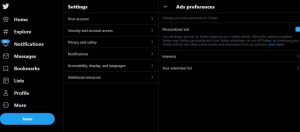
You can also hide the page promotion from your Twitter timeline by visiting the Personalised settings. Read the guide below to hide the promoted tweets from your Twitter timeline.
Sign in to your Twitter account using your username and password
Click on more with the three-dot icon
Go to Settings
And select Privacy and settings
Under “Data sharing and off-Twitter activity”
Tap on Ads preference
Click personalised ad
Also, you can use other options
Mute the page or account
The last option on the list to hide the promoted tweets on your Twitter timeline is to use the option of mute the page or account. Follow the steps to know how to mute it.
Go to your Twitter account
Browse for the page or account
Choose the page you like to mute
Click on the option from the three-dot
From the page that opens select mute and clicks Yes I’m sure
Privacy is always the priority when using tech or gadgets. Having a private conversation or call needs to be secure or private. There are many instances where you want to hide private calls or messages. It may be for a secret birthday party or for that celebration you want to keep a secret. You can hide your calls or messages from a contact on your Android device by following the guide below.
Securing with A password, fingerprint, or PIN
To save yourself from those prying eyes you can always hide your calls or messages on your Android mobile by putting a password or fingerprint. Securing your phone with a PIN is always a simple way to start to keep things private and secure. You can always turn on the silent notifications to keep those messages private. Follow the steps for notification settings below.
Open the phone screen and go to settings
Find Apps and notification
Navigate to Sensitive notification and toggle it off
And also turn on the Hide silent conversations and notifications
If you don’t want people to find certain conversations after opening the Google Messages app, simply store them in the Archive folder. Archived conversations don’t appear on the main page, even when they have unread messages. You can archive a conversation by long-pressing it and hitting the box icon with the arrow. The Archive folder can be accessed by hitting your profile icon at the top right corner of the screen.
Lock a chat on WhatsApp
Archiving your messages can only get you so far. As soon as someone accesses the Archived folder, it’s game over for privacy. WhatsApp, being one of the most popular messaging platforms in the world, lets you secure your chats by storing them in a locked folder. This folder is secured by your biometric and password. To lock a chat, open it in WhatsApp, tap the name of the contact, hit Chat lock, and turn on the toggle switch for ‘Lock this chat with fingerprint’.
Calculator Pro+ Private Message and Call screening: App
Calculator Pro+ is the decoy app that hides your calls and messages. The app has a calculator icon so that you can hide all your calls or messages in plain sight from an Android phone. Follow the steps for the settings
First, download Calculator Pro+ from the Play Store
Allow permission on the app for contacts and storage and proceed
On the next step, you can set a four-digit PIN to secure it
Choose the calculator screen to start hiding calls and messages
When the Message box screen pop up make sure you add the contacts you want to make calls and message privately
After adding the contacts it will now move to a private database
Using Private Text Messaging + Secure Texting & Calling:
Another app that you can choose to hide your calls or messages is Private Text Messaging+. You can download the app from Playstore and installation is simple and easy. The app allows you to have end-to-end encryption with the CoverMe Private Messenger. It gives the option to keep all your contacts, call records, and messages private. A pin-based lock for more securing the app. Text messages can be added to privacy. And you can also put the app to hide. The best feature is you can send disappearing messages and also recall sent messages. Over that, you can also include a private Vault to hide all your photos, videos, and passwords.Download on Play storeRead also:10 must-know Hidden Features of Microsoft Word
TextU-Private SMS Messenger, call app
TextU is another app that you can download from the Play Store to hide your calls or messages from a contact. The perks of the app are the list of options provided by the app. From secure messages, Caller ID, Private box, to delay & schedule SMS you can access many features on the app. TextU has an encrypted messages option to secure all your messages to keep people away from snooping. Other features include the option to lock your app with patterns to use your phone in private. Try the app by downloading it from the Play Store.Download here from the Play Store
Frequently Asked Questions (FAQs)
How do I archive my conversations in Google Messages?
Long-press a conversation and hit the folder with the arrow icon at the top toolbar to archive it.
Where is the Archived folder in Google Messages?
Tap on your profile picture at the top right corner of the screen and select Archive to view the contents of the archived folder.
How do I lock a chat in WhatsApp?
Open a message, tap the name of the contact, then go to Chat lock>Lock this chat with a fingerprint. You can view the locked folder by scrolling all the way to the top of the chat page and swiping down once.
Read Also:Best smartphone deals to look out for during Amazon Great Summer Sale
Conclusion
These are the top 6 ways to hide calls and messages from a particular contact on your Android smartphone. You can also use DND and only allow certain contacts to filter through. The calls and messages from other contacts will be muted and you will only be notified when you take your phone off DND.
Noise Buds XS201 true wireless stereo (TWS) earbuds have been launched in India. This is the company’s latest budget-friendly offering which comes with Dual Equaliser. It features a 6mm driver for an impressive sound experience and supports Android and iOS devices via 5.1 Bluetooth connectivity. There is full touch control and each earbud offers up to 4.5 hours of playback on a single charge and up to 14 hours of total playback including a chagrin case. In addition to this, the earbuds are IPX5 rated for water and dust resistance.Commenting on the launch, Amit Khatri, Co-Founder, Noise said, “We at Noise, are continuously working towards offering the smartest technology and features to Noisemakers within an affordable price range which earlier, one could only imagine. We intend to offer a phenomenal experience to the Noisemakers with a wide portfolio of smart TWS earbuds. Our newest offering, Buds VS201 with Dual Equalizer not only augments the sound and audio quality but also offers a comfortable fit for prolonged usage.”Noise Buds XS201 true wireless stereo (TWS) earbuds pricing and availabilityNoise Buds XS201 true wireless stereo (TWS) earbuds have been launched in India with a price tag of Rs 1,499. But as introductory offers the company is offering them at a discounted price of Rs 1,299 for a limited period. It will be offered in a single Charcoal Black colour option. The earphones will be exclusively available via the e-commerce website Amazon in the country.Noise Buds XS201 true wireless stereo (TWS) earbuds features and specifications Noise Buds XS201 true wireless stereo (TWS) earbuds feature a Dual Equalizer and 6mm driver that is claimed to allow the user to balance the sound quality between normal and bass modes to offer a whimsical musical experience. The earphones have Bluetooth Version v5.1 which offers a Bluetooth range of 10 metres and supports Android and iOS devices. Noise Buds XS201i are IPX5 sweat and water-resistant and come with full touch controls for accessing the call, during workout sessions, switch tracks and binge-watching. The TWS earbuds by Noise also come with a Type-C charging case with charging indicators. Each earbud offers 4.5 hours of battery life on a single charge, but with the charging case it provides a total playback of up to 14 hours. The wireless earphones also have Voice Assistant/Siri support for voice control.
For the latest gadget and tech news, and gadget reviews, follow us on Twitter, Facebook and Instagram. For newest tech & gadget videos subscribe to our YouTube Channel. You can also stay up to date using the Gadget Bridge Android App.
Twitter has changed the authentication process from password to Auth. This means you will not be sharing your username and password when logging into any third-party app without your authorisation. This will help increase the security of your accounts. Read the below guide to see how to remove third-party access from your accounts.
Remove third-party access from Twitter account:
How will the YouTube video play feature of Twitter work?Twitter introducing the authentication process is a big step to keeping your account more secure. Especially when you sign up for any other app using your Twitter account and the app might turn out to be spam. Twitter works continuously to improve such flaws and to manage the third-party app accessing your account, so they have updated the app permission. The third-party app request authorisation has changed and the app you only authorise can have access when you are signing up for a third-party tool. And also Twitter brings you the options to remove all the third-party access directly from your Twitter account. You can see how to remove the apps that have access to your Twitter account by reading the below steps.
Read more: How to remove saved passwords from Google Chrome browser on smartphone and PC
Disabled form App or Desktop:
If you are using an Android device these steps guide you on how to disable the third-party access allowed on your Twitter account for a safer and secure account with privacy maintained. Check out the steps.
Open Twitter account and sign in with your username and password
Go to more and select Settings and privacy
From settings access the “Security and account access”
Now click on Apps and session
And select connected apps
Press on the app you want to disable and click on the Revoke app permission
On iPhone or Mac:
You can also remove third-party access to your Twitter account if you are using an iPhone or a Mac. Check the steps below.
For iPhone Tap on the profile icon and in Mac click the three-dot menu icon
Find Settings and privacy
Next, click on Account
Navigate to the section Apps and session
Choose the Apps you want to remove the access from the Twitter account
Remove third-party access from your Instagram account:
Instagram allows you to connect to third-party apps for its services. But there are still many apps linked to your Instagram account which you do not even need, use, or forget you have allowed permission to have access. Fortunately, Instagram allows you disabled third-party access to your account with some easy and simple steps. Revoking the third-party access will help you in keeping your account secure and maintain privacy. Follow the steps below to know how to revoke the access.
On the mobile app:
These steps are to disable the apps that have access to your Instagram account. The simple and easy steps will help you to securely so do. Follow the steps below.
Open the Instagram app
Go to Profile on the bottom corner and click on it
Now click on the hamburger menu: Three horizontal line
Find Setting on the bottom of the side panel
On the settings page go to the security
Scroll down to Apps and Websites
Select active
And choose the apps you want to remove and press remove
On the website: Desktop
You can also remove third-party access from your Instagram account if you are using it from the website or your desktop version. Follow the guide to disable it.
Browse Instagram and log in with your username and password
Go to the profile icon on the extreme right corner
From the drop-down menu select settings
Click on Apps and websites
And on the page open on the right find the apps you want to remove from the Active page
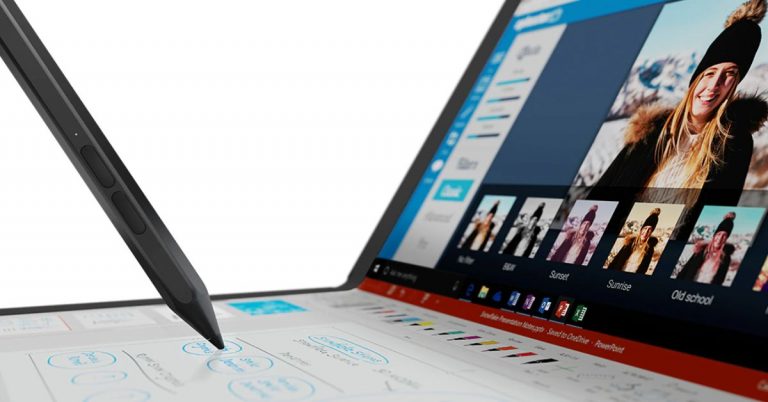
After showcasing at CES 2020 the Lenovo ThinkPad X1 Fold has now hit the Indian shores. So far we know that many companies such as Dell, HP, Samsung among others offer convertible laptops in the market. But this laptop is the world’s first foldable laptop, setting it apart from others. The device looks similar to any other foldable phone, which we have seen but is still different as it is aimed at professional users who are looking for a more portable option, which offers the best hardware.You must have seen a foldable phone or a convertible laptop that transforms into a tablet but have you ever heard of a full-fledged laptop that comes with a foldable screen? Lenovo has officially launched its world’s first foldable laptop namely Lenovo ThinkPad X1 Fold and it belongs to the ThinkPad series of laptops in India. No, it is neither a phone nor a tablet when unfolded it opens up to a 13.3-inchOLED 2K display that looks like a big-sized tablet and on being folded its compresses to 9.6-inches. It can be split into two screens or can be accessed in its full width. The display is by LG, which offers thin bezels. With the help of a mechanical hinge, the device transforms into a foldable screen. It can be used as a regular laptop in landscape mode and in portrait mode to be accessed as a notebook using Lenovo’s Active Pen you can take notes or do sketching on it. In addition to this, the Lenovo ThinkPad X1 Fold ships an Easel Stand for the Whereas Bluetooth Mini Fold Keyboard can be attached to it to make it work as your regular laptop.As for the software, the new foldable laptop runs Windows 10 Pro. There is a preloaded Mode Switcher app that will allow you to change the orientation of the laptop as you like. Now you must be thinking this should be as fragile as a foldable phone but according to company Lenovo ThinkPad X1 Fold is MIL-STD 810H certified and can withstand stresses while opening or closing the laptop’s lid several or a thousand times.Powered by an Intel Core i5 processor and paired with 11th-generation Intel UHD graphics the device offers 8GB of LPDDR4x RAM, and up to 1TB of PCIe-NVMe M.2 2242 SSD storage.In terms of connectivity, there is 5G/ 4G LTE support, which is optional. Furthermore, it includes Wi-Fi 6, Bluetooth v5.1, and two USB Type-C 3.2 Gen 2 ports.Lenovo ThinkPad X1 Fold comes with a Hybrid infrared (IR) and HD webcam integrated with Windows Hello facial recognition. The device also equips four microphones and a Dolby Atmos speaker and is claimed to offer up to 10.4 hours of video playback. The 50Wh battery also supports 50W Rapid Charge fast charging technology. Coming to the pricing, the Lenovo ThinkPad X1 Fold will be available at Rs 3,29,000 in India. However, it is currently listed on the Lenovo India website at a starting price of Rs 2,48,508.
For the latest gadget and tech news, and gadget reviews, follow us on Twitter, Facebook and Instagram. For newest tech & gadget videos subscribe to our YouTube Channel. You can also stay up to date using the Gadget Bridge Android App.
The e-commerce website Flipkart is hosting Daily Trivia Quiz. Every day it brings a bunch of new questions for its users. By answering them correctly you can win exciting prizes. The questionnaire is based on questions related to general knowledge. Also, the users can win free vouchers and super coins, among other offers via the daily quiz. June 23 Flipkart Daily Trivia Quiz Answers has already gone live on its platform.
The participant should be at least 18 years old and should have a valid login ID. The Quiz is available on the mobile platform and not the web version. E-commerce conducts the quiz on daily basis and goes live at 12:00 AM IST and runs till 11:59 PM IST. The winners are announced within 15 days from the date of participation that can be viewed under the Gems/Rewards section in the app.
How to participate in the Flipkart Daily Trivia Quiz
To participate download the Flipkart app on your phone. Then open the Flipkart app then head to Game Zone. Now click on the Daily Trivia Banner or search for Daily Trivia. Enter the game and answer all 5 questions with correct answers.
June 23 Flipkart Daily Trivia Quiz Answers
Question 1: Who among these made a special appearance in the film Zero?
Answer: R. Madhavan
Question 2: From 2009 to 2014, who served as the Leader of the Opposition in the Rajya Sabha?
Answer: Arun Jaitley
Question 3: Airports Authority of India appointed Taniya Sanyal as its first woman _____.
Answer: Firefighter
Question 4: Sharanya Manivannan’s novel ‘The Queen of Jasmine Country’ is about which poet?
Answer: Andal
Question 5: Soap Operas get their name from which company originally sponsoring such programs?
Answer: Procter & Gamble



 The first benefit of downloading this app is you can create your personal cookbook. It is very simple to search for recipes on the Web and add them to your personal list on the cookbook or edit them. Now you will never need a paper or memorise them. The app also features a Whisk Meal Planner for you to plan your meal in advance and the option is entirely free to access. The most interesting part is you can copy recipes from any website you have visited and liked the recipe. You can edit the copied recipe and add comments to it. Download the app and make cooking more exciting.
Download from Play Store
The first benefit of downloading this app is you can create your personal cookbook. It is very simple to search for recipes on the Web and add them to your personal list on the cookbook or edit them. Now you will never need a paper or memorise them. The app also features a Whisk Meal Planner for you to plan your meal in advance and the option is entirely free to access. The most interesting part is you can copy recipes from any website you have visited and liked the recipe. You can edit the copied recipe and add comments to it. Download the app and make cooking more exciting.
Download from Play Store
 Cheftap is the most organised coking app you will find. It allows you to use tags, search and sorting to help find recipes easily. You can easily take out the recipe from any blog and also use the app as a meal planner effortlessly. The app’s unique feature lets you create menus of food and meals you cook regularly. Over that, it also offers you to make copies of recipes and let you create your own. The meal planner of this app is of great help; it will help you track what is in stock and what is not. Use the app and enjoy cooking effortlessly.
Download the app on Play Store
Read more: Apple to unveil its online store in India on September 23
Cheftap is the most organised coking app you will find. It allows you to use tags, search and sorting to help find recipes easily. You can easily take out the recipe from any blog and also use the app as a meal planner effortlessly. The app’s unique feature lets you create menus of food and meals you cook regularly. Over that, it also offers you to make copies of recipes and let you create your own. The meal planner of this app is of great help; it will help you track what is in stock and what is not. Use the app and enjoy cooking effortlessly.
Download the app on Play Store
Read more: Apple to unveil its online store in India on September 23
 The app is like using social media for people who love cooking. You can have access to thousands of recipe ideas, and cooking experiences are shared by people on the app. You will never run out of recipes in this app. The app lets you browse a collection of recipes or search by specifics via ingredients, seasonal dishes, and more. The app will not just provide cooking knowledge but will let you share all your recipes with others.
Download it from Google Play Store
Read also: World Food Day: Top gadgets that will help you prepare great food at home
The app is like using social media for people who love cooking. You can have access to thousands of recipe ideas, and cooking experiences are shared by people on the app. You will never run out of recipes in this app. The app lets you browse a collection of recipes or search by specifics via ingredients, seasonal dishes, and more. The app will not just provide cooking knowledge but will let you share all your recipes with others.
Download it from Google Play Store
Read also: World Food Day: Top gadgets that will help you prepare great food at home
 The next best app for cooking is Tasty, which has some unique features. The app will not only give you access to more than 3,000 recipes but also be a coach with the all-new-step-step instruction mode. The app will also keep your screen awake during your cooking so you don’t have to check your phone often making it so convenient. Tasty lets you search the recipe on the app according to social plans, ingredients, dietary needs, difficulty, speed, cuisine, and more making your recipe search more easy and simple. Check out the app on Google Play Store.
Download it on the Play Store.
For the latest gadget and tech news, and gadget reviews, follow us on Twitter, Facebook and Instagram. For newest tech & gadget videos subscribe to our YouTube Channel. You can also stay up to date using the Gadget Bridge Android App.
The next best app for cooking is Tasty, which has some unique features. The app will not only give you access to more than 3,000 recipes but also be a coach with the all-new-step-step instruction mode. The app will also keep your screen awake during your cooking so you don’t have to check your phone often making it so convenient. Tasty lets you search the recipe on the app according to social plans, ingredients, dietary needs, difficulty, speed, cuisine, and more making your recipe search more easy and simple. Check out the app on Google Play Store.
Download it on the Play Store.
For the latest gadget and tech news, and gadget reviews, follow us on Twitter, Facebook and Instagram. For newest tech & gadget videos subscribe to our YouTube Channel. You can also stay up to date using the Gadget Bridge Android App. 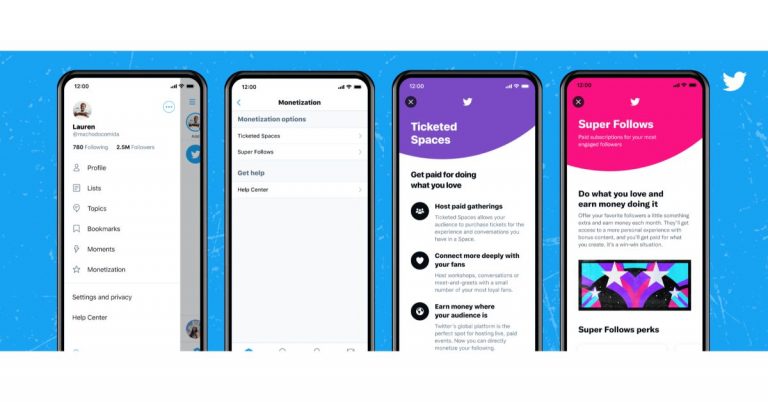







 Archiving your messages can only get you so far. As soon as someone accesses the Archived folder, it’s game over for privacy. WhatsApp, being one of the most popular messaging platforms in the world, lets you



 Noise Buds XS201 true wireless stereo (TWS) earbuds features and specifications