


In This Article
Jio 5G Welcome Offer: Experience incredible 5G speeds on your smartphone
 Like every preceding network rollout, Jio has launched a welcome offer for its 5G service. But first, you need an invite to avail of the 5G network. If you are located in one of the four cities where Jio has rolled out its True 5G network, you may be eligible for the service. Secondly, you need to have a 5G-enabled smartphone to use the network. Here is our list of the cheapest 5G-enabled smartphones you can buy right now.
If you meet the two prerequisites mentioned above, head over to the MyJio app to see if you’ve received an invite to the welcome offer. For the initial phase of the rollout, Jio is keeping the service invitational based. The larger rollout will take place in the coming months, with Jio planning on pan-India 5G coverage by December.
If you’re one of the lucky Jio users that received the 5G invite, you can make use of the Jio 5G Welcome Offer. As a part of the Welcome Offer, users with invites can use the 5G network as a part of their current data plan without any extra costs. Jio has not announced its 5G pricing and data plans yet. Right now, the only requirement to use 5G network on your smartphone is that you need to have an active base plan of Rs 239 minimum.
Here’s how you can switch to 5G network on your smartphone once you’ve got the invite.
Step 1: Go to Settings and select Connections.
Like every preceding network rollout, Jio has launched a welcome offer for its 5G service. But first, you need an invite to avail of the 5G network. If you are located in one of the four cities where Jio has rolled out its True 5G network, you may be eligible for the service. Secondly, you need to have a 5G-enabled smartphone to use the network. Here is our list of the cheapest 5G-enabled smartphones you can buy right now.
If you meet the two prerequisites mentioned above, head over to the MyJio app to see if you’ve received an invite to the welcome offer. For the initial phase of the rollout, Jio is keeping the service invitational based. The larger rollout will take place in the coming months, with Jio planning on pan-India 5G coverage by December.
If you’re one of the lucky Jio users that received the 5G invite, you can make use of the Jio 5G Welcome Offer. As a part of the Welcome Offer, users with invites can use the 5G network as a part of their current data plan without any extra costs. Jio has not announced its 5G pricing and data plans yet. Right now, the only requirement to use 5G network on your smartphone is that you need to have an active base plan of Rs 239 minimum.
Here’s how you can switch to 5G network on your smartphone once you’ve got the invite.
Step 1: Go to Settings and select Connections.
 Step 2: Tap on Mobile Network and select Network Mode.
 Step 3: Choose 5G/LTE/3G/2G (autoconnect).
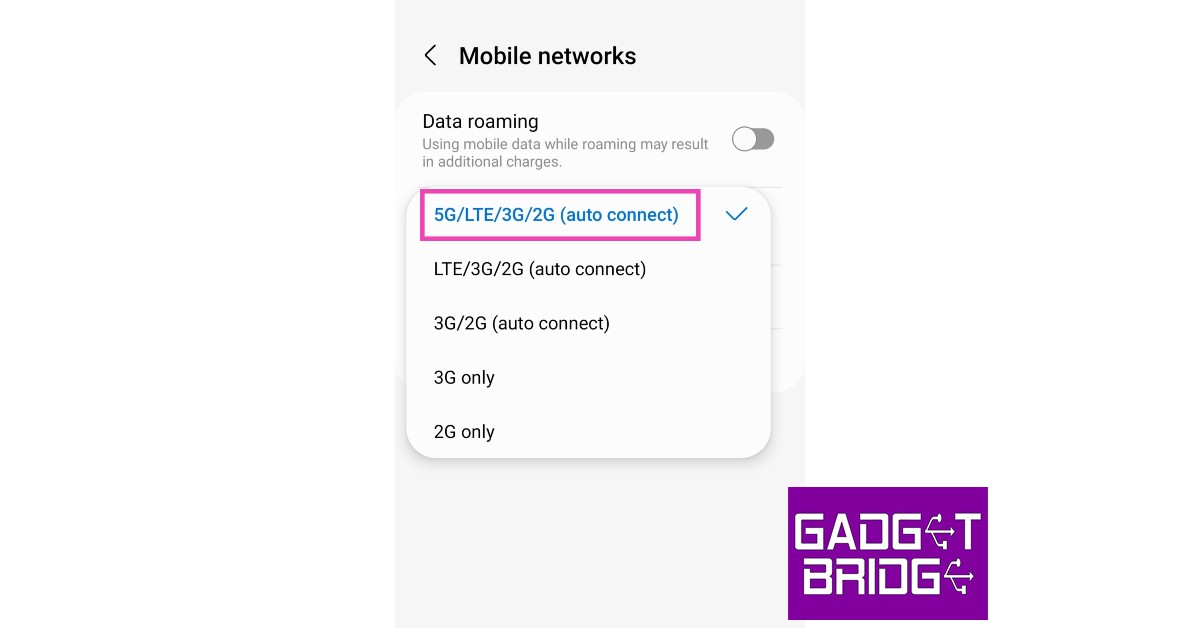 Your smartphone will switch to 5G network.
Read Also: Sony India announces exciting festive offers on new range of Bravia televisions
Your smartphone will switch to 5G network.
Read Also: Sony India announces exciting festive offers on new range of Bravia televisions













 Step 3:
 Step 4:
 Step 3:





















 Step 3:
 Step 3:
 Step 4:
 Step 5:
 Step 6:
 Step 3:
 Step 4:




How To Hide Reels Likes Count and Turn Off Comments on Instagram?
In This Article
Turn off the likes count on Reels using a web browser
Instagram does not allow users to turn off the likes count on Reels from the app. Instead, users need to log in to Instagram using a web browser to turn off the likes counter on their posts. Here’s how you can do that. Step 1: Log in to Instagram using the web browser on your PC. Step 2: Click on your profile at the top right corner of the screen.Turn off the likes count on Reels using your smartphone
Step 1: Open the web browser on your smartphone. Step 2: Log into Instagram and request the desktop site from the Chrome menu.Turn off comments using the Instagram app
Step 1: Open the Instagram app and go to your profile. Step 2: Select the Reel and tap on the ellipses at the top right corner of the screen. Step 3: Select ‘Turn off commenting’.Frequently Asked Questions
Can I turn off the likes counter on Instagram Reels using the app?
No, you cannot turn off the likes counter using the Instagram app. You need to log in to Instagram using a web browser on your smartphone or PC to turn off the likes counter.Can I turn off commenting on my posts on Instagram?
Yes, Instagram allows you to restrict comments on your posts. Simply select the post and tap on ‘Turn off commenting’ from the options.How can I keep someone from commenting on my Instagram posts?
While you can’t keep someone from commenting on your posts without blocking them, you can restrict their profile. Restricting someone on Instagram makes their comments on your posts invisible to everyone else. For the latest gadget and tech news, and gadget reviews, follow us on Twitter, Facebook and Instagram. For newest tech & gadget videos subscribe to our YouTube Channel. You can also stay up to date using the Gadget Bridge Android App. You can find the latest car and bike news here.