It’s uncommon to see someone in today’s fast-paced society without a set of headphones or earphones on their ears. The perfect set of headphones or earphones can make all the difference, whether you enjoy listening to music, podcasting, or making a lot of phone calls. Choosing the ideal pair for you can be difficult with so many possibilities available.
It might be challenging to sort through the numerous alternatives available when selecting the ideal headphone or earphone. It might be looking on paper but you never know if it is as comfortable or qualitative as you might hope. It’s akin to playing slots for real money at websites such as Bovada, you’re never sure what you’re going to get, or what selection is right for you.
Making a choice might be difficult with so many aspects to think about, such as comfort, durability, and sound quality. You will have a better chance of discovering the ideal pair, though, if you keep an eye out for a few specific factors. We’ve got you covered, so don’t worry.
We will discuss distinct options in depth in this article to assist you in choosing the best set for your requirements.
In This Article
Over-Ear Headphones
Over-ear headphones are a popular choice for music producers, gamers, and audiophiles due to their top-notch sound quality. They encircle your ear, which helps in delivering a rich and immersive sound experience. Market-leading examples of over-ear headphones are the Bose Quiet Comfort 35 II and Sony WH-1000XM4. Over-ear headphones are available in both wired and wireless options.
They are also excellent in noise cancellation capabilities due to a closed-back design, which means that the sound is less likely to leak out and disturb people around you. However, this design may make your ears sweat if worn for extended periods, which can be uncomfortable. Prices range from anywhere between $100-$500 depending on the brand on each model’s differing features.
On-Ear Headphones
On-ear headphones sit on the outer ear and have a compact design in comparison to the over-ear headphones. They are a great option for those who don’t want to wear bulky headphones but still want good sound quality. Examples of market-leading on-ear headphones are the Beats Solo Pro, Sennheiser HD 25, and JBL 510BT.
They too come in both wired and wireless options. They are also more comfortable to wear for extended periods than over-ear headphones due to their lightweight design, which reduces one’s sweatiness when wearing them for extended periods. However, due to their portable design, they may sacrifice sound quality and noise-cancelling features compared to over-ear headphones.
The cost of on-ear headphones is somewhat cheaper than their over-ear competitors, with prices ranging from anywhere between $30 and $300, depending on the brand and features.
Wireless In-Ear Earphones
If you are an Apple user, you must have come across AirPods. Wireless in-ear earphones are the best option for those who don’t like to be tethered by a cord to their phone. The market leaders in this area are of course the Apple AirPods Pro, with Jabra Elite 75t and Beats providing healthy competition.
Their biggest selling point is that they are incredibly portable and convenient due to their small size and wireless design. They also come equipped with various features like noise-cancelling, quick charging, and touch controls. However, the compact design of wireless in-ear earphones may come at a disadvantage to some users who are looking for a richer audio experience.
Additionally, they are easy to misplace or drop, and they don’t have the longest battery life. The price of wireless in-ear earphones can range wildly, with the latest AirPods coming in at a mighty $250.
Classic Earbuds
Classic earbuds are the ones that come free with your phone or music device purchase. They are a pocket and budget-friendly option for those who want to listen to music casually. They are the smallest of all categories of ear/ headphones and can fit snuggly in your ears.
However, due to their design, they may not be the most comfortable or convenient for prolonged use. They also tend to have low sound quality, less noise isolation and frequently fall out of your ears. They are excellent for occasional use but not recommended for prolonged periods, however, if you are looking for a budget choice, these are the earphones for you.
Conclusion
The ideal headphone or earbud for you will rely on a variety of criteria, including your preferences for sound quality, price, and use. While over-ear headphones offer a more immersive audio experience, on-ear headphones are cosy and portable. While traditional earbuds are more portable, wireless in-ear headphones are tremendously convenient.
There are also further solutions available that we haven’t covered, like bone conduction headphones, which are perfect for people who need situational awareness. We sincerely hope that our information has helped you make an informed choice. Always remember to take your time and select the option that seems best to you in terms of comfort and cost.
For the latest gadget and tech news, and gadget reviews, follow us on Twitter, Facebook and Instagram. For the newest tech & gadget videos subscribe to our YouTube Channel. You can also stay up to date using the Gadget Bridge Android App. You can find the latest car and bike news here.
Investing in an initial public offering (IPO) can be an attractive prospect for those seeking to add a new company to their portfolio. However, it’s important to understand the intricacies of this investment strategy to minimize risk and maximize potential returns. In this article, we’ll explore the appeal of IPOs, how to analyze a prospectus, various investing strategies, and the risks and challenges of investing in IPOs.
In This Article
Understanding IPOs and Their Appeal
The allure of investing in an IPO lies in the potential for high returns. These stocks are typically priced low at the time of the initial offering and can quickly rise in value. Additionally, there’s the excitement of investing in a company in its early stages and contributing to its growth.
What is an Initial Public Offering (IPO)?
An Initial Public Offering (IPO) is the first sale of stock issued by a company to the public. This process allows the company to raise funds and become publicly traded. It is a significant milestone for any company, as it marks the transition from a privately held company to a publicly traded one. The IPO process involves the company hiring an investment bank to assess its value and determine the initial offering price. Once the shares are sold to the public, the company’s stock is traded on the stock market.
Going public is a complex process that requires a great deal of preparation. Before going public, companies must meet certain criteria, including revenue and profitability, to ensure they can generate investor interest. Once they decide to go public, the company must file a prospectus with the Securities and Exchange Commission (SEC), disclosing financial information, risks, and other important details. This information is used by investors to determine if the investment is worth their money.
The Process of Going Public
The process of going public can take several months or even years, depending on the company’s size and complexity. It involves a number of steps, including selecting an underwriter, preparing financial statements, and filing a registration statement with the SEC. The underwriter is responsible for marketing the IPO to potential investors and determining the initial offering price. The underwriter also helps the company navigate the complex regulatory requirements of going public.
Once the company has completed the IPO, its shares are listed on a stock exchange, such as the New York Stock Exchange (NYSE) or the NASDAQ. This allows investors to buy and sell the company’s stock, which can lead to significant gains or losses depending on market conditions.
Why Investors are Attracted to IPOs
Investing in an IPO can be an exciting opportunity for investors. Not only do IPOs have the potential for high returns, but they also offer the chance to be a part of a new company’s growth. Many investors are attracted to IPOs because they want to be a part of the next big thing. IPOs can also diversify a portfolio and provide exposure to a new industry or sector.
However, investing in an IPO is not without risks. IPOs are often volatile, and the stock price can fluctuate wildly in the first few months of trading. Investors should carefully consider the risks and rewards before investing in an IPO.
Quantum AI trading revolutionizes IPO investing by leveraging quantum computing and AI to analyze data, identify patterns, and optimize decision-making. This innovative approach offers valuable insights and the potential for superior returns in the volatile IPO market. As a result, investors can easily profit from Quantum AI trading.
In conclusion, IPOs offer investors the potential for high returns and the excitement of investing in a new company. However, investing in an IPO is not for everyone and requires careful consideration of the risks and rewards.
Analyzing an IPO Prospect
Before investing in an IPO, it’s essential to analyze the company’s fundamentals, the industry and market potential, and read the prospectus.
Evaluating the Company’s Fundamentals
Assessing the company’s fundamentals, including its financial statements, growth potential, and management team, is critical to understanding if the company can deliver investor returns. Additionally, it’s important to assess the company’s competitive advantages, potential risks, and regulatory environment.
Assessing the Industry and Market Potential
It’s essential to assess the industry and market potential of the company to understand if there is growth potential. Understanding the competitive landscape, industry trends, and market shifts can provide insight into the company’s future growth and potential challenges.
Reading the IPO Prospectus
The prospectus provides information such as company financials, risk factors, and key management personnel. Thoroughly reviewing this document is crucial to evaluate whether the company is worth investing in. Investors should pay attention to any red flags or uncertainties and assess the potential impact on their investment.
Strategies for Investing in IPOs
When investing in IPOs, there are various strategies to consider, including flipping shares for short-term gains, taking a long-term approach, and diversifying with IPO exchange-traded funds (ETFs).
Flipping IPO Shares for Short-Term Gains
Some investors participate in IPOs with the intention of selling their shares immediately after the public offering. This approach can be profitable but is riskier due to the unpredictability of the stock market. Investors must be aware of lock-up periods, which is a period in which insiders and institutional investors are prohibited from selling shares, and can cause a decrease in market liquidity.
Long-Term Investment Approach
Investing in an IPO for the long-term can be a more stable approach. By focusing on a company that has strong fundamentals and growth potential, investors can hold onto the stock for an extended period, allowing for potential gains over time. However, there is the risk that the company may not meet expectations or that market conditions change, negatively impacting the stock price.
Diversifying with IPO Exchange-Traded Funds (ETFs)
Investing in an IPO ETF can provide diversification and lower risk. These ETFs invest in a number of IPOs, spreading the investment across multiple companies, thereby reducing the risk to any single company. However, investors should be aware that ETFs come with their own sets of risks, including expenses and fees.
Risks and Challenges of Investing in IPOs
While IPOs can be exciting and profitable, there are also risks and challenges to investing in them. It’s essential to understand these factors before investing.
Limited Historical Data
One of the primary challenges of investing in IPOs is that there is limited historical data on the company. This lack of information makes it challenging to accurately predict the company’s future performance, leading to increased risk.
Volatility and Price Swings
Because IPOs are newly issued, they can be volatile, and the stock price can swing significantly in the early months of the offering. Extreme fluctuations in the price can lead to significant losses or gains, making IPOs a high-risk investment.
Potential Overvaluation
There is also the potential for the IPO price to be overvalued, reflecting an unrealistic expectation of the company’s future performance. Under these circumstances, the stock price may decrease significantly after the initial public offering, resulting in a loss for investors.
Conclusion
Investing in an IPO is an exciting prospect that can provide significant returns. However, it’s essential to understand the risks and challenges and ensure that the investment fits within your overall investment strategy. By evaluating the company’s fundamentals and market potential, choosing a strategy that fits your investment goals, and monitoring the investment closely, investors can mitigate risks and achieve success.
For the latest gadget and tech news, and gadget reviews, follow us on Twitter, Facebook and Instagram. For newest tech & gadget videos subscribe to our YouTube Channel. You can also stay up to date using the Gadget Bridge Android App. You can find the latest car and bike news here.
If your phone number is linked to your Instagram profile, it makes it easier for other people to find you on the app. Using ‘contact syncing’ anyone with your number in their phone contacts can find you on Instagram. If you do not wish to be found using your number, there is a way you can avoid it. In this article, we show you how to remove your phone number from Instagram.Read Also:Top 5G smartphones for under $250 in USA
In This Article
Remove your Phone Number from Instagram using the mobile app
Before you begin, make sure you’ve disabled Two Factor Authentication using text messages and added an email address to your Instagram profile.Step 1: Launch the Instagram app on your smartphone and go to your profile.Step 2: Select ‘Edit Profile’.Step 3: Select ‘Personal information settings’.Step 4: Tap the cross icon next to your number to delete it.Step 5: Hit ‘Next’ to save your changes.
Remove your Phone Number from Instagram using the desktop website
Step 1: Open Instagram on your PC’s web browser and go to your profile.Step 2: Click on ‘Edit Profile’ or professional account.Step 3: Go to the phone number box and click on ‘Remove the number’.Step 4: Click on Submit to save the changes.
Disable contact syncing on Instagram
If you do not want Instagram to access your contacts, disable contact syncing. Here’s how.Step 1: Launch the Instagram app on your phone and go to your profile.Step 2: Tap on the hamburger menu.Step 3: Select ‘Settings and privacy’.Step 4: Tap on ‘Accounts Centre’.Step 5: Tap on ‘Your information and permissions’.Step 6: Select ‘Upload Contacts’.Step 7: Turn off the toggle bar for ‘Connect Contacts’.
Frequently Asked Questions
Why can’t I remove my phone number from Instagram?
If you aren’t able to remove your phone number from Instagram, make sure you have disabled two-factor authentication and added a valid email address to your profile.
How do I remove contact access for Instagram?
To make sure Instagram doesn’t access your contacts go to Settings>Apps>Instagram>Permissions and remove its access to your contacts.
This is how you can remove your phone number from Instagram. If two-factor authentication is the only thing keeping you from removing your number on Instagram, you can substitute text-based 2FA with apps like Microsoft Authenticator and Google Authenticator. You can also remove your Facebook account from your Instagram using Accounts Centre.
Exactly a year back OnePlus 10R 5G debuted in India. It is a 5G smartphone and is priced under Rs 40,000. But now the company is offering huge discounts on this smartphone. After applying a coupon of Rs 4,000 the device can be purchased for Rs 30,999.
In This Article
OnePlus 10R 5G discount details
The OnePlus 10R is getting a coupon-based discount of Rs 4,000. After applying this coupon the buyers can get the 8GB RAM with 128GB storage option at Rs 30,999. Currently, the device is listed on Amazon at Rs 34,999. Furthermore, HDFC card holders can get Rs 1,500 off on their purchases and EMI transactions, therefore, bringing the price down to Rs 29,999. Not just that the customers can also avail exchange offer which is limited to Rs 31,150. There is another 12GB RAM with 256GB storage option which is listed at Rs 38,999. On applying the discount coupon the buyers can grab the phone for Rs 34,999. Bank offer is also applicable to this variant as well.
OnePlus 10R 5G specifications
OnePlus 10R 5G features a 6.7-inch full-HD+ AMOLED display with 1,080×2,412 pixels of resolution. It has a 120Hz dynamic refresh rate and a touch response rate of up to 720Hz. The screen comes with a 20:9 aspect ratio and is protected with Corning Gorilla Glass 5 with a 2.5D curve. The device operates on OxygenOS 12.1 based on Android 12 and is powered by an octa-core MediaTek Dimensity 8100-Max SoC and up to 12GB of LPDDR5 RAM with up to 256GB of UFS 3.1 storage. The chipset is equipped with 3D Passive Cooling Technology, which employs a 4,100mm square vapour chamber to regulate temperature.Also Read:5 Best Photography smartphones in India: Ditch the DSLRThe OnePlus 10R 5G comes integrated with a triple rear camera setup that includes a 50-megapixel Sony IMX766 primary sensor with f/1.88 aperture with optical image stabilisation (OIS). A Sony IMX355 sensor with an ultra-wide lens with f/2.2 aperture and a 2-megapixel GC02M1 macro sensor are included. For selfies and video calls, there’s a 16-megapixel Samsung ISOCELL S5K3P9 sensor with an f/2.4 aperture and EIS support on the front.A 5,000mAh battery on the phone supports 80W SuperVOOC fast charging. There is 5G, 4G LTE, Wi-Fi 6, Bluetooth v5.2, GPS/ A-GPS, NFC, and a USB Type-C port for connectivity. An accelerometer, ambient light sensor, gyroscope, magnetometer, and proximity sensor are among the phone’s other sensors. The phone has a fingerprint sensor embedded in the display.
For the latest gadget and tech news, and gadget reviews, follow us on Twitter, Facebook and Instagram. For newest tech & gadget videos subscribe to our YouTube Channel. You can also stay up to date using the Gadget Bridge Android App. You can find the latest car and bike news here.
The South Korean electronics giant Samsung has officially announced the release of a new 4G smartphone in India. The company has launched Samsung Galaxy A14 4G. The phone features an LCD display and a triple rear camera setup. In addition to this, the device is powered by Exynos 850 SoC and runs on Android 13 with One UI 5 out of the box. The device also houses a 5,000mAh battery and is now up for sale in the country.
In This Article
Samsung Galaxy A14 4G price in India and sale details
Samsung Galaxy A14 4G has debuted in India today. The smartphone comes in two RAM and storage options. The price of the base 4GB RAM with 64GB storage option is set at Rs 13,999 whereas the 4GB RAM with 128GB storage model comes with a price tag of Rs 14,999. The device is offered in three colour options: Black, Light Green, and Silver.The company is offering a Rs 1,000 discount if the transaction is done by SBI Bank Cards. The device is currently selling in the country via Samsung’s official website.
Samsung Galaxy A14 specifications
In terms of specifications, the Samsung Galaxy A14 comes with a 6.6-inch full-HD+ PLS LCD display. Its screen has a resolution of 1,080×2,408 pixels. The smartphone operated on One UI 5 skinned on top of Android 13. The company has promised two OS upgrades and four years of security updates for the device. Under the hood, there is an octa-core Exynos 850 SoC with up to 8GB of RAM. Also, there is a RAM plus feature on this phone that virtually expands the RAM by up to 8GB. Additionally, the phone comes with up to 128Gb of internal storage that can be expanded via microSD card to up to 1TB.The triple rear camera setup on the Samsung Galaxy A14 includes a 50-megapixel primary camera with an f/1.8 aperture. The camera unit also includes a 5-megapixel ultra-wide angle lens with an f/2.2 aperture lens and a 2-megapixel sensor with f/2.4 aperture. The 13-megapixel front-facing camera is provided for taking selfies and video calling.The Samsung Galaxy A14 includes 4G, Wi-Fi, Bluetooth v5.1, GPS, a 3.5mm headphone jack, and a USB Type-C port for connectivity. The device has a side-mounted fingerprint scanner in addition to other sensors like an accelerometer, geomagnetic sensor, light sensor and proximity sensor.The 4G smartphone is fuelled by a 5,000mAh battery that is claimed to provide two days of endurance when charged completely. For the latest gadget and tech news, and gadget reviews, follow us on Twitter, Facebook and Instagram. For newest tech & gadget videos subscribe to our YouTube Channel. You can also stay up to date using the Gadget Bridge Android App. You can find the latest car and bike news here.
Taking a screenshot is the best way to bookmark important things on your Android device. It is a quick and easy process, which is also why it is such a versatile feature. You can use screenshots to record and share important stuff like documents, tickets, webpages, images, and more. If your smartphone refuses to take any screenshots, it may hamper a lot of your daily tasks. In this article, we bring you 8 fast ways to fix the ‘Android screenshots not working’ problem on your device.Read Also:Nokia 105, Nokia 106 feature phones launched in India
In This Article
Was your device issued to you by your school?
If your device was issued to you by your school or educational institution, it may not allow you to take screenshots on certain apps. In this scenario, your smartphone will display the ‘Can’t take screenshots due to security policy’ message. What you can do is contact the IT department of your institution and request them to give you the clearance to take screenshots. If you’re turned down, you will need to remove your school account from the device to take a screenshot.
Are you taking a screenshot in an app that restricts it?
Certain OTT apps like Netflix do not allow users to take screenshots in order to reduce the sharing of copyrighted content. However, there is a way you can get around this issue. All you need to do is mirror your smartphone’s display on your PC using the Scrcpy tool and then use the Snipping tool to take a screenshot. Read this article to find out how you can use the Scrcpy tool to mirror your smartphone’s display.
Restart your smartphone
Restarting your smartphone can resolve any minor issues and background glitches on your device. If you’re unable to take a screenshot on your device, restarting it may do the trick. To restart your smartphone, press and hold the side key and select ‘Restart’. Some smartphones may trigger the Google Assistant when you long-press the side key. In this case, press and hold the side key and volume up button together to open the power options window.
Exit the Incognito tab
The Incognito tab on Google Chrome does not let you take screenshots of the pages you’ve opened on it. Other mobile browsers may also restrict you from taking screenshots when you enter a ‘secret/private browsing’ mode. To get around this issue, open the webpage in a normal window and take a screenshot. You can always delete the webpage from your browsing history later.
Make sure your phone has enough internal storage
If your phone has run out of internal storage, it wouldn’t have any space to store any new screenshots. If you keep getting an error every time you take a screenshot, go to Settings>Storage and see how much space on your device is occupied. Delete some files to free up some space and try taking a screenshot again.
Take a screenshot in Safe Mode
Sometimes, certain third-party apps can interfere with the regular functioning of your device. To ensure that this is the case, restart your phone in Safe Mode. Doing so limits the activity of all the third-party apps on your device and runs only the basic system apps. To enter Safe Mode, press and hold the power button and volume down button. Once the power menu pops up on the screen, press and hold the power icon until the Safe Mode option shows up.Once you have entered Safe Mode, take a screenshot. If you’re able to capture the screen, it means that one of the third-party apps on your device is causing it to malfunction. A good idea would be to delete some of the apps you installed recently and see if the issue still persists.
Use gesture controls to take a screenshot
If the physical buttons on your device are malfunctioning, you can use additional gesture controls to take a screenshot. Some smartphones let you capture the screen by swiping three fingers across the display. Samsung users can take a screenshot with a swipe of their palm across the screen. Go to Settings>Advanced Gestures>Motions and gestures to enable this feature.
Clear the cache of the screenshot app
Your Android phone allows you to clear the cache of its native screenshot app. Before you do that, you need to unhide the system apps from settings. Here’s how.
Step 1: Go to Settings and select Apps.
Step 2: Tap the ellipses at the top right corner of the screen and select System apps.
Step 3: Scroll down and select the screenshots app.
Step 4: Tap on Storage and cache.
Step 5: Hit Clear cache.
Frequently Asked Questions
Why does taking a screenshot not always work on Android?
Certain apps may prevent you from taking a screenshot for security or copyright reasons. Apps like Netflix, PayTM, and others may restrict screenshot access on certain windows.
How to take a screenshot on Android without the power button?
You can enable certain gestures for screenshots from settings or use a third-party app to capture the screen.
Why can’t I take screenshots on my device?
If your smartphone or tablet was issued to you by your educational institution, you may not be allowed to take screenshots on it. To fix this, remove the existing Google Account and log in again using your personal account.Read Also:Noise ColorFit Qube 2 smartwatch with BT calling launched in India
Conclusion
These are 8 fast ways to fix the ‘Android screenshots not working’ problem on your smartphone. You can also try using a third-party app like Screenshot Touch and Screenshot Easy to capture your smartphone’s screen without relying on the physical buttons. You can also take a screenshot using the tile on the drop-down menu.
iQoo today expanded its Z-Series portfolio with the launch of iQoo Z7s 5G. The newly launched smartphone is powered by an octa-core Qualcomm Snapdragon 695 processor. The phone also boasts a 4,500mAh battery along with 44W Flash Charge. In addition to this, the phone includes a 90Hz display and dual rear camera setup.
In This Article
iQoo Z7s 5G price in India and sale details
The iQoo Z7s 5G has made its debut in India today and is a sibling of iQoo Z7 5G which was launched in India a few months ago. The Z7s comes in two different configurations of 6GB RAM with a 128GB storage option priced at Rs 18,999. Whereas the price of the 8GB RAM with 128GB storage model is set at Rs 19,999.The device comes in Norway Blue and Pacific Night colour options. The phone is currently selling on the iQoo website and through Amazon.
iQoo Z7s 5G specification
The iQoo Z7s 5G is highlighted with a 6.38-inch full-HD+ display with 2400 x 1080 pixels of resolution. The screen comes with 90Hz refresh rate support. In addition to this, the phone operates on Funtouch OS 13 on top of Android 13. Under the hood, there is an octa-core Qualcomm Snapdragon 695 5G SoC along with Adreno 619L GPU. The smartphone is avaiable with up to 8GB of LPDDR4x RAM and 128GB of UFS 2.2 internal storage. The memory can be further expanded by up to 1TB using a microSD card.Also read:5 Best premium smartphones to buy in India in 2023The device has slots for dual nano SIMs, with one hybrid slot for a microSD card. The phone packs a 4,500mAh battery along with support for 44W wired Flash Charging. The supported charger comes inside the box. The iQoo Z7s 5G has USB Type-C, Bluetooth v5.1, GPS, Wi-Fi 6 and a 3.5mm audio jack for connectivity. The smartphone also supports an in-display fingerprint sensor for biometrics.Lastly, iQoo Z7s 5G has a dual rear camera setup that includes a 64-megapixel primary sensor and a 2-megapixel sensor. In addition to this, there is a 16-megapixel front-facing camera for taking selfies and video calling.
For the latest gadget and tech news, and gadget reviews, follow us on Twitter, Facebook and Instagram. For newest tech & gadget videos subscribe to our YouTube Channel. You can also stay up to date using the Gadget Bridge Android App. You can find the latest car and bike news here.
Even though Twitter is a text-based platform, posts with pictures or videos attached to them get more exposure on the platform. Since the change in ownership, Twitter is working on attracting video content creators to boost the volume of original content on the platform. People do want to download videos from X (formerly Twitter), so we have created a guide for that too. While it may have a massive audience, uploading video content on Twitter can be a daunting task at times. In this article, we bring you 6 easy ways to fix the ‘Twitter Video File Not Compatible’ error on your device.Read Also:Nokia 105, Nokia 106 feature phones launched in India
In This Article
Make sure your video meets all the requirements
Like other video-sharing social media platforms, Twitter also has certain requirements that must be met before you upload a video on the website. Make sure your video fits the following criteria if you’re receiving the ‘Twitter video file not compatible’ error.
Format
MP4/MOV
Audio Codec
AAC
Video Codec
H264
Audio Channel
Mono/Stereo
Length
140 seconds (2 hours for Twitter Blue Subscribers)
Size
No bigger than 512MB
Resolution
1920×1200 maximum
Aspect Ratio
1:2.39 to 2.39:1
Frame Rate
40fps or fewer
Convert your video to the appropriate format
As mentioned earlier, Twitter only lets you upload videos in mp4 or MOV format. If your video file sports a different format, use an online tool to convert it to the appropriate format. Cloudconvert is one of the best online tools for this task. All you need to do is upload your video file to the website and select your desired format (mp4 or MOV for Twitter). Cloudconvert also lets you decide the frame rate and resolution for the converted video. Make sure these parameters align with Twitter’s requirements. Once the video has been converted, you can download it on your device and upload it on Twitter.
Trim the video
Users that aren’t subscribed to Twitter Blue can only upload videos up to 140 seconds in length. Video any longer than that limit will trigger the ‘Video File Not Compatible’ error on Twitter. Luckily, trimming a video is a very easy task. The native video editor on your smartphone is equipped to trim any video down to the desired length. Once you open the video on your phone, simply click the edit icon and select ‘trim’. Use the slider to trim the video from both ends. Here are 6 other ways you can trim a video on your device.
Subscribe to Twitter Blue
Struggling to upload a video longer than 140 seconds? Subscribe to Twitter Blue. One of the many perks of being a Twitter Blue subscriber is the increased video upload limit. This higher limit helps content creators who typically create videos longer than 2 minutes. Subscribing to Twitter Blue boosts this limit to 2 hours and the file size limit to 8GB.
Use the Twitter website or iOS app to upload your video
One of the major drawbacks of Twitter Blue is that it limits the video duration for Android users to 10 minutes. If you want to post longer videos on the platform, you will need to use the Twitter website or the iOS app. Perhaps, in future this limit will be lifted, but for now, Android users will have to make use of their web browser to get around this issue.
Clear app cache
The temporary files stored within the cache have a tendency to get corrupted, leading to certain app malfunctions. It may be the reason why Twitter isn’t processing your video. Here’s how you can clear Twitter’s app cache on your smartphone.Step 1: Go to Settings and select Apps.Step 2: Select Twitter.Step 3: Tap on Storage.Step 4: Select ‘Clear Cache’.
Frequently Asked Questions
How do I make my video compatible for Twitter?
To make your video compatible with Twitter, make sure it is in mp4 or MOV format and does not exceed the duration of 140 seconds. It also needs to be no larger than 512MB and should have H264 and AAC video and audio codecs.
Why is my mp4 file not compatible with Twitter?
If Twitter is refusing to process your mp4 file, it may be because it exceeds the 1900×1200 resolution or 40fps frame rate. Make the appropriate adjustments and try again.
What is the video size and duration limit on Twitter?
These are the 6 easy ways you can use to fix the ‘Twitter Video File Not Compatible’ error on your device. If these fixes did not work for you, try contacting Twitter Support for further help. If you are a content creator, subscribing to Twitter Blue can help you boost the reach of your videos along with increasing the file size and duration limit.For the latest gadget and tech news, and gadget reviews, follow us on Twitter, Facebook and Instagram. For newest tech & gadget videos subscribe to our YouTube Channel. You can also stay up to date using the Gadget Bridge Android App. You can find the latest car and bike news here.
The gap between high-end flagships and affordable alternatives is closing down every year. Sure, you may not get features like wireless charging, NFC, and a telephoto lens with your average $250 smartphone, but it can still perform better than you can imagine. We’ve been testing all the budget smartphones across the spectrum, here are our picks for the top 5G smartphones you can buy for under $250 in USA.Read Also:Nothing Phone 2 confirmed to be powered by Snapdragon 8+ Gen 1 SoC
In This Article
Motorola One 5G Ace
Price: $179Quick Specs
Display
6.7-inch IPS LCD
Chipset
Snapdragon 750G
RAM
4GB, 6GB
Storage
64GB, 128GB
Battery
5,000 mAh
Motorola One 5G Ace is a midrange smartphone from 2021, but a price tag of $168 makes it a solid deal two years down the line. The Snapdragon 750G chip on this smartphone is still a stellar SoC for gaming and holds up pretty well two years later. If a good display is a non-negotiable aspect while buying a smartphone, the 6.67-inch FHD+ display on Motorola One 5G Ace will certainly not disappoint. The triple camera array consists of a 48MP primary shooter, an 8MP ultrawide lens, and a 2MP macro lens. You get 2-day battery life on the One 5G Ace with its 5,000 mAh unit. With
Samsung Galaxy A14 5G
Price: $199.99Quick Specs
Display
6.6-inch PLS LCD
Chipset
Exynos 1330
RAM
4GB/6GB/8GB
Storage
64GB/128GB
Battery
5,000 mAh
We reviewed the Samsung Galaxy A15 5G as soon as it came out and were very impressed with the range of features it had to offer at such an affordable price. It may very well be the best 5G phone on a budget. Samsung has decided to go for a uniform design language for all its products across different price categories. This means that the Samsung Galaxy A15 5G features the same vertical camera layout as the flagship S23. The PLS LCD display on this smartphone has a very smooth and satisfying touch response that is hardly matched by any of its competitors. In our review, we were also surprised by the versatile gaming and camera performance of this smartphone.
OnePlus Nord N300 5G
Price: $228Quick Specs
Display
6.56-inch IPS LCD
Chipset
MediaTek Dimensity 810
RAM
4GB
Storage
64GB
Battery
5,000 mAh
There’s a lot to like about the budget-friendly OnePlus Nord N300 5G. The 6.56-inch IPS LCD display has a refresh rate of 90Hz and offers a good touch response. You also get Android 12 out of the box, which can be updated to Android 13. The MediaTek Dimensity 810 SoC is a decent SoC in this price range. The dual rear camera setup consists of a 48MP primary lens and a 2MP depth sensor. The 16MP selfie camera takes good-quality shots that are social media-ready. The 5,000 mAh battery can easily last all day, and if you’re looking for a fast-charging smartphone, the 33W wired charging on this device will certainly impress you.
TCL Stylus 5G
Price: $258Quick Specs
Display
6.81-inch IPS LCD
Chipset
MediaTek Dimensity 700
RAM
4GB
Storage
128GB
Battery
4,000 mAh
As you may have already guessed from the name, this smartphone comes with its own stylus. You can get the TCL Stylus 5G for as low as $258 from the Verizon store. The 6.81-inch LCD display has a screen-to-body ratio of 90.2%. You also get a dedicated microSD slot on this smartphone. The MediaTek Dimensity 700 SoC is a pretty decent midrange chipset, that can handle basic gaming along with other everyday tasks. The 4,000 mAh battery can easily last an entire day.
Samsung Galaxy A23 5G
Price: $214.90Quick Specs
Display
6.6-inch PLS LCD
Chipset
Snapdragon 695 5G
RAM
4GB/6GB/8GB
Storage
64GB/128GB
Battery
5,000 mAh
The Samsung Galaxy A23 5G is currently listed at $299.99 on the official website, but you can get it for as low as $214.90 on Amazon. The smartphone rocks a PLS LCD display with an impressive 120Hz refresh rate. It comes with Android 12 out of the box that can be quickly upgraded to Android 13. Powering this device is the Snapdragon 695 SoC. The Quad camera unit at the back comprises a 50MP primary lens with OIS, a 5MP ultrawide lens, a 2MP macro camera, and another 2MP depth sensor. The 8MP selfie camera upfront takes decent shots as well. 25W wired charging support is not the fastest around, but it does a decent job.
Motorola Moto G Stylus (2021)
Price: $179.99Quick Specs
Display
6.8-inch IPS LCD
Chipset
Snapdragon 480 5G
RAM
4GB/6GB
Storage
128GB/256GB
Battery
5,000 mAh
If you have to have a stylus with your smartphone, the Motorola Moto G Stylus is another great option along with the TCL Stylus 5G. This smartphone is powered by the Snapdragon 480 5G processor, which may not be the best in its category anymore but still delivers a rock-solid performance on this device. You can use the stylus on this device to highlight text, jot down notes, edit pictures, and even create art. The Moto G Stylus sports a quad camera setup with a 48MP main camera that takes pretty good shots. The 6.8-inch Max Vision FHD+ display is another big highlight of this smartphone. This display is ideal for streaming content across all platforms.Read Also:Sony WH-CH520 Review: A needed upgrade that brings helpful features
Conclusion
These are the best 5G smartphones you can get for under $250 in USA. If you can spend a little extra, you can get some excellent deals on certain midrange smartphones as well. For instance, last year’s Google Pixel 6A is constantly fetting discounted, and you can get it for as low as $299 on certain occasions. If you’re looking for a great deal, we’d suggest looking out for these discount offers.For the latest gadget and tech news, and gadget reviews, follow us on Twitter, Facebook and Instagram. For newest tech & gadget videos subscribe to our YouTube Channel. You can also stay up to date using the Gadget Bridge Android App. You can find the latest car and bike news here.
When thinking about purchasing a new smartphone, users give important consideration to the camera. Maybe that is why a number of technology companies have started collaborating with companies like Leica, Zeiss and Hasselblad to provide the best camera features to their users. These are so powerful that you replace them with a DSLR and shoot a movie. These smartphones fall under different price segments. Here, we’ve picked the best camera smartphones so you can stop using your DSLR. Take a look:
In This Article
iPhone 14 Pro Max
The 6.7-inch Super Retina XDR OLED display of the iPhone 14 Pro Max has the ProMotion refresh rate feature. The device is powered by the company’s own A16 Bionic SoC. The triple rear camera setup on the iPhone elevates mobile photography with its 48-megapixel primary camera, 12-megapixel telephoto camera, and 12-megapixel sensor ultra-wide angle lens. In addition, a TrueDepth front camera features a 12-megapixel sensor for selfies.Buy HereSamsung Galaxy S23 Ultra
Samsung Galaxy S23 Ultra
Samsung Galaxy S23 Ultra is another smartphone in another photography-focused smartphone in India. The Samsung Galaxy S23 Ultra has a quad rear camera setup, led by a 200-megapixel primary wide camera, a 12-megapixel ultra-wide camera, a 10-megapixel telephoto lens and another 10-megapixel telephoto sensor Upfront there is a 12-megapixel selfies camera.Also Read:5 Best premium smartphones to buy in India in 2023The Samsung Galaxy S23 Ultra, on the other hand, features a 6.8-inch Edge QHD+ Dynamic AMOLED 2X Display. Its dynamic refresh rate ranges from 1 to 120 Hz, and its touch sampling rate is 240 Hz in game mode. Snapdragon 8 Gen 2 SoC powers the device. Samsung has also included the S Pen stylus with the phone.Buy HereVivo X90 Pro
Vivo X90 Pro
Vivo X90 Pro features a Zeiss-powered triple rear camera setup that consists of a 50-megapixel Zeiss 1-inch primary sensor with an f/1.75 aperture. A 12-megapixel extreme wide-angle sensor and a 50-megapixel secondary 50mm sensor with an f/1.6 aperture each are also included. In addition to this, there is a 32-megapixel selfie camera on the front with an f/2.45 aperture.Besides this, the phone comes with a 6.78-inch AMOLED display and has a resolution of 1,260 x 2,800 pixels. The handset operates on OriginOS 3 and runs Android 13. Under the hood, there is an octa-core 4nm MediaTek Dimensity 9200 SoC and a G715 GPU.
Buy Here
Google Pixel 7 Pro
Google Pixel 7 Pro is powered by a 4nm G2 Tensor and comes with a 6.7-inch Quad-HD LTPO OLED display with a variable refresh rate of 120Hz. A 50-megapixel primary sensor and a 12-megapixel secondary sensor with an ultra-wide-angle lens are both featured in the Pixel 7 Pro. Additionally, Pro has a 48-megapixel telephoto lens that supports 5x optical and 30x Super Resolution Zoom. Both handsets have a selfie camera with a resolution of 10.8 megapixels.Buy Here
OnePlus 11
The triple rear camera setup on the OnePlus 11 is powered by Hasselblad and includes a 50-megapixel primary, 32-megapixel portrait and a 48-megapixel Sony IMX58 ultra wide-angle sensor. For selfies, there is a 16-megapixel sensor (f/2.4 aperture) front-facing camera. The device also features a 6.7-inch Samsung LTPO 3.0 AMOLED display. The new phone boasts an octa-core 4nm Snapdragon 8 Gen 2 SoC, up to 16GB of LPDDR5x RAM, and an Adreno 740 GPU. The device has a 5,000mAh dual-cell battery.
Buy Here For the latest gadget and tech news, and gadget reviews, follow us on Twitter, Facebook and Instagram. For newest tech & gadget videos subscribe to our YouTube Channel. You can also stay up to date using the Gadget Bridge Android App. You can find the latest car and bike news here.
Garena Free Fire is a battle royale game with regular awards and tournaments to keep players interested. If you play Garena Free Fire, you should be aware of the redeem codes that are released on a daily basis. However, because the battle royale game is banned in India, players from other countries can use the Free Fire Redeem codes daily. If you’re unfamiliar with the Garena Free Fire redeem codes or don’t know how to get them, we’ve put together a step-by-step guide to help you redeem them. Check out Garena Free Fire Redeem Codes for 22 May 2023.The Free Fire redeem codes are a great way to get free stuff. These are 12-digit codes that contain alphabets and numbers, as well as an expiration date and time. Because the Garena FF redeem codes cannot be used more than once, you should hurry to the redemption page to claim your free reward before someone else does. To get a free reward, all you have to do is go to reward.ff.garena.com/en, which is the official redemption page. Also, keep an eye on this space for daily updates on Garena Free Fire redemption codes and rewards.
Amazon hosts a Quiz session for its customers daily. Its app platform brings a quiz on a daily basis, which begins at 12 AM and ends at 11:59 PM daily. The participants stand a chance to win cash prizes on a daily basis. Today’s 22 May 2023 will let you win Rs 1,250 Amazon Pay Balance.By participating in the Amazon Quiz the participants can win Amazon Pay Balance ranging from Rs 1,000 to Rs 50,000 every day while sitting at home. To win the participants must answer five questions correctly that are based on current events and general knowledge. One wrong answer can eliminate you from the quiz. The results will be announced at the end of the month. Today’s question will let you win Rs 1,250 Amazon Pay Balance. Check below for today’s Amazon quiz answers.Amazon Quiz Today Prize – Rs 1,250 Amazon Pay BalanceQuiz Date – 22 May 2023Daily Timing – 12 AM to 11:59 PMWinner Announcement – Today 12 PM
In This Article
Amazon Quiz Answers Today 22 May 2023
Question 1: As of March 2023, which film is the highest-grossing Hindi film of all time?Answer: PathaanQuestion 2: What limited-edition variant of Realme 10 Pro 5G comes in a two-tone pattern of black and red?
Answer: Coca-Cola
Question 3: Which Hungarian diplomat, currently serving as President of the 77th United Nations General Assembly, visited India?Answer: Csaba KorosiQuestion 4: This animal is a symbol of which Tirthankara of Jainism?
Answer: FourthQuestion 5: This species of deer has the largest range in which continent?Answer: Europe
How To Play Amazon Quiz
Only app users are eligible to play the Amazon quiz every morning from 12 AM to 11:59 PM. The quiz is not available on the desktop. For those who are unaware of how to play the Amazon quiz below are the steps, you can follow to take the quiz.
Firstly download the Amazon app from Google Play Store or App Store
Now fill in the required information through the Sign Up option.
You need to log in to the Amazon app and scroll down on the home screen to find the Amazon Quiz banner.
Tap on the Amazon Quiz banner and tap on the Start button to start the Quiz.
Now you will get 5 questions and you need to answer them correctly. One wrong answer will eliminate you from the Quiz.
After answering all the questions correctly you are now eligible for a Lucky Draw.
The winner’s name will be announced today at 12 PM.
Amazon Quiz for 21 May 2023 has gone live on the company’s mobile platform. The daily quiz contest brings an opportunity for Amazon users to win exciting prizes. In today’s Amazon Quiz the participants have the chance to win Rs 500 Amazon Pay Balance. All they have to do is answer all the questions correctly.A fresh question is posted on the Amazon app daily which consists of five simple questions based on general knowledge and current events. The quiz can be played on the Amazon App from 12 AM to 11:59 PM. You have to answer all the questions correctly. Then the participants will be shortlisted for a lucky draw. The result of the lucky draw will be announced at the end of the month. The participants can win Amazon Pay Balance to up to Rs 50,000. Check out the 21 May 2023 Amazon Quiz question and their answers to win Rs 500 Amazon Pay Balance.Amazon Quiz Today Prize – Rs 500 Amazon Pay BalanceQuiz Date – 21 May 2023Daily Timing – 12 AM to 11:59 PMWinner Announcement – Today 12 PM
In This Article
Amazon Quiz Answers Today 21 May 2023
Question 1: Which series does actor Samantha Ruth Prabhu feature in the Indian adaptation of?
Answer- Citadel
Question 2: In February 2023, who became the fifth Indian cricketer to score a century in all 3 formats of international cricket?
Answer- Shubman Gill
Question 3: Which country held a nighttime military parade to celebrate the 75th anniversary of its army?
Answer- North Korea
Question 4:Where do these birds make their nests?
Answer- Burrows
Question 5: In greek Mythology, which hero quested for the golden fur of this animal?
Answer- Jason
How To Play Amazon Quiz
Only app users are eligible to play the Amazon quiz every morning from 12 AM to 11:59 PM. The quiz is not available on the desktop. For those who are unaware of how to play the Amazon quiz below are the steps, you can follow to take the quiz.
Firstly download the Amazon app from Google Play Store or App Store
Now fill in the required information through the Sign Up option.
You need to log in to the Amazon app and scroll down on the home screen to find the Amazon Quiz banner.
Tap on the Amazon Quiz banner and tap on the Start button to start the Quiz.
Now you will get 5 questions and you need to answer them correctly. One wrong answer will eliminate you from the Quiz.
After answering all the questions correctly you are now eligible for a Lucky Draw.
The winner’s name will be announced today at 12 PM.
HMD Global brand licensee of Nokia has announced the release of its new feature phones in India. The brand has introduced Nokia 105 and Nokia 106 in the country. Both mobile phones have a lot in common. The new devices come with an in-built 123PAY and wireless FM radio. In addition to this, they are IP52 rates and have a dedicated slot for microSD cards.
In This Article
Nokia 105, and Nokia 106 price in India and sale details
The price of the Nokia 105 is set at Rs 1,299 and it comes in three colour options of Charcoal, Cyan, and Red. On the other hand, the Nokia 106 will be available with a price tag of Rs 2,199 and offered in two different colour options of Blue and Charcoal.Both the feature phones are now selling on the company’s website.Nokia 105
Nokia 105, Nokia 106 Specifications
Both Nokia 105 and Nokia 106 come with 1.8-inch QVGA displays. The devices operate on the Series 30+ operating system.The built-in FM radio on Nokia feature phones enables both wired and wireless operations. The Nokia 106 4G also includes an MP3 player.Additionally, a built-in UPI 123PAY is NPCI’s immediate payment solution for mobile devices that enables safe and secure use of the Unified Payments Interface (UPI) payment service. Users of feature phones will be able to conduct a variety of transactions through UPI 123PAY based on four technological options, including contacting an IVR (interactive voice response) number, using an app on a feature phone, using a missed call-based method, and using proximity sound-based payments.Nokia 106Nokia 105 is equipped with an upgraded 1000 mAh battery, 25% larger than its predecessor. Whereas, Nokia 106 4G has an increased 1450 mAh battery.Ravi Kunwar, VP- India & APAC, HMD Global added “We are excited to launch the market-leading feature phones, Nokia 105 2023 and Nokia 106 4G, more relevant than ever with the introduction of UPI feature. Through the introduction of the UPI feature in our feature phones, we aim to empower feature phone users with the ability to perform secure, convenient digital transactions with ease and move ahead with the times. By bringing UPI to our beloved feature phones, Nokia 105 and Nokia 106 4G, we strive to bridge the digital divide and enable financial access for all”
For the latest gadget and tech news, and gadget reviews, follow us on Twitter, Facebook and Instagram. For newest tech & gadget videos subscribe to our YouTube Channel. You can also stay up to date using the Gadget Bridge Android App. You can find the latest car and bike news here.
Popular Indian audio and wearable brand Noise has launched a new smartwatch in the market namely- Noise ColorFit Qube 2. The device comes with a larger display and small bezels. The smartwatch also includes over 100 sports modes and more than 220 watch faces. The Noise fitness tracker is IP67 rated for protection against water and dust. The watch can also do Bluetooth calling.
In This Article
Noise ColorFit Qube 2 features
The Noise ColorFit Qube 2 features a 1.96 inches TFT large dial having 240×282 pixels of resolution. It has a peak brightness of 450 nits and includes more than 220 cloud-based watch faces. In addition to this, the smartwatch is IP67 rated for dust and water resistance.This Noise smartwatch comes with a single-chip Bluetooth v5.1, making it easy to use and pair. It includes a host of productivity and health monitoring features. The device allows users to make a call from the dial-pad, access recent calls and save up to 8 contacts on the watch using Noise Buzz.The Noise ColorFit Qube 2 comes packed with a number of wellness features under Noise Health Suite which equips the device to track an array of vitals like SPO2 levels, heart rate, sleeping and breathing patterns, and activity levels. One can also set daily reminders and weather forecasts handy, with the help of its inbuilt Productivity Suite. It includes more than 100 sports modes (volleyball, softball, hockey, walking, running, cycling, water skiing, rafting, diving and more)and built-in games like young bird and Hamster. Also, there is support for AI voice assistants for hands-free operation. According to the company the watch can last up to 7 days on a single charge and up to 2 days battery with calling.
Noise ColorFit Qube 2 price in India and availability
The price of the Noise ColorFit Qube 2 is set at Rs 2,499. The smartwatch comes in five colour options of Jet Black, Deep Wine, Rose Pink, Royal Blue and Silver Grey. One can buy this smartwatch via Flipkart and company’s website.Amit Khatri, Co-founder, Noise commented on the launch, “Noise is a brand that puts consumers first, always striving to provide them with innovative and intuitive products at an affordable price. The latest addition to our lineup, the Noise Colorfit Qube 2, takes us closer to achieving this goal. We are eager to see how our users will embrace this exciting new experience. This smartwatch marks yet another step that we have taken towards making technology accessible to everyone, allowing new users to enjoy hassle-free calling on the bigger screen segment.”
For the latest gadget and tech news, and gadget reviews, follow us on Twitter, Facebook and Instagram. For newest tech & gadget videos subscribe to our YouTube Channel. You can also stay up to date using the Gadget Bridge Android App. You can find the latest car and bike news here.
Vivo has officially announced exciting deals on the latest flagship Vivo X90 Series. This premium smartphone range was launched last month that consists of Vivo X90, and X90 Pro. Customers purchasing Vivo X90 Series can take advantage of Zero Down Payment/no-cost EMI for 24 months at just Rs 2,500/month. Read on to learn how to benefit from the best discounts and offers on Vivo X90 Series.From today onwards those who want to purchase Vivo X90 or X90 Pro can get it for just Rs 2,500 per month, with a 24-month no-cost EMI option across all partner retail stores. This EMI option is only valid for the customers of HDFC, IDFC, ICICI, Kotak, and Bajaj Finserv among other major banks and finance partners.Moreover, buyers can also avail cashback of up to Rs 6,000 on SBI, ICICI, and IDFC first bank along with an additional exchange bonus of up to Rs 8,000 during purchase.Vivo X90 is currently available at Rs 59,999 for the 8GB RAM with 256GB storage option whereas the 12GB RAM with 256GB storage comes with a price tag of Rs 63,999. The phone will come in a lone Legendary Black colour option. On the other hand, the Vivo X90 Pro comes with a price tag of Rs 84,990 for the 12GB RAM with 256GB storage option. The device will be available in two colour options of Asteroid Black and Breeze Blue.
In This Article
Vivo X90 specifications
The X90 features a 6.78-inch AMOLED display and has a resolution of 1,260 x 2,800 pixels. The phone comes with a screen-to-body ratio of 93.53 percent, a 20:09 aspect ratio, and a refresh rate of up to 120 Hz. The screen has been certified to support the DCI-P3 colour gamut. The device runs on OriginOS 3 and runs Android 13. Under the hood, there is an octa-core 4nm MediaTek Dimensity 9200 SoC and a G715 GPU. It offers up to 12GB of LPDDR5 RAM, to power the smartphone. The Vivo X90 comes with internal storage of up to 512GB UFS4.0.The Vivo X90 highlights a triple rear camera unit that includes Zeiss lenses. It has a 12-megapixel ultra-wide-angle camera with an f/2.0 aperture, a 12-megapixel portrait camera with a 50mm lens, and a 50-megapixel main sensor with an f/1.75 aperture. The smartphone sports a 32-megapixel selfie camera with an f/2.45 aperture for taking selfies. The handset includes a 4,810mAh battery and supports 120W rapid charging.
Vivo X90 Pro specifications
The Vivo X90 Pro has a similar display however it is powered by a MediaTek Dimensity 9200 chipset paired with up to 12GB of LPDDR5 RAM and up to 256GB of UFS 3.1 inbuilt storage that can be expanded further via microSD card.In addition to this, the Pro variant comes with a Zeiss-powered triple rear camera setup that consists of a 50-megapixel Zeiss 1-inch primary sensor with an f/1.75 aperture. A 12-megapixel extreme wide-angle sensor and a 50-megapixel secondary 50mm sensor with an f/1.6 aperture each are also included. There is a 32-megapixel selfie camera on the front with an f/2.45 aperture. It includes a 4,870mAh battery with compatibility for 50W wireless charging and 120W rapid charging.
For the latest gadget and tech news, and gadget reviews, follow us on Twitter, Facebook and Instagram. For newest tech & gadget videos subscribe to our YouTube Channel. You can also stay up to date using the Gadget Bridge Android App. You can find the latest car and bike news here.
After a 10-month ban, Battlegrounds Mobile India to soon make a comeback. The Krafton-owned mobile game was banned in India in July of 2022 following a government directive. Soon it was removed from Google Play Store and App Store. It was banned similar to PUBG was banned and vanished from India. For those who are unaware PUBG was relaunched in India by the name of BGMI also known as Battlegrounds Mobile India. Apart from the new branding, the game was specifically designed for Indian users.Battlegrounds Mobile India tragedy in India is soon to become a thing of the past. Krafton the parent company of the popular game has announced that it is going to relaunch BGMI in India. The battle-royale game is making a comeback after it was banned in July last year by the Indian government owing to privacy and security concerns. However New State Mobile, a different app that Krafton owns is still operating in the country.Also Read:BGMI banned: Battlegrounds Mobile India removed from Play Store and App StoreWhile sharing the new Krafton the publisher of BGMI said, We are highly grateful to the Indian authorities for allowing us to resume operations of BATTLEGROUNDS MOBILE INDIA (BGMI). We would like to extend our gratitude to our Indian gaming community for their support and patience over the past few months. We are excited to announce that BATTLEGROUNDS MOBILE INDIA will be available for download soon and we cannot wait to welcome you back to our platform. We believe in the power of gaming to bring people together and create unforgettable experiences. We are committed to delivering exceptional products and services to our users in India and beyond, and we look forward to continuing our journey with you.”He further adds, “At KRAFTON, Inc., we are deeply committed to the Indian gaming ecosystem. Our approach has always been India-first, which serves as the foundation of all our efforts. We believe in investing in the Indian gaming industry and contributing to building a vibrant ecosystem that fosters growth and innovation. To achieve our mission, we aim to augment technology developments in India by collaborating with local developers and promoting the use of cutting-edge technologies. We also recognize the importance of providing skilling and employment opportunities for Indian talent, which can help them nurture their skillset and thrive in the industry.”BGMI quickly gained a lot of popularity after its debut in India. Shortly after a year after its release, the game passed the 100 million user mark. With 24 million concurrent viewers and 200 million viewers overall, BGMI created history by becoming the first Esports event to be televised on mainstream television.
For the latest gadget and tech news, and gadget reviews, follow us on Twitter, Facebook and Instagram. For newest tech & gadget videos subscribe to our YouTube Channel. You can also stay up to date using the Gadget Bridge Android App. You can find the latest car and bike news here.
Garena Free Fire is a battle royale game with regular awards and tournaments to keep players interested. If you play Garena Free Fire, you should be aware of the redeem codes that are released on a daily basis. However, because the battle royale game is banned in India, players from other countries can use the Free Fire Redeem codes daily. If you’re unfamiliar with the Garena Free Fire redeem codes or don’t know how to get them, we’ve put together a step-by-step guide to help you redeem them. Check out Garena Free Fire Redeem Codes for 20 May 2023.The Free Fire redeem codes are a great way to get free stuff. These are 12-digit codes that contain alphabets and numbers, as well as an expiration date and time. Because the Garena FF redeem codes cannot be used more than once, you should hurry to the redemption page to claim your free reward before someone else does. To get a free reward, all you have to do is go to reward.ff.garena.com/en, which is the official redemption page. Also, keep an eye on this space for daily updates on Garena Free Fire redemption codes and rewards.
In This Article
Garena Free Fire Redeem Codes Today 20 May 2023
FF9UYHJGMVCLDO
FEIUYH5GB6Y7NU
FMJLNOBIV8U7Y6
FFTHTFYJAQ6R23F
F4VRBJVUIYTFVBE
FSK7OE4IU5TGJB
FUY6ST5REFGRBT
FFYTJHFTYHTYHR
F4NM5K6YIHU7Y6F
FTGDVBSNMEJKO5
FT5SRDFV4N5M6
FKYLOHI8UBVYHJ
How to Get Free Fire Redeem Codes for Garena on 20 May2023?
20 May 2023 Amazon Quiz has gone live on its mobile app platform. The quiz can be played from 12 AM to 11:59. All you need to do is just answer five easy questions that the e-commerce website puts before you. Today you can stand a chance to win Rs 2,500 Amazon Pay Balance.Every day Amazon posts a new questionnaire that consists of five simple questions about general knowledge and current events. To enter a lucky draw, participants must correctly answer the questions. One incorrect answer will result in your elimination from the quiz. Each month, only one person will be declared the winner and the results will be announced at the end of the month. Amazon customers who submit correct answers can win an Amazon Pay Balance worth up to Rs 50,000. To ensure that you answer all five questions correctly, Gadget Bridge updates all of the correct answers on a daily basis. Take a look at today’s answers:Amazon Quiz Today Prize – Rs 2,500 Amazon Pay BalanceQuiz Date – 20 May 2023Daily Timing – 12 AM to 11:59 PMWinner Announcement – Today 12 PM
In This Article
Amazon Quiz Answers Today 20 May 2023
Question 1: Which director’s latest film is Gandhi Godse – Ek Yudh?
Answer: Rajkumar Santoshi
Question 2: Which country has passed a law to completely end tobacco smoking by banning youth from buying cigarettes for life?
Answer: Norway
Question 3: Donovan Mitchell who recently scored 71 points in an NBA game, plays for which team?
Answer: Cleveland Cavaliers
Question 4: Name this musical instrument
Answer: Bagpipe
Question 5: This is the flag of which country?
Answer: Ireland
How To Play Amazon Quiz
Only app users are eligible to play the Amazon quiz every morning from 12 AM to 11:59 PM. The quiz is not available on the desktop. For those who are unaware of how to play the Amazon quiz below are the steps, you can follow to take the quiz.
Firstly download the Amazon app from Google Play Store or App Store
Now fill in the required information through the Sign Up option.
You need to log in to the Amazon app and scroll down on the home screen to find the Amazon Quiz banner.
Tap on the Amazon Quiz banner and tap on the Start button to start the Quiz.
Now you will get 5 questions and you need to answer them correctly. One wrong answer will eliminate you from the Quiz.
After answering all the questions correctly you are now eligible for a Lucky Draw.
The winner’s name will be announced today at 12 PM.
Apple’s Safari is the browser of choice for many iPhone users. For the longest time, you could not set any other browser other than Safari as the default browser on an iPhone. This changed a few years ago, with the introduction of iOS 14. While Safari works fine for the most part, people that use a Windows PC or laptop may favour Google Chrome for its cross-platform syncing capability. Duck Duck Go is another web browser that many favour over Safari, due to its privacy driver approach. In this article, we show you how to change the default web browser on your iPhone.Read Also:ASUS Zenbook 14 (OLED) 2023 Review: Premium and works like a charm
In This Article
Here’s how you can change the default browser on iPhone
Before you begin, make sure you have installed your desired web browser on your iPhone from the App Store. Once that is done, follow these steps.Step 1: Go to Settings.Step 2: Scroll down and select the browser you want to set as the default choice.Step 3: Tap on ‘Default Browser App’.Step 4: Select the browser you want to set as the default choice.
Frequently Asked Questions
Can I set Chrome as the default web browser on my iPhone?
To set Google Chrome as the default web browser on your iPhone, go to Settings>Chrome>Default Browser app and select Chrome.
Is there a default browser on the iPhone?
Clicking a link on an iPhone opens it on the Safari web browser. Safari is Apple’s very own browser and is the default choice on all of its products.
This is how you can change the default browser on your iPhone. If you’re thinking about trying out a new browser, check out our comparison of Google Chrome and Microsoft Edge here. Apart from the major browsers like Edge, Chrome, Duck Duck Go, Mozilla, and Opera, there are a plethora of Chromium-based mobile web browsers you can use that offer niche features of their own.For the latest gadget and tech news, and gadget reviews, follow us on Twitter, Facebook and Instagram. For newest tech & gadget videos subscribe to our YouTube Channel. You can also stay up to date using the Gadget Bridge Android App. You can find the latest car and bike news here.
Nothing Phone 2 is confirmed to launch this summer of 2023. What chipset will be installed inside the Phone 2 has been officially disclosed by CEO Carl Pei. Prior to the formal announcement, the company’s CEO at the MWC 2023 in Barcelona announced that the Nothing Phone 1’s successor will include a Snapdragon 8 series SoC but withheld any other information regarding the SoC.In the most recent development, Nothing CEO Carl Pei confirmed on Twitter that the Snapdragon 8+ Gen 1 SoC will power the Nothing Phone 2. The confirmation follows the phone’s listing on Geekbench with the Qualcomm Snapdragon CPU dubbed Taro, which is thought to be Snapdragon 8+ Gen 1 processor. The CPU runs at 3.0GHz, with four efficiency cores running at 1.8GHz and three performance cores running at 2.5GHz.
There has been a lot of discussion ever since we announced that Phone (2) will have a Snapdragon 8 Series chipset. Well here's some news – it’s going to be the premium-tier powerhouse Snapdragon 8+ Gen 1. A clear upgrade from Phone (1). Let’s talk about the key differences👇 pic.twitter.com/l5NwCxDAVa
In the single-core and multi-core tests of Geekbench 5, the Nothing Phone 2 managed to earn 1253 and 3833 points, respectively. The description states that the smartphone will have 12GB of RAM and run Nothing OS 1.5 over Android 13.The company hasn’t said when or where the Nothing Phone 2 will be on sale, although the device’s model number AIN065 was previously found listed on the BIS certification website, suggesting that India will be the device’s first market. The listing indicates that the forthcoming phone would probably include a 120Hz refresh rate FHD+ AMOLED display. Additionally, a 5,000mAh battery with 67W fast charging support may be included in the smartphone. The Phone 2 will include a Snapdragon 8+ Gen 1 SoC with up to 12GB RAM and up to 256GB storage, according to the BIS listing.Also Read:Nothing Phone 1 Review: A statement pieceAlthough the launch date for the Nothing Phone 2 hasn’t been announced, our sources indicate that it will probably go on sale between June and July. Nothing made its debut on July 12; hence, the upcoming launch is anticipated to take place in July.At MWC 2023 in Barcelona, the company’s CEO stated that the Phone 2 will be powered by a Snapdragon 8 Series chipset. However, by accidentally publishing the information on LinkedIn, Alex Katouzian, Qualcomm’s SVP and GM of the Mobile, Compute, and XR business unit, revealed that the device will be powered by a Snapdragon 8+ Gen1 processor. Later, that post was taken down.In addition, the device probably runs Nothing OS, which is based on Android 13. A 50-megapixel primary camera with OIS capability could potentially be included.
For the latest gadget and tech news, and gadget reviews, follow us on Twitter, Facebook and Instagram. For newest tech & gadget videos subscribe to our YouTube Channel. You can also stay up to date using the Gadget Bridge Android App. You can find the latest car and bike news here.
Launched in April at a price of Rs 4,490, Sony WH-CH520 is the successor to the popular WH-CH510. Sony’s reputation in the headphone market precedes the products it puts out. The premium Sony WH-100XM5 (review) is unanimously agreed to be one of the best-sounding headphones, facing very little competition – if any – in its price segment. However, things aren’t the same in the budget category, where Sony locks horns with high-value products from boAt, JBL, Sennheiser, and the like. While WH-CH510 may have enjoyed a fair bit of success in this category, they were by no means the outright best. Sony’s latest in the CH500 series aims to build on the performance while also offering some new features like Multipoint connectivity, DSEE, 360 Reality Audio, and Sony Headphones app support. We spent a week with these wireless headphones to see where they land. Here is our in-depth Sony WH-CH520 review. Read Also:Redmi A2 and Redmi A2+ launching in India today: How to watch the Livestream
In This Article
Sony WH-CH520 review: Design
Sony WH-CH520 ships within a compact square box. Inside, you will find the headphones, a USB Type-A to Type-C cable, and a reference guide. There is no hard case or soft carry pouch for the headphones inside the box.The WH-CH520 doesn’t stray too far from its predecessor in terms of styling. It still rocks the on-ear design and doesn’t have an excessive clamping force. There’s optimum foam padding on the earcups and headband. The headphones are made out of plastic, but the quality of the material is quite nice here. It can withstand rugged, outdoor use. The matte finish on the plastic body is also a nice touch, as it elevates the feel of the headphones. You don’t have to worry about the earcups and headband attracting any fingerprints or smudges either.The earcups are capable of swivelling inwards, making the headphones easier to pack in your luggage while travelling. The Sony logo is branded on either side of the headband, right above the earcups. The right earcup houses the three control buttons, a USB port, and the only microphone on this pair of headphones. The control buttons are clicky but could have been a bit firmer. It takes a while to get familiar with their arrangement before you can instantly reach for the button you want. There is no 3.5mm jack on the headphones which means you’re completely dependent on the battery.While you can’t ask for anything more in terms of design, if you’re not fond of on-ear headphones, Sony WH-CH520 won’t change your mind in any way. The fit and the clamping may be comfortable, but the constant force exerted on the earlobes while wearing these headphones can get too overbearing. After an hour of use, we had to take off these headphones for a bit before using them again. Since these headphones don’t fully go over your ears, there is very little passive noise cancellation.
Sony WH-CH520 review: Performance
Sony WH-CH520 deliver audio output through powerful 30mm dynamic drivers. The headphones come with Bluetooth 5.2 support and have an effective range of 10m. There is no LDAC support, you get the standard SBC and AAC codecs to play with. Pairing the Bluetooth to your device takes very little time. Perhaps the only hangup here is that you need to press the power button for 7 seconds to enable pairing mode. If the headphones are already connected to a device, they will be unpaired before entering pairing mode.Before we move on to the sound quality, let’s talk about the different features on offer. As we mentioned earlier, Sony WH-CH520 replace the WH-CH510 which had been on the market for four years. This update brings some much-needed features to Sony’s entry in this price category. The biggest of them all is multi-point pairing. Connecting your headset to multiple devices is something that is only possible with a wireless connection. But surprisingly, this feature is often missing on budget wireless headphones.Sony WH-CH520 can connect to two devices at once. Pairing them with your PC and smartphone at the same time means you’re never going to miss a call while you’re gaming or watching a movie. However, if you’re playing media on one of the devices, it doesn’t automatically pause it if you play something on the other device. We also noticed some audio stuttering while watching videos on YouTube on PC with the multi-point connection turned on. Thankfully, the Sony app (more on that later) offers an option to stabilise the connection, but it comes at the cost of compromising audio quality.Another important function that has been included in WH-CH520 is app support. To unlock the full potential of these headphones, you need to link them to the Sony Headphones Connect app. This app has a bunch of sound profiles and equaliser presets you can use to tune the audio output according to your liking. Sony’s Digital Sound Enhancement Engine (DSEE) can also be turned on from the Headphones Connect app. DSEE upscales the audio for compressed files on your device. If you primarily stream music on Spotify, Apple Music, YouTube, or many major platforms, you won’t find much use for this feature. But if you have a digital library of music in compressed format, DSEE works like a charm to enhance the sound quality.Sony’s 360 Reality Audio, like Dolby Atmos and Spatial Audio, offers an immersive listening experience. To use this format, you will need to take pictures of your ears and upload them in the app for optimisation and tuning purposes. Currently, there are not a lot of apps that support this format, so this feature may be a hit or miss for you.Let’s talk about the most vital aspect of the performance – the sound quality. Sony WH-CH520 delivers a punchy, texture-rich audio output with the signature Sony sound. The bass isn’t tuned too high, giving other frequencies optimum representation in the mix. If you want, you can opt for a more bass-oriented output in the Sony Headphones Connect app.We played a bunch of genres on the WH-CH520 and they delivered a decent performance. While the soundstage is certainly not category-defining, there is very little to complain about here. The headphones manage to relay the glossiness of hyper-pop songs pretty well. The intricacies of bass notes were also very well handled. The thumping delivery of rock music was also very good. However, the high-end frequency response leaves a little more to be desired. The vocals and guitars sound as they should, but the cymbal hits sometimes tend to get lost in the mix.Overall, we were happy with the audio performance that we got on the Sony WH-CH520. There is a single microphone on these headphones, which surprisingly performs pretty well on calls. It is able to extract the caller’s voice from the surrounding noise and relay it to the receiver with minimal loss in quality. We’d suggest these headphones if you work from home and have to attend a lot of meetings during work hours.The 50-hour battery life on offer here is the cherry on the cake. With no headphone jack available, a good battery backup was necessary on these headphones. On our tests, the headphones lasted between 40-50 hours depending on the average volume level. It takes 3 hours to fully charge these headphones.Read Also:Asus introduces a new lineup of ROG and TUF gaming laptops in India
Verdict
At Rs 4,490, Sony WH-CH520 offers tremendous value for money. Multi-point pairing and app support are welcome features on these headphones. We’d recommend these headphones to folks that work from home and are looking for a pair of headphones that can connect to their PC and smartphone at once while also offering a good calling experience. Music enthusiasts will enjoy Sony’s signature sound on offer here. If you’re tired of the bass-heavy output offered by most budget headphones, Sony WH-CH520 offer a nice respite.
Sony WH-CH520: Pros
Good audio output
Muti-point connectivity
App support
Sony WH-CH520: Cons
On-ear design can exert a fair bit of pressure on the earlobes
Redmi A2 and Redmi A2+ have officially made their debut in the Indian market today. The newly launched Redmi smartphones share a lot of similarities. Both smartphones are powered by MediaTek Helio G36 SoC. In addition to this, they house a 5,000mAh battery and a 6.52-inch HD+ LCD screen. There is a dual rear camera setup on both devices.
In This Article
Redmi A2, Redmi A2+ price in India sale details
The price of the Redmi A2 starts at Rs 5,999 for the 2GB RAM with 32GB storage option. Whereas the 2GB RAM with 64GB storage model will be available with a price tag of Rs 6,499. There is another 4GB RAM with 64GB storage option that will sell at Rs 7,499.The Redmi A2+ price in India has been set at Rs 8,499 for the single 4GB RAM with 64GB storage option.Both the Redmi phones will come in three different colour options of Black, Light Green, and Light Blue. They are scheduled to go on sale from May 23 at 12 noon via Amazon.in, Mi.com, Mi Home and all retail partners. ICICI bank card holders can also avail an additional instant discount of up to Rs 500 on the purchase of these devices.
Redmi A2, Redmi A2+ specifications
As mentioned earlier Redmi A2, and Redmi A2+ have a lot in common. They both have a 6.52-inch HD+ LCD display with 1600 x 720 pixels. The screen will have a waterdrop-style notch housing a selfie camera and an aspect ratio of 20:9. The new line-up features a 120Hz touch sampling rate. The devices run on Android 13 out of the box. Under the hood, there is MediaTek Helio G36 SoC paired with up to 4GB of RAM (3GB virtual RAM option) and up to 64GB of storage that can be extended via microSD card to 512GB.For the photos and videos both the phones includes a dual rear camera setup, including an 8-megapixel primary sensor along with a QVGA camera. The devices also features a 5-megapixel selfie sensor.In addition to this, the smartphones packs a 5,000mAh with 10W fast charging support. The Redmi A2+ also come with a fingerprint scanner to unlock the phone. In terms of connectivity, the Redmi smartphone also includes a Dual-SIM, 4G, 2.4GHz Wi-Fi, Bluetooth 5.0, GPS, Glonass, Galileo, a 3.5mm audio jack, a USB type-C port and in-built FM radio app for entertainment.Commenting on the launch, Anuj Sharma, Chief Marketing Officer, Xiaomi India, said, “As a brand, we have always worked towards our vision of innovation for all with a strong aim to empower the youth of the nation. Today’s launch is one of the many efforts by Xiaomi to fuel the smooth transition for our consumers as they move towards adopting the latest technologies. The all-new Redmi A2 series is packed with meaningful features and we are optimistic that value-conscious consumers, who want to upgrade to newer tech, will find the best solutions in our latest offerings at an honest price. Building on the success of Redmi A1 series and backed by Redmi’s quality, we are confident of an equally successful inning for Redmi A2 series. These smartphones are yet another offering from our side to further strengthen our resolve of a progressive Digital India.”
For the latest gadget and tech news, and gadget reviews, follow us on Twitter, Facebook and Instagram. For newest tech & gadget videos subscribe to our YouTube Channel. You can also stay up to date using the Gadget Bridge Android App. You can find the latest car and bike news here.
Your smartphone is a very useful tool in cases of emergency. Pressing the side key three times triggers the emergency helpline of your locality, even when your phone is locked. Apple’s newest iPhone comes with an Emergency SOS feature that can connect to the nearest satellite when you are out of network coverage. Most devices also let you select multiple people as emergency contacts so the first responders can use your phone to contact them without having to unlock it. In this article, we bring you the top 4 ways to set an emergency contact on an Android device or an iPhone.Read Also:Asus introduced a new lineup of ROG and TUF gaming laptops in India
In This Article
Set an emergency contact on your Android smartphone
Step 1: Go to Settings and select ‘Safety and emergency’.Step 2: Tap ‘Emergency Contacts’.Step 3: Tap on the pencil icon on the right side of the screen.Step 4: Tap on ‘Add member’.Step 5: Select a person from your phonebook as an emergency contact.Step 6: Hit ‘Save’.Once the emergency contact is saved, it can be contacted without unlocking your phone. To make a call to your emergency contact, the responders will have to hit the ‘Emergency call’ button on the lock screen.
Add an emergency contact to your Android phone’s lock screen
Sometimes adding an emergency contact can prove to be futile if the responders cannot locate it on your lock screen in time of need. To make the contact more accessible, here is how you can add it to your phone’s lock screen.Step 1: Go to Settings and select ‘Lock screen’.Step 2: Tap on ‘Contact information’. Typically, this feature is used to display your alternate phone number or email address on the lock screen so you can be contacted in case you lose your phone. You can also use it to put emergency contact info on the screen.Step 3: Add the phone number of your emergency contact in the popup box.Step 4: Hit ‘Done’. The contact will show up on your lock screen.
Use this trick if your phone does not have an Emergency Contact feature
If you’re using an old version of Android then it probably does not have the feature to set up an emergency contact. There is one workaround to this problem but it comes at the cost of sacrificing your lock screen. To set up an emergency contact, go to the Notes app on your device and enter all the information on a new document. Now, take a screenshot of this document and set it as your lock screen wallpaper. Make sure that the contact info isn’t hidden by any of the widgets on the screen. This may diminish the aesthetic of your device, but it will come in extremely clutch in case of emergency.
Set an emergency contact on your iPhone
Step 1: Launch the Health app on your iPhone. Step 2: Tap on your profile icon at the top right corner of the screen.Step 3: Select ‘Medical ID’.Step 4: Tap on ‘Edit’ at the top right corner of the screen.Step 5: Select ‘Add emergency contact’.Step 6: Scroll through your contacts and select one to be your emergency contact.Step 7: Select how they are related to you.Step 8: Hit ‘Done’.
Frequently Asked Questions
How do I select an emergency contact on Android?
To select an emergency contact on Android, go to Settings>Safety and Emergency and select ‘Emergency Contact’.
How do I set an emergency contact on an iPhone?
To set an emergency contact on an iPhone, go to the Health app, tap your profile icon, and select Medical ID. Scroll down and select ‘Add emergency contact’.
Acer today expanded its Predator Helios lineup with the launch of Acer Predator Helios Neo 16 with 13th Gen Intel Core i5 and i7 processors, as well as NVIDIA GeForce RTX 4050 and 4060 series GPUs. The devices are ideal for gamers and creators. Both laptops offer a 16-inch Acer ComfyView LED-backlit TFT LCD display. They include 5th Gen AeroBlade 3D fans, heat pipes, and liquid metal thermal grease to handle thermals
In This Article
Acer Predator Helios Neo 16 features
The Acer Predator Helios Neo 16 comes in two variants featuring a 16-inch IPS display with a WQXGA resolution of 2560 x 1600 and 1920 x 1200, and high-brightness levels of 500 and 400 nits. The screen supports a 165Hz refresh rate and the panel comes with NVIDIA G-SYNC and 100% Advanced Optimus technology. Additionally, the Acer ComfyView LED-backlit TFT LCD technology ensures clear visibility even in well-lit environments.The Acer Predator Helios Neo 16 laptops also have NVIDIA GeForce RTX 4050 and 4060 series GPUs and 13th Gen Intel Core i5 and i7 processors. Both models have a cutting-edge cooling system with 5th Gen AeroBlade 3D fans, heat pipes, and liquid metal thermal grease to guarantee uninterrupted performance even during prolonged gaming sessions without any heat-related difficulties.Also Read:ASUS Zenbook 14 (OLED) 2023 Review: Premium and works like a charmThe updated PredatorSense 4.0 utility app and the new RGB backlit keyboard allow users of the Acer Predator Helios Neo 16 to quickly switch between several operating modes. Ethernet, Intel Killer Wi-Fi 6 AX1650, and Intel Killer E2600 are all available. Additionally, it has two USB Type-C ports that support Thunderbolt 4 and may be utilised for charging, G-SYNC, and DisplayPort.
Acer Predator Helios Neo 16 price and availability







 Step 3: Select ‘Personal information settings’.
 Step 4: Tap the cross icon next to your number to delete it.
Step 5: Hit ‘Next’ to save your changes.
Step 4: Tap the cross icon next to your number to delete it.
Step 5: Hit ‘Next’ to save your changes.
 Step 2: Click on ‘Edit Profile’ or professional account.
 Step 3: Go to the phone number box and click on ‘Remove the number’.
Step 4: Click on Submit to save the changes.
Step 3: Go to the phone number box and click on ‘Remove the number’.
Step 4: Click on Submit to save the changes.
 Step 3: Select ‘Settings and privacy’.
 Step 4: Tap on ‘Accounts Centre’.
 Step 5: Tap on ‘Your information and permissions’.
 Step 6: Select ‘Upload Contacts’.
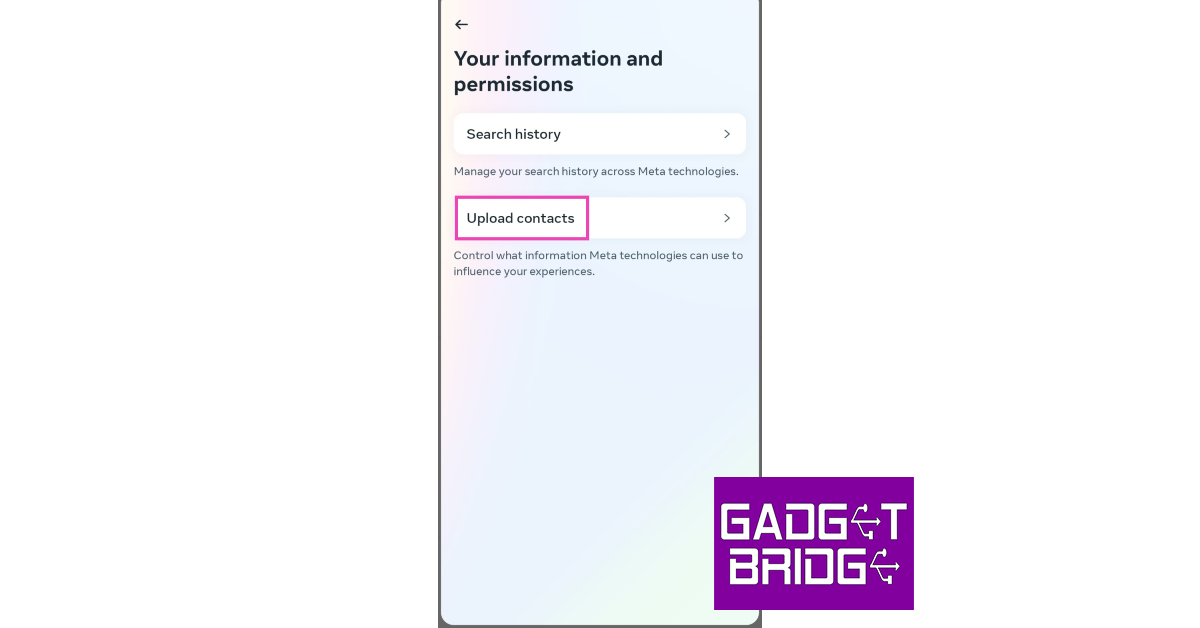 Step 7: Turn off the toggle bar for ‘Connect Contacts’.

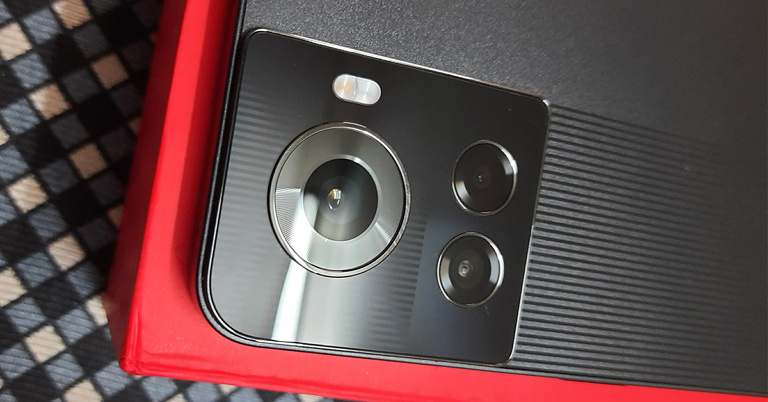

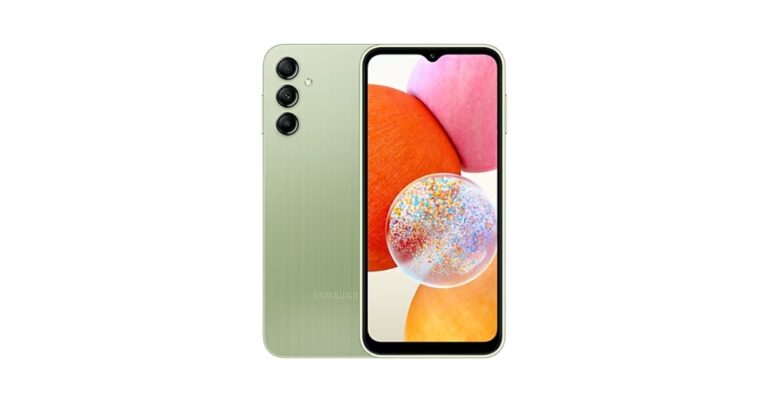


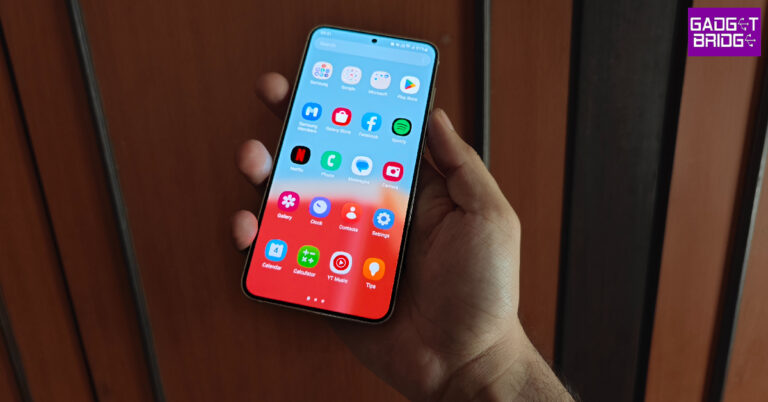
 Step 2: Tap the ellipses at the top right corner of the screen and select System apps.
 Step 3: Scroll down and select the screenshots app.
 Step 4: Tap on Storage and cache.

 Certain OTT apps like Netflix do not allow users to take screenshots in order to reduce the sharing of copyrighted content. However, there is a way you can get around this issue. All you need to do is mirror your smartphone’s display on your PC using the Scrcpy tool and then use the Snipping tool to take a screenshot. Read this article to find out how you can use the Scrcpy tool to mirror your smartphone’s display.
 Restarting your smartphone can resolve any minor issues and background glitches on your device. If you’re unable to take a screenshot on your device, restarting it may do the trick. To restart your smartphone, press and hold the side key and select ‘Restart’. Some smartphones may trigger the Google Assistant when you long-press the side key. In this case, press and hold the side key and volume up button together to open the power options window.
 If your phone has run out of internal storage, it wouldn’t have any space to store any new screenshots. If you keep getting an error every time you take a screenshot, go to Settings>Storage and see how much space on your device is occupied. Delete some files to free up some space and try taking a screenshot again.
 Sometimes, certain third-party apps can interfere with the regular functioning of your device. To ensure that this is the case, restart your phone in Safe Mode. Doing so limits the activity of all the third-party apps on your device and runs only the basic system apps. To enter Safe Mode, press and hold the power button and volume down button. Once the power menu pops up on the screen, press and hold the power icon until the Safe Mode option shows up.
Once you have entered Safe Mode, take a screenshot. If you’re able to capture the screen, it means that one of the third-party apps on your device is causing it to malfunction. A good idea would be to delete some of the apps you installed recently and see if the issue still persists.
Sometimes, certain third-party apps can interfere with the regular functioning of your device. To ensure that this is the case, restart your phone in Safe Mode. Doing so limits the activity of all the third-party apps on your device and runs only the basic system apps. To enter Safe Mode, press and hold the power button and volume down button. Once the power menu pops up on the screen, press and hold the power icon until the Safe Mode option shows up.
Once you have entered Safe Mode, take a screenshot. If you’re able to capture the screen, it means that one of the third-party apps on your device is causing it to malfunction. A good idea would be to delete some of the apps you installed recently and see if the issue still persists.
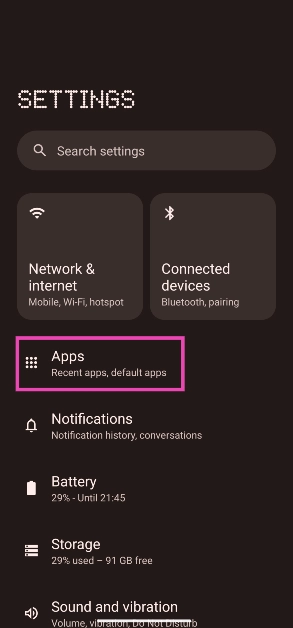 Step 2: Tap the ellipses at the top right corner of the screen and select System apps.
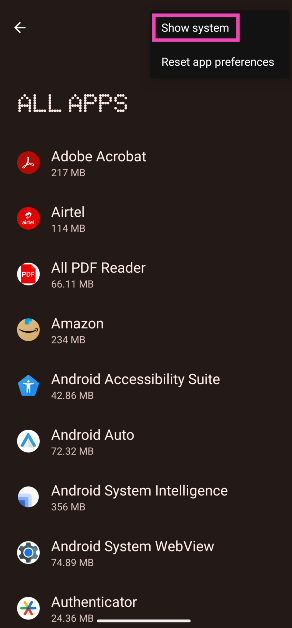 Step 3: Scroll down and select the screenshots app.
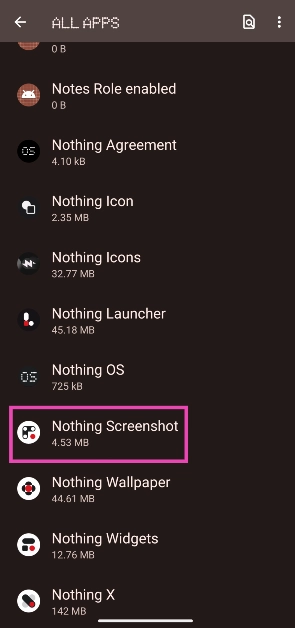 Step 4: Tap on Storage and cache.
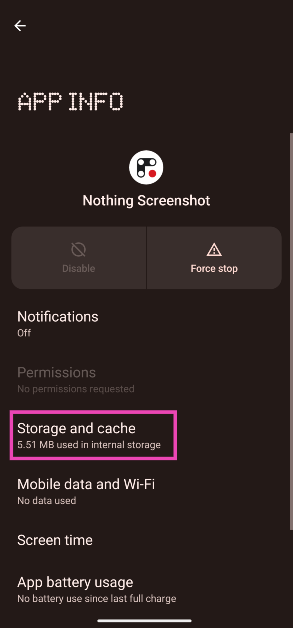 Step 5: Hit Clear cache.
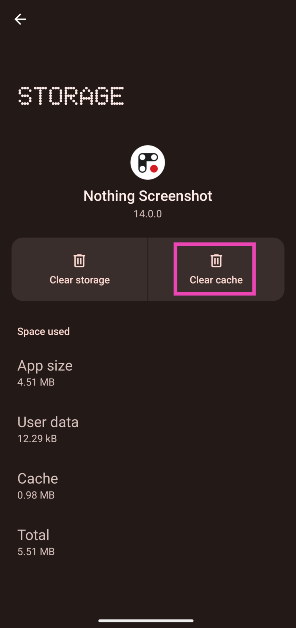
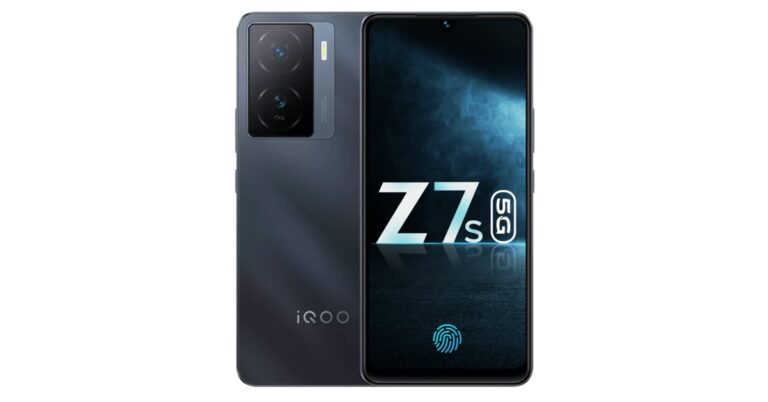

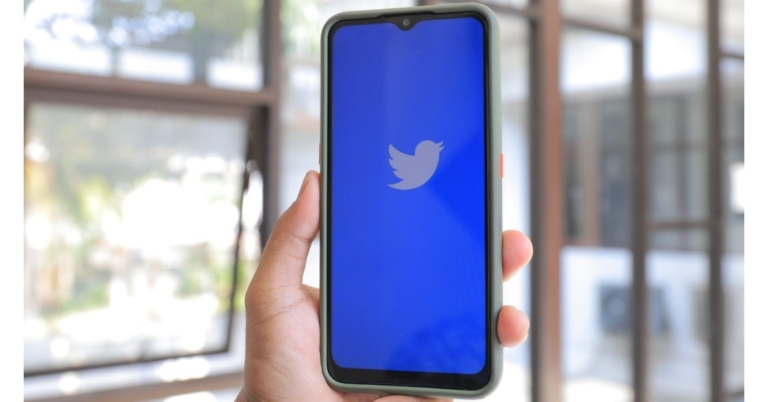
 Users that aren’t subscribed to Twitter Blue can only upload videos up to 140 seconds in length. Video any longer than that limit will trigger the ‘Video File Not Compatible’ error on Twitter. Luckily, trimming a video is a very easy task. The native video editor on your smartphone is equipped to trim any video down to the desired length. Once you open the video on your phone, simply click the edit icon and select ‘trim’. Use the slider to trim the video from both ends. Here are 6 other ways you can trim a video on your device.
 As mentioned earlier, Twitter only lets you upload videos in mp4 or MOV format. If your video file sports a different format, use an online tool to convert it to the appropriate format. Cloudconvert is one of the best online tools for this task. All you need to do is upload your video file to the website and select your desired format (mp4 or MOV for Twitter). Cloudconvert also lets you decide the frame rate and resolution for the converted video. Make sure these parameters align with Twitter’s requirements. Once the video has been converted, you can download it on your device and upload it on Twitter.
 Users that aren’t subscribed to Twitter Blue can only upload videos up to 140 seconds in length. Video any longer than that limit will trigger the ‘Video File Not Compatible’ error on Twitter. Luckily, trimming a video is a very easy task. The native video editor on your smartphone is equipped to trim any video down to the desired length. Once you open the video on your phone, simply click the edit icon and select ‘trim’. Use the slider to trim the video from both ends. Here are 6 other ways you can trim a video on your device.
 Struggling to upload a video longer than 140 seconds? Subscribe to Twitter Blue. One of the many perks of being a Twitter Blue subscriber is the increased video upload limit. This higher limit helps content creators who typically create videos longer than 2 minutes. Subscribing to Twitter Blue boosts this limit to 2 hours and the file size limit to 8GB.
 One of the major drawbacks of Twitter Blue is that it limits the video duration for Android users to 10 minutes. If you want to post longer videos on the platform, you will need to use the Twitter website or the iOS app. Perhaps, in future this limit will be lifted, but for now, Android users will have to make use of their web browser to get around this issue.
 Step 2: Select Twitter.
 Step 3: Tap on Storage.
 Step 4: Select ‘Clear Cache’.

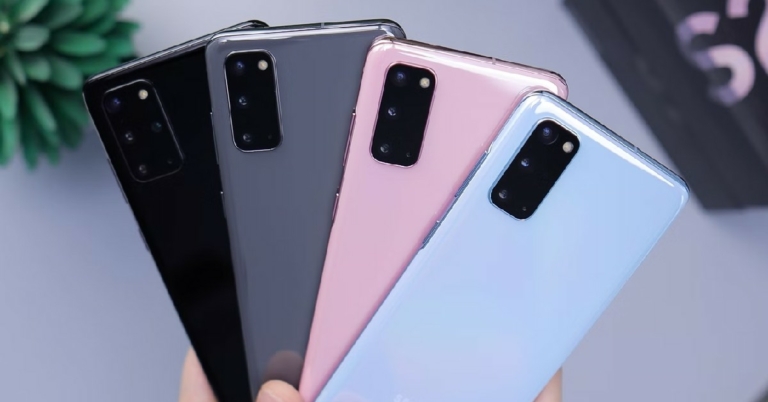
 We reviewed the Samsung Galaxy A15 5G as soon as it came out and were very impressed with the range of features it had to offer at such an affordable price. It may very well be the best 5G phone on a budget. Samsung has decided to go for a uniform design language for all its products across different price categories. This means that the Samsung Galaxy A15 5G features the same vertical camera layout as the flagship S23. The PLS LCD display on this smartphone has a very smooth and satisfying touch response that is hardly matched by any of its competitors. In our review, we were also surprised by the versatile gaming and camera performance of this smartphone.
 Motorola One 5G Ace is a midrange smartphone from 2021, but a price tag of $168 makes it a solid deal two years down the line. The Snapdragon 750G chip on this smartphone is still a stellar SoC for gaming and holds up pretty well two years later. If a good display is a non-negotiable aspect while buying a smartphone, the 6.67-inch FHD+ display on Motorola One 5G Ace will certainly not disappoint. The triple camera array consists of a 48MP primary shooter, an 8MP ultrawide lens, and a 2MP macro lens. You get 2-day battery life on the One 5G Ace with its 5,000 mAh unit. With
 We reviewed the Samsung Galaxy A15 5G as soon as it came out and were very impressed with the range of features it had to offer at such an affordable price. It may very well be the best 5G phone on a budget. Samsung has decided to go for a uniform design language for all its products across different price categories. This means that the Samsung Galaxy A15 5G features the same vertical camera layout as the flagship S23. The PLS LCD display on this smartphone has a very smooth and satisfying touch response that is hardly matched by any of its competitors. In our review, we were also surprised by the versatile gaming and camera performance of this smartphone.
 There’s a lot to like about the budget-friendly OnePlus Nord N300 5G. The 6.56-inch IPS LCD display has a refresh rate of 90Hz and offers a good touch response. You also get Android 12 out of the box, which can be updated to Android 13. The MediaTek Dimensity 810 SoC is a decent SoC in this price range. The dual rear camera setup consists of a 48MP primary lens and a 2MP depth sensor. The 16MP selfie camera takes good-quality shots that are social media-ready. The 5,000 mAh battery can easily last all day, and if you’re looking for a fast-charging smartphone, the 33W wired charging on this device will certainly impress you.
 As you may have already guessed from the name, this smartphone comes with its own stylus. You can get the TCL Stylus 5G for as low as $258 from the Verizon store. The 6.81-inch LCD display has a screen-to-body ratio of 90.2%. You also get a dedicated microSD slot on this smartphone. The MediaTek Dimensity 700 SoC is a pretty decent midrange chipset, that can handle basic gaming along with other everyday tasks. The 4,000 mAh battery can easily last an entire day.
 The Samsung Galaxy A23 5G is currently listed at $299.99 on the official website, but you can get it for as low as $214.90 on Amazon. The smartphone rocks a PLS LCD display with an impressive 120Hz refresh rate. It comes with Android 12 out of the box that can be quickly upgraded to Android 13. Powering this device is the Snapdragon 695 SoC. The Quad camera unit at the back comprises a 50MP primary lens with OIS, a 5MP ultrawide lens, a 2MP macro camera, and another 2MP depth sensor. The 8MP selfie camera upfront takes decent shots as well. 25W wired charging support is not the fastest around, but it does a decent job.
 If you have to have a stylus with your smartphone, the Motorola Moto G Stylus is another great option along with the TCL Stylus 5G. This smartphone is powered by the Snapdragon 480 5G processor, which may not be the best in its category anymore but still delivers a rock-solid performance on this device. You can use the stylus on this device to highlight text, jot down notes, edit pictures, and even create art. The Moto G Stylus sports a quad camera setup with a 48MP main camera that takes pretty good shots. The 6.8-inch Max Vision FHD+ display is another big highlight of this smartphone. This display is ideal for streaming content across all platforms.
Read Also: Sony WH-CH520 Review: A needed upgrade that brings helpful features
If you have to have a stylus with your smartphone, the Motorola Moto G Stylus is another great option along with the TCL Stylus 5G. This smartphone is powered by the Snapdragon 480 5G processor, which may not be the best in its category anymore but still delivers a rock-solid performance on this device. You can use the stylus on this device to highlight text, jot down notes, edit pictures, and even create art. The Moto G Stylus sports a quad camera setup with a 48MP main camera that takes pretty good shots. The 6.8-inch Max Vision FHD+ display is another big highlight of this smartphone. This display is ideal for streaming content across all platforms.
Read Also: Sony WH-CH520 Review: A needed upgrade that brings helpful features
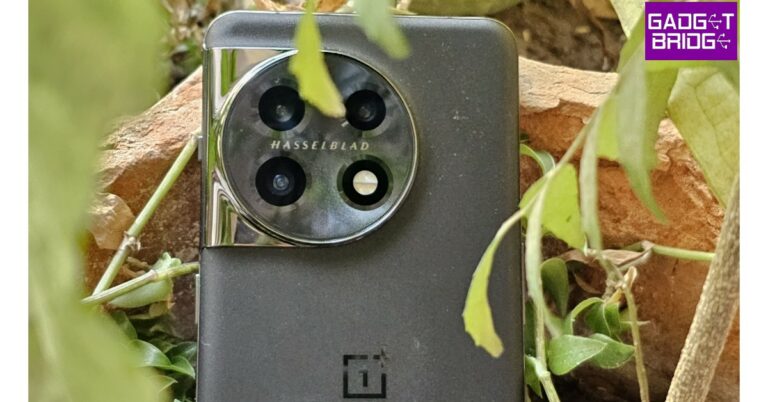







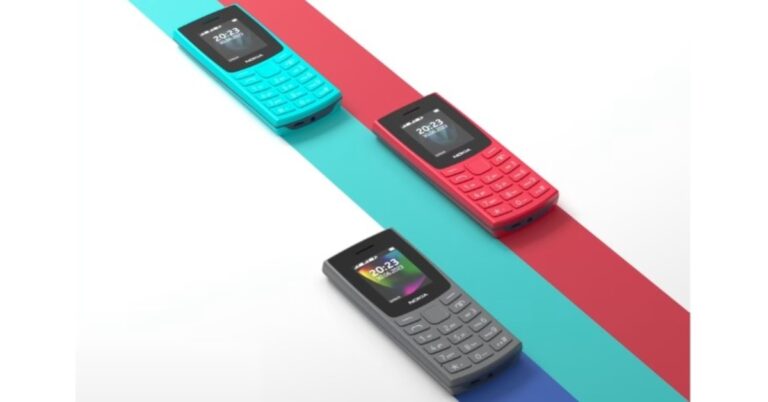


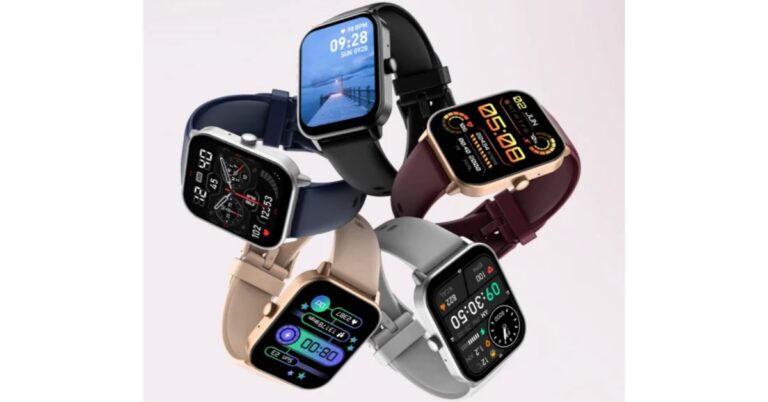
 The Noise ColorFit Qube 2 comes packed with a number of wellness features under Noise Health Suite which equips the device to track an array of vitals like SPO2 levels, heart rate, sleeping and breathing patterns, and activity levels. One can also set daily reminders and weather forecasts handy, with the help of its inbuilt Productivity Suite. It includes more than 100 sports modes (volleyball, softball, hockey, walking, running, cycling, water skiing, rafting, diving and more)and built-in games like young bird and Hamster. Also, there is support for AI voice assistants for hands-free operation. According to the company the watch can last up to 7 days on a single charge and up to 2 days battery with calling.
 The Noise ColorFit Qube 2 comes packed with a number of wellness features under Noise Health Suite which equips the device to track an array of vitals like SPO2 levels, heart rate, sleeping and breathing patterns, and activity levels. One can also set daily reminders and weather forecasts handy, with the help of its inbuilt Productivity Suite. It includes more than 100 sports modes (volleyball, softball, hockey, walking, running, cycling, water skiing, rafting, diving and more)and built-in games like young bird and Hamster. Also, there is support for AI voice assistants for hands-free operation. According to the company the watch can last up to 7 days on a single charge and up to 2 days battery with calling.
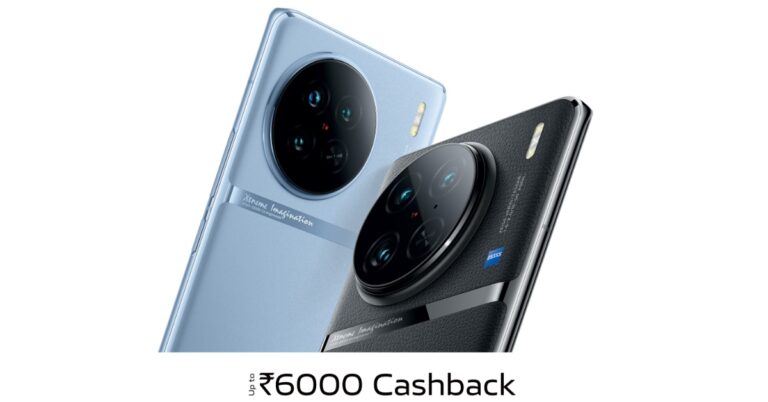



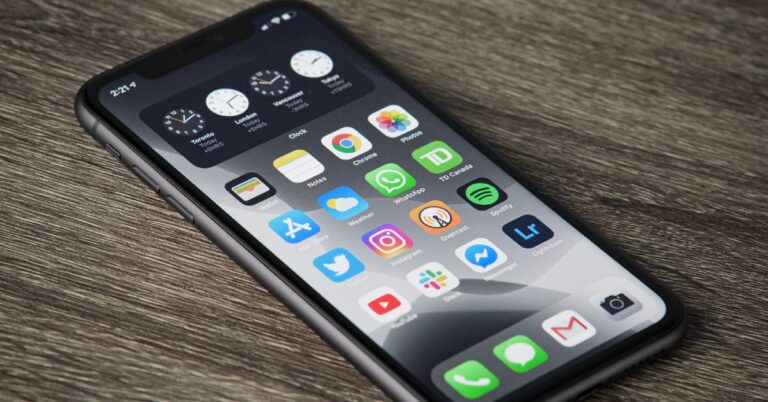
 Step 3: Tap on ‘Default Browser App’.
 Step 4: Select the browser you want to set as the default choice.

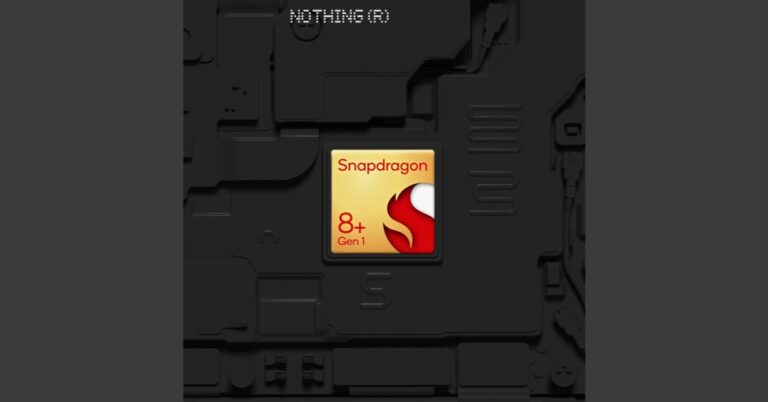
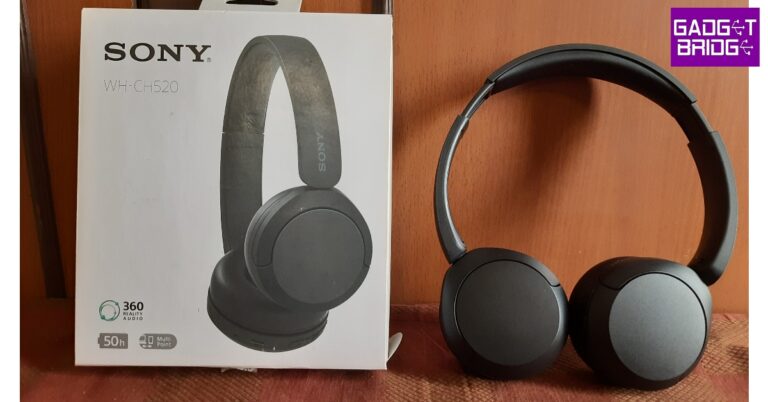
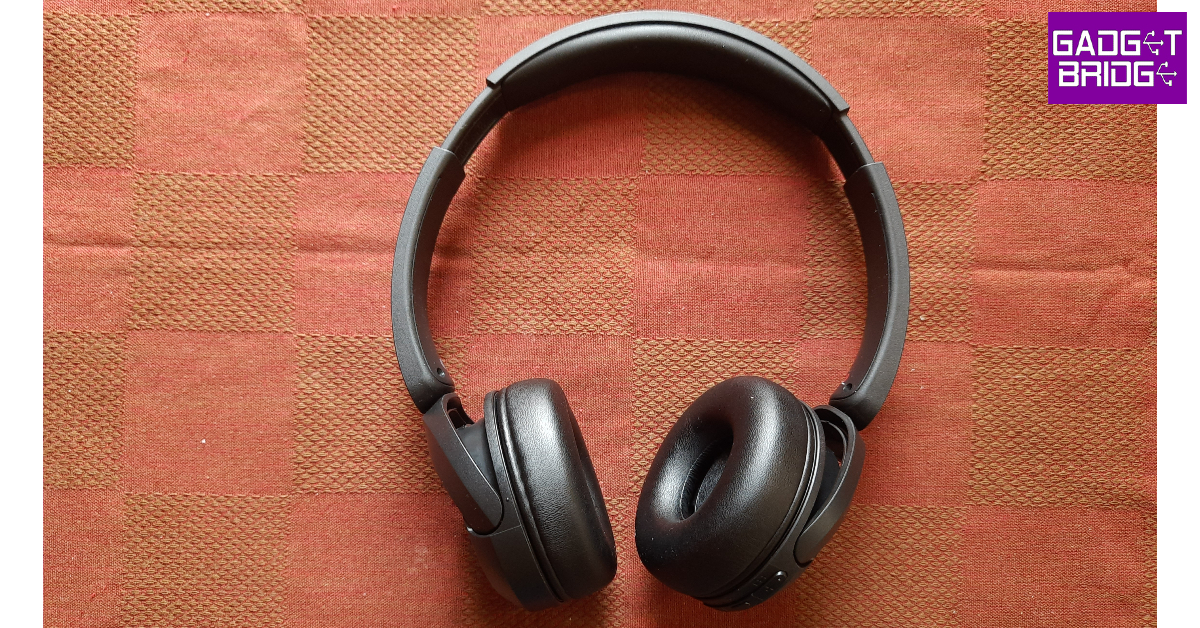 The WH-CH520 doesn’t stray too far from its predecessor in terms of styling. It still rocks the on-ear design and doesn’t have an excessive clamping force. There’s optimum foam padding on the earcups and headband. The headphones are made out of plastic, but the quality of the material is quite nice here. It can withstand rugged, outdoor use. The matte finish on the plastic body is also a nice touch, as it elevates the feel of the headphones. You don’t have to worry about the earcups and headband attracting any fingerprints or smudges either.
 The earcups are capable of swivelling inwards, making the headphones easier to pack in your luggage while travelling. The Sony logo is branded on either side of the headband, right above the earcups. The right earcup houses the three control buttons, a USB port, and the only microphone on this pair of headphones. The control buttons are clicky but could have been a bit firmer. It takes a while to get familiar with their arrangement before you can instantly reach for the button you want. There is no 3.5mm jack on the headphones which means you’re completely dependent on the battery.
 While you can’t ask for anything more in terms of design, if you’re not fond of on-ear headphones, Sony WH-CH520 won’t change your mind in any way. The fit and the clamping may be comfortable, but the constant force exerted on the earlobes while wearing these headphones can get too overbearing. After an hour of use, we had to take off these headphones for a bit before using them again. Since these headphones don’t fully go over your ears, there is very little passive noise cancellation.
 Before we move on to the sound quality, let’s talk about the different features on offer. As we mentioned earlier, Sony WH-CH520 replace the WH-CH510 which had been on the market for four years. This update brings some much-needed features to Sony’s entry in this price category. The biggest of them all is multi-point pairing. Connecting your headset to multiple devices is something that is only possible with a wireless connection. But surprisingly, this feature is often missing on budget wireless headphones.
Sony WH-CH520 can connect to two devices at once. Pairing them with your PC and smartphone at the same time means you’re never going to miss a call while you’re gaming or watching a movie. However, if you’re playing media on one of the devices, it doesn’t automatically pause it if you play something on the other device. We also noticed some audio stuttering while watching videos on YouTube on PC with the multi-point connection turned on. Thankfully, the Sony app (more on that later) offers an option to stabilise the connection, but it comes at the cost of compromising audio quality.
Before we move on to the sound quality, let’s talk about the different features on offer. As we mentioned earlier, Sony WH-CH520 replace the WH-CH510 which had been on the market for four years. This update brings some much-needed features to Sony’s entry in this price category. The biggest of them all is multi-point pairing. Connecting your headset to multiple devices is something that is only possible with a wireless connection. But surprisingly, this feature is often missing on budget wireless headphones.
Sony WH-CH520 can connect to two devices at once. Pairing them with your PC and smartphone at the same time means you’re never going to miss a call while you’re gaming or watching a movie. However, if you’re playing media on one of the devices, it doesn’t automatically pause it if you play something on the other device. We also noticed some audio stuttering while watching videos on YouTube on PC with the multi-point connection turned on. Thankfully, the Sony app (more on that later) offers an option to stabilise the connection, but it comes at the cost of compromising audio quality.
 Another important function that has been included in WH-CH520 is app support. To unlock the full potential of these headphones, you need to link them to the Sony Headphones Connect app. This app has a bunch of sound profiles and equaliser presets you can use to tune the audio output according to your liking. Sony’s Digital Sound Enhancement Engine (DSEE) can also be turned on from the Headphones Connect app. DSEE upscales the audio for compressed files on your device. If you primarily stream music on Spotify, Apple Music, YouTube, or many major platforms, you won’t find much use for this feature. But if you have a digital library of music in compressed format, DSEE works like a charm to enhance the sound quality.
Sony’s 360 Reality Audio, like Dolby Atmos and Spatial Audio, offers an immersive listening experience. To use this format, you will need to take pictures of your ears and upload them in the app for optimisation and tuning purposes. Currently, there are not a lot of apps that support this format, so this feature may be a hit or miss for you.
Another important function that has been included in WH-CH520 is app support. To unlock the full potential of these headphones, you need to link them to the Sony Headphones Connect app. This app has a bunch of sound profiles and equaliser presets you can use to tune the audio output according to your liking. Sony’s Digital Sound Enhancement Engine (DSEE) can also be turned on from the Headphones Connect app. DSEE upscales the audio for compressed files on your device. If you primarily stream music on Spotify, Apple Music, YouTube, or many major platforms, you won’t find much use for this feature. But if you have a digital library of music in compressed format, DSEE works like a charm to enhance the sound quality.
Sony’s 360 Reality Audio, like Dolby Atmos and Spatial Audio, offers an immersive listening experience. To use this format, you will need to take pictures of your ears and upload them in the app for optimisation and tuning purposes. Currently, there are not a lot of apps that support this format, so this feature may be a hit or miss for you.
 Let’s talk about the most vital aspect of the performance – the sound quality. Sony WH-CH520 delivers a punchy, texture-rich audio output with the signature Sony sound. The bass isn’t tuned too high, giving other frequencies optimum representation in the mix. If you want, you can opt for a more bass-oriented output in the Sony Headphones Connect app.
We played a bunch of genres on the WH-CH520 and they delivered a decent performance. While the soundstage is certainly not category-defining, there is very little to complain about here. The headphones manage to relay the glossiness of hyper-pop songs pretty well. The intricacies of bass notes were also very well handled. The thumping delivery of rock music was also very good. However, the high-end frequency response leaves a little more to be desired. The vocals and guitars sound as they should, but the cymbal hits sometimes tend to get lost in the mix.
Let’s talk about the most vital aspect of the performance – the sound quality. Sony WH-CH520 delivers a punchy, texture-rich audio output with the signature Sony sound. The bass isn’t tuned too high, giving other frequencies optimum representation in the mix. If you want, you can opt for a more bass-oriented output in the Sony Headphones Connect app.
We played a bunch of genres on the WH-CH520 and they delivered a decent performance. While the soundstage is certainly not category-defining, there is very little to complain about here. The headphones manage to relay the glossiness of hyper-pop songs pretty well. The intricacies of bass notes were also very well handled. The thumping delivery of rock music was also very good. However, the high-end frequency response leaves a little more to be desired. The vocals and guitars sound as they should, but the cymbal hits sometimes tend to get lost in the mix.
 Overall, we were happy with the audio performance that we got on the Sony WH-CH520. There is a single microphone on these headphones, which surprisingly performs pretty well on calls. It is able to extract the caller’s voice from the surrounding noise and relay it to the receiver with minimal loss in quality. We’d suggest these headphones if you work from home and have to attend a lot of meetings during work hours.
The 50-hour battery life on offer here is the cherry on the cake. With no headphone jack available, a good battery backup was necessary on these headphones. On our tests, the headphones lasted between 40-50 hours depending on the average volume level. It takes 3 hours to fully charge these headphones.
Read Also: Asus introduces a new lineup of ROG and TUF gaming laptops in India
Overall, we were happy with the audio performance that we got on the Sony WH-CH520. There is a single microphone on these headphones, which surprisingly performs pretty well on calls. It is able to extract the caller’s voice from the surrounding noise and relay it to the receiver with minimal loss in quality. We’d suggest these headphones if you work from home and have to attend a lot of meetings during work hours.
The 50-hour battery life on offer here is the cherry on the cake. With no headphone jack available, a good battery backup was necessary on these headphones. On our tests, the headphones lasted between 40-50 hours depending on the average volume level. It takes 3 hours to fully charge these headphones.
Read Also: Asus introduces a new lineup of ROG and TUF gaming laptops in India
 Both the Redmi phones will come in three different colour options of Black, Light Green, and Light Blue. They are scheduled to go on sale from May 23 at 12 noon via Amazon.in, Mi.com, Mi Home and all retail partners. ICICI bank card holders can also avail an additional instant discount of up to Rs 500 on the purchase of these devices.
 Commenting on the launch, Anuj Sharma, Chief Marketing Officer, Xiaomi India, said, “As a brand, we have always worked towards our vision of innovation for all with a strong aim to empower the youth of the nation. Today’s launch is one of the many efforts by Xiaomi to fuel the smooth transition for our consumers as they move towards adopting the latest technologies. The all-new Redmi A2 series is packed with meaningful features and we are optimistic that value-conscious consumers, who want to upgrade to newer tech, will find the best solutions in our latest offerings at an honest price. Building on the success of Redmi A1 series and backed by Redmi’s quality, we are confident of an equally successful inning for Redmi A2 series. These smartphones are yet another offering from our side to further strengthen our resolve of a progressive Digital India.”
For the latest gadget and tech news, and gadget reviews, follow us on Twitter, Facebook and Instagram. For newest tech & gadget videos subscribe to our YouTube Channel. You can also stay up to date using the Gadget Bridge Android App. You can find the latest car and bike news here.
Commenting on the launch, Anuj Sharma, Chief Marketing Officer, Xiaomi India, said, “As a brand, we have always worked towards our vision of innovation for all with a strong aim to empower the youth of the nation. Today’s launch is one of the many efforts by Xiaomi to fuel the smooth transition for our consumers as they move towards adopting the latest technologies. The all-new Redmi A2 series is packed with meaningful features and we are optimistic that value-conscious consumers, who want to upgrade to newer tech, will find the best solutions in our latest offerings at an honest price. Building on the success of Redmi A1 series and backed by Redmi’s quality, we are confident of an equally successful inning for Redmi A2 series. These smartphones are yet another offering from our side to further strengthen our resolve of a progressive Digital India.”
For the latest gadget and tech news, and gadget reviews, follow us on Twitter, Facebook and Instagram. For newest tech & gadget videos subscribe to our YouTube Channel. You can also stay up to date using the Gadget Bridge Android App. You can find the latest car and bike news here.  Both the Redmi phones will come in three different colour options of Black, Light Green, and Light Blue. They are scheduled to go on sale from May 23 at 12 noon via Amazon.in, Mi.com, Mi Home and all retail partners. ICICI bank card holders can also avail an additional instant discount of up to Rs 500 on the purchase of these devices.
 For the photos and videos both the phones includes a dual rear camera setup, including an 8-megapixel primary sensor along with a QVGA camera. The devices also features a 5-megapixel selfie sensor.
In addition to this, the smartphones packs a 5,000mAh with 10W fast charging support. The Redmi A2+ also come with a fingerprint scanner to unlock the phone. In terms of connectivity, the Redmi smartphone also includes a Dual-SIM, 4G, 2.4GHz Wi-Fi, Bluetooth 5.0, GPS, Glonass, Galileo, a 3.5mm audio jack, a USB type-C port and in-built FM radio app for entertainment.
For the photos and videos both the phones includes a dual rear camera setup, including an 8-megapixel primary sensor along with a QVGA camera. The devices also features a 5-megapixel selfie sensor.
In addition to this, the smartphones packs a 5,000mAh with 10W fast charging support. The Redmi A2+ also come with a fingerprint scanner to unlock the phone. In terms of connectivity, the Redmi smartphone also includes a Dual-SIM, 4G, 2.4GHz Wi-Fi, Bluetooth 5.0, GPS, Glonass, Galileo, a 3.5mm audio jack, a USB type-C port and in-built FM radio app for entertainment.
 Commenting on the launch, Anuj Sharma, Chief Marketing Officer, Xiaomi India, said, “As a brand, we have always worked towards our vision of innovation for all with a strong aim to empower the youth of the nation. Today’s launch is one of the many efforts by Xiaomi to fuel the smooth transition for our consumers as they move towards adopting the latest technologies. The all-new Redmi A2 series is packed with meaningful features and we are optimistic that value-conscious consumers, who want to upgrade to newer tech, will find the best solutions in our latest offerings at an honest price. Building on the success of Redmi A1 series and backed by Redmi’s quality, we are confident of an equally successful inning for Redmi A2 series. These smartphones are yet another offering from our side to further strengthen our resolve of a progressive Digital India.”
For the latest gadget and tech news, and gadget reviews, follow us on Twitter, Facebook and Instagram. For newest tech & gadget videos subscribe to our YouTube Channel. You can also stay up to date using the Gadget Bridge Android App. You can find the latest car and bike news here.
Commenting on the launch, Anuj Sharma, Chief Marketing Officer, Xiaomi India, said, “As a brand, we have always worked towards our vision of innovation for all with a strong aim to empower the youth of the nation. Today’s launch is one of the many efforts by Xiaomi to fuel the smooth transition for our consumers as they move towards adopting the latest technologies. The all-new Redmi A2 series is packed with meaningful features and we are optimistic that value-conscious consumers, who want to upgrade to newer tech, will find the best solutions in our latest offerings at an honest price. Building on the success of Redmi A1 series and backed by Redmi’s quality, we are confident of an equally successful inning for Redmi A2 series. These smartphones are yet another offering from our side to further strengthen our resolve of a progressive Digital India.”
For the latest gadget and tech news, and gadget reviews, follow us on Twitter, Facebook and Instagram. For newest tech & gadget videos subscribe to our YouTube Channel. You can also stay up to date using the Gadget Bridge Android App. You can find the latest car and bike news here. 
 Step 2: Tap ‘Emergency Contacts’.
 Step 3: Tap on the pencil icon on the right side of the screen.
 Step 4: Tap on ‘Add member’.
 Step 5: Select a person from your phonebook as an emergency contact.
Step 6: Hit ‘Save’.
Step 5: Select a person from your phonebook as an emergency contact.
Step 6: Hit ‘Save’.
 Once the emergency contact is saved, it can be contacted without unlocking your phone. To make a call to your emergency contact, the responders will have to hit the ‘Emergency call’ button on the lock screen.

 Step 2: Tap on ‘Contact information’. Typically, this feature is used to display your alternate phone number or email address on the lock screen so you can be contacted in case you lose your phone. You can also use it to put emergency contact info on the screen.
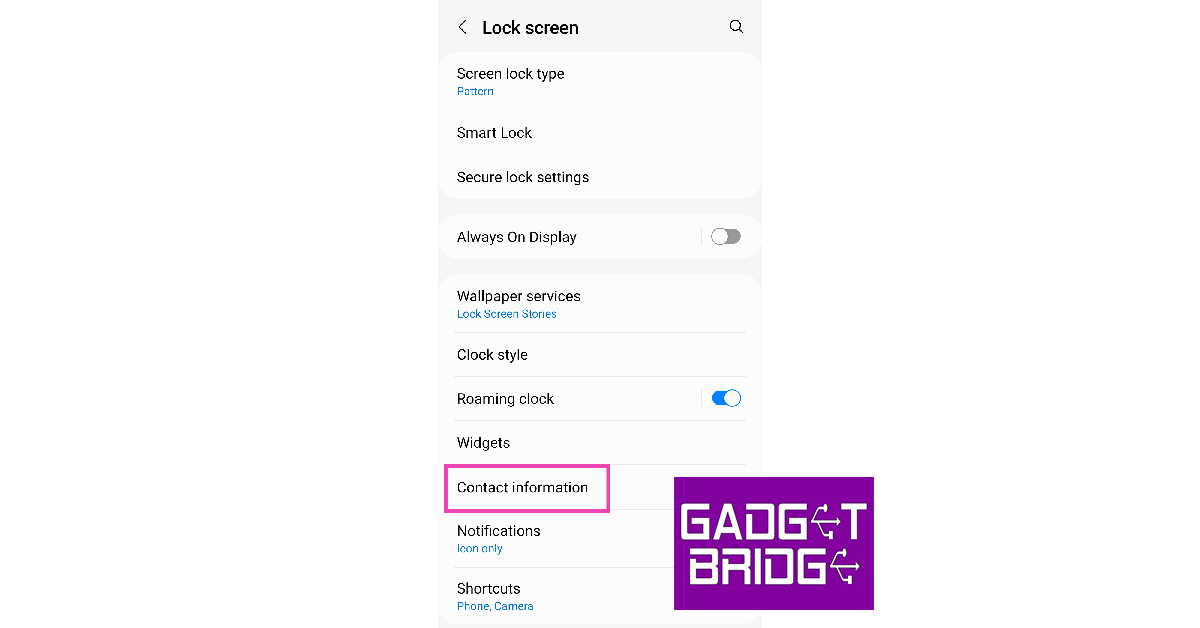 Step 3: Add the phone number of your emergency contact in the popup box.
 Step 4: Hit ‘Done’. The contact will show up on your lock screen.

 Step 3: Select ‘Medical ID’.
 Step 4: Tap on ‘Edit’ at the top right corner of the screen.
Step 5: Select ‘Add emergency contact’.
Step 4: Tap on ‘Edit’ at the top right corner of the screen.
Step 5: Select ‘Add emergency contact’.
 Step 6: Scroll through your contacts and select one to be your emergency contact.
Step 7: Select how they are related to you.
Step 8: Hit ‘Done’.
Step 6: Scroll through your contacts and select one to be your emergency contact.
Step 7: Select how they are related to you.
Step 8: Hit ‘Done’.
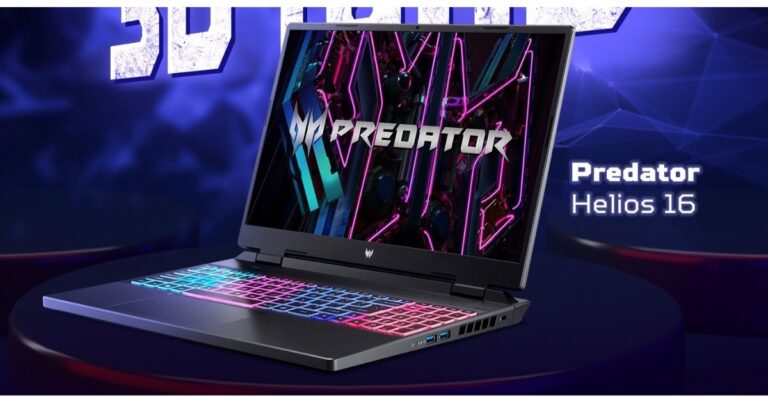
 The Acer Predator Helios Neo 16 laptops also have NVIDIA GeForce RTX 4050 and 4060 series GPUs and 13th Gen Intel Core i5 and i7 processors. Both models have a cutting-edge cooling system with 5th Gen AeroBlade 3D fans, heat pipes, and liquid metal thermal grease to guarantee uninterrupted performance even during prolonged gaming sessions without any heat-related difficulties.
Also Read: ASUS Zenbook 14 (OLED) 2023 Review: Premium and works like a charm
The updated PredatorSense 4.0 utility app and the new RGB backlit keyboard allow users of the Acer Predator Helios Neo 16 to quickly switch between several operating modes. Ethernet, Intel Killer Wi-Fi 6 AX1650, and Intel Killer E2600 are all available. Additionally, it has two USB Type-C ports that support Thunderbolt 4 and may be utilised for charging, G-SYNC, and DisplayPort.
The Acer Predator Helios Neo 16 laptops also have NVIDIA GeForce RTX 4050 and 4060 series GPUs and 13th Gen Intel Core i5 and i7 processors. Both models have a cutting-edge cooling system with 5th Gen AeroBlade 3D fans, heat pipes, and liquid metal thermal grease to guarantee uninterrupted performance even during prolonged gaming sessions without any heat-related difficulties.
Also Read: ASUS Zenbook 14 (OLED) 2023 Review: Premium and works like a charm
The updated PredatorSense 4.0 utility app and the new RGB backlit keyboard allow users of the Acer Predator Helios Neo 16 to quickly switch between several operating modes. Ethernet, Intel Killer Wi-Fi 6 AX1650, and Intel Killer E2600 are all available. Additionally, it has two USB Type-C ports that support Thunderbolt 4 and may be utilised for charging, G-SYNC, and DisplayPort.
 The Acer Predator Helios Neo 16 laptops also have NVIDIA GeForce RTX 4050 and 4060 series GPUs and 13th Gen Intel Core i5 and i7 processors. Both models have a cutting-edge cooling system with 5th Gen AeroBlade 3D fans, heat pipes, and liquid metal thermal grease to guarantee uninterrupted performance even during prolonged gaming sessions without any heat-related difficulties.
Also Read: ASUS Zenbook 14 (OLED) 2023 Review: Premium and works like a charm
The updated PredatorSense 4.0 utility app and the new RGB backlit keyboard allow users of the Acer Predator Helios Neo 16 to quickly switch between several operating modes. Ethernet, Intel Killer Wi-Fi 6 AX1650, and Intel Killer E2600 are all available. Additionally, it has two USB Type-C ports that support Thunderbolt 4 and may be utilised for charging, G-SYNC, and DisplayPort.
The Acer Predator Helios Neo 16 laptops also have NVIDIA GeForce RTX 4050 and 4060 series GPUs and 13th Gen Intel Core i5 and i7 processors. Both models have a cutting-edge cooling system with 5th Gen AeroBlade 3D fans, heat pipes, and liquid metal thermal grease to guarantee uninterrupted performance even during prolonged gaming sessions without any heat-related difficulties.
Also Read: ASUS Zenbook 14 (OLED) 2023 Review: Premium and works like a charm
The updated PredatorSense 4.0 utility app and the new RGB backlit keyboard allow users of the Acer Predator Helios Neo 16 to quickly switch between several operating modes. Ethernet, Intel Killer Wi-Fi 6 AX1650, and Intel Killer E2600 are all available. Additionally, it has two USB Type-C ports that support Thunderbolt 4 and may be utilised for charging, G-SYNC, and DisplayPort.