Amazon is back with another quiz on its mobile platform. The Amazon Quiz is conducted every day for its customers. Customers from different parts of the country are participating in the daily quiz. Today’s Amazon quiz is now live on the Amazon App. The customers who participate in the 16 April 2023 Amazon Quiz will get a chance to win Rs 1,000 Amazon pay Balance.
The Amazon Quiz can be played from 12 AM to 11:59 PM. For those who are unaware of the quiz, the e-commerce platform brings a fresh quiz on a daily basis which consists of five questions related to general knowledge and current affairs. The participants need to answer all the questions correctly and their names will be selected for a lucky draw. The winner will be announced at the end of the month. One wrong answer could eliminate you from the quiz. Only app users are eligible to participate in the Quiz. Check Out 16 April 2023 Amazon Quiz Answers.
Question 1: Which of these is the new AC tourist train that links Delhi with Northeast India?
Answer: Bharat Gaurav
Question 2: Which Oscar-winning documentary film revolves around Russian opposition leader Alexei?
Answer: Navalny
Question 3: India’s first batch of Agniveers celebrated their passing out parade on which ship?
Answer: INS Chilka
Question 4: This is a memorial for those fallen in which war?
Answer: Vietnam War
Question 5: A young boy going by this bird’s name is the sidekick to which superhero?
Answer: Batman
How To Play Amazon Quiz
Only app users are eligible to play the Amazon quiz every morning from 12 AM to 11:59 PM. The quiz is not available on the desktop. For those who are unaware of how to play the Amazon quiz below are the steps, you can follow to take the quiz.
Firstly download the Amazon app from Google Play Store or App Store
Now fill in the required information through the Sign Up option.
You need to log in to the Amazon app and scroll down on the home screen to find the Amazon Quiz banner.
Tap on the Amazon Quiz banner and tap on the Start button to start the Quiz.
Now you will get 5 questions and you need to answer them correctly. One wrong answer will eliminate you from the Quiz.
After answering all the questions correctly you are now eligible for a Lucky Draw.
The winner’s name will be announced today at 12 PM.
A bunch of fresh security features have been added to WhatsApp to make it more secure. The new features apparently improve user security on the app. According to the company these features make your chats as private and secure as an in-person conversation. Below are some of the additional security features that will be added to WhatsApp in the coming months.
WhatsApp via its blog post said, “At WhatsApp, we believe that your messages should be as private and secure as an in-person conversation. Protecting your personal messages with default end-to-end encryption is the foundation of that security, and we’ll never stop building new features to give you extra layers of privacy, and more control over your messages.”
A few major security features have already been made available to Android users, but they have not yet been enabled for the iOS version, which is anticipated to launch in the near future.
Account Protect
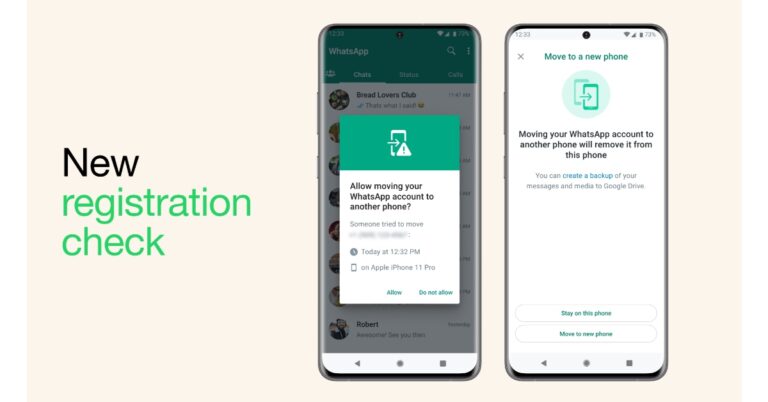
Account Protect is quite an important tool to be added to WhatsApp. When the user moves their account to a new device WhatsApp always confirms that it’s truly you. But now WhatsApp will prompt you on your old device to verify that you want to take this step as an extra security check. This feature is really helpful if someone tries to hack or move your account to another device.
One more WhatsApp security feature, Device Verification, ensures that no one instals malware to read your messages. Without your knowledge, mobile malware can access your phone and use WhatsApp to deliver harmful messages.
In order to further safeguard you in the event that your device is compromised, the firm has implemented checks to assist authenticate your account without requiring any action from you. This enables uninterrupted use of WhatsApp.
Automatic Security Codes
Last but not least, the Automatic Security Codes tool is said to ensure you are interacting with the intended recipient. One can check this manually by selecting the encryption tab from a contact’s information.
WhatsApp is also launching a security feature based on a method called “Key Transparency” that will automatically verify that you have a secure connection in order to make this procedure simpler and more accessible to everyone. This means be able to immediately check that your private discussion is encrypted when you click on the encryption tab.
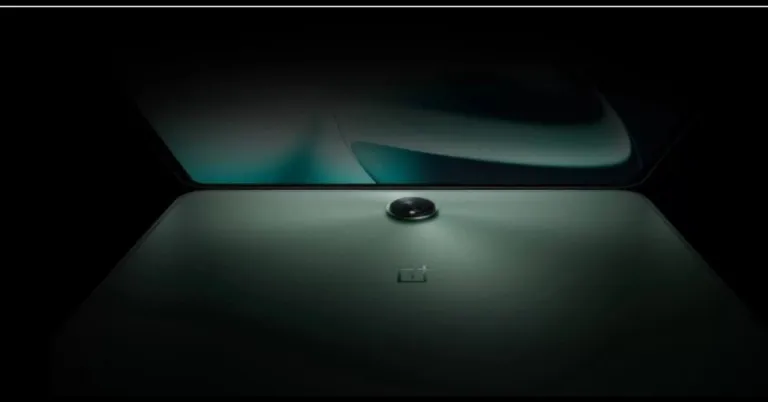
Before the official announcement, the OnePlus Pad price in India has been tipped again. The possible launch timeline and the expected price were tipped just a few days ago by a popular tipster. Note that the OnePlus Tablet debuted in the country in February at the Cloud 11 event alongside a couple of products. However, the pricing and availability details still remain a secret. All we know which the company confirmed at the time of launch is it will be available in April.
Once again the price of the OnePlus Pad in India has been tipped. According to a tweet by tipster Mukul Sharma of @stufflistings, it would cost Rs 39,999 at launch. Speculations also suggest that the company would provide bank discounts to use this to entice customers.
Comparing the recently rumoured price of the OnePlus Pad to the previously tipped price, it is slightly higher. Tipster Piyush Bhasarkar revealed that the upcoming tablet could be priced at Rs 23,099 after applying offers. The tablet is expected to cost Rs 30,000 in the country. He further revealed that the device is likely to go on sale between April 28 and April 30.
At the time of the launch, OnePlus announced that the tablet will open up for pre-orders in the country in the month of April. In addition to India, the tablet will be available in North America, Europe and the Middle East.
OnePlus Pad specifications
The OnePlus Pad has 5G cellular sharing with smartphones and it is powered by a MediaTek Dimensity 9000 chipset, which supports up to 12GB of LPDDR5 RAM. The Tab will be shipped with Android 13 out of the box and should get at least the 2 next OS updates with security updates.
The device is highlighted with an 11.61-inch display with a refresh rate of 144Hz, a resolution of 2,800×2,000, a pixel density of 296 ppi, and a brightness of 500 nits. The device has a 2.5D curved glass, a 7:5 screen ratio, and an 88 percent screen-to-body ratio. It further includes a quad-speaker setup that is said to provide an Omnibearing sound field, and depending on how the tablet is held, the speakers can switch between the left and right channels. Dolby Atmos and Dolby Vision are also supported on the tablet.
The tablet houses a 9,510mAh battery with 67W SUPERVOOC capability, which is said to provide up to one month of standby time. It has an 8-megapixel selfie camera and a single 13-megapixel back camera with an LED flash. In addition to this, the device is supplied with a magnetic keyboard and a stylus.
Warner Bros. Discovery has officially announced that its Max Streaming Service is set to launch on May 23. The much-awaited streaming service has also revealed the Harry Potter Series, “Game of Thrones” Prequel A Knight of the Seven Kingdoms: The Hedge Knight, And More
The company via blog post said, “Max will stand out amongst streamers by uniquely combining unrivalled breadth and superior quality with iconic franchises and strong product experience, all for a great value.”
Max, an enhanced Streaming Service by Warner Bros. Discovery is set to debut on May 23 in the United States. According to the company HBO Originals, Warner Bros. movies, Max Originals, the DC Universe, and the Wizarding World of Harry Potter, a vast selection of kid-friendly content will be available. Additionally, best-in-class programming across food, home, reality, lifestyle and documentaries from leading brands like HGTV, Food Network, Discovery Channel, TLC, ID and more will also be available for viewing.
JB Perrette, President & CEO, Global Streaming & Games, Warner Bros. Discovery said, “From the biggest superheroes to real-life champions; from culture-shaping dramas to taste-shaping entertainment; from fantastical realms to the realest of worlds, Max will offer an unrivaled range of choice.” He further added “This new brand signals an important change from two narrower products, HBO Max and discovery+, to our broader content offering and consumer proposition. While each product offered something for some people, Max will have a broad array of quality choices for everybody.”
Warner Bros. suggests that Discovery Max would provide users with three pricing options, allowing them to choose the one that better serves their needs.
Max Ad-Lite | $9.99/month or $99.99/year 2 concurrent streams, 1080p resolution, no offline downloads, 5.1 surround sound quality
Max Ad Free | $15.99/month or $149.99/year 2 concurrent streams, 1080 resolution, 30 offline downloads, 5.1 surround sound quality
Max Ultimate Ad Free | $19.99/month or $199.99/year 4 concurrent streams, up to 4K UHD resolution, 100 offline downloads, and Dolby Atmos sound quality
It should be noted that current HBO Max subscribers will pay the same fee to access Max as they do for their HBO Max subscription. Also, for a minimum of six months after debut, HBO Max users will remain and have access to the benefits of their current subscription. According to the firm, their HBO Max subscribers’ profiles, settings, watch history, “Continue Watching,” and “My List” items will also migrate to Max so they can pick up streaming just where they left off.
What content will Max offer?
As per Warner Bros. Discovery, Max streaming service will provide a “regular freshness of content with an average of more than 40 new titles and seasons every month.” There will be a collection of globally recognized brands, franchises, series, and characters. Users can explore the content of HBO, the DC Universe, and Harry Potter, plus hit movies, original series, and fan-favourite genres like true crime, reality, food, and comedy, all in one place. New tiles such as Max Original Harry Potter series, a Max Original comedy series derived from The Big Bang Theory; an HBO Original “Game of Thrones” prequel A Knight of the Seven Kingdoms: The Hedge Knight;a Max Original drama series based on The Conjuring films; Magnolia Network’s Fixer Upper: The Hotel; Discovery Channel’s Survive the Raft; Max Original Peter & the Wolf from Bono; Adult Swim’s Rick and Morty: The Anime; Investigation Discovery’s Lost Women of Highway 20; Cartoon Network’s Tiny Toons Looniversity; and TLC’s Love & Translation can also be watched.
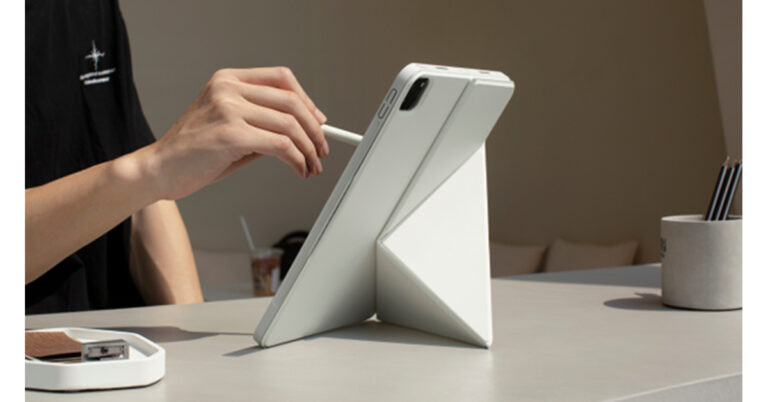
If you use your iPad Pro outdoors, you would probably want to protect it with a case. And perhaps take a folding stand with you so you can work anywhere anytime. The good news is you just need to carry one item to meet your purposes, a folding iPad cover. PITAKA, a technology consumer brand specializing in material science and innovative design, has recently launched the MagEZ Folio 2, a lightweight iPad folio cover that works in both portrait and landscape mode, which sees few parallels.
Four Standing Positions
Some iPad folio cover only offers two to three standing positions. And most of them don’t support standing your iPad in portrait orientation. The Apple Smart Folio, for example, can work in two horizontal standing positions. PITAKA’s MagEZ Folio 2 can be folded in two ways, offering four standing angles for your iPad Pro, including landscape and portrait orientations. Literally, it has every angle you need to draw, type, view, or whatever you do to make your day fulfilling.
More importantly, to switch from landscape to portrait orientation, you don’t need to remove the case to adjust it. Simply just turn around your iPad screen with a single hand.
Strong and Stable
The next big upside of the MagEZ Folio 2 is that it can hold your iPad firmly in place, and you don’t need to worry about it falling off and wobbling.
Built-in strong magnets in the PITAKA iPad cover allow you to magnetically snap your tablet to the folio and ensure that the tablet stays in place even when you type or touch the screen in portrait mode. Also, the triangle structure can keep the multi-fold folio cover in a stable position.
Built-in Magnetic Pencil Strap
The magnetic strap on the side can be used to fasten your Apple Pencil, so you won’t lose it on the go or drop it when you take the iPad Pro out of your bag.
This feature may not sound to be something new. But what makes it stand out is that the strap can be folded to hide. When you don’t use the Apple Pencil, you can fold the strap inward, magnetically attaches to the back cover, and hide it. This way you can keep the iPad folio sleek and minimalist.
Lightweight and Portable
iPad Pro users know very well how heavy the tablet is. If you carry it around a lot, it’s recommended to avoid bulky covers or stands. And PITAKA, having made many extremely lightweight accessories, knows how to keep their iPad folio cover simple and slim.
The Apple Smart Folio is known for how lightweight it is. The 12.9-inch MagEZ Folio 2 weighs about 325g, a bit heavier than the Apple Smart Folio. The 11-in weighs about 240g, slightly lighter than Apple’s. In general, the MagEZ Folio 2 is much lighter than iPad folio covers of the like.
Additionally, the MagEZ Folio 2 is made of premium PU leather which is dust-and-water resistant and can be cleaned up easily. It comes in black and white, classic colors to fit your style.
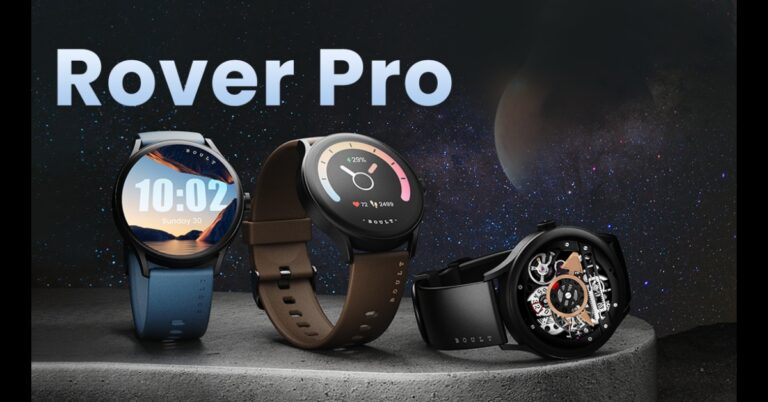
Last year in December Boult, a popular audio brand Rover smartwatch in the Indian market. Now the company has launched its pro variant- Boult Rover Pro. As the name suggests the watch includes smart features and is waterproof for protection. The fitness tracker includes an AMOLED screen with an Always-on display. It also includes single-chip Bluetooth and 10 days of battery life.
Boult Rover Pro features
The Boult Rover Pro features a 1.43-inch HD AMOLED screen with a round dial. It offers 446×446 pixels of resolution and 1000 nits of peak brightness compared to the 600 Nits brightness of its predecessor Rover smartwatch and an Always on Display. It comes equipped with a single-chip BT 5.2 version which enables three times more effective battery utilisation along with a one-click connection with devices up to the 10m range. The Boult smartwatch has a dial pad and a Bluetooth calling feature with a dedicated mic and speaker. One can make calls, reject calls with an SMS facility and synchronise contacts as per consumers’ requirements.
The Boult Rover Pro comes equipped with several health features that allow users to monitor SpO2, heart rates, and blood pressure right at their wrists. In addition to this, the device also supports tracking of a woman’s menstrual cycle, sleep tracking, and sedentary and water reminders. The watch also offers 150+ cloud-based watch faces and 100+ sports modes, including cricket, running, cycling, basketball, and yoga.
Moreover, Rover Pro has a battery life of 7 days and can be fully charged in 90 minutes using a lightning Type-C rapid charging port. With just 10 minutes of charge, it can provide two days of battery life. The wearable is IP68 rated for water resistance. According to the company, the device can withstand water up to 1.5m for around 30 minutes. It is dust-proof and easily withstands heavy spillages.
Boult Rover Pro price in India and sale details
Boult Rover Pro has been launched at an affordable price of Rs 2,499. The device is available in two variants Regal and Icon along with two free extra detachable straps. While the Regal variant is available in black, brown and blue colours, the Icon is in black, green and white colours. The product can be purchased via the company’s website in the country.
When you’re in a Zoom meeting with a bunch of people, you may not want to share your video feed with the rest of the participants. Zoom allows you to turn off your camera while attending a virtual meeting. When your camera is turned off, Zoom displays your name or initials in the window where your video feed is supposed to be. To make your icon more engaging, you can set your profile picture to it. In this article, we show you how to display your profile picture in a Zoom meeting instead of your video feed.
Set up a profile picture before the meeting starts
Step 1: Launch the Zoom desktop application and click on the Settings icon.
Step 2: Click on the Profile tab in the side menu. This will redirect you to your Zoom profile in your web browser.
Step 3: Click on your profile picture to change it. If you don’t have a profile picture, click on the empty thumbnail to set one up.
Step 4: Choose a picture from your device or drag and drop one in the dialogue to upload as your profile picture.
Step 5: Make sure the picture is appropriately cropped and under 2MB in size before uploading it.
Step 6: Turn off your video before joining a meeting. Your video feed will be replaced by your profile picture.
Already in a meeting? Here’s how you can set up your profile picture
If you don’t have a profile picture on Zoom, your video feed will display your initials as soon as you turn your camera off. You can set up a profile picture while you are in a meeting. Simply right-click on your video window in the meeting and select ‘Add profile picture’. If you already have a profile picture, select ‘Edit profile picture’ to change it. Once you’ve added a picture, turn off your camera. Your icon will show your profile picture instead of your initials or name.
Frequently Asked Questions
How do I get my profile picture on a Zoom meeting instead of my video?
Set up a profile picture on your account and turn off your camera during a meeting. Once your camera is off, your profile picture will display on the screen.
How do you show only your picture on Zoom?
Go to Settings>Profile and set up a profile picture. Then turn your camera off to display it in your window during a meeting.
Why doesn’t my profile picture show on Zoom when my video is off?
Click on the Security icon in the toolbar and uncheck the option to Hide profile photos.
This is how you can display your profile picture on a Zoom meeting instead of your video feed. Once you change your profile picture on Zoom, it will show up on the device you are logged into. Turning your camera off while you are attending a meeting using your phone will also display your profile picture on the screen.
Garena Free Fire is a battle royale game with regular awards and tournaments to keep players interested. If you play Garena Free Fire, you should be aware of the redeem codes that are released on a daily basis. However, because the battle royale game is banned in India, players from other countries can use the Free Fire Redeem codes daily. If you’re unfamiliar with the Garena Free Fire redeem codes or don’t know how to get them, we’ve put together a step-by-step guide to help you redeem them. Check out Garena Free Fire Redeem Codes for 15 April 2023.
The Free Fire redeem codes are a great way to get free stuff. These are 12-digit codes that contain alphabets and numbers, as well as an expiration date and time. Because the Garena FF redeem codes cannot be used more than once, you should hurry to the redemption page to claim your free reward before someone else does. To get a free reward, all you have to do is go to reward.ff.garena.com/en, which is the official redemption page. Also, keep an eye on this space for daily updates on Garena Free Fire redemption codes and rewards.
Garena Free Fire Redeem Codes Today 15 April 2023
Updating Soon
How to Get Free Fire Redeem Codes for Garena on 15 April 2023?
15 April 2023 Amazon Quiz has gone live on its mobile app platform. Customers from different parts of the country are participating in the daily quiz. The daily quiz is conducted by the company brings an opportunity for the customers to win exciting prizes. The quiz begins from 12 AM to 11:59 PM. In today’s quiz participants have a chance to win Rs 500 Amazon Pay Balance by answering all the questions correctly.
Every day Amazon brings a fresh set of questions for its customers that contains five easy questions. Amazon quiz brings an opportunity for its customers to win Amazon Pay Balance ranging from Rs 1,000 to Rs 50,000. which consists of five questions related to general knowledge and current affairs.
The participants need to answer all the questions correctly and their names will be selected for a lucky draw. The winner will be announced at the end of the month. One wrong answer could eliminate you from the quiz. If you manage to answer all the questions correctly you can stand a chance to win Rs 500 Amazon Pay Balance today. Only app users are eligible to participate in the Quiz. Check Out 15 April 2023 Amazon Quiz Answers.
Question 1: Kylian Mbappe surpassed Edinson Cavani as which club’s all-time leading goalscorer?
Answer: Paris Saint-Germain
Question 2: How do we better know the Nigerian singer Chukwuka Ekweani who recently visited India?
Answer: CKay
Question 3: Copper+ is a new brand of bottled water from which company?
Answer: Tata
Question 4: Which area has the highest diversity of this bird’s species?
Answer: South Asia
Question 5: This temple is dedicated to which Hindu god?
Answer: Shiva
How To Play Amazon Quiz
Only app users are eligible to play the Amazon quiz every morning from 12 AM to 11:59 PM. The quiz is not available on the desktop. For those who are unaware of how to play the Amazon quiz below are the steps, you can follow to take the quiz.
Firstly download the Amazon app from Google Play Store or App Store
Now fill in the required information through the Sign Up option.
You need to log in to the Amazon app and scroll down on the home screen to find the Amazon Quiz banner.
Tap on the Amazon Quiz banner and tap on the Start button to start the Quiz.
Now you will get 5 questions and you need to answer them correctly. One wrong answer will eliminate you from the Quiz.
After answering all the questions correctly you are now eligible for a Lucky Draw.
The winner’s name will be announced today at 12 PM.
Esports has grown massively as an industry over the past decade. We have gone from playing video games against each other on the same console and in the same room to competing against players from around the planet online. From the latest online video games to live casino games, the internet has opened a new world in terms of competitive gaming. Counter-Striker: Global Offensive is one of the biggest games in the eSports industry and with CS2 around the corner, are we going to see a big increase in eSports fan engagement?
Counter-Strike: Global Offensive
Counter-Strike 2 is going to be the latest instalment of the popular Counter-Strike online game. Counter-Strike was first released by Valve in 2000 and the most recent version of the game is Counter-Strike: Global Offensive. CS:GO was the fourth release by Valve in the series and the game is a multiplayer tactical first-person shooter running on the Source engine. Such is the popularity of CS:GO, it has become one of the world’s leading eSports scenes, with events taking place throughout the year. There is often more than US$1,000,000 in prize money and millions of fans from around the world have tuned in to watch the major tournaments. However, with the original CS:GO having been released in 2012, there were fears among some eSports fans that it was beginning to lose its appeal.
Counter-Strike 2
Valve announced Counter-Strike 2 in March 2023 and there has been plenty of excitement and rumours ahead of a potential release in the summer. This will not only be the first new version of the game to be released in over a decade but it will also utilise the Source 2 engine. Perhaps most importantly for fans of the game, CS2 will come as a free upgrade for anyone who already plays CS: GO. There are going to be changes to the gameplay, including smoke interacting with other gameplay events and seeping into other areas of the map naturally, such as doorways, stairs, and open windows.
Fans Talking
It seems smoke is going to play a significant role in the new version of the game and it already has fans talking about what to expect in the big eSports events. There has been plenty of chatter regarding how the new smoke mechanic can be exploited and the top players in the best teams will already be working on ways to use the new responsive smoke to their advantage. There has also been a significant increase in the value of many skins in the Counter-Strike marketplace. As players can continue playing the new game as they left off from the previous version, some weapons have increased in value. Much like the new smoke mechanic, this has led to a lot of discussion about the game and driven up fan engagement.
The release of an updated version of any popular online gaming title is going to cause a stir. That is certainly the case with CS2 and there is sure to be an increase in eSports fan engagement when the first events using the new version of the game are announced.
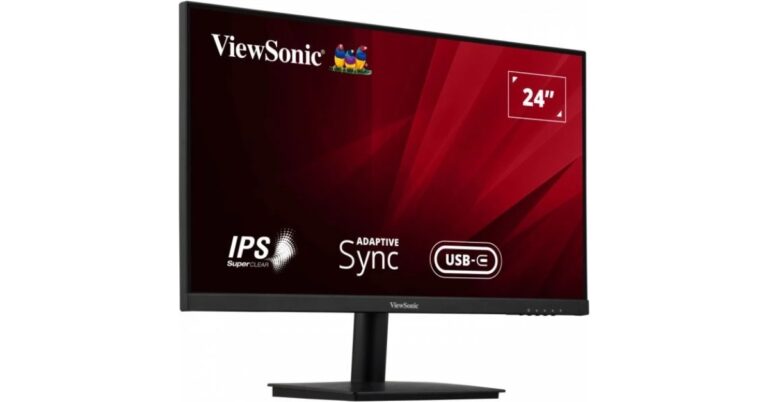
Viewsonic has been quite a popular name in offering visual products like monitors, displays and projectors. Today the company has announced the launch of the VA2409-MHU Monitor in India. It is a USB Type-C 24-inch monitor that offers FHD IPS panels and high refresh rate. The Viewsonic monitor features a three-sided frameless design for seamless viewing.
Viewsonic VA2409-MHU Monitor price in India
Viewsonic VA2409-MHU Monitor price in India has been set at Rs 17,000. The display can be purchased via the e-commerce website Amazon in the country.
Viewsonic VA2409-MHU Monitor specifications
Viewsonic VA2409-MHU Monitor is available in a single 24-inch size with Full HD 1080p resolution having an aspect ratio of 16:9. The monitor has a high refresh rate of 75Hz It has a three-sided frameless design and an eye-care technology that allows seamless viewing experience. In addition to this, the display comes with 178-degree vertical and horizontal viewing angles ensuring an extraordinary wide-angle vision with consistent brightness. The device has multiple ViewMode – “Game”, “Movie”, “Web”, “Text”, and “Mono” makes it an ideal addition to any workspace set-up.
In terms of connectivity, it offers flexibility with HDMI, VGA and USB-C connectivity. The USB Type C single cable solution further provides faster audio and video transfers with a power delivery of up to 65W. It comes equipped with two built-in speakers and an eco mode that greatly decreases office overhead costs with its low energy consumption.
Commenting on the new launch, Mr. Sanjoy Bhattacharya, Director Sales and Marketing – IT Business, ViewSonic India said, “It is our objective to keep innovating new technology that helps in enhancing our customer’s experience and meet their requirements. USB Type C connectivity is a great addition to our product portfolio. We want to offer a monitor range that is not only efficient but also helps declutter the desk space and Type C is just the right solution for this. Our new monitors provide the best of tech and feature with SuperClear IPS panel, ergonomic design, multi-port connectivity and various work modes. We hope the new monitor allows our consumers to have the best of both worlds while effectively managing their workspace.”
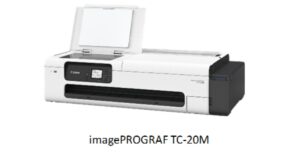
Canon has added a new multi-function printer to its portfolio. The company has announced Canon imagePROGRAF TC-20M which is basically an all-in-one A1-size desktop printer that comes with print, scan and copy capabilities. It also allows users to print and scan directly with a USB memory stick. In addition to this, the Canon printer is said to have various applications across remote worksites, small offices and retail outlets.
The Canon imagePROGRAF TC-20M all-in-one A1 size desktop printer is a compact 4-colour pigment ink all-in-one large format printer. It comes equipped with an A4 flatbed scanner, letting you make copies from cut sheets and roll papers suitable for architects, retail, food and beverages, schools or travel agencies.
The printer has the capability to A4 documents to A3 cut sheets, A2 or A1 roll papers and even to the full width of roll paper. One can select the portrait or landscape orientation of the output copies from the user panel. Whereas the repeated copy feature allows copying and printing an original document repeatedly using roll papers. Therefore it is ideal for wrapping paper or retail store banners. Whereas thick booklets or brochures can be converted to hard or soft copies for distribution with the use of a flatbed scanner.
The TC-20M supports JPEG & PDF file formats for immediate printing and scanning with a USB memory stick without the need to contact a workstation along with the copy feature. A4 handheld leaflets and handwritten manuscripts can be expanded to large-size posters for use in travel agencies or food and beverage outlets by using the ‘Enlargement copy’ tool.
According to the company the Canon printer has enhanced capabilities so that A4 documents can be easily enlarged and copied, beneficial for printing educational material, official notices and promotional posters for retail outlets and restaurants. Also, remote site offices can quickly make copies and large-format prints of technical drawings.
The printer can handle roll paper up to A1 plus width and has a standard auto sheet feeder that can load cut sheets up to A3 or A4 in size, enabling printing, scanning, and copying to be done on a single device.
The Canon imagePROGRAF TC-20M includes four 70ml ink bottles (cyan, magenta, yellow, and black) for continuous printing of CAD drawings and posters and increases productivity. It takes less time and effort to refill ink thanks to the system’s huge ink tank capacity. Large format prints and long banners can be collected and held with an optional desktop basket.
One of the reasons why Google is so fast and efficient is because the search engine is quick to detect bots and hand out bans to them. This has its drawbacks as sometimes Google confuses regular users as bots and limits their activity on its website. This typically happens when a user makes a lot of search queries in a short interval. Luckily, there are some ways it can be fixed. In this article, we bring you the 7 best methods to fix the ‘Unusual Traffic’ error on Google.
If Google confuses frequent search queries from your device as bot activity, it will give you a CAPTCHA test to solve. CAPTCHAs are regularly used on the Internet to limit bot activity and to make sure only humans have access to the website. You will need to click on ‘I’m not a robot’ to proceed. As a part of the CAPTCHA test, Google will show you a bunch of images and ask you to select the ones with a certain object in them. Once, you’ve selected the correct images, click on ‘Verify’ to proceed. Upon you passing the test, Google will recognise you’re human and let you continue with your web activity.
Reduce the frequency of your searches
Since Google throw the ‘unusual traffic’ error when it notices a tremendous volume of searches from your IP, it is a good idea to reduce the number of searches until normalcy resumes. The cooldown period can last anywhere from a few hours to an entire day. If you are using a scraping tool or a bot for your searches, disable it. If you use a lot of search operators to filter search results, Google may have classified it as unusual activity. In this case, reduce the number of operators for your searches.
Check your device for malware
If your device got exposed to malware, it may be making Google search queries on your behalf. To make sure your PC is malware free, go to Settings>Update & Security>Open Windows Security and perform a full scan of your system. If you are getting the “unusual traffic” error on your smartphone, download a third-party malware protection app and perform a deep scan of your phone.
Disable VPN
A VPN reroutes your traffic through thousands of different servers, which are also being used by other VPN users. This may confuse Google, resulting in the ‘unusual traffic’ error. To fix this, simply disconnect from the VPN before making a search query. You can also try using another device which is not connected to the VPN to perform a Google search.
Remove browser extensions
If you use a scraping tool extension for Google searches, it is likely to cause this problem. Simply remove the extension from your browser and try again. Any other suspicious extensions that you don’t use as often could also have malfunctioned, leading to this situation. Go through all the extensions and remove the ones you find suspicious.
Flush the DNS cache
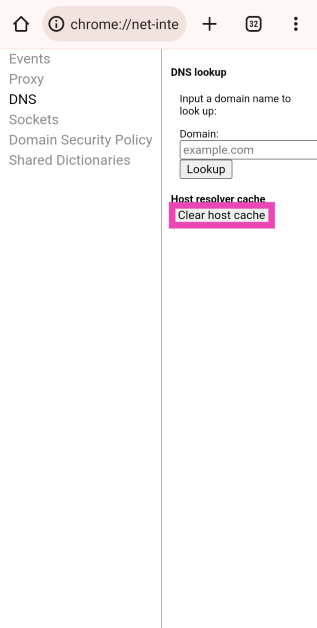
The DNS cache can sometimes get corrupted, leading to the Google webpage not loading at all. Here’s how you can clear it.
Step 1:Launch Google Chrome on your Android phone and type the following command in the address box:
chrome://net-internals/#dns
Step 2: Tap on Clear host cache.
Restart the router
Giving your WiFi network a quick refresh can fix the ‘unusual traffic’ issue on Google. Turn off your WiFi router’s power switch and turn it back on to restart it. You can also remotely restart your router using its management portal or app. Check out this article to learn how to go about it.
Frequently Asked Questions
How do I fix unusual traffic on Google?
Solve the CAPTCHA puzzle or remove the third-party extensions on your browser. You can also scan your PC for malware or disconnect from the VPN to get rid of this problem.
Why does Google detect unusual traffic when I use a VPN?
Since your VPN reroutes your traffic through a shared IP address, Google confuses it for bot activity and limits your access to their website.
Why is Google blocking me?
If you did a lot of searches in a short span of time, Google may think you are a bot and temporarily block you.
These are the top 7 ways to fix the ‘unusual traffic’ error on Google. If the methods mentioned above don’t work, try rebooting your router. Once connected, you will be able to perform searches on Google again. If the problem still persists, waiting for the cooldown period to be over is your only option.
Danish audio equipment manufacturer Jabra has announced the launch of Jabra Elite 4 to expand its truly wireless earbuds portfolio. The TWS comes with Bluetooth multipoint connectivity that keeps two devices to stay connected at once. For easy pairing, there is a fast pair and swift pair. The audio device also includes Active Noise Cancellation with 6mm driver speakers. In addition to this, they are IP55 dated for water and dust resistance.
Jabra Elite 4 price in India and sale details
The Jabra Elite 4 has been launched in India with a price tag of Rs 9,999. The device is scheduled to go on sale in the country today via Amazon, Flipkart, Croma, Reliance and Jabra authorised resellers. The earbuds are made with premium durable materials that offer an IP55 durability rating against dust and water and come in four classic colours: Dark Gray, Navy, Lilac, and Light Beige.
Jabra Elite 4 specifications
Jabra Elite 4 true wireless earbuds, a predecessor of Jabra Elite 3 come with 4-microphone call technology and 6mm speakers for loud and clear sound. It also features Active Noise Cancellation (ANC) that filters out unwanted sounds. It is powered by Qualcomm aptX.
The Elite 4 allows connecting to two different devices simultaneously as it offers Bluetooth multipoint connectivity for smooth and stress-free switching. For smooth pairing, there is Fast Pair for mobile devices and Swift Pair to connect to a computer or laptop. There is a solo feature to use either earbuds for listening or taking calls while the other charges. The audio device IP55 is rated for protection against dust and water. The true wireless earbuds offer 5.5 hours of playtime and a total battery life of 22 hours with the case. It can last for 28 hours with ANC off and 10 minutes of quick charge provides one hour of playtime.
In order to customise sound users can download Jabra music equaliser and intuitive Sound+ app on their device for a personalised sound experience.
Ashish Srivastava, Country Marketing Manager – India & SAARC at Jabra said: “With the evolving world, the needs and expectations of contemporary earbud users have expanded, and they seek technology that delivers a holistic experience fulfilling their work as well as play needs without giving up on the key aspects. The latest Jabra Elite 4 keeps up with these needs, enabling users to truly focus, connect, and make calls without interruptions. We are thrilled to introduce yet another high-performance buds that today’s users have been looking for – an ideal companion to balance work and life.”
Setting up a custom feed on Reddit is a great way to view posts from similar communities or subreddits in one place. If you are subscribed to a lot of subreddits, it is easy to miss out on a lot of content that doesn’t get enough upvotes to make it to the front page. While setting up a custom feed is easy, deleting it can be tricky especially if you’re using the official Reddit app. In this article we bring you the top 2 ways to hide or delete custom feeds (or multis) on Reddit.
How to hide or delete a custom feed on the Reddit website
Step 1: Select the custom feed you want to delete from the side menu.
Step 2: Click on the ellipses (three dots) on the feed banner.
Step 3: Select ‘Delete Custom Feed’.
Step 4: To hide the custom feed on your profile, click on the pencil icon next to the feed’s name and turn the toggle bar off for ‘Show on profile’. You can also make the feed private to hide it on your profile.
How to hide or delete a custom feed on the ‘Reddit is fun’ app
The official Reddit app does not have the option to delete a custom feed. One of the many reasons why it falls behind the third-party Reddit apps that have been around for ages. Reddit is fun (now known as Rif is fun for Reddit) offers a quick and easy way to delete or hide a custom feed. Here’s how you can do it.
Step 1: Launch the ‘Reddit is fun’ app and tap the hamburger icon to reveal the side menu.
Step 2: Tap on the ‘Multis’ option next to ‘reddit front page’.
Step 3: Tap the edit icon next to the custom feed you want to delete.
Step 4: Tap the delete icon to delete the custom feed. Uncheck the box next to ‘Public’ if you want to hide it.
Frequently Asked Questions
What are custom feeds on Reddit?
Custom feed is a group of communities you can bunch together in a group to view the content posted in them in one place. Custom feed helps you keep us with a group of subreddits without the risk of them getting lost in your home feed.
Can I delete a custom feed on the official Reddit app?
No, the official Reddit app does not have the option to delete a custom feed. You can use the Reddit website or a third-party app like Reddit is fun to delete a custom feed.
How do I hide my custom feed on Reddit?
You can hide your custom feed on Reddit by setting it to private or disabling the option to show it in your profile.
These are the top 2 ways to hide or delete custom feeds (or multis) on Reddit. Since the official Reddit app does not have the option to delete a custom feed, you can use other third-party apps like Bacon Reader, Relay for Reddit, or Rif is fun for Reddit.
Xiaomi 13 series was launched in India earlier this month. Xiaomi 13 Pro debuted alongside two more models Xiaomi 13 and Xiaomi 13 Lite. But during the ongoing Xiaomi Fan Fest, the company is offering a Rs 10,000 discount on the Pro variant. The Xiaomi 13 Pro debuted in India in February with a price tag of Rs 79,999. The device is powered by Snapdragon 8 Gen 2 SoC. It comes with a 50-megapixel triple rear camera setup and a 32-megapixel selfie camera. The smartphone supports 120W wired and 50W wireless charging.
Xiaomi 13 Pro is now getting a huge price cut of Rs 10,000. The phone has been put on sale during the Xiaomi Fan Fest and there it is being offered at a discounted price of Rs 71,999. After applying a loyalty discount which is only available to Xiaomi and Redmi customers the phone will be available for as low as Rs 69,999. The device comes in Ceramic White and Ceramic Black colour options. The handset is currently selling at mi.com.
Xiaomi 13 Pro is highlighted with a 6.73-inch 2K E6 LTPO 3.0 OLED screen with 3200 x 1440 pixels of resolution. In addition to this, the display supports a 120Hz refresh rate while allowing 240Hz of the touch sampling rate, HDR10+ and Dolby Vision too.
The Xiaomi 13 Pro comes with MIUI 14, which is based on Android 13 and is driven by Qualcomm Snapdragon 8 Gen 2 SoC with up to 512GB of internal UFS 4.0 storage and up to 12GB of LPDDR5X RAM. The phone also includes a 4,820mAh battery which supports 50W wireless charging and 120W wired charging.
The Xiaomi 13 Pro features a triple rear camera setup that includes a 50-megapixel 1-inch Sony IMX989 primary sensor. Moreover, the system consists of a 50-megapixel Leica’s 75mm floating telephoto lens and a 50-megapixel wide-angle lens. There is a 32-megapixel front-facing camera for selfies and video calling.
Garena Free Fire is a battle royale game with regular awards and tournaments to keep players interested. If you play Garena Free Fire, you should be aware of the redeem codes that are released on a daily basis. However, because the battle royale game is banned in India, players from other countries can use the Free Fire Redeem codes daily. If you’re unfamiliar with the Garena Free Fire redeem codes or don’t know how to get them, we’ve put together a step-by-step guide to help you redeem them. Check out Garena Free Fire Redeem Codes for 14 April 2023.
The Free Fire redeem codes are a great way to get free stuff. These are 12-digit codes that contain alphabets and numbers, as well as an expiration date and time. Because the Garena FF redeem codes cannot be used more than once, you should hurry to the redemption page to claim your free reward before someone else does. To get a free reward, all you have to do is go to reward.ff.garena.com/en, which is the official redemption page. Also, keep an eye on this space for daily updates on Garena Free Fire redemption codes and rewards.
Garena Free Fire Redeem Codes Today 14 April 2023
W0JJAFV3TU5E
SARG886AV5GR
B6IYCTNH4PV3
ZYPPXWRWIAHD
FF10617KGUF9
MCPTFNXZF4TA
WLSGJXS5KFYR
YXY3EGTLHGJX
FF1164XNJZ2V
FF10GCGXRNHY
FF11HHGCGK3B
Y6ACLK7KUD1N
FF11NJN5YS3E
FF11DAKX4WHV
ZRJAPH294KV5
FF11WFNPP956
8F3QZKNTLWBZ
How to Get Free Fire Redeem Codes for Garena on 14 April 2023?
14 April 2023 Amazon Quiz has gone live. Customers from different parts of the country are participating in the daily quiz. The quiz begins from 12 AM to 11:59 PM. Those participating in the quiz can win exciting prizes by answering all the questions correctly. Today participants have a chance to win a Rs 2,500 Amazon Pay Balance.
Amazon quiz brings an opportunity for its customers to win Amazon Pay Balance ranging from Rs 1,000 to Rs 50,000. The Quiz can be played from 12 AM to 11:59 PM. The e-commerce platform brings a fresh quiz on a daily basis which consists of five questions related to general knowledge and current affairs. The participants need to answer all the questions correctly and their names will be selected for a lucky draw. The winner will be announced at the end of the month.
One wrong answer could eliminate you from the quiz. If you manage to answer all the questions correctly you can stand a chance to win a Rs 2,500 Amazon Pay Balance today. Only app users are eligible to participate in the Quiz. Check Out 14 April 2023 Amazon Quiz Answers.
Question 1: Giorgia Meloni, who recently visited India, is the Prime Minister of which country?
Answer: Italy
Question 2: Bill Gates recently met with Anshul Bhatt, the world’s youngest _____ champion.
Answer: Bridge
Question 3: Which singer’s latest album is titled ‘Endless Summer Vacation’?
Answer: Miley Cyrus
Question 4: Where is this, the largest monitor lizard located?
Answer: Indonesia
Question 5: This statue is from which ancient civilization?
Answer: Egypt
How To Play Amazon Quiz
Only app users are eligible to play the Amazon quiz every morning from 12 AM to 11:59 PM. The quiz is not available on the desktop. For those who are unaware of how to play the Amazon quiz below are the steps, you can follow to take the quiz.
In today’s gaming landscape, smartphones have become indispensable tools for avid gamers constantly on the move. Recent data shows that 58% of gamers use their mobile devices for gaming, emphasizing the crucial role of mobile gaming in the lives of developers and players.
In 2022, the popular game PUBG generated a revenue of $1.72 billion, highlighting the growing significance of mobile gaming in the industry. However, mobile gaming is more comprehensive than traditional games like PUBG, as casino games are also gaining popularity among gamers.
As live casino games surge in popularity, the need for smartphones featuring robust processors, superior displays, and extended battery life has reached new heights. In this blog, we will explore the best smartphones for gamers in 2023, considering the needs of both traditional and live casino gamers.
The ASUS ROG Phone 5
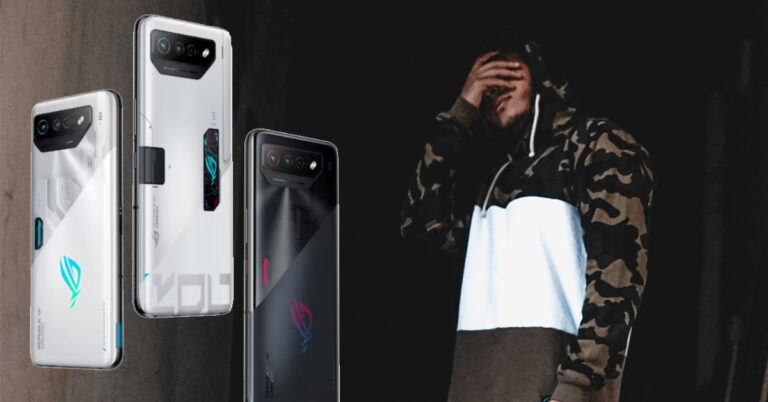
The Asus ROG Phone 5, with a simple design and a weight of 238g, is considered one of the best gaming smartphones of 2023. One such device boasts a 6.78-inch OLED display with a 144Hz refresh rate and an impressive peak brightness of 1200 nits.
Powered by a Snapdragon 888 chip, it offers up to 16GB of RAM and 512GB of storage, ensuring smooth gaming experiences. It also boasts a triple camera setup, a 6,000mAh battery capacity, and a 65W fast charger. The phone provides cool game themes and individual game profiles for customized gaming experiences.
The Xiaomi 12T Pro
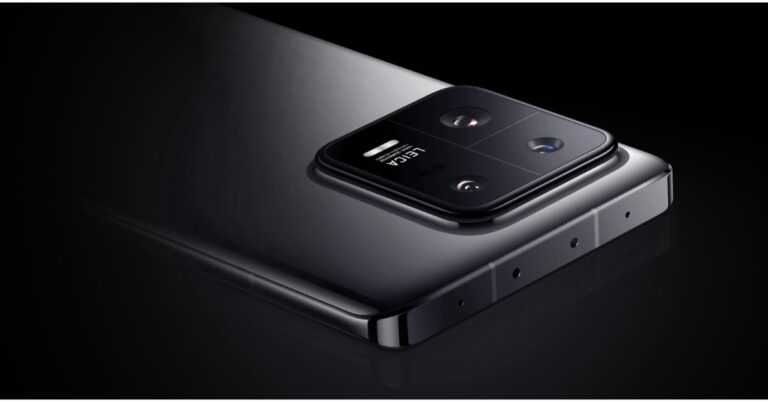
The Xiaomi 12T Pro is a reasonably priced gaming phone with a Snapdragon 8+ Gen 1 chipset with up to 12GB of RAM and a 6.67 AMOLED screen with a 120Hz refresh rate. Although it is known more for its camera, the phone can handle 3D games.
However, maintaining smoothness while playing requires a few graphical tweaks. The battery life is decent, but gaming can quickly deplete it. The phone is compatible with 120W fast charging, allowing for a full charge in just 20 minutes.
Google Pixel 7 Pro
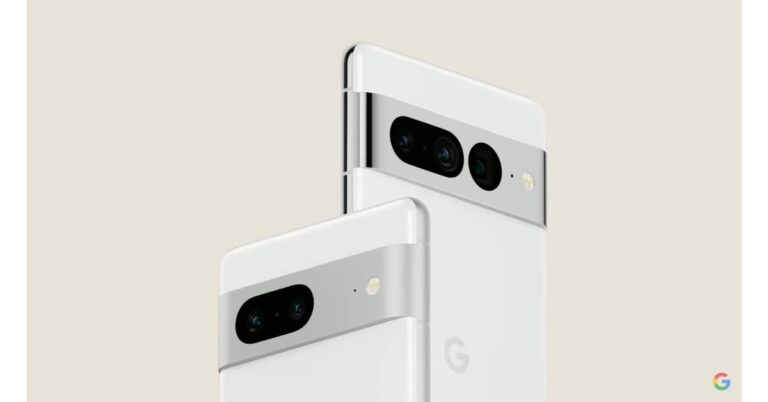
The Pixel 7 Pro is an excellent gaming phone built upon the foundations of the Google Pixel 6. Another smartphone caters to gamers with its 6.7-inch AMOLED screen, which features a 120Hz refresh rate, HDR10+ capabilities, and a protective Gorilla Glass coating. Packed with Android 13, this phone stands out as one of the first to operate on the latest system.
The G2 Tensor chip is an eight-core processor with higher clock speeds, upgraded cores, and a new GPU compared to the original, providing excellent performance for gaming and algorithm-intensive tasks. The phone’s RAM is generous, providing flagship-level performance. The 5000mAh battery is sufficient to keep gamers playing all day.
The Black Shark 5 Pro
In addition to these outstanding options, the Black Shark 5 Pro has entered the market as a strong contender. Released in April 2022, it boasts a powerful Snapdragon 8 Gen 1 CPU with 8, 12, or 16GB of RAM and 256 or 512GB of storage. Its 6.67-inch display has a resolution of 1080 x 2400, and the device runs on Android 12.
The Black Shark 5 Pro features a 108MP primary camera, a 13MP and 5MP secondary camera, and a 16MP front camera. However, its 4,650mAh battery may not be sufficient for extended gaming sessions, and the device tends to get hot.
Summary
The gaming smartphone market has become more diverse and competitive than ever before. As the mobile gaming industry expands, gamers must stay informed about the latest devices and trends. This knowledge will empower them to make well-informed decisions when selecting the ideal gaming smartphone to match their preferences and budget.
Last month, Samsung released two midrange offerings in Galaxy A34 and A54. We took the Galaxy A54 out for a spin first, you can read our review here. Its younger sibling, the Samsung Galaxy A34, is priced at Rs 30,999 and covers the lower end of the midrange spectrum. We spent quite some time with the smartphone, digging into the finer nuances to see just how much value you are getting for your buck. Does it tick all the boxes? Find out in this in-depth Samsung Galaxy A34 review.
Upon unpacking the box, you will find the A34 smartphone, a USB Type-C to Type-C charging cable, a SIM ejector tool, and some basic reading material. No power adapter or plastic case for Samsung’s mid-ranger.
Samsung has applied its flagship S23’s design language to the A series as well this year. The lenses on the vertical triple camera array don’t stick out as much as they do on the A54. The back panel on the A34 is made entirely from plastic and is a stark departure from the glass back on the A54. However, the frame here is a bit sleeker, which we like.
The glossy plastic back has the tendency to attract a few smudges but it does not amount to be a nuisance. Also, worth noting that we only observed prints and smudges upon prolonged use, that too in humid conditions. Without a glass back to elevate the in-hand feel of the device, the A34 does feel quite ordinary.
On the right edge of the frame, you get the volume rocker keys and the power button. At the bottom, you will find the microphone, the USB port, and the primary speaker grill. The hybrid SIM tray and secondary speaker have been placed up top. The left edge of the phone is clean and keyless.
Up front, you get a 6.6-inch display, which is bigger than the 6.4-inch unit on the A54. If you prioritise display over everything else then Samsung’s smartphones are a no-brainer, no matter which category you’re shopping in. Samsung has bumped the refresh rate on this Super AMOLED display to 120Hz, enhancing the fluidity and the overall scrolling experience.
With a 1,080 x 2,340p resolution, this stunning display captures a lot of details in the images it relays. The deep blacks and punchy, vivid colours make this device ideal to watch content on. With wide viewing angles, you don’t have to worry about how your phone is placed while watching videos on it. With a peak brightness of 1,000 nits, the display is decently visible under direct sunlight.
The bezels are still noticeable around the display and could use a little trimming. But a bigger letdown is the waterdrop cutout for the selfie camera which is an absurd choice on a Rs 30,000 smartphone in 2023. A punch-hole cutout for the front camera would have significantly improved the look of the phone.
The IP67 rating for dust and water resistance is a great sight on the Samsung Galaxy A34. You will hardly find any smartphones in this price range offering complete water resistance. You also get Corning Gorilla Glass 5 protection up front, which can absorb minor falls with ease.
Samsung Galaxy A34 review: Performance and Cameras
Samsung Galaxy A34 comes in two storage variants – 128GB and 256GB. Both variants are offered with 8GB RAM. The 256GB variant gets a price tag of Rs 32,999. Samsung has ditched its Exynos chipset for a more powerful MediaTek Dimensity 1080 on this smartphone. The A34 comes with Android 13 skinned with One UI 5.1 out of the box. Samsung has promised four years of major OS upgrades along with five years of security patches on this device. In terms of software support, you won’t find a better deal anywhere else.
We used the Samsung Galaxy A34 as our daily for almost a week for this review. During our time with the phone, we did not run into any major performance issues. The Dimensity 1080 SoC is a common fixture on a lot of smartphones in this category. We used the A34 for routine tasks like checking emails, browsing social media, GPS navigation, playing video content, and more. There were no complications to report and the smartphone easily crushed these tasks while also running a handful of apps in the background.
To check out the gaming experience on the A34 we played Free Fire Max and Call of Duty mobile on the A34. The gameplay experience was quite satisfactory and the stellar display offers amazing fluidity and touch response. We noticed some minor heating around the camera bump around the 20-minute mark which slowly crept up as we kept playing. We pushed the device to its limit and were happy with the results. We did not experience any throttling for the first 40 minutes. After that, we had to stop the gameplay and let the device cool for a bit. We ran the Geekbench 6 test on the Samsung Galaxy A34 and it returned a single-core score of 734 points and a multi-core score of 2,472 points.
The OS experience offered by One UI 5.1 is also remarkable. The only premium feature missing from this smartphone is Samsung DeX, which is reserved for Samsung’s flagship products. The device gives you the option to skip installing the bloatware apps while setting up the phone but some apps like Amazon, Facebook, and Jio Cinema still manage to creep through. The Galaxy Widget is a great feature to make your home screen interesting, but it only displays advertisements if you don’t spend time customising it.
Samsung claims a 2-day battery life on the A54 and A34, equipping both phones with a 5,000 mAh battery unit. We tested this out and it (kind of) holds up. You can extend the battery life of the phone to 2 days if you don’t perform heavy tasks like gaming or prolonged navigation. If you stick to social media browsing and watching videos for a short duration, the phone will last almost two days. This means limiting the screen-on time to three hours per day.
With moderate to heavy usage, the A34 offers the standard one-day battery life. This is still pretty impressive because we were racking up almost 6-7 hours of screen-on time while performing heavy tasks like gaming, playing HD videos across multiple platforms, video recording, and even some light editing. By the end of the day, we were left with a 15% charge.
What we find interesting is that the A54 with its in-house Exynos chip falls slightly behind the A34 in terms of battery life. What unites both phones is 25W wired charging. Like the A54, Samsung Galaxy A34 takes around 90 minutes to fully charge. It is about time Samsung starts offering better charging speeds for their midrange offerings.
The rear camera unit on the A34 consists of a 48MP primary shooter, an 8MP ultrawide lens, and a 5MP macro camera. In ample natural lighting, the 48MP main camera delivers a powerful performance, producing very rich colours on the images without over-processing them too much. We were also happy with the amount of detail captured by this lens, and it resulted in sharp, well-composed images. The images are definitely ‘social media ready’ with slightly heightened contrast and some minor tune-up.
The Portrait Mode does a great job of separating the subject from the background and taking close-up images with a good amount of detail with them. You can see the results for yourself in the images below. The macro camera struggles to find its purpose in this array, and you’ll hardly ever find yourself using it.
Primary lens vs Macro lensPortrait Mode
The 8MP ultrawide lens delivers a good performance as well. Even though it doesn’t capture a lot of details as the primary lens, what we like is that it doesn’t compromise the colour profile. Images taken during the day are very colour rich and do not look washed at all. However, at night you’re better off sticking with the primary lens.
Ultrawide lensUltrawide lensUltrawide lens
The 13MP selfie camera up front also performs very well. There is minor skin tone correction, but certainly a lot less than its counterparts in Vivo and Xiaomi. The best part about this camera is that it can record 4K videos at 30fps. The rear camera can also record in 4K, but if you want to make use of OIS, you will have to stick to 1080p resolution.
Samsung has priced the Galaxy A34 at Rs 30,999, but using Premier Sale offers you can get it for as low as Rs 25,000. At this price, there are many good things to like about this phone. Firstly, the Super AMOLED display on the A34 is excellent and largely unmatched by any other phone in this segment. The MediaTek Dimensity 1080 SoC is also a great addition to this device. On top of that, you get a good primary and ultrawide camera. If you can look past the dated waterdrop notch on the display and the slow charging, the Samsung Galaxy A34 will make a solid daily driver.
Samsung Galaxy A34: Pros
Great display
Good SoC
Tremendous battery life
4 major OS upgrades + 5 years of security patches
Samsung Galaxy A34: Cons
Sizeable bezels around the display along with a waterdrop notch
Xiaomi India today hosted a Smarter Living event in the country. The company presented a host of AIoT products at the event that includes Xiaomi Smart TV X Pro Series, Xiaomi Smart Air Purifier 4 Series and Xiaomi Robot Vacuum Mop-2i. The latest Smart TV by the company supports Dolby Vision IQ whereas the Air purifier has a triple layer filtration. The Xiaomi Robot Vacuum offers enhanced and customised cleaning.
Xiaomi Smart TV X Pro Series price and features
The all-new Xiaomi Smart TV X Pro Series supports 4K HDR with improved colours, contrast, saturation, and brightness across Wide Colour Gamut, along with Dolby Vision IQ support and Vivid Picture Engine 2 technology. The television includes a 40-Watt speaker system with support for Dolby Atmos and DTS:X technology. The device is powered by Google TV so you can easily stream your favourite content. It has a Google Chromecast Built-in feature plus users can experience over 30 content providers on PatchWall.
Xiaomi Smart TV X Pro will be available in three sizes 43, 50 and 55 inch priced at Rs 32,999, Rs 41,999 and Rs 47,999 respectively. But the company is offering them at a special launch price of Rs 31,499, Rs 39,999 and Rs 45,999. The sale is scheduled to start on April 19 at 12 noon via mi.com, Flipkart and offline retail partners.
Xiaomi Smart Air Purifier 4 Series price and features
On the other hand, the Xiaomi Smart Air Purifier 4 Series includes two models Xiaomi Smart Air Purifier 4 and Xiaomi Smart Air Purifier 4 Lite that are claimed to reduce harmful substances in the air with its Triple Layer Filtration. It is said to eliminate up to 99.97% of particles as small as 0.3 microns so you breathe clean and fresh air.
It comes integrated with a negative ion generator to help remove airborne particles like pollen, animal dander, dust, and mould spores. According to Xiaomi, the new air purifier offers clean air across the room with 360° Filtration and True HEPA Filter. Xiaomi Smart Air Purifier 4 offers a Particle Clean Air Delivery Rate (PCADR) of up to 400m3/h, capable of circulating air of max. 516 sq. ft within 10 minutes. The Smart Air Purifier Lite comes with a PCADR of up to 360m3/h and can deliver 6000L of clean air per minute.
The Xiaomi Smart Air Purifier 4 also supports app control and voice control with Google Assistant and Amazon Alexa. There is an OLED display with two touch controls to view the air quality, temperature, and humidity status.
The Xiaomi Air Purifier 4 comes at a special introductory price of Rs 13,999. The ICICI card holders can avail of a discount of Rs 750. While the Xiaomi Smart Air Purifier 4 Lite has been launched at a special introductory price of Rs 9,999. The ICICI card users can get Rs 500 off on their purchases.
The Early access sale will begin on April 20 at noon via mi.com and offline retail partners. Whereas the Xiaomi Smart Air Purifier 4 sale starts from April 23 at 12 noon on Amazon.in and for Xiaomi Smart Air Purifier 4 Lite on Flipkart and Amazon.in.
Xiaomi Robot Vacuum-Mop 2i price and features
Xiaomi Robot Vacuum-Mop 2i is one of the devices that launched today at the Xiaomi Smarter Living event. It is actually a combo of a vacuum and a mop. The cleaning device has a large suction inlet and a powerful brush, the new vacuum-mop uses 2,200 pa suction to pull dirt effortlessly. Further, it includes 25 high-precision sensors that analyses real-time information about the home environment.
In addition to this the Gyroscope and Optical Sensor Aided Navigation on the new Xiaomi Robot Vacuum-Mop 2i scans and maps the complex environment of the home to plan the cleaning route. It comes equipped with a 450 ml independent large dust compartment and a battery that can clean areas of more than 1200 sq ft. easily with up to 100-minute run time.
When connected with the Xiaomi Home App you can control it remotely, and other functions like customizing cleaning schedules, adjusting cleaning modes and water levels, tracking device location and more. Besides this, it supports Google Assistant and Amazon Alexa voice assistance for hands-free control.
The Xiaomi Robot Vacuum – Mop 2i is launched at Rs 16,999 however if you use an ICICI card to purchase it you can save up to Rs 1000. The early access sale will begin on April 25 at noon via mi.com and offline retail partners while the sale starts on April 28 at noon via Amazon.
Asus ROG Phone division started great a couple of years ago. They became a path-breaking phenomenon when it came to gaming smartphones with great specs and very good pricing. But after today’s launch of the Asus ROG Phone 7 series, we beg to differ. This time the cons outweigh the pros and there are some really odd things about these new smartphones, which you all should know about. Take an informed decision.
Here are 5 reasons not to buy the Asus ROG Phone 7 series
Overpriced
In a price-sensitive market, let’s be frank, that price is not at all friendly. At Rs 1 lakh you can buy many other better phones or invest in a more usefulphone by paying a little extra, like the Samsung S23 Ultra, which has all round features, better specs, cameras and is built for extreme gaming. Else you can invest in a smartphone from Xiaomi like the Note 12 Pro and keep upgrading every year. In Rs 1 lakh you can buy one phone each year with newer and better specs.
There is nothing new when it comes to the design of the Asus ROG 7 series. It looks just or almost the same like the last 3-4 iterations of the ROG smartphone. It just shows how lazy the designer got at Asus and probably did not even think about giving fresh cutting edge form factor, which once was the pride of the ROG smartphone company.
Low Grade Cameras
While the world has moved to 100+ megapixel sensors the Asus ROG Phone 7 and 7 Ultimate are still using old technology. 50MP primamry camera just does not cut it for a smartphone that has a price tag of Rs 1 Lakh. Samsung is giving 200MP in the S23 Ultra, which is around the same price and Asus is still stuck with years old 50MP.
Extremely bulky
The phone is relatively heavy and bulky compared to other smartphones, which may not be comfortable to hold for extended periods. It is almost quarter of a kilogram heavy. Your hands will get tired and sprain after playing on it for long. While the competition is going sleeker the new ROG 7 series smartphones are still very heavy.
Yes, a cool thing about the Asus ROG Phone series was the accessories, which is now essential to keep the smartphone cool. the internal system will heat up very quickly. The phone is already so heavy and now it will be even heavier to keep it cool. Over that, one has to shell out extra money to keep it cool. The cooling fan is not part of the box, pay more if you want to game on it properly else you will see frame drops, and frame drops and lag are the most hated things by any gamer. Imagine you are in an intese fight in COD: Mobile and the frame drops and you lag out, this is very possible without the bulky cooling fan. but for that you will need to pay more.
Instagram is home to some of the freshest and most engaging bite-sized content on the Internet. Instagram Reels have become wildly popular in a very short period of time. One of the reasons behind this popularity is the special focus on making Reels easy to share within the platform and even outside of it. Of late, users have noticed a glitch that keeps Instagram from loading the correct Reel once they click on the link shared with them on a different Instant Messaging app. Repeatedly clicking on the Instagram link opens up a different Reel every time. Luckily, we make have a few fixes for you. Here’s how you can resolve the ‘Instagram loading the wrong Reel’ issue on your Android smartphone.
As the name implies, Instagram Lite is a smaller and faster version of the Instagram app. The Lite version occupies less storage space on your phone and consumes considerably less amount of data than the regular app. There are a few drawbacks, though. Instagram Lite does not allow swiping gestures on its interface, so you will have to rely on tapping the icons to access basic features. Instagram Stories on the Lite app may take some time to load as well since the app cuts down on data usage by not preloading them.
The good news is that the Lite version of Instagram does not have the annoying bug that loads a different Reel when you click on a shared link. Clicking on a link shared with you through WhatsApp, Telegram, or any other IM app will load the correct Reel. You can download Instagram Lite from Google Play Store by clicking on this link. Launch the app after it is installed and log in using your Instagram handle.
Clear app cache
If you don’t want to switch to Instagram Lite, you can try clearing the app cache before clicking on a link. A cache stores temporary files to ensure that an app runs faster. Once you launch an app, it reaches the cache to access stuff like banner images, scripts, files, and other multimedia without needing to download them again. If you haven’t cleared the app cache in a long time, a corrupted temporary file may keep it from working properly. Here’s how you can clear Instagram’s app cache on your smartphone.
Step 1: Go to Settings and select Apps.
Step 2: Scroll down and select Instagram.
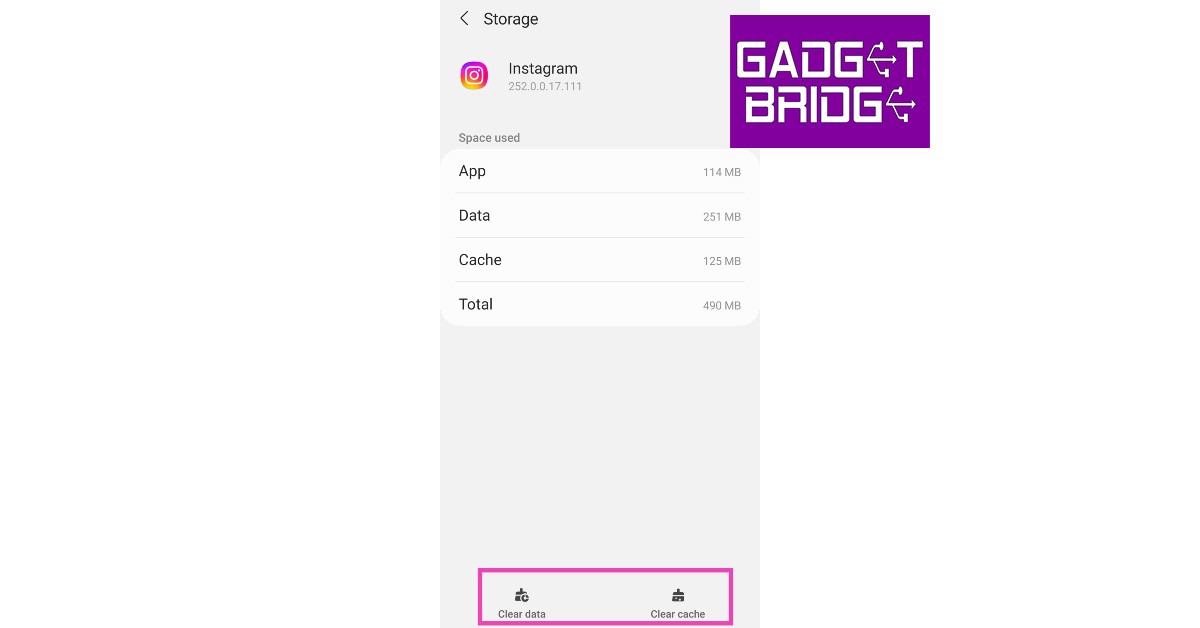
Step 3: Tap on Storage.
Step 4: Select ‘Clear Cache’ from the toolbar at the bottom of the screen.
Update the Instagram app
Any glitches or bugs are generally resolved with a quick update. Check if there is an update available for Instagram. Go to Instagram’s page on Google Play Store and tap on ‘Update’. Sometimes an update may take some time to arrive. You can also download a previous version of the app from third-party app stores like APKPure and APKMirror. It is possible that an older version may not face the same issue on your device.
Frequently Asked Questions
Why is Instagram not loading the correct Reel when I click on a link?
An internal glitch or bug may be keeping Instagram from loading the correct Reel when you click on a shared link. Try clearing the app cache or using Instagram Lite to get rid of this issue.
How to fix Instagram Reels if they are not loading?
If Instagram isn’t loading Reels for you, try updating the app and clearing the app cache. You can also try checking whether Instagram’s servers are down.
These are the best ways to fix the ‘Instagram loading a wrong or different Reel on clicking a shared link’ issue. If the issue still persists after trying the methods mentioned above, report the problem to Instagram. Go to Settings>Help>Report a problem to let Instagram know about the issue you’re facing.
Acer has upgraded its Gaming portfolio with the launch of the Acer Predator Helios 16 professional gaming laptop in India. The machine comes equipped with a 13th Gen Intel Core i9 processor. It also includes NVIDIA GeForce RTX 4080 Series GPU. Furthermore, there is a 16-inch IPS display that supports a 240Hz refresh rate. It also includes an FHD camera and a Mini LED per-key backlit keyboard. For more details keep on reading.
Acer Predator Helios 16 price in India
Acer Predator Helios 16 has been launched in India at Rs 199990. The gaming laptop will be available for purchase via store.acer.com and Acer Exclusive Stores.
Acer Predator Helios 16 specifications
Acer Predator Helios 16 features a 16-inch IPS (In-Plane Switching) display with a WQXGA resolution of 2560 x 1600. It offers 500 nits of brightness with a 240Hz refresh rate. It also includes Acer ComfyView LED-backlit TFT LCD technology that keeps the display crystal clear even in brightly lit environments. The laptop is powered by up to 13th Gen Intel Core i9 processor having 24 cores, made up of up to eight performance cores (P-core) and 16 efficient cores supporting DDR4/DDR5 and PCIe 4.0/5.0. It also includes NVIDIA GeForce RTX 4080 Series GPU with 175W MGP, up to 32GB of 5600MHz DDR5 memory, and high-speed PCIe storage.
The Acer Predator Helios 16 includes 5th Gen AeroBlade 3D fans, vector heat pipes, and liquid metal thermal grease, ensuring seamless performance even during extended gaming sessions, without encountering any heat-related issues. One can also customise the per-key RGB backlit keyboard with Mini LED backlights. The company recommends using PredatorSense software to further tailor the RGB lighting to your preference.
The Acer laptop further comes with an Intel Killer E2600 Ethernet Controller, Intel Killer Wi-Fi 6E AX1675i, full range of USB 3.2 Gen2, including two Thunderbolt™ 4 USB-C ports HDMI 2.1 and a Micro SD Card reader.
Lastly, the gaming laptop has a customisable thermal deco, FHD camera and DTS:X Ultra sound ecosystem. It uses liquid metal thermal grease so that the laptop stays cool even during heavy gaming sessions.
Nothing might be a young company, but they have come a long way in a short period of time. More so because they are listening to what the customers are saying. They are regularly hearing the social media chants and otherwise banter, including ours, to make their devices better. After Nothing Ear (1), the company is out with Nothing Ear (2), which we got over for an assessment. We took them through our rigorous test bench and this is the Nothing Ear (2) review you need to read before purchasing.
Let’s first address the elephant in the room. So, the second iteration of the Nothing Ear are very similar to the first one and consumers can easily mistake them for the previous edition. For a moment, even we did. But when you look closely, you will find subtle yet good differences. For starters, both the Nothing Ear (2) and its case have become smaller and lighter. But does that mean they also have a lesser battery? We shall find out in the next section, for now, let’s talk more about its form factor.
Packaged in an eco-friendly cardboard outer package, you get a transparent charging case in which the Nothing Ear (2) lie, magnetically cocooned in their respective hollows. The lid of the charging case also slams shuts into place using a magnet, which has a nice thud to it when shut. The façade is very similar to the previous edition, except the charging case’s battery now protrudes out from the bottom. Again, to keep its weight low and to sport a smaller design, this has been done. We thought the case might wobble on a flat surface due to this, but it does not.
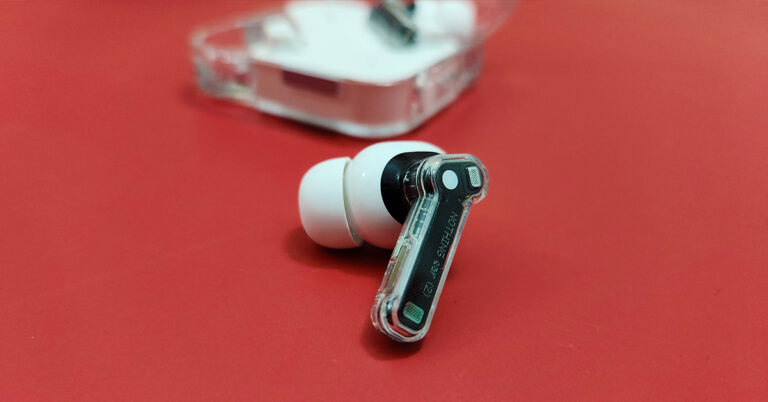
Moving to the build of the Nothing Ear (2) audio ear plugs, you get a smaller transparent stem on each with white audio driver enclosures and white silicon tips. Users also get additional silicon tips in the box to fit into different ear cavities. For us, the default ones were just fine. We quite liked what we saw and these half-transparent earphones sure look yummy for the taking. Each earpiece has multiple microphones to keep the noise out up to 40-decibel levels. More on that a little later.
Consumers also get a strung USB Type-C charging cable in the box. To connect it to any charger, users can use the supplied USB Type-C charging port located on the charging case, which also has the BlueTooth pair button next to it. Also, on this case, there is a LED light indicator, which supports different functionalities, like when you are connected to a device or when it is in pairing mode etc.
Let’s move to the fun part — its resonance. Each Nothing Ear (2) earphone hides an 11.6mm audio driver to provide exquisite sound. Download the Nothing X app from the Play Store, turn on the BlueTooth on the smartphone and head straight into the setup. It will take about 5-10 mins for the initial setup, but it is worth the wait. The app will take into consideration a few factors and accordingly set a sound that is best suited for you.
For us, we love a more bassy setup. If you do not like what the app has to provide (which we doubt) you can also head into the equaliser part of the app and play around with different modes. And there are 4-5 of them. We loved every beat the Nothing Ear (2) provided us with. These are spectacular in the resonance department and we were not expecting the brilliant thump they provide. The bass can put some of the over-the-ear headphones to shame.
We listened to quite a few tracks we are drooling over these days and when we tuned into them with the Nothing Ear (2), we heard newer never heard before beats in the same songs. Jaws Dropped!
After we collected ourselves back up by just getting a great music beat down, or up, whatever you want to call it, we charged towards the gaming section of our smartphone. We turned on the low lag mode in the Nothing X app and it did manage to reduce the sound lag by quite a few milliseconds. Overall, the gaming experience was not bad either with the Nothing Ear (2).
The Nothing Ear (2) come with Active Noise Cancelation (ANC), too. You get three modes (off, transparency and noise cancellation) which can be accessed using the app. The ANC can also be controlled by pinching and holding the stem of the earphones. Talking about which, there are pinch controls on the Nothing Ear (2) as well.
You can triple or double pinch to skip back or forward a track, single pinch to play/pause a track or answer or cut a call. 9 out of 10 times these worked as marketed. However, you cannot control the volume with them. For that, you would need to bring out the smartphone.
Moving to the battery life of the Nothing Ear (2), these sport a 33mAh battery in the earphones and an additional 485mAh battery in the case. The company says you can get 6.3 hours of battery from the earbuds and 36 hours of additional playback with the charging case (ANC off).
This is more or less right. We were able to squeeze in 5.75 hours of playback and got another 33 hours using the charging case. With the ANC turned on we got 3.5 hours of music playback from the earpieces and additional 20 hours from the charging case. This, overall, is not bad coming from such a small contraption.
Talking a little bit more about the Nothing Ear (2), the earphones have an IP54 rating for water and dust resistance and the case has an IP55 rating. The case also supports wireless Qi charging of up to 2.5w. Over that, these also support multi-device connectivity. You can pair them with your mobile phone as well as the laptop at the same time enabling you to take calls and listen to music from the laptop without switching Bluetooth. Lastly, Bluetooth version 5.2 is what these earbuds use.
Verdict
So, it all bubbles down to if at Rs 9,999 are the Nothing Ear (2) worth buying? That is an astounding yes. You get exquisite sound, good ANC, lightweight, good looks, IP rating and also wireless charging. These are a well-packaged set of earphones. If you have a budget of Rs 5-7 thousand for new wireless earphones, we suggest extending it by a few thousand and buy these.