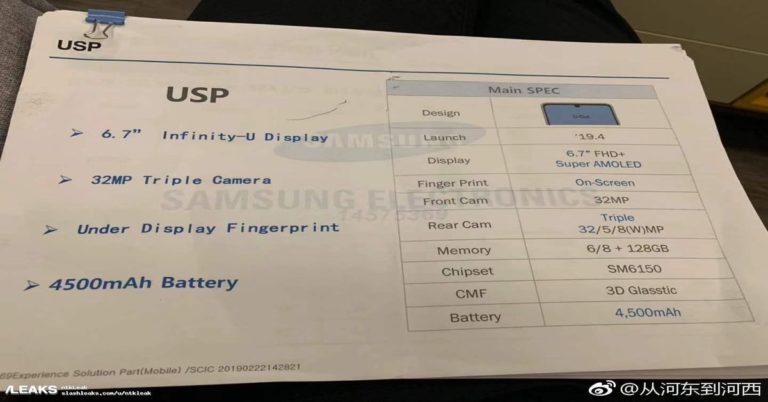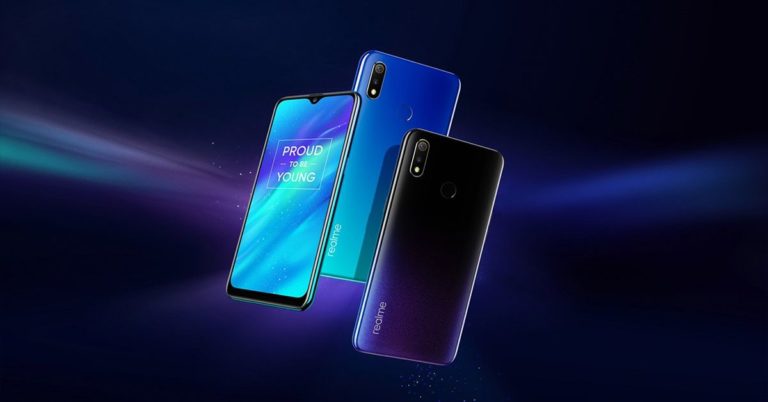
Xiaomi is slated to launch a Redmi smartphone in the market that is expected to carry Qualcomm’s flagship chipset. Yes, that is correct this new upcoming smartphone will be powered by Qualcomm’s Snapdragon 855 CPU. Yesterday, Xiaomi launched its budget segment smartphone, the Xiaomi Redmi Note 7 at CNY 999(roughly Rs 10,500) in China. However, this phone which hasn’t been named yet is not going to be a part of the budget segment.
In a report by GizmoChina, it was mentioned that this flagship smartphone will cost around CNY 2,500 that is roughly Rs 26,000. The Redmi Note 7, which was launched yesterday will go on sale from January 15. The smartphone’s dimensions are 159.2×75.2×8.1mm and runs on Android 9.0 Pie out-of-the-box. It sports an IPS LCD 6.3-inch capacitive touchscreen with a screen resolution of 1080×2340 pixels. The screen aspect ratio is 19:5:9 and the smartphone is powered by Qualcomm’s octa-core Snapdragon 660 SoC.
There are three RAM variants—4GB, 6GB and 3GB. The 4GB and 6GB variant come with a 64GB on-board storage and the 3GB variant comes with a 32GB storage. The Xiaomi Redmi Note 7 has dual rear cameras of 48MP and 5MP and a single front camera of 13MP which is meant for selfies. Connectivity options include WiFi 802.11, WiFi Direct, hotspot, Bluetooth 5.0, GPS, Infrared Port, USB 2.0 and FM Radio.
The device is powered by a 4,000mAh non-removable battery. Sensors of the smartphone include a fingerprint sensor, accelerometer, gyro, proximity and compass. The Xiaomi Redmi Note 7 comes in three colour options, that is blue, black and twilight gold.
The price of Samsung Galaxy A7 (2018) and Galaxy A9(2018) have been dropped in India. The two RAM variants of Samsung Galaxy A7(2018) are 4GB and 6GB. They come with 64GB and 128GB internal storage respectively. The 4GB RAM variant previously costed Rs 23,990. With the price cut, it now costs Rs 18,990. The 6GB RAM variant which earlier costed Rs 28,990 now comes at a price of Rs 22,990.
The Samsung Galaxy A9(2018) comes in 6GB RAM and 8GB RAM variations. Both come with an internal storage of 128GB. While the 6GB RAM variant costs Rs 36,990, after the price reduction it will now cost Rs 33,990. Where the 8GB RAM version costed Rs 39,990 earlier, thereafter the price reduction of Rs 3,000, it now costs Rs 39,990.
To recall the specifications of the Samsung Galaxy A7(2018), it runs on Android 8.0 Oreo and comes with Samsung Experience 9.0 on top. The device sports a 6-inch full HD+ Super AMOLED Infinity Display. The screen resolution of the same is 1,080×2,220 pixels, which comes with an aspect ratio of 18.5:9. The Samsung Galaxy A7(2018) comes with a Gorilla Glass 3 protection. The smartphone is powered by an octa-core Samsung Exynos 7885 SoC clocked at 2.2 GHz.
In terms of the camera, the Samsung Galaxy A7(2018) has a triple rear camera setup—24MP, 8MP and 5MP camera. Front camera includes a 24MP sensor with an f/2.0 aperture and an LED flash. Connectivity options include 4G VoLTE, dual-band WiFi 802.11ac, Bluetooth v5.0, ANT+, NFC with Samsung Pay support, GPS, GLONASS and a 3.5mm headphone jack. The smartphone is powered by a 3,300mAh non-removable battery.
The Samsung Galaxy A9(2018) runs on Android Oreo 6.3-inch full HD+ screen with a resolution of 1,080×2,220 pixels. The screen has an aspect ratio of 18.5:9. The device is powered by an octa-core Qualcomm Snapdragon 660 SoC that has four cores clocked at 2.2 GHz and four cores clocked at 1.8GHz. The smartphone, exceptionally has four rear cameras of 24MP, 10MP, 8MP and 5MP. The front facing camera consists of a 24MP sensor. Connectivity options include 4G VoLTE, WiFi 802.11ac, Bluetooth v5.0, USB Type-C, NFC and a 3.5mm headphone jack.
This week, iPhone turned 12 on January 9. To recall, on January 9, 2007, the first ever iPhone was announced at Mac World. To celebrate this occasion, we have made a list of cool yet useful things that you should try on your Apple iPhone. But before we get started we should tell you to update your device at least to iOS 12. Here’s a look at the little-known things that can be done on your iPhone:
In This Article
Enable QR code scanner
For doing this, you head to the Settings of your iPhone, then go to Control Centre and then select the option of ‘Customise Controls’. Here, you will see the option called ‘QR Code Scanner’. This lets you use your iPhone’s camera to scan QR codes.
Allow automatic software updates
If you have iOS 12 installed on your iPhone, you will be able to allow automatic updates on your device. Head to Settings of your iPhone and then go to General. Here, select the option of Software Update and tap Automatic Updates. Enable the option to install automatic updates on your iPhone. You will be notified before any update gets installed.
Set up multiple faces on Face ID
This feature is limited to iPhone X, iPhone XS, iPhone XS Max and iPhone XR because these are the only iPhones in Apple’s lineup that support Face ID. To enable multiple faces on your iPhone’s Face ID, go to Settings, and then select Face ID. After that, press on passcode and then choose the option of ‘Set Up an Alternate Appearance.’
Do more with Photos
IF you have the iOS 12 installed on your iPhone, your Photos app will show you a ‘For You’ tab that showcases your memories from your photo album. You also get sharing suggestions from the revamped app.
Siri Shortcuts
There are a number of Siri shortcuts which can make your life easier. To know what shortcuts Siri supports on your iPhone, go to ‘Settings’ and then select ‘Siri & Search’ and then go to ‘All Shortcuts’. Here, there will be a number of Siri suggestions that you will be able to see. Use the ones that you like and these recorded phrases will then start appearing under My Shortcuts in Settings.
Autofill passwords via third-party password apps
If you have a problem with remembering all your passwords, you should know that if your iPhone is updated, you can use password managers like LastPass on it to fill in your passwords. Till now, these apps could only be used for passwords in Safari, but now they can be used to fill passwords of other apps too.
Get detailed battery stats
To get detailed battery stats, you can head to the Settings of your iPhone and then go to Battery. Here, you can see the detailed battery usage along with graphs that tell you where you have used your battery the most.
Use the Hindi-English dictionary
To access this feature of iPhone, go to Settings, select General and then choose the option of Dictionary. Here, you will find a new bilingual dictionary which can help you by predicting words when you use the Hindi Transliteration keyboard.
Use the thesaurus
To use the thesaurus on your iPhone, head to Settings, go to General and then choose Dictionary. Here, there is a choice between two dictionaries which you can use – Oxford Thesaurus of English and Oxford American Writer’s Thesaurus. Enable the one you want to use and it will give you suggestions when you are typing on Notes, Pages or more.
Do more with voice memo settings
To make the most of the Voice Memos, go to Settings and then choose the option of Voice Memos. Here, you set the option of clearing the deleted voice recordings after a few days or choose to record in a compressed audio format.
Check the air quality in the Weather app
Air quality is increasingly becoming a big concern. If you live in an area where this issue is prevalent, the Weather app on your iPhone will show air readings as well. However, if it is not a major issue in the city you live in, you won’t see it.
Select text on your device without using 3D Touch ID
You can select text on your iPhone very easily without using the 3D Touch ID feature. All you have to do is long-press on the space bar to use this feature.
Before we move ahead, the one thing you need to know is that there are two kinds of resetting for an Android smartphone. The first one is the basic reset method, and the other one is performing a hard recovery reset. Factory resetting your Android smartphone becomes a necessity when it does not work properly or when you want to sell it off. So, first of all we are going to guide you through the basic factory resetting process. Then we will tell you how recovery resetting process works. The basic resetting process works in the following way:
Open settings on your phone.
Go to Backup and Reset. You will find this option if you scroll down a bit.
The next step is to click on Factory Reset. The Factory Reset Button will appear on the page, which would ensue once you click on Backup and reset. Scroll a bit on the page and you’ll find it.
Now click on Factory data reset. It is the bottom option in the menu which will appear hereon.
Now click on Reset Phone. At times the phone might ask you for your phone password, you would need to key that in.
The process might take 10 to 20 minutes and might reboot several times until the process is complete. Once the process is complete all your data will be removed and your phone would appear as it did when it left the factory.
In order to do a recovery hard reset follow the given steps:
Power off your device.
Boot your phone to recovery mode. This requires pressing a set of buttons that varies from different smartphone brands. But mostly is the power + lower volume key for 10-20 seconds.
A different screen will appear. Here you will find wipe data/factory reset. You need to use the volume buttons to scroll from one option to the next.
Now in order for the reset option to appear, press the power button.
Select the YES option when the device asks you to Erase Everything.
Power off your device and it will start off with the resetting process.
Xiaomi has launched two new TVs in India. These are called the Mi TV 4X Pro and the Mi TV 4A Pro. The former is 55-inches and the latter, 45-inches. The Mi TV 4X Pro comes with 2GB RAM and an 8GB internal storage. On the other hand, the Mi TV 4A Pro has 1GB RAM and 8GB internal storage. The Xiaomi Mi TV 4X Pro sports a 4K resolution 10-bit panel, and the Mi TV 4A Pro features a 1080p display 8-bit panel.
Let’s talk about the pricing and availability first. The Xiaomi Mi TV 4X Pro 55-inch is priced at Rs 39,999 and the Mi TV 4A Pro 43-inch costs Rs 22,999. Both of them will be available on Xiaomi’s official site, Mi.com, Mi Home as well as Flipkart starting January 15, 12PM. To talk about the features of both the TVs, they come with 20W stereo speakers for high quality output. Both of them have thin bezels on all four sides and have a metallic finish, which the company has named Piano Black. Both the 55-inch TV and the 43-inch TV come with a Bluetooth remotes that offers Google Assistant voice command support.
There is a built-in Chromecast support for both Mi TV 4A Pro and Mi TV 4X Pro TVs, and a PatchWall OS that features content from 14 different partners with over 7,00,000+ hours of content. According to the company, online content can be found very easily as they are seamlessly integrated. Some of the content partners Xiaomi has collaborated include Hotstar, Hungama, Sony Liv, Eros Now, Zee 5, Hooq, Epic ON etc. The Xiaomi Mi TV 4X Pro is powered by a 64-bit Amlogic quad-core processor with Mali-450 GPU.
Connectivity options of the same TV include WiFi 802.11 b/g/n, Bluetooth v4.2, three HDMI ports, two USB ports, a S/PDIF port and an Ethernet port. The Xiaomi Mi TV 4A comes with a 3.5mm audio jack, too. Along with these TVs Xiaomi has also launched the Mi Soundbar. The soundbar comes for a price of Rs 4,999. It has two 20mm dome speakers to cover high frequencies and 2.5-inch woofers to cover low frequencies. The Mi Soundbar would be available starting January 16 at 12PM via Mi.com and Flipkart.
iOS and macOS users can now use voice navigation with the help of the turn-by-turn navigation launched in India by Apple. The technology is not just limited to iOS and macOS users, but it can also be used in cars with the help of Apple CarPlay. To recall, the Apple Maps app was launched in India back in 2012. Back then, it was just a kind of rudimentary map, which did not show directions while moving to places.
Eventually the map service improved over the years, showing the location of many establishments, businesses and other important locations in major cities. However, the turn-by-turn feature wasn’t available until now. Right now, the app might guide you through inconvenient routes to reach your destination. However, as more people use it, eventually it is expected to improve. But now, it is best not to completely rely on the turn-by-turn feature of this map app.
Some features are missing such as transport information. Thus, you won’t know how to reach a place using various means of transportation. Also, there is no flyover support as of now. As Apple maps has introduced the turn-by-turn feature finally, we can also expect it to have other features coming in the future. Recently, Apple announced that it is going to introduce the AirPlay support for a range of TV brands. Based on the information given on the AirPlay page, users can stream 4K HDR video on TV that will replicate the screen of your iPhone.
With this, they can do a range of activities like connecting their photos from iCloud, connect music to their television and control homekit accessories. There are built-in controls in your iPhone that appear in apps, on the Lock screen and in Control Center. Connecting your iPhone to the TV means that it will act as a remote to navigate your TV features. One can play, pause, fast-forward, rewind and adjust the volume on their televisions.
Very recently, Apple also announced that it is soon going to authorise iTunes for Samsung TVs which constitute the 2018 and 2019 models. This is the first time Apple has allowed a third party, apart from Windows to access its video and audio library.
Xiaomi has launched its new Mi soundbar yesterday. The company also live streamed the launch of Mi LED TV 4X Pro 55-inch model, Mi LED TV 4A 34-inch model alongside the Mi Soundbar on Flipkart and Mi.com. One of the key features of the Mi Soundbar, Xiaomi said, is that it can be set within 30 seconds. To talk about its pricing and availability, the Mi Soundbar comes at a price of Rs 4,999 in India and would be available starting January 16 from 12PM.
The Mi Soundbar has two 20mm dome speakers to cover high frequencies and also, two 2.5-inches woofers for the low frequencies. There are four passive radiators for the extreme low-end sounds. Connectivity options include Bluetooth v4.2, S/PDFIF/ Optical Line-in, and a 3.5 aux-in. According to Xiaomi, the Mi Soundbar would run in any TV.
Recently, Xiaomi had announced a price cut for the Mi TV 4A 32-inch, Mi TV 4c Po 32-inch and the Mi TV 4A Pro 49. All three price cuts occurred in India. The first two price cuts were based on the GST reduction from 28 percent to 18 percent for all Xiaomi TVs within the range of 32-inches. The Xiaomi Mi LED TV 4A Pro 49 on the other hand, received a price reduction under the pretext of US dollar moderation. Where Mi TV 4A 32 was priced Rs 13,999 it now costs Rs 12,499. On the other hand, the Mi TV 4C 32 Pro that costed Rs 15,999 earlier has now been reduced to Rs 13,999.
With a permanent price cut of Rs 1,000 the Xiaomi Mi TV 4A 32-inch TVs price dropped down from Rs 31,999 to Rs 30,999. A few days back, the Xiaomi Mi Box 4 SE was also launched. It bears a price tag of CNY 189 which is around Rs 1,900. The set top box has 1GB RAM and 4GB internal storage. Connectivity options include HDMI, AV and USB. The PatchWall UI on the Xiaomi Mi Box 4 SE helps you to switch channels with your DTH connection, various apps or even voice commands.
Most reports that mention Nokia these days talk about the upcoming Nokia 9 PureView smartphone that has been spotted online with five rear cameras. But this time, a report has surfaced online which talks about the Nokia 6 (2019) smartphone, which is also being dubbed as Nokia 6.2. It is being said that the device will be launched either in January end or the beginning of February. Considering that reports suggest that Nokia 9 will be launched around the same time, we wouldn’t be wrong in assuming that the two smartphones may get launched together at the same event.
Nokia 6.2 (6 2019): 6.2-inch display with camera hole-punch, Snapdragon 632, 4/6GB RAM, 16MP Dual-rear Zeiss Camera,OZO Audio, First market China. Coming Jan end/Feb 2019.
The tipster who first spoke about Nokia 6 (2019) – Nokia_Leaks – also said that the smartphone will sport a 6.2-inch display that will come with a hole on the top left to house the selfie camera. It is the same technology that we saw in Samsung Galaxy A8s, in which case it was referred to as Infinity-O. Powered by Qualcomm Snapdragon 632 processor, Nokia 6 (2019) will reportedly come with either 4GB RAM or 6GB RAM. According to Nokia_Leaks, Nokia (2019) will feature a dual rear camera setup with 16MP lenses from Zeiss and will have support for OZO Audio. If these specifications are correct, then Nokia 6 (2019) will come a display that will be larger than Nokia 6 (2018)’s and will be powered by a more powerful processor too.
It has also been reported that the device will first be launched in China and will make its way to international markets later. And as we mentioned earlier, the smartphone is expected to be launched in either late January or the beginning of February, most likely along with Nokia 9 PureView.
However, it is so far just speculation that the two devices will be launched together. There is no confirmation about the same. Various reports have surfaced online speaking about the Nokia 9 smartphone. It is being said that the smartphone will come with a penta-lens camera setup and have sleek bezels on the front panel. Nokia 9’s launch is said to be ahead of Mobile World Congress which is scheduled to take place towards February end. Reports have also suggested that the smartphone would fall in the EUR 749 to EUR 799 price range.
Today, Gigabyte Technology, a manufacturer of motherboards and graphic cards has introduced its AORUS RGB SSD series. This series has been showcased at CES 2019 that will be loved by gamers too, and comes in two factor forms—AIC and M.2, which provides suitable selection of mainstream storage capacity options. The company claims that the SSD fulfils GIGABYTE standard for durability and reliability because of having undergone a lot of testing. This would ensure that users can experience a credible SSD performance.
The AORUS RGB M.2 SSD comes in two storage options—256GB and 512GB. It delivers sequential read speeds up to 3,480 MB/s and is built with anodized, aluminium heatsinks that leads to heat dissipation. This prevents heat to affect the storage performance. The AORUS Falcon logo provides extra texture to the M.2 SSD with its contour and digital LED lighting. This gives the motherboards a perfect combination of lighting and style. The storage capacity of the AORUS RB AIC SSD on the other hand, has storage variants of 512GB and 1TB.
The AORUS RGB AIC SSD which has been inspired by the Z390 motherboard series has a similar heat dissipation technology and integrates them into its heatsink design in order to provide a proven thermal solution. There is a 0.5cm thick dark grey aluminium matte heatsink and a cross cut heatsink installed in order to increase heat dissipation. Plus, a LAIRD Thermal Pad has also been placed in order to ensure that the SSD performs at its maximum level without bottlenecks from excessive heat.
In terms of aesthetics, there is a metallic silver, mirror AORUS falcon logo on it. The AIC SSD comes with CNC processed screw holes that looks tidier and more symmetrical, and its positioning is more precise for users. The heatsink of this motherboard has been treated with sandblasting on the surface and multi-step anodization along with laser engraving has been done for a stylish look. There is an RGB Fusion 2.0 App that can bring smooth and layered lighting effects to show off new styles of lighting on this SSD.
GIGABYTE claims that, similar to its other AORUS products, the RGB SSDs will meet the standard of users and gamers. This is because, as the company states, it has cleared test software and high temperature and voltage tests.
South Korean technology giant Samsung has finally confirmed that it will be unveiling its upcoming flagship smartphone – Galaxy S10 – at a special UNPACKED event in San Francisco on February 20. Samsung Galaxy S10 is the tenth-anniversary edition of the smartphone maker’s Galaxy S series, which basically has all the company’s flagship devices. Samsung‘s this year’s flagship lineup is expected to come with three variant – Galaxy S10, Galaxy S10 Lite and Galaxy S10+. Other than this, the company is said to showcase two 5G variants of the device along with its foldable phone.
In This Article
Samsung Galaxy S10 launch date and live-stream details
Samsung has confirmed that it will be launching its Galaxy S10 smartphone on February 20. Most people thought that the device will be showcased in Barcelona, where Mobile World Congress (MWC) is scheduled to take place at a similar time. However, the smartphone maker said that it will unveil its handset at an event in San Francisco. The launch of the smartphone will be live-streamed on www.samsung.com/galaxy, but we will have to wait till we get to know of the exact timing of the event.
Samsung Galaxy S10 specifications
As we mentioned earlier, Samsung is expected to launch three variants of Galaxy S10. Samsung Galaxy S10 will come with the Infinity-O display that we saw earlier in Galaxy A8s. For those who are unaware, the smartphone with an Infinity-O display comes with a hole on the top left of its screen to house the selfie camera. Smartphone makers are resorting to Infinity-O displays coupled with thin bezels in order to provide users with a full-screen experience. Depending upon the market, Samsung will either be powered by Qualcomm Snapdragon 855 processor or Exynos 9820 SoC.
Speaking of Samsung Galaxy S10 Lite, a report in Techtastic said that the device will come with only one selfie camera and a flat display, unlike the curved display that Samsung usually uses. In fact, Samsung Galaxy S10 will also come with a single selfie camera, but Galaxy S10+, Galaxy S10 5G and Galaxy S10 Bolt are said to sport dual selfie cameras, according to the report in Techtastic.
The 5G variant of Samsung Galaxy S10 mobile will come with a 6.7-inch display and will reportedly feature a quadruple camera set up at the back, whereas Galaxy S10+ is said to come with three rear cameras and a 6.3-inch display.
Samsung Galaxy S10 Bolt will also be launched by the company and it will come with a 6.7-inches curved display and four rear cameras. It will also have dual selfie cameras and come with 5G support. But then, reports suggest that the device will come with a ceramic back panel instead of a glass one.
All the smartphone in the Samsung Galaxy S10 range will come with an ultrasonic in-display fingerprint sensor, with Galaxy S10 Lite being the only exception. Galaxy S10 Lite will have an optical fingerprint sensor embedded on the side. The 5G variant of Samsung Galaxy S10 will house a 5,000mAh battery. It has also been said that Samsung will launch three variants of Galaxy S10 in February, followed by the 5G variants and its foldable phone later this year.
The biggest technology show of the year – CES 2019 – saw a number of new innovations and exciting gadgets. While the focus was primarily on televisions and laptops for most companies, Samsung seized the opportunity to show its much-talked-about upcoming foldable phone to a select audience. The news about this surfaced online when the Korean Herald, a Korea-based publishing firm reported about the same.
Samsung’s foldable phone or Galaxy F smartphone will reportedly feature a 7.3-inch display and users will be able to fold it in three ways – one side, the opposite side and in the middle. As of now, the Samsung foldable phone is not ready to be shown to the global audience as, according to the company, there are still some structural changes in the upcoming smartphone that need to be made. However, the company is working on getting these solved and it plans to launch the device in the first half of 2019. But then, we should mention that Samsung only plans to launch 1 million units of its foldable phone, which is expected to be sold with a price tag in the GBP 1,500- GBP 2,000 range.
The South Korean technology giant has earlier said that the device can work like a tablet as well as a smartphone. So in case you find both of these useful, and you find the price tag affordable enough, you can definitely opt for Samsung’s upcoming foldable phone. Speaking about Samsung‘s foldable phone, a company executive said, “Because it’s equipped with the latest flexible display and battery technology, Samsung’s foldable phone is likely to be sold at 1.5 million won ($1,336) or more. Therefore, the company appears to have chosen men in their 40s with purchasing power as the prime customer base.”
The problem that is currently being faced by Samsung is the creasing of the device when it is folded. It is being said that the creases may lead to the smartphone getting broken. This is the reason Samsung is testing the device right now and wishes to take some more time before unveiling the smartphone to the global audience. Once these issues get fixed, the finalised version of Samsung’s foldable phone will be introduced to all. If you wish to know more about the upcoming device, you can read our story in which we have highlighted the little-known facts of Samsung’s foldable phone.
If you want to buy a smartphone that has a powerful performance but is available at an affordable price, this surely seems to be a good time. A few days back, Xiaomi slashed the price of its Mi A2 smartphone in order to stay ahead in the segment that it is currently leading. The company also reduced the price of the Redmi Note 5 series when it wanted to achieve a milestone that it achieved. And now, Taiwanese smartphone maker Asus is offering its Zenfone 5Z smartphone at a discounted price as a part of ‘Asus Days’ that is going on Flipkart.
Customers can avail a massive price cut of Rs 8,000 on Asus Zenfone 5Z smartphone if they purchase it from Flipkart between January 9 and January 11. So, today is the last day when you can avail this offer. The smartphone was launched in July last year as a direct competitor to OnePlus 6. The base model of Asus Zenfone 5Z (review) was priced at Rs 29,999 at the time of launch. while the product received positive reviews and people who bought the smartphone were happy with it, the price point was such that Asus Zenfone 5Z did not garner too much popularity in a segment that was already dominated by OnePlus. The launch of POCO F1, which offered the same processor at a lesser price, did not help much either.
It is worth noticing that the discount on Flipkart is only available on the 6GB RAM/128GB internal storage model and the 8GB RAM/256GB internal storage variant of Asus Zenfone 5Z mobile. This may be because the two models were even more costly and were priced at Rs 32,999 and Rs 36,999 respectively. Considering that the smartphone is powered by Snapdragon 845 chipset, which was the latest in the market at the time of the smartphone’s launch, we don’t consider this pricing to be too high. However, with Xiaomi’s POCO F1, customers were getting the same processor at an even lower price.
After the reduction in price, the 6GB RAM variant of Asus Zenfone 5Z will be available at Rs 24,999, while the 8GB RAM model will cost Rs 28,999. At less than Rs 30,000, it is a good deal to buy either of the two variants of the smartphone.
Mobiistar is a Vietnamese smartphone brand and it has announced a new product today. This one is called the X1 Notch and it comes with a 13MP AI selfie camera. It has two RAM variants—2GB and 3GB which come with onboard storage of 16GB and 32GB respectively. While the earlier one comes at a price of Rs 8,499, the latter costs Rs 9,499. The screen size of the phone is 5.7-inches and this one is a HD+ display. It has a gradient shine body, 2.5D curved glass and dual tone colours. The smartphone houses a 3,020 mAh battery.
Chinese smartphone maker Oppo has launched a new variant of its A7 smartphone in India. The new model comes with 3GB of RAM and 64GB of internal storage. Priced at Rs 14,990, Oppo A7 will be available on Amazon India, Flipkart, Paytm Mall and Snapdeal. Interested buyers will be able to pick up the device starting January 11.
Prior to being launched in India, Oppo A7 was unveiled in China and Nepal. In India, it came with 4GB of RAM and 64GB of internal storage and that model came at a price tag of Rs 16,990. The 4GB RAM model of Oppo A7 smartphone was unveiled in India in November last year. The device is available in Glaring Gold and Glaze Blue colour options in the country.
To recall the specifications of the smartphone, Oppo A7 features a 6.2-inch In-Cell HD+ display that has a resolution of 1520×720 pixels and a waterdrop-shaped notch on the top. Powered by Qualcomm’s Snapdragon 450 processor, the smartphone was earlier available only with 4GB of RAM and 64GB storage and now, it has been launched in a 3GB RAM variant. If you want more storage, you would be able to install a microSD card of up to 256GB. The device comes with an Adreno 506 GPU for graphics performance.
Oppo A7 smartphone runs Android 8.1 Oreo operating system skinned with the company’s own ColorOS 5.2 on top. The device houses a 4,230mAh non-removable battery.
On the camera front, Oppo A7 sports a dual rear camera setup with a 13MP primary sensor with an aperture of f/2.2 and a 2MP sensor with an f/2.4 aperture. For selfies and video calls, there is a 16MP sensor with an f/2.0 aperture housed in the waterdrop-shaped notch on the front panel.
For connectivity, the Oppo A7comes with Bluetooth v4.2, GPS, Wi-Fi, 3.5mm audio socket, and microUSB port. The smartphone also has a fingerprint sensor embedded on its back panel.
The week also saw the launch of Oppo R15 Pro smartphone in India which comes with the company’s VOOC Charge technology. According to Oppo, with VOOC technology the smartphone will be able to deliver two hours of talk time with five minutes of charging.
Smartphone manufacturers are looking for new and innovative ways to say goodbye to the notch on the top of the display to provide users with a full-screen experience. While Vivo NEX had a pop-up selfie camera, Oppo Find X came with a slider camera, Samsung A8s started the trend of having a hole on the top left of the display to house the selfie camera of the device. Huawei and its sub-brand Honor followed the suit with their smartphones – Nova 4 and View 20 respectively.
And now, according to latest reports, HMD Global will also be getting a smartphone with a display cutout to its lineup. @OnLeaks, along with 91mobiles has leaked the first renders and 360-degree video of the upcoming smartphone, which will reportedly be called Nokia 8.1 Plus.
As per the images shared by 91mobiles, Nokia 8.1 Plus will be dominated by a large display and it will come with a cut-out on its screen to house the selfie camera. Since there is a hold on the display in which the selfie camera will be placed, there is no notch and the smartphone comes with thin displays. It is only the chin of the device that is a little broader than the bezels and it has the Nokia branding on it. The display of the device will be 6.22-inches in size and it is expected to come with a full HD+ resolution.
The left edge of the Nokia 8.1 Plus mobile has the volume rocker and power buttons sandwiched on it and the top has the 3.5 mm headphone jack. At the bottom, there is a USB Type-C ports, a speaker grill and a mic.
Flip over to the back and you will see a glass panel that has the Nokia logo in the centre and Android One branding at the bottom. Above the logo of the company, the fingerprint sensor of the smartphone is placed. So if you were looking forward to seeing an in-display fingerprint scanner on the next Nokia device, you will have to face disappointment.
The back panel of Nokia 8.1 Plus also houses dual rear cameras that will have Zeiss optics. Along with the dual rear camera setup, a dual LED flash is also present. As of now, there is no other word on the specifications of the upcoming Nokia 8.1 Plus smartphone, but we’ll update you as we get to know more.
Resetting your device is a complex process. Just like your computer, you might have to reset your iPhone for several reasons. There are different ways of resetting your Apple iPhone. One is a basic restart, a more comprehensive reset and sometimes you might just need to delete all your content and start your device afresh as if it were new. In iPhones however, resetting doesn’t usually lead to deleting of data.
There are different ways of resetting for different iPhone versions. First let us tell you about how restart your device in case you have an iPhone 8, iPhone X, iPhone XS and iPhone XR. Follow these steps:
1) Hold the Sleep/Wake button and at the same time press the volume down button
2) A Power off slider will appear. Move that slider from left to right.
That’s it. This method comes in handy in order to solve problems like poor WiFi connectivity. However, there can be times when your phone doesn’t respond to the power off button.
In such a case one needs to resort to the hard-reset method. To hard reset follow the steps given below:
1) Click and release the volume up button
2) Click and release the volume down button
3) Now hold the sleep/wake button. Your phone should restart now.
For other iPhone models the normal way to reset is to hold down the sleep/wake button. When the power off slider appears, then swipe it from left to right. After this, hold the sleep/wake button until the device is switched on.In case of hard resetting, you need to hold the sleep/wake button and home button at the same time. Keep pressing them, until the Apple Logo appears. Note that you should not let go of the buttons even if the power slider appears. Once this happens, let go off the buttons. Your work is done.
Tencent Games, with the release of PUBG has taken over the worldwide mobile gaming community. And an even bigger news is that it is announcing the PUBG Mobile India Series 2019 that is the second biggest tournament after ‘Campus Championship’ that was hosted last year. Earlier this tournament was only applicable for college students, but now, it is open to all. The winner of this game is going to receive a prize from a pool of Rs 1 crore and the commonly coveted chicken dinner.
In order to be a part of this tournament, you don’t need to pay any registration fee, but need to be upgraded to level 20. Registrations are ongoing with the deadline being January 23. In order to register, players need to go to the PUBG Mobile India Series 2019 registration page where they can sign up. Once you are a part of the game, you either have to enter a squad or make your own squad. There will be two rounds of survival battle which will be followed by a grand finale. All the games would be held in Asia server region in third-person mode.
The first online in-game qualifier round will be held between January 21 and January 27. Players need to battle in 15 classic rounds in their squads that will be held in Erangel. The next 10 rounds will be held for qualified players whose eligibility would be based on kill count, survival time, accuracy, team play etc.
The second round will be held between February 16 and February 19. At this stage, there will be 400 squads divided into 20 slots. The third round will be held from February 21 and February 24 and will feature 80 squads divided into four slots where each slot would constitute 20 squads. Finally, there will grand finale which will be held in the month of March where 20 teams will battle against each other in the quest to win the chicken dinner.
Mobiistar is a Vietnamese smartphone brand and it has announced a new product today. This one is called the X1 Notch and it comes with a 13MP AI selfie camera. It has two RAM variants—2GB and 3GB which come with onboard storage of 16GB and 32GB respectively. While the earlier one comes at a price of Rs 8,499, the latter costs Rs 9,499. The screen size of the phone is 5.7-inches and this one is a HD+ display. It has a gradient shine body, 2.5D curved glass and dual tone colours. The smartphone houses a 3,020 mAh battery. The CPU is a quad-core Arm7 in this mobile.
The Mobiistar X1 Notch comes in three colour options, that is gradient shine, midnight black and sapphire blue. There are some exciting offers which Mobiistar has provided under its partnership with Reliance Jio. Those who buy new Mobiistar smartphones, including the X1 Notch and have Jio connection will get all-IP 4G LTE network. Jio users, under this offer will get Rs 2,200 cashback and can enjoy Unlimited Data, Free Voice Calls, Free Roaming, unlimited SMS, video calls, complimentary Jio Apps Subscription for Rs 198/299.
Besides this, users will avail 60 days HD music and ad-free streaming using Gaana App on Mobiistar X1 Notch. Carl Ngo, co-founder and CEO of Mobiistar, India and Global said, “We could not have begun the year in a better way than with the launch of the X1 Notch. This stunning smartphone brings latest trends in technology at a very compelling price for its users. With a strong focus on selfies, this device comes with a 13 MP AI selfie camera, modern design notch display and gradient shine body. We have high hopes for this phone in the market and are confident that the X1 Notch will win many hearts just like our other products have been doing so far.”
There is a dual SIM card slot in the Mobiistar X1 Notch that can also accommodate a microSD card within. Over that, this smartphone comes with a finger print sensor at the back. The rear also has a single 13-megapixel camera with an LED flash, placed on a vertical tablet style camera bump. Our first impressions video is out, you can also head over to our YouTube channel to check it out.
Let’s admit: Smart TVs have now become mainstream. However, there are a number of users who would rather just have a regular TV at home and use a streaming dongle with it instead of spending too much money on a smart TV. So, if your television has an HDMI port, you can use Google Chromecast or an Amazon Fire TV Stick with it to get smart connectivity at an affordable price.
Considering all of this, Chinese consumer electronics maker Xiaomi has launched the latest version of its smart set-top box in China, called Xiaomi Mi Box 4 SE.
The Xiaomi Mi Box 4 SE bears a price tag of CNY 189 which, on converting, becomes around Rs 1,900. This basically means that the Xiaomi’s offering is cheaper than Google’s and Amazon’s. The smart set-top box comes with a PatchWall UI, which has previously also been seen on Xiaomi Mi TVs. We should mention that this helps in adding smart capability to any television when it gets connected to it via HDMI or AV.
The smart set-top box is also Wi-Fi enabled and features Full-HD streaming. It is powered by a quad-core processor clubbed with 1GB of RAM and has 4GB of internal storage. The connectivity options available are HDMI, AV and USB ports.
The PatchWall UI on Xiaomi Mi Box 4 SE helps you switch channels with your DTH connection, various apps or even voice commands.
The Xiaomi Mi Box 4 SE succeeds Mi Box 4 and Mi Box 4c, which are presently only available in China. Another notable feature of the smart set-top box is that has support for screen mirroring from mobile devices.
This isn’t the only product that Xiaomi launched today. The Chinese smartphone brand had hosted an event in its home country today where it launched the Redmi Note 7 smartphone, which is the first from its Redmi sub-brand. The key highlight of the smartphone is 48MP primary camera and the affordable price point at which it can be picked up. However, as of now, there is no word on when it will be launched in India.
Internet is abuzz with unofficial leaked renders of the upcoming Samsung Gear Sport smartwatch. This is the successor of the previous smartwatch of the same name. The renders have been leaked by OnLeaks and the CAD based images show that compared to its predecessor, the smartwatch is smoother in design, and is rounder. The leaks showcased the device with the codename ‘Pulse’.
The Samsung Gear Sport smartwatch will come in four colour options—black, silver, green and pink gold. Its screen size is supposed to be same as that of its predecessor, which is to say, 1.2-inches. It is expected to have a rotating bezel like any other Gear Smartwatch. There are chances that this smartwatch would be unveiled at Samsung’s Unpacked event for the Galaxy S10 or during the Mobile World Congress that is supposed to start during February. A few days back, at the backdrop of 2019 CES, Samsung launched the Galaxy Notebook 9 Pro. This laptop comes with an Active Pen that is very suitable for graphic designers.
The Samsung Notebook 9 Pro comes with a 13.3-inch Full HD display and bezels of 6.7mm outline on all four sides. The laptop is powered by an 8th gen Intel Core i7-8565U processor and comes with an 8GB RAM and 256GB of PCI NVMe SSD storage. The laptop comes with a battery that supports fast charging and an integrated Intel UHD 620 GPU. Connectivity options include Gigabit WiFi 802.11ac, USB Type-C port and a microSD card slot. Plus, there is a 3.5mm headphone jack on this notebook to connect audio devices such as the headphones.
On the same day, Samsung had also launched the Notebook Flash that has 4GB RAM and 64GB on-board storage. The laptop has a 13.3-inch full-HD display and is powered by an Intel Celeron N4000 or Pentium Silver N5000 processor. The battery of this device is said to last for 10 hours. The Samsung Notebook Flash has dual-channel Gigabit WiFi and fingerprint scanner as connectivity options.
Xiaomi CEO Lei Jun has introduced the Redmi Note 7 smartphone in China today. We should mention that it is the company’s first smartphone that has been launched as a part of its new Redmi sub-brand. The newly launched Redmi Note 7 smartphone comes with some key highlights like a 48MP rear camera with Sony IMX586 sensor, is powered by Qualcomm Snapdragon 660 SoC and a 4,000mAh battery.
Xiaomi’s Redmi Note 7 features a 6.3-inch LCD display that is protected with Corning Gorilla Glass and has a waterdrop-shaped notch on the top. The smartphone’s display has a Full HD+ resolution and a screen to body ratio of 84%. As we just mentioned, The Android smartphone is powered by the Snapdragon 660 processor and it comes with 3GB, 4GB or 6GB of RAM. While the 3GB RAM variant of the device comes with 32GB onboard storage, the 4GB and 6GB RAM models are coupled with 64GB internal storage. The device also has a microSD card in case users require more storage.
On the camera front, Redmi Note 7 has a massive 48MP main camera coupled with a 5MP sensor that comes with AI enhancements and can support the Portrait mode. The 48MP primary camera can easily be called the biggest selling point of the device. For selfies and video calls, there is a 13MP front-facing snapper that is housed in the waterdrop notch on the display of the device.
Redmi Note 7 packs a 4,000mAh battery that has support for Qualcomm Quick Charge 4. The Redmi Note 7 by Xiaomi comes with a 5V/2A charger in the box, but customers can opt for a fast charging one by paying CNY10 extra. On doing this, they will be able to get 9V/2A charging capabilities, so Redmi Note 7 will be charged from 0 to 100% in one hour and forty-three minutes.
Redmi Note 7 smartphone is available in Blue, Twilight Gold and Black colour variants and its base model is priced at CNY999. The 4GB RAM variant can be bought at CNY1,199 and you will have to pay CNY1,399 for the 6GB RAM version. Pre-orders of the device have started in China already and the shipments will begin on January 15.
Gizmore is an accessories brand in India that is now offering a range of accessories in the smartphone category that are meant for music, fitness etc. This time it has launched a pair of wireless headphones, a Bluetooth speaker and bone conduction headset. The Bluetooth speaker is called BOOM Barrel 10M. It has got multiple connectivity options, an output of 10W and digital Bass Enhancement feature. To speak about the specifications, the BOOM Barrel 10M Bluetooth speaker has a battery of 1,800mAh that has a charging capacity of 5V. It can stay connected to the phone within the range of 10 meters.
Frequency response is between 50Hz-10KHz and the device can last up to 4 hours when fully charged. However, it takes 4-5 hours in order to charge completely. The device is coming at a price of Rs 2,999 with black colour option. The wireless headphones, also known as BASS has a 300mAh battery, provides 8-10 hours of talk time and 4-6 hours of playback time. Rated power of this device is 100mW and has a frequency response of 20-20KHz. The BASS wireless headphones weighs 201 grams and has a charging capacity of 5V. The headphone can connect via Bluetooth V4.1.
Pricing of the headphones is Rs 2,499 and comes in two colour options—red and black. Now we come to the Bone Conduction Set. It is quite different from ordinary earphones. It is made with a technology that carries sound waves to the internal auditory canal through the vibration of the bone instead of the eardrum. The Bone Conduction set weighs 35.5 grams and can be bent 360 degrees without deformation. The device provides 6 hours of talk time, up to 5 hours of music time and 15 days of standby time. The Bone Conduction headset comes at a price of Rs 8,999.
Manish Gupta, the vice president of Gizmore said, “With smartphones usage growing rapidly, the demand for accessories is also growing proportionately. We are thrilled to bring to our customers our latest offerings – wireless headphones, Bluetooth speaker and bone conduction headset among other at reasonable prices. This will be our first set of offerings and we promise to keep adding more innovative products in our portfolio. Gizmore believes in delivering unrivaled products that offer unbeatable value.
For the latest gadget and tech news, and gadget reviews, follow us on Twitter, Facebook and Instagram. For newest tech & gadget videos subscribe to our YouTube Channel. to all consumers.”
Technology giant Google has today removed 85 malicious apps from its Android Play Store after it was found by security researchers that these apps are a disguise of an adware family. On the Play Store, these apps were available as games, TV, remote control and more. In fact, an app among the ones that have been downloaded – Easy Universal TV Remote – had been downloaded over 5 million times.
The issue with these apps was first reported by Trend Micro, where a researcher was quoted saying, “This adware is capable of displaying full-screen ads, hiding itself, monitoring a device’s screen unlocking functionality, and running in the mobile device’s background.”
According to Trend Micro, all of these apps have been downloaded together over nine million times. The list of apps that have been banned has surfaced online. Here, we list down a few of them so that you can be sure that you don’t have any of them installed on your smartphone:
Instagram will soon launch an update, which will let you see multiple accounts at the same time. The feature would be launched for iOS, however, there is no confirmation as to whether or not it will come to Android devices. There will be a “self-regram” option once you are about to share a new post. Also, there will be an option for “Post to Other Accounts” that will give you an option to publish your posts elsewhere.
For people who run multiple business accounts, are doing partnerships or takeovers with other accounts, or several photography hubs, it will be very convenient for them. Even for people who don’t do business, for them it might be helpful as it is quite trendy to have more than one social media account. Previously, there have been rumours that Instagram is testing regramming from other accounts to a user’s main feed. However, the company later said that it is doing no such thing.
To recall, Instagram was updated last year so that users could regram any public feed post shared by other users. Currently, Instagram is testing an Android Shortcut, which will help users import photos from Google Photos. This was tipped on the basis of what an Instagram representative told to a news source. As mentioned, it has only been confirmed that the new update will be rolled out to iOS users. Nothing of the same is known with regards to Android users.
Last month, Instagram came up with a voice messaging feature. In order to record your voice, you need to tap the microphone button and hold it until you record the voice note. Quite similar to Facebook and WhatsApp. The only difference is that Instagram came up with this update a lot later than them. Instagram had also come up with a “close friends” feature wherein people can choose whom to show their posts to. This update came under the pretext of evading cyber bullying. To recall, Snapchat has also released the same feature to stay at par with Instagram.
Whatsapp messenger is going to rollout a new feature where one will be able to unlock the popular instant messaging app using the smartphones fingerprint sensor. This will require users to authenticate their devices with a unique identity with their fingerprint that will help them unlock this app. This feature was first spotted by WABetaInfo and according to its reports this update is going to be in the beta version for Android 2.19.3. Those who use third-party applications for securing Whatsapp, they would be fortunate to get this better alternative.
Previously, there were rumours that Whatsapp would include Face ID and Touch ID for iOS users. People are probably going to stop using third party apps to secure Whatsapp once they get their hands on the Finger Authentication feature. Based on the WABetaIinfo report, we know that the feature is only meant to unlock the app, and not content in it.
This update is meant for users to keep their Whatsapp content; be it messages, photos GIFs, videos, voice messages safely and prevent them from falling into wrong hands.
App developers are enhancing Whatsapp in order for better safety for users. However, there has been some bad news relating to this messaging app that could hamper user safety. Recently, there has been a malware related to Whatsapp which is coming to users disguised under an update named Whatsapp Gold.
Countless number of Whatsapp users have received messages regarding this update, telling them to download it. A lot of people have downloaded it thinking that they are actually true. There is a huge possibility that you will receive the same message if you haven’t received it yet. If you do, be informed beforehand and don’t fall for it. For your knowledge, Whatsapp rolls out its update in beta version and only a handful of users who have enrolled to the beta version receive them before it is available to the masses.
This is because app developers test the update before rolling them out fully. If you want to be one of the first users to receive Whatsapp update, enrol as a Beta tester for Whatsapp.