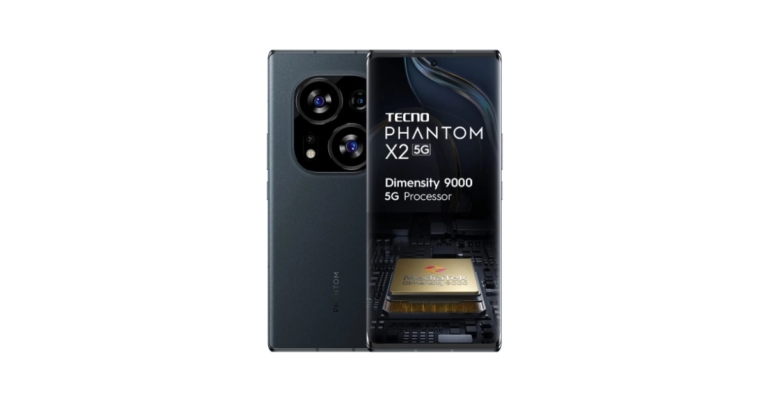
Tecno Phantom X2 5G has officially debuted in India today. The smartphone is powered by MediaTek Dimensity 9000 SoC. The device features a 120Hz curved AMOLED display and also has three rear cameras, the primary of which is a 64-megapixel sensor with optical image stabilisation (OIS).
In This Article
Tecno Phantom X2 5G price in India and availability details
The Tecno Phantom X2 5G has been launched in India with a price tag of Rs 39,999. But after the discount, the device will be available for Rs 39,999. In Moonlight Silver and Stardust Grey, Tecno has released the Phantom X2 5G.On Amazon, you can pre-order the device; it will be available for purchase on January 9th.The device recently made its debut in the UAE before going on sale in India. The Phantom X2 is priced at SAR 2699, or roughly Rs 59,200, in the UAE for the 8GB RAM and 256GB storage version.Also Read:Redmi Note 12 Pro 5G confirmed to launch in India on January 5
Tecno Phantom X2 5G specifications
The 6.8-inch full-HD+ curved AMOLED display on the Tecno Phantom X2 5G has a 360HZ touch sampling rate and a screen resolution of 1080 x 2400 pixels. The screen refreshes at a rate of 120Hz. Additionally, the display supports the P3 Wide colour gamut and has Corning Gorilla Glass Victus protection and TUV SUD certification. It is powered by the Android 12-based operating system HiOS 12. It is powered by the MediaTek Dimensity 9000 SoC, 8GB of RAM, and 256GB of inbuilt UFS3.1 storage.It also includes a vapour chamber cooling mechanism and a secure in-display fingerprint sensor. It is powered by a 5,160mAh battery with 45W fast charging capabilities. Additionally, the phone has a compass, a proximity sensor, a three-axis accelerometer, a six-axis gyroscope, and an ambient light sensor.Also Read:Redmi Note 11 Pro+ gets a price reduction of up to Rs 2,000The triple rear camera setup on the Tecno Phantom X2 5G consists of a 64-megapixel primary camera with optical image stabilisation (OIS), a 13-megapixel secondary sensor, and a 2-megapixel sensor. For selfies and video calls, a 32-megapixel camera is available.Bluetooth 5.3, GPS, OTG, NFC, and a USB Type-C connector are among the connectivity choices. Wi-Fi 2.4 GHz, 5 GHz, and Wi-Fi 6 are also available.
For the latest gadget and tech news, and gadget reviews, follow us on Twitter, Facebook and Instagram. For newest tech & gadget videos subscribe to our YouTube Channel. You can also stay up to date using the Gadget Bridge Android App. You can find the latest car and bike news here.
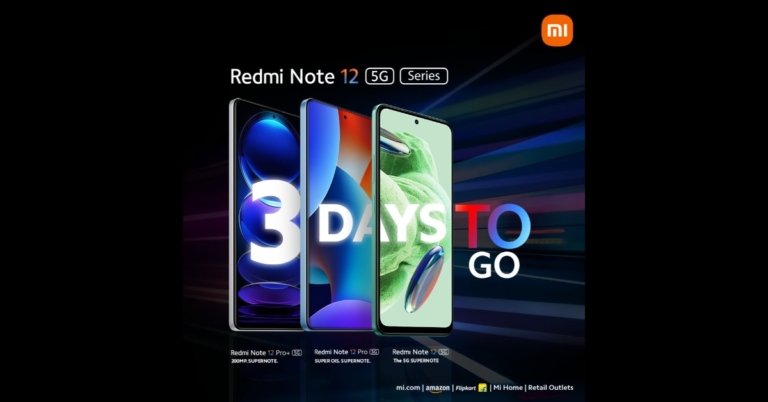
Xiaomi’s sub-brand Redmi has officially confirmed that the Redmi Note 12 Pro+ 5G will feature a 50MP Sony IMX766 sensor just ahead of its official India launch. It has been announced that the Redmi Note 12 5G series will debut on January 5 in India. Redmi’s newest Note series is anticipated to launch in India with the Redmi Note 12 5G, Redmi Note 12 Pro 5G, and Redmi Note 12 Pro+ 5G.The company took to Twitter to announce the 50-megapixel Sony IMX766 primary camera sensor and optical image stabilisation (OIS) capabilities of the Redmi Note 12 Pro 5G smartphone. Alvin Tse, the general manager of Xiaomi India, posted some sample photos taken with the Redmi Note 12 Pro 5G. Sumit Sonal, another business official and General Manager, Marketing, at Xiaomi India, also used Twitter to discuss the Redmi Note 12 Pro 5G smartphone’s photography features in-depth. This smartphone will be available in India in the coming days. Sumit Sonal also provided sample screenshots to support the company’s claims that the smartphone’s 50-megapixel Sony IMX766 primary camera sensor helps to collect more light, resulting in a more detailed and superior photo.Previously, it was anticipated that the Note 12 Pro+ would be sold in India under the name Xiaomi 12i HyperCharge.The Note 12 Pro+’s 6.67-inch full-HD OLED display has a refresh rate of up to 120Hz. The screen offers a 900 nits maximum brightness and a 240 Hz touch sampling rate. Dolby Vision and HDR10+ are supported by the monitor. An octa-core 6nm MediaTek Dimensity 1080 SoC, up to 12GB LPDDR4X RAM, and a Mali-G68 GPU are included in the Note 12 Pro+. It has MIUI 13 pre-installed, which is an Android 12 operating system.Three rear cameras on the Note 12 Pro+ have a 200-megapixel primary sensor with OIS. Also featured are an 8-megapixel ultra wide-angle camera and a 2-megapixel macro lens. For selfies, the phone has a 16-megapixel front-facing camera sensor.The 5,000mAh battery inside the brand-new Redmi Pro+ smartphone supports 120W quick charging.
For the latest gadget and tech news, and gadget reviews, follow us on Twitter, Facebook and Instagram. For newest tech & gadget videos subscribe to our YouTube Channel. You can also stay up to date using the Gadget Bridge Android App. You can find the latest car and bike news here.
Creating a new Gmail account is a pretty easy task and doesn’t take a lot of time. If you’re intent on using the Internet, you will need to create an email account at some point, and Gmail is one of the best email clients out there. In this article, we show you how to create a new Gmail account in 2023 and also bring you 5 hidden tips, tricks, and features that will make your Gmail experience considerably easier as a beginner. Read Also:Top 3 ways to get YouTube Premium membership for 4 months for free
In This Article
Here’s how you can create a Gmail account in 2023
Step 1: Go to www.mail.google.com and select ‘Create Account.’Step 2: Google will ask you who you are making the account for. If you are creating an account for your child, you can enable parental controls on the account. Step 3: Enter the first and last name along with a unique email account name and a password.Step 4: Click on ‘Next’ once all the details have been filled in.Step 5: Google will prompt you to link your phone number with your email account. Enter your number and fill in the OTP you receive to confirm it.Step 6: Fill in your birthdate and gender and hit ‘Next’.Step 7: Your Gmail account will be created. Go through the Terms & Conditions and then click on ‘I Agree’. Following that, you will be able to use your account.
Here are 5 hidden Gmail tips, tricks and features you should know about
These tips and tricks will greatly improve your Gmail experience. We’ve picked the best tricks that are easy to incorporate in everyday use and also help a great deal while using Gmail.
Increase the Undo time limit
Gmail gives you 5 seconds to take back an email you’ve just sent. For a lot of users, a 5-second window isn’t enough to make the call. Luckily, you can extend this window to 10, 20, or even 30 seconds. Simply click on the Settings icon at the top right corner of the screen and go to Settings>General. Scroll down to the ‘Undo Send’ section and select your desired time window.
Confidential Mode
Need to ensure that your email has an added layer of privacy? Click on the lock icon at the bottom of the mail toolbar. Using Gmail’s confidential mode, you can set an expiry period for the emails you send. All emails will be automatically deleted past the expiry date. All emails sent using confidential mode cannot be forwarded, copied, printed, or downloaded. On top of that, the recipient will need a passcode (sent through SMS or email) to access the confidential mail.
Use your email address to organise incoming mail
Everyone hates unnecessary newsletters from all the websites they signed up for using their Gmail account. Deleting those emails one by one can be really tiring. However, now you can filter all those emails at once. While signing up for a website or online service simply add a plus sign after your Gmail username and add the name of the service.For example, if you are signing up for Swiggy, fill in your username as username+swiggy@gmail.com. Since the service does not register anything after the plus sign, the emails will be directed to your Gmail account but they will contain the +swiggy identifier in your inbox. Now, you can easily search username+swiggy@gmail.com in your inbox to filter out all emails from Swiggy. These can be deleted all at once.This trick also comes in handy when you use one email address for work and social activities. You can classify every mail by its activity. Simply type in username+gym@gmail.com when signing up for a gym, username+news@gmail.com when subscribing to a news service, or username+socialmedia@gmail.com when making an account on a social media platform. This will make it easier to manage your inbox.
Mute email threads
If a particular email thread keeps pinging continuously and is becoming an annoyance, you can easily mute it by clicking on the ellipses and selecting More>Mute. This will move that email thread to the archives and you won’t be bothered by the constant updates.
Schedule emails
This tip will come in particularly handy for people that work in different time zones than their colleagues. Need to send an email in the early hours of the day? Schedule it instead. Simply click on the arrow button next to the send icon after composing the mail and select ‘Schedule Send’. Type in the date and time for when you want the email to be sent. Read Also: Redmi K60 likely to debut in other countries as Poco F5 Pro
One of the annoying aspects of owning a TWS is that they are really easy to misplace. The earbuds and the charging case can easily slide into places where it becomes extremely hard to find them. However, if you own the Google Pixel Buds Pro, there is an easy solution to this problem. In this article, we bring you 2 easy ways to find your misplaced or lost Google Pixel Buds Pro.Read Also: Top 3 ways to get YouTube Premium membership for 4 months for free
In This Article
Find your Pixel Buds Pro by ringing them
Step 1: Go to Settings and select Bluetooth.Step 2: Tap the Settings icon next to the paired Pixel Buds. If you don’t use a Pixel smartphone, download the Google Pixel Buds app.Step 3: Select ‘Find device’.Step 4: If your Pixel Buds are connected to your smartphone, you can ring them from this screen. Tap on ‘Ring left’ to ring the left earbud or ‘Right right’ to ring the right earbud. You can also choose to ring both earbuds at once. Step 5: The buds will ring for 20 seconds. Locate the source of the sound and you will find your Pixel Buds Pro. To stop the ringing sound, flip the lid open and shut. If your buds are outside the case, put them back in to stop the sound.
How to find the last paired location of your Pixel Buds Pro
If your Pixel Buds Pro aren’t connected to your smartphone and you’re worried you may have misplaced them outside your house, finding out the last paired location may help you figure out where you lost them. Here’s how you can do that.Step 1: Go to Settings and select Bluetooth.Step 2: Tap the Settings icon next to the paired Pixel Buds. If you don’t use a Pixel smartphone, download the Google Pixel Buds app.Step 3: Select ‘Find device’.Step 4: If your Pixel Buds Pro are not connected to your smartphone, tap on ‘Last known location’.Step 5: Select Pixel Buds Pro to find their last paired location. Read Also:Redmi K60 likely to debut in other countries as Poco F5 Pro
In India, 5G capability is still not available to Google Pixel phone owners. The company however did not provide any timeframe but according to a new Google update, the over-the-air (OTA) upgrade enabling 5G functionality on Pixel devices could begin to roll out by Q1 of 2023. Currently, the nation’s 5G network services are provided by Airtel and Jio. They began the launch in a few key locations before eventually expanding to additional cities all over the nation.Google confirmed that it will release the upgrade that will enable 5G connectivity for Pixel 6a, Pixel 7, and Pixel 7 Pro smartphones in India in the first quarter of 2023. The update that would allow 5G connectivity on the Pixel 6a, Pixel 7, and Pixel 7 Pro devices will be released between January 2023 and March 2023, the firm said, though it did not provide a more precise release date. The tech giant in a statement said, “We have been actively working with Indian carriers on the various requirements that go into provisioning 5G and look forward to rolling this out for Pixel 7, Pixel 7 Pro and Pixel 6a in Q1 2023.”Also Read:Pixel 7 Pro Review: Why you should get the phoneIt’s important to note that Google is one of the few smartphone businesses left that hasn’t launched support for 5G connection in India. It has been about three months since 5G services were launched in the nation by Airtel and Jio. The wait is still ongoing for Pixel users even though the majority of Android and iPhone handsets can now utilise Airtel and Jio 5G in the nation. However, just after the 5G service was launched Google announced that it was collaborating with Indian telecom service providers to release an upgrade that would enable 5G connectivity on its Pixel handsets soon.Also Read:Google Pixel 7 review: Is this an all-rounder phone?On their 5G-enabled smartphones, brands like Samsung, Oppo, Vivo and OnePlus have already made 5G networking capabilities available in India. More recently, Apple released an over-the-air (OTA) update for the iPhone 12 series, iPhone 13 series, iPhone 14 series, and the iPhone SE 2022 that enabled 5G connectivity.
For the latest gadget and tech news, and gadget reviews, follow us on Twitter, Facebook and Instagram. For newest tech & gadget videos subscribe to our YouTube Channel. You can also stay up to date using the Gadget Bridge Android App. You can find the latest car and bike news here.
An ‘Instagram Collaboration’ is a great way for two profiles to share a post together with their followers. Once two people collaborate on Instagram, the post shows up on their followers’ feeds with both their usernames in the header. This is similar to tagging, with the only difference being that the post is accessible to both sets of followers. As interesting as this feature may sound, it may be a bit tricky to pull off at times. In this article, we bring you the top 7 easy methods to fix the ‘can’t accept Instagram collab invite’ issue.Read Also: Top 3 ways to get YouTube Premium membership for 4 months for free
In This Article
Make your Instagram account public
Private accounts can only collaborate with profiles that follow them. If your profile is private and the collaborator does not follow you, make your profile public. Here’s how.
Step 1:Launch the Instagram app and tap your profile picture at the bottom right corner of the screen.
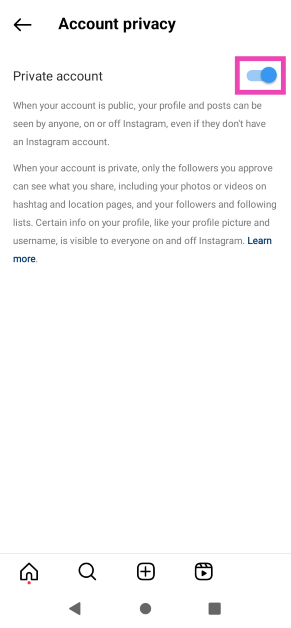
Step 2: Hit the hamburger menu at the top right corner of the screen and select Account privacy.
Step 3: Turn off the toggle switch for Private account.
Change tagging settings
Step 1:Launch the Instagram app and tap your profile picture at the bottom right corner of the screen.
Step 2: Hit the hamburger menu at the top right corner of the screen and select Tags and mentions.
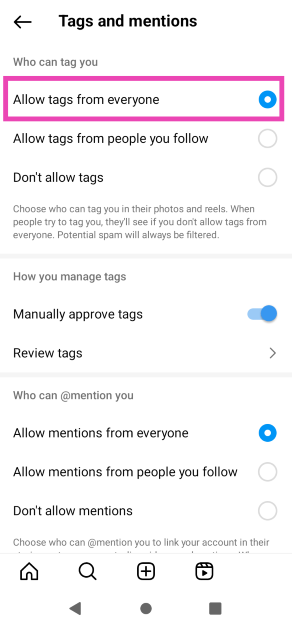
Step 3: Select Allow tags from everyone.
Clear app cache
If you haven’t cleared Instagram’s app cache in a while, chances are that a corrupted temporary file may be keeping the essential functions from working correctly. Here’s how you can quickly clear the app cache. Step 1: Go to Settings and select Apps.Step 2: Scroll down and select Instagram.Step 3: Select Storage.Step 4: Tap on Clear cache.
Find the Collab invite on the activity page
If you can’t find the collab invite in your DMs, look for it on the activity page. Your activity page is also where you receive the notifications. Launch the Instagram app and tap on the heart icon at the bottom menu. Browse your notifications for the collab invite. Once you see the notification, tap on it and select the ‘Review’ option. In the following dialogue box, select ‘Accept’. If this method doesn’t work either, make sure you are following the person who sent you the collab invite.
Log out and log back in
If the issue is account-related, logging out of Instagram and then logging back in will fix it. Go to your profile, hit the hamburger menu, scroll down and select the logout option. Once you’re logged out, use your account credentials to log back in.
Update the Instagram app
Since collaborations on Instagram are a recent feature, the app version you are using may not support it. Go to the Google Play Store and search for the Instagram app to see if there is any pending update. Tap on the ‘Update’ icon to install the latest version of Instagram.
Use Instagram on a desktop or another phone to accept the collab invite
If nothing works, chances are the issue lies with your smartphone and not Instagram. You can either use the desktop version of Instagram on a web browser or simply log in to the app on another phone. Once you’ve accepted the collab invite, you can log out and go back to using Instagram on your smartphone.
Frequently Asked Questions (FAQs)
Why am I not able to collaborate with other accounts on Instagram?
If your account is set to private, you cannot collaborate with accounts that do not follow you on Instagram.
How do I make my Instagram account public?
Go to your profile, hit the hamburger menu, select ‘Account privacy’, and turn off the toggle switch for ‘Private profile’.
These are the top 4 easy methods to fix the ‘can’t accept Instagram collab invite’ issue on your smartphone. If none of the above fixes work for you, it may be because of a bug that will likely get patched in the next update. In this case, go to Settings from your profile and report the issue to Instagram.
According to Elon Musk, Twitter users shall be allowed to side-swipe through messages, trends, topics, lists, and so much more. He has also mentioned that the platform will likely see numerous significant UI updates in January. Twitter has unveiled a new View Count tool for tweets that allows users to view a tweet’s exact view count in a manner akin to how it displays on videos. All customers can now enjoy the new feature that Musk promised to deliver earlier this month. Additionally, Twitter Blue subscribers now have the option to upload movies that are up to 60 minutes long. The video’s quality after release will likewise change due to the new capacity.In a post, Elon Musk said that the microblogging platform Twitter will get a new side swipe functionality in January. “New Twitter navigation coming in Jan that allows swiping to side to switch between recommended & followed tweets, trends, topics, etc. Until then, tap stars icon on upper right of home screen to switch,” he tweeted.According to this feature, users will be able to quickly access lists, trends, and lists of recommended and followed tweets.Additionally, Musk claims that Twitter AI continues to advance as several UI updates are coming from January. His Tweet reads, “That and several major UI improvements coming in Jan.”Also Read:The global rollout of the Twitter View Count for Tweets has begunThe new View Count feature will allow users to see the actual view count for their tweets. Elon Musk tweeted to announce the launch of the feature. According to Elon Musk’s tweet, users will be able to use the View Count tool to determine how many times a tweet has been viewed. Now, users may access the feature through web, iOS, and Android apps. Not just the account owner, but everyone can see how many times a tweet has been viewed. The feature is currently supported by apps for iOS and Android. It is also accessible on the web. Currently, only recently posted tweets will show the view count; older tweets will not.A 60-minute video in 1080p definition will be made available for sharing online for Twitter Blue subscribers. Through its Twitter Blue page, the microblogging site made the change public. Members of Twitter Blue were previously limited to uploading movies that were up to 10 minutes long and 512MB in size. According to the business, customers can now submit videos that are 60 minutes long. However, the video shouldn’t be larger than 2GB. Twitter mobile apps for iOS and Android do not have this capability.
For the latest gadget and tech news, and gadget reviews, follow us on Twitter, Facebook and Instagram. For newest tech & gadget videos subscribe to our YouTube Channel. You can also stay up to date using the Gadget Bridge Android App. You can find the latest car and bike news here.
Garena Free Fire is a battle royale game with regular awards and tournaments to keep players interested. If you play Garena Free Fire, you should be aware of the redeem codes that are released on a daily basis. However, because the battle royale game is banned in India, players from other countries can use the Free Fire Redeem codes daily. If you’re unfamiliar with the Garena Free Fire redeem codes or don’t know how to get them, we’ve put together a step-by-step guide to help you redeem them. Check out Garena Free Fire Redeem Codes for 2 January 2023.The Free Fire redeem codes are a great way to get free stuff. These are 12-digit codes that contain alphabets and numbers, as well as an expiration date and time. Because the Garena FF redeem codes cannot be used more than once, you should hurry to the redemption page to claim your free reward before someone else does. To get a free reward, all you have to do is go to reward.ff.garena.com/en, which is the official redemption page. Also, keep an eye on this space for daily updates on Garena Free Fire redemption codes and rewards.
In This Article
Garena Free Fire Redeem Codes Today 2 January 2023
FF1164XNJZ2V
FF11HHGCGK3B
W0JJAFV3TU5E
FF10617KGUF9
B6IYCTNH4PV3
FF11WFNPP956
SARG886AV5GR
FF11DAKX4WHV
MCPTFNXZF4TA
8F3QZKNTLWBZ
FF10GCGXRNHY
ZRJAPH294KV5
Y6ACLK7KUD1N
YXY3EGTLHGJX
FF11NJN5YS3E
How to Get Free Fire Redeem Codes for Garena on 2 January 2023?
2 January 2023 Amazon Quiz has gone live. Customers from different parts of the country are participating in the daily quiz. The quiz begins from 12 AM to 11:59 PM. Those participating in the quiz can win exciting prizes by answering all the questions correctly. Today participants have a chance to win a Rs 500 Amazon Pay Balance.Amazon quiz brings an opportunity for its customers to win Amazon Pay Balance ranging from Rs 1,000 to Rs 50,000. The Quiz can be played from 12 AM to 11:59 PM. The e-commerce platform brings a fresh quiz on a daily basis which consists of five questions related to general knowledge and current affairs. The participants need to answer all the questions correctly and their names will be selected for a lucky draw. The winner will be announced at the end of the month.One wrong answer could eliminate you from the quiz. If you manage to answer all the questions correctly you can stand a chance to win a Rs 500 Amazon Pay Balance today. Only app users are eligible to participate in the Quiz. Check Out 2 January 2023 Amazon Quiz Answers.Amazon Quiz Today Prize – Rs 500 Amazon Pay BalanceQuiz Date – 2 January 2023Daily Timing – 12 AM to 11:59 PMWinner Announcement – Today 12 PM
In This Article
Amazon Quiz Answers Today 2 January 2023
Question 1: What is the fastest land animal?
Answer: CheetahQuestion 2: February gets its name from the word ‘februa’, from which language was it derived from?
Answer: Latin
Question 3: The theme for World Wildlife Day 2022 was ‘Recovering key species for _____ restoration’. (Fill in the blank)
Answer: EcosystemQuestion 4: Who successfully built and flew the world’s first Aeroplane?Answer: The Wright BrothersQuestion 5: Where are the Giza Pyramids located in?Answer: Egypt
How To Play Amazon Quiz
Only app users are eligible to play the Amazon quiz every morning from 12 AM to 11:59 PM. The quiz is not available on the desktop. For those who are unaware of how to play the Amazon quiz below are the steps, you can follow to take the quiz.
Firstly download the Amazon app from Google Play Store or App Store
Now fill in the required information through the Sign Up option.
You need to log in to the Amazon app and scroll down on the home screen to find the Amazon Quiz banner.
Tap on the Amazon Quiz banner and tap on the Start button to start the Quiz.
Now you will get 5 questions and you need to answer them correctly. One wrong answer will eliminate you from the Quiz.
After answering all the questions correctly you are now eligible for a Lucky Draw.
The winner’s name will be announced today at 12 PM.
Many users may not be familiar with this but your iPhone lets you see several insights related to its battery. If you are buying a used or refurbished iPhone, it is a good idea to check its battery health before you pay for it. Conversely, having a good battery capacity increases the resale value of your iPhone. In this article, we show you how to check your iPhone’s battery health and suggest a few tips maximise the battery lifespan.Read Also: Spotify launched New Year’s Hub feature, making party music easily accessible
In This Article
Here’s how you can check your iPhone’s battery health
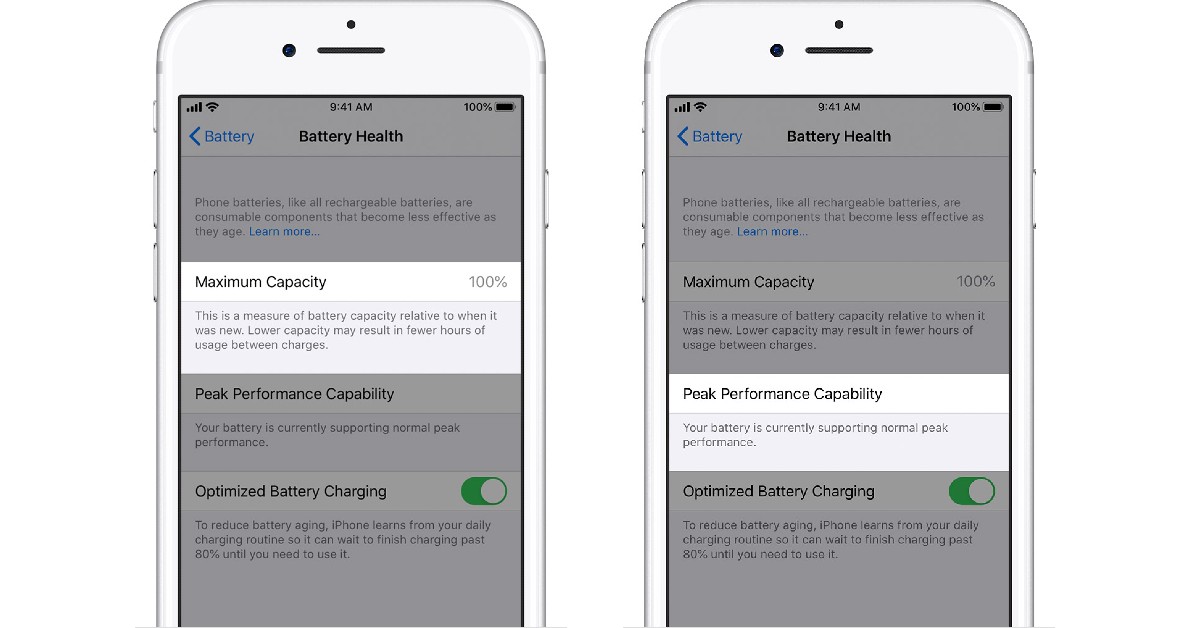
Step 1: Go to Settings and tap on Battery.Step 2: Select ‘Battery Health’.This is where you can have a look at your iPhone’s battery insights. ‘Maximum capacity’ lets you know what the capacity of your battery is like now compared to when it was new. A higher percentage means it has not deteriorated much. However, with time, the maximum capacity will drop down until a need for battery replacement arises. Under regular conditions, a battery is designed to retain up to 80% of its original capacity after 500 charge cycles. If the battery is improperly installed or your iPhone does not recognise a battery part, it will not display the battery health stats. If your battery capacity has dropped down so low that it needs replacement, instead of maximum capacity, you will be shown a message that your battery health has degraded.‘Peak Performance Capability’ lets you know if your battery is still able to deliver a performance to sustain all functions of your iPhone at its peak levels. Over a period of time, the battery may struggle to sustain the necessary levels, which is when your iPhone may experience shutdowns. Once your iPhone experiences an unwarranted shutdown it applies ‘Performance management’ which keeps it from working at the peak level to reduce the stress on the battery. You can turn this off by tapping on ‘Disable’.
Here are some tips to maximise your iPhone’s battery lifespan
There are a few practices you can incorporate into your everyday usage that will greatly improve your battery’s lifespan. Follow these tips to maximise your iPhone’s battery lifespan
Turn off unnecessary background functions
If you are not actively using a function running in the background, turn it off. Background functions drain your battery quicker, which means the frequency of charge cycles will increase over a period of time. Turn off your phone’s Bluetooth, GPS, WiFi, and push notifications (for certain apps) when they are not in use.
Do not overcharge your phone
If you keep your phone on charge even when it hits 100% charge, it may negatively affect the battery health. Excessive current flowing into the battery when it’s fully charged can damage the cells. Make sure you don’t leave your phone on charge overnight.
Only charge your phone when it’s low on charge
Charging your phone even when it has a significant amount of charge left will increase the frequency of charge cycles. As mentioned earlier, the maximum capacity of the battery drops down below 80% after the first 500 charge cycles. So the idea is to limit the charge cycle as much as you can. Charging your phone even when it has enough charge left can increase the number of charge cycles. Only charge your phone once the battery drops down to 20%.
Use official Apple chargers
Official Apple chargers pass quality control checks and are designed for your iPhone. Chargers from other manufacturers may not be optimised for your device, and while they may still charge your iPhone, it may take a toll on the battery in the long run. It is a good idea to use only Apple-certified accessories for your iPhone.Read Also: WhatsApp is testing select multiple chats feature in Desktop beta
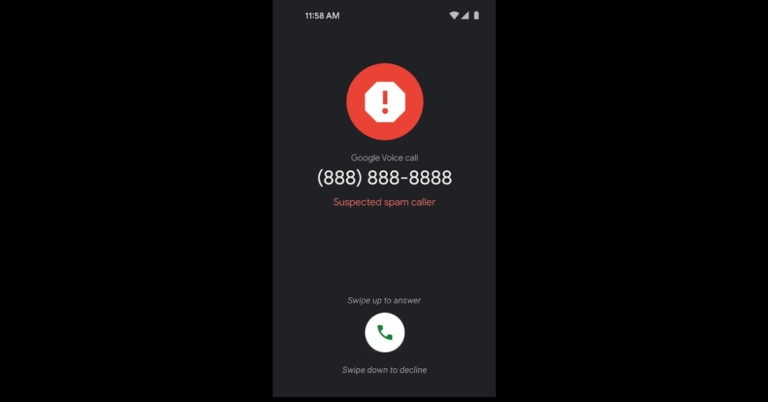
Now that a new version has been released, Google Voice will make it simpler for users to avoid spam calls. All calls that Google Voice suspects to be spam will be marked with the label “suspected spam caller” in order to help protect you against telemarketers and other potentially dangerous frauds. Both the caller screen and the call history will show a number’s spam label.The Google Voice feature now includes an alert that informs users by highlighting “Suspected spam caller” labels on calls that might sound suspicious. Simply flagging a call as not spam enables the user to remove a number from the spam list. The improved secure calling functionality supports Google Voice‘s most recent network switching for Wi-Fi and cellular services.“To help protect you from unwanted calls and potentially harmful scams, Google Voice shows a “suspected spam caller” label on all calls that Google believes to be spam. Google makes this determination using the same advanced artificial intelligence that identifies billions of spam calls each month across Google’s calling ecosystem,” the company via a blog post said.Also Read:Redmi K60 likely to debut in other countries as Poco F5 ProIn addition to the user’s call history, the new labels are visible on the incoming call screen. One option for users is to confirm a suspected spam call, which will put all subsequent calls from that number in the spam folder and send them directly to voicemail. Mark a suspected spam call as non spam so that the number’s label is never displayed again.When the Voice spam filter setting (Settings > Security > Filter spam) is OFF, suspected spam labelling automatically appears. All calls that Google identifies as spam are immediately sent to voicemail when spam filtering is ON, and the call entry is placed in the spam folder.According to Google, the gradual distribution of the functionality began on December 29. It could take up to 15 days to appear on Google Voice.
For the latest gadget and tech news, and gadget reviews, follow us on Twitter, Facebook and Instagram. For newest tech & gadget videos subscribe to our YouTube Channel. You can also stay up to date using the Gadget Bridge Android App. You can find the latest car and bike news here.
YouTube’s premium services have been around for a few years by the name of YouTube Red, but the video platform rebranded it to ‘YouTube Premium’ last year. With YouTube Premium, you can enjoy an adless experience on YouTube and also get access to exclusive content on the platform. On top of that, you also get free access to YouTube Music and YouTube Kids with exclusive features like unlimited downloads and the ability to minimise the app without pausing the video. In this article, we show you the top 4 ways to get a YouTube Premium membership for 4 months for free.Read Also: WhatsApp is testing select multiple chats feature in Desktop beta
In This Article
Here’s how you can get a 4 month YouTube Premium membership for free
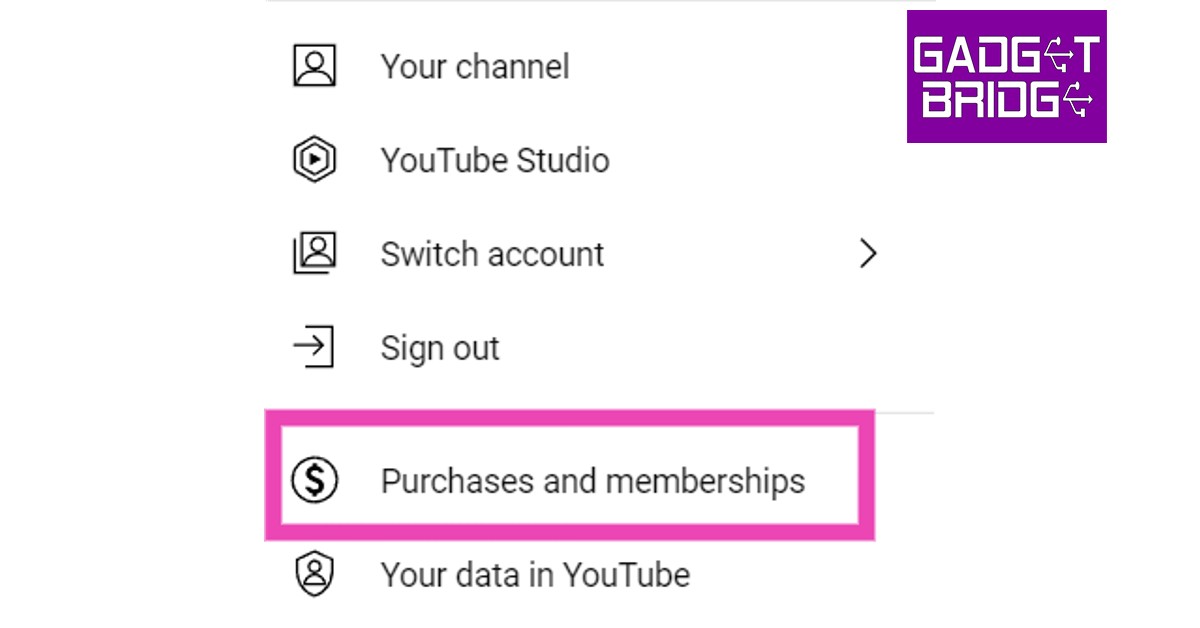
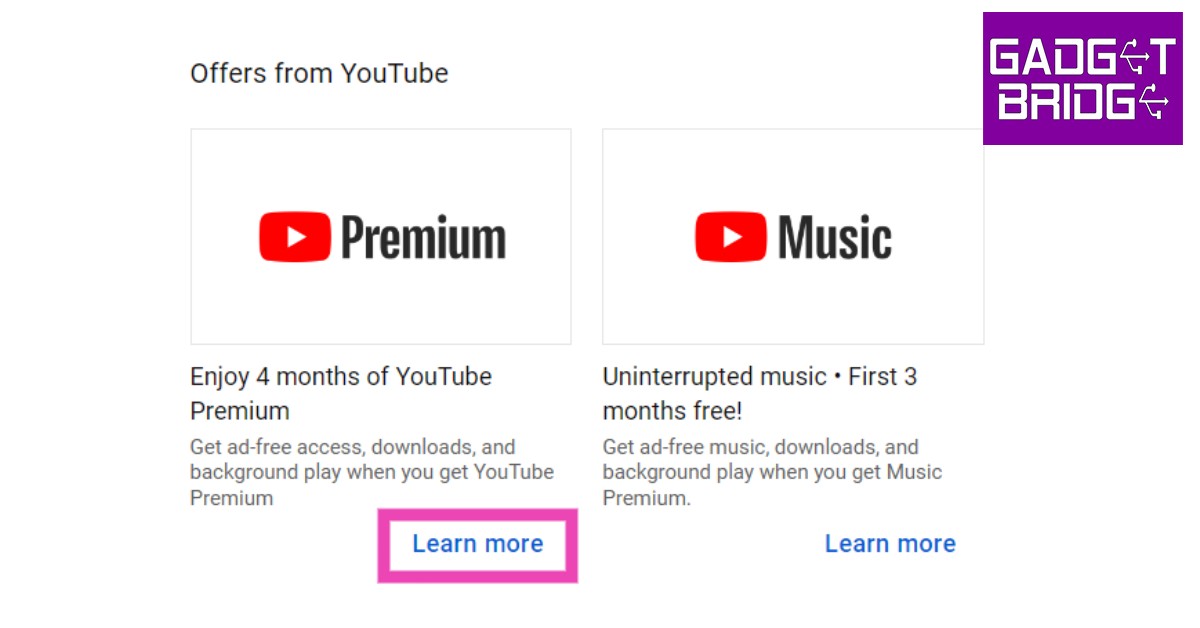
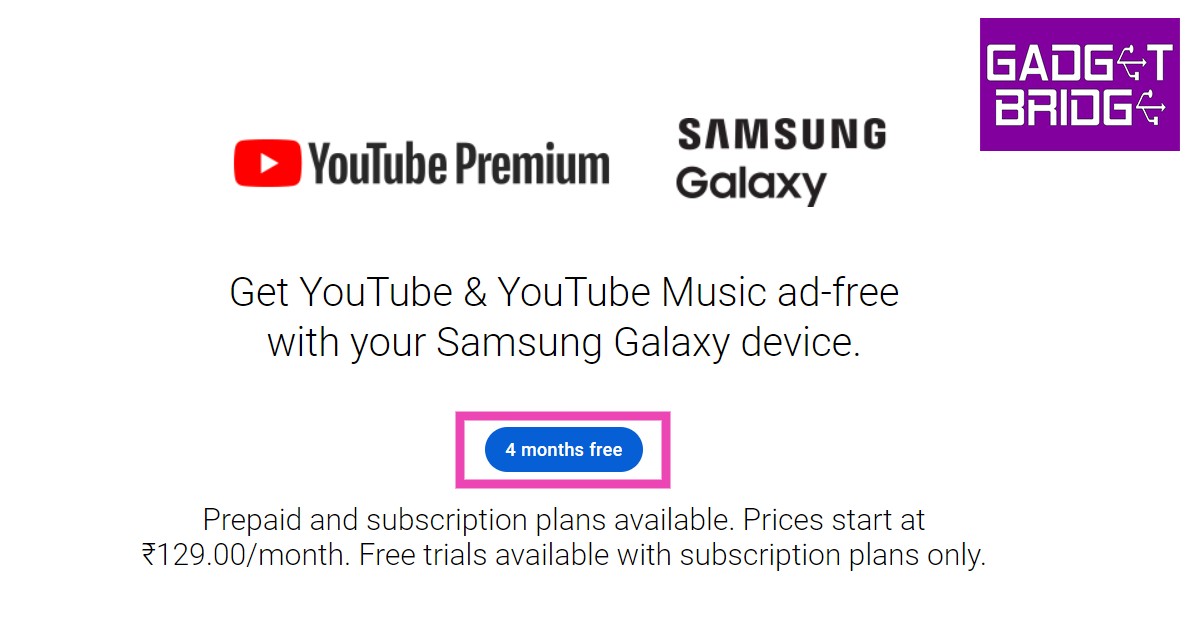
Step 1: Go to the YouTube homepage and click on your profile icon at the top right corner of the screen.Step 2: Select ‘Purchases and Memberships’.Step 3: Click on ‘Enjoy 4 months of YouTube Premium’.Step 4: Click on ‘4 months free’.Step 5: Scroll down and click on ‘4 months free’ again under the ‘Subscription Plan’ segment.Step 6: Enter your card details and select ‘Buy’. While you won’t be charged any money, the billing will start after the 4-month trial and will auto-renew every month.
Here’s how you can get a free YouTube Premium membership on Android
Step 1: Launch the YouTube app on your Android smartphone.Step 2: Tap on your profile icon at the top right corner of the screen.Step 3: Select ‘Get YouTube Premium’.Step 4: Tap on ‘4 months free’.Step 5: Tap on ‘4 months free’ in the ‘Monthly Subscription’ segment.Step 6: You can subscribe using UPI or a credit/debit card. To change payment method, tap on the Online Wallet field. To verify your payment a sum of Rs 2 will be charged to your account, which will be refunded in 10 days.Step 7: Select ‘Subscribe’.
Get a free 6-month YouTube Premium membership using Flipkart Plus
If you are a Flipkart Plus subscriber, you can use 150 ‘super coins’ to get a free YouTube Premium membership for 6 months. First, you need to log in to Flipkart using your Flipkart Plus account and go to the ‘Flipkart Zone’. Go to the ‘Claim Exclusive Reward’ page and select the YouTube Premium reward. You will be able to get a YouTube Premium membership for 6 months for free.
Get YouTube Premium for free using Google Play Balance
Instead of using traditional payment methods for a YouTube Premium subscription, you can use your Google Play balance. How do you get free Google Play balance, you ask? The answer is Google Opinion Rewards. By filling out short surveys, polls, and reviews, you can get credited with Google Play balance. It may take some time to accumulate enough balance for a Premium membership but you will eventually get there. You can also exchange your Google Play points (accrued by making transactions using Google Play) for Play Store credit.
Frequently Asked Questions (FAQs)
How do I get YouTube Premium for free?
If you’re buying a YouTube Premium membership for the first time, you get a free trial period of 4 months. You can also get a Premium subscription for free by using your Google Play balance or Flipkart Supercoins.
How much does a YouTube Premium subscription cost in India?
Here are all the individual subscription plans for YouTube Premium in India.
12 months – Rs 1,299
3 months – Rs 399
1 month – Rs 199
Is YouTube Premium worth it?
If you are a regular YouTube user who does not like watching multiple ads before every video, a Premium subscription is well worth its value. Not only do you get an adless experience on the platform, but you also get to download videos for offline viewing and play them in the background while carrying out other tasks on your phone. You also get a free subscription to YouTube Music with a Premium membership.Read Also: iQoo Neo 7 Racing Edition with Snapdragon 8+ Gen 1 SoC launched
Conclusion
This is how you can get a YouTube Premium membership for 4 months for free. Once you subscribe to a free membership, you will be billed for the plan once the trial period ends. YouTube will send a reminder 7 days before the trial period ends. If you found this article helpful, let us know in the comments!
The Redmi K60 series was recently introduced in China. The lineup comprises the Redmi K60, Redmi K60e, and Redmi K60 Pro. The series’ launch date in India has not yet been disclosed by the firm. A rumour claims that the Redmi K60 will make its debut as the Poco F5 Pro. The device has a 6.67-inch AMOLED screen with a 2K resolution and 120Hz refresh rate. Snapdragon 8+ Gen 1 SoC from Qualcomm power the Redmi K60,The Redmi K60e would first be exclusive to China, according to CEO Kacper Skrzypek. He made an allusion to the Redmi K60 being renamed as the Poco F5 Pro. For those who are unaware Redmi K40s and Redmi K50 Gaming were both released with different branding namely Poco F4 and Poco F4 GT respectively.
#POCOX55G, codenamed "moonstone", shares ROM with Global #RedmiNote12 variant. It doesn't mean they use same CPU; AFAIK, POCO device will use Snapdragon 695 instead of 4 Gen 1. Both CPUs belong to the same Qualcomm platform, so making one ROM for both CPUs is possible.
Redmi hasn’t disclosed whether the phone would be accessible worldwide.The Redmi K60’s price for the 8GB RAM and 128GB storage option is CNY 2,499, or roughly Rs. 30,000. The 16GB RAM with 512GB storage model costs CNY 3,599, or around Rs 43,000. It is available in the colours Cyan, Blue, White, and Black.
Redmi K60 specifications
The Redmi K60’s 6.67-inch 2K AMOLED screen features a 1,440 x 3,200-pixel resolution. The display also boasts a maximum brightness of 1,400 nits and supports HDR10+. The display can support refresh rates of up to 120Hz and touch sampling rates of up to 480Hz. This Redmi smartphone runs MIUI 14, which is based on Android 13. The Snapdragon 8+ Gen 1 SoC powers this smartphone.Also Read:Redmi Note 12 Pro Speed Edition powered by Snapdragon 778G SoC launchedThe Redmi K60’s 5,500mAh battery is capable of 67W cable fast charging as well as 30W wireless fast charging.A triple rear camera setup with a 64-megapixel primary sensor and OIS is featured on the Redmi K60. It also includes an 8-megapixel ultra-wide angle lens and a 2-megapixel macro sensor. A 16-megapixel front-facing selfie camera is also included with the gadget. Using the back cameras, up to 8K videos can be recorded at 24 frames per second. The selfie camera, however, shoots 60 frames per second full-HD movies.
For the latest gadget and tech news, and gadget reviews, follow us on Twitter, Facebook and Instagram. For newest tech & gadget videos subscribe to our YouTube Channel. You can also stay up to date using the Gadget Bridge Android App. You can find the latest car and bike news here.
Garena Free Fire is a battle royale game with regular awards and tournaments to keep players interested. If you play Garena Free Fire, you should be aware of the redeem codes that are released on a daily basis. However, because the battle royale game is banned in India, players from other countries can use the Free Fire Redeem codes daily. If you’re unfamiliar with the Garena Free Fire redeem codes or don’t know how to get them, we’ve put together a step-by-step guide to help you redeem them. Check out Garena Free Fire Redeem Codes for December 31.The Free Fire redeem codes are a great way to get free stuff. These are 12-digit codes that contain alphabets and numbers, as well as an expiration date and time. Because the Garena FF redeem codes cannot be used more than once, you should hurry to the redemption page to claim your free reward before someone else does. To get a free reward, all you have to do is go to reward.ff.garena.com/en, which is the official redemption page. Also, keep an eye on this space for daily updates on Garena Free Fire redemption codes and rewards.
In This Article
Garena Free Fire Redeem Codes Today 31 December 2022
FFBJIYUSA3QF45
GENRATEFFREWRL0
FKJNHBGVCXAQ1
F34ERHYU72022
FOO0P8OITKUJYH
FT6EGDDAQ1234
F5T6YHGVFBGHJ
FLO0PIJIOLYITU
HYHERTDO9Y8UY
FFTHFGMAX2023
How to Get Free Fire Redeem Codes for Garena on December 31?
31 December 2022 Amazon Quiz has gone live on its platform. The quiz timings are 12 AM to 11:59 PM. The Amazon App users can participate in the quiz daily and all they have to do is submit correct answers to the questions asked on the e-commerce platform. Today’s participants can get a chance to win Rs 1,250 Amazon Pay Balance.By participating in the Amazon Quiz the participants can win Amazon Pay Balance ranging from Rs 1,000 to Rs 50,000 every day while sitting at home. To win the participants must answer five questions correctly that are based on current events and general knowledge. One wrong answer can eliminate you from the quiz. The results will be announced at the end of the month. Today’s question will let you win Rs 1,250 Amazon Pay Balance. Check below for today’s Amazon quiz answers.Amazon Quiz Today Prize – Rs 1,250 Amazon Pay BalanceQuiz Date – 31 December 2022Daily Timing – 12 AM to 11:59 PMWinner Announcement – Today 12 PM
In This Article
Amazon Quiz Answers Today 31 December 2022
Question 1: Which star shines in the day and provides light?
Answer: SunQuestion 2: Which one is a fur-bearing animal?
Answer: CatQuestion 3: What is the opposite of ‘Top’?Answer: Bottom
Question 4: Name the smallest breed of the dog
Answer: ChihuahuaQuestion 5: How many sides are there in heptagon?
Answer: 7
How To Play Amazon Quiz
Only app users are eligible to play the Amazon quiz every morning from 12 AM to 11:59 PM. The quiz is not available on the desktop. For those who are unaware of how to play the Amazon quiz below are the steps, you can follow to take the quiz.
Firstly download the Amazon app from Google Play Store or App Store
Now fill in the required information through the Sign Up option.
You need to log in to the Amazon app and scroll down on the home screen to find the Amazon Quiz banner.
Tap on the Amazon Quiz banner and tap on the Start button to start the Quiz.
Now you will get 5 questions and you need to answer them correctly. One wrong answer will eliminate you from the Quiz.
After answering all the questions correctly you are now eligible for a Lucky Draw.
The winner’s name will be announced today at 12 PM.
With a brand-new function that will be quite useful throughout the onslaught of celebrations ahead, Spotify is getting its subscribers ready for the new year. The Music streaming app has announced New Year’s Hub a single location where customers can get their preferred party music that is incorporated in a number of playlists.The news of the new function was announced by Spotify on its official blog. Spotify has a tonne of music in its recently established New Year’s Hub to get your celebration started. You can find timeless party playlists as well as unique takeovers from performers like Charli XCX, Rita Ora, N-Dubz, and Madame Canada, Céline Dion, at this one-stop shop. And Spotify has featured playlists to match your mood, whether you prefer a low-key evening or a heart-pounding dance party. Additionally, starting on January 1, you can access content on Home that will assist you in making resolutions.Also Read:Jio True 5G is now available in Indore and Bhopal, with updates to more cities coming in January 2023
“So that’s what Spotify is doing . . . but how do Spotify listeners like to ring in the new year? The best way to predict the future is to look at past results, so we checked the data archives to see how the world was celebrating in December 2021, the company via Blog Post said.
Through a previously announced beta version, Spotify first provided users with access to the Android 13 media player capability. With Spotify version 8.7.92.521, which is available for download from the Play Store, support for the media player has now reached the stable channel.
Compared to Android 12 devices, users using Android 13 will notice that the stop-and-play icons are square-shaped, curved, and more accessible. The navigation controls for the next and previous tracks are located on each side of the seek bar, which is located at the bottom. The new media player now comes with shuffle and heart buttons.
For the latest gadget and tech news, and gadget reviews, follow us on Twitter, Facebook and Instagram. For newest tech & gadget videos subscribe to our YouTube Channel. You can also stay up to date using the Gadget Bridge Android App. You can find the latest car and bike news here.
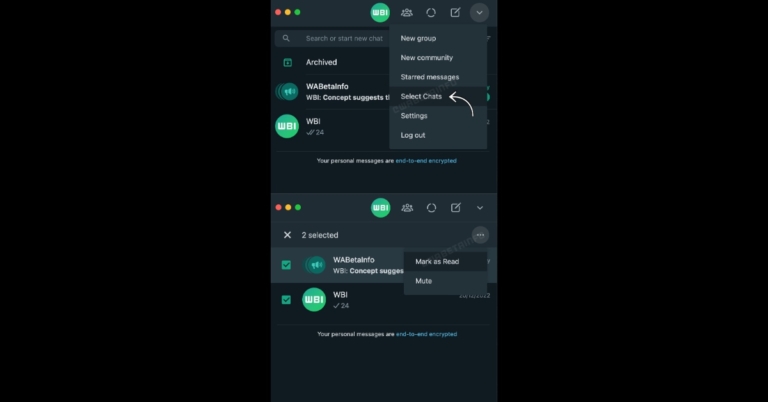
According to reports, WhatsApp is developing a new feature that would enable users to control their chats using the desktop app. WhatsApp is beta-testing a feature that will enable users to pick multiple chats at once and carry out specific operations while utilising the web-based interface.According to WABetaInfo in a future update to the WhatsApp Desktop beta, WhatsApp intends to enhance chat list management by adding a new feature that allows users to pick numerous talks. According to a report WhatsApp is now testing a feature that will allow users to pick many chats at once and carry out specific operations while using the web version of the programme. Currently, only the Android and iOS apps of WhatsApp allow users to pick several chats. Multiple chats can be chosen, marked as read or unread, archived, or deleted with a single command.Also Read:Jio True 5G is now available in Indore and Bhopal, with updates to more cities coming in January 2023This screenshot demonstrates the new “Select Chats” function that will be available when this feature is made available. You can mute a conversation or label them all as read or unread when you choose a particular conversation. If you use WhatsApp Desktop, you’ve surely seen that doing those tasks for several conversations may be rather difficult. However, WhatsApp hopes to make it simpler in the future with the help of this functionality.You can report messages and contacts to WhatsApp if you believe they violate their Terms of Service. The last five messages in the conversation are transferred to WhatsApp when you report a contact, but you can also select to report only certain texts. What can you do, though, if something communicated via status updates is against their Terms of Service? Currently, WhatsApp is working on a fix for this issue by supporting a status report feature for a subsequent edition of WhatsApp Desktop beta.A new menu within the status section will have an option for reporting status updates. With the help of this feature, you will finally be able to alert the moderation staff if you come across any questionable status updates that might be in violation of their Terms of Service. The status update will be sent to WhatsApp for moderation purposes so they can determine whether there has been a violation, as is the case with reporting messages.
For the latest gadget and tech news, and gadget reviews, follow us on Twitter, Facebook and Instagram. For newest tech & gadget videos subscribe to our YouTube Channel. You can also stay up to date using the Gadget Bridge Android App. You can find the latest car and bike news here.
The debut of Reliance Jio’s 5G services in Madhya Pradesh’s Indore and Bhopal was announced on Thursday. Reliance Jio has now introduced 5G services in these cities, making it the first and exclusive operator in the state to do so.Commenting on the launch, a Jio Spokesperson said that “We are proud to rollout 5G in Indore and Bhopal ahead of the Pravasi Bharatiya Divas and the Global Investor Summit in January 2023. Jio True 5G is the only 5G service to be available in these cities and we honoured our commitment to the Hon’ble CM regarding the launch of True 5G services in the state.”Jio users in Indore and Bhopal will be welcomed to take advantage of the Jio Welcome Offer, which offers unlimited data at speeds of up to 1 Gbps+ at no additional cost.
Also Read: Snapdragon 8cx Gen 3-equipped Samsung Galaxy Book2 Pro 360 launchedAccording to the declaration made by the Honourable Chief Minister Shri. Shivraj Singh Chouhan at Shri Mahakaal Mahalok Ujjain on December 14, 2022, Jio True 5G would be launched. Jio would roll out its 5G services in Indore and Bhopal by the end of 2022, the Hon. CM stated in his speech. The introduction of Jio True 5G demonstrates Jio’s dedication and supports technological preparation for the upcoming 17th Pravasi Bharatiya Divas as well as the Global Investor Summit, both of which will take place in Indore in January 2023.The business claims that Bhopal and Indore are significant tourists, educational, and industrial growth centres in MP. Consumers will receive the best telecommunications network with the rollout of Jio’s True 5G services, as well as limitless growth potential in e-governance, education, automation, artificial intelligence, gaming, healthcare, agriculture, IT, and SMEs.Jio will roll out its Jio True 5G services by January 2023 in more significant cities including Jabalpur and Gwalior. By the end of December 2023, every town and taluka in Madhya Pradesh would be able to use Jio True 5G services.“We are grateful to the Hon’ble CM Shri Shivraj Singh Chouhan and the State Government, MP administration team for their continuous support in our quest to digitize the region. Jio continues to be the most loved telecom brand in the state and enjoys almost two-thirds of data traffic and almost half the customer market share in the region”, the company added.
For the latest gadget and tech news, and gadget reviews, follow us on Twitter, Facebook and Instagram. For newest tech & gadget videos subscribe to our YouTube Channel. You can also stay up to date using the Gadget Bridge Android App. You can find the latest car and bike news here.
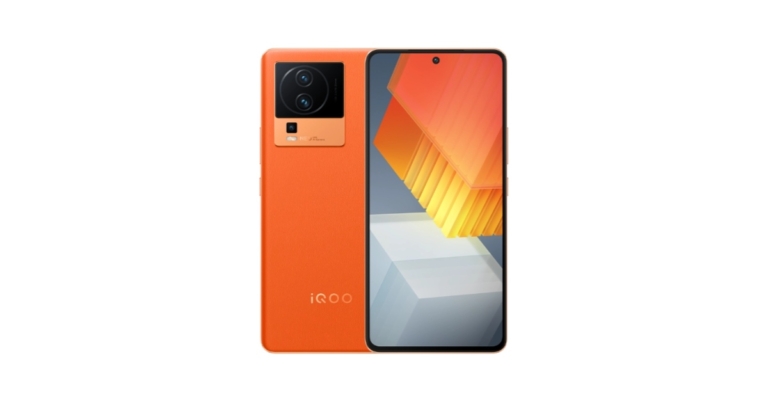
In China, a Vivo sub-brand unveiled the iQoo Neo 7 Racing Edition. The new phone is powered by a Snapdragon 8+ Gen 1 SoC. The hole-punch display of the iQoo Neo 7 Racing Edition has a refresh rate of up to 120Hz. It includes three back cameras, the primary one of which is a 50-megapixel sensor. The 5,000mAh battery supports 120W flash charging.
In This Article
iQoo Neo 7 Racing Edition price
The starting pricing for the 8GB RAM with 256GB storage model of the iQoo Neo 7 Racing Edition is CNY 2,799, or around Rs 32,000. Priced at CNY 2,999, or about Rs 34,000, for the 12GB with 256GB storage option, and CNY 3,299, or about Rs 37,000, for the 16GB with 256GB storage model. Costing CNY 3,599, or around Rs 42,800, is the top-tier variant with 16GB and 512GB of storage. Impression Blue, Geometric Black, and Pop are the available colour options.The Neo 7 Racing Edition is presently available for purchase in China on the Vivo website.
iQoo Neo 7 Racing Edition specifications
The 6.78-inch full-HD+ Samsung E5 AMOLED display of the iQoo Neo 7 Racing Edition has a resolution of 1,080 x 2,400 pixels. The screen’s 20:9 aspect ratio, 120Hz refresh rate, and 93.11 percent screen-to-body ratio are all supported. With a peak brightness of 1500 nits, the display supports HDR. It uses OriginOS 3.0, which is based on Android 13. An octa-core 4nm Snapdragon 8+ Gen 1 SoC, up to 16GB of LPDDR5 RAM, and an Adreno 730 GPU power it. The phone has an internal storage capacity of up to 512GB using UFS3.1.Also Read:Snapdragon 8cx Gen 3-equipped Samsung Galaxy Book2 Pro 360 launchedThe Neo 7 Racing Edition from iQoo sports a 5,000mAh battery. The battery may be charged quickly with 120W. It supports a face unlock function and has an in-display fingerprint sensor for authentication. The phone has 5G, Wi-Fi, Bluetooth v5.3, OTG, NFC, GPS, and a USB Type-C port as options for connectivity. An accelerometer, infrared remote control, ambient light sensor, e-compass, proximity sensor, gyroscope, and pressure sensor are among the sensors on board.A triple back camera configuration is also included in the Neo 7 Racing Edition. A 50-megapixel primary sensor with an f/1.88 aperture and OIS capability. An 8-megapixel ultra-wide lens, and a 2-megapixel macro shooter are all included in the camera unit. Additionally, a 16-megapixel camera with an f/2.45 aperture is located on the front for selfies and video calls.For vibration in 4D games, the device features two X-axis linear motors. It has a 4,013 mm square vapour chamber (VC) cooling surface for thermal control while playing video games.
For the latest gadget and tech news, and gadget reviews, follow us on Twitter, Facebook and Instagram. For newest tech & gadget videos subscribe to our YouTube Channel. You can also stay up to date using the Gadget Bridge Android App. You can find the latest car and bike news here.
Garena Free Fire is a battle royale game with regular awards and tournaments to keep players interested. If you play Garena Free Fire, you should be aware of the redeem codes that are released on a daily basis. However, because the battle royale game is banned in India, players from other countries can use the Free Fire Redeem codes daily. If you’re unfamiliar with the Garena Free Fire redeem codes or don’t know how to get them, we’ve put together a step-by-step guide to help you redeem them. Check out Garena Free Fire Redeem Codes for December 30.The Free Fire redeem codes are a great way to get free stuff. These are 12-digit codes that contain alphabets and numbers, as well as an expiration date and time. Because the Garena FF redeem codes cannot be used more than once, you should hurry to the redemption page to claim your free reward before someone else does. To get a free reward, all you have to do is go to reward.ff.garena.com/en, which is the official redemption page. Also, keep an eye on this space for daily updates on Garena Free Fire redemption codes and rewards.
In This Article
Garena Free Fire Redeem Codes Today 30 December 2022
ZYPPXWRWIAHD
FF10617KGUF9
FF119MB3PFA5
WLSGJXS5KFYR
FF11WFNPP956
SARG886AV5GR
FF11HHGCGK3B
Y6ACLK7KUD1N
ZRJAPH294KV5
4ST1ZTBE2RP9
X99TK56XDJ4X
B3G7A22TWDR7X
How to Get Free Fire Redeem Codes for Garena on December 30?
30 December 2022 Amazon Quiz has gone live on its platform. The quiz timings are 12 AM to 11:59 PM. The Amazon App users can participate in the quiz daily and all they have to do is submit correct answers to the questions asked on the e-commerce platform. Today’s participants can get a chance to win Rs 5000 Amazon Pay Balance.By participating in the Amazon Quiz the participants can win Amazon Pay Balance ranging from Rs 1,000 to Rs 50,000 every day while sitting at home. To win the participants must answer five questions correctly that are based on current events and general knowledge. One wrong answer can eliminate you from the quiz. The results will be announced at the end of the month. Today’s question will let you win Rs 5000 Amazon Pay Balance. Check below for today’s Amazon quiz answers.Amazon Quiz Today Prize – Rs 5000 Amazon Pay BalanceQuiz Date – 30 December 2022Daily Timing – 12 AM to 11:59 PMWinner Announcement – Today 12 PM
In This Article
Amazon Quiz Answers Today 30 December 2022
Question 1: How many teeth does an adult human have?
Answer: 32
Question 2: What is the name of the ship that sank in 1912?
Answer: Titanic
Question 3: What is the opposite of ‘Soft’?
Answer: Hard
Question 4: Which is the newest country in the world?
Answer: South Sudan
Question 5: What kind of tree do acorns come from?
Answer: Oak
How To Play Amazon Quiz
Only app users are eligible to play the Amazon quiz every morning from 12 AM to 11:59 PM. The quiz is not available on the desktop. For those who are unaware of how to play the Amazon quiz below are the steps, you can follow to take the quiz.
Firstly download the Amazon app from Google Play Store or App Store
Now fill in the required information through the Sign Up option.
You need to log in to the Amazon app and scroll down on the home screen to find the Amazon Quiz banner.
Tap on the Amazon Quiz banner and tap on the Start button to start the Quiz.
Now you will get 5 questions and you need to answer them correctly. One wrong answer will eliminate you from the Quiz.
After answering all the questions correctly you are now eligible for a Lucky Draw.
The winner’s name will be announced today at 12 PM.
Samsung has officially unveiled the latest Samsung Galaxy Book2 Pro 360. The newest laptop from Samsung will make its debut in South Korean markets in January of next year, the company stated today. The high-end laptop from Samsung Electronics, will have a Snapdragon 8cx 3rd generation processor. With an S Pen and a 360-degree rotating Super AMOLED display, the product is a mobile PC with the highest level of performance, speed, and efficiency.
In This Article
Samsung Galaxy Book2 Pro 360 price and availability details
The cost of the Samsung Galaxy Book 2 Pro 360 is 1.89 million won, or around Rs. 1,23,585 and US$ 1490. The device will only be offered in Graphite as a colour choice. In South Korea, it will be available for purchase starting on January 16, 2023.Also Read:Apple might launch its foldable iPhone “iPhone Fold” in 2025
Samsung Galaxy Book2 Pro specifications
Samsung Galaxy Book2 Pro 360 comes with a Qualcomm Snapdragon 8cx Gen 3 Compute Platform. Moreover, it has a Qualcomm Adreno GPU that performs up to 60% quicker than a Snapdragon 8cx 2nd generation chip, giving consumers access to better visuals and faster premium computing performance. Additionally used is the Qualcomm FastConnect 6900 System technology. Wi-Fi 6E connectivity that is multi-gigabit, quick, and seamless is supported.Strong privacy features are available on the “Galaxy Book 2 Pro 360.” It complies with Microsoft’s Secured-Cored PC standard, which offers the greatest degree of security features in Windows 11.The touch screen’s 33.7 cm 360-degree rotation allows for both laptop and tablet experiences. Additionally, portability has been enhanced with a weight of just 1.04kg and a thickness of 11.5mm.It also has a long battery life, allowing up to 35 hours of video playback on a single charge, according to the manufacturer.The Galaxy Book 2 Pro 360’s “S Pen” increases productivity by allowing users to take notes on difficult-to-type topics, such as important lectures or meetings.Additionally, it can be quickly and easily connected to a variety of Galaxy devices, including smartphones, tablets, and wearables, which makes daily life more intelligent.
For the latest gadget and tech news, and gadget reviews, follow us on Twitter, Facebook and Instagram. For newest tech & gadget videos subscribe to our YouTube Channel. You can also stay up to date using the Gadget Bridge Android App. You can find the latest car and bike news here.
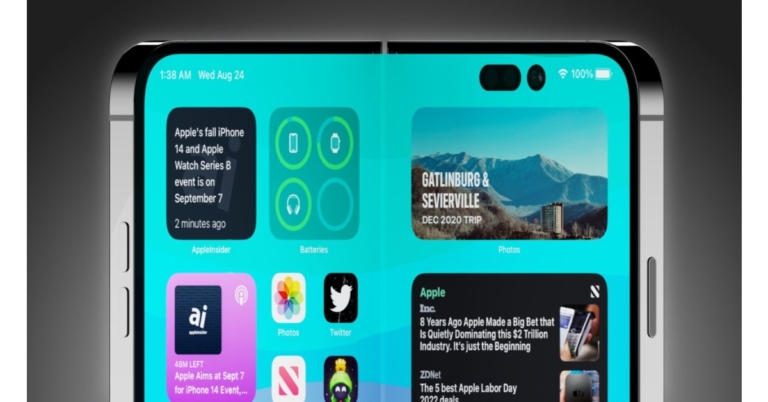
The popularity of foldable phones is increasing. The only firms to release foldable smartphones on the market are Samsung, Motorola, LG, and Huawei. Apple is currently preparing to walk in the footsteps of its rivals. The long-awaited foldable iPhone from Apple might eventually be released in 2025. The “iPhone Fold” is the name given to the foldable iPhone.When Apple truly plans to introduce the foldable seems to be the subject of conflicting reports. At the earliest, according to analyst Min-Chi Kuo, it might occur in 2023. Even later dates, 2024 or 2025, are suggested by some speculations.There is a tonne of information that points to the existence of the “iPhone Fold,” even if Apple might never unveil it, according to a report by Appleinsider. A foldable OLED display and hinges would be used in this concept device to give users a huge screen in a compact design.Apple may soon push for the release of a consumer product version of the “iPhone Fold,” which currently only exists in patents and internal testing. Since there aren’t many rumours regarding the product, patents are the main source of information.Also Read: OnePlus 11 5G confirmed to offer 12GB and 16GB LPDDR5X RAM optionsThe report claims that Apple may be working on a tablet that converts into a phone or a clamshell that becomes a full-screen phone. The distinction is slight but distinct. Samsung offers two “foldable” products for sale: the tablet Galaxy Z Fold and the clamshell Galaxy Z Flip.The “iPhone Flip” has also been mentioned in leaks and rumours, but Apple may choose to completely eschew these titles or even stop referring to the gadget as an iPhone. The folding iPhone will still be an iPhone running iOS in the first place.“Expect feature parity with whatever flagship device it launches alongside, maybe the “iPhone 15.” It is likely that if Apple releases the “iPhone Fold,” not much else will differentiate the product besides the folding gimmick,” the report stated.The A16 or A17 would be the most obvious possibility for the “iPhone Fold,” depending on when it launches, given Apple uses A-series CPUs for its iPhone range. Apple might possibly employ an M-series processor to ensure optimal performance, though, considering the hybrid nature of this gadget.More recent speculations claim Apple has chosen the “flip” design for their next product. Similar to the Gameboy Advanced SP, it would have a clamshell design that opens into a phone and shuts into a small square that can fit in a pocket. OLED’s adaptability makes it likely that a folding iPhone will have the display technology. Manufacturers showcased screens that could be folded or wrapped up using OLED when it was initially introduced to the mobile industry. This is crucial since tiny LED might not allow for the same flexibility in Apple’s folding display as per the report.On the “inside,” the selfie camera and Face ID will be visible above the usable screen. The back camera system with LiDAR is located in the area that is deemed to be the “outside” when it is open. Apple probably won’t make the product any more intricate than that, especially for the first-generation release. Apple could also use Face ID, but it would limit authentication options if it was only usable when the iPhone was “open.” The “iPhone Fold” has the option of combining Face ID with Touch ID.
For the latest gadget and tech news, and gadget reviews, follow us on Twitter, Facebook and Instagram. For newest tech & gadget videos subscribe to our YouTube Channel. You can also stay up to date using the Gadget Bridge Android App. You can find the latest car and bike news here.
If there’s too much clutter on your smartphone’s app drawer, you can try hiding apps to make it look neater. You can also hide your banking apps to ensure that no one gets access to them in case your phone gets lost. Once you hide an app, you will not receive any notifications from it. Don’t know how to go about it on your Samsung smartphone? In this article, we show you how to hide and unhide apps on any Samsung mobile.Read Also: Honor Pad V8 Pro tablet with 144Hz display launched
In This Article
Here’s how you can hide and unhide apps on your Samsung mobile
Step 1: Go to Settings and select Home screen.Step 2: Scroll down and tap on ‘Hide apps’.Step 3: Select the apps you want to hide. Tap on Done once you’ve selected the app.Step 4: To unhide an app, tap the ‘minus’ icon on the app thumbnail. You can also access the home screen settings by tapping the ellipses on the app drawer and selecting ‘Settings’. You can also long-press the home screen and tap on ‘Settings’ to access home screen settings.
Bonus Tip: How to lock and mask apps on a Samsung smartphone
Step 1: Launch the S Secure app from the app drawer. If you dont have it app, install it from the Galaxy Store.Step 2: Tap on ‘Lock and mask apps’. Locking an app protects it with your lock pin/pattern/password. Masing an app blocks notifications from it.Step 3: Tap on locked apps.Step 4: Tap on ‘Add’ at the top right corner of the screen to add apps to the lock list.Step 5: Tap on Done once you’ve selected the apps you want to lock.Your changes will be saved.Read Also: Redmi Watch 3 and Redmi Band 2 launched: Price and availability details
If you’re looking for a tough and durable smartphone that can withstand tough conditions, there aren’t many options out there. Not every major smartphone brand comes out with regular offerings in this category, but there are certain established players with great products to offer. Here are our picks for the best rugged smartphones for people who work outdoors.Read Also: Recover Deleted Videos from SD Card from Windows and Mac
In This Article
Nokia XR20
Price: Rs 46,999In the last few years, Nokia has put out some decent smartphones but it is still a long way from reclaiming the market share it once had. However, when it comes to rugged smartphones, Nokia has one of the best products out there in the form of the Nokia XR20. With an IP68 rating, drop-to-concrete resistance from up to 1.8m, and MIL-STD-810H compliance, the XR20 can handle anything you throw at it. This smartphone is designed to last and comes with 4 years of monthly security updates and up to 3 years of OS version upgrades. With the ultra-solid case and Corning Gorilla Glass Victus protection, this smartphone can easily absorb damage without a hiccup.
Samsung Galaxy XCover Pro
Price: Rs 39,690Samsung’s entry into the rugged smartphone category is characterised by its sleek design with no compromise on durability and ruggedness. The XCover Pro is rated IP68 and has a drop of resistance from up to 1.5m. On top of that, it is also MIL-STD-810G compliant. The 6.3-inch display is protected by Corning Gorilla Glass 5. In terms of security, the XCover Pro gets Samsung’s Knox anti-hacking software. One of the better features of the XCover Pro is that it comes with a 4,050 mAh removable battery, allowing users to easily replace it with a charged unit when it runs out.
Blackview BV9900 Pro
Price: Rs 35,314The Blackview BV9900 Pro is designed for intensive outdoor use in challenging environments. This smartphone can handle a great amount of physical impact along with water damage, humidity, solar radiation, and extreme temperatures. The BV9900 Pro is also equipped with a thermal imaging camera that can locate the heat source and produce a thermal image with an accurate temperature. If that’s not enough, the smartphone also comes with a heart rate monitor.
Doogee S98 Pro
The Doogee S98 Pro is drop resistant from up to 1.5m and is MIL-STD-810G compliant. On top of that, it is rated IP68/IP69K for dust/water resistance. In terms of features, the S98 Pro gets thermal imaging, night vision, a compass, a flashlight, and a protractor. Powering the S98 Pro is the MediaTek MT6781 Helio G96 chipset. It also gets 256GB of internal storage and 8GB RAM. The massive 6,000 mAh battery is one of the best you can get in this category.
Motorola Defy
Closing out this list is the Motorola Defy. This smartphone is drop proof up to 1.8m and fully waterproof for up to 1.5m for 35 minutes. The IP68 rating also ensures that the smartphone is thoroughly dust and sand-proof. Defy can also perform in extreme weather conditions and has been tested for prolonged periods between -25°C to 55°C. It can last up to 2 days on a single charge and also gets 20W fast charging. The display screen is protected by Corning Gorilla Glass Victus.Read Also: Redmi Watch 3 and Redmi Band 2 launched: Price and availability details
Conclusion
These are our picks for the best rugged smartphones for people who work outdoors. While there may not be a diverse range of products in this category, these phones are built to last under tough conditions and usually come with multiple years of security and OS updates. Think there’s another smartphone that deserves to be on this list? Let us know in the comments!For the latest gadget and tech news, and gadget reviews, follow us on Twitter, Facebook and Instagram. For newest tech & gadget videos subscribe to our YouTube Channel. You can also stay up to date using the Gadget Bridge Android App. You can find the latest car and bike news here.


 The device recently made its debut in the UAE before going on sale in India. The Phantom X2 is priced at SAR 2699, or roughly Rs 59,200, in the UAE for the 8GB RAM and 256GB storage version.
Also Read: Redmi Note 12 Pro 5G confirmed to launch in India on January 5
The device recently made its debut in the UAE before going on sale in India. The Phantom X2 is priced at SAR 2699, or roughly Rs 59,200, in the UAE for the 8GB RAM and 256GB storage version.
Also Read: Redmi Note 12 Pro 5G confirmed to launch in India on January 5
 Step 2:
 Step 4:
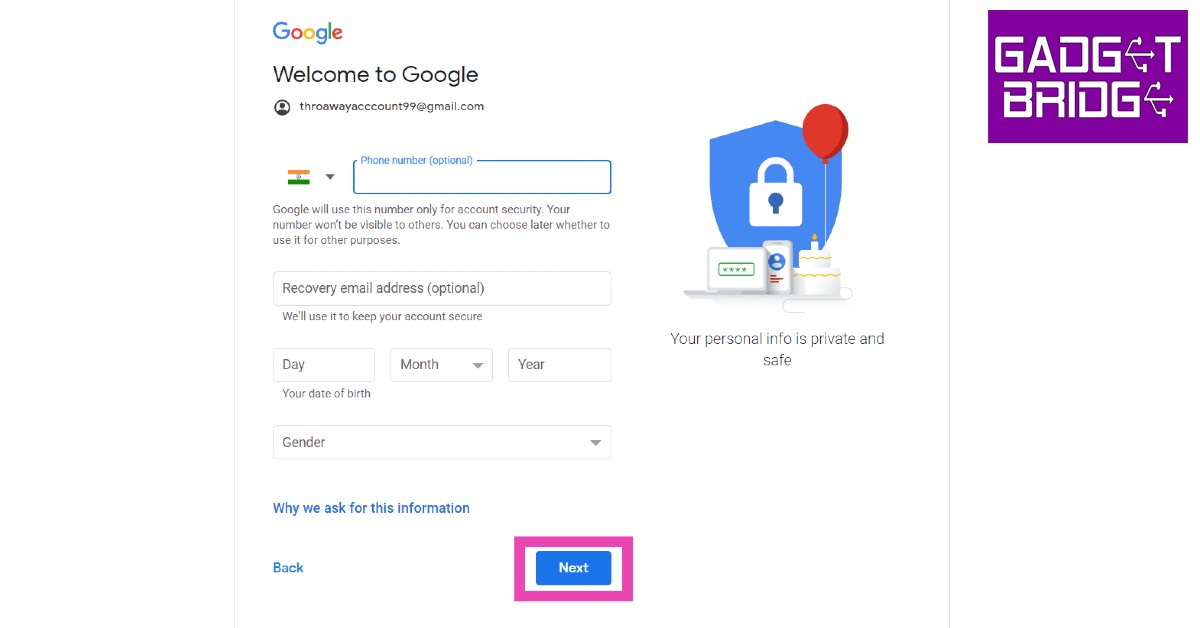 Step 7:
 Step 1:

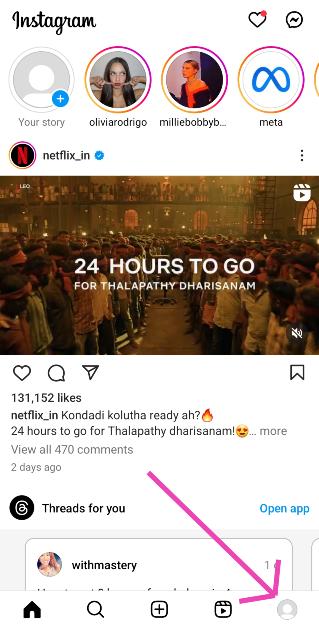 Step 2: Hit the hamburger menu at the top right corner of the screen and select Account privacy.
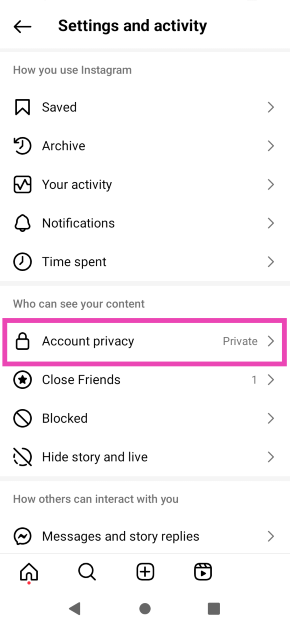 Step 3: Turn off the toggle switch for Private account.
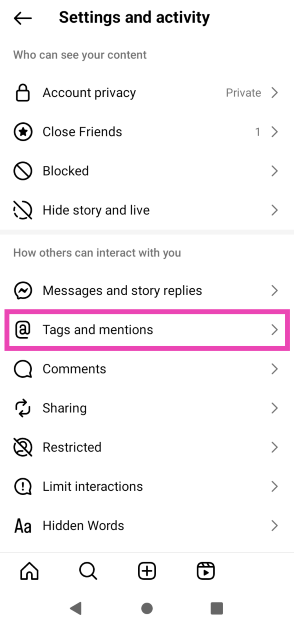 Step 3: Select Allow tags from everyone.
 Step 2:
 Step 3:
 Step 4: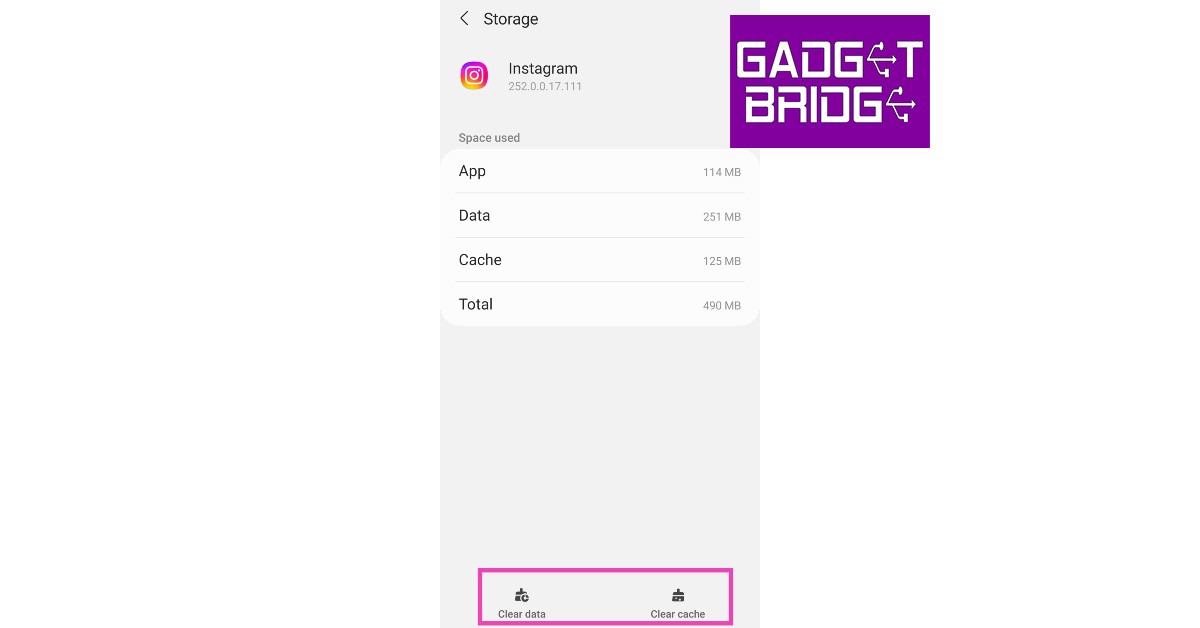



 Step 2:
 Step 2:
 Step 3:
  Step 4:
  Step 5:
  Step 6:
  Step 3:
  Step 4:
 Step 5:
 Step 6:









 Step 2:
  Step 3:
  Step 4:
 Step 3:
 Step 4:
 Step 5: