After being teased for some time, Samsung has officially announced the launch of the Galaxy M32 5G smartphone in India. The smartphone will be available via Amazon in the country. It will be powered by an octa-core MediaTek Dimensity 720 SoC and a quad rear camera setup. The device also supports 12 5G bands for better connectivity and promises two-year OS upgrades.Samsung Galaxy M32 5G price and availability detailsSamsung Galaxy M32 5G has been launched in India in 6GB RAM with 128GB of storage at Rs 20,999. The 8GB RAM with 128GB storage model will be available at Rs 22,999. The device is scheduled to go on sale from September 2 and will be available on Samsung.com, Amazon.in, leading online portals and select retail stores. Galaxy M32 5G will have an introductory offer of Rs 2,000 Instant Cashback on ICICI Credit Cards and EMI transactions. The handset will come in two colour options of Slate Black and Sky Blue. Samsung Galaxy M32 5G tech specsSamsung Galaxy M32 5G comes with a 6.5-inch HD+ TFT Infinity-V display along with 60Hz refresh rate support. The device also features Dolby Atmos support on wired and Bluetooth headsets. The phone runs on OneUI 3.1 on top of Android 11 and offers Samsung Knox, Samsung’s defence-grade security platform, to safeguard personal information and data in real-time. Under the hood, there is an octa-core MediaTek Dimensity 720 SoC, paired with up to 8GB RAM and 128GB storage. The internal storage can be expanded up to 1TB using a microSD card. It also supports 12 5G bands-N1, N3, N5, N7, N8, N20, N28, N38, N40, N41, N66, N78 for a super-fast and smooth 5G experience. According to the company, the data speed in a 5G network could be 20x faster than 4G with a 10x decrease in latency and 10x more efficient IoT connectivity. Furthermore, it comes with two years of guaranteed OS upgrades. For gamers, the AI-based Game Booster offers advanced gaming performance and a lag-free gaming experience. In terms of photography, Samsung Galaxy M32 5G features a quad rear camera setup that includes a 48-megapixel primary sensor. Furthermore, there is an 8-megapixel ultra-wide-angle sensor, a 2-megapixel macro shooter, and a 2-megapixel depth sensor. Lastly, the device comes with a 13-megapixel front-facing camera for taking selfies.The handset boasts a 5,000mAh battery that supports 15W fast charging. The phone delivers up to 106 hours of music playback, 36 hours of talk time, 19 hours of internet usage time and 20 hours of video playback on a single charge. On the connectivity front, there is 5G, Wi-Fi, Bluetooth, and GPS.
For the latest gadget and tech news, and gadget reviews, follow us on Twitter, Facebook and Instagram. For newest tech & gadget videos subscribe to our YouTube Channel. You can also stay up to date using the Gadget Bridge Android App. You can find the latest car and bike news here.
The e-commerce website Flipkart is hosting Daily Trivia Quiz. Every day it brings a bunch of new questions for its users. By answering them correctly you can win exciting prizes. The questionnaire is based on questions related to general knowledge. Also, the users can win free vouchers and super coins, among other offers via the daily quiz. 26 August 2021 Flipkart Daily Trivia Quiz Answers has already gone live on its platform.
The participant should be at least 18 years old and should have a valid login ID. The Quiz is available on the mobile platform and not the web version. E-commerce conducts the quiz on daily basis and goes live at 12:00 AM IST and runs till 11:59 PM IST. The winners are announced within 15 days from the date of participation that can be viewed under the Gems/Rewards section in the app.
How to participate in the Flipkart Daily Trivia Quiz
To participate download the Flipkart app on your phone. Then open the Flipkart app then head to Game Zone. Now click on the Daily Trivia Banner or search for Daily Trivia. Enter the game and answer all 5 questions with correct answers.
26 August 2021 Flipkart Daily Trivia Quiz Answers
Question 1: Which of these players did not score a century in the 2015 ODI World Cup?
Answer: Ajinkya Rahane
Question 2: In Ramayana, who left Sita near sage Valmiki’s ashram after Rama banished her?
Answer: Lakshmana
Question 3: In which field does the Indian government give the Sant Kabir Award?
Answer: Textile
Question 4: Which of these is a subdivision of the geological time period ‘Holocene’?
Answer: Meghalayan
Question 5: Who is the subject of the biographical film ‘Kaptaan: The Making of a Legend’?
Answer: Imran Khan
26 August 2021 Amazon Quiz has gone live now and the e-commerce platform Amazon is giving you a chance to win Rs 5,000 Amazon Pay Balance. It can be played daily from 12 AM to 11:59 PM. Millions of its customers are trying their luck by participating in the daily quiz to win free gadgets as well as Amazon Pay Balance. All you need to do is log in to your Amazon app on your device and participate in today’s quiz.
Every day Amazon brings a fresh questionnaire that consists of five easy questions based on general knowledge and current affairs. By submitting correct answers the contestants can win exciting prizes such as iPhone X, iPhone Xs, Seagate HDD, GoPro Hero 8 Camera, LG Smartphones, Bose Sound Touch 20 Speakers, OnePlus 7T among others. One thing to note is that the quiz is not available for the desktop platform, you can only participate in the quiz from 12 AM to 11:59 PM via mobile app. After giving all the correct answers to the question you will get shortlisted for a lucky draw to select a winner. The results will be announced at the end of the month. Check out today’s answers for the Amazon Quiz to win Rs 5,000 Amazon Pay Balance.
26 August 2021 Amazon Quiz Answers
Question 1: With five goals to his name, who won the Golden Boot award for the top goal-scorer at Euro 2020?
The answer is- D) Cristiano Ronaldo
Question 2: Which band played at Madison Square Garden on June 20 for the iconic venue’s first concert since before the pandemic?
The answer is- D) Foo Fighters
Question 3: In July 2021, Ashleigh Barty became the first woman from which country to win the Wimbledon singles title in 41 years?
The answer is- C) Australia
Question 4: This app was created by former students of which American University?
The answer is- D) Stanford University
Question 5: What is this iconic tower in Paris locally called?
The answer is- C) La Dame De Fer
Is your Windows laptop or computer not performing according to the way when you first bought it? Probably the reason is your system is cluttered up with junk files. Various apps which are of no use and the remains of uninstalled apps clog the system and make the processing speed slow. This clutter also takes a lot of space, lowering your storage. There is an inbuilt application on your windows to clean things up but often we need a deeper clean and for that, we need a specialist. Here is a list of such top software for cleaning the clutter in your Windows PC.
1. Iolo System Mechanic
Iolo is no basic cleaning application as it has features like security apps, driver scrubber, password manager and system mechanic. The application also works as an AntiVirus and malware remover making it stand out from other cleaning applications. The interface is also available in dark mode to soothe your eyes. It has two options: a quick scan and a deep scan. The deep scan however takes a lot of time. Iolo also comes with a LiveBoost technology which makes sure no application is using your CPU or RAM in the background unnecessarily. There are many more features available in the application, however, the company charges extra for premium features.Download here
2. CCleaner
CCleaner is more focused on the privacy of its user. The software has an automatic driver updater that will update your drivers so you don’t fall for any kind of security vulnerability issues. Also updating drivers to their latest versions will make your system run at optimum performance. CCleaner scans unused applications and files taking up space in your storage. The application points out redundant settings and kills auto startup of applications in the background or during startup. It automatically clears saved cookies and trackers to better your privacy. CCleaner is free for 14 days and needs a subscription to use afterwards.Download HereRead Also: How to keep your smartphone cool while gaming
3. IObit Advanced SystemCare
What makes IObit Advanced SystemCare stand out from every cleaner is its advanced AI technology, which the software uses. It learns the user’s behaviour and removes junk files and clutter accordingly. The software has a strong defragmentation algorithm that helps to clear a lot of space covered with system junk and application residue. The application even takes care of your private data by protecting it and fixes security vulnerabilities. After buying the pro version you can also unlock the Boost internet speed option, which will come really handy during these work from home times.Download hereRead Also:Amazon Introduces Upgraded Echo Show 8 (2nd Gen)These applications will not only boost your productivity but also keep your system clutter-free and snappy. There are many cleaning applications and tools present in the market but these applications stand out in the crowd and have some unique features.For the latest gadget and tech news, and gadget reviews, follow us on Twitter, Facebook and Instagram. For newest tech & gadget videos subscribe to our YouTube Channel. You can also stay up to date using the Gadget Bridge Android App. You can find the latest car and bike news here.
Google Chrome is one of the most used browsers across all the platforms. Making sure of the security, Google Chrome doesn’t allow you to take screenshots in Incognito mode. As soon as you try to do so you are intercepted with a message saying ‘Taking Screenshots isn’t allowed’. Although there is a simple trick you can take screenshots even in incognito mode very easily. Here is how you can do it.Read Also:Best Ways to View Saved Passwords in Google Chrome (2024)
Take a screenshot in Google Chrome incognito mode (Android)
Step 1: Open the Google Chrome application on your Android smartphone.Step 2: In the Chrome application, tap on the address bar.Step 3: Type – chrome://flagsStep 4: Now, head to the search bar at the top of the page.Step 6:Search for the option that says ‘Incognito Screenshot.’Step 5: Tap on the option and select Enable.
Take a screenshot in incognito mode (PC)
Unlike its Android counterpart, Google Chrome for Windows does not limit the user’s ability to take a screenshot. You can take a screenshot of the incognito tab on your PC at any given time using the tool of your choice. Our favourite method is using the Windows + Shift + S key combination to trigger the Snipping Tool. Once triggered, use the mouse or touchpad to select the part of the screen that you want to capture. The image will be saved in the screenshots folder.
Bonus Tip: Take a screenshot in incognito mode on Mozilla Firefox
Step 1:Launch the Mozilla Firefox browser on your Android phone.
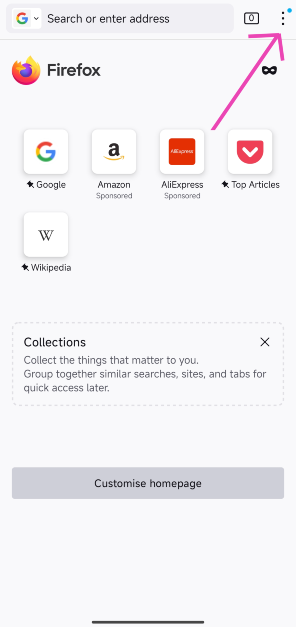
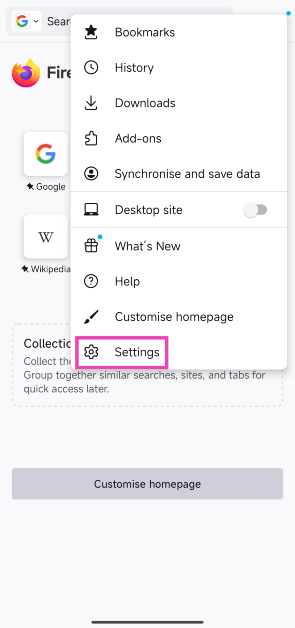
Step 2: Tap the ellipses at the top right corner of the screen.
Step 3: Hit Settings.
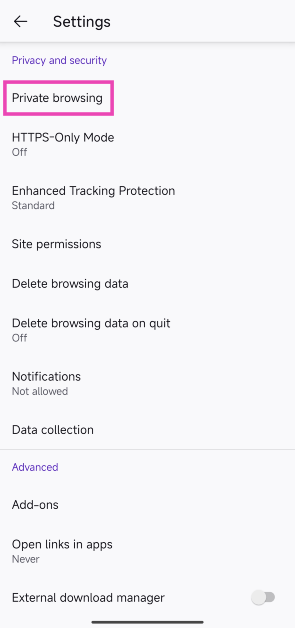
Step 4: Scroll down and select Private browsing under Privacy and security.
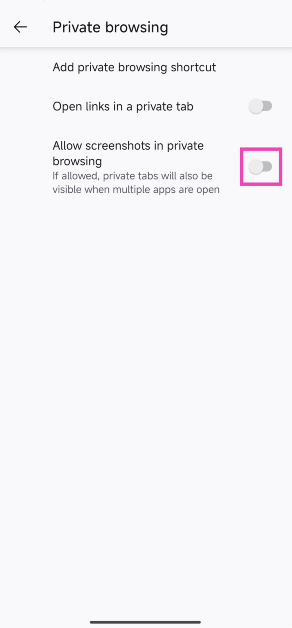
Step 5: Turn on the toggle switch for Allow screenshots in private browsing.
Frequently Asked Questions (FAQs)
How do I take a screenshot in Google Chrome incognito mode?
Type and enter chrome://flags in the address bar, search for ‘Incognito Screenshot’ and hit ‘Enable’. Restart the app. Once that’s done, you will be able to take a screenshot in incognito mode.
Do third-party screenshot apps work in Google Chrome’s incognito mode?
No, Android prevents third-party apps from taking screenshots in Chrome’s incognito mode.
How do I take a screenshot in Mozilla Firefox’s incognito mode?
Go to Settings>Private Browsing and turn on the toggle switch for ‘Allow screenshots in private browsing’.
Read Also:How to take a screenshot on a Mac?
Conclusion
After completing this process Google Chrome will ask you to restart the application. After successfully restarting, you will be able to take screenshots even in Incognito Mode. However, use these steps only when it’s absolutely necessary as the incognito mode is meant to secure your privacy.
Consumers nowadays are always looking for fast solutions. Western Digital being the mother company of SanDisk today announced Ixpand wireless charger that can take backup of your device as well. The company aimed towards two major problems an average consumer faces. Firstly is running out of battery juice during the day and secondly being running out of storage. Western Digital made sure that the process remains hassell free so it’s not at all difficult for a common person to use its new device. Here is everything you want to know about this new technology introduced by SanDisk.
Features
Ever felt lazy to backup your data? The process is not only time taking but also energy consuming. The need of backing up your data by yourself is over, with SanDisk Ixpand Wireless Charger. A person can not only charge their phone but also back up selected data to the onboard storage available within the charger. All a consumer needs to do is download the application on your device which is available inside the box as well as behind the charger. After installing the application just select the data you want to back up. Users can also select contacts from the list as well as backup. After all these steps all the user has to do is place their device on the wireless Ixpand charger and all your selected data will be backed up easily.Most of the chargers don’t come with a power brick but SanDisk has got you covered in this condition as well. They include a fast charging brick inside the box, which can charge your device with 10W wirelessly. Yes, there are faster chargers in the market but they don’t locally sync your data while charging.Read Also: Best wireless fast chargers under Rs 10,000
Pricing
Currently, there are 3 variants available for Ixpand wireless chargers. The first is the standard charging mat with a 10W charger and 256 GB local storage capacity priced at Rs 9,999. SanDisk thought about people who don’t want storage just want to wirelessly charge their smartphone. Consumers can buy only the charging variant for Rs 2,999, which will include a 15W faster charger supporting Quick charge 3.0. Already got a fast charging brick and just want the charging mat? In that case, the consumer can go with the Ixpand wireless charging dock available at Rs 1,999.It’s really exciting to see the technology advancing so fast and consumers are getting new features to experience having a quick solution to every small problem. Currently, in India, the product is available with only 1 storage option as compared to 3 in the international market. We also expect the company to bring more models with higher storage capacity as there is an increase in storage consumption.For the latest gadget and tech news, and gadget reviews, follow us on Twitter, Facebook and Instagram. For newest tech & gadget videos subscribe to our YouTube Channel. You can also stay up to date using the Gadget Bridge Android App. You can find the latest car and bike news here.
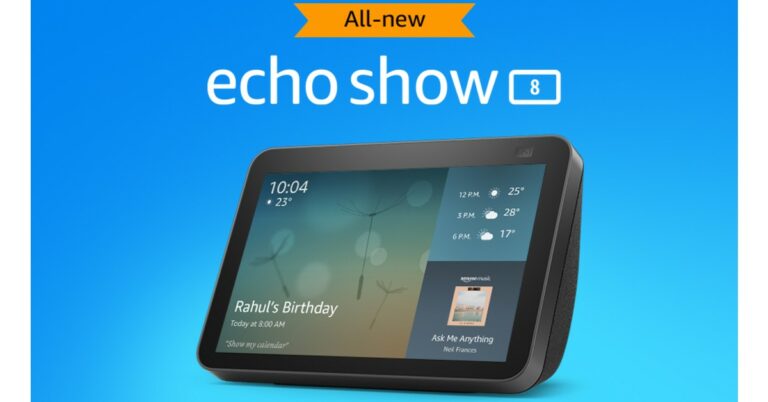
After the success of the first-generation Echo Show, Amazon finally brought out its 2nd gen of Echo Show 8. The show sits exactly in between its 5-inch and 10-inch siblings. After major upgrades over amazon’s Echo dot series, an update on the show series was needed as well. Here are a few of the changes and similarities.
Looks
Talking about the looks, not much has changed. The body has an 8-inch touch screen, which is quite responsive displaying your personalised screen that you can customise according to your taste. The screen also supports multimedia functionalities and streams. Your favourite content will be shown in a HD resolution of 1,280X800. All the button controls are housed on the top edge with microphones to capture your voice commands. On the top rim of the Echo Show 8 houses the new camera setup. Amazon has taken care of privacy by providing a microphone on/off button and a mechanical switch for the camera shutter. The device is covered with fabric like material in the back matching the colour tone of the front frame. The Echo Show 8 gen 2 is available in two colours black and white. Also Read:Should you leave the Wi-Fi router on at night?
Features and price
There are few changes in both hardware and software of the device. One major change is on the chipset, which is the new MT8183 as compared to the older MT8163 on the previous model. Even if the previous gen never felt slow the new chipset will make the new gen snappier. Also, a major upgrade is the new 13-megapixel wide angle camera, which will zoom and pan according to your face for all the meetings and video calls you want to attend onboard. The previous generation’s 1MP camera was not that great and the company did a good job replacing it with a decent sensor now. It feels like the same sensor used in Echo show 10 with an auto framing feature minus the motorized tracking capabilities has been picked up. Like all the Echo devices it also supports Amazon Alexa support which will listen to all your commands with a 4 microphone setup. The smart assistant can perform tasks like playing music, streaming your favourite content, making voice and video calls on your command. The device has a dual 2.0-inch speaker with a passive bass radiator resulting in a clear non muffled sound. You can also remotely monitor your place with its camera making you worry less about your home when you are away.Also Read: Oppo introduces Apple-like MagVOOC flash charging technologyWith the current generation of the Echo Show 8 release company has really listened to its customers. There might not be a lot of changes than the previous gen. The company really focused on necessities and made the Echo Show 8 really value for what you spent. The device is priced at Rs 13,999 but the company is selling it at a discounted price of Rs 11,499 for a limited time.For the latest gadget and tech news, and gadget reviews, follow us on Twitter, Facebook and Instagram. For newest tech & gadget videos subscribe to our YouTube Channel. You can also stay up to date using the Gadget Bridge Android App. You can find the latest car and bike news here.
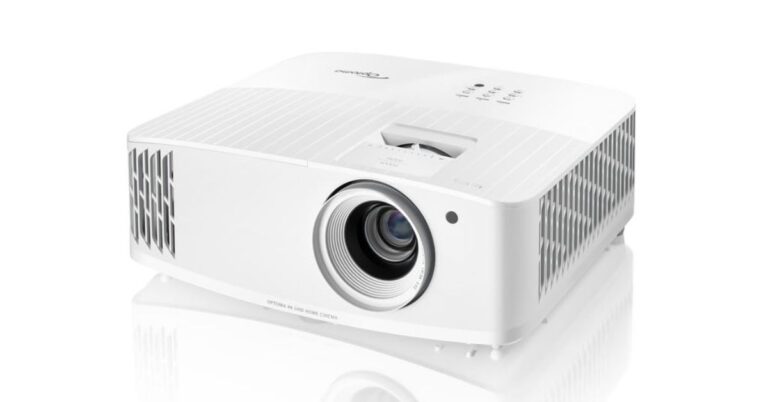
Taiwanese multinational company that manufactures projectors, all-in-one LED displays and image processing equipment Optoma today announced that it became the number one DLP projector brand globally. Also, the company achieved the number one position in DLP Projectors & 4K UHD segments in India for Q2, 2021 as per the PMA report. Speaking about this achievement Mr. Vijay Sharma, Country Head, India, Optoma Corporation said that “ We are pleased to announce that despite the pandemic situation and challenging market conditions, we have managed to maintain an upward curve in sales. We registered demand coming from across segments, especially the home segment. This growth in the first six months of 2021 is a result of our advanced technology-based product launches and our proper understanding of the current circumstances of the Indian market. We expect the trend to continue in the second half of the year too.”The Taiwan based projector firm Optoma Corporation stated that it’s the only projector brand to have reflected the growth trend in the first half of 2021 by becoming the No.1 projector brand in the 4K UHD segment. According to the company earlier it has doubled its market share in ProAV and home segment in 2020. But now Optoma has achieved a growth of more than 50% market share in the Short Throw projector category to become s No 1 brand in India for the DLP projectors & 4K UHD category during Q2, 2021.Furthermore, Optoma claims that to get the top position the company has pulled off more than 33% of the market share in Q2, 2021. Now, the company has future plans to aggressively tap the home entertainment segment, ProAV and education projector category with an array of new product launches for these categories. The company recently introduced Optoma UHD33 4K UHD Home Theatre Projector in India. It features a 240Hz refresh rate and delivers vibrant and blur-free visuals and HDR10 support. This projector also comes integrated with gaming mode and dynamic black tech. It supports 4K @60Hz immersive gaming and offers Ultra-low 4.2ms latency@1080P 240Hz for PC games. The Optoma UHD33 comes with 3,600 ANSI lumens of brightness and delivers a 1,000,000:1 contrast ratio, along with HDR10 and HLG (Hybrid-Log Gamma) compatibility.
For the latest gadget and tech news, and gadget reviews, follow us on Twitter, Facebook and Instagram. For newest tech & gadget videos subscribe to our YouTube Channel. You can also stay up to date using the Gadget Bridge Android App. You can find the latest car and bike news here.
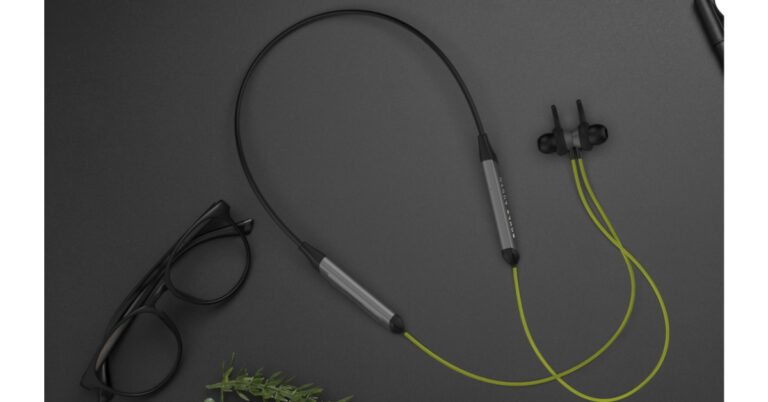
Indian audio brand Boult today announced the launch of new neckband-style earphones in the Indian market. The Boult Audio ProBass Qcharge in-ear earphones deliver 24 hours of battery life. In addition to these, all the devices are IPX5 certified for water and sweat resistance. In addition to this, the Boult earphones come with voice assistant support and built-in Aerospace-grade alloy micro-woofers for extra bass.Boult Audio ProBass Qcharge earphones price and availabilityThe Boult Audio ProBass Qcharge in-ear earphones have been launched in India with a price tag of Rs 1,999. The device can be purchased through Amazon in three colour options of Black, Blue, and Green. It will also bring a 1-year standard industry warranty.Boult Audio ProBass Qcharge earphones tech specsBoult Audio ProBass Qcharge earphones come with a neckband along with an in-ear design aimed toward an active lifestyle. The flexible and lightweight soft rubber design neckband is built for grip and style, while the extra-soft silicone ear tips and ear fins ensure a good grip and all-day comfort. The entire body is IPX5 certified for sweat and water resistance ideal for sweating it out of the gym. It also has a 60-degree angled tunnel design for a comfortable fit.The earphones come with an inbuilt aerospace-grade alloy micro woofer that produces a rich and precise audio signature. It also produces deep bass, isolating noise in any environment. A simple tap can help you with a hands-free experience as there is Google and Siri voice assistance support that will keep the users updated with the latest news or weather reports. Simply ask for directions, change music tracks or dial back home with just your voice. Besides this, the Boult Audio ProBass Qcharge in-ear earphones offer a 24 hours playtime on a single charge. The fast charging technology allows the battery to charge from 0 to 100% in just 30 minutes. And with a mere 15 minutes of charging, you can hit the road for a good 15-hour journey.
For the latest gadget and tech news, and gadget reviews, follow us on Twitter, Facebook and Instagram. For newest tech & gadget videos subscribe to our YouTube Channel. You can also stay up to date using the Gadget Bridge Android App. You can find the latest car and bike news here.
It’s been months since everyone is working from home and are online. Finally, after the government gave some relief we could return back to our office and roaming jobs. It has often happened that the file required by you has been left behind at home in your PC and there is no way you can go back. This guide will come in handy for these situations. You can connect to your device securely and access your system in a few clicks. Not only can the user get files from his/her home system but can also control it remotely. Here is how to do it.
Built-In Tools
Microsoft and Apple both have their built-in tools so you can access your desktop remotely
For macOS
Apple also sells a full fedge version but charges a premium amount to the users to use it completely. Although that option is not meant for day to day users. The paid version is made for network management and IT professionals. Similar options are available for normal users by staying in the same network. Here is how to remotely access your MAC from anywhere in the world.Step 1 – In your home MAC, go to System Preferences.Step 2 – Click on Sharing option.Step 3 – Check the Screen Scaring checkbox.Step 4 – On another machine running macOS and signed in with your account, open Finder.Step 5 – Head to the shared section.Step 6 – Select your home MAC here to enable screen sharing, now you can access or fetch any file.Read Also:Top 5 Android apps you can use to transfer large files
For Windows
Microsoft makes their own remote access tools, too. Although this feature is only available for users having windows professional or Enterprise version on there pc, which means most of the people who use the Home version are not eligible to use it.Step 1 – Go to start and select settings.Step 2 – Click System and select Remote Desktop.Step 3 – Enable Remote Desktop.Step 4 – On the local machine go to Remote Desktop Connections.Step 5 – Select the device you want to connect with.Note – The pc can also be accessed with the Remote desktop application on both Android and MAC’s.Read Also:5 free web services you can use to transfer large files
Third-Party Applications
There are tons of third-party applications available for users to download and install on the system. All they have to do is install these applications on their system and allow remote access. One of the most popular applications among these is TeamViewer. For home usage, this application is absolutely free and for advanced features, they charge an amount for the premium version. TeamViewer is a handy application to control remote desktops and Share files across platforms. After installing from www.teamviewer.com just follow the onscreen instructions and you can access your machine from anywhere.Other than TeamViewer, users can also see Anydesk. Anydesk works the same way as TeamViewer but it’s very lightweight. The User just needs to head to the official website and download. It’s a really lightweight application and needs no setup. Just share the personal key with the computer you want to connect and you are good to go.This list was an easy guide to how to access your files from anywhere. Users can also consider using Google Drive to access the files directly from the cloud. This is also a handy process to access your files from a remote location. Although this option is very limited as only the files saved in the cloud can be accessed and not your full PC.For the latest gadget and tech news, and gadget reviews, follow us on Twitter, Facebook and Instagram. For newest tech & gadget videos subscribe to our YouTube Channel. You can also stay up to date using the Gadget Bridge Android App. You can find the latest car and bike news here.


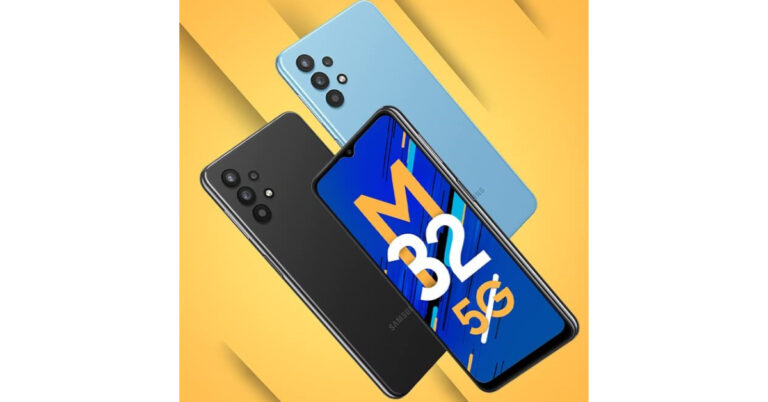
 Samsung Galaxy M32 5G tech specs
Samsung Galaxy M32 5G comes with a 6.5-inch HD+ TFT Infinity-V display along with 60Hz refresh rate support. The device also features Dolby Atmos support on wired and Bluetooth headsets. The phone runs on OneUI 3.1 on top of Android 11 and offers Samsung Knox, Samsung’s defence-grade security platform, to safeguard personal information and data in real-time. Under the hood, there is an octa-core MediaTek Dimensity 720 SoC, paired with up to 8GB RAM and 128GB storage. The internal storage can be expanded up to 1TB using a microSD card.
Samsung Galaxy M32 5G tech specs
Samsung Galaxy M32 5G comes with a 6.5-inch HD+ TFT Infinity-V display along with 60Hz refresh rate support. The device also features Dolby Atmos support on wired and Bluetooth headsets. The phone runs on OneUI 3.1 on top of Android 11 and offers Samsung Knox, Samsung’s defence-grade security platform, to safeguard personal information and data in real-time. Under the hood, there is an octa-core MediaTek Dimensity 720 SoC, paired with up to 8GB RAM and 128GB storage. The internal storage can be expanded up to 1TB using a microSD card.
 It also supports 12 5G bands-N1, N3, N5, N7, N8, N20, N28, N38, N40, N41, N66, N78 for a super-fast and smooth 5G experience. According to the company, the data speed in a 5G network could be 20x faster than 4G with a 10x decrease in latency and 10x more efficient IoT connectivity. Furthermore, it comes with two years of guaranteed OS upgrades. For gamers, the AI-based Game Booster offers advanced gaming performance and a lag-free gaming experience.
In terms of photography, Samsung Galaxy M32 5G features a quad rear camera setup that includes a 48-megapixel primary sensor. Furthermore, there is an 8-megapixel ultra-wide-angle sensor, a 2-megapixel macro shooter, and a 2-megapixel depth sensor. Lastly, the device comes with a 13-megapixel front-facing camera for taking selfies.
The handset boasts a 5,000mAh battery that supports 15W fast charging. The phone delivers up to 106 hours of music playback, 36 hours of talk time, 19 hours of internet usage time and 20 hours of video playback on a single charge. On the connectivity front, there is 5G, Wi-Fi, Bluetooth, and GPS.
For the latest gadget and tech news, and gadget reviews, follow us on Twitter, Facebook and Instagram. For newest tech & gadget videos subscribe to our YouTube Channel. You can also stay up to date using the Gadget Bridge Android App. You can find the latest car and bike news here.
It also supports 12 5G bands-N1, N3, N5, N7, N8, N20, N28, N38, N40, N41, N66, N78 for a super-fast and smooth 5G experience. According to the company, the data speed in a 5G network could be 20x faster than 4G with a 10x decrease in latency and 10x more efficient IoT connectivity. Furthermore, it comes with two years of guaranteed OS upgrades. For gamers, the AI-based Game Booster offers advanced gaming performance and a lag-free gaming experience.
In terms of photography, Samsung Galaxy M32 5G features a quad rear camera setup that includes a 48-megapixel primary sensor. Furthermore, there is an 8-megapixel ultra-wide-angle sensor, a 2-megapixel macro shooter, and a 2-megapixel depth sensor. Lastly, the device comes with a 13-megapixel front-facing camera for taking selfies.
The handset boasts a 5,000mAh battery that supports 15W fast charging. The phone delivers up to 106 hours of music playback, 36 hours of talk time, 19 hours of internet usage time and 20 hours of video playback on a single charge. On the connectivity front, there is 5G, Wi-Fi, Bluetooth, and GPS.
For the latest gadget and tech news, and gadget reviews, follow us on Twitter, Facebook and Instagram. For newest tech & gadget videos subscribe to our YouTube Channel. You can also stay up to date using the Gadget Bridge Android App. You can find the latest car and bike news here. 






 Step 3: Hit Settings.
 Step 4: Scroll down and select Private browsing under Privacy and security.
 Step 5: Turn on the toggle switch for Allow screenshots in private browsing.
 Boult Audio ProBass Qcharge earphones tech specs