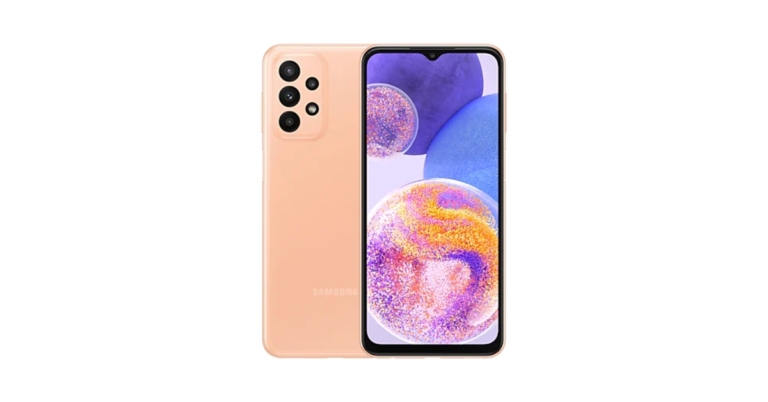
Samsung has decreased the Galaxy A23 pricing in India. The price of the smartphone has decreased by Rs 1,000. The updated Samsung smartphone price is now available from offline retailers throughout the nation. For the first time, the price of the smartphone was reduced. In March of this year, Samsung introduced the mid-range smartphone in India. The device comes with a 5,000mAh battery FHD+ LCD display and triple rear camera set up.In India, the Samsung Galaxy A23 was offered in two configurations: 6GB of RAM and 128GB of storage for Rs 19,990 and 8GB of RAM with 128GB storage priced at Rs 20,999. Both the variant are now offered for Rs 18,499 and Rs 19,999 after the price reduction of Rs 1,000. There are 4 colour choices for the smartphone: Black, Light Blue, Orange, and White.
Samsung Galaxy A23 specifications
A 6.6-inch full-HD+ LCD screen with a resolution of 1,0802,408 pixels is available on the Samsung Galaxy A23. The screen has support for 90Hz refresh rates. The device uses One UI 4.1, which is based on Android 12. Under the hood, there is a Snapdragon 680 SoC with up to 8GB of RAM and up to 128GB of internal storage that can be increased to 1TB with a microSD card.A 50-megapixel primary camera with an f/1.8 aperture and optical image stabilisation (OIS), a 5-megapixel ultra-wide-angle camera with an f/2.2 aperture lens, and two 2-megapixel macro and depth cameras are all included in the Samsung Galaxy A23’s quad rear camera setup. On the front, there’s a selfie camera with 8 megapixels as well.Samsung’s 25W fast charger can quickly recharge the phone’s 5,000mAh battery. For connectivity, the smartphone offers a 3.5mm headphone socket, Wi-Fi, Bluetooth v5.0, GPS, 4G, and a USB Type-C connector. The sensors on board include an accelerometer, gyro sensor, geomagnetic sensor, virtual light sensor, virtual proximity sensor, and a side-mounted fingerprint scanner.
For the latest gadget and tech news, and gadget reviews, follow us on Twitter, Facebook and Instagram. For newest tech & gadget videos subscribe to our YouTube Channel. You can also stay up to date using the Gadget Bridge Android App. You can find the latest car and bike news here.
Have you participated in the Amazon Quiz today? If not then participate in the 16 July 2022 Amazon Quiz as it has already gone live on the app. The daily quiz can be played from 12 AM to 11:59 every day on the mobile app platform. Today e-commerce is giving the chance to win Rs 20,000 Amazon Pay Balance.Every day Amazon brings a fresh quiz for its customers. By participating in the quiz the participants can win an Amazon Pay Balance of up to Rs 50,000. The quiz can only be played on the mobile app as it is not available for the desktop platform. The quiz contains five easy questions and you have to answer all the questions correctly. The participants will then be shortlisted for a lucky draw to select a winner. Whereas the results are declared at the end of the month. Check out today’s Amazon quiz answers to win Rs 20,000.Amazon Quiz Today Prize – Rs 20,000 Amazon Pay BalanceQuiz Date – 16 July 2022Daily Timing – 12 AM to 11:59 PMWinner Announcement – Today 12 PM
In This Article
Amazon Quiz Answers Today 16 July 2022
Question 1: Shaheen 1-A medium-range ballistic missile made with the help of China, belongs to which country?Answer: PakistanQuestion 2: Who has recently been appointed as the Chairman of India Tourism Development Corporation (ITDC)?Answer: Sambit PatraQuestion 3: Assam government has decided to confer the ‘Asom Baibhav Award’ 2021, the state’s highest civilian award, to whom?Answer: Ratan TataQuestion 4: In which administrative region of Italy is this tower located?Answer: TuscanyQuestion 5: What water body is this island lighthouse located in?Answer: Bosphorus Strait
How To Play Amazon Quiz
Only app users are eligible to play the Amazon quiz every morning from 12 AM to 11:59 PM. The quiz is not available on the desktop. For those who are unaware of how to play the Amazon quiz below are the steps, you can follow to take the quiz.
Firstly download the Amazon app from Google Play Store or App Store
Now fill in the required information through the Sign Up option.
You need to log in to the Amazon app and scroll down on the home screen to find the Amazon Quiz banner.
Tap on the Amazon Quiz banner and tap on the Start button to start the Quiz.
Now you will get 5 questions and you need to answer them correctly. One wrong answer will eliminate you from the Quiz.
After answering all the questions correctly you are now eligible for a Lucky Draw.
The winner’s name will be announced today at 12 PM.
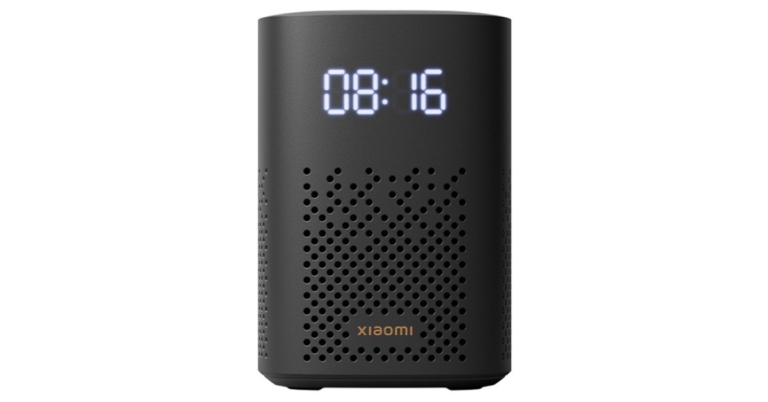
The debut of the Xiaomi Smart Speaker (IR Control) in India was recently announced by Xiaomi. The new Xiaomi Smart Speaker (IR control) comes with new and improved features including IR Control, Smart home control centre, Balanced sound field, LED clock display, and much more.The Xiaomi Smart Speaker comes equipped with a 1.5-inch mono speaker, a built-in smart voice assistant (Google assistant), and Bluetooth 5.0. The speaker makes advantage of IR control, a voice remote for household appliances that give outdated, non-smart gadgets new life. To build a smart home experience, customers can connect the device to the Google Home app first, then the Xiaomi Home app.The Xiaomi Smart Speaker (IR Control) has a beautiful, small form, and soothing colour scheme. Additionally, it has an LED display with adaptive brightness that can change its brightness based on the ambient light. Customers can set alarms on the smart speaker by selecting their preferred songs, artists, genres, and scenes.The all-side speaker has an innovative cavity design. Customers can connect two Xiaomi Smart Speakers and experience thunderous stereo sound, which helps to provide a completely immersive experience. Customers can enjoy playing music, podcasts, or news through Bluetooth with a smooth transmission because these devices come with Chromecast built-in, which allows you to wirelessly cast audio with just one click.
Xiaomi Smart Speaker (IR Control) price in India, availability
Xiaomi Smart Speaker (IR Control) comes with a price tag of Rs 5,999 but it is presently being offered at Rs 4,999. Only Black is offered as a colour choice for the Xiaomi smart speaker. It is available for purchase via Flipkart, Xiaomi’s official website, and other retailers in the country.Commenting on the launch, Raghu Reddy, Chief Business Officer, Xiaomi India said, “Being one of the top three smart speaker brands in the country[1], we have a deep understanding of our consumer’s needs and preferences. In line with that, we are extremely happy to announce the launch of the Xiaomi Smart Speaker (IR Control) from the house of Xiaomi that truly captures the brand’s vision of innovation. The smart speaker is the perfect amalgamation of unique features and the latest technological offerings, making it the smart centre for your home. It is a great package that offers convenience and quality, simultaneously enabling customers to enjoy diverse multimedia options. Our endeavour is to deliver the best and Xiaomi Smart Speaker (IR Control) is the validation of the same.”
For the latest gadget and tech news, and gadget reviews, follow us on Twitter, Facebook and Instagram. For newest tech & gadget videos subscribe to our YouTube Channel. You can also stay up to date using the Gadget Bridge Android App. You can find the latest car and bike news here.
Microsoft Outlook is one of the most popular email clients used by businesses to handle and organise their email. One of the most common complaints by Outlook users is that their mails take too long to send, or they get stuck in the Outbox. Today, we show you how to fix emails stuck in the outbox of Microsoft Outlook.Read Also:How to Fix Emails Stuck in Outbox of Gmail?
In This Article
Make sure the attachment size isn’t too large
The primary cause of emails getting stuck in Microsoft Outlook Outbox is the large attachment size. Most email service providers do not allow attachment size of over a few MBs. For example, Gmail has an attachment size limit of 15MB. To make sure your email gets sent, trim the attachment size or send the attachments in multiple emails. You can also remove the attachment by moving the email to the Drafts folder, then clicking the attachment and selecting ‘Remove’.
Make sure that Microsoft Outlook is connected to the internet
All emails you send get transferred to the Outbox when Microsoft Outlook is offline. You can check whether Outlook is connected to the internet, by looking at the status bar at the bottom of your screen. If it says ‘Connected to: Microsoft Exchange’ there is nothing wrong with your Outlook account. If it says ‘Disconnected’ or ‘Trying to Connect’, you need to check your internet connection.
Change your password
If you’ve recently changed your email password, you need to change the password for that email account on Outlook as well. The passwords need to match for Microsoft Outlook to work. In order to change your Outlook password go to File>Account Settings and select the email address your want to change the password for and enter the new password. Click on ‘Finish’, and your password will be changed.
Check delay settings
If you scheduled your emails to go out at a certain time, they will move to Outbox as soon as you hit send. They will only get sent at the scheduled time. If you want to send the email right away, go to your email account and check for delay settings.Read Also:How to block emails in Gmail and OutlookThese are some of the common fixes for emails getting stuck in the Outbox of Microsoft Outlook. If you’ve tried all of these techniques and the problem still persists, try using another email client to send your emails. It is possible that Microsoft Outlook servers may be down.
For the latest gadget and tech news, and gadget reviews, follow us on Twitter, Facebook and Instagram. For newest tech & gadget videos subscribe to our YouTube Channel. You can also stay up to date using the Gadget Bridge Android App. You can find the latest car and bike news here.
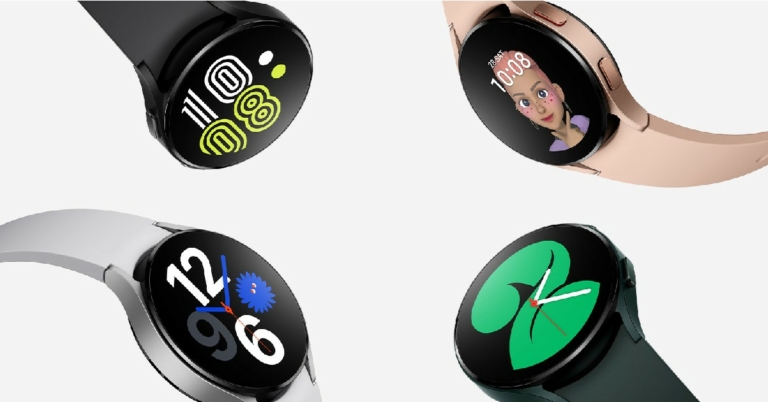
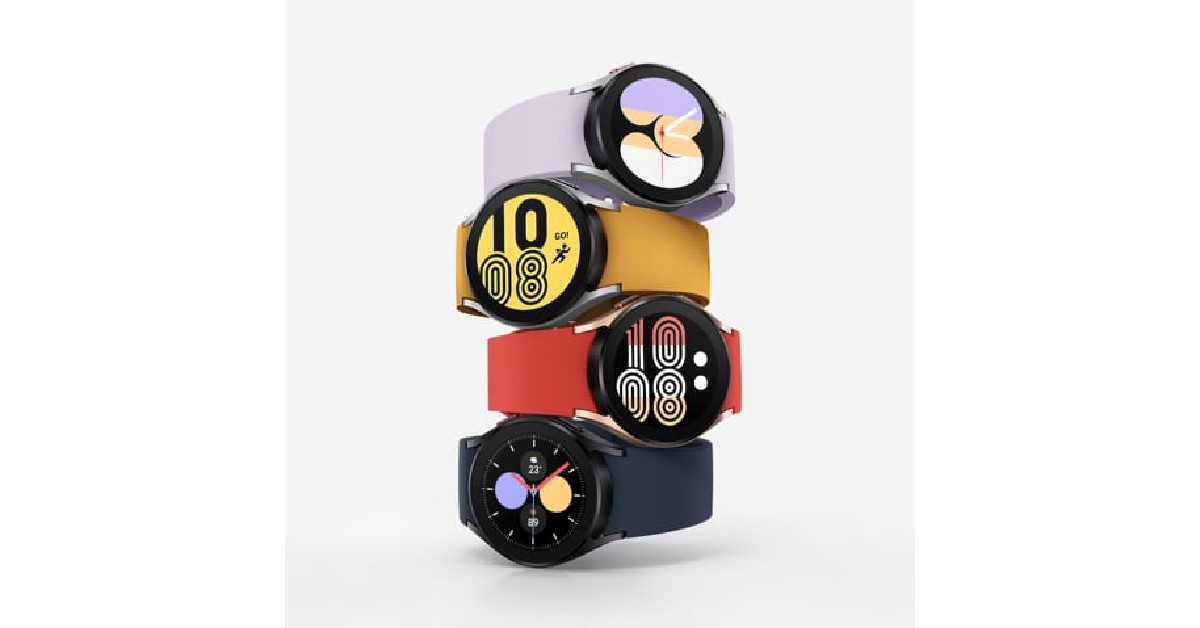
The Samsung Galaxy Watch 4 is one of the best-selling products in the wearable category. Running on Wear OS3, the Galaxy Watch has been wildly popular among its users. One of the most requested features for the Galaxy Watch 4, ever since its launch in 2021, has been Google Assistant connectivity. And now with Google Assistant finally being launched for Galaxy Watch 4, users can bid farewell to Bixby. In this article, we show you how to install Google Assistant on Samsung Galaxy Watch 4.Read Also: Top 7 easy methods to Find Location From a Photo
Here’s how you can download Google Assistant on your Samsung Galaxy Watch 4
Step 1: Unlock your Galaxy Watch and go to Google Play Store.Step 2: Search for Google Assistant in the search bar and open the resulting app page.Step 3: On the Google Assistant app page, tap on ‘Install’.Step 4: Once the update has been downloaded, tap on ‘Open’. You can also access Google Assistant from the App drawer.Step 5: Tap on ‘Get Started’ and then select ‘Open on Phone to Activate’.Step 6: On your smartphone, tap ‘Activate’ once the Google Assistant window pops up.Step 7: Select which features you want to activate on Google Assistant in your Galaxy Watch. This includes setting ‘Hey Google’ as a trigger word to turn on the Google Assistant, syncing your messages, contacts and calendar, and setting up a dedicated button for Google Assistant on your Galaxy Watch.Step 8: Once you’ve finished setting up the Google Assistant, tap on ‘Done’.Google Assistant will be installed on your Galaxy Watch 4.Read Also: Vivo T1x set to launch in India on July 20Bonus TipGoogle Assistant for Galaxy Watch 4 is still being rolled out in phases, and it may not be available in your country. Right now it is only available in ten markets: US, UK, Australia, France, Germany, Ireland, Japan, Taiwan, and South Korea. If it isn’t available in your location, you can use third-party marketplaces like APKMirror and APKPure to download it. Once you’ve downloaded the APK on your smartphone, you can transfer it to your Galaxy Watch using Easy Fire Tools.Since this is the first version of Google Assistant for Galaxy Watch, you may encounter a few bugs while using it. Usually, these bugs get fixed with software updates, but that may take some time. For your Galaxy Watch, you also have the option to use Bixby, Samsung’s own voice assistant.
For the latest gadget and tech news, and gadget reviews, follow us on Twitter, Facebook and Instagram. For newest tech & gadget videos subscribe to our YouTube Channel. You can also stay up to date using the Gadget Bridge Android App. You can find the latest car and bike news here.
The introduction of the iQoo 9T 5G in India is scheduled soon. Amazon India has been hinting that the new iQoo 9 series phone will be arriving in the nation. The precise launch date and time of the phone are not stated in the listing, but as per the listing the iQoo 9T 5G will sport a triple back camera setup in addition to Vivo’s V1+ imaging technology.iQoo 9 Series is soon getting bigger in India. The company will be launching iQoo 9T 5G in the nation. Even though iQoo has yet to reveal the precise date of its release, the device has been listed on Amazon indicating the upcoming launch. The iQoo 9T 5G would be the fourth model in the iQoo 9 series, which included the basic iQoo 9, iQoo 9 Pro, and iQoo 9 SE variants when it was introduced in February of this year.The e-commerce listing implies that the next phone will have a look that is influenced by BMW Motorsport. Three colour stripes symbolising the brand flow off-centre down the white back panel in a pattern that is reminiscent of BMW Motorsport.The power button is displayed in a blue hue. Additionally, a triple camera arrangement with 40x digital zoom is seen on the back. The device will also have Vivo’s V1+ imaging chip. It may also include a 6.78-inch AMOLED display with a 120Hz refresh rate.The Snapdragon 8+ Gen 1 chipset is anticipated to power the new smartphone. Two RAM and storage combinations are anticipated: 8 GB RAM with 128 GB storage and 12 GB RAM with 256 GB storage. Additionally, the device might be capable of 120W fast charging.The iQoo 10 series, which will officially launch in China on July 19, has a similar appearance and set of features to those teased. Two models are anticipated to debut iQoo 10 and iQoo 10 Pro. The business has created a promo film before the launch date that showcases the smartphone’s full design. They will include Vivo’s V1+ imaging chip and three rear cameras. The Qualcomm Snapdragon 8+ Gen 1 SoC will be the engine behind the iQoo 10 series.
For the latest gadget and tech news, and gadget reviews, follow us on Twitter, Facebook and Instagram. For newest tech & gadget videos subscribe to our YouTube Channel. You can also stay up to date using the Gadget Bridge Android App. You can find the latest car and bike news here.
Garena Free Fire is a battle royale game with regular awards and tournaments to keep players interested. If you play Garena Free Fire, you should be aware of the redeem codes that are released on a daily basis. However, because the battle royale game is banned in India, players from other countries can use the Free Fire Redeem codes daily. If you’re unfamiliar with the Garena Free Fire redeem codes or don’t know how to get them, we’ve put together a step-by-step guide to help you redeem them. Check out Garena Free Fire Redeem Codes for July 15.The Free Fire redeem codes are a great way to get free stuff. These are 12-digit codes that contain alphabets and numbers, as well as an expiration date and time. Because the Garena FF redeem codes cannot be used more than once, you should hurry to the redemption page to claim your free reward before someone else does. To get a free reward, all you have to do is go to reward.ff.garena.com/en, which is the official redemption page. Also, keep an eye on this space for daily updates on Garena Free Fire redemption codes and rewards.
In This Article
Garena Free Fire Redeem Codes Today 15 July 2022
ZRJAPH294KV5
FF10GCGXRNHY
X99TK56XDJ4X
FF11NJN5YS3E
Y6ACLK7KUD1N
FF11HHGCGK3B
SARG886AV5GR
FF1164XNJZ2V
WOJJAFV3TU5E
MCPTFNXZF4TA
FF119MB3PFA5
FF10617KGUF9
8F3QZKNTLWBZ
FF11WFNPP956
B61YCTNH4PV3
FF11DAKX4WHV
YXY3EGTLHGJX
WLSGJXS5KFYR
How to Get Free Fire Redeem Codes for Garena on July 15?
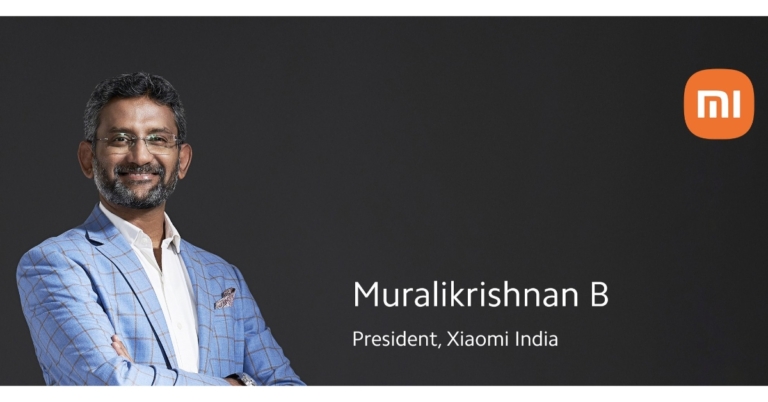
Muralikrishnan B will take over as President of Xiaomi India, according to an announcement by Xiaomi. Since 2018, Muralikrishnan B has held the position of Chief Operating Officer at Xiaomi. Muralikrishnan will be in charge of daily operations, services, public affairs, and strategic projects, the corporation claims. Remember that Alvin Tse was appointed general manager of Xiaomi India on June 3 by the business and that Muralikrishnan was promoted to the position of head of operations a month later. When Tse’s appointment as general manager of Xiaomi India was announced, he was one of the founding members of Xiaomi Global.Xiaomi recently declared that it would name Muralikrishnan B, its COO (Chief Operating Officer), as the new company president. He will now be accountable for the company’s day-to-day operations, strategic projects, and public relations as president. Furthermore, he will continue to work to strengthen the company’s commitment to the Make in India and Digital India initiatives. As per Xiaomi by August 1st, 2022, these adjustments will be fully implemented.Alvin Tse succeeded Manu Jain as General Manager of Xiaomi India last month. Tse founded Poco, is a member of the founding team of Xiaomi Global, and served as the general manager of Xiaomi Indonesia in the past.While Anuj Sharma joined Xiaomi India again as Chief Marketing Officer to bolster the country’s executive team. The overarching brand and marketing plan will be in charge of Anuj Sharma.IIM-Calcutta alumni Muralikrishnan has over 25 years of expertise in the consumer technology sector and has played a key role in the expansion of the brand in areas such as offline sales, service, and operations. The company has had great development across all categories under the capable leadership of Muralikrishnan.According to Xiaomi India, it has also significantly increased its organisational capabilities, execution machinery, and established a strong foothold in the offline retail sector.As it continues to adhere to its primary tenet of providing innovation for everyone, Xiaomi India will concentrate on reaffirming its commitment to the nation.
For the latest gadget and tech news, and gadget reviews, follow us on Twitter, Facebook and Instagram. For newest tech & gadget videos subscribe to our YouTube Channel. You can also stay up to date using the Gadget Bridge Android App. You can find the latest car and bike news here.
If you stream video content on your iPhone, a lightning to HDMI adapter can come in quite handy if you want to project the media on your TV. You can use an HDMI adapter not only to watch videos but also to stream presentations and gameplay. While most Smart TVs come equipped with a wireless screen mirroring function, the video quality from an HDMI connection is far superior. In this article, we bring you the 5 best lightning to HDMI adapters that you can buy in the US.Read Also:How to connect your iPhone to your TV?
In This Article
Apple Lightning to Digital AV Adapter
If you’re someone that does not like to stray from the original branding, Apple offers lightning to digital AV adapter. This adapter can be connected to your iPhone, iPad, or iPod for mirroring purposes. Listed at $49 on the Apple Store, this adapter may be pricier than others on this list, but that is the price one has to pay when buying official accessories and add-ons.Price: $49Buy from Amazon.
Unitrox HDMI Adapter
Compatible with all your Apple devices, the Unitrox HDMI adapter does not need an app or external power source to connect your phone to another device. Its pure plug n play feature makes it an easy buy. If your iPhone is running low on battery while it’s connected to the HDMI adapter, you can connect the adapter to a charger for your phone to charge.Price: $20.99Buy from Amazon.
WORLDBOYU Lightning to HDMI Adapter
The Worldboyu lightning to HDMI adapter is another plug n play adapter that is very easy to use. Using this adapter you’ll be able to mirror your iPhone or iPad to the TV screen. Streaming media can be pretty easy when using this adapter. The only drawback is that the Worldboyu adapter needs to be connected to a power source at all times.Price: $19.99Buy from Amazon.
Anytrox HDMI Adapter
Possibly one of the better adapters on this list, the Anytrox HDMI adapter also includes a USB camera transfer port. The Anytrox HDMI adapter supports video resolution of up to 4k and provides vivid, ultra HD videos making it perfect for a home theatre setup. The camera reader provides a transfer rate of up to 90mbps, making it one of the best adapters you can buy.Price: $26.99Buy from Amazon.
Woodford Design HDMI Adapter
The Woodford Design HDMI adapter is perfect for streaming the media on your phone to a larger HD screen, like your TV. For its price, the Woodford Design HDMI adapter is one of the best you can buy. It can come in handy when you don’t have a smart TV and need to stream TV shows and movies from your phone. It is a plug n play device that does not need any app or wifi connection to function.Price: $15.99Buy from Amazon.Read Also: Top 7 easy methods to Find Location From a PhotoThese are the 5 best lightning to HDMI adapters you can buy right now. All of these adapters are compatible with your iPhone, iPad, iPod, and all Apple devices that use a lightning port. If there are other Apple accessories or add-ons that you use on a regular basis, let us know in the comments!
For the latest gadget and tech news, and gadget reviews, follow us on Twitter, Facebook and Instagram. For newest tech & gadget videos subscribe to our YouTube Channel. You can also stay up to date using the Gadget Bridge Android App. You can find the latest car and bike news here.
On July 18, Oppo is all set to announce its first-ever Oppo Pad Air tablet along with the Reno 8 Series. On the same day, the company will also unveil its newest flagship TWS, the Enco X2. The Oppo tablet will be powered by Qualcomm Snapdragon 680 SoC.The Chinese smartphone company Oppo has officially announced that it will be coming up with its first tablet Oppo Pad Air on July 18 in India alongside the Oppo Enco X2 TWS headphones and the Oppo Reno 8 line of smartphones. Before arriving in India the firm introduced both the tablet and the cellphones in May of this year.
In This Article
Oppo Pad Air
The Oppo Pad Air will be equipping a 6nm” octa-core Snapdragon 680 processor and AI System Booster 2.1. According to the company, while preserving battery life, its SoC is capable of handling complex tasks including high-resolution video streaming, seamless app switching, and 3D mobile games. The Oppo tablet will have an ultra-thin body, industry-first Sunset Dune 3D texture, and exclusive OPPO Glow to deliver a fingerprint- and scratch-proof cover. Its category-first TÜV Rheinland Low Blue Light eye comfort certification is a tribute to how comfortable it is to watch.Running on the tablet is ColorOS 12 for Pad. It is compatible with a number of new features, including Multi-Device Connection, two-finger split-screen for using multiple apps at once, Dual Windows, which enables users to independently display two levels of pages from the same app on the same screen, and four-finger floating window for a comfortable reading experience.As per the company, this tablet in its price range that lets you transition from your OPPO handset’s display to its larger screen is the OPPO Pad Air. Additionally, it supports features like file drag-and-drop and clipboard sharing amongst gadgets. Customers can also purchase an OPPO Smart Stylus Pen. It offers 4,096 levels of pressure sensitivity for a better writing or drawing experience.
Oppo Enco X2
Oppo will also introduce Oppo Enco X2 TWS headphones alongside its first tablet and Oppo Reno 8 line of smartphones on July 18 in India. These TWS are the successors of Enco X true wireless earbuds featuring segment-first Dolby Atmos Binaural Recording that allows users to easily record and playback sounds. It also features industry-leading ANC for an immersive music experience in any situation. Additionally, it features the most recent Super Dynamic Balance Enhanced Engine (SuperDBEE) acoustic technology, which was created in collaboration with the Nordic audio powerhouse Dynaudio.The Enco X2 also has 45dB depth and 4000Hz wide Active Noise Cancellation. The TWS earbuds also feature a new Low Latency High-Definition Audio Codec (LHDC) 4.0 and Hi-Res Audio Wireless certification.
For the latest gadget and tech news, and gadget reviews, follow us on Twitter, Facebook and Instagram. For newest tech & gadget videos subscribe to our YouTube Channel. You can also stay up to date using the Gadget Bridge Android App. You can find the latest car and bike news here.
It is quite common to forget where you took a particular picture, especially if you’re someone who takes a lot of photographs. Luckily, your phone camera does more than just take pictures, it records additional information about the picture you take and stores it as metadata. This metadata can be helpful in figuring out where you took a particular picture. Today, we bring you the top 9 easy methods to find the location from a photo.Read Also: Top 7 timepass games like Wordle that you can play every day
In This Article
Metapicz
Metapicz is a helpful tool that you can use to find out where you took a particular picture. Just head over to the website and upload the picture you want to know more about. Metapicz will read the metadata from the picture, which includes the location coordinates of where the picture was taken. Not just that, it’ll also give you significant details like the name of the device that was used to take the picture, camera settings, and a lot more.
Pic2Map
Like Metapicz, Pic2Map also reads the metadata from your photo to give you the coordinates of where the picture was taken. But it goes one step ahead and opens those coordinates on a map. It also shows you images from the location your picture was taken in. If you do not want your pictures to be published you can change the privacy settings.
Photo Location
Photo Location reads the EXIF data from your image to extract the geolocation. It gives you the exact coordinates of where the photo was taken. Not only that, you can use Photo Location to add EXIF data to an image that does not have any.
Google Reverse Image Search
If your image does not contain enough metadata to extract GPS coordinates, using a Google Reverse Image Search may help. While it will not give you the exact location where the image was taken, it will show you additional images from the same area, or identify any popular landmarks that may be in the picture.
Where is the Picture
As the name suggests, Where is the Picture is a pretty straightforward website that tells you where the image was clicked. The website has a basic design and is pretty easy to navigate but you may encounter a lot of ads.
Extract the EXIF data on desktop
Looking up the EXIF data for an image on a PC is a pretty easy process. Using an online tool or website is not all that necessary. Simply right-click on the image and select properties. Then head over to the details tab where you will find the location coordinates.
Find Location Info on a Mac
Your Mac also allows you to view the location info of a particular image. To this, open the image on your Mac and hit the ‘Info’ icon in the toolbar at the top. Switch to the ‘info’ tab and hit the GPS button to view the location of the image on a map. Apart from its location, you can also view the altitude at which the picture was taken.
Extract the EXIF data on your smartphone
If you can’t figure out where you took a particular picture, all you need to do is expand the details of the image and you will be able to see the location tag. However, if you’ve turned off the geotagging feature, the location tab will be empty. If you want to add a location to a picture, you can manually do that by clicking on the location tab and finding coordinates on the map.
Find image location info on an iPhone
iPhone users can extract the location data of any image on their device by opening the picture and hitting the info icon at the bottom of the screen. On the page that pops up, the location of the image will be marked on a map. You can also see which device was used to take the image, when the image was taken, and other details.
Frequently Asked Questions (FAQs)
How do I remove image metadata?
Use a third-party app like Photo EXIF Editor to remove the metadata from any image on your phone. You can also turn off the feature that records the metadata for every image while clicking it.
Does the metadata of my images get published when I post them online?
All the major social media websites like Twitter, Instagram, and Facebook automatically remove the metadata of an image when you post it on the platform. It is still a good idea to remove the location info from a photo before you post it online.
How do I find the exact location where I took a photo?
Open the image on your device, go to the details or properties and view the location info for the image. If the metadata of the image has been removed, you may want to reverse-search the image on Google.
Read Also: Smartphone Comparison: Nothing Phone 1 vs iPhone 13
Conclusion
There were the top 9 methods to find a location from a photo. If you want your camera to automatically record the location of the pictures you take, turn on the geotagging feature. Your camera will require GPS access for this feature. If you do not want to grant GPS permission to the camera, you can add the location manually after taking a picture.
Philips Domestic Appliances India Ltd. introduced the HL7703, a small yet potent mixer grinder that uses a strong 1000W motor to give outstanding performance. This mixer grinder delivers increased grinding and blending efficiency with minimal lumps, resulting in a consistent texture, and promises the ideal grinding experience in 90 seconds.According to the company, Philips HL7703 mixer grinder will enable users to perfectly grind greater batches of even the most difficult foods. They want the greatest blends possible for their homemade smoothies, leaving no lumps behind. The new mixer grinder from Philips Domestic Appliances, which promises to simplify and make consumers’ lives more pleasant, enables one to enjoy simple cooking at home.The Philips HL7703 has a high precision blade design and a 1000W strong motor.The brand-new Philips HL7703 Mixer Grinder is a portable powerhouse with robust suction feet for improved stability. It comes with three stainless steel jars and one fruit filter-equipped, unbreakable polycarbonate jar. Due to its high precision blade design, masalas can be finely ground, smoothies and shakes can be easily blended, and coconut or almond milk can be extracted.The cost of the brand-new Philips HL7703 Mixer Grinder is Rs 9,595 only. Customers can now purchase this product at the local retail stores. Additionally, it will be accessible through the online store.Commenting on the launch, Mr. Gulbahar Taurani, MD & CEO, Philips Domestic Appliances, India Subcontinent, said, “Indian food preparation is indispensable without a mixer grinder, and a powerful one is a must-have for today’s kitchens. At Philips Domestic Appliances, we understand that consumers are looking for quicker and efficient solutions to meet their day-to-day needs, and the new Philips HL7703 mixer grinder, equipped with a heavy-duty 1000W motor guarantees faster grinding and finer blending in just 90 seconds. With this launch, we aim to expand and further strengthen our Mixer Grinder portfolio and provide differentiated offerings to our consumers.”
For the latest gadget and tech news, and gadget reviews, follow us on Twitter, Facebook and Instagram. For newest tech & gadget videos subscribe to our YouTube Channel. You can also stay up to date using the Gadget Bridge Android App. You can find the latest car and bike news here.
Daily Amazon brings a fresh quiz for its customers with exciting rewards on its platform. The Amazon quiz can be played every day from 12 AM to 11:59. 15 July 2022 Amazon Quiz has gone live on its platform and the e-commerce platform Amazon is today giving you a chance to win Rs 1,000 Amazon Pay Balance.To participate all you need to do is log in to your Amazon app on your device and give answers. Daily a new set of questions are presented to the participants which gives them a chance to win exciting prizes. The questionnaire consists of five easy questions that are usually based on general knowledge and current affairs. You can submit the correct answers and can win an Amazon Pay Balance of up to Rs 50,000. It should be noted that the quiz is not accessible on the web platform instead you have to participate only through the dedicated app.Amazon Quiz Today Prize – Rs 1,000 Amazon Pay BalanceQuiz Date – 15 July 2022Daily Timing – 12 AM to 11:59 PMWinner Announcement – Today 12 PM
In This Article
Amazon Quiz Answers Today 15 July 2022
Question 1: India’s first privately developed cryogenic rocket engine, that recently test-fired, is named what?Answer: Dhawan-1Question 2: Sanjay Dutt has been named the brand ambassador for Golden Jubilee celebrations of which state?Answer: Arunachal Pradesh
Question 3: China launched its first cross-border train as part of the Belt and Road Initiative with which country?Answer: LaosQuestion 4: The oldest of these structures were built by which Pharaoh?Answer: DjoserQuestion 5: This structure was initially constructed to honour the people who died during whose rule?Answer: Napoleon
How To Play Amazon Quiz
Only app users are eligible to play the Amazon quiz every morning from 12 AM to 11:59 PM. The quiz is not available on the desktop. For those who are unaware of how to play the Amazon quiz below are the steps, you can follow to take the quiz.
Firstly download the Amazon app from Google Play Store or App Store
Now fill in the required information through the Sign Up option.
You need to log in to the Amazon app and scroll down on the home screen to find the Amazon Quiz banner.
Tap on the Amazon Quiz banner and tap on the Start button to start the Quiz.
Now you will get 5 questions and you need to answer them correctly. One wrong answer will eliminate you from the Quiz.
After answering all the questions correctly you are now eligible for a Lucky Draw.
The winner’s name will be announced today at 12 PM.
Vivo is all set to announce a new smartphone in India soon. The company today confirmed that it is bringing Vivo T1x to India on July 20. The Vivo T1x with 5G connection is anticipated to be unveiled by Vivo in India which was first introduced in China in October last year. The MediaTek Dimensity 900 SoC-equipped 5G version.Via its official Twitter account, the firm announced the Vivo T1x’s introduction in India. The Vivo T1x is now offered in a few international regions in both 4G and 5G versions. The phone’s 4G version, which features Qualcomm’s Snapdragon 680 SoC, was revealed in Malaysia in April. But as said earlier the company is going to bring the product that supports 5G connection. The smartphone will come in Blue and Black colour options with twin rear cameras, according to the Vivo ad. Vivo has also begun mailing launch-related media invitations. The launch ceremony will start on July 20 at noon.On the Vivo India website, a special microsite is teasing the release of the Vivo T1x. Customers who are interested in receiving the most recent information can click the “Notify Me” option on the website. In the nation, Flipkart will be the place to buy the phone.
In This Article
Vivo T1x specifications expected
The Vivo T1x has a 6.58-inch FHD Plus display with a 1,080 x 2,408-pixel resolution and support for a 120 Hz refresh rate. OriginOS 1.0 is installed on top of Android 11 on the device. The MediaTek Dimensity 900 Octa-core SoC, 8GB of RAM, and 256GB of internal storage are included in the Vivo T1x. The dual rear camera system of the T1x consists of a 64MP primary sensor and a 2MP macro lens. Moreover, an 8MP selfie camera is present. A 5,000mAh battery powers the smartphone, which also supports 44W rapid charging. A side-mounted fingerprint sensor is also included.
Vivo T1x price in India expected
Vivo T1x is available in China in a 6GB RAM with 128GB storage option that costs CYN 1,699 which is around Rs 19,900. The 8GB RAM with 128GB storage option comes at CYN 1,799 translating to Rs 21,100 and the 8GB RAM with 256GB storage option at CYN 1,999 which converts to Rs 23,400.
For the latest gadget and tech news, and gadget reviews, follow us on Twitter, Facebook and Instagram. For newest tech & gadget videos subscribe to our YouTube Channel. You can also stay up to date using the Gadget Bridge Android App. You can find the latest car and bike news here.
With billions of users worldwide, WhatsApp is one of the most widely used instant messengers in the world. What attracts users to WhatsApp is its simple design and ease of access. But if you dig beneath the surface you’ll find a lot of features that will greatly enhance your chatting experience. In this article, we bring you the top 10 tips and tricks of WhatsApp you should use regularly.Read Also:How to message an unsaved number on WhatsApp
In This Article
Pin a chat to the top of the chat window
If there are certain people you text more frequently, you can pin their chat logs to the top of the chat window. WhatsApp allows a maximum of 3 chats to be pinned at one time. To pin a chat, simply long press the chat log and tap the pin icon at the top menu.
Find out who you chat with the most
WhatsApp keeps a record of all the data you’ve consumed using the app. This record is sorted by contacts. Go to Settings>Storage and Data>Manage Storage to see which contacts you talk to the most. Pictures and videos carry more data than texts and gifs, so if you’ve exchanged more pictures with a certain contact, their name will be placed above someone you’ve exchanged more texts with.
Swipe left to reply to a text
You’re probably already aware of how to reply to a text. The standard method is to long press the text and select the reply option from the top menu. However, WhatsApp also offers you a quick way to reply to texts. Simply swipe right on a message and it will ger quoted in your message box.
React to a text with an emoji
Don’t want to respond to every text that you receive? Simply long press the text and select an emoji reaction. This is a quick fun way to acknowledge that you’ve read the text. This is a pretty new feature so a lot of people are not aware of it yet.
Change your chat background
Did you know that you can set any image as a custom chat background? Simply go to Settings>Chat>Wallpaper and choose from a range of preset templates or use an image from your phone gallery as chat background.
Create bold, italicized, and strikethrough text
To add more emphasis to your texts, use these simple tricks to create bold, italicized, and strikethrough text. For bold, put your text between two asterisks, *like this*. For italics, put your text between two underscores, _like this_. And finally, for strikethrough, put your text between two tilde signs, ~like this~.
Turn off auto-download to save data
If you’re using mobile data, turn off auto download to save your internet data. Simply go to Settings>Storage and Data and disable auto download when using mobile data. Turning off auto downloads also helps you in sorting which images you want to save on your phone and which ones you want to trash.
Email chatlogs to yourself
WhatsApp creates regular backups of your chats. If you want to use WhatsApp on another device, downloading these backups can help restore your chat history. You can also email your chatlog to yourself (or someone else). Simply go to Settings>Chats>Chat History and select Export Chat. WhatsApp will prompt you to select the contact whose chat history you want to export. Upon selecting a contact, you can send their chat history to anyone through mail or other platforms.
Add a chat shortcut to your home screen
If you frequently talk to certain people or engage in certain active groups, you can add their icon to your phone’s home screen. Simply long press the chat log and tap on the three dots at the top right corner. Select ‘Add Shortcut’. The chat shortcut will be added to your home screen.
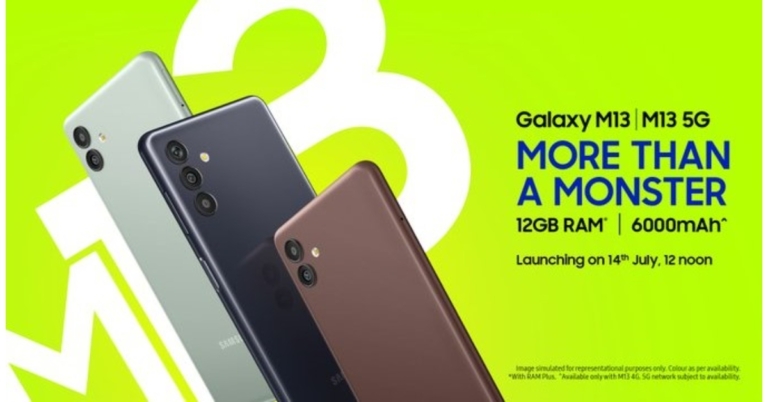
Samsung unveiled the Galaxy M13 and Galaxy M13 5G smartphones in India today. 11 5G bands will be supported by the Galaxy M13 5G and will have a 5,000mAh battery, compared to a 6,000mAh battery in the Galaxy M13, which has a 4G connection. Moreover, when your primary SIM is out of network, you can still stay connected thanks to the smartphone’s Auto Data Switching feature.
In This Article
Samsung Galaxy M13 5G and Galaxy M13 price in India and availability
The starting pricing for the Galaxy M13 5G in India is Rs 13,999 for the 4GB of RAM and 64GB of storage, and Rs 15,999 for the model with 6GB of RAM and 128GB of storage. On the other hand, the base model of the Galaxy M13, which comes with 4GB of RAM and 64GB of storage, costs Rs 11,999, while the model with 6GB of RAM and 128GB of storage costs Rs 13,999. Both the devices will be available in Aqua Green, Midnight Blue, and Stardust Brown colour variants.The smartphone is scheduled to go on sale for purchase from July 23 via Samsung.com, Amazon, and at a few retail locations. Users of ICICI Bank cards are eligible for a special launch offer from Samsung that includes a Rs 1,000 immediate rebate.
Samsung Galaxy M13 5G specifications
The 6.5-inch HD+ display on the Samsung Galaxy M13 5G has a refresh rate of 90Hz, Gorilla Glass 3 protection and a 400 nit brightness. The smartphone runs on One UI 4, which is based on Android 12.0. The device is powered by a MediaTek Dimensity 700 SoC and can support up to 6GB of RAM. The Samsung RAM Plus function allows the RAM to be increased to up to 12GB and has an internal storage capacity of up to 128GB, which can be increased by up to 1TB with a microSD card.The Samsung Galaxy M13 5G has a dual rear camera arrangement with a 50-megapixel primary sensor and a 2-megapixel secondary sensor for pictures and videos. For taking selfies and making video calls, there is a 5-megapixel front camera. The smartphone has a 5,000mAh battery that can be charged at 15W.
Samsung Galaxy M13 specifications
The 6.6-inch full-HD+ LCD display on Samsung Galaxy M13 has Gorilla Glass 5 protection and 480 nits of brightness. The device operates on One UI 4, which is based on Android 12.0 and is powered by Exynos 850 SoC and up to 6GB of RAM. The Samsung RAM Plus function allows the RAM to be increased to up to 12GB and has an internal storage capacity of up to 128GB, which can be increased by up to 1TB with a microSD card.The Galaxy M13 has a triple-back camera arrangement with a 50-megapixel primary sensor, a 2-megapixel depth sensor and a 5-megapixel ultra-wide angle camera. For taking selfies and making video calls, there is an 8-megapixel front camera. There is a 6,000mAh battery onboard that supports 15W charging.
For the latest gadget and tech news, and gadget reviews, follow us on Twitter, Facebook and Instagram. For newest tech & gadget videos subscribe to our YouTube Channel. You can also stay up to date using the Gadget Bridge Android App. You can find the latest car and bike news here.
Since its launch last year, Wordle has found its way into the daily routine of millions of users worldwide. With New York Times acquiring the daily puzzle for $1 million, it may not be long until it gets placed behind a paywall. Luckily, there are lots of games like Worldle that will keep you occupied. In this article, we bring you the top 7 games like Wordle that you can solve every day.Read Also: How to Fix Emails Stuck in Outbox of Gmail?
In This Article
Quordle
If one Wordle a day just isn’t enough for you, Quordle might interest you. Quordle follows the same rules as Wordle but instead of guessing one word, you’re given nine attempts to guess four words. After solving the daily puzzle you can also play Quordle in practice mode.
Worldle
Best described as Wordle but for countries, Worldle gives you six attempts to guess a country by its shape. The map of the country is presented as a blacked-out figure, isolated from its surroundings. After every guess, Worldle tells you how close you are to the country in the puzzle. Using these cues you can get closer to solving the puzzle.
Nerdle
If you’re a math lover, Nerdle is the perfect puzzle for you. The puzzle is solved by guessing the calculation. Like Wordle, every correct tile you guess turns green and every incorrect tile turns black. If the tile you guessed is a part of the puzzle but isn’t placed in the correct position, it turns magenta. Even if you don’t like math, Nerdle is a fun puzzle to solve.
Heardle
Heardle is a puzzle designed for music enthusiasts. The aim is to guess the song correctly from a one-second audio clip. If you make a wrong guess, Heardle will give you additional clips to guess from. If you guess the artist correctly, the auto-fill feature will help you narrow down the guesses.
Octordle
Octordle is a fun game just like Wordle, where you have to guess eight words in thirteen attempts. The higher number of words makes the game interesting, decreasing the margin of error. Apart from the daily puzzle, you can also solve unlimited free puzzles from the Octordle catalogue.
Wordle Unlimited
If you can’t wait for the next daily puzzle on Wordle, you can solve as many puzzles as you want in Wordle Unlimited. You can even make a custom puzzle and send it to your friends as a challenge.
Framed
This one is for all the movie buffs. Framed gives you a still from a movie, and you get six guesses to figure out which movie it is. With every wrong guess, you get an additional frame, helping you narrow down the answer.Read Also: Smartphone Comparison: Nothing Phone 1 vs iPhone 13
All of the games mentioned above are free to play. Some may have memberships that offer additional features. If there are any daily puzzles that you like to solve, let us know in the comments!
Garena Free Fire is a battle royale game with regular awards and tournaments to keep players interested. If you play Garena Free Fire, you should be aware of the redeem codes that are released on a daily basis. However, because the battle royale game is banned in India, players from other countries can use the Free Fire Redeem codes daily. If you’re unfamiliar with the Garena Free Fire redeem codes or don’t know how to get them, we’ve put together a step-by-step guide to help you redeem them. Check out Garena Free Fire Redeem Codes for July 14.The Free Fire redeem codes are a great way to get free stuff. These are 12-digit codes that contain alphabets and numbers, as well as an expiration date and time. Because the Garena FF redeem codes cannot be used more than once, you should hurry to the redemption page to claim your free reward before someone else does. To get a free reward, all you have to do is go to reward.ff.garena.com/en, which is the official redemption page. Also, keep an eye on this space for daily updates on Garena Free Fire redemption codes and rewards.
In This Article
Garena Free Fire Redeem Codes Today 14 July 2022
WEYVGQC3CT8Z
WLSGJXS5KFYR
X99TK56XDJ4X
FF11NJN5YS3E
FF9MJ31CXKRG
FFICJGW9NKYT
YXY3EGTLHGJX
4ST1ZTBE2RP9
8F3QZKNTLWBZ
FFCO8BS5JW2D
FFBBCVQZ4MWA
FF10HXQBBH2J
B6IYCTNH4PV3
WOJJAFV3TU5E
3IBBMSL7AK8G
FF1164XNJZ2V
FFAC2YXE6RF2
J3ZKQ57Z2P2P
How to Get Free Fire Redeem Codes for Garena on July 14?
Nothing Phone 1 was officially released in India and worldwide earlier this week. Even before its official announcement, the smartphone gained a lot of popularity for its interesting form factor. The Nothing Phone (1), which has a semi-translucent back and is shaking up the mid-range market but here we have compared the smartphone with the iPhone 13. In order to establish which Smartphone is ideal for which type of user, we will compare Nothing Phone 1 vs iPhone 13 in this post.
Nothing Phone 1: Dual rear cameras that includes a 50MP primary Sony IMX766 sensor (ƒ/1.88) with OIS and EIS as well as a second 50MP Samsung JN1 ultrawide sensor (ƒ/2.2) with 140 degrees of FoViPhone 13: Dual rear cameras- 12MP wide-angle and 12MP ultra-wide lens
Selfie camera
Nothing Phone 1: 16MP Sony IMX471 sensor has a ƒ/2.45 apertureiPhone 13: 12MP selfie camera
RAM and storage
Nothing Phone 1: 8GB RAM/128GB storage, 8GB RAM/256GB and 12GB RAM/256GB storageiPhone 13: 128GB storage, 256GB storage and 512GB storage
Battery
Nothing Phone 1: 4,500mAh batteryiPhone 13: 3,240 mAh
Operating system
Nothing Phone 1: Nothing OS based on Android 12iPhone 13: iOS 15
The semi-translucent exterior of the Nothing phone (1) deviates from the standard with its design by partially disclosing its inside components. The LEDs on the rear of the Glyph Interface can be programmed to display notifications. The finish on the rear is glass as well. Although the iPhone 13 has a unique design of its own, let’s agree that the form factor of Nothing is what makes it stand apart from the iPhone. While the iPhone 13 has an IP68 rating as opposed to the Phone’s 1’s IP53 rating.Nothing Phone 1 will provide you with an uninterrupted 120HZ AMOLED display with a small dot notch in place of the enormous notch at the top that interrupts the screen on the iPhone 13 in terms of display. Additionally, the iPhone’s display only supports HDR10, while the Phone 1 supports HDR10+.Performance-wise, the Snapdragon 778G+ SoC and Apple’s own A15 Bionic chipset cannot be compared. However, Qualcomm’s chipset can definitely compete with the flagship devices now on the market.Although we haven’t yet tested the camera on the Nothing Phone 1, both handsets boast a dual back camera setup with wide and ultrawide sensors, however, their individual performance is probably going to vary. Wait for our comprehensive review of the Nothing Phone 1 to learn more about the camera aspect of things.Nothing Phone 1 costs much less than the iPhone 13, which has a price that starts at Rs 79,999. What phone ought you to purchase? Nothing is giving you uniqueness, whereas Apple has a different fan base. To upgrade your Android smartphone, choose Nothing Phone 1 if you’re looking for anything new.
For the latest gadget and tech news, and gadget reviews, follow us on Twitter, Facebook and Instagram. For newest tech & gadget videos subscribe to our YouTube Channel. You can also stay up to date using the Gadget Bridge Android App. You can find the latest car and bike news here.
If you have multiple Gmail accounts and want to access emails from all your accounts on your smartphone, Gmail allows you to add more than one account. You can add another account directly from the Gmail app or your phone’s user settings. Today, we show you how to add another Gmail account to your Android smartphone.Read Also: How to message an unsaved number on WhatsApp
Here’s how you can add another Gmail account to your Android smartphone
Step 1: Go to Settings.Step 2: Scroll down and select ‘Accounts and Backup’.Step 3: Tap on ‘Manage Accounts’.Step 4: Scroll down and tap ‘+ Add Account’.Step 5: Select Gmail.Step 6: Enter the email address you want to add.Gmail will prompt you to enter the password, after which the account will be added to your smartphone.Read Also:Official Renders of the Motorola Razr 2022 Tease the Design, Launching soonBonus Tip: Add another account using the Gmail appYou can also add another Gmail account simply by opening the Gmail app on your phone and tapping on the user profile at the top right corner of your screen. In the pop-up window, tap on ‘Add Another Account’ and enter the email address you want to add.This is how you can add another Gmail account to your Android smartphone. In order to access mails from different accounts, you will have to switch between them once you open the Gmail app. You can also add another Gmail account to other apps like Play Store, Calendar, Hangouts and Google Chrome.
For the latest gadget and tech news, and gadget reviews, follow us on Twitter, Facebook and Instagram. For newest tech & gadget videos subscribe to our YouTube Channel. You can also stay up to date using the Gadget Bridge Android App. You can find the latest car and bike news here.
The Motorola Razr 3 has been mentioned in a few recent leaks and rumours. However, the introduction of the Moto Razr 2022 in China is anticipated to happen soon. The Chinese electronics manufacturer has recently posted a teaser on Weibo to provide details about the upcoming release of the new Razr phone in the nation while avoiding to disclose the precise launch date. It had previously been reported to include a 2,800mAh battery, the same battery size as the Motorola Razr 5G.The company’s official Weibo account hinted at the Moto Razr 2022 debut in China. The teaser image depicts the phone as being black and proposes dual cameras and LED flash on the back. The precise release date or other important details of the future foldable phone were not, however, confirmed by Motorola. Additionally, a Motorola executive displayed the Moto Razr 2022, showcasing the updated look. The Qualcomm Snapdragon 8 Gen 1 SoC is anticipated to power the clamshell foldable smartphone. It might have a display with a 120Hz refresh rate and dual 50 megapixel rear cameras.Image Courtesy: WeiboThe Moto Razr 2022 was featured in hands-on photos uploaded by Chen Jin, General Manager of Lenovo Mobile Business Group, on the Chinese microblogging site, displaying the design from all sides and in both folded and unfolded configurations. In comparison to the Motorola Razr original and Motorola Razr 5G, the renders depict the device as having rounded sides and a relatively slim chin.According to previous sources, the Motorola Razr 3 will be sold in Europe for EUR 1,149. The foldable phone could come in Tranquil Blue and Quartz Black colour schemes. It is anticipated to have an AMOLED display with a 120Hz refresh rate. Rumours suggest that the main screen is going to have a 20:9 aspect ratio and full-HD+ resolution. It’s anticipated that the Qualcomm Snapdragon 8 Gen 1 SoC will power it.In addition to this, the leaks state that the Moto Razr 2022 might have a 50-megapixel dual-back camera arrangement that can capture ultra-HD films at 60 frames per second. It is rumoured to have a 32-megapixel Omnivision front camera sensor that can capture full-HD films at 120 frames per second.
For the latest gadget and tech news, and gadget reviews, follow us on Twitter, Facebook and Instagram. For newest tech & gadget videos subscribe to our YouTube Channel. You can also stay up to date using the Gadget Bridge Android App. You can find the latest car and bike news here.
Running can be as simple as just putting on some sneakers and moving your legs, but a well-chosen gadget can make a world of difference to your exercise.
Whether it’s an app to motivate you to get off the sofa, a pedometer to measure your progress, or just the right music to jog along to, these can help turn your workout from a boring routine into something to remember.
In This Article
Bose’s Bluetooth Audio Sunglasses
What do you get if you cross sunglasses with an iPod? Well, you get Bose’s Audio Sunglasses.
This gadget is perfect for running, simultaneously protecting you from the sun’s glare while pumping your ears with your favourite tunes.
The glasses are sweat resistant, come with interchangeable lenses, and even have a built-in volume adjuster, plus a button for playback control. The time between charges of eight hours is also decent.
This gadget will set you back £240 for a new pair, but it may be worth it if you love both running and gadgets.
Sony Linkbuds
Comparison websites are everywhere now, covering everything from top flight deals to finding the best lottery sites. You might be tempted to use a similar site for finding amazing running earbuds, but we can save you the hassle by pointing you towards the Sony Linkbuds.
While the £149 cost might hurt a little, the advantages far outweigh the costs. First, you won’t even notice you’re wearing them as they use little wings to stay nestled in your outer ear.
Next, you’ll find that they produce excellent quality sound that outranks most products in its price category. Finally, their battery life of 5.5 hours between charges means they should even see you through a marathon training, if necessary.
MapMyRun
The number of different GPS uses has steadily increased over the last decade or so, and GPS is responsible for the craze in tracking run pace and distances, powered by the likes of Strava.
MapMyRun is a good alternative to the industry’s frontrunner. It saves all the data from your workout, including your heart rate when used with a chest-strap monitor which you can buy from a number of outlets.
There’s also a digital MapMyRun community where you can post run times, chat about upcoming events, and earn trophies. If you have Under Armour footwear, you’ll also be able to sync the app to that, too.
The only downside is that there are fewer people on there than Strava, so it may not be as easy to find friends.
When it comes to value for money, though, MapMyRun sprints ahead.
Read Also:Garmin Forerunner 55 launched, now available in India at Rs 20,990
Garmin Forerunner 955 Running Watch
If you like to glance at the time while you run instead of fiddling with a phone app, then sports watches are your best friend. This is another good running gadget.
Today’s models come in a vast array of sizes and prices and often come packed with features that incorporate GPS technology, heart rate tracking, and even training plans.
The Garmin Forerunner 955 is a prime example of the high-end area of the market, with prices typically coming in between £400 and £500. Not only does the watch include every feature you could possibly want, it also stores advanced offline maps to stop you from getting lost in areas with low network coverage.
The less you pay for sports watches, of course, the fewer features you have; but that may suit you just fine if you’re one of the traditionalists who just want a watch to tell the time!
Shokz OpenRun Pro
We’ve mentioned earphones, but if you want the music to really echo through your head, then Shokz OpenRun Pro will make you feel like a portable nightclub.
Known as bone conduction headphones, they send sound waves vibrating through your skull instead of your ear drum, giving you a truly immersive experience.
The Shokz are surprisingly lightweight for such an action-packed gadget, coming with a comfortable design and a long battery life of up to 10 hours to boot.
Also, if you’re into professional athletics, then you may be impressed by the fact that these are the only headphones that are approved by England Athletics.
Armband phone pockets
Last but not least is an accessory that we may overlook when we’re preparing our running kit.
Armband phone pockets might not be glamorous, but they’re extremely useful in the way they let you work your phone as you run.
Costing under a tenner, these plastic pouches come with a Velcro strap that you wrap around your upper arm, giving you access to your mobile. You could even fit other gadgets in there, like an old-fashioned iPod, but this may not work as well.
When it comes to simple convenience, phone pockets are a winner. In fact, many runners who use them can’t imagine how they lived without them before.
For the latest gadget and tech news, and gadget reviews, follow us on Twitter, Facebook and Instagram. For newest tech & gadget videos subscribe to our YouTube Channel. You can also stay up to date using the Gadget Bridge Android App. You can find the latest car and bike news here.
14 July 2022 Amazon Quiz has gone live on its platform. The quiz timings are 12 AM to 11:59 PM. The Amazon App users can participate in the quiz daily and all they have to do is submit correct answers to the questions asked on the e-commerce platform. Today’s participants can get a chance to win Rs 1,000 Amazon Pay Balance.Amazon brings a fresh questionnaire that contains 5 questions daily. These questions are based on current affairs and general knowledge. The quiz can be played from 8 AM to 11:59 PM and the contestants need to answer correctly to enter into a lucky draw.Only one person is declared as a winner and the results will be announced at the end of every month. And to make sure that you give correct answers to all the 5 questions Gadget Bridge everyday updates all the answers to the Amazon Quiz. Do check out 14 July 2022 Amazon Quiz Answers to win a Rs 1,000 Amazon pay Balance.Amazon Quiz Today Prize – Rs 1,000 Amazon Pay BalanceQuiz Date – 14 July 2022Daily Timing – 12 AM to 11:59 PMWinner Announcement – Today 12 PM
In This Article
Amazon Quiz Answers Today 14 July 2022
Question 1: Gulabo, who recently died at the Van Vihar National Park and Zoo in Bhopal, was the oldest of what animal in India?Answer: Sloth bearQuestion 2: Jaitapur, set to be the country’s largest nuclear power generating site, is located in which state?Answer: MaharashtraQuestion 3: Which airlines recently became the first airline to use sustainable commercial aviation fuel?Answer: British AirwaysQuestion 4: This doll depicts which Marvel character?Answer: Black WidowQuestion 5: What breed of dog is shown here?Answer: Corgi
How To Play Amazon Quiz
Only app users are eligible to play the Amazon quiz every morning from 12 AM to 11:59 PM. The quiz is not available on the desktop. For those who are unaware of how to play the Amazon quiz below are the steps, you can follow to take the quiz.
Firstly download the Amazon app from Google Play Store or App Store
Now fill in the required information through the Sign Up option.
You need to log in to the Amazon app and scroll down on the home screen to find the Amazon Quiz banner.
Tap on the Amazon Quiz banner and tap on the Start button to start the Quiz.
Now you will get 5 questions and you need to answer them correctly. One wrong answer will eliminate you from the Quiz.
After answering all the questions correctly you are now eligible for a Lucky Draw.
The winner’s name will be announced today at 12 PM.
Gmail is one of the most easy-to-use email services, which is also why it is so popular. However, it can get annoying when the emails you’re trying to send won’t get through and get stuck in the Outbox. This may be due to several different reasons. In this article, we bring you the top 7 ways to fix the ’emails stuck in the outbox of Gmail‘ issue.Read Also:How to add or remove another email account to your Gmail app?
In This Article
Check Attachment Size
If your email contains an attachment, check if its size exceeds 25MB. Currently, Gmail does not allow its users to send attachments that are larger than 25MB. Make sure the attachment size is under 25MB and resend the email. You can split up the attachments into two emails if the total size of the files exceeds 25MB.
Clear Gmail Cache
If you haven’t cleared the cache in a long time, it may have stored some expired or corrupted files. Make sure you regularly clear the cache so you don’t face any issues like this. In order to clear the Gmail cache, go to Chrome Settings>Privacy and Security>Cookies and other site data. Scroll down to ‘See all cookies and site data’ and delete the Gmail entry. Your Gmail cache will be cleared.
Check your Internet connection
When you are disconnected from the Internet, all the emails that you try to send from your Gmail account get stuck in the outbox. Once internet connectivity is restored, the emails get sent automatically. If this isn’t the case with you, go to your outbox after connecting to the Internet and refresh the page. On a PC you can do this by hitting the refresh button. On smartphones, refresh the outbox by pulling down from the top of the page.
Check whether Gmail is in offline mode
Gmail allows you to go through your mails and compose new ones even when you’re offline. However, in order to send an email, you need to be connected to the internet. If you send an email in offline mode, it’ll get stuck in the Outbox. To disable offline mode in Gmail go to Gmail Settings>See All Settings, and click on the ‘Offline’ tab. Uncheck the box that says ‘Enable offline mail’, and resend the email stuck in Outbox.
Make sure the recipient’s email address is correct
It is easy to make small typos while composing emails. If there is even a slight typo in the recipient’s email address, the email will either reach the wrong person or get stuck in the outbox. The latter happens when there’s no email account linked to the address you entered. Double-check the recipient’s email address before trying to clear the email from the outbox.
Update the Gmail app
If you’re using Gmail on your smartphone, try updating your Gmail app. If you haven’t updated the app in a while, chances are the old version of the app is being phased out. Go to Google Play Store and search for Gmail. From the app page select the ‘Update’ option.
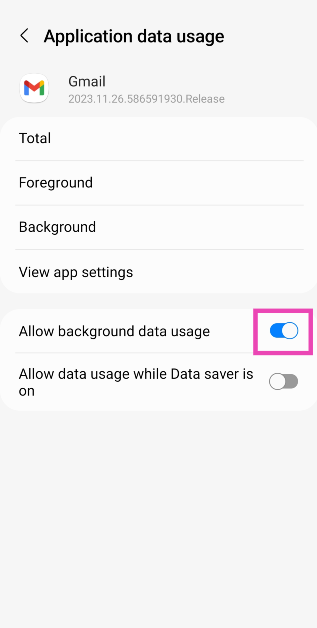
Enable background usage
Step 1: Go to Settings and select Apps.
Step 2: Tap on Gmail.
Step 3: Select Mobile Data.
Step 4: Turn on the toggle switch for Allow background data usage.
Frequently Asked Questions (FAQs)
Why are emails stuck in Gmail outbox?
Your emails may get stuck in the outbox when there’s no internet connection or if the attachment size exceeds the stipulated limit.
How do I clear the emails stuck in Gmail’s outbox?
Refresh the outbox, make sure Gmail isn’t functioning in offline mode, and clear the app’s cache to clear the emails stuck in the outbox.
What is the maximum file size limit for Gmail attachments?
Using these easy techniques, you will be able to send any emails stuck in the Outbox of Gmail. Sometimes, closing any apps running in the background can help solve this issue. Simply tap the icon to switch apps and close all the apps running in the background. If the problem still persists, try signing out of Gmail then sign back in. It is also possible that Gmail’s servers are down, so wait for a while and then try sending the email again.
Samsung is all set to launch a new smartphone series in the Indian market tomorrow that is on July 14. The new Samsung Galaxy M13 Series is going to include two handsets Galaxy M13 5G and Galaxy M13. Twelve 5G bands will be supported by the Galaxy M13 5G and will have a 5,000mAh battery, compared to a 6,000mAh battery in the Galaxy M13, which has 4G connection.Samsung will be hosting a launch event to unveil Samsung Galaxy M13 Series in India. The event will be livestreamed tomorrow at 12 noon IST via Samsung India social media channels- Samsung Newsroom India Twitter, Samsung India Twitter, Samsung India YouTube and Samsung India Facebook. During the livestream, Samsung will unveil the latest Galaxy M13 series, along with its pricing and specification details. Samsung will also host launch events across different cities in the country. The events will be held in Pune, Bhopal, Jaipur, Patna, Visakhapatnam and Guwahati.Before the launch ceremony, a microsite for both smartphones is already active on Amazon.com. As per the landing page, the 5G variant from Samsung sports a 5,000mAh battery. Up to 12GB of RAM can be delivered with its RAM Plus function.Moreover, when your primary SIM is out of network, you can still stay connected thanks to the smartphone’s Auto Data Switching feature. Additionally, it is shown on the page that the Galaxy M13 5G will come in silver.A MediaTek Dimensity 700 SoC may power this smartphone, according to a recent report. It might have a 5-megapixel selfie camera and a 50-megapixel dual rear camera arrangement. Furthermore, it probably supports 15W fast charging.On the other hand, the Galaxy M13 4G has recently debuted in South Korea so the specification of the smartphone is likely to be similar. A 6.6-inch full-HD+ Infinity-V display is featured on it. The phone’s Exynos 850 SoC and up to 128GB of storage provide power. Additionally, the RAM Plus functionality for up to 12GB of RAM is stated as being included with this 4G variant. The Amazon website demonstrates that this phone will initially come in three colour options: brown, black, and silver.
For the latest gadget and tech news, and gadget reviews, follow us on Twitter, Facebook and Instagram. For newest tech & gadget videos subscribe to our YouTube Channel. You can also stay up to date using the Gadget Bridge Android App. You can find the latest car and bike news here.



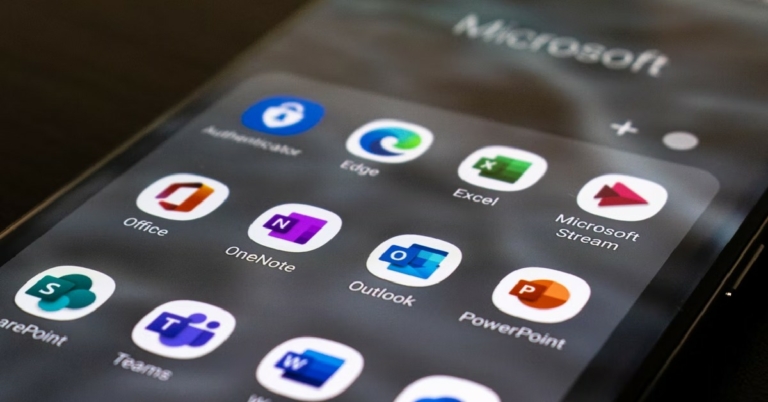
 The primary cause of emails getting stuck in Microsoft Outlook Outbox is the large attachment size. Most email service providers do not allow attachment size of over a few MBs. For example, Gmail has an attachment size limit of 15MB. To make sure your email gets sent, trim the attachment size or send the attachments in multiple emails. You can also remove the attachment by moving the email to the Drafts folder, then clicking the attachment and selecting ‘Remove’.
 The primary cause of emails getting stuck in Microsoft Outlook Outbox is the large attachment size. Most email service providers do not allow attachment size of over a few MBs. For example, Gmail has an attachment size limit of 15MB. To make sure your email gets sent, trim the attachment size or send the attachments in multiple emails. You can also remove the attachment by moving the email to the Drafts folder, then clicking the attachment and selecting ‘Remove’.
 All emails you send get transferred to the Outbox when Microsoft Outlook is offline. You can check whether Outlook is connected to the internet, by looking at the status bar at the bottom of your screen. If it says ‘Connected to: Microsoft Exchange’ there is nothing wrong with your Outlook account. If it says ‘Disconnected’ or ‘Trying to Connect’, you need to check your internet connection.
 If you’ve recently changed your email password, you need to change the password for that email account on Outlook as well. The passwords need to match for Microsoft Outlook to work. In order to change your Outlook password go to File>Account Settings and select the email address your want to change the password for and enter the new password. Click on ‘Finish’, and your password will be changed.
 Step 1: Unlock your Galaxy Watch and go to Google Play Store.
Step 2: Search for Google Assistant in the search bar and open the resulting app page.
Step 3: On the Google Assistant app page, tap on ‘Install’.
Step 4: Once the update has been downloaded, tap on ‘Open’. You can also access Google Assistant from the App drawer.
Step 5: Tap on ‘Get Started’ and then select ‘Open on Phone to Activate’.
Step 6: On your smartphone, tap ‘Activate’ once the Google Assistant window pops up.
Step 7: Select which features you want to activate on Google Assistant in your Galaxy Watch. This includes setting ‘Hey Google’ as a trigger word to turn on the Google Assistant, syncing your messages, contacts and calendar, and setting up a dedicated button for Google Assistant on your Galaxy Watch.
Step 8: Once you’ve finished setting up the Google Assistant, tap on ‘Done’.
Google Assistant will be installed on your Galaxy Watch 4.
Read Also: Vivo T1x set to launch in India on July 20
Step 1: Unlock your Galaxy Watch and go to Google Play Store.
Step 2: Search for Google Assistant in the search bar and open the resulting app page.
Step 3: On the Google Assistant app page, tap on ‘Install’.
Step 4: Once the update has been downloaded, tap on ‘Open’. You can also access Google Assistant from the App drawer.
Step 5: Tap on ‘Get Started’ and then select ‘Open on Phone to Activate’.
Step 6: On your smartphone, tap ‘Activate’ once the Google Assistant window pops up.
Step 7: Select which features you want to activate on Google Assistant in your Galaxy Watch. This includes setting ‘Hey Google’ as a trigger word to turn on the Google Assistant, syncing your messages, contacts and calendar, and setting up a dedicated button for Google Assistant on your Galaxy Watch.
Step 8: Once you’ve finished setting up the Google Assistant, tap on ‘Done’.
Google Assistant will be installed on your Galaxy Watch 4.
Read Also: Vivo T1x set to launch in India on July 20
 Bonus Tip
Google Assistant for Galaxy Watch 4 is still being rolled out in phases, and it may not be available in your country. Right now it is only available in ten markets: US, UK, Australia, France, Germany, Ireland, Japan, Taiwan, and South Korea. If it isn’t available in your location, you can use third-party marketplaces like APKMirror and APKPure to download it. Once you’ve downloaded the APK on your smartphone, you can transfer it to your Galaxy Watch using Easy Fire Tools.
Since this is the first version of Google Assistant for Galaxy Watch, you may encounter a few bugs while using it. Usually, these bugs get fixed with software updates, but that may take some time. For your Galaxy Watch, you also have the option to use Bixby, Samsung’s own voice assistant.
For the latest gadget and tech news, and gadget reviews, follow us on Twitter, Facebook and Instagram. For newest tech & gadget videos subscribe to our YouTube Channel. You can also stay up to date using the Gadget Bridge Android App. You can find the latest car and bike news here.
Bonus Tip
Google Assistant for Galaxy Watch 4 is still being rolled out in phases, and it may not be available in your country. Right now it is only available in ten markets: US, UK, Australia, France, Germany, Ireland, Japan, Taiwan, and South Korea. If it isn’t available in your location, you can use third-party marketplaces like APKMirror and APKPure to download it. Once you’ve downloaded the APK on your smartphone, you can transfer it to your Galaxy Watch using Easy Fire Tools.
Since this is the first version of Google Assistant for Galaxy Watch, you may encounter a few bugs while using it. Usually, these bugs get fixed with software updates, but that may take some time. For your Galaxy Watch, you also have the option to use Bixby, Samsung’s own voice assistant.
For the latest gadget and tech news, and gadget reviews, follow us on Twitter, Facebook and Instagram. For newest tech & gadget videos subscribe to our YouTube Channel. You can also stay up to date using the Gadget Bridge Android App. You can find the latest car and bike news here. 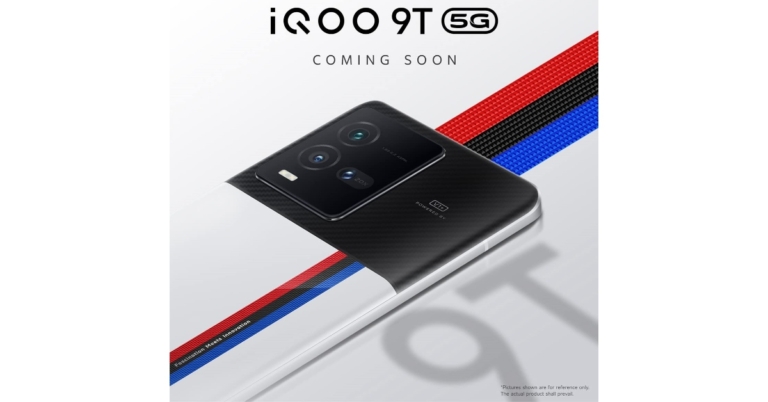

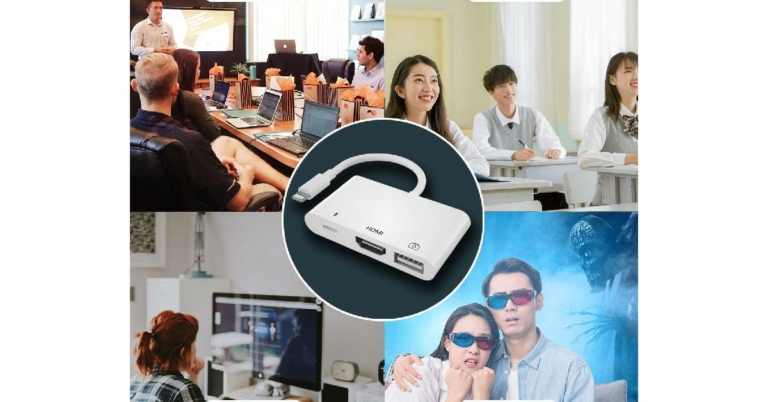
 If you’re someone that does not like to stray from the original branding, Apple offers lightning to digital AV adapter. This adapter can be connected to your iPhone, iPad, or iPod for mirroring purposes. Listed at $49 on the Apple Store, this adapter may be pricier than others on this list, but that is the price one has to pay when buying official accessories and add-ons.
Price: $49
Buy from Amazon.
If you’re someone that does not like to stray from the original branding, Apple offers lightning to digital AV adapter. This adapter can be connected to your iPhone, iPad, or iPod for mirroring purposes. Listed at $49 on the Apple Store, this adapter may be pricier than others on this list, but that is the price one has to pay when buying official accessories and add-ons.
Price: $49
Buy from Amazon.
 Compatible with all your Apple devices, the Unitrox HDMI adapter does not need an app or external power source to connect your phone to another device. Its pure plug n play feature makes it an easy buy. If your iPhone is running low on battery while it’s connected to the HDMI adapter, you can connect the adapter to a charger for your phone to charge.
Price: $20.99
Buy from Amazon.
Compatible with all your Apple devices, the Unitrox HDMI adapter does not need an app or external power source to connect your phone to another device. Its pure plug n play feature makes it an easy buy. If your iPhone is running low on battery while it’s connected to the HDMI adapter, you can connect the adapter to a charger for your phone to charge.
Price: $20.99
Buy from Amazon.
 The Worldboyu lightning to HDMI adapter is another plug n play adapter that is very easy to use. Using this adapter you’ll be able to mirror your iPhone or iPad to the TV screen. Streaming media can be pretty easy when using this adapter. The only drawback is that the Worldboyu adapter needs to be connected to a power source at all times.
Price: $19.99
Buy from Amazon.
The Worldboyu lightning to HDMI adapter is another plug n play adapter that is very easy to use. Using this adapter you’ll be able to mirror your iPhone or iPad to the TV screen. Streaming media can be pretty easy when using this adapter. The only drawback is that the Worldboyu adapter needs to be connected to a power source at all times.
Price: $19.99
Buy from Amazon.
 Possibly one of the better adapters on this list, the Anytrox HDMI adapter also includes a USB camera transfer port. The Anytrox HDMI adapter supports video resolution of up to 4k and provides vivid, ultra HD videos making it perfect for a home theatre setup. The camera reader provides a transfer rate of up to 90mbps, making it one of the best adapters you can buy.
Price: $26.99
Buy from Amazon.
Possibly one of the better adapters on this list, the Anytrox HDMI adapter also includes a USB camera transfer port. The Anytrox HDMI adapter supports video resolution of up to 4k and provides vivid, ultra HD videos making it perfect for a home theatre setup. The camera reader provides a transfer rate of up to 90mbps, making it one of the best adapters you can buy.
Price: $26.99
Buy from Amazon.
 The Woodford Design HDMI adapter is perfect for streaming the media on your phone to a larger HD screen, like your TV. For its price, the Woodford Design HDMI adapter is one of the best you can buy. It can come in handy when you don’t have a smart TV and need to stream TV shows and movies from your phone. It is a plug n play device that does not need any app or wifi connection to function.
Price: $15.99
Buy from Amazon.
Read Also: Top 7 easy methods to Find Location From a Photo
These are the 5 best lightning to HDMI adapters you can buy right now. All of these adapters are compatible with your iPhone, iPad, iPod, and all Apple devices that use a lightning port. If there are other Apple accessories or add-ons that you use on a regular basis, let us know in the comments!
For the latest gadget and tech news, and gadget reviews, follow us on Twitter, Facebook and Instagram. For newest tech & gadget videos subscribe to our YouTube Channel. You can also stay up to date using the Gadget Bridge Android App. You can find the latest car and bike news here.
The Woodford Design HDMI adapter is perfect for streaming the media on your phone to a larger HD screen, like your TV. For its price, the Woodford Design HDMI adapter is one of the best you can buy. It can come in handy when you don’t have a smart TV and need to stream TV shows and movies from your phone. It is a plug n play device that does not need any app or wifi connection to function.
Price: $15.99
Buy from Amazon.
Read Also: Top 7 easy methods to Find Location From a Photo
These are the 5 best lightning to HDMI adapters you can buy right now. All of these adapters are compatible with your iPhone, iPad, iPod, and all Apple devices that use a lightning port. If there are other Apple accessories or add-ons that you use on a regular basis, let us know in the comments!
For the latest gadget and tech news, and gadget reviews, follow us on Twitter, Facebook and Instagram. For newest tech & gadget videos subscribe to our YouTube Channel. You can also stay up to date using the Gadget Bridge Android App. You can find the latest car and bike news here. 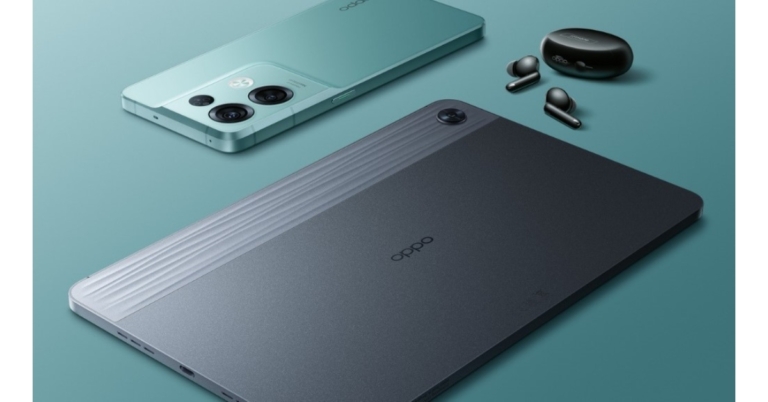
 Metapicz is a helpful tool that you can use to find out where you took a particular picture. Just head over to the website and upload the picture you want to know more about. Metapicz will read the metadata from the picture, which includes the location coordinates of where the picture was taken. Not just that, it’ll also give you significant details like the name of the device that was used to take the picture, camera settings, and a lot more.
 Like Metapicz, Pic2Map also reads the metadata from your photo to give you the coordinates of where the picture was taken. But it goes one step ahead and opens those coordinates on a map. It also shows you images from the location your picture was taken in. If you do not want your pictures to be published you can change the privacy settings.
 Photo Location reads the EXIF data from your image to extract the geolocation. It gives you the exact coordinates of where the photo was taken. Not only that, you can use Photo Location to add EXIF data to an image that does not have any.
 If your image does not contain enough metadata to extract GPS coordinates, using a Google Reverse Image Search may help. While it will not give you the exact location where the image was taken, it will show you additional images from the same area, or identify any popular landmarks that may be in the picture.
 As the name suggests, Where is the Picture is a pretty straightforward website that tells you where the image was clicked. The website has a basic design and is pretty easy to navigate but you may encounter a lot of ads.
 Looking up the EXIF data for an image on a PC is a pretty easy process. Using an online tool or website is not all that necessary. Simply right-click on the image and select properties. Then head over to the details tab where you will find the location coordinates.
 If you can’t figure out where you took a particular picture, all you need to do is expand the details of the image and you will be able to see the location tag. However, if you’ve turned off the geotagging feature, the location tab will be empty. If you want to add a location to a picture, you can manually do that by clicking on the location tab and finding coordinates on the map.

 The Philips HL7703 has a high precision blade design and a 1000W strong motor.
The brand-new Philips HL7703 Mixer Grinder is a portable powerhouse with robust suction feet for improved stability. It comes with three stainless steel jars and one fruit filter-equipped, unbreakable polycarbonate jar. Due to its high precision blade design, masalas can be finely ground, smoothies and shakes can be easily blended, and coconut or almond milk can be extracted.
The cost of the brand-new Philips HL7703 Mixer Grinder is Rs 9,595 only. Customers can now purchase this product at the local retail stores. Additionally, it will be accessible through the online store.
Commenting on the launch, Mr. Gulbahar Taurani, MD & CEO, Philips Domestic Appliances, India Subcontinent, said, “Indian food preparation is indispensable without a mixer grinder, and a powerful one is a must-have for today’s kitchens. At Philips Domestic Appliances, we understand that consumers are looking for quicker and efficient solutions to meet their day-to-day needs, and the new Philips HL7703 mixer grinder, equipped with a heavy-duty 1000W motor guarantees faster grinding and finer blending in just 90 seconds. With this launch, we aim to expand and further strengthen our Mixer Grinder portfolio and provide differentiated offerings to our consumers.”
For the latest gadget and tech news, and gadget reviews, follow us on Twitter, Facebook and Instagram. For newest tech & gadget videos subscribe to our YouTube Channel. You can also stay up to date using the Gadget Bridge Android App. You can find the latest car and bike news here.
The Philips HL7703 has a high precision blade design and a 1000W strong motor.
The brand-new Philips HL7703 Mixer Grinder is a portable powerhouse with robust suction feet for improved stability. It comes with three stainless steel jars and one fruit filter-equipped, unbreakable polycarbonate jar. Due to its high precision blade design, masalas can be finely ground, smoothies and shakes can be easily blended, and coconut or almond milk can be extracted.
The cost of the brand-new Philips HL7703 Mixer Grinder is Rs 9,595 only. Customers can now purchase this product at the local retail stores. Additionally, it will be accessible through the online store.
Commenting on the launch, Mr. Gulbahar Taurani, MD & CEO, Philips Domestic Appliances, India Subcontinent, said, “Indian food preparation is indispensable without a mixer grinder, and a powerful one is a must-have for today’s kitchens. At Philips Domestic Appliances, we understand that consumers are looking for quicker and efficient solutions to meet their day-to-day needs, and the new Philips HL7703 mixer grinder, equipped with a heavy-duty 1000W motor guarantees faster grinding and finer blending in just 90 seconds. With this launch, we aim to expand and further strengthen our Mixer Grinder portfolio and provide differentiated offerings to our consumers.”
For the latest gadget and tech news, and gadget reviews, follow us on Twitter, Facebook and Instagram. For newest tech & gadget videos subscribe to our YouTube Channel. You can also stay up to date using the Gadget Bridge Android App. You can find the latest car and bike news here.  The Philips HL7703 has a high precision blade design and a 1000W strong motor.
The brand-new Philips HL7703 Mixer Grinder is a portable powerhouse with robust suction feet for improved stability. It comes with three stainless steel jars and one fruit filter-equipped, unbreakable polycarbonate jar. Due to its high precision blade design, masalas can be finely ground, smoothies and shakes can be easily blended, and coconut or almond milk can be extracted.
The cost of the brand-new Philips HL7703 Mixer Grinder is Rs 9,595 only. Customers can now purchase this product at the local retail stores. Additionally, it will be accessible through the online store.
Commenting on the launch, Mr. Gulbahar Taurani, MD & CEO, Philips Domestic Appliances, India Subcontinent, said, “Indian food preparation is indispensable without a mixer grinder, and a powerful one is a must-have for today’s kitchens. At Philips Domestic Appliances, we understand that consumers are looking for quicker and efficient solutions to meet their day-to-day needs, and the new Philips HL7703 mixer grinder, equipped with a heavy-duty 1000W motor guarantees faster grinding and finer blending in just 90 seconds. With this launch, we aim to expand and further strengthen our Mixer Grinder portfolio and provide differentiated offerings to our consumers.”
For the latest gadget and tech news, and gadget reviews, follow us on Twitter, Facebook and Instagram. For newest tech & gadget videos subscribe to our YouTube Channel. You can also stay up to date using the Gadget Bridge Android App. You can find the latest car and bike news here.
The Philips HL7703 has a high precision blade design and a 1000W strong motor.
The brand-new Philips HL7703 Mixer Grinder is a portable powerhouse with robust suction feet for improved stability. It comes with three stainless steel jars and one fruit filter-equipped, unbreakable polycarbonate jar. Due to its high precision blade design, masalas can be finely ground, smoothies and shakes can be easily blended, and coconut or almond milk can be extracted.
The cost of the brand-new Philips HL7703 Mixer Grinder is Rs 9,595 only. Customers can now purchase this product at the local retail stores. Additionally, it will be accessible through the online store.
Commenting on the launch, Mr. Gulbahar Taurani, MD & CEO, Philips Domestic Appliances, India Subcontinent, said, “Indian food preparation is indispensable without a mixer grinder, and a powerful one is a must-have for today’s kitchens. At Philips Domestic Appliances, we understand that consumers are looking for quicker and efficient solutions to meet their day-to-day needs, and the new Philips HL7703 mixer grinder, equipped with a heavy-duty 1000W motor guarantees faster grinding and finer blending in just 90 seconds. With this launch, we aim to expand and further strengthen our Mixer Grinder portfolio and provide differentiated offerings to our consumers.”
For the latest gadget and tech news, and gadget reviews, follow us on Twitter, Facebook and Instagram. For newest tech & gadget videos subscribe to our YouTube Channel. You can also stay up to date using the Gadget Bridge Android App. You can find the latest car and bike news here. 
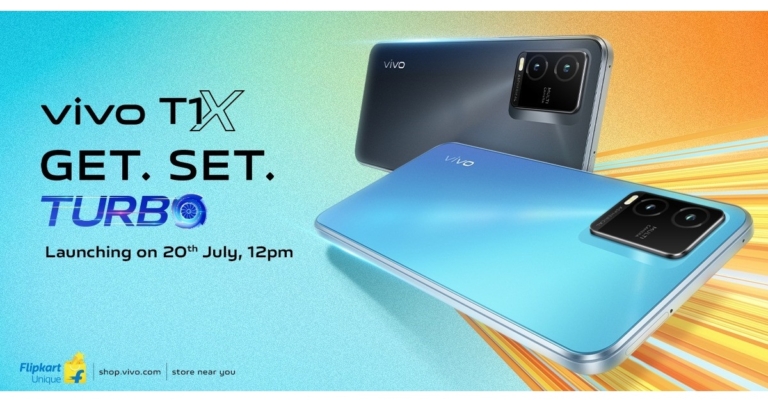
 If there are certain people you text more frequently, you can pin their chat logs to the top of the chat window. WhatsApp allows a maximum of 3 chats to be pinned at one time. To pin a chat, simply long press the chat log and tap the pin icon at the top menu.
 WhatsApp keeps a record of all the data you’ve consumed using the app. This record is sorted by contacts. Go to Settings>Storage and Data>Manage Storage to see which contacts you talk to the most. Pictures and videos carry more data than texts and gifs, so if you’ve exchanged more pictures with a certain contact, their name will be placed above someone you’ve exchanged more texts with.
 Did you know that you can set any image as a custom chat background? Simply go to Settings>Chat>Wallpaper and choose from a range of preset templates or use an image from your phone gallery as chat background.
 If you’re using mobile data, turn off auto download to save your internet data. Simply go to Settings>Storage and Data and disable auto download when using mobile data. Turning off auto downloads also helps you in sorting which images you want to save on your phone and which ones you want to trash.
 WhatsApp creates regular backups of your chats. If you want to use WhatsApp on another device, downloading these backups can help restore your chat history. You can also email your chatlog to yourself (or someone else). Simply go to Settings>Chats>Chat History and select Export Chat. WhatsApp will prompt you to select the contact whose chat history you want to export. Upon selecting a contact, you can send their chat history to anyone through mail or other platforms.
 If you frequently talk to certain people or engage in certain active groups, you can add their icon to your phone’s home screen. Simply long press the chat log and tap on the three dots at the top right corner. Select ‘Add Shortcut’. The chat shortcut will be added to your home screen.
 For added security, enable two-step verification on WhatsApp. Simply go to Settings>Account and select two-step verification. Create a pin as your password. You will be required to enter this pin whenever you register your number to another device.
Read Also: How to migrate your WhatsApp data from Android to iPhone?
These were the 10 most essential tips and tricks to enhance your WhatsApp experience. If you found these tips helpful or think we missed out on something, let us know in the comments!
For the latest gadget and tech news, and gadget reviews, follow us on Twitter, Facebook and Instagram. For newest tech & gadget videos subscribe to our YouTube Channel. You can also stay up to date using the Gadget Bridge Android App. You can find the latest car and bike news here.
For added security, enable two-step verification on WhatsApp. Simply go to Settings>Account and select two-step verification. Create a pin as your password. You will be required to enter this pin whenever you register your number to another device.
Read Also: How to migrate your WhatsApp data from Android to iPhone?
These were the 10 most essential tips and tricks to enhance your WhatsApp experience. If you found these tips helpful or think we missed out on something, let us know in the comments!
For the latest gadget and tech news, and gadget reviews, follow us on Twitter, Facebook and Instagram. For newest tech & gadget videos subscribe to our YouTube Channel. You can also stay up to date using the Gadget Bridge Android App. You can find the latest car and bike news here. 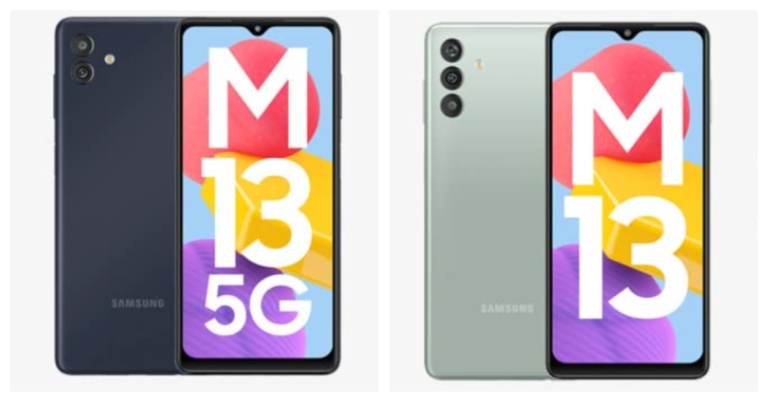
 The Samsung RAM Plus function allows the RAM to be increased to up to 12GB and has an internal storage capacity of up to 128GB, which can be increased by up to 1TB with a microSD card.
The Samsung Galaxy M13 5G has a dual rear camera arrangement with a 50-megapixel primary sensor and a 2-megapixel secondary sensor for pictures and videos. For taking selfies and making video calls, there is a 5-megapixel front camera. The smartphone has a 5,000mAh battery that can be charged at 15W.
The Samsung RAM Plus function allows the RAM to be increased to up to 12GB and has an internal storage capacity of up to 128GB, which can be increased by up to 1TB with a microSD card.
The Samsung Galaxy M13 5G has a dual rear camera arrangement with a 50-megapixel primary sensor and a 2-megapixel secondary sensor for pictures and videos. For taking selfies and making video calls, there is a 5-megapixel front camera. The smartphone has a 5,000mAh battery that can be charged at 15W.
 The Samsung RAM Plus function allows the RAM to be increased to up to 12GB and has an internal storage capacity of up to 128GB, which can be increased by up to 1TB with a microSD card.
The Samsung Galaxy M13 5G has a dual rear camera arrangement with a 50-megapixel primary sensor and a 2-megapixel secondary sensor for pictures and videos. For taking selfies and making video calls, there is a 5-megapixel front camera. The smartphone has a 5,000mAh battery that can be charged at 15W.
The Samsung RAM Plus function allows the RAM to be increased to up to 12GB and has an internal storage capacity of up to 128GB, which can be increased by up to 1TB with a microSD card.
The Samsung Galaxy M13 5G has a dual rear camera arrangement with a 50-megapixel primary sensor and a 2-megapixel secondary sensor for pictures and videos. For taking selfies and making video calls, there is a 5-megapixel front camera. The smartphone has a 5,000mAh battery that can be charged at 15W.

 If one Wordle a day just isn’t enough for you, Quordle might interest you. Quordle follows the same rules as Wordle but instead of guessing one word, you’re given nine attempts to guess four words. After solving the daily puzzle you can also play Quordle in practice mode.
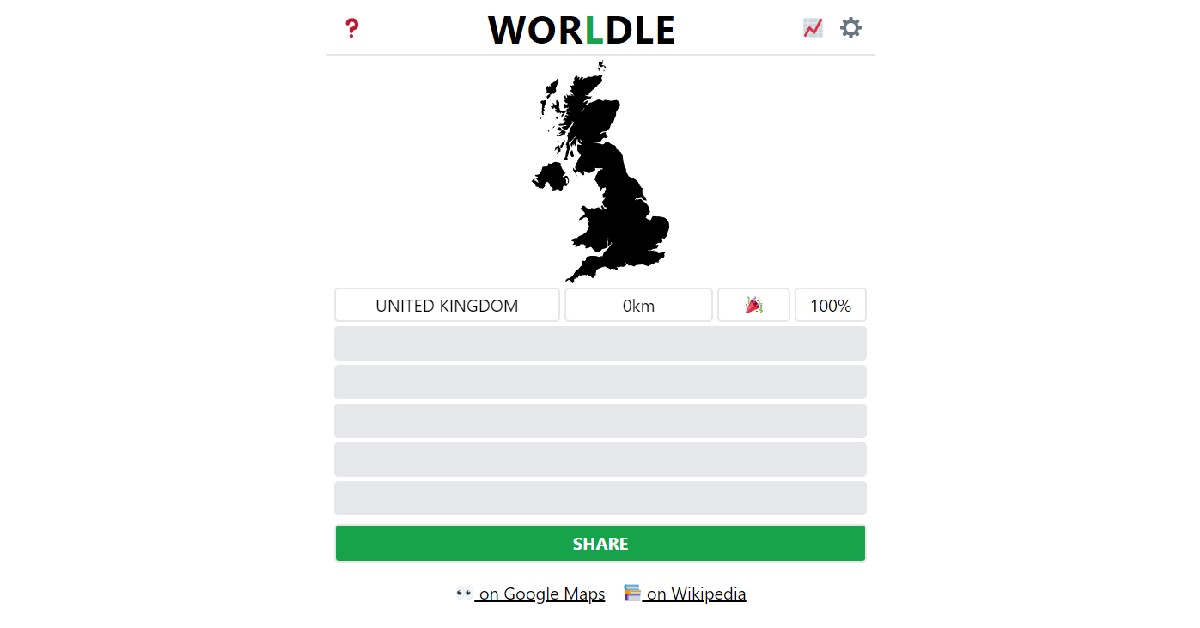 Best described as Wordle but for countries, Worldle gives you six attempts to guess a country by its shape. The map of the country is presented as a blacked-out figure, isolated from its surroundings. After every guess, Worldle tells you how close you are to the country in the puzzle. Using these cues you can get closer to solving the puzzle.
 If you’re a math lover, Nerdle is the perfect puzzle for you. The puzzle is solved by guessing the calculation. Like Wordle, every correct tile you guess turns green and every incorrect tile turns black. If the tile you guessed is a part of the puzzle but isn’t placed in the correct position, it turns magenta. Even if you don’t like math, Nerdle is a fun puzzle to solve.
 Heardle is a puzzle designed for music enthusiasts. The aim is to guess the song correctly from a one-second audio clip. If you make a wrong guess, Heardle will give you additional clips to guess from. If you guess the artist correctly, the auto-fill feature will help you narrow down the guesses.
 Octordle is a fun game just like Wordle, where you have to guess eight words in thirteen attempts. The higher number of words makes the game interesting, decreasing the margin of error. Apart from the daily puzzle, you can also solve unlimited free puzzles from the Octordle catalogue.
 If you can’t wait for the next daily puzzle on Wordle, you can solve as many puzzles as you want in Wordle Unlimited. You can even make a custom puzzle and send it to your friends as a challenge.
 This one is for all the movie buffs. Framed gives you a still from a movie, and you get six guesses to figure out which movie it is. With every wrong guess, you get an additional frame, helping you narrow down the answer.
Read Also: Smartphone Comparison: Nothing Phone 1 vs iPhone 13
This one is for all the movie buffs. Framed gives you a still from a movie, and you get six guesses to figure out which movie it is. With every wrong guess, you get an additional frame, helping you narrow down the answer.
Read Also: Smartphone Comparison: Nothing Phone 1 vs iPhone 13

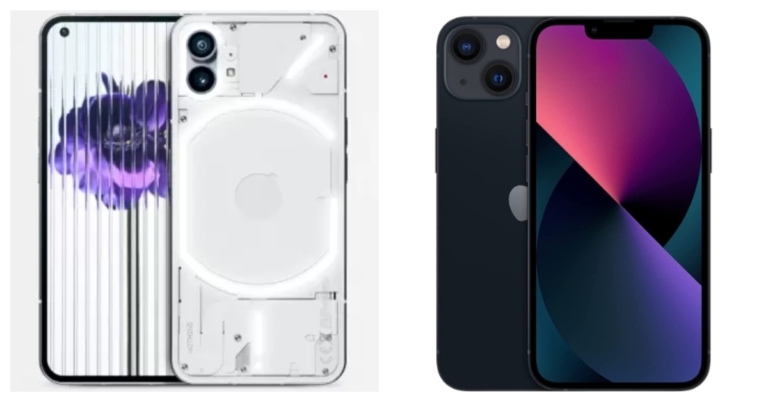
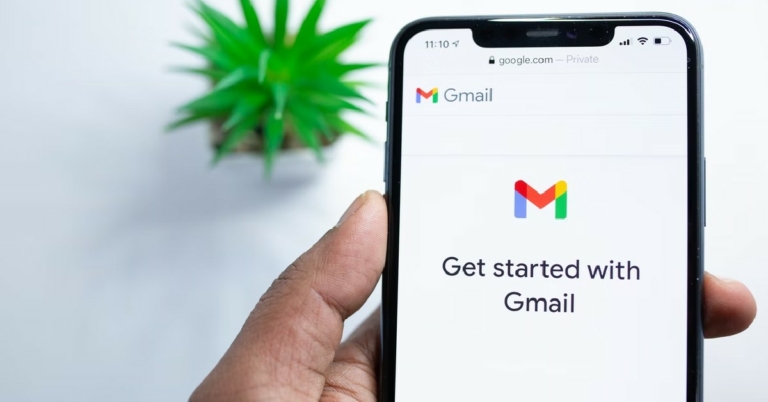
 Step 3: Tap on ‘Manage Accounts’.
 Step 4: Scroll down and tap ‘+ Add Account’.
 Step 5: Select Gmail.
 Step 6: Enter the email address you want to add.
 Gmail will prompt you to enter the password, after which the account will be added to your smartphone.
Read Also: Official Renders of the Motorola Razr 2022 Tease the Design, Launching soon
Bonus Tip: Add another account using the Gmail app
You can also add another Gmail account simply by opening the Gmail app on your phone and tapping on the user profile at the top right corner of your screen. In the pop-up window, tap on ‘Add Another Account’ and enter the email address you want to add.
This is how you can add another Gmail account to your Android smartphone. In order to access mails from different accounts, you will have to switch between them once you open the Gmail app. You can also add another Gmail account to other apps like Play Store, Calendar, Hangouts and Google Chrome.
For the latest gadget and tech news, and gadget reviews, follow us on Twitter, Facebook and Instagram. For newest tech & gadget videos subscribe to our YouTube Channel. You can also stay up to date using the Gadget Bridge Android App. You can find the latest car and bike news here.
Gmail will prompt you to enter the password, after which the account will be added to your smartphone.
Read Also: Official Renders of the Motorola Razr 2022 Tease the Design, Launching soon
Bonus Tip: Add another account using the Gmail app
You can also add another Gmail account simply by opening the Gmail app on your phone and tapping on the user profile at the top right corner of your screen. In the pop-up window, tap on ‘Add Another Account’ and enter the email address you want to add.
This is how you can add another Gmail account to your Android smartphone. In order to access mails from different accounts, you will have to switch between them once you open the Gmail app. You can also add another Gmail account to other apps like Play Store, Calendar, Hangouts and Google Chrome.
For the latest gadget and tech news, and gadget reviews, follow us on Twitter, Facebook and Instagram. For newest tech & gadget videos subscribe to our YouTube Channel. You can also stay up to date using the Gadget Bridge Android App. You can find the latest car and bike news here. 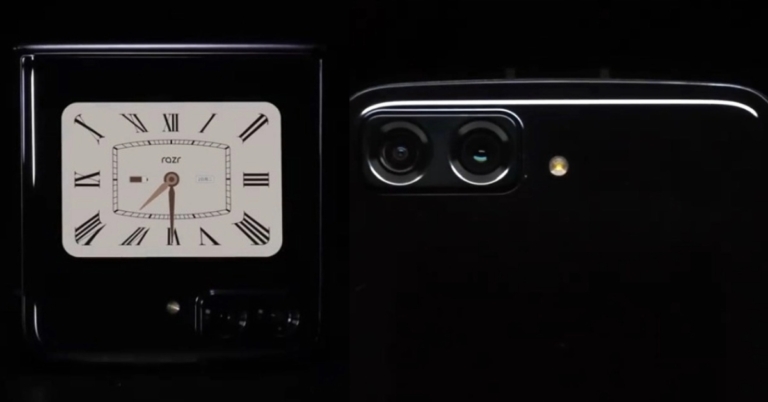




 Step 2: Tap on Gmail.
 Step 3: Select Mobile Data.

 If your email contains an attachment, check if its size exceeds 25MB. Currently, Gmail does not allow its users to send attachments that are larger than 25MB. Make sure the attachment size is under 25MB and resend the email. You can split up the attachments into two emails if the total size of the files exceeds 25MB.
 If you haven’t cleared the cache in a long time, it may have stored some expired or corrupted files. Make sure you regularly clear the cache so you don’t face any issues like this. In order to clear the Gmail cache, go to Chrome Settings>Privacy and Security>Cookies and other site data. Scroll down to ‘See all cookies and site data’ and delete the Gmail entry. Your Gmail cache will be cleared.
 Gmail allows you to go through your mails and compose new ones even when you’re offline. However, in order to send an email, you need to be connected to the internet. If you send an email in offline mode, it’ll get stuck in the Outbox. To disable offline mode in Gmail go to Gmail Settings>See All Settings, and click on the ‘Offline’ tab. Uncheck the box that says ‘Enable offline mail’, and resend the email stuck in Outbox.
 If you’re using Gmail on your smartphone, try updating your Gmail app. If you haven’t updated the app in a while, chances are the old version of the app is being phased out. Go to Google Play Store and search for Gmail. From the app page select the ‘Update’ option.
 Step 2: Tap on Gmail.
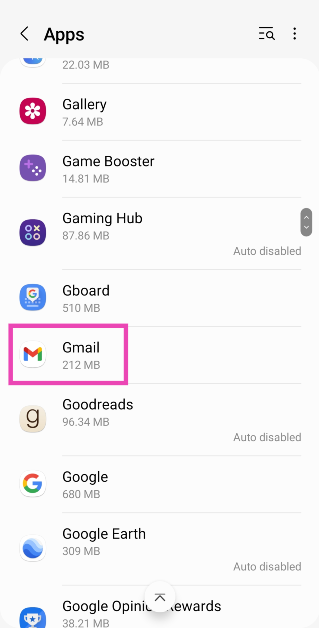 Step 3: Select Mobile Data.
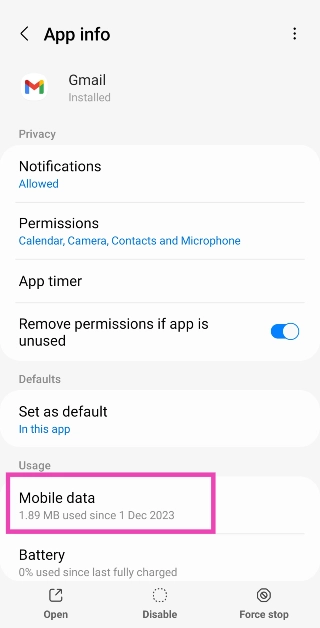 Step 4: Turn on the toggle switch for Allow background data usage.