How can you bring back recently deleted images on Instagram?

Instagram is one of the most popular social networking services where you can share photos and videos. Instagram is available for all the major operating systems like Windows, Android, and iOS. People share many photos that they feel later should not have been posted. Instagram allows you to either archive the photos or videos that you don’t want to keep in public or permanently delete it. Instagram has also brought a new ‘Recently Deleted’ feature on the app. Let’s first take a look at how that feature works. Then we can look at other ways of recovery too.

Can you bring back recently deleted Instagram photos or videos?

It is indeed possible to recover the recently deleted photos and videos on Instagram. Even if you deleted one or more images or videos from your profile, they remain on the Instagram servers, in the app or device itself.

The storage of your device that runs Instagram is made of blocks of memory that get overwritten when new data is allocated to them. In a nutshell, nothing is deleted, only the address to the corresponding memory blocks is deleted. Therefore, you can recover the deleted images or videos provided they are not overwritten by any other data.

Method 1: Instagram’s new ‘Recently Deleted’ feature

Now, it’s possible to recover the deleted photos and video within the Instagram app. Instagram recently released its new ‘Recently Deleted’ feature from where you can find your photos, videos, reels, IGTV videos, and stories that you chose to delete. You need to know that the deleted stories that are not sent to your archive will stay in the folder as long as 24 hours. Everything else will be deleted automatically after 30 days.

Instagram's Recently Deleted Feature

Method 2: Recovery using Android Data Recovery Tool 

This is the easiest method to recover deleted Instagram photos and videos. Android Recovery Tool is free software that does not require the creation of any backup to restore the deleted photos and videos on Instagram. Moreover, this method works equally well to restore media files on other social networking applications like WhatsApp, Viber, and Telegram.

Method 3: You might get deleted Instagram photos and videos in the ‘Recently Deleted’ folder 

Whenever your photos from the app get wiped away then don’t panic, just remember that the lost photos are not gone forever. Simply check the recently deleted folder and you can get back the erased photos.

Recently Deleted Folder

When you post a photo or a video on Instagram, a copy of that file is made in your Gallery. When you delete the photo or a video from Instagram, the copy of the file is sent to the ‘Recently Deleted’ folder. You can search your deleted media file in the following steps on an Android smartphone:

  1. Open the Photos app on your phone
  2. Go to the ‘Album’ and scroll until you find the ‘Recently Deleted’ folder.
  3. In the ‘Recently Deleted’ folder, you can either search it manually or can find it by typing the initials of the image.

Remember: You can only recover deleted files from the ‘Recently Deleted’ folder that were deleted in the last 30 days.

Method 4: Seek your photo or video in the Instagram Archive 

Instagram had released its ‘Archive’ feature in 2017. This feature allows you to save your photos, videos, or stories in the archive without making them public. It also stores your removed stories, deleted photos, and deleted videos. To get the deleted media file from the Archive, follow these steps:

Follow the below steps:

  1. Log into your Instagram account.
  2. Go to your profile
  3. Tap the Options button on the top-right corner
  4. You will see a list of option including the Archive
  5. Choose the Archive to see all your deleted photos and videos.

Instagram Archive

Method 5: Using your Google account to recover the deleted photos and videos

If you are an Android user, your smartphone is linked to your Google account. This technique works on the cloud from where you can get back all your deleted Instagram photos and videos. Just follow these steps to recover media files from your Google account:

  • Open the Google Photos app on your phone
  • You will find all the photos that you’ve ever clicked.
  • If you don’t find the desired photo or video, go to the ‘Trash’ folder within the Google Photos app to recover the deleted file.

Deleting a photo or a video is a common practice among millions of people on social media. Whenever you in an unexpected situation when you want to recover the deleted files on your Instagram, the above tips shall come to your rescue.

For the latest gadget and tech news, and gadget reviews, follow us on Twitter, Facebook and Instagram. For newest tech & gadget videos subscribe to our YouTube Channel. You can also stay up to date with the Gadget Bridge Android App.

February 5 Flipkart Daily Trivia Quiz Answers: Answer to win exciting prizes

The e-commerce website Flipkart is hosting Daily Trivia Quiz. Every day it brings a bunch of new questions for its users. By answering them correctly you can win exciting prizes. The questionnaire is based on questions related to general knowledge. Also, the users can win free vouchers and super coins, among other offers via the daily quiz. February 5 Flipkart Daily Trivia Quiz Answers has already gone live on its platform.

The participant should be at least 18 years old and should have a valid login ID. The Quiz is available on the mobile platform and not the web version. E-commerce conducts the quiz on daily basis and goes live at 12:00 AM IST and runs till 11:59 PM IST.  The winners are announced within 15 days from the date of participation that can be viewed under the Gems/Rewards section in the app.

How to participate in the Flipkart Daily Trivia Quiz

To participate download the Flipkart app on your phone. Then open the Flipkart app then head to Game Zone. Now click on the Daily Trivia Banner or search for Daily Trivia. Enter the game and answer all 5 questions with correct answers.

February 5 Flipkart Daily Trivia Quiz Answers 

Question 1: Percy Spencer invented the ___ when he noticed melted chocolate in his pocket.

Answer: Microwave oven

Question 2: At the age of 25 years and 11 months, who is the youngest Lok Sabha member ever?

Answer: Chandrani Murmu

Question 3: In which village of Begusarai did nationalist poet Ramdhari Singh ‘Dinkar take birth?

Answer: Simariya

Question 4: A manufacturer of stainless steel, Mukand Ltd is a company owned by which group?

Answer: Bajaj

Question 5: Which Indian state was the first to have an independent candidate as CM?

Answer: Odisha

For the latest gadget and tech news, and gadget reviews, follow us on TwitterFacebook and Instagram. For newest tech & gadget videos subscribe to our YouTube Channel. You can also stay up to date using the Gadget Bridge Android App.

February 5 Amazon Quiz: Today you can win Rs 25,000 Amazon Pay Balance

The e-commerce website Amazon continues to keep its customers entertained and in high spirits through their daily quizzes. February 5 Amazon Quiz has gone live now in its mobile app platform. The daily quiz contest conducted by the company brings an opportunity for the consumers to win exciting prizes. In today’s quiz, you can win the Rs 25,000 Amazon Pay Balance by answering all the questions correctly.

Every day Amazon brings a fresh set of questions for its customers that contains five easy questions based on general knowledge and current affairs. The quiz can be played on the Amazon app from 8 AM to 12 noon. You have to answer all the questions correctly; one wrong answer can make you eliminate from the quiz. By answering all the questions correctly, you will be shortlisted for a lucky draw. The results for the lucky draw will be announced at the end of the month. By participating in the quiz, you can win free products ranging from smartphones, other gadgets and Amazon Pay balance. Check out today’s quiz questions and answers to win February 5 Amazon Quiz: Today you can win Rs 25,000 Amazon Pay Balance.

February 5 Amazon Quiz Answers

Question 1: Which political figure born on 17th January, was also a popular actor starring in movies such as Sathi Leelavati, Rajakumari and Mohini?

The answer is- MG Ramachandran

Question 2: Which of these is true about the Union Budget about to be presented in 2021?

The answer is- All of these

Question 3: Which of these is the name of a coastal defence exercise conducted by the Indian Navy in January 2021?

The answer is- Sea Vigil- 21

Question 4: Which fact about this animal is incorrect?

The answer is- A female is called a stallion

Question 5: Which ball and net sport is being played in this picture?

The answer is- Lacrosse

How to find your forgotten Wi-Fi password in Windows 10?

Forgetting a Wi-Fi password is not a big deal. In your daily life, you have to remember and manage many things. If you have not written your Wi-Fi password on a piece of paper, you are very likely to forget it after few days. Forgetting the password is not a problem till you want to reset the Wi-Fi settings in your connected Windows 10 device or want a new person to get connected to that Wi-Fi router.

In case you have forgotten the password, you don’t need to worry as this article talks about how to find your forgotten Wi-Fi password. However, you must keep in mind that the following trick works only if your Windows 10 device was previously connected to the same Wi-Fi.

Step 1

Go to the Start menu and type ‘Control Panel’ in the search bar. Once you open your Control Panel, you’ll find a list of options to change like System and Security, Network and Internet, ‘Hardware and Sound’, ‘Programs’, etc. Since you’ve to look for the WiFi password, click on the ‘Network and Internet’.

Step 2

Once you are in the ‘Network and Internet’ category of the Control Panel, you will find the options related to the type of internet your device can get connected to. Since your device was connected to the Wi-Fi, which is a wireless network, click on the ‘Network and Sharing Center’ option.

Step 3

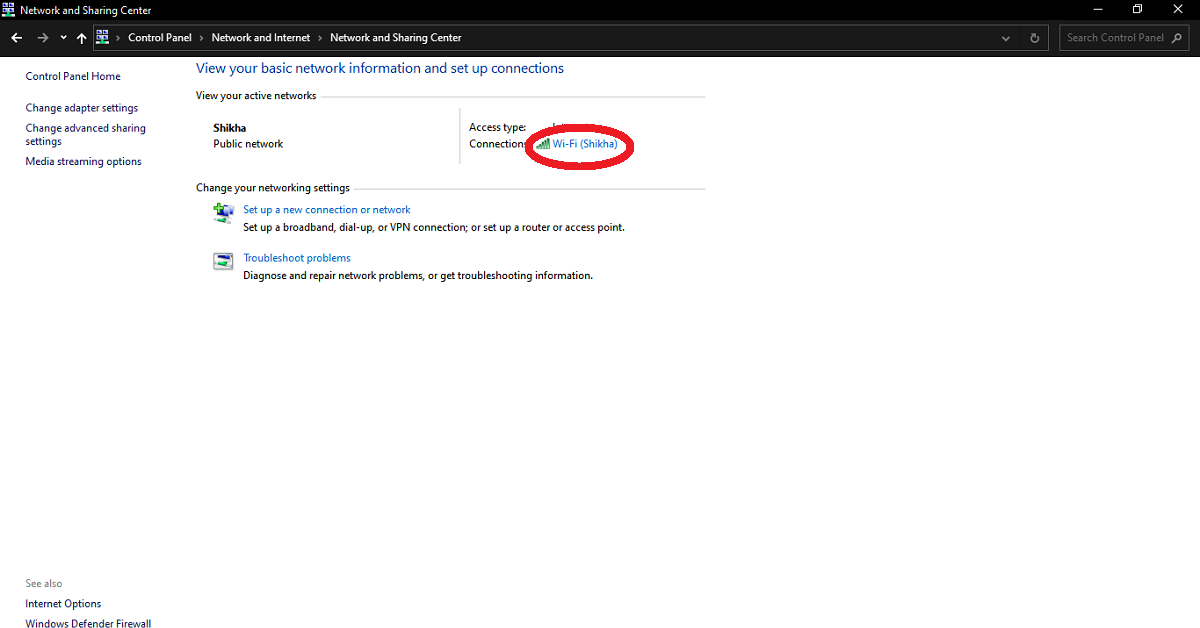
Once you are in your ‘Network and Sharing Center’, you’ll find the names of all the active networks your device got connected to. Locate the name of the Wi-Fi network for which you want to find the password. Click on the ‘Connection’ listed against the name of the Wi-Fi to open the ‘Wi-Fi Status’ box corresponding to the selected Wi-Fi network.

Step 4:

The ‘Wi-Fi Status’ box tells you the technical information related to your Wi-Fi connection and activity like the IP address, SSID, speed, and the data sent and received. In the Connection category, click on the ‘Wireless Properties’ to open the details about your Wi-Fi network.

Step 5:

Once you open the ‘Wireless Network Properties’ of the selected WiFi, you’ll find the ‘Network Security Key’ which is your lost password written in hidden format. To reveal the password, you just need to check the ‘Show characters’ option given under the ‘Network Security’ Option.

The above method is the most secure and easiest way to recover your forgotten password as it does not involve the installation of any third-party software. Third-party software can pose risk to your data and privacy and thus should be used only when you trust the software provider.

For the latest gadget and tech news, and gadget reviews, follow us on Twitter, Facebook and Instagram. For newest tech & gadget videos subscribe to our YouTube Channel. You can also stay up to date with the Gadget Bridge Android App.

Realme X7 Pro 5G launched: Here are the top 5 reasons why you should not buy this smartphone

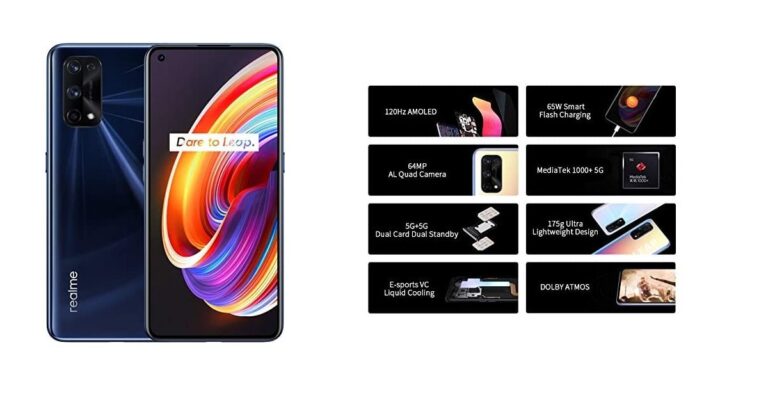
Realme launched its first flagship of 2021. While a lot of hype was created around the smartphone before its launch and many anticipated some good things. The phone in accordance with its price is not up to the mark. While there are plenty, here are the top 5 reasons why you should be skipping this Realme phone. 

Compromised battery

The new Realme X7 Pro 5G runs on a 4,500 mAh battery with the support of 65W fast-charging. At a glance, the fast charging may be seen as good, but the battery is not strong enough. In the new decade, people are demanding at least a 5,000 mAh battery that can last not less than a day. However, this smartphone comes with only a small 4,500 mAh battery that is likely to die out quickly while running resource-demanding applications. Moreover, the integration of 5G would force the battery to get exhausted even faster. Thus, the claims of the company regarding its battery and fast-charging are doomed to get shattered in today’s fast-paced competition.

The same old 64MP camera

The camera quality of the Realme X7 Pro 5G is disappointing. Generally, Realme cameras perform somewhat decent, but the one installed in this smartphone is not up to the mark. It is a year-old sensor and compared to the competition is half the MP power. While others in the Xiaomi kitty come with 108MP, this one is just at 64MP. Generally compared to a 108MP sensor, the picture quality that you get from the rear and the front camera would be worse than that of its competitors, just opposite of what the company is boasting on paper. The Realme X7 Pro comes with a rear quad-camera setup and a 64-megapixel primary Sony IMX 686 sensor, an 8-megapixel ultra-wide lens, a 2-megapixel black, a white portrait camera, and a 2-megapixel macro lens. These are something that you can get at a much cheaper price.

Redme X7 Pro

No memory expansion slot

The Realme X7 Pro 5G comes in three variants: 128GB 6GB RAM, 128GB 8GB RAM, and 256GB 8GB RAM. It does not have an expandable card slot. The users want a smartphone that offers a scalable memory to run and keep applications, save media files, and documents. You can expect its memory to get full within a few months beyond which you can’t expand. With its fixed memory, you can’t expect this smartphone to be your companion for a long time. In today’s day and age, You will be struggling to keep the storage from getting full.

Nothing new in design

The design of the Realme X7 Pro 5G has no great shakes. Apart from the glaring “DARE TO LEAP” logo at the rear, the construction is pretty much the same. It comes with the same old punch-hole display design to accommodate the selfie camera with a gradient back panel. At this price point, we expect a metal finish with a stylish rear camera setup panel. However, when you take a glance at the Realme X7 Pro 5G, it follows the same overall old legacy of design.

Bad price

The price of a majority of 5G mid-range smartphones starts from ₹19,999 in the Indian market. However, the starting price of the new Realme X7 Pro 5G is ₹29,999. The Realme X7 Pro 5G comes with a MediaTek chipset and not a more expensive and popular Snapdragon one. . The features that you get are not worth the hefty amount you are paying. The customers who shall buy this smartphone may soon realize they could have bought any other smartphone offering a Snapdragon processor at the same price range. That could have lasted them longer.

Realme X7 Pro 5G is too costly for the features and design. The customers are likely to choose its competitors that are offering better features and build quality at a similar or lesser price.  

For the latest gadget and tech news, and gadget reviews, follow us on TwitterFacebook, and Instagram. For newest tech & gadget videos subscribe to our YouTube Channel. You can also stay up to date with the Gadget Bridge Android App.
5 things we know about Samsung’s Pop Up, rotating smartphone, which you should be aware of

0

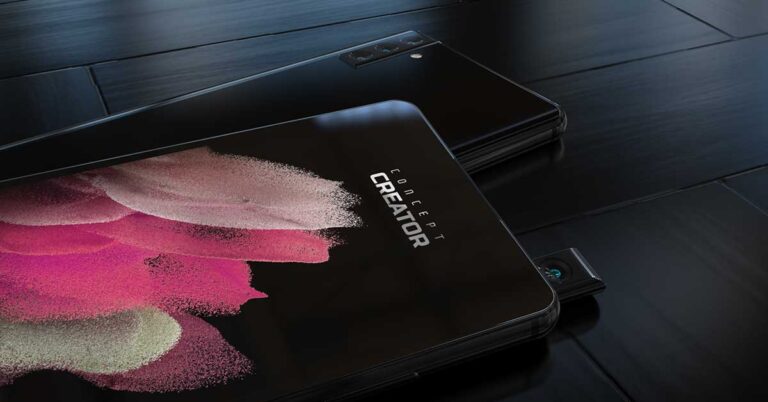
Samsung recently released its first pop-up, rotating smartphone camera patent. World Intellectual Property recently published a patent for this feature for Samsung. The motive behind this technology is to utilize a pop-up selfie camera for both selfie and rear imagery. The following are the five things you should know about Samsung’s Pop Up, rotating smartphone, which might come to life soon.

A new way fo taking selfies

Samsung is not alien to the concept of rotating cameras. We have seen this in the previous A80 series too. Samsung’s pop-up and rotating camera will consist of a rotating motor that slides up and rotates a camera to the front or to the back. This is good for privacy too. A majority of Indian users prefer to secure their smartphones with a protective cover, or at least a back cover. in that case, you need to make sure that the panel consisting of the camera setup is not sealed to allow it to move freely.

samsung-pop-up
Image Courtesy: Peta Pixels

No notch and no punch-dot

Since, the advent of the infinity display in Samsung smartphones, the punch-dot camera hole of the selfie camera remained a problem. It used to obstruct the complete view of the infinity display. Samsung, with its rotating motor, can utilize the rear camera for taking selfies, thereby, eliminating the need to punch the screen to accommodate a separate selfie camera. Now the end result is a large completely bezel-less display that simply maximises the experience while shooting videos or watching movies.

No notch

Ultrawide selfies and better imagery

It’s a well-known fact that the rear camera is way better than the selfie camera. The rear camera setup has a wide-angle lens accompanied by depth-effect. On the other hand, you can’t achieve the same quality of those features from a selfie camera. But now, the rear camera rotates to work as a selfie camera to take ultrawide group selfies. Till now, most smartphones had to rely on the camera software to generate the depth-effect in selfies. That resulted in poor quality bokeh images, But now, the rotating camera provides the true depth effect to your selfies. So you will get excellent selfies too.

Ultrawide selfie

Can the rotating motor survive drops? Is it water-resistant?

It’s been a contested issue if the pop-up and rotating camera motor can withstand stress and drops. Well, till now there have been no authentic drop tests done to challenge the rotating motor of the camera as it is still in developmental stages. However, it is expected to survive minor drops without any emergent mechanical or functional issues. Samsung’s pop-up rotating camera could or could not be water-resistant, we shall get to know in the coming months. But many experts feel that the rotating feature of the camera does not prevent water from entering the spaces. This can be a big concern for users who are fond of adventure sports or are located in a tropical country.

Water Resistant

No face unlock

Although, you may feel that pop-up and rotating camera comes with a lot of benefits. But, there is a disadvantage too. The Samsung camera can rotate only when the camera app is running. That means when the smartphone is unlocked, it can’t rotate to capture your facial features to unlock the smartphone. The on-screen fingerprint scanner and the security PIN are the only options by which you can unlock the smartphone. In the future, we may expect the expansion in the functionality of the rotating camera to allow it to capture your facial features when the phone is locked.

Phone Lock

Samsung’s pop-up and rotating camera feature is indeed a disruptive technology, which the company is improving on. However, it stills needs some research and development to do away with the front camera. For the general public, the smartphone comes with more advantages than disadvantages. So, we can expect this technology to gain currency in the market.

For the latest gadget and tech news, and gadget reviews, follow us on Twitter, Facebook and Instagram. For newest tech & gadget videos subscribe to our YouTube Channel. You can also stay up to date with the Gadget Bridge Android App.

How to check audio and video quality in a green room before joining a call in Google Meet?

Google has recently launched a new feature for Meet to help you check your video and audio are working before you join a meeting. Prior to clicking the “Ready to join?” button, you can always check your surrounding and external noise that you don’t wish the other person in the meeting to see or hear. However, Google Meet’s new “green room” helps you do that in a matter of seconds.

Check AV

Before you join a meeting, you can check that your camera, microphone, and network are working properly by clicking the “Check your audio and video” button on the preview screen. It will help you figure out and eliminate catch issues that may reach the other side of the meeting.

Google Meet green room

The issues may be poor sound quality, background noise, muted microphones, and absent speaker or earphone. If during testing, any problem occurs, Meet’s troubleshooting feature will automatically give you warning signs and tips to resolve them.

Audio Video Message

To solve the problems. it will ask you to grant your browser access to your microphone or camera if they’re disabled. It allows you to individually select the device you want to enable for the meeting. So, within the green room, you can choose the mic, speaker, or camera you want to use. The feature has now started working out to Google Workspace and G Suite users and will soon be available to every user in the coming days.

Google Meet green room

It should be noted that the admins of the meeting do not get any control over the ‘green room’. It is a feature that the guest of the meeting can utilize at his/her end. In the initial phase, Google started to roll out this new feature (Google Meet Green Room) only to enterprise customers. Thus, it would only be available to the Google users with Google Workspace Essentials, Business Starter, Business Standard, Business Plus, Enterprise Essentials, Enterprise Standard, and Enterprise Plus are eligible for the update. Besides, the users having G-Suite Basic, Business, Education, Enterprise for Education, and Nonprofits plans can also use this new feature. However, Google is yet to share its details to free and regular Google Meet customers in the coming weeks.

Audio Video Settings

The company shared about this new feature in a blog post where it tells that users can now test the new feature to ensure that peripheral devices are properly configured. Google further adds that by using this new feature, the users can enter the meeting confidently.

For the latest gadget and tech news, and gadget reviews, follow us on Twitter, Facebook and Instagram. For newest tech & gadget videos subscribe to our YouTube Channel. You can also stay up to date with the Gadget Bridge Android App.

Jeff Bezos to step down as CEO of amazon this year: 5 key things he did that changed the face of the company

0

Amazon founder and CEO Jeff Bezos shall soon step down from his role as chief executive to the role of executive chair. He has been Amazon’s CEO since its inception in 1995. He witnessed and drove its growth from an online book store into a $1.7 trillion global company. Here are the five things that materialized from his imagination that changed the face of the company.

AMAZON PRIME AIR

It is a delivery service mechanism that claims to deliver packages up to five pounds within 30 minutes by drones. To ensure safety, the vehicles are built taking care of multiple redundancies and tested against advanced “sense and avoid” technology. Amazon is ready for the deployment of this technology as soon as the regulatory mechanism favours. When Prime Air delivery will come to action, Amazon shall be able to greatly enhance the delivery process and customer feedback. The drones of different shapes and sizes are being tested in a variety of operating environments and shall continue to evolve after the operation starts. As of now, Amazon has its Prime Air development centres in the United States, the United Kingdom, Austria, France, and Israel. The company is testing vehicles in several international locations.

Amazon Prime Air Delivery

ALEXA

Amazon Alexa is a virtual assistant utilising AI technology. It was first used in the Amazon Echo smart speakers for the purposes of voice interaction, music playback, making to-do lists, setting alarms, streaming podcasts, playing audiobooks, and providing weather, traffic, and sports. Alexa is so designed that it can control several smart devices like smart TVs and smartwatches using itself as a home automation system. Alexa works on cloud technology where the data collected is constantly refined to give you more accurate results. Alexa can also tap into data from other smart devices by using the application enabling it to offer specific information regarding your car or electronic gadgets.

Amazon Alexa
Amazon Alexa

AMAZON WEB SERVICES

Amazon Web Services (AWS) is a subsidiary company of Amazon that provides on-demand cloud computing solutions and APIs. The service works on a metered pay-as-you-go basis to individuals, companies, and governments. AWS serves as a basic abstract technical infrastructure and dispersed computing building blocks and tools to build, run, and deploy projects. AWS’s version of virtual computers follows most of the characteristics of a real computer, including hardware, central processing units (CPUs), and graphics processing units (GPUs) for computation. AWS provides a secure, durable technology program with industry-driven certifications. AWS is an open-source flexible language and operating system platform where you can choose the development environment and programming models that are vital for your business.

Amazon Web Services
Amazon Web Services

BLUE ORIGIN

Blue Origin was founded in 2000 by Jeff Bezos and aims to make space flight cheaper and more reliable via reusable launch vehicles. Blue Origin is employing a step-by-step approach from suborbital to orbital flight, with each progressive step building on its preceding work. Blue Origin is promoting a variety of technologies, with a focus on rocket-powered vertical takeoff and vertical landing (VTVL) vehicles. Blue Origin’s National Team, which has Lockheed Martin, Northrop Grumman, and Draper as its members were granted $579 million to produce an integrated human landing system as part of NASA’s Artemis program to return humans to the Moon.

Blue Origin
Blue Origin

AMAZON MUSIC & PRIME VIDEO

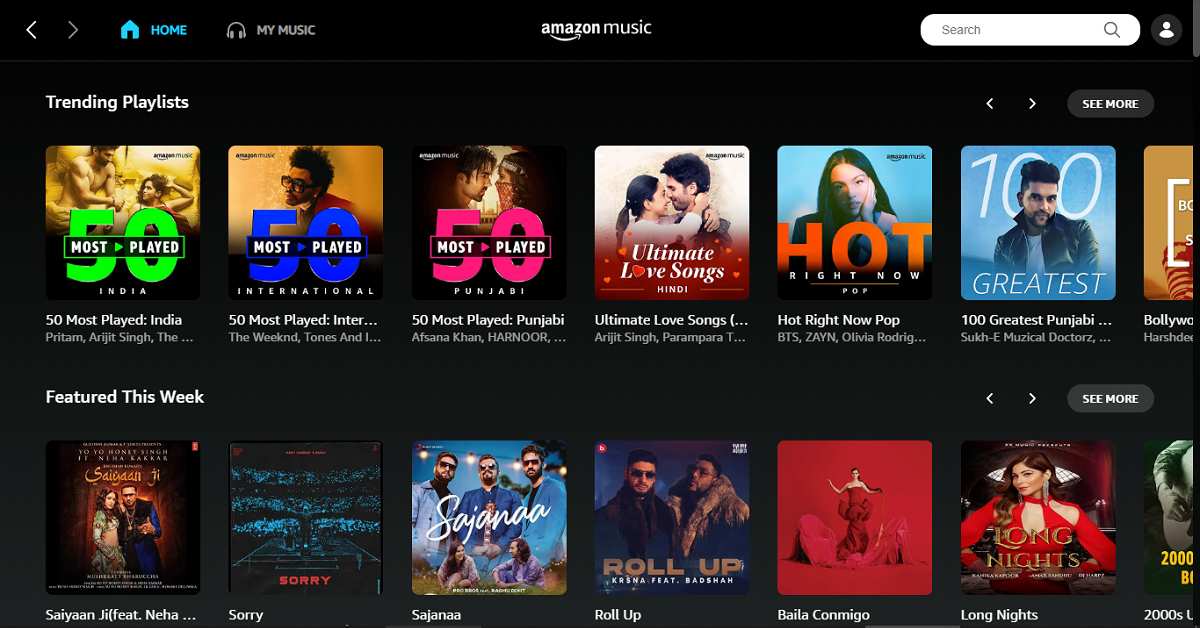
Amazon Music is an online music streaming platform and online music store that became the first music portal to sell music without having digital rights management (DRM) from the four principal music labels, namely, EMI, Universal, Warner, and Sony BMG. Amazon Music originally sold all tracks in 256 kilobits-per-second variable bitrate MP3 format. During the launch, Amazon Music offered over 2 million songs of 180,000 artists and over 20,000 labels that included EMI Music and Universal Music Group. In August 2019, Amazon Music released its first smartwatch app available on limited Garmin smartwatches.

Amazon Music
Amazon Music

Amazon Prime Video is an online video streaming service available for Amazon Prime members for having access to several Prime Video titles at no extra cost. It also provides an option to rent or buy movies and web series. Amazon Prime membership comes with an enormous library of movies and TV shows ranging across various categories including romantic comedies and timeless classics. Just by getting Prime membership, you can stream unlimited movies and TV episodes on the Prime Video app or the compatible Fire TV, smart TV, streaming media player, and game consoles.

Amazon Prime Video
Amazon Prime Video

Regardless of the ongoing speculations regarding Jeff Bezos’s decision of stepping down from his position, the above listed five things shall prove the foundation stone for not only the company but for the entire technological industry.

For the latest gadget and tech news, and gadget reviews, follow us on Twitter, Facebook and Instagram. For newest tech & gadget videos subscribe to our YouTube Channel. You can also stay up to date with the Gadget Bridge Android App.
Samsung Galaxy M02s review: For those who need a big-battery smartphone

South Korean technology giant, Samsung, recently launched its Galaxy M02s budget smartphone in India. The key highlights of Samsung Galaxy M02s include its 5,000mAh battery and a 13MP primary camera. But is the device really worth buying? Take a look at our review of Samsung Galaxy M02s and find out:

Samsung Galaxy M02s design and display

Let’s begin by talking about the design of Samsung Galaxy M02s. The smartphone is elegant to look at and does have a look and feel that would make it stand out, thanks to its textured back panel. It’s a pattern diagonal lines running in different directions. The back panel of the device has the camera module that houses three lenses and besides this, the Samsung branding is towards the bottom. The right edge of the handset houses the volume rocker and power keys, while the left one has the SIM tray.

The bottom edge has the Type C port, 3.5mm headphone jack, a speaker grille and a microphone, while the secondary microphone is placed at the top. Samsung Galaxy M02s has a plastic body and is available in Blue, Black and Red colour options. The smartphone that we got for review was dressed in Black. The one-handed usage on the device could be a problem for some, even though the volume rocker keys and the power button are placed fully in reach.

Samsung Galaxy M02s 2

Flip over, and you will see the front panel of the device that is dominated by the 6.5-inch HD+ IPS LCD display and has a U-shaped notch on its top. Thin bezels that outline the display of the smartphone, however, the one on the bottom is relatively thicker than the other three and really stands out.

Overall, the design of the smartphone is good and as we mentioned earlier, the textured back panel will make it stand out. However, on the downside, the broad chin and the U-shaped notch can be a hindrance for some while watching video content.

Moving on to the display, the 6.5-inch HD+ IPS LCD screen has a resolution of 720×1600 pixels and an aspect ratio 20:9. The colours depicted are accurate and vibrant, and the images projected were sharp and clear. The colours remain the same on different viewing angles, but the sunlight readability of the device could have been better. We did watch some video content on the handset, and while the smartphone doesn’t disappoint, there would be no reason to stay hooked to it to watch shows too. But for this price point, we can’t really ask for more.

Samsung Galaxy M02s performance and cameras

Before we move on the performance of Samsung Galaxy M02s, we’ll take a minute to talk about the rest of the specifications of the smartphone. The device is powered by the Qualcomm Snapdragon 450 processor clubbed with up to 4GB of RAM and 64GB of internal storage. It is worth mentioning that another variant of the device comes with 3GB RAM and 32GB storage. The smartphone can hold a microSD card of up to 1TB. It runs Android 10 skinned with OneUI 2.5 and houses a massive 5,000mAh battery. For imaging duties, Samsung Galaxy M02s sports a triple rear camera module that included a 13MP primary sensor, a 2MP depth sensor and a 2MP macro lens. For selfies, there is a 5MP camera on the front panel of the handset.

Samsung Galaxy M02s 6

Coming to the software of the device, there are some features like a system-wide dark mode that you will find, but then, somehow the user interface wasn’t very smooth. The apps took a little longer than usual to launch and switching between them was an issue too.

Naturally, this affected the performance because the user interface was kind of laggy. There was some bloatware on the handset too, in spite of the fact that we opted out of installing most apps. Moving on to performance, the multi-tasking on the smartphone was decent, but gaming wasn’t too great an experience. While light games like Alto’s Odyssey worked perfectly, we occasionally did struggle a bit with graphic-heavy ones like Asphalt 9: Legends. Strangely, Samsung Galaxy M02s did heat up a bit while gaming, but it remained perfectly fine even when we watched shows on Netflix for three hours, straight.

Samsung Galaxy M02s 5

The battery of the smartphone is definitely one of its best aspects. With moderate usage, involving just some social media apps, clicking pictures, and listening to music for a while, the device’s battery lasts two whole days. Throw in some hours of Netflix and reading on Kindle, and the smartphone’s battery still lasts easily more than a day. With the 5W charger that comes with the smartphone, it takes up to two hours to charge the device, so you may want to use a 15W one as Samsung Galaxy M02s is compatible with that too.

Samsung Galaxy M02s 3

Finally, let’s talk about the cameras. Samsung Galaxy M02s does an average job when used for clicking pictures. The 13MP primary camera managed to click some good images in well-lit areas, or outdoors.

Samsung Galaxy M02s image 2

However, the ones taken in dimly lit areas lacked clarity and some noise was visible in the pictures. The smartphone at times even took a while to focus on the object we wished to click.

Samsung Galaxy M02s image

Nevertheless, the colours remained accurate and the brightness was just right. We faced a similar problem with the other depth sensor and the macro lens too. During the day or in well-lit conditions, they worked well, but the performance was affected in dimly lit areas. The selfies also just turned out to be decent, but we guess the performance of the cameras can be excused because of the price point it is at.

Verdict

Samsung Galaxy M02s does have its aces and ploys. The design and the display of the smartphone are good. The battery is great, while the performance could have been smoother. And the cameras, they did a good job during the day but did not perform consistently in dimly-lit areas. Still, at a starting price of Rs 8,999, we can definitely not call Samsung Galaxy M02s a bad buy.

At this price point, most smartphones have their share of pros and cons, and it’s about picking the one that is strong in the aspects that you value. So, if you are someone who needs a big battery smartphone with a good display in the under Rs 10,000, Samsung Galaxy M02s is the right pick for you.

Pros

  • Elegant design
  • Lasting batttery
  • Good pricing

Cons

  • Performance could be smoother
  • Cameras could be better

For the latest gadget and tech news, and gadget reviews, follow us on TwitterFacebook and Instagram. For newest tech & gadget videos subscribe to our YouTube Channel. You can also stay up to date with the Gadget Bridge Android App.

Top must-have gadgets and tech for vlogging

Vlogging is quite a difficult task than it appears. Shooting the videos is only one part of vlogging. However, preparation and editing require knowledge, experience, and awareness. If you have to start a vlog channel, the following gadgets are essential for you to have the best quality results for your vlogs. 

Camera

Vlogging requires shooting videos at different times of the day. Your camera should be able to shoot high-quality videos even at night time. Also, your camera should perfectly capture the night sky, steel wool photography, waterfalls, landscapes, and all that you can shoot for your vlogs. Nikon D3400 is an affordable camera that comes with Bluetooth connectivity so that you can download the images right away on your phone through an application. Moreover, it has got a 300mm zoom lens that perfectly captures distant subjects like mountains and birds. You can shoot slow-motion videos as well owing to its 60FPS lens that brings life to your videos. In smartphones, the Samsung Note 20 Ultra is also a very good option, if you do not want to carry bulky DSLRs. 

Vlog Camera

You can choose a camera from the following list:

  • Sony A6400: It’s a brilliant camera for vloggers that is capable of capturing 4K videos. It also comes with a front-facing screen. Price: ₹ 74,900.00. Buy at Amazon
  • Nikon D 3400: It comes with an APS-C CMOS Sensor and 24.2 MP with ISO: 100-25600 sensitivity range (critical for obtaining grain-free pictures, especially in low light). Price: ₹ 45,990. Buy at Amazon

Microphone

A good microphone is something that you can’t miss out on when shooting your vlogs. Your vlogs will have maximum impact on your viewers only when they can listen clearly to what you want to express. The characteristic of a microphone needed for vlogging is that it cancels the noise coming from the surrounding. USB microphones are affordable and provide you with a good quality sound recording. They also suppress external sounds effectively. A shotgun microphone connects well with your DSLR or your smartphone camera. Another great option is a lapel mic, which many newcomers start with.

Mic

You can choose from the following list:

  • Boya BY-M1: It is a wired lavalier mic with a switchable power source. It runs on an LR44 button cell, and needs to be switched on if using a ‘passive’ source, or off if recording via a device with plug-in power. Price: ₹ 999.00 Buy at Amazon
  • Rode Wireless GO: Although it’s designed to pair with the Rode Wireless GO wireless microphone, the RØDE Lavalier GO is actually compatible with most cameras and recording devices, with a 3.5mm TRS mic input. Price: ₹ 5,999.00 Buy at Amazon

A tripod or selfie stick

Your videos won’t be recorded well if your camera keeps shaking. You need a tripod or a selfie stick to hold your camera firmly in your fist. The camera sticks also come with a rotating mechanism to move the camera towards the direction you want. It also works well if you want to capture pictures in your vlog. Nowadays, camera stands come with a handy design to enable you to capture yourself as well as the surroundings.

Selfie

You can choose from the following:

  • Accmor AC-13TR Self-Portrait Monopod: Manufactured by Accmor, it is made of lightweight aluminum with a buckle to lock the rods, making it easy to carry. It has a soft foam handle with a good grip to prevent slipping. Price: ₹1,319 Buy at Flipkart
  • XCSOURCE DC494 Monopod Bundle:  Manufactured by XCSOURCE, it is lightweight, adjustable, and easy to mount. Buy at Amazon

Lighting

Lighting is as essential a part of your vlog production as any other gear. Your camera will shoot perfectly if you are shooting videos in the sunlight. However, for recording videos in a room, you need to have sufficient lighting in your room. Poorly lit rooms cause the camera to capture a lot of noise thereby reducing the quality of the output video.

Lighting

Video Editing Software

This is the last step to your vlogging process until you upload your video. After you’ve recorded the video and audio, you have to edit the video, mix the sounds and effects. Nowadays, there are several free video editing software available on the internet like Shortcut, and Hitfilm Express. If you want to perform advanced editing, then you can go for paid software like Adobe Premiere Pro or DaVinci Resolve.

Video Edit

Vlogging is fun and that is why it’s getting popular among youngsters as a secondary profession. If you just keep in mind the above tips and have good equipment, you can create wonderful vlogs.

For the latest gadget and tech news, and gadget reviews, follow us on Twitter, Facebook and Instagram. For newest tech & gadget videos subscribe to our YouTube Channel. You can also stay up to date with the Gadget Bridge Android App.

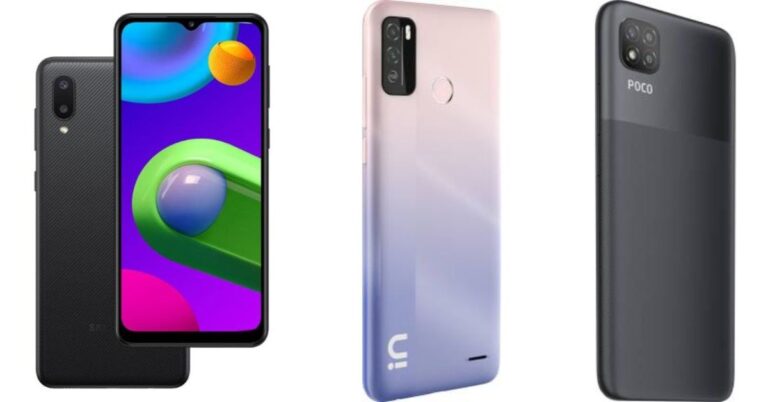
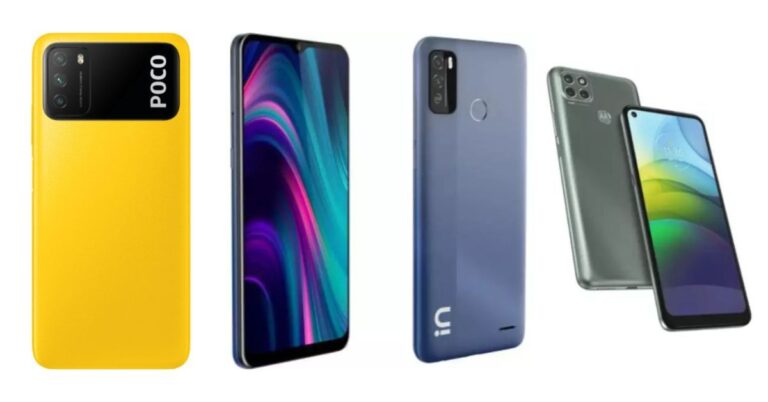
Comparison: Samsung Galaxy M02 vs Micromax In 1b vs Poco C3

The South Korean smartphone company, Samsung, launched Samsung Galaxy M02 as its latest budget offering in India. The device comes with an Infinity-V display and runs Android 10 out of the box. There is a dual rear camera set up and the smartphone includes a 5,000mAh battery and is powered by an unnamed MediaTek processor. We have compared Samsung Galaxy M02 with Micromax In 1b and Poco C3 to know how Samsung stands against the other two devices. 

Display

Samsung Galaxy M02: 6.5-inch HD+ Infinity-V Display

Micromax In 1b: 6.52-inch HD+ mini-drop HD+ display

Poco C3:  6.53-inch HD+ LCD waterdrop-style notch display

Processor

Samsung Galaxy M02: a MediaTek chipset

Micromax In 1b: MediaTek Helio G35 processor

Poco C3: MediaTek Helio G35 chipset

Rear camera(s)

Samsung Galaxy M02: dual rear camera setup that includes a 13-megapixel primary sensor and a 2-megapixel macro lens

Micromax In 1b: dual rear camera setup that includes a 13-megapixel primary sensor with  f/1.8 aperture and a 2-megapixel depth sensor

Poco C3: triple rear camera setup that includes a 13-megapixel primary sensor with f/2.2 aperture. Further assisted by a 2-megapixel macro lens with f/2.4 aperture and a 2-megapixel depth sensor with f/2.4 aperture. 

Selfie camera

Samsung Galaxy M02:5-megapixel sensor 

Micromax In 1b:8-megapixel 

Poco C3:5-megapixel selfie sensor with f/2.2 aperture

RAM and storage

Samsung Galaxy M02: 2GB RAM with 32GB storage and 3GB with 32GB storage options

Micromax In 1b:2GB RAM with 32GB storage and 4GB RAM with 64GB storage

Poco C3:3GB RAM with 32GB storage and 4GB RAM with a 64GB storage model

Battery

Samsung Galaxy M02: 5,000mAh battery

Micromax In 1b:5,000mAh battery

Poco C3:5,000mAh battery

Operating system

Samsung Galaxy M02: One UI on top of Android 10

Micromax In 1b: the stock version of Android 10

Poco C3:MIUI 12 for Poco on top of Android 10

Price

Samsung Galaxy M02: Rs 6,999

Micromax In 1b: Rs 6,999

Poco C3:Rs 7,499

Our Take

While looking at the spec sheets all three smartphones come with similar screen sizes. The size is perfect to carry in a pocket and it is not too small so it is easier to use while reading, browsing the internet or watching movies. The battery capacity is also the same despite being a budget offering. 

Micromax In 1b and Poco C3 offers 10W fast charging support. On the other hand, Samsung Galaxy M02 does not include a fast charger. Poco smartphone comes with an additional rear camera and it also offers a larger RAM which means the more RAM the more applications can run at the same time and makes the phone faster.

For the latest gadget and tech news, and gadget reviews, follow us on TwitterFacebook and Instagram. For newest tech & gadget videos subscribe to our YouTube Channel. You can also stay up to date using the Gadget Bridge Android App.

Canon launches seven new PIXMA G series Ink tank printers in India

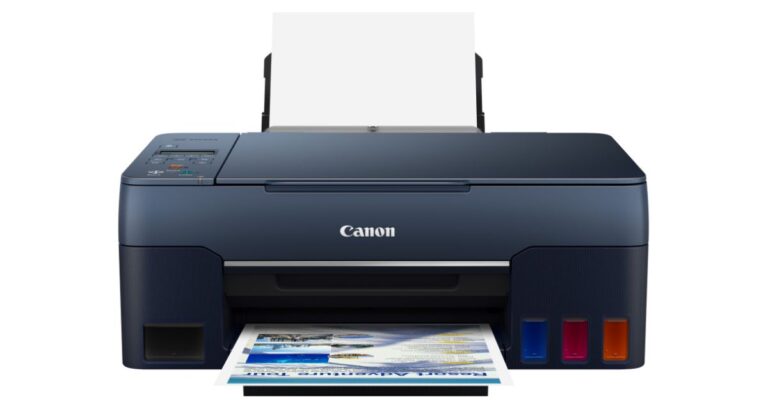
Canon has launched its flagship high-speed Ink Tank printers in its PIXMA G-series for home and small businesses in India. The company has released a total of seven new Ink Tank Printers namely PIXMA G3060, PIXMA G3021, PIXMA G3020, PIXMA G2060, PIXMA G2021, PIXMA G2020, and PIXMA G1020. The printers include drip-free, hands-free ink refilling mechanism, and a user-replaceable maintenance cartridge built to stand out with high ink volumes and low-cost printing.

Speaking on the launch, Mr. Kazutada Kobayashi, President & CEO, Canon India said, “The pandemic has transformed the way we have operated, by bringing in a significant shift in the usage pattern of technology and devices. With the entire world grappling to adapt to a hybrid working environment, we have witnessed a sudden rise in the demand of multi-functional ink-tank printers. This has further led to the Consumer System Products division becoming one of the highest contributing businesses for us in India. As we continue to address the evolving needs of our customers, we are delighted to further strengthen our ink-tank product portfolio with the launch of 7 versatile PIXMA G series printers that are specially built to boost productivity for home and small businesses.”

The printers are touted to be cost-efficient and comes with reliable ink tank technology. The devices are designed to deliver high-speed printing, Spill-Free and Easy to Handle Ink Filling. According to the company, all the Canon printers have an economy mode that lets the users print up to 7700 colour pages or 7600 black pages in economy mode. It is suitable to print for general use or photo printing, with the dedicated use of pigment black ink for crisp and sharp text in text documents and line drawings, and automatic switching to only dye-ink colour channels when there is a need to produce full-borderless glossy photos up to A4 sizes.

PIXMA G-series

In addition to this, there is an On System guide to clean the Paper Feed Rollers that helps to reduce the service calls and increase better customer experience. The new Canon G series features new ink bottle designs, with outlet nozzles that fit only in the respective colour tank well openings to avoid unintended filling of coloured inks into the wrong tank openings. All the printers have support for wireless connectivity, therefore, allowing mobile printing as well as scanning 1 from iOS and Android mobile devices (smartphone, tablets, and laptops) through the Canon PRINT Inkjet/SELPHY app that offers fine-tuned control of all printer settings.

The Pixma G series printers also feature a 2-line LCD panel to perform and confirm printer settings. The PIXMA G3060. PIXMA G 3021 comes with an additional black ink bottle inside the box.

Similar to the above-mentioned models the G2020 also features a 2-line LCD for easy operation, including ease of management for printer settings. PIXMA G 2021 comes with an additional black ink bottle inside the box.

Additionally, the Canon printers comes with voice assistant support for Google Assistant and Amazon Alexa, which enables voice-activated printing.

Pricing and availability

The price of the Canon PIXMA G3060, G3021, G3020 has been set at Rs 17,403, Rs. 17,704 and Rs. 17,102 respectively. Whereas PIXMA G2060, G2021, G2020 and G1020 are priced at Rs. 14,203, Rs. 14,523, Rs. 13,922 and Rs.11,048 respectively. All the printers will be available across leading e-commerce platforms and authorized retailers starting 15 February 2020, in India. 

For the latest gadget and tech news, and gadget reviews, follow us on TwitterFacebook and Instagram. For newest tech & gadget videos subscribe to our YouTube Channel. You can also stay up to date using the Gadget Bridge Android App.

Comparison: Poco M3 Vs Micromax In Note 1 Vs Motorola G9 Power

Poco has launched a new budget-friendly smartphone in India. The company has expanded its M-series in the country with the introduction of the Poco M3. The device is a successor to Poco M2. It is powered by Qualcomm Snapdragon 662 SoC and houses a 6,000mAh battery. In addition to this, it has a triple rear camera setup too. So today we are here to compare Poco M3 Vs Micromax In Note 1 Vs Motorola G9 Power to check how the newly launched phone stands against the other two devices. Our Poco M3 comparison will also be helpful for you to understand what unique features it comes with if you are planning to buy the new device.

Display

Poco M3: 6.53-inch full-HD+ display

Micromax In Note 1: 6.67-inch full-HD+ hole-punch design display

Motorola G9 Power:6.8-inch HD+ IPS display

Processor

Poco M3: Qualcomm Snapdragon 662 SoC

Micromax In Note 1: MediaTek Helio G85 processor

Motorola G9 Power: Qualcomm Snapdragon 662 SoC

Rear camera(s)

Poco M3: 48-megapixel primary sensor with f/1 aperture. Furthermore, there is a 2-megapixel macro lens with f/2.4 aperture and a 2-megapixel depth sensor with f/2.4 aperture

Micromax In Note 1: a 48-megapixel primary sensor, 5-megapixel wide-angle lens and two 2-megapixel macro and depth sensors.

Motorola G9 Power:64-megapixel primary sensor, 2-megapixel macro sensor with an aperture of f/2.4 and a 2-megapixel depth sensor with f/2.4 aperture

Selfie camera

Poco M3: 8-megapixel selfie camera with an f/2.05 aperture

Micromax In Note 1: a 16-megapixel selfie camera with a 78-degree FoV

Motorola G9 Power: 16-megapixel front-facing camera

RAM and storage

Poco M3: 6GB with 64GB storage variant and 6GB with 128GB storage model

Micromax In Note 1: 4GB RAM with 64GB and 128GB of internal storage

Motorola G9 Power:4GB RAM with 64GB internal storage

Battery

Poco M3: 6,000mAh battery

Micromax In Note 1: 5,000mAh battery

Motorola G9 Power:6,000mAh battery

Operating system

Poco M3: MIUI 12 for Poco based on the top of Android 10

Micromax In Note 1: Android 10

Motorola G9 Power: Android 10

Price

Poco M3: Rs 10,999

Micromax In Note 1: Rs 10,999

Motorola G9 Power: Rs 11,999

Verdict

If we compare the pricing, the price of both Poco and Micromax devices are similar however Poco M3 comes with a larger RAM and storage at this price. On the other hand, the Motorola smartphone’s pricing is on the higher side. But when considering the features and specs Moto G9 power is a clear winner. The device offers you a much larger display than both the compared mobile phones. It also offers higher resolution rear cameras than Poco and Micromax. But then if you are planning to go for the made in India smartphone then we would recommend Micromax In Note 1. 

For the latest gadget and tech news, and gadget reviews, follow us on TwitterFacebook and Instagram. For newest tech & gadget videos subscribe to our YouTube Channel. You can also stay up to date using the Gadget Bridge Android App.

Top 10 video games to look out for in the year 2021


The advancement in video game production and the release of Playstation 5 has unlocked new levels of gaming. Check out the best upcoming video games in 2021

1) FAR CRY 6

Publisher: Ubisoft 

Platforms: PlayStation 4, PlayStation 5, Xbox One, Xbox Series X and Series S, Amazon Luna, Google Stadia, Microsoft Windows

FAR CRY 6
FAR CRY 6

Far Cry 6 shall make a return in 2021 with its popular Fangs for Hire system. It differs from its predecessor, Far Cry 5 because it will for the first time feature the city setting. In a forward show hosted by Ubisoft, the Far Cry 6 video game was leaked even before its reveal. The official teaser shows a new villain Anton Casillo that is played by Breaking Bad’s Giancarlo Esposito in a setting that resembles Havana. The story presents a typical Far Cry fare where you play Dani Rojas who is in a battle to liberate the tropical island of Yara from the rule of El Presidente.

2) MASS EFFECT LEGENDARY EDITION

Publisher: Electronic Arts 

Platforms: PlayStation 4, Xbox One, Microsoft Windows

MASS EFFECT LEGENDARY EDITION

The Mass Effect Legendary Edition gives you a chance to go back to the SSV Normandy for a meeting with Garrus, Liara, and pals. Mass Effect Legendary Edition is an upgraded edition of the Mass Effect franchise. The video game comes with high resolution, swift frame rates, and enthralling visual enhancements. In this edition, the storyline from the original trilogy will be tweaked for 4k Ultra HD.

3) GHOSTWIRE: TOKYO

Publisher: Bethesda Softworks 

Platforms: Microsoft Windows, PlayStation 5

GHOSTWIRE: TOKYO
GHOSTWIRE: TOKYO

The video game presents a story where people are moving out of the neon-lit streets of Toyko that indicates turmoil. In the video game, you will find strange shadowy figures that are patrolling the streets. This storyline is full of terrible monsters inspired by Japanese lore and legends. The video game also revolves around paranormal entities, supernatural events, conspiracies, and the occult.

4) HALO INFINITE

Publisher: Xbox Game Studios 

Platforms: Xbox One, Xbox Series X and Series S, Microsoft Windows

HALO INFINITE
HALO INFINITE

For gamers who are fond of Xbox exclusive video games, this video game is supposed to be a big Xbox Series launch game. The official trailer depicted that the story will be set on a Halo ring that has miraculously endured damage and also exhibited the design of Master Chief’s MJOLNIR armor to return to the design that also existed in Halo 2 and Halo 3. Although the Halo 5 was welcomed with mixed reviews, this edition is expected to bring back the big boost this series need.

5) RESIDENT EVIL VILLAGE

Publishers: Capcom, Capcom U.S.A., Inc.

Platforms: PlayStation 4, PlayStation 5, Xbox Series X and Series S, Xbox One, Microsoft Windows 

RESIDENT EVIL VILLAGE

Resident Evil Village is a direct sequel to Resident Evil 7. This video game starts with that game’s protagonist, Ethan, whose happy new life is disrupted by the appearance of Resi mainstay Chris Redfield. Ethan soon discovers himself in a once-peaceful wintry village that’s now flooded with paranormal horrors. This edition also expects high-fidelity first-person terrors. However, this video game showcases witches, werewolves, and other imagery that is a hallmark of this long-running survival horror video game series. 

6) HORIZON FORBIDDEN WEST

Publisher: Sony Interactive Entertainment 

Platforms: PlayStation 4, PlayStation 5

HORIZON FORBIDDEN WEST

This video game is a new location where the protagonist, Aloy, attempts to what was once predominated by forests, lost cities, and mountains in a storm-torn land. In this video game, new enemies will be roving the land, and you’ll have to enhance Aloy’s armory to stop them. 

7) GRAN TURISMO 7

Publisher: Sony Interactive Entertainment

Platform: PlayStation 5

7) GRAN TURISMO 7
7) GRAN TURISMO 7

Sony’s Gran Turismo 7 is expected to be a graphical challenge for the system as it comes with the ray-traced reflections that will likely make the gaming experience immersive. The video game showcases expensive cars that appear more realistic than ever before. Gamers are waiting to see how far the series goes after the successful GT Sport on PS4. 

8) DEATHLOOP

Publisher: Bethesda Softworks

Platforms: Microsoft Windows, PlayStation 5

DEATHLOOP
DEATHLOOP

The video game revolves around the two assassins, who found themselves stuck on an island named Blackreef. Deathloop is expected to be a complete package of stealth, action, and magic powers. It also offers a unique multiplayer mode that will allow the players to play as Julianna with the challenge to kill another player’s Colt, another character in the story.

9) ELDEN RING

Publishers: BANDAI NAMCO Entertainment, Namco Bandai Games America Inc.

Platforms: PlayStation 4, Xbox One, Microsoft Windows

ELDEN RING
ELDEN RING

Elden Ring is an expected action role-playing video developed by FromSoftware. It is expected to be a more “natural evolution” to the Souls series. The video game will be set on a much larger scale than the previous editions. The Elden Ring will feature an open world setting powered by new gameplay mechanics such as horseback riding and combat.

10) Back 4 Blood

Publisher: Warner Bros. Interactive Entertainment Engine: Unreal Engine 4

Platforms: PlayStation 4, Xbox One, PlayStation 5, Xbox Series X and Series S, Microsoft Windows

Back 4 Blood
Back 4 Blood

Back 4 Blood is a four-player co-op zombie experience video game that offers the same frantic energy as you have experienced in the Left 4 Dead video game series. The video game portrays humour, distinctive style, and infinite zombies.

The ray-tracing feature is a new technology that gamers expect in each of the video games to be released in 2021. The above-listed video games shall take your gaming experience to a new level.

For the latest gadget and tech news, and gadget reviews, follow us on Twitter, Facebook and Instagram. For newest tech & gadget videos subscribe to our YouTube Channel. You can also stay up to date with the Gadget Bridge Android App.
February 3 Flipkart Daily Trivia Quiz Answers: Answer to win exciting prizes

The e-commerce website Flipkart is hosting Daily Trivia Quiz. Every day it brings a bunch of new questions for its users. By answering them correctly you can win exciting prizes. The questionnaire is based on questions related to general knowledge. Also, the users can win free vouchers and super coins, among other offers via the daily quiz. February 3 Flipkart Daily Trivia Quiz Answers has already gone live on its platform.

February 3 Amazon Quiz: Participate to win Rs 10,000 Amazon Pay Balance

Amazon quiz has gone live now on its mobile app platform. The quiz can be played from 8 AM to 12 noon. All you need to do is just answer five easy questions that the e-commerce website puts before you. Today you can stand a chance to win Rs 10,000 Amazon Pay Balance.

Every day Amazon brings a new set of questions that consists of five easy questions based on general knowledge and current affairs. The participants have to answer them correctly to enter into a lucky draw. One wrong answer will get you eliminated from the quiz. Only one person will be declared as a winner and the results are announced at the end of every month. By submitting correct answers Amazon customers can win free gadgets as well as Amazon Pay Balance. To make sure you answer all the questions correctly Gadget Bridge everyday updates all the correct answers to all 5 questions. Check out today’s answers:

February 3 Amazon Quiz Answers

Question 1: Which famous gentleman whose birthday is in January, was Mayor of Kolkata from August 1930- April 1931, succeeded by Bidhan Chandra Roy?

The answer is- Subhash Chandra Bose

Question 2: Chandrikapersad Santokhi, the Chief Guest of the 2021 Republic Day parade, is the President of which country?

The answer is- Suriname

Question 3: India batted the 2nd most overs in the 4th innings to draw a Test in Australia this century at the SCG, which country leads this list?

The answer is- South Africa, Adelaide

Question 4: Which holiday is associated with this picture? 

The answer is- Easter Sunday

Question 5: Belonging to the rodent family, what kind of animals are these? 

The answer is- Prairie dogs

For the latest gadget and tech news, and gadget reviews, follow us on TwitterFacebook and Instagram. For newest tech & gadget videos subscribe to our YouTube Channel. You can also stay up to date using the Gadget Bridge Android App.

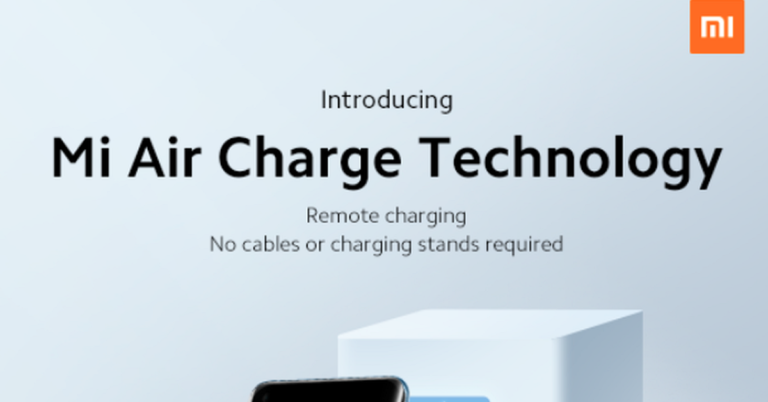
What is Xiaomi Mi Air Charge technology and how does it work?

Xiaomi recently announced the brand new Mi Air Charge Technology. It’s a wireless charging mechanism that can charge devices like smartphones and tablets from a distance. Xiaomi claims this distance to be a radius of several meters. Moreover, More than one device can be charged at 5W simultaneously. According to Xiaomi, the charging efficiency shall not be influenced or blocked by physical obstacles like furniture or a wall.

“We’re excited to bring you the remote charging technology – Mi Air Charge Technology! Charge multiple devices simultaneously while you’re gaming, walking around, or even when something’s in the way, no strings attached. Another giant leap forward in wireless charging technology!” – Xiaomi

Xiaomi’s Air Charge Technology works across different gadgets like smartwatches and fitness bracelets equally well. Xiaomi aims to is to make “living rooms truly wireless,” with speakers, lamps, and smart home devices all working by a single remote system.

How does the Mi Air Charge Technology work?

The main technology that works behind Xiaomi’s remote charging works on space positioning and energy transmission. Xiaomi has developed an isolated charging pile that has five phase interference antennas. These antennas can detect the location of the device like a smartwatch or a smartphone with high accuracy. It also has a phase control assembly consisting of 144 antennas transmitting waves straight to the connected device.

“Xiaomi’s patented Mi Air Charge Technology makes use of a special self-developed tower/box-like device that uses beamforming technology to send millimetre waves directly to a device. These waves are converted to electric power that charges the device.” – Xiaomi

Xiaomi has said that Mi Air Charge technology is merely a tech demo at this stage. Thus, it’s still ambiguous if the company will overcome the implementational and structural market dilemmas faced by other companies that have exhibited remote charging models. 

Xiaomi's Air Charging Technology
Xiaomi’s Air Charging Technology

There are also health concerns, and there’s no doubt that if this technology ever makes it to market, it’ll be heavily scrutinized by regulatory authorities.

“This new wireless charging technology can charge devices at a speed of 5W, even in the presence of physical obstacles that don’t reduce charging efficiency. It comes with a phase control array composes of 144 antennas, which emits millimetre waves through beam-forming, creating electric energy via a rectifier circuit.” – Xiaomi

What are the issues and concerns related to air charging?

  1. Health Concerns: There is no doubt that the telecommunications industry and its manufacturers have been accused several times of the health concerns posed by electronic gadgets and electromagnetic radiations. Xiaomi’s Air charging technology utilizes electromagnetic radiations in the transparent medium unless it’s converted to electrical signals at the transmitter and the receiver circuits. Thus, it’s apparent that it shall pose similar health concerns as any other device. With the integration of 5G technology, the overall radiation may become strong enough to start interfering with the physiological functioning of human and animal cells.
  2. Energy concerns: Charging using a USB cable is one of the most efficient methods of charging as the electrical energy is transferred directly from the adapter to the electronic device like a smartphone or a smartwatch. There is hardly any dissipation of electrical energy in the USB cable. Contrary to this, air charging is not based on the principle of directional charging. Rather, the electromagnetic energy is emitted in the entire space in a radius of a few meters. This can raise energy concerns in the future if not optimized. 

If Xiaomi succeeds in optimising the air charging technology, this technology can prove to be a game-changer for smart devices, especially when integrated with AI, IoT, and 5G. In the recent past, many companies have tried to invent remote charging systems, so it’ll be fascinating to see if Xiaomi will be the first to manufacture it.

For the latest gadget and tech news, and gadget reviews, follow us on Twitter, Facebook and Instagram. For newest tech & gadget videos subscribe to our YouTube Channel. You can also stay up to date with the Gadget Bridge Android App.

Everything you need to know about Bitcoin: Where and how to buy

Bitcoin, invented in 2008, is a cryptocurrency that allows people to send or receive money over the internet. The origin of Bitcoin is ambiguous. It is believed that a person, or a group of people, with the identity of Satoshi Nakamoto had conceptualised an electronic cash system that would permit payments to be sent directly across the internet from one party to another without going through a financial institution. Here we also let you know where to buy bitcoin.

How can you get Bitcoins?

There are three major ways in which you can acquire Bitcoins:

  1. Buy Bitcoins: You can buy Bitcoins using ‘real’ currency like Rupee, USDollars, Renminbi, etc. There are several online marketplaces known as “bitcoin exchanges” where you can trade bitcoin using different currencies.
  2. Receive Bitcoins: You can also receive Bitcoins as modes of payment for goods you purchase and the services you avail of.
  3. Bitcoin Mining: Bitcoins can be generated by the process of Bitcoin Mining where you use your computer to perform mathematical calculations for the Bitcoin network to validate transactions.

How and where to buy Bitcoins?

Using the Bitcoin.com Wallet

  1. Open the Bitcoin.com wallet app on your device.
  2. Press the green ‘Buy’ button to buy Bitcoin Cash (BCH)
  3. Just follow the instructions on the screen to deposit coins to your preferred wallet
  4. You will be asked to verify your identity
  5. Once done, you can proceed to purchase. Your first purchase may be slower as it involves identification and verification. However, your future purchases shall be much faster.

Through a cryptocurrency exchange

  1. Just visit the cryptocurrency exchange.
  2. Create your account and validate your identity.
  3. Follow the on-screen instructions to buy your Bitcoin Cash (BCH) or Bitcoin (BTC).
  4. You will be able to find your coins in the exchange’s wallet connected to your exchange account.
  5. Lastly, move your Bitcoin to your personal wallet to keep it more secure.

BTC trade

How to sell your Bitcoins?

  1. Visit a cryptocurrency exchange like Bitcoin.com Exchange.
  2. Create an account and validate your identity.
  3. Follow the on-screen instructions to sell your Bitcoin Cash (BCH) or Bitcoin (BTC).
  4. If you have sold it for fiat currency, you can cash out the funds directly into your bank account otherwise you can send the coins to your personal wallet.

Where can you check the price of Bitcoin?

BTC priceThere are many websites on the internet where you can get the price of Bitcoins against the desired currency. Keep in mind that many of the sites provide multiple types of data, so there can be a discrepancy in the exchange rates across different websites. The following sites are the most preferred resources for checking cryptocurrency prices as well as data for deeper analysis.

  1. bitcoinwisdom.io – For a truly old school way to check prices across popular exchanges, and view corresponding charts, bitcoinwisdom.io is a solid choice. The classic site affords users the opportunity to check prices in terms of their preferred trading pairs.
  2. bitinfocharts.com – It presents price, volume, transaction value, fees, block time, block size, difficulty, hash rate, mining profitability, and even wealth distribution of Bitcoin.
  3. coinmarketcap.com – This website is renowned for its comprehensive historical data section, which allows analysis of cryptocurrency data for the past five years. It’s also available as a mobile application.
  4. markets.bitcoin.com – It is a handy resource to get a clean check of prices crypto assets that are doing best in the last 24 hours duration.
  5. messari.io – Much more than just a place to check prices, Messari specializes in research, news, and analysis, and like bitinfocharts.com, This website provides a huge collection of metrics as well as advanced options for analysis and professional research. Some of the features available only via paid subscription, but the free library is also extensive.

Will bitcoin be relevant in the future?

BTC futureThere is a hot debate going on regarding the future of cryptocurrency. Some economists predict a possibility that cryptocurrency will be floated on the Nasdaq, leading to increased credibility to blockchain and its application as an alternative to conventional currencies. With the advancement of Virtual Reality and Augmented Reality, the concept of cryptocurrency has gained further significance. If we imagine a virtual world run by a virtual economy, a cryptocurrency might be the most convenient means of payment within those virtual networks rather than hard currencies like the US Dollar or Euro. Due to its network-based structure, the banning of the cryptocurrency turns the traders to overseas platforms to continue participating in crypto transactions. Even in China, dealing in cryptocurrencies has now reduced not banned. It is still ambiguous whether an outright ban is an excellent choice as a regulatory measure, particularly in a domain-driven by fast-paced technological innovations. We believe that there should be more debate before the decisions of regulating or banning cryptocurrency are materialised.

For the latest gadget and tech news, and gadget reviews, follow us on Twitter, Facebook and Instagram. For newest tech & gadget videos subscribe to our YouTube Channel. You can also stay up to date with the Gadget Bridge Android App.
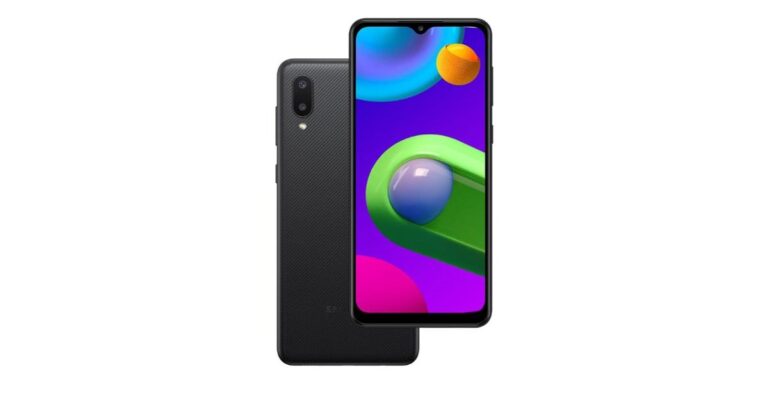
Samsung Galaxy M02 with 5,000mAh battery and dual rear cameras launched in India

The South Korean smartphone company Samsung today expanded its budget smartphone segment in India with the launch of the Samsung Galaxy M02. The key highlights of the smartphone include a 5,000mAh battery and is powered by an unnamed MediaTek processor. The phone ships with a dual rear camera set up and runs Android 10 out of the box. The smartphone also features an Infinity-V display.

Samsung Galaxy M02 price and availability details

Samsung Galaxy M02 has been launched in two different configurations of 2GB RAM with 32GB storage and 3GB with 32GB storage options. The 2GB model is priced at Rs 6,999 but as an introductory price, the phone will be offered at Rs 6,799 whereas the 3GB RAM option price is yet to be revealed by the company. The Samsung budget smartphone will be available via Amazon Samsung India online store and offline retailers starting February 9. The phone comes in three colour options of Black, Blue, Gray, and Red.Samsung Galaxy M02 with 5,000mAh battery and dual rear cameras launched in India

Samsung Galaxy M02 specifications and features

In terms of specifications, Samsung Galaxy M02 features a 6.5-inch HD+ Infinity-V Display. The budget offering by Samsung is powered by a MediaTek chipset paired with up to 3GB RAM and 32GB internal storage. The internal storage can be further expanded up to 1TB using a microSD card. The mobile phone runs One UI on top of Android 10 out of the box.

As far as the cameras are concerned, Samsung Galaxy M02 comes with a dual rear camera setup that includes a 13-megapixel primary sensor and a 2-megapixel macro lens. While on the front there is a 5-megapixel sensor for taking selfies and video calling.

The Samsung Galaxy M02 is backed by a 5,000mAh battery and it does not include a fast-charging as it is a budget offering. In terms of connectivity, the phone includes a 4G LTE, Wi-Fi, Bluetooth, GPS/ A-GPS, and a USB Type-C port for charging.

For the latest gadget and tech news, and gadget reviews, follow us on TwitterFacebook and Instagram. For newest tech & gadget videos subscribe to our YouTube Channel. You can also stay up to date using the Gadget Bridge Android App.

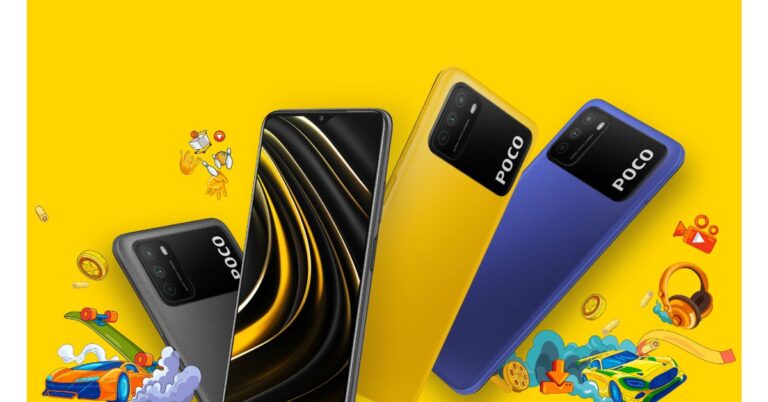
Poco M3 powered by Qualcomm Snapdragon 662 SoC launched in India

Xiaomi’s spin-off brand, Poco, has officially launched Poco M3 in India as its latest smartphone. The device comes with a 6,000mAh battery and FullHD+ display waterdrop-style display. The smartphone is powered by Qualcomm Snapdragon 662 chipset. The new M series phone is the successor of Poco M2, which was launched in the country last year.

Commenting on the launch, Anuj Sharma, Country Director, POCO India said, “In its first year, POCO has created many milestones and connected with the more connected, smarter audience. Within 10 months of becoming independent, we became the 3rd largest online smartphone player in India. This is a testimony of the consumers’ overwhelming endorsement of our brand’s philosophy – ‘everything you need, nothing you don’t’. The launch of POCO M3 is our effort to elevate the brand further, offering enthusiasts cutting-edge technology coupled with best-in-class looks.”

Poco M3 powered by Qualcomm Snapdragon 662 SoC launched in India

Poco M3 price and availability details

Poco M3 has been launched in India in two different configurations. The price of the 6GB with 64GB storage variant is set at Rs 10,999 while the 6GB with 128GB storage model comes with a price tag of Rs 11,999. The device will be offered in three colour options of Cool Blue, Poco Yellow, and Power Black. The mobile phone will go on sale in the country from February 9 onwards via the e-commerce website Flipkart. On the purchase of the smartphone, the buyers will get an additional Rs 1,000 off using ICICI Bank Credit and Debit cards.

Poco M3 specifications 

Poco M3 features a 6.53-inch full-HD+ display that offers 1,080×2,340 pixels of resolution. The display also comes with a screen-to-body ratio of 90.34 percent and a 19.5:9 aspect ratio. The display is protected with a layer of Corning Gorilla Glass. It runs on MIUI 12 for Poco based on the top of Android 10. The phone is powered by an octa-core Qualcomm Snapdragon 662 SoC paired with 6GB of LPDDR4x RAM and up to 128GB of onboard storage. The internal storage can be expanded up to 512GB using a microSD card.

Poco M3 ships with a triple rear camera set up that include a 48-megapixel primary sensor with f/1 aperture. Furthermore, there is a 2-megapixel macro lens with f/2.4 aperture and a 2-megapixel depth sensor with f/2.4 aperture. Upfront there is an 8-megapixel selfie camera with an f/2.05 aperture.

The device packs a 6,000mAh battery that comes with 18W fast charging support. There is an Infrared (IR) blaster on the phone along with a side-mounted fingerprint sensor to unlock the phone. In terms of connectivity, there is 4G LTE, Wi-Fi, Bluetooth, GPS/ A-GPS, a 3.5mm audio jack and a USB Type-C port for charging.

For the latest gadget and tech news, and gadget reviews, follow us on TwitterFacebook and Instagram. For newest tech & gadget videos subscribe to our YouTube Channel. You can also stay up to date using the Gadget Bridge Android App.

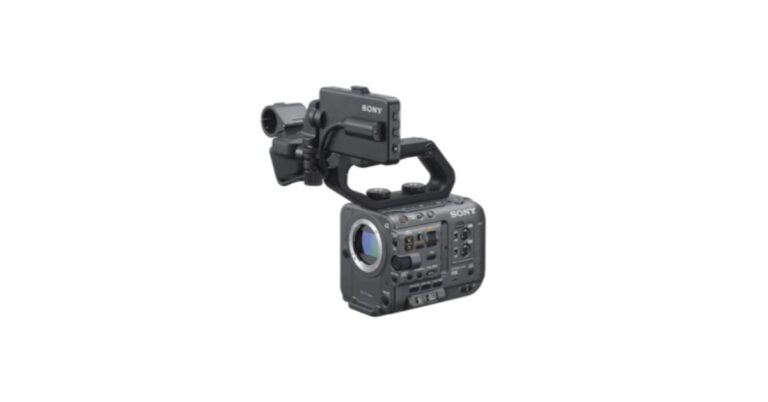
Sony ILME-FX6V full-frame format camera with FE C 16-35mm T3.1G E-mount lens launched in India

Sony has introduced its latest professional camera, therefore, expanding its Cinema line in India. The company has launched Sony ILME-FX6V full-frame format camera that comes with the company’s proprietary Digital Cinema Technology with Advanced Imaging Features from Alpha Mirrorless Cameras. The professional camera further includes 4K Full-frame back-illuminated CMOS Exmor R sensor, fast hybrid autofocus and delivers recording up to 4K 120p / HD 240p, 10 bit 4:2:2 colour depth in full-frame. The Sony camera also comes with support for 12G-SDI and 4K at up to 60p 16-bit SDI RAW output with ISO expandable to 409,600 for very low light conditions.

Along with the introduction of the Sony ILME-FX6V full-frame format camera the company has also launched an accompanying full-frame E-mount lens, 16-35mm (FE C 16-35mm T3.1 G) for high optical performance, reliable operability and intelligent shooting functions for professional video creation. The camera features a compact and lightweight body design having an S-Cinetone look profile, also used in FX9 and inspired by VENICE colourimetry. FX6’s 3.5-inch LCD Viewfinder can be attached to multiple locations of the camera body for added freedom and easy menu control with touch operation.

The new FX6 camera offers a 10.2 MP full-frame back-illuminated Exmor R CMOS sensor. Moreover, it comes with Fast Hybrid AF by combining 627-point focal-plane phase-detection AF with advanced Face Detection and Real-time Eye AF in high frame rates with continuous AF. The camera is also capable of capturing up to five times slow-motion with 4K (QFHD) 120fps. The new FX6 can also record XAVC All Intra 4:2:2 10-bit depth with DCI 4K (4096 x 2160 – up to 60p), QFHD 4K (3840 x 2160 – up to 120p) and FHD (1920×1080 – up to 240p) image quality for detailed slow motion. When more convenient file sizes are needed, FX6 can record in XAVC Long GOP 4:2:0 8-bit QFHD 4K (3840 x 2160 – up to 120p6) and 4:2:2 10-bit FHD (1920×1080 – up to 240p).

The Sony ILME-FX6V full-frame format camera further includes a 2G-SDI output that also supports 16-bit RAW, HDMI output, timecode in/out, built-in Wi-Fi and four-channel audio recording (via XLR Interface, Multi-Interface Shoe and built-in Stereo Mic).

There are two media slots compatible with CFexpress Type A cards for higher overall capacity and faster read and write speeds in addition to SDXC UHS-II/UHS-I cards.

Sony FX6 offers a base sensitivity of ISO 800 with an enhanced sensitivity setting of ISO 12,800 expandable to 409,600 for shooting in low and very low light conditions. It delivers a 15+ stop wide dynamic range with high sensitivity and low noise for greater details in the highlights and shadows of a scene. The device is powered by a BIONZ XR image processing engine that provides four times faster processing performance compared to the Sony Alpha 7S III camera. It also has two XA (Extreme Aspherical) elements with extreme surface precision of 0.01-micron, together with circular 11-blade apertures that deliver smooth bokeh.

Price and Availability

Sony ILME-FX6V full-frame format camera has been priced at Rs 5,99,990 in India and FE C 16-35mm T3.1G E-mount lens price goes up to Rs 679,990. Both the models with and without the lens will be available at select Sony Centers & Alpha Flagship stores starting February 4.

For the latest gadget and tech news, and gadget reviews, follow us on TwitterFacebook and Instagram. For newest tech & gadget videos subscribe to our YouTube Channel. You can also stay up to date using the Gadget Bridge Android App.

How to create, find and join Telegram groups and channels?

Telegram is a messaging application with the feature of end-to-end encryption. This is extremely important in today’s day and age. After the WhatsApp mess related to user privacy, many users are now flocking to Telegram. This article serves as a guide on how to create, find and join telegram groups and channels. Let’s see how you can do that. 

How to create a group in Telegram?

The best way to chat with multiple contacts at the same time in Telegram is by creating a group. Telegram allows you to add up to 200,000 people to a group. In the following steps, you will know how to create a group in Telegram.

Step 1: Open the Telegram app and tap on the circular pencil button located in the bottom right corner.

Step 2: Select the New Group option.

Step 3: Choose the contacts you want to add to the group.

Step 4: Give a name and a profile photograph to the group and tap on the blue checkmark.

Telegram Group
How to create a Telegram Group?

The next thing you need to do after creating a Telegram group is to manage the permissions of the members. You can do this in the following steps.

Step 1: Tap on the group name in the chat.

Step 2: Sustain tap on the contact you want to modify the permissions for.

Step 3: To decide the actions for the contacts in the group, choose one option between ‘Promote to admin’ and ‘User permissions’. Try to limit the chance to change the chat information or embed links and multimedia files to avoid spam.

Telegram group How to search for groups in Telegram?

There are two types of groups – public groups and private groups. You can’t search or join private groups unless you have been invited to add. Thus, it depends solely on the creator or admin of the group whether you can join or not. The default permission of any group is private because they were invented for friends and family members. However, the admin can always modify the permission in the group settings. Private groups usually have long complex URLs that you need to share to invite new members. On the other hand, public groups can have custom URLs as desired by the admin based on availability. You can find public Telegram groups if you know the username or related characters about the name of the group. In case you are not able to find a public group, you may request the creator or admin of the group to send you an invite or voluntarily add you to the group.

How to join groups in Telegram?

Joining a public group is a simple task. You just need to tap on the group name in the search results and tap the ‘Join’ button at the bottom of the view. As soon as you join the group, the existing members will be able to view a message notifying them of the newest member of the group. If you have been invited through a link, just click the same to open the Telegram group. Here also you just need to tap the ‘Join’ button to join the group.

How to add channels in Telegram to broadcast information?

Telegram Channel
How to create a Telegram Channel?

Creating a Telegram channel is an effective way to spread information to a wide audience, it’s a good idea to create a channel. The advantage of creating Telegram channels is that the data you send does not interfere with your chat messages. To create a channel, just follow these simple steps:

Step 1: Open the Telegram app and tap the circular pencil icon.

Step 2: Choose the ‘New Channel’ option.

Step 3: Select between ‘Public Channel’ or ‘Private Channel’

Step 4: If you’ve selected the ‘Public channel’ option, you will need to enter a simple permanent link to easily find your channel.

Step 5: Lastly, tap on the checkmark in the top right corner to confirm.

The main difference between a public channel and a private channel is that you can only join a private channel through an invite link. Otherwise, if the channel is open, anyone can find it by searching for it.

Telegram ChannelHow to find channels in Telegram?

Telegram Channels are quite similar to the groups in Telegram. You’ll have to follow the same procedure to join a Telegram channel. Just like Telegram groups, Telegram channels can also be private or public. You can’t find private Telegram channels in the search results. However, you can search for public channels in Telegram if you know the channel name on the search bar.

How to searcg and join a Telegram Channel?
How to search and join a Telegram Channel?

How to join channels in Telegram?

When you join or leave a Telegram channel, no notification will be released. Once you have searched a public channel in the search results, open it and tap the Join button at the bottom of the screen to join it. If you have received the channel link, just click it to launch the Telegram app with the channel in question ready to join. Just tap the button to join it.

In the backdrop of changed privacy policies by WhatsApp, more and more people are moving towards Telegram. Thus, the above tips shall help you get handy with Telegram groups and channels.

For the latest gadget and tech news, and gadget reviews, follow us on Twitter, Facebook and Instagram. For newest tech & gadget videos subscribe to our YouTube Channel. You can also stay up to date with the Gadget Bridge Android App.

Garena Free Fire South Asia Showdown: Battle of the Stars, the first esports tournament for the region announced

Garena has announced the launch of Free Fire South Asia Showdown: Battle of the Stars, an esports tournament for the South Asia region. tournament to set in motion from February 6 that is going to feature Free Fire streamers and personalities from India, Pakistan, Nepal, and Bangladesh. This esports tournament includes a total of 12 team captains means the top 3 streamers from each of the 4 nations that are going to be battling for a 1 million diamond prize pool.

While announcing the Free Fire South Asia Showdown: Battle of the Stars the publisher said, “The Free Fire community has continued to expand in South Asia and across the world, with the mobile battle royale game the most downloaded mobile game globally in 2020, according to App Annie. Through the Free Fire South Asia Showdown: Battle of the Stars, Garena will look to continue its efforts to excite and delight its fast-growing South Asian community with exciting Free Fire content, and to support and develop the incredible online community in the region.”

As we mentioned earlier the Free Fire South Asia Showdown: Battle of the Stars will be featuring some of the gaming community’s favourite Free Fire streamers and personalities from India, Pakistan, Nepal, and Bangladesh. 12 team captains – comprising the top 3 streamers from each of the 4 nations – will lead their teams into battle for a slice of the 1 million diamond prize pool. These streamers will be chosen by public voting from the 4 participating nations.

Additionally, the winners of the Free Fire tournament will receive 500,000 in-game diamonds; the first and second runners-up will be awarded 300,000 and 200,000 diamonds respectively.

Below is a list of team captains for each nation that are invited to participate in the Free Fire South Asia Showdown: Battle of the Stars:

India

  1. Total Gaming (19.4 Million YT Subs)
  2. Desi Gamers (7.8 Million YT Subs)
  3. Two-Side Gamers (6.85 Million YT Subs)

Bangladesh

  1. GamingwithNayeem (1.6 Million YT Subs)
  2. Illusionist YT (479K YT Subs)
  3. Gaming With Zihad (698K YT Subs)

Nepal

  1. Sooneeta (3.26 Million YT Subs)
  2. Bshow Mgr (399K YT Subs)
  3. Tonde Gamer (2.37 Million YT Subs)

Pakistan

  1. RKG ARMY (1.77 Million YT Subs)
  2. Unusual Gamer (81K YT Subs)
  3. The Skinzo FF (75.5K YT Subs)

In addition to this, the Free Fire fan can also watch the tournament live on Free Fire Esports India YouTube and Facebook, Free Fire Bangladesh Official YouTube and Facebook, as well as on BOOYAH! and all the matches will be live-streamed with live commentary in 5 languages – Bengali, English, Hindi, Nepali and Urdu.

For the latest gadget and tech news, and gadget reviews, follow us on TwitterFacebook and Instagram. For newest tech & gadget videos subscribe to our YouTube Channel. You can also stay up to date using the Gadget Bridge Android App

How can you transfer your chats and data from WhatsApp to Telegram or Signal?

In the wake of changes in the privacy policy of the Facebook-owned messaging application, WhatsApp, you might think of transferring your Whatsapp chats to other messaging applications like Signal or Telegram. This new policy of WhatsApp will share your WhatsApp account registration, and phone number, transaction data, service-related information, interaction information, mobile device information, IP address, and “other information identified… or obtained upon notice to you or based on your consent,” with Facebook.

Why would you transfer your WhatsApp chats to Signal? 

Signal gives secure messaging, voice, and video calls with end-to-end encryption. You can also build groups, but can’t relay messages to multiple contacts at once. Signal has recently appended support for group calling.

  1. Signal supports self-destructing messages
  2. Signal permits relay voice calls to its servers but the identity is not shared
  3. Signal uses a back-end user-facing encryption
  4. It uses Signal Protocol for implementing end-to-end encryption
  5. It encrypts your metadata at multiple levels of security

Signal Messaging App

How to export WhatsApp chats to Signal?

Transferring your chats across platforms can be a bit tricky task. Here’s how you can export your WhatsApp group chats to Signal.

Step 1: Open the Signal app, tap on three dots in the top right corner, and create a group on the app.

Step 2: Give a name to the newly created group and feed the contacts you want on the Signal group chat.

Step 3: Go to the new Signal group, tap on three dots in the top right corner and select Settings, and then click on the Group link.

Step 4: Activate the Group link by turning it on and tap on the ‘Share’ option. 

Step 5: Lastly, go to your WhatsApp group chat and paste the group link.

Your WhatsApp chats will be copied to Signal. However, in the Signal app, anyone can get access to the Signal group from the WhatsApp chat.

How to export WhatsApp chats to Telegram in Android?

Transferring chats to Telegram is more complicated than doing that to Signal as in Telegram, it needs to be done one chat at a time. Here are the steps to do that for Android users:

Step 1: Open your WhatsApp and select the chat that you wish to transfer.

Step 2: In this chat, click on the three vertical dots to see more options, and select the Export Chat option.

Step 3: Now, go to the share menu and tap on Telegram.

Step 4: Once you’re in Telegram, you have to select the contact where you want to export the chat. Be careful while choosing the destination chat. Once that is done, the chat would be relocated from WhatsApp to Telegram.

Telegram AppHow to export WhatsApp chats to Telegram on iOS?

The iOS users can transfer their WhatsApp chats to Telegram in the following simple steps.

Step 1: Open your WhatsApp and open the chat you want to export to Telegram.

Step 2: You will need to scroll down to locate the Export Chat option.

Step 3: Once you choose the Export Chat option, you may attach the media or forego it. You are free to select the option you like.

Step 4: Once the export file is ready, you would get several options in the iOS Share Sheet. After selecting Telegram, you can choose the contact where you want to map the chat. As soon as you select the desired contact name, the entire chat would be relocated from WhatsApp to the Telegram chat window.

Remember: You need to export WhatsApp chats to Telegram carefully because Telegram does not link the phone numbers or contacts from WhatsApp to Telegram. Thus, while exporting a chat with one person, you need to ensure that once they reach the Telegram app through the transferring process, they are copied to the correct user. If by mistake, the wrong person’s contact is selected, the entire chat would be copied to that contact, making the chat vulnerable to the third-party.

For the latest gadget and tech news, and gadget reviews, follow us on Twitter, Facebook and Instagram. For newest tech & gadget videos subscribe to our YouTube Channel. You can also stay up to date with the Gadget Bridge Android App.

Itel A47 smartphone launched in India at Rs 5,599

The Chinese smartphone company Itel owned by Transsion Holding has launched its latest budget smartphone in the Indian market. The company has launched Itel A47 that is going to be accessible via the e-commerce website Amazon in the country. The device comes with a 5.5-inch display and super curved edges with 2.5D Glass, 3020mAh powerful battery, 2+32GB memory, face unlock and multi-functional fingerprint sensor for dual security. In addition to this, the smartphone also equips a dual rear camera set up and a 3,020mAh battery.

Itel A47 smartphone price in India and availability

The price of Itel A47 in India has been set at Rs 5,499 for the single 2GB RAM with 32GB of storage option. The device comes in two colour options Cosmic Purple and Ice Lake Blue. The latest budget phone will be available for purchase via Amazon starting February 5th at 12 noon onwards with EMI options.

Itel A47 smartphone

Itel A47 smartphone tech specs

Itel A47 smartphone comes with a 5.5-inch HD+ full-screen display with 2.5D Glass and an IPS panel. The display offers an aspect ratio of 18:9 and 1440×720 resolution. The device runs Android 9 Pie (Go Edition) and is powered by an unnamed 1.4GHz quad-core processor paired with the single 2GB RAM with 32GB of storage option. The internal memory can be further expanded up to 32GB using a microSD card.

In terms of photos and videos, Itel A47 smartphone features a dual rear camera that includes a 5-megapixel AI sensor. On the front, there is a 5-megapixel selfie camera. The rear and the selfie camera comes equipped with multiple camera effects like smart recognition, portrait mode, beauty mode, etc. that will add a professional tone to the image with utmost picture clarity.

The phone comes with an adapter, USB cable, screen film, user manual, protective case and a warranty card. The latest budget smartphone equips a 3,020mAh battery. The smartphone further includes dual security features like a multi-functional fingerprint sensor and face unlock which allows the consumer to unlock the device in 0.2sec time frame.

Commenting on the launch, Mr Arijeet Talapatra, CEO, TRANSSION India said, “The new world order has reinstated the significance of digitalization and has made the role of a smartphone more profound to continue our daily life whether it is to continue with education, businesses, healthcare or to continue with daily virtual meet-ups, etc. Continuing with democratising technology for masses for weaving them with ‘Digital India’ journey, our strategic partnership with Amazon will make A47 available at the consumer’s doorstep. Itel 47 is not only a perfect amalgamation of superior design and technology but it is crafted with sheer perfection for aspirational millennials in the sub 6K budget segment. Itel A47 will be a game-changer with unmatched experience to the masses by being a category disruptor under 6K”.

For the latest gadget and tech news, and gadget reviews, follow us on TwitterFacebook and Instagram. For newest tech & gadget videos subscribe to our YouTube Channel. You can also stay up to date using the Gadget Bridge Android App.