

In This Article
21 December 2021 Amazon Quiz today answers: Answer to win Rs 30,000 Amazon Pay Balance

Amazon is back with another quiz on its mobile platform. The 21 December 2021 Amazon Quiz is now live on its platform and today’s Amazon Quiz will give you a chance to win Rs 30,000 Amazon pay Balance.
Every day Amazon brings a fresh questionnaire that comprises 5 questions. These questions are based on current affairs and general knowledge. The quiz can be played from 8 AM to 11:59 PM and the contestants need to answer correctly to enter into a lucky draw. In today’s Amazon Quiz the participants will get a chance to win Rs 30,000 Amazon Pay Balance. Check Out 21 December 2021 Amazon Quiz Answers.
Boult Audio AirBass PropodsX launched in India at Rs 1,499
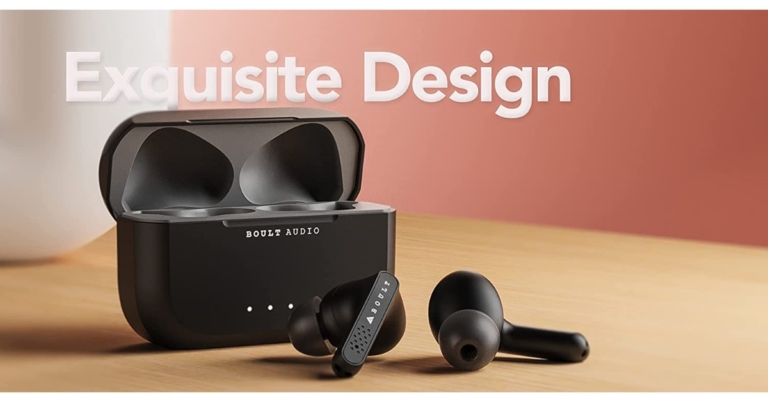
Indian audio brand Boult announced the launch of true wireless stereo (TWS) earbuds in the Indian market. The company has released Boult Audio AirBass PropodsX. The device comes with an in-ear design and is IPX5 certified for dust and water resistance. In addition to this, there are no physical buttons on the TWS instead they have a touch panel for control.

In This Article
Boult Audio AirBass PropodsX price in India and availability details
Boult Audio AirBass PropodsX price in India has been set at 5,999. But the company is offering them at an introductory price of Rs 1,499. The device is available in a sole Black colour option. The earphones can be either purchased through the company’s official website in the country or via the e-commerce website Amazon.
Boult Audio AirBass PropodsX specifications
Like we said before Boult Audio AirBass PropodsX features an in-ear design with an angled bud with soft silicone tips for long-lasting comfort. The true wireless stereo (TWS) earbuds are equipped with 10mm drivers and inbuilt micro-woofers. A microphone is also included in each of the earbuds. The device has touch controls to play/pause, previous/next track and answer/hang-up calls. The Voice assistant function lets you access Siri/Google Assistant. The Boult TWS earphones also automatically pair with your device as soon as you take them out of the case. No need to manually pair to your device each time. As these are IPX5 rated for splash and water resistance so they can be comfortably be used outdoors or in the gym. In addition to this, each charge provides up to 8 hours of playback time. The carrying case can charge the earbuds four times more, giving them a total play-time of up to 32 hours. With just 10 minutes of charge, they can deliver 100 minutes of playback. Also, there is Bluetooth v5.1 for connectivity. The earbuds can be used separately after successful pairing. Not only listening to both earbuds in stereo mode but also can be used as monopods to enjoy the music and take calls. For the latest gadget and tech news, and gadget reviews, follow us on Twitter, Facebook and Instagram. For newest tech & gadget videos subscribe to our YouTube Channel. You can also stay up to date using the Gadget Bridge Android App. You can find the latest car and bike news here.Asus ExpertBook B1400 powered by Intel Core Tiger Lake Processors launched
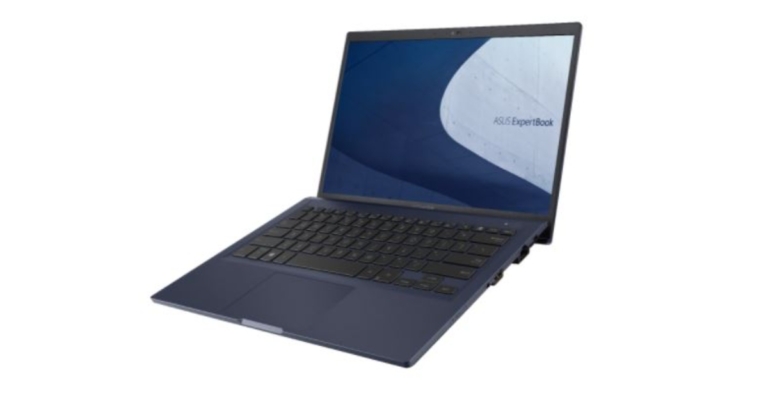
Asus has expanded its ExpertBook Series with the launch of the new ExpertBook B1400 laptop in the Indian market today. The portable PC is powered by the Intel Core Tiger Lake Processors paired with optional Nvidia GeForce MX330 GPU. The laptop is MIL-STD810H certified and features a 14-inch FHD IPS LED display as well as Wi-Fi 6 interconnectivity.
In This Article
Asus ExpertBook B1400 price and availability
ExpertBook B1400 price in India starts at Rs 48,990 and will come in a single Blue colour option. The new laptop is said to be available at ASUS Exclusive Stores, and leading Commercial PC channel partners in the country.Asus ExpertBook B1400 specifications
With MIL-STD-810H specification, an aluminium lid, ErgoLift and 180-degree lay-flat hinge, and a sleek 1.45kg and 19.2mm tall with an 84 percent screen-to-body ratio, the ExpertBook B1400 is the latest in a military-grade durable construction. It features a 14-inch full-HD IPS LED display with a 16:9 aspect ratio. In addition to this, it offers a peak brightness of 250 nits and a 178-degree field-of-view The display is also certified by TÜV Rheinland for low blue-light emissions, ensuring comfortable eyes when used over longer periods. The Asus ExpertBook B1400 equips 11th-Gen Intel Core Tiger Lake processors. The one with Intel Core i3-111G4 comes with Intel UHD GPU while Intel Core i5-1135G7 with Intel Xe GPU and Intel Core i7-1165G7 with Intel Xe GPU. In addition to this, there is optional discrete NVIDIA GeForce graphics, up to 48 GB of upgradable RAM and hybrid storage (PCIe 3.0 SSD + SATA HDD). On the connectivity front there is Comprehensive I/O, including fast USB-C 3.2 with display out and power delivery, VGA, HDMI, USB 3.2 Gen 2 Type-A, USB 2.0, Giga-bit LAN and audio combo jack. Additionally, there is a fingerprint sensor-enabled power ON key, shielded webcam, dedicated TPM 2.0, Kensington lock, and optional NumberPad 2.0 precision touchpad. The laptops also come integrated with two-way AI noise-cancelling technology and software employs machine learning to eliminate background sounds, both in single presenter and multi-presenter mode. A dual heat-pipe cooling solution on the B1400 helps the processor to achieve consistent high-speed desktop-grade performance for heavy workloads, in comparison to a single heat-pipe is superior as a notebook coupled with a single heat-pipe design will frequently have to turn down performance to keep the thermals in check. For the latest gadget and tech news, and gadget reviews, follow us on Twitter, Facebook and Instagram. For newest tech & gadget videos subscribe to our YouTube Channel. You can also stay up to date using the Gadget Bridge Android App. You can find the latest car and bike news here.Top 5 smartphones of 2021 in India

2021 has been a fantastic year for smartphones, with a plethora of excellent handsets featuring cutting-edge technology. There have been so many devices that come with so many features, ranging from graphics-intensive games to HDR video quality and camera focused in every way. So, here are the top 5 smartphones to buy in India in 2021.
 A 5nm octa-core SoC with up to 12 GB RAM and 512GB storage options powers the phone. On top of One UI, it runs Android 11. There’s a fingerprint sensor on the side of the phone. A 12-megapixel primary sensor, a 12-megapixel secondary telephoto lens, and a 12-megapixel ultra-wide lens are included in the triple rear camera setup. The Galaxy Z Fold 3 has a 4-megapixel sensor and an f/1.8 aperture under the display, as well as a 10-megapixel selfie camera with an f/2.2 aperture on the front.
A 4,400mAh battery is also included, as well as 25W wireless and reverse charging capabilities. It also works with the S Pen Fold Edition and the S Pen Pro, two new S Pen models.
Also Read: Samsung Galaxy Z Fold 3 review: Love at third sight
A 5nm octa-core SoC with up to 12 GB RAM and 512GB storage options powers the phone. On top of One UI, it runs Android 11. There’s a fingerprint sensor on the side of the phone. A 12-megapixel primary sensor, a 12-megapixel secondary telephoto lens, and a 12-megapixel ultra-wide lens are included in the triple rear camera setup. The Galaxy Z Fold 3 has a 4-megapixel sensor and an f/1.8 aperture under the display, as well as a 10-megapixel selfie camera with an f/2.2 aperture on the front.
A 4,400mAh battery is also included, as well as 25W wireless and reverse charging capabilities. It also works with the S Pen Fold Edition and the S Pen Pro, two new S Pen models.
Also Read: Samsung Galaxy Z Fold 3 review: Love at third sight
 iPhone 13 Pro Max features 6.68 inches Super Retina XDR display with ProMotion featuring an adaptive refresh rate of up to 120Hz, making the touch experience faster and more responsive. The devices are powered by an A15 Bionic chipset with 5-nanometer technology with a new 6-core CPU with two new high-performance cores and four new high-efficiency cores. It features a new 5-core GPU to offer the fastest graphics performance ideal for video apps, high-performance gaming, and a slate of new camera features. In terms of cameras, the device is highlighted with a triple rear camera set up. It includes a 12-megapixel ultra-wide shooter, a 12-megapixel wide-angle lens, 12-megapixel telephoto shooter and a LiDAR scanner.
Also Read: Apple iPhone 13 Pro review: Is it still the Apple of your eye?
iPhone 13 Pro Max features 6.68 inches Super Retina XDR display with ProMotion featuring an adaptive refresh rate of up to 120Hz, making the touch experience faster and more responsive. The devices are powered by an A15 Bionic chipset with 5-nanometer technology with a new 6-core CPU with two new high-performance cores and four new high-efficiency cores. It features a new 5-core GPU to offer the fastest graphics performance ideal for video apps, high-performance gaming, and a slate of new camera features. In terms of cameras, the device is highlighted with a triple rear camera set up. It includes a 12-megapixel ultra-wide shooter, a 12-megapixel wide-angle lens, 12-megapixel telephoto shooter and a LiDAR scanner.
Also Read: Apple iPhone 13 Pro review: Is it still the Apple of your eye?
 On the camera front, there is a 108-megapixel primary sensor, a 12-megapixel Dual Pixel sensor, a 10-megapixel telephoto lens, another 10-megapixel sensor with a telephoto lens and OIS support. The smartphone is backed by a 5,000mAh battery with USB PD 3.0 and Wireless Charging 2.0 support.
Also Read: Samsung Galaxy S21 Ultra Review: A good start to the year for Samsung
On the camera front, there is a 108-megapixel primary sensor, a 12-megapixel Dual Pixel sensor, a 10-megapixel telephoto lens, another 10-megapixel sensor with a telephoto lens and OIS support. The smartphone is backed by a 5,000mAh battery with USB PD 3.0 and Wireless Charging 2.0 support.
Also Read: Samsung Galaxy S21 Ultra Review: A good start to the year for Samsung


In This Article
Here is our list of Top 5 smartphones of 2021 in India
Samsung Galaxy Z Fold 3
The Samsung Galaxy Z Fold 3 has a 7.6-inch foldable QXGA AMOLED 2X Infinity Flex main display with a resolution of 2,208,1768 pixels, a 22.5:18 aspect ratio, and a pixel density of 374ppi. On the outside, there’s a 6.2-inch HD AMOLED display with a resolution of 832,268 pixels, a 24.5:9 aspect ratio, and a pixel density of 387ppi. Both screens have a 120Hz refresh rate, support for HDR10+, and Gorilla Glass Victus protection on top. A 5nm octa-core SoC with up to 12 GB RAM and 512GB storage options powers the phone. On top of One UI, it runs Android 11. There’s a fingerprint sensor on the side of the phone. A 12-megapixel primary sensor, a 12-megapixel secondary telephoto lens, and a 12-megapixel ultra-wide lens are included in the triple rear camera setup. The Galaxy Z Fold 3 has a 4-megapixel sensor and an f/1.8 aperture under the display, as well as a 10-megapixel selfie camera with an f/2.2 aperture on the front.
A 4,400mAh battery is also included, as well as 25W wireless and reverse charging capabilities. It also works with the S Pen Fold Edition and the S Pen Pro, two new S Pen models.
Also Read: Samsung Galaxy Z Fold 3 review: Love at third sight
A 5nm octa-core SoC with up to 12 GB RAM and 512GB storage options powers the phone. On top of One UI, it runs Android 11. There’s a fingerprint sensor on the side of the phone. A 12-megapixel primary sensor, a 12-megapixel secondary telephoto lens, and a 12-megapixel ultra-wide lens are included in the triple rear camera setup. The Galaxy Z Fold 3 has a 4-megapixel sensor and an f/1.8 aperture under the display, as well as a 10-megapixel selfie camera with an f/2.2 aperture on the front.
A 4,400mAh battery is also included, as well as 25W wireless and reverse charging capabilities. It also works with the S Pen Fold Edition and the S Pen Pro, two new S Pen models.
Also Read: Samsung Galaxy Z Fold 3 review: Love at third sight

iPhone 13 Pro Max
Samsung Galaxy S21 Ultra
Samsung Galaxy S21 Ultra features a 6.8-inch Edge QHD+ Dynamic AMOLED 2X Infinity-O Display with 1,440×3,200 pixels of resolution. There is HDR10+ support and a 120Hz adaptive refresh rate. Like other siblings, this phone also runs One UI on top of Android 11. Under the hood, there is an octa-core Exynos 2100 SoC paired with up to 16GB LPDDR5 RAM and 512GB storage options. On the camera front, there is a 108-megapixel primary sensor, a 12-megapixel Dual Pixel sensor, a 10-megapixel telephoto lens, another 10-megapixel sensor with a telephoto lens and OIS support. The smartphone is backed by a 5,000mAh battery with USB PD 3.0 and Wireless Charging 2.0 support.
Also Read: Samsung Galaxy S21 Ultra Review: A good start to the year for Samsung
On the camera front, there is a 108-megapixel primary sensor, a 12-megapixel Dual Pixel sensor, a 10-megapixel telephoto lens, another 10-megapixel sensor with a telephoto lens and OIS support. The smartphone is backed by a 5,000mAh battery with USB PD 3.0 and Wireless Charging 2.0 support.
Also Read: Samsung Galaxy S21 Ultra Review: A good start to the year for Samsung

iPhone 13
iPhone 13 comes with a 6.06 inches Super Retina XDR display with max outdoor brightness at 800 nits, with higher peak brightness for HDR content like photos and videos at 1200 nits. Under the hood, there is an A15 Bionic chipset with a six-core CPU with 2 high-performance cores and 4 efficiency cores. It has been paired with a new 4-core GPU specially designed with visuals and lighting effects in graphics-intensive games. iPhone 13 features a 12MP dual rear camera set up.
Xiaomi Mi 11X Pro
Xiaomi Mi 11X Pro features a 6.67-inch full-HD+ E4 AMOLED display with 1,080×2,400 pixels of resolution. It also offers a 120Hz refresh rate panel, 1,300 nits of peak brightness, 360Hz touch sampling rate and 20:9 aspect ratio. It is powered by the Qualcomm Snapdragon 888 SoC with the Adreno 660 GPU paired with 8GB of RAM and up to 256GB of storage. Also Read: Mi 11X Pro Review: The best value for money device out there In terms of cameras, there is a triple rear camera set up that includes 108-megapixel Samsung HM2 sensor with an f/1.75 aperture. In addition to this, there is an 8-megapixel ultra-wide-angle lens and a 5-megapixel macro lens. Upfront there is a 20-megapixel selfie camera. The phone packs a 4,520mAh battery that supports 33W fast charging. For the latest gadget and tech news, and gadget reviews, follow us on Twitter, Facebook and Instagram. For newest tech & gadget videos subscribe to our YouTube Channel. You can also stay up to date using the Gadget Bridge Android App. You can find the latest car and bike news here.5 lesser-known hacks to take the best selfies
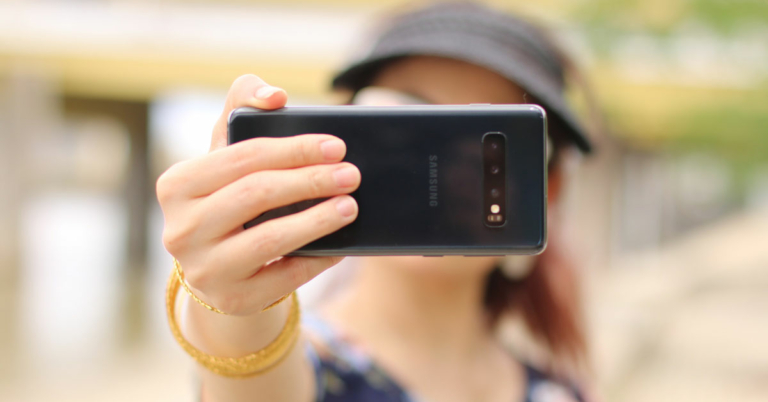
Taking selfies and putting them on social media in modern times is like a ritual. We want to capture ourselves in the scenic beauty of the place we go. If you are bored of taking the same type of selfies again and again and want to know some lesser-known hacks to take the best selfies this is the right article for you.
Just follow the ways or hacks mentioned down below and you can get better selfies.

In This Article
Watch out for jawline
The jawline is a part of the body that makes a big impact on the selfies you take. If you do not have a sharp jawline then no problem! You just need to try out a few different camera angles in which the double chin is least visible. Additionally, you can also contract the skin on your jaw to make it look slimmer. Take a top-angle selfie with your phone contracting the skin under the jaw and you should be able to get a perfect selfie.Tryout best selfie angles
Of course, everyone does look different even when the camera angle is exactly the same, you can find out what suits you best for you. But if you are confused about what angles you can choose to take selfies, we have you covered. Just try out these angles and see what suits you best.
- Hold your phone above your forehead and point your chin slightly down and look up at the camera.
- Turn your face slightly to one side (ideally 45 degrees)
- Lay down and put the camera directly above your face. Quick side note, just make sure that you are not using a Nokia phone, you know why.
- Look straight on at the camera but slightly elevate the arm that’s holding your phone

Make a signature filter/pose
Making your signature pose or using the same filter in most of your selfies can help you to stand out from the crowd. If you use the same pose or filter quite often then you can make it as your style statement. Using the same pose or filter will also make your feed look more uniform and clean. But be careful with this hack, if used excessively then it can also impact your social media game.Experiment with light
Light is a key element in any photo let it be selfies only. When used correctly can make your selfies look great. Try to experiment a bit with different lights, if you have studio lights at home then you can also try key light and rim light effects with it. But if you don’t have expensive lighting equipment at home then you can always experiment with natural light.
Take selfies during golden hour
Golden hour is a time frame between 1-2 hours before the sunset and 1-2 hours before sunrise. This is a time when the light from the sun has a bit of yellowish-gold light in it. Photos taken in this time frame look very good because the light coming from the sun has some golden colour to it and also the light is very soft in that time frame. So these were some lesser-known hacks to take best selfies. Try all these hacks and you will be able to improve your selfie game. For the latest gadget and tech news, and gadget reviews, follow us on Twitter, Facebook and Instagram. For newest tech & gadget videos subscribe to our YouTube Channel. You can also stay up to date using the Gadget Bridge Android App. You can find the latest car and bike news here.Best ways to make the Clubhouse experience even better
Clubhouse has been on Android and iOS devices for a while. The audio only platform allows users to join public or private chat rooms and have to deep dive into the given topic. You can request to be a speaker if you want to share your thoughts and ideas on the topic and build connections. While most people use the clubhouse for time pass and for fun, it can be a great platform to build really useful connections of your interest. This article is about guiding you through the best ways to make the Clubhouse experience even better.
Just follow these simple and easy steps
You should also mention your hobbies and interests. Also, you should add your other social media platforms as well in it so that people may connect with you on other platforms as well.
Invite your contacts
Whenever you invite anyone to Clubhouse and they join the platform with your invite, your account will be displayed on the profile of that person. This can be very useful to get some extra exposure on the platform. Since your profile will be displayed on others’ profiles as well then there is a chance that people may follow you as well. But you should be careful while inviting others on the platform, as the number of invites is limited.
Set profile picture same across all platforms
You should try to use the same profile picture as you have used on other social media platforms. Using the same profile picture will make it easy for followers to find your profile and in addition to that using the same profile picture makes you look more professional. So just head over to Instagram or Twitter and pick the profile picture that you have used.
Read also: Clubhouse will add a DM text chat feature: Everything you need to
Read also: 10 reasons why you are not getting right-swiped on Tinder
For the latest gadget and tech news, and gadget reviews, follow us on Twitter, Facebook and Instagram. For newest tech & gadget videos subscribe to our YouTube Channel. You can also stay up to date using the Gadget Bridge Android App. You can find the latest car and bike news here.
In This Article
Add a good bio
Unlike other social media platforms like Instagram, Clubhouse is a platform where people do read your bio because it is an audio only platform. So adding a proper bio with your interest is a must, so that visitors can have some information about you. You should also mention your hobbies and interests. Also, you should add your other social media platforms as well in it so that people may connect with you on other platforms as well.
Invite your contacts
Whenever you invite anyone to Clubhouse and they join the platform with your invite, your account will be displayed on the profile of that person. This can be very useful to get some extra exposure on the platform. Since your profile will be displayed on others’ profiles as well then there is a chance that people may follow you as well. But you should be careful while inviting others on the platform, as the number of invites is limited.

Set profile picture same across all platforms
You should try to use the same profile picture as you have used on other social media platforms. Using the same profile picture will make it easy for followers to find your profile and in addition to that using the same profile picture makes you look more professional. So just head over to Instagram or Twitter and pick the profile picture that you have used.
Read also: Clubhouse will add a DM text chat feature: Everything you need to

Try to get on stage
Being in the room and just listening to the speakers might increase your followers, but if you try to get to the stage as a speaker then there are more chances for you to be followed by others in the room. Sharing your thoughts with other members in the room will help you to gain more followers as people now know about your thought process and your interest. It also brings the attention of the hosts toward you. So, the next time you join any chat room don’t just sit and listen to others, share your ideas as well.Become a member of clubs
That’s the main reason for the clubhouse, isn’t it? Joining different clubs and making new contacts. You can join different clubs in the clubhouse sharing the same interests as you. Joining clubs will allow you to get a better connection with your type of people. The clubs that you will join will appear in your profile and everyone can see them. So if you are interested in photography just join any photography club that you like the most or where you have most of your icons and friends.
Start your own room private room
If you want to host a conversation on any new trendy topic but you don’t have any experience or knowledge to do so, just invite your friends to a private room and practice over there. And as they say “The more you sweat in practice the less you bleed in battle” so it’s better that you learn everything about hosting a room and then go ahead and create a public room. When you have a better stage presence you will get more followers.Give a proper name to your room
Out of many mistakes that people make while creating a room, one is not giving a proper name to the room. Giving a proper name to the room will attract more audience and will be better for you at the end. You should always give a short and simple name to your chat room and it should be related to the topic. Nobody would like it if you give the “How to make chocolate cake” name to your chat room and then talk about the 5 benefits of the Keto Diet. Read also: 10 reasons why you are not getting right-swiped on Tinder
For the latest gadget and tech news, and gadget reviews, follow us on Twitter, Facebook and Instagram. For newest tech & gadget videos subscribe to our YouTube Channel. You can also stay up to date using the Gadget Bridge Android App. You can find the latest car and bike news here.
Read also: 10 reasons why you are not getting right-swiped on Tinder
For the latest gadget and tech news, and gadget reviews, follow us on Twitter, Facebook and Instagram. For newest tech & gadget videos subscribe to our YouTube Channel. You can also stay up to date using the Gadget Bridge Android App. You can find the latest car and bike news here. iQoo Neo 5S and iQoo Neo 5 SE with high refresh rate display launched
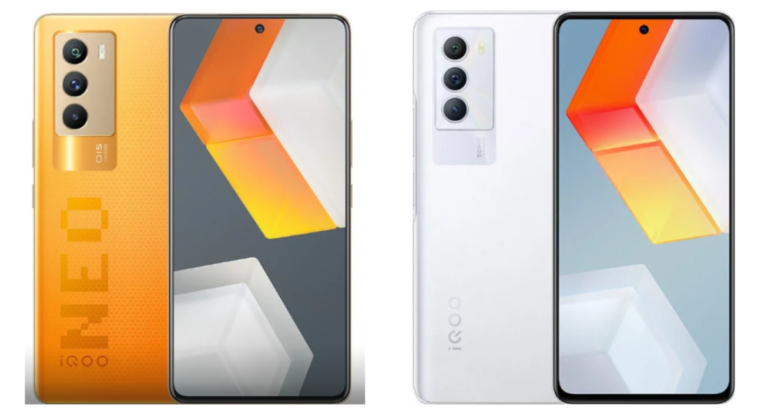
After teasing it for almost a month, the iQoo Neo 5S and iQoo Neo 5 SE officially made their way to the market. Both the smartphones have debuted in China and come with fast charging, a high refresh rate and more. Read on to know its pricing and availability details.
 For the optics, there is a triple rear camera setup on the mobile phone which includes a 48MP Sony IMX598 sensor with OIS. In addition to this, there is a 13M ultra-wide and a 2MP macro lens. There is a 16MP camera sensor on the front for taking selfies and video calling.
The device includes a 4,500mAH battery and comes with 66W fast charging support.
For the optics, there is a triple rear camera setup on the mobile phone which includes a 48MP Sony IMX598 sensor with OIS. In addition to this, there is a 13M ultra-wide and a 2MP macro lens. There is a 16MP camera sensor on the front for taking selfies and video calling.
The device includes a 4,500mAH battery and comes with 66W fast charging support.
 In terms of imaging, iQoo Neo 5 SE is highlighted with a triple rear camera set-up that includes a 50MP primary sensor. Furthermore, there is an 8MP ultra wide-angle sensor and a 2MP camera lens. On the front, there is a 16MP selfie camera. Also, the device houses a 4,500mAh battery with 55W fast charging support.
For the latest gadget and tech news, and gadget reviews, follow us on Twitter, Facebook and Instagram. For newest tech & gadget videos subscribe to our YouTube Channel. You can also stay up to date using the Gadget Bridge Android App. You can find the latest car and bike news here.
In terms of imaging, iQoo Neo 5 SE is highlighted with a triple rear camera set-up that includes a 50MP primary sensor. Furthermore, there is an 8MP ultra wide-angle sensor and a 2MP camera lens. On the front, there is a 16MP selfie camera. Also, the device houses a 4,500mAh battery with 55W fast charging support.
For the latest gadget and tech news, and gadget reviews, follow us on Twitter, Facebook and Instagram. For newest tech & gadget videos subscribe to our YouTube Channel. You can also stay up to date using the Gadget Bridge Android App. You can find the latest car and bike news here.
In This Article
Price and availability
iQoo Neo 5S is priced at CNY 2699 translating to Rs 32,000 for the 8GB RAM with 128GB storage variant. The price of the 8GB RAM with 256GB storage and 12GB RAM with 256GB storage is priced at CNY 2899 and CNY 3199 which converts to Rs 34,500 and Rs 38,000 respectively. The phone will be available in Black, Blue and Orange colour options. On the other hand, the price of iQoo Neo 5 SE is set at CNY 2199 for the 8GB RAM with a 128GB storage model. The device is available in 8GB RAM with 256GB storage and 12GB RAM with 256GB storage options. The former one is priced at CNY 2399 which is roughly around Rs 28,500 and the latter one comes with a price tag of CNY 2599 which converts to Rs 31,000. The smartphone is being offered in three colour options of Blue, White and multicolour. In terms of availability both the handsets are up for preorders. The Neo 5S will be available for purchase from December 24 while the SE variant is scheduled to go on sale from December 28 onwards.iQoo Neo 5S specifications
The 6.56-inch AMOLED display on the iQoo Neo 5S has a 120Hz refresh rate. The phone runs on OriginOS Ocean based on top of Android 12 out of the box. The device is powered by Qualcomm Snapdragon 888 SoC paired with up to 12GB of LPDDR5 RAM and up to 256GB UFS 3.1 storage. For the optics, there is a triple rear camera setup on the mobile phone which includes a 48MP Sony IMX598 sensor with OIS. In addition to this, there is a 13M ultra-wide and a 2MP macro lens. There is a 16MP camera sensor on the front for taking selfies and video calling.
The device includes a 4,500mAH battery and comes with 66W fast charging support.
For the optics, there is a triple rear camera setup on the mobile phone which includes a 48MP Sony IMX598 sensor with OIS. In addition to this, there is a 13M ultra-wide and a 2MP macro lens. There is a 16MP camera sensor on the front for taking selfies and video calling.
The device includes a 4,500mAH battery and comes with 66W fast charging support.
iQoo Neo 5 SE specifications
iQoo Neo 5 SE comes with a 6.3-inch full-HD+ LCD display with 144Hz refresh rate support. The phone operates on OriginOS Ocean on top of Android 12. Under the hood, there is a Qualcomm Snapdragon 870 SoC paired with up to 12GB of RAM and up to 256GB UFS 3.1 storage. In terms of imaging, iQoo Neo 5 SE is highlighted with a triple rear camera set-up that includes a 50MP primary sensor. Furthermore, there is an 8MP ultra wide-angle sensor and a 2MP camera lens. On the front, there is a 16MP selfie camera. Also, the device houses a 4,500mAh battery with 55W fast charging support.
For the latest gadget and tech news, and gadget reviews, follow us on Twitter, Facebook and Instagram. For newest tech & gadget videos subscribe to our YouTube Channel. You can also stay up to date using the Gadget Bridge Android App. You can find the latest car and bike news here.
In terms of imaging, iQoo Neo 5 SE is highlighted with a triple rear camera set-up that includes a 50MP primary sensor. Furthermore, there is an 8MP ultra wide-angle sensor and a 2MP camera lens. On the front, there is a 16MP selfie camera. Also, the device houses a 4,500mAh battery with 55W fast charging support.
For the latest gadget and tech news, and gadget reviews, follow us on Twitter, Facebook and Instagram. For newest tech & gadget videos subscribe to our YouTube Channel. You can also stay up to date using the Gadget Bridge Android App. You can find the latest car and bike news here. Panasonic Toughbook S1 MIL-STD-810H certified rugged tablet launched in India
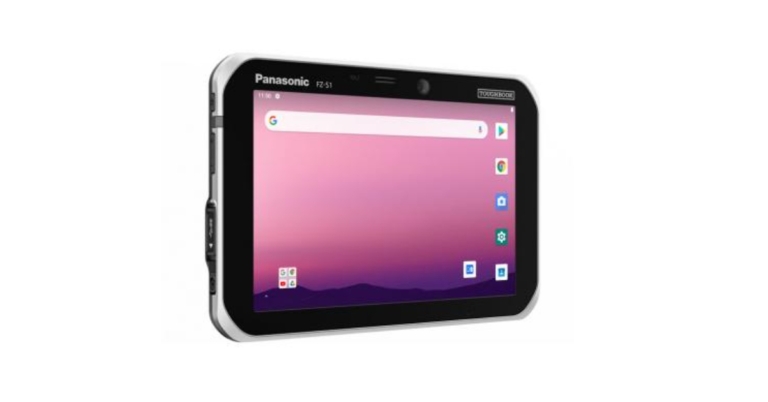
Panasonic Toughbook S1 rugged tablet is now available in India. The new tablet by the electronics giant was previously launched in the US a few months back and has now arrived in India. It is designed for mobile workers working in the most difficult environments and conditions, such as transportation and logistics, manufacturing, and field services, where efficiency and dependability are critical to getting the job done. The Tab runs on Android 10 and has thick bezels on the sides.

In This Article
Panasonic Toughbook S1 price in India and availability details
Panasonic Toughbook S1 has been made available in India at a starting price of Rs 98,000. The tablet can be purchased via Panasonic distributors and system integrators in the country. To recall the Panasonic tablet was launched in the US in May this year there is available at $2,999 which translates to around Rs 1,90,000 that too for the 4GB RAM with 64GB storage variant.
Panasonic Toughbook S1 specifications
Panasonic Toughbook S1 rugged tablet comes with a 7-inch WXGA display offering 800×1,280 pixels of resolution and 500 nits of peak brightness. Furthermore, it offers a 10-point capacitive multi-touch panel along with glove touch modes and anti-reflective (AR) screen treatment. The tablet operates on Android 10 and is powered by an octa-core Qualcomm Snapdragon 660 SoC. It will be available with 4GB of LPDDR4 RAM and 65GB of storage which can be further expandable to 2GB via SD card, up to 32GB via SDHC and up to 64GB through SDXC. In terms of optics, there is a single 13-megapixel camera sensor on the back of the tab. For taking selfies and video chats there is a 5-megapixel camera at the front. The Panasonic Toughbook S1 tablet comes with a docking connector and an optional USB Type-A host port along with this there is 4G, Qualcomm WCN3990 Wi-Fi, NFC, GPS Bluetooth version 5.2, Type C port and a 3.5mm headphone jack for connectivity. While the sensors on the tablet include an accelerometer, ambient light sensor, digital compass and gyroscope. Panasonic Toughbook S1 houses a 3,200mAh battery that is claimed to last 8 hours. With its Warm Swap feature, it offers an extended-life battery rated at 5580 mAh that is said to deliver 14-hour battery life. The device is MIL-STD-810H certified and 1.5m (5′) drop onto concrete and is able to operate in extreme cold, -20°C (-4°F) and extreme heat, 50°C (122°F). There is an optional IP65/67 dust & water resistance. In addition to this, there is an optional barcode reader that provides workers with integrated barcode scanning options in landscape or portrait modes, enhancing the efficiency of order processing and fulfilment. For the latest gadget and tech news, and gadget reviews, follow us on Twitter, Facebook and Instagram. For newest tech & gadget videos subscribe to our YouTube Channel. You can also stay up to date using the Gadget Bridge Android App. You can find the latest car and bike news here.How to record videos together from front and rear cameras on an iPhone?
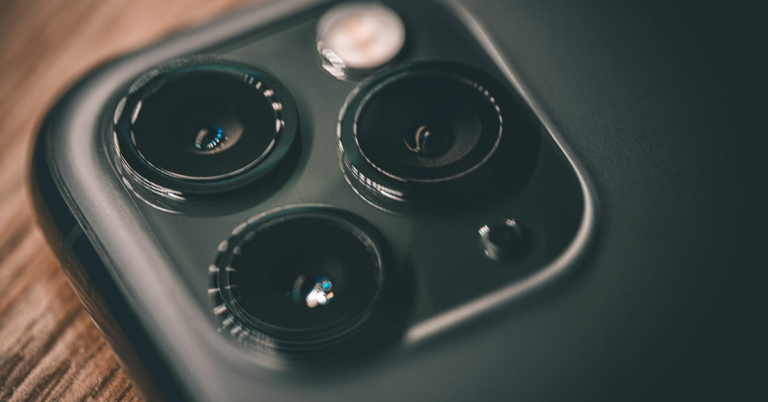
If you love making videos and putting them on social media sites like Instagram, you should keep experimenting with different things. One such thing can be recording videos from the front and back camera at the same time.
We have an article on How to record videos together from the front and rear cameras on Android. But in this article, we will drive you through how to record videos together from the front and rear cameras on an iPhone. So just follow the simple ways mentioned below to record videos from both cameras at the same time using your iPhone.
Read also: How to record videos together from the front and rear cameras on Android?
 Using the app is very simple and straightforward. You can see the feed from all the cameras present on your iPhone. Just select any two cameras, which you want to record with, in this case the front and back camera, and just hit the record button, it’s that simple.
Another benefit of the app is that you can also record footage from the different cameras on the back. By doing so, you can get a different perspective of the same subject that you are recording.
Using the app is very simple and straightforward. You can see the feed from all the cameras present on your iPhone. Just select any two cameras, which you want to record with, in this case the front and back camera, and just hit the record button, it’s that simple.
Another benefit of the app is that you can also record footage from the different cameras on the back. By doing so, you can get a different perspective of the same subject that you are recording. You can download the app by clicking here. The app is a one time purchase that will cost you $4.99
 The interface on the app is again very simple and easy for even a toddler to understand. You can download the app by clicking here.
Read also: How to do screen recording in your Android smartphone
For the latest gadget and tech news, and gadget reviews, follow us on Twitter, Facebook and Instagram. For newest tech & gadget videos subscribe to our YouTube Channel. You can also stay up to date using the Gadget Bridge Android App. You can find the latest car and bike news here.
The interface on the app is again very simple and easy for even a toddler to understand. You can download the app by clicking here.
Read also: How to do screen recording in your Android smartphone
For the latest gadget and tech news, and gadget reviews, follow us on Twitter, Facebook and Instagram. For newest tech & gadget videos subscribe to our YouTube Channel. You can also stay up to date using the Gadget Bridge Android App. You can find the latest car and bike news here.
In This Article
Doubletake By FiLMiC
FiLMiC is one of the top players when it comes to the mobile videography world. Doubletake by FiLMiC is an app that lets you record video from any of the two cameras on your iPhone. Just download the app from Apple Appstore. Now that you have the app on your iPhone it is time to use it and make some awesome videos out of it. Using the app is very simple and straightforward. You can see the feed from all the cameras present on your iPhone. Just select any two cameras, which you want to record with, in this case the front and back camera, and just hit the record button, it’s that simple.
Another benefit of the app is that you can also record footage from the different cameras on the back. By doing so, you can get a different perspective of the same subject that you are recording.
Using the app is very simple and straightforward. You can see the feed from all the cameras present on your iPhone. Just select any two cameras, which you want to record with, in this case the front and back camera, and just hit the record button, it’s that simple.
Another benefit of the app is that you can also record footage from the different cameras on the back. By doing so, you can get a different perspective of the same subject that you are recording. You can download the app by clicking here. The app is a one time purchase that will cost you $4.99
DuetCam
DuetCam is yet another great app that lets you record videos from both the front and the rear cameras at the same time. Unlike Doubletake, this is a free app and offers in-app purchases. One handy feature of the app is that it allows users to share the recorded footage directly to their Instagram account. So you need not waste even a second to share your creation with the world. The interface on the app is again very simple and easy for even a toddler to understand. You can download the app by clicking here.
Read also: How to do screen recording in your Android smartphone
For the latest gadget and tech news, and gadget reviews, follow us on Twitter, Facebook and Instagram. For newest tech & gadget videos subscribe to our YouTube Channel. You can also stay up to date using the Gadget Bridge Android App. You can find the latest car and bike news here.
The interface on the app is again very simple and easy for even a toddler to understand. You can download the app by clicking here.
Read also: How to do screen recording in your Android smartphone
For the latest gadget and tech news, and gadget reviews, follow us on Twitter, Facebook and Instagram. For newest tech & gadget videos subscribe to our YouTube Channel. You can also stay up to date using the Gadget Bridge Android App. You can find the latest car and bike news here. 21 December 2021 Amazon Quiz today answers: Answer to win Rs 1,000 Amazon Pay Balance

21 December 2021 Amazon Quiz has gone live on its platform. The quiz timings are 12 AM to 11:59 PM. The Amazon App users can participate in the quiz daily and all they have to do is submit correct answers to the questions asked on the e-commerce platform. Today’s participants can get a chance to win Rs 1,000 Amazon Pay Balance.
By participating in the Amazon Quiz the participants can win Amazon Pay Balance ranging from Rs 1,000 to Rs 50,000 every day while sitting at home. To win the participants must answer five questions correctly that are based on current events and general knowledge. One wrong answer can eliminate you from the quiz. The results will be announced at the end of the month. Today’s question will let you win Rs 1,000 Amazon Pay Balance. Check below for today Amazon quiz answers.
In This Article
21 December 2021 Amazon Quiz Answers
Question 1: What is the newly set up consortium for the governance of infectious diseases in India?
Answer: One HealthQuestion 2: As of October 2021, who is the leading wicket-taker in T20 Internationals?
Answer: Shakib Al HasanQuestion 3: Who won the Turkish F1 Grand Prix 2021?
Answer: Valtteri BottasQuestion 4: This is the inspiration behind the logo of a famous management institute in which city?
Answer: AhmedabadQuestion 5: The owner of this hammer is a character from which mythology?
Answer: Norse For the latest gadget and tech news, and gadget reviews, follow us on Twitter, Facebook and Instagram. For newest tech & gadget videos subscribe to our YouTube Channel. You can also stay up to date using the Gadget Bridge Android App. You can find the latest car and bike news here.Krafton releases new Christmas events for Battlegrounds Mobile India

Krafton has today announced the rollout of new Christmas events for Battlegrounds Mobile India through its December update. The new events come with the latest 1.8 update which gets a number of Christmas-themed in-game and community events and new game modes. The update will be rolled out today on the Google Play Store and iOS App Store. The new update will showcase the new ‘React Survival’ mode and reopen 6 popular modes including ‘Metro Royale’.
 Battlegrounds Mobile India‘s six most popular modes will also be reopened in this update. Among these modes are the ‘Metro Royale Mode’ where you can gear up before the match and loot lots of items, ‘Survive Till Dawn Mode’ where you loot items by killing zombies, ‘Virus Infection Mode’ where you fight either as a human or zombie, ‘Heavy Machine Gun 2.0 Mode’ offering exciting combat with helicopters and armoured vehicles, and ‘Rune Theme Mode’ where you join the match after choosing 1 out of 3 rune fragments.
In the meantime, from December 20th, 2021 to January 17th, 2022, the new Mythic Winter themed RPM6 will be available. By purchasing the royale pass for 360UC, fans can get the Snow Santa Monster Set, Snow Santa Monster UAZ, and Frozen Guardian Set.
For the latest gadget and tech news, and gadget reviews, follow us on Twitter, Facebook and Instagram. For newest tech & gadget videos subscribe to our YouTube Channel. You can also stay up to date using the Gadget Bridge Android App. You can find the latest car and bike news here.
Battlegrounds Mobile India‘s six most popular modes will also be reopened in this update. Among these modes are the ‘Metro Royale Mode’ where you can gear up before the match and loot lots of items, ‘Survive Till Dawn Mode’ where you loot items by killing zombies, ‘Virus Infection Mode’ where you fight either as a human or zombie, ‘Heavy Machine Gun 2.0 Mode’ offering exciting combat with helicopters and armoured vehicles, and ‘Rune Theme Mode’ where you join the match after choosing 1 out of 3 rune fragments.
In the meantime, from December 20th, 2021 to January 17th, 2022, the new Mythic Winter themed RPM6 will be available. By purchasing the royale pass for 360UC, fans can get the Snow Santa Monster Set, Snow Santa Monster UAZ, and Frozen Guardian Set.
For the latest gadget and tech news, and gadget reviews, follow us on Twitter, Facebook and Instagram. For newest tech & gadget videos subscribe to our YouTube Channel. You can also stay up to date using the Gadget Bridge Android App. You can find the latest car and bike news here.
Christmas events for Battlegrounds Mobile India
A new ‘React Survival’ mode will be introduced in the 1.8 updates. In this mode, players can join the Red Light and Green Light games by wearing blue tracksuits with different numbers. The game is won by the player who makes it to the finish line without being detected by the Giant Rabbit. The match consists of three rounds and ends when the time limit is reached. This mode can be accessed from the arcade mode, and players can also play with their friends by creating a custom room. Battlegrounds Mobile India‘s six most popular modes will also be reopened in this update. Among these modes are the ‘Metro Royale Mode’ where you can gear up before the match and loot lots of items, ‘Survive Till Dawn Mode’ where you loot items by killing zombies, ‘Virus Infection Mode’ where you fight either as a human or zombie, ‘Heavy Machine Gun 2.0 Mode’ offering exciting combat with helicopters and armoured vehicles, and ‘Rune Theme Mode’ where you join the match after choosing 1 out of 3 rune fragments.
In the meantime, from December 20th, 2021 to January 17th, 2022, the new Mythic Winter themed RPM6 will be available. By purchasing the royale pass for 360UC, fans can get the Snow Santa Monster Set, Snow Santa Monster UAZ, and Frozen Guardian Set.
For the latest gadget and tech news, and gadget reviews, follow us on Twitter, Facebook and Instagram. For newest tech & gadget videos subscribe to our YouTube Channel. You can also stay up to date using the Gadget Bridge Android App. You can find the latest car and bike news here.
Battlegrounds Mobile India‘s six most popular modes will also be reopened in this update. Among these modes are the ‘Metro Royale Mode’ where you can gear up before the match and loot lots of items, ‘Survive Till Dawn Mode’ where you loot items by killing zombies, ‘Virus Infection Mode’ where you fight either as a human or zombie, ‘Heavy Machine Gun 2.0 Mode’ offering exciting combat with helicopters and armoured vehicles, and ‘Rune Theme Mode’ where you join the match after choosing 1 out of 3 rune fragments.
In the meantime, from December 20th, 2021 to January 17th, 2022, the new Mythic Winter themed RPM6 will be available. By purchasing the royale pass for 360UC, fans can get the Snow Santa Monster Set, Snow Santa Monster UAZ, and Frozen Guardian Set.
For the latest gadget and tech news, and gadget reviews, follow us on Twitter, Facebook and Instagram. For newest tech & gadget videos subscribe to our YouTube Channel. You can also stay up to date using the Gadget Bridge Android App. You can find the latest car and bike news here. How to change Google Meet and Google Chats notification setting on PC?

Google Meet and Google Chats are some of the most used platforms for work. These tools allow users to connect during this pandemic and continue the work without any problem. But there are times when you get confused about whether you received a notification or not. In this article, we will guide you through some of the best ways by which you will get to know how to change Google Meet and Google Chats notification settings on PC.
In This Article
For Google Meet
Google meet is a great tool to interact with office colleagues and get the project done with ease by talking face to face. Here is how you can change notification settings for Google Meet:- On your computer, open Chrome.
- At the top right, click the three-dot menu and then settings.
- Under Privacy and security, click Site settings.
- Click Notifications.
- Select the Meet and then allow notifications or type https://meet.google.com/. And allow notifications


For Google Chat
Google Chat is another tool that is used to make work-life easy in this pandemic era. It provides users direct messages and team chat rooms, along with a group messaging function that allows Google Drive content sharing. The process for turning on the notifications for Google chat is also very simple. Here is how you can change notification settings on Google Chat:- On your computer, open Chrome.
- At the top right, click the three-dot menu and then settings.
- Under Privacy and security, click Site settings.
- Click Notifications.
- Select the Chat and then allow notifications or type https://chat.google.com/. And allow notifications

How to Disable Google Smart Lock on Android and Chrome?

The Smart Lock by Google is very useful. With the feature turned on your device, you don’t need to worry about forgetting your passwords, because Google remembers and saves all the passwords and enters them automatically at the time when you are trying to sign in. There are several ways to disable Google Smart Lock and we will talk about them in a moment.
Google Smart Lock is very useful when it comes to filling passwords automatically and signing you in across the websites and applications you use.
Although this feature by Google is very helpful, it has some loopholes that can breach your privacy.
Like for a PC or Laptop, one needs to enter the login with the computer password to access the passwords you have saved in your Chrome browser. This is risky as anyone having your login password can view all the other passwords stored in Chrome.
So, if you want to disable Google Smart Lock on Android and Chrome browser for whichever reason. The process for that is very easy and we have covered all the steps to disable it. Read the article to find it.
Read Also: 5 best smart locks available in India right now
 Step 2: Choose “Passwords”.
Step 3: Toggle off the Save Passwords and disable “Auto Sign-in”.
Step 2: Choose “Passwords”.
Step 3: Toggle off the Save Passwords and disable “Auto Sign-in”.
 Now, delete all the passwords you see by tapping on their individual entry and then on the trashcan (or delete) icon placed at the top or on the upper row of the page.
 Step 3: Turn off the toggle for “Offer to save passwords off” and “Auto Sign-in”.
 Now, delete all the passwords by Clearing browsing history or by tapping the three-dots menu on their individual entry and selecting “Remove” to delete.
Read Also: Facebook Messenger launches App Lock for its iPhone and iPad users
So, these are the ways by which you can turn off or disable Google Smart Lock on Chrome and Android. We hope this helps you in disabling it.
For the latest gadget and tech news, and gadget reviews, follow us on Twitter, Facebook, and Instagram. For the newest tech & gadget videos subscribe to our YouTube Channel. You can also stay up to date using the Gadget Bridge Android App. You can find the latest car and bike news here.
Now, delete all the passwords by Clearing browsing history or by tapping the three-dots menu on their individual entry and selecting “Remove” to delete.
Read Also: Facebook Messenger launches App Lock for its iPhone and iPad users
So, these are the ways by which you can turn off or disable Google Smart Lock on Chrome and Android. We hope this helps you in disabling it.
For the latest gadget and tech news, and gadget reviews, follow us on Twitter, Facebook, and Instagram. For the newest tech & gadget videos subscribe to our YouTube Channel. You can also stay up to date using the Gadget Bridge Android App. You can find the latest car and bike news here.
In This Article
Disable Google Smart Lock on Android
Below are the steps to turn off Google Smart Lock in the Chrome browser on your Android device. Step 1: Open the Google Chrome app and tap the three dots placed at the top right corner. Select the “Settings” menu at the bottom. Step 2: Choose “Passwords”.
Step 3: Toggle off the Save Passwords and disable “Auto Sign-in”.
Step 2: Choose “Passwords”.
Step 3: Toggle off the Save Passwords and disable “Auto Sign-in”.
 Now, delete all the passwords you see by tapping on their individual entry and then on the trashcan (or delete) icon placed at the top or on the upper row of the page.
Disable Google Smart Lock on Chrome
Here’s how you can disable Google Smart Lock in Google Chrome on your Laptop or PC. Step 1: Open the Chrome browser settings page by selecting three dots placed at the top right corner. Select the “Settings” menu from the given options. Step 2: Choose “Auto-fill” from the sidebar and select “Passwords”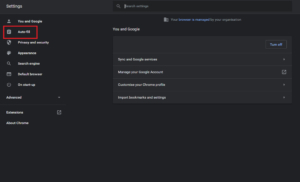 Step 3: Turn off the toggle for “Offer to save passwords off” and “Auto Sign-in”.
 Now, delete all the passwords by Clearing browsing history or by tapping the three-dots menu on their individual entry and selecting “Remove” to delete.
Read Also: Facebook Messenger launches App Lock for its iPhone and iPad users
So, these are the ways by which you can turn off or disable Google Smart Lock on Chrome and Android. We hope this helps you in disabling it.
For the latest gadget and tech news, and gadget reviews, follow us on Twitter, Facebook, and Instagram. For the newest tech & gadget videos subscribe to our YouTube Channel. You can also stay up to date using the Gadget Bridge Android App. You can find the latest car and bike news here.
Now, delete all the passwords by Clearing browsing history or by tapping the three-dots menu on their individual entry and selecting “Remove” to delete.
Read Also: Facebook Messenger launches App Lock for its iPhone and iPad users
So, these are the ways by which you can turn off or disable Google Smart Lock on Chrome and Android. We hope this helps you in disabling it.
For the latest gadget and tech news, and gadget reviews, follow us on Twitter, Facebook, and Instagram. For the newest tech & gadget videos subscribe to our YouTube Channel. You can also stay up to date using the Gadget Bridge Android App. You can find the latest car and bike news here. OnePlus Nord 2 CE 5G bagged BIS certification, may launch in India soon
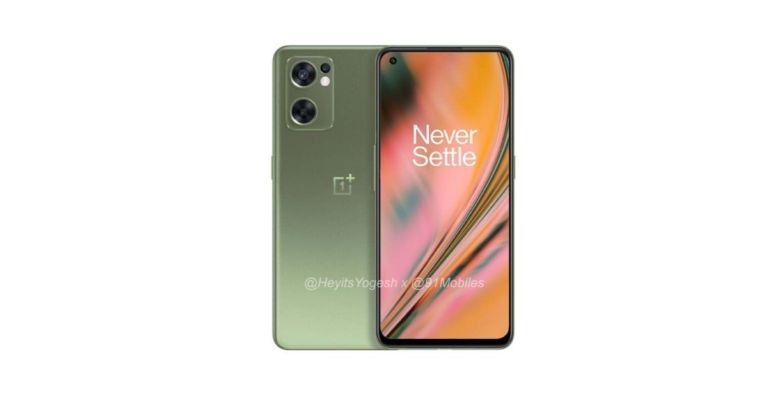
Recently, OnePlus Nord 2 CE 5G renders leaked on the web. The specification and the pricing were also tipped earlier. In a new development, the device has been spotted on BIS, therefore indicating an imminent launch in India having codename Ivan which is believed to be Nord 2 CE.
According to tipster Mukul Sharma, the OnePlus Nord 2 CE 5G has appeared on the Bureau of Indian Standards (BIS) website. The phone bears the model number IV2201. Except for this other details about the smartphone remains undisclosed. But if the phone has bagged the Indian certification then the mobile phone may launch in the country soon.
Previously the OnePlus Nord 2 CE 5G renders were also leaked on the web. The phone has been leaked in grey and olive colour options. The images suggest that the phone will have an AMOLED display with a hole-punch design. The power button is located on the right side of the frame, and the volume rocker is located on the left side.
A microphone, speaker grille, headphone jack, and USB Type-C port are located on the handset’s bottom. There will also be a fingerprint sensor built into the display. In terms of optics, a triple rear camera sensor will be housed inside a rectangular module, similar to what we saw on the OnePlus Nord 2.
Also, the OnePlus Nord 2 CE 5G price was originally assumed to be around Rs 28,000 in India. The smartphone will be released in India in the first quarter of 2022, and it will also be available in Europe, according to the report.
In terms of specifications, the OnePlus Nord 2 CE will run OxygenOS 12 on top of Android 12. Furthermore, a MediaTek Dimensity 900 SoC with 6GB of RAM and 128GB of internal storage, as well as 12GB of RAM and 256GB of internal storage, is expected to power the device. A 6.4-inch FHD+ AMOLED display with a refresh rate of 90Hz is expected on the device. Corning Gorilla Glass will protect the display as well as the back panel, with a punch hole cut out for the selfie camera. The side frames will be made of plastic.
On the back of the OnePlus Nord 2 CE phone is a triple camera setup with a 64MP primary OmniVision sensor, an 8MP ultra-wide lens, and a 2MP macro lens. For selfies and video calls, there’s a 16MP camera on the front. It has a 4,500mAh battery capacity and supports 65W fast charging.
The smartphone is said to have a triple card slot for SIM and microSD cards. Because the existing OnePlus Nord CE lacks a MicroSD card slot, the addition of the triple card slot is an improvement over the previous model. The phone, on the other hand, is said to be missing the alert slider, which could be a disappointment for many.
For the latest gadget and tech news, and gadget reviews, follow us on Twitter, Facebook and Instagram. For newest tech & gadget videos subscribe to our YouTube Channel. You can also stay up to date using the Gadget Bridge Android App. You can find the latest car and bike news here.
Best ways to hide photos and videos on iPhone and iPad

Everyone loves capturing special moments with their phone. Recording and capturing special moments with loved ones and then re-living them gives us great pleasure. Since mobile phones are the most personal device that we own, there are a lot of such special moments that we do not want to share with anyone. But how?
How can you keep personal photos on your phone and not think that anyone won’t see them? Well, in this article we will guide you through the best ways to hide photos and video on your Apple iPhone and iPad.
Here are the ways:
In This Article
Use native Photos app
Apple’s pre-installed photos app has a feature that lets you hide some personal photos and videos on your iPhone or iPad. You can hide photos on hidden photo album in iPhone Just follow these simple steps:- Open the Photos app on your iPhone/iPad.
- Select all the photos and videos that you wish to hide
- Tap on the Share icon, you will see the hide option tap on that.


Hide photos by using the notes app on iPhone and iPad
Hiding photos through the hidden photo album on iPhone is an option, but this is an option that many people do not know. So, if you really want to hide your photos then you should choose an option that fewer people know. Just follow these steps:- Open the notes app on iPhone or iPad and create a new folder by tapping the button at the bottom left.
- Give this folder a name and hit save.
- Open the Photos app on your device and tap the select button at the top right and select all photos that you want to hide.
- Tap on the share button and then the Notes app on the share sheet.
- Select the folder you made to hide photos and hit save.
- Then open the notes app again and open the note that you created using photos, and select the lock button by hitting the three-dot menu at the top right.
- Now just enter a password and that is it.
Use Private Photo Vault
The app allows users to lock their private photos with a pin, TouchID, or FaceID. So if anyone even knows that you have hidden some photos in the vault they can not access them. The app also has a built-in web browser so that you can directly download photos and save them to the app. Its premium version has a feature to import and hide photos locally and on iTunes as well. To hide photos in this app simply import all the photos that you want to hide and then delete them from your photos app. You can get the Private Photo Vault by clicking here.Save photos on another device
You can also delete all the private photos from your iPhone and store them on another device on Google Drive, Dropbox,any other cloud storage service or your PC. Having photos saved locally on your iPhone can sometimes be a bit risky. So you can also try this option as well. If you have another old iPhone or any Android device lying around, use it as your private photo vault and store all photos in it. This will also act as a backup in case your phone is stolen or lost. Read also: How to enable YouTube PiP mode on your iOS device like iPhone or For the latest gadget and tech news, and gadget reviews, follow us on Twitter, Facebook and Instagram. For newest tech & gadget videos subscribe to our YouTube Channel. You can also stay up to date using the Gadget Bridge Android App. You can find the latest car and bike news here.


Noise Beads affordable TWS earbuds launched in India
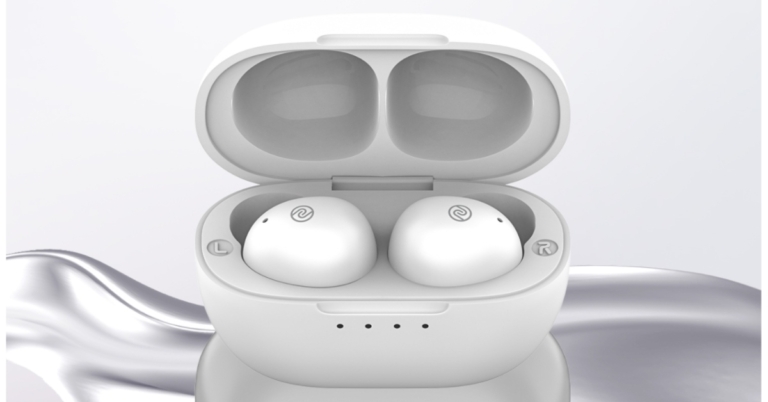
Indian lifestyle brand Noise has announced the launch of its new truly wireless stereo earbuds in India. The company has introduced Noise BeadsTWS earbuds in the country. The new earphones are splash and water-resistant and offer 18 hours of endurance on a single charge. In addition to this, the device supports Siri and Google Assistant too therefore it is also compatible with both iPhone and Android devices.

In This Article
Noise Beads TWS earbuds price in India and availability
Noise Beads TWS earbuds price in India has been set at Rs 3,499. However, the company is offering a launch or introductory price of Rs 1,499. The audio device is scheduled to go on sale from December 24. The sale will begin at 12 noon via the e-commerce website Amazon. The earphones will be available in three colour options of White, Grey and Black.
Noise Beads TWS earbuds specifications
The Noise Beads are used in conjunction with a charging case that has a USB Type-C port. The charging case is shaped like a pebble and is metallic in appearance. LED lights on the charging case indicate how much battery is left. The earbuds are sweat and splash resistant to IPX5, making them ideal for runners who are constantly sweating on the go. Noise Beads earbuds are also lightweight, weighing only 4.5 grams each. For a comfortable fit, the earbuds have a beads-like ergonomic design with silicone tips. The Noise Beads have touch controls and are compatible with both Google Assistant and Siri. Furthermore, the earbuds can be used with either an Android or an iPhone. Each earbud is claimed to last seven hours on a single charge. The charging case, on the other hand, adds 11 hours to the battery life. The earbuds are said to have a total playback time of up to 18 hours when used with the charging case. The Noise Beads also come with Bluetooth v5.1 connectivity, as well as proprietary Hyper Sync technology and touch controls. Earlier this month the company also launched Air Buds Pro that comes with a stem-like design. Active Noise Cancellation (ANC) is a feature of the audio device. In addition, the device has a total playtime of up to 20 hours and includes features such as a 10mm driver and touch controls. For the latest gadget and tech news, and gadget reviews, follow us on Twitter, Facebook and Instagram. For newest tech & gadget videos subscribe to our YouTube Channel. You can also stay up to date using the Gadget Bridge Android App. You can find the latest car and bike news here.Top 3 ways to use the Clubhouse app on PC
The Clubhouse app is an audio chat platform that got a lot of attention during the last few months. The invite-based app allows users to invite some of their friends on the platform using special invitations links. The app allows users to make, enter and interact with public and private audio rooms. You get a never-ending list of public rooms based on your interest, which you can join and have a deep dive into the topic with other people across the globe. But it is only available on iOS and Android as of now. Nonetheless, there are a few ways/hacks to use the Clubhouse app on a PC. We have gathered 3 ways to use clubhouse on PC for you here.
Here are they:
Read also: How to use Android apps on Windows 10
When you have installed it on your PC, just like any other software, follow these steps:
In This Article
Use Clubdesk
Clubdesk is a desktop client for Clubhouse. However, this is not an official client or app for Clubhouse, but it is one of the most popular and used ways. Just download the Clubdesk app on your Windows PC or your Mac.- Now that you have downloaded the App, just double-click on it to install it.
- Sign in by entering your mobile no.
- Check your phone for an OTP and enter the same.
- Just enjoy Clubhouse on the desktop.


 Read also: How to use Android apps on Windows 10
Use BlueStacks to use Clubhouse on PC
Another good way to use Clubhouse on PC is by this method. BlueStacks has been a go-to name when it comes to Android emulators. It has been, by far, one of the most used and popular emulators out there. And with BlueStacks, you can enjoy the ongoing conversation over Clubhouse on your favourite food on a bigger screen. Just download and install BlueStacks from Windows App Store or by clicking here. Just follow these simple steps after you have downloaded BlueStack on your PC:- Double click and install BlueStacks on your PC.
- Find PlayStore and sign in with an account.
- Search for Clubhouse and hit download, Clubhouse for android will be installed in BlueStacks on your PC
- Log in with your phone no.
- And the most important step. Just enjoy Clubhouse on your PC!

Use MEmu
MEmu is yet another leading Android emulator available. Using MEmu you can also download and use Clubhouse as you do on your Android or iOS device. Just download MEmu on your PC, you can get MEmu by clicking here. When you have installed it on your PC, just like any other software, follow these steps:
- Open MEmu on your PC and look for PlayStore.
- Search for Clubhouse and download it.
- Create a new account or log in through your phone no.
- And now you can enjoy Clubhouse on a bigger display.
How to record videos together from the front and rear cameras on Android?

If you love making travel videos or Vlogs then you must have tried to edit the video in PIP (Picture-in-Picture) style. Making videos in PIP style allows you to stay in the frame while you want to show something in your videos from the other camera. We will also tell you about PIP video editors for Android smartphones.
Making videos in PIP format lets you connect with the audience even better, but for that, you need an editing machine, and travelling everywhere with a laptop or a desktop is not possible. Also, you will require superman-like editing skills to make PIP videos. But we will tell you how you can record videos together from the front and rear camera on Android the easy way.
Read also: Best 3 ways to fix YouTube PiP (picture in picture) not working
Here is how you can do it
If you have an Oppo phone then you can find it by the name Dual-View.
The only catch in this is that it is available only on selected devices.
Just follow these simple steps and you can also install and use this amazing app on your Android device:
In This Article
Check if your phone’s camera app has a dual recording feature
Installing third-party apps can be an option for every android user out there, but that would take up unnecessary space on your device. If you have a dual recording feature on your phone then you can record PIP videos from there. OEMs like Oppo and HMD Global (Nokia) provide this feature on their native camera app. In Nokia phones, you can find it by the name Dual-Sight. If you have an Oppo phone then you can find it by the name Dual-View.
The only catch in this is that it is available only on selected devices.
If you have an Oppo phone then you can find it by the name Dual-View.
The only catch in this is that it is available only on selected devices.
Get Dual Side camera from PlayStore
The Dual Side camera is one of the best apps on PlayStore that can shoot videos from front and back cameras at the same time. Just follow these simple steps and you can also install and use this amazing app on your Android device:
- Download the DualSide camera from PlayStore or click here.
- Give it permission of camera and microphone, as it needs them to capture footage and audio.
- And the final step is to press the record button if you want to record video and the capture button if you want to take a photo.

Get Dual Camera app: Front and Back from Android PlayStore
Another good pip video editor for Android is this one. This is also a very popular app if you want to make PIP-style videos on the fly. Simply search for this app on PlayStore or click here to download the app. Once downloaded follow these steps:- Tap on the camera icon at the centre.
- Choose the layout in which you want to shoot the video, and select video quality.
- The final step is just tapping on the record button.

How to use, login or create Twitter Spaces on a PC?

If you are someone who loves to interact and talk with people, then Twitter Spaces can be a great platform for you. Twitter Spaces allows users to join any space, which they want and listen to the valuable conversation taking place. And if you also want to share your views and ideas on a given topic you can ask the host to make you a speaker.
Most of us already use Spaces on our Android and iOS devices. If you are someone who is always working on their laptops or desktops, reaching out to the phone can be distracting. So here we are, to tell you, how you can use, log in or create Twitter Spaces on a PC..
Here is how you can do it
In This Article
Use Twitter on PC
- Install the Twitter app on your PC or use any browser to log in.
- If you already have an existing Twitter account then, hit login or else create a new account.
- Now that you have successfully logged into Twitter via app or browser, just look for the search bar and type Filter:Spaces, and hit the search button.
- Now you can see all the Spaces being hosted at that time
- Click on any of the Spaces and hit the Start listening button.


Use Android Emulator
You will need an Android emulator in this case. Just install any of your favourite Android emulator on your PC and in that install the Twitter app. Twitter app on the emulator will work exactly as it works on Android phone. Just follow these steps to create your Twitter Space- Press the + icon on the app.

- Then, tap on the Spaces icon at the top.
- Give the name to your space and select topics that you want.
- And finally, hit start space.


20 December 2021 Amazon Quiz today answers: Answer to win Rs 40,000 Amazon Pay Balance
Amazon hosts a Quiz session for its customers daily. Its app platform brings a quiz on a daily basis, which begins at 12 AM and ends at 11:59 PM daily. The participants stand a chance to win cash prizes on a daily basis. Today’s 20 December 2021 Amazon Quiz will let you win Rs 40,000 Amazon Pay Balance.
By participating in the Amazon Quiz the participants can win Amazon Pay Balance ranging from Rs 5,000 to Rs 50,000 every day while sitting at home. To win the participants must answer five questions correctly that are based on current events and general knowledge. One wrong answer can eliminate you from the quiz. The results will be announced at the end of the month. Today’s question will let you win Rs 40,000 Amazon Pay Balance. Check below for today Amazon quiz answers.
In This Article
20 December 2021 Amazon Quiz Answers
Question 1: India’s first smartphone-based e-voting solution is being tested in a dummy election at Khammam in which state?
Answer: TelanganaQuestion 2: The President’s Tatrakshak Medal is awarded to members of which organisation?
Answer: Indian Coast GuardQuestion 3: External Affairs Minister S. Jaishankar recently unveiled the Bhoodan Grove plaque at the Jerusalem Forest in which country?
Answer: IsraelQuestion 4: How many tournaments make up a Grand Slam in this sport?
Answer: 4Question 5: Name this US President who is the first and only man to resign from his post.
Answer: Richard Nixon For the latest gadget and tech news, and gadget reviews, follow us on Twitter, Facebook and Instagram. For newest tech & gadget videos subscribe to our YouTube Channel. You can also stay up to date using the Gadget Bridge Android App. You can find the latest car and bike news here.Vivo Y32 powered by Snapdragon 680 SoC launched
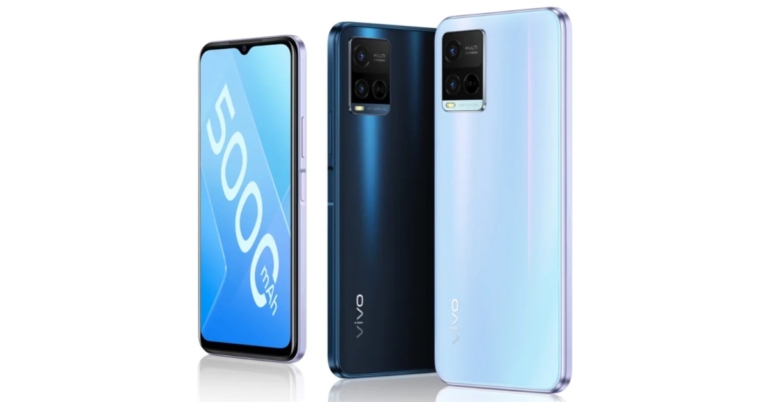
Vivo has expanded its popular Y-Series lineup with the addition of a new smartphone. The company has introduced Vivo Y32 which is the first smartphone to be powered by the Snapdragon 680 SoC. The device features a dual rear camera set-up and an HD+ display. In addition to this, the handset houses a 5,000mAh battery and a side-mounted fingerprint sensor. Keep on reading to know its price and availability details.

In This Article
Vivo Y32 Price and availability details
According to the listing on the Vivo China website, Vivo Y32 will be available in a single 8GB RAM with a 128GB storage model that will cost CYN 1,399 translating to Rs 16,700. The phone will be available in a variety of colours, including Foggy Night and Harumi Blue. However, no information on the phone’s release date or availability outside of China has been released.
Vivo Y32 tech specifications
The Vivo Y32 has a 6.51-inch HD+ display with a resolution of 720×1,600 pixels and a 20:9 aspect ratio. The smartphone operates on OriginOS 1.0 on top of Android 11 out of the box. There is an octa-core Qualcomm Snapdragon 680 SoC under its hood. The phone comes in a single 8GB of LPDDR4x RAM, which can be virtually expanded to 12GB by using the built-in storage. There is 128GB of storage onboard that can be expanded via a microSD card. For the photos and videos, there is a 13-megapixel primary sensor with an f/2.2 lens and a 2-megapixel secondary sensor with an f/2.4 lens included in the Vivo Y32’s dual rear camera setup. Additionally, there is an 8-megapixel selfie camera sensor with an f/1.8 lens on the front for selfies and video calling. Vivo has included a 5,000mAh battery with 18W fast charging support. 4G VoLTE, Wi-Fi, Bluetooth v5.0, GPS/ A-GPS, USB Type-C, and a 3.5mm headphone jack are among the connectivity options. An accelerometer, ambient light sensor, magnetometer, and proximity sensor are all on board. A fingerprint sensor is also located on the phone’s side. For the latest gadget and tech news, and gadget reviews, follow us on Twitter, Facebook and Instagram. For newest tech & gadget videos subscribe to our YouTube Channel. You can also stay up to date using the Gadget Bridge Android App. You can find the latest car and bike news here.Xiaomi TV Stick 4K announced featuring 4K streaming, Android TV 11 and more
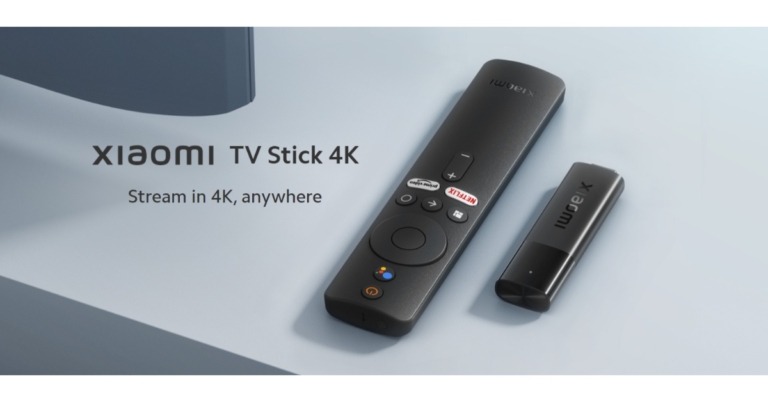
Last year Xiaomi introduced the Mi TV Stick. Now the company has launched the upgraded version of the streaming device. Xiaomi TV Stick 4K has been officially announced and also been listed on the company’s global website. The new model supports 4K streaming and also comes pre-installed with Android TV 11 and Dolby Vision. Read on to know more about the device.
Although the Xiaomi TV Stick 4K has been seen listed on the company’s website. But Xiaomi has neither revealed its pricing nor its availability details. To recall Mi TV Stick was launched in India at Rs 2,799. As the upgraded model now supports 4K streaming so it is expected to be more expensive than the Mi TV Stick.
In terms of design, the Xiaomi TV Stick 4K has been designed to be compact, with a slim and sleek design that weighs only 42.8 grams and measures 106.8×29.4×15.4mm, making it a lightweight device. It comes with a remote that includes dedicated Amazon Prime Video and Netflix shortcuts. There is a dedicated button to wake Google Assistant as well giving users hands-free control, get latest updates, news, play, search their favourite content and control other smart home devices.
Taking about the specifications, Xiaomi TV Stick 4K runs on Android TV Version 11 giving access to 400,000+ movies and shows from across your favourite apps. Get 7000+ apps from Google play. Play music and games, cast from any device, and more. The last generation operated on the Android TV version (9.0). The device is equipped with four Cortex-A35 processor cores, as well as a Mali-G31 MP2 GPU and 2GB of RAM and a storage capacity of 8GB. The Mi TV Stick was powered by a quad-core Cortex A53 processor backed by 1GB of RAM and 8GB of internal storage.
Dual-band Wi-Fi and Bluetooth v5.0 are among the Xiaomi TV Stick 4K’s wireless connectivity options. In addition to this, there is a Micro-USB port for charging and an HDMI port for connecting to a TV. The combination of 4K ultra-high-resolution output and Dolby Vision technology elevates video quality to new heights. While the Dolby Atmos and DTS HD technology support is said to give sounds more richness and realism than ever before.
It has Chromecast built-in, allowing users to cast content from all of their favourite apps to multiple devices, including smartphones, laptops, and tablets.
For the latest gadget and tech news, and gadget reviews, follow us on Twitter, Facebook and Instagram. For newest tech & gadget videos subscribe to our YouTube Channel. You can also stay up to date using the Gadget Bridge Android App. You can find the latest car and bike news here.
OnePlus Buds Z2 with Active Noise Cancellation support launched globally

The OnePlus Buds Z2 has been launched internationally. The TWS earphones are an upgrade by the company’s existing OnePlus Buds Z. Also the new earphones debuted in China in October this year. The new true wireless earphones feature active noise cancellation (ANC) and 11MM dynamic drivers onboard.
The OnePlus Buds Z2 will cost $99 that converts to Rs 7,600. The earbuds are available in two colour options of Pearl White and Obsidian Black.
In terms of availability, the OnePlus Buds Z2 Pearl White colour option is currently available in the United States, and the Obsidian Black colour option is expected to be available in early 2022. In addition to this starting December 20, the earbuds will be available in Europe and the United Kingdom. The OnePlus Buds Z2 will not be available in India until later this year as the company has not yet shared its availability details for the country.
 The OnePlus Buds Z2 is rated IPS55 for dust and water resistance, while the chagrin case is rated IPX4. Because the device is touch-enabled, you can control it by tapping or touching it. The TWS earbuds come with Bluetooth v5.2 connectivity and have a latency rate of 94 milliseconds.
The OnePlus Bus Z2 is powered by 11mm dynamic drivers. In addition, the device includes active noise cancellation, which is claimed to reduce ambient noise by up to 40 decibels. There’s also Dolby Atmos support for a more immersive music experience. In addition, the TWS earphones have three microphones for improved audio quality. There’s also a transparency mode that can be activated to hear announcements or while travelling, allowing the user to hear and be aware of their surroundings. The earbuds also have Cinematic Movie, Immersive Music, and Mobile Gaming modes, which allow you to customise your listening experience based on the content you’re listening to.
The charging case has a 520mAh battery, while each earbud has a 40mAh battery. The Buds Z2 have a 40mAh battery in each earbud that is rated for five hours of playback with ANC on and seven hours without ANC. According to OnePlus, the OnePlus Buds Z2 can last up to 38 hours on a single charge. The TWS earphones can provide five hours of listening time in just ten minutes of charging.
For the latest gadget and tech news, and gadget reviews, follow us on Twitter, Facebook and Instagram. For newest tech & gadget videos subscribe to our YouTube Channel. You can also stay up to date using the Gadget Bridge Android App. You can find the latest car and bike news here.
The OnePlus Buds Z2 is rated IPS55 for dust and water resistance, while the chagrin case is rated IPX4. Because the device is touch-enabled, you can control it by tapping or touching it. The TWS earbuds come with Bluetooth v5.2 connectivity and have a latency rate of 94 milliseconds.
The OnePlus Bus Z2 is powered by 11mm dynamic drivers. In addition, the device includes active noise cancellation, which is claimed to reduce ambient noise by up to 40 decibels. There’s also Dolby Atmos support for a more immersive music experience. In addition, the TWS earphones have three microphones for improved audio quality. There’s also a transparency mode that can be activated to hear announcements or while travelling, allowing the user to hear and be aware of their surroundings. The earbuds also have Cinematic Movie, Immersive Music, and Mobile Gaming modes, which allow you to customise your listening experience based on the content you’re listening to.
The charging case has a 520mAh battery, while each earbud has a 40mAh battery. The Buds Z2 have a 40mAh battery in each earbud that is rated for five hours of playback with ANC on and seven hours without ANC. According to OnePlus, the OnePlus Buds Z2 can last up to 38 hours on a single charge. The TWS earphones can provide five hours of listening time in just ten minutes of charging.
For the latest gadget and tech news, and gadget reviews, follow us on Twitter, Facebook and Instagram. For newest tech & gadget videos subscribe to our YouTube Channel. You can also stay up to date using the Gadget Bridge Android App. You can find the latest car and bike news here.
 The OnePlus Buds Z2 is rated IPS55 for dust and water resistance, while the chagrin case is rated IPX4. Because the device is touch-enabled, you can control it by tapping or touching it. The TWS earbuds come with Bluetooth v5.2 connectivity and have a latency rate of 94 milliseconds.
The OnePlus Bus Z2 is powered by 11mm dynamic drivers. In addition, the device includes active noise cancellation, which is claimed to reduce ambient noise by up to 40 decibels. There’s also Dolby Atmos support for a more immersive music experience. In addition, the TWS earphones have three microphones for improved audio quality. There’s also a transparency mode that can be activated to hear announcements or while travelling, allowing the user to hear and be aware of their surroundings. The earbuds also have Cinematic Movie, Immersive Music, and Mobile Gaming modes, which allow you to customise your listening experience based on the content you’re listening to.
The charging case has a 520mAh battery, while each earbud has a 40mAh battery. The Buds Z2 have a 40mAh battery in each earbud that is rated for five hours of playback with ANC on and seven hours without ANC. According to OnePlus, the OnePlus Buds Z2 can last up to 38 hours on a single charge. The TWS earphones can provide five hours of listening time in just ten minutes of charging.
For the latest gadget and tech news, and gadget reviews, follow us on Twitter, Facebook and Instagram. For newest tech & gadget videos subscribe to our YouTube Channel. You can also stay up to date using the Gadget Bridge Android App. You can find the latest car and bike news here.
The OnePlus Buds Z2 is rated IPS55 for dust and water resistance, while the chagrin case is rated IPX4. Because the device is touch-enabled, you can control it by tapping or touching it. The TWS earbuds come with Bluetooth v5.2 connectivity and have a latency rate of 94 milliseconds.
The OnePlus Bus Z2 is powered by 11mm dynamic drivers. In addition, the device includes active noise cancellation, which is claimed to reduce ambient noise by up to 40 decibels. There’s also Dolby Atmos support for a more immersive music experience. In addition, the TWS earphones have three microphones for improved audio quality. There’s also a transparency mode that can be activated to hear announcements or while travelling, allowing the user to hear and be aware of their surroundings. The earbuds also have Cinematic Movie, Immersive Music, and Mobile Gaming modes, which allow you to customise your listening experience based on the content you’re listening to.
The charging case has a 520mAh battery, while each earbud has a 40mAh battery. The Buds Z2 have a 40mAh battery in each earbud that is rated for five hours of playback with ANC on and seven hours without ANC. According to OnePlus, the OnePlus Buds Z2 can last up to 38 hours on a single charge. The TWS earphones can provide five hours of listening time in just ten minutes of charging.
For the latest gadget and tech news, and gadget reviews, follow us on Twitter, Facebook and Instagram. For newest tech & gadget videos subscribe to our YouTube Channel. You can also stay up to date using the Gadget Bridge Android App. You can find the latest car and bike news here. OnePlus Nord 2 CE 5G renders surfaced online, will be identical to Nord 2
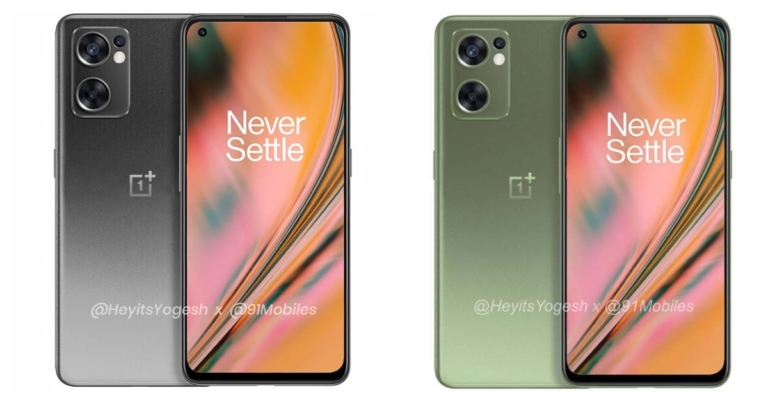
Recently the pricing and the launch timeline for the OnePlus Nord 2 CE 5G was tipped. The specification of the device was also revealed in the past. In a new development, the renders of the OnePlus Nord 2 CE 5G have also surfaced online ahead of the official announcement. The leaked renders reveal the form factor of the smartphone and it looks similar to that of the original Nord 2.
According to a report, the OnePlus Nord 2 CE 5G leaked renders are shown in grey and olive colours. The device is said to have a hole-punch design AMOLED display. While on the right side of the frame the power button is given and the left side consists of the volume rocker. The bottom part of the handset has a microphone, speaker grille, headphone jack and a USB Type-C port. Also, there will be an in-display fingerprint sensor onboard. In terms of optics, there will be a triple rear camera sensor housed inside a rectangular module similar to what we have seen on the original OnePlus Nord 2.

 Talking about the specification, OxygenOS 12 will run on top of Android 12 on the OnePlus Nord 2 CE. Furthermore, the handset is expected to be powered by a MediaTek Dimensity 900 SoC with 6GB of RAM and 128GB of internal storage, as well as 12GB of RAM and 256GB of internal storage. The device is expected to have a 6.4-inch FHD+ AMOLED display with a refresh rate of 90Hz. The display, as well as the back panel, will be protected by Corning Gorilla Glass, with a punch hole cut out for the selfie camera. Plastic will be used for the side frames.
A triple camera setup with a 64MP primary OmniVision sensor, an 8MP ultra-wide lens, and a 2MP macro lens will be found on the back of the OnePlus Nord 2 CE phone. On the front, there’s a 16MP camera for selfies and video calls. It has a battery capacity of 4,500mAh and supports 65W fast charging.
A triple card slot for SIM and microSD card is said to be included in the smartphone. The existing OnePlus Nord CE does not have a MicroSD card slot, so the inclusion of the triple card slot is an upgrade over the predecessor. The phone, however, is said to lack the alert slider, which is a bummer.
The OnePlus Nord 2 CE was previously tipped to cost around Rs 28,000. According to the report, the smartphone will be released in India in the first quarter of 2022, and it will also be available in Europe.
For the latest gadget and tech news, and gadget reviews, follow us on Twitter, Facebook and Instagram. For newest tech & gadget videos subscribe to our YouTube Channel. You can also stay up to date using the Gadget Bridge Android App. You can find the latest car and bike news here.
Talking about the specification, OxygenOS 12 will run on top of Android 12 on the OnePlus Nord 2 CE. Furthermore, the handset is expected to be powered by a MediaTek Dimensity 900 SoC with 6GB of RAM and 128GB of internal storage, as well as 12GB of RAM and 256GB of internal storage. The device is expected to have a 6.4-inch FHD+ AMOLED display with a refresh rate of 90Hz. The display, as well as the back panel, will be protected by Corning Gorilla Glass, with a punch hole cut out for the selfie camera. Plastic will be used for the side frames.
A triple camera setup with a 64MP primary OmniVision sensor, an 8MP ultra-wide lens, and a 2MP macro lens will be found on the back of the OnePlus Nord 2 CE phone. On the front, there’s a 16MP camera for selfies and video calls. It has a battery capacity of 4,500mAh and supports 65W fast charging.
A triple card slot for SIM and microSD card is said to be included in the smartphone. The existing OnePlus Nord CE does not have a MicroSD card slot, so the inclusion of the triple card slot is an upgrade over the predecessor. The phone, however, is said to lack the alert slider, which is a bummer.
The OnePlus Nord 2 CE was previously tipped to cost around Rs 28,000. According to the report, the smartphone will be released in India in the first quarter of 2022, and it will also be available in Europe.
For the latest gadget and tech news, and gadget reviews, follow us on Twitter, Facebook and Instagram. For newest tech & gadget videos subscribe to our YouTube Channel. You can also stay up to date using the Gadget Bridge Android App. You can find the latest car and bike news here.
 According to a report, the OnePlus Nord 2 CE 5G leaked renders are shown in grey and olive colours. The device is said to have a hole-punch design AMOLED display. While on the right side of the frame the power button is given and the left side consists of the volume rocker. The bottom part of the handset has a microphone, speaker grille, headphone jack and a USB Type-C port. Also, there will be an in-display fingerprint sensor onboard. In terms of optics, there will be a triple rear camera sensor housed inside a rectangular module similar to what we have seen on the original OnePlus Nord 2.
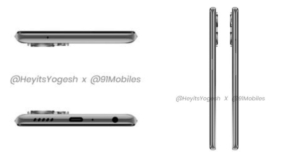
 Talking about the specification, OxygenOS 12 will run on top of Android 12 on the OnePlus Nord 2 CE. Furthermore, the handset is expected to be powered by a MediaTek Dimensity 900 SoC with 6GB of RAM and 128GB of internal storage, as well as 12GB of RAM and 256GB of internal storage. The device is expected to have a 6.4-inch FHD+ AMOLED display with a refresh rate of 90Hz. The display, as well as the back panel, will be protected by Corning Gorilla Glass, with a punch hole cut out for the selfie camera. Plastic will be used for the side frames.
A triple camera setup with a 64MP primary OmniVision sensor, an 8MP ultra-wide lens, and a 2MP macro lens will be found on the back of the OnePlus Nord 2 CE phone. On the front, there’s a 16MP camera for selfies and video calls. It has a battery capacity of 4,500mAh and supports 65W fast charging.
A triple card slot for SIM and microSD card is said to be included in the smartphone. The existing OnePlus Nord CE does not have a MicroSD card slot, so the inclusion of the triple card slot is an upgrade over the predecessor. The phone, however, is said to lack the alert slider, which is a bummer.
The OnePlus Nord 2 CE was previously tipped to cost around Rs 28,000. According to the report, the smartphone will be released in India in the first quarter of 2022, and it will also be available in Europe.
For the latest gadget and tech news, and gadget reviews, follow us on Twitter, Facebook and Instagram. For newest tech & gadget videos subscribe to our YouTube Channel. You can also stay up to date using the Gadget Bridge Android App. You can find the latest car and bike news here.
Talking about the specification, OxygenOS 12 will run on top of Android 12 on the OnePlus Nord 2 CE. Furthermore, the handset is expected to be powered by a MediaTek Dimensity 900 SoC with 6GB of RAM and 128GB of internal storage, as well as 12GB of RAM and 256GB of internal storage. The device is expected to have a 6.4-inch FHD+ AMOLED display with a refresh rate of 90Hz. The display, as well as the back panel, will be protected by Corning Gorilla Glass, with a punch hole cut out for the selfie camera. Plastic will be used for the side frames.
A triple camera setup with a 64MP primary OmniVision sensor, an 8MP ultra-wide lens, and a 2MP macro lens will be found on the back of the OnePlus Nord 2 CE phone. On the front, there’s a 16MP camera for selfies and video calls. It has a battery capacity of 4,500mAh and supports 65W fast charging.
A triple card slot for SIM and microSD card is said to be included in the smartphone. The existing OnePlus Nord CE does not have a MicroSD card slot, so the inclusion of the triple card slot is an upgrade over the predecessor. The phone, however, is said to lack the alert slider, which is a bummer.
The OnePlus Nord 2 CE was previously tipped to cost around Rs 28,000. According to the report, the smartphone will be released in India in the first quarter of 2022, and it will also be available in Europe.
For the latest gadget and tech news, and gadget reviews, follow us on Twitter, Facebook and Instagram. For newest tech & gadget videos subscribe to our YouTube Channel. You can also stay up to date using the Gadget Bridge Android App. You can find the latest car and bike news here.