According to the latest Krafton blog post, Battlegrounds Mobile India is going to ban the use of rogue devices. The permanent device ban on the popular Battle Royale game came into operation from today onwards, that is December 24. So from now onwards, those using illegal means to do cheating during the gameplay will be permanently prohibited and the smartphones running the cheating software.Now Krafton will not only penalise or prohibit the cheating user accounts on BGMI, but it will also permanently ban the devices. The new banning policy change will come into effect from today. While announcing the permanent device ban to deal with cheating it said, “If the use of illegal programs is detected with a mobile device by the newly applied security logic, the device will be permanently banned from using BGMI.”Also Read:Here are the steps taken by Krafton to remove cheaters from Battlegrounds Mobile IndiaBefore the device ban policy, Krafton used to only ban Battlegrounds Mobile India users’ accounts if they were found to be cheating. “Up until now sanctions were given only to the accounts, but now the mobile devices will be banned as well, making fair gameplay far more effective. We will continuously strive to eradicate any unfair gameplay, especially the use of illegal programs to provide our fans with the utmost pleasant gaming experience,” it further added.Previously Krafton has banned 25,19,692 accounts permanently and 7,06,319 accounts temporarily. In order to deal with cheaters, the developers also listed out strict measures that were taken to stop the use of unfair means to beat out other players, therefore, undermining the overall experience. Krafton earlier also advised players to avoid giving access to other people in their accounts. In addition to this Kraton is also keeping an eye on YouTube for any channels that promote illegal programs and if any are identified, their channels will be blocked immediately as the company is working with YouTube.
For the latest gadget and tech news, and gadget reviews, follow us on Twitter, Facebook and Instagram. For newest tech & gadget videos subscribe to our YouTube Channel. You can also stay up to date using the Gadget Bridge Android App. You can find the latest car and bike news here.
Gmail is the most used e-mail client of all. It is easy to use and you do not have to install, log in or create a separate Google account for this mail. Gmail, Google Photos, and Google Drive are all integrated into one account and you can seamlessly use all of them. But, sometimes you can’t accept mail on your Gmail because of storage issues. If you are facing this problem then this article is for you, here are the best ways to fix the ‘Gmail storage is full issue. Just follow these simple ways/hacks and you will be able to create space in your Gmail.
Clear spam, trash, and other unwanted mail
If you have ever signed on to any platform using your Gmail account, then you will be bombarded by many emails on your account. Every mail that you receive takes up some storage from your Gmail account and it is better to delete all the old and unnecessary trash from your Gmail. Just go to the trash folder and delete all the emails, and do the same with spam and old emails. Also, you can unsubscribe to the newsletters, which you don’t want, just open any mail from which you do not want regular updates, and scroll down to the bottom you will see an unsubscribe button hit that, and follow the next steps.Read also: How to block emails in Gmail and Outlook
In This Article
Manage space in Google Drive and Google Photos
Since your Gmail, Google Photos, and Google Drive are linked to a single Google account the base 15GB of limited storage is shared between these three. Google has also removed unlimited storage functionality for Photos, so now every photo or video that you back up on the Photos app will take storage. So if you have storage issues with Gmail, then chances are that the photos app is the culprit here. Just turn off the automatic backup option and delete some photos and videos.The same is the case with Google Drive, it also shares storage with the other two. So, if you have shared some large files on Google Drive with someone and you forgot to delete them, it’s the perfect time to delete those files and make some storage in your Gmail inbox.
Empty the social/update tab
If you use your Gmail account to sign in to any app like Swiggy, Linkedin, or any other then those apps keep sending you a lot of updated emails that take up storage on the device, just delete them all and you will have some more storage in your account.
Save all your emails on your computer
Several third-party tools and email clients allow you to move your emails to the local storage on your computer. Once that’s done, you can simply clear your Gmail inbox. Before you link your Gmail account to a third-party client enable POP by going to Settings>Forwarding and POP/IMAP.
Buy more storage
If you use Gmail very often and you are a power user and share a lot of big files, then you should buy storage from Google. By default, Google gives 15GB of free space to every user. So if you need extra space you can always buy some extra storage.
Bonus Tip
You can search for large emails as well. Just type larger:5m in the search box of your email. This will show you all emails that are larger than 5 MB. Then you can easily delete them. You can use any number with M (1M, 5M, 10m) and Gmail will show you emails larger than those sizes. Remember to clear the trash after you delete these large emails.
Frequently Asked Questions (FAQs)
How do I clear unwanted emails on my Gmail account?
To manage or clear unwanted emails on your Gmail account, routinely clear out the trash, social, and spam folders. Unsubscribe from newsletters forwarded by services that you use.
How do I filter large emails on Gmail?
If you want to view the emails with a large file size in your Gmail inbox, simply type large:5m in the search box and hit Enter. This will display all the emails larger than 5MB.
How do I save my emails on my computer?
Third-party email clients like Thunderbird, Outlook, and Windows Mail let you download your entire email inbox to your computer after you have successfully linked your Gmail account to them.
Read also: How to clean-up your Gmail?
Conclusion
By following these simple hacks/ways you can solve the ‘Gmail storage is full’ issue. To ensure that you don’t hit the maximum storage capacity prematurely, manage your inbox on a regular basis by clearing out spam and unsubscribing from unwanted newsletters and emails.
Have you participated in the Amazon Quiz today? If not then participate in the 24 December 2021 Amazon Quiz as it has already gone live on the app. The daily quiz can be played from 12 AM to 11:59 every day on the mobile app platform. Today the e-commerce is giving the chance to win Rs 20,000 Amazon Pay Balance.Every day Amazon brings a fresh quiz for its customers. By participating in the quiz the participants can win an Amazon Pay Balance of up to Rs 50,000. The quiz can only be played on the mobile app as it is not available for the desktop platform. The quiz contains five easy questions and you have to answer all the questions correctly. The participants will then be shortlisted for a lucky draw to select a winner. Whereas the results are declared at the end of the month. Check out today Amazon quiz answers to win Rs 25,000.
24 December 2021 Amazon Quiz Answers
Question 1: Who is the first representative from India to serve as Chairman of the World Steel Association?Answer: Sajjan JindalQuestion 2: Kushinagar International Airport was recently inaugurated in Which Indian state?Answer: Uttar PradeshQuestion 3: Which country recently launched its first homegrown rocket, Nuri?Answer: South KoreaQuestion 4: What book of this author has to do with immortality?Answer: The picture of Dorian GrayQuestion 5: What was the name of this character’s brother in the famous books of Sir Arthur Conan Doyle?Answer: Mycroft
For the latest gadget and tech news, and gadget reviews, follow us on Twitter, Facebook and Instagram. For newest tech & gadget videos subscribe to our YouTube Channel. You can also stay up to date using the Gadget Bridge Android App. You can find the latest car and bike news here.
Grand Gaming Days in India has been announced by Amazon. The newly announced sale for gamers features a variety of offers and deals on gaming accessories. Gaming laptops, desktops, and monitors, advanced headphones, gaming consoles, graphic cards, and televisions will all be available at discounted prices on the shopping portal.Customers can find great deals on gaming laptops, desktops & monitors, advanced headphones, gaming consoles, graphic cards, and TVs from well-known brands such as Lenovo, Acer, ASUS, LG, HP, Sony, Dell, Corsair, Cosmic byte, JBL, and others. The promotions will run until December 25, 2021.Customers can save up to 40% on large screen TVs with high resolution, more RAM, and a faster refresh rate, which improves gaming performance. They can also take advantage of no-cost EMI and exchange offers, as well as price reductions on select models.Here are some of the most popular gaming products on Amazon.in, along with seller offers and deals:
In This Article
Gaming Laptops, Desktops and Monitors
During the Amazon Gaming Grand Gaming Days, ASUS TUF Gaming F15 Laptop is available for Rs 56,990, which is a great deal. This gaming laptop is equipped with Powered by Intel Core H-Series processors and GeForce GTX 1650 Ti graphics.Victus by HP FHD Gaming Laptop price now starts at just Rs 58,990. One can also avail of Rs 5,000 off on exchange. It is powered by Intel Core R5-5600H processor and a dedicated Nvidia RTX 3050 graphics card with 4GB DDR6 memory.The Intel Core i5 11th generation processor powers the HP Pavilion Gaming Desktop. The Nvidia GeForce RTX 3060Ti graphics card has 8GB of dedicated DDR4 RAM and 16GB of computer RAM. With preinstalled Windows 11 and a 1TB SSD, you can enjoy smooth multitasking and excellent performance. The price of this gaming desktop is INR 1,02,490.MSI GF75 Thin Gaming Laptop is priced at Rs 59,990. The MSI GF75 Thin Gaming Laptop is equipped with a 10th Generation Intel Core processor. Your GF75 is powered by an Intel Core i5 processor with GeForce GTX 16 Series graphics. While the 144HZ gaming display provides the most vibrant visuals.
Gaming accessories, routers and TVs
JBL Quantum 100 by Harman, Wired Over-Ear Gaming Headphones are now available at a discounted price of Rs 1,999. Whereas Logitech G435 Wireless Gaming Headset now comes at Rs 6,995.On the other hand EvoFox X-Team Fireblade TKL Gaming Keyboard and Spirit Gaming Mouse Combo are now selling for Rs 1,410 while Logitech G502 High-Performance Wired Gaming Mouse can be bought for Rs 3,995 during Grand Gaming Days Sale on Amazon.Other devices like gaming routers are up for sale on Amazon. Netgear Nighthawk Whole Home Mesh WiFi 6 System, 4-Stream Wi-Fi 6 Router and Orbi High-Performance AC3000 Tri-band Whole Home Mesh WiFi System are selling at a sale price of Rs 12,999, Rs 8,049 and Rs 18,499 in the country.Whereas Gaming TVs like Sony Bravia (55) 4K Ultra HD Smart LED Google TV KD-55X80AJ and Redmi 139 cm (55 inches) 4K Ultra HD Android Smart LED TV are available for purchase at Rs 76,990 and Rs 44,999 respectively.
For the latest gadget and tech news, and gadget reviews, follow us on Twitter, Facebook and Instagram. For newest tech & gadget videos subscribe to our YouTube Channel. You can also stay up to date using the Gadget Bridge Android App. You can find the latest car and bike news here.
Tecno has officially launched a new series of smartphones in the Indian market today. Just a few months back this year the company launched Camon 17 series and today it has released its successor Tecno Camon 18 in the country. As of now only one device has been introduced featuring a 5,000mAH battery and FHD+ display and a triple rear camera set up. The device is powered by a MediaTek Helio G85 processor. Read on to know more.
In This Article
Tecno Camon 18 price in India and availability details
Tecno Camon 18 price in India has been set at Rs 14,999 for the single 4GB RAM with 128GB storage variant. The smartphone will be offered in the hues of Dusk Grey and Iris Purple. With every Tecno Camon 18 purchase, the company is also including its Buds 2 true wireless earbuds worth Rs 1,999 free of cost. Starting on December 27, the smartphone will be available online and in stores.
Tecno Camon 18 tech specifications
The Tecno Camon 18 has a 6.8-inch full HD+ screen with a resolution of 1,080×2,460 pixels. The screen also has a 120Hz touch sampling rate, 396 ppi, and 500 nits of maximum brightness. The mobile phone runs Android 11 with the HiOS 8 skin on top. The device is powered by a MediaTek Helio G85 octa-core processor with 4GB of LPDDR4 RAM and 128GB of storage. Tecno also allows you to use unused storage to virtually expand the built-in memory up to 7GB.In terms of cameras, a 48-megapixel primary sensor with an f/1.79 aperture, a 2-megapixel depth sensor, and an AI lens, as well as dual flash, are included in the Tecno Camon 18’s triple rear camera setup. Slow-motion, night video mode, video bokeh, and other modes are also available. In addition to this, the company’s TAIVOS technology, the smartphone also has 2K video recording and a low-light photography mode. Upfront there is a 48-megapixel hole-punch camera for taking selfies and video calling.The Tecno Camon 18 is powered by a 5,000mAh battery that supports 18W charging.
For the latest gadget and tech news, and gadget reviews, follow us on Twitter, Facebook and Instagram. For newest tech & gadget videos subscribe to our YouTube Channel. You can also stay up to date using the Gadget Bridge Android App. You can find the latest car and bike news here.
Reportedly, the Redmi Note 11 4G global variant has received certification from the Bureau of Indian Standards (BIS). The smartphone has also been certified by the National Broadcasting and Telecommunications Commission (NBTC). This indicates that Xiaomi may be planning to launch the device in India at some point in the near future. To recall the phone was launched in China earlier this month however the phone was also previously tipped to make its way to the Indian market.According to a report Redmi Note 11 4G global variant has been listed on BIS website bearing model number 2201117Ti. Similarly, the device with a slightly different model number 2201117TG was also listed on Thailand’s National Broadcasting and Telecommunications Commission (NBTC). The i and the G suffix at the end of the model number suggest Indian and Global variants.Meanwhile, model number 2201117TG for the Redmi Note 11 4G has shown up on the Camera FV-5 website. According to the Camera FV5 Database listing the upcoming smartphone will have a 50MP primary camera with an f/2.0 aperture and support for electronic image stabilisation (EIS). The handset will feature a 13.1MP front-facing camera with an f/2.4 aperture, a 99.4-degree horizontal field of view, and an 82.3-degree vertical field of view.The Redmi Note 11 4G global variant’s specifications are unknown. However, rumours suggest that the phone will be powered by Snapdragon 680 SoC and will be fuelled by a 5,000mAh battery. Besides, the other specifications are expected to be the same as the Chinese variant.
Specifications for the Redmi Note 11 4G
A 6.5-inch Full HD+ display with a hole punch cutout in the centre is featured on the top of the Redmi Note 11 4G. The display has a 90Hz refresh rate and a 180Hx touch sampling rate. The screen also has a 20:9 aspect ratio and a contrast ratio of 1500:1. The device’s operating system is MIUI 12.5 and is based on Android 11. The Redmi Note 11 4G features a MediaTek Helio G88 processor, 6GB of LPDDR4X RAM, and 128GB of EMMC 5.1 storage. In addition, the device comes with a 5,000mAh battery that supports 18W fast charging.
For the latest gadget and tech news, and gadget reviews, follow us on Twitter, Facebook and Instagram. For newest tech & gadget videos subscribe to our YouTube Channel. You can also stay up to date using the Gadget Bridge Android App. You can find the latest car and bike news here.
Twitter is the most famous and used Micro-blogging site, and of course, it does not make it a proper blogging site. Twitter helps you to express your thoughts in limited characters which are 280 characters. So you have to be precise and short. The micro-blogging site has an enormous user base, and if you are also one of its users, you might want to know about What is the difference between Twitter mute vs Twitter unfollowing.This article is a guide for you for the same.
What is Twitter mute and unfollow?
So, mute in Twitter is a feature that stops all the Tweets from appearing from your Twitter timeline. So if you started to see Tweets of some accounts that you don’t like, then you can simply mute that account. With this option, you can mute any account and after that, you won’t see any tweets from that account on your timeline. Now that you know what mute is in Twitter, it is the right time to mute accounts you don’t want to see on your timeline, just follow these steps-
Just open the account of the person you want to mute, and hit the three-dot menu on the top right.
Over there you will see a mute button, hit that and you are good to go.
Alternatively, you can hit the three-dot menu on the person’s tweet and then press the mute option to mute the person.Muting any account does not remove you from the follower’s list of that person, so it is a great option if you want to ignore someone’s tweets without letting them know.Read also: How to mute videos before sending them on WhatsApp?On the other hand, if you were following an account on Twitter and that account is no longer relevant to you or you do not like the tweets of that account and you also do not want to show the world that you follow that person. Unfollowing is the way to go for you. If you want to unfollow someone on Twitter then simply follow these steps:
Open Twitter, and go to the person’s profile
On the top right side, just below the account cover photo, you will be able to see a “Following” button, it shows that you currently follow the account.
Press the following button and the account will be unfollowed by you.
Google Playstore is a place where you can find hundreds of apps for almost anything you can ever imagine. It is home to thousands of apps, games, movies, e-books, and more. And if you are someone who uses a lot of paid apps and you have downloaded them from Playstore you expect to receive some rewards, don’t you? In this article, we will teach you what are Google play points? And how to use Google play points?
In This Article
What are Google Play points?
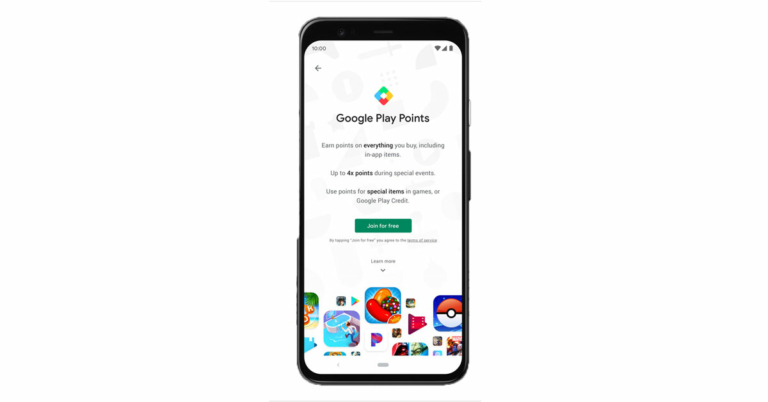
So the first and most basic question is that what is a Google point, right?According to Google, “Play Points is a rewards program that lets you earn points and rewards with the Google Play Store”. In simplest terms, Play Points are rewards that you get for purchasing content which includes apps, movies, books, and games through the Google Play Store. At the initial stage, you earn 1 point for every $1 you spend. However, during the first 7 days, you can earn 3 times more points.And the more you earn points the more benefit you get.Read also: Beware: These are the 9 apps stealing Facebook login credentials from Google Play
How can you use Google Play points?
Well, unfortunately, there are some requirements that you need to fulfill if you want to use Google Play Points. Here they are:
You can use play points only in selected countries, and they are- Australia, Austria, Belgium, Denmark, Finland, France, Germany, Greece, Hong Kong, Indonesia, Ireland, Israel, Italy, Japan, Korea, Netherlands, New Zealand, Norway, Portugal, Saudi Arabia, South Africa, Spain, Sweden, Switzerland, Taiwan, United Arab Emirates, United Kingdom, or the United States.
You will also need a computer or an Android device that works with Google Play.
Google Play account that’s not managed by your school or a parent.
A valid payment method.
And at last, a billing address that matches your Google Play country.
What is its use?
The play points can be used in a variety of ways which include:
To make purchases on apps, movies, books, and anything else in the Play Store.
You can also use Google play points for in-app purchases. So if you want to purchase a coupon or a pass for any game you can use play points instead of money.
And lastly, if you want to use them to go towards a charity you can also do that.
Smartphones are a very essential part of our lives and making and accepting calls is the most basic function of a smartphone. But sometimes due to some reasons, you are unable to pick up calls on your Android phone. If this is the case with you we have 10 ways to fix unable to answer calls on Android phones.Read Also: OnePlus 12 could launch in January 2024, company confirms
In This Article
Restart your phone
While troubleshooting any problem the first step should be to restart your phone.Restarting your phone resets all the background processes and when the phone is turned on again it starts all the apps from scratch and chances are the problem is solved. So this is a way in which you can fix being unable to answer calls on an Android phone.
Check if the proximity sensor is working properly
Restarting can solve the issue if it is limited to the software level, but if the screen of your phone does not turn on when you receive a call, then there is a chance that the proximity sensor is the culprit. Simply turn off the sensor by searching the option in the smartphone’s settings menu.Read also: 6 steps that help you access error-free Microsoft Store
See if you are picking up the call in the right way
So if your phone’s screen does not go black when you receive a call then that’s good, the proximity sensor is working fine. But the issue is still there, right? Well, see if you are picking up the call correctly or not. Android is an open-source OS and OEMs like to customise Android according to them. So if you have switched the phone to a different brand then chances are you are not picking up the call in the right way. In some phones, you have to swipe left from the green button while in some you have to swipe upwards, and in some, you just need to tap on the green button. Check the right way to pick up calls on your phone.
Re-insert the SIM card
You should also try to remove and insert the SIM card on your phone. If this is a network issue then this way the issue can be resolved and you can pick up the call that you are receiving.Read also: Best 9 ways to fix cannot install or update YouTube on Android
Turn on and off the Airplane Mode
Another way to fix the network issue is by turning on and off the ‘Airplane Mode’. This is a quick way to solve any network issue on your phone and let it be able to answer calls. You can turn on ‘Airplane Mode’ by opening the quick settings menu and taping on the plane icon.
Clear the cache data of the phone app
While restarting the phone, it renews all the processes running on the phone but if the problem is with data on the phone app then you have to clear cache files and data of the phone app. To do this just follow these steps:
Open the Settings app, scroll down to App Management and tap on it.
Find the phone app that you are using and tap on it.
Go to storage and clear all data.
This will solve the issue.
Update the phone app
Not updating software on our phone is a really bad habit, we have an article about bad habits that kill your smartphone, which you can check out from here.Coming back to the topic, you should go to the Playstore and see if you have any pending updates on the phone app, if you have it just install it.
Use the default phone app
If you have installed or used any other third-party calling app like Truecaller’s dialer, then chances are the culprit is that phone app. You should always use the default phone app. To check this, just follow these steps:
Open the Settings app on your phone.
Then go to apps and tap the default app.
Click on the phone app and select the one which says system default.
Update your smartphone
If your smartphone is running on an older OS version, updating it to the latest version will help in fixing any issues you are facing on it. Here’s how you can do that.
Go to Settings and select Software update.
2. Tap on Download and install.
3. Select Install now.
Turn off Do Not Disturb (DND)
If your phone is in DND mode, you will not receive any notifications for incoming calls and messages. The idea of DND mode is to eliminate your phone as a distraction when you are focused on other tasks. This means all notifications will be muted and you won’t be able to receive any calls. Swipe down from the status bar and tap the tile for DND to turn it off.
Frequently Asked Questions (FAQs)
Why can’t I answer calls on my Android phone?
If you’re unable to answer calls on your Android phone, check if the network connection is working properly. Try performing a quick restart on your device. Lastly, make sure that DND isn’t turned on.
Why doesn’t my phone’s screen turn off when I accept a call?
If your phone doesn’t kill the screen when you bring it up to your ear during a call, it is due to a faulty proximity sensor. Clear the dust off the sensor to make sure this doesn’t happen again. If the situation continues to persist, take your phone to a professional repair centre.
Why can’t I receive calls on my phone?
If no one is able to reach you on your Android phone, the problem likely lies with your network reception. Go to an open place where you are more likely to receive a stronger signal. If that doesn’t fix the issue, perform a network reset on your device.
Read also: Unable to download apps on your iPhone? Top 5 ways to fix the issue
Conclusion
These are the top 10 ways to fix the ‘unable to answer calls’ issue on your Android phone. If the problem still persists after trying these fixes, take your phone to the authorised service centre for further diagnosis. Make sure you back up all your personal data before turning your phone in for repair.
Facebook is by far the most famous social media platform, it has its users from teenage school kids to retired old citizens. Everyone uses Facebook on a daily basis to get updates from the life of friends and family and vice versa. But it does not mean that every user is a geek and knows each and every part of Facebook and its messenger service. If you wanted to know what is the difference between Facebook messenger mute vs ignore you are in the right place.We will teach you everything that you should know about Facebook messenger mute vs ignore. Stick with us till the end and everything will be clear.
In This Article
What is Facebook Messenger
In case you don’t know what Messenger is, then let’s clear this doubt first. FB Messenger is an instant messaging app/platform that works alongside Facebook.Now that we have cleared this let’s move ahead.Read also: Bad habits that are reducing the life of your smartphone
Difference between Facebook Messenger mute and Ignore
Muting messages is a fairly old concept. You might know how to mute any chat on Whatsapp or Instagram, and in case you don’t, muting a chat will stop the notification that you receive from that particular chat.On the other hand, Ignore is the same as Mute but a notch above, you can call it an advance version of mute. Previously, the ignore option was only available for Messenger and not on other apps, but now you have the same option on Whatsapp also by the name of “Archived Chats”. The mute option just stops all the notifications from a particular chat, it’s just like you have put your phone on silent mode for an individual chat. So you can mute those family Whatsapp groups and you won’t be annoyed by the bombarding of messages.The Ignore option however removes that chat of that individual from the chat menu and puts the chat in a different section by the name “Message requests”. This is very useful for those types of groups which you never wanted to be a part of but you had to, and now you are irritated by the notifications that it sends to your phone.
How to mute or ignore someone on Messenger
You just need to have the messenger app installed on your phone and log in with your Facebook account, then follow these steps
Open the chat that you want to mute or ignore.
On the top right corner, you will see an “i” button, tap on that.
Now just select the mute or ignore option, and that’s it.
Paytm Payments Bank and MoneyGram International announced a partnership today that will allow MoneyGram customers around the world to send money to a Paytm Wallet user in India in real-time.While announcing the collaboration Alex Holmes, MoneyGram Chairman and CEO said, “We’re thrilled to partner with Paytm Payments Bank to expand our mobile wallet capabilities into one of the largest receive markets in the world. The digitization of our receive network is a core component of our growth strategy which has led to exceptional results, such as an all-time high in our total transactions received digitally in the third quarter of this year. As consumer preference in India and beyond shifts toward receiving transfers digitally, MoneyGram is well-positioned to continue to meet demand.”MoneyGram users outside of India can now send money to full KYC Paytm wallet users in India from the comfort of their own homes thanks to this partnership. Millions of customers use the Paytm Wallet for its convenience, which includes greater control over their expenses, highly secure payments, utility bill payments in a flash, and seamless integration across mobile, online, and in-store payments, among other things.This is MoneyGram’s first mobile wallet partnership in India, and it’s a significant step forward as India’s transition to digital payments accelerates. MoneyGram transactions received digitally in India now account for nearly half of all transactions received in the country. According to the company from just under 10% two years ago, the number of transactions sent directly to bank accounts has increased by about six times. MoneyGram expects higher growth rates as a result of this, as Indian customers continue to value the convenience of digital transfers.Satish Kumar Gupta, MD & CEO – Paytm Payments Bank Ltd said, “We always strive to empower Indians with seamless, digital banking services, and offering direct transfer of international remittances into the Paytm Wallet, is another step in the same direction. Paytm Wallet is used by millions of Indians and we hope that this partnership will offer unmatched convenience & flexibility to the Indian diaspora across the world to send money home in real-time.”
For the latest gadget and tech news, and gadget reviews, follow us on Twitter, Facebook and Instagram. For newest tech & gadget videos subscribe to our YouTube Channel. You can also stay up to date using the Gadget Bridge Android App. You can find the latest car and bike news here.
The Philips 2000 series 3-in-1 multifunctionality Air Purifier with heater is a new air purifier from Philips Domestic Appliances that has been launched in India. The new Philips Air Purifier aims to keep homes healthy and comfortable with its purify, heat, and fan modes. The device is claimed to remove 99.95 percent of particles as small as 0.003 m and purifies the air of viruses, allergens, and pollutants with its 3-layer HEPA filtration system.The air purifier’s purification function is suitable for rooms up to 215 square feet. An optimal 360° airflow intake design drives purification performance of up to 165 m3/hr of Clean Air Delivery Rate (CADR). It can effectively clean the air of a 20 m² room in 17.5 minutes.The purifier also has three-speed settings: 7.5 W, 15 W, and 25 W for fans and three-speed heat settings: 1250 W, 1500 W, and 2200 W for heat, as well as three-level settings for light control and display, giving customers more control.With its multifunctionality modes of purify, heat, and fan, the new Philips 3-in-1 purifier aims to keep homes healthy and comfortable. It has a 3-layer HEPA filtration system that removes 99.95 percent of particles as small as 0.003 m and purifies the air of viruses, allergens, and pollutants, and the clean air is distributed throughout the room by a 350° rotating fan. The 3 layer system includes a pre-filter, HEPA filter and activated carbon filter. The pre-filter captures large particles like dust and hair. Afterwards, the HEPA filter traps viruses, bacteria, household dust, pet dander, pollen, outdoor pollution, dust mite, mold spores, smoke and other allergens and pollutants. Finally, the activated carbon filter removes harmful gases and unpleasant odours.The air quality sensor on the Philips 2000 series 3-in-1 multifunctionality Air Purifier detects particles smaller than 2.5 micrometres in the air and displays them in real-time with numerical and colour-coded feedback. The colour bar indicates the high quality of indoor air, ranging from blue (good), purple (fair), pink (poor), and red (extremely poor) (very poor). Indoor temperature and a filter change alert are also displayed in real-time.In terms of pricing the Philips 2000 series 3-in-1 multifunctionality Air Purifier has been launched at Rs 32,995. But it is now being made available at Rs 29,695. The Air Purifier can be bought through the company’s official website in the country.
For the latest gadget and tech news, and gadget reviews, follow us on Twitter, Facebook and Instagram. For newest tech & gadget videos subscribe to our YouTube Channel. You can also stay up to date using the Gadget Bridge Android App. You can find the latest car and bike news here.
Asus has launched plenty of good to great laptops in the year 2021. Probably the last to come from the camp is Asus Vivobook Pro 14x, which we got to play around with for the last 7-10 days. If you are in the market to buy a lightweight yet powerful laptop then you should read the Asus Vivobook Pro 14x review by us. Here is everything you need to know about the new notebook.
In This Article
Asus Vivobook Pro 14x review: Design and Display
Asus has been one of the pioneers to bring out the best looking and the brightest displays in the 14 to 16-inch laptop segment. Laying in the same is the new Asus Vivobook Pro 14x. The laptop is a knockout when it comes to looks. It is built of sturdy plastic with a hint of metal around it. A good example of design is its protruding logo on the top of the lid, which is something very fresh.
Open it up and the first thing you will notice is the large keyboard, which has the side keys like TAB, Entre etc in a lighter shade of grey and the mid part is black in colour. With exception of the Escape key that is dressed in red. The keyboard is accompanied by a fairly large trackpad. Why is it so large? Because it also has the Asus virtual dial pad, which it has borrowed from its Pro Art sibling. There it was a physical dial, but here it is embedded within the trackpad. More about it in the ‘performance section’.
As for the ports, users get 3 USB, 1 HDMI, 1 USB Type-C and 1 audio/mic port along with a microSD card slot. The speakers (powered by Harman Kardon) are bottom-firing which do have a decent output, but a bit louder would have been perfect.
Moving to its screen, which is one of its best features, consumers get a 14-inch OLED NanoEdge screen that supports FHD+ resolution of 2,800×1,800 pixels. 600 nits of peak brightness with HDR support keeps everything lively on the screen. The text is crisp and the colours are very pleasing with super deep blacks. This is by far the finest display we have seen this year. We played a lot of things on the computer including Netflix shows, games like CS: Go and more. Everything on the screen looks very good. It did not give a chance to shame it even once.
While the Asus branding can be seen under the screen, there is an HD camera present on top. This has a special shutter in front of it that slides in, this gives you that extra bit of relief that no one can see you even if they somehow get access to your laptop’s camera.
Also Read:Asus Vivobook Flip 14 (2021) review: 360 degree performance
Asus Vivobook Pro 14x review: Performance
Right, so all of it till now seems like a fairy tale, but the best is yet to come. The Asus Vivobook Pro 14x comes with AMD Ryzen 9 (5900HX) inside with 16GB RAM and 1TB of superfast SSD drive. Graphics are provided by NVIDIA GeForce 3050 Ti graphics card. This combo is very hard to come by at this price point and the way Asus has assembled it all can put some of the best machines slip back into their blankets (and never come out).
We threw everything at the machine including the kitchen sink to find a chink in the armour, but we could not find even one. It can play games like Dota 2 and CS: Go at their respective highest settings. Can play games like Battlefield 2042 in high settings, which is quite good too. We were able to edit 4K resolution videos easily and it could render them out swiftly. Not once did we feel it was underpowered.
The dual-fan cooling system works exceptionally well, too. Yes, these are winter months, but still many in the bracket get hot, but not this one. It got warm only when it was rending 4K videos. Other than that even after 30 minutes of gaming, it was cool.
So, tell us more about the virtual dial pad on the trackpad?
With it, you can do so many things. For example, you can increase decrease brush sizes in Photoshop, can access the volume or decrease/increase the screen brightness too. It can be customised to more programs, but it works best with the Adobe Suite of programs including Premiere Pro and After Effects. Well, the creator in us was very happy with Asus Vivobook Pro 14x, as we love extra keys or feather touch panels that work as a shortcut for the most commonly used commands in a software.
Moving on, the power button on the Asus Vivobook Pro 14x doubles up as a fingerprint sensor, too. This is great as it opens the machine with just a tap and every time you need not key in the password.
As for the battery, it has a three-cell 63Wh battery inside that gave us over 5.5 hours of work time. This is not bad considering how small the device is. It weighs just 1.45 Kg. Other features include WiFi 6, Bluetooth 5, Windows 11 Pro, Microsoft Office suite (onboard) and built-in microphones for daily Zoom meetings.
Also Read:Asus Zenbook 14 review: Definitely a style statement, but at a price
Verdict
And then it boils down to just one thing. Is it worth buying at Rs 109,990? That is a firm yes. If you are in the market looking for a portable powerhouse fit for any creator, artist, video or graphic editor, this is the laptop for you. You can do so much with it. In case you need a little more screen room, then you can look at its bigger brother that has a 16-inch screen.
Recently WhatsApp was spotted testing the new in-app camera interface. Now the chatting platform appears to be working on a redesigned interface when you place a voice call. This is said to be under works for both Android and iOS platforms. However, even beta testers can’t see the changes yet.But, according to a report by WABetaInfo the new call interface will enhance both individual and group calling experience. Citing information from its sources the WhatsApp beta tracker has also shared some screenshots to convey how the redesigned interface differs from the current one.As you can see in this screenshot, WhatsApp is redesigning the interface in preparation for a future update in order to make it more compact and modern, while also organising the available space: the new redesign will look nice, especially when placing group voice calls.Despite the fact that the screenshot was taken on WhatsApp for iOS, the same redesign is planned for a future update of WhatsApp beta for Android. All we have to do now is wait for a future update that will allow beta testers to test out the new interface.WhatsApp is also testing out new visual feature indicators for end-to-end encryption on WhatsApp beta for Android and iOS. As we already know that the chats and calls are end-to-end encrypted. But the team will bring indicators in the Status and Calls section, claiming that your status updates, personal and group calls are always end-to-end encrypted, and this will never change. The same notice will be added to WhatsApp’s Chats section, and a new update for WhatsApp for Android will support the same feature at a later date.Image Courtesy: WabetainfoThis new visual addition is currently unavailable due to development, but it will be available in a future update.The Meta-owned chatting app also appeared to be experimenting with a new Android camera interface. The Switch Camera button has been redesigned, and the Flash shortcut appears to have been relocated.WhatsApp has released the 2.22.1.2 beta update, which includes a redesigned in-app camera interface, according to Wabetainfo. The new in-app camera will be available in a future update, as we previously stated, and is currently being tested.You’ll be able to open recent media by tapping the image in the lower-left corner, and the Flash and Switch Camera buttons will be redesigned.
For the latest gadget and tech news, and gadget reviews, follow us on Twitter, Facebook and Instagram. For newest tech & gadget videos subscribe to our YouTube Channel. You can also stay up to date using the Gadget Bridge Android App. You can find the latest car and bike news here.
Amazon is back with another quiz on its mobile platform. The daily quiz is now live on the Amazon App and today’s Amazon Quiz will give you a chance to win Rs 20,000 Amazon pay Balance. The participants can play the 23 December 2021 Amazon Quiz from 12 AM to 11:59 PM. For those who are unaware of the quiz, the e-commerce platform brings a fresh quiz on a daily basis which consists of five questions related to general knowledge and current affairs.The participants need to answer all the questions correctly and their names will be selected for a lucky draw. The winner will be announced at the end of the month. One wrong answer could eliminate you from the quiz. Only app users are eligible to participate in the Quiz. In today’s Amazon Quiz the participants will get a chance to win Rs 20,000 Amazon Pay Balance. Check Out 23 December 2021 Amazon Quiz Answers.
In This Article
23 December 2021 Amazon Quiz Answers
Question 1: In Mexico City, a statue of an indigenous woman recently replaced which explorer in a famous monument?
Answer: Christopher Columbus
Question 2: Which former Indian fast bowler has been awarded life membership of the Marylebone Cricket Club in 2021?
Answer: Javagal Srinath
Question 3: Which famous personality announced that we would launch a new social network called TRUTH Social?
Answer: Donald Trump
Question 4: In the movies how did this character like his martini to be?
Answer: Shaken, not stirred
Question 5: The British Prime Minister won a Nobel Prize for which subject?
Indian brands’ customer base in the smartwatch market has been continuously growing as their products offer good value for money. The homegrown brand Inbase has announced the launch of Urban Fab Smartwatch for your smart teenagers and kids this Christmas.
In This Article
Inbase Urban Fab Smartwatch features
The Inbase Urban Fab Smartwatch has a unique design and comes in four vibrant colours: Pink, Blue, Light Purple, and Army Green. The watch is specifically designed for children aged 5 to 15, providing them with a unique combination of cool design and new technology, as well as assisting them in exploring and developing healthy habits and lifestyles.The kid’s smartwatch is extremely lightweight, and it comes with over 100 watch faces that are constantly updated, allowing the kids to have a new watch face every day. It has ten alarms to remind them of their daily activities, such as getting up on time, eating breakfast, getting ready for school, doing homework, playing with their families, sleeping, and so on.The Inbase Urban Fab Smartwatch includes four games: 2048, Candy Crush, Maze, and Fly a Plane. Because the Urban Fab Teen has an IP68 rating and is water-resistant, their gaming sessions can continue uninterrupted even if they spill cola or juice.The smartwatch for kids also has a variety of health features, such as heart rate monitoring, sleep tracking, walking and running, and so on, so you can monitor your child’s health without having to take them to the doctor. The watch runs for 7 days with normal, regular working time and 14 days in standby mode.In addition to this, a child lock feature is included to ensure that your children do not misuse the smartwatch. This means you can use a password to secure the watch.
Inbase Urban Fab Smartwatch Pricing and Availability
The modern-day smartphone is built tough and durable but at the end of the day, it is just a smartphone, not Superman. If you have a phone whose volume buttons are not working properly or maybe you have dropped the volume keys then this article is for you. We will take you through the 6 best ways to use an Android phone with broken volume buttons.Read Also:How to move your Spotify Playlists to Amazon Music or Apple Music?
In This Article
Restart your phone
Sometimes we feel the buttons are broken, but at times there is a bug, because of which they are not working. So, restart your phone to resolve any background glitches on the software. Long press the side key on your Android phone and hit Restart. If the side key triggers the voice assistant, press it with the volume-up key to access the power menu.
Use the Virtual volume slider in Settings
When you press any volume button you get a volume slider on your phone to adjust the volume. But the volume buttons are broken, right? So to use just that, follow these steps to use the volume slider on your phone:Step 1: Open Settings on your Android phone by clicking the gear icon.Step 2: Then, head over to the sound and vibrations option.Step 3: You will see a few volume sliders adjusting the volume of media, ringtone, notifications, and alarms, now you just need to adjust the volume and that’s it.This setting option might be different for every other OEM so in case you can not find this feature just search for sound and vibrations in the settings and you will see the option.Read more: 7 best ways to fix alarm volume too high or low on iPhone
Use Google Assistant
Google Assistant is one of the most used and intelligent virtual assistants. You can also ask Google Assistant to adjust the volume in case your buttons are broken. Just follow these steps:Step 1: Say the phrase “Okay Google” or “Hey Google” on your phone, it will trigger the assistant.Step 2: Then ask to increase or decrease media/notification/alarm/ringtone volume.Step 3: The volume will be adjusted, also you will get to see the volume slider for a short period of time so you can also adjust the volume according to your liking.
This is another way to use an Android phone with broken volume buttons.
Use accessibility menu
Accessibility options are very useful in many cases one such case can be broken volume buttons. Just follow these steps to enable the accessibility menu on your phone:Step 1: Open Settings on your Android phone by clicking the gear icon.Step 2: Then go to additional settings, and then accessibility.Step 3: Under accessibility, you will find the accessibility menu, tap on the option and enable shortcuts.Step 4: Now you have an accessibility shortcut enabled on your phone. Use the shortcut to increase or decrease the volume of your Android smartphone.
Use earphones
Some wired headphones and Bluetooth earpieces/ear pods have dedicated volume buttons to pause, play, increase and decrease the volume. They also help in receiving and cancelling phone calls. So if you have one lying around you can use it to adjust the volume on your phone.
Use a third-party app (Assistive Volume Button)
Step 1:Download and install the Assistive Volume Button app from the Google Play Store.
Step 2: Allow the app to display over other apps and run in the background.
Step 3: Turn on the toggle switch for Show volume buttons and select their style.
Step 4:Minimise the app. Use the volume controls on the screen to change the volume.
Frequently Asked Questions (FAQs)
How do I control the volume on my phone if the volume keys aren’t working?
You can control your phone’s volume from the virtual slider in settings or use a third-party app like Assistive Volume Button to overlay the controls on the screen.
How do I fix my phone’s volume buttons?
If the volume rocker keys on your phone aren’t working, make sure the case isn’t pressing on them. Furthermore, wipe them clean using a microfibre cloth to remove any collected dust.
How do I control my phone’s volume without using any buttons?
These are the top 6 ways to use an Android phone with broken volume buttons. Even though there are a handful of native ways to resolve this problem, a third-party app like Assistive Volume Button works best because it offers a bunch of styling and personalisation options as well. If you know of any other way to get around this issue, let us know in the comments!
Taiwanese electronics major Asus has officially announced the availability of the Asus ROG Phone 5 Ultimate in India. The device is an 18GB RAM variant of Asus ROG Phone 5 and will go on its first sale in the country from December 26. The gaming smartphone comes with 512GB of internal storage. It is equipped with a Qualcomm Snapdragon 888 SoC and features a 144Hz refresh rate display. Continue reading to know its pricing and specifications.
In This Article
Asus ROG Phone 5 Ultimate price in India and availability
The 18GB with 512GB storage variant on the Asus ROG Phone 5 Ultimate costs Rs 79,999. Storm White will be available in a matte finish on the ROG Phone 5 Ultimate. The gaming smartphone is scheduled to go on sale in India via the e-commerce website Flipkart at 12 noon from December 26.To recall the smartphone was introduced alongside Asus ROG Phone 5 and ROG Phone 5 Pro but somehow the company changed its mind and only the regular variant was made available for purchase.
Asus ROG Phone 5 Ultimate specifications
Asus ROG Phone 5 Ultimate features a 6.78-inch full-HD+ AMOLED display with 1,080×2,448 pixels of resolution. The display also offers a 20.4:9 aspect ratio, a 144Hz refresh rate, a 300Hz touch sampling rate, up to 1,200 nits of peak brightness and comes protected by Corning Gorilla Glass Victus. The gaming phone runs ROG UI and ZenUI custom interfaces based on Android 11. Under the hood, there is an octa-core Qualcomm Snapdragon 888 SoC, paired with an Adreno 660 GPU. There is a unique rear monochrome display PMOLED display on ROG Phone 5 Ultimate that matches the premium frosted back glass and unique Storm White colour, it displays customizable animations for system alerts and statusFor imaging, the Asus ROG Phone 5 Ultimate features a triple rear camera setup that includes a 64-megapixel primary Sony IMX686 sensor with an f/1.8 aperture. In addition to this, there is a 13-megapixel ultra-wide-angle lens with f/2.4 aperture and a 5-megapixel macro lens. Upfront there is a 24-megapixel selfie camera sensor with an f/2.45 aperture.In addition to this, the phone comes with a thermal design from Asus called GameCool 5 for better temperature control. There is an ultrasonic AirTrigger 5 on the shoulder of the device, rear dual triggers, and Motion Control gesture inputs; with up to 10 Motion Control gesture inputs that can be accessed alongside the AirTrigger 5 triggers. Armoury crate with expanded feature set offering more user-level customizable tuning for each, and every gameIn terms of connectivity, the device includes 5G, 4G LTE, Wi-Fi 6, Bluetooth 5.0, GPS/ A-GPS, NFC, two USB Type-C ports and a 3.5mm headphone jack. The Asus ROG Phone 5 Ultimate is backed by a dual-cell 6,000mAh battery with MMT technology that supports 30W fast charging. There are large front-firing speakers powered by dual amplifier technology and tuned to perfection by Dirac.
For the latest gadget and tech news, and gadget reviews, follow us on Twitter, Facebook and Instagram. For newest tech & gadget videos subscribe to our YouTube Channel. You can also stay up to date using the Gadget Bridge Android App. You can find the latest car and bike news here.
Facebook is by far the most famous social media platform, but it does not mean that everyone on this planet is on Facebook. Chances are that you want to check someone’s profile or find relevant details, but you do not have a Facebook account. We will guide you through some of the best ways to search for Facebook without an account or logging in. You just need to follow these simple and easy hacks/ways and you should be able to find the material that you were looking for without logging into Facebook. Here are the Best ways to search Facebook without an account or logging in:
In This Article
Take the help of a Facebook user
This is the easiest method if you just want to search or see someone’s profile. Just ask any of your friends or family members to let them search a profile with their account. Alternatively, you can also ask them to search that account for you and share the link of the account with you. You can see the profile when you click on the link without having a Facebook account.
Use Google Search Query
There is no doubt that Google is the most efficient and best search engine available. It offers many features in it, one of which is a search query. You can search in Google for a specific type of file as you do on your PC. Just use this search string site:yoursitehere.com. For example, if you want to search Max Verstappen’s Facebook account then type site:facebook.com max verstappen. You will find the link to the account at the top of the search result. The only downside of this hack is that you can only search for public accounts with this. If someone has locked their account then it will not show in search results.Read also: Google Search rolling out a redesign for music-related searc
Use Social Searcher
Social search engines are search engines for social media sites. Social networking sites like Facebook have a lot of data to handle and these specifically designed search engines help in finding accounts quickly. They can look and find information about an individual. The most popular of these search engines are Social Searcher and snitch.name. With these search engines, you can find any account on Facebook. Social Searcher is a free Social Media Search Engine that allows users to search for people on social networking sites like Facebook.You can visit Social Searcher by clicking here.
Pipl search engine
Pipl search engine is another social search engine that allows users to find accounts in a more efficient manner. The search engine asks for the name of the account and the location of the person as well, which helps in finding the right person that you were looking for. So if you want to find someone who has a very common name, then you can add the location to it and you will be able to get the correct account.You can check out pipl search engine here.Read also: How to change the default search engine in Google Chrome?
If you also know of any more ways to search Facebook without account or logging in then do let us know below in the comments section.
For the latest gadget and tech news, and gadget reviews, follow us on Twitter, Facebook and Instagram. For newest tech & gadget videos subscribe to our YouTube Channel. You can also stay up to date using the Gadget Bridge Android App. You can find the latest car and bike news here.
For most people, tablets are not something you need, but they’re definitely nice to have around. They’re so versatile. You can watch a movie, browse the web or catch up on a bit of work. Sometimes your phone screen just doesn’t cut it but taking out your laptop is overkill. That’s when you’re glad you bought a tablet.
But if you’re reading this article, you’ve already decided that you want to buy one. You’re just not sure which one to buy.
Well, what makes a tablet good? It should have a long battery life, be able to run your favourite apps smoothly, and offer more than another screen to watch YouTube videos on.
These days you have a lot of great tablets to choose from that fit any budget. Apple continues to dominate the tablet market with its iPad line, but it isn’t the only company that makes great tablets.
We know that it often feels that you have too many options. It becomes overwhelming, so you end up buying the latest iteration from the brand you’re most familiar with. To help you out, we’ve made a shortlist of our favourite tablets for 2021.
In This Article
Apple iPad Air (2020)
The iPad Air 2020 represents a significant step forward for Apple’s mid-range tablet, as it replaces the outdated look with something more industrial and sleek. Even without the 120Hz ProMotion display or Face ID from the iPad Pro series, if you’re willing to forego such indulgences, the 2020 Air is still the only iPad most people will ever need.
In addition to a beautiful design, Touch ID, and a variety of vibrant colour options, you also get a stunning, high-resolution full-screen display – though it does have slightly larger bezels than its Pro counterpart. Moreover, the iPad Air 2020 is compatible with Apple’s Magic Keyboard and Apple Pencil that were previously reserved for the company’s high-end tablets.
The A14 Bionic chipset, which is also included in the iPhone 12 line, is still a beast capable of handling nearly anything you throw at it. It may not offer performance as impressive as that of the iPad Pro line or Apple’s A15 or M1 chips, but it still packs quite a punch and works seamlessly.
With this tablet, you get great hardware, a very intuitive operating system, and a large library of high-quality apps. Using a device that runs on iOS also means that you get frequent updates and excellent security, which unfortunately is still not something we can say about Android tablets.
Apple iPad Mini (2021)
With an angular design, Centre Stage technology, stereo speakers, and significantly thinner bezels than before, the sixth-generation iPad Mini leaves the traditional form factor in favor of something closer to the iPad Air and Pro ranges.
The Mini’s 60Hz display has grown to 8.3 inches without increasing the tablet’s physical size, providing greater display space without compromising portability. And we must say that the display is stunning. It may be a bit too small for proper split-screen multitasking, but it has the highest pixel density of any iPad to date.
It uses the same A15 Bionic chip as the iPhone 13 series, which makes it more powerful than the iPad Air at a comparable price.
The Touch ID sensor is now on the Power button, just as the iPad Air, and the second-gen Apple Pencil is supported. However, because it lacks a Smart Connector on the back, it lacks its own Magic Keyboard, which is a huge plus for the iPad Air and Pro lines, and the Mini’s only significant weakness.
Samsung Galaxy Tab S7+
If you don’t want an iPad but need something strong for work and entertainment, the Tab S7+ is our top Android selection. The Galaxy Tab S7+ is Samsung’s most impressive tablet to date, nailing the fundamentals with its display, performance, and design while also including interesting extras like powerful stereo speakers and a reliable in-display fingerprint scanner.
It offers quad-speaker performance that rivals that of the iPad Pro, and the 12.4-inch OLED screen with a 120-Hz refresh rate makes it one of the greatest tablets for watching videos and playing games.
Samsung’s S Pen is included, so you can get started sketching straight away without having to spend any additional money on any accessories. It also includes Samsung’s DeX software, which transforms Android into a desktop-like computer interface when required. When used in DeX mode with a Bluetooth keyboard, the Tab S7+ becomes a handy productivity tool.
The Tab S7+, like the iPad Pro, is an expensive device. If you want a more affordable price tag and are willing to forego the OLED screen for a smaller 11-inch LCD panel, you could opt for the Tab S7. All the other features are pretty much the same. Both versions come with an LTE/5G version in case you need to connect outside of your home or office.
Microsoft Surface Pro 7
Although the initial Surface Pro had flaws, it made a significant impact on the market. Since then, Microsoft has improved the design, and the Surface Pro 7 is the closest thing to a hybrid device that can be used as both a tablet and a laptop.
The Pro 7 really shines thanks to its enhanced internals and better graphics. It’s obviously more powerful than the Pro X, and it’s also a significant improvement over the Surface Pro 6. It’s still not a gaming laptop, and while cheaper conventional laptops may offer greater raw power, you’ll forfeit the versatile design.
With the Pro 7, you get a great 12.3-inch screen with a resolution of 2736 x 1824 pixels, a clever design, and a range of internal specs from basic to superfast. It is, without a doubt, the most customizable device on our list. It’s fun to watch movies on because of the pixel-packed display and strong speakers, but it falls short of the iPad Pro when it comes to gaming performance.
The Surface Pen and Type cover are fantastic accessories that, when combined with the full edition of Windows 10, make this tablet a perfect pick for students and creative professionals.
The Pro 7 is worth considering if you want to take advantage of the portability and flexibility of this 2-in-1. However, if processing power is important, there are more capable laptops at a similar price.
For the latest gadget and tech news, and gadget reviews, follow us on Twitter, Facebook and Instagram. For newest tech & gadget videos subscribe to our YouTube Channel. You can also stay up to date using the Gadget Bridge Android App. You can find the latest car and bike news here.
Xiaomi 11i Hypercharge is all set to launch in India soon. The company has revealed today that the launch is going to take place on January 6 in the country. It is going to be a rebadged variant of the Redmi Note 11 Pro+ that was announced in China a few months back. According to the newly released teaser, the upcoming smartphone will feature 120W fast charging and 5G connectivity.While announcing the arrival of Xiaomi 11i Hypercharge in India the company commented, “Witness the unveiling and join us on a #Hypercharge ride that fuels up the smartphone from 0 to 100% in just 15 mins. We are hypercharged, are you? Join us at the #𝘏𝘺𝘱𝘦𝘳𝘤𝘩𝘢𝘳𝘨𝘦𝘙𝘦𝘷𝘰𝘭𝘶𝘵𝘪𝘰𝘯 with #Xiaomi11iHypercharge on 6th Jan, 2022.”The Chinese smartphone brand is expected to host a physical launch event in the country to unveil Xiaomi 11i Hypercharge. However, the company did not reveal the launch timing and other details.The official teaser suggests that the Xiaomi 11i Hypercharge will get 120W fast charging support that is said to fully charge the device in just 15 minutes.As Xiaomi 11i HyperCharge is said to be a rebranded variant of Redmi Note 11 Pro+ then it could come with a price tag of 6GB RAM with a 128GB storage variant launched at CYN 1,899 which is approx. Rs 22,200. There is an 8GB RAM with 128GB/256B storage at CYN 2,099 that converts to Rs 24,500 and CYN 2,299 that is Rs 26,900.The device is likely to come with a hole punch design 6.67 inch AMOLED display The screen supports a 120Hz refresh rate, 260Hz touch sampling rate 20:9 aspect ratio and HDR10+. The Xiaomi 11i Hypercharge will be powered by MediaTek Dimensity 920 SoC.There will be a quad rear camera set up on Xiaomi 11i HyperCharge including a 108MP Samsung HM2 primary sensor. Apart from this, there can be an 8MP wide-angle sensor and a 2MP depth sensor. The smartphone could have a 16MP snapper on the front for taking selfies and video calling.Xiaomi 11i HyperCharge is also likely to pack a 4,500mAh battery and support a mega 120W fast charging support.
For the latest gadget and tech news, and gadget reviews, follow us on Twitter, Facebook and Instagram. For newest tech & gadget videos subscribe to our YouTube Channel. You can also stay up to date using the Gadget Bridge Android App. You can find the latest car and bike news here.
OnePlus co-founder Pete Lau has confirmed that the company’s upcoming flagship, the OnePlus 10 Pro, will be released in January. The company is likely to also introduce the OnePlus 10 alongside the Pro variant. The device has been leaked several times before the firm confirmed its existence. The leaked renders showcased a new design for the upcoming smartphone featuring a big sized rectangular shaped camera module. The rumours and reports also suggest that the handset will be powered by Qualcomm Snapdragon Gen 1 SoC. Soon after the announcement the OnePlus 10 Pro concept renders also appeared on the web, which looks similar to the previously leaked images.The news was confirmed by the executive via a post on the Chinese microblogging site Weibo. However, the launch date is yet to be confirmed but the OnePlus 10 Pro launched is likely to take place during the upcoming CES 2022. The tech event is scheduled to be held between January 5 to January 8, 2022. The company will be hosting a physical launch event in Las Vegas, but they might also live stream the event.Image Courtesy: Waqar Khan/YouTubeThough both OnePlus 10 and OnePlus 10 Pro have been leaked several times but the fresh OnePlus 10 Pro Concept Video Renders revealed the form factor of the device to the colour options it will be available in. The device is said to be offered in four colour options of Black, Green, Purple and Silver.The leaked renders also suggest the OnePlus 10 Pro will be highlighted with a curved display and rounded edges. Speaking more about the design the phone is seen retaining the alert slider on the right side of the frame along with the power button. While the volume rocker is placed on the other side of the frame. The OnePlus flagship smartphone’s bottom frame has a USB Type-C port, but there is no headphone jack.Image Courtesy: Waqar Khan/YouTubeThe alleged renders showed a large rectangular camera module with Hasselblad engraved in the corner and the company’s logo engraved in the middle of the back panel. The renders further revealed a hole-punch cutout at the top left corner of the screen while bezels are sleek.In addition to this, it is rumoured to feature a 6.7-inch LTPO AMOLED display with 2,048 x 1,080 pixels of resolution. The screen will have a refresh rate support of 120Hz. The mobile is also speculated to come with an IP68 rating for protection against dust and water resistance. It is said to be shipped with Oppo and OnePlus’s shared operating system.As we mentioned earlier the OnePlus 10 Pro might equip Snapdragon 8 Gen 1 chipset but will be paired with up to 12GB of LPDDR5 RAM and up to 256GB of UFS 3.1 storage. According to the report, the handset could house a 5,000mAh battery.In terms of optics, the OnePlus 10 Pro is expected to come with a triple-camera setup on the back, which could include a 48MP primary sensor. A 50MP ultra-wide-angle lens and an 8MP telephoto lens are also included. The front camera will be upgraded to 32MP as well.
For the latest gadget and tech news, and gadget reviews, follow us on Twitter, Facebook and Instagram. For newest tech & gadget videos subscribe to our YouTube Channel. You can also stay up to date using the Gadget Bridge Android App. You can find the latest car and bike news here.
Vivo’s sub-brand iQoo seems to be on a launch spree. The company recently launched Qoo Neo 5S and iQoo Neo 5 SE smartphones. Now the company has introduced another device namely iQoo U5 in China. The device is the successor of iQoo U3 and is powered by Snapdragon 695 SoC. The 5G ready phone runs on Android 11 and features a dual rear camera set up. In addition to this, there is a 120Hz FHD+ display and a 5,000mAH battery onboard.
In This Article
iQoo U5 price and availability details
According to the company, iQoo U5 will be available in three different configurations. There will be 4GB RAM with 128GB storage, 6GB RAM with 128GB storage, and 8GB RAM with a 128GB storage model; however, the pricing of the devices are yet to be revealed. The 5G smartphone will come in the hues of Dark Black, Magic Blue, and Silver White.All three variants have been listed on JD.com and are scheduled to be available for pre-order from December 24.The company has also introduced iQoo Neo 5S and iQoo Neo 5 SE. The 8GB RAM with 128GB storage variant of the iQoo Neo 5S costs CNY 2699 roughly Rs 32,000. The 8GB RAM with 256GB storage and 12GB RAM with 256GB storage are priced at CNY 2899 and CNY 3199, respectively, which translates to Rs 34,500 and Rs 38,000. The phone will be available in three colours: black, blue, and orange.The iQoo Neo 5 SE, on the other hand, is priced at CNY 2199 for the 8GB RAM with a 128GB storage model. The device comes with 8GB of RAM and 256GB of storage, as well as 12GB of RAM and 256GB of storage. The former is priced at CNY 2399 roughly Rs 28,500, while the latter is priced at CNY 2599 approximately Rs 31,000. Blue, White, and multicolour are the three colour options for the smartphone.
iQoo U5 specifications
The iQoo U5 has a 6.58-inch full-HD+ display with a refresh rate of 120Hz. Out of the box, the device runs on iQoo UI 1.0, which is built on top of Android 11. The Qualcomm Snapdragon 695 SoC is paired with up to 8GB of RAM and 128GB of storage in the smartphone.For the photos and videos, there are dual camera sensors on the back of the smartphone. It consists of a 50-megapixel primary sensor and a 2-megapixel macro lens. For taking selfies and video chats the device is highlighted with an 8-megapixel sensor on the front.The iQoo U5 is equipped with a 5,000mAh battery that supports 18W fast charging. The phone has a USB Type-C port as well as a fingerprint sensor on the power button for connectivity.
For the latest gadget and tech news, and gadget reviews, follow us on Twitter, Facebook and Instagram. For newest tech & gadget videos subscribe to our YouTube Channel. You can also stay up to date using the Gadget Bridge Android App. You can find the latest car and bike news here.
Smartphones are a very essential part of modern-day life. They are not just tools that we use to connect with people, they are now almost a part of our body. From confidential information to personal chats, you name it and everything is present on our smartphones. We can not imagine our world with smartphones. But, there are certain bad habits that are reducing the life of your smartphone.This article is for you if you want to use your smartphone to the fullest. Just follow these hacks/ways and you can improve the life of your phone.
In This Article
Bad charging habits
Believe it or not, most smartphone users have developed a very bad habit of either always plugging the phone into the charger or not plugging it until it dies. If you lie in either of the categories then you are damaging the battery on your device. Batteries at 100% or below 10% are at their most unstable and in a high-pressure state for your smartphone battery.So ideally you should always try to keep the battery between 20%-90% to maximise the lifespan of the battery and hence increase the life of your smartphone.Read also: Here is what you may have to face when you choose not to accept
Bad habit to use smartphone as a toy
Smartphones in today’s time are more rugged and more durable, but that does not mean they are indestructible. Some have a habit to throw their smartphone to the table, bed, or anywhere when they reach home. This will also degrade the life of your smartphone because inside any device let it be a smartphone, there are a lot of delicate components. Whenever you slam your smartphone onto a table, you might not see any damage on the outside, but the internals might have taken some rough hits. So do not slam your phone on a table, bed, or any surface.
The habit of not cleaning your phone
Think of your phone as your home, would you like it if your home is filled with things that you do not use at all? The answer will be no, right? But we have a bad habit of keeping those apps on our smartphones, which we have not used for ages. Keeping extra apps takes up space in your smartphone and it also uses the processing power of the device, resulting in poor battery life and performance. So, you should uninstall all the unnecessary apps on your phone that are taking up space.
Habit to ignore software updates
Admit it, we have all ignored software updates before the internet revolution in India. But now that the internet is available at a very affordable price we should always keep our phones and apps up to date with the latest version available. Updates bring fixes to problems your phone or any app might have and on top of that, you get to experience some new features. Keeping your phone always up to date will help it to last longer.These were some of the habits that are reducing the life of your smartphone. Change these habits and you should be able to spend more time with your favourite tool that you own.Read also: Best Health and Fitness Apps 2021For the latest gadget and tech news, and gadget reviews, follow us on Twitter, Facebook and Instagram. For newest tech & gadget videos subscribe to our YouTube Channel. You can also stay up to date using the Gadget Bridge Android App. You can find the latest car and bike news here.
Amazon is back with another quiz on its mobile platform. The 21 December 2021 Amazon Quiz is now live on its platform and today’s Amazon Quiz will give you a chance to win Rs 30,000 Amazon pay Balance.Every day Amazon brings a fresh questionnaire that comprises 5 questions. These questions are based on current affairs and general knowledge. The quiz can be played from 8 AM to 11:59 PM and the contestants need to answer correctly to enter into a lucky draw. In today’s Amazon Quiz the participants will get a chance to win Rs 30,000 Amazon Pay Balance. Check Out 21 December 2021 Amazon Quiz Answers.
In This Article
21 December 2021 Amazon Quiz Answers
Question 1: Which state government has scrapped the position of Police Naik recently?
Answer: Maharashtra
Question 2: Mount Aso, one of the world’s largest active volcanoes, recently erupted in which country?
Answer: Japan
Question 3: Who was the captain of India A in their first unofficial Test on their recent tour to South Africa?
Answer: Priyank Panchal
Question 4: This is a visual from the Axel Towers known for their unique architecture. It is located in which European city?
Answer: Copenhagen
Question 5: The name of this pasta literally means what?




 Also, you can unsubscribe to the newsletters, which you don’t want, just open any mail from which you do not want regular updates, and scroll down to the bottom you will see an unsubscribe button hit that, and follow the next steps.
Read also: How to block emails in Gmail and Outlook
Also, you can unsubscribe to the newsletters, which you don’t want, just open any mail from which you do not want regular updates, and scroll down to the bottom you will see an unsubscribe button hit that, and follow the next steps.
Read also: How to block emails in Gmail and Outlook
 So if you have storage issues with Gmail, then chances are that the photos app is the culprit here. Just turn off the automatic backup option and delete some photos and videos.
The same is the case with Google Drive, it also shares storage with the other two. So, if you have shared some large files on Google Drive with someone and you forgot to delete them, it’s the perfect time to delete those files and make some storage in your Gmail inbox.
So if you have storage issues with Gmail, then chances are that the photos app is the culprit here. Just turn off the automatic backup option and delete some photos and videos.
The same is the case with Google Drive, it also shares storage with the other two. So, if you have shared some large files on Google Drive with someone and you forgot to delete them, it’s the perfect time to delete those files and make some storage in your Gmail inbox.

 Also, you can unsubscribe to the newsletters, which you don’t want, just open any mail from which you do not want regular updates, and scroll down to the bottom you will see an unsubscribe button hit that, and follow the next steps.
Read also: How to block emails in Gmail and Outlook
Also, you can unsubscribe to the newsletters, which you don’t want, just open any mail from which you do not want regular updates, and scroll down to the bottom you will see an unsubscribe button hit that, and follow the next steps.
Read also: How to block emails in Gmail and Outlook
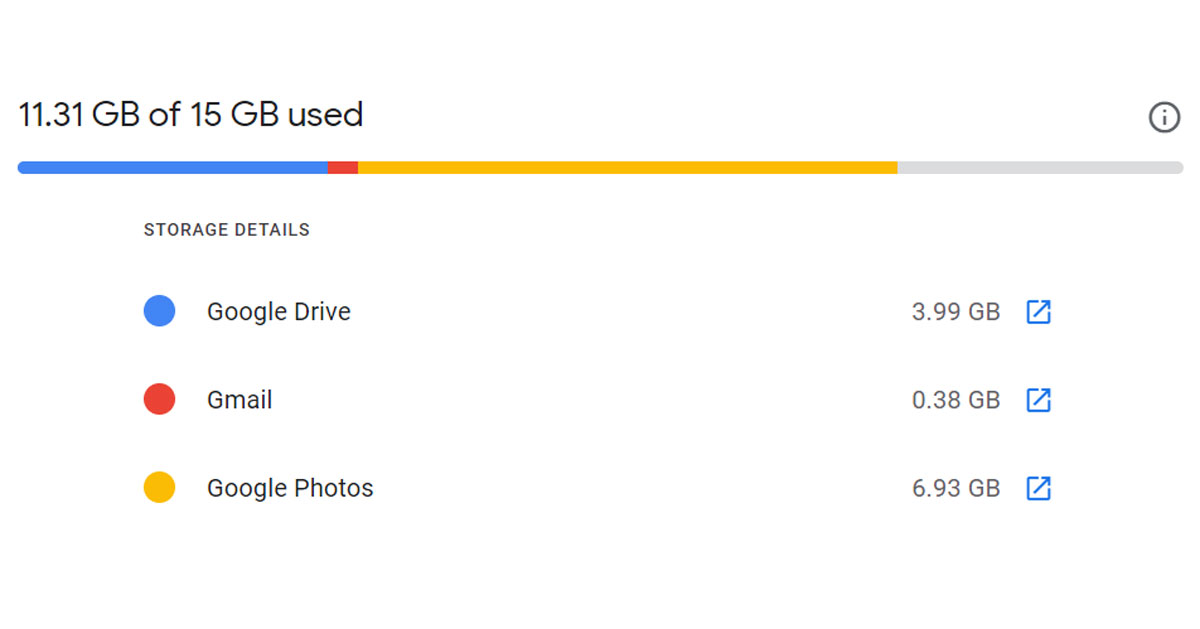 So if you have storage issues with Gmail, then chances are that the photos app is the culprit here. Just turn off the automatic backup option and delete some photos and videos.
The same is the case with Google Drive, it also shares storage with the other two. So, if you have shared some large files on Google Drive with someone and you forgot to delete them, it’s the perfect time to delete those files and make some storage in your Gmail inbox.
So if you have storage issues with Gmail, then chances are that the photos app is the culprit here. Just turn off the automatic backup option and delete some photos and videos.
The same is the case with Google Drive, it also shares storage with the other two. So, if you have shared some large files on Google Drive with someone and you forgot to delete them, it’s the perfect time to delete those files and make some storage in your Gmail inbox.






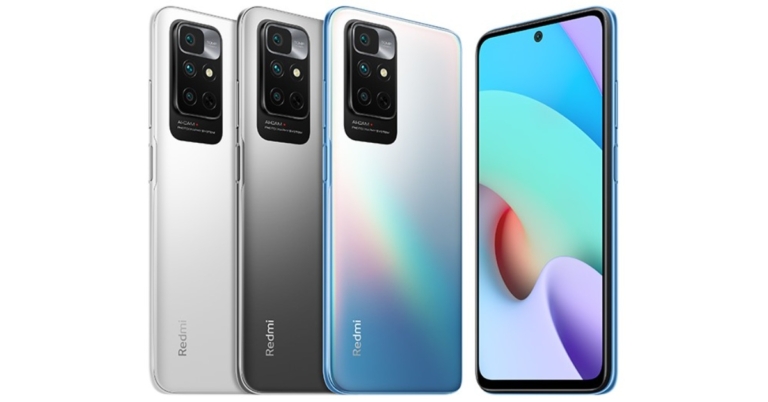




 2. Tap on Download and install.
 If your phone is in DND mode, you will not receive any notifications for incoming calls and messages. The idea of DND mode is to eliminate your phone as a distraction when you are focused on other tasks. This means all notifications will be muted and you won’t be able to receive any calls. Swipe down from the status bar and tap the tile for DND to turn it off.
 Restarting your phone resets all the background processes and when the phone is turned on again it starts all the apps from scratch and chances are the problem is solved. So this is a way in which you can fix being unable to answer calls on an Android phone.
 In some phones, you have to swipe left from the green button while in some you have to swipe upwards, and in some, you just need to tap on the green button. Check the right way to pick up calls on your phone.
 You should also try to remove and insert the SIM card on your phone. If this is a network issue then this way the issue can be resolved and you can pick up the call that you are receiving.
Read also: Best 9 ways to fix cannot install or update YouTube on Android
You should also try to remove and insert the SIM card on your phone. If this is a network issue then this way the issue can be resolved and you can pick up the call that you are receiving.
Read also: Best 9 ways to fix cannot install or update YouTube on Android
 You can turn on ‘Airplane Mode’ by opening the quick settings menu and taping on the plane icon.


 2. Tap on Download and install.
 3. Select Install now.

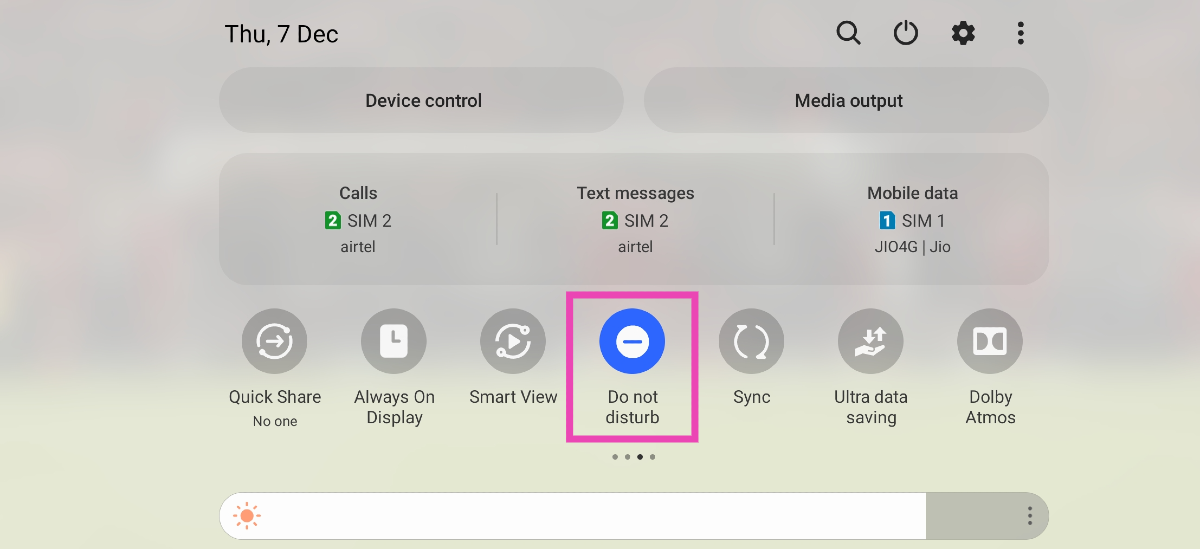 If your phone is in DND mode, you will not receive any notifications for incoming calls and messages. The idea of DND mode is to eliminate your phone as a distraction when you are focused on other tasks. This means all notifications will be muted and you won’t be able to receive any calls. Swipe down from the status bar and tap the tile for DND to turn it off.

 On the other hand, Ignore is the same as Mute but a notch above, you can call it an advance version of mute. Previously, the ignore option was only available for Messenger and not on other apps, but now you have the same option on Whatsapp also by the name of “Archived Chats”.
The mute option just stops all the notifications from a particular chat, it’s just like you have put your phone on silent mode for an individual chat. So you can mute those family Whatsapp groups and you won’t be annoyed by the bombarding of messages.
The Ignore option however removes that chat of that individual from the chat menu and puts the chat in a different section by the name “Message requests”.
On the other hand, Ignore is the same as Mute but a notch above, you can call it an advance version of mute. Previously, the ignore option was only available for Messenger and not on other apps, but now you have the same option on Whatsapp also by the name of “Archived Chats”.
The mute option just stops all the notifications from a particular chat, it’s just like you have put your phone on silent mode for an individual chat. So you can mute those family Whatsapp groups and you won’t be annoyed by the bombarding of messages.
The Ignore option however removes that chat of that individual from the chat menu and puts the chat in a different section by the name “Message requests”. This is very useful for those types of groups which you never wanted to be a part of but you had to, and now you are irritated by the notifications that it sends to your phone.



 The purifier also has three-speed settings: 7.5 W, 15 W, and 25 W for fans and three-speed heat settings: 1250 W, 1500 W, and 2200 W for heat, as well as three-level settings for light control and display, giving customers more control.
With its multifunctionality modes of purify, heat, and fan, the new Philips 3-in-1 purifier aims to keep homes healthy and comfortable. It has a 3-layer HEPA filtration system that removes 99.95 percent of particles as small as 0.003 m and purifies the air of viruses, allergens, and pollutants, and the clean air is distributed throughout the room by a 350° rotating fan. The 3 layer system includes a pre-filter, HEPA filter and activated carbon filter. The pre-filter captures large particles like dust and hair. Afterwards, the HEPA filter traps viruses, bacteria, household dust, pet dander, pollen, outdoor pollution, dust mite, mold spores, smoke and other allergens and pollutants. Finally, the activated carbon filter removes harmful gases and unpleasant odours.
The purifier also has three-speed settings: 7.5 W, 15 W, and 25 W for fans and three-speed heat settings: 1250 W, 1500 W, and 2200 W for heat, as well as three-level settings for light control and display, giving customers more control.
With its multifunctionality modes of purify, heat, and fan, the new Philips 3-in-1 purifier aims to keep homes healthy and comfortable. It has a 3-layer HEPA filtration system that removes 99.95 percent of particles as small as 0.003 m and purifies the air of viruses, allergens, and pollutants, and the clean air is distributed throughout the room by a 350° rotating fan. The 3 layer system includes a pre-filter, HEPA filter and activated carbon filter. The pre-filter captures large particles like dust and hair. Afterwards, the HEPA filter traps viruses, bacteria, household dust, pet dander, pollen, outdoor pollution, dust mite, mold spores, smoke and other allergens and pollutants. Finally, the activated carbon filter removes harmful gases and unpleasant odours.
 The air quality sensor on the Philips 2000 series 3-in-1 multifunctionality Air Purifier detects particles smaller than 2.5 micrometres in the air and displays them in real-time with numerical and colour-coded feedback. The colour bar indicates the high quality of indoor air, ranging from blue (good), purple (fair), pink (poor), and red (extremely poor) (very poor). Indoor temperature and a filter change alert are also displayed in real-time.
In terms of pricing the Philips 2000 series 3-in-1 multifunctionality Air Purifier has been launched at Rs 32,995. But it is now being made available at Rs 29,695. The Air Purifier can be bought through the company’s official website in the country.
For the latest gadget and tech news, and gadget reviews, follow us on Twitter, Facebook and Instagram. For newest tech & gadget videos subscribe to our YouTube Channel. You can also stay up to date using the Gadget Bridge Android App. You can find the latest car and bike news here.
The air quality sensor on the Philips 2000 series 3-in-1 multifunctionality Air Purifier detects particles smaller than 2.5 micrometres in the air and displays them in real-time with numerical and colour-coded feedback. The colour bar indicates the high quality of indoor air, ranging from blue (good), purple (fair), pink (poor), and red (extremely poor) (very poor). Indoor temperature and a filter change alert are also displayed in real-time.
In terms of pricing the Philips 2000 series 3-in-1 multifunctionality Air Purifier has been launched at Rs 32,995. But it is now being made available at Rs 29,695. The Air Purifier can be bought through the company’s official website in the country.
For the latest gadget and tech news, and gadget reviews, follow us on Twitter, Facebook and Instagram. For newest tech & gadget videos subscribe to our YouTube Channel. You can also stay up to date using the Gadget Bridge Android App. You can find the latest car and bike news here.  The purifier also has three-speed settings: 7.5 W, 15 W, and 25 W for fans and three-speed heat settings: 1250 W, 1500 W, and 2200 W for heat, as well as three-level settings for light control and display, giving customers more control.
With its multifunctionality modes of purify, heat, and fan, the new Philips 3-in-1 purifier aims to keep homes healthy and comfortable. It has a 3-layer HEPA filtration system that removes 99.95 percent of particles as small as 0.003 m and purifies the air of viruses, allergens, and pollutants, and the clean air is distributed throughout the room by a 350° rotating fan. The 3 layer system includes a pre-filter, HEPA filter and activated carbon filter. The pre-filter captures large particles like dust and hair. Afterwards, the HEPA filter traps viruses, bacteria, household dust, pet dander, pollen, outdoor pollution, dust mite, mold spores, smoke and other allergens and pollutants. Finally, the activated carbon filter removes harmful gases and unpleasant odours.
The purifier also has three-speed settings: 7.5 W, 15 W, and 25 W for fans and three-speed heat settings: 1250 W, 1500 W, and 2200 W for heat, as well as three-level settings for light control and display, giving customers more control.
With its multifunctionality modes of purify, heat, and fan, the new Philips 3-in-1 purifier aims to keep homes healthy and comfortable. It has a 3-layer HEPA filtration system that removes 99.95 percent of particles as small as 0.003 m and purifies the air of viruses, allergens, and pollutants, and the clean air is distributed throughout the room by a 350° rotating fan. The 3 layer system includes a pre-filter, HEPA filter and activated carbon filter. The pre-filter captures large particles like dust and hair. Afterwards, the HEPA filter traps viruses, bacteria, household dust, pet dander, pollen, outdoor pollution, dust mite, mold spores, smoke and other allergens and pollutants. Finally, the activated carbon filter removes harmful gases and unpleasant odours.
 The air quality sensor on the Philips 2000 series 3-in-1 multifunctionality Air Purifier detects particles smaller than 2.5 micrometres in the air and displays them in real-time with numerical and colour-coded feedback. The colour bar indicates the high quality of indoor air, ranging from blue (good), purple (fair), pink (poor), and red (extremely poor) (very poor). Indoor temperature and a filter change alert are also displayed in real-time.
In terms of pricing the Philips 2000 series 3-in-1 multifunctionality Air Purifier has been launched at Rs 32,995. But it is now being made available at Rs 29,695. The Air Purifier can be bought through the company’s official website in the country.
For the latest gadget and tech news, and gadget reviews, follow us on Twitter, Facebook and Instagram. For newest tech & gadget videos subscribe to our YouTube Channel. You can also stay up to date using the Gadget Bridge Android App. You can find the latest car and bike news here.
The air quality sensor on the Philips 2000 series 3-in-1 multifunctionality Air Purifier detects particles smaller than 2.5 micrometres in the air and displays them in real-time with numerical and colour-coded feedback. The colour bar indicates the high quality of indoor air, ranging from blue (good), purple (fair), pink (poor), and red (extremely poor) (very poor). Indoor temperature and a filter change alert are also displayed in real-time.
In terms of pricing the Philips 2000 series 3-in-1 multifunctionality Air Purifier has been launched at Rs 32,995. But it is now being made available at Rs 29,695. The Air Purifier can be bought through the company’s official website in the country.
For the latest gadget and tech news, and gadget reviews, follow us on Twitter, Facebook and Instagram. For newest tech & gadget videos subscribe to our YouTube Channel. You can also stay up to date using the Gadget Bridge Android App. You can find the latest car and bike news here. 
 Open it up and the first thing you will notice is the large keyboard, which has the side keys like TAB, Entre etc in a lighter shade of grey and the mid part is black in colour. With exception of the Escape key that is dressed in red. The keyboard is accompanied by a fairly large trackpad. Why is it so large? Because it also has the Asus virtual dial pad, which it has borrowed from its Pro Art sibling. There it was a physical dial, but here it is embedded within the trackpad. More about it in the ‘performance section’.
 As for the ports, users get 3 USB, 1 HDMI, 1 USB Type-C and 1 audio/mic port along with a microSD card slot. The speakers (powered by Harman Kardon) are bottom-firing which do have a decent output, but a bit louder would have been perfect.

 Moving to its screen, which is one of its best features, consumers get a 14-inch OLED NanoEdge screen that supports FHD+ resolution of 2,800×1,800 pixels. 600 nits of peak brightness with HDR support keeps everything lively on the screen. The text is crisp and the colours are very pleasing with super deep blacks. This is by far the finest display we have seen this year. We played a lot of things on the computer including Netflix shows, games like CS: Go and more. Everything on the screen looks very good. It did not give a chance to shame it even once.
 While the Asus branding can be seen under the screen, there is an HD camera present on top. This has a special shutter in front of it that slides in, this gives you that extra bit of relief that no one can see you even if they somehow get access to your laptop’s camera.
Also Read: Asus Vivobook Flip 14 (2021) review: 360 degree performance
While the Asus branding can be seen under the screen, there is an HD camera present on top. This has a special shutter in front of it that slides in, this gives you that extra bit of relief that no one can see you even if they somehow get access to your laptop’s camera.
Also Read: Asus Vivobook Flip 14 (2021) review: 360 degree performance
 We threw everything at the machine including the kitchen sink to find a chink in the armour, but we could not find even one. It can play games like Dota 2 and CS: Go at their respective highest settings. Can play games like Battlefield 2042 in high settings, which is quite good too. We were able to edit 4K resolution videos easily and it could render them out swiftly. Not once did we feel it was underpowered.
The dual-fan cooling system works exceptionally well, too. Yes, these are winter months, but still many in the bracket get hot, but not this one. It got warm only when it was rending 4K videos. Other than that even after 30 minutes of gaming, it was cool.
We threw everything at the machine including the kitchen sink to find a chink in the armour, but we could not find even one. It can play games like Dota 2 and CS: Go at their respective highest settings. Can play games like Battlefield 2042 in high settings, which is quite good too. We were able to edit 4K resolution videos easily and it could render them out swiftly. Not once did we feel it was underpowered.
The dual-fan cooling system works exceptionally well, too. Yes, these are winter months, but still many in the bracket get hot, but not this one. It got warm only when it was rending 4K videos. Other than that even after 30 minutes of gaming, it was cool.

 As you can see in this screenshot, WhatsApp is redesigning the interface in preparation for a future update in order to make it more compact and modern, while also organising the available space: the new redesign will look nice, especially when placing group voice calls.
Despite the fact that the screenshot was taken on WhatsApp for iOS, the same redesign is planned for a future update of WhatsApp beta for Android. All we have to do now is wait for a future update that will allow beta testers to test out the new interface.
WhatsApp is also testing out new visual feature indicators for end-to-end encryption on WhatsApp beta for Android and iOS. As we already know that the chats and calls are end-to-end encrypted. But the team will bring indicators in the Status and Calls section, claiming that your status updates, personal and group calls are always end-to-end encrypted, and this will never change. The same notice will be added to WhatsApp’s Chats section, and a new update for WhatsApp for Android will support the same feature at a later date.
As you can see in this screenshot, WhatsApp is redesigning the interface in preparation for a future update in order to make it more compact and modern, while also organising the available space: the new redesign will look nice, especially when placing group voice calls.
Despite the fact that the screenshot was taken on WhatsApp for iOS, the same redesign is planned for a future update of WhatsApp beta for Android. All we have to do now is wait for a future update that will allow beta testers to test out the new interface.
WhatsApp is also testing out new visual feature indicators for end-to-end encryption on WhatsApp beta for Android and iOS. As we already know that the chats and calls are end-to-end encrypted. But the team will bring indicators in the Status and Calls section, claiming that your status updates, personal and group calls are always end-to-end encrypted, and this will never change. The same notice will be added to WhatsApp’s Chats section, and a new update for WhatsApp for Android will support the same feature at a later date.
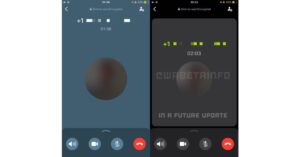 As you can see in this screenshot, WhatsApp is redesigning the interface in preparation for a future update in order to make it more compact and modern, while also organising the available space: the new redesign will look nice, especially when placing group voice calls.
Despite the fact that the screenshot was taken on WhatsApp for iOS, the same redesign is planned for a future update of WhatsApp beta for Android. All we have to do now is wait for a future update that will allow beta testers to test out the new interface.
WhatsApp is also testing out new visual feature indicators for end-to-end encryption on WhatsApp beta for Android and iOS. As we already know that the chats and calls are end-to-end encrypted. But the team will bring indicators in the Status and Calls section, claiming that your status updates, personal and group calls are always end-to-end encrypted, and this will never change. The same notice will be added to WhatsApp’s Chats section, and a new update for WhatsApp for Android will support the same feature at a later date.
As you can see in this screenshot, WhatsApp is redesigning the interface in preparation for a future update in order to make it more compact and modern, while also organising the available space: the new redesign will look nice, especially when placing group voice calls.
Despite the fact that the screenshot was taken on WhatsApp for iOS, the same redesign is planned for a future update of WhatsApp beta for Android. All we have to do now is wait for a future update that will allow beta testers to test out the new interface.
WhatsApp is also testing out new visual feature indicators for end-to-end encryption on WhatsApp beta for Android and iOS. As we already know that the chats and calls are end-to-end encrypted. But the team will bring indicators in the Status and Calls section, claiming that your status updates, personal and group calls are always end-to-end encrypted, and this will never change. The same notice will be added to WhatsApp’s Chats section, and a new update for WhatsApp for Android will support the same feature at a later date.


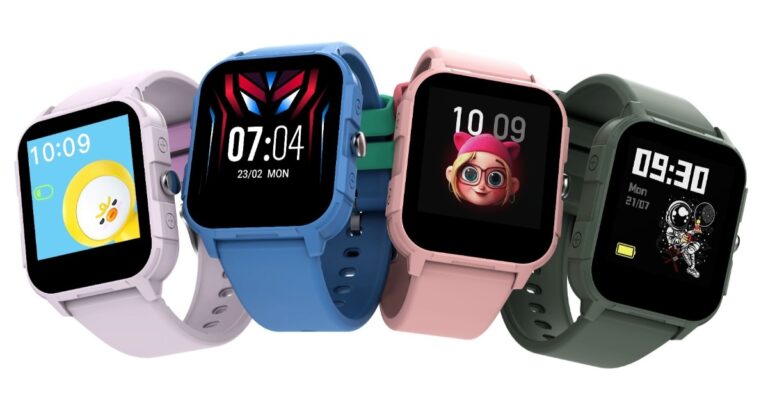
 The Inbase Urban Fab Smartwatch includes four games: 2048, Candy Crush, Maze, and Fly a Plane. Because the Urban Fab Teen has an IP68 rating and is water-resistant, their gaming sessions can continue uninterrupted even if they spill cola or juice.
The smartwatch for kids also has a variety of health features, such as heart rate monitoring, sleep tracking, walking and running, and so on, so you can monitor your child’s health without having to take them to the doctor. The watch runs for 7 days with normal, regular working time and 14 days in standby mode.
In addition to this, a child lock feature is included to ensure that your children do not misuse the smartwatch. This means you can use a password to secure the watch.
The Inbase Urban Fab Smartwatch includes four games: 2048, Candy Crush, Maze, and Fly a Plane. Because the Urban Fab Teen has an IP68 rating and is water-resistant, their gaming sessions can continue uninterrupted even if they spill cola or juice.
The smartwatch for kids also has a variety of health features, such as heart rate monitoring, sleep tracking, walking and running, and so on, so you can monitor your child’s health without having to take them to the doctor. The watch runs for 7 days with normal, regular working time and 14 days in standby mode.
In addition to this, a child lock feature is included to ensure that your children do not misuse the smartwatch. This means you can use a password to secure the watch.
 The Inbase Urban Fab Smartwatch includes four games: 2048, Candy Crush, Maze, and Fly a Plane. Because the Urban Fab Teen has an IP68 rating and is water-resistant, their gaming sessions can continue uninterrupted even if they spill cola or juice.
The smartwatch for kids also has a variety of health features, such as heart rate monitoring, sleep tracking, walking and running, and so on, so you can monitor your child’s health without having to take them to the doctor. The watch runs for 7 days with normal, regular working time and 14 days in standby mode.
In addition to this, a child lock feature is included to ensure that your children do not misuse the smartwatch. This means you can use a password to secure the watch.
The Inbase Urban Fab Smartwatch includes four games: 2048, Candy Crush, Maze, and Fly a Plane. Because the Urban Fab Teen has an IP68 rating and is water-resistant, their gaming sessions can continue uninterrupted even if they spill cola or juice.
The smartwatch for kids also has a variety of health features, such as heart rate monitoring, sleep tracking, walking and running, and so on, so you can monitor your child’s health without having to take them to the doctor. The watch runs for 7 days with normal, regular working time and 14 days in standby mode.
In addition to this, a child lock feature is included to ensure that your children do not misuse the smartwatch. This means you can use a password to secure the watch.
 Step 3: Turn on the toggle switch for Show volume buttons and select their style.
 Step 4: Minimise the app. Use the volume controls on the screen to change the volume.

 Step 3: You will see a few volume sliders adjusting the volume of media, ringtone, notifications, and alarms, now you just need to adjust the volume and that’s it.
 This setting option might be different for every other OEM so in case you can not find this feature just search for sound and vibrations in the settings and you will see the option.
Read more: 7 best ways to fix alarm volume too high or low on iPhone
This setting option might be different for every other OEM so in case you can not find this feature just search for sound and vibrations in the settings and you will see the option.
Read more: 7 best ways to fix alarm volume too high or low on iPhone
 Step 3: Under accessibility, you will find the accessibility menu, tap on the option and enable shortcuts.
Step 4: Now you have an accessibility shortcut enabled on your phone. Use the shortcut to increase or decrease the volume of your Android smartphone.
Step 3: Under accessibility, you will find the accessibility menu, tap on the option and enable shortcuts.
Step 4: Now you have an accessibility shortcut enabled on your phone. Use the shortcut to increase or decrease the volume of your Android smartphone.
 Some wired headphones and Bluetooth earpieces/ear pods have dedicated volume buttons to pause, play, increase and decrease the volume. They also help in receiving and cancelling phone calls. So if you have one lying around you can use it to adjust the volume on your phone.
 Step 3: Turn on the toggle switch for Show volume buttons and select their style.
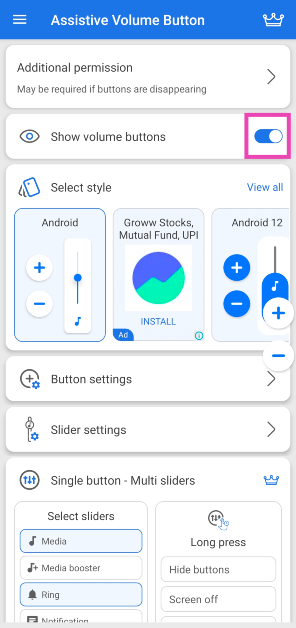 Step 4: Minimise the app. Use the volume controls on the screen to change the volume.
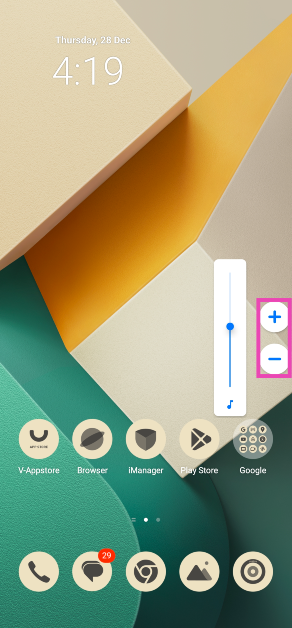
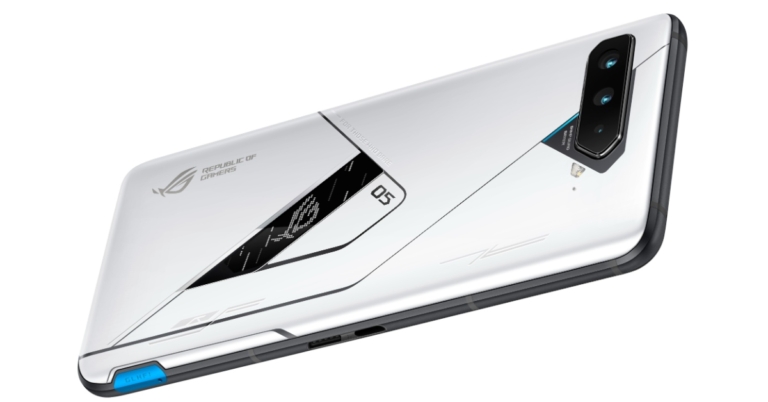



 You will find the link to the account at the top of the search result. The only downside of this hack is that you can only search for public accounts with this. If someone has locked their account then it will not show in search results.
Read also: Google Search rolling out a redesign for music-related searc
You will find the link to the account at the top of the search result. The only downside of this hack is that you can only search for public accounts with this. If someone has locked their account then it will not show in search results.
Read also: Google Search rolling out a redesign for music-related searc
 You will find the link to the account at the top of the search result. The only downside of this hack is that you can only search for public accounts with this. If someone has locked their account then it will not show in search results.
Read also: Google Search rolling out a redesign for music-related searc
You will find the link to the account at the top of the search result. The only downside of this hack is that you can only search for public accounts with this. If someone has locked their account then it will not show in search results.
Read also: Google Search rolling out a redesign for music-related searc
 You can visit Social Searcher by clicking here.
 Pipl search engine is another social search engine that allows users to find accounts in a more efficient manner. The search engine asks for the name of the account and the location of the person as well, which helps in finding the right person that you were looking for. So if you want to find someone who has a very common name, then you can add the location to it and you will be able to get the correct account.
You can check out pipl search engine here.
Read also: How to change the default search engine in Google Chrome?
If you also know of any more ways to search Facebook without account or logging in then do let us know below in the comments section.
For the latest gadget and tech news, and gadget reviews, follow us on Twitter, Facebook and Instagram. For newest tech & gadget videos subscribe to our YouTube Channel. You can also stay up to date using the Gadget Bridge Android App. You can find the latest car and bike news here.
Pipl search engine is another social search engine that allows users to find accounts in a more efficient manner. The search engine asks for the name of the account and the location of the person as well, which helps in finding the right person that you were looking for. So if you want to find someone who has a very common name, then you can add the location to it and you will be able to get the correct account.
You can check out pipl search engine here.
Read also: How to change the default search engine in Google Chrome?
If you also know of any more ways to search Facebook without account or logging in then do let us know below in the comments section.
For the latest gadget and tech news, and gadget reviews, follow us on Twitter, Facebook and Instagram. For newest tech & gadget videos subscribe to our YouTube Channel. You can also stay up to date using the Gadget Bridge Android App. You can find the latest car and bike news here. 

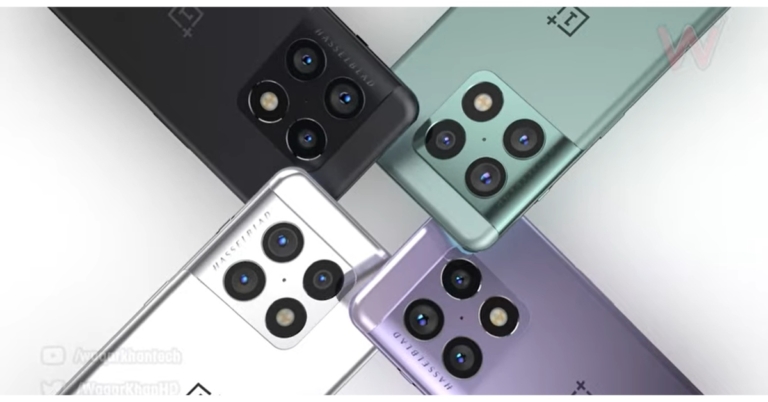


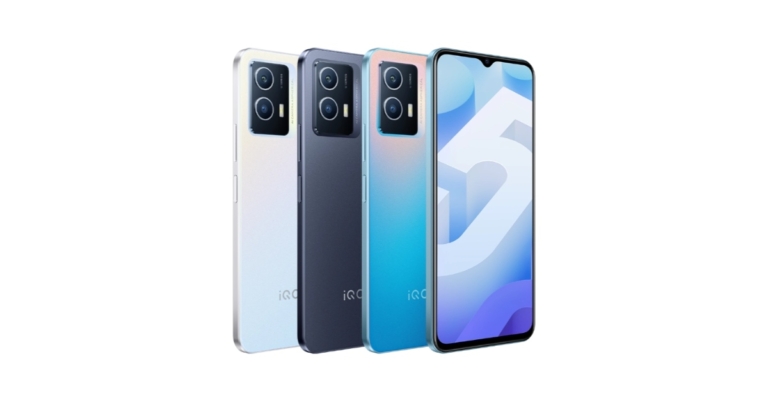



 So ideally you should always try to keep the battery between 20%-90% to maximise the lifespan of the battery and hence increase the life of your smartphone.
Read also: Here is what you may have to face when you choose not to accept
So ideally you should always try to keep the battery between 20%-90% to maximise the lifespan of the battery and hence increase the life of your smartphone.
Read also: Here is what you may have to face when you choose not to accept
 Keeping extra apps takes up space in your smartphone and it also uses the processing power of the device, resulting in poor battery life and performance. So, you should uninstall all the unnecessary apps on your phone that are taking up space.
 Updates bring fixes to problems your phone or any app might have and on top of that, you get to experience some new features. Keeping your phone always up to date will help it to last longer.
These were some of the habits that are reducing the life of your smartphone. Change these habits and you should be able to spend more time with your favourite tool that you own.
Read also: Best Health and Fitness Apps 2021
For the latest gadget and tech news, and gadget reviews, follow us on Twitter, Facebook and Instagram. For newest tech & gadget videos subscribe to our YouTube Channel. You can also stay up to date using the Gadget Bridge Android App. You can find the latest car and bike news here.
Updates bring fixes to problems your phone or any app might have and on top of that, you get to experience some new features. Keeping your phone always up to date will help it to last longer.
These were some of the habits that are reducing the life of your smartphone. Change these habits and you should be able to spend more time with your favourite tool that you own.
Read also: Best Health and Fitness Apps 2021
For the latest gadget and tech news, and gadget reviews, follow us on Twitter, Facebook and Instagram. For newest tech & gadget videos subscribe to our YouTube Channel. You can also stay up to date using the Gadget Bridge Android App. You can find the latest car and bike news here. 