In This Article
Asus TUF Dash F15 gaming laptop review: Design and Display
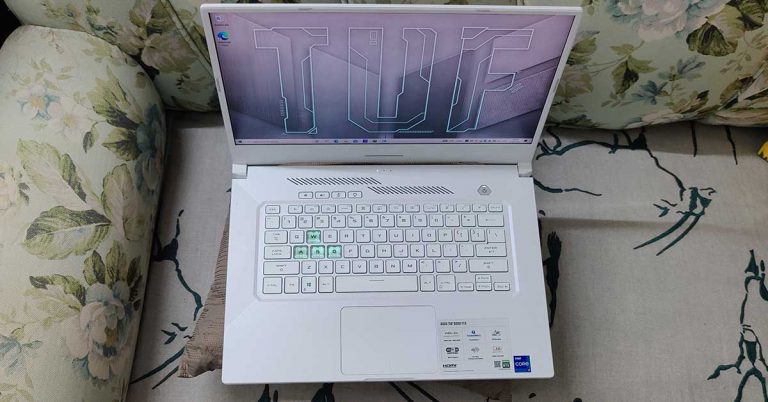
We are sure the engineers and designers at Asus are locked in a room to bring out the best of both worlds. Asus TUF Dash F15 gaming laptop is a very good-looking device, which every gamer would love to own. We got our hands on the white version of the laptop and even though it can catch those dark ugly smudges, we could not stop drooling over it. Upfront you get an ultra-thin 15.6-inch anti-glare display with a 240Hz refresh rate. It supports full-HD graphics, too. The lower part has a large keyboard without NUMPAD. Here the WASD keys are transparent which the FPS gamers would love. The keyboard is backlit and has a couple of extra multimedia keys along with the diamond-shaped power button on top. The trackpad is also decently large and does not come in the way when typing.
 The top of the lid has the large TUF branding in a matte white finish with grey lines. The right side of the Asus TUF Dash F15 gaming laptop has two USB 3.2 ports, while the left side has another USB port, one 3.5mm audio jack, one HDMI, Ethernet and one thunderbolt port. The power input is also placed here. An array of microphones can also be found on the laptop, however, there is no webcam on the device. So that sums up the design, now let’s move on.

 The display is by far one of the best we have seen on an Asus laptop. The brightness is great and games like DOTA 2 or CS: Go can be played with ease at 120+ frames per second. We watched a lot of movies on the Asus TUF Dash F15 gaming laptop, plus some Netflix shows in HD and the laptop did not disappoint us. The sound compliments the screen, but we wanted a little more thump from it.
Asus TUF Dash F15 gaming laptop review: Performance
Let’s quickly talk about the tech specifications first. The Asus TUF Dash F15 gaming laptop we reviewed had the Intel Core i7 version that supports 3.3 GHz. But this is just a quad core CPU, which is not super best for high-end gaming, but does get the job done on medium to high settings with the NVIDIA 3070RTX GPU for most games. The above is coupled with 16GB RAM, 8GB of which is soldered on the motherboard and 8GB is removable. Most super-thin gaming laptops (this one is 19.9mm thin) like these come with soldered RAM, which has its own pros and cons. Pro is the thinness of the notebook and the con is if it gets ruined, you need to replace the motherboard. Users also get 1TB NVMe PCIe 3.0 SSD. Windows 10 Home is the native OS on the Asus TUF Dash F15 gaming laptop. We would have appreciated the Pro version.
The laptop also has Wi-Fi 6 and Bluetooth 5.1. Overall, the laptop performed really well and we loved working on it. It does get hot rather quickly when gaming, but the system fans do a good job of keeping it cool. But for prolonged gaming, you would need to keep the AC in the room turned on.
Moving to its battery life, the Asus TUF Dash F15 gaming laptop lasts for Over 12.5 hours when watching FHD movies or YouTube videos. But it drops down considerably when you are gaming. This is why it is recommended to keep the charger connected when you are slaying your enemies on screen. Also, that will kick in the discreet GPU unit. The laptop supports fast charging too. It can charge up to 50% in 30 minutes.
The above is coupled with 16GB RAM, 8GB of which is soldered on the motherboard and 8GB is removable. Most super-thin gaming laptops (this one is 19.9mm thin) like these come with soldered RAM, which has its own pros and cons. Pro is the thinness of the notebook and the con is if it gets ruined, you need to replace the motherboard. Users also get 1TB NVMe PCIe 3.0 SSD. Windows 10 Home is the native OS on the Asus TUF Dash F15 gaming laptop. We would have appreciated the Pro version.
The laptop also has Wi-Fi 6 and Bluetooth 5.1. Overall, the laptop performed really well and we loved working on it. It does get hot rather quickly when gaming, but the system fans do a good job of keeping it cool. But for prolonged gaming, you would need to keep the AC in the room turned on.
Moving to its battery life, the Asus TUF Dash F15 gaming laptop lasts for Over 12.5 hours when watching FHD movies or YouTube videos. But it drops down considerably when you are gaming. This is why it is recommended to keep the charger connected when you are slaying your enemies on screen. Also, that will kick in the discreet GPU unit. The laptop supports fast charging too. It can charge up to 50% in 30 minutes.




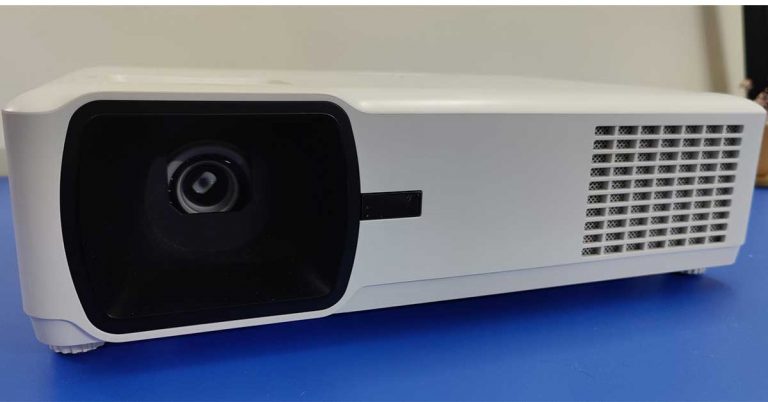
 The functions are fairly simple and with the supplied IR remote and well-placed buttons on top of the projector you can access all the features with ease. There are a lot of ports placed behind the ViewSonic LS00WE projector. These include a couple of HDMI ports, 1 Ethernet port, USB, Video-in and audio in and out ports. We connected the laptop to the projector via HDMI and the results were good. More about it in the performance section.
 The manual zoom knob is also given on the top, which also works well and is not flimsy at all. Users can zoom 1.2X optically using it. A 10W speaker is also part of the ViewSonic LS600WE projector, which is given at the back of the projector. It is not super loud but is decent for small to medium rooms. In case you want higher sound, you can connect external speakers.
ViewSonic LS600WE projector review: Performance
Now on to the fun part. The ViewSonic LS600WE
The manual zoom knob is also given on the top, which also works well and is not flimsy at all. Users can zoom 1.2X optically using it. A 10W speaker is also part of the ViewSonic LS600WE projector, which is given at the back of the projector. It is not super loud but is decent for small to medium rooms. In case you want higher sound, you can connect external speakers.
ViewSonic LS600WE projector review: Performance
Now on to the fun part. The ViewSonic LS600WE  The projector consumes 270watts when working and just 0.5W when in standby mode. ViewSonic LS600WE projector supports screen sizes from 30-300 inches. That is an A+ in our books as you can enjoy sporting events and movies on an extremely large screen. Overall, we loved what this neat device had to project.
Verdict
At Rs 1,49,000 the ViewSonic LS600WE projector is a decent buy for home users and businesses, as it does not have any moving parts. It is also dust resistant and considering our homes and offices are very dusty, the projector will last longer. A worthy buy if you can afford it.
Pros:
Good look
Excellent colour reproduction
A good amount of ports
Cons:
Some might find it expensive
No 4K support
For the latest
The projector consumes 270watts when working and just 0.5W when in standby mode. ViewSonic LS600WE projector supports screen sizes from 30-300 inches. That is an A+ in our books as you can enjoy sporting events and movies on an extremely large screen. Overall, we loved what this neat device had to project.
Verdict
At Rs 1,49,000 the ViewSonic LS600WE projector is a decent buy for home users and businesses, as it does not have any moving parts. It is also dust resistant and considering our homes and offices are very dusty, the projector will last longer. A worthy buy if you can afford it.
Pros:
Good look
Excellent colour reproduction
A good amount of ports
Cons:
Some might find it expensive
No 4K support
For the latest 



 Redmi Note 10T 5G specification





 Boult Audio Freepods Pro truly wireless earbuds tech specs