The Chinese smartphone company Vivo today announced the launch of its new 5G smartphone in the Indian market. The company has expanded its Y-Series lineup with the launch of the Vivo Y75 5G. The phone comes equipped with Dimensity 700 SOC and is powered by a 5,000mAh battery. The phone also features a triple rear camera set up that includes a 50MP primary lens and a 16MP selfie camera.
In This Article
Vivo Y75 5G price in India and sale details
Vivo Y75 5G has been launched in a single 8GB RAM with a 128GB storage model. The device is priced at Rs 21,990 and will be offered in two colour options of Starlight Black and Glowing Galaxy. The smartphone is scheduled to go on sale from January 27 via Vivo India E-store and across all partner retail stores.
Vivo Y75 5G tech specifications
Vivo Y75 5G features a 6.58-inch full-HD+ IPS LCD display with 1,080×2,408 pixels of resolution. The additional Eye Protection Mode filters out the harmful blue light for a more comfortable viewing experience. The smartphone operates on Funtouch OS 12 on top of Android 12. The device is powered by a 7nm octa-core MediaTek Dimensity 700 SoC runs at a clock rate as high as 2.2 GHz. It will be offered with 8GB of RAM with 128GB of internal storage that can be expanded up to 1TB using a microSD card. The extended RAM of 4GB guarantees smooth app switching. Multi Turbo 5.0 raises data connectivity, system processing speed, and power-saving performance to an entirely new level, even after extended use.The Vivo Y75 5G has a triple rear camera arrangement consisting of a 50-megapixel main camera with an f/1.8 aperture. Furthermore, there is a 2-megapixel macro camera with an f/2.0 aperture lens and a 2-megapixel depth sensor with f/2.0 aperture. The smartphone also has a 16-megapixel front-facing camera with an f/2.0 aperture. It is also supported by a wide range of features, including Personalised Portrait Mode, Super HDR, and Super Night Mode providing a delightful photography experience.The Vivo Y75 5G supports 5G, 4G LTE, Bluetooth 5.1, Wi-Fi, GPS, and FM radio connectivity. The phone is powered by a 5,000mAh battery and enables 18W rapid charging through USB Type-C. Furthermore, the newly redesigned Ultra Game Mode 2.0 provides a more sensual and better gaming experience.
For the latest gadget and tech news, and gadget reviews, follow us on Twitter, Facebook and Instagram. For newest tech & gadget videos subscribe to our YouTube Channel. You can also stay up to date using the Gadget Bridge Android App. You can find the latest car and bike news here.
As attention span lowers, the importance of reels goes higher. Reels are our one-stop entertainment point. They are short, fun and sometimes knowledgeable. But here’s a deal! If you’re dead set on keeping your online game strong or breaking into the influencer scene with a bang, it’s time to call a reputable Social Media Management Company. They’ll take charge and deliver seamless results because you might miss those points that they don’t! However, some reels remain quite close to us, we may be inspired, entertained or might just find it cute. There are plenty of creators out there who get inspired from IG reels and want to use a small part of it in their own Reels. In most cases, downloading IG Reels is a task. Thus, these are the top 4 ways to download Instagram reels with sound in case you want to save them and watch them later.
In This Article
Download from stories
Downloading Instagram Reels using Stories is a simple yet useful hack that does not require any additional app or tool usage. Just follow these steps and you will be able to download in no time:
Play the Instagram Reels video and then tap the Send/Receive icon.
Click on the “Add Reel to your Story” button.
A preview screen will appear. To download the video in full-screen mode, pinch-and-zoom to fill the screen.
When finished, tap the “Download” button at the top. That’s all! The video will be saved in the gallery of your phone.
Download on iPhone app
Another way of the top 4 ways is to download Instagram reels with sound in case you want to save them and watch them later is through InstDown. First, go to the Apple App Store and download the app InstDown for Instagram Reels.Open the app and configure it, granting it access to your images and media. Return to Instagram and select the Reels video you want to download. Then select the three-dot icon > Copy Link.Return to InstDown, and the Instagram link you copied will be automatically pasted.Tap Generate! The video will be saved to the Photos folder on your device. And that’s it.Read Also:Audio not working in Instagram reels and Instagram stories? Top 5 ways to fix it.
Third-party sites
Launch the Instagram Reel that you want to save. Select the Copy link by tapping the three-dot icon.
Now, on your Android or iPhone or laptop, open instafinsta.com or any other Reel downloading website in a browser. If you aren’t taken directly to it, go to the Reels tab on the website.
Paste the link copied in step 1 into the website’s available box and click the Download button.
Wait for the video to be processed by the website. When you’re finished, you’ll see a preview of the video beneath the box where you pasted the link. Scroll to the bottom and click the Download button. There will be a confirmation pop-up. Permission is granted to download the video.
If the video begins to play simply touch and hold it. Another Download video button will appear. Tap it to activate it. If that doesn’t work, hold down the Download button from the above step and select Download linked file from the menu.On Android, you can access them via the Gallery app as well as File Explorer. On an iPhone, open the Files app and navigate to the Downloads folder.
Other top websites to download Instagram reels from are
The is by far the simplest and fastest way to download reels with audio. Screen recording is another option for saving or downloading Instagram Reels with sound on an Android or iOS phone. Because screen recorders are built into almost all Android smartphones and iPhones.To begin, launch the screen recorder and press record on your phone (if it asks you to record sound, enable that too) and play the reel video you want to save.Simply stop recording the screen and save the video to your phone’s gallery.
So, these were the top 4 ways to download Instagram reels with sound safely, easily and immediately. if you use any other way to download Instagram Reels with sound then do let us know below in the comments section.
For the latest gadget and tech news, and gadget reviews, follow us on Twitter, Facebook and Instagram. For the newest tech & gadget, videos subscribe to our YouTube Channel. You can also stay up to date using the Gadget Bridge Android App. You can find the latest car and bike news here.
As the world is becoming more and more tech-savvy, we are moving from cash to credits. Gen-Z finds online payments and cards far more convenient than cash payments. One of the main benefits that come with online payments is cashback. So, these are the Top 4 credit card bill payment apps that give the best cash backs in India.
In This Article
Cred
Cred is a PCI DSS v3.2.1 certified company, which implies that they have implemented the appropriate industry-standard security procedures mandated by PCI. You must have a solid credit score in order to register on Cred. Cred is considered one of the best credit card payment apps because it offers you cashback with each transaction.The cashback is in the form of cred coins and can also include mystery cashbacks. Cred allows you to connect your Gmail account to automatically download credit card statements, but if you’re concerned about your privacy, you should avoid using the service. There’s also a one-of-a-kind referral programme that pays you up to 750 dollars for referring friends. Make your account here.
Paytm
Paytm offers you a dynamic platform where you can not only pay your credit card bills but a lot of other bills as well. Although the cashback is not really huge. You can acquire various scratch cards after some bill payments.However, there is no discreet cashback system.1 lakh cashback points equal to 1,000 Rupees and every card transaction will earn you a minimum of 1,000 points (as claimed). You can pay via wallet, UPI or card. Use Paytm here.Read Also: Paytm Payments Bank and MoneyGram have teamed up to offer international remittances directly to Paytm Wallet
Phone pe
Another one of the top 4 credit card bill payment apps that give the best cash backs in India is Phonepe has included a section for paying credit card bills. As a reward, Phonepe offers scratch cards. Once you pay the bill, the feature will be enabled.When compared to other UPI apps, it is the best app for UPI payments. PhonePe allows you to pay your credit card bill with UPI or a debit card. As said, it rewards you with a scratch card that contains a mystery cashback or other offers. Make your Phone Pe account here.
Amazon
Amazon is considered one of the best shopping apps. But now it has also become a leading player in the banking race. From UPIs to wallet payments, you can now pay your credit card bill through Amazon. Unlike cred, Amazon occasionally offers cashback and rewards. When it comes to paying your credit card bills, we believe this is another viable option. You can take advantage of special offers from time to time. Amazon does have a downside, which is that you cannot use your Amazon Pay balance to pay your credit card bill. Explore Amazon Pay here.Thus, to make your lives easier and enjoyable, these were our top picks for your credit card bill payment apps that will fetch you some extra money when paying them online.
For the latest gadget and tech news, and gadget reviews, follow us on Twitter, Facebook and Instagram. For the newest tech & gadget, videos subscribe to our YouTube Channel. You can also stay up to date using the Gadget Bridge Android App. You can find the latest car and bike news here.
Apple is celebrating Black History Month by highlighting Black entrepreneurship and innovation, as well as elevating Black voices, through a range of unique content and curated collections available across Apple Music, Fitness+, and the Podcasts app.Apple is urging its customers to commemorate Black History Month by focusing on Black health and wellbeing through a range of exclusive content and collections available across devices and services. Users can listen to special episodes of “The Message” on Apple Music 1 that discuss Black creators’ contributions to culture and the importance of health and wellness in the community throughout the month; join new workouts that honour Black History Month on Apple Fitness+; discover new podcasts from Black creators about health, well-being, culture, and history on Apple Podcasts; and much more. Customers may also get the new Apple Watch Black Unity Braided Solo Loop and a limited edition Unity Lights watch face starting today.
In This Article
Apple Music
Apple Music is launching a campaign centred on the concept “Music is Healing.” Special editions of “The Message” on Apple Music will feature in-depth interviews with Ebro Darden, Apple Music’s head of Hip-Hop and R&B editorial, as well as guests. The radio episodes will contextualise current challenges concerning Black health and wellbeing, as well as showcase the historical perspective, successes, and contributions made by Black people to culture. On the Apple Music Browse, Genre, and Radio sites, music programming will emphasise varied interpretations of the themes Movement, Black Love, Celebration, and Peace. Full-day takeovers of music videos inspired by the campaign will also be available on Apple Music TV.
Apple Fitness+
Apple Fitness+ will feature new workouts that pay tribute to Black History Month, including playlists dedicated to celebrating Black artists, as well as two new meditations led by Fitness+ trainers Christian Howard and JoAnna Hardy, focused on the themes of gratitude and awareness, to assist users on their health and well-being journey. Throughout the month, users will also have the option to participate in the Unity Challenge and receive a limited-edition reward by closing their Move ring seven days in a row. To commemorate Black History Month, the inclusive Fitness+ trainer team will also wear the new Apple Watch Unity Braided Solo Loop.As per the company on February 7, Fitness+ will also release a new episode of Time to Walk, a motivating audio experience on Apple Watch, including activist Ay Tometi, one of the Black Lives Matter movement’s founders. On this stroll, she discusses how the death of Trayvon Martin fueled her advocacy and how changing her name changed her view on life. On the same day, Time to Run, an audio running experience designed to help users become more consistent and better runners, will debut a new episode starring Fitness+ trainer Cory Wharton-Malcolm as he coaches runners through Atlanta, Georgia, including notable sights such as the Martin Luther King, Jr. Birth Home and the International Civil Rights Walk of Fame.
Apple Podcasts
Listeners on Apple Podcasts may browse a large collection of episodes by Black producers concerning Black history, health, well-being, and culture. Apple Podcasts has also asked seven transformative, would-be podcasting history-makers to share their highly praised work alongside episodes that inspire them. Listeners in the United States can explore curated collections from bestselling author, professor, and social commentator Roxane Gay; food writer, entrepreneur, and founder of Whetstone Magazine Stephen Satterfield; former basketball player and sports TV personality Jay Williams; artist and poet Morgan Harper Nichols; Glory Edim, founder of the Well-Read Black Girl reading network; and Rashad Bilal and Troubadour, founders of the financial literacy and lifestyle brand Earn Your Leisure.
Apple Watch
Apple is releasing a limited-edition Apple Watch Black Unity Braided Solo Loop and matching Unity Lights watch face inspired by Afrofuturism, an ideology that analyses the Black experience through a narrative of science, technology, and self-empowerment. As part of this launch, Apple is partnering with groups focused on increasing inclusion in science and technology for communities of colour through its Racial Equity and Justice Initiative.The Apple Watch Black Unity Braided Solo Loop and matching Unity Lights watch face, designed by members and friends of Apple’s Black creative community to commemorate Black history and culture, honour generations of Black people across the African diaspora. This design represents a shared belief in the need for a more equal society. The Pan-African flag’s brilliant red and green hues emerge as scattered light over the black ribbon.The band is supplemented with the Unity Lights watch face, which was created with 2D ray tracing, a technology never previously used for a watch face. Each pixel on the screen represents light and shadow falling over it, and the movement of the clock hands reveals and hides the light dynamically throughout the day. The Unity Lights watch face may be adjusted to have a full screen or circular dial, as well as black and white options, tick markings, and up to four complexities. Users of the iPhone, iPad, and Mac may also express their support for Black History Month by downloading Afrofuturism-inspired wallpapers from apple.com.
Pricing and Availability
The Black Unity Braided Solo Loop is now available for Rs 7,900 on apple.com/in.The Black Unity Braided Solo Loop is compatible with Apple Watch Series 4 and later.The Unity Lights watch face will be released today for Apple Watch Series 4 and later running watchOS 8.3, as well as iPhone 6s and later running iOS 15.2.Customers may download the watch face via apple.com/in or from the Apple Watch Black Unity package, which will have App Clip capability.
For the latest gadget and tech news, and gadget reviews, follow us on Twitter, Facebook and Instagram. For newest tech & gadget videos subscribe to our YouTube Channel. You can also stay up to date using the Gadget Bridge Android App. You can find the latest car and bike news here.
Our mail accounts are as private as our bank accounts now. From personal information to professional contracts, we have everything stored on our mail accounts. However, there might be some instances when our phones might get lost or stolen. In that case, how should we protect our data without using our Android phone? Here are the Top 3 ways to log out of an Android smartphone remotely.
Another way to log out of your Android smartphone remotely and securely is from the Google Dashboard. The process is very easy, just follow these steps:
You’ll need a laptop with an internet connection as well as your Google account credentials to do this.
Go to myaccount.google.com in your browser.
Now enter your Google account credentials and log in.
Go to the Security tab and select Manage devices from Your devices section.
Select Sign-out from the three-dot menu on the specified device.
After you confirm your choice, your account will be logged out of that device.
Use Find My Device
Google’s Find My Device is used to track your lost Android device. You can also use it to remotely sign out of your device. Here’s how.
Step 1: Go to google.com/android/find.
Step 2:Sign in using the account that is registered on your smartphone.
Step 3:Select your device from the list.
Step 4: Click on Secure Device.
Step 5: Add a recovery message and your phone number in case someone finds your phone and wants to reach out to you to return it.
You will be logged out of the device.
Frequently Asked Questions (FAQs)
How do I log out of my Google Account on my Android device?
To log out of your Google Account on your phone, simply go to Settings>Accounts and back up>Manage account and select your Google Account. Hit Remove Account to log out of it.
How do I remotely log out of my Google Account on my Android device?
You can remove any device’s access to your Google Account by using the Google Dashboard on your PC. Switch to the Security tab and select the devices you want to remove.
How do I log out of my phone in case I lose it?
To log out of a phone you cannot retrieve, go to Google’s Find My Device webpage, log in using your registered account, and hit Secure Device on the side menu.
Netflix India announced the beginning of Take Ten, a short film workshop and competition. This is designed to discover and support next-generation filmmakers from varied backgrounds in India. As per the company, a total of filmmakers will be given a chance to participate in the workshops led by the greatest in the creative business. They will also get the opportunity to further produce a short film that will be aired on Netflix’s India YouTube channel.Film critic, author and Film Companion editor, Anupama Chopra, who is leading the program said, “Take Ten is a celebration of storytelling and originality. The workshop and competition aim to be inclusive and showcase the diverse voices behind and in front of the camera in India. I hope Take Ten enables artists across India to find their footing and soar.”Take Ten is supported by the Netflix Fund for Creative Equity, which has committed $100 million per year for the next five years to preparing underrepresented groups for success in the television and film industries through initiatives all across the world. As per the video streaming platform, Ten filmmakers will be given an exciting opportunity to attend workshops by the best in the creative industry and then to make a fully-funded short film with a $10,000 grant. The films will be showcased on Netflix’s India YouTube channel.
How to apply for Netflix India Take Ten competition?
Anyone in India is eligible to apply to the Netflix India Take Ten competition. There are only two requirements to join: Applicants must be Indian citizens or residents above the age of 18.Registration will begin on February 7, 2022, at www.taketen.in. To compete, candidates must submit a video of up to two minutes in length based on the theme ‘My India,’ taken on their phone and representing who they are as a filmmaker. The applications will be examined in the order they are received.Shortlisted participants will not only have the opportunity to bring their short film idea to life, but they will also have the opportunity to learn about writing, direction, production, and other skills from award-winning talent such as Abhishek Chaubey, Hansal Mehta, Juhi Chaturvedi, Neeraj Ghaywan, and Guneet Monga.
For the latest gadget and tech news, and gadget reviews, follow us on Twitter, Facebook and Instagram. For newest tech & gadget videos subscribe to our YouTube Channel. You can also stay up to date using the Gadget Bridge Android App. You can find the latest car and bike news here.
Sony introduced the WF-1000XM4 wireless earphones last year in the international market and we were hoping they will launch these in the Indian market at that time only. But as the saying goes, better late than never. The Sony WF-1000XM4 finally have made it to the Indian shore and they are making quite a wonderful clamour. We got our hands on them and this is the Sony WF-1000XM4 review, which you need to read first before buying them.
In This Article
Sony WF-1000XM4 review: Design
It is good to see that Sony has taken a step towards producing eco-friendly products, at least when it comes to its packaging. The Sony WF-1000XM4 comes in a biodegradable box and 100% of it is made of cardboard or paper with zero use of plastics. Break the box apart and you get to see a USB Type-C charging cable, extra ear tips for different ear cavities and a few user manuals. Dig in further and you finally get your hands on the black matt finish charging case, which also hold the twin audio earplugs.
The charging case can be charged using the USB Type-C port placed on the back or can be wireless charged as it is Qi-enabled, too. The case is not very heavy (39 grams, without the earphones) and the matt black finish works well for it. Sony’s branding can also be found on the top of the lid in gold. Flip it open and you will see a LED lamp light up the front. The Sony WF-1000XM4 earphones are neatly tucked inside. Yes, the containment has magnets in each pocket to snap the earplugs in place.
Talking about the Sony WF-1000XM4 built and quality, these are built with absolute perfection. The Sony craftsmanship can be seen here. The Sony branding (again in gold) can be found on each earpiece with a hint of extra bronzish gold on them. Both have charging points underneath along with sensors that pause the music as soon one of them is pulled out of the ear. They also have black matt finish and overall weigh 14 grams (7gm each).
Sony WF-1000XM4 review: Performance
The fit of the Sony WF-1000XM4 is very comfortable and you can easily take them out for a run. Moreover, they have IPX4 water resistance rating, so light splashes of water, sweat or rain will not ruin them. If the Bluetooth is turned on, on your smartphone, the device detects the Sony WF-1000XM4 easily and one can pair them at the press of a button.
It will ask you to download the Sony Headphones Connect app, which has all the options to enhance the experience like equalisers and 360 reality audio. This feature clicks images of your ear and the AI analyses your ear type to make the sound experience better.
The resonance of the Sony WF-1000XM4 is exceptional. We loved every bit of it. 7 grams is light on the ear and with active noise cancellation (ANC) the sound is brilliant. A tap on the left earplug you can turn down ANC and another one can turn it back up. Tapping or double-tapping on the right one, you can play/pause or go to the next track. If you tap and hold the left one, you can hear the ambient sounds too. So, some of the neat features from its bigger sibling do drop into this one as well.ANC
The bass of the Sony WF-1000XM4 is very good. You can also control it using the equaliser settings in the app. The vocals are clear and we heard quite a few songs on Spotify using them, and it kept impressing us with each soundtrack we played. We saw a Netflix show also with them and the latency is fine here. The movie and show watching experience was superb. But we would not fully recommend them to professional gamers, as there is a bit of lag from shot to sound. So, yes pro PUBG players, you are better off buying its elder (wired) familial.
Google Assistant as well as Alexa AI is supported, and one can easily command them using the multiple MICS that come on the Sony WF-1000XM4. Coming to its battery life, Sony claims you can get 8 hours of music playback with ANC on, which is about right. We got 7.5 hours of music playback time. Over that, with 5 mins of battery charge, users can get 60 minutes of playback time. The charging case in total supplies another 16 hours of charge to the earphones.
Verdict
Though late in the country the Sony WF-1000XM4 are still super impressive. At Rs 24,990, they do end up at the premium end of things. But we do not consider this as a flaw. These audio earphones are of the best right now, which money can buy. It has good looks, ANC, long battery life and most of all great sound, which each one of us audiophiles are looking for. If you have the money, buy it, buy it right now. Else, save up and then buy, you will not be disappointed.
Samsung, a significant South Korean business, has officially confirmed the first flagship smartphone launch of the year, which will take place on February 9. Leaving all conjecture and leaks aside, the company declared that Galaxy Unpacked 2022 would be held almost entirely online due to the pandemic situation. However, it is still unknown what will be introduced at the Galaxy Unpacked Event, but the firm is likely to follow tradition and announce the Samsung Galaxy S22 series, which will feature three new models.Samsung has officially revealed that this year’s Galaxy Unpacked event will take place on February 9. The event is being held virtually owing to the Covid-19 epidemic. The programme is scheduled to begin at 10:00 a.m. ET and 8:30 pm IST. The business originally previewed the event last week but did not provide a precise date for the upcoming Unpacked. The event will be streamed live on Samsung Newsroom, Samsung.com.Like we said before the company has not yet confirmed the upcoming devices but it is most likely to reveal the Galaxy S22 and Galaxy Tab S8 series. Based on rumours and leaks the flagship smartphone series may include Galaxy S22, Galaxy S22+, and Galaxy S22 Ultra.
In This Article
Samsung Galaxy S22 series specifications expected
According to leaks and rumours Galaxy S22 is likely to come with a 6.1-inch Dynamic AMOLED 2X display with 2340x1080px of resolution. The screen is said to offer a variable refresh rate of up to 120Hz with 1500 nits of peak brightness and Gorilla Glass Victus protection. The device is slated to be powered by a 4nm octa-core Exynos 2200 chip paired with AMD RDNA 2 graphics.Image Courtesy: GSMArenaAs per the report the Galaxy S22 will have a 50MP (f/1.8, OIS, 1/1.56) camera “, 1.0 µm) primary sensor behind the wide 23mm lens, a 12MP (f/2.2, 1/2.55″, 1.44 µm) ultrawide unit, and a 10MP (f/2.4, OIS, 1/3.94″, 1.0 µm) 69mm 3x telephoto lens. A 10MP (f/2.2, 1/3.24”, 1.22 µm) selfie camera with 25mm focal length.In addition to this, the phone will equip a 3,700mAh battery with uncertain wired and wireless charging capabilities. Wi-Fi 6, Bluetooth 5.2, and 5G connectivity are all available.Whereas Galaxy S22+ will boast a larger 6.6 inch Dynamic AMOLED 2X with 2340x1080px of resolution and a variable refresh rate of up to 120Hz. It will support a maximum brightness of 1,750 nits along with Gorilla Glass Victus protection. The battery capacity will be 4,500mAh. While the cameras and chipset configuration are identical to those of the Galaxy S22.Image Courtesy: GSMArenaLastly, the Galaxy S22 Ultra will have a 6.8-inch Dynamic AMOLED 2X display with a resolution of 3,080×1,440px, a more advanced 1-120Hz variable refresh rate. It will have a maximum brightness of 1750 nits and Gorilla Glass Victus protection.Image Courtesy: GSMArenaThe Galaxy S22 Ultra is reported to feature much-enhanced processing. There’s a primary 108MP f/1.8 camera with OIS, as well as a secondary 12MP camera (f/2.2, 1/2.55″, 1.4 µm, AF) 13mm ultrawide and two 10MP telephoto cameras: a 69mm 3x (f/2.4, 1/3.52″, 1.12 µm, OIS) and a 230mm 10x (f/4.9, 1/3.52″, 1.12 µm, OIS) periscope lens.The selfie camera will include a 40MP (1/2.8″, 0.7µm, AF) with a focal length of 25mm f2.2 lens.The Galaxy S22 Ultra will include a 5,000mAh battery and a built-in S Pen.
Samsung Galaxy S22 series pricing expected
According to Verge, a trustworthy leaker named Roland Quandt has released prospective European pricing data for the next Samsung Galaxy S22 series. According to rumours, the vanilla S22 will cost 849€ (about Rs 71,644), the S22 Plus will cost 1,049€ (roughly Rs 88521), and the basic S22 Ultra will cost 1,249€. (Rs 1,05,375). While all of the series’ lowest models might have 8GB of RAM and 128GB of storage. The S22 and S22 Plus feature a more expensive version with 8GB of RAM and 128GB of storage, while the S22 Ultra has two more levels with 12GB of RAM and either 256GB or 512GB of storage.Samsung has begun taking pre-orders for the next Galaxy S22 smartphone series, ahead of the phones’ release date. Customers in the United States may already pre-order the upcoming Samsung flagship smartphone and Galaxy Tab S8 before they are officially released. Consumers who pre-order the smartphone will receive $50, which amounts to Rs 7,000, to be used to purchase other items on the company’s website, according to Samsung’s website.
For the latest gadget and tech news, and gadget reviews, follow us on Twitter, Facebook and Instagram. For newest tech & gadget videos subscribe to our YouTube Channel. You can also stay up to date using the Gadget Bridge Android App. You can find the latest car and bike news here.
Get ready to participate in the 27 January 2022 Amazon Quiz, as it is live on its mobile platform. In today’s quiz participants have a chance to win Rs 10,000 Amazon Pay Balance by answering all the questions correctly. The quiz can be played every day from 12 AM to 11:59.The daily quiz conducted by the company brings an opportunity for the customers to win exciting prizes. Every day Amazon brings a fresh set of questions for its customers that contains five easy questions. The questionnaire consists of five questions related to general knowledge and current affairs.The participants need to answer all the questions correctly and their names will be selected for a lucky draw. The winner will be announced at the end of the month. Amazon quiz brings an opportunity for its customers to win Amazon Pay Balance ranging from Rs 10,000 to Rs 50,000. Only app users are eligible to participate in the Quiz as it is not accessible on the web platform. Check Out 27 January 2022 Amazon Quiz Answers.
In This Article
27 January 2022 Amazon Quiz Answers
Question 1: Which item owned by Marie Antoinette was sold at an auction in 2021 for an unexpected $8.2 million?
Answer: Diamond bracelet
Question 2: Which airport in India is being developed by Yamuna International Airport Private Limited?
Answer: Noida International Airport
Question 3: Which cricketer recently became the first Indian player to score a century and a half-century on Test debut?
Answer: Shreyas Iyer
Question 4: Which country’s flag is seen in the picture?
Answer: Vietnam
Question 5: Which continent does this country belong in?
Google Docs users may now add text watermarks to every page of their document. The search giant Google has introduced the app with the new watermark tool so that the users will be able to put watermarks like DRAFT and CONFIDENTIAL to their document. This feature will be available to all Google Workspace users and G Suite Basic and Business customers. It will make the document identified before being shared. A Watermark option has been included in the Insert menu where they can change the font, size and personalise it as per their requirement.As per the latest Blog post Text Watermarks can be added to the Google Docs document. Whether dealing with Microsoft Word documents, text watermarks are also kept when importing or exporting your files.As per the company Text watermarks will appear on every page of your document, making them helpful for signalling file status, such as “Confidential” or “Draft,” before distributing more widely, regardless of the programme you use. You may add an image watermark or pictures above or behind the text in addition to text watermarks.This tool will be accessible to all Google Workspace customers, as well as G Suite Basic and Business customers. A gradual rollout has begun and is likely to be available to everyone in a few weeks. To recall Google Docs received an image watermark feature in September last year letting users put an image watermark on every page of a Google Docs document.
Here is how to insert an image watermark in your document
To the right, click Image Options to launch a panel.
Text Wrapping should be set to ‘In front of text’.
Adjustments may be found by scrolling down to Image Options.
Change the image’s transparency.
Adjust the brightness and contrast as needed; make sure your image is appropriately adjusted otherwise it will be impossible to move out from behind the letters.
Make your documents read-only and share them with others.
Micromax today announced the launch of a new smartphone in the Indian market. The company has introduced Micromax In Note 2 as its latest budget smartphone. It features a 30W quick charging technology as well as an AMOLED display. The phone also has a fingerprint sensor on the side and is powered by the MediaTek Helio G95 SoC. With these specifications, the smartphone stands against the likes of the Moto G31. So let’s compare the two smartphones to see what the differences are and which would be a better choice for you if you’re wanting to upgrade or get a new Android phone.
Micromax In Note 2: A quad camera set up that includes a 48-megapixel main sensor, 5-megapixel ultra-wide lens, a 2-megapixel macro sensor and a 2-megapixel depth sensorMoto G31: A triple rear camera set-up that includes a 50MP primary sensor with f/1.8 aperture, an 8MP ultra-wide-angle lens with f/2.2 aperture and 118 degrees of FoV as well as a 2MP macro lens with f/2.4 aperture.
Selfie camera
Micromax In Note 2: 16-megapixel selfie cameraMoto G31: A 13MP sensor
RAM and Storage
Micromax In Note 2: 4GB RAM with a 64GB storageMoto G31: 4GB RAM with 64GB storage and 6GB of RAM and 128GB of internal storage
Battery
Micromax In Note 2: 5,000mAh batteryMoto G31: 5,000mAh battery
Operating system
Micromax In Note 2: Android 11Moto G31: Android 11
Looking at the specifications there isn’t much of a difference between the two phones. When comparing both smartphones, the chipset plays a significant influence. We cannot dispute that the MediaTek Helio G95 is superior to the G85. It has a quicker CPU speed, which makes downloading and uploading a breeze. In terms of gameplay and performance, G95 clearly outperforms G85. However, both the smartphones carry a 5,000mAh battery Micromax also takes the lead in this aspect. It offers 30W fast charging, while the Motorola handset only supports 20W charging. In terms of photography, however, the Moto G31 outperforms the Micromax In Note 2.So, if you’re searching for a low-cost smartphone with an excellent camera, the Moto G31 is the way to go. Otherwise, the Micromax In Note 2 is a better option.
For the latest gadget and tech news, and gadget reviews, follow us on Twitter, Facebook and Instagram. For newest tech & gadget videos subscribe to our YouTube Channel. You can also stay up to date using the Gadget Bridge Android App. You can find the latest car and bike news here.
Oppo Reno 7 series India launch has been announced. The launch is scheduled to happen on February 4 in India. The company took to Twitter and its official website to confirm the launch date. The upcoming smartphone series is likely to include Oppo Reno 7 5G, Oppo Reno 7 Pro 5G, and Oppo Reno 7 SE 5G. All three phones were released in China last year. In addition, a special homepage for the new collection has been built by the firm.The Oppo Reno 7 series will be available in India on February 4, according to a tweet from Oppo India. The Chinese business has not published any specifics but information regarding the Oppo phone lineup, including pricing and availability, has leaked on the Internet ahead of the official announcement.Last month, the Oppo Reno 7 series pricing in India was leaked. The pricing of the Oppo Reno 7 5G is expected to range between Rs 28,000 to Rs 31,000. The Oppo Reno 7 Pro 5G, on the other hand, is estimated to cost between Rs 41,000 and Rs 43,000 in India. Along with the smartphone, the Chinese smartphone company is expected to debut its latest TWS headphones as well as the Oppo Watch Free. The TWS earphones are expected to be priced at about Rs 9,990.
In This Article
Oppo Reno 7 5G specifications
The Oppo Reno 7 5G comes with a 6.42-inch FHD+ AMOLED display. The aspect ratio is set to 20:9, and the refresh rate is set to 90Hz. The Snapdragon 778G chipset powers the phone, which runs ColorOS 12 on top of Android 11. The device has a triple rear camera system that includes a 64MP primary sensor, an 8MP wide-angle lens, and a 2MP macro lens. A 32MP front-facing camera is also included for selfies and video chats. There’s also a 4,500mAh battery with a 60W flash charge capacity.
Oppo Reno 7 Pro 5G specifications
The Oppo Reno 7 Pro 5G features a slightly bigger 6.55-inch display than the Reno 7 Pro 5G. Within is a MediaTek Dimensity 1200 Max chipset. There is also a triple rear camera system with a 50MP primary sensor, a wide-angle lens, and a 2MP macro lens. The selfie camera is the same as its older sibling. There is also a 4,500mAh dual-cell battery with 65W quick-charging capability. A 32MP front-facing camera is also included for selfies and video chats. There’s also a 4,500mAh battery with a 60W flash charge.
For the latest gadget and tech news, and gadget reviews, follow us on Twitter, Facebook and Instagram. For newest tech & gadget videos subscribe to our YouTube Channel. You can also stay up to date using the Gadget Bridge Android App. You can find the latest car and bike news here.
The Micromax In Note 2 has finally arrived in India. The device is a successor of In Note 1, which was announced in India in 2020. The smartphone includes 30W rapid charging technology and an AMOLED display. The smartphone also features a fingerprint sensor on the side and is powered by MediaTek Helio G95 SoC Read on to know the specification of the handset.
In This Article
Micromax In Note 2 price on India and availability details
The Micromax In Note 2 has been launched in a single 4GB RAM with a 64GB storage variant in India. The price of the phone is set at Rs 13,490. The device is available in two colours: black and brown. It will be available for purchase on Flipkart and via the company’s official website beginning at 12 p.m. on January 30. For a limited time, the Micromax In Note 2 will be offered at a reduced price of Rs. 12,490, as an introductory offer.
Micromax In Note 2 tech specs
The Micromax In Note 2 has a 6.43-inch full-HD+ AMOLED display offering 1,080×2,400 pixels of resolution. The screen comes with a 20:9 aspect ratio and 550 nits of peak brightness. A Gorilla Glass shield protects the display as well. The smartphone operates on Android 11 and it is powered by MediaTek Helio G95 SoC and 4GB of RAM with 64GB of internal storage. It can be expanded through a microSD card to up to 256GB. The phone also sports a side-mounted fingerprint sensor.Furthermore, the phone features a quad back camera configuration, emphasised by a 48-megapixel main sensor, for photography. In addition to this, there is a 5-megapixel ultra-wide lens, a 2-megapixel macro sensor and a 2-megapixel depth sensor. The Micromax In Note 2 has a 16-megapixel selfie camera sensor on the front for selfies and video calling.Micromax has included a 5,000mAh battery with 30W fast charging capabilities. As per the company, with a compatible charger, the battery will be charged to 50 percent in 25 minutes. Connectivity options include 4G LTE, Wi-Fi 802.11ac, Bluetooth v5.0, GPS/ A-GPS, USB Type-C, and a 3.5mm headphone port.
For the latest gadget and tech news, and gadget reviews, follow us on Twitter, Facebook and Instagram. For newest tech & gadget videos subscribe to our YouTube Channel. You can also stay up to date using the Gadget Bridge Android App. You can find the latest car and bike news here.
AOC India has announced the launch of new G2 series gaming monitors in the Indian market. The new range of gaming monitors includes 3 models 24G2U/BK, 24G2E5, and G2490VX. These displays are for professional gamers looking for a diverse gaming experience. All the AOC G2 Series gaming monitors feature VA and IPS display with HDR mode, Adaptive-Sync Anti-tearing Technology, 144Hz refresh rate, 1ms reaction time.The AOC has introduced new models to its G2 Gaming Series. The AOC 24G2U/BK, 24G2E5 and G2490VX are priced at Rs 28,990, Rs 22,990 and Rs 21,990 respectively. During the current Republic Day Sale, monitors will be offered at low rates in all major online and offline businesses.
In This Article
AOC 24G2U/BK gaming monitor
The AOC 24G2U/BK gaming monitor has a 23.8-inch IPS display that provides 178/178-degree viewing angles. It has AMD FreeSync Premium, a 144Hz frame rate, and a 1ms reaction time, and it improves colour and clarity for various gaming genres. It also has an HDR mode, which converts non-HDR video into HDR-like graphics using three separate approaches. This model includes an adjustable stand that lets you tilt, twist, swivel, and alter the height for a more comfortable and ergonomic viewing experience.
AOC 24G2E5 gaming monitor
AOC 24G2E5 gaming monitor also features a 23.8-inch IPS display. It has a Dial Point feature that is specifically built for first-person shooting (FPS) with AMD FreeSync. It features a 1ms reaction time, which decreases blurring or ghosting. This model also has an HDR mode, which converts non-HDR video into HDR-like graphics using three separate algorithms. It has four filtering modes: reading, online surfing, multimedia, and office.
AOC G2490VX gaming monitor
G2490VX 23.8-inch display with VA panel offers Full HD 1920 x 1080 resolution. This VA panel gaming monitor has handy features such as a 144Hz refresh rate, a 1ms response time, and Adaptive-Sync Anti-Tearing technology. It also has an HDR mode, which converts non-HDR video into HDR-like graphics using three separate approaches. The HDR mode assures HDR visuals while watching a standard quality video by improving RGBCMY colour (through better saturation and range), increasing dynamic contrast for clarity and image sharpness.This also has Flicker-free technology for a more pleasant gaming experience. The AOC flicker-free technology employs a DC (Direct Current) lighting system to deliver a more pleasant and healthy viewing experience, reducing the impacts of eye fatigue during working hours.
For the latest gadget and tech news, and gadget reviews, follow us on Twitter, Facebook and Instagram. For newest tech & gadget videos subscribe to our YouTube Channel. You can also stay up to date using the Gadget Bridge Android App. You can find the latest car and bike news here.
Xiaomi, the Chinese smartphone manufacturer, appears to be on a launch binge since the start of the new year. Following the Xiaomi 11i HyperCharge 5G, Xiaomi 11i 5G and Xiaomi 11T Pro launch the company is preparing to launch a new smartphone under its Redmi sub-brand. As announced by the company, the Redmi Note 11S India launch is set for February 9. The official Redmi India account on Twitter tweeted a teaser to herald the smartphone’s debut. Recently, the phone was identified on a variety of certification websites.The Redmi Note 11S has been circulating for quite some time. The company began teasing the Redmi Note 11S’s arrival in the nation earlier this month. As per the launch teasers, the device will come with a quad rear camera configuration. In addition to this, the renderings suggested that the phone will include a hole-punch camera in the centre of the front.The latest teaser as released by the company suggests a quad rear camera arrangement with a 108-megapixel main sensor on the back of the Redmi Note 11S. The teaser also implies that the upcoming Redmi phone would have a 4G connection and may not feature 5G capabilities.Xiaomi has not revealed many details regarding the smartphone, however, depending on the country, the Redmi Note 11S is believed to be powered by a MediaTek SoC and include a 108-megapixel Samsung HM2 camera or a 64-megapixel OmniVision OV6480 as the primary camera. An 8-megapixel Sony IMX355 ultra-wide camera and a 2-megapixel OV02A macro camera will also be included in the future device.As previously said, the phone was discovered on multiple certification websites. At the same time, the gadget received BIS certification, indicating an impending introduction. The model number of the phone was 220111TSI. A smartphone with the model number 2201117SG was also spotted on the NTBC certification authority website, which also listed the Redmi Note 11S. On the EEC certification page, another smartphone with the model numbers 2201117TG, 2201117TY, and 2201117SY was discovered.
For the latest gadget and tech news, and gadget reviews, follow us on Twitter, Facebook and Instagram. For newest tech & gadget videos subscribe to our YouTube Channel. You can also stay up to date using the Gadget Bridge Android App. You can find the latest car and bike news here.
25 January 2022 Amazon Quiz has gone live on its mobile app platform. Customers from different parts of the country are participating in the daily quiz. The daily quiz is conducted by the company brings an opportunity for the customers to win exciting prizes. The quiz begins from 12 AM to 11:59 PM. In today’s quiz participants have a chance to win Rs 25,000 Amazon Pay Balance by answering all the questions correctly.Every day Amazon brings a fresh set of questions for its customers that contains five easy questions. Amazon quiz brings an opportunity for its customers to win Amazon Pay Balance ranging from Rs 1,000 to Rs 50,000. which consists of five questions related to general knowledge and current affairs.The participants need to answer all the questions correctly and their names will be selected for a lucky draw. The winner will be announced at the end of the month. One wrong answer could eliminate you from the quiz. If you manage to answer all the questions correctly you can stand a chance to win Rs 25,000 Amazon Pay Balance today. Only app users are eligible to participate in the Quiz. Check Out 25 January 2022 Amazon Quiz Answers.
In This Article
25 January 2022 Amazon Quiz Answers
Question 1: Former world leader F.W. de Klerk, who died Thursday at age 85, shared the 1993 Nobel Peace Prize with which other person?
Answer: Nelson Mandela
Question 2: A Guinness World Record for the largest orchestra was set by which country’s National System of Youth and Children’s Orchestra “El Sistema”?
Answer: Venezuela
Question 3: Which word has become Collins Dictionary’s word of the year for 2021?
Answer: NFT
Question 4: In which city would you find this clock?
Answer: Kolkata
Question 5: This tower exists in which Mediterranean city?
The Samsung Galaxy S22 series is set to launch next month as the company prepares to showcase its flagship smartphones for 2022. Samsung has also started teasing the device’s release and now it has begun taking pre-orders for the upcoming Galaxy S22 smartphone series ahead of the Galaxy Unpacked event in February. Not just that, the price details of the upcoming flagship has been leaked. The South Korean company plans to unveil the Samsung Galaxy S22, Galaxy S22+, and Galaxy S22 Ultra.Samsung has begun accepting pre-orders for the next Galaxy S22 smartphone series, ahead of the handsets’ release. Customers in the United States may already pre-order the next Samsung flagship smartphone and the next Galaxy Tab S8 even before they went official. According to Samsung’s website, consumers who pre-order the smartphone will receive $50 which translates to Rs 7,000 be used to purchase other things on the company’s website.According to a report by the Verge, Roland Quandt a credible leaker has revealed potential European price details for the forthcoming Samsung Galaxy S22 series. As per the leaks, the vanilla S22 price will start at 849€ which translates to Rs 71,644, the S22 Plus at 1,049€ (Rs 88521), and the basic S22 Ultra at 1,249€ (Rs 1,05,375). While all of the base versions in the series appear to feature 8GB of RAM and 128GB of storage. The regular S22 and S22 Plus have a higher-priced option with 8GB of RAM and 128GB of storage, while the S22 Ultra has two further tiers with 12GB of RAM and either 256GB or 512GB of storage.
Whoever said S22 series was to be cheaper, didn't think of Covid, parts shortages and inflation.
Samsung appears to have retained the prices from the previous S21 series, with the only exception being an identically priced S22 Ultra model with supposedly smaller RAM than its S21 predecessor.In terms of specifications depending on the location, the Samsung Galaxy S22 series is expected to be powered by a Snapdragon 8 Gen 1 or an Exynos 2200 processor. The handsets are believed to have up to 12GB of RAM and 512GB of storage, with the high-end Samsung Galaxy S22 Ultra, rumoured to include a built-in S Pen. The date of the forthcoming Galaxy Unpacked event has not been officially revealed by Samsung, but reports claim it will take place on February 8.
For the latest gadget and tech news, and gadget reviews, follow us on Twitter, Facebook and Instagram. For newest tech & gadget videos subscribe to our YouTube Channel. You can also stay up to date using the Gadget Bridge Android App. You can find the latest car and bike news here.
Vivo Y21A has officially launched in India. The device is the latest addition by the company to its popular Y-Series lineup. Last week the company also introduced Vivo Y21e in the country and now its successor has arrived in the market. The phone is powered by MediaTek Helio P22 SoC. The phone also comes equipped with a 5,000mAh battery and dual camera set up on its back.
In This Article
Vivo Y21A price in India and availability
The Vivo Y21A is already featured on Vivo India’s official website, but no pricing or availability information has been provided. But as per the listing, this budget offering will be available in only a single 4GB RAM with a 64GB storage option. We will update you on this after the information is received. The smartphone will come in two colour options Diamond Glow and Midnight Blue.
Vivo Y21A specifications
The Vivo Y21A is powered by Android 11 with Funtouch OS 11.1 on top. Under the hood, there is an octa-core MediaTek Helio P22 SoC, 4GB of RAM, and 64GB of internal storage. The device can also expand the RAM by 1GB by using free inbuilt storage. While the internal storage can be expanded using a microSD card. The budget handset features a 6.51-inch HD+ display with 720×1,600 pixels of resolution and a 20:9 aspect ratio.The Vivo Y21A has two rear cameras: a 13-megapixel main camera with an f/2.2 aperture lens and a 2-megapixel macro camera with an f/2.4 aperture. The smartphone has an 8-megapixel front-facing camera with an f/2.0 aperture lens.In terms of connectivity, the Vivo Y21A supports 4G LTE, Wi-Fi, Bluetooth 5, and GPS. An accelerometer, ambient light sensor, proximity sensor, e-compass, and virtual gyroscope are among the sensor options on the phone. The smartphone is powered by a 5,000mAh battery and supports 18W charging through USB Type-C.
For the latest gadget and tech news, and gadget reviews, follow us on Twitter, Facebook and Instagram. For newest tech & gadget videos subscribe to our YouTube Channel. You can also stay up to date using the Gadget Bridge Android App. You can find the latest car and bike news here.
Collaborative robots are transforming the manufacturing industry in the 21st century. Robots are a popular choice for manufacturing companies because of their flexibility and ease of use. The vehicle industry is one such industry that robots have revolutionized.
Robots are a middle ground between human work and traditional machines. Learn in this article the benefits they bring and how they give an edge to businesses and make them more efficient.
In This Article
What are Collaborative Robots in Automotive Manufacturing?
Robots are computer-controlled machines that perform specific tasks in a factory environment. Collaborative Robots (Cobots) are operable by human beings in a work cell, and they resemble human motion with their articulated arms and hands. Collaborative robots design lets them work alongside humans in the workplace using sensors and safety protocols and work without posing a threat. Automotive robots perform tasks considered dangerous for humans.
The latest robots use a suite of special sensors to navigate the factory and communicate with their human counterparts. The most impressive thing about automotive robots is that they can detect humans and stop or slow down instantly when they sense movement. Thus, they are much safer than traditional industrial robots that move very fast and don’t always know if they are in the path of humans.
How Collaborative robots Work in automotive manufacturing?
The automobile manufacturing industry integrates robots in almost every aspect of an automobile’s manufacture. Auto companies worldwide use collaborative automotive robots for many tasks like welding, painting, and assembly.
Automotive robots play a crucial role in the development of autonomous cars. These robots help in many ways within each stage of vehicle production—from designing and machining prototypes to assembling.
Welding
In welding, robots eliminate human error and increase quality by completing precise welds in a highly productive manner. The automotive robots accomplish these tasks by using cameras that provide visual inspection and sophisticated scanning technology that eliminates the possibility of a missed spot on the part that needs welding. As such, the combination allows the robot to use precise movements to mimic those made by an experienced welder with years of experience.
Painting
Robots now play a more significant role in painting tasks. Moreover, instead of having workers stand for long hours and work with harmful solvents to paint car parts, robots spray paint onto the parts at high speed. As a result, they produce better quality work while allowing the workers to focus on other tasks.
Automotive robots paint all kinds of automobiles and perform other tasks of the process, including sanding, buffing, and polishing. The tasks are dangerous to humans, but robots accomplish them faster without endangering workers’ lives.
Quality Inspection
Automotive robots are already playing a role in quality inspection thus, eliminating human error by detecting defects more efficiently than humans. In addition, advances in technology have made it possible for robots to perform their duties with precision. For example, infrared cameras can detect defects that are invisible to the human eye. These cameras send data on defects directly to a computer or mobile device. And when combined with machine learning software, this data can be used to teach robots how to detect different types of defects in the future.
Assembly
The assembly of cars or other vehicles typically involves attaching parts and components. Assembly is one step in a production line, and its tasks are organized by the type of vehicle or the part being worked on. The tools and machinery used for assembly are highly specialized, with some designed for specific tasks such as car doors, windshields, and several other tasks.
Benefits of Automotive Robots in Car Manufacturing
The use of automotive robots has been increasing in the manufacturing of vehicles in recent times. Here are some benefits of using industrial robots in car manufacturing.
Efficiency
Automotive robots increase efficiency in car manufacturing processes by performing multiple tasks at the same time. The application of such robots has helped major car companies in boosting efficiency.
Quality
Automotive Robots help improve the quality of vehicles by reducing opportunities for human errors. Robots detect and repair defects on car parts and help manufacturers ensure their customers receive high-quality products.
Safety
Automotive robots enhance safety when working around heavy machinery or other dangerous environments. The robot’s programming has increased awareness of potential threats that may prove fatal to humans, such as moving parts or molten metal.
Handle difficult and complex tasks
Robots eliminate repetitive stress injuries due to performing the same task repeatedly, which is a common problem in manufacturing facilities that use human labor. In addition, they handle more complex tasks than humans can and allow the employees to focus on specific tasks that need urgent attention.
There are robots for lifting both heavy and small components, hence the flexibility to work with different types of machinery and perform various tasks. Robots are strong and can lift heavy objects without hurting their back or hurting themselves in any way. If a human worker manually picks up each object and places it onto the conveyor belt, he would need several weeks to complete one task.
The Future of Automotive Robots
The auto industry is undergoing rapid changes. As the popularity of autonomous driving increases and the world becomes increasingly digitized, auto manufacturers are facing some challenges.
There are many exciting happenings in the world of robotics, particularly in the automotive industry. As a result, there’s a lot on the horizon for vehicle automation, from self-driving cars to robot valets.
Many are investing in new technologies to meet customer demands, including artificial intelligence (AI), machine learning (ML), computer vision, and deep learning. With the increasing demand for vehicles and the growing number of accidents, future robots will efficiently produce safer cars.
Final Submission
In the auto industry, robots help in different aspects of the manufacturing process. They play a crucial role in final assembly, working alongside human workers to produce car parts. They also prepare and paint vehicle bodies and weld pieces together.
Collaborative robots, also known as Cobots, are semi-autonomous, interactive robots designed to work side-by-side with human workers. Employing robots in automotive manufacturing is the best way to move the industry forward. As expected, the future robots would be social and appealing to humans.
Industrial robots apply throughout the world in the manufacturing of automobiles. Such robots can perform a variety of tasks, including welding, painting, riveting, and assembling. Automotive robots can be programmed to continuously handle a wide variety of tasks for extended periods without getting tired or fatigued. In addition to this, these robots can be easily supervised by an employee when necessary because they have built-in safety and warning devices.
For the latest gadget and tech news, and gadget reviews, follow us on Twitter, Facebook and Instagram. For newest tech & gadget videos subscribe to our YouTube Channel. You can also stay up to date using the Gadget Bridge Android App. You can find the latest car and bike news here.
24 January 2022 Amazon Quiz has gone live. Customers from different parts of the country are participating in the daily quiz. The quiz begins from 12 AM to 11:59 PM. Those participating in the quiz can win exciting prizes by answering all the questions correctly. Today participants have a chance to win Rs 20,000 Amazon Pay Balance.Amazon quiz brings an opportunity for its customers to win Amazon Pay Balance ranging from Rs 1,000 to Rs 50,000. The Quiz can be played from 12 AM to 11:59 PM. The e-commerce platform brings a fresh quiz on a daily basis which consists of five questions related to general knowledge and current affairs. The participants need to answer all the questions correctly and their names will be selected for a lucky draw. The winner will be announced at the end of the month.One wrong answer could eliminate you from the quiz. If you manage to answer all the questions correctly you can stand a chance to win Rs 20,000 Amazon Pay Balance today. Only app users are eligible to participate in the Quiz. Check Out 24 January 2022 Amazon Quiz Answers.
In This Article
24 January 2022 Amazon Quiz Answers
Question 1: In November 2021 more than 500 people in Egypt were attacked by which creatures during a period of heavy rain and flooding?
Answer: Scorpions
Question 2: The Kangxiwar Martyrs’ Cemetery is the highest cemetery located in which country?
Answer: China
Question 3: Which driver won the inaugural Qatar Grand Prix 2021?
Answer: Lewis Hamilton
Question 4: This is a sculpture made by which famous artist?
Answer: Pablo Picasso
Question 5: A shoe company that shares its name with this animal, was founded in which country?
Screenshots are like evidence for every person right now. They act as the ultimate proof. Not just evidence, but many of us use the feature to capture photos from paid photo editing apps and much more. However, with advancing technology, the restriction over the same increases. A lot of apps now have started to restrict the permission to take screenshots. Yet, whenever there is a restriction, there is also a loophole (jugaad), so here are some of the ways to take screenshots in restricted apps or the ones that don’t allow it.Read Also:CES 2024: AMD Ryzen 8000G desktop processor with dedicated AI neural processing unit announced
In This Article
Use Google Assistant to take screenshots in restricted apps
Most apps take the standard approach to blocking screenshots on their platforms — blocking the screenshot key combinations. So, the only thing you need to do is avoid these combinations to take a screenshot. The easiest way to go about this is by asking your phone’s voice assistant to take a screenshot. Simply say “Hey Google, take a screenshot”, and the job will be done.
Use scrcpy to take screenshots in restricted apps
Screen copy or ‘scrcpy‘ is a great tool for mirroring your phone’s display on your PC. If you have exhausted all options for taking a screenshot on your smartphone, you can take a screenshot of the app after mirroring it on your PC. Use the PrtScn key or the Snipping Tool to take a screenshot on your Windows PC. The best thing about using this option is that you can directly transfer the screenshot to your phone right away. Read this article to learn how to use scrcpy.
Use AZ Screen Recorder to take screenshots if an app doesn’t allow it
Another way to take screenshots on restricted apps is through AZ Recorder is a wonderful screen recording software that can also be used to take screenshots. The nicest part about this app is that it is completely free, with fewer annoying advertisements and no time limits.This screen recorder tool can also be used to take screenshots in password-protected apps. Follow the steps below to do so:Step 1: From the Play Store, download and install the AZ Screen Recorder.Step 2: Open AZ Screen Recorder and grant it the rights it needs.Step 3: On your screen, you’ll now see a floating button with numerous alternatives.Step 4: Open the Restricted app where the screenshot will be taken.Step 5: Select the Settings icon that looks like a toolbox from the floating button on your screen.Step 6: Select the Screenshot option from the drop-down menu and shut the drop-down menu.Step 7: A second floating button, a left-hand camera icon, will appear on your screen.Step 8: Tap the Allow button after clicking the Camera icon. It will take a screenshot and save it to your gallery. After tapping on the floating window that appears, you can preview/edit the screenshot.Read Also: How to take a screenshot in Google Chrome incognito mode
Taking a picture of your screen on a different phone
While the above two methods might not be compatible with iOS as they are with Android. Here’s a way you can take screenshots of a restricted app from Android and iOS. As long as you have a spare phone, this is arguably the simplest way to take a screenshot of a restricted app. Simply take a screenshot of the screen you wish to capture. To secure any important data from prying eyes, remember to erase the photo from the other phone.
Take a screenshot in Google Chrome’s Incognito Mode
Google Chrome has an experimental feature that lets you take a screenshot in its incognito mode. To enable this feature type chrome://flags in the address flag and hit Enter. Search for ‘Incognito’ and enable the ‘Incognito screenshot’ feature.
Read Also:4 Ways To Set an Animated GIF as a Wallpaper (2024)
Frequently Asked Questions (FAQs)
How do I take a screenshot in an app that doesn’t allow it?
To take a screenshot in a restricted app, cast your phone’s display to your PC using scrcpy and take a screenshot. You can also ask Google Assistant to take a screenshot.
Why can’t I take a screenshot on Netflix?
Netflix and other streaming platforms do not allow users to take screenshots or record the screen within the app because it is in direct violation of their copyright laws.
How do I take a screenshot in Chrome’s incognito mode?
To take a screenshot in incognito mode on Chrome, go to chrome://flags and turn on the ‘Incognito Screenshot’ feature.
Conclusion
So, these were some of the ways one can take a screenshot of those restricted apps. Some apps like PayTM do not allow you to take a screenshot by default, but let the user change their preference from app settings. You will find this feature on most financial apps but not streaming platforms.
Nowadays, uploading statuses has become a sign of creativity. The more innovative you get, the more followers you have. Thus, it has become quite necessary to add your tunes to your WhatsApp status as well. Today we bring you some of the best ways to add background music to your WhatsApp status. Follow the below hacks and you will be able to add your favourite tunes in no time to your WhatsApp statuses.
In This Article
Manually via the phone speaker
This is the most straightforward method to add music to your WhatsApp status. You can do this without involving any third-party editing software. Follow the steps below:Step 1: Use any music app on your phone to play the music of your choice.Step 2: Go to the status option on your WhatsApp app while the music is playing.Step 3: Now hold the capture button for a long time to record a video while music plays in the background.This will include the current music on your phone on your WhatsApp status video, which you can quickly share with your friends and family.Read Also :3 brilliant methods to view someone’s WhatsApp status without letting them know
Using a video-editing app
InShot Video Editor (download the app from here) is a popular video editing programme on Android smartphones. It provides the proper number of capabilities for creating bespoke videos and does so quickly. To use this software to add music to your WhatsApp statuses, follow these steps:Step 1: Record the status video on your phone. It might be anything you want to share with your pals. We’ll add the tune separately, so don’t bother about playing the music in this one.Step 2: Once you’ve finished recording the video, go to the InShot Video Editor app and import it.Step 3: Select the proper music volume level after deciding on the song you wish to use. It would be wise to mute the original video volume at this point because it might add unwanted noise. Then Save it.Step 4: Open WhatsApp, go to your profile and add the video you just generated to your status. It’s best to watch the video before sharing it and only share it if everything appears to be in order.
Youcut app
YouCut is a free app (download the app from here) that you can download and install on your phone. You can follow these steps to add music to WhatsApp status:Step 1: Open the app and go to the bottom of the screen to the Plus button.Step 2: Now choose the video to which you wish to add music as background music. You can also combine several photographs and videos into a single clip. Tap the Music option on the editing screen.Step 3: From the many options available, to add music from your local gallery, go to the My Music tab and find the song you want.Step 4: You will find some featured tracks by the YouCut app within the ‘Featured’ section. To mute the video’s audio, click on the video clip from the bottom and drag the volume to the lowest setting.Step 5: Also, enable the Fade in and Fade Out buttons by clicking on the music clip from the button. This will add a fading effect to the video’s beginning and end.Step 6: Tap the Save button in the top right corner of the screen once you’ve completed editing. After that, choose the video quality (High) and push the Compress button. That is all there is to it. Your video is now complete with background music, and you can share it on WhatsApp.
Use Instagram
If you don’t wanna go through the trouble of using a dedicated video editing app to add background music to your WhatsApp Status, you can simply use Instagram instead. The only catch is that you will need to post the update as a Reel on Instagram in order to download it on your device. Instagram does not let you download a Reel with background music unless it has been posted to your profile. Here’s how you can go about it.
Step 1: Record the WhatsApp status on your phone.
Step 2: Launch the Instagram app, switch over to the ‘Create’ page and go to the Reels tab.
Step 3: Upload the video from your device’s gallery.
Step 4: Hit the music note icon at the top of the editing page.
Step 5: Tap the search bar and enter the name of the song that you want to use on your Reel.
Step 6: Use the seek bar to select the portion of the song that you want as background music for your Reel.
Step 7: Hit Done and post the Reel to your profile.
Step 8: Open the Reel and tap the Share arrow.
Step 9: Select Download.
Go to the ‘Instagram’ folder on your device’s gallery app to access the video.
Frequently Asked Questions (FAQs)
How do I add background music to my WhatsApp status update?
Simply play the music of your choice on your device and shoot a video from the ‘status’ tab on WhatsApp. The recorded video for the status update will incorporate the background music.
How do I add background music to a picture for WhatsApp status?
Use a third-party editing app like YouCut or Canva to add background music to a picture.
What is the time limit for videos on WhatsApp status?
Now that you have so many tricks up your sleeve, power up your creative instincts and let’s start uploading the best WhatsApp statuses with your favourite background music. If you’ve got any other method that you’d like to share with us, let us know in the comments!
Technology has brought a lot of ease to our society. However, a lot of times we do take it for granted. Because of our clumsiness, our phone suffers a lot. At least ours does! So, when our phone’s power button broke, we had to find some ways to make it work without pressing it. Thus, we bring to you 8 ways you can turn on an Android phone without using the power button.
In This Article
Use recovery mode
This approach only works on Android devices, and you must switch off your Android phone to use it. To enter recovery mode, simply connect in your USB cord while holding down the volume down/volume up buttons. When the menus display, simply tap exit and the device will reboot. Different manufacturers may use different Android versions; therefore, this may vary.Read Also: How to use Android apps on Windows 10
Using voice control – Bixby
Bixby may be used to turn on and lock Samsung devices.
If you have a Samsung phone or Galaxy Tab, you can use Bixby instructions to turn off and lock your device without touching the power button. Unfortunately, Google Assistant commands are ineffective in this situation.
To lock or unlock your device, open the Samsung Bixby app and select “Unlock my phone” or “Lock my phone.”
Bixby will activate the screen, which you may unlock with your PIN, pattern, or biometrics.
Set a power timer
If the power button on your Android phone is broken and you need to switch it on or off, you can schedule the power on and off time.
Tap on the search bar or icon under Settings.
Select Schedule power on/off after typing “schedule” into the search box.
You can program your phone to turn on and off automatically without having to press the power button.
Quick ball to lock and unlock Xiaomi and Redmi phones
Quick Ball is a useful function found on all Xiaomi and Redmi devices running MIUI. Home, Recents, Back, screenshot, and Lock are among the shortcuts.
Select Quick ball from the drop-down menu under Settings > Additional settings.
Now, in front of Turn on Quick ball, tap the toggle symbol.
You can now lock your phone by tapping the Lock shortcut in Quick ball, then wake it up and unlock it with a double-tap without having to use the power button.
Accessibility menu
To assist physically disabled persons using their phones, Android smartphones offer an Accessibility or Assistant menu. After you’ve enabled it, you’ll be able to access the Power Menu screen and turn on or lock your Android phone without having to use the power button. Follow the steps below:
On your device, go to Settings > Accessibility. Accessibility can be found under Additional options for Chinese phones such as Xiaomi, Google Pixel, Huawei, Oppo, Realme, OnePlus, Vivo, and so on. The Accessibility or Assistant Menu must now be enabled.
Samsung gadgets: Enable the Assistant menu by tapping on Interaction and dexterity. At the right border of the screen, a floating will appear. Simply press it and choose the Power off option from the menu.
Other brands: Enable the Accessibility Menu under Accessibility > Accessibility Menu. On your phone’s navigation bar, look for the Accessibility Menu symbol. To lock or restart your phone without using the power button, simply hit the Accessibility Menu icon and select the Power or Lock screen.
Use the Quick Settings Panel
Most smartphones allow users to access the power menu from the Quick Settings panel. If your smartphone’s power key is not working at all, you may need to connect it to a charger or activate the ‘double tap to wake up’ option in order to activate the lock screen. Once you’ve unlocked your phone, swipe down from the status bar and tap the power button at the top right section of the screen to access the power menu. You can now choose to turn off or reboot your phone.
Use the Buttons Remapper app
Using the Buttons Remapper app, you can assign custom controls to any button on your phone. If your phone’s power key isn’t working, you can customise either volume key to trigger the power menu when you long-press it. Buttons Remapper also allows you to perform certain actions using a specific key combination, but you will need to pay for a premium subscription to gain access to this functionality.
Use the Phone Lock + Volume app
The Phone Lock + Volume app allows you to reassign the power and volume controls to an app icon on your phone’s home page. This app will come in handy if none of the physical buttons are working on your phone. Long-pressing the specialised icon also lets you take a quick screenshot. This app is also useful for people who use very thick cases for their devices.
Frequently Asked Questions (FAQs)
How do I lock my phone if the power button isn’t working?
Samsung users can enable the ‘tap to lock/wake’ function in their device settings if the power button stops working. Other smartphone users can use the assistive ball for this task. Certain smartphones can also be locked using the Quick Settings Panel.
How do I power off my phone if the power key isn’t working?
You can tap the power button on the Quick Settings Panel to trigger the power menu. This works when the side key on your phone isn’t working.
How do I use the volume key to turn off my phone?
The Button Remapper app allows you to assign certain functions to specific keys on your phone. Using this app you can customise the volume key to trigger the power menu.
Read Also:Top 3 Ways To Clone or Install the Same App Twice On Android
Conclusion
This is how you can turn off or turn on your Android phone without using the power button. If your phone’s power button isn’t working, try dipping a cotton swab in isopropyl alcohol and rubbing it along the button. If there’s dirt stuck around the power button, this fix will help in removing it.
For the latest gadget and tech news, and gadget reviews, follow us on Twitter, Facebook and Instagram. For the newest tech & gadget, videos subscribe to our YouTube Channel. You can also stay up to date using the Gadget Bridge Android App. You can find the latest car and bike news here.
Sometimes, we want to check out a contact’s status message or image without letting them know. We want to quietly watch and see but do not feel the need to let them know. Yes, many of us want to do that at times, so in case you are in the same boat, we have got some good to great ways to just do that. Follow the processes below to view someone’s WhatsApp status without letting them know.Read Also:Redmi 13C 5G spotted listed on Amazon and mi.com, India launch imminent
In This Article
Status folder
Even before you touch on a particular status to view it, WhatsApp may pre-download the photographs uploaded to it. Using a file manager on Android, you may view these photos under WhatsApp’s>Statuses directory.Step 1: Go to the Updates tab on WhatsApp. WhatsApp will be able to download some of the statuses as a result of this.Step 2: Install a file manager app on your Android phone, such as ES File Explorer.Step 3: Activate the option to display hidden files. This may be done in ES File Explorer by touching on Menu in the upper left corner and selecting Show Hidden Files.Step 4: Go to Internal Storage>WhatsApp>Media>Statuses.
Step 5:Copy the photographs to a separate location and check out the statuses.Read Also:How to download an image or video from WhatsApp status using an Android device?
Turn off read receipts
Disabling read receipts hides the double-blue ticks for your messages. WhatsApp statuses work in a similar way.To turn off read receipts, follow these steps:Step 1: On your iPhone or Android phone, open WhatsApp.Step 2: Select Settings from the three-dot menu in the top right corner.Step 3: Select Privacy from the Accounts menu.Step 4: Disable the Read Receipts toggle here.Read Also:Elon Musk launched its first AI chatbot, Grok
Go Offline
Another option to view someone’s WhatsApp status without letting them know is to unplug from Wifi or switch off your mobile data. You can then check on the status of any contact without letting them know you’ve done so.You are, however, just concealed while you are offline. When you go online, the other person will notice that you have looked at their status.This technique should be used minutes before the status is set to expire. You won’t have to be offline for long this way. Android users can also force-stop WhatsApp, which means you won’t show up in the viewer’s list even if you go online.
Use GB WhatsApp
GB WhatsApp is a modded version of the instant messenger. It has a host of new features which aren’t available in the regular WhatsApp app. Using GB WhatsApp, you can choose to discreetly view someone’s status update without needing to hide the receipts on your updates too. Apart from that, GB WhatsApp lets you send large files, hide online and typing status, schedule messages, read deleted messages and more. It goes without saying that this app isn’t legal to use. WhatsApp has a strict policy of banning users who are found using this app.
Frequently Asked Questions (FAQs)
How do I view someone’s WhatsApp status update without them knowing?
Go to Settings>Privacy and turn off the toggle switch for Read Receipts.
Is there a way to view someone’s status discreetly without turning off read receipts?
You can check the WhatsApp status folder in your phone’s internal storage for any new updates. Tapping on an update with the internet connectivity turned off does not send the user read receipts as long as your device isn’t connected to the internet.
What is GB WhatsApp?
GB WhatsApp is a modded version of the messenger which unlocks features that aren’t present on the regular app. These features include an increased file size limit, the ability to read deleted messages, and more.
Read Also:After a three-month trial, the Indian government approves Krafton’s BGMI
Conclusion
These are the top 4 ways to view someone’s WhatsApp status without letting them know. GB WhatsApp is an exceptional app that gives you this option, but it also carries the risk of account suspension. If you know any other way to go about this task, let us know in the comments!
Amazon is back with another quiz on its mobile platform. The Amazon Quiz is conducted every day for its customers. Customers from different parts of the country are participating in the daily quiz. Today’s Amazon quiz is now live on the Amazon App. The customers who participate in the 22 January 2022 Amazon Quiz will get a chance to win Rs 1,000 Amazon pay Balance.The Amazon Quiz can be played from 12 AM to 11:59 PM. For those who are unaware of the quiz, the e-commerce platform brings a fresh quiz on a daily basis which consists of five questions related to general knowledge and current affairs. The participants need to answer all the questions correctly and their names will be selected for a lucky draw. The winner will be announced at the end of the month. One wrong answer could eliminate you from the quiz. Only app users are eligible to participate in the Quiz. Check Out 22 January 2022 Amazon Quiz Answers.
In This Article
22 January 2022 Amazon Quiz Answers
Question 1: A magnitude 7.5 earthquake recently hit which country, about 25 miles northwest of the coastal city of Barranca?
Answer: Peru
Question 2: Where did the Sagar Shakti Exercise recently take place to test combat readiness?
Answer: Kutch
Question 3: NASA’s Hubble space telescope has recently captured an image of which massive stellar nursery, also known as Gum 56?
Answer: Prawn Nebula
Question 4: This breed of dog originated in which continent?


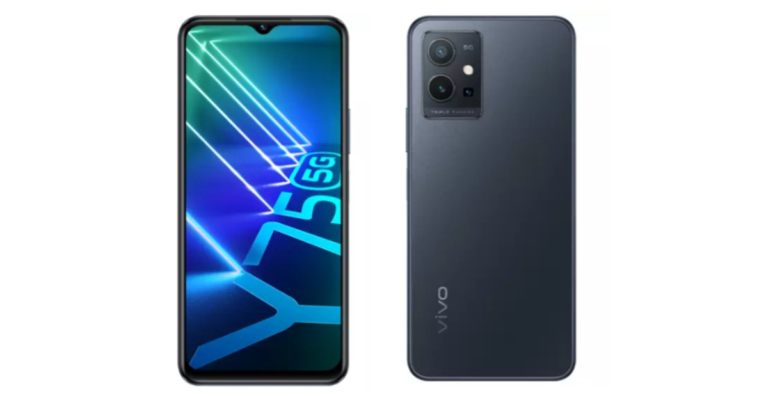
 Open the app and configure it, granting it access to your images and media. Return to Instagram and select the Reels video you want to download. Then select the three-dot icon > Copy Link.

 Open the app and configure it, granting it access to your images and media. Return to Instagram and select the Reels video you want to download. Then select the three-dot icon > Copy Link.
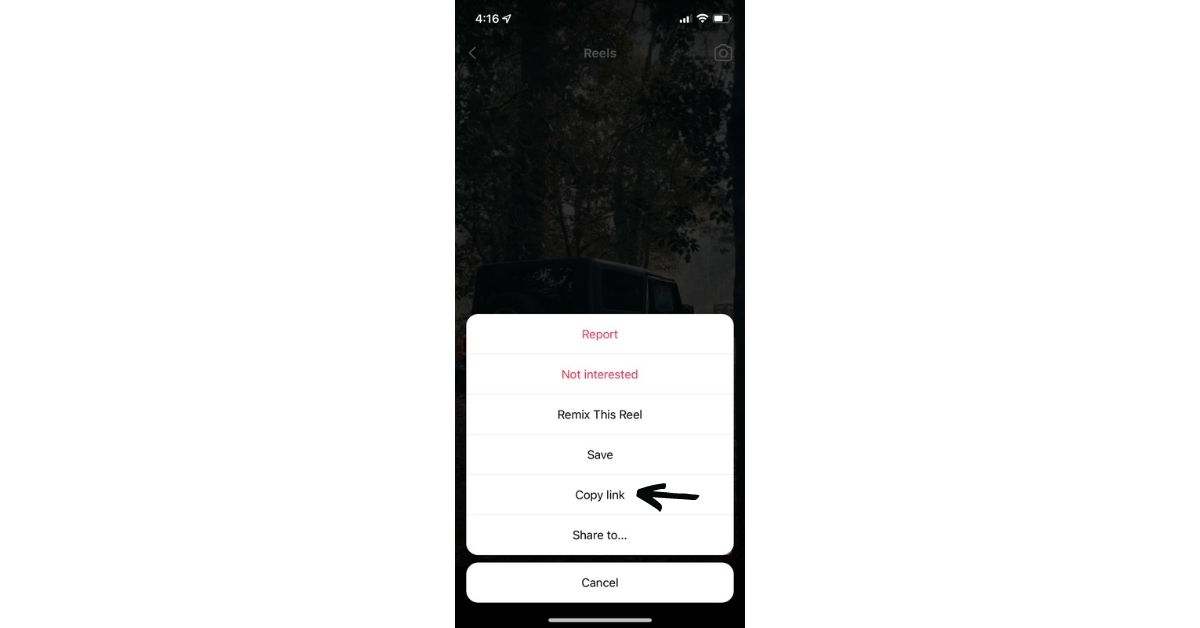 Return to InstDown, and the Instagram link you copied will be automatically pasted.
Tap Generate! The video will be saved to the Photos folder on your device. And that’s it.
Return to InstDown, and the Instagram link you copied will be automatically pasted.
Tap Generate! The video will be saved to the Photos folder on your device. And that’s it.
 Read Also: Audio not working in Instagram reels and Instagram stories? Top 5 ways to fix it.



 Simply stop recording the screen and save the video to your phone’s gallery.
 So, these were the top 4 ways to download Instagram reels with sound safely, easily and immediately. if you use any other way to download Instagram Reels with sound then do let us know below in the comments section.
For the latest gadget and tech news, and gadget reviews, follow us on Twitter, Facebook and Instagram. For the newest tech & gadget, videos subscribe to our YouTube Channel. You can also stay up to date using the Gadget Bridge Android App. You can find the latest car and bike news here.
So, these were the top 4 ways to download Instagram reels with sound safely, easily and immediately. if you use any other way to download Instagram Reels with sound then do let us know below in the comments section.
For the latest gadget and tech news, and gadget reviews, follow us on Twitter, Facebook and Instagram. For the newest tech & gadget, videos subscribe to our YouTube Channel. You can also stay up to date using the Gadget Bridge Android App. You can find the latest car and bike news here. 

 Read Also: Paytm Payments Bank and MoneyGram have teamed up to offer international remittances directly to Paytm Wallet

 Thus, to make your lives easier and enjoyable, these were our top picks for your credit card bill payment apps that will fetch you some extra money when paying them online.
For the latest gadget and tech news, and gadget reviews, follow us on Twitter, Facebook and Instagram. For the newest tech & gadget, videos subscribe to our YouTube Channel. You can also stay up to date using the Gadget Bridge Android App. You can find the latest car and bike news here.
Thus, to make your lives easier and enjoyable, these were our top picks for your credit card bill payment apps that will fetch you some extra money when paying them online.
For the latest gadget and tech news, and gadget reviews, follow us on Twitter, Facebook and Instagram. For the newest tech & gadget, videos subscribe to our YouTube Channel. You can also stay up to date using the Gadget Bridge Android App. You can find the latest car and bike news here. 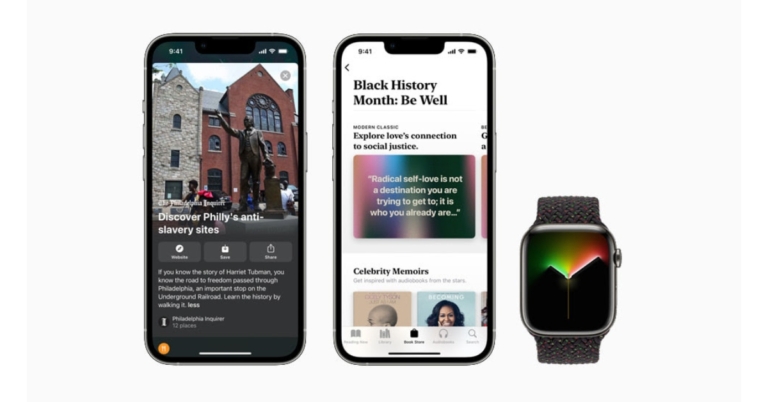
 The Apple Watch Black Unity Braided Solo Loop and matching Unity Lights watch face, designed by members and friends of Apple’s Black creative community to commemorate Black history and culture, honour generations of Black people across the African diaspora. This design represents a shared belief in the need for a more equal society. The Pan-African flag’s brilliant red and green hues emerge as scattered light over the black ribbon.
The band is supplemented with the Unity Lights watch face, which was created with 2D ray tracing, a technology never previously used for a watch face. Each pixel on the screen represents light and shadow falling over it, and the movement of the clock hands reveals and hides the light dynamically throughout the day. The Unity Lights watch face may be adjusted to have a full screen or circular dial, as well as black and white options, tick markings, and up to four complexities. Users of the iPhone, iPad, and Mac may also express their support for Black History Month by downloading Afrofuturism-inspired wallpapers from apple.com.
The Apple Watch Black Unity Braided Solo Loop and matching Unity Lights watch face, designed by members and friends of Apple’s Black creative community to commemorate Black history and culture, honour generations of Black people across the African diaspora. This design represents a shared belief in the need for a more equal society. The Pan-African flag’s brilliant red and green hues emerge as scattered light over the black ribbon.
The band is supplemented with the Unity Lights watch face, which was created with 2D ray tracing, a technology never previously used for a watch face. Each pixel on the screen represents light and shadow falling over it, and the movement of the clock hands reveals and hides the light dynamically throughout the day. The Unity Lights watch face may be adjusted to have a full screen or circular dial, as well as black and white options, tick markings, and up to four complexities. Users of the iPhone, iPad, and Mac may also express their support for Black History Month by downloading Afrofuturism-inspired wallpapers from apple.com.
 The Apple Watch Black Unity Braided Solo Loop and matching Unity Lights watch face, designed by members and friends of Apple’s Black creative community to commemorate Black history and culture, honour generations of Black people across the African diaspora. This design represents a shared belief in the need for a more equal society. The Pan-African flag’s brilliant red and green hues emerge as scattered light over the black ribbon.
The band is supplemented with the Unity Lights watch face, which was created with 2D ray tracing, a technology never previously used for a watch face. Each pixel on the screen represents light and shadow falling over it, and the movement of the clock hands reveals and hides the light dynamically throughout the day. The Unity Lights watch face may be adjusted to have a full screen or circular dial, as well as black and white options, tick markings, and up to four complexities. Users of the iPhone, iPad, and Mac may also express their support for Black History Month by downloading Afrofuturism-inspired wallpapers from apple.com.
The Apple Watch Black Unity Braided Solo Loop and matching Unity Lights watch face, designed by members and friends of Apple’s Black creative community to commemorate Black history and culture, honour generations of Black people across the African diaspora. This design represents a shared belief in the need for a more equal society. The Pan-African flag’s brilliant red and green hues emerge as scattered light over the black ribbon.
The band is supplemented with the Unity Lights watch face, which was created with 2D ray tracing, a technology never previously used for a watch face. Each pixel on the screen represents light and shadow falling over it, and the movement of the clock hands reveals and hides the light dynamically throughout the day. The Unity Lights watch face may be adjusted to have a full screen or circular dial, as well as black and white options, tick markings, and up to four complexities. Users of the iPhone, iPad, and Mac may also express their support for Black History Month by downloading Afrofuturism-inspired wallpapers from apple.com.


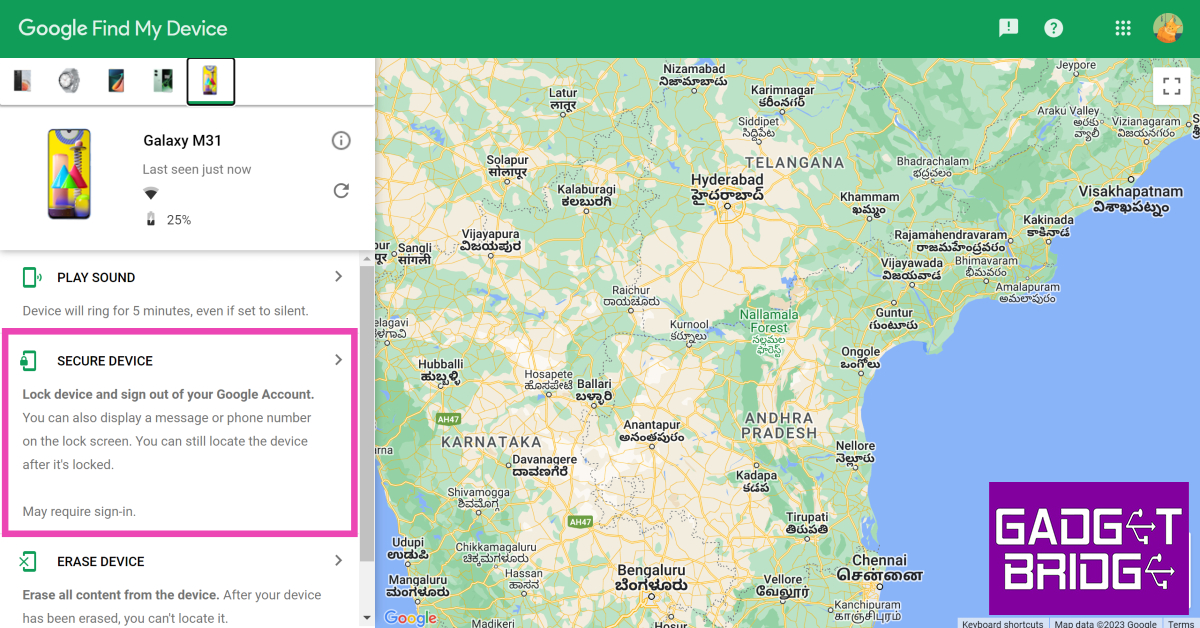 Step 5: Add a recovery message and your phone number in case someone finds your phone and wants to reach out to you to return it.
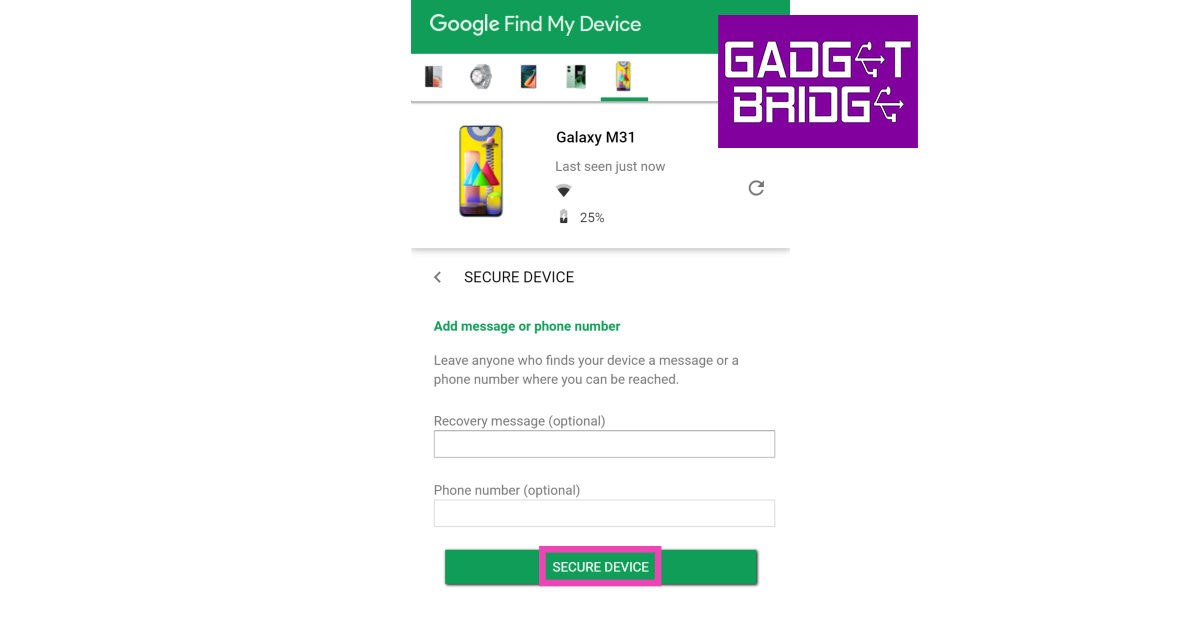 You will be logged out of the device.

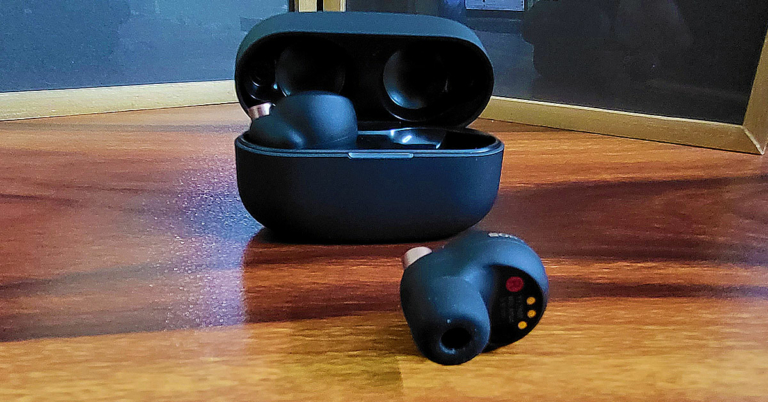
 The charging case can be charged using the USB Type-C port placed on the back or can be wireless charged as it is Qi-enabled, too. The case is not very heavy (39 grams, without the earphones) and the matt black finish works well for it. Sony’s branding can also be found on the top of the lid in gold. Flip it open and you will see a LED lamp light up the front. The Sony WF-1000XM4 earphones are neatly tucked inside. Yes, the containment has magnets in each pocket to snap the earplugs in place.
Talking about the Sony WF-1000XM4 built and quality, these are built with absolute perfection. The Sony craftsmanship can be seen here. The Sony branding (again in gold) can be found on each earpiece with a hint of extra bronzish gold on them. Both have charging points underneath along with sensors that pause the music as soon one of them is pulled out of the ear. They also have black matt finish and overall weigh 14 grams (7gm each).
The charging case can be charged using the USB Type-C port placed on the back or can be wireless charged as it is Qi-enabled, too. The case is not very heavy (39 grams, without the earphones) and the matt black finish works well for it. Sony’s branding can also be found on the top of the lid in gold. Flip it open and you will see a LED lamp light up the front. The Sony WF-1000XM4 earphones are neatly tucked inside. Yes, the containment has magnets in each pocket to snap the earplugs in place.
Talking about the Sony WF-1000XM4 built and quality, these are built with absolute perfection. The Sony craftsmanship can be seen here. The Sony branding (again in gold) can be found on each earpiece with a hint of extra bronzish gold on them. Both have charging points underneath along with sensors that pause the music as soon one of them is pulled out of the ear. They also have black matt finish and overall weigh 14 grams (7gm each).
 The resonance of the Sony WF-1000XM4 is exceptional. We loved every bit of it. 7 grams is light on the ear and with active noise cancellation (ANC) the sound is brilliant. A tap on the left earplug you can turn down ANC and another one can turn it back up. Tapping or double-tapping on the right one, you can play/pause or go to the next track. If you tap and hold the left one, you can hear the ambient sounds too. So, some of the neat features from its bigger sibling do drop into this one as well.ANC
The bass of the Sony WF-1000XM4 is very good. You can also control it using the equaliser settings in the app. The vocals are clear and we heard quite a few songs on Spotify using them, and it kept impressing us with each soundtrack we played. We saw a Netflix show also with them and the latency is fine here. The movie and show watching experience was superb. But we would not fully recommend them to professional gamers, as there is a bit of lag from shot to sound. So, yes pro PUBG players, you are better off buying its elder (wired) familial.
Google Assistant as well as Alexa AI is supported, and one can easily command them using the multiple MICS that come on the Sony WF-1000XM4. Coming to its battery life, Sony claims you can get 8 hours of music playback with ANC on, which is about right. We got 7.5 hours of music playback time. Over that, with 5 mins of battery charge, users can get 60 minutes of playback time. The charging case in total supplies another 16 hours of charge to the earphones.
The resonance of the Sony WF-1000XM4 is exceptional. We loved every bit of it. 7 grams is light on the ear and with active noise cancellation (ANC) the sound is brilliant. A tap on the left earplug you can turn down ANC and another one can turn it back up. Tapping or double-tapping on the right one, you can play/pause or go to the next track. If you tap and hold the left one, you can hear the ambient sounds too. So, some of the neat features from its bigger sibling do drop into this one as well.ANC
The bass of the Sony WF-1000XM4 is very good. You can also control it using the equaliser settings in the app. The vocals are clear and we heard quite a few songs on Spotify using them, and it kept impressing us with each soundtrack we played. We saw a Netflix show also with them and the latency is fine here. The movie and show watching experience was superb. But we would not fully recommend them to professional gamers, as there is a bit of lag from shot to sound. So, yes pro PUBG players, you are better off buying its elder (wired) familial.
Google Assistant as well as Alexa AI is supported, and one can easily command them using the multiple MICS that come on the Sony WF-1000XM4. Coming to its battery life, Sony claims you can get 8 hours of music playback with ANC on, which is about right. We got 7.5 hours of music playback time. Over that, with 5 mins of battery charge, users can get 60 minutes of playback time. The charging case in total supplies another 16 hours of charge to the earphones.





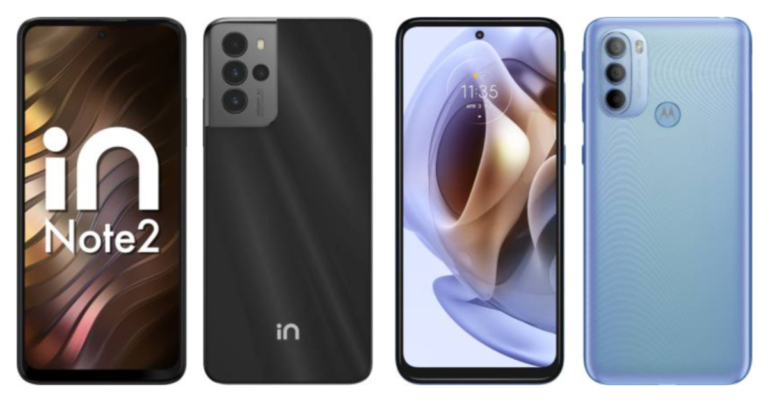
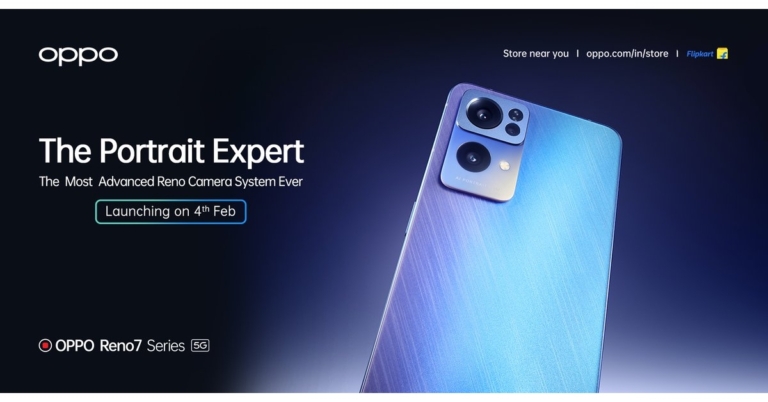
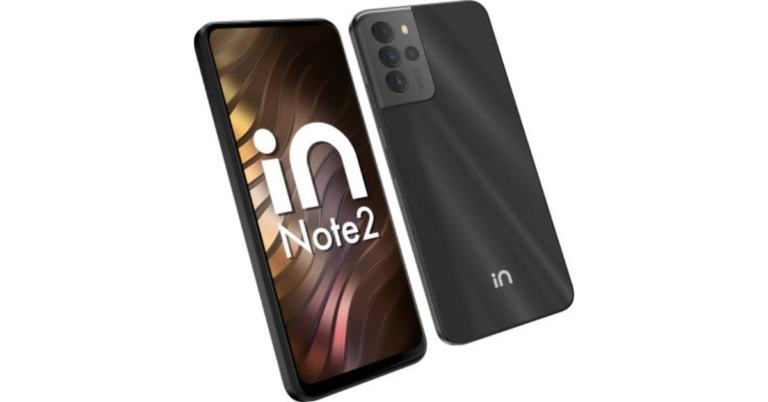

 Furthermore, the phone features a quad back camera configuration, emphasised by a 48-megapixel main sensor, for photography. In addition to this, there is a 5-megapixel ultra-wide lens, a 2-megapixel macro sensor and a 2-megapixel depth sensor. The Micromax In Note 2 has a 16-megapixel selfie camera sensor on the front for selfies and video calling.
Micromax has included a 5,000mAh battery with 30W fast charging capabilities. As per the company, with a compatible charger, the battery will be charged to 50 percent in 25 minutes. Connectivity options include 4G LTE, Wi-Fi 802.11ac, Bluetooth v5.0, GPS/ A-GPS, USB Type-C, and a 3.5mm headphone port.
For the latest gadget and tech news, and gadget reviews, follow us on Twitter, Facebook and Instagram. For newest tech & gadget videos subscribe to our YouTube Channel. You can also stay up to date using the Gadget Bridge Android App. You can find the latest car and bike news here.
Furthermore, the phone features a quad back camera configuration, emphasised by a 48-megapixel main sensor, for photography. In addition to this, there is a 5-megapixel ultra-wide lens, a 2-megapixel macro sensor and a 2-megapixel depth sensor. The Micromax In Note 2 has a 16-megapixel selfie camera sensor on the front for selfies and video calling.
Micromax has included a 5,000mAh battery with 30W fast charging capabilities. As per the company, with a compatible charger, the battery will be charged to 50 percent in 25 minutes. Connectivity options include 4G LTE, Wi-Fi 802.11ac, Bluetooth v5.0, GPS/ A-GPS, USB Type-C, and a 3.5mm headphone port.
For the latest gadget and tech news, and gadget reviews, follow us on Twitter, Facebook and Instagram. For newest tech & gadget videos subscribe to our YouTube Channel. You can also stay up to date using the Gadget Bridge Android App. You can find the latest car and bike news here. 
 Furthermore, the phone features a quad back camera configuration, emphasised by a 48-megapixel main sensor, for photography. In addition to this, there is a 5-megapixel ultra-wide lens, a 2-megapixel macro sensor and a 2-megapixel depth sensor. The Micromax In Note 2 has a 16-megapixel selfie camera sensor on the front for selfies and video calling.
Micromax has included a 5,000mAh battery with 30W fast charging capabilities. As per the company, with a compatible charger, the battery will be charged to 50 percent in 25 minutes. Connectivity options include 4G LTE, Wi-Fi 802.11ac, Bluetooth v5.0, GPS/ A-GPS, USB Type-C, and a 3.5mm headphone port.
For the latest gadget and tech news, and gadget reviews, follow us on Twitter, Facebook and Instagram. For newest tech & gadget videos subscribe to our YouTube Channel. You can also stay up to date using the Gadget Bridge Android App. You can find the latest car and bike news here.
Furthermore, the phone features a quad back camera configuration, emphasised by a 48-megapixel main sensor, for photography. In addition to this, there is a 5-megapixel ultra-wide lens, a 2-megapixel macro sensor and a 2-megapixel depth sensor. The Micromax In Note 2 has a 16-megapixel selfie camera sensor on the front for selfies and video calling.
Micromax has included a 5,000mAh battery with 30W fast charging capabilities. As per the company, with a compatible charger, the battery will be charged to 50 percent in 25 minutes. Connectivity options include 4G LTE, Wi-Fi 802.11ac, Bluetooth v5.0, GPS/ A-GPS, USB Type-C, and a 3.5mm headphone port.
For the latest gadget and tech news, and gadget reviews, follow us on Twitter, Facebook and Instagram. For newest tech & gadget videos subscribe to our YouTube Channel. You can also stay up to date using the Gadget Bridge Android App. You can find the latest car and bike news here. 
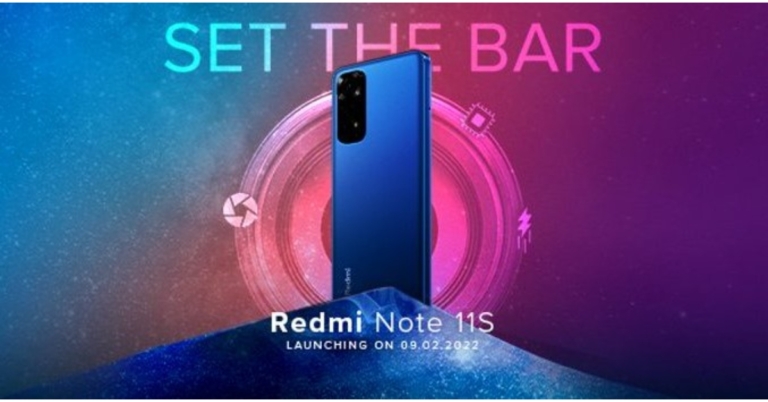
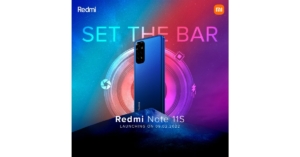 The latest teaser as released by the company suggests a quad rear camera arrangement with a 108-megapixel main sensor on the back of the Redmi Note 11S. The teaser also implies that the upcoming Redmi phone would have a 4G connection and may not feature 5G capabilities.
Xiaomi has not revealed many details regarding the smartphone, however, depending on the country, the Redmi Note 11S is believed to be powered by a MediaTek SoC and include a 108-megapixel Samsung HM2 camera or a 64-megapixel OmniVision OV6480 as the primary camera. An 8-megapixel Sony IMX355 ultra-wide camera and a 2-megapixel OV02A macro camera will also be included in the future device.
As previously said, the phone was discovered on multiple certification websites. At the same time, the gadget received BIS certification, indicating an impending introduction. The model number of the phone was 220111TSI. A smartphone with the model number 2201117SG was also spotted on the NTBC certification authority website, which also listed the Redmi Note 11S. On the EEC certification page, another smartphone with the model numbers 2201117TG, 2201117TY, and 2201117SY was discovered.
For the latest gadget and tech news, and gadget reviews, follow us on Twitter, Facebook and Instagram. For newest tech & gadget videos subscribe to our YouTube Channel. You can also stay up to date using the Gadget Bridge Android App. You can find the latest car and bike news here.
The latest teaser as released by the company suggests a quad rear camera arrangement with a 108-megapixel main sensor on the back of the Redmi Note 11S. The teaser also implies that the upcoming Redmi phone would have a 4G connection and may not feature 5G capabilities.
Xiaomi has not revealed many details regarding the smartphone, however, depending on the country, the Redmi Note 11S is believed to be powered by a MediaTek SoC and include a 108-megapixel Samsung HM2 camera or a 64-megapixel OmniVision OV6480 as the primary camera. An 8-megapixel Sony IMX355 ultra-wide camera and a 2-megapixel OV02A macro camera will also be included in the future device.
As previously said, the phone was discovered on multiple certification websites. At the same time, the gadget received BIS certification, indicating an impending introduction. The model number of the phone was 220111TSI. A smartphone with the model number 2201117SG was also spotted on the NTBC certification authority website, which also listed the Redmi Note 11S. On the EEC certification page, another smartphone with the model numbers 2201117TG, 2201117TY, and 2201117SY was discovered.
For the latest gadget and tech news, and gadget reviews, follow us on Twitter, Facebook and Instagram. For newest tech & gadget videos subscribe to our YouTube Channel. You can also stay up to date using the Gadget Bridge Android App. You can find the latest car and bike news here. 
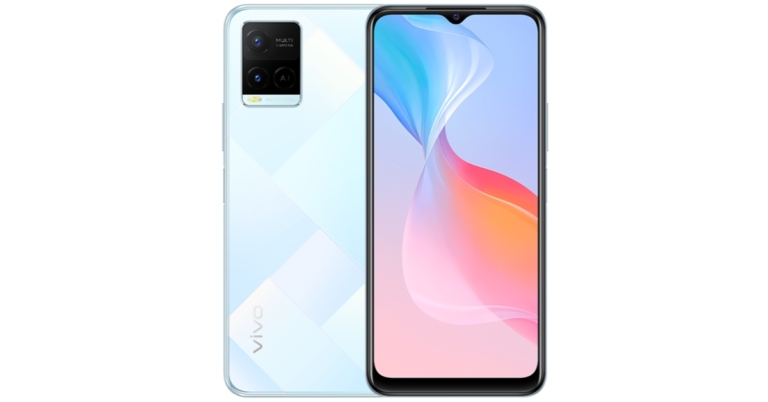




 Screen copy or ‘scrcpy‘ is a great tool for mirroring your phone’s display on your PC. If you have exhausted all options for taking a screenshot on your smartphone, you can take a screenshot of the app after mirroring it on your PC. Use the PrtScn key or the Snipping Tool to take a screenshot on your Windows PC. The best thing about using this option is that you can directly transfer the screenshot to your phone right away. Read this article to learn how to use scrcpy.
 Step 4: Open the Restricted app where the screenshot will be taken.
Step 5: Select the Settings icon that looks like a toolbox from the floating button on your screen.
Step 6: Select the Screenshot option from the drop-down menu and shut the drop-down menu.
Step 7: A second floating button, a left-hand camera icon, will appear on your screen.
Step 4: Open the Restricted app where the screenshot will be taken.
Step 5: Select the Settings icon that looks like a toolbox from the floating button on your screen.
Step 6: Select the Screenshot option from the drop-down menu and shut the drop-down menu.
Step 7: A second floating button, a left-hand camera icon, will appear on your screen.
 Step 8: Tap the Allow button after clicking the Camera icon. It will take a screenshot and save it to your gallery. After tapping on the floating window that appears, you can preview/edit the screenshot.
Read Also: How to take a screenshot in Google Chrome incognito mode
Step 8: Tap the Allow button after clicking the Camera icon. It will take a screenshot and save it to your gallery. After tapping on the floating window that appears, you can preview/edit the screenshot.
Read Also: How to take a screenshot in Google Chrome incognito mode
 Step 5: Tap the search bar and enter the name of the song that you want to use on your Reel.
 Step 6: Use the seek bar to select the portion of the song that you want as background music for your Reel.
 Step 7: Hit Done and post the Reel to your profile.
Step 8: Open the Reel and tap the Share arrow.
Step 7: Hit Done and post the Reel to your profile.
Step 8: Open the Reel and tap the Share arrow.
 Step 9: Select Download.
 Go to the ‘Instagram’ folder on your device’s gallery app to access the video.
 Step 3: Select the proper music volume level after deciding on the song you wish to use. It would be wise to mute the original video volume at this point because it might add unwanted noise. Then Save it.
 Step 4: Open WhatsApp, go to your profile and add the video you just generated to your status. It’s best to watch the video before sharing it and only share it if everything appears to be in order.
 Step 3: From the many options available, to add music from your local gallery, go to the My Music tab and find the song you want.
Step 4: You will find some featured tracks by the YouCut app within the ‘Featured’ section. To mute the video’s audio, click on the video clip from the bottom and drag the volume to the lowest setting.
Step 5: Also, enable the Fade in and Fade Out buttons by clicking on the music clip from the button. This will add a fading effect to the video’s beginning and end.
Step 3: From the many options available, to add music from your local gallery, go to the My Music tab and find the song you want.
Step 4: You will find some featured tracks by the YouCut app within the ‘Featured’ section. To mute the video’s audio, click on the video clip from the bottom and drag the volume to the lowest setting.
Step 5: Also, enable the Fade in and Fade Out buttons by clicking on the music clip from the button. This will add a fading effect to the video’s beginning and end.
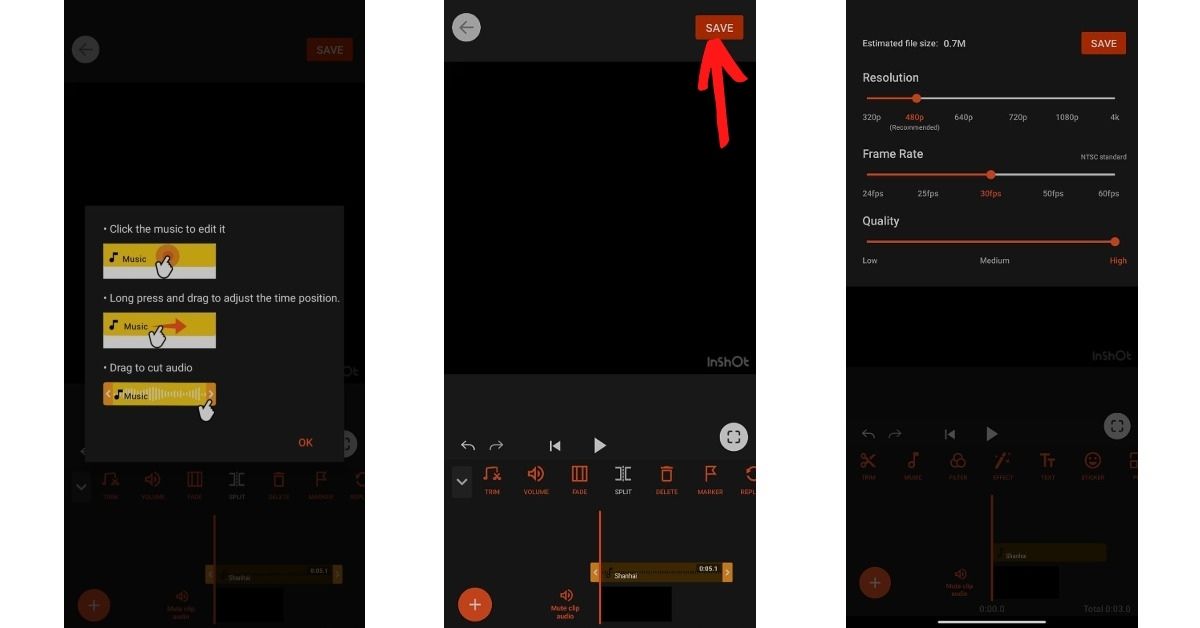 Step 6: Tap the Save button in the top right corner of the screen once you’ve completed editing. After that, choose the video quality (High) and push the Compress button. That is all there is to it. Your video is now complete with background music, and you can share it on WhatsApp.
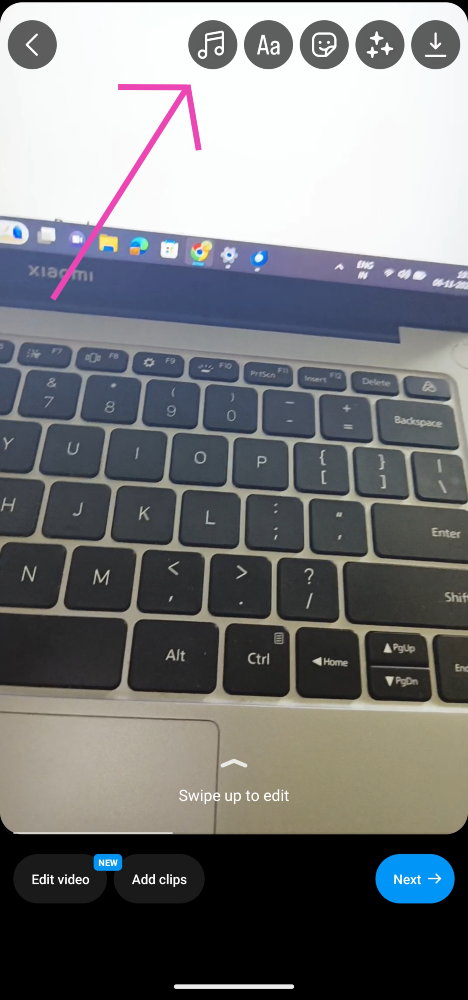 Step 5: Tap the search bar and enter the name of the song that you want to use on your Reel.
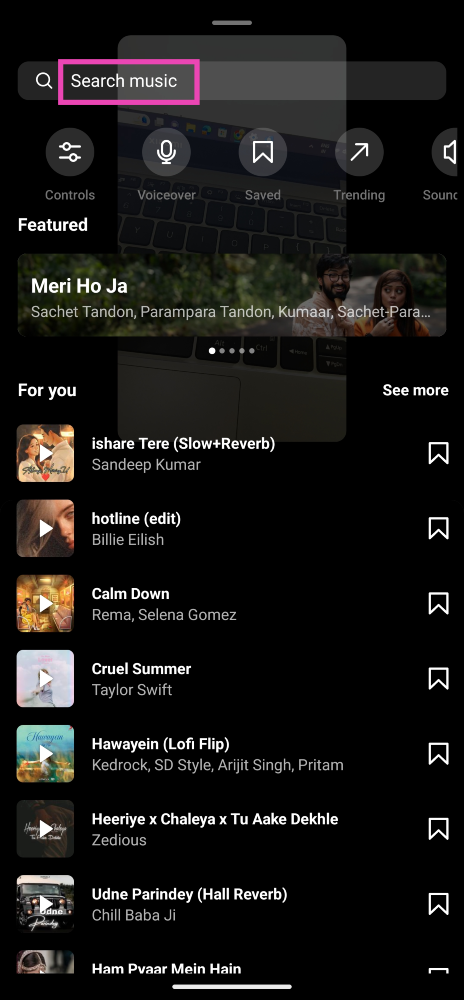 Step 6: Use the seek bar to select the portion of the song that you want as background music for your Reel.
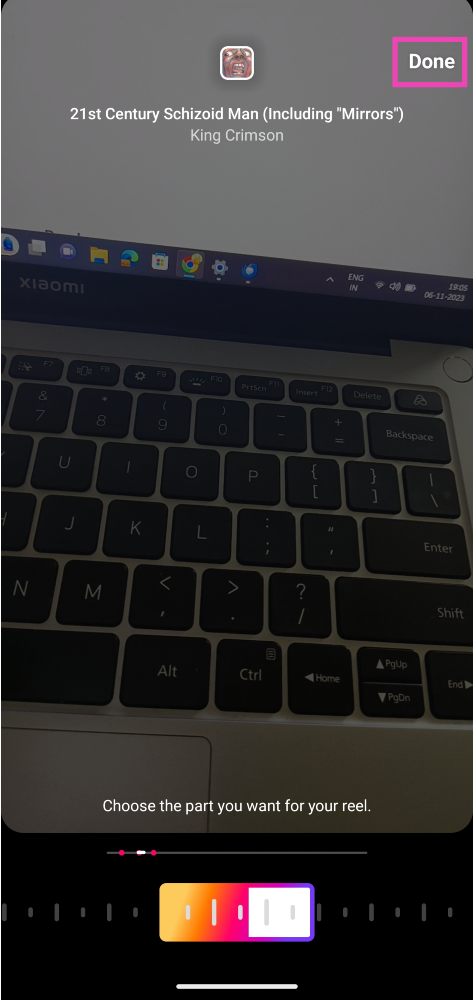 Step 7: Hit Done and post the Reel to your profile.
Step 8: Open the Reel and tap the Share arrow.
Step 7: Hit Done and post the Reel to your profile.
Step 8: Open the Reel and tap the Share arrow.
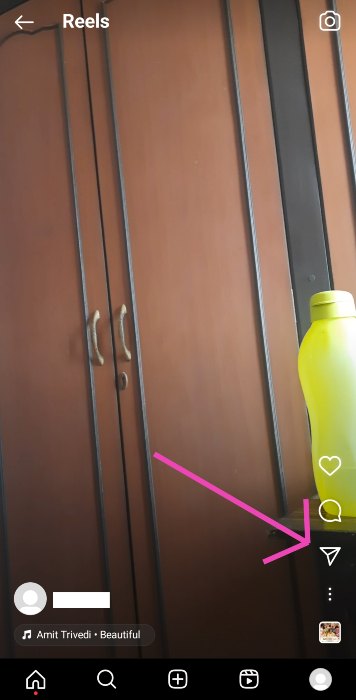 Step 9: Select Download.
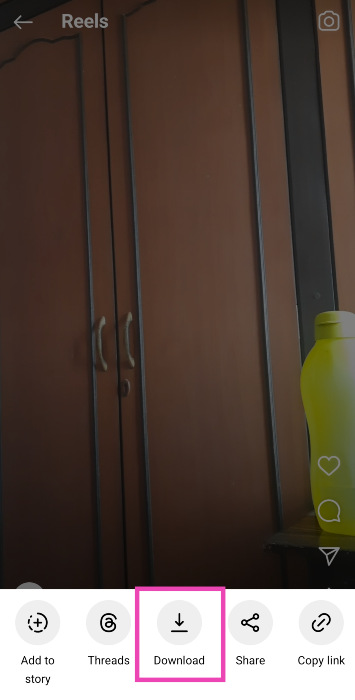 Go to the ‘Instagram’ folder on your device’s gallery app to access the video.



 Most smartphones allow users to access the power menu from the Quick Settings panel. If your smartphone’s power key is not working at all, you may need to connect it to a charger or activate the ‘double tap to wake up’ option in order to activate the lock screen. Once you’ve unlocked your phone, swipe down from the status bar and tap the power button at the top right section of the screen to access the power menu. You can now choose to turn off or reboot your phone.
 Using the Buttons Remapper app, you can assign custom controls to any button on your phone. If your phone’s power key isn’t working, you can customise either volume key to trigger the power menu when you long-press it. Buttons Remapper also allows you to perform certain actions using a specific key combination, but you will need to pay for a premium subscription to gain access to this functionality.
 The Phone Lock + Volume app allows you to reassign the power and volume controls to an app icon on your phone’s home page. This app will come in handy if none of the physical buttons are working on your phone. Long-pressing the specialised icon also lets you take a quick screenshot. This app is also useful for people who use very thick cases for their devices.

 Step 4: Go to Internal Storage>WhatsApp>Media>Statuses.
 Step 5: Copy the photographs to a separate location and check out the statuses.
Read Also: How to download an image or video from WhatsApp status using an Android device?
Step 5: Copy the photographs to a separate location and check out the statuses.
Read Also: How to download an image or video from WhatsApp status using an Android device?
 Step 4: Disable the Read Receipts toggle here.
 Read Also: Elon Musk launched its first AI chatbot, Grok
 GB WhatsApp is a modded version of the instant messenger. It has a host of new features which aren’t available in the regular WhatsApp app. Using GB WhatsApp, you can choose to discreetly view someone’s status update without needing to hide the receipts on your updates too. Apart from that, GB WhatsApp lets you send large files, hide online and typing status, schedule messages, read deleted messages and more. It goes without saying that this app isn’t legal to use. WhatsApp has a strict policy of banning users who are found using this app.
