Google’s Android Auto is a great interface that syncs with your car’s infotainment system, but it is pretty much useless on older cars that do not have a touchscreen display. For older cars, Google offers Driving Mode for your smartphone, bringing hands-free access to your phone’s most essential features. In this article, we show you how to enable and use Google’s Driving Mode on your Android smartphone.Read Also:The new Xiaomi Smart TV X Series India launch date revealed
In This Article
Requirements
A smartphone running Android 9.0 or higher
At least 4GB of RAM
Portrait Mode
Must reside in Australia, Canada, France, Germany, India, Italy, Mexico, Spain, the United Kingdom, or the United States
Launch Google’s Driving Mode from Assistant Settings
Step 1: Connect your phone to your car’s interface via Bluetooth.Step 2: Say “Hey Google, open Assistant Settings”.Step 3: Select Transport.Step 4: Tap on Driving Mode.Step 5: Switch on the toggle bar for Driving Mode.Step 6: Turn on the toggle bar for Allow Incoming Calls While Driving and Get Messaging Help While Driving.Step 7: Tap on Hey Google Detection.Step 8: Switch on the toggle bar for While Driving.
Launch Driving Mode from Google Maps
Step 1: Launch the Google Maps app on your Android smartphone.Step 2: Tap the profile icon at the top right corner of the screen and select Settings.Step 3: Scroll down and select Navigation Settings.Step 4: Select Google Assistant Settings.Step 5: Tap on Driving Mode.Step 6: Switch on the toggle bar for Driving Mode.Step 7: Turn on the toggle bar for Allow Incoming Calls While Driving and Get Messaging Help While Driving.Step 8: Tap on Hey Google Detection.Step 9: Switch on the toggle bar for While Driving.
Frequently Asked Questions (FAQs)
What is the difference between Google’s Driving Mode and Android Auto?
Android Auto works in sync with your car’s infotainment system. Meanwhile, you can use Google’s Driving Mode on your phone while driving.
What can I do with Google’s Driving Mode?
Driving Mode offers a hands-free way of accepting calls and responding to texts while you are driving. You can also play media in Driving Mode.
How do I enable Driving Mode on my phone?
To launch Driving Mode on your Android phone, go to Google Assistant Settings and select Transport>Driving Mode and switch on the toggle bar.Read Also:Exploring Anti-Cheat Measures in Online PC Games
Instagram is a popular social media platform that allows users to share photos and videos with their friends and followers. Instagram users can also interact with the help of likes, comments, shares and direct messages. Launched in 2010, Instagram has grown to become one of the most popular social media sites worldwide. It is one of the most widely used social media platforms with billions of users. However, sometimes users experience various technical difficulties while using the app which is known as Instagram outage. During an Instagram outage, users may encounter the following issues:
On July 25, 2023, around 8.25 am Instagram suffered a massive outage. Instagram users took to Twitter and other social media sites complaining about Instagram being down. Soon after, #InstagramDown started trending on Twitter. According to the popular website tracking app outages, DownDetector, several users complained about Instagram being down at around 8.25 am. The complaints were at peaked at 8.50 am. Around 52000 users complained about Instagram being down. The reports of Instagram outages were primarily from Chandigarh, Delhi, Lucknow, Jaipur, Patna, Indore, Nagpur, Mumbai, Hyderabad, Bengaluru, Chennai, Kolkata and Imphal. DownDetecor also stated the issues faced by users. Around 42% of users faced problems in accessing their feed, 31% of users were facing server connectivity issues and 21% were unable to login into the app. Some users even found their Instagram accounts suspended.
The reason behind Instagram Down
This is not the first time that Instagram or other Meta apps Facebook and Whatsapp have reported an outage. Instagram users reported two outages earlier this month on July 11, 2023 and on July 20, 2023. Instagram has confirmed that there has been an Instagram outage this morning, although the reason behind Instagram’s down is still unclear. Instagram can be down due to various reasons. These are:
Server Issues: Technology operates with the help of servers and a problem in these servers such as hardware failure, bugs can lead to service disruptions.
Maintenance: To improve the performance of its platform MMeta frequently performs maintenance activities. Services can be available during this time.
Technical Glitches: Technical glitches such as bugs or errors in code can also lead to outages.
Software Updates: While rolling out new updates on Instagram users can experience unforeseen issues.
Traffic urge: A sudden increase in user activity can also lead to Instagram being down. These can occur during major events or viral trends.
This is the third time in a month Instagram users are facing such issues. However, it is possible that Instagram outages can affect only several users and not all of them. To check whether Instagram is down or not you can check the official updates on Twitter or social media channels. The best course of action during an Instagram outage is to be patient and wait for the glitches to fix.
For the latest gadget and tech news, and gadget reviews, follow us on Twitter, Facebook and Instagram. For newest tech & gadget videos subscribe to our YouTube Channel. You can also stay up to date using the Gadget Bridge Android App. You can find the latest car and bike news here.
Samsung is updating it Wallet app, allows Samsung customers to securely access their documents like digital IDs, boarding passes, rail tickets, and FASTag accounts in one location. Users will also be able to access Digital IDs such as Aadhaar, PAN, Driving Licenses and Vehicle RCs from Samsung Wallet. In addition to this, the company has also merged Samsung Pay & Samsung Pass on the platform letting consumers have a seamless card Tap & Pay, UPI payments & bill payments experience.
Samsung has announced that owners of Galaxy smartphones can now access all of their necessary Digital IDs, including their Aadhaar Card, PAN Card, driver’s licence, and vehicle registration certificate, through Samsung Wallet. According to the company users of Galaxy smartphones can quickly and securely maintain their Co-WIN immunisation certificates on their phone.
Also Read: Twitter Rebranded: Twitter logo has got a new look, the blue bird logo replaced with an X
The Samsung Wallet, which combines and improves the features of Samsung Pay and Samsung Pass on Galaxy smartphones has also received a number of new travel and mobility features from Samsung. These features are said to enable customers have a seamless card Tap and Pay, UPI payments and bill payments experience.
In addition to this, the users will also be able to top off and monitor their FASTag accounts, save their flight boarding passes for easy access, and utilise a comprehensive rail ticketing solution within Samsung Wallet such as booking and saving tickets, and checking train status, among others. By scanning the QR code or barcode, or by importing the image or PDF, users can upload rail tickets or boarding cards to Samsung Wallet.
Users will be able to access over 2,000 more IDs/documents straight from Samsung Wallet in addition to the four Digital IDs—Aadhaar Card, PAN Card, Driving Licence, and Vehicle Registration Certificate. The details will be shown on the device within the Samsung Wallet app, but Samsung will not store any of this information for privacy and security.
Users may access UPI, bill payments, Digital IDs, travel and mobility documents, FASTag, Gift cards, Coupons, and much more by just swiping up to launch Samsung Wallet from the off-screen, lock screen and home screen on their Galaxy devices.
In terms of availability Galaxy smartphone users can update their existing Samsung Pay service to Samsung Wallet through the Galaxy Store. The update is available through auto mode and manual mode.
According to the company, a dedicated team of engineers, designs and product managers at the Samsung R&D Institute, Bangalore (SRI-B), which is Samsung’s largest R&D centre outside Korea, has developed these new features of Samsung Wallet. These features are part of several India-specific features developed by SRI-B for Samsung Galaxy smartphones. To protect the personal and financial information of users, it employs a number of unique security techniques, including tokenization. Additionally, Samsung Knox, a defence-grade security platform, continuously guards against malware and other threats on customers’ mobile devices.
For the latest gadget and tech news, and gadget reviews, follow us on Twitter, Facebook and Instagram. For newest tech & gadget videos subscribe to our YouTube Channel. You can also stay up to date using the Gadget Bridge Android App. You can find the latest car and bike news here.
Launched earlier this month, Nothing Phone 2 retains its iconic see-through design with a unique Glyph panel while upgrading its processor to the more powerful Snapdragon 8+ Gen 1 SoC. Prices for the Phone 2 start at Rs 44,999 for the 128GB storage variant and go up to Rs 54,999 for the 512GB version. In this article, we bring you the top 10 apps that you should download first on your new Nothing Phone 2.Read Also:Exploring Anti-Cheat Measures in Online PC Games
In This Article
WhatsApp
There aren’t many apps that are more important and essential than WhatsApp. While iOS may have iMessage, WhatsApp is as close as you can get to a ‘universal’ messenger for Android. The recently introduced ‘chat lock’ feature allows you to password-protect your conversations and keep them hidden from prying eyes. The messenger can be used on up to four devices at one time.
Feem
Feem is a great app to transfer files between your smartphone and computer. If you are a Mac user, this app will be of great use. Feem transfers files over a WiFi connection 50 times faster than a Bluetooth transfer. If you don’t have a WiFi network at home, you can easily connect with a device using your smartphone’s WiFi hotspot. Once you start using Feem, you’ll never need a USB cable for file transfer again.
Nova Launcher
Nothing Phone 2 brings its own special twist to stock Android OS, but for the most part, its aesthetic isn’t radically different from other Android smartphones. If you want to personalise your phone’s home screen, using Nova Launcher is the best way to go about it. Using Nova Launcher, you can customise even the minutest parts of your phone’s home screen. One of our favourite features is the ability to place app icons between grid cells, which opens the door to a range of possibilities. The potential for creating a unique look for the home screen is limitless.
Todoist
Todoist is one of the better planner apps that we have used for Android. What makes Todoist so versatile is that it can be linked to other productivity apps like Calendar, Gmail, Slack, Outlook, and more. You can easily add entries to your to-do lists and track them as time goes on. You can also set up visual task priority levels to manage your time better. Working on a task with someone else? Set up a collaborative project with them. Todoist can do it all!
Zomato
You may already be familiar with Zomato as one of the biggest food delivery and restaurant aggregator apps, but that’s not the reason why it is on this list. Zomato is one of the few apps that can make use of the Glyph lighting on the back panel of the Nothing Phone 2 as a progress bar. When you place an order, you can track its ETA on one of the lighting strips on your phone. As of now, only a few apps can use the Glyph interface for this purpose, but more developers are working on optimising their apps for this unique back panel design.
DuckDuckGo
If you value privacy over everything else, DuckDuckGo should be your web browser of choice. It prevents most 3rd party cookies from tracking your internet activity. DuckDuckGo also forces websites to use an HTTPS connection, safeguarding your data from malicious entities. You can also choose to clear all your current tabs and browsing data with a very accessible fire button.
Microsoft Swiftkey
You may have your preferred smartphone keyboard that you’re unwilling to change no matter what, but Microsoft Swiftkey may finally be able to change your mind. Right now, Swiftkey is the only Android keyboard with seamlessly integrated AI functions that are accessible to use and also make a lot of sense. Using Bing AI, you can now change the tone of your texts to suit the conversation. Need to send a quick work mail? Simply type the essential information and let Bing AI compose it in a more formal manner.
SeriesGuide: show manager
With so many OTT and media streaming apps around, it can get hard to keep track of what you have been watching. Looking for a particular movie title across different OTT apps can also be a chore in itself. SeriesGuide simplifies this process by keeping a record of your watched TV episodes and movie titles. You can also look up a show and see find out where you can stream it online. If you share a Netflix account with multiple people and don’t like that your watch history is filled with other people’s entries, SeriesGuide is the app for you.
Microsoft Lens
Microsoft Lens produces high-quality scans of documents, turning them into detailed PDFs. If you want to digitize your notes without any loss of quality, Microsoft Lens is the way to go. The digitized files can be uploaded directly to OneDrive or saved in the local storage of your device. You can take live images of a page of text or import images directly from your phone’s gallery.
Zedge
Zedge contains one of the biggest digital libraries of wallpapers, alarm tones, ringtones, and stickers. You can find millions of free HD wallpapers across different genres on this app. Zedge covers all your personalisation needs, bringing you an exhaustive collection of content. You can also use Zedge to auto-select a new background that changes at selected intervals.Read Also:Top 4 Ways to Set a Photo for Incoming Calls on iPhone and Android
The trend of online gaming is increasing day by day. Gaming is a leisure activity done by people in their free time. For some people, gaming is also a career as their primary source of income is earning money by live streaming while gaming. Online gaming requires special gaming equipment as well such as laptops, PCs, mice etc. Gaming mice enhance the overall gaming experience. They offer improved precision, responsiveness and customization options to cater to the needs of gamers. Let’s take a look at the 5 best ergonomic gaming mouse under $100 in the USA.
In This Article
Hyper X Pulsewire Haste 2
Hyper X Pulsewire Haste 2 is a lightweight wireless optical ergonomic gaming mouse with RGB lighting available in White & Black colour. It is built for gamers who do not want to wait even a millisecond and are looking for wireless connectivity. It is the sequel of Hyper X Pulewire haste and is weighed 61g and 100-hour battery life. It has dual-mode wireless connectivity allowing you to switch between 2.4 GHz wireless connectivity and Bluetooth. Other key features are a HyperX 26K sensor, a speed of 650 IPS, a lifespan of 100 million clicks, virgin PTFE skates and grip tape. It is priced at $84.99.Read Also:Top 4 Ways to Set a Photo for Incoming Calls on iPhone and Android
Razer- Orochi V2
Razer Orochi V2 is a lightweight wireless optical gaming mouse with a battery life of 950 hours. It has the longest battery life as compared to its competitor in the market for peerless portable performance. It is armed with an upgraded sensor and switches for crisp control and is perfect for gaming on the go. It is priced at $69.99.
Reddragon M-987K
Red Dragon M-987K is a lightweight wired optical gaming mouse with RGB lightning. It is weighed only 55g and is perfect for longer and more precise gameplay without fatigue. It is a high-precision mouse with a 12400 DPI sensor which delivers pinpoint accuracy and extreme responsiveness. Its price is $26.99.
Glorious- Model D
Glorious Model D is a wired optical honeycomb RGB gaming mouse. It has a honeycomb shell perfect for achieving a feather-light weight while maintaining ultra-durable strength. The holes provide ventilation to keep your palms cool and fresh while gaming. They come with a braided cable that is ultra flexible and super lightweight that gives you mouse almost wireless feel. Other key features are premium G-skates, 100% pure virgin PTFE, 0.81mm thickness and rounded edges. It is priced at $49.99.
Logitech- G502 X
Logitech G502 X is priced at $69.99. It is a wired USB gaming mouse with a Hero 25K sensor. It combines the legacy of performance with advanced gaming technologies. Its key features are Hybrid optical mechanical light force, HERO 25K submicron sensor, reversible and removable DPI, redesigned scroll wheel, thin wall moulding and lightweight design.Read Also: Top 5 Free Ways to Transfer Files Between Android and Mac
Reliance Industries is an Indian multinational corporation headquartered in Mumbai, India. Founded in 1966 by Dhiubhai Ambani, Reliance is currently led by his son Mukesh Ambani. Reliance Industries have its operations spread out in various sectors such as Refining and Petrochemicals, Oil and Gas exploration, Telecommunication, Retail and Media & Entertainment. Reliance Industries is going to launch its next-generation Reliance Jiobook on July 31.
In This Article
Reliance Jiobook: What do we know so far?
Reliance Industries launched its first Jiobook in October 2022 at the Indian Mobile Congress held in New Delhi, India. After its success, Reliance has decided to launch the second generation of Reliance Jiobook. Jiobook will be available on Amazon from July 31, 2023. Amazon has created a dedicated microsite to reveal the laptop’s key design and features. Although, the features and design of Jiobook 2023 are similar to the previous one there have been some internal upgrades. Read Also: The new Xiaomi Smart TV X Series India launch date revealed
Key features of Reliance Jiobook 2023
Reliance Jiobook 2023 has an 11.6-inch display and an attached webcam. The laptop will run on an Android-based JioOS operating system and will have pre-installed Jio apps such as Jio Meet, Jio Cloud and Jio Store. Jiobook 2023 will have an octa-core processor with 4G connectivity that offers a fast and uninterrupted network connection. Reliance Jiobook’s second generation has an enhanced battery life that will last up to a day after a single charge. The second-gen Jiobook will weigh 990 grams which is 210 grams lighter than the previous one. The previous year’s model of Jiobook was powered by Snapdragon 665 chipset. Reliance Jiobbok 2023 will be powered by an octa-core processor and will allow users to play HD videos, multitask or run advanced learning software. Another key feature of Jiobook 2023 is that it will have an embedded Jio sim card. Jiobook 2023 is also expected to have dual speakers, two microphones, a 3.5 mm headphone jack, an HDMI port, two USB ports, and a micro SD card slot. It will also offer users wireless connectivity options like Wifi and Bluetooth connectivity. However, there is no clarification regarding the RAM and storage capacity of the second-generation Jiobook. The first generation of Jiobook boasted 2 GB RAM and 32 GB of external storage that was expandable up to 128 GB.
Price and availability of Jiobook 2023
Jiobook 2022 was priced around Rs 15000 and the second generation of Reliance Jiobook is expected to be priced around Rs 20000. However, the official price is yet to be announced by Reliance Industries and will be announced on the launch date of Jiobook 2023 which is July 31, 2023. Read Also: Exploring Anti-Cheat Measures in Online PC Games
The Chinese smartphone brand Xiaomi is getting ready for its upcoming product launch. The company has scheduled to launch a new lineup of Smart TVs under the Xiaomi Smart TV X Series on August 1 in India. Note that a few days back the company revealed that Redmi 12 and Redmi Watch 3 Active will also arrive on the same day.While announcing its upcoming launch of the new Xiaomi Smart TV X Series in India the company said “Big is back”. The Redmi 12 and Redmi Watch 3 Active will be released at Xiaomi’s launch event, as was already said.Also Read:Twitter Rebranded: Twitter logo has got a new look, the blue bird logo replaced with an XAlso some days back the company launched Xiaomi Smart TV A in India. The TV series includes three models in different sizes: 32 inches, 40 inches, and 43 inches. Xiaomi Smart TV 32A model is priced at Rs 14,999 but for a limited time, it is available for Rs 13,999. On the other hand, the price of the Xiaomi Smart TV 40A and Xiaomi Smart TV 43A is set at Rs 22,999 and Rs 24,999 respectively. All the Television models will be available for purchase via Mi.com, Mi Homes, Flipkart, and in-person from July 25 at noon.The Quad Core A35 chipset powers the various Xiaomi Smart TV A series models. All TVs in the series feature Dolby Audio and DTS Virtual:X and come with Xiaomi’s exclusive Vivid Picture Engine and 20W speakers. They have an HD full-screen display, 1.5 GB of RAM, and 8 GB of storage.The smart TVs also support PatchWall, Chromecast, and YouTube. They include new PatchWall+ support, which gives customers free access to more than 200 live TV channels. Users will be able to stream apps and watch live TV on their home screen thanks to the integration with Google TV. In addition, they provide Live TV, Universal Search, IMDb integration, and Kids Mode with parental lock.Dual-band Wi-Fi and Bluetooth v5.0, two HDMI ports that support ARC and ALLM, two USB 2.0 connections, an AV port, and a headphone jack are also included on the TV models as connectivity options.
For the latest gadget and tech news, and gadget reviews, follow us on Twitter, Facebook and Instagram. For newest tech & gadget videos subscribe to our YouTube Channel. You can also stay up to date using the Gadget Bridge Android App. You can find the latest car and bike news here.
After being banned for nearly ten months, Battleground Mobile India, aka BGMI, is officially available again in India. BGMI fans are looking for ways to improve their game experience and one such method is the usage of redemption codes, which offers a variety of rewards and advantages using BGMI redeem codes players can gain access to new skins, outfits, loot crates, weapons and free UC and diamonds.As mentioned earlier, these codes give users the chance to earn unique rewards and gain extra benefits while playing the game. This includes GUN SKINS (M4, AKM, M416, AWM, M24, UZI, KAR98K), free character voucher, Andy, Carlo, Sara, Victor character for free, free Anna Character on completing the mission and UC or Royal Pass Discount. So here we have gathered a list of the most recent BGMI redeem codes as of 25 July 2023. Also, redeem these codes asap as these are only valid for a limited duration.
In This Article
BGMI Redeem Codes for 25 July 2023
updating soon…
How to get free Redeem Codes for BGMI on 25 July 2023?
Launch BGMI on your device.
Then select the Redeem Code option from the main menu.
Next, click on the Redeem code tab.
A new window will open, requesting the redemption code.
Now enter your BGMI code.
Confirm and click on the “Redeem” tab.
If your redeem code is valid then you will get a message confirming that your rewards were successfully redeemed.
Garena Free Fire is a battle royale game with regular awards and tournaments to keep players interested. If you play Garena Free Fire, you should be aware of the redeem codes that are released on a daily basis. However, because the battle royale game is banned in India, players from other countries can use the Free Fire Redeem codes daily. If you’re unfamiliar with the Garena Free Fire redeem codes or don’t know how to get them, we’ve put together a step-by-step guide to help you redeem them. Check out Garena Free Fire Redeem Codes for 25 July 2023.The Free Fire redeem codes are a great way to get free stuff. These are 12-digit codes that contain alphabets and numbers, as well as an expiration date and time. Because the Garena FF redeem codes cannot be used more than once, you should hurry to the redemption page to claim your free reward before someone else does. To get a free reward, all you have to do is go to reward.ff.garena.com/en, which is the official redemption page. Also, keep an eye on this space for daily updates on Garena Free Fire redemption codes and rewards.
Online gaming has become increasingly popular, particularly amongst PC gamers. As the number of players continues to grow, so too does the risk of cheating. To combat this issue, developers have implemented a variety of anti-cheat measures designed to ensure fair play and maintain a positive user experience.
This article will explore the various anti-cheat methods commonly employed in online PC games, including in-game reporting systems, automated detection algorithms, manual monitoring techniques, third-party anti-cheat software solutions, and server-side security features. Through an examination of these strategies and their effectiveness at combating cheating behaviour, it is possible to gain insight into how best to protect online gaming environments from malicious actors.
In This Article
In-Game Reporting Systems
In-game reporting systems provide a method for players to report potential cheating activity that has been observed within the game. This system is typically provided by the developer or publisher of the game and allows players to submit in-game reports about suspicious behaviour they have witnessed, such as an opponent using hacks or exploiting glitches. The reports are then reviewed by moderators, who can investigate further and take action against those found to be cheating.
In order for this system to be effective, it must be easy to access and use, which means providing clear instructions on how to report cheaters as well as making sure the user interface is intuitive and accessible. Additionally, it should also provide adequate feedback on what actions have been taken following a successful report submission. By making sure these elements are in place, developers can ensure that their in-game reporting system serves its purpose of deterring cheating within their games.
A well-designed in-game reporting system can be extremely effective at reducing the presence of cheaters within online PC gaming communities, as seen when players utilize hacks in Call of Duty games. It provides players with an opportunity to help maintain a sense of fairness and balance within the environment while allowing moderation teams to quickly identify potential issues before they become more widespread problems. Furthermore, it helps protect both casual gamers as well as competitive players from being cheated out of fair play experiences by unscrupulous individuals while still providing them with an avenue through which they can enjoy engaging gaming experiences without fear of exploitation or abuse from other players.
Automated Detection
Utilizing automated detection methods can be an effective strategy for identifying potential cheaters in digital environments. Automated detection utilizes artificial intelligence algorithms to identify suspicious or abnormal behaviour that is indicative of cheating. These algorithms are able to analyze a variety of data and detect patterns or anomalies that might be difficult or tedious for manual review.
Furthermore, they are able to work quickly and at scale, making them well-suited for large online games with many players who may be engaging in cheating activities.
In addition, automated detection systems can make use of a variety of data sources such as game logs, player accounts, and even external databases. This enables them to accurately identify cheaters by analyzing how they interact with the game environment and other players. For example, if a player is using an aimbot to gain an unfair advantage over other players, the system can detect this by analyzing their performance compared to other players.
Many modern games utilize real-time analysis techniques which allow them to constantly monitor player activity and adjust the ruleset dynamically as needed. This allows them to quickly respond if any suspicious activity is detected while also ensuring that all players have access to fair gameplay conditions without having to wait for manual reviews by moderators or administrators.
Automated detection systems provide an efficient way of identifying potential cheaters in online gaming environments while also allowing developers and administrators greater flexibility when it comes to managing game rulesets. As such, these systems continue to be popular among developers looking for better ways of maintaining fairness and balance in their virtual worlds.
Manual Monitoring
Manual monitoring of gaming environments is a strategy utilized to detect potential cheating activity. This process involves monitoring players’ online behaviour and activities either manually or through the use of sophisticated software programs. Manual monitoring requires game administrators to actively watch for suspicious behaviour such as exploiting loopholes in the game, using unauthorized software, or exhibiting behaviours that are outside of the norm.
While manual monitoring can be tedious and time-consuming, it is still seen as an effective way to reduce instances of cheating since it allows administrators to take immediate action when they identify suspicious behaviour. Game developers have also invested in advanced technologies such as artificial intelligence (AI) and machine learning (ML) to assist with manual monitoring efforts. These technologies can help detect anomalies in player behaviour by analyzing data from multiple sources within a gaming environment.
AI-driven solutions allow administrators to more accurately identify suspicious activities and respond quickly if needed. Additionally, these systems can provide insights into how players interact with games so that developers can improve their products over time. The success of manual monitoring measures largely depends on the effectiveness of their implementation.
It is important for game developers to ensure that their staff are adequately trained on how to effectively monitor games for potential cheaters while maintaining fairness towards legitimate players. Additionally, they should make sure that their systems are regularly updated with the latest anti-cheat technology so that they stay ahead of the curve when it comes to detecting cheating activity. By taking these steps, game developers can ensure that their anti-cheat measures remain robust and effective against cheaters who try to exploit their games for personal gain.
Third-Party Anti-Cheat Software
Third-party anti-cheat software is often used as an additional layer of protection against cheaters in online PC games. This type of software enables developers to detect and prevent cheating by monitoring a player’s actions during game sessions in real-time. It can be implemented into the game itself or integrated into existing gaming platforms, such as Steam or Battle.net.
The software works by tracking specific data points, such as mouse movements, keyboard inputs, and activity logs that are then compared against predetermined cheat codes and behaviours associated with cheating. If any suspicious activities are detected, the software will alert the game server and take appropriate action, such as suspending the account or banning players from joining future matches until their behaviour has been verified as legitimate.
Third-party anti-cheat can be effective at deterring cheaters but there are some limitations to this approach; for example, it is not always able to accurately detect more sophisticated types of cheating code that may have been altered by hackers. Additionally, some players may find ways around the detection system if they have enough knowledge about how it works or access to tools designed specifically to bypass security measures.
Finally, while third-party anti-cheat may be effective at preventing most instances of cheating in online PC games, it is not a foolproof solution and should only be used alongside other measures such as manual monitoring and vigilant reporting systems.
Server-Side Security Features
Server-side security features offer an additional layer of protection against malicious activities in online gaming. Key features include:
Real-time monitoring and logging of players’ activity to identify suspicious behaviour or use of unauthorized programs.
Automated detection algorithms that can quickly identify cheaters and ban them from the game server.
Game server-side modifications allow administrators to control settings such as speed, gravity, health regeneration, etc., making it harder for cheaters to gain an advantage over legitimate players.
Dedicated servers with robust firewalls and access control lists that protect against DDoS attacks or external attempts to modify game data or code on the server itself.
These measures act as a deterrent against cheating while also helping to preserve fair play in online gaming environments by providing admins with the tools they need to ensure a level playing field for all participants.
Additionally, these security features can help detect exploits and vulnerabilities in games before they are exploited by malicious actors, allowing developers to quickly address issues before they become major problems for their communities of players.
Conclusion
The implementation of anti-cheat measures is critical for the continued success and growth of online PC gaming.
In-game reporting systems, automated detection, manual monitoring, and third-party anti-cheat software are all important aspects of an effective approach to reducing cheating.
For the latest gadget and tech news, and gadget reviews, follow us on Twitter, Facebook and Instagram. For newest tech & gadget videos subscribe to our YouTube Channel. You can also stay up to date using the Gadget Bridge Android App. You can find the latest car and bike news here.
One of the best ways to customise your smartphone is by assigning personalised images to your contacts. These images show up on your screen when you’re called by the contact. You can choose to set a small profile picture or enlarge it for the entire screen. In this article, we bring you the top 4 ways to set a photo for incoming calls on iPhone and Android.Read Also:Xbox Live Gold to Become Xbox Game Pass Core: Everything You Need to Know
In This Article
Set a photo for incoming calls on Android
Step 1: Go to the Contacts app and open the contact for which you want to set the picture.Step 2: Tap the profile picture of the contact.Step 3: You can choose a picture from your gallery or take a live picture using the camera.Step 4:Select a picture and crop it. Hit Done.Step 5: Select Save.The picture will be assigned to the contact.
Set a call background on Android
Step 1: Launch the Contacts app and select the contact for which you want to set a call background image.Step 2: Select Edit from the bottom menu.Step 3: Tap on View More.Step 4: Select Call Background.Step 5: Select Background.Step 6: Tap the plus icon at the top right corner of the screen.Step 7: Tap on Select from Gallery.Step 8: Select an image from your phone’s gallery and tap on Set as call background.Step 9:Save the changes.
Set a photo for incoming calls on an iPhone
Step 1: Launch the Contacts app and select a contact.Step 2: Tap the Edit option at the top right corner of the screen.Step 3: Select Add Photo.Step 4: You can choose to add a photo from the gallery or take a live picture using the camera.Step 5:Select a picture and adjust its size.Step 6: Hit Done at the top right corner of the screen.Step 7: Tap Done at the top right corner of the contact page.
Turn on full-screen images for incoming calls on an iPhone
Step 1: Go to Settings and select Phone.Step 2: Tap on Incoming Calls.Step 3: Select Full Screen.
Frequently Asked Questions
How do I set a contact picture on Android?
To set a profile picture for a contact on Android, go to Contacts>Select the Contact>Profile Picture>Gallery and select an image.
How do I set a contact picture on an iPhone?
Select the contact on your iPhone and select Edit>Add Photo>Gallery and choose an image. Hit Done to confirm all changes.
How do I set a call background on Android?
To set a call background image for a contact on Android, go to the Contacts app and open the contact. Select Edit>View More>Call Background>Background>Plus icon>Gallery and choose an image.Read Also:Best 3 Ways to Change Your Name in Fortnite
While you can use Nearby Share to transfer files between your Android phone and Windows PC wirelessly, there is no native way to go about it on a Mac. Cross-platform connectivity is always something you should consider when you’re buying a new device. Luckily, there are plenty of ways of overcoming this barrier. In this article, we bring you the top 5 free ways to transfer files between an Android phone and a Mac.Read Also:How to Fix ‘Can’t Pause Instagram Videos or Reels’?
In This Article
Transfer files over a USB connection
Step 1:Download the Android File Transfer app on your Mac.Step 2: Open the file and drag Android File Transfer to Applications.Step 3:Connect your Android phone to your Mac using a USB cable.Step 4: Open Android File Transfer.You can now browse the files on your phone and copy them on your Mac.
Google Drive
If you’re looking for a way to transfer files between your Android phone and Mac that doesn’t involve wires, Google Drive is the way to go. Simply upload the file you want to transfer to Google Drive using the app on your phone. Now, launch the Google Drive website on your Mac and download the file from there.
Send Anywhere
Send Anywhere is a great way to transfer files across any platform. Once you upload a file on the website, you can generate a link to receive and open it on any other device. Every link has an expiration time, after which it becomes unusable. If you’re looking for a quick way to transfer files between your Android phone and Mac, Send Anywhere is a great option.
Feem
Feem is a great app to overcome cross-platform barriers and share files among multiple devices. The best part about using Feem is that you don’t need a WiFi router to send and receive files. Once you’ve downloaded Feem on your Android phone and Mac, it will use your phone’s WiFi hotspot to transfer files to the Mac. File transfer via Feel is 50 times faster than a Bluetooth transfer.
Xender
Like Feem, Xender does not require an active WiFi connection to share files between two devices. It is available for both Android and Mac, which means sending files between the two platforms won’t present any issues. Xender uses your Android phone’s hotspot to establish a connection with your Mac. It is capable of sharing files up to 200x faster than a Bluetooth transfer.
Frequently Asked Questions (FAQs)
How do I transfer files from Android to Mac over USB?
If you want to transfer files from Android to Mac over a USB connection, you will need to download the Android File Transfer app on your Mac from the official Android website.
How do I wirelessly transfer files from Android to Mac?
Apps like Send Anywhere, Xender, and Feem can facilitate wireless file transfer between your Android phone and Mac.
New State Mobile is a battle royale game developed by PUBG Studios and published by Krafton. It is a futuristic-style battle royale game and was released on November 11, 2021, on iOS and Android Play Store. The game surpassed 50 million downloads shortly on December 2021. New State Mobile recently unveiled a weekly league in its July update.
In This Article
What is in the New State Mobile’s July update?
The New State Mobile July update announced by Krafton is now live. In this month’s update, Krafton introduces Weekly League, new customisation for the UMP4 submachinegun, the opening of the Summer Festival event, improvements for modes such as Bunty Royale and Kaboom!, Battle Royale season 10 and Survivor Pass Vol. 21.Read Also: Twitter Rebranded: Twitter logo has got a new look, the blue bird logo replaced with an XPlayers with a tier score of 2000 or higher can compete with each other every weekend after the newly added Weekly League in New State Mobile July update. There are weekly changes in the battle royale maps. ‘AKINTA’ and ‘LAGNA’ are played on Saturdays. ‘TROI’ and ‘ERANGEL’ are played on Sundays. These leagues can only be played in third-person squad modes with a dedicated blue zone balance. Based on performance in the weekly league, a double-tier score is awarded. Honour coins, chicken medals, BP etc are also provided based on rankings. The weekly league can be played for two hours every Saturday and Sunday from July 22 to September 3, 2023. The second customisation done in the New State Mobile July update is adding UPM45 submachine gun “laser grip”. After applying this customisation, a non-replaceable dedicated grip is equipped. This further enhances the visual effect of a laser sight, and vertical recoil control and also enhances accuracy when shooting and aiming.Along with this, Krafton has also introduced New State Mobile Summer Festival event to celebrate the summer season. The event will be held from July 20 to August 23, 2023. By completing daily missions, players can earn Bingo tokens. After completing a Bingo, players can earn various rewards such as costumes, gun skins and BP. The New State Mobile July update has enhanced the experience for players. With the second season of Bounty Royale, we are introduced to a powerful “Grenade Launcher” and a “Golden Flare Gun”. The damage of “Red Zone Launcher” has been reduced in the Kaboom! Mode. An invincible terrain as well as a terrain that can be destructible even with one grenade has been added. With this latest update of New State Mobile, Battle Royale Season 10 has also begun. The tiers have been reset and rewards are distributed through in-game mail. After achieving all levels, Wild Skinner’s character skin can be obtained for free. Read Also: Overwatch 2 will be made available on Steam, available to Wishlist
Conclusion
Krafton Inc is enhancing the experience for every gamer by releasing new content and organising tournaments. So gaming community assemble and download the latest update of New State Mobile to get a first-hand experience of these key features. Also, stay tuned to Gadget Bridge to know about the latest happenings in the field of gaming.
For the latest gadget and tech news, and gadget reviews, follow us on Twitter, Facebook and Instagram. For newest tech & gadget videos subscribe to our YouTube Channel. You can also stay up to date using the Gadget Bridge Android App. You can find the latest car and bike news here.
Blizzard is porting several of its PC titles over to Steam. The company has officially announced that Overwatch 2 will be the first game that will be brought to Steam. It is a free-to-play, always-on, and ever-evolving live game. The recent announcement comes just before Blizzard’s upcoming takeover by Microsoft. Also, its player’s interest is rapidly declining.On August 10, Overwatch 2 will be made available on Steam. Blizzard via its blog post shared the news to bring a number of its PC titles to Steam, starting with Overwatch 2. The Overwatch 2 Steam page is live now and is available to Wishlist.Also Read:Twitter Rebranded: Twitter logo has got a new look, the blue bird logo replaced with an X“It’s our goal at Blizzard to listen to players and try to exceed their expectations in everything we do,” said Mike Ybarra, President of Blizzard Entertainment. “While Battle.net remains a priority for us now and into the future, we’ve heard players want the choice of Steam for a selection of our games, starting with Overwatch 2 on August 10th. We’re happy to work with Valve to make that happen.”Blizzard claims that despite its continued commitment to investing in and supporting Battle.net, the company believes that gaming is no longer just for a select group of people as it was when Battle.net first launched over 20 years ago. Instead, it is for everyone, and Blizzard wants to remove any obstacles that prevent players from finding and enjoying their favourite games anywhere in the world.Reports claim that the majority of Overwatch users have lost interest and aren’t playing anymore, Blizzard’s PvE strategies are said to be one factor in this. One of the main attractions of the upcoming Overwatch game was the free mode, but after numerous delays, the concept was completely shelved, sparking a storm of criticism.Overwatch 2: Invasion is debuting with more brand-new gameplay experiences. These experiences include the first-ever set of PvE Story Missions, a new core PvP game mode with two new maps, and of course, a new hero. For new players, it’s a wonderful chance to take advantage of their introduction to the Overwatch universe.Overwatch 2 is available on Steam in addition to Battle.net, allowing the community that already accesses the game through Battle.net to continue playing without any modifications. Overwatch 2 players on Steam will still need to link their accounts to Battle.net, as we do for all platforms, in order to enable cross-platform play and other features.Blizzard says that while playing Overwatch 2, players who use Steam will have access to features like Steam achievements, their Steam friends list, and the ability to send them in-game invites.
For the latest gadget and tech news, and gadget reviews, follow us on Twitter, Facebook and Instagram. For newest tech & gadget videos subscribe to our YouTube Channel. You can also stay up to date using the Gadget Bridge Android App. You can find the latest car and bike news here.
Today, Twitter officially replaced its popular blue bird logo with a plain white X on a dark backdrop. A white X written on a black background was used as the new Twitter logo.
Elon Musk and Twitter CEO Linda Yaccarino’s Twitter handle presented the new logo design on Monday in favour of the new revamp. However, the logo has been receiving a lot of criticism and #GoodByeTwitter and #RIPTwitter is currently trending on the microblogging platform.
This news was first shared by Twitter’s chief on Sunday saying, “And soon we shall bid adieu to the Twitter brand and, gradually, all the birds.”
For those who are unaware the SpaceX and Tesla CEO has been obsessed with the letter X since the 1990s. He introduced the X.com domain, a forerunner to PayPal, which offered online banking services, in 1999. The X.com domain was repurchased by him in 2017 saying it had a sentimental value. However, the modification is part of a larger branding campaign launched when Elon Musk acquired the platform.
Note that this is not the first time that the Twitter logo has been replaced. In April this year, the popular blue bird was temporarily replaced with Dogecoin’s Shiba Inu dog.
Musk tweeted a photograph of the Twitter headquarters in San Francisco with the X branding projected across it early this morning.
Twitter’s CEO, Linda Yaccarino also tweeted: “It’s an exceptionally rare thing – in life or in business – that you get a second chance to make another big impression. Twitter made one massive impression and changed the way we communicate. Now, X will go further, transforming the global town square.”
She further twitted, “X is the future state of unlimited interactivity – centered in audio, video, messaging, payments/banking – creating a global marketplace for ideas, goods, services, and opportunities. Powered by AI, X will connect us all in ways we’re just beginning to imagine.”
For the latest gadget and tech news, and gadget reviews, follow us on Twitter, Facebook and Instagram. For newest tech & gadget videos subscribe to our YouTube Channel. You can also stay up to date using the Gadget Bridge Android App. You can find the latest car and bike news here.
It is difficult to imagine our life without technology in recent years. We need the assistance of technology at every stage of our life. Laptops are the most essential part of our daily routine especially if you are a working professional. Whether your laptop is old or new, cheap or expensive, its sound quality is dubious and we need to boost laptop audio. Due to space limitations, audio chips, analogue to digital converters, amplifiers and speakers are downsized leading to a distorted sound that needs to be louder. If you are also looking to boost laptop audio, here is everything you need to know:Read Also: Acer Nitro 15 for gaming with up to NVIDIA 4060 graphics card launched in India
This feature works well for users who use Bluetooth speakers to listen to audio on their laptops and to relax while working. The spatial audio feature is a built-in feature of Windows. Here is how you can enable it:
Start by connecting your earphones/headphones to your laptop.
Right-click on the speaker icon on the taskbar.
Go to spatial audio and set it to window sonic for headphones and enjoy.
2. Change the Preset Audio Profile
Another way to increase your laptop sound is by changing the preset audio profiles. You can do this in the following ways:
Launch the control panel on your Windows computer.
After that go to Hardware and Sound.
Next, go to Manage Audio Devices. This will open a new window.
Click on the audio device you are using and then click on properties.
In the properties window change the tab to Enhancement, here you will find Headphone Virtualization and Loudness Equalization.
Adjust them according to preferences.
3. Enable Bass Boost from Windows Control Panel
Low or no bass can be a mood killer for audio preferences. However, you can always boost the bass on your laptop. Here’s how:
On your laptop launch Control Panel.
Next, go to Hardware and Sound.
Then go to Manage Audio Devices. This will open a new window.
Choose the audio device you are using. Click on properties and then enhancements.
Click on Boost Bass enhancement and adjust the frequency. Remember more the frequency more will be the bass.
4. Enable Bass Boost from Settings
Launch settings on your Windows computer.
Go to the system and then click on sound.
Go to advanced settings and then click on All Sound devices. Then click on the Output device and select the device you are using.
Enable Enhance Audio.
5. Boost Bass using Third-Party Software
You can use third-party software to boost the bass of your laptops. Some of these softwares are; FX Sound, Equalizer APO, Bass Treble Booster or Boom 3D.Read Also:How to Fix ‘Can’t Pause Instagram Videos or Reels’?
Instagram may have started as an image-sharing platform but right now its biggest attraction is bite-sized content in the form of Reels. To enter the world of Reels, all you have to do is tap the play icon at the bottom menu. Unlike YouTube Shorts, you cannot pause a Reel by simply tapping on it once. A single tap mutes the Reel instead of pausing it. The latter can be achieved by tapping and holding the screen. If you’re still not able to pause Instagram Reels and videos, here are some common fixes for the issue.Read Also:Find and Follow Your Instagram Friends on Threads: Top 4 Ways
In This Article
Clear app cache
Step 1: Go to Settings and select Apps.Step 2: Scroll down and select Instagram.Step 3: Tap on Storage.Step 4: Select Clear Cache from the bottom of the screen.
Force Stop Instagram
Step 1: Go to Settings.Step 2: Scroll down and select Apps.Step 3: Scroll down and select Instagram.Step 4: Select Force Stop from the bottom menu.
Clean your phone’s screen
In order to pause an Instagram Video or Reel, you need to tap and hold it. This gesture won’t register if there’s something wrong with your phone’s touchscreen. It is common for the touchscreen to malfunction when there’s some moisture or dirt on it. Wipe it clean using a micro fibre cloth and try again. Additionally, make sure your hands aren’t wet as well.
Remove the screen protector
A faulty screen protector can create problems on the touchscreen. Some parts of the screen may become unresponsive. This may lead to Instagram Reels and videos not pausing when you press and hold the touchscreen. Remove the screen protector from your phone and try again.
Increase touch sensitivity
If you don’t want to remove the screen protector, you can simply increase your screen’s touch sensitivity in order to make it work. With heightened sensitivity, your phone’s touchscreen can pick up the faint touches that would otherwise go unnoticed because of the screen protector getting in the way. Go to Settings>Display and switch on the toggle bar for Touch sensitivity.
Restart your phone
Restarting your phone can fix any minor background issues on the OS or any one of the apps. Simply press and hold the side key and volume down key and select ‘Restart’ from the power options. Once your phone has rebooted, launch the Instagram app and check if you are able to pause Reels and videos again.
Update the Instagram app
If you are using an older version of the Instagram app, chances are that the issue you are facing has already been fixed with an update. Simply go to the Google Play Store, search for Instagram, and hit the ‘Update’ option. Once the app has been updated, you will be able to pause the Reels and videos again.
Use Instagram Lite
Instagram Lite is the stripped-down version of the Instagram app that uses considerably less data. If you’re facing issues on the main app, use the Lite app until the developers patch the problem. The browsing experience on Instagram Lite is identical to the main app side from one key difference. The Lite app doesn’t pre-load the Reels. This means every Reel will take a couple of seconds to buffer before loading on the screen.
Why are Instagram Reels and videos not pausing on my phone?
A faulty touchscreen and an older version of the app may be the reason why you are not able to pause the Reels and videos on Instagram.
How do I fix the ‘Reels won’t pause’ issue on Instagram?
Force stop the Instagram app and clear its cache. Additionally, make sure the screen protector isn’t impeding the performance of the touchscreen. Give the touchscreen a good wipe as well.Read Also:Samsung Galaxy M34 Review: Ticks all the essential boxes
Conclusion
This is how you can fix the ‘Reels and videos not pausing’ issue on Instagram. These methods should fix the issue you’re facing. You should also know that some ads that you come across while browsing Reels cannot be paused. If you found this article helpful, let us know in the comments!
Acer has unveiled the Nitro 16, its latest gaming laptop in India. The machine comes with a 16-inch display paired with customizable 4-Zone RGB backlight keyboards. The device features the most recent AMD Ryzen 7 7840HS octa-core processor and is available in two configurations: one with the NVIDIA GeForce RTX 4060, which offers 8 GB of dedicated GDDR6 VRAM, and the other with the 4050, which offers 6 GB.
In This Article
Acer Nitro 16 price in India and sale details
As mentioned earlier the Acer Nitro 16 is available in two models, the price of the Acer Nitro 16 with an AMD Ryzen 7 7840HS processor with an Nvidia GeForce RTX 4050 6GB GPU is set at Rs 1,14,990. Whereas Nitro 16 with AMD GeForce RTX 4050 8GB GPU will be available with a price tag of Rs 1,43,550. The laptop can be purchased from any Acer exclusive shop nationwide, as well as from the Acer E-store, Amazon, and Flipkart. It will be offered in a single Obsidian Black colour variant.
Acer Nitro 16 specifications
The 16-inch WUXGA LED-backlit TFT IPS LCD screen of the Acer Nitro 16 has a resolution of 1920 x 1200 pixels. The display can support a refresh rate of up to 165Hz and has a quick Overdrive Grey to Grey reaction time of 3ms. Additionally, it has a 400-nit peak brightness. Gamers may customise their gaming environment and enhance their gameplay with the keyboard’s 4-Zone RGB lighting with Nitro Sense.Also Read:Comments on YouTube Shorts may now be converted to a separate YouTube ShortsThe gaming laptop is available in two different configurations- GeForce RTX 4060 and 8 GB of dedicated GDDR6 VRAM or Nvidia GeForce RTX 4050 graphics and 6 GB of GDDR6 VRAM. It has a 512GB PCIe Gen4 NVMe storage drive and an octa-core AMD Ryzen 7 7840HS processor with up to 32GB of DDR5 RAM. The Gen 4 memory slots on the laptop can be used to boost system performance for gamers, while the DDR5 storage slots allow for faster data access and transfer rates. Windows 11 64-bit is already installed on the laptop.To minimise overheating during prolonged gaming sessions Acer Nitro 16 includes Dual fans, dual intake, quad exhaust, and liquid metal grease to effectively dissipate heat and keep the laptop cool even during strenuous gaming sessions. The Nitro 16 provides a variety of connectivity choices, including HDMI 2.1, a MicroSD card reader, USB 4, Killer Ethernet E2600, and Wi-Fi 6E.
For the latest gadget and tech news, and gadget reviews, follow us on Twitter, Facebook and Instagram. For newest tech & gadget videos subscribe to our YouTube Channel. You can also stay up to date using the Gadget Bridge Android App. You can find the latest car and bike news here.
Microsoft offers subscription-based services known as Xbox Live Gold on its Xbox Gaming platform. However, on September 14, 2023, Xbox Live Gold is going to become Xbox Game Pass Core. This subscription offers several benefits to users such as:
Online Multiplayer: With Xbox Live Gold players can access various features. They can play games with their friends and other people over the Internet.
Free Games: Xbox Live Gold subscribers get enrolled in the “Games with Gold” program. Under this program, they get free games every month. These games can be downloaded and played until the subscription lasts.
Deals & Discounts: Xbox Live Gold members get additional discounts on add-ons, digital games and other content available in the store.
Messaging: Xbox Live Gold members can use the party chat feature to interact with their friends while gaming. They can also send and receive text messages.
As on September 14, 2023, Xbox Live Gold will become Xbox Game Pass Core. It will be launched for gaming consoles like Xbox One, Xbox Series S and Xbox Series X. As per reports, Xbox Live Gold will shut down on September 1 and existing members will automatically become Xbox Game Pass Core members. Xbox Game Pass Core is priced the same as Xbox Live Gold. Users get the option of paying $9.99 per month or $59.99 for an entire year. According to the announcement, Games with Gold will be removed along with Xbox Live Gold. However, any games you played while using the service will not be gone anywhere. Xbox Game Pass Core will bring along with it 25 new free games for its subscribers. There isn’t going to be any substantial change for the gaming community at the moment. Although over time there is speculation that the price of the Xbox Game Pass Core could be increased. Original Xbox and Xbox 360 games will be thee till perpetuity. However just like Xbox Live Gold gave access to a couple of games every month this will not be the case for Xbox Game Pass Core. Read Also: Comments on YouTube Shorts may now be converted to a separate YouTube ShortsThe list of games included in the Xbox Game Pass Core is as follows:
Among Us
Descenders
Dishonored 2
DOOM Eternal
Fable Anniversary
Fallout 4
Fallout 76
Forza Horizon 4
Gears 5
Grounded
Halo 5: Guardian
Halo Wars 2
Hellblade: Senua’s Sacrifice
Human Fall Flat
INSIDE
Ori & the Will of the Wisps
Psychonauts 2
State of Decay 2
The Elder Scrolls Online: Tamriel Unlimited
Conclusion
It is obvious to feel a little doubtful regarding any new introduction. However, the introduction of Game Pass Core will be beneficial to gamers as it would mean access to more games. Microsoft has also announced that two to three games will be added every year. Stay tuned to Gadget Bridge as we will bring you more developments happening in the field within the next few weeks
For the latest gadget and tech news, and gadget reviews, follow us on Twitter, Facebook and Instagram. For newest tech & gadget videos subscribe to our YouTube Channel. You can also stay up to date using the Gadget Bridge Android App. You can find the latest car and bike news here.
If you didn’t put much thought into your Fortnite username and are now regretting your choice, you can easily change it in just a few simple steps. The process to change your Fortnite username varies between different platforms and consoles. For example, on Xbox and PlayStation, your Fortnite username is linked to your Gamertag and PSN Name. In this article, we bring you the best 3 ways to change your Fortnite name on a smartphone, Xbox, and PlayStation.Read Also:Samsung Galaxy M34 Review: Ticks all the essential boxes
In This Article
Change your Fortnite username using your smartphone
Step 1: Go to Fortnite’s official website on your phone’s web browser.Step 2: Tap the hamburger menu at the top right corner of the screen and select Sign In.Step 3:Sign in using your chosen method.Step 4: Enter your login credentials.Step 5: Tap the hamburger menu at the top right corner of the screen and select your username.Step 6: Select Account and scroll down to Account Settings.Step 7: Tap the pencil icon next to your display name.Step 8: Type the new display name and then type it again to confirm your choice.Step 9: Hit Confirm. Your Fortnite display name will be changed.
Change your Fortnite username on Xbox
Your Fortnite username is the same as your Xbox Gamertag. To change your name on Fortnite you will need to change your Gamertag. This change will apply to other games as well.Step 1: Press and hold the Xbox button on your controller.Step 2: Go to Profile & System and select your Gamertag.Step 3: Hit My Profile.Step 4: Select Customise Profile.Step 5: Scroll down to Choose New Gamertag and type in your new Gamertag.Step 6:Confirm your new Gamertag.Your Xbox Gamertag and Fortnite name will be changed.
Change your Fortnite username on PlayStation
On PlayStation, your Fortnite username is the same as your PSN Name. Changing your PSN Name will change the Fortnite username. This change will be made across all the games in your library.Step 1: Go to Settings and select Account Management.Step 2: Select Account Information, then scroll down and select Profile.Step 3: Select an Online ID. Hit I Accept and Continue.Step 4: Enter the new Online ID.Step 5: Hit Confirm.Your PSN Name and Fortnite name will be changed.
Frequently Asked Questions (FAQs)
How do I change my Fortnite username on my phone?
Go to the official Fortnite website and select Username>Account>Account Settings and hit the pencil icon next to the display name. Enter your new username and confirm your selection.
How do I change my Fortnite name on Xbox?
Press and hold the Xbox button on the controller and go to Profile & System>Gamertag>My Profile>Customise Profile>Choose new Gamertag and enter your new Gamertag.
How do I change my Fortnite username on PlayStation?
Google often tests new features in an effort to increase user engagement on its video streaming platform YouTube. In order to rival Instagram and TikTok the company is currently testing a new feature where the YouTube Shorts comments can be converted into a separate new Shorts video. This feature is currently in the development phase and is available to a select number of Android and iOS users.Soon, YouTube will be allowing users to take a comment from a video they’re watching and turn it into a Shorts video. This new feature is covered in more detail on the support page for the YouTube team.Also Read: Mivi DuoPods A650 Review: Should you buy them?“We’re running an experiment that enables mobile viewers to create Shorts featuring comments posted on videos they’re watching. While creators are already able to reply to comments (posted on their own content) with a Short, we want to explore offering viewers the opportunity to create content from comments as well. ” while explaining the feature the company said.According to the company, the created short video will show up in the Shorts feed and on the viewer’s channel page. Viewer-created Shorts won’t notify either the comment’s author or the creator whose video it is. Creators can’t prohibit their comments from being featured in a Short unless comments on their video(s) are disabled.As mentioned earlier the feature is under the developmental phase and the test feature (sometimes also called “betas” or “experiments”) is usually available for a short period of time and only for a small group of people. As per Google, the new YouTube Shorts feature is currently available to a small percentage of viewers on Android and iOS mobile devices across the globe.Earlier this month YouTube also announced that it is testing AI-generated quizzes on its mobile platform. A select group of users will be able to observe the emergence of these AI-generated tests on your app’s home page. The quizzes will evaluate how well you comprehend a topic that was addressed in a recent video that you viewed. If you decide to take a quiz, a link to the most recent video you viewed will show up underneath it so you can quickly go back and watch it again to learn more. For the latest gadget and tech news, and gadget reviews, follow us on Twitter, Facebook and Instagram. For newest tech & gadget videos subscribe to our YouTube Channel. You can also stay up to date using the Gadget Bridge Android App. You can find the latest car and bike news here.
After being banned for nearly ten months, Battleground Mobile India, aka BGMI, is officially available again in India. BGMI fans are looking for ways to improve their game experience and one such method is the usage of redemption codes, which offers a variety of rewards and advantages using BGMI redeem codes players can gain access to new skins, outfits, loot crates, weapons and free UC and diamonds.As mentioned earlier, these codes give users the chance to earn unique rewards and gain extra benefits while playing the game. This includes GUN SKINS (M4, AKM, M416, AWM, M24, UZI, KAR98K), free character voucher, Andy, Carlo, Sara, Victor character for free, free Anna Character on completing the mission and UC or Royal Pass Discount. So here we have gathered a list of the most recent BGMI redeem codes as of 24 July 2023. Also, redeem these codes asap as these are only valid for a limited duration.
Garena Free Fire is a battle royale game with regular awards and tournaments to keep players interested. If you play Garena Free Fire, you should be aware of the redeem codes that are released on a daily basis. However, because the battle royale game is banned in India, players from other countries can use the Free Fire Redeem codes daily. If you’re unfamiliar with the Garena Free Fire redeem codes or don’t know how to get them, we’ve put together a step-by-step guide to help you redeem them. Check out Garena Free Fire Redeem Codes for 24 July 2023.The Free Fire redeem codes are a great way to get free stuff. These are 12-digit codes that contain alphabets and numbers, as well as an expiration date and time. Because the Garena FF redeem codes cannot be used more than once, you should hurry to the redemption page to claim your free reward before someone else does. To get a free reward, all you have to do is go to reward.ff.garena.com/en, which is the official redemption page. Also, keep an eye on this space for daily updates on Garena Free Fire redemption codes and rewards.
Threads has been the biggest thing on the Internet this month. The text-based social media platform owned by Meta is one of the better alternatives to Twitter. To sign up for Threads, all you need is an Instagram account. But what should you do once you’ve made a Threads profile? Look for your friends, of course! In this article, we bring you the top 4 ways to find and follow your Instagram friends on Threads.Read Also:How to install the Google Photos app on Android TV?
In This Article
Find Instagram friends while setting up Threads
While setting up your Threads profile, the app gives you the option to follow all the people that you are currently following on your Instagram account. This list only consists of the people who have made a Threads profile. You can scroll through the list and follow any account you want. This list does not display your followers on Instagram but the people that you follow on there. You can also choose to follow all the accounts at once.
Find Instagram friends on Threads from Settings
If you forgot to follow your Instagram contacts while setting up your Threads profile, you can always do it later from your profile settings. Here’s how.Step 1: Launch the Threads app and hit the profile icon at the bottom right corner of the screen.Step 2: Tap the hamburger menu icon at the top right corner of the screen.Step 3: Select Follow and invite friends.Step 4: Select Follow accounts from Instagram.Step 5: You will be presented with a list of people you follow on Instagram that also have a Threads account. Scroll through this list and follow the people you want.
Find Instagram friends on Threads from your following tab
Step 1:Launch the Threads app and hit the profile icon at the bottom right corner of the screen.Step 2: Tap on followers and switch to the following tab.Step 3: Tap on See all.
Step 4: You will be able to see the people you follow on Instagram that also have a Threads account.Step 5: Hit the follow icon next to the profile you want to follow on Threads. Or simply select Follow all to follow all of the profiles at once.
Search a contact’s Instagram handle on Threads
Since you need an Instagram account to make a Threads profile, your Threads username is the same as your Instagram username. If you know someone from Instagram that you want to connect with on Threads, simply hit the search icon in the bottom menu and look up their Instagram username. If the user has a Threads profile, it will show up in search results.
Frequently Asked Questions
How do I find my Instagram contacts on Threads?
To find your Instagram contacts on Threads, go to Profile>Menu>Follow and invite friends>Follow accounts from Instagram or Profile>Followers>Following>See all.
How do I search for a profile on Threads?
To search for a profile on Threads, hit the search icon at the bottom menu and type the username of the profile you are looking for.
Samsung’s M-series is known for its big battery smartphones that can easily last you more than a day. Back in May, we reviewed the Galaxy M14, which proved to be a solid smartphone under Rs 15,000. Now Samsung is back with another addition to the M-series lineup. The Galaxy M34 is slightly pricier than its younger sibling, M14. With a 6,000 mAh battery, this smartphone promises to last for 2 days. But how does it perform in other aspects? Read our Samsung Galaxy M34 review to find out.Read Also:5 Superhero movies you should not miss releasing in the next few months
In This Article
Samsung Galaxy M34 review: Design and Display
Samsung has brought uniformity to their smartphone releases this year. This isn’t just restricted to the design language of the phones, but also their retail boxes. The Samsung Galaxy M34 ships inside a sleek rectangular box, as opposed to the bulky M Series boxes of the past. While sleek is almost always good, this is certainly one of the exceptions. Upon unboxing the package you will realise that it doesn’t ship with a power adapter. A sad trend which has now found its way to affordable smartphones as well. Nevertheless, inside the box, you get the smartphone, some reading material, a SIM ejector tool, and a USB Type-C charging cable.The Samsung Galaxy M34 retains the all-too-familiar design of the flagship S Series. The plastic back panel horses the vertically arranged triple camera setup. While we like that an affordable smartphone gets the same design as the company’s flagship release, we do miss every smartphone having its own unique personality.The plastic back of this smartphone attracts fingerprints and smudges very easily. Using this smartphone in the thick of the monsoons when humidity levels are at their highest meant constantly wiping the back to get rid of any unwanted smudges. You can also bypass this problem by slapping a case on the phone. The right edge of the curved frame houses the volume rocker and the side button. The side button also doubles as a fingerprint scanner. The hybrid SIM slot has been positioned on the left side of the frame. At the bottom, you get the 3.5mm headphone jack, a USB Type-C port, a primary microphone, and the speaker grille. The secondary microphone has been placed at the top edge of the frame.The highlight of this smartphone is its 6.5-inch Super AMOLED display that has a maximum refresh rate of 120Hz. With a peak brightness of 1,000 nits, this display is perfectly legible under direct sunlight. The touch response is phenomenal, something that we’ve come to expect from Samsung smartphones. We’d suggest splurging some extra cash and going for the M34 over the M14 for this display alone.We played HD content on the M14 across different OTT services. The quality of images relayed on the screen left no room for complaint. If you’re upgrading from a smartphone with an LCD display, you’ll immediately notice the richness in colour that this display produces along with those deep deep blacks. While this smartphone is great for media consumption, the only thing that keeps it from being ideal is the single-speaker grille. If there’s a loud fan running in the background, you will need to plug in a pair of headphones. The single speaker unit simply isn’t powerful enough to overcome the noisy environment.
Samsung Galaxy M34 review: Performance and Cameras
Samsung Galaxy M34 is available in a storage capacity of 128GB with two RAM variants – 6GB and 8GB. Powering this smartphone is Samsung’s in-house Exynos 1280 SoC. OS duties are handled by Android 13 with One UI 5.1 on top. The 6GB RAM variant is priced at Rs 18,000 while the 8GB variant costs Rs 19,000.We used the M34 for a range of tasks and it didn’t display any gaping flaws in its performance. The smartphone managed to handle basic tasks like media playback, instant messaging, social media browsing, and more with absolute ease. We ran a dozen apps in the background, and the smartphone did a good job of optimising their usage without affecting the overall performance. We did not experience any lags or jitters in everyday use.However, the smartphone did get warm and presented a few hiccups while carrying out heavy tasks like video recording and editing, navigation, and rigorous gaming. We played Call of Duty Mobile on this smartphone and were left a bit underwhelmed. Simply put, the Exynos SoC is just not good enough to carry seamless gameplay. Framedrops were a little too common and the experience lacked the ideal level of fluidity. On the Geekbench 6 test, this smartphone got a single-core score of 943 points and a multi-core score of 2,033 points. This isn’t too far from Galaxy M14’s score of 921 and 2,056 points.While the M34’s performance may have left a little more to be desired, it did not let us down on the OS front. You get the full One UI experience on this smartphone, while its younger sibling, M14, has to settle for the Core version of the OS. Another reason to go for the M34 over the M14. You get special features like Secure folder, Knox security, Bixby routine, Link to Windows, Samsung Health, Samsung Pay, and more on the Galaxy M34.The 6,000 mAh battery on this device is one of its major selling points. We were easily able to push the battery backup on this smartphone to two days on moderate usage. This even included watching a couple of hour-long episodes on Netflix and twenty-minute gaming sessions. At the end of the second day, we had about 10% charge left. If you cut down on gaming and media consumption, you can easily push this smartphone to the third day. With 25W charging, the M34 takes a little over 90 minutes to charge.We did not have high hopes for the Galaxy M34 when it came to the camera performance. After all, this smartphone is known for its battery. But the results from the 50MP primary camera left us pleasantly surprised.The images taken in outdoor conditions had the perfect balance of colour richness and saturation. In some cases, we felt the sky was left underexposed when it formed the background of the image, but overall, we were quite happy with the results. The colours truly ‘popped’ in the images and the level of detail was quite impressive.Images taken from the 8MP ultrawide lens are on the softer side, but they still retain the richness in colour. Most smartphones in this price range don’t offer an ultrawide lens at all, so its inclusion in the camera array is good to see. You certainly won’t be ignoring this lens while taking images from the M34.Ultrawide LensUltrawide lensThe camera app on this smartphone also has a Portrait Mode. The M34 does a good job of edge detection and subject separation. Again, the colours in this mode were tuned to near perfection. We also took some shots in Night Mode, but it failed to leave a mark. The phone relies on a good amount of artificial lighting to take passable shots.Portrait ModeNight Mode vs Without Night ModeThe 13MP selfie camera produces decent results. We like that there’s no overt skin tone correction. The selfies we took managed to capture a good amount of detail. The Portrait Mode produced good results for the front camera as well. The ‘Fun’ mode built into the camera lets you play around with different Snapchat filters.Read Also:What is the difference between the Home Screen and Lock Screen on iPhone?
Verdict
If you’re looking for an affordable smartphone for everyday use, the Samsung Galaxy M34 fits the bill nicely. It offers a tremendous display, a monstrous battery unit, and a remarkable camera setup. Sure, the Exynos 1280 SoC is not the most powerful processor out there, but if your smartphone usage does not exceed routine tasks, you won’t notice its limitations. At Rs 18,000 the Samsung Galaxy M34 ticks all the essential boxes.


 Step 4: Tap on Driving Mode.
 Step 5: Switch on the toggle bar for Driving Mode.
 Step 6: Turn on the toggle bar for Allow Incoming Calls While Driving and Get Messaging Help While Driving.
 Step 7: Tap on Hey Google Detection.
 Step 8: Switch on the toggle bar for While Driving.

 Step 4: Select Google Assistant Settings.
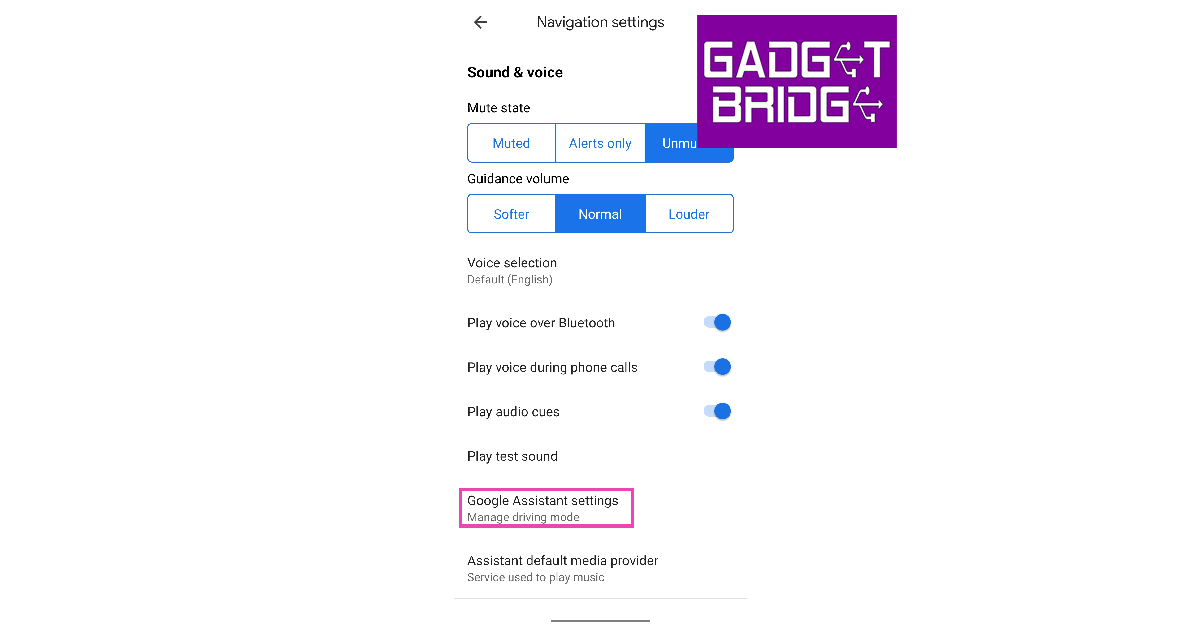 Step 5: Tap on Driving Mode.


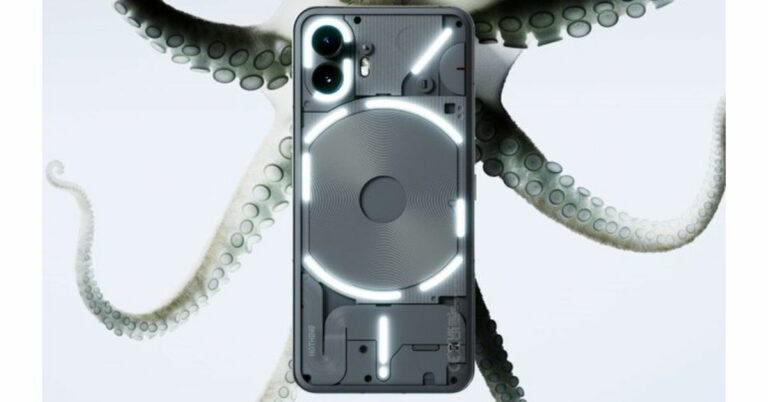





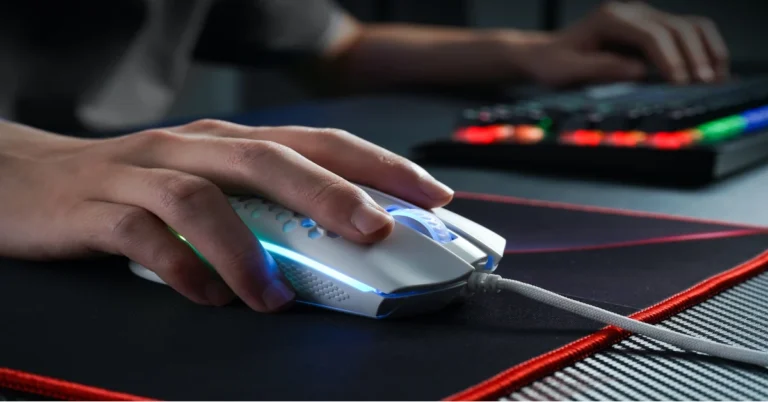








 In order for this system to be effective, it must be easy to access and use, which means providing clear instructions on how to report cheaters as well as making sure the user interface is intuitive and accessible. Additionally, it should also provide adequate feedback on what actions have been taken following a successful report submission. By making sure these elements are in place, developers can ensure that their in-game reporting system serves its purpose of deterring cheating within their games.
A well-designed in-game reporting system can be extremely effective at reducing the presence of cheaters within online PC gaming communities, as seen when players utilize
In order for this system to be effective, it must be easy to access and use, which means providing clear instructions on how to report cheaters as well as making sure the user interface is intuitive and accessible. Additionally, it should also provide adequate feedback on what actions have been taken following a successful report submission. By making sure these elements are in place, developers can ensure that their in-game reporting system serves its purpose of deterring cheating within their games.
A well-designed in-game reporting system can be extremely effective at reducing the presence of cheaters within online PC gaming communities, as seen when players utilize 
 Step 3:
 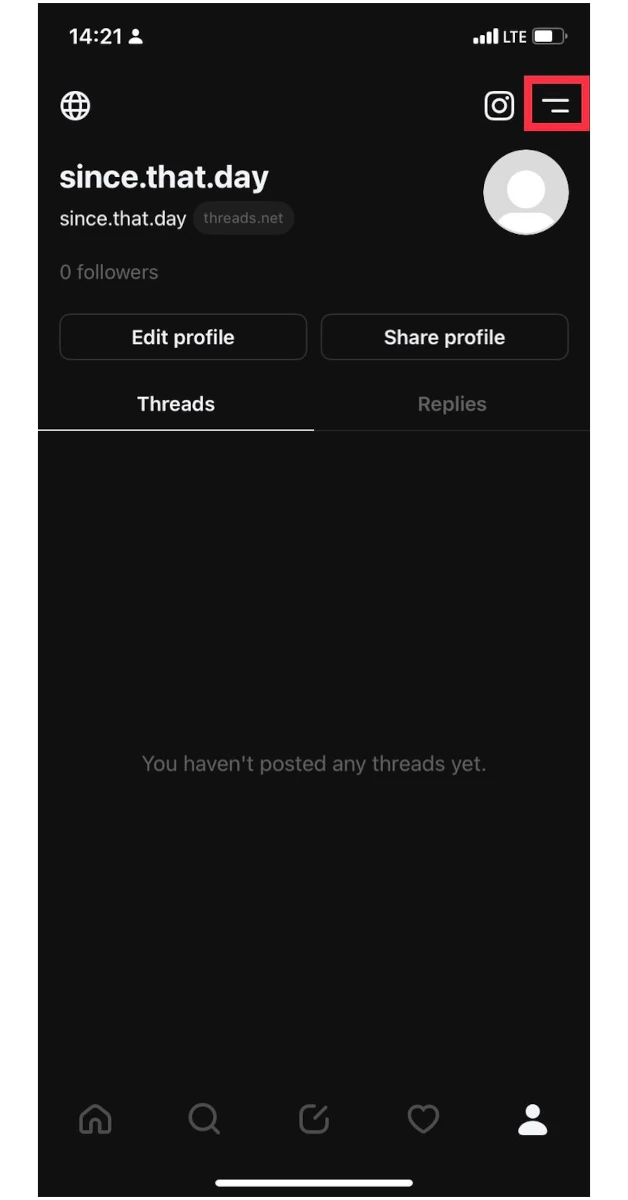 Step 4: Select
  Step 5:
 Step 3:
 Step 4:
 Step 5:
 Step 6:
 Step 7:
 Step 8:
 Step 9: Save
  Step 1:
 Step 1:










 Step 2:
 Step 3:
 Step 4: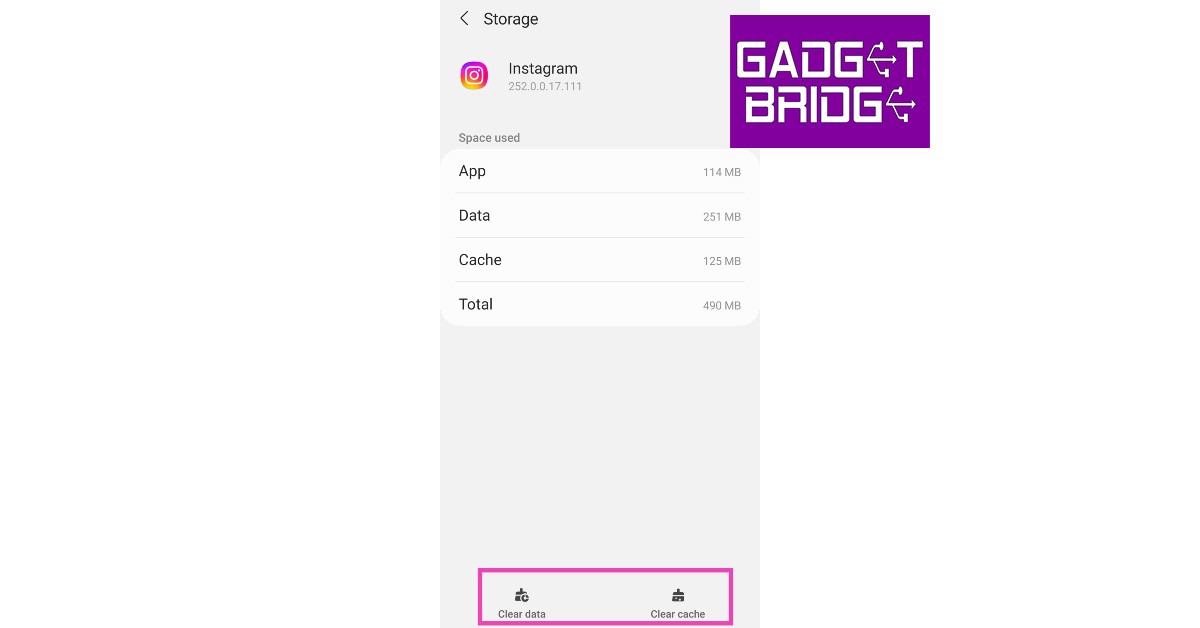

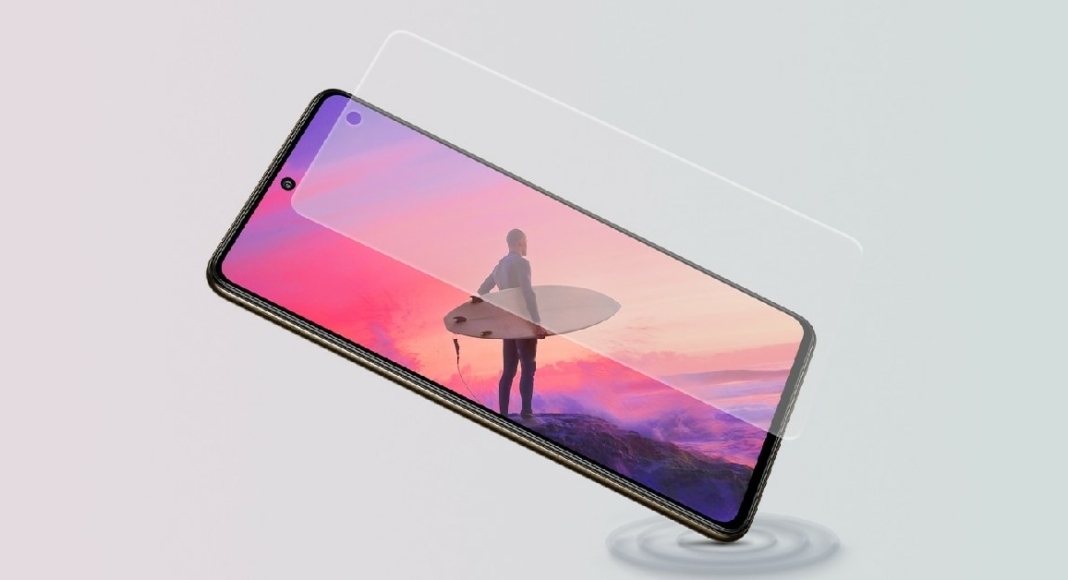
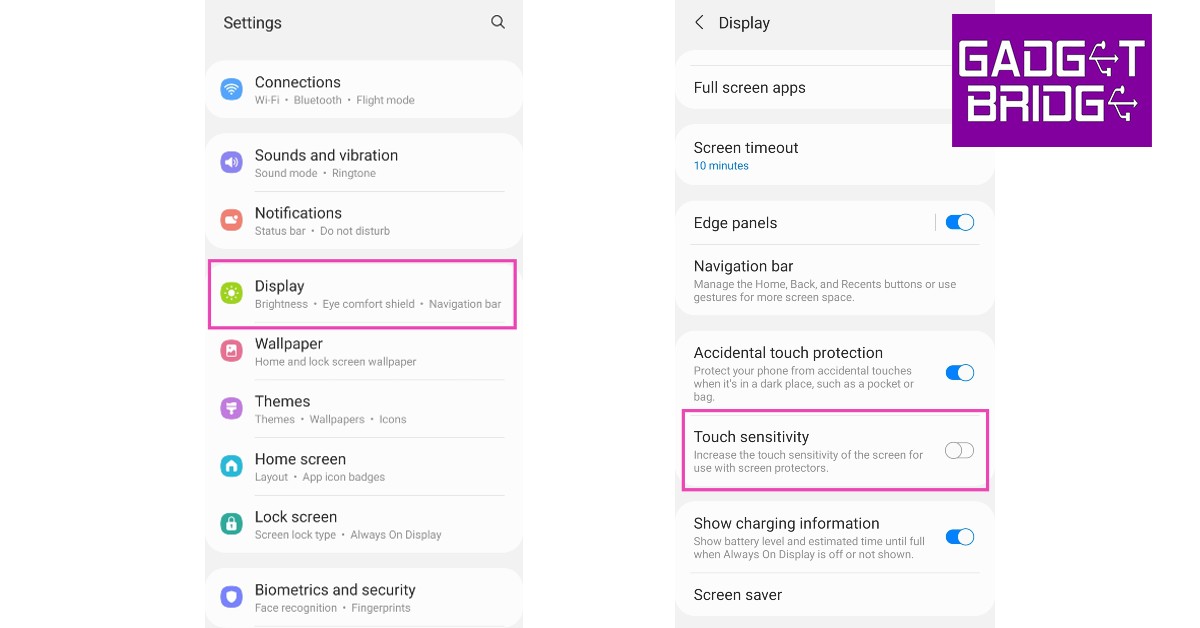





 Step 1:



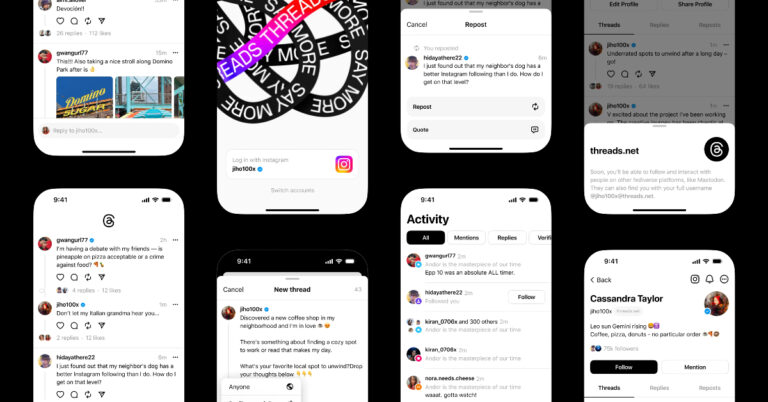
 Step 2:
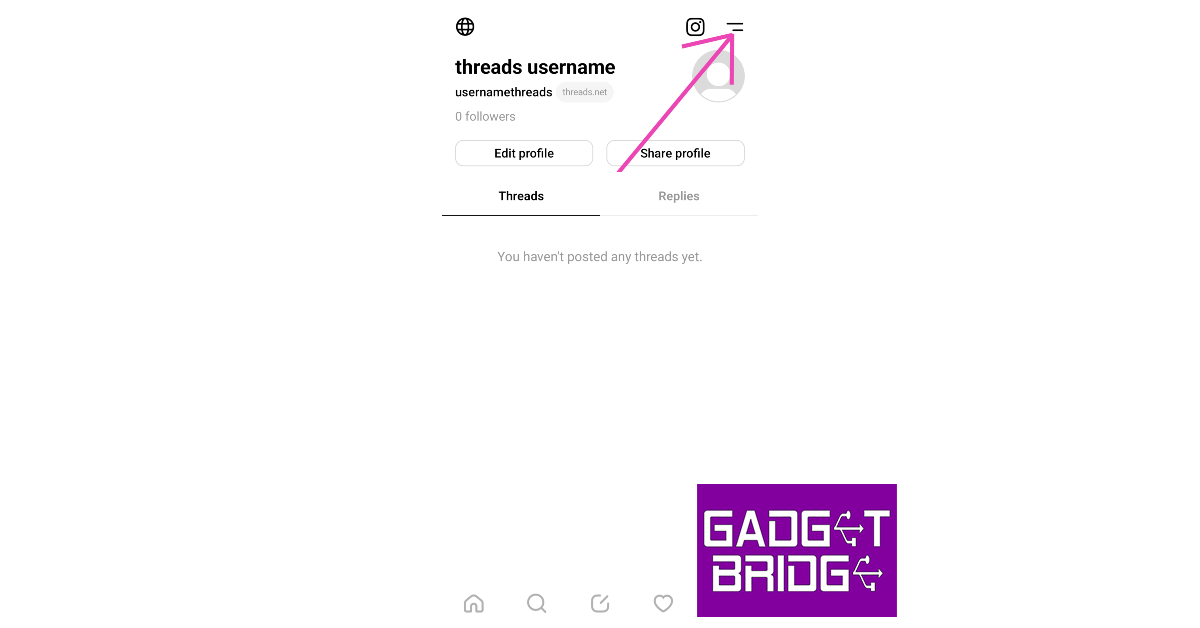 Step 3:
 Step 4:
  Step 5:
 Step 3: