21 June 2022 Amazon Quiz has gone live on its mobile app platform. The quiz can be played from 12 AM to 11:59. All you need to do is just answer five easy questions that the e-commerce website puts before you. Today you can stand a chance to win Rs 30,000 Amazon Pay Balance.Every day Amazon posts a new questionnaire that consists of five simple questions about general knowledge and current events. To enter a lucky draw, participants must correctly answer the questions. One incorrect answer will result in your elimination from the quiz. Each month, only one person will be declared the winner and the results will be announced at the end of the month. Amazon customers who submit correct answers can win an Amazon Pay Balance worth up to Rs 50,000. To ensure that you answer all five questions correctly, Gadget Bridge updates all of the correct answers on a daily basis. Take a look at today’s answers:Amazon Quiz Today Prize – Rs 30,000 Amazon Pay BalanceQuiz Date – 21 June 2022Daily Timing – 12 AM to 11:59 PMWinner Announcement – Today 12 PM
In This Article
Amazon Quiz Answers Today 21 June 2022
Question 1: Which team did India defeat in the final to win the 2022 Thomas Cup in badminton?
Answer: Indonesia
Question 2: The Centre’s recent recruitment scheme for Indian youth to serve in the armed forces, shares its name with which movie?
Answer: Agnipath
Question 3: At the 2022 Skytrax World Airport Awards, an airport in which city bagged the best regional airport in India and South Asia award?
Answer: Bengaluru
Question 4: In which European country is this location located?
Answer: Switzerland
Question 5: What is the profession of this famous comic book character?
Answer: Reporter
How To Play Amazon Quiz
Only app users are eligible to play the Amazon quiz every morning from 12 AM to 11:59 PM. The quiz is not available on the desktop. For those who are unaware of how to play the Amazon quiz below are the steps, you can follow to take the quiz.
Firstly download the Amazon app from Google Play Store or App Store
Now fill in the required information through the Sign Up option.
You need to log in to the Amazon app and scroll down on the home screen to find the Amazon Quiz banner.
Tap on the Amazon Quiz banner and tap on the Start button to start the Quiz.
Now you will get 5 questions and you need to answer them correctly. One wrong answer will eliminate you from the Quiz.
After answering all the questions correctly you are now eligible for a Lucky Draw.
The winner’s name will be announced today at 12 PM.
Once you sign in to your Netflix on your Smart TV, it remembers your login credentials so you don’t have to sign in every time you use the app. Since you don’t always sign out of Netflix on your Smart TV, it can be tricky to figure out how to do it. The need to sign out of your Netflix account may arise when someone else wants to use their account, or when you don’t want anyone else to use your account. Today, we’ll show you 2 ways to sign out of Netflix on your Smart TV.Read Also:Netflix users can now remove series or movies from the “Continue Watching” list
In This Article
Here’s how you can sign out of Netflix on your Smart TV
Step 1: Launch the Netflix app on your Smart TV using the app menu or the dedicated Netflix button on your Smart TV remote.Step 2: Press the left arrow button on your Smart TV remote to access the Netflix side menu.Step 3: Keep pressing the down arrow button until the Get Help option is highlighted.Step 4: Press Enter on your Smart TV remote to select the Get Help option. If your remote does not have the Enter button, press the round button at the centre of the navigation buttons.Step 5: Keep pressing the down arrow until the Sign Out option is highlighted.Step 6: Press the Enter button to select the ‘Sign Out’ option.Step 7: Netflix will ask you if you want to Sign Out of your device. Use the navigation buttons to highlight the Yes option.Step 8: Press the Enter button to select the Yes option. You will be signed out of your Netflix account on your Smart TV.
Remotely sign out of Netflix on your Smart TV
Step 1: Sign into Netflix on your PC’s web browser.
Step 2: Hover the cursor on your profile picture at the top right corner of the screen and select Account.
Step 3: Scroll down and select Manage access and devices.
Step 4: Hit Sign Out next to your Smart TV.
Frequently Asked Questions (FAQs)
How do I sign out of Netflix on all my devices at once?
Open Netflix on your PC’s browser and go to Account>Manage access and devices. Scroll down and select ‘Sign Out of All Devices’
How do I sign out of Netflix on my Smart TV?
Launch Netflix on your Smart TV, hit the left arrow icon on the remote to access the side panel, then scroll down and select ‘Get help’. Hit ‘Sign Out’ and confirm your selection.
How do I install Netflix on my Macbook?
Since the Netflix app isn’t available for Macbooks, you are left with the option of creating a ‘web app’. Open Netflix in Chrome, hit the ellipses, and select ‘Create Shortcut’.
Read Also:How to block YouTube channels from appearing on your Smart TV?
Conclusion
Following the methods mentioned above, you will be able to sign out of Netflix on your Smart TV. It is important to not select the ‘Exit Netflix’ option on the side menu. It will only exit you from the app and not sign out from your Netflix account. If you need to sign back in, open Netflix on your Smart TV and select Sign In.
The all-new Samsung Galaxy M53 5G smartphone is here and we are very excited to share our review of the device with all of you. It is offered with 6GB/8GB RAM, which is extendable up to 16GB, as claimed by the brand. This is coupled with a 128GB/256GB internal memory. The smartphone comes with a 120Hz FHD+ Super AMOLED display and a 5,000mAh battery capacity. One of the highlights of this model is its 108MP quad-camera system, which is paired with a 32MP front camera. Here is a complete review of the Samsung Galaxy M53 5G so you can check out whether it is the right investment for you or not.
In This Article
Samsung Galaxy M53 5G Review: Design and Display
The Galaxy M53 5G smartphone comes riding a thin rectangular box. Along with the phone comes a USB to Type-C cable, a SIM ejector tool and a quick start guide within the package. As the brand tries to go green, it does not offer you an adapter with it. The smartphone’s 6.7-inch shiny black display stares at you as soon as you unbox the package. Picking up the smartphone in your hands, you’ll feel it to be lightweight for its size. The 120Hz Super AMOLED Infinity-O display has a screen-to-body ratio of about 85%. It comes with a Gorilla Glass 5 protection. The screen resolution is 1,080×2,408 pixels, the aspect ratio is 20:9 and the pixel density is 394ppi. Flip the phone over and you’ll meet its sleek and glossy plastic back cover in its body colour. The Galaxy M53 is offered in three colours, Blue, Green and Emerald Brown. We were able to get our hands on its Green coloured model. The back has been given an elegant minimalistic look. It doesn’t seem fingerprint-resistant. The rear quad camera system is placed neatly and symmetrically on a mount. Just below the mount lies the flashlight of the device. At the bottom in the centre is the Samsung brand engraving, which completes the look of the smartphone.The model comes with a body-coloured metallic frame. On its left side lies the SIM card tray while on its right lies the volume button and the power button with an integrated fingerprint sensor. At the bottom of the frame lies the Type-C USB port along with the mono speaker. Bringing the phone to life, its bright and colourful FHD+ AMOLED display immediately appeals to the eyes. One gets to enjoy the features of the latest Android 12-based One UI 4.1 OS. The look and feel of its interface is that of a standard Samsung device. The screen colours appear to be well-lit and even the default theme has great contrast. The icons within the home screen and the app drawer are square-shaped with rounded corners, as seen in a typical Samsung model. The touch of the smartphone feels quite soft and fluid. Overall, the display looks pretty and is easy to get accustomed to. Streaming videos on Youtube is very life-like. The quality of the videos can be enhanced up to 2160p at a rate of 60fps. Watching movies and TV series on Netflix also provides a seamless experience. The picture quality delivered is super fine and the colours are vibrant. The Galaxy M53 5G comes with a mono-audio system. The mono-speaker works decently in terms of loudness and crispness of the sound. However, one still does miss stereo-audio output in the device.The gaming experience on the device was tested by playing high-end games like Asphalt 9 Legends. The graphics offered are commendable and the response to the touch commands is also swift. Movements and actions are smooth. Together with the audio, gaming on the smartphone is quite enjoyable. A stereo sound output would have surely taken the experience to the next level though. Overall, the design of the Samsung Galaxy M53 5G is graceful and has a sophisticated character to it. The display of the smartphone is also pretty amazing and works flawlessly. Read also: Smartphone Comparison: Motorola Edge 30 Vs Samsung Galaxy M53
Samsung Galaxy M53 5G Review: Performance and Cameras
Elaborating further on the Galaxy M53 5G specifications, it gets offered with 6GB/8GB RAM options in combination with 128GB/256GB internal storage. The device supports nano dual-SIM and the microSD card slot shares its space with the SIM slot. It comes equipped with a MediaTek MT6877 Dimensity 900 (6 nm) Octa-core processor. It also offers Bluetooth 5.2, Wi-Fi and 5G connectivity. The model comes with a Li-ion 5,000mAh battery which supports 25W fast charging as well as reverse charging. The battery life of the smartphone is also good. Upon heavy usage (including continuous binge-watching, gaming and camera use), it can last up to an entire day. After mild to moderate usage, it can last for more than a day. The hours may vary by the different applications in use. The device comes pre-installed with Android 12-based One UI 4.1 OS. The home screen and app drawer have a traditional Samsung interface. The device comes downloaded with some additional applications as well, which may or may not be useful. There was no app crash observed while using multiple applications simultaneously. Switching between apps was also quite hassle-free. The device also doesn’t seem to get heated easily upon usage for prolonged periods.Coming to the Samsung Galaxy M53 5G camera review, it comes with a superb 108MP+8MP+2MP+2MP quad rear camera system, along with a 32MP front camera. It has 5 zoom modes, 0.5x, 1x, 2x, 4x and 10x. The picture quality degrades significantly as we go up the zoom scale after 2x. The 5 zoom modes are available for use from the rear camera in the standard Photo mode and Video mode. The Night mode offers 2 zoom modes for the rear camera, 0.5x and 1x. Two zoom modes (a normal and a wide-angle) are offered for the front selfie camera Portrait mode, Photo mode and Night mode whereas no zoom options are offered for video captures from the front camera. Videos can be captured in UHD resolution with up to a 30fps frame rate from both front and back. Samsung Galaxy M53 5G: Photo ModeThe rear camera’s Photo mode works great in capturing the fine details within the frame. The colour scheme is full of contrast and looks close to reality. Under suitable external conditions, the camera enhances each colour within the frame, making the images instantly pleasing to the eyes. The shots taken appear quite vivid in daylight. Samsung Galaxy M53 5G: Portrait ModeThe smartphone’s rear camera Portrait mode can very well be defined as one of its most significant highlights. Not only does it provide a superior picture quality, but the colours in the frame are captured extremely well. The overall result has a nice pop element to it. The blacks in the image are increased subtly while the saturation of each colour is tuned up a notch, producing astounding captures. You will fall in love with the camera’s capabilities in no time. Samsung Galaxy M53 5G: Night ModeThe rear camera’s Night mode also works pretty appreciably. Although the 0.5x zoom mode produces slightly blurry results, shots taken from the 1x zoom do not compromise in capturing the details at all. The surrounding lights captured by the camera help brighten up the image. Speaking of the front camera, it takes selfies quite decently. The details are captured nicely while the skin tones appear close to reality. The Fun mode embeds all the Snapchat filters directly into the smartphone’s built-in camera, thereby providing ease of access. Apart from the above, the camera also offers various other modes like Food, Macro, Pro, Single Take, and many more.Overall, the quality of the camera package offered with the Samsung Galaxy M53 5G is pretty impressive and makes you happy.Read also:Samsung Galaxy A53 5G Review: Should You Pick It Up In This Price Range?
Verdict
To sum up, the Samsung Galaxy M53 5G seems to be a great smartphone choice. It offers a sophisticated design along with commendable display quality. The performance of the device is also up to the mark while the clicks from its premium quality cameras appear quite striking. Geekbench 5 CPU benchmarking gives it a single-core score of 506 and a multi-core score of 1989. The price of the smartphone may seem to incline toward the higher end for some people. However, if that’s not an issue, we would gladly give you a go-ahead for buying this device. It is a delight to use. The Samsung Galaxy M53 5G is priced at Rs 28,499 onwards.
If you’re looking to make a tutorial video or need to broadcast a great moment from a game you just played, you will need to figure out how to record your device screen. There are an array of software and tools available online for this particular task. Navigating them and finding the best tool for your needs can be tricky and confusing. To help ease your task, we bring you the 3 best ways to screen record on your Windows Device. Following these steps, you will be able to start and stop screen recording any time you please.Read Also:Microsoft revamps Xbox Game Bar on Windows 10: Here’s everything that’s new
In This Article
Here are the 3 best ways to start and stop screen recordings on a Windows 10 and 11 device
Xbox Game Bar
A lot of people may not know this but Windows 10 and 11 have native screen recording software that comes built-in with the OS. It is called the Xbox Game Bar and is primarily designed for gamers to record their gaming screen and capture vital gameplay moments. But it can still be used as an excellent screen record software since it can record any app or browser screen.You do not need to have an Xbox console to use this tool. It comes pre-installed on the Windows device for everyone to use. The Xbox Game Bar has one drawback – it is unable to record the desktop and the file explorer screens.Step 1: Open the screen you wish to record on your Windows device.Step 2: Search for Xbox Game Bar on your Windows Game Tab.Step 3: The Xbox Game Bar overlay will open on top of your current screen. On the top left corner, you will see the ‘Capture’ window with several options within it. Hit the record button. The capture window also has the option to take a screenshot.Step 4: The Game Bar will start recording your screen. A small pop-up bar will open up on the right side of your screen, giving you the option to end the recording. Click anywhere on the screen to hide the Xbox Game Bar overlay, so you can continue carrying out the task on your screen that you wish to record.Step 5: When you’ve recorded the desired footage, hit the stop button on the pop-up window. A blue notification window will appear on the right side of your screen, alerting you that your recording has been saved.Step 6: Click on the blue window that just appeared and it’ll take you to the folder where your recording is saved.
OBS Studio
Open Broadcast Software, more commonly known as OBS is one of the widely used tools for screen recording and sharing. Since the Xbox Game Bar cannot record the desktop and windows file explorer screen, users often flock to OBS for their broadcasting needs. OBS is available for free on the OBS Project website.To record your Windows screen using OBS follow these easy steps.Step 1: Install and launch OBS.Step 2: Click the Plus button in the Sources window to add a new source.Step 3: Click on ‘Display Capture’.Step 4: A box will pop up which will allow you to name the source being recorded. You may give your source a name and hit OK after you’re done.Step 5: Choose a display and hit OK. OBS allows you to link from different display sources, in case you’re using multiple monitors. Choose the monitor of your choice and hit OK. If you’re using only one monitor, simply click OK.Step 6: Click on the ‘Start Recording’ option.Step 7: Minimise OBS on your screen and go to the screen you wish to record.Step 8: Click ‘Stop Recording’ once you’re finished.OBS will save your recording in the Videos folder on your Windows device.
Microsoft Stream
If you use Microsoft Stream in your workplace or organization, you can use it to record your screen as well. Just follow these easy steps.Step 1: Launch Microsoft Stream.Step 2: Select Create>Record Screen.Step 3: A window will pop up, asking you to allow Microsoft Streams access to the microphone and camera. Click on Allow.Step 4: Click on the Record button to begin your recording. If you want to record your system audio as well, click on Share audio.Step 5: A countdown will pop up on your screen. Wait for the recording to begin.Step 6: If you wish to pause or finish your recording, come back to the Microsoft Streams tab and hit Next or Pause.Microsoft Stream allows you to record up to 15 minutes of screen footage.Read Also:How To Save Money On Your Microsoft Office 365 Subscription?The three tools mentioned above will help you start and stop screen recording on Windows. All three of these tools allow you to record your system audio as well as external voiceovers. In order to record a voiceover, you will need to plug in an external microphone. If there is another tool or software you find easy to record your Windows screen with, mention it in the comments!
For the latest gadget and tech news, and gadget reviews, follow us on Twitter, Facebook and Instagram. For newest tech & gadget videos subscribe to our YouTube Channel. You can also stay up to date using the Gadget Bridge Android App. You can find the latest car and bike news here.
Transsion Holdings smartphone brand Tecno Mobile, today announced the launch of Tecno Pova 3 in the Indian market. The handset features a 90Hz HD display. This gaming handset houses a whopping 7,000mAh battery which is claimed to provide 14 hours of gaming time. it also comes with a 33W fast charger. Moreover, it is powered by MediaTek Helio G88 SoC with a Mali G52 GPU. This smartphone has a Z-axis linear motor that generates 4D vibrations for an immersive gaming experience.
In This Article
Tecno Pova 3 price in India, sale details
The Tecno Pova 3 is available for Rs. 11,499. It comes with two different configurations: 4GB RAM with 64GB storage and 6GB RAM with 128GB storage option. The Tecno phone will be available in two colours: Eco Black and Tech Silver. It will go on sale in India on June 27. It can be purchased through the Amazon India website.
Tecno Pova 3 specifications
A 6.9-inch full-HD+ Dot-in display with 1,080×2,460 pixels of resolution is included on Tecno Pova 3. The device runs on Android. The smartphone is powered by a MediaTek Helio G88 processor and a Mali G52 GPU. It comes with up to 6GB of RAM, which can be upgraded to 11GB thanks to Memory Fusion technology. This smartphone features a Z-axis linear motor that generates 4D vibrations for a more immersive gaming experience. Panther Engine 2.0 is built inside the smartphone, allowing for lag-free gameplay and lower power consumption. A graphite cooling system is standard on the Tecno Pova 3.For photos and videos, Tecno Pova 3 comes with a 50-megapixel triple-back camera configuration with quad flash. There’s also an 8-megapixel selfie camera hidden behind a hole-punch cutout in the centre.In addition to this, DTS technology enhances the twin stereo speakers. In terms of endurance, the smartphone has a 7,000mAh battery that can last up to 14 hours of gaming time. With a 40-minute charge, the bundled 33W flash charger is touted to provide up to 50 percent backup.
For the latest gadget and tech news, and gadget reviews, follow us on Twitter, Facebook and Instagram. For newest tech & gadget videos subscribe to our YouTube Channel. You can also stay up to date using the Gadget Bridge Android App. You can find the latest car and bike news here.
Omegle is possibly one of the biggest chat-oriented websites in the world. With its simple idea of linking two random users across the globe for a video or text conversation, Omegle gained instant popularity as soon as it was launched in March 2009. As the website increased its user base, the chat experience started to diminish. A lot of users find Omegle undesirable now, with excessive bots plaguing the website along with routinely coming across harmful and offensive content. Luckily, there are other websites that offer a similar service as Omegle and are a lot more fun to use. Today, we bring you the 12 best alternatives to Omegle.Read Also:10 Best New Emojis And Their Meaning For Using In Your Chats And Instagram Posts
As old as Omegle, Chatroulette uses the same idea of linking two random users for a video conversation. Either of the users is free to abort the chat at any given time. The website also offers the option of chatting via text.Chatroulette is one of the most popular chat websites out there, paralleling in popularity with Omegle. However, the website faces the same criticisms as Omegle, of taking too long to remove inappropriate content.
Tinychat allows its users to access its chatrooms to converse with other people. A user has the choice of joining a pre-existing chatroom or they can create one by themselves. Chatrooms can be either text, audio, or video-based. You need a Tinychat account in order to use it.The website also has a premium service where you can have an ad-free experience. Being a premium user gives you other perks as well. Like, highlighted screen name, pro badges, purple or gold coloured screen name, access to more than chatrooms at once, etc. Tinychat also comes with a virtual store where you can buy virtual gifts for other users on the website.
MeetMe is a website that allows you to live stream on its platform. As a spectator, you can either watch the streams hosted on the website or create one of your own. You can also guest on someone else’s stream, giving you the option to interact with other users. While it is a good alternative to Omegle, it may not be suitable for users who do not want to live stream.MeetMe also has a highly functional Android and iOS app. MeetMe lets you send and receive gifts, which can be exchanged for credit. It also allows you to randomly chat with another live streamer.
Shagle is very similar to Omegle, providing the option of both, text and video chats. You can use Shagle without needing an account, although making one gives you access to a lot of other features. In order to begin chatting, you need to specify your gender and your location. You can also set your interests, letting the algorithm match you with someone that shares your interests. Shagle boasts more than 4 million users on its website which means you’ll never run out of people to talk to, making it one of the best alternatives to Omegle.Shagle offers a premium service, which gives the user added benefits like the ability to initiate a private (encrypted) conversation, send gifts to desired users, location override, and match with people of preferred gender.
Emerald Chat is one of the better alternatives to Omegle out there. Firstly, you’ll need to make an account and fill it up with basic information about your likes and interests. Emerald Chat will then link you to someone with similar interests, whom you can chat with on video or on text. One unique thing about Emerald Chat is that it lets users rate each other after every conversation.Users can give their counterpart a point if they enjoyed the chatting experience, or reduce a point if the experience wasn’t suitable to their liking. These points add up to make a user’s ‘karma’. If a user’s karma score drops down too low, Emerald Chat places restrictions on their profile, so as to provide a smooth experience for everyone else.On top of that, Emerald Chat is heavily moderated, with offensive content getting taken down quickly. Emerald Chat also comes with a paid subscription service, which unlocks some additional features like filtering users according to their karma score and genres.
Camsurf is another pretty straightforward alternative to Omegle that offers all the features as the latter. You can set up an account and filter people you want to chat with by location. You can also select a genre before chatting. It allows you to find like-minded people who share the same interests as you.Camsurf also has a premium service that lets you filter users by gender, lets you reconnect a chat with a previous user, and gives you the option of creating a private, encrypted chat. Camsurf has a pleasant UI and fast servers, which make your chatting experience smooth and unhindered.
With its stripped-down minimal look, Meetzur is a website for people who simply want to chat with another user, without any added features or perks.Meetzur only allows the option of text chat and follows a very simple algorithm. You do not need to register to start chatting. Just press the ‘Chat Now’ button and you’re on your way.
There are several benefits to using ChatHub. The interface is quite similar to Omegle and very easy to use. You can filter participants by language and gender, making it easy to find your preferred matches. The website is optimised for mobile, allowing you to browse through users without any hiccups. Its special algorithm ensures you don’t match with the same partner twice. There is a smartphone app available for ChatHub as well. All you need to do is open ChatHub in Chrome, press the three dots up top and select ‘Add to Home Screen’.
Bazoocam keeps things simple, light, and fun, without being too bland. The website follows the typical method of matching two users together from across the world. To move to the next person, all you have to do is press ‘Next’. What’s unique about Bazoocam is that it allows you to play fun games like Tetris, Tic Tac Toe, and 4 In A Row with the person you have matched in order to break the ice.
As the name implies, Chatrandom connects you with random users to chat with. You can either turn on your webcam for a video chat or enter a text chat with a stranger. Chatrandom has accessible filters for gender and country. Chatrandom is also available as an app on Google Play Store. Click on this link to download it.
With its large user base, you will never run out of people to talk to at ChatSpin. The website connects you with a stranger within seconds and makes sure you keep on getting matched with new people. ChatSpin encourages users to display their talents and creativity to the person they are matched with. If you want to keep your anonymity intact, there are plenty of face and voice filters you can use.
FaceFlow follows the Omegle formula of matching you with random people for a text or video conversation but also brings something of its own into the mix. You can create profiles on FaceFlow so that the people you match with can add you after the conversation is over. You can upload a picture to your profile, add a bio and share stuff with your friends. Have a clique going? FaceFlow also lets you host group calls on its platform.
Read Also:This is FireChat: An instant messaging platform that works without internet access and how it works
Conclusion
These 12 best alternatives to Omegle are all the options you need to cover everything on the chat experience spectrum. Among these websites, you’ll find every feature you need, from text chats to video conversations, and one-on-one conversations to online communities designed to cater to specific interests.While the websites mentioned above are safe to use, it goes without saying that one must observe basic safety measures when interacting with strangers online. This includes maintaining your anonymity, not clicking on any suspicious links, not sharing any personal information, and reporting any malicious content you come across. Unfortunately, there are a lot of scams one can fall prey to on these websites, and it is advised to take basic precautions before you begin chatting.
Garena Free Fire is a battle royale game with regular awards and tournaments to keep players interested. If you play Garena Free Fire, you should be aware of the redeem codes that are released on a daily basis. However, because the battle royale game is banned in India, players from other countries can use the Free Fire Redeem codes daily. If you’re unfamiliar with the Garena Free Fire redeem codes or don’t know how to get them, we’ve put together a step-by-step guide to help you redeem them. Check out Garena Free Fire Redeem Codes for June 20.The Free Fire redeem codes are a great way to get free stuff. These are 12-digit codes that contain alphabets and numbers, as well as an expiration date and time. Because the Garena FF redeem codes cannot be used more than once, you should hurry to the redemption page to claim your free reward before someone else does. To get a free reward, all you have to do is go to reward.ff.garena.com/en, which is the official redemption page. Also, keep an eye on this space for daily updates on Garena Free Fire redemption codes and rewards.
In This Article
Garena Free Fire Redeem Codes Today 20 June 2022
FF7W SM7C N44Z
FFA9 UV8X 4H7D
9EHDK5GDEW6DRDM5
FF46 OC2II VYU
JIJY L8T4 6V2Z
8JKN XUB9 6C9P
8F8U Q5XP DKA7
MV9C Q97L QJOL
FXCV BNNK DSXC
FOKM JNLV CXSD
DWF3F71VE2D708EK
FFTQ T5PR MCNX
FF7W 7M0C N44Z
FFA9 UVHX 4H7D
FFA0 E811 YL2D
FFX6 0C4II VYU
JIMY LVT4 6V2Z
88KN XUB9 6C9P
How to Get Free Fire Redeem Codes for Garena on June 20?
Recently educators who subscribe to Google’s Workspace for Education Plus and Teaching and Learning Upgrade plans got access to an automatic transcribing function in Google Meet. With the latest update, Picture-in-Picture mode is now available in Google Meet for Chrome. Now, Google has added a clever picture-in-picture option to Meet. Additionally, you can now pin multiple video feeds. Users have the option to see up to four video tiles of meeting participants in a floating window on top of other apps. Moreover on Chrome Google Meet also receives a new multi-pinning feature.The availability of picture-in-picture mode on Meet for Chrome browsers has been announced by Google on its official blog. While on a Google Meet call on the web, users will now be able to see up to four tiles of meeting participants. On Chrome, tap the three-dot menu symbol next to the hang-up button to get the Picture-in-Picture option.While announcing the new features, the company via blog post said, “We’re bringing picture-in-picture to Google Meet to Chrome browsers on the web. You’ll be able to see up to four video tiles of meeting attendees in a floating window on top of other applications.”In addition to this Google Meet is also getting a variety of other video options. Instead of just one video source, users can now pin numerous video feeds. According to the company, this will provide greater flexibility in how you combine people and content, allowing you to adjust the view in a way that best serves your meeting.In terms of availability all Google Workspace subscribers, as well as existing G Suite Basic and Business clients, have access to the picture-in-picture and multi-pinning capabilities for Google Meet users and is already being rolled out. Moreover, users with personal Google Accounts can also take advantage of it.
For the latest gadget and tech news, and gadget reviews, follow us on Twitter, Facebook and Instagram. For newest tech & gadget videos subscribe to our YouTube Channel. You can also stay up to date using the Gadget Bridge Android App. You can find the latest car and bike news here.
WhatsApp users can now choose who can see their Profile Photo, About, and Last Seen status from their contact list. Improved privacy measures are being rolled out to WhatsApp users in large numbers. The privacy enhancements come only days after the business unveiled support for moving chats from an Android smartphone to an iPhone.WhatsApp announced the implementation of advanced privacy controls on all its social media platforms. WhatsApp, users will be able to hide parts or all of their profile by selecting particular people from their address book. The features provide users greater control over their privacy settings on the messaging app, allowing them to decide who can see their last seen, about, and profile photo.
🔒 To further protect your privacy online, we’re rolling out new options to your privacy control settings 🔒
Now you can select who from your contact list can see your Profile Photo, About, and Last Seen status. For more information follow this link: https://t.co/UGMCx2n70h
The new privacy settings have also been changed in the messaging service’s frequently asked questions (FAQ) section on its website.WhatsApp users who have connected contacts with whom they do not wish to reveal their personal information may benefit from the extensive privacy options. Earlier, the privacy settings for About, Last Seen, and Profile Photo on Android and iOS had three options: Everyone, My Contacts, and Nobody. To restrict their profile photo, last seen, and about from being revealed to certain users, users had to either delete a person from their contacts, block them, or adjust their visibility setting in the settings to “Nobody.”My Contacts Except… has now been introduced as a fourth option, allowing users to pick particular contacts from their contact list and hide elements of their profile from them. Best part other people in the user’s contact list should be able to see their WhatsApp profile properly.Control who sees your information by adjusting your privacy settings. You can set your last seen, profile photo, about, or status to the following options:Everyone: Your last seen, profile photo, about, or status will be available to all WhatsApp users.My Contacts: Your last seen, profile photo, about, or status will be available to your contacts from your address book only.My Contacts Except…: Your last seen, profile photo, about, or status will be available to your contacts from your address book, except those you exclude.Nobody: Your last seen, profile photo, about, or status won’t be available to anyone.
For the latest gadget and tech news, and gadget reviews, follow us on Twitter, Facebook and Instagram. For newest tech & gadget videos subscribe to our YouTube Channel. You can also stay up to date using the Gadget Bridge Android App. You can find the latest car and bike news here.
Have you participated in the Amazon Quiz today? If not then participate in the 20 June 2022 Amazon Quiz as it has already gone live on the app. The daily quiz can be played from 12 AM to 11:59 every day on the mobile app platform. Today e-commerce is giving the chance to win Rs 10,000 Amazon Pay Balance.Every day Amazon brings a fresh quiz for its customers. By participating in the quiz the participants can win an Amazon Pay Balance of up to Rs 50,000. The quiz can only be played on the mobile app as it is not available for the desktop platform. The quiz contains five easy questions and you have to answer all the questions correctly. The participants will then be shortlisted for a lucky draw to select a winner. Whereas the results are declared at the end of the month. Check out today’s Amazon quiz answers to win Rs 10,000.Amazon Quiz Today Prize – Rs 10,000 Amazon Pay BalanceQuiz Date – 20 June 2022Daily Timing – 12 AM to 11:59 PMWinner Announcement – Today 12 PM
In This Article
Amazon Quiz Answers Today 20 June 2022
Question 1: Casper Ruud recently became the first male singles player from which country to reach the final of a Grand Slam in the open era?Answer: NorwayQuestion 2: Moonfall’ was a 2022 science fiction movie starring which of these famous actors in the lead role?Answer: Halle BerryQuestion 3: A Manimekhalai has recently been appointed as the Managing Director of which bank?Answer: Union Bank of IndiaQuestion 4: TWhich country is the largest producer of this beverage?Answer: BrazilQuestion 5: Fishermen who fish using a fish hook are generally known by which of these names (also sometimes used to refer to fishermen in general)?Answer: Anglers
How To Play Amazon Quiz
Only app users are eligible to play the Amazon quiz every morning from 12 AM to 11:59 PM. The quiz is not available on the desktop. For those who are unaware of how to play the Amazon quiz below are the steps, you can follow to take the quiz.
Firstly download the Amazon app from Google Play Store or App Store
Now fill in the required information through the Sign Up option.
You need to log in to the Amazon app and scroll down on the home screen to find the Amazon Quiz banner.
Tap on the Amazon Quiz banner and tap on the Start button to start the Quiz.
Now you will get 5 questions and you need to answer them correctly. One wrong answer will eliminate you from the Quiz.
After answering all the questions correctly you are now eligible for a Lucky Draw.
The winner’s name will be announced today at 12 PM.
In partnership with Warner Bros., boAt, an Indian earwear audio brand. Consumer Products and DC have collaborated on new DC-themed designs for boAt’s best-selling audio accessories. BoAt Rockerz 450 headphones in Krypton Blue (Superman), boAt Stone 190 portable speaker in Amazonian Red (Wonder Woman), and boAt Airdopes 131 earbuds in Knight Black are among the products created in conjunction with the two major companies (Batman).The epic characters Batman, Superman, and Wonder Woman are combined with boAt’s exceptional technology in this new collection. For the first time, the new relationship will bring the Indian market closer to the enormous DC Multiverse. As per the company, the collection and its products have been meticulously picked and deliberately crafted to complement all of the characters and their distinctive characteristics. boAt said this legendary partnership is the result of DC and boAt’s incredibly comparable audiences, who are on the lookout for powerful and inspiring consumer durables; those that have their own personal style and strive for perfection in everything they do.Airdopes 131 DC Edition is priced at Rs 1,399. It will be available in three colour options of Krypton Blue, Knight Black and Amazonian Red. Whereas the Stone 190 DC edition Bluetooth speakers can be purchased for Rs 1,299. It is also being offered in three colours Black, Blue and Red. The Rockerz 450 DC edition Bluetooth headphones costs Rs 1,499 and the Airdopes 441 Pro – Special Batman Edition wireless earbuds will comes with a price tag of Rs 2,499.The DC-themed collection is now available on boat-lifestyle.com.Aman Gupta, Co-founder, and CMO of boAt said, “I feel extremely excited to announce our partnership with Warner Bros. Consumer Products and reveal our DC-themed boAt audio wear. DC Super Heroes are some of the most loved and watched characters across several age groups. We feel our boAthead community would really appreciate this truly unique collection.”
For the latest gadget and tech news, and gadget reviews, follow us on Twitter, Facebook and Instagram. For newest tech & gadget videos subscribe to our YouTube Channel. You can also stay up to date using the Gadget Bridge Android App. You can find the latest car and bike news here.
For music fans looking for an amazing audio experience, Sony is offering a wide choice of audio goods at exceptional pricing. On the special occasion of World Music Day, Sony India announced exciting deals on its audio products. The World Music Day Fest offers will be accessible until June 23. Headphones, Truly Wireless Earbuds Series, portable Bluetooth Speakers, and Party Speakers will all be available at discounted prices during the sale. The audio products will be available at discounted prices. So, if you’re considering purchasing any Sony Audio products, now is the best time to do so.Sony India has announced a 6-day sale to commemorate World Music Day, with special discounts on a variety of audio items, including headphones, truly wireless earbuds, and portable Bluetooth speakers. The World Music Day special pricing offer begins on June 17th, 2022, and runs through June 23rd, 2021. It is available at numerous Sony retail outlets (Sony Center and Sony Exclusive), the www.ShopatSC.com portal, as well as major electronic retailers and other e-commerce platforms.Sony’s WF-C500 earbuds are available at Rs 4,490, a savings of Rs 8,990 off the MRP. A rebate of Rs 1,000 is included in the discounted price. The WF-XB700, on the other hand, is now available for Rs 6,990 during the World Music Day Fest, despite having a regular price of Rs 11,990.For Rs 12,990, you can get the Sony WH-XB910N. The audio device was originally priced at Rs 19,990. During the World Music Day Fest , the Sony WF-1000XM4 is currently available for Rs 9,990, down from the MRP of Rs 19,990.Sony’s WF-C500 earbuds are available at Rs 4,490, a savings of Rs 8,990 off the MRP. A rebate of Rs 1,000 is included in the discounted price. The WF-XB700, on the other hand, is now available for Rs 6,990 during the World Music Day Fest, despite having a regular price of Rs 11,990.When it comes to the headphones, the WH-CH710N is now available for Rs 6,990, but it has an MRP of Rs 14,990. The Sony WI-XB400, which was originally priced at Rs 4,990, is now available for Rs 2,790, according to the firm. The WI-C200 will be available for Rs 1,599, which is a significant discount from the MRP of Rs 2,990. Furthermore, the WH-CH510, which originally retailed for Rs 4,990, is now available for Rs 2,990.We’ve included a list of more bargains and offers below.
Garena Free Fire is a battle royale game with regular awards and tournaments to keep players interested. If you play Garena Free Fire, you should be aware of the redeem codes that are released on a daily basis. However, because the battle royale game is banned in India, players from other countries can use the Free Fire Redeem codes daily. If you’re unfamiliar with the Garena Free Fire redeem codes or don’t know how to get them, we’ve put together a step-by-step guide to help you redeem them. Check out Garena Free Fire Redeem Codes for June 18.The Free Fire redeem codes are a great way to get free stuff. These are 12-digit codes that contain alphabets and numbers, as well as an expiration date and time. Because the Garena FF redeem codes cannot be used more than once, you should hurry to the redemption page to claim your free reward before someone else does. To get a free reward, all you have to do is go to reward.ff.garena.com/en, which is the official redemption page. Also, keep an eye on this space for daily updates on Garena Free Fire redemption codes and rewards.
In This Article
Garena Free Fire Redeem Codes Today 18 June 2022
FF7W SM7C N44Z
FFA9 UV8X 4H7D
9EHDK5GDEW6DRDM5
FF46 0C2II VYU
JIJY L8T4 6V2Z
8JKN XUB9 6C9P
8F8U Q5XP DKA7
MV9C Q97L QJOL
FXCV BNNK DSXC
F0KM JNLV CXSD
DWF3F71VE2D708EK
FFTQ T5PR MCNX
FF7W 7M0C N44Z
FFA9 UVHX 4H7D
FFA0 E811 YL2D
FFX6 0C4II VYU
JIMY LVT4 6V2Z
88KN XUB9 6C9P
8F9U QJXP DKA7
MV9C Q27L QJOL
FX8V BNMK DSXC
3GF3851KB8H4JE2A
FF12 NYW9 4A00
FF8Q T5IR MCNX
How to Get Free Fire Redeem Codes for Garena on June 18?
Indian wearable brand boAt has announced the launch boAt Xtend Sport smartwatch in India. The smart wearable comes with more than 700 active modes. Besides this, the device features a heart rate monitor, SP02 and more. It has a water-resistant body and offers up to 7 days of runtime. Moreover, there are over 100 watch faces on the watch faces.
In This Article
boAt Xtend Sport Smartwatch price in India and availability
boAt Xtend Sport Smartwatch has been launched in India with a price tag of Rs 2,499. The device comes in three colour options of Ashen Grey, Classic Black, and Cool Blue. It can be purchased via Amazon.in and boAt-lifestyle.com.
boAt Xtend Sport Smartwatch specifications and features
The boAt Xtend Sport Smartwatch comes with an elegant square dial that houses a bright and crisp. It features a 1.69-inch HD display offering a peak brightness of 500 nits. It comes with IP67 water and sweat-resistant body and a sporty yet breathable strap.The boAt Xtend Sport Smartwatch comes with 700+ Active Fitness modes, covering strength and cardiovascular activities like Dance, Cricket, Ballet, Running, Boxing, and more. Cooking, Skateboarding, Meditating, Playing Instruments, and Gardening are just a few of the low and moderate-intensity activities that boAt Xtend Sport is capable of tracking. Aside from a variety of exercise modes, the wristwatch includes a 24-hour heart rate sensor, SPO2 monitor, and pedometer to track and monitor your fitness levels in real-time. While keeping track of your activity throughout the day to keep you fit and healthy.The smartwatch works in tandem with the boAt Crest App, which tracks and maps your health information. With Fitness Buddies, you can track your progress and entice friends and family to join your routine, as well as earn prizes and rewards through Gamification mode. Wellness Crew Guardians allows you to monitor and care for your loved ones’ health and fitness data.The Xtend Sport comes with a boAt ASAP charge that fully charges the battery in 30 minutes and offers you a 7-day runtime. 100+ watch faces, Live Cricket Scores, Calls, Text and Notifications, Curated Controls, Sedentary Alerts, and much more are all included.
For the latest gadget and tech news, and gadget reviews, follow us on Twitter, Facebook and Instagram. For newest tech & gadget videos subscribe to our YouTube Channel. You can also stay up to date using the Gadget Bridge Android App. You can find the latest car and bike news here.
The Noise Buds VS104 true wireless stereo (TWS) earphones were released in India. The earbuds are said to have a battery life of up to 30 hours on a single charge. The earphones have 13mm drivers and come with a water-resistant rating as well as Bluetooth v5.2 connectivity.
In This Article
Noise Buds VS104 price in India, availability
Noise Buds VS104 price in India has been set at Rs 1,499. The device will be available for purchase via Amazon in the country. The product will shortly be available on gonoise.com as well. It will come in different colour options of Charcoal Black, Midnight Blue, Mint Green, and Snow White.
Noise Buds VS104 specifications
The Noise Buds VS104 uses unique technology and 13mm drivers to deliver loud and clear sound so you can enjoy every beat of your song. It also includes Hyper Sync technology, which allows Buds to automatically reconnect to the previously associated device as soon as the charging case cover is opened. Furthermore, thanks to psychoacoustic bass enhancement, small speaker drivers can detect richer, natural bass of the audio source material. It will improve the tool’s relaxing effects, which are already enjoyed by the majority of the brand’s users.When it comes to battery life, the Buds VS104 boasts a 30-hour playtime when fully charged in one go. However, even with a quick charge of 10 minutes, the device can last up to 2 hours. It comes with a USB Type-C charging port. This assures that you do not run out of battery power while listening to your favourite music. For quick pairing, this gadget uses the most up-to-date Bluetooth 5.2 wireless communication. The wireless earbuds are also water-resistant to IPX5 standards, making them ideal for usage during workouts.Gaurav Khatri, Co-Founder, Noise, said, “I am delighted to announce Noise Buds VS104 as another star-studded addition to the list of ingenious and innovative Noise products for new-age customers. With a stellar mix of elite designs and best-in-class audio outputs, the device is a perfect match for customers who are inclined toward new technology and want a wholesome experience. We are confident that this innovative product will gather a stunning reception amongst our customers across the country.”
For the latest gadget and tech news, and gadget reviews, follow us on Twitter, Facebook and Instagram. For newest tech & gadget videos subscribe to our YouTube Channel. You can also stay up to date using the Gadget Bridge Android App. You can find the latest car and bike news here.
Daily Amazon brings a fresh quiz for its customers with exciting rewards on its platform. The Amazon quiz can be played every day from 12 AM to 11:59. 18 June 2022 Amazon Quiz has gone live on its platform and the e-commerce platform Amazon is today giving you a chance to win Rs 25,000 Amazon Pay Balance.To participate all you need to do is log in to your Amazon app on your device and give answers. Daily a new set of questions are presented to the participants which gives them a chance to win exciting prizes. The questionnaire consists of five easy questions that are usually based on general knowledge and current affairs. You can submit the correct answers and can win an Amazon Pay Balance of up to Rs 50,000. It should be noted that the quiz is not accessible on the web platform instead you have to participate only through the dedicated app.Amazon Quiz Today Prize – Rs 25,000 Amazon Pay BalanceQuiz Date – 18 June 2022Daily Timing – 12 AM to 11:59 PMWinner Announcement – Today 12 PM
In This Article
Amazon Quiz Answers Today 18 June 2022
Question 1: Which club recently won the UEFA Champions League title beating Liverpool in the final?Answer: Real MadridQuestion 2: Which season of the web series, ‘The Boys’ released on Amazon Prime video in June 2022?Answer: Season 3Question 3: Rajesh Bhushan, who recently urged states to be vigilant, is the occupant of which important post in India?Answer: Union Health SecretaryQuestion 4: Which of these regions was destroyed by this natural calamity in 79 CE?Answer: PompeiiQuestion 5: There were widespread protests such as these, following the death of George Floyd in which of these cities?Answer: Minneapolis
How To Play Amazon Quiz
Only app users are eligible to play the Amazon quiz every morning from 12 AM to 11:59 PM. The quiz is not available on the desktop. For those who are unaware of how to play the Amazon quiz below are the steps, you can follow to take the quiz.
Firstly download the Amazon app from Google Play Store or App Store
Now fill in the required information through the Sign Up option.
You need to log in to the Amazon app and scroll down on the home screen to find the Amazon Quiz banner.
Tap on the Amazon Quiz banner and tap on the Start button to start the Quiz.
Now you will get 5 questions and you need to answer them correctly. One wrong answer will eliminate you from the Quiz.
After answering all the questions correctly you are now eligible for a Lucky Draw.
The winner’s name will be announced today at 12 PM.
Infinix has released the InBook X1 Slim laptop in India. The 14-inch full-HD+ display on the InBook X1 Slim offers a peak brightness of 300 nits. This laptop is available with Intel Core i3, i5, and i7 CPUs from the 10th generation. It also has up to 16GB of RAM and 512GB of solid-state drive storage. The laptop has an aluminium alloy-based metal body that is ultra-durable and weighs only 1.24 kg. All-day battery life is backed by a 50Wh high-capacity battery and a multi-utility 65 Watt Type C charger.
In This Article
Infinix InBook X1 Slim laptop price in India
The Infinix InBook X1 Slim variant, which comes with a 10th Generation Intel Core i7 processor, costs Rs 49,990. Whereas the model with Intel Core i5 CPU costs Rs 44,990 and comes with 16GB of RAM and 512GB of storage. The variant with an Intel Core i3 processor with 8GB of RAM and 256GB of storage costs Rs 29,990. The laptops will come in four colour options of Aurora Green, Cosmic Blue, Noble Red, and Starfall Grey.Users of Axis Bank can take advantage of this offer by using a credit or debit card to get a discount of up to Rs 3000.
Infinix InBook X1 Slim laptop specifications
The 14-inch full HD+ IPS display on the InBook X1 Slim laptop has a peak brightness of 300 NITS and 100% sRGB colour reproduction. As a result, it’s suitable for usage both at home and at work. Users can also access Netflix and Amazon Prime for basic gaming and movie streaming.You may watch films and play games in good sound quality with the Infinix INBook X1 Slim’s HD Webcam and two-layer stereo speakers with advanced DTS sound technology. However, the laptop includes a dual-star light camera that improves visibility in low-light circumstances for making video calls or attending zoom meetings.INBook X 1 Slim laptops are powered by 10th Generation Intel Core processors with i3, i5, and i7 models that are compatible with Windows 11 Home. The laptop has up to 16GB of RAM and a 512GB M.2 NVMe PCIe 3.0 SSD that promises to be 5X faster than standard SATA SSDs. This enables users to read at a speed of 2400 MBs and write at a pace of 1900 MBs.The Infinix Laptop features a 50Wh battery. The laptop has about 11 hours of continuous web browsing, 9 hours of typical work, and 9 hours of video playback. The battery is supported by a high-power Type C multi-utility charger that allows users to transfer data, charge their smartphones, and charge their laptops all at the same time. The Type-C charger, which is convenient to carry and can charge the laptop to 100% in 90 minutes, is 65W.Other unique features of the Infinix INBook X1 Slim include the Ice Storm 1.0 Cooling System, which keeps the temperature low even when users spend long hours gaming, working, or consuming content. Multiple connectivity options are included in all three models, including two USB 3.0 ports, two USB Type-C connectors (one for charging and data transfer and the other for full function), an HDMI 1.4 port, an SD card reader, and a 3.5 mm headset and microphone combo jack. They also have Wi-Fi 5 installed for quicker downloading.
For the latest gadget and tech news, and gadget reviews, follow us on Twitter, Facebook and Instagram. For newest tech & gadget videos subscribe to our YouTube Channel. You can also stay up to date using the Gadget Bridge Android App. You can find the latest car and bike news here.
The June Update for New State Mobile is now available for Android and iOS. Players may now experience the joy of key characters such as Brown, Colly, and Sally through varied in-game content as part of the battle royale game’s collaboration with Line Friends. The partnership between LINE and FRIENDS is currently live and will be available until July 21. A new Survivor Pass and more weapon customization options for the Micro UZI and M16A4 are also included in the PUBG New State Mobile June Update.For a complete list of other key improvements added to the game with the June Update, see the list below.The June Update for New State Mobile is now available for Android and iOS users. The Line Friends partnership has come on New State Mobile to commemorate the introduction of the June Update, and it will be available until July 21. Players can start earning LINE FRIENDS-themed things like a costume, helmet, emote, vehicle, and melee skin through the collaboration crates as soon as they enter the game. When players arrive on the starting island, they will notice that the Mall zone of Troi has been refurbished to include a LINE FRIENDS store. Finally, players can engage in a profile reward event during this partnership period, which rewards gamers with a Line Friends-themed profile image, BP random crate, title, profile frame, chicken medal, and profile frame effect by completing daily missions.Additional customization slots have been added to the Micro UZI and M16A4 guns to improve weapon customization and viability with the PUBG New State Mobile June Update. The Micro UZI can now be equipped with a laser sight, while the M16A4 can now be customised with an improved barrel that boosts burst fire rate and a grip that improves vertical recoil control.With Alex May of the Strategist faction appearing in New State Mobile as part of the June Update, a new Survivor Pass is introduced. By completing all of the Story Missions, players can gain Alex May’s clothes and character appearance. Alex May’s Moonlight Goddess outfit set will be given to players that upgrade to the Premium Pass.
For the latest gadget and tech news, and gadget reviews, follow us on Twitter, Facebook and Instagram. For newest tech & gadget videos subscribe to our YouTube Channel. You can also stay up to date using the Gadget Bridge Android App. You can find the latest car and bike news here.
Over the last decade, First Person Shooter (FPS) games have had a tremendous rise in the gaming landscape. Games like Call of Duty, Overwatch, and Apex Legend, are not just popular within their genre but have become household names. With their rise in popularity, these games have also become a lot more pricey and often come along with pesky in-game purchases which might deter a newcomer from playing them. Luckily, there is a wide variety of FPS games that you can play in your browser. All you need is a computer and an internet connection to access the incredible world of FPS gaming. Today we bring you the 10 best free FPS browser games you can play online.Read Also:15 Best Scary Roblox Games You Should Play in 2022
Superhot is a game created by a team of Polish developers and received funding on Kickstarter to be brought to life. The full game is available for download on PC, but the demo version can be played online. Superhot has a minimal art style which may intrigue some of the players, but the real charm of the game lies in its storyline. There are a lot of metanarratives added to the story, making it captivating and hard to walk away from. In Superhot, time moves slower when you’re still and speeds up as you start moving. This allows you to experience the gameplay in slow-motion, essentially giving you the option to dodge bullets and pull off a bunch of other tricks. The browser version of Superhot only gives you access to three levels. However, you can download the full game for PC/Xbox/PS as well as VR.
Designed in the mold of call of duty and Counter-Strike, Rush Team gives you the best of both worlds. You can play multiple in-game modes, like ‘Capture the Flag’, ‘Team Deathmatch’, ‘Search and Destroy’, and a lot more. While the gun design and shooting mechanics are as good as it gets in the browser gaming category, the graphics leave a lot more to be desired. The audio design fails to impress as well. On top of that, the servers outside of the US and EU are often near empty, with the option to play with bots not available.
Built identical to Counter-Strike 1.6, Global Strike is meant for gamers looking to revisit the past glory of CS. Global Strike has near-identical graphics and gameplay as CS, and several modes like Team Deathmatch, Mutation, and Capture the Flag that keeps the player thoroughly engrossed. One downside though, Global Strike is a pay-to-win game, meaning you can pay to get access to permanent weapons, character customisations, and other accessories. This gives some players a significant advantage over the others.
War Brokers is one of the best FPS browser games you can play right now. With a Minecraft-like blocky game design, War Brokers offers two game modes: Classic and Battle Royale. While the Classic mode is fun to play, Battle Royale is where War Brokers truly shines.The one advantage that War Brokers has over its peers is readily available servers that’ll begin the game without any prolonged game time. Your character is dropped onto the battlefield where it has to collect weapons while taking out other opponents in order to stay the last man alive.The blocky graphics will take a while to get accustomed to, but they are aesthetically pleasing. The maps aren’t too big, which makes the gameplay fast and exciting.If you are a fan of PUBG, Fortnite, and H1Z1, you will have a great time playing War Brokers.
As the name suggests, Warmerise puts you in one of the two factions, Red or Blue. The objective is to get as many kills as you can and climb the leaderboard. Warmerise follows a sci-fi theme, which makes it even more fun to play as there are a lot of imaginative guns that you can utilise to achieve your objectives. You can find specialised weaponry through drops on the map. As exhaustive and creative as the arsenal might be, Warmerise is a bit of a letdown when it comes to graphics. It seems like a nod to the early FPS point-and-shoot games of the 90s like Quake, original Counter-Strike, and Halo 1.
If you’re just starting out with Battle Royale games, Mini Royale is where you need to begin. With a small map that only lets 10 players in at a time, Mini Royale lets you get accustomed to the gameplay and ensures you’re able to let the experience thoroughly sink in.The objective is simple – you have to eliminate all other players to be the last man standing. When you enter a battlefield you are given a sidearm. You have to pick weapons along the way while avoiding getting killed. For a game its size, Mini Royale 2 has surprisingly good graphics. It is highly recommended to players who enjoy Counter-Strike Global Offensive.
Like War Brokers, Krunker also features a Minecraft-like blocky game design. The simple game design also ensures that it is light and easy to play. You are able to access better guns and skins as you level up in the game. The game mechanism is pretty fluid, which is essential in the FPS category. The servers are usually very active, which means you’ll always find other users to play with. If you like in-game customisations, Krunker lets you buy a host of accessories for your weapons. These accessories are solely for aesthetics and do not give you any added perks.
If you’re a seasoned gamer, there is no way you aren’t familiar with Wolfenstein. Now available in a 3D title you can now play Wolfenstein on your web browser. Wolfenstein 3D is a trip down memory lane, with the 3D title still managing to capture the essence of the original FPS. While nostalgia might be a strong element of Wolfenstein 3D, it still holds its own among the other games mentioned in this list. Set in the time of WW2, it follows the character of William Blazkowicz, an Allied forces soldier set to hunt down Nazis. The final boss of the game is no other than Hitler himself. Wolfenstein is the rite of passage for every gamer that enjoys playing FPS games. It had an incredible influence on the genre it helped create and is often dubbed as the ‘Grandfather of First Person Shooters’.
DOOM is another previous generation title that had a significant impact on the modern gaming landscape. Often known for its adaptability and the impressive attribute to run on any console no matter how rundown it is, DOOM has created a unique reputation for itself. Set on a post-apocalyptic Mars that’s plagued with demons, your objective is to slay as many demons as you can and return to Earth. Accomplishing your mission is not an easy task, though. There are a lot of obstacles you need to overcome on the way. DOOM is a genre-defining epic and still holds up really well. The arcade audio is a fun addition to the game and it still remains one of the most immersive games out there.
We end this list with another classic, this time from the Quake franchise. Open Arena’s gameplay follows Quake III Arena and gives you the option to choose from several modes like Team Deathmatch, Capture the Flag, Overload, Harvester, and a lot more. This one is for all the retro gaming enthusiasts who do not mind the graphics being a bit dated. While it may be clunky in parts, Open Arena is still a fun and captivating FPS.Read Also:25 Best And Most Interesting Websites To Kill Time In 2022All games mentioned above are free to play. However, there may be in-game purchases in some of the titles. You do not need any high-end gaming rig to play these FPS games. All they require is a standard laptop or computer and a stable internet connection. If your browser does not support any of these games, you may need to update your Adobe Flash Player.While the graphics may not be as vivid as their console counterparts, these games are still a whole lot of fun, especially for a beginner. If there’s a game you love playing that you didn’t see mentioned in the list, let us know!
For the latest gadget and tech news, and gadget reviews, follow us on Twitter, Facebook and Instagram. For newest tech & gadget videos subscribe to our YouTube Channel. You can also stay up to date using the Gadget Bridge Android App. You can find the latest car and bike news here.
While you may find it easy to work your way around YouTube on your desktop and smartphone, navigating it on your Smart TV can be a bit tricky. Sometimes, even more so when you need to use the functions you rarely ever require. One such rarely-used option is ‘blocking’ a YouTube channel. Today, we will show you how you can block YouTube channels on your Smart TV. Blocking unwanted YouTube channels is a nice way to keep your feed curated to your liking. It may also come in handy if you want to keep your feed kid-friendly. ‘Blocking’ on YouTube doesn’t quite work the same way as it does on other social media platforms. While you will never see the blocked content on your personal YouTube feed, you may still encounter it on other websites.Read Also:How to Disable YouTube Shorts in the YouTube App
In This Article
Here’s how you can block YouTube channels from appearing on your Smart TV
While some Smart TVs let you report offensive content on YouTube, the option of blocking a YouTube Channel can still be inaccessible. Luckily, there is a quick workaround that’ll keep certain channels blocked on your Smart TV. You will, however, require another device for this process.Step 1: Sign in to YouTube on your Laptop or Phone with the YouTube account you use on your Smart TV.Step 2: Visit the page of the YouTube Channel you wish to block. Step 3a: If you’re using the YouTube app on your phone, click on the ellipses at the top right end of your screen and hit the ‘Block user’ button.Step 3b: If you’re using the YouTube website on your laptop, go to the ‘About’ section on the YouTube channel and click on the small flag that appears on the right side of your screen below the stats graphic. Click ‘Block user’.Step 4: Log in to YouTube using your Smart TV. The changes you made to your account will apply across all devices you log in using that account. As a result, you will not be able to view the blocked channel on your Smart TV.
Frequently Asked Questions
Is there a direct way to block a YouTube channel on my Smart TV?
The YouTube App for Smart TVs does not offer a native way to block a channel. At best, you can select ‘Not Interested’ to stop YouTube from recommending content from that channel again.
How to block a YouTube channel on Android?
If you block a YouTube channel on your Android phone, it will get blocked on your Smart TV as well – given you are using the same account. To block a YouTube account on Android, simply go to the channel page, tap on the three dots, and select ‘Block user’.
Can I block a YouTube channel on my device if I’m not signed in?
If you’re interested, there are other ways of restricting content on your device instead of blocking it. Whenever you come across an undesired video, simply click on the ellipses on the video icon and select ‘Not Interested’. You will also find several other options like flagging the content as offensive. The YouTube algorithm will make sure you do not see videos from that content creator in the future.
For the latest gadget and tech news, and gadget reviews, follow us on Twitter, Facebook and Instagram. For newest tech & gadget videos subscribe to our YouTube Channel. You can also stay up to date using the Gadget Bridge Android App. You can find the latest car and bike news here.
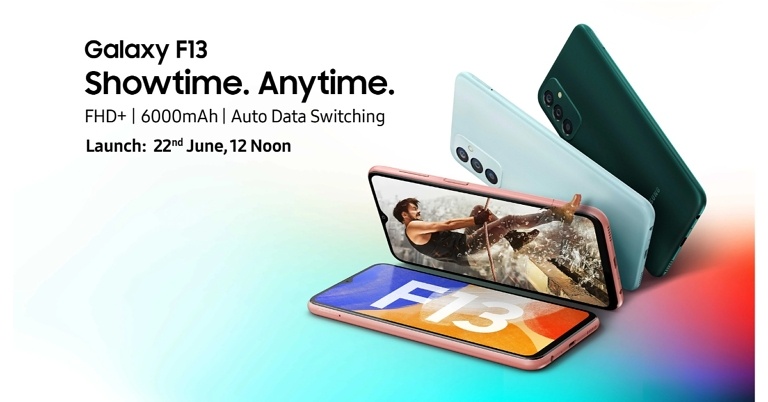
Today, Samsung confirmed that the Galaxy F13 will be released in India on June 22. According to the company, the upcoming Galaxy F-Series smartphone will go on sale exclusively via Flipkart. A dedicated homepage has also been created to tease the key specifications of the upcoming handset. Samsung India’s official website also has a product page for the phone up and running. Continue reading to know the launch details.
In This Article
Samsung Galaxy F13 India launch details
According to Samsung, the new Galaxy F13 will be released in India on June 22 at 12 noon IST. The Samsung Galaxy F13 has been listed on Flipkart as well as on the Samsung India website to tease the availability as well as its specifications. The phone’s price, on the other hand, is yet unknown.While announcing the forthcoming phone the company said, “Samsung’s popular Galaxy F series offers unprecedented style and experience to the aspirational Gen Z and millennial consumers while delivering segment-best features. After Galaxy F23’s success earlier this year, Galaxy F13 is the second addition to the F series in 2022.”
Samsung Galaxy F13 specifications and features expected
There appear to be three colour options available for the Samsung Galaxy F13. As the name suggests, the latest Galaxy F-series phone is believed to be an update to the Galaxy F12, which was released in April of last year.The Samsung Galaxy F13 is shown on the official Samsung page and the Flipkart teaser page, with triple rear cameras. It will be featuring a water drop-style notch on the display having a full-HD+ LCD. It will have a 6,000mAh battery with a 15W rapid charging capability.According to the company Samsung Galaxy F13 will feature an Auto data switching which when the Wi-Fi or primary SIM connection is weak, the Samsung phone will automatically switch to the second SIM’s mobile data. With the RAM Plus function, the Galaxy F13 will have up to 8GB of RAM. The RAM Plus feature improves multitasking by supplementing the built-in RAM with memory from the storage. According to the official listing, the phone would be available in three different colours.The upcoming handset was also spotted listed on Geekbench suggesting that the Galaxy F13 will be equipped with an octa-core Exynos 850 processor. It’s believed to come with 4GB of RAM and run Android 12 out of the box.
For the latest gadget and tech news, and gadget reviews, follow us on Twitter, Facebook and Instagram. For newest tech & gadget videos subscribe to our YouTube Channel. You can also stay up to date using the Gadget Bridge Android App. You can find the latest car and bike news here.
Garena Free Fire is a battle royale game with regular awards and tournaments to keep players interested. If you play Garena Free Fire, you should be aware of the redeem codes that are released on a daily basis. However, because the battle royale game is banned in India, players from other countries can use the Free Fire Redeem codes daily. If you’re unfamiliar with the Garena Free Fire redeem codes or don’t know how to get them, we’ve put together a step-by-step guide to help you redeem them. Check out Garena Free Fire Redeem Codes for June 17.The Free Fire redeem codes are a great way to get free stuff. These are 12-digit codes that contain alphabets and numbers, as well as an expiration date and time. Because the Garena FF redeem codes cannot be used more than once, you should hurry to the redemption page to claim your free reward before someone else does. To get a free reward, all you have to do is go to reward.ff.garena.com/en, which is the official redemption page. Also, keep an eye on this space for daily updates on Garena Free Fire redemption codes and rewards.
In This Article
Garena Free Fire Redeem Codes Today 17 June 2022
AN3CIK5XSBST
ME5866OGLPQZ
BMTMP22W3OZ7
QW0LSEK9U86B
AO02ZLKJDPGV
7L5Z3DHOS8YJ
8JQT2WZEUNKF
C24INWB3YFPD
FU5OPKTT56LP
RNTW4A2TMCVU
O8Y0P7BZ150T
Q1RC5NPZ2C2F
66QSZD5ZEMHH
O1W9PGX13WO8
P0E12EY41QCS
LXXEP7XZQ5KT
UV1QN0QGG9OB
K1KK7Y7RN1FT
E5VD23639TTJ
DFL6QE534M5O
6J40XMCIVNBZ
How to Get Free Fire Redeem Codes for Garena on June 17?
Are you using Google Chrome, Firefox, or Samsung Internet on your phone? Every time you access the web whether it’s Google Chrome, Firefox, or Samsung Internet, your browser collects and retains data. Regardless of whose Android smartphone you use, it’s a fine decision to get into the practice of regularly cleaning up that data. Here is how you can easily clear cache and cookies from your phone’s browser.
In This Article
What are Cache and cookies and how do they work?
Your cookies and cache contain this information, which allows your phone to quickly log in to your accounts and load regularly viewed websites. Cookies are little text files that websites create when you visit them. By preserving browsing data, they make your online experience more convenient. The cache saves elements of pages, such as graphics, to make them open faster the next time you visit. However, this data accumulates over time, eating up space on your phone and most likely incorporating cookies that track your surfing activity in order to serve targeted advertising. For instance, when you visit an e-commerce platform to buy or check a product’s price you start seeing ads for the product you have searched on the platform or other websites and their price comparisons.Clearing them solves issues like site loading and formatting. It may appear tough to delete the cookies and cache on your Android phone browser, but it is actually more easier than it appears. If that’s the case, we’ll teach you how to improve your privacy and possibly even your speed by clearing cache and cookies on your phone.
How to clear cache and cookies in the Chrome app
On your Android phone or tablet, open the Chrome app.
At the top right, tap More.
Tap History and then Clear browsing data.
At the top, choose a time range. To delete everything, select All time.
Next to “Cookies and site data” and “Cached images and files,” check the boxes.
Tap Clear data.
How to clear cache and cookies in the Mozilla Firefox
Select Settings from the menu button.
Select the Privacy & Security panel from the drop-down menu.
Click Clear Data… under the Cookies and Site Data section.
Clear the checkbox next to Cookies and Site Data.
Click the Clear button with the Cached Web Content checkbox selected.
Close the page about: preferences. Any modifications you make will be stored automatically.
Here’s another way to clear the Firefox cache:
Click the menu button to open the menu panel.
Click History and select Clear Recent History….
Next to Time range to clear, choose Everything from the drop-down menu, select Cache in the items list, make sure other items you want to keep are not selected and then click the OK button.
How to clear cache and cookies in the Samsung Internet
Go to Settings and select Apps from the drop-down menu.
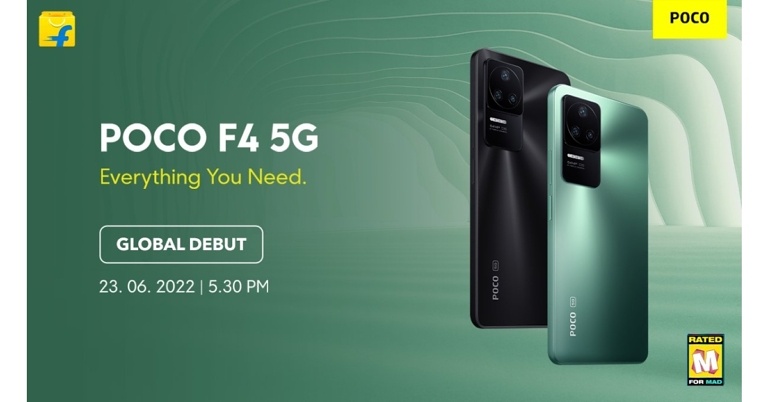
Poco India has officially confirmed the Poco F4 5G’s launch date. The smartphone’s launch date has been slated for June 23 in the country. The device’s global launch is also going to happen on the same day. Qualcomm has already stated that the Snapdragon 870 chipset will be released. A teaser for the smartphone has also been revealed, confirming similarities between the Poco F4 5G and the Redmi K40S. According to previous rumours, the upcoming phone would be a rebranded edition of the Redmi K40S.
Poco F4 5G launch details
Poco confirmed the launch date of the upcoming Poco F4 5G smartphone. The Chinese smartphone brand also confirmed that the smartphone will go on sale in India on June 23 at 5:30 p.m. The event will be live-streamed on the company’s YouTube account.
Furthermore, the company has posted a teaser of Poco F4 5G verifying a triple rear camera configuration, including a 64-megapixel primary sensor with optical image stabilisation (OIS). Resolution details about the remaining two camera sensors are yet to be confirmed. With the same camera module design and gradient finish as the Redmi k40S, the smartphone appears to be pretty comparable.The teaser also claims that the Poco F4 5G would have an IP53 rating, indicating that it will be splash resistant to some extent.The Poco F4 5G is claimed to have LiquidCool 2.0 in addition to a Snapdragon 870 SoC. In fact, the smartphone was previously revealed to contain up to 12GB of RAM and 256GB of storage, as well as three colour variations.The price details had already been exposed by an information leak. The POCO F4 will be sold in a single form worldwide for $459, which translates to Rs 35,000, according to the poster.According to rumours, it could simply be a repackaged Redmi K40S. The Poco F4 5G will be powered by Qualcomm’s Snapdragon 870 SoC, according to the manufacturer. The Redmi phone has the same Snapdragon 870 processor as the Xiaomi phone, as well as a triple-camera setup and a 120Hz AMOLED display. Outside of its home market China, the company has a history of releasing rebranded Redmi smartphones. The Poco F4 GT, a rebranded version of the Redmi K50 Gaming Edition that launched in Europe in April, is one of the most recent examples of how the business typically launches rebranded Redmi phones in India and other areas under its own brand name.
For the latest gadget and tech news, and gadget reviews, follow us on Twitter, Facebook and Instagram. For newest tech & gadget videos subscribe to our YouTube Channel. You can also stay up to date using the Gadget Bridge Android App. You can find the latest car and bike news here.
25 May 2022 Amazon Quiz has gone live on its platform. The quiz timings are 12 AM to 11:59 PM. The Amazon App users can participate in the quiz daily and all they have to do is submit correct answers to the questions asked on the e-commerce platform. Today’s participants can get a chance to win Rs 20,000 Amazon Pay Balance.Amazon brings a fresh questionnaire that contains 5 questions daily. These questions are based on current affairs and general knowledge. The quiz can be played from 8 AM to 11:59 PM and the contestants need to answer correctly to enter into a lucky draw.Only one person is declared as a winner and the results will be announced at the end of every month. And to make sure that you give correct answers to all the 5 questions Gadget Bridge everyday updates all the answers to the Amazon Quiz. Do check out 17 June 2022 Amazon Quiz Answers to win a Rs 20,000 Amazon pay Balance.Amazon Quiz Today Prize – Rs 20,000 Amazon Pay BalanceQuiz Date – 17 June 2022Daily Timing – 12 AM to 11:59 PMWinner Announcement – Today 12 PM
In This Article
Amazon Quiz Answers Today 17 June 2022
Question 1: Who among these did Rafael Nadal beat in the quarter-finals of the 2022 French Open?Answer: Novak DjokovicQuestion 2: Tatiana Maslany would play the lead role in which upcoming Marvel studios web series?Answer: She-Hulk: Attorney at LawQuestion 3: Which company recently appointed Alvin Tse as the General Manager of its India business?Answer: XiaomiQuestion 4: In which country is the largest library in the world located?Answer: USAQuestion 5: What breed of dog is shown here?Answer: Corgi
How To Play Amazon Quiz
Only app users are eligible to play the Amazon quiz every morning from 12 AM to 11:59 PM. The quiz is not available on the desktop. For those who are unaware of how to play the Amazon quiz below are the steps, you can follow to take the quiz.
Firstly download the Amazon app from Google Play Store or App Store
Now fill in the required information through the Sign Up option.
You need to log in to the Amazon app and scroll down on the home screen to find the Amazon Quiz banner.
Tap on the Amazon Quiz banner and tap on the Start button to start the Quiz.
Now you will get 5 questions and you need to answer them correctly. One wrong answer will eliminate you from the Quiz.
After answering all the questions correctly you are now eligible for a Lucky Draw.
The winner’s name will be announced today at 12 PM.




 Step 1:
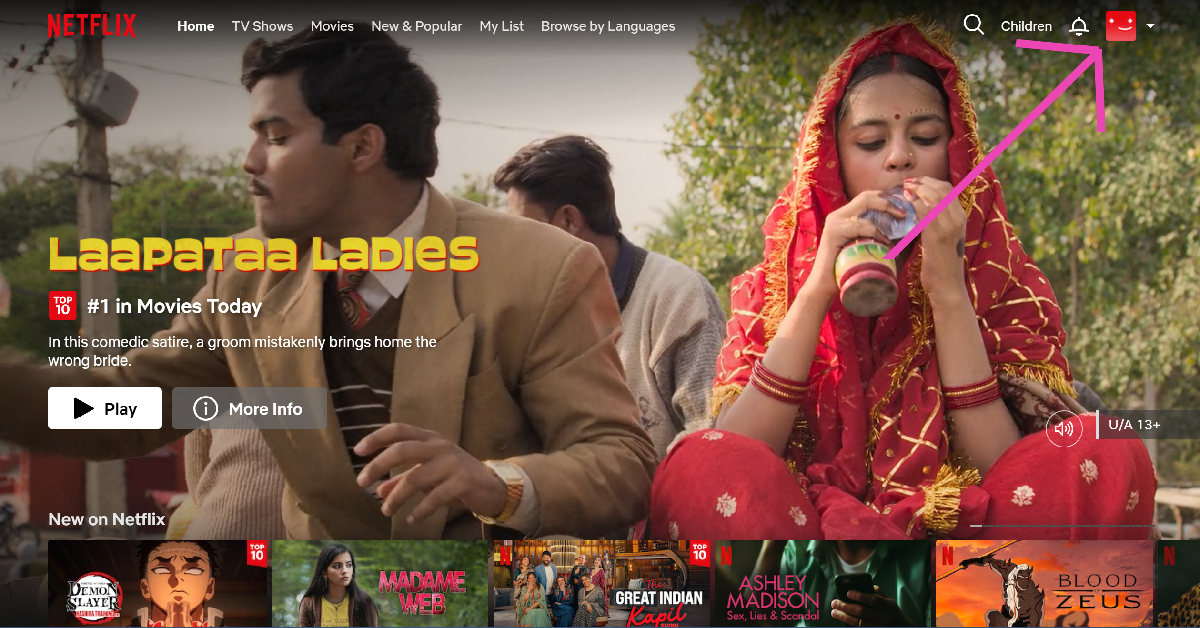 Step 2: Hover the cursor on your profile picture at the top right corner of the screen and select Account.
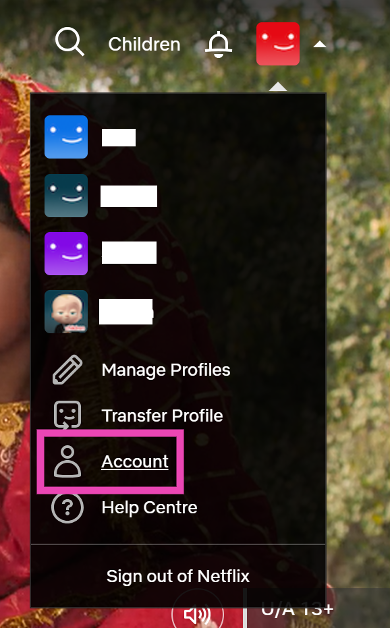 Step 3: Scroll down and select Manage access and devices.
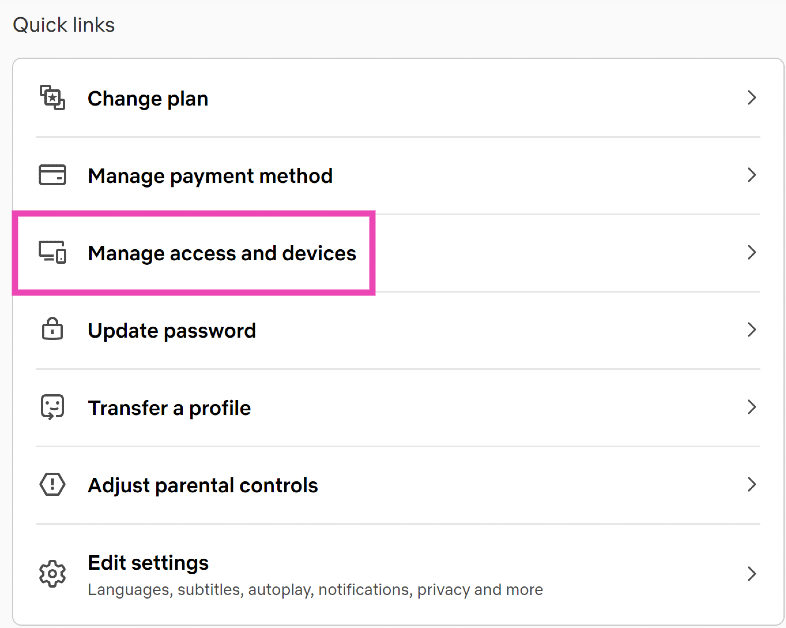 Step 4: Hit Sign Out next to your Smart TV.
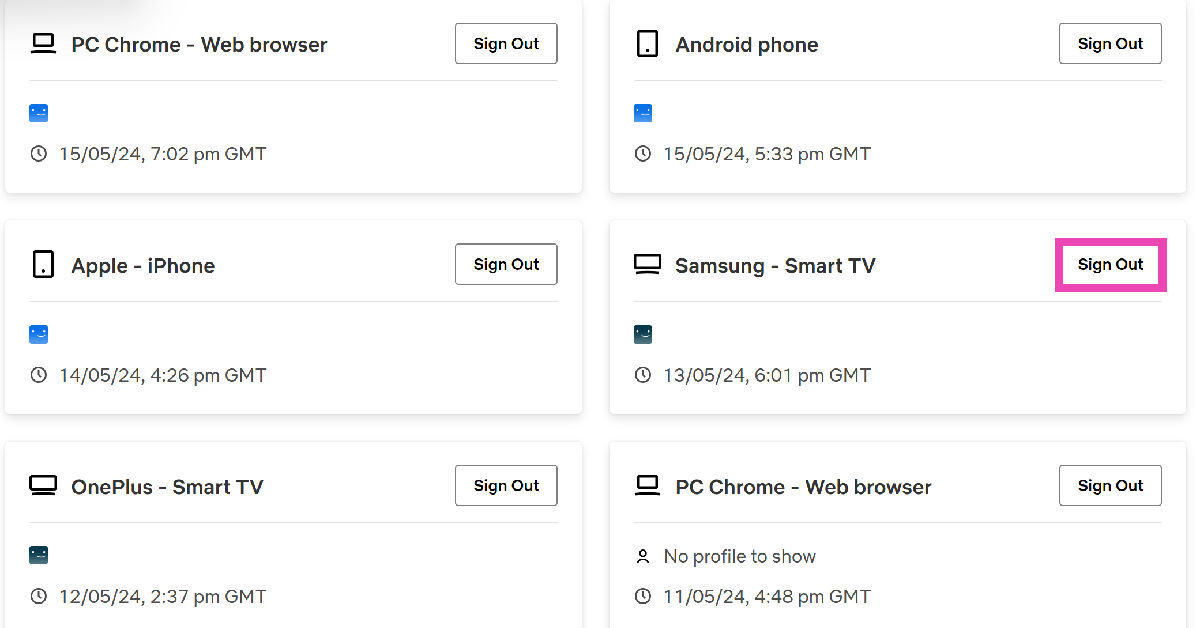
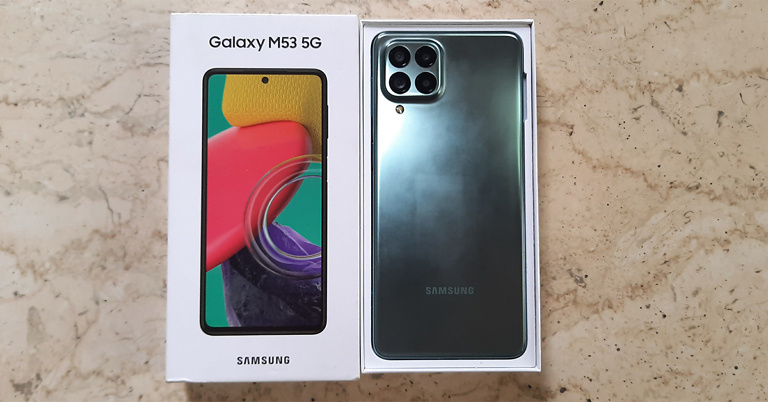



 Step 4:
 Step 5:
 Step 6:

 Step 7:
 Step 6: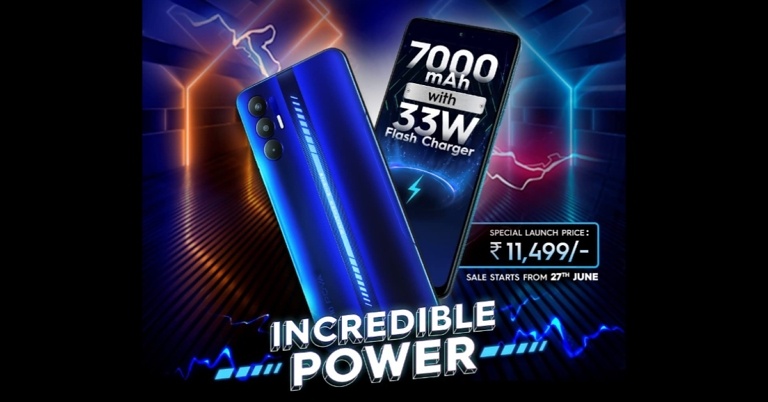



 There are several benefits to using ChatHub. The interface is quite similar to Omegle and very easy to use. You can filter participants by language and gender, making it easy to find your preferred matches. The website is optimised for mobile, allowing you to browse through users without any hiccups. Its special algorithm ensures you don’t match with the same partner twice. There is a smartphone app available for ChatHub as well. All you need to do is open ChatHub in Chrome, press the three dots up top and select ‘Add to Home Screen’.
 Bazoocam keeps things simple, light, and fun, without being too bland. The website follows the typical method of matching two users together from across the world. To move to the next person, all you have to do is press ‘Next’. What’s unique about Bazoocam is that it allows you to play fun games like Tetris, Tic Tac Toe, and 4 In A Row with the person you have matched in order to break the ice.
 As the name implies, Chatrandom connects you with random users to chat with. You can either turn on your webcam for a video chat or enter a text chat with a stranger. Chatrandom has accessible filters for gender and country. Chatrandom is also available as an app on Google Play Store. Click on
  With its large user base, you will never run out of people to talk to at ChatSpin. The website connects you with a stranger within seconds and makes sure you keep on getting matched with new people. ChatSpin encourages users to display their talents and creativity to the person they are matched with. If you want to keep your anonymity intact, there are plenty of face and voice filters you can use.
 FaceFlow follows the Omegle formula of matching you with random people for a text or video conversation but also brings something of its own into the mix. You can create profiles on FaceFlow so that the people you match with can add you after the conversation is over. You can upload a picture to your profile, add a bio and share stuff with your friends. Have a clique going? FaceFlow also lets you host group calls on its platform.
Read Also:
FaceFlow follows the Omegle formula of matching you with random people for a text or video conversation but also brings something of its own into the mix. You can create profiles on FaceFlow so that the people you match with can add you after the conversation is over. You can upload a picture to your profile, add a bio and share stuff with your friends. Have a clique going? FaceFlow also lets you host group calls on its platform.
Read Also: 
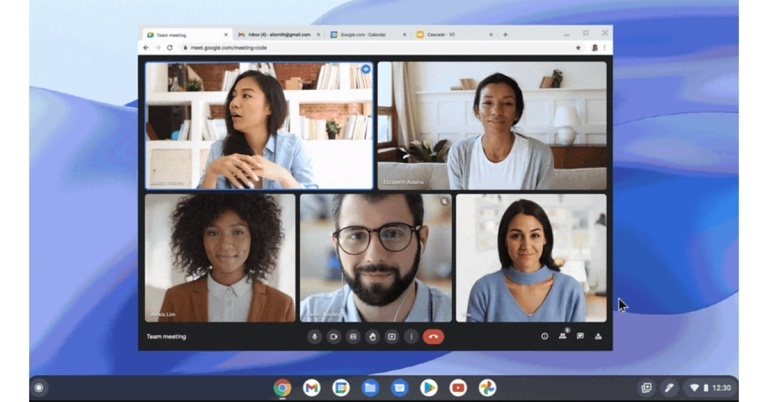


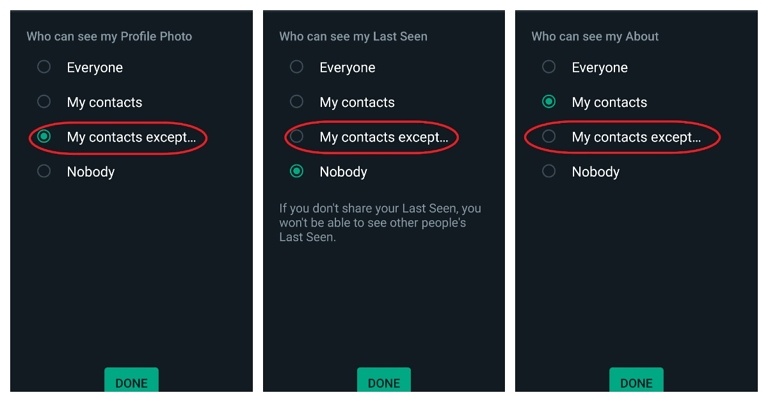






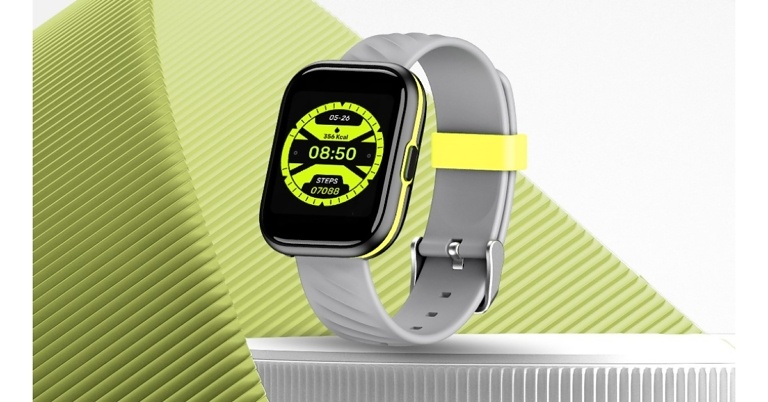

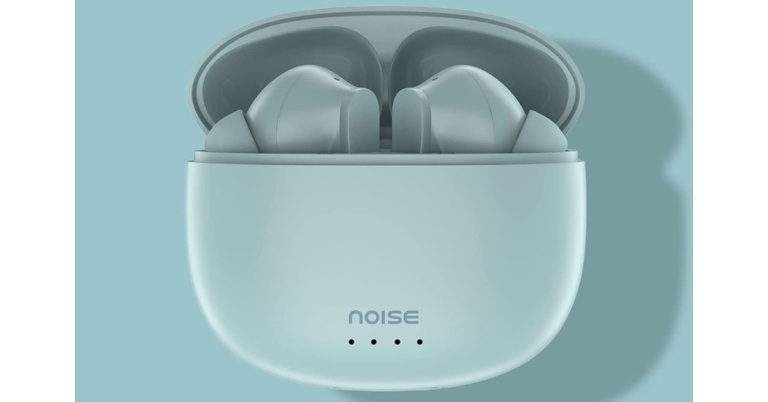


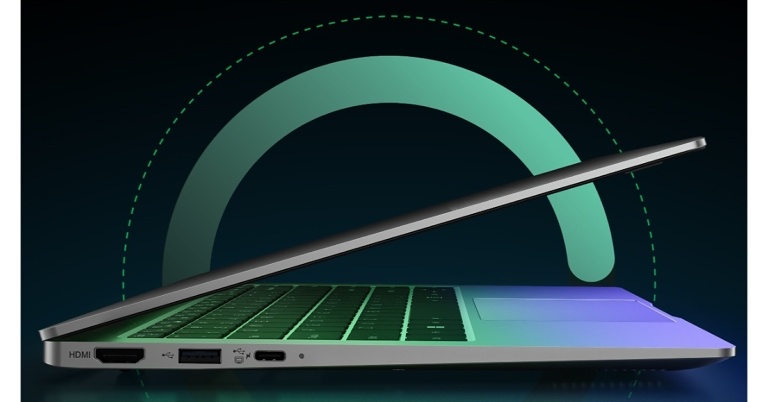






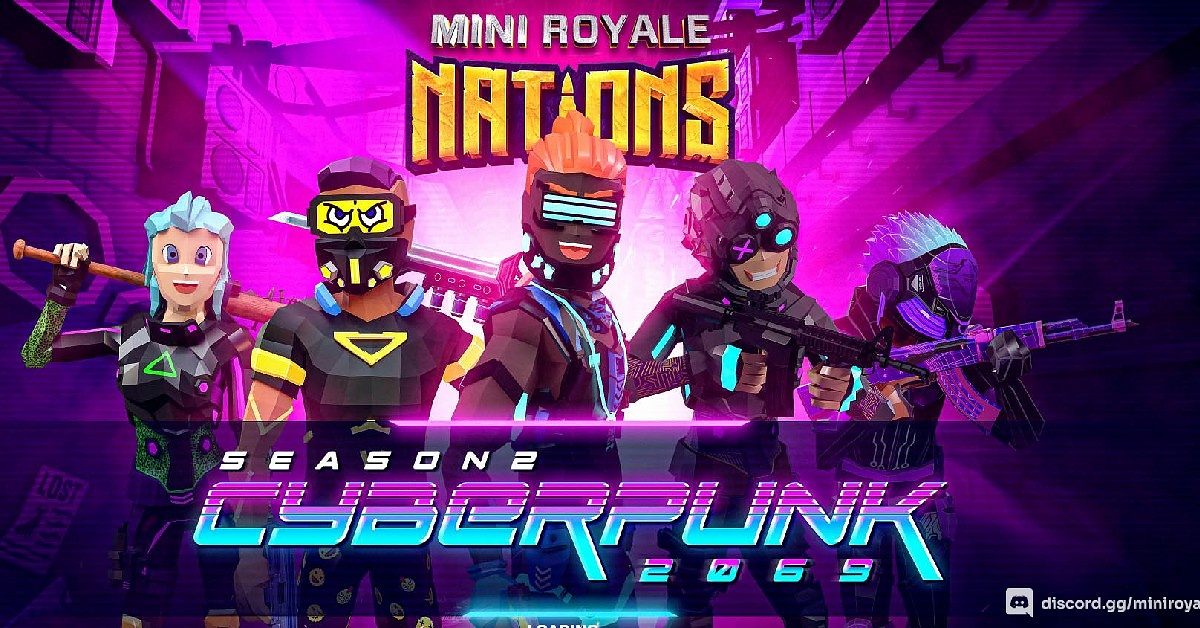



 Step 3b:
 Step 4: