With the rise of good and popular games – single player or multiplayer – game streaming has become one of the biggest entertainment mediums. There are a number of ways to stream games, but YouTube Gaming is one of the easier and well-known platforms for it. You can either upload your game streaming videos on the YouTube or do a live streaming. To stream a game without difficulties you need the following things – a good PC, high-speed broadband internet, an encoder program (OBS or XSplit Broadcaster), and most importantly a verified YouTube account.
You can download the encoder programs for Windows or MacOS or Linux from the internet. OBS and XSplit Broadcaster are free and are easy to use. To start streaming you would need to verify your YouTube account. Follow these steps to verify your YouTube account:
- If you have an account, sign in to YouTube. If you don’t have an account, you can simply make one by following the details on the Create an account page.
- After signing in, go to YouTube.com/verify.
- Here, you will be given the option to choose your country.
- Enter your phone number and then you can click on submit.
- After that, you will be asked to receive a voice message or text message for verification.
- Once the text or voice message arrives, it will carry a verification code. Enter the code in the required space and click on submit.
- Go to your main YouTube account and then go to the Creator Studio page.
- Click on the camera icon with the ‘+’ icon.
- After that, click Go Live.
- Once it is done, you will be asked to provide Chrome to access to your webcam and microphone. Then you need to click Allow.
- After that, you need to enter the title and description for your stream and then click on Next.
- Click Go Live and you will be live on the platform
- Once the streaming is done, click END STREAM to end the live stream.




 In most smartphones, any new app that you download will appear on your
  Everyone knows that personalized ads can be very annoying. Or at least, mostly they are. A way of enhancing your smartphone’s performance is to disable them.
To disable personalized ads by
Everyone knows that personalized ads can be very annoying. Or at least, mostly they are. A way of enhancing your smartphone’s performance is to disable them.
To disable personalized ads by  Using instant apps is a lot like taking a car for a test drive and then later deciding whether you want to buy it or not.
Instant apps can be used for
Using instant apps is a lot like taking a car for a test drive and then later deciding whether you want to buy it or not.
Instant apps can be used for  If your smartphone remains unused for a while, Doze mode automatically shuts off the network to save the battery.
The apps on your device will continue to work in the background, so you will be able to get some notifications.
But then, to ensure that not all apps are muted, you can head to Settings >
If your smartphone remains unused for a while, Doze mode automatically shuts off the network to save the battery.
The apps on your device will continue to work in the background, so you will be able to get some notifications.
But then, to ensure that not all apps are muted, you can head to Settings >  This is more of a privacy feature than a performance one, but in case you feel the need of enabling it, here are the instructions to follow.
Go to Android Settings > Notifications. Click on the gear icon on the top right corner and press the ‘On the lock screen’ option. Here, choose the option of ‘Hide sensitive notification content.’
This is more of a privacy feature than a performance one, but in case you feel the need of enabling it, here are the instructions to follow.
Go to Android Settings > Notifications. Click on the gear icon on the top right corner and press the ‘On the lock screen’ option. Here, choose the option of ‘Hide sensitive notification content.’
 The best way of getting the notifications to stop on your Android smartphone for a while is to enable the ‘Do Not Disturb’ mode.
You can also block alerts on an app-by-app basis by going to the ‘Apps and notifications’ in the Settings of your
The best way of getting the notifications to stop on your Android smartphone for a while is to enable the ‘Do Not Disturb’ mode.
You can also block alerts on an app-by-app basis by going to the ‘Apps and notifications’ in the Settings of your  Clutter can seriously deteriorate the performance of a smartphone. It is always advisable to have a decent chunk of space free on your smartphone.
You can start by uninstalling apps that you don’t use anymore. Another thing that really helps is saving images and videos in
Clutter can seriously deteriorate the performance of a smartphone. It is always advisable to have a decent chunk of space free on your smartphone.
You can start by uninstalling apps that you don’t use anymore. Another thing that really helps is saving images and videos in  For doing this, tap on Battery in the Android Settings of your smartphone and then go to Battery Saver and Adaptive Battery options.
Both of them will restrict the background battery usage and hence, you will have to charge your
For doing this, tap on Battery in the Android Settings of your smartphone and then go to Battery Saver and Adaptive Battery options.
Both of them will restrict the background battery usage and hence, you will have to charge your  This one is very basic, but please ensure that all the apps on your smartphone are updated timely.
By doing this, you will be making sure that your smartphone’s performance remains top-notch as apps perform the best when they are updated to their latest version.
This one is very basic, but please ensure that all the apps on your smartphone are updated timely.
By doing this, you will be making sure that your smartphone’s performance remains top-notch as apps perform the best when they are updated to their latest version.
 If you ever feel tempted to put a live wallpaper on your smartphone, just remember that they eat up the battery life of the device and at the same time slow your phone down.
We recommend you to simply avoid them.
Boost the Performance of Your Android Smartphone using the above tips.
For the latest
If you ever feel tempted to put a live wallpaper on your smartphone, just remember that they eat up the battery life of the device and at the same time slow your phone down.
We recommend you to simply avoid them.
Boost the Performance of Your Android Smartphone using the above tips.
For the latest 










 Ted is a website on which you can spend hours. You can choose from thousands of talks on the
  What’s the difference between innovators and entrepreneurs? Or how are hate speech and free speech different from each other? If you often find yourself pondering on questions like these, Difference Between is the
  If you are someone who is interested in history, Whizzpast is the place for you. It doesn’t matter which era you wish to learn about. Whizzpast has interesting
  You wouldn’t even realise the number of hours you end up spending on this website. On Sporcle, you would be able to find
  If you are learning a new language, Lang-8 can help you do it better. All you have to do is go and write in that
  Browse comic strips made by talented users, or show your own talent by creating strips on the website. You can then share with your friends on social media and garner appreciation for yourself.
 You don’t have to be an artist to create the most beautiful and dreamy pieces of art on Silk. All you need is a mouse and some time at hand. Just visit the website and get started with your first drawing to see what magical pieces of art you didn’t know you can create.
 As the name suggests, this website is very useful to anyone who is looking for useless websites to kill time on. You’ll find scores of them on The Useless
  GeoGuessr is a very interesting website to be on. It will show you various pictures from
 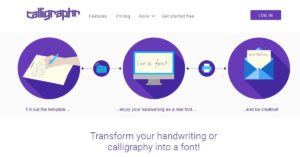 If you don’t like any fonts that are available on Word or Powerpoint because they aren’t personalised enough, you can create your own. Just head to Calligraphr and make a new font based on your handwriting.
 This is pure sorcery. We are not exaggerating. Visit the website, think of a character (real fictional) and then hit ‘Play’. With just a few questions about your character, Akinator would accurately guess what you thought. We tried it thrice before putting it in on the list, and trust us, it works.
 On Kongregate, you can find thousands of free games online. These include the big, popular ones, as well as the lesser known ones. If you are a gamer, this is the website for you.
 Again, this is a website where you can spend hours. You will be given a query and you will be asked how Google completes it. Take a few guesses and see how close you can get to the real Google autocomplete.
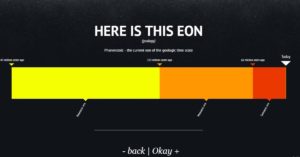 If you want to see where exactly we are today in terms of the history of all of the recorded time, then this website will help you find that out. It’s something everyone should check out at least once.
 As the name suggests, this website will recommend different documentaries that you can watch. Choose a topic and find various documentaries on it and spend hours watching them.
For the latest
As the name suggests, this website will recommend different documentaries that you can watch. Choose a topic and find various documentaries on it and spend hours watching them.
For the latest