Instagram is one of the most-used social media platforms for uploading photos and videos on a daily basis. If you are a frequent user of Instagram and you love taking pictures, then don’t miss out on the best gadgets that will make your process easier.
Today, we’ll go over the top 5 slick gadgets that will make Instagramming better.
In This Article
Universal 3-in-1 Camera Lens
Source: Pinterest
To adjust to a number of shooting conditions, the 3-in-1 package includes wide-angle, macro, and fisheye lenses. These lenses attach to any camera on a mobile, tablet, or desktop via clips.
The clips are constructed of silicone material, so your gadget would not be scratched.
This is an excellent tool for anyone who wants to try their hand at photography. You can get significantly higher image resolution with the lenses. Simply attach one of these lenses to your device and you’re ready to snap a high-resolution photo or reel.
You may gain attention, create loyalty, provide important information, and boost engagement by uploading good-quality photos. The Universal 3-in-1 Camera Lens helps take fabulous pictures anytime, anywhere.
Spy Lens
Source: Pinterest
A spy lens enables you to snap photos at all angles while your lens is concentrating on one side. When you wish to capture a photo of someone who is busy with their activities, focusing your lens on them will cause them to be camera conscious, and you won’t get the true impact.
The spy lens lets you photograph them without having to focus the lens on them. It assists you in taking a photograph at a 90-degree angle. Spy lenses are very useful for taking natural photographs of children.
Natural and candid pictures are always the best. Use the spy lens to take Instagramable pictures of the living things around you and draw the attention of your followers.
However, keep in mind that in order to attract the attention you desire, you must post photographs that are relevant to your target demographic.
Pocket Spotlight
Source: Pinterest
The pocket spotlight is a constant light source that can be turned on and off manually. It is a compact device that fits nicely in your pocket and has a large number of LEDs for better light.
It also allows you to change the level of brightness according to the natural light in the background. A natural flash is provided by the pocket flashlight, allowing you to capture better images.
This gadget plugs into your phone’s or tablet’s jack. It can be used as a steady light source for your images or videos. The pocket spotlight also features an inbuilt battery, so you won’t have to worry about it draining your phone’s charge. The good thing is that it is compatible with both iOS and Android devices.
Bottle Cap Tripod
This ingenious bottle tripod will help take stable photos and videos without any blurring effect. It’s a versatile mount that’ll work with any compact camera. It simply attaches to the cap of a bottle and you have a tripod to take steady pictures.
Keep in mind that the bottle you attach the mount to should not be empty because it won’t be able to handle the weight of the camera. It is simple to install and remove the tripod from any type of bottle.
Various kinds of pictures function better on different platforms, according to studies. For example, selfies do well on Facebook, but they don’t do so well on Instagram. You can use the bottle cap tripod to take pictures of products from different angles and post them on Instagram for promotion.
RunCam 5
Source: Pinterest
RunCam 5 is a compact and fantastic camera that can be used to take a variety of high-quality images by mounting it on different things. It is shaped like a cube with dimensions of 38x38x36mm. Its battery life allows you to take pictures and videos for 104 minutes.
People nowadays have a focus of fewer than 8 seconds. Therefore, it is important that the picture you post on Instagram is excellent in every way. A high-resolution picture speaks a thousand words and it’s also worth a thousand likes on Instagram.
The RunCam 5 helps take amazing pictures in high quality.
Hiring a photographer for taking your Instagram pictures may be an expensive option. Consider purchasing a high-quality camera with automatic settings.
Cell Phones have come a long way in terms of increasing the quality of their cameras, but the RunCam 5 still takes the best photographs.
How to Create High-Quality Images For Instagram?
Source: Pinterest
To begin, know that you’ll need to create a budget that you’ll use for increasing your engagement on Instagram. A portion of that expenditure will go toward advertising, but the rest should be used to hire professional help or purchase necessary equipment.
You can use the 5 slick gadgets that we mentioned above to help you create high-quality images.
If you want to spice up your account with web design and other illustrations, a good camera would be the most important purchase you can make. But how can you make images that are well-balanced and of good quality?
Firstly, determine what you want the image to accomplish. Do you have a swimming suit from your firm’s current swimwear range on display? Or do you have a gorgeous gown that you want to flaunt in front of your friends?
Whatever it is, the spotlight should be on the subject that appears to be very happy while utilizing the product. Eliminate extraneous elements that take attention away from what you’re attempting to convey.
To take the perfect picture, there should be a perfect balance between the light, colour, and space of the subject and the background. For a bright swimsuit, there needs to be a light background with beach items to accessorize the outfit.
What Are the Advantages of Using High-Quality Images on Instagram?
Source: Pinterest
Now that you know how to create high-quality images, have a look at the advantages of posting them on Instagram.
They Help Build Your Brand
Brands have now sought social media platforms to make sales and because Instagram is one of the leading platforms that customers use to make purchase decisions, it is important that you post high-quality and relevant images on your profile.
Most of the viewers on Instagram simply scroll through their feed while double-tapping the pictures that they like. A majority of those people do not care to read the caption most of the time. Therefore, your sales pitch heavily relies on the image that you posted on your account.
If the image that you posted is catchy enough, the viewer will go on to read the caption and even go to your page and click the follow button in anticipation to see more such posts in the future.
According to research, having something aesthetically interesting to gaze at can help the viewers recall 65 percent of what you said through the image.
They Will Increase Engagement on Your Instagram
Instagram helps you with free promotion via its platform. Posting high-quality and relevant images can help you increase the likes of your post and followers on your page.
When the time comes for somebody who is looking for your goods or service to come across your page, they will most likely have more faith in your business if it has a significant following. This tells the viewers that there are a large number of people that appreciate your stuff, not simply your feed.
To make your Instagram feed more attractive and trustworthy, you can buy Instagram likes, so that the visitors can appreciate your posts in accordance with the number of likes that you have.
They Make Your Profile More Appealing
Even if your brand is an expert at what it makes, if you do not have a social media presence, potential buyers may not find your firm as tempting.
Poor-quality or unprofessional graphics can reflect negatively on your company because it will give the impression that you lack flair, professionalism, or genuine passion in your company’s offerings.
This is true for all brands, not simply those that rely on looks, such as apparel or interior decorating. Even though you’re offering something unsavoury, such as insecticides or solutions that clear sewers and pipes, the quality of your photographs must be prioritized.
They Make You Look Professional
You should stay active on Instagram, but you also don’t want to come across as spam. To put it another way, don’t overwhelm your followers’ timelines with 2-3 posts each day. It will most likely irritate your followers and cause them to unfollow you.
A single high-quality photograph that appears sophisticated and communicates the proper message can be more powerful than a collection of low-quality images.
Photos that are of good quality for Instagram are unforgettable and appealing. A high-quality post might continue to work for you long after it was published. This will also save you a lot of time and money. You can take out time for other things in your business or in your life.
How to Upload Pictures on Instagram Without Compromising the Quality?
Instagram can lower the quality of your photographs after you upload them on your profile, for a variety of reasons. If you do not want to compromise on the quality of your photograph, make sure that you post a compressed JPEG of the highest resolution directly from your mobile, laptop, or tablet.
Do not transfer the image from one device to another and then post it on Instagram, because then the quality of your image would be compromised.
The Oppo Find X5 series has officially been launched. This is the company’s flagship smartphone series consisting of three models Oppo Find X5, Find X5 Pro, and Find X5 Lite. Both the vanilla and the Pro variants use Hasselblad cameras with MariSilicon X image neural processing unit (NPU) for improved photography.
In This Article
Oppo Find X5, Find X5 Pro, Find X5 Lite price and availability
Starting with the Oppo Find X5, which is priced at EUR 999 translates to Rs 84,500 for the single 8GB RAM with 256GB storage configuration. It will be available in Black and White colour choices.Whereas the Oppo Find X5 Pro costs EUR 1,299 which is about Rs 1,09,900 for the 12GB RAM with 256GB storage option. The device will be offered in Ceramic White and Glaze Black colour options. The Oppo Find X5 Lite’s price and availability are yet to be announced however it will come in Starlight Black and Startrails Blue colour variants.Both the smartphones will go on sale on March 14th and are presently available for pre-order in Europe. The Oppo Find X5 series will not be available in India, according to current information.
Oppo Find X5 specifications
The Oppo Find X5 has a 6.55-inch full-HD+ AMOLED display with 1,080×2,400 pixels of resolution and Corning Gorilla Glass 7 protection. The screen supports a 120Hz refresh rate and a 20:9 aspect ratio. The smartphone ships Android 12 with ColorOS 12.1 on top and is powered by an octa-core Qualcomm Snapdragon 888 SoC with 8GB of LPDDR5 RAM and 256GB of UFS 3.1 storage that is not expandable.The vanilla Find X5 has a triple rear camera array that includes a 50-megapixel Sony IMX766 main sensor with an f/1.8 aperture and optical image stabilisation (OIS), as well as a second 50-megapixel Sony IMX766 sensor with an f/2.2 ultra-wide lens. A 13-megapixel telephoto lens is also included in the camera package.Oppo has also integrated its 6nm MariSilicon X chip, a neural processing unit (NPU) with an image signal processor (ISP) and multi-tier memory architecture that is said to improve image processing. Also, the device has a 32-megapixel Sony IMX615 selfie camera sensor on the front for selfies and video chats.Oppo has equipped the Find X5 with a 4,800mAh dual-cell battery that enables rapid wired charging at 80W SuperVOOC, wireless charging at 30W AirVOOC, and reverse wireless charging at 10W. 5G, 4G LTE, Wi-Fi 6, Bluetooth v5.2, GPS/ A-GPS, NFC, and a USB Type-C connector are among the connectivity choices. An accelerometer, ambient light, gyroscope, magnetometer, pedometer, and proximity sensor, in addition, the phone has an in-display fingerprint sensor.
Oppo Find X5 Pro specifications
Oppo Find X5 Pro has a 6.70-inch 10-bit QHD+ AMOLED LTPO display with 1,440×3,216 pixels of resolution and Corning Gorilla Glass Victus protection. The screen supports HDR10+ and 120Hz adaptive refresh rate. The phone runs Android 12 with ColorOS 12.1 on top and is equipped with an octa-core Snapdragon 8 Gen 1 SoC and 12GB of LPDDR5 RAM and has 256GB of UFS 3.1 storage that cannot be expanded with a microSD card.The Oppo Find X5 Pro features a 50-megapixel Sony IMX766 main sensor with an f/1.7 lens housed in a triple rear camera system. A 50-megapixel Sony IMX766 ultra-wide lens with an f/2.2 aperture and a 13-megapixel Samsung S5K3M5 sensor with an f/2.4 telephoto lens round out the camera configuration. In addition, this phone has the MariSilicon X chip for improved image processing. There is a 32-megapixel Sony IMX709 selfie camera sensor with an f/2.4 aperture.The smartphone also supports Air Gestures, which allow you to control apps without touching the screen. The device houses a 5,000mAh dual-cell battery and the fast charging support is similar to Find X5.
Oppo Find X5 Lite 5G specifications
Oppo Find X5 Lite 5G is highlighted with a Full-HD+ AMOLED display with Corning Gorilla Glass 5 protection. The screen has 1,080×2,400 pixels of resolution and refresh rate of 90Hz. The phone is powered by Android 11 and ColorOS 12 and is equipped with an octa-core MediaTek Dimensity 900 SoC and 8GB of LPDDR4X RAM along with 256GB of UFS 2.2 storage.The phone has three back cameras, including a 64-megapixel main sensor with an f/1.7 aperture and an 8-megapixel wide-angle lens and a 2-megapixel macro sensor. In addition to this, there is a 32-megapixel selfie camera sensor with an f/2.4 aperture.The device includes an in-display fingerprint sensor. The Find X5 Lite is powered by a 4,500mAh dual-cell battery that enables 65W SuperVOOC rapid charging.
For the latest gadget and tech news, and gadget reviews, follow us on Twitter, Facebook and Instagram. For newest tech & gadget videos subscribe to our YouTube Channel. You can also stay up to date using the Gadget Bridge Android App. You can find the latest car and bike news here.
WhatsApp may offer the functionality of message reactions in a future version, according to the latest report. The feature is currently under development that will enable users to instantly attribute an emoji “reaction” to a message. Note that this feature is supported by other Meta owned products like Face and Instagram. Telegram also allows its users to react to a specific message using emojis. The WhatsApp message reactions were first spotted testing last year on Android and iOS for months. In a new development, WhatsApp looks to be working on bringing message reaction capabilities to the desktop client. According to a snapshot released by WhatsApp features tracker WABetaInfo of the WhatsApp Desktop beta the functionality is not yet available for beta testers because it is still in development.As seen in this snapshot, you may respond to messages by selecting one of six different emojis. We previously knew this from previous publications, but the response button is a new addition. When the cursor is close to a chat or group message, a new response button appears. You will be able to respond to the message by pressing the response button. The function is still under development, but the fact that WhatsApp is finally working on it today suggests that it won’t be long. In the meanwhile, WhatsApp is developing a new shortcut for editing recipients when submitting a new Status update, allowing users to pick the audience for each update. But they have been seen on beta versions of WhatsApp Desktop and WhatsApp for Android, respectively, both additions are still in the works. This implies that users will not be able to update them until they are enabled in the app’s beta versions and then in the stable channel. There’s no information on when these features will be available to everyone.WhatsApp has started rolling out a new audio call interface to iOS beta users. The news comes only a few days after an iOS device upgrade, including iPhone and iPad models, enabled users to play voice messages in the background. The capability is now accessible to select iOS beta testers with the latest compatible WhatsApp for iOS beta 22.5.0.70 upgrade. As a result of the change, users may now play voice messages and audio files outside of the chat window.
For the latest gadget and tech news, and gadget reviews, follow us on Twitter, Facebook and Instagram. For newest tech & gadget videos subscribe to our YouTube Channel. You can also stay up to date using the Gadget Bridge Android App. You can find the latest car and bike news here.
The popular Amazon Quiz is now live on the Amazon app. The 25 February 2022 Amazon Quiz gives a chance to win Rs 20,000 Amazon Pay Balance by answering all the questions correctly. The quiz can be played every day from 12 AM to 11:59. Only app users are eligible to participate in the Quiz as it is not accessible on the web platform.The Amazon Quiz brings a fresh set of questions for its customers that contains five easy questions. The questionnaire consists of five questions related to general knowledge and current affairs. The participants need to answer all the questions correctly and their names will be selected for a lucky draw. The daily quiz brings an opportunity for the customers to win exciting prizes. They can win Amazon Pay Balance ranging from Rs 1,000 to Rs 50,000. The participants need to answer all the questions correctly and their names will be selected for a lucky draw. The winner will be announced at the end of the month. Check Out 25 February 2022 Amazon Quiz Answers.
In This Article
25 February 2022 Amazon Quiz Answers
Question 1: Rukmini Banerji, CEO of Pratham Education Foundation, has been awarded which highest education accolade in 2021?
Answer: Yidan Prize
Question 2: Indian Navy’s indigenous stealth guided-missile destroyer ‘Mormugao’ is named after a port in which state?
Answer: Goa
Question 3: Sabah Al Khaled Al Hamad Al Sabah has been appointed the new Prime Minister of which country?
Answer: Kuwait
Question 4: Name this animal that is endemic to the Democratic Republic of Congo and is referred to as a ‘zebra giraffe.’
Answer: Okapi
Question 5: In which of these countries is this the national animal?
Motorola Edge 30 Pro has officially made its debut in the Indian market today. The smartphone is a rebranded variant of Moto Edge X30 and also a successor to Edge 20 Pro. The handset is powered by Snapdragon 8 Gen 1 SoC. The key highlights of the smartphone include a 144Hz pOLED display, 68W rapid charging capabilities and triple rear camera set up.
In This Article
Motorola Edge 30 Pro price in India and sale details
Motorola Edge 30 Pro is priced at Rs 49,999 for the single 8GB RAM with a 128GB storage model in India. The phone is available in Cosmos Blue and Stardust White colour choices. It is scheduled to be available for purchase beginning March 4 on Flipkart and prominent retail outlets.The Motorola Edge 30 Pro is being launched with Rs 5,000 discount on Flipkart and Rs 5,000 rebate via retail shops. This launch offer is available to consumers who use SBI credit cards. On the other hand, the Jio subscribers will also receive benefits of Rs 10,000. The phone will be offered with no-cost EMI options for up to nine months for Axis, HDFC, ICICI, and SBI cards.
Motorola Edge 30 Pro specifications
The Motorola Edge 30 Pro runs Android 12 and is powered by Snapdragon 8 Gen 1 SoC and 8GB of LPDDR5 RAM and with 128GB of non-expandable UFS 3.1 internal storage. It is highlighted with a 6.7-inch full-HD+ pOLED display 1,080×2,400 pixels of resolution and 2.5D curved Corning Gorilla Glass 3 with anti-fingerprint coating. The screen has a refresh rate of 144Hz, a 20:9 aspect ratio and DCI-P3 colour space.The Motorola Edge 30 Pro features a triple rear camera array with a 50-megapixel main sensor, an f/1.8 lens, Omni-directional phase-detection autofocus (PDAF), and OIS. A 50-megapixel ultra-wide lens and a 2-megapixel depth sensor are also included in the camera arrangement. The rear cameras can also record up to 8K video at 24fps. It also supports slow-motion full-HD (1080p) video recording at frame rates of up to 960fps. In addition to this, there is a 60-megapixel selfie camera sensor with an f/2.2 lens.The smartphone also has a fingerprint sensor on the side, twin stereo Dolby Atmos speakers and three microphones. An accelerometer, ambient light sensor, gyroscope, magnetometer, and proximity sensor are among the sensors onboard. In terms of connectivity, there is 5G, 4G LTE, Wi-Fi 6E, Bluetooth v5.2, GPS/ A-GPS, NFC, and a USB Type-C connector. The device is water-resistant to IP52 standards.In addition to this, the Edge 30 Pro comes with a 4,800mAh battery that supports 68W TurboPower rapid wired charging. The phone has 15W wireless charging and 5W wireless power-sharing.
For the latest gadget and tech news, and gadget reviews, follow us on Twitter, Facebook and Instagram. For newest tech & gadget videos subscribe to our YouTube Channel. You can also stay up to date using the Gadget Bridge Android App. You can find the latest car and bike news here.
Xiaomi has officially teased the introduction of the Redmi Note 11 Pro series in India. The global variant of the series consists of two models Redmi Note 11 Pro and Redmi Note 11 Pro 5G, which were released last month globally. Both the devices include 120Hz AMOLED panels.Manu Kumar Jain, Xiaomi Global Vice President took to Twitter to tease the arrival of the Redmi Note 11 Pro series in India. He has posted a short teaser that confirms the upcoming launch of the series in India.As of now, the company has not revealed the exact launch date but tipster Yogesh Brar claims that the Redmi Note 11 Pro series would be available in India from March 8 and March 10.To recall, Xiaomi launched the Redmi Note 11 Pro series last month. Xiaomi sub-brand, updated its Redmi Note series earlier this month with the Redmi Note 11 and Redmi Note 11S.In China, the Redmi Note 11 Pro series also includes the Redmi Note 11 Pro+ variant. That device, however, was released in India as the Xiaomi 11i HyperCharge 5G.
In This Article
Redmi Note 11 Pro specifications
Redmi Note 11 Pro runs MIUI 13, which is based on Android 11 and is powered by an octa-core MediaTek Helio G96 SoC and up to 8GB of LPDDR4X RAM. The device features a 6.67-inch full-HD+ AMOLED Dot Display with a refresh rate of up to 120Hz.A 108-megapixel main sensor with an f/1.9 wide-angle lens, an 8-megapixel ultra-wide shooter, a 2-megapixel macro lens and a 2-megapixel depth sensor is housed in a quad rear camera arrangement. In addition to this, there is a 16-megapixel selfie camera on the front for selfies and video chats.It has a 5,000mAh battery and supports 67W Turbocharging.
Redmi Note 11 Pro 5G specifications
The Redmi Note 11 Pro 5G likewise runs MIUI 13 and has a 6.67-inch AMOLED display with a refresh rate of up to 120Hz. The phone is equipped with an octa-core Qualcomm Snapdragon 695 SoC and up to 8GB of LPDDR4X RAM.It has three back cameras, including a 108-megapixel main sensor with an f/1.9 lens, an 8-megapixel ultra-wide lens, and a 2-megapixel macro camera.
For the latest gadget and tech news, and gadget reviews, follow us on Twitter, Facebook and Instagram. For newest tech & gadget videos subscribe to our YouTube Channel. You can also stay up to date using the Gadget Bridge Android App. You can find the latest car and bike news here.
Intel has announced the expansion of its 12th Gen Intel Core mobile processor family with the launch of 12th Gen Intel Core P-series and U-series CPUs. The newly announced lineup will include 20 new mobile CPUs and will power the next generation of thin-and-light laptops. According to the company, 12th Generation Intel Core mobile CPUs will power over 250 thin-and-light designs, including over 100 new Intel Evo certified products.Intel’s latest mobile CPUs for thin-and-light designs, like the rest of the 12th Gen family, are based on Intel’s performance hybrid architecture, which combines Performance-cores (P-cores) with Efficient-cores (E-cores). With Intel Thread Director on Windows 11, workloads are intelligently put on the correct core at the right time for efficient multitasking, from video conferencing to online surfing to picture editing.The new 12th Gen Intel Core mobile CPUs Core architecture is completely new, with up to 14 cores (6 P-cores and 8 E-cores) paired with Intel Iris Xe graphics integrated with up to 96EU. In addition to this, it will support DDR5/LPDDR5 and DDR4/LPDDR4 memory along with scale with up to 70% quicker multi-thread performance nearly double the performance for 3D rendering. It will have productivity with up to 30 percent quicker photo editing.Moreover, the new Intel processor will come integrated with Intel Wi-Fi 6E (Gig+) integrated for better wireless performance, responsiveness, and dependability. While the integration of Thunderbolt 4 provides the quickest, easiest, and most dependable cable solution to any dock, display, or accessory. Intel IPU 6.0 provides improved videoconferencing with outstanding visual quality and battery economy.The 12th Gen Intel Core P-series will include six models in the Core i3, Core i5, and Core i7 levels. The Core i3-1220P features two P-cores using Hyper-Threading and eight E-cores, while the Core i7-1280P has six P-cores with Hyper-Threading and eight E-cores. Whereas the 12th Gen Intel Core U-series has seven new models, ranging from Celeron with one P-core, four E-cores, and no Hyper-Threading to Core i7 with two P-cores, eight E-cores, and 12 total threads.The first devices will be available in March 2022, with over 250 more arriving this year from Acer, Asus, Dell, Fujitsu, HP, Lenovo, LG, MSI, NEC, Samsung, and others.
For the latest gadget and tech news, and gadget reviews, follow us on Twitter, Facebook and Instagram. For newest tech & gadget videos subscribe to our YouTube Channel. You can also stay up to date using the Gadget Bridge Android App. You can find the latest car and bike news here.
Amazon has expanded its Echo lineup with the launch of the second-gen of Amazon Echo Buds true wireless stereo earphones in the Indian market today. The new TWS earphone features a 5.7mm dynamic driver and offers active noise cancelling (ANC). In addition to this, there is Amazon Alexa built-in as well as Siri and Google Assistant voice assistant functionality and Bluetooth v5 connection.
In This Article
Amazon Echo Buds price in India and availability details
In India, the Amazon Echo Buds TWS earbuds with a USB Type-C cable charging case cost Rs 11,999. Whereas the one with a wireless charging case costs Rs 13,999. Amazon is offering a Rs. 1,000 discount on both selections as a launch promotion. The earphones are available in black and are presently available on the Amazon India website.
Amazon Echo Buds specifications
The Amazon Echo Buds TWS earbuds have a 5.7mm dynamic driver with three microphones housed in each earphone for increased audio clarity. You can also control the bass and treble from the equalizer in the Alexa app. Echo Buds are great for lengthy periods of usage during the day due to their narrow nozzle and built-in vents that alleviate ear pressure. With four ear tip sizes and two wingtip sizes included with your purchase, you may customise the fit to your liking. The simple Ear Tip Fit Test in the Alexa app will – during setup – assist you in getting an ideal fit, so the Echo Buds feel and sound wonderful.The Amazon TWS earbuds have touch control and it filter all ambient noise thanks to Amazon’s Active Noise Cancellation technology. Simply touch and hold either earbud to activate Active Noise Cancellation, or say, “Alexa, switch on noise cancellation,” or access settings via the Alexa app. Enabling Passthrough Mode with a push and hold on either earphone or by asking, “Alexa, turn on Passthrough,” allows you to hear what’s going on around you. With Passthrough Mode enabled, you can quickly control the amount of ambient sound you hear in the Alexa app via the device settings.With Active Noise Cancellation and Alexa wake word ON, Echo Buds deliver up to five hours of music playing on a single charge, and the compact case allows two extra charges for a total of up to 15 hours of music listening. Simply ask “Alexa, what’s my battery state?” while wearing Echo Buds to check your battery status. You can also check the battery state via the Alexa app, or open the case while your Echo Buds are inside, and the battery status will be shown by the LED lights in front of each earbud.The Amazon Echo Buds can be charged by USB-C (included in the package), and the wireless alternative may be charged using compatible Qi-certified wireless charging stations (to be purchased separately).In addition to this, the Amazon Echo Buds true wireless stereo earphones are IPX4-rated to withstand splashes, perspiration, or light rain. The TWS earphones also support music on Amazon Prime Music, Hungama, JioSaavn, Gaana, Apple Music, Spotify, or Audible, or stories told by celebrities on Audible Suno, among other services. A new Alexa function allows you to swap music between Alexa devices in real-time. Simply say “Alexa, shift my music to Echo Buds” to resume listening to music where you left off.Moreover Echo Buds connect to Alexa via the Alexa app on your mobile device and utilise your smartphone’s existing data plan to access functions like music, calling, and more.
For the latest gadget and tech news, and gadget reviews, follow us on Twitter, Facebook and Instagram. For newest tech & gadget videos subscribe to our YouTube Channel. You can also stay up to date using the Gadget Bridge Android App. You can find the latest car and bike news here.
Poco is preparing to launch a new smartphone, the Poco M4 Pro 4G, in India. The company launched the 5G variant in the country last week, which is a rebranded variant of the Redmi Note 11 5G. The upcoming smartphone is expected to hit the market on February 28. According to rumoured specifications that have surfaced online, the phone will be powered by a MediaTek Helio G96 chipset.Poco India posted a video announcing the official launch date of the Poco M4 Pro 4G in the nation. The device is going to launch in India on February 28 at 7:00 p.m. IST.The company has yet to reveal the specifications and pricing of the upcoming smartphone, but specifications for the global variant of the Poco M4 Pro 4G smartphone have been leaked online ahead of the official announcement. According to well-known tipster Yogesh Brar, the device will come pre-installed with Android 11-based MIUI 12.5 MIUI 13. The display will be 6.4-inch full-HD+ AMOLED with a refresh rate of 90Hz.The global variant is likely to come in two RAM and storage options of 6GB RAM with 64GB storage and 8GB RAM with 128GB storage. The MediaTek Helio G96 chipset is expected to power the Poco M4 Pro 4G with up to 8GB of LPDDR4X RAM and 128GB of UFS2.2 storage.In terms of optics, the Poco M4 Pro 4G global variant is believed to include a triple rear camera set with a 64-megapixel primary sensor, an 8-megapixel ultra-wide sensor, and a 2-megapixel macro lens.In addition to this, the upcoming smartphone is said to have a 16-megapixel selfie camera sensor for selfies and video calls.Moreover,, the smartphone is believed to include a 5,000mAh battery with 33W rapid charging capabilities.Poco M4 Pro 5G was officially launched in India last week. The gadget is the successor to last year’s Poco M3 Pro 5G. The new Poco 5G smartphone features a 90Hz display and a 50MP dual camera setup. Furthermore, the gadget offers a Turbo RAM mode that essentially doubles the built-in RAM by using internal storage. The MediaTek Dimensity 810 SoC powers the phone.
For the latest gadget and tech news, and gadget reviews, follow us on Twitter, Facebook and Instagram. For newest tech & gadget videos subscribe to our YouTube Channel. You can also stay up to date using the Gadget Bridge Android App. You can find the latest car and bike news here.
Printer companies like HP, Canon, and others used to give dirt-cheap printers and make up the difference with ink cartridges. Printers are becoming more expensive, while ink costs are decreasing. HP Deskjet Ink Advantage Ultra 4826 AIO, which we recently reviewed, is one such example. Let’s take a look at what this printer has to offer its customers.
In This Article
HP Deskjet Ink Advantage Ultra 4826 AIO review: Design
Out of the box, the HP Deskjet Ink Advantage Ultra 4826 AIO is a very modern-looking Deskjet machine. It is not the usual boxy printer you used to get 5 years ago. This printer has curves and is not afraid to flaunt it. We quite liked the new look HP has given to this printer.
The paper holding tray can be found at the top back, which also has a flip over it that protects it from dust. The bottom tray is divided into three parts, one that hides the colour and black ink cartridges, a fixed output tray and a drop-down tray that extends the fixed tray further with a swivel out arm. The output tray can hold up to 25 pages, while the input slot can hold up to 60 A4 sheets.
Since it is an all-in-one machine, you get a scanner on top that can scan pages up to A4 in size. On the left of which users get to see a few buttons, that can scan, scan and print in colour or black, the power button and the Wi-Fi key. Here there is a mono colour LED screen that shows you the ink levels of the cartridges as well.
At the back, you get to see the USB port as well as the power input port. All in all, the HP Deskjet Ink Advantage Ultra 4826 AIO is a well built, sturdy and good looking machine.
HP Deskjet Ink Advantage Ultra 4826 AIO review: Performance
Now let’s talk about the main USP of HP Deskjet Ink Advantage Ultra 4826 AIO – its scanning and printing capabilities. Setting it up is easy and one can just download the HP smart software after turning on the machine and wirelessly set it up using a PC/Laptop or via your smartphone. Yes, you can give direct print commands from your smartphone as well.
We chose to set it up with our laptop and it was a very easy process. Just remember to turn off your Anti-Virus for a few minutes as that might hinder the process as it did in our case, we had to turn down Kaspersky for 5 minutes for the process to complete.
In the box, you get two black number 47 cartridges as well as tri-colour number 47 cartridges. But the printer can hold just 1 colour and 1 black. So the additional ones can be used once you run out of the first ones.
HP claims that the HP Deskjet Ink Advantage Ultra 4826 AIO can print up to 7.5 pages of black and 5 pages of colour pages in one minute at mid 600PPi setting. However, on our test bench, we could only squeeze out 5.5 black and 3.5 colours pages in a minute, which is not bad but isn’t the best either. If you bring down the quality then you can get over 12.5 pages of black at blitzkrieg speeds, but that will not give you the desired results.
At the max setting, which is 1200PPi you get the best results and blacks look deep, and colours look vibrant. But printing at that level is painfully slow, even if you are just printing a black excel sheet it will take over 5 minutes to spurt out a single paper. Colour? Even more. We ended up getting a fabulous looking page but after 7 minutes of wait time. We gave the print command, made ourselves a cup of coffee and the page was still printing. But as said, the wait is worth it. In case you are ok with decent (not the best) looking colour pages, you can always print at the mid setting of 600PPi.
Over that, we did not find the colours to be bleeding, no white lines in between and at the best settings the colours came very close to what we were seeing on the laptop’s screen.
Scan times are very decent and in under 35 seconds, you get a fabulous, scanned copy on your computer screen. You can even scan and print in colour without the need for any computer or mobile. Over that, printing through an Android mobile (with Bluetooth V4.2 or higher) using the HP Smart app is also child’s play. Again, no need to send the file to a computer, simply connect to the HP Deskjet Ink Advantage Ultra 4826 AIO using your smartphone and print away. Remember you need to be less than 5 feet from the AIO to print using your mobile phone.
Verdict
The HP Deskjet Ink Advantage Ultra 4826 AIO’s sleep mode power consumption is less than 1W, which is good because it becomes more power-efficient. Additional black or colour number 47 cartridges cost only Rs 472 to buy. As a result, the printer is very cost-effective and will not burn a hole in your pocket. The overall weight of the machine is less than 5.8Kg, which makes it quite luggable and easy to move around. So, is it worthwhile to purchase at Rs 9,778? We initially thought maybe, but after looking at the cartridge prices, it makes a lot of sense. You may be paying a lot right now, but you will save a lot of money on printing costs in the long run. In addition, two additional ink packs are included in the box. If you need a printer for your home or small business, the HP Deskjet Ink Advantage Ultra 4826 AIO is an excellent choice.
HP Deskjet Ink Advantage Ultra 4826 AIO
Good economical prints
Fresh design
All in one scanner and printer
Motorola Edge 30 Pro is all set to launch in India today. The device has been listed on Flipkart which suggested the February 24 launch. The handset is also claimed to be a rebranded version of the Moto Edge X30, which was launched in China last year. The smartphone will stand against the likes of the recently launched Samsung Galaxy S22 series, iQoo 9 Pro which comes equipped with a Snapdragon 8 Gen 1 chipset. The company has not revealed much about the smartphone, not its name but the following are the anticipated characteristics of the next Motorola phone.Flipkart has created a special website to tease the Motorola Edge 30 Pro’s India release date. The phone’s name isn’t listed on the website, but it does include the phrase “Find Your Edge with Snapdragon 8 Gen 1.” However, it has yet to firmly hint at the phone’s true product name and specifications. Yet, the phrase clearly points to the Motorola Edge 30 Pro, which is supposed to be a renamed Moto Edge X30. Motorola has so far kept the Motorola Edge 30 Pro’s release date a secret. According to the Flipkart ad, the launch will take place on February 24 at 8 p.m.
In This Article
Motorola Edge 30 Pro price in India expected
According to a rumour, the alleged upcoming flagship smartphone will be the cheapest phone in the country to use the Snapdragon 8 Gen 1 SoC. It’s worth noting that the recently released Samsung Galaxy S22 series, which contains the same top CPU, starts at Rs 72,999 in India.According to reports, the Motorola Edge 30 Pro will launch with a retail box price of Rs 55,999 and a price of Rs 49,999 on Flipkart. Furthermore, the new phone is rumoured to have discounts on numerous bank cards, perhaps dropping the price to Rs 44,999.
Motorola Edge 30 Pro specifications expected
The Motorola Edge 30 Pro specs, if accurate, will be identical to the Moto Edge X30, with the exception of the appearance. It will most likely sport a 6.8-inch full-HD+ POLED display with a resolution of 1,0802,400 pixels. The panel might have a 144Hz refresh rate, a 20:9 aspect ratio, and HDR10+ capability.The smartphone might be powered by a Qualcomm Snapdragon 8 Gen 1 SoC, up to 12GB of LPDDR5 RAM, and 256GB of internal UFS 3.1 storage. Furthermore, the smartphone may be equipped with MYUI 3.0, which is based on Android 12.The Motorola Edge 30 Pro is said to include a triple rear camera setup for pictures and videos, with the primary sensor being a 50-megapixel OmniVision’s OV50A40. A 50-megapixel wide-angle camera and a 2-megapixel depth sensor are also included. Furthermore, the phone may include a front-facing 60-megapixel camera for selfies and video chats.For connectivity, it will most likely include 5G, 4G LTE, Wi-Fi 6, Bluetooth v5.2, and a USB Type-C port. A fingerprint sensor on the side of the phone is also an option. A 5,000mAh battery with 68W TurboPower quick charging capacity will also be included.
For the latest gadget and tech news, and gadget reviews, follow us on Twitter, Facebook and Instagram. For newest tech & gadget videos subscribe to our YouTube Channel. You can also stay up to date using the Gadget Bridge Android App. You can find the latest car and bike news here.
TWS earbuds are quite popular these days due to their design and mobility. But, if you ask us, we prefer neckband earphones since they are more utilitarian and beneficial than TWS earbuds. And, most importantly, you do not misplace them. For the past few weeks, we have been using Oppo Enco M32 neckband style earphones. In the Oppo Enco M32 review, you’ll find out whether the device is as good as it appears.
In This Article
Oppo Enco M32 review: Design
Because of the high quality of construction, these are built to last. There is a huge button that allows you to effortlessly increase and reduce the volume. Also, these are so light that you don’t even notice you’re wearing anything around your neck; simply wear them as a necklace.The ergonomically designed silicone ear tips fit perfectly in the ear canals, and the plush ear wings keep the headphones firmly in your ears even while you’re working out.For control, there are three sensitive buttons. The Volume up button when once pressed increases the volume and Hold down to pick the next track. A multifunction button is located between the volume up and down buttons. Once you’ve pressed the button, you may play/pause audio or answer/hang up a phone call.Press three times on the button to activate the voice assistant. To refuse a call, press and hold the button for 2 seconds. The volume down button, on the other hand, lowers the volume. To play a previous track, press and hold.The greatest thing is that the Oppo Enco M32 earbuds have IP55 dust and water-resistant certification. You may listen to music while working out in the gym or walking around in the rain, knowing that your headphones are secure.
Oppo Enco M32 review: Performance
Before purchasing any form of earphones or headphones, we look for three things: first, audio quality, which requires the gadget to have strong drivers. Oppo has given 10mm titanium-plated composite diaphragm dynamic drivers for the M32. The audio quality is really good given the price point at which the item is available. By the way, we’re now obsessed with Gehriayaan’s music, and listening to Doobey on this gadget gave us a lot of joy. The nicest feature is that it provides high-quality bass, similar to what we’ve heard from premium devices like JBL and Sony. The mids and highs are perfectly clear. Whereas the vocals and instruments are quite superb, which is amazing for the price. These earbuds also support the AAC audio format.Second, we require a secure fit, particularly whether working out, going for a stroll, or performing home tasks. These earbuds are ideal for everyone since they fit snugly into your ear canal and provide an almost noise-cancelling experience. The ear loops hold them in place so they don’t fall out of your ears and you don’t have to constantly adjust them to keep them in place. So the Oppo Enco M32 has a great fit. Additionally, the manufacturer includes ear tips within the package that can be readily adjusted based on size for a snug and secure fit.The earbuds are magnetic, so if you need to remove them quickly, simply take them out of your ears. After they stay together, the music you’re listening to stops, and when you’re finished talking, put them back in your ears and you’re ready to leave.The OPPO Enco M32 employs a Hall-effect switch. When you split the headphones, they instantly connect to a device; when you put them together, the headphones immediately switch off and stop playing music. Controlling the audio is quite simple.The third and most crucial consideration is the battery life. Bluetooth earphones, whether TWS or neckband type, must have long battery life. The oppo Enco M32 is powered by a 220mAh battery that provides 28 hours of playback time. Furthermore, just 10 minutes of charging can provide you with 20 hours of battery life. However, it just takes around a half-hour to completely charge.In terms of connectivity, the Bluetooth earbuds provide a quick switch feature that connects to your other device instantly when you are out of range. For example, if you connect the M32 to your laptop and have your smartphone nearby, and then leave the room to do some work, the earphones will automatically connect to your smartphone with the click of a button. Simply pressing the volume up and down buttons for 2 seconds changes the device from your laptop to your device. There is no requirement for re-connecting. Bluetooth 5.0 low-latency transmission technology is supported, with a communication range of up to 10 metres. This ensures strong and fast connections for smooth chats, films, and games, as well as an optimal listening experience at all times.
Verdict
We don’t have a particular musical taste; we listen to merely what feels nice to my ears or that we enjoy. Also, we don’t listen to music all day, only for a few hours, and we have the earbuds swinging about exactly on our neck for that. It is important to highlight that whether you are a traveller, fitness fanatic, or use public transportation to get to college or a job, neckband earbuds are for you. We’ve tried a number of TWS earbuds, and these Oppo Enco M32 neckband type headphones are our absolute favourite. They’re also quite affordable (Rs 1,699). You’d think we’d solely covered the positive aspects of the Oppo Enco M32 review. In fact, we couldn’t locate any flaws or drawbacks.
Pros
Comfortable
IP55 dust and water-resistant certification
Afoordable
Wouldn’t you agree on the fact that our work pressure is directly proportional to our smartphone’s work pressure? As the number of tasks in our daily checklist increases, so does our smartphones, right? In order to maintain a healthy balance in your life, you already know how much rest you need, which areas you need to work upon more, what to do in your leisure time in order to relax, and so on. Similarly, your smartphone also needs a performance benchmark once in a while, so that you can determine its efficiency. And there are many performance benchmarking apps available for Android. For example, you may need to identify the causes of an annoying lag or stuttering speed in your Android device and take measures accordingly in order to correct it. This is where performance benchmarking apps for Android come in. Hence, we bring to you the top 5 best free benchmark apps for Android in 2022, that you can download right now.
In This Article
GeekBench 5
The Android benchmarking app which made it to the top of our list of the 5 best free benchmark apps for Android in 2022 is GeekBench.Being one of the most popular apps in its field, it measures CPU performance and provides both single-core and multi-core metrics. The latest version of this app also offers Vulcan Computing tests to measure the processing power of your device’s GPU.Download the app from here.Read also: Top 10 Apps To Download In Your New Samsung Galaxy S22 Ultra
AnTuTu Benchmark
The second most popular and useful android benchmarking app that we recommend is AnTuTu Benchmark. This free benchmarking app is the Android version of the CPU identification tool provided by the company. It is designed to thoroughly test the CPU, GPU, memory and capacity of your Android smartphone. From providing basic information about your system’s RAM, storage and screen resolution to providing detailed metrics such as SoC (System on Chip) architecture, clock speed and more, it gives you a complete 360-degree view of the performance and potential of your device. It also lets you compare your device’s performance across different models and operating systems, along with filtering and sorting out lists.Download the app from here.
PCMark for Android Benchmark
With PCMark for Android Benchmark, you can monitor the performance and battery life of your smartphone and tablet and compare the same with other models. Its Work 3.0 package helps you analyze how your device handles common tasks like web browsing, editing documents, images or videos, etc. Its Storage 2.0 benchmark test package allows you to test the performance of your device’s internal and external storage as well as database operations. You can choose which test package you want to install and also add or remove benchmark tests as needed, without losing your scores. Download the app from here.
3DMark- The Gamer’s Benchmark
This popular benchmarking app helps you test and compare the performance of your smartphone as well as your tablet. 3DMark gives you insights into the performance of your device and lets you compare your device’s score with others from the same model. You can also check how your device’s performance varies with each OS update, discover devices that perform consistently without slowing down, filter and sort lists of models for comparison. You can also choose tests that you want to install in order to save storage space and minimize download times. Download the app from here.Read also: Top 5 Best Selfie Apps for Android: Finger Clicking Good
CPU Throttling Test
At number five in our list of the top 5 free benchmark apps in 2022 is the CPU Throttling Test app. It displays the maximum, minimum and average performance of the CPU graphically and analyses CPU throttling. The application loads CPU with up to 100 threads and has built-in tests which benchmark Java and native C single and multi-thread performance. Download the app from here.With these top 5 free benchmarking apps, you can monitor your Android device’s performance from anywhere, at any point in time, and for absolutely free. If we missed out on your favourite benchmarking apps which made it to your top 5 list, let us know in the comments section below. For the latest gadget and tech news, and gadget reviews, follow us on Twitter, Facebook and Instagram. For newest tech & gadget videos subscribe to our YouTube Channel. You can also stay up to date using the Gadget Bridge Android App. You can find the latestcar and bike news here.
24 February 2022 Amazon Quiz has gone live on its platform. The quiz timings are 12 AM to 11:59 PM. The interested users can participate in the Amazon daily quiz to win exciting prizes. The company puts up 5 questions based on general awareness. You can submit the correct answers from the four options. Today the participants have the chance to win a Rs 30,000 Amazon Pay Balance.Daily the e-commerce platform Amazon brings a new set of questionnaires that includes five easy questions. The Amazon Quiz can be played from 12 AM to 11:59. The users have to answer all the questions correctly to enter into a lucky draw. The result of today’s quiz will be announced at the end of the month and only one person is declared a winner. We at Gadget Bridge update all the answers to the Amazon Quiz on our website for the convenience of our readers. Here are the answers of the 24 February 2022 Amazon Quiz that will make you win Rs 30,000 Amazon Pay Balance.
In This Article
24 February 2022 Amazon Quiz Answers
Question 1: The 25th National Youth Festival was held where in India?
Answer: Puducherry
Question 2: Who became the first space tourist to travel to the International Space Station in more than a decade in December 2021?
Answer: Yusaku Maezawa
Question 3: Where is the 22nd Missile Vessel Squadron based that comprises vessels Prabal, Pralaya, Nashak, Nishank, Vipul, Vibhuti, Vinash and Vidyut?
Answer: Mumbai
Question 4: What is the name of the pasta seen in the picture?
Answer: Tagliatelle
Question 5: This is the side view of a fort in which city, also featured in a famous Satyajit Ray movie?
iQoo 9 Pro is the latest smartphone to launch in India today under the iQoo 9 Series, which also includes two other devices iQoo 9 and iQoo 9 SE. As of now, there are very few smartphones with similar features and especially consisting of Qualcomm’s latest flagship Snapdragon 8 Gen 1 SoC. And we believe the OnePlus 10 Pro is the ideal gadget to compete with iQoo’s newest phone. So comparing the iQOO 9 Pro Vs OnePlus 10 Pro will help you understand how the iQOO 9 Pro 5G equates to the OnePlus 10 Pro 5G and which one you should buy.
iQoo 9 Pro: Snapdragon 8 Gen 1 SoCOnePlus 10 Pro: Snapdragon 8 Gen 1 SoC
Rear camera(s)
iQoo 9 Pro: Triple back camera array with a 50-megapixel Samsung ISOCELL GN5 main sensor and ‘Gimbal‘ technology with optical image stabilisation (OIS). In addition to this, there is a 50-megapixel 150-degree fisheye wide-angle lens and a 16-megapixel portrait sensor with 2.5x optical zoom. The iQoo 9 Pro’s camera system is paired with five-axis video image stabilisation (VIS) technology.OnePlus 10 Pro: Triple rear camera array for photographs and videos with a 48-megapixel Sony IMX789 main sensor with f/1.8 aperture and optical image stabilisation (OIS). A 50-megapixel Samsung ISOCELL JN1 ultra-wide sensor with an f/2.2 aperture and an 8-megapixel telephoto lens with OIS is also included in the camera configuration.
Selfie camera
iQoo 9 Pro: 16-megapixel selfie camera sensor with an f/2.45 lensOnePlus 10 Pro: 32-megapixel Sony IMX615 camera sensor with an f/2.4 aperture
RAM and Storage
iQoo 9 Pro: 8GB RAM with 128GB storage and 12GB RAM with 256GB storageOnePlus 10 Pro: 8GB RAM with 128GB storage and 8GB RAM with 256GB storage
iQoo 9 Pro: Android 12 based Funtouch OS 12OnePlus 10 Pro: Android 12 with ColorOS 12.1 on top
Price
iQoo 9 Pro: Rs 64,990OnePlus 10 Pro: CNY 4,699 that translates to Rs 54,500
Our Take
Both gadgets include LTPO displays, which means they consume less energy. Furthermore, they feature an adaptive 120Hz refresh rate, therefore the displays are identical. In terms of hardware, there is no significant difference; the SoC is identical, and both run Android 12 with their separate skin overlays, which provide extensive customization choices. The cameras are also the same, however, the sensor on the OnePlus 10 Pro is made by Hasselblad, whilst the iQoo 9 Pro has gimbal stabilisation and a telephoto sensor. In terms of selfies, we prefer the one on the OnePlus phone, which has a 32MP camera, while the iQoo has a 16MP selfie camera.OnePlus has a longer battery life, but the iQoo 9 Pro has an advantage because it supports 120W fast charging. OnePlus has yet to announce the smartphone in India, but when its Chinese price is converted to Indian currency, it is less expensive than the iQoo 9 Pro, which is roughly Rs 10,000 more expensive. Both phones have premium features, therefore our selection would be the OnePlus 10 Pro, but we will have to wait till the company introduces the smartphone in India. In case it is more expensive than the iQoo 9 Pro, then our vote will swing in iQoo’s favour.
For the latest gadget and tech news, and gadget reviews, follow us on Twitter, Facebook and Instagram. For newest tech & gadget videos subscribe to our YouTube Channel. You can also stay up to date using the Gadget Bridge Android App. You can find the latest car and bike news here.
Isn’t it a total letdown when at the last minute, you have to cancel your vacation plan? What’s worse is that you already drum-rolled about your vacation to everyone around. But you know what? We have a quick trick for you to save your day. You may not be able to go on that vacation, but you also won’t have to tell anyone that it was cancelled, and you’ll be saved from making a fool of yourself. Feeling mischievous yet? The trick that we’re sharing with you is to remove and replace the background of your already clicked image on Android, and here are the top 5 ways to do it. If you decide to give it a try, you’ll know that it’s a total cakewalk.Read Also:Titan Traveller Smartwatch Review: Worth the Rs 13,000 price tag?
In This Article
Removing Background From Your Android Mobile Web Browser
This option would especially be suitable for you if you have to remove the background of your image(s) only once. You don’t have to go through the tedious process of downloading any app on your phone for that matter. All you have to do is just head to your Android mobile web browser on your Android. You can remove the background of your image through a web browser in the following manner:Step 1: From your web browser in your Android, go to the website https://www.remove.bg/upload and click on the Upload Image button, as shown below.Step 2: From the Select an image window that appears next, you can either click a picture in real-time, browse for your required image on your device or scroll right away to select the one for which you want to remove the image background on Android. Select the appropriate option and then click on Done.Step 3: The website automatically takes you to another window in which your image is ready without its background. Click on the Download icon on the top right corner of the window as highlighted below. Step 4: You can either choose to directly share the new image via the Share image option provided, or you can download the image via the Download image option as shown below. Read also: Top 5 Best Selfie Apps for Android: Finger Clicking Good
Replacing Background From Your Web Browser
The easiest way to replace the existing background of an image with a new one on Android is again through your web browser. You can replace your clicked image background through your web browser in the following manner:Step 1: Again, head to the website https://www.remove.bg/upload from your Android’s web browser. Now, you can either directly upload an image without a background, or upload an image, remove its background on the same website (using the above-mentioned steps), and then move forward to change its background. Step 2: Click on the Edit drop-down icon and select the Preview option. Step 3: The remove.bg website provides you with options to blur your image background, add a background from their provided collection, or even select a solid colour as the background of your image. After making the required changes, click on the Download icon on the top right corner of the website interface, as shown below. Step 4: Again, from the two options provided to you namely, the Share image and the Download image option, select the appropriate one, and that’s it. You’re all set!Read also: Top 10 Apps To Download In Your New Samsung Galaxy S22 Ultra
Removing And Replacing Background From Remove.bg App
If you have multiple images for which you have to replace backgrounds every now and then, the next best solution in that case for you would be downloading an image background removal application on your Android smartphone, once and for all. You can download the remove.bg android app on your smartphone for the purpose. Download the remove.bg app from here.
Removing And Replacing Background From Picsart App
For those of you who already use photo editing apps like Picsart, you are well in luck. The background removal tool is provided within Picsart as one of its Gold features, for which you might have to pay a small fee (monthly or yearly). You can remove and replace the background from the Picsart app in the following manner:Step 1: Open the Picsart app on your Android device and click on the Add icon within the Picsart interface as shown below.Step 2: Click on the Edit a Photo option.Step 3: Select the image for which you want to replace the background. You can also click a picture in real-time for the same.Step 4: In the editing area, click on the Remove BG option, as highlighted below. From there on, you are provided with tools to either set a solid colour or another image as your image’s background. All you have to do then is click on the Download icon and that’s it.
Removing and Replacing Image Background using your phone’s native gallery
What if we told you that you don’t need a third-party tool or app to remove the background from your images? Modern Android smartphones can natively perform this task for you. Here’s how.
Step 1: Go to your smartphone’s photo gallery and select the image you want to edit.
Step 2: Long-press the subject in the image. The subject will be extracted from the image without the background.
Step 3: Hit Copy.
Step 4: The subject will be copied to the clipboard. You can use any of the above-mentioned editing apps to fill its background.
Frequently Asked Questions (FAQs)
How do I remove the background of an image on my Android phone?
Go to the remove.bg website and upload the image. It will automatically remove the background of the image for you.
How do I replace the image background with something else?
Once you have used remove.bg to remove the background of an image, you can insert a new background in the form of a colour or another picture.
How do I remove the background of an image without using another website or app?
So those were the top 5 ways to remove and replace your clicked image background on Android. If you know of any other way to do the same, let us know in the comments section below.
Vivo’s sub-brand iQoo has today announced the launch of its latest gaming smartphone series iQoo 9 Series in the Indian market. The company has released iQoo 9, iQoo 9 Pro, and iQoo 9 SE. The Pro variant includes Snapdragon 8 Gen 1 SoC whereas the vanilla and the SE model equips Snapdragon 888+ and Snapdragon 888 processor respectively. All three phones feature an AMOLED display with 120Hz refresh rate support and a ‘Gimbal’ triple rear camera set up.
In This Article
iQoo 9 Series price and availability details
The price of the iQoo 9 in India starts at Rs 42,990 for the 8GB RAM with 128GB storage option while the 12GB RAM with 256GB memory model comes at Rs 46,990. The iQoo 9 Pro will be available in two variants 8GB RAM with 128GB storage and 12GB RAM with 256GB storage priced at Rs 64,990 and Rs 69,990 respectively. Lastly, the iQoo 9 SE will retail at Rs 33,990 for the 8GB RAM with 128GB storage and the 12GB RAM with 256GB storage can be purchased for Rs 37,990.The iQoo 9 Pro and iQoo 9 will be available for pre-order in the nation beginning today while the iQoo 9 SE will go on sale starting March 2. All three devices will be available for purchase via Amazon in the country.Customers who pre-order the iQoo 9 Pro with an ICICI Bank credit card will receive a flat Rs 6,000 discount, as well as an extra Rs 5,000 exchange discount. Whereas the buyers who pre-order the iQoo 9 will receive a Rs 4,000 discount on their ICICI Bank credit card, as well as a Rs 3,000 exchange discount. The iQoo 9 SE will be offered with a Rs 3,000 flat discount for ICICI Bank credit card members, as well as an extra Rs 3,000 exchange discount. In addition to this, there will also be no-cost EMI options for up to 12 months and an extra exchange incentive of up to Rs 10,000.
iQoo 9 Pro specifications
The iQoo 9 is shipped with a 6.78-inch 2K E5 AMOLED LTPO display. It has 3D curved glass protection, an adaptive 120Hz refresh rate, and 300Hz touch sampling rate support. It runs on Android 12 based Funtouch OS 12 and is powered by octa-core Snapdragon 8 Gen 1 SoC, paired with up to 12GB of LPDDR5 RAM and up to 256GB of storage.The iQoo 9 Pro boasts a triple back camera array with a 50-megapixel Samsung ISOCELL GN5 main sensor and ‘Gimbal‘ technology with optical image stabilisation (OIS). In addition to this, there is a 50-megapixel 150-degree fisheye wide-angle lens and a 16-megapixel portrait sensor with 2.5x optical zoom. The iQoo 9 Pro’s camera system is paired with five-axis video image stabilisation (VIS) technology. Also, there is a 16-megapixel selfie camera sensor with an f/2.45 lens for selfies and video calls.The device also has a 4,700mAh battery and supports 120W FlashCharge and 50W Wireless FlashCharge rapid charging. Additionally, there is a 3D ultrasonic in-display fingerprint sensor.
iQoo 9 specifications
The iQoo 9 has a 6.56-inch full-HD+ 10-bit AMOLED display with a refresh rate of 120Hz and a touch sampling rate of 300Hz. The device ships Funtouch OS 12, which is based on Android 12. The handset comes equipped with an octa-core Qualcomm Snapdragon 888+ SoC and up to 12GB of LPDDR5 RAM and supports UFS 3.1 storage of up to 256GB.There is a triple back camera array with a 48-megapixel Sony IMX598 main sensor and ‘Gimbal’ technology. Additionally, there is a 13-megapixel wide-angle or macro sensor and a 13-megapixel portrait sensor. The selfie camera is similar to its elder sibling.In addition to this a 4,350mAh battery with 120W FlashCharge rapid charging capabilities. The phone also includes a dual X-axis linear motor for improved vibration patterns.
iQoo 9 SE specifications
iQoo 9 SE on the other hand features a 6.62-inch full-HD+ AMOLED display with a refresh rate of 120Hz and a touch sampling rate of 300Hz. The Snapdragon 888 SoC powers the phone, which is paired with up to 12GB of LPDDR5 RAM and up to 256GB of UFS 3.1 storage.It has a triple rear camera arrangement with a 48-megapixel Sony IMX598 main sensor with optical image stabilisation (OIS), a 13-megapixel wide-angle or macro shooter, and a 2-megapixel monochrome sensor. The selfie camera is the same as above.The device includes an in-display fingerprint sensor. It also has a 4,500mAh battery and 66W Flash Charge rapid charging capabilities.
For the latest gadget and tech news, and gadget reviews, follow us on Twitter, Facebook and Instagram. For newest tech & gadget videos subscribe to our YouTube Channel. You can also stay up to date using the Gadget Bridge Android App. You can find the latest car and bike news here.
Flipkart has suggested a February 24 launch date for the Motorola Edge 30 Pro in India. The device is also said to be a renamed edition of the Moto Edge X30, which was released in China last year.Motorola has so far kept the Motorola Edge 30 Pro debut under wraps. Flipkart has set up a separate homepage to tease the Motorola Edge 30 Pro’s India launch date. The phone’s name isn’t mentioned on the website, but it does include a slogan that says, “Find Your Edge with Snapdragon 8 Gen 1.” However, it has yet to clearly hint at the actual product name and specifics of the phone. But the slogan certainly leads to the Motorola Edge 30 Pro, which is said to be a rebranded Moto Edge X30. The Flipkart listing also indicates that the launch will take place on February 24 at 8 p.m.According to a tip, the alleged future flagship smartphone is expected to be the cheapest phone to equip the Snapdragon 8 Gen 1 SoC in the country. Note that the recently launched Samsung Galaxy S22 series which includes the same flagship processor starts at Rs 72,999 in India.Reportedly the Motorola Edge 30 Pro will debut with a retail box of Rs 55,999 and a price of Rs 49,999 on Flipkart. In addition to this, the upcoming phone is expected to come with discounts on several bank cards, perhaps lowering the price to Rs 44,999.If rumours are true, the Motorola Edge 30 Pro specifications will be similar to the Moto Edge X30, with the exception of the look. It will most likely have a 6.8-inch full-HD+ POLED display with a 1,0802,400-pixel resolution. The screen might have a refresh rate of 144Hz, a 20:9 aspect ratio, and HDR10+ support.The smartphone might be powered by a Qualcomm Snapdragon 8 Gen 1 SoC, as well as up to 12GB of LPDDR5 RAM and 256GB of internal UFS 3.1 storage. In addition, the smartphone may come preloaded with MYUI 3.0, which is based on Android 12.The Motorola Edge 30 Pro is believed to contain a triple back camera arrangement for images and movies, with the primary sensor being a 50-megapixel OmniVision’s OV50A40. There’s also a 50-megapixel wide-angle camera and a 2-megapixel depth sensor. In addition, the phone might have a front-facing 60-megapixel camera for selfies and video chats.It will most likely have 5G, 4G LTE, Wi-Fi 6, Bluetooth v5.2, and a USB Type-C connector for connection. A fingerprint sensor on the phone’s side is also an option. There will also be a 5,000mAh battery with a 68W TurboPower rapid charging capability.
For the latest gadget and tech news, and gadget reviews, follow us on Twitter, Facebook and Instagram. For newest tech & gadget videos subscribe to our YouTube Channel. You can also stay up to date using the Gadget Bridge Android App. You can find the latest car and bike news here.
Facebook’s short video feature Reels is being expanded to more than 150 countries. This feature was first made available to Meta owned photo-sharing app Instagram in 2020 and was expanded to Facebook last year. The company is extending tests of overlay ads, beginning with banner and sticker advertisements, to enable creators to make money from Facebook Reels. Remix, sharing to Facebook Stories, and other new Facebook Reels capabilities will also be available.Meta via blog post said, “Today, we’re expanding the availability of Facebook Reels for iOS and Android to more than 150 countries across the globe. We’re also introducing better ways to help creators to earn money, new creative tools and more places to watch and create Facebook Reels.”As per Meta, Reels is the fastest-growing content format by far on its platform. “We’re focused on making Reels the best way for creators to get discovered, connect with their audience and earn money. We also want to make it fun and easy for people to find and share relevant and entertaining content.”In order to create earning opportunities for creators, Reels Play bonus program, part of Facebook’s $1 billion creator investment, pays eligible creators up to $35,000 a month based on the views of their qualifying reels. As per the company, these bonuses have helped creators like Jason the Great fund their reels creation and better understand what types of content works on Facebook. Facebook will expand the bonus scheme to new countries in the coming months, allowing more artists to be compensated for making reels that their communities like.The company is also building direct monetization options for Facebook Reels through ad revenue share and fan support to allow creators to earn meaningful income from our monetization products like in-stream ads and Stars.Meta is also expanding tests of Facebook Reels Overlay Ads to all creators in the US, Canada and Mexico, and to more countries in the coming weeks. It will be starting with two formats: banner ads that appear as a semi-transparent overlay at the bottom of a Facebook Reel, and sticker ads: a static image ad that can be placed by a creator anywhere within their reel. These non-interruptive ads enable creators to earn a portion of the ad revenue.Any creator in the United States, Canada, or Mexico who participates in our in-stream advertisements programme is instantly able to monetize their publicly posted reels with ads. By mid-March, these experiments will be extended to creators in virtually every country where in-stream advertising is accessible. On its Meta for Creators blog, creators may learn more about overlay advertisements. In the coming weeks, it will also begin testing Stars on Facebook Reels so that users can buy and give Stars while viewing reels to support creators. Overlay advertisements and Stars are both meant to increase creator payments as more people watch and interact with Reels on Facebook.Brand suitability controls, including Publisher Lists, Blocklists, Inventory Filters and Delivery Reports for Banner and Sticker Ads in Facebook Reels have also been announced giving advertisers more control over how their ads appear in places they don’t consider suitable for their brand or campaign.In addition to this Facebook is also testing full-screen and immersive ads in between Facebook Reels since October of last year, and will roll them out to more places around the world over the coming months. Just like with organic content on Facebook, people can comment, like, view, save, share and skip them.
For the latest gadget and tech news, and gadget reviews, follow us on Twitter, Facebook and Instagram. For newest tech & gadget videos subscribe to our YouTube Channel. You can also stay up to date using the Gadget Bridge Android App. You can find the latest car and bike news here.
Xiaomi has been manufacturing televisions in India for several years. Every year, they up the ante and release something that blows the competition away, and in 2022, they appear to be on a mission to be even bigger number one in the category. The latest product to emerge from their Indian factories is the Redmi Smart TV X43, which we put through its paces. This is what we could make of Xiaomi‘s new-age TV.
In This Article
Redmi Smart TV X43 review: Design
Xiaomi like the rest of the pack has also become more earth-conscious. They are using less and less plastics and more eco-friendly containers for their devices. Unpacking and setting up the Redmi Smart TV X43 is child’s play, yes there are some large plastics still present on the TV that you need to remove, but it has become less than before.
So let’s get into it and talk about the form factor. The Redmi Smart TV X43 is a brilliant looking TV that has a 43-inch, almost edge to edge, display. The bezel is super thin and it almost merges with the wall behind it. The Redmi branding can be seen under it and the indicator light is now white, not the usual red. This can be controlled to stay off/on via the settings menu.
The TV can easily be wall-mounted or kept on a table using the supplied V legs. At the back, you will find a lot of connectivity ports. These include three HDMI, USB, headphones that are side-mounted and downward-facing AV, Ethernet and Optical ports. The physical power off button is placed behind the LED indicator at the bottom.
The remote has also seen an upgrade. Well, it is still sleek, but with the Netflix and Prime video buttons, you will also get dedicated Disney+ Hotstar and Apps keys. These are good additions as people do watch a lot of Disney+ Hotstar, and geeks like us want to quickly get to the apps section instead of jogging through the menu.
Redmi Smart TV X43 review: Performance
The Redmi Smart TV X43 is a significant upgrade. There are a lot of good things happening in it. But first, let’s quickly get the tech specs out of the way. This smart TV has a 64-bit quad-core A55 CPU, Mali G52 MP2 GPU, 2 GB RAM (out of which 1.5 is available) and 16GB of internal storage for apps. 4K works at 60Hz refresh rate and what you essentially get is a better looking Android 10 driven system.
Thanks to this configuration, the scrolling and OS fluidity has become much better. Also, the users have the option to either use the Redmi PatchWall 4, which has good features and gives you a lot of personal recommendations. In case you like the vanilla Android 10 TV OS look, you can always go back to it at a press of a button. You do get pre-loaded apps like Netflix, Prime Video and Disney+Hotstar on the TV and more can easily be downloaded from the Play Store.
With it, there are a few other good free apps available too, like Live TV, which will stream news channels like Republic TV and ABP. If you want more you can always download the Zee5 app that has almost all the News Channels.
Now let’s talk about its main USP, the 4K HDR 10+ driven display. The Redmi Smart TV X43 also has Dolby Vision and Hybrid Log Gamma, which makes everything look very realistic and life-like. We loved every bit of this smart display. The colours are very vivid, blacks are super deep, and everything from sports to fast-paced action movies look super great on it. We played a lot of Netflix, Prime Video and YouTube content on it and Redmi Smart TV X43 never gave us a chance to bicker or find fault. As we said, it floored us.
And the experience becomes even better thanks to the 30W (15W x 2) downward-firing speakers with Dolby Audio. They are exceptionally loud and are great for bedrooms and large living rooms. We always kept the sound under 25 and from 12-14 feet, every word was audible. With that the remote also has a dedicated Google Assistant button, so you can voice command your TV to open or search for shows and movies. 9 out of 10 times the feature worked perfectly.
The Redmi Smart TV X43 supports dual-band Wi-Fi and Ethernet in case you want wired connectivity. We ran 100% of the review through Wi-Fi and the internet router was in another room 35 feet away and not once did we see a buffering signal. We even connected a wired USB Mouse to the TV and immediately it recognised it and a mouse pointer appeared on the TV screen. A mouse makes the browsing experience much better.
Another advantage of the Redmi Smart TV X43 is that its remote is Bluetooth 5 compatible. As a result, if you want to address the TV with the remote, you don’t need to point it at it. Simply press the buttons, and the TV will respond. Speaking of which, it is a simple remote with a circular dial for next, previous, up, and down. The middle section/button is used to execute or enter.
It works well in most situations, but when browsing a website, a remote with air mouse capabilities is preferable, so we used the wired mouse. However, this is not a disadvantage because 99 percent of people would rather watch TV shows than browse the internet, which it is perfect at. Oh, just in case you are wondering where the mute button is? Double press the reduce volume button on the remote and it will mute the Redmi Smart TV X43.
Verdict
We were able to search for any OTT show using voice command on PatchWall 4’s home screen. We liked it because it cut down on our search time, as we didn’t have to go to an app, then search, then go to another, and so on. When turned on, this TV consumes less than 100W of power. So, is it worthwhile to purchase the Redmi Smart TV X43 for Rs 28,999? That is a resounding yes. This TV has everything you could want in a budget-friendly 4K TV. If you prefer a larger screen, the same TV is also available in 50, 55, and 65-inch sizes (at extra cost). Overall, this is a promising start for Redmi TVs in India in 2022.
Redmi Smart TV X43 Pros
Excellent 4K display
Not expensive
Exceptional audio quality
With the kind of busy lives people have these days, keeping a track of which application on your smartphone is up-to-date and which one is not is out of the question. You blindly rely on your smartphone doing all that work for you, don’t you? But surely at some point in your life, it may have happened that while using one of the apps, you are notified in the middle of your session that the app needs an update. In fact, there have been some cases around where some people are facing this problem of apps not updating on the latest Android 11 OS. The worst-case scenario is that the app doesn’t support its older version after a certain period. Hence, you are left with no choice but to take out time to update the app. Frustrating, isn’t it? Now imagine what will happen if your OS stops updating all the apps altogether. How dreadful a scenario would that be? We, therefore, bring to you our top 5 solutions on how to fix the issue of apps not updating on Android 11. After all, does time and tide wait for anyone?
In This Article
Check The Network Permissions of Play Store
The very first thing you need to do is make sure that the Google Play Store has all the necessary network permissions to function to its full potential. If you have high-speed Wi-Fi connectivity at your place, then installing application updates over Wi-Fi is preferable, since it saves your data expenses. But in any other case, it is advisable to enable Auto-update for apps option over any network. This can be done in the following manner:Step 1: Open the Google Play Store app and click on your Google Profile icon on the top right corner of the interface.Step 2: Click on the Settings option.Step 3: Click on Auto-update apps.Step 4: Select the Over any network option, as shown below, and then click on Done.Read also: How to update the Google Play Store app?
Check Your Internal Storage
The second solution for fixing the issue of apps not updating on Android 11 is checking your internal storage. If your device’s storage is full, it may cause a hindrance in downloading updates for the apps. You can check the storage of your smartphone in the following manner:Step 1: Open the Settings app and click on Battery and device care.Step 2: Click on the Storage option.Step 3: In the Storage window, you can see detailed metrics on how much storage of your phone has been utilized, how much is left, where most of the internal storage is getting used, and more. You can accordingly clear some storage of your smartphone, and then try updating the applications via the Play Store.
Clear Cache From Google Play Store
Google Play Store also stores cache like other applications, which may get corrupted, causing trouble. Hence, clearing cache is always a good idea. You can clear the cache of the Google Play Store on your Android device in the following manner:Step 1: Open the Settings app and click on the Apps option.Step 2: Click on Google Play Store.Step 3: Click on Storage.Step 4: Click on Clear Cache, as highlighted below.
Sign Out and Sign In Your Google Account
Sometimes signing out from your Google account and then signing back in also helps fix certain bugs which may have crept in, making your life miserable. You can also try removing your Google account and then adding it back to your device. You can remove and add back your account in the following manner:Step 1: Open the Settings app and click on Accounts and backup.Step 2: Click on Manage accounts.Step 3: Select the Google account that you want to remove.Step 4: Click on Remove, as highlighted below.Step 5: To add your account, repeat steps 1 to 3 above. Then click on the Add account button at the bottom of the list within the Manage accounts window. Read also: Apple iOS 14.5 will block app updates that take fingerprint information for profiling and user-tracking
Reset Your Device To Factory Settings
Of course, when nothing works, the only option that remains is to reset your device to factory settings. But before you head onto that option, make sure that you have a full backup of your Android device. Otherwise, you may lose crucial data which you won’t be able to recover after the process. You can reset your device to factory settings in the following manner: Step 1: Go to Settings > Accounts and backup option.Step 2: Click on the Reset option, as highlighted below.So those were our top 5 solutions on how to fix the issue of apps not updating on Android 11. If you know of any other method to fix application updates on Android 11, do let us know in the comments section below. For the latest gadget and tech news, and gadget reviews, follow us on Twitter, Facebook and Instagram. For newest tech & gadget videos subscribe to our YouTube Channel. You can also stay up to date using the Gadget Bridge Android App. You can find the latestcar and bike news here.
Last month, the iQoo 9 and iQoo 9 Pro were unveiled at an event in China. Both the new smartphones are set to make their debut in the Indian market today. The gadget is powered by a Snapdragon 8 Gen 1 SoC. In addition, they have OLED displays. Along with these phones, the business expects to release the iQoo 9 SE. Because the devices have been listed on Amazon, they will likewise be sold there.
In This Article
How to watch iQoo 9 series launch live in India
Due to the increasing number of Omicron cases in India, the iQoo 9 series India launch event will be held online. The new smartphone series will be unveiled at 12 p.m. IST. The iQoo 9 series launch ceremony will be broadcast live on the company’s YouTube account and other social media outlets. You may watch the launch event live right now on our website by clicking on the link below.
iQoo 9 series price in India expected
The expected price of the iQoo 9 series in India has surfaced online ahead of the official announcement. According to reports, the retail box price of the iQoo 9 Pro 5G top-end variant is Rs 74,990, however it is expected to cost between Rs 55,000 and Rs 58,000. The basic iQoo 9 is projected to cost between Rs 43,000 and Rs 47,000, while the iQoo 9 SE is predicted to cost between Rs 35,000 and Rs 40,000. The Vivo sub-smartphone series will be available on Amazon.
iQoo 9 series specifications
The Indian versions of these gadgets are said to have different specifications from the Chinese variants. The iQoo 9 Pro will be powered by a Snapdragon 8 Gen 1 SoC, according to the company. The combination of enhanced LPDDR5 memory and UFS 3.1 flash storage boosts performance even more. Both the vanilla and Pro models will support 120W FlashCharge, according to the company. The iQoo 7 Series, for example, enabled 66W FlashCharge last year. The 120W quick charging capability is designed to charge the battery from 0% to 50% in 6 minutes.The iQOO 9 series will also have the latest gaming features such as a Dual X-Axis Linear Motor for the greatest haptics experience and an Advanced Liquid Cooling System. The flagship phone will also have a Gimbal Camera for a more professional photographic experience.The iQoo 9 India variant is expected to ship with Android 12 and a 6.56-inch AMOLED display with a refresh rate of 120Hz. In addition, the phone might include a triple-camera arrangement on the back, including a 48-megapixel main camera. It is also said to have an intelligent display chip.The iQoo 9 Pro, on the other hand, is said to boast a 6.78-inch AMOLED screen. A triple back camera configuration with a 50-megapixel main sensor is also available. The iQoo 9 Pro’s battery capacity is stated to be 4,700mAh.
For the latest gadget and tech news, and gadget reviews, follow us on Twitter, Facebook and Instagram. For newest tech & gadget videos subscribe to our YouTube Channel. You can also stay up to date using the Gadget Bridge Android App. You can find the latest car and bike news here.
23 February 2022 Amazon Quiz has gone live on its platform. The quiz timings are 12 AM to 11:59 PM. The Amazon App users can participate in the quiz daily and all they have to do is submit correct answers to the questions asked on the e-commerce platform. Today’s participants can get a chance to win Rs 1,000 Amazon Pay Balance.Amazon brings a fresh questionnaire that contains 5 questions daily. These questions are based on current affairs and general knowledge. The quiz can be played from 8 AM to 11:59 PM and the contestants need to answer correctly to enter into a lucky draw.Only one person is declared as a winner and the results will be announced at the end of every month. And to make sure that you give correct answers to all the 5 questions Gadget Bridge everyday updates all the answers to the Amazon Quiz. Do check out 28 January 2022 Amazon Quiz Answers to win Rs 1,000 Amazon pay Balance.
In This Article
23 February 2022 Amazon Quiz Answers
Question 1: Which film won the Best Film (Drama) award at the Golden Globes 2022?
Answer: The Power of the Dog
Question 2: Which city has the world’s longest metro network?
Answer: Shanghai
Question 3: Kazhuveli Wetland was recently declared as the 16th Bird Sanctuary of which state?
Answer: Tamil Nadu
Question 4: This is the famous Jacques Cartier bridge in which city?
Answer: Montreal
Question 5: Which national park of India is known to have the highest population of this animal?
The Benq Mobiuz EX3210U gaming display was released in India. It is a 32-inch immersive gaming monitor that supports 4K@120Hz through HDMI 2.1 on the newest consoles and 4K@144Hz via DisplayPort 1.4 for PC gaming. There are two 2W speakers and a 5W subwoofer and has an AMD FreeSync Premium Pro technology for decreased latency and stutter.The Mobiuz EX3210U has a 31.5-inch IPS display panel, 4K UHD resolution, 144Hz refresh rate, 1ms response time, VESA Display HDR 600, and a colour gamut of 98 percent DCI-P3. It is BenQ’s first gaming display with HDMI 2.1, this is the first 32 inches 4K monitor with a full HDMI bandwidth of 48 Gbps to be unveiled in India.The HDRi technology, which combines smart HDR with automatic brightness and contrast changes, results in a vastly improved HDR experience with intelligent brightness and contrast management, resulting in a more natural, less stressful HDR experience. In addition to the 144Hz refresh rate support, the display has a 1ms reaction time for smooth gaming images and decreased input latency. By syncing the GPU output with the monitor refresh rate, AMD FreeSync Premium Pro technology offers a smooth tear-free gaming experience devoid of lag and stutter.Moreover, the Benq Mobiuz EX3210U gaming display has a Light tuner, which accentuates details, makes shadows more realistic, and makes the picture more colourful. The colour vibrance function allows you to modify the colour gradations until the colours really stand out. The purpose of Black eQualizer is to brighten darker regions without overexposing brighter parts.The Mobiuz EX3210U comes with built-in 2.1 channel speakers, which are a mix of two 2W speakers and a 5W subwoofer The Bongiovi DPS technology always listens to the material and pulls out the best optimum sound in each given setting during gameplay.There are 5 audio presets for a better audio experience as per the desired use case such as when playing games (FPS, Racing, Sports), Watching Movies/Sit-coms (Cinema), Listening to Music, Concerts (Pop/Live).The display is compatible with PC, PlayStation 5, and Xbox Series X gaming. With the Dual HDMI 2.1 connecting option, the user receives 4K resolution viewing paired with 120 FPS on the PS5 and Xbox Series X. The DisplayPort 1.4 interface offers 4K resolution at 144 FPS for the finest PC gaming experience. Aside from these, the EX3210U has four USB 3.0 ports and a Headphone Jack for connecting to compatible peripherals.
Those of you who use the Truecaller app would already know how useful the app is. It displays the identity of the caller so that you can filter the calls, which you want to pick up. One of its most handy features is that it also is able to identify and warn you of fraudulent and spam calls, ensuring your security while saving you valuable time. Today, we have provided below a step-by-step guide on how to remove your name and number from Truecaller on Android.Now, if you are using the Truecaller app, you won’t be able to remove your number from it. But instead, you would have to deactivate your Truecaller account. In case you don’t use the Truecaller application, you might have to download and log into it in order to remove your details from its databases. You can also change your name and number if you want. Read also: Truecaller Version 12 announced: Brings Video Caller ID, call record and moreTo Deactivate Your Truecaller AccountStep 1: Click on the Profile icon on the top left corner within your Truecaller Android interface as shown below.Step 2: Click on the Setting option from the list.Step 3: Click on the Privacy Center option within the Settings list as shown below. Step 4: Click on the Deactivate option. Step 5: Click Yes to confirm deactivating your Truecaller account, which will remove your details including your name and number from its databases. Read also: Top 10 Apps To Download In Your New Samsung Galaxy S22 UltraTo Change Your Name and Number on TruecallerStep 1: Click on the Profile icon on the top left corner of the Truecaller interface on your Android, as done in Step 1 before. Then click on the edit icon displayed on the right of your name and phone number, as highlighted below.Step 2: Change your name in the First Name and Last Name fields and change your number in the Phone Number field, as shown below, and then click on the Save button to save changes. This will change your existing name and phone number on your Truecaller account, and you can continue using its services ahead of.You can download the app from here.In this way, you can remove your name and phone number from Truecaller on Android. In case you want to keep receiving the caller ID and spam notification services from Truecaller, but want to remove just your details from the app, we are afraid that’s not possible as of now. You still would have to deactivate your account entirely for the same, which you can do in just 5 simple steps as provided above.If there is any other way to remove your name and number from the Truecaller app that we missed, let us know in the comments section below. For the latest gadget and tech news, and gadget reviews, follow us on Twitter, Facebook and Instagram. For newest tech & gadget videos subscribe to our YouTube Channel. You can also stay up to date using the Gadget Bridge Android App. You can find the latestcar and bike news here.


 This ingenious bottle tripod will help take stable photos and videos without any blurring effect. It’s a versatile mount that’ll work with any compact camera. It simply attaches to the cap of a bottle and you have a tripod to take steady pictures.
Keep in mind that the bottle you attach the mount to should not be empty because it won’t be able to handle the weight of the camera. It is simple to install and remove the tripod from any type of bottle.
Various kinds of pictures function better on different platforms, according to studies. For example, selfies do well on Facebook, but they don’t do so well on Instagram. You can use the bottle cap tripod to take pictures of products from different angles and post them on Instagram for promotion.
This ingenious bottle tripod will help take stable photos and videos without any blurring effect. It’s a versatile mount that’ll work with any compact camera. It simply attaches to the cap of a bottle and you have a tripod to take steady pictures.
Keep in mind that the bottle you attach the mount to should not be empty because it won’t be able to handle the weight of the camera. It is simple to install and remove the tripod from any type of bottle.
Various kinds of pictures function better on different platforms, according to studies. For example, selfies do well on Facebook, but they don’t do so well on Instagram. You can use the bottle cap tripod to take pictures of products from different angles and post them on Instagram for promotion.


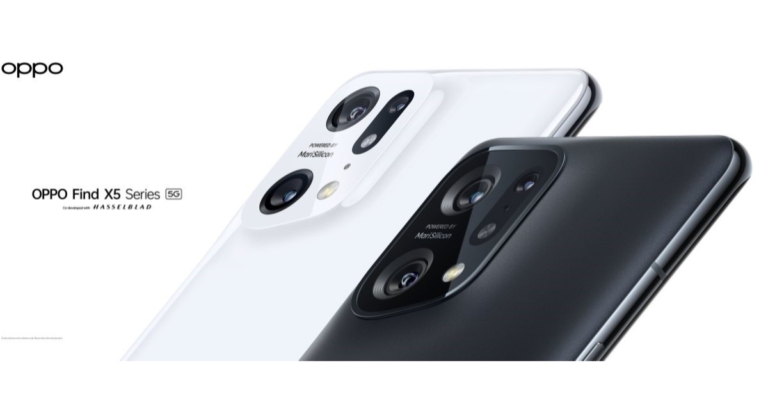





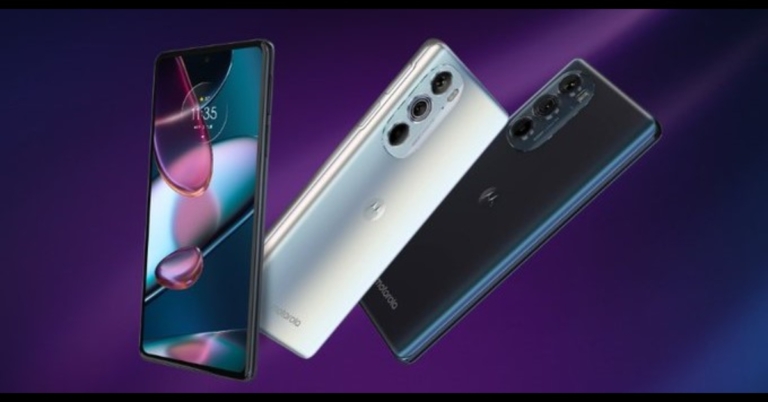

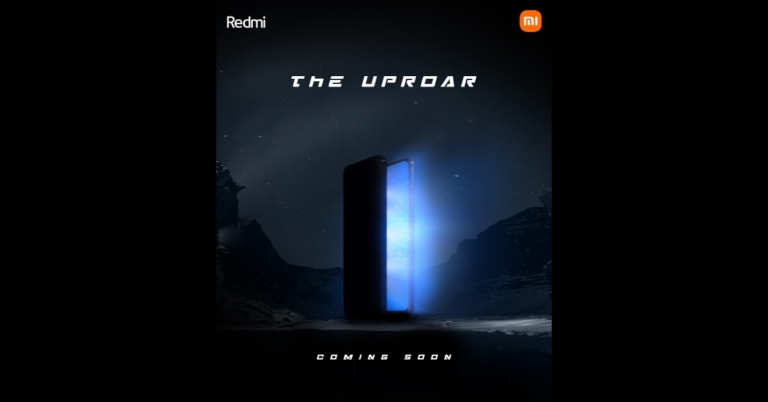

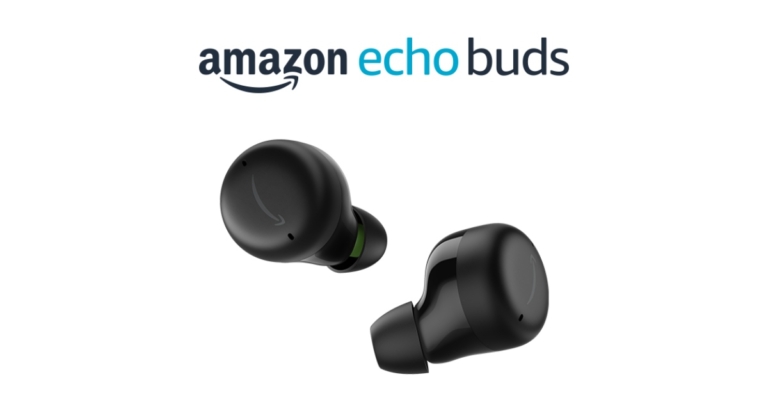


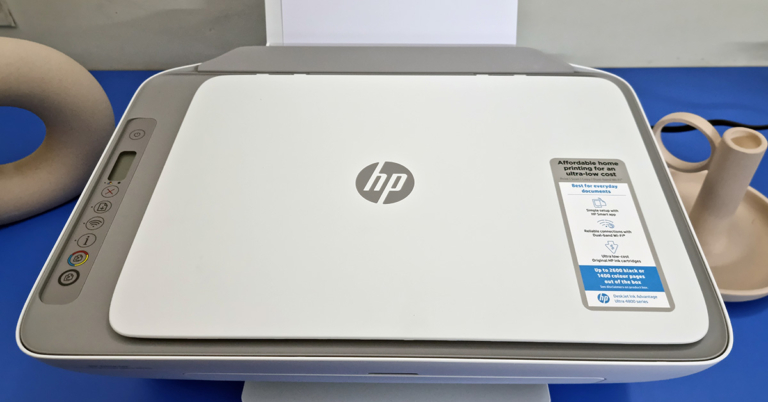
 Since it is an all-in-one machine, you get a scanner on top that can scan pages up to A4 in size. On the left of which users get to see a few buttons, that can scan, scan and print in colour or black, the power button and the Wi-Fi key. Here there is a mono colour LED screen that shows you the ink levels of the cartridges as well.
 At the back, you get to see the USB port as well as the power input port. All in all, the HP Deskjet Ink Advantage Ultra 4826 AIO is a well built, sturdy and good looking machine.
 At the max setting, which is 1200PPi you get the best results and blacks look deep, and colours look vibrant. But printing at that level is painfully slow, even if you are just printing a black excel sheet it will take over 5 minutes to spurt out a single paper. Colour? Even more. We ended up getting a fabulous looking page but after 7 minutes of wait time. We gave the print command, made ourselves a cup of coffee and the page was still printing. But as said, the wait is worth it. In case you are ok with decent (not the best) looking colour pages, you can always print at the mid setting of 600PPi.
Over that, we did not find the colours to be bleeding, no white lines in between and at the best settings the colours came very close to what we were seeing on the laptop’s screen.
At the max setting, which is 1200PPi you get the best results and blacks look deep, and colours look vibrant. But printing at that level is painfully slow, even if you are just printing a black excel sheet it will take over 5 minutes to spurt out a single paper. Colour? Even more. We ended up getting a fabulous looking page but after 7 minutes of wait time. We gave the print command, made ourselves a cup of coffee and the page was still printing. But as said, the wait is worth it. In case you are ok with decent (not the best) looking colour pages, you can always print at the mid setting of 600PPi.
Over that, we did not find the colours to be bleeding, no white lines in between and at the best settings the colours came very close to what we were seeing on the laptop’s screen.
 Scan times are very decent and in under 35 seconds, you get a fabulous, scanned copy on your computer screen. You can even scan and print in colour without the need for any computer or mobile. Over that, printing through an Android mobile (with Bluetooth V4.2 or higher) using the HP Smart app is also child’s play. Again, no need to send the file to a computer, simply connect to the HP Deskjet Ink Advantage Ultra 4826 AIO using your smartphone and print away. Remember you need to be less than 5 feet from the AIO to print using your mobile phone.
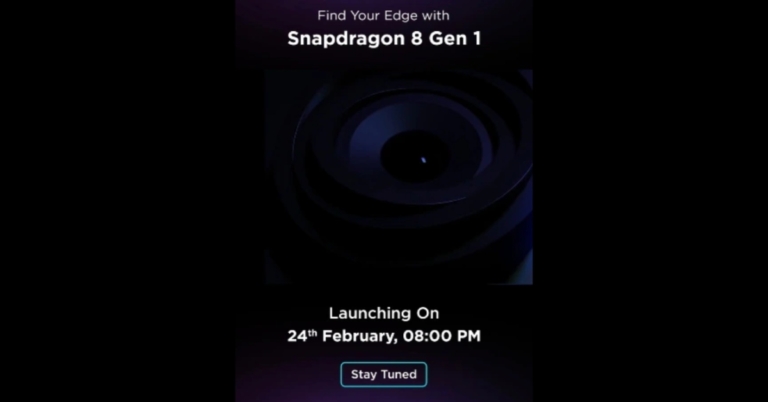
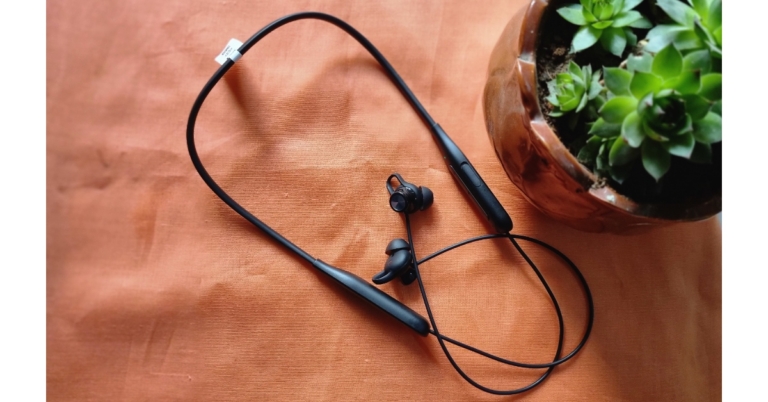




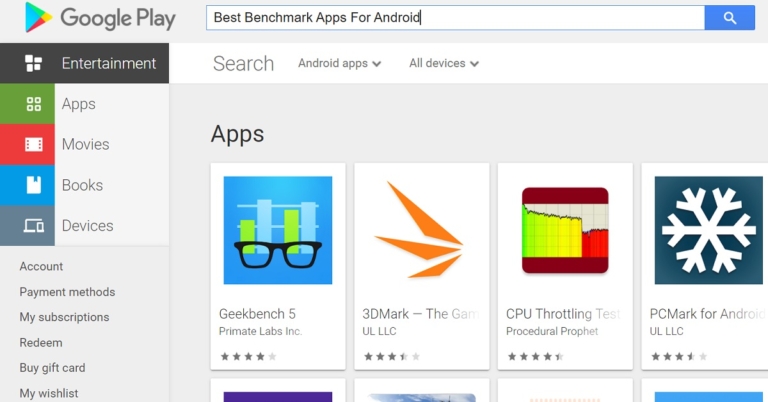
 Read also:

 Read also:

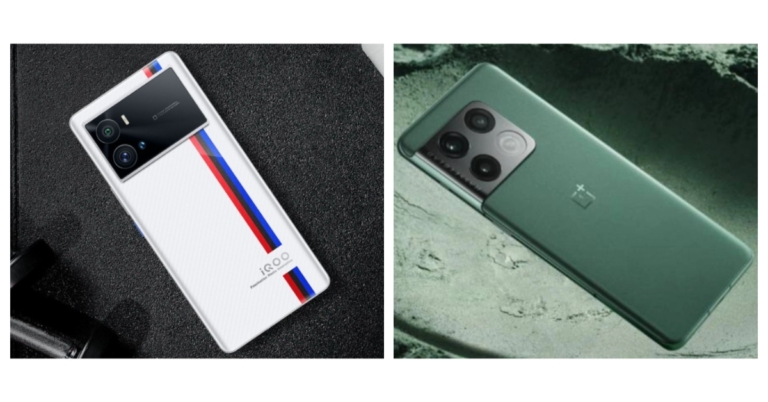

 Step 2:
  Step 3:
  Step 4:
 Read also:
  Step 3:
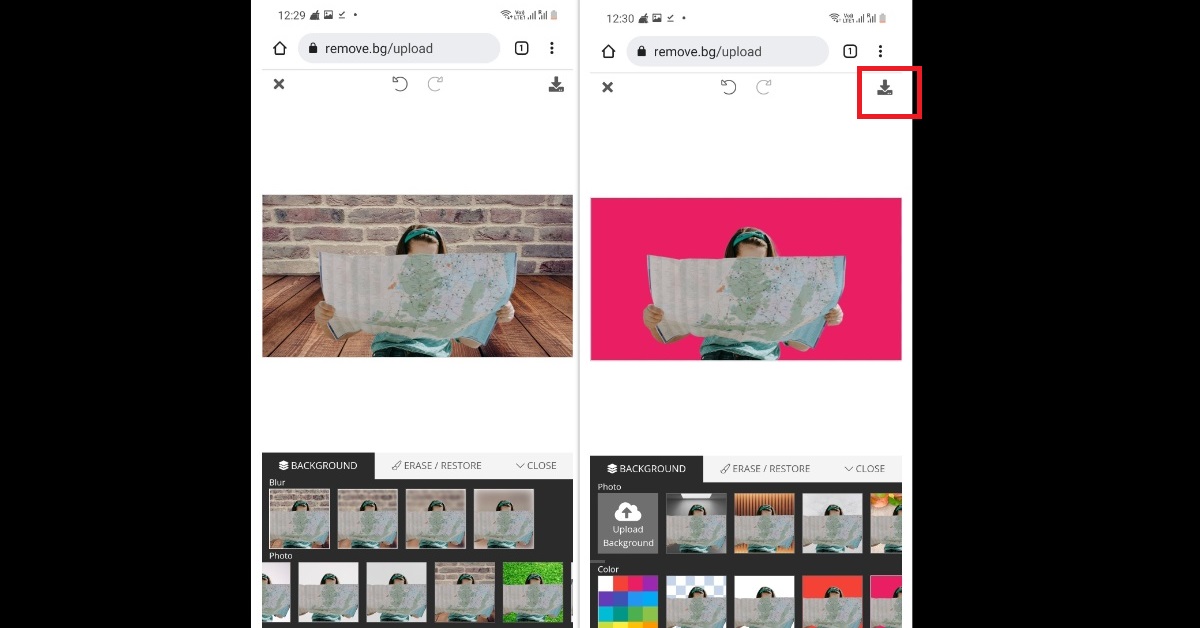 Step 4:
 Step 2:
 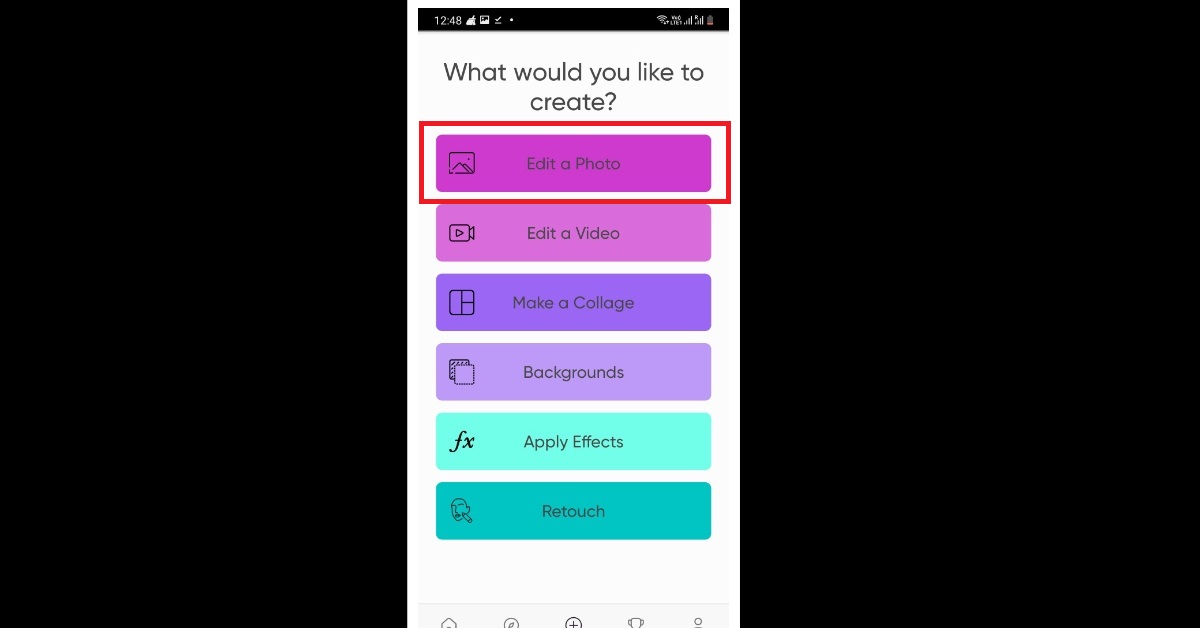 Step 3:
  Step 4:
 Step 3: Hit Copy.
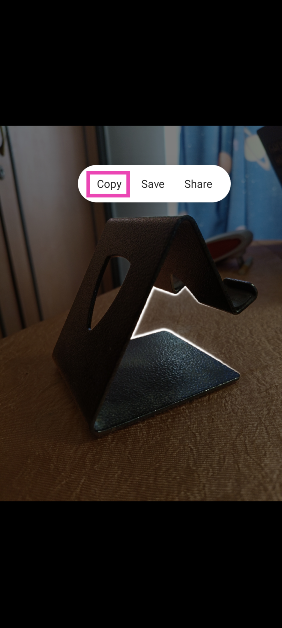 Step 4: The subject will be copied to the clipboard. You can use any of the above-mentioned editing apps to fill its background.
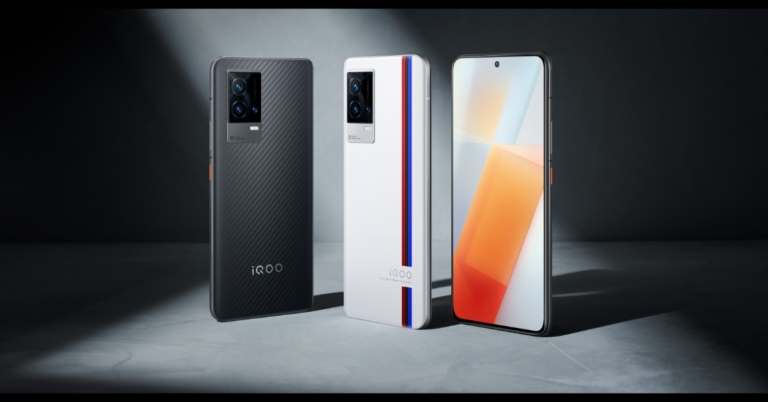


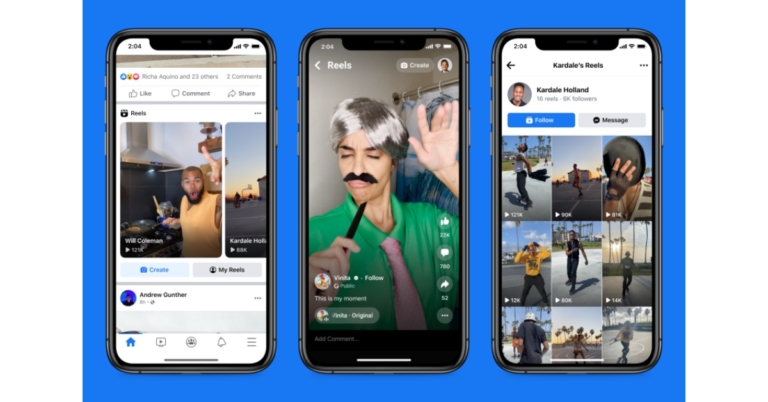
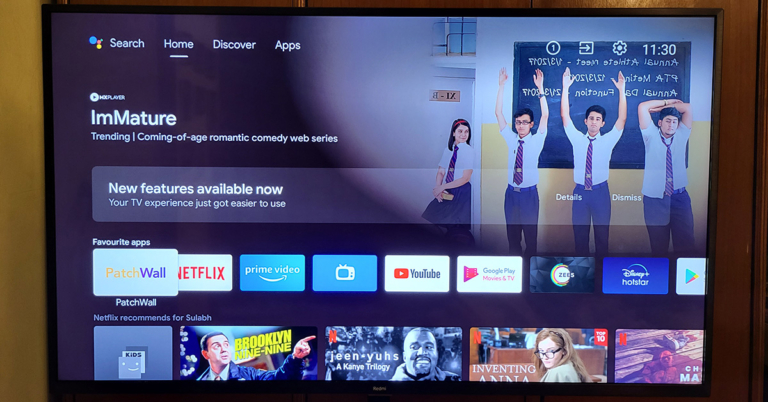
 The TV can easily be wall-mounted or kept on a table using the supplied V legs. At the back, you will find a lot of connectivity ports. These include three HDMI, USB, headphones that are side-mounted and downward-facing AV, Ethernet and Optical ports. The physical power off button is placed behind the LED indicator at the bottom.
 The remote has also seen an upgrade. Well, it is still sleek, but with the Netflix and Prime video buttons, you will also get dedicated Disney+ Hotstar and Apps keys. These are good additions as people do watch a lot of Disney+ Hotstar, and geeks like us want to quickly get to the apps section instead of jogging through the menu.

 Step 2:
 Step 3:
 Step 4:
 Read also:
  Step 2:
 Step 3:
 Step 2:
  Step 3:
 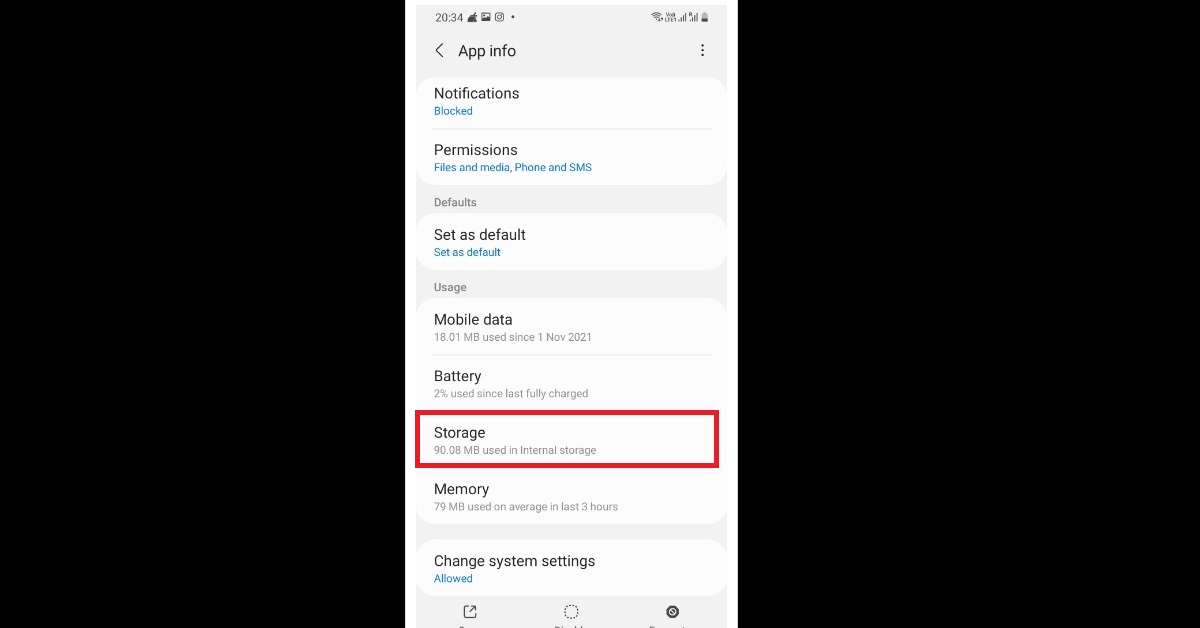 Step 4:
 Step 2:
  Step 3:
  Step 4:
 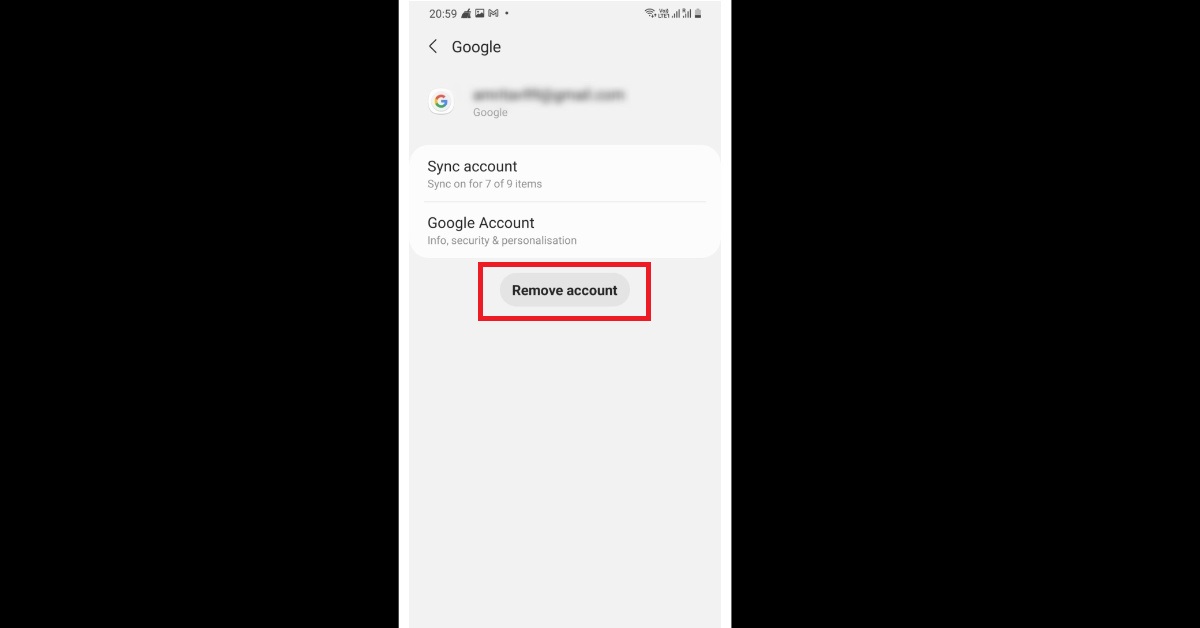 Step 5:
  Read also:
  Step 2:
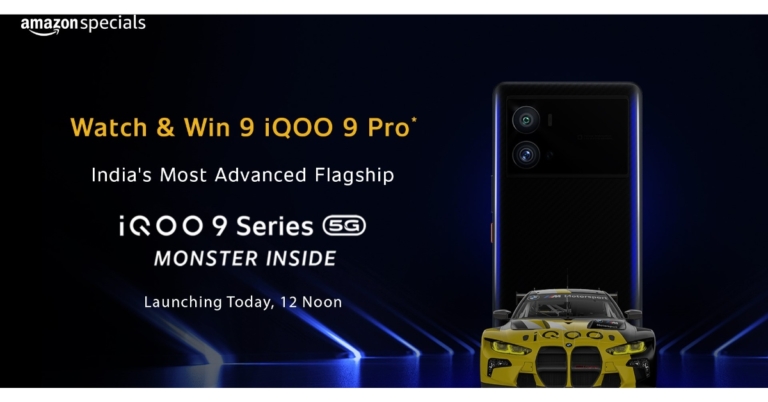



 Step 2:
  Step 3:
  Step 4:
  Step 5:
  Read also:
  Step 2: