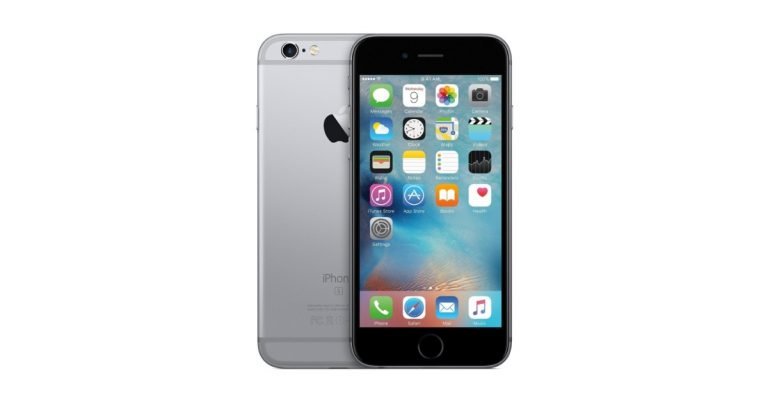
Right after launching its F11 Pro smartphone in India, Chinese smartphone maker Oppo is planning to unveil two new handsets in India – Oppo A1K and Oppo A5s. While Oppo A1K will be a mid-range budget smartphone, the A5s will cost more. Oppo A1K will be powered by the MediaTek Helio P22 SoC while the A5s will be powered by the MediaTek Helio P35 processor. The Oppo A5s has reportedly received the BIS certification so we can expect the smartphone to launch in the Indian market in the next few months. Here’s a look at the rumoured specifications of the two smartphones:
Oppo A1K specifications (rumoured)
Oppo A1K will reportedly sport a 6-inch display that will come with a waterdrop-shaped notch. However, the aspect ratio of the smartphone is currently unknown. The device will most likely be powered by a 2.0GHz MediaTek Helio P22 SoC coupled with 2GB RAM and 32GB internal storage. Oppo A1K is expected to house a 4,000mAh battery and will run Android 9.0 Pie skinned with ColorOS 6.0.
According to a report by MySmartPrice, the Oppo A1K will sport a single rear camera and will feature a selfie camera on its front panel. However, other details of the camera of the handset are currently not known. The device will be available in Red and Black colour options. Oppo A1K is expected to come with 154.4×77.4×8.4 mm dimensions and will weigh 165 grams.
Oppo A5s specifications (rumoured)
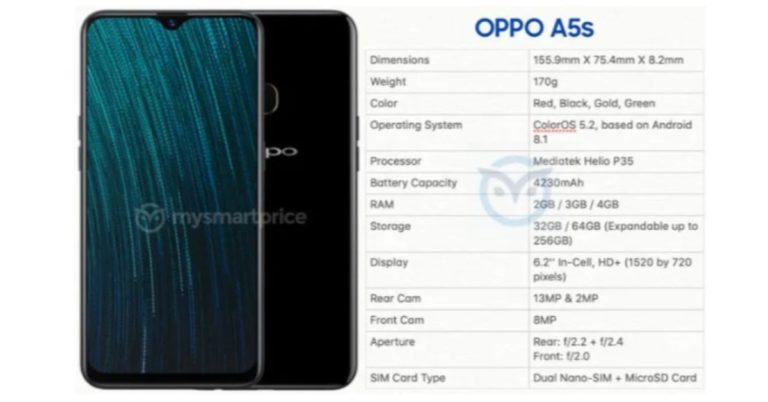
On the other hand, some render images of Oppo A5s surfaced online earlier this month. But according to reports, Oppo A5s has received the BIS certification in India which means that the Oppo A5s will be launching in the Indian markets in the next few months. The smartphone will be a refreshed version of the Oppo A5 that was unveiled last month.
Speaking about the specifications, Oppo A5s will reportedly sport a 6.2-inch HD+ (720 x 1520 pixels) resolution display with a waterdrop-shaped notch. It will be powered by the MediaTek Helio P35 SoC coupled with 2GB/3GB/4GB of RAM. According to reports, the smartphone will be available in 32GB and 64GB storage options will be able to support a microSD card up to 256GB. Oppo A5s will sport a dual-rear camera setup comprising of a 13MP primary sensor with an f/2.2 aperture paired with an 8MP sensor with an f/2.4 aperture. The front camera will have an 8MP sensor with f/2.0 aperture.
The Oppo A5s will reportedly run on Android 8.0 Oreo skinned with ColorOS 5.2. It is said to come in Red, Black Gold and Green colour options and will have 155.9×75.4×8.2mm dimensions and weigh 170 grams.
Although the exact launch date and the pricing of the smartphones are currently unknown they are expected to launch in the Indian market in the next few months.
Can we even imagine a day without WhatsApp? Probably not. The app is the most popular instant messenger in the world and Facebook keeps on rolling out new WhatsApp features in order to make sure that it stays useful for its users. Here, we have listed down 12 features of WhatsApp you probably did not know about:
Get new features first
If you want to get all the new WhatsApp features before anyone else does, you can become a beta tester for the app. To do this, go to WhatsApp Messenger’s app page on Google Play Store and scroll down to the bottom to ‘Become a beta tester’ panel. Select ‘I’m in’ and when you are asked to confirm, press ‘Join’. It is worth noticing that once you do this, you will get a lot more updates than you do now and not all of them will be bug-free.
Voice-to-video call switch
It is very simple to switch between voice and video calls on WhatsApp. Suppose you are currently on a video call with a friend, and you wish to switch it to a voice call instead, just click on the ‘Video Off’ icon on the screen. Similarly, if you have made a voice call on WhatsApp to a friend, but want to get on a video call, press on the ‘Video On’ icon to make the switch.
Send messages without typing
You can actually send messages on WhatsApp without even typing them out. Just say ‘Ok Google’ and ask your digital assistant to ‘Send a message on WhatsApp’. Google Assistant will then ask you who you wish to message and what your message is. You can say the name of the contact and the message that you wish to send and then confirm it. Once confirmed, the message will be sent.
Reply to Group messages on personal chat
If your friend says something on the group and you want to say something back but would rather do it on personal chat, you don’t have to scroll to find his chat to do this. You can just select the message sent by your friend, click on the three-dot icon on top right and then press on ‘Reply Privately.’
Save data in WhatsApp calls
Go to WhatsApp and press on the three-dot icon to open Settings. Here, select ‘Data and storage usage’ and then press ‘Low data usage’. It will be the last option on the page.
Create GIFs
To make your own GIFS and send them on WhatsApp, you first go to the conversation where you wish to send the GIF and then select on the Attach icon. Select the video you wish to make a GIF from your smartphone’s Gallery and when you come to the edit page, reduce the duration of the video to 6 seconds or less. You will see that the option of converting it into a GIF will pop up on the right of the screen.
Create Stickers
This isn’t exactly a WhatsApp feature as you need a third-party app for it, but it definitely makes sending Stickers more fun on the instant messenger. Download Sticker maker for WhatsApp from Google Play Store, and then open the app and select ‘Create a new sticker pack’. Fill in the name of sticker pack and the author, and then upload the photos you wish to convert into a sticker. Draw an outline around the area you want in your sticker and then tap on ‘Yes, Save Sticker’. Once you publish the sticker pack, a message would then prompt to ask you if you want to add the sticker pack to WhatsApp. Press on ‘Add’ to add all the stickers to the instant messenger.
Group video calling
Open a WhatsApp conversation and tap on the video camera icon on the top. Once the video call begins and the recipient answers tap on the add user icon on the top right of the screen and choose the second recipient you wish to call. You can add more people to the call in the same way. Alternatively, you can also go to a WhatsApp group and tap on the Group Call icon and select the contacts you wish to call.
Chat in different languages
Open WhatsApp and click on the three-dot icon to go to ‘Settings’. Here, select ‘Chats’ and then choose the option of ‘App Language’. Here, you can select the language that you wish to use WhatsApp in.
Add conversation shortcuts
If you wish a particular WhatsApp chat of yours to appear on your Home Screen, just select it on WhatsApp and then press on the three-dot icon. Once you do this, you need to select ‘Add chat shortcut’. You will be asked if you wish to add the chat to your home screen. Press ‘Add’ to confirm.
Enable two step verification
To enable two-step verification, open WhatsApp and click on the three-dot icon on top right. Press on ‘Settings’ and then select ‘Account’. Here, you will see the option of Two Step Verification. Select it and press on ‘Enable’. You can then add the six-digit pin that you will be asked for registering your phone number with WhatsApp again.
Group description feature
If you make a group on WhatsApp, you now also have the option of adding a description for it so that the people who are a part of it know its exact purpose. For doing this, go to the Group for which you wish to add a description and click on the top bar where the name of the group and participants is written. This will open the page where you will be able to see all the participants and media of the group. On this page, right below the Name of the group, you will see an option of ‘Add Description.’ Select it and write a short description to let all the participants know the purpose of the WhatsApp group.
Recently, Rajkot police arrested 10 college students for playing PUBG Mobile after a ban was imposed on the game in Gujarat. And till now, there was no word from Tencent India on how it was planning to deal with the situation. However, the parent company of PUGB Mobile has finally broken silence on the ongoing criticism and bans that the game is facing in the country. The company said in a statement:
“PUBG Mobile is a game. It is meant merely for entertainment and should be enjoyed in a healthy and responsible manner. In consonance with our endeavor to continue promoting responsible gaming experience, we are working on the introduction of a healthy gameplay system in India to promote balanced, responsible gaming, including limiting play time for under-aged players. We were thus surprised to learn that local authorities in a few cities have decided to impose a ban on playing our game.
We are working to understand the legal basis of such bans, and hope we can have a constructive dialogue with relevant authorities to explain our objectives and that they withdraw the prohibition. To PUBG Mobile players, we want to assure you that we are on your side and we will try our best to find a reasonable solution.”
We should mention that these are the first PUBG Mobile relates arrests in the country and it is worth noticing that the smartphones of the players have been seized by Rajkot police for the “purpose of investigation.” A cop who was involved in the arrest also said that the players were so engrossed in the game that they did not even notice the police coming to arrest them.
In a statement to Indian Express, Rajkot taluka police inspector VS Vanzara said, “As part of a special drive, police sub-inspector ND Damor arrested the six youths who were playing the game at tea stalls and fast-food joints outside a college on Kalavad road on Tuesday. Police checked their mobile to see if the PUBG game was running and also checked the history in their handset. We have filed six different cases against them.”
The players were then released from police custody on bail.
We should add here that a notification was reportedly sent on March 6 stating that PUBG Mobile and the MOMO Challenge were banned. The notification read, “It has come to our notice from various media that PUBG game, MOMO challenge is leading to a violent attitude among youth. The game is also having an impact on studies as well as behaviour, conduct and language of children and youth… Keeping in mind public safety security and to maintain law and order, I hereby impose a ban on playing PUBG game/MOMO challenge.”
The notification was based on directions by from the Gujarat state government.
For the latest gadget and tech news, and gadget reviews, follow us on Twitter, Facebook and Instagram. For newest tech & gadget videos subscribe to our YouTube Channel.
South Korean technology giant Samsung’s latest flagship smartphone Galaxy S10 comes with top-notch specifications and features. Whether we talk about the hardware of the smartphone or its software, Samsung has really made sure that its handset has an edge over other company’s flagship mobile phones. However, a number of users are complaining about an issue that they are facing with Samsung Galaxy S10 smartphone.
According to reports, Samsung Galaxy S10 does not automatically disable the screen when it is placed in a user’s pocket. Furthermore, users have also complained about accidental touch inputs that their Galaxy S10 handsets get when they are placed in their pockets. We should mention here that although the smartphone comes with a preloaded option that prevents accidental touches, but then, it seems like the function that enables the built-in proximity sensor to lock the screen of the smartphone is absent.
A number of users have taken to Reddit and Samsung’s Community forums to complain about the issue in the recently-launched flagship smartphone. A user on Reddit said, “I have an S10, and I keep my phone in my pocket with the screen towards my leg (since my leg is far less likely to damage the screen). The only issue with this is that I started feeling the ‘fingerprint rejected’ vibrations while the phone was in my pocket.”
We should add here that this issue also affects the battery life of the Samsung Galaxy S10 smartphone. Another thing worth adding is that users also have similar complaints about the Samsung Galaxy S10+. What makes it worse is the Always On Display (AOD) feature of the handset that is meant to show the clock and notifications, even when the smartphone is not in use.
Interestingly, Samsung Galaxy S10 comes with the company’s own One UI that is touted to come with an Accidental touch protection feature which can help protect the smartphone from accidental touch inputs when it is inside a pocket or a bag or any other similar dark place.
It is also worth mentioning that a number of other smartphones that are more affordable than Samsung Galaxy S10 are able to prevent touches even when they are placed inside a pocket. Most smartphones use a proximity sensor to disable the display.
While the new flagship smartphones by Samsung do use the proximity sensor to lock the screen when the user is on a call, they are somehow unable to do the same when they are placed in a pocket. Considering that so many people are complaining, Samsung is expected to roll out a fix for the issue in the days to come.
This week, Google rolled out its Android Q developer beta to its Pixel smartphones. And if reports are to be believed, this time, more smartphones would be getting the developer beta of the latest Android version before it is finally unveiled at Google I/O 2019 in May. So it isn’t really surprising that a number of smartphone makers have suddenly started rolling out roadmaps about when their remaining handsets would receive the current Android Pie update.
Yesterday, Chinese smartphone brand Xiaomi rolled out a list of its smartphones along with expected months when they would receive the Android Pie update. And just a day after Xiaomi, Taiwanese electronics maker Asus has done the same. Although it has been a while since the devices have been launched, till now, there was no word about Asus Zenfone Max Pro M2, Zenfone Max Pro M1 and Zenfone Max M2 handsets.
All three smartphones fall in the budget segment of the Indian smartphone market, and Zenfone Max Pro M2 and Zenfone Max Pro M2 have been appreciated a lot for offering powerful specifications at an affordable price.
However, Asus has finally broken its silence about when the three smartphones will be getting the much-awaited update. In a video that the company has posted on Facebook, Dinesh Sharma, the Head of Mobile Business of Asus India announced that Zenfone Max Pro M2, Zenfone Max Pro M1 and Zenfone Max M2 smartphones will be getting the Android Pie update latest by April 15. So, if you have one among the three smartphones and have been waiting for it to get the update, you don’t have to wait for too long.
Dear Zenfone family, we deeply apologize for missing our previously announced deadline for the Android Pie update. We promise it won’t be the same this time around. We’re bringing the Android Pie to the Zenfone Max Pro M1, Zenfone Max Pro M2 and Zenfone Max M2 latest by April 15th. Thank you all for your patience and continuous support. We promise this Pie will be worth the wait. For those who wish to test it out right now, you may visit the following link to register for our Android Beta Power program.Zenfone Max Pro M1 – https://bit.ly/2BWIwP3Zenfone Max Pro M2 – http://asus.in/beta-testing/
In its Facebook post, the company has also apologized about missing the prior deadline for the update. The post reads, “Dear Zenfone family, we deeply apologize for missing our previously announced deadline for the Android Pie update. We promise it won’t be the same this time around. We’re bringing the Android Pie to the Zenfone Max Pro M1, Zenfone Max Pro M2 and Zenfone Max M2 latest by April 15th. Thank you all for your patience and continuous support. We promise this Pie will be worth the wait. For those who wish to test it out right now, you may visit the following link to register for our Android Beta Power program.”
We should add here that Asus Zenfone Max Pro M1 and Zenfone Max Pro M2 have already received the Android Pie beta update, but are yet to receive a stable update. Currently, the beta update is being tested by a limited number of people who have signed up for it.
With Android Pie, Asus Zenfone Max Pro M2, Zenfone Max Pro M1 and Zenfone Max M2 smartphones will get features like Adaptive Battery, Adaptive Brightness, App Actions, and more.
For the latest gadget and tech news, and gadget reviews, follow us on Twitter, Facebook and Instagram. For newest tech & gadget videos subscribe to our YouTube Channel.
Chinese consumer electronics maker Xiaomi has slashed the price of its Mi TV 4A Pro 49 in India. Post the price cut, the smart television by Xiaomi can now be bought at Rs 29,999 in the country. We should add here that this is Rs 1,000 less from the original price of the Android TV-based Mi TV model.
It is worth noticing that the new reduced pricing is effective on all official channels where the television is being sold, which includes Amazon India’s website, Flipkart’s e-commerce portal, Mi.com and Mi Hone Stores. The slash in price of the smart TV comes right after the Chinese electronics company reduced the price of its Mi TV 4 Pro 55-inch model – a move which was made so that the television can pose a competition to Samsung’s new lineup of 4K UHD Smart TVs.
The latest price cut by the company was announced by Xiaomi‘s Global Vice President and India Managing Director Manu Kumar Jain on his Twitter account. Jain said on Twitter, “India’s smartest Android TV is now available for ₹29,999. Your perfect weekend binge-partner, Mi LED TV 4A PRO 49 comes with – 123.2cm FHD display, 20W speakers, PatchWall + Android TV and more.” He further added that he will give away “10 Mi earphones on 1232 RTs & 1 M iTV on 4900 RTs.”
India's smartest @Android TV is now available for ₹29,999.😎
Your perfect weekend binge-partner, Mi LED TV 4A PRO 49 comes with: 123.2cm FHD display 20W speakers PatchWall + Android TV and more.
Prior to the price cut, the smart TV by Xiaomi was available at Rs 30,999 in India and now, it can be bought at Rs 29,999. As we mentioned earlier, interested buyers can be buy the smart TV via Amazon India. Flipkart, Mi.com and Mi Home Stores.
Speaking of the discount that was levied on Xiaomi’s Mi TV 4 Pro 55, which can now be picked up at Rs 47,999, the price of the television was slashed so that the product can rival Samsung Super 6 Series NU6100 4K UHD Smart TV range that was unveiled in India earlier this week.
We should also add that in January this year, Xiaomi reduced the price of its Mi TV 4A Pro 49 from Rs 31,999 to Rs 30,999. So, it is not the first time that the cost of the smart TV has received a discount. At the same time, the company also reduced the price of its Mi TV 4A Pro 49 and Mi TV 4A 32. While the former received a price cut of Rs 2,000 and is selling at Rs 13,999, the latter’s price was slashed by Rs 1,500 and can be picked up at Rs 12,499.
To recall the specifications of the Mi TV 4A Pro 49, it comes with a full-HD LED display and is powered by 64-bit quad-core Amlogic processor clubbed with 2GB of RAM. The device has 8GB of internal storage and comes with 20W stereo speakers. In addition to this, it runs Android TV skinned with Xiaomi’s PatchWall UI.
Wireless speakers are always a good investment. You can buy a rugged speaker that is guaranteed to survive the test of time and extreme conditions, and you can spend at least a year or year and a half listening to your favourite rhythms out loud no matter where you are.
Although most people prefer earphones or headphones for listening to music while they are at work, but let’s face it, we don’t spend all our lives in offices. It’s so much better to listen to music on a wireless speaker at home, at house parties and even on vacations.
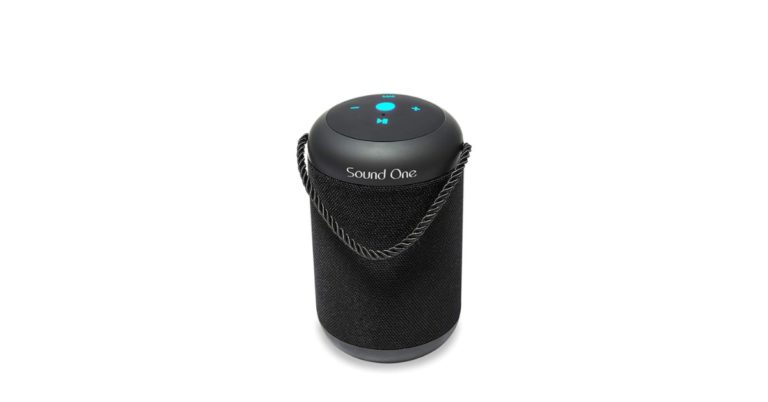
Needless to say, the market for wireless speakers is a crowded one and it has a lot of players competing with each other. And one among them is personal audio and mobile accessories brand Sound One, which makes wireless and wired audio products as well as cables and chargers. The company has this week expanded its portfolio in India with the launch of its Drum portable wireless speaker that is priced at Rs 3,490.
If you are an interested in buying the Sound One Drum wireless speaker, you can head to Amazon and Flipkart’s websites to order it for yourself. And in case you aren’t too fond of online shopping, you can buy the speaker offline from select retailers. We should add here that the speaker is available at a discounted price of Rs 1,990 on Amazon India‘s website.
Coming to the specifications of the newly launched Sound One Drum wireless speaker, it comes with Bluetooth 4.2 for connectivity and has IPX5 certification, which means that it is water and dust resistant. The Sound One Drum portable wireless speaker has a fabric-wrapped exterior that covers its two drivers of 5W each. The combined output of the two drivers is 10W. You can also insert a microSD card in the wireless speaker, and it can also be used for hands-free calls by pairing it with your smartphone.
The Sound One Drum wireless portable speaker houses a 2,000mAh battery which, according to the company, can last up to 8 hours with a single charge. The control buttons of the newly launched speaker by Sound One are placed on the top and in order to make it simple to carry the speaker, Sound One has also added a fabric ribbon. The wireless speaker weighs 649 grams and comes with support for 3.5mm and USB cables.
Technology giant Google is said to be working on its mid-range Pixel smartphones, which will reportedly be named as Pixel 3 Lite and Pixel 3 XL Lite. While we still don’t know exactly when Google will be launching the two smartphones, leaks about the company’s next flagship – Pixel 4 XL – have already started surfacing online.
With Pixel 3 XL, Google took a different route when it settled for a primary sensor on the back panel and chose to add a dual camera setup on the front for selfies and video calls. However, some recent reports claim that Google will finally be adding a dual camera setup on its back panel in its next flagship, Pixel 4 XL.
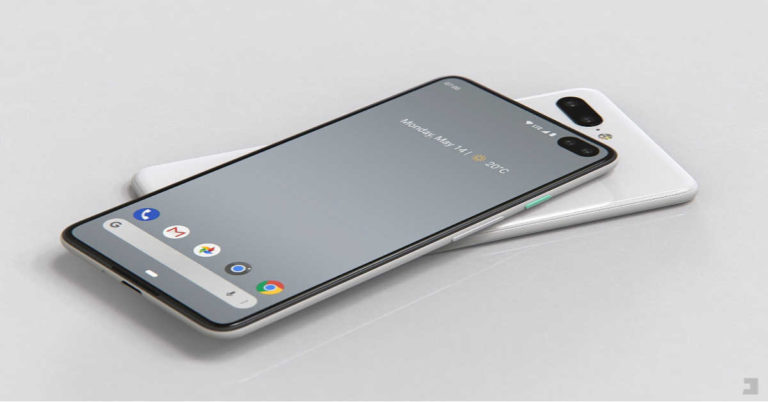
Recently, an alleged sketch of the Google Pixel 4 XL has been shared by Slashleaks that shows the upcoming flagship smartphone with dual front and dual rear cameras. The device is also shown to come with thinner bezels on the display panel. But that’s not all. A rendered image of Google’s next flagship smartphone has surfaced online too.
The image, that has been shared by Phone Designer, seems to be based on the sketch that was shared by Slashleaks as it shows horizontally aligned rear and front cameras. It is worth noticing that the image shows a punch hole display on the Google Pixel 4 XL smartphone. If Google indeed comes with dual camera setups on the front as well as on the back, we can expect the handset to offer even better photography than Pixel 3 and Pixel 3 XL. And needless to say, more number of photography-related features will be added too.
Image courtesy: Slashleaks
Even though Pixel 3 and Pixel 3 XL came with a single camera on their back panels, they surpassed the photography-performance of most of the rival flagship handsets that came with dual or triple rear cameras.
We should also mention that the leaked image does not show a physical fingerprint sensor on the smartphone’s back panel, which can only mean that the device will come with an in-display fingerprint scanner. It is being speculated that the upcoming Pixel 4 XL device will come with an ultrasonic in-display fingerprint scanner.
Other speculated features of the Google Pixel 4 XL smartphone are Qualcomm Snapdragon 855 processor and the latest Android Q operating system. The device may also support 5G connectivity, although as of now, there is no official word on it.
Popular dating app Tinder wants to bring in more transparency about how its platform ranks and shows people their potential matches. In order to do this, Tinder has published a blog post that talks about the subject. However, we should mention that it still keeps fairly vague.
According to the blog post, the company’s Elo score was a ‘hot topic’ till a few years back, however, now the ranking feature has been depreciated. Tinder’s Elo score used to rank people on the basis of attractiveness. We should mention that in the real world, Elo scores are actually used to rank chess players, but in Tinder, it goes up as more and more number of people swipe right on a person’s profile.
And then, their profile is shown to other people who have similar scores. It is Tinder’s way of making the most desirable people interact with one another. We should mention that since profiles are limited in scope, a person’s looks and attractiveness play a key role in matches getting made. But then, people also started speculating that with Elo scores on, only the attractive lot kept talking to one another, while the ‘undesirable’ people were left with a low ranking.
The company said in the blog post, “Our algorithm is designed to be open. Today, we don’t rely on Elo — though it is still important to consider both parties who Like profiles to form a match.”
The dating app has clarified that it adjusts the potential matches of the user each time someone acts on their profile. Furthermore, Tinder rearranges the user’s possible match profiles within 24 hours of the action being taken. This means that potential matches are constantly updated. So if an action was taken on your profile, you would see a change in your potential matches.
But then, this is more or less as transparent as Tinder got in the blog post. The algorithm that has been spoken about in the blog post seems to identify patterns around likes. So, if two women on Tinder swipe right to the same guy’s profile, the dating app would deduce that they have similar taste when it comes to looking for a potential partner. Then, if one of the two women swipe right on another guy’s profile, that profile would be shown to the other girl too, because chances are that she may end up swiping right on him.
It seems like all major social media platforms are coming up with ways to get gamers on board. After Facebook rolled out a gaming hub on its mobile app to get gamers more interested, a report has emerged that claims that Snap may be launching a new gaming platform for its photo-messaging app Snapchat. Furthermore, it has also been said that the company may launch the gaming-centric platform at Snap Partner Summit that will be held in Los Angeles on April 4.
The report about Snapchat’s upcoming gaming platform first surfaced on Cheddar. We should mention here that this is not Snapchat’s first attempt to capture the gaming audience. Last year, the company launched ‘Snappables’, which were basically a set of AR lens games. The new platform is reportedly codenamed ‘Project Cognac’ and it will be a much bigger step that Snapchat will be taking in the world of gaming. The upcoming platform would also let outside developers create games that would live inside the Snapchat app.
It is worth noticing that according to a report in CNET, Snapchat also bought the Australian game studio Prettygreat in January this year, which also points towards the fact that the app is focussing on gaming.
In addition to this, a report emerged in The Information in 2018 that Snap is working on a gaming platform. The report also said that the company plans to launch the platform in the fall of 2018, but that obviously did not happen. However, this is completely in-line with Cheddar’s report, if we assume that the program got a little delayed.
We should also add that Chinese technology conglomerate Tencent bought a 12% stake in Snap last year. Speaking on it back then, Tencent said that it wanted to “explore cooperation opportunities with the company on mobile games publishing and newsfeed.” This clearly indicated that Snap has been planning to make a move towards gaming for some time now.
If you are wondering why would Snap want to add games in Snapchat, the answer to that is more user engagement, which obviously also means more money. Facebook’s Messenger app has been offering gaming-related features for years now. So, if Snapchat gets games on its platform, it would simply be adding a new source of revenue from developers who would want to place their games on the app, and also from advertisers who would want to place ads in those games. Another added benefit would be that users who would be busy playing games on Snapchat, wouldn’t really be spending too much time on Instagram.
Last week we saw how Whatsapp was testing its ‘Search Image’ feature which would let the users search for any image they send or receive in chats. Now, the Facebook-owned instant messaging app has reportedly submitted the beta version of its upcoming update which will support an in-app browser. Being a beta version, the new feature is still in development and is disabled by default.
The new beta version of Whatsapp (version number 2.19.74) was spotted by WABetaInfo and it will come with an in-built web browser (much like mini version of Chrome). The in-built browser will let the user open the links sent to him or sent by him in the chat. Earlier, when the user received any web link, he would be guided to select a web browser to open the link. Once selected, the browser would open the link and guide the user to the webpage.
According to the report on WABetaInfo, if the user chooses to use the in-app browser on Whatsapp then he should not worry about data loss. Furthermore, Whatsapp or Facebook will not be able to access the user’s search history because the feature uses an Android Application Programming Interface (API). This API feature lets the system manage everything and the developers of the feature at Whatsapp or the parent company Facebook won’t be able to see or access the user’s in-app web search history.
The new feature will also be able to detect the unsafe web pages as it uses the ‘Safe Browsing’ feature which was introduced to Android 8.1 in 2018. In Safe Browsing mode, the users would get an alert when they reached a web page infected with malware and malicious content.
The report also mentioned that Whatsapp won’t let the users natively take screenshots or capture videos while using the in-app browser. Currently, it is not known if the app will let the users take screenshots when the feature is rolled out officially. The new update and feature will require Android 4.1 or newer to work. But Whatsapp has reportedly intends to roll out the new feature to everyone once it is out of its beta programme.
The beta version of Whatsapp version 2.19.74 is available for user-testing and can be downloaded through the Google Play Beta programme.
For the latest gadget and tech news, and gadget reviews, follow us on Twitter, Facebook and Instagram. For newest tech & gadget videos subscribe to our YouTube Channel.
Last year was not a good one for Facebook. The social media giant was embroiled in one data breach after the other and while most users did not end up leaving the platform, the company did lose out on its users’ trust to an extent.
While earlier people shared their details on Facebook without a second thought, today there are those who are very guarded about their personal details on the social media platform. And this is particularly true for information that involves money, like credit card numbers.
In order to somehow reverse this attitude, Facebook has adopted a new strategy since the beginning of the year. The company has rolled out some enhanced privacy controls for its users and at the same time, it is also adding interesting features on its website and app that would make users hooked again.
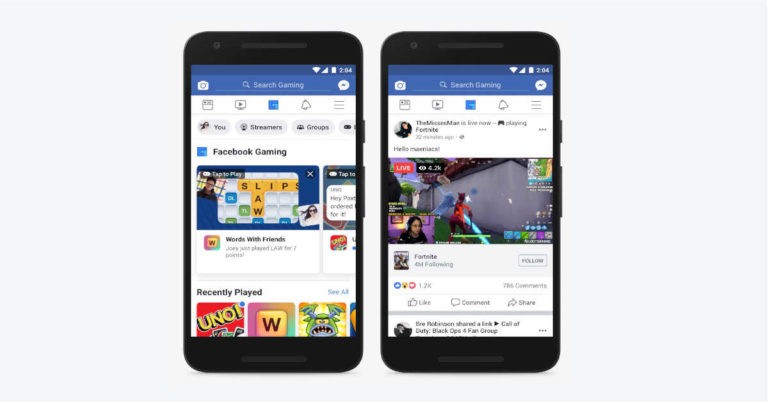
Today, Facebook has launched another such feature on its mobile app that is specifically aimed at gamers. The social media app will now have a dedicated gaming hub where users would be able to explore content related to games. Facebook has made sure that the gaming hub looks like a separate section on its app. And for this, the social media giant has dedicated a tab for the gaming hub. The company is also adding it to the sidebar and also as an option for the customizable navigation bar.
The hub will be a central place where users will be able to play Facebook’s Instant Games and at the same time, look for new ones. Users will also be able to wat gaming videos from streamers and connect with various gaming groups that are already on the social media platform.
We should mention that this move by Facebook is obviously an attempt to make a number of gamers come to its platform. Also, the new feature automatically makes Facebook compete with the likes of Twitch and YouTube. However, we have our doubts if only a hub on its app will be enough to make gamers pick Facebook over their preferred gaming platform.
We should mention that the feature is being rolled out in a phased manner by the social media platform, so don’t be surprised if you don’t find it on your app yet. In addition to this, the beta-test of a standalone of Facebook Gaming app for Android has also begun. According to the company, the app would offer far more features as compared to the current app. This surely indicates that Facebook is indeed ready to go up against the already established gaming platforms.
Although video calling is now available on WhatsApp, there are some features from Skype that still haven’t made it to the instant messenger. And now, software giant Microsoft has decided to add another feature to make sure that its service has an edge over others.
The company is testing a new change to its video calling service that will let users add up to 50 participants in a conference video call. If this happens, a number of businesses and companies would rely on Skype to hold meetings in which they have to include people who cannot physically be present there.
We should mention that no other video calling app can let you add this many people on a video conference call. This even surpasses Apple‘s limit of adding up to 32 people in a FaceTime group video chat.
It is worth noticing that Microsoft will be managing this number of calls by sending notifications in large video calls, instead of having the app ring all the members involved in the call.
Furthermore, if people don’t respond to the notification, you can also include them by calling them up once the call has started. If you are a beta tester on Skype, you can access these new features already, However, even if you are not, the feature will most likely roll out in a stable update in the next few months.
In an unrelated piece of news, Microsoft has started testing updates to its ‘Your Phone’ app for Windows 10. With this, Android users will be able to mirror a smartphone screen directly to their Windows 10 PC. It is worth noticing that the ‘phone screen’ mirroring feature will be made available to Windows Insider starting this week. However, in order to make the feature work, you need to have the latest test builds of Windows 10 along with the Your Phone app.
To recall, the software giant had earlier demonstrated how the smartphone screen mirroring feature works in Your Phone app at its Surface event that was held in October last year. The app makes the smartphone screen appear directly on to Windows 10 PC and it projects the entire list of Android apps that you have on your device. You can also access these apps by tapping on them and make them appear in the remote session of your device that gets mirrored to your PC that runs on Windows 10.
Nvidia has launched its GeForce GTX 1660 GPU in India, which promises to be 130 percent faster than the GTX 960 and 35 percent faster than the GTX 1060 3GB at 1080p, according to the company. This makes it a good option for 1080p gaming at least on paper, however, we will have to wait to vouch for it till we put it to test ourselves. The Nvidia GeForce GTX 1660 GPU is priced at Rs 21,500 and will be be made available in India starting March 14 We should mention that the GPU was launched globally last month.
In India, the company is not launching a Founders Edition variant, but if you wish to buy the GeForce GTX 1660 GPU, you can head to Nvidia’s partners like Asus, Zotac, and MSI. However, it is worth pointing out that each of would be following their own pricing starting at Rs 21,500. The newly launched GPU can be bought via online as well as offline channels.
Other than this, Nvidia has stated that GTX 1660 has the same Turing architecture technology that was found in the GTX 1660 Ti. This means that it would support all sorts of Nvidia features like Ansel, GameStream, GeForce Experience, Highlights, ShadowPlay and Adaptive Shading technology to name a few. We should point out that GeForce GTX 1660 is the second new GPU from Nvidia that doesn’t have its own highly publicised ray tracing technology that the company calls as RTX.
The company has also said that the new GPU comes with improved performance and capabilities in the latest games and it supports G-SYNC Compatible gaming monitors. The GPU has NVENC technology for single-PC broadcasting and its support for Adaptive Shading technology further enhances its performance in the supported titles.
Nvidia has also said that the GTX 1660 GPU comes with 6GB of GDDR5 VRAM, 1408 CUDA Cores, and a boost clock of almost 1.8 GHz.
The company has promised that its GPU is capable of handling most of the AAA game titles of and that it has support for concurrent floating points along with integer operations. The Turing architecture used in the newly launched GPU is more power efficient and the company claims that it delivers 1.5 times instructions per clock as compared to the Pascal architecture that was used previously.
It is worth adding that Nvidia has not shipped any new units into the market for an entire quarter and has now depleted reserves of its GeForce GTX 1080 Ti, GeForce GTX 1080, GeForce GTX 1070 Ti, and GeForce GTX 1070 GPUs. Furthermore, its stocks of its GeForce GTX 1060 will also reportedly run out soon.
Joining in on the foldable device race is the tech titan Google. Samsung and Huawei have already launched their foldable smartphones named Galaxy Fold and Mate X, with Xiaomi closing in on the date of the release of its foldable smartphone.
According to a recent patent application, Google might be experimenting with foldable display technology. These displays are similar to Samsung Galaxy Fold and Huawei Mate X. The patent application was spotted by Patently Mobile and it describes the method of construction of the OLED display panels in a way that it could bend repeatedly and can be used as a ‘modern computing device.’
The image on the patent application shows a screen which could be bent at two places, like the alphabetical Z. Just how the technology giant would manage to produce a glass display with two folds without it breaking is unknown.
Cupertino-based technology giant Apple has responded to Spotify’s complaint with the EU antitrust regulators. The company said that the Spotify ‘wants all the benefits of a free app without being free.’ Earlier, Spotify had complained about Apple saying that the company ‘unfairly limits rivals to its own music streaming service’.
It should be noted that Apple too owns a music streaming service Apple Music through which iOS users can stream music online. Spotify blamed Apple that it was hindering with other music streaming rivals so that its own platform would be considered by the users instead of the other apps.
Apple’s App Store is fully controlled by the Cupertino-based technology firm and it decides what app should be kept on the App Store. Spotify said, “Apple’s control of its App Store deprived consumers of choice and rival providers of audio streaming services to the benefit of Apple Music, which began in 2015.” According to Spotify, Apple uses different ways by which it uses its power to make the App Sore an ‘uneven playing field’. To which Apple replied by rebutting most of the points made by Spotify saying ‘time to play fair’.
Spotify also mentioned that Apple’s Voice Assistant, Siri didn’t let the iPhone users play music from Spotify app, when asked to play music, Siri used the Apple Music app. Also, Apple had declined Spotify’s request about letting its app launch on the Apple Watch.
To Spotify’s claims Apple said that it has approved and distributed around 200 app updates in place of Spotify which resulted in over 300 million downloads of the app from the App Store. Apple said, “The only time we have requested adjustments is when Spotify has tried to sidestep the same rules that every other app follows. Spotify is free to build apps for – and compete on – our products and platforms, and we hope they do.”
Apple said that it reached out to Spotify for AirPlay 2 and Siri’s support on many occasions but the music streaming company said that they were working on it.
With the tension growing between one of the major music platforms and Apple, there seems to be no common ground on which both the companies agree to work on. It is not the first time Apple had been highlighted with troubles with other major platforms. Many companies are not letting their apps and services be available on Apple’s App Store because the company is asking an exorbitant amount of royalties and shares. This results in the companies not entering into a partnership with Apple. Netflix, Hulu, New York Times are examples of such companies.
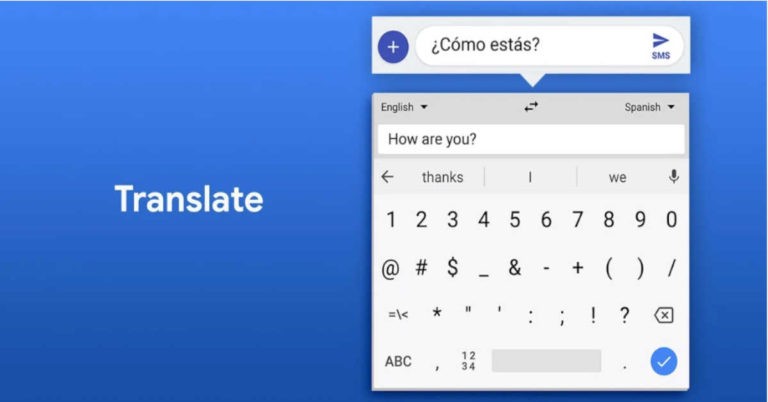
Technology giant Google has always added useful features to its apps. Just yesterday, Google Maps got the ability to report accidents and speed traps. And now, the technology company has rolled out the Google Translate feature to its Gboard app for iOS.
We should mention that Google Translate has been present on Gboard for Android since 2017 and it can be accessed by tapping on the dedicated icon on the suggestion bar. Alternatively, users can also click on Google button to access the Translate feature.
The patch notes of the update for Gboard for iOS says that “all the languages supported by Google Translate” are available. We should mention that at the time of writing, Google Translate had support for 103 languages. Although the software automatically detects new languages and offers to translate them, you can also go and pick languages manually.
The last major update for Gboard for iOS included feedback for keyboard, which is also a feature that is not available in the built-in iOS keyboard. Gboard’s Android version recently got support for support for enhanced offline voice dictation. However, we should point out that the feature is currently only available for English-speaking Pixel smartphone owners.
The artificial intelligence-based offline dictation would speak out the emails and texts to users even when their smartphones are not connected to internet.
Speaking about the new feature, Johan Schalkwyk from Speech Team of Google, wrote in a blog post, “We’re happy to announce the rollout of an end-to-end, all-neural, on-device speech recogniser to power speech input in Gboard which is always available, even when you are offline. This means no more network latency or spottiness — the new recogniser is always available, even when you are offline. The model works at the character level, so that as you speak, it outputs words character-by-character, just as if someone was typing out what you say in real-time, and exactly as you’d expect from a keyboard dictation system.”
He further added, “Our new all-neural, on-device Gboard speech recogniser is initially being launched to all Pixel phones in American English only. Given the trends in the industry, with the convergence of specialised hardware and algorithmic improvements, we are hopeful that the techniques presented here can soon be adopted in more languages and across broader domains of application. We are hopeful that the techniques presented here can soon be adopted in more languages and across broader domains of application.”
Yesterday, Marvel released the first full trailer of the second part of the Avengers: Infinity War – Avengers: Endgame which it went viral as soon as it launched. The Avengers: Endgame will be released globally on April 26, 2019 and it will put an end to the current Marvel storyline.
The trailer begins with the flashback of Tony Stark in Ironman 1 as he fought his way out of the cave he was captured in. Tony is still trapped in space following the aftermath of Infinity War where Thanos wiped out half of the whole universe. Realizing that this could be his final moments, Tony is recording a goodbye message for Pepper Pots describing his life and love for her.
The scene is followed by Steve Rogers’s flashback before he became Captain America. Then we see the retired Clint Barton/Hawkeye spending time with his family. The scene is instantly cut to a rainy night in Japan where we see the revel of Ronin, which is Barton’s another superhero persona. It should be noted that Barton was completely absent from the Infinity War so we expect him to play a big role in Avengers: Endgame.
Then we see Thor’s flashback where he is in Asgard with his father Odin. The scene is quickly cut to the end of Infinity War where most of the Marvel heroes dies as a result of Thanos’ ‘snap’.
The trailer shows the deeper, emotional scars our heroes have been carrying after the death of their loved ones, friends, families. How they haven’t been able to move on with their lives and are searching for a way to bring back their friends. There is a scene with Scott Lang/Antman and Brue Banner/Hulk where they are contemplating the past.
We then see Barton return to the US with Natasha Romanoff/Black Widow and Rocket with War Machine/Jim Rhodes. The trailer then showcases all the remaining heroes as they get ready to face the final battle with an unknown enemy (most probably Thanos). We see the heroes fighting/training different fights which could mean they are fighting separately before reuniting for the big finale.
Then a mid-fight scene is revealed of a bloodied Captain America and Antman as he tries to escape from a raging inferno.
At the end, we are taken back to the Avengers facility where the heroes are shown marching, but they can be seen donning new white suits (most probably Quantum Realm suits). We see Captain America, Antman, Nebula, Hawkeye, War Machine, Black Widow and Ironman marching to an unknown location. Having Tony Stark in the team led by Rogers could only mean one thing, he got saved by someone in space and they are back together.
Then we are shown bits and pieces coming together to form the title of the film. It could mean the undoing of Thanos’s snap and bringing back the dead heroes. In the end we see Thor and Captain Marvel/Carol Denvers interaction, meaning Captain Marvel too will be joining in on the team. Thus, her film’s release before Endgame to set the ground for her entry in the Marvel universe.
With the release of the movie more than a month away we see the original Avengers back in action as they team up before they face the Mad Titan Thanos. And with the Avengers Endgame we will see what a decade of planning has led to and probably say goodbye to the current Marvel heroes.
This week, Google rolled out the developer beta version of Android Q on its Pixel smartphones. The technology giant is also ready to talk in detail about its latest Android version at its Google I/O 2019 developers conference. However, this doesn’t mean that all major smartphone makers have rolled out Android Pie, which was unveiled in 2018 to their smartphones.
Xiaomi, which currently dominates the budget segment of the Indian smartphone market has just shared a roadmap of its devices which will be getting the Android Pie update. The update will be available for a list of Redmi and Mi smartphones. According to Xiaomi’s official MIUI forums, the company will be bringing the new update to at least ten of its smartphones including the Mi 6, Mi 6A, Redmi 6, Mi Mix 2, and Mi Note 3.
On the other hand, smartphones such as Redmi Note 5 and Redmi Y2 will be receiving the Android Pie update this month itself. The newly launched Xiaomi Mi 9 Transparent Edition and Mi 6X along with the company’s Redmi Note 6 Pro will also receive the latest update, however, their dates haven’t been made official yet. The new update can be availed by users of the MIUI China ROM as well as the MIUI Global ROM.
In February, the Chinese smartphone manufacturer started the global testing of the Android Pie update for Xiaomi Redmi Note 5 Pro, Redmi Note 6 Pro and Redmi Y2. The smartphones running Android One like the Mi A1 will also be getting the Android Pie update along with MIUI 10, which is the latest UI version from Xiaomi. The company’s sub-brand, Poco F1 too received the Android Pie update along with MIUI 10.
In January, Xiaomi mentioned on the official MIUI forum that it will bring the Android Pie update to Redmi Note 5, Redmi Note 6 Pro and Redmi Y2 before March. And since we are already half-way through the month, we still have a few days to see the new Android Pie update come to the devices. If Xiaomi manages to roll out the update timely, that is.
It should be noted that Xiaomi isn’t as fast with its Android updates as other smartphones companies like the HMD Global or OnePlus.
But the company claims that it has started taking software updates more seriously now. It even released a new MIUI 10 last year which brought new features and a smooth UI to Xiaomi phones.
With the launch of Android Q right around the corner, the company seems to be focusing to get the current Android to most of its smartphones.
For the latest gadget and tech news, and gadget reviews, follow us on Twitter, Facebook and Instagram. For newest tech & gadget videos subscribe to our YouTube Channel.
Till now, Garmin has mainly focussed on smartwatches that are aimed at fitness lovers. But now, the smart wearables maker has taken its fitness-focussed smartwatches in a more premium direction by unveiling its new Marq lineup. Garmin‘s Marq range is a series of luxury smartwatches that will be priced between $1,500 and $2,500. With the new smartwatches, the company is targeting the high-end watch market where it will be seen competing with the likes of Rolex, Breitling and Omega.
Under its new Marq range, Garmin has released five smartwatches and each one of them comes with its own speciality. The smart wearables company also seems to have taken some inspiration from what Tag Heuer and Louis Vuitton did and hence, will be merging a high-build quality, materials with the internals of a smartwatch. So all Garmin Marq smartwatches will come with titanium cases, sapphire crystal and house features like notifications, activity tracking and heart rate monitors. Other than this, each Garmin Marq smartwatch will have a unique feature.
The five smartwatches that have been launched by Garmin are:
Marq Driver: Priced at $2,500 and meant for racing. The smartwatch has a pre-loaded data for over 250 tracks and it has some racing-focussed features so it can be used to track lap times, top speed and more.
Marq Aviator: Priced at $1,950 and aimed at pilots. Its unique features include emergency navigation guides to the nearest airport, a map, weather reports and more.
Marq Captain: Priced at $1,850 and targeted at those who love to sail. The smartwatch comes with a special regatta timer, tack assist, autopilot, boat data functions and a ‘man overboard’ feature. As the name suggests, the feature helps in marking a person overboard and helping the sailor navigate towards his location.
Marq Expedition: Priced at $1,750 and meant for hiking. The luxury smartwatch comes with topographical maps, a compass and a dedicated mode that can extend the battery life by weeks in case the wearer has to go on a long trip.
Marq Athlete: The smartwatch costs $1,500 and is aimed at athletes. The device comes with fitness-focussed features and offers performance metrics, running apps and dedicated maps to find cycling and running routes.
However, it can be said that by adding these unique features to its smartwatches, Garmin has made them relevant to very specific audiences. So, the pilot-focussed smartwatch will not be very handy if the pilot one day decides to go for hiking. Or the smartwatch aimed at sailors may not prove to be very useful if the sailor decides to go for a race. While these features surely make these smartwatches unique, they also bring in some downsides.
If there is one thing that has always dominated Apple’s marketing campaigns, it is the level of privacy that the company’s devices offer users. Apple’s latest iPhone ad has not deviated from the usually route and has reinforced how much Apple values its customer’s privacy.
The Apple commercial shows a number of privacy related scenarios. It begins by showing boards saying ‘No trespassing’, ‘Keep Out’, ‘Beware of dog’ and then goes on to show people avoiding an eavesdropping waitress. Then it goes on to show a drawer being locked, a window being closed, followed by some more ‘Keep out’ signs.
The ad also has some moments that are rather hilarious. For instance, it shows a school girl scribbling on a paper, and when her teacher says, “Let me see that”, she keeps it in her mouth. Another such moment in the ad is when a woman is shown to applying makeup on her face while she is sitting in her car. However, till she looks out of her car window, she is unaware of the fact that a man is creepily looking at her. She then rolls up her car window while giving him a stern look.
https://www.youtube.com/watch?v=A_6uV9A12ok
The commercial closes with the tagline, “If privacy matters in your life, it should matter to the phone your life is on.” And then Apple finally declares, “Privacy. That’s iPhone.” The commercial has been posted on Apple’s official YouTube channel.
We should point out that the approach is very similar to the one Apple took at CES 2019 when the Cupertino-based technology giant had its display ad up on a massive billboard that read, “What happens on your iPhone, stays on your iPhone.” Apple not only promoted itself with the billboard, but also took a jab at its rivals like Google, who were presenting their products right across the street.
However, we don’t think that this time Apple is trying to take a dig at its rivals. Instead, it just may be trying to reinforce the fact that it values its customers’ privacy over everything else after the news of FaceTime bug got viral last month.
To recall, the glitch in FaceTime could have been misused by anyone to hear someone else’s conversations. What’s more, in some cases, the person making the call could not only hear the conversation but also go to see the live video of the other person. This happened only when the recipient pressed the volume button to dismiss the call. Apple had to stop group FaceTime calls till it eventually rolled out a fix for the issue.
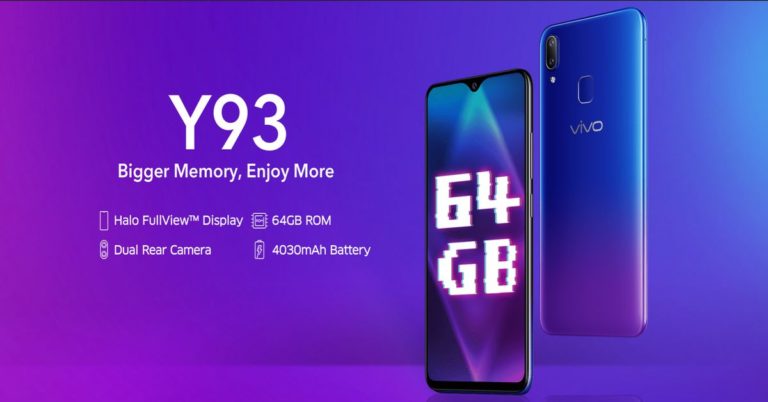
Vivo’s mid-range smartphones Y93 and Y95 were launched in the later months of 2018 in India. And just a few months after their launch, the Chinese smartphone brand is offering a price cut on the Vivo Y93 and Y95 smartphones. The prices of the 3GB and 4GB variants of the Vivo Y93 along with the Y95 have been reduced as per company’s announcement today. The price cut can be availed on online stores as well as via offline retailers. The online prices of the smartphones are yet to be updated but in the offline market, the smartphones are being sold at discounted prices already.
After the discount, Vivo Y93 with 3GB RAM and 32GB storage can be picked up at Rs 11,990 while the 4GB RAM and 64GB storage variant of the smartphone is selling for Rs 12,990. Originally, the two variants of the smartphone held a price tag of Rs 12,990 and Rs 13,990 respectively. On the other hand, the Vivo Y95 is available for Rs 14,990 after discount, and originally it was selling for Rs 15,990. As mentioned above, the online shopping platforms are yet to revise their prices of the smartphones while the offline retailers are selling the handsets at discounted rates already.
Vivo Y93 was launched in India in December of 2018. The smartphone sports a 6.2-inch HD+ (720 x 1580 pixels) resolution Halo FullView display with an aspect ratio of 19:9. It is powered by MediaTek Helio P22 SoC coupled with 3GB or 4GB of RAM and packs a 4,030mAh battery. The smartphone runs Android 8.1 Oreo skinned with FunTouch OS 4.5 UI. On the camera front, there is a dual-rear camera setup comprising of a 13MP primary sensor with f/2.2 aperture paired with a 2MP secondary sensor with an f/2.4 aperture. At the front, there is an 8MP selfie camera with an f/1.8 aperture.
On the other hand, Vivo Y95 was launched in November of 2018 and it sports a 6.22-inch HD+ (720 x 1520 pixels) full-InCell Halo FullView display with an aspect ratio of 19:9. Unlike the Y93, Vivo Y95 is powered by a Snapdragon 439 SoC coupled with 4GB of RAM and 64GB storage. It too runs Android 8.1 Oreo skinned with FunTouch OS 4.5 UI and packs a 4,030mAh battery. For imaging duties, Vivo Y95 comes with a dual-rear camera setup that comprises of a 13MP primary sensor with an f/2.2 aperture paired with a 2MP depth sensor with an f/2.4 aperture. On the front, there is a 20MP selfie camera with an f/2.0 aperture.
Y95
Apple might stop the sale of iPhones from stores and outlets which don’t sell more than 35 devices in a month. The devices that will stop selling are limited to Apple iPhone 6 and iPhone 6 Plus.
According to a report in The Economic Times, three senior industry executives cited the information that the strategy of Apple was to reinforce its premium positioning in India by increasing the cost of the entry level iPhones by more than Rs 5,000. Earlier, Apple had increased the price of iPhone SE and sold it for Rs 21,000 while the iPhone 6 and iPhone 6s costs Rs 24,900 and Rs 29,900 respectively.
An Apple executive said, “It wants to reinforce the brand’s ‘premiumness’ in the Indian market and increase average selling prices. Apple has no plans to immediately drop prices of iPhone 6s, which is locally manufactured.”
Other than increasing the price of the iPhones, the company will also be pulling out its smartphones from the small retail stores who are unable to sell the required number of units every month. Instead, the company wants to expand its exclusive stores or as they are commonly known – ‘Apple Authorised Resellers’. According to Apple, these stores should have more than 500 square feet of space and its trade partners should have more than one such store.
“Apple wants fewer trade partners in India, and to deepen the relationship with them. This is to improve the selling experience and ensure compliance of the store as per its terms. The larger Apple Premium Reseller stores, too, are a big focus area,” an Apple executive said.
Apple is ending its partnership with many retailers and distributors so that it can start afresh and gain its place once again in the premium smartphone market in India. Ashish Chowdhary, who was the part of Nokia’s global leadership team had joined the Apple’s India operations as the new country head in January. And since his joining he has been touring the market and meeting key trade partners of the company in the country.
As Android smartphones have become cheaper and more accessible, iPhone retailers are facing a problem selling the high-priced devices to users. Even people who love and prefer iOS over Android are opting for Android smartphones because they are more affordable than iPhones.
For instance, iPhone 6 32GB which was launched way back in 2014 currently sells for more than Rs 22,000 and doesn’t offer as many features as the Samsung Galaxy S6, that was released in 2015 and sells for lesser money.
For the latest gadget and tech news, and gadget reviews, follow us on Twitter, Facebook and Instagram. For newest tech & gadget videos subscribe to our YouTube Channel.
It seems to be the week of outages. First several Google services like Gmail and Google Drive faced an outage, followed by Facebook, Instagram and WhatsApp. And now, Apple also joined the other two technology giants, and surprisingly, all of this happened in the same week.
The Cupertino-based technology giant reported about issues in all of its iCloud services, which resulted in an outage that lasted more than four hours. While the outage started at 11 AM ET (8:30 PM IST, Thursday), it went on till 3.28 PM ET (12:58 AM IST, Friday).
However, we should add that Apple did not give any details about the kind of issues that resulted in the outage. The company just said that “some users are affected” adding that “users may be unable to access this service.” Although no details about the issues was provided, Apple’s support page did say that the problem was widespread. The services which were affected during the outage include iCloud sign in, Backup, Calendar, Contacts, Mail, Keychain, iCloud Drive file storage, iWork, Photos, Notes, Reminders, Find My iPhone among others.
Now, Apple has updated its support page and it shows that all of the company’s services are available and are working fine.
Prior to this, this week Facebook and Instagram faced an outage that was the biggest ever for the two platforms. The two services were affected globally and users could not access them. WhatsApp and Facebook Messenger could also not be accessed in some parts of the world.
Some users also took to social media to say that when they attempted to sign in to apps like Tinder and Spotify using their Facebook account, they couldn’t do that successfully. When they tried, an error popped up on the users’ screens saying that the feature isn’t available right now. This goes to show the extent to which the outage affected people. But then, we should also add that people who had already signed into Spotify were not logged out because of the outage.
In another outage that happened this week, a number of Google Services including Gmail and Google Drive were affected. Google’s outage was spread across globally too.
While Google’ outage also lasts for more than three hours, Facebook and Instagram’s outage surpassed that. Facebook acknowledged the outage on its Twitter page at 11:19 pm IST on Wednesday, and then posted a follow-up tweet at 12:33 am IST on Thursday. The two services became fully functional only on Thursday during the day, making it the longest among the three outages.
The search giant, Google has taken another step towards creating and providing a safe platform for the users by banning misleading and inappropriate ads. On Thursday, the California-based technology company announced that it banned around 2.3 billion misleading ads which violated its advertising policies in 2018. Along with that, Google also introduced 31 new policies.
In its 2018 ‘Bad Ads Report’ Google said that six million ads were banned every day.
Speaking about the step, Scott Spencer, Director of Sustainable Ads of Google, said in a statement, “At Google, we take our responsibility to help create a healthy and sustainable advertising ecosystem that works for everyone, seriously. Our ads are meant to connect users with relevant businesses, products and services; but bad ads ruin the experience. We, at Google, have been working towards protecting the users, advertisers and publishers by investing significant technological resources.”
Furthermore, around 7,34,000 publishers and app developers were terminated from Google ad network and the ads were removed completely from around 1.5 million apps. Through its ‘Bad Ads Report’, the company shares key actions and other data to keep the Google ecosystem safe through its policies across platforms.
“This will continue to remain our top priority as bad ads pose a threat to users, Google’s partners, and the sustainability of the open web itself,” Spencer added.
After banning the ads, Google also identified and terminated around 1 million bad advertiser accounts who posted such ads. It should be noted that the company had banned half the amount of bad advertiser accounts in the year 2017. So, the double growth of such accounts shows the serious challenge that is being faced by the technology giant. Moreover, the company has taken granular actions by taking the ads off from around 28 million webpages which violated the publisher policies.



 If you want to get all the new WhatsApp features before anyone else does, you can
  It is very simple to switch between voice and video calls on WhatsApp. Suppose you are currently on a video call with a friend, and you wish to switch it to a voice call instead, just click on the ‘Video Off’ icon on the screen. Similarly, if you have made a voice call on WhatsApp to a friend, but want to get on a video call, press on the ‘Video On’ icon to make the switch.
 You can actually send messages on WhatsApp without even typing them out. Just say ‘Ok Google’ and ask your digital assistant to ‘Send a message on WhatsApp’. Google Assistant will then ask you who you wish to message and what your message is. You can say the name of the contact and the message that you wish to send and then confirm it. Once confirmed, the message will be sent.
 If your friend says something on the group and you want to say something back but would rather do it on personal chat, you don’t have to scroll to find his chat to do this. You can just select the message sent by your friend, click on the three-dot icon on top right and then press on ‘Reply Privately.’
 Go to WhatsApp and press on the three-dot icon to open Settings. Here, select ‘Data and storage usage’ and then press ‘Low data usage’. It will be the last option on the page.
 To make your own GIFS and send them on WhatsApp, you first go to the conversation where you wish to send the GIF and then select on the Attach icon. Select the video you wish to make a GIF from your smartphone’s Gallery and when you come to the edit page, reduce the duration of the video to 6 seconds or less. You will see that the option of converting it into a GIF will pop up on the right of the screen.
 This isn’t exactly a WhatsApp feature as you need a third-party app for it, but it definitely makes sending Stickers more fun on the instant messenger. Download
  Open a WhatsApp conversation and tap on the video camera icon on the top. Once the video call begins and the recipient answers tap on the add user icon on the top right of the screen and choose the second recipient you wish to call. You can add more people to the call in the same way. Alternatively, you can also go to a WhatsApp group and tap on the Group Call icon and select the contacts you wish to call.
 Open WhatsApp and click on the three-dot icon to go to ‘Settings’. Here, select ‘Chats’ and then choose the option of ‘App Language’. Here, you can select the language that you wish to use WhatsApp in.
 If you wish a particular WhatsApp chat of yours to appear on your Home Screen, just select it on WhatsApp and then press on the three-dot icon. Once you do this, you need to select ‘Add chat shortcut’. You will be asked if you wish to add the chat to your home screen. Press ‘Add’ to confirm.
 To enable two-step verification, open WhatsApp and click on the three-dot icon on top right. Press on ‘Settings’ and then select ‘Account’. Here, you will see the option of Two Step Verification. Select it and press on ‘Enable’. You can then add the six-digit pin that you will be asked for registering your phone number with WhatsApp again.
 If you make a group on WhatsApp, you now also have the option of adding a description for it so that the people who are a part of it know its exact purpose. For doing this, go to the Group for which you wish to add a description and click on the top bar where the name of the group and participants is written. This will open the page where you will be able to see all the participants and media of the group. On this page, right below the Name of the group, you will see an option of ‘Add Description.’ Select it and write a short description to let all the participants know the purpose of the WhatsApp group.

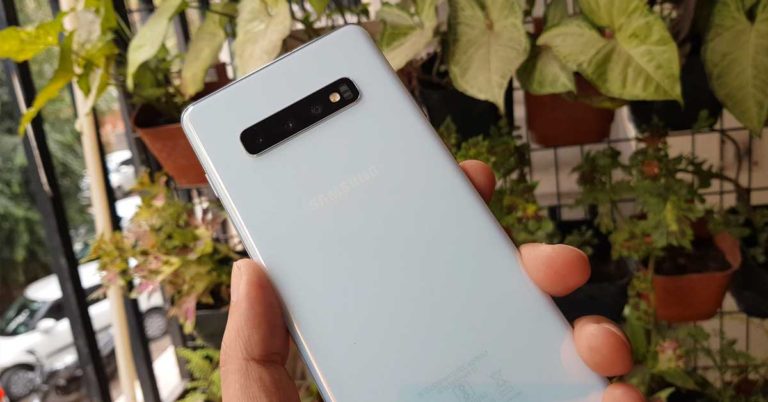







 With the rise of foldable phones, many companies are coming up with their own ideas about how to make the foldable displays more durable and long-lasting to withstand the constant fold-unfold cycle. About the durability of the foldable screens, Samsung has promised that the Galaxy Fold will survive “hundreds of thousands” of folds.
  For the latest