Infinix has released the InBook X1 Slim laptop in India. The 14-inch full-HD+ display on the InBook X1 Slim offers a peak brightness of 300 nits. This laptop is available with Intel Core i3, i5, and i7 CPUs from the 10th generation. It also has up to 16GB of RAM and 512GB of solid-state drive storage. The laptop has an aluminium alloy-based metal body that is ultra-durable and weighs only 1.24 kg. All-day battery life is backed by a 50Wh high-capacity battery and a multi-utility 65 Watt Type C charger.
In This Article
Infinix InBook X1 Slim laptop price in India
The Infinix InBook X1 Slim variant, which comes with a 10th Generation Intel Core i7 processor, costs Rs 49,990. Whereas the model with Intel Core i5 CPU costs Rs 44,990 and comes with 16GB of RAM and 512GB of storage. The variant with an Intel Core i3 processor with 8GB of RAM and 256GB of storage costs Rs 29,990. The laptops will come in four colour options of Aurora Green, Cosmic Blue, Noble Red, and Starfall Grey.Users of Axis Bank can take advantage of this offer by using a credit or debit card to get a discount of up to Rs 3000.
Infinix InBook X1 Slim laptop specifications
The 14-inch full HD+ IPS display on the InBook X1 Slim laptop has a peak brightness of 300 NITS and 100% sRGB colour reproduction. As a result, it’s suitable for usage both at home and at work. Users can also access Netflix and Amazon Prime for basic gaming and movie streaming.You may watch films and play games in good sound quality with the Infinix INBook X1 Slim’s HD Webcam and two-layer stereo speakers with advanced DTS sound technology. However, the laptop includes a dual-star light camera that improves visibility in low-light circumstances for making video calls or attending zoom meetings.INBook X 1 Slim laptops are powered by 10th Generation Intel Core processors with i3, i5, and i7 models that are compatible with Windows 11 Home. The laptop has up to 16GB of RAM and a 512GB M.2 NVMe PCIe 3.0 SSD that promises to be 5X faster than standard SATA SSDs. This enables users to read at a speed of 2400 MBs and write at a pace of 1900 MBs.The Infinix Laptop features a 50Wh battery. The laptop has about 11 hours of continuous web browsing, 9 hours of typical work, and 9 hours of video playback. The battery is supported by a high-power Type C multi-utility charger that allows users to transfer data, charge their smartphones, and charge their laptops all at the same time. The Type-C charger, which is convenient to carry and can charge the laptop to 100% in 90 minutes, is 65W.Other unique features of the Infinix INBook X1 Slim include the Ice Storm 1.0 Cooling System, which keeps the temperature low even when users spend long hours gaming, working, or consuming content. Multiple connectivity options are included in all three models, including two USB 3.0 ports, two USB Type-C connectors (one for charging and data transfer and the other for full function), an HDMI 1.4 port, an SD card reader, and a 3.5 mm headset and microphone combo jack. They also have Wi-Fi 5 installed for quicker downloading.
For the latest gadget and tech news, and gadget reviews, follow us on Twitter, Facebook and Instagram. For newest tech & gadget videos subscribe to our YouTube Channel. You can also stay up to date using the Gadget Bridge Android App. You can find the latest car and bike news here.
The June Update for New State Mobile is now available for Android and iOS. Players may now experience the joy of key characters such as Brown, Colly, and Sally through varied in-game content as part of the battle royale game’s collaboration with Line Friends. The partnership between LINE and FRIENDS is currently live and will be available until July 21. A new Survivor Pass and more weapon customization options for the Micro UZI and M16A4 are also included in the PUBG New State Mobile June Update.For a complete list of other key improvements added to the game with the June Update, see the list below.The June Update for New State Mobile is now available for Android and iOS users. The Line Friends partnership has come on New State Mobile to commemorate the introduction of the June Update, and it will be available until July 21. Players can start earning LINE FRIENDS-themed things like a costume, helmet, emote, vehicle, and melee skin through the collaboration crates as soon as they enter the game. When players arrive on the starting island, they will notice that the Mall zone of Troi has been refurbished to include a LINE FRIENDS store. Finally, players can engage in a profile reward event during this partnership period, which rewards gamers with a Line Friends-themed profile image, BP random crate, title, profile frame, chicken medal, and profile frame effect by completing daily missions.Additional customization slots have been added to the Micro UZI and M16A4 guns to improve weapon customization and viability with the PUBG New State Mobile June Update. The Micro UZI can now be equipped with a laser sight, while the M16A4 can now be customised with an improved barrel that boosts burst fire rate and a grip that improves vertical recoil control.With Alex May of the Strategist faction appearing in New State Mobile as part of the June Update, a new Survivor Pass is introduced. By completing all of the Story Missions, players can gain Alex May’s clothes and character appearance. Alex May’s Moonlight Goddess outfit set will be given to players that upgrade to the Premium Pass.
For the latest gadget and tech news, and gadget reviews, follow us on Twitter, Facebook and Instagram. For newest tech & gadget videos subscribe to our YouTube Channel. You can also stay up to date using the Gadget Bridge Android App. You can find the latest car and bike news here.
Over the last decade, First Person Shooter (FPS) games have had a tremendous rise in the gaming landscape. Games like Call of Duty, Overwatch, and Apex Legend, are not just popular within their genre but have become household names. With their rise in popularity, these games have also become a lot more pricey and often come along with pesky in-game purchases which might deter a newcomer from playing them. Luckily, there is a wide variety of FPS games that you can play in your browser. All you need is a computer and an internet connection to access the incredible world of FPS gaming. Today we bring you the 10 best free FPS browser games you can play online.Read Also:15 Best Scary Roblox Games You Should Play in 2022
Superhot is a game created by a team of Polish developers and received funding on Kickstarter to be brought to life. The full game is available for download on PC, but the demo version can be played online. Superhot has a minimal art style which may intrigue some of the players, but the real charm of the game lies in its storyline. There are a lot of metanarratives added to the story, making it captivating and hard to walk away from. In Superhot, time moves slower when you’re still and speeds up as you start moving. This allows you to experience the gameplay in slow-motion, essentially giving you the option to dodge bullets and pull off a bunch of other tricks. The browser version of Superhot only gives you access to three levels. However, you can download the full game for PC/Xbox/PS as well as VR.
Designed in the mold of call of duty and Counter-Strike, Rush Team gives you the best of both worlds. You can play multiple in-game modes, like ‘Capture the Flag’, ‘Team Deathmatch’, ‘Search and Destroy’, and a lot more. While the gun design and shooting mechanics are as good as it gets in the browser gaming category, the graphics leave a lot more to be desired. The audio design fails to impress as well. On top of that, the servers outside of the US and EU are often near empty, with the option to play with bots not available.
Built identical to Counter-Strike 1.6, Global Strike is meant for gamers looking to revisit the past glory of CS. Global Strike has near-identical graphics and gameplay as CS, and several modes like Team Deathmatch, Mutation, and Capture the Flag that keeps the player thoroughly engrossed. One downside though, Global Strike is a pay-to-win game, meaning you can pay to get access to permanent weapons, character customisations, and other accessories. This gives some players a significant advantage over the others.
War Brokers is one of the best FPS browser games you can play right now. With a Minecraft-like blocky game design, War Brokers offers two game modes: Classic and Battle Royale. While the Classic mode is fun to play, Battle Royale is where War Brokers truly shines.The one advantage that War Brokers has over its peers is readily available servers that’ll begin the game without any prolonged game time. Your character is dropped onto the battlefield where it has to collect weapons while taking out other opponents in order to stay the last man alive.The blocky graphics will take a while to get accustomed to, but they are aesthetically pleasing. The maps aren’t too big, which makes the gameplay fast and exciting.If you are a fan of PUBG, Fortnite, and H1Z1, you will have a great time playing War Brokers.
As the name suggests, Warmerise puts you in one of the two factions, Red or Blue. The objective is to get as many kills as you can and climb the leaderboard. Warmerise follows a sci-fi theme, which makes it even more fun to play as there are a lot of imaginative guns that you can utilise to achieve your objectives. You can find specialised weaponry through drops on the map. As exhaustive and creative as the arsenal might be, Warmerise is a bit of a letdown when it comes to graphics. It seems like a nod to the early FPS point-and-shoot games of the 90s like Quake, original Counter-Strike, and Halo 1.
If you’re just starting out with Battle Royale games, Mini Royale is where you need to begin. With a small map that only lets 10 players in at a time, Mini Royale lets you get accustomed to the gameplay and ensures you’re able to let the experience thoroughly sink in.The objective is simple – you have to eliminate all other players to be the last man standing. When you enter a battlefield you are given a sidearm. You have to pick weapons along the way while avoiding getting killed. For a game its size, Mini Royale 2 has surprisingly good graphics. It is highly recommended to players who enjoy Counter-Strike Global Offensive.
Like War Brokers, Krunker also features a Minecraft-like blocky game design. The simple game design also ensures that it is light and easy to play. You are able to access better guns and skins as you level up in the game. The game mechanism is pretty fluid, which is essential in the FPS category. The servers are usually very active, which means you’ll always find other users to play with. If you like in-game customisations, Krunker lets you buy a host of accessories for your weapons. These accessories are solely for aesthetics and do not give you any added perks.
If you’re a seasoned gamer, there is no way you aren’t familiar with Wolfenstein. Now available in a 3D title you can now play Wolfenstein on your web browser. Wolfenstein 3D is a trip down memory lane, with the 3D title still managing to capture the essence of the original FPS. While nostalgia might be a strong element of Wolfenstein 3D, it still holds its own among the other games mentioned in this list. Set in the time of WW2, it follows the character of William Blazkowicz, an Allied forces soldier set to hunt down Nazis. The final boss of the game is no other than Hitler himself. Wolfenstein is the rite of passage for every gamer that enjoys playing FPS games. It had an incredible influence on the genre it helped create and is often dubbed as the ‘Grandfather of First Person Shooters’.
DOOM is another previous generation title that had a significant impact on the modern gaming landscape. Often known for its adaptability and the impressive attribute to run on any console no matter how rundown it is, DOOM has created a unique reputation for itself. Set on a post-apocalyptic Mars that’s plagued with demons, your objective is to slay as many demons as you can and return to Earth. Accomplishing your mission is not an easy task, though. There are a lot of obstacles you need to overcome on the way. DOOM is a genre-defining epic and still holds up really well. The arcade audio is a fun addition to the game and it still remains one of the most immersive games out there.
We end this list with another classic, this time from the Quake franchise. Open Arena’s gameplay follows Quake III Arena and gives you the option to choose from several modes like Team Deathmatch, Capture the Flag, Overload, Harvester, and a lot more. This one is for all the retro gaming enthusiasts who do not mind the graphics being a bit dated. While it may be clunky in parts, Open Arena is still a fun and captivating FPS.Read Also:25 Best And Most Interesting Websites To Kill Time In 2022All games mentioned above are free to play. However, there may be in-game purchases in some of the titles. You do not need any high-end gaming rig to play these FPS games. All they require is a standard laptop or computer and a stable internet connection. If your browser does not support any of these games, you may need to update your Adobe Flash Player.While the graphics may not be as vivid as their console counterparts, these games are still a whole lot of fun, especially for a beginner. If there’s a game you love playing that you didn’t see mentioned in the list, let us know!
For the latest gadget and tech news, and gadget reviews, follow us on Twitter, Facebook and Instagram. For newest tech & gadget videos subscribe to our YouTube Channel. You can also stay up to date using the Gadget Bridge Android App. You can find the latest car and bike news here.
While you may find it easy to work your way around YouTube on your desktop and smartphone, navigating it on your Smart TV can be a bit tricky. Sometimes, even more so when you need to use the functions you rarely ever require. One such rarely-used option is ‘blocking’ a YouTube channel. Today, we will show you how you can block YouTube channels on your Smart TV. Blocking unwanted YouTube channels is a nice way to keep your feed curated to your liking. It may also come in handy if you want to keep your feed kid-friendly. ‘Blocking’ on YouTube doesn’t quite work the same way as it does on other social media platforms. While you will never see the blocked content on your personal YouTube feed, you may still encounter it on other websites.Read Also:How to Disable YouTube Shorts in the YouTube App
In This Article
Here’s how you can block YouTube channels from appearing on your Smart TV
While some Smart TVs let you report offensive content on YouTube, the option of blocking a YouTube Channel can still be inaccessible. Luckily, there is a quick workaround that’ll keep certain channels blocked on your Smart TV. You will, however, require another device for this process.Step 1: Sign in to YouTube on your Laptop or Phone with the YouTube account you use on your Smart TV.Step 2: Visit the page of the YouTube Channel you wish to block. Step 3a: If you’re using the YouTube app on your phone, click on the ellipses at the top right end of your screen and hit the ‘Block user’ button.Step 3b: If you’re using the YouTube website on your laptop, go to the ‘About’ section on the YouTube channel and click on the small flag that appears on the right side of your screen below the stats graphic. Click ‘Block user’.Step 4: Log in to YouTube using your Smart TV. The changes you made to your account will apply across all devices you log in using that account. As a result, you will not be able to view the blocked channel on your Smart TV.
Frequently Asked Questions
Is there a direct way to block a YouTube channel on my Smart TV?
The YouTube App for Smart TVs does not offer a native way to block a channel. At best, you can select ‘Not Interested’ to stop YouTube from recommending content from that channel again.
How to block a YouTube channel on Android?
If you block a YouTube channel on your Android phone, it will get blocked on your Smart TV as well – given you are using the same account. To block a YouTube account on Android, simply go to the channel page, tap on the three dots, and select ‘Block user’.
Can I block a YouTube channel on my device if I’m not signed in?
If you’re interested, there are other ways of restricting content on your device instead of blocking it. Whenever you come across an undesired video, simply click on the ellipses on the video icon and select ‘Not Interested’. You will also find several other options like flagging the content as offensive. The YouTube algorithm will make sure you do not see videos from that content creator in the future.
For the latest gadget and tech news, and gadget reviews, follow us on Twitter, Facebook and Instagram. For newest tech & gadget videos subscribe to our YouTube Channel. You can also stay up to date using the Gadget Bridge Android App. You can find the latest car and bike news here.
Today, Samsung confirmed that the Galaxy F13 will be released in India on June 22. According to the company, the upcoming Galaxy F-Series smartphone will go on sale exclusively via Flipkart. A dedicated homepage has also been created to tease the key specifications of the upcoming handset. Samsung India’s official website also has a product page for the phone up and running. Continue reading to know the launch details.
In This Article
Samsung Galaxy F13 India launch details
According to Samsung, the new Galaxy F13 will be released in India on June 22 at 12 noon IST. The Samsung Galaxy F13 has been listed on Flipkart as well as on the Samsung India website to tease the availability as well as its specifications. The phone’s price, on the other hand, is yet unknown.While announcing the forthcoming phone the company said, “Samsung’s popular Galaxy F series offers unprecedented style and experience to the aspirational Gen Z and millennial consumers while delivering segment-best features. After Galaxy F23’s success earlier this year, Galaxy F13 is the second addition to the F series in 2022.”
Samsung Galaxy F13 specifications and features expected
There appear to be three colour options available for the Samsung Galaxy F13. As the name suggests, the latest Galaxy F-series phone is believed to be an update to the Galaxy F12, which was released in April of last year.The Samsung Galaxy F13 is shown on the official Samsung page and the Flipkart teaser page, with triple rear cameras. It will be featuring a water drop-style notch on the display having a full-HD+ LCD. It will have a 6,000mAh battery with a 15W rapid charging capability.According to the company Samsung Galaxy F13 will feature an Auto data switching which when the Wi-Fi or primary SIM connection is weak, the Samsung phone will automatically switch to the second SIM’s mobile data. With the RAM Plus function, the Galaxy F13 will have up to 8GB of RAM. The RAM Plus feature improves multitasking by supplementing the built-in RAM with memory from the storage. According to the official listing, the phone would be available in three different colours.The upcoming handset was also spotted listed on Geekbench suggesting that the Galaxy F13 will be equipped with an octa-core Exynos 850 processor. It’s believed to come with 4GB of RAM and run Android 12 out of the box.
For the latest gadget and tech news, and gadget reviews, follow us on Twitter, Facebook and Instagram. For newest tech & gadget videos subscribe to our YouTube Channel. You can also stay up to date using the Gadget Bridge Android App. You can find the latest car and bike news here.
Garena Free Fire is a battle royale game with regular awards and tournaments to keep players interested. If you play Garena Free Fire, you should be aware of the redeem codes that are released on a daily basis. However, because the battle royale game is banned in India, players from other countries can use the Free Fire Redeem codes daily. If you’re unfamiliar with the Garena Free Fire redeem codes or don’t know how to get them, we’ve put together a step-by-step guide to help you redeem them. Check out Garena Free Fire Redeem Codes for June 17.The Free Fire redeem codes are a great way to get free stuff. These are 12-digit codes that contain alphabets and numbers, as well as an expiration date and time. Because the Garena FF redeem codes cannot be used more than once, you should hurry to the redemption page to claim your free reward before someone else does. To get a free reward, all you have to do is go to reward.ff.garena.com/en, which is the official redemption page. Also, keep an eye on this space for daily updates on Garena Free Fire redemption codes and rewards.
In This Article
Garena Free Fire Redeem Codes Today 17 June 2022
AN3CIK5XSBST
ME5866OGLPQZ
BMTMP22W3OZ7
QW0LSEK9U86B
AO02ZLKJDPGV
7L5Z3DHOS8YJ
8JQT2WZEUNKF
C24INWB3YFPD
FU5OPKTT56LP
RNTW4A2TMCVU
O8Y0P7BZ150T
Q1RC5NPZ2C2F
66QSZD5ZEMHH
O1W9PGX13WO8
P0E12EY41QCS
LXXEP7XZQ5KT
UV1QN0QGG9OB
K1KK7Y7RN1FT
E5VD23639TTJ
DFL6QE534M5O
6J40XMCIVNBZ
How to Get Free Fire Redeem Codes for Garena on June 17?
Are you using Google Chrome, Firefox, or Samsung Internet on your phone? Every time you access the web whether it’s Google Chrome, Firefox, or Samsung Internet, your browser collects and retains data. Regardless of whose Android smartphone you use, it’s a fine decision to get into the practice of regularly cleaning up that data. Here is how you can easily clear cache and cookies from your phone’s browser.
In This Article
What are Cache and cookies and how do they work?
Your cookies and cache contain this information, which allows your phone to quickly log in to your accounts and load regularly viewed websites. Cookies are little text files that websites create when you visit them. By preserving browsing data, they make your online experience more convenient. The cache saves elements of pages, such as graphics, to make them open faster the next time you visit. However, this data accumulates over time, eating up space on your phone and most likely incorporating cookies that track your surfing activity in order to serve targeted advertising. For instance, when you visit an e-commerce platform to buy or check a product’s price you start seeing ads for the product you have searched on the platform or other websites and their price comparisons.Clearing them solves issues like site loading and formatting. It may appear tough to delete the cookies and cache on your Android phone browser, but it is actually more easier than it appears. If that’s the case, we’ll teach you how to improve your privacy and possibly even your speed by clearing cache and cookies on your phone.
How to clear cache and cookies in the Chrome app
On your Android phone or tablet, open the Chrome app.
At the top right, tap More.
Tap History and then Clear browsing data.
At the top, choose a time range. To delete everything, select All time.
Next to “Cookies and site data” and “Cached images and files,” check the boxes.
Tap Clear data.
How to clear cache and cookies in the Mozilla Firefox
Select Settings from the menu button.
Select the Privacy & Security panel from the drop-down menu.
Click Clear Data… under the Cookies and Site Data section.
Clear the checkbox next to Cookies and Site Data.
Click the Clear button with the Cached Web Content checkbox selected.
Close the page about: preferences. Any modifications you make will be stored automatically.
Here’s another way to clear the Firefox cache:
Click the menu button to open the menu panel.
Click History and select Clear Recent History….
Next to Time range to clear, choose Everything from the drop-down menu, select Cache in the items list, make sure other items you want to keep are not selected and then click the OK button.
How to clear cache and cookies in the Samsung Internet
Go to Settings and select Apps from the drop-down menu.
Poco India has officially confirmed the Poco F4 5G’s launch date. The smartphone’s launch date has been slated for June 23 in the country. The device’s global launch is also going to happen on the same day. Qualcomm has already stated that the Snapdragon 870 chipset will be released. A teaser for the smartphone has also been revealed, confirming similarities between the Poco F4 5G and the Redmi K40S. According to previous rumours, the upcoming phone would be a rebranded edition of the Redmi K40S.
Poco F4 5G launch details
Poco confirmed the launch date of the upcoming Poco F4 5G smartphone. The Chinese smartphone brand also confirmed that the smartphone will go on sale in India on June 23 at 5:30 p.m. The event will be live-streamed on the company’s YouTube account.
Furthermore, the company has posted a teaser of Poco F4 5G verifying a triple rear camera configuration, including a 64-megapixel primary sensor with optical image stabilisation (OIS). Resolution details about the remaining two camera sensors are yet to be confirmed. With the same camera module design and gradient finish as the Redmi k40S, the smartphone appears to be pretty comparable.The teaser also claims that the Poco F4 5G would have an IP53 rating, indicating that it will be splash resistant to some extent.The Poco F4 5G is claimed to have LiquidCool 2.0 in addition to a Snapdragon 870 SoC. In fact, the smartphone was previously revealed to contain up to 12GB of RAM and 256GB of storage, as well as three colour variations.The price details had already been exposed by an information leak. The POCO F4 will be sold in a single form worldwide for $459, which translates to Rs 35,000, according to the poster.According to rumours, it could simply be a repackaged Redmi K40S. The Poco F4 5G will be powered by Qualcomm’s Snapdragon 870 SoC, according to the manufacturer. The Redmi phone has the same Snapdragon 870 processor as the Xiaomi phone, as well as a triple-camera setup and a 120Hz AMOLED display. Outside of its home market China, the company has a history of releasing rebranded Redmi smartphones. The Poco F4 GT, a rebranded version of the Redmi K50 Gaming Edition that launched in Europe in April, is one of the most recent examples of how the business typically launches rebranded Redmi phones in India and other areas under its own brand name.
For the latest gadget and tech news, and gadget reviews, follow us on Twitter, Facebook and Instagram. For newest tech & gadget videos subscribe to our YouTube Channel. You can also stay up to date using the Gadget Bridge Android App. You can find the latest car and bike news here.
25 May 2022 Amazon Quiz has gone live on its platform. The quiz timings are 12 AM to 11:59 PM. The Amazon App users can participate in the quiz daily and all they have to do is submit correct answers to the questions asked on the e-commerce platform. Today’s participants can get a chance to win Rs 20,000 Amazon Pay Balance.Amazon brings a fresh questionnaire that contains 5 questions daily. These questions are based on current affairs and general knowledge. The quiz can be played from 8 AM to 11:59 PM and the contestants need to answer correctly to enter into a lucky draw.Only one person is declared as a winner and the results will be announced at the end of every month. And to make sure that you give correct answers to all the 5 questions Gadget Bridge everyday updates all the answers to the Amazon Quiz. Do check out 17 June 2022 Amazon Quiz Answers to win a Rs 20,000 Amazon pay Balance.Amazon Quiz Today Prize – Rs 20,000 Amazon Pay BalanceQuiz Date – 17 June 2022Daily Timing – 12 AM to 11:59 PMWinner Announcement – Today 12 PM
In This Article
Amazon Quiz Answers Today 17 June 2022
Question 1: Who among these did Rafael Nadal beat in the quarter-finals of the 2022 French Open?Answer: Novak DjokovicQuestion 2: Tatiana Maslany would play the lead role in which upcoming Marvel studios web series?Answer: She-Hulk: Attorney at LawQuestion 3: Which company recently appointed Alvin Tse as the General Manager of its India business?Answer: XiaomiQuestion 4: In which country is the largest library in the world located?Answer: USAQuestion 5: What breed of dog is shown here?Answer: Corgi
How To Play Amazon Quiz
Only app users are eligible to play the Amazon quiz every morning from 12 AM to 11:59 PM. The quiz is not available on the desktop. For those who are unaware of how to play the Amazon quiz below are the steps, you can follow to take the quiz.
Firstly download the Amazon app from Google Play Store or App Store
Now fill in the required information through the Sign Up option.
You need to log in to the Amazon app and scroll down on the home screen to find the Amazon Quiz banner.
Tap on the Amazon Quiz banner and tap on the Start button to start the Quiz.
Now you will get 5 questions and you need to answer them correctly. One wrong answer will eliminate you from the Quiz.
After answering all the questions correctly you are now eligible for a Lucky Draw.
The winner’s name will be announced today at 12 PM.
Nothing recently, in anticipation of its impending launch, has released the first official glimpse at the Nothing Phone 1’s back panel. The design of the Nothing Phone 1 was published on official social media outlets by the UK brand managed by ex-OnePlus co-founder Carl Pei. The official poster depicts a dual-camera configuration with an LED flash on the back. The full white finish of the Nothing Phone 1 is visible. In the latest development, the company revealed the first look of its upcoming flagship officially. The shared images show off the back panel of Nothing Phone 1 featuring a number of fancy lights which light up to signal a message or a phone call.Nothing had a surprise event at Art Basel in Switzerland, where it allowed a few media limited access to the impending Nothing Phone 1. There the company unveiled the design of its flagship smartphone.“For years now, it felt like all the artists had left the industry. All we’re left with are cold, unexciting and derivative products. It was time for a fresh take.” said Carl Pei, CEO and Co-founder of Nothing. “phone (1) was designed out of instinct, making a product for ourselves and more importantly that we would be proud to share with our loved ones. Can’t wait for people to start experiencing it.”The company has shared the design of its upcoming Nothing Phone 1. As per the company, the transparent back of the Nothing phone (1) conceals a mechanical design with approximately 400 components. Artists like Massimo Vignelli, who designed New York’s subway map and turned a complicated system into art, served as inspiration. Its 100% recyclable aluminium frame is lightweight and durable, and more than half of the phone’s plastic components are manufactured from bio-based or post-consumer recycled materials, which is an industry-leading ratio.Nothing has partnered with StockX, a global platform for trading and consuming current culture, to auction the first 100 serialised phone (1) units via DropX, a direct-to-consumer product release method designed for brands and creatives to release new and exclusive products to StockX’s global audience. The 48-hour auction will run from 14:00 BST on June 21, 2022, to 13:59 BST on June 23, 2022 on StockX.com, giving consumers the chance to acquire a piece of Nothing’s history. All revenues will go to a fund controlled by the community.Furthermore, Nothing’s chief Carl Pei has shared the design of the Nothing Phone 1 on its social media platforms. the handset’s back panel is white with rounded corners. The phone has a back camera with an LED flash. The camera is located in the handset’s upper left corner, with Nothing branding on the bottom left corner.The right side frame has the volume rockers, while the left frame features the power button. There’s also a ring in the centre of the back panel that might light up at certain moments, such as while charging. The phone appears to have a USB Type-C port and does not have a 3.5mm jack.
For the latest gadget and tech news, and gadget reviews, follow us on Twitter, Facebook and Instagram. For newest tech & gadget videos subscribe to our YouTube Channel. You can also stay up to date using the Gadget Bridge Android App. You can find the latest car and bike news here.
A microSD card is something that most tech consumers are well familiar with. It finds its place in almost every modern device and serves as a very portable memory card. It evolved out of the ‘SD card’, which is comparatively larger than a microSD card. The SD (Secure Digital) format was developed by SD Association for use in portable electronic devices. Introduced in 1999 by a joint collaboration among SanDisk, Panasonic, and Toshiba, the SD card soon found its way into a vast array of electronic devices and quickly became the industry standard. As the electronic landscape changed over the years, so did the SD card. It got progressively smaller, with the miniSD and microSD coming out in the following decade. Read Also:Yamaha announced the launch of TW-E3B and TW-E5B TWS earbuds in IndiaWhat is the difference between a microSD and a TF Card?There is practically no difference between a microSD and a TF Card. The TF card was jointly developed by SanDisk and Motorola and was launched on the market in 2004. With dimensions of 11x15x1mm it was considerably smaller than the SD card. Originally called the TransFlash card, TF could easily work with devices that accepted an SD card. All that was needed was a handy, portable that the TF could be fitted into. The SD Association later incorporated the TF card into its range of formats and rebranded it as the microSD card. Functionally, there is no difference between a TF and a microSD card. They can be used interchangeably in any device that accepts them.
With Father’s Day approaching, it’s time to come up with a unique way to honour and remember the important man in our lives. To thank him for everything he has done for us, and to make your job easier, we’ve produced a list of the greatest tech-powered Father’s Day gifts below, keeping the tastes of audiophiles, tech-geeks, and all other types of fathers in mind.Father’s Day Gifts ideasWD My Passport HDD
In This Article
WD My Passport HDD
The ultra-slim WD My Passport HDD has a large capacity of up to 5TB, making it the go-to drive for data backup. Backup software is included with the My Passport drive and may be programmed to run automatically according to his schedule. Simply choose a time and frequency for backing up key files from the system to the My Passport disc, and you’ll never have to worry about losing data again. My Passport portable storage is ready to use straight out of the box, complete with all essential cables, so Dad can get started backing up his life and moving forward right away.Price: Rs 3,999 Buy HereSamsung Galaxy S22 Ultra
Samsung Galaxy S22 Ultra
The Samsung Galaxy S22 Ultra features a 6.8-inch Edge QHD+ Dynamic AMOLED 2X display with 1,750 nits of peak brightness and a 120Hz adaptive refresh rate. An octa-core Snapdragon 8 Gen 1 SoC with up to 12 GB of RAM and up to 1TB of internal storage powers the gadget. It has a quad-camera system with a 108-megapixel wide-angle sensor and an aperture of f/1.8. A 40-megapixel camera sensor with an f/2.2 aperture lens sits on the front of the Samsung Galaxy S22 Ultra. The S22 Ultra’s 5,000mAh battery supports Wireless PowerShare and enables 45W fast charging, 15W wireless charging, and reverse wireless charging.Price: Rs 1,18,999Buy Here
Apple Watch 7
If your father is a fitness enthusiast or you are concerned about his health, the new Apple wristwatch is a great gift for him this Father’s Day. An electrical heart sensor and ECG app, as well as a Blood Oxygen sensor and app, are among the health and wellness features. The smartwatch runs on watchOS 8, which includes new workout types, the Mindfulness app, innovative accessibility features, greater access with Apple Wallet, and more capabilities with the Home app, as well as improvements to Messages and the Photos app, to help users stay healthy, active, and connected.Price: Rs 41,900Buy HereFitbit Charge 5
Fitbit Charge 5
Fitbit Charge 5 is another fitness tracker on our list, allowing you to keep track of your fitness, stress, readiness, heart health, sleep, and overall well-being in a slimmer, sleeker design. Charge 5 provides the convenience features you need to focus on what’s most important, including a brighter, colour touchscreen and up to seven days of battery life (varies with use). Black / Graphite Stainless Steel, Lunar White / Soft Gold Stainless Steel, and Steel Blue / Platinum Stainless Steel are the three colour possibilities for Charge 5.
Price: Rs 14,999Buy HereXiaomi Pad 5
Xiaomi Pad 5
The Xiaomi Pad 5 is a multi-purpose tablet that can handle anything from entertainment to productivity, making it a must-have gift for your superhero this Father’s Day. Its bright 27.8-inch display with 2.5K+ resolution, 120 Hz refresh rate, and quad-speaker setup make it the greatest device for watching anything, whether it’s a show or a YouTube video. The latest MIUI makes using the Xiaomi Pad 5 a snap and even expands its capabilities. Those who want to get even more out of the tablet may acquire Xiaomi’s Smart Pen stylus and keyboard, which can turn it into a sketching canvas or a notepad that can replace a laptop, depending on their preferences.Price: Rs 26,999Buy Here
Redmi Note 11S
We’ve included some low-cost solutions in our list, so don’t worry. This is another option if you’re looking for a smartphone around Rs 20,000 to give as a Father’s day gift. It includes the most up-to-date features, including a 90Hz display, a 5,000mAh battery with 33W fast charging, and a quad-camera configuration. This smartphone may also be a good choice for you because it is within your budget range.Price: Rs 16,499Buy Here
Xiaomi Trimmer 2
If your father is fussy about his grooming regimen, why not treat him to a pampering session with Xiaomi’s Trimmer 2 this Father’s Day? Xiaomi Beard Trimmer 2 focuses on delivering flawless trimming that takes men’s grooming to the next level with its sleek & attractive design that gives the optimal ergonomics. It has a new trendy LED display for battery life indication, as well as self-sharpening stainless-steel blades with 40 length settings and 0.5 mm precision, delivering precise and evenly made cuts. It also has a washable body that is protected by an IPX7 grade, making it water-resistant and safe to use in any condition.Price: Rs 1,999Buy Here
Amazon Echo Dot 3rd gen
You can also give this smart speaker to your father on Father’s Day. The Amazon Echo Dot is voice-controlled and small enough to fit any place in your home. It may be connected to additional speakers or synced with your phone. Your father may use it to control lights, air conditioners, televisions, geysers, water motors, and more.Price: Rs 2,499Buy Here
Lenovo Smart Clock Essential with Alexa Built-in
Lenovo has recently launched Smart Clock Essential with Alexa Built-in in India. The latest addition to Lenovo’s smart device collection takes digital smart clock capabilities and time-saving convenience to the next level thanks to hands-free voice control with Alexa. The device doubles as a smart speaker and a voice control device for your electronic devices. Users of the new Smart Clock Essential with Alexa Built-in may create timers, alarms, and reminders, and add items to their Amazon shopping cart with simple voice commands.Price: Rs 4,999Buy Here
Havells Desklite Kittylite 7 W 4 K BLU
As more people work from home, a desk light will be a great gift to give to help them create the optimal working atmosphere. Havells’ attractive desk lamp features eyesoft technology for a soft, glare-free glow. It also has an adjustable lamp shade and a touch-based on/off switch.Price: Rs 2,071Buy Here
For the latest gadget and tech news, and gadget reviews, follow us on Twitter, Facebook and Instagram. For newest tech & gadget videos subscribe to our YouTube Channel. You can also stay up to date using the Gadget Bridge Android App. You can find the latest car and bike news here.
While using your Android device, there is hardly ever a situation where you need to look beyond the Google Play Store for your app needs. In the rare case that the Play Store doesn’t have what you’re looking for, you can always turn to third-party stores to find the desired APK. However, this can be a risky affair as it can lead to harmful malware coming along with the download. While, Google utilizes Play Protect to keep the security in its Play Store airtight, not every third-party store can say the same. Today, we bring you the 8 best websites for safe and secure android APK downloads. Read Also: How and when to Clear Cache on an Android smartphone?
Perhaps the biggest and the most popular third-party app store for Android apps, APK Mirror is the go-to website for all APK needs. APK mirror verifies all uploads prior to publishing. It uses cryptographic signatures to identify verified developers and restricts any duplicates. For newer apps, it tries to match the signature to other existing apps by the same developer. When the match is successful, the app is green-lit. In case the signature doesn’t match, APK mirror looks for the same app in other stores and compares it to the upload on their site. If it cannot obtain a match, it contacts the developers. APK Mirror does not publish any APKs prior to verification.
Like APK Mirror, APKPure also employs cryptographic signatures to check the validity of the app it hosts. On top of that, it also utilizes the SHA certificate to ensure no harmful APKs are published on its website. Read Also:Top 10 Movies And TV Series To Watch On Netflix In June 2022
One of the largest APK hosting websites, Aptoide was founded in 2011 and currently holds 1 million apps in its catalogue with over 300 million users worldwide. Aptoide claims to hold one of the best malware detection systems among its contemporaries. It was rated the safest third-party app store according to a study by Waseda University in Japan.Aptoide uses a collection of tools to recognise malware within the apps hosted in its store. Following that, the apps also go through a manual scan by Aptoide’s ‘Quality Team’.
F-droid is a free and open-source app repository, a great alternative to the Google Play Store. Unlike the Google Play Store, you do not need to sign in using an account to download from F-droid. All APKs hosted on F-droid are verified against their public logs of observed SHA-256 checksums. On F-droid you can find a wide array of open-source apps that aren’t available on the Google Play Store.
APKMonk offers an exhaustive collection of apps and games on its website. It performs regular malware checks and weeds out any problematic apps. You can also find multiple previous versions of an app on APKMonk. The metadata of these apps is sourced directly from the Google Play Store and links back to the original listing of the app.
APKHere provides access to a plethora of apps from across the world that aren’t published on the Google Play Store. You can find tons of apps in several different languages on this website, which you wouldn’t be able to download from the Google Play Store due to a region lock.
Based out of Romania, Softpedia is a comprehensive encyclopedia for all things tech. The website provides a ton of apps and software not only for Android, but also for Windows, Linux, and Mac. On top of that, the website also has a news and review section, to cover all your tech queries.
As the name suggests, APK Downloader provides you with all the latest apps on offer. The APKs are shared from Google Play Store, which leaves little room for questionable malware. The website design is minimal and easy to navigate, making it one of the more user-friendly APK download websites out there. Even though the websites listed above are as safe as they come, it is still advised to observe caution when downloading items from third-party stores. There are a variety of malware detection tools present on the Play Store which will help you in avoiding problematic downloads to your smartphone.
For the latest gadget and tech news, and gadget reviews, follow us on Twitter, Facebook and Instagram. For newest tech & gadget videos subscribe to our YouTube Channel. You can also stay up to date using the Gadget Bridge Android App. You can find the latest car and bike news here.
Yamaha Corporation announced the debut of two new TWS in India the TW-E3B and TW-E5B. The truly wireless earbuds (TWS) offer Yamaha’s Listening Care feature, which takes into account the human ear’s unique sensitive characteristics so that its users can stay connected to music without harming their hearing capacity due to excessive use over a period of time.It automatically adjusts the sound balance to the loudness, reducing ear fatigue. It maintains the music’s original balance by balancing the difficult-to-hear high and low frequencies. This allows consumers to listen to music at a lower volume without having to turn it up too loudly.
In This Article
Yamaha TW-E3B TWS earphones price and specifications
Yamaha TW-E3B TWS earphones are priced at Rs 8,490. In terms of technical specifications, the new TWS have 7mm, dynamic drivers, with a 20Hz to 20kHz frequency response. It includes an IPX5 dust and water-resistant coating. The device is powered by a High-quality audio codec, Qualcomm aptX, that supports SBC, AAC, and Qualcomm’s advanced aptX audio for higher sound quality. The earbuds connect via Bluetooth version 5.2.The compact housing of the TW-E3B ensures a secure fit, even for small ears. It comes with four different ear tips in four different sizes to offer a tailored fit for various ear structures. For a secure fit, the insert housing includes a non-slip covering. It provides a comfortable general fit that reduces fatigue even after long periods of listening. Blue, Pink, Purple, and Black are the four colours offered for the earbuds. All essential functions, such as play, pause, skip, and volume buttons, are located on the earbuds themselves, eliminating the need for customers to regularly remove their phones. Users can also use the Yamaha Headphones Controller app to manage controls. It has a charging case and a 24-hour battery backup to keep you connected to your favourite music at all times.
Yamaha TW-E5B TWS earphones price and specifications
On the other hand, Yamaha TW-E5B TWS earphones come with a price tag of Rs 14,200. The Yamaha TW-E5B TWS earbuds include 6mm, dynamic drivers, with a 20Hz to 20kHz frequency response. Qualcomm aptX, a high-quality audio codec that supports SBC, AAC, and Qualcomm’s enhanced aptX audio for improved sound quality, is included. With a superior mic design and Qualcomm CVC, the TW-E5B provides crystal-clear calls (Clear Voice Capture). It also offers an intelligent Ambient Sound setting that allows users to be aware of their surroundings. For game enthusiasts, there is a Gaming Mode that eliminates the delay between sound and video, improving performance for gaming and video content.There is IPX5 dust and water-resistant covering, and Bluetooth version 5.2 connectivity.The TW-housing E5B’s has an “edge” that fits better in the ear canal. Because of the oval form, the earbuds may be rotated to fit in any position. It comes with four ear-tip sizes that may be swapped out depending on the size of the left and right earholes. It is offered in two colours in India: black and blue. Phone calls, music playback, and Siri / Google Assistant activation are all simple to control. With the Yamaha Headphone Control app on their smartphone, users may alter custom EQ and other parameters. It boasts a battery life of up to 30 hours and a charging case with easy-to-read battery life indications.
For the latest gadget and tech news, and gadget reviews, follow us on Twitter, Facebook and Instagram. For newest tech & gadget videos subscribe to our YouTube Channel. You can also stay up to date using the Gadget Bridge Android App. You can find the latest car and bike news here.
Your Android smartphone collects pieces of temporary data over time for easy and faster functioning for the apps within it. A ‘cache’ is a reserved location where this data is stored. Cache memory provides easy access to the apps and websites, so they can run faster. The kind of data stored in the cache is generally something that gets requested a lot, like your login credentials, cookies, HTML files that describe the site, and images on the site. When this data is pre-stored in the caches, it allows the apps and websites to run faster. Over a period of time, the cache gets filled with unnecessary data and may affect the performance of your Android smartphone, at which point you need to clear the cache on your device. So, it is necessary to clear the cache of your Android mobile device.Read Also: Apps That Save Time: Top 10 Android Apps That Help You Get Your Work Done Faster
In This Article
Here’s how you can clear the cache on your Android smartphone
Step 1: Go to Settings>AppsStep 2: Choose the App whose cache you want to clear.Step 3: Click on StorageStep 4: Click on ‘Clear cache’The app cache will be cleared in a few seconds, depending on the size of the data stored. Read Also: Top 15 Best Android TV Apps You Should be Using In 2022
When should you clear the cache?
The cache doesn’t need to be cleared regularly. It is quite helpful in boosting the speed of your apps. It should only be cleared when it takes up an increased amount of storage and hinders the performance of your Android smartphone as a result. This may also depend on the storage capacity of your smartphone. Typically, it is advised to clear the cache periodically every few months.
For the latest gadget and tech news, and gadget reviews, follow us on Twitter, Facebook and Instagram. For newest tech & gadget videos subscribe to our YouTube Channel. You can also stay up to date using the Gadget Bridge Android App. You can find the latest car and bike news here.
Garena Free Fire is a battle royale game with regular awards and tournaments to keep players interested. If you play Garena Free Fire, you should be aware of the redeem codes that are released on a daily basis. However, because the battle royale game is banned in India, players from other countries can use the Free Fire Redeem codes daily. If you’re unfamiliar with the Garena Free Fire redeem codes or don’t know how to get them, we’ve put together a step-by-step guide to help you redeem them. Check out Garena Free Fire Redeem Codes for June 16.The Free Fire redeem codes are a great way to get free stuff. These are 12-digit codes that contain alphabets and numbers, as well as an expiration date and time. Because the Garena FF redeem codes cannot be used more than once, you should hurry to the redemption page to claim your free reward before someone else does. To get a free reward, all you have to do is go to reward.ff.garena.com/en, which is the official redemption page. Also, keep an eye on this space for daily updates on Garena Free Fire redemption codes and rewards.
In This Article
Garena Free Fire Redeem Codes Today 16 June 2022
FF9MJ31CXKRG
FFCO8BS5JW2D
PCNF5CQBAJLK
FFAC2YXE6RF2
FFICJGW9NKYT
WEYVGQC3CT8Q
3IBBMSL7AK8G
FV5BNJ45IT8U
F4N5K6LYOU9I
FH2GYFDHE34G
F7YGT1BE456Y
FJBHVFS4TY23
F87GYF3DGE6B
FD9A Q1FG H2Y3
FBI8 YT8G VB7N
K2OG IUY6 T7EA
How to Get Free Fire Redeem Codes for Garena on June 16?
Tecno Camon 19 series has officially been announced. The new smartphone series includes two devices Tecno Camon 19 Pro and Camon 19 Pro 5G. Both the devices operate on Android 12 OS and house a 5,000mAh battery. Moreover, the handsets feature a Full HD+ display with slim bezels. The handset is endowed with the world’s first Samsung 64 MP RGBW sensor.
In This Article
Tecno Camon 19 Pro, Tecno Camon 19 Pro 5G price and availability
The single 8GB RAM with 256GB storage edition of the Tecno Camon 19 Pro is priced at $280 (approximately Rs 21,850). For the single 8GB RAM with 256GB storage model, the Camon 19 Pro 5G is priced at $320 (approximately Rs 25,000). There are two colour options for the phones: black and blue.In terms of availability both the phones are scheduled to be widely available in Africa, Latin America, the Middle East, Southeast Asia, and Southern Asia in June. The cost varies depending on the location.
Tecno Camon 19 Pro and Camon 19 Pro 5G specifications
The Tecno Camon 19 Pro has a 6.8-inch full-HD+ display with 1080×2460 pixels of resolution. The screen comes with a 120Hz refresh rate and TüV Rheinland certification. The phone is powered by a MediaTek Helio G96 processor with 8GB of RAM and 128GB/256GB storage options. There is a MicroSD slot to expand the internal memory when needed.The Camon 19 Pro has a triple rear camera array that includes a 64-megapixel sensor with RGBW+G+P lens by Samsung. The system’s sensor is believed to match the focus of a human eye, while the glass lens boosts light intake by 208 percent. Moreover, there is a 50-megapixel sensor and a 2X optical zoom lens is included. Lastly, the set-up includes a 2-megapixel tertiary lens with four LED spotlights that work in combination with an innovative algorithm to enable the camera to recognise low-light settings and give appropriate light for a clean image. Also, there’s a 32-megapixel camera on the front for selfies.A 5,000mAh battery with 33W Flash Charge technology powers the Tecno Camon 19 Pro.On the other hand, the Camon 19 Pro 5G features a similar display as its sibling. However, it is powered by MediaTek Dimensity 810 chipset paired with 8GB RAM and 256GB storage. While most of the specifications of the smartphone are also similar.
For the latest gadget and tech news, and gadget reviews, follow us on Twitter, Facebook and Instagram. For newest tech & gadget videos subscribe to our YouTube Channel. You can also stay up to date using the Gadget Bridge Android App. You can find the latest car and bike news here.
The popular Amazon Quiz is now live on the Amazon app. The 16 June 2022 Amazon Quiz gives a chance to win Rs 20,000 Amazon Pay Balance by answering all the questions correctly. The quiz can be played every day from 12 AM to 11:59. Only app users are eligible to participate in the Quiz as it is not accessible on the web platform.The Amazon Quiz brings a fresh set of questions for its customers that contains five easy questions. The questionnaire consists of five questions related to general knowledge and current affairs. The participants need to answer all the questions correctly and their names will be selected for a lucky draw. The daily quiz brings an opportunity for the customers to win exciting prizes. They can win Amazon Pay Balance ranging from Rs 1,000 to Rs 50,000. The participants need to answer all the questions correctly and their names will be selected for a lucky draw. The winner will be announced at the end of the month. Check Out 16 June 2022 Amazon Quiz Answers.Amazon Quiz Today Prize – Rs 30,000 Amazon Pay BalanceQuiz Date – 16 June 2022Daily Timing – 12 AM to 11:59 PMWinner Announcement – Today 12 PM
In This Article
Amazon Quiz Answers Today 16 June 2022
Question 1: Matte Middelkoop partnered with which Indian in the 2022 French Open, where they reached the semi-finals?Answer: Rohan BopannaQuestion 2: Farhan Akhtar will make his MCU debut by starring in which Marvel Studios web series?
Answer: Ms MarvelQuestion 3: According to the Forbes Real time billionaire list, who did Mukesh Ambani replace to become India’s richest man again?Answer: Gautam Adani
Question 4: Where is the tiniest desert of the world located?Answer: CanadaQuestion 5: The founder of this app initially created a website known as what?Answer: FaceMash
How To Play Amazon Quiz
Only app users are eligible to play the Amazon quiz every morning from 12 AM to 11:59 PM. The quiz is not available on the desktop. For those who are unaware of how to play the Amazon quiz below are the steps, you can follow to take the quiz.
Firstly download the Amazon app from Google Play Store or App Store
Now fill in the required information through the Sign Up option.
You need to log in to the Amazon app and scroll down on the home screen to find the Amazon Quiz banner.
Tap on the Amazon Quiz banner and tap on the Start button to start the Quiz.
Now you will get 5 questions and you need to answer them correctly. One wrong answer will eliminate you from the Quiz.
After answering all the questions correctly you are now eligible for a Lucky Draw.
The winner’s name will be announced today at 12 PM.
Snapchat is typically a very straightforward app to use. On sending a message, Snapchat lets you know that it’s been ‘delivered’ using a blue pointer for text, and red for an image or video. The pointer turns white when the message gets ‘read’. Often times users are left clueless when their message is left ‘pending’ on Snapchat. Read Also: Lost Your Snapchat Streak? Here Is How To Get It Back
Here’s what the ‘Pending’ on Snapchat might mean
You have been unfriended: Perhaps the most common reason why messages are left on ‘pending’. Click on the user’s account to see if you’ve been unfriended.
You have been blocked: Snapchat doesn’t notify its users when they’ve been blocked. Once blocked, your messages get stuck on ‘pending’.
Your add request hasn’t been accepted: Snapchat only allows users to send messages once they’ve added each other. If you’re sending a message to someone that has removed you from their list, your message will be left ‘pending’ until they accept your request again.
Snapchat flagged your account: Your Snapchat account could have been restricted for violation of TOS.
Lenovo has launched Smart Clock Essential with Alexa Built-in in India, expanding its smart home offerings. Thanks to hands-free voice control with Alexa, the latest addition to Lenovo’s smart device lineup brings digital smart clock capabilities and time-saving convenience to the next level. The device can be used as a smart speaker as well as a voice control device for your electronic equipment.
In This Article
Smart Clock Essential with Alexa Built-in price in India and availability
Lenovo Smart Clock Essential with Alexa Built-in has been launched in India with a price tag of Rs 4,999. The new smart clock will be offered in two colour options Clay Red and Misty Blue. It will go on sale on Lenovo.com and Amazon.in from today and will then be available through Lenovo’s offline retail channels.
Smart Clock Essential with Alexa Built-in specifications
The Lenovo Smart Clock Essential is made of a soft-touch fabric designed to blend into and compliment any space at home. With a 4″ LED display for weather, humidity, and the temperature outside, users can keep informed at all times or simply ask Alexa.Users of the newest Smart Clock Essential with Alexa Built-in can utilise easy voice commands to set timers, alarms, reminders, and add goods to their Amazon shopping cart.Lenovo’s new Smart Clock Essential is just a smart speaker with an LED display. Users may listen to audiobooks and podcasts, as well as stream songs from Amazon Music, Gaana, JioSaavn, Spotify, and other services, with a clean and crisp sound that fills the room thanks to the device’s 3W front-firing speaker. To play media across many devices and rooms, add your Smart Clock Essential to a speaker group. You may now make hands-free Alexa-to-Alexa calls to your friends who have Alexa-enabled devices.The Smart Clock Essential takes care of privacy and preferences. For users who are photosensitive to light. When sleeping, the Smart Clock Essential’s auto-dim display may be adjusted to fit your needs. while still displaying the time, the user’s requirement Users can still utilise the top buttons, which are soft and clicky. They can use their voice to control the Smart Clock Essential. In addition, the Smart Clock protects your privacy. A mic mute toggle is included, which electrically disconnects the mics.Users can now operate all connected smart home appliances with a ‘Works with Alexa’ label using only their voice with Smart Clock Essential. Control all of your electronic equipment using voice commands, including lights, plugs, air conditioners, locks, TVs, and fans. Users can also utilise numerous Lenovo Smart Clock Essential with Alexa Built-in to create a one-to-all intercom system in their home. Once linked to the same WiFi network, all it takes is a button press to send messages to other Smart Clocks, making it a perfect feature for checking on the kids or sending a “DND” alert to family members in the event of an online conference or class.
For the latest gadget and tech news, and gadget reviews, follow us on Twitter, Facebook and Instagram. For newest tech & gadget videos subscribe to our YouTube Channel. You can also stay up to date using the Gadget Bridge Android App. You can find the latest car and bike news here.
The iQoo Days Sale is currently happening on Amazon, with discounts, deals, and offers for online buyers. Customers can get discounts on a variety of smartphones under 30K, including the iQOO Neo 6, iQOO Z series, and iQOO 9 Series, as part of an ongoing deal that concludes on June 18. All phones purchased during this offer will come with a two-year servicing warranty.During the current iQoo Days Sale, here are some of the finest smartphone deals available.On ICICI bank credit cards and all EMI purchases, buyers would receive a flat Rs 3,000 discount. On top of that, there’s an extra Rs 3,000 savings on exchange. On credit/debit cards and all EMI transactions, SBI customers can get an instant discount of up to Rs 4,000.The Neo 6 costs Rs 29,999 for the 8GB RAM with 128GB storage option and Rs 33,999 for the 12GB RAM with 256GB model. The iQoo Neo 6 will be available at a discounted price of Rs 25,999 during the sale. The Neo 6 has a 120Hz E4 AMOLED display. It is powered by Snapdragon 870 Soc and features a 4700mAh battery and 80W rapid wired charging.The iQoo 9 Pro will be offered at Rs 64,990. It comprises a Rs 2,000 Amazon coupon and a Rs 4,000 instant discount. Whereas the iQoo 9 is also discounted by Rs 6,000.The 6GB RAM with 128GB storage edition of the iQoo Z6 Pro 5G will cost Rs 21,999 during the iQoo Days on Amazon. This includes a Rs 1,000 Amazon coupon and a Rs 1,000 immediate discount with an SBI credit card. On the other hand, iQoo 9 SE ICICI bank cards buyers can get Rs 2,000 instantly.During the Amazon iQOO Days Sale, the iQOO Z6 5G is offered for a 19% discount. During the deal, you may acquire this smartphone for Rs. 16,999 and up. During the sale, you can acquire the iQoo Z3 5G smartphone for Rs 20,990, which is a Rs 4,000 discount.The iQOO 7 5G and the iQOO 7 Legend 5G are also available at the Amazon iQOO Days Sale. The Legend edition will come at a discounted price of Rs 39,990.The SBI credit card offer is also valid for the iQoo Z5 5G and iQoo 7 5G phones. With the SBI credit card, buyers of these phones would receive an instant discount of Rs 1,000.
For the latest gadget and tech news, and gadget reviews, follow us on Twitter, Facebook and Instagram. For newest tech & gadget videos subscribe to our YouTube Channel. You can also stay up to date using the Gadget Bridge Android App. You can find the latest car and bike news here.
Garena Free Fire is a battle royale game with regular awards and tournaments to keep players interested. If you play Garena Free Fire, you should be aware of the redeem codes that are released on a daily basis. However, because the battle royale game is banned in India, players from other countries can use the Free Fire Redeem codes daily. If you’re unfamiliar with the Garena Free Fire redeem codes or don’t know how to get them, we’ve put together a step-by-step guide to help you redeem them. Check out Garena Free Fire Redeem Codes for June 15.The Free Fire redeem codes are a great way to get free stuff. These are 12-digit codes that contain alphabets and numbers, as well as an expiration date and time. Because the Garena FF redeem codes cannot be used more than once, you should hurry to the redemption page to claim your free reward before someone else does. To get a free reward, all you have to do is go to reward.ff.garena.com/en, which is the official redemption page. Also, keep an eye on this space for daily updates on Garena Free Fire redemption codes and rewards.
In This Article
Garena Free Fire Redeem Codes Today June 15 2022
FF9MJ31CXKRG
FFCO8BS5JW2D
PCNF5CQBAJLK
FFAC2YXE6RF2
FFICJGW9NKYT
WEYVGQC3CT8Q
3IBBMSL7AK8G
FV5BNJ45IT8U
F4N5K6LYOU9I
FH2GYFDHE34G
F7YGT1BE456Y
FJBHVFS4TY23
F87GYF3DGE6B
FD9A Q1FG H2Y3
FBI8 YT8G VB7N
K2OG IUY6 T7EA
How to Get Free Fire Redeem Codes for Garena on June 15?
Apple’s airtight privacy policy does not allow its users to record any phone calls made from the device. Most Android devices come with a native call recorder, but there is no such option for an iPhone. While privacy is a major priority for a large share of Apple users, they still might want to record their phone calls for a bunch of reasons, be it documentation or personal safety. Luckily, there are a few workarounds that allow you to record any call made from or received on your iPhone. Today we bring to you the easiest ways with which you can record your phone calls on your iPhone. Some of these might use a third-party app.Read Also: How to migrate your WhatsApp data from Android to iPhone?
In This Article
Use a voice recorder on an external device
This is perhaps the easiest way to record phone calls on your iPhone. You will require a second device to record your phone conversation. If you do not have another device, scroll down and refer to the other options to record calls on your iPhone itself. Step 1:Turn on the voice recorder on the second device and hit record. Make sure you do this before placing the call so you do not miss out on recording anything. If you wish to record the phone call you’re receiving, turn on the voice recorder before you accept the call.Step 2:Make the phone call from your iPhone and turn on the speaker. Conversely, if you are receiving a phone call, make sure you put your iPhone on speaker as soon as you pick up the call.Step 3: Ensure the voice recorder is recording the conversation. Place it close to the speaker on your iPhone for maximum clarity in recording. Step 4: If there are any extended pauses in your conversation, you can pause the voice recording on the second device as well. Do not forget to resume recording once the conversation picks up again. Step 5: Once you’ve hung up the call, hit the stop button on the voice recorder. Ensure that the voice recording has been saved.
Using Google Voice to record calls on your iPhone
If you do not have another device available to record your calls, you might want to use a third-party app to do so. Google Voice is one of the best apps that you can use for this purpose. It is available to download from the App Store. Once you’ve installed it on your iPhone, follow these easy steps to record your phone calls. Step 1: Sign in to Google Voice using your Google account. If you do not have a Google account, you can easily create one here. Step 2: Google Voice gives you a free number once you’ve signed up. You can access it by clicking on the Search option. Step 3: Once you’ve selected the number you want to use, you will need to link your phone number on your iPhone to Google Voice. Step 4: Google Voice will send you a code on the number you’ve just linked. Verify this code on the Google Voice app in order to use the service. Step 5: Go to Settings and select Calls. Press the option to record incoming calls. Step 6: On receiving a phone call, press 4 on your iPhone number pad to start recording the call. Press 4 again when you wish to stop the recording. You will be able to access the recording in the Recorded option on the Menu.One thing you should keep in mind is that Google Voice notifies the other party once you’ve started recording the call. While you can record an incoming call, Google Voice does not have the option to record an outgoing call yet.Read Also: How To Share Wi-Fi Passwords Using QR Codes On Android And iPhone?There are a few other apps that you can use to record your phone calls on an iPhone. Some of these are, Rev Voice Recorder, Tape A Call, Call Recorder App for iPhone by Profuse, and Call Recorder iCall. However, not all of these apps are available in India, and some require a subscription fee to use their service.
For the latest gadget and tech news, and gadget reviews, follow us on Twitter, Facebook and Instagram. For newest tech & gadget videos subscribe to our YouTube Channel. You can also stay up to date using the Gadget Bridge Android App. You can find the latest car and bike news here.
If you have recently made the switch to an iPhone, you would know that Whatsapp did not let you transfer its data from Android to iOS. However, that is now set to change. Mark Zuckerberg on Tuesday announced on his Facebook post that you can now migrate your WhatsApp data from Android to iOS. The option to transfer data from iPhone to Android had been rolled out last year. This was one of the most requested features by WhatsApp users. Today, we show you how to carry on with your Whatsapp experience seamlessly between the platforms. Following these easy steps, you’ll be able to transfer your WhatsApp data from Android to iPhone without using a PC.Read Also:iPhone 14 to launch in September: Everything we know till now – Specs, Design, and Price
In This Article
Firstly, you need to ensure that these pre-requisites are met
Make sure you have iOS 15.5 installed on your iPhone and Android 5 on your Android device.
Move to iOS app installed on your Android device.
Your iPhone must be installed with WhatsApp version 2.22.10.70 or higher.
Your Android device must be installed with Whatsapp version 2.22.7.74 or higher.
Your phone number across both devices needs to be the same.
Your iPhone must be reset to factory settings in order to pair with the Move to iOS app. If you’re using a new iPhone, you can ignore this instruction.
Both devices must be connected to a power source.
Both devices must be connected to the same WiFi network. If that isn’t possible, connect your Android device to the iPhone’s hotspot.
Now, follow these easy steps to migrate your WhatsApp data from Android to iPhone
Step 1: Open the Move to iOS app on your Android smartphone.Step 2: Your iPhone will display a code. Enter this code to your Android device when you are prompted to do so. Step 3: Press Continue and follow the prompts that come up on the screen.Step 4: Select WhatsApp on the transfer data screen.Step 5: Press START on your Android device and wait as Whatsapp prepares data to export to your iPhone. Once the data is prepared, you will be signed out of WhatsApp on your Android device. Step 6: Press NEXT and return to the Move to iOS appStep 7: Press CONTINUE to transfer the data prepared by Whatsapp from your Android device to the iPhone. Wait until the transfer is complete. Step 8: Open WhatsApp on your iPhone and login using your phone number. Make sure it is the same phone number as your previous device. Step 9: Press START on your iPhone in order to finish the process.Step 10: Activate WhatsApp on your iPhone. You will find all data restored there.Read Also: WhatsApp is planning to add an edit messages function that will allow you to make changes to your messages even after they have been sentThis process will allow you to transfer your WhatsApp chat history, images, videos, and voice notes between the two platforms, while still preserving end-to-end encryption. However, WhatsApp does not allow call history to be transferred yet. Peer-to-peer payment cannot be transferred either. Make sure you create an iCloud backup on your iPhone in order to preserve your WhatsApp data and transfer it to another device in the future. Meanwhile, your Android device will still hold the data that you’ve just transferred.
For the latest gadget and tech news, and gadget reviews, follow us on Twitter, Facebook and Instagram. For newest tech & gadget videos subscribe to our YouTube Channel. You can also stay up to date using the Gadget Bridge Android App. You can find the latest car and bike news here.
After considerable anticipation, WhatsApp brings the ability to move from an Android phone to an iPhone. Yes, the Meta-owned instant chatting app has added the option to transfer your WhatsApp chat data from an Android phone to an iPhone. The new feature was launched in beta on Tuesday. Earlier last year the users were made capable of migrating their chats from an iPhone to an Android phone. Now that users may migrate their WhatsApp data from Android to iOS, here’s how to do it.WhatsApp Users may now switch from an Android phone to an iPhone and transfer their WhatsApp account information, profile photo, individual and group chats, chat history, media, and settings. However, this modification is currently only available on a few Samsung and Google phones. This feature was first announced 10 months back at the Samsung Galaxy Unpacked event.Mark Zuckerberg, Founder and CEO, Meta took to Facebook to announce that WhatsApp began giving out the option to transmit data from Android phones to iPhones. He said, “We’re adding to WhatsApp the ability to securely switch between phones and transfer your chat history, photos, videos, and voice messages between Android and iPhone while maintaining end-to-end encryption. This is a top requested feature. We launched the ability to switch from iPhone–>Android last year, and now adding Android–>iPhone as well.”The migration from Android to iPhone is done wirelessly, unlike the data transfer from an iPhone to an Android phone, which requires both devices to be physically connected through a connection. Both devices must be linked to the same Wi-Fi network, or the Android device must connect to the iPhone’s hotspot connection. The devices must be attached to a power source in order to send data.In order to begin the transfer procedure, users must have the most recent version of the Move to iOS software loaded on their Android phone. Users must have an Android 5 or later handset for the transfer. While the iPhone to which the data must be moved must be running at least iOS 15.5. To enable data transfer, WhatsApp for Android version 2.22.7.74 or above is required. The Move to iOS software must also be installed on the Android phone.Furthermore, in order to transfer data, customers must have the same phone number on their iPhone as they have on their Android phone.Note that the process works through the Move to iOS software, the iPhone to which the WhatsApp data needs to be transported should be brand new or reset to factory settings.This feature is said to be going out slowly and would take approximately a week to reach all users.
How to migrate WhatsApp data from Android to iPhone
On your Android phone, open the Move to iOS app and follow the on-screen instructions.
On your iPhone, a code will appear. Enter the code on your Android phone when prompted.
Continue by tapping the Continue button and following the on-screen instructions.
Wait for WhatsApp to prepare the data for export by pressing START on your Android phone. Once the data is ready, you’ll be signed out of your Android phone.
To return to the Move to iOS app, tap NEXT.
Wait for Move to iOS to ensure that the data transfer from your Android phone to your iPhone is complete before tapping CONTINUE.
From the App Store, download the most recent version of WhatsApp.
Log in to WhatsApp using the same phone number you had on your old handset.
When prompted, tap Start and wait for the process to finish.
After you’ve finished activating your new device, your chats will be ready for you.



 INBook X 1 Slim laptops are powered by 10th Generation Intel Core processors with i3, i5, and i7 models that are compatible with Windows 11 Home. The laptop has up to 16GB of RAM and a 512GB M.2 NVMe PCIe 3.0 SSD that promises to be 5X faster than standard SATA SSDs. This enables users to read at a speed of 2400 MBs and write at a pace of 1900 MBs.
The Infinix Laptop features a 50Wh battery. The laptop has about 11 hours of continuous web browsing, 9 hours of typical work, and 9 hours of video playback. The battery is supported by a high-power Type C multi-utility charger that allows users to transfer data, charge their smartphones, and charge their laptops all at the same time. The Type-C charger, which is convenient to carry and can charge the laptop to 100% in 90 minutes, is 65W.
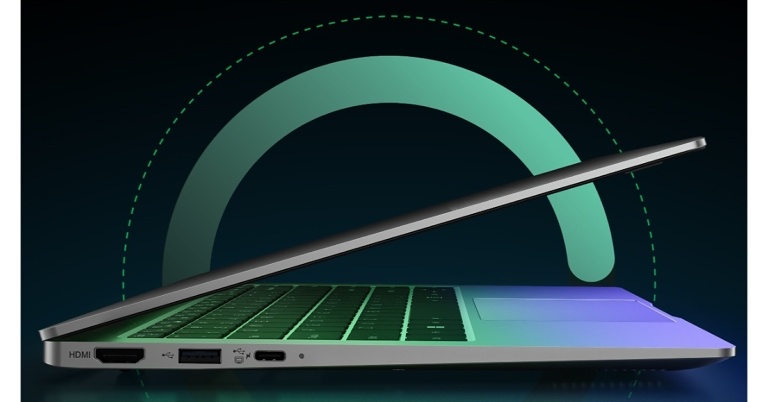
Other unique features of the Infinix INBook X1 Slim include the Ice Storm 1.0 Cooling System, which keeps the temperature low even when users spend long hours gaming, working, or consuming content. Multiple connectivity options are included in all three models, including two USB 3.0 ports, two USB Type-C connectors (one for charging and data transfer and the other for full function), an HDMI 1.4 port, an SD card reader, and a 3.5 mm headset and microphone combo jack. They also have Wi-Fi 5 installed for quicker downloading.
For the latest gadget and tech news, and gadget reviews, follow us on Twitter, Facebook and Instagram. For newest tech & gadget videos subscribe to our YouTube Channel. You can also stay up to date using the Gadget Bridge Android App. You can find the latest car and bike news here.
INBook X 1 Slim laptops are powered by 10th Generation Intel Core processors with i3, i5, and i7 models that are compatible with Windows 11 Home. The laptop has up to 16GB of RAM and a 512GB M.2 NVMe PCIe 3.0 SSD that promises to be 5X faster than standard SATA SSDs. This enables users to read at a speed of 2400 MBs and write at a pace of 1900 MBs.
The Infinix Laptop features a 50Wh battery. The laptop has about 11 hours of continuous web browsing, 9 hours of typical work, and 9 hours of video playback. The battery is supported by a high-power Type C multi-utility charger that allows users to transfer data, charge their smartphones, and charge their laptops all at the same time. The Type-C charger, which is convenient to carry and can charge the laptop to 100% in 90 minutes, is 65W.
Other unique features of the Infinix INBook X1 Slim include the Ice Storm 1.0 Cooling System, which keeps the temperature low even when users spend long hours gaming, working, or consuming content. Multiple connectivity options are included in all three models, including two USB 3.0 ports, two USB Type-C connectors (one for charging and data transfer and the other for full function), an HDMI 1.4 port, an SD card reader, and a 3.5 mm headset and microphone combo jack. They also have Wi-Fi 5 installed for quicker downloading.
For the latest gadget and tech news, and gadget reviews, follow us on Twitter, Facebook and Instagram. For newest tech & gadget videos subscribe to our YouTube Channel. You can also stay up to date using the Gadget Bridge Android App. You can find the latest car and bike news here. 



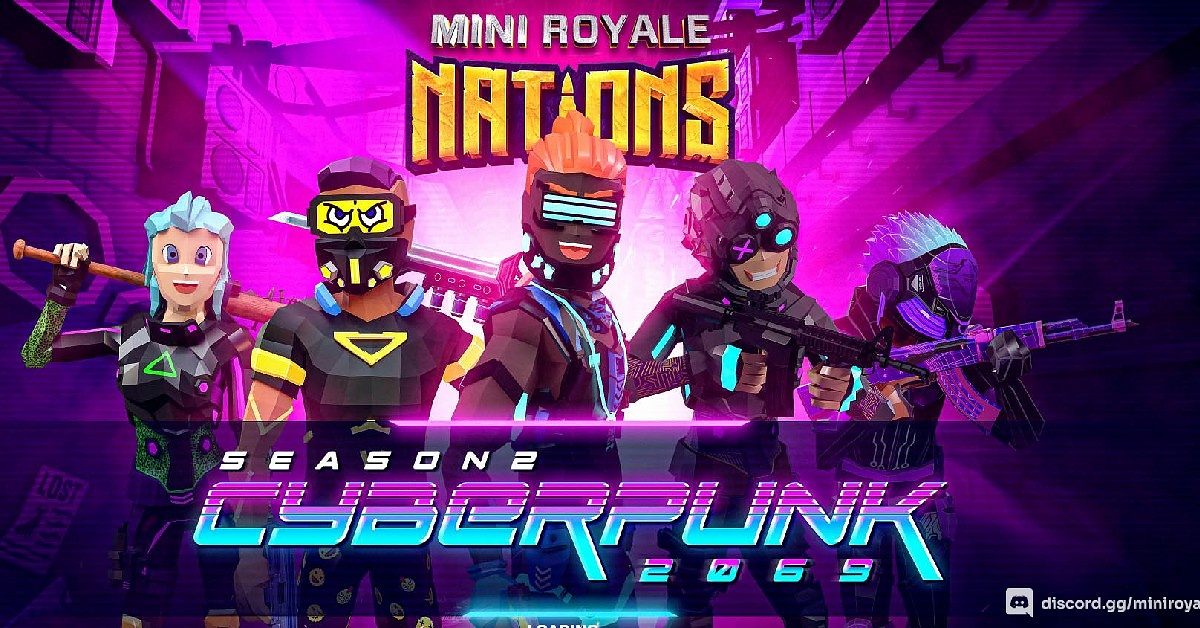



 Step 3b:
 Step 4: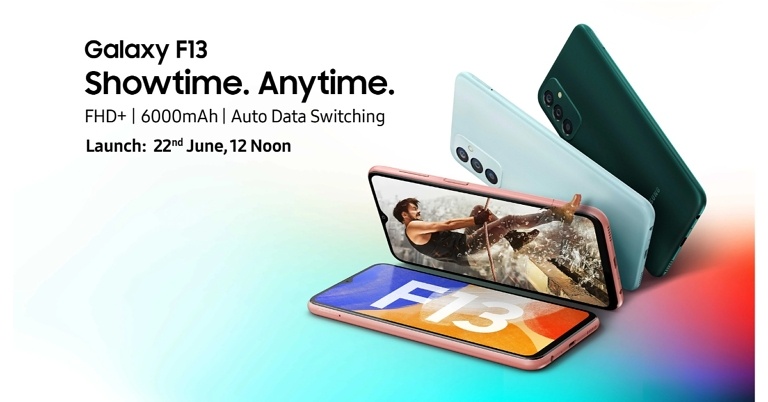





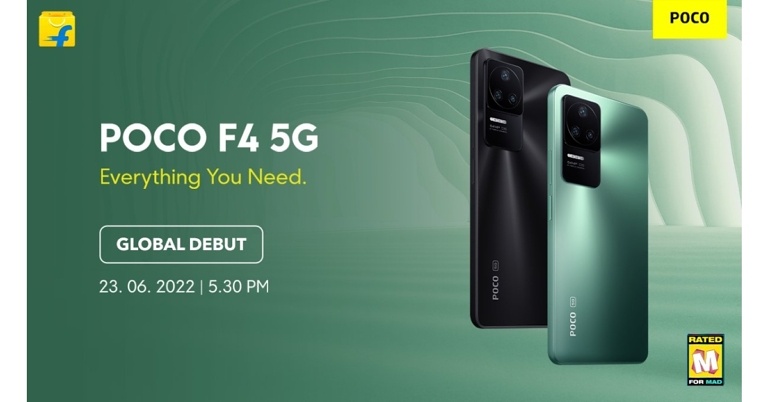

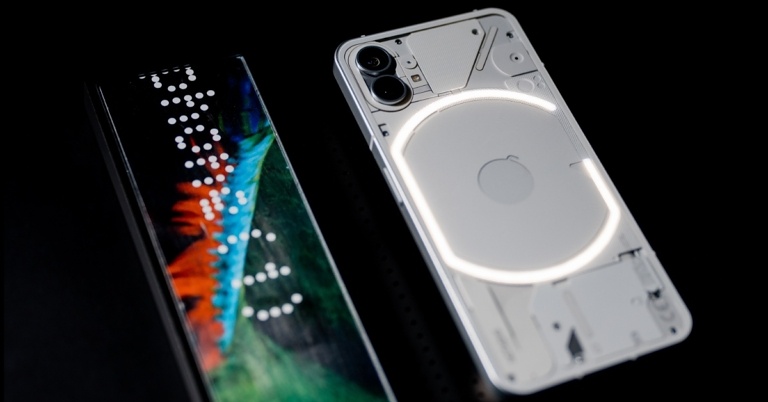


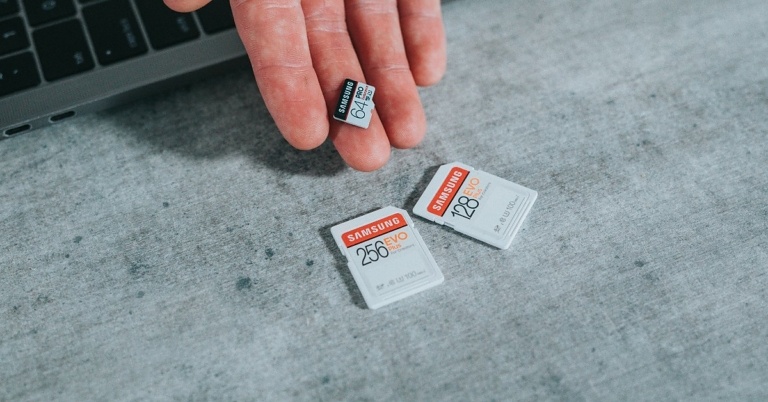




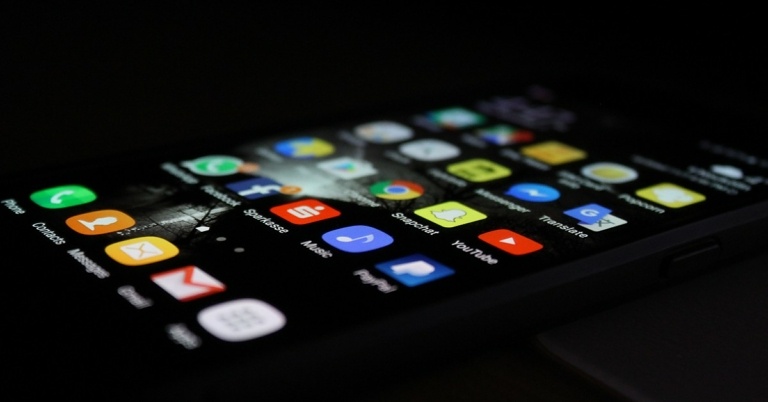




 Step 2:
  Step 3:
 Step 4:







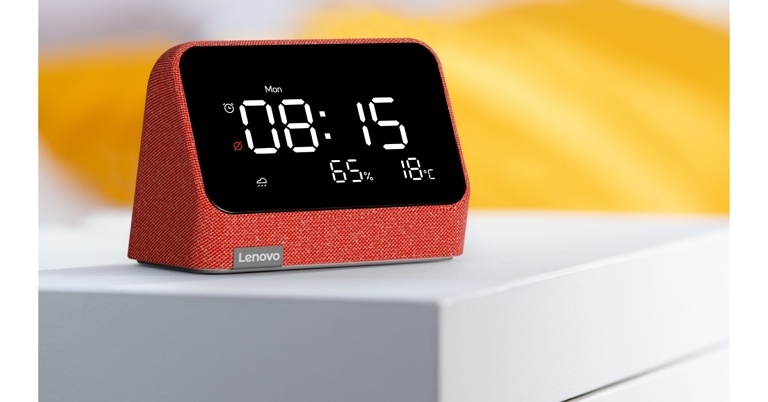


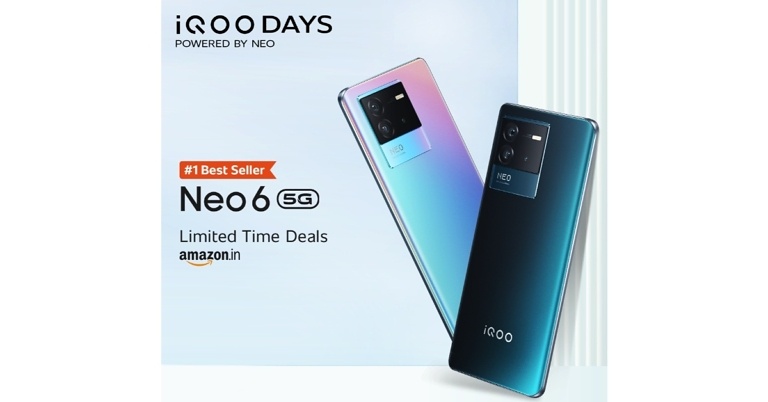


 Step 2: Make the phone call from your iPhone
 Step 3:

 Step 6:

 Step 2:
 Step 3:
 Step 4: