Blizzard is porting several of its PC titles over to Steam. The company has officially announced that Overwatch 2 will be the first game that will be brought to Steam. It is a free-to-play, always-on, and ever-evolving live game. The recent announcement comes just before Blizzard’s upcoming takeover by Microsoft. Also, its player’s interest is rapidly declining.On August 10, Overwatch 2 will be made available on Steam. Blizzard via its blog post shared the news to bring a number of its PC titles to Steam, starting with Overwatch 2. The Overwatch 2 Steam page is live now and is available to Wishlist.Also Read:Twitter Rebranded: Twitter logo has got a new look, the blue bird logo replaced with an X“It’s our goal at Blizzard to listen to players and try to exceed their expectations in everything we do,” said Mike Ybarra, President of Blizzard Entertainment. “While Battle.net remains a priority for us now and into the future, we’ve heard players want the choice of Steam for a selection of our games, starting with Overwatch 2 on August 10th. We’re happy to work with Valve to make that happen.”Blizzard claims that despite its continued commitment to investing in and supporting Battle.net, the company believes that gaming is no longer just for a select group of people as it was when Battle.net first launched over 20 years ago. Instead, it is for everyone, and Blizzard wants to remove any obstacles that prevent players from finding and enjoying their favourite games anywhere in the world.Reports claim that the majority of Overwatch users have lost interest and aren’t playing anymore, Blizzard’s PvE strategies are said to be one factor in this. One of the main attractions of the upcoming Overwatch game was the free mode, but after numerous delays, the concept was completely shelved, sparking a storm of criticism.Overwatch 2: Invasion is debuting with more brand-new gameplay experiences. These experiences include the first-ever set of PvE Story Missions, a new core PvP game mode with two new maps, and of course, a new hero. For new players, it’s a wonderful chance to take advantage of their introduction to the Overwatch universe.Overwatch 2 is available on Steam in addition to Battle.net, allowing the community that already accesses the game through Battle.net to continue playing without any modifications. Overwatch 2 players on Steam will still need to link their accounts to Battle.net, as we do for all platforms, in order to enable cross-platform play and other features.Blizzard says that while playing Overwatch 2, players who use Steam will have access to features like Steam achievements, their Steam friends list, and the ability to send them in-game invites.
For the latest gadget and tech news, and gadget reviews, follow us on Twitter, Facebook and Instagram. For newest tech & gadget videos subscribe to our YouTube Channel. You can also stay up to date using the Gadget Bridge Android App. You can find the latest car and bike news here.
Today, Twitter officially replaced its popular blue bird logo with a plain white X on a dark backdrop. A white X written on a black background was used as the new Twitter logo.
Elon Musk and Twitter CEO Linda Yaccarino’s Twitter handle presented the new logo design on Monday in favour of the new revamp. However, the logo has been receiving a lot of criticism and #GoodByeTwitter and #RIPTwitter is currently trending on the microblogging platform.
This news was first shared by Twitter’s chief on Sunday saying, “And soon we shall bid adieu to the Twitter brand and, gradually, all the birds.”
For those who are unaware the SpaceX and Tesla CEO has been obsessed with the letter X since the 1990s. He introduced the X.com domain, a forerunner to PayPal, which offered online banking services, in 1999. The X.com domain was repurchased by him in 2017 saying it had a sentimental value. However, the modification is part of a larger branding campaign launched when Elon Musk acquired the platform.
Note that this is not the first time that the Twitter logo has been replaced. In April this year, the popular blue bird was temporarily replaced with Dogecoin’s Shiba Inu dog.
Musk tweeted a photograph of the Twitter headquarters in San Francisco with the X branding projected across it early this morning.
Twitter’s CEO, Linda Yaccarino also tweeted: “It’s an exceptionally rare thing – in life or in business – that you get a second chance to make another big impression. Twitter made one massive impression and changed the way we communicate. Now, X will go further, transforming the global town square.”
She further twitted, “X is the future state of unlimited interactivity – centered in audio, video, messaging, payments/banking – creating a global marketplace for ideas, goods, services, and opportunities. Powered by AI, X will connect us all in ways we’re just beginning to imagine.”
For the latest gadget and tech news, and gadget reviews, follow us on Twitter, Facebook and Instagram. For newest tech & gadget videos subscribe to our YouTube Channel. You can also stay up to date using the Gadget Bridge Android App. You can find the latest car and bike news here.
It is difficult to imagine our life without technology in recent years. We need the assistance of technology at every stage of our life. Laptops are the most essential part of our daily routine especially if you are a working professional. Whether your laptop is old or new, cheap or expensive, its sound quality is dubious and we need to boost laptop audio. Due to space limitations, audio chips, analogue to digital converters, amplifiers and speakers are downsized leading to a distorted sound that needs to be louder. If you are also looking to boost laptop audio, here is everything you need to know:Read Also: Acer Nitro 15 for gaming with up to NVIDIA 4060 graphics card launched in India
This feature works well for users who use Bluetooth speakers to listen to audio on their laptops and to relax while working. The spatial audio feature is a built-in feature of Windows. Here is how you can enable it:
Start by connecting your earphones/headphones to your laptop.
Right-click on the speaker icon on the taskbar.
Go to spatial audio and set it to window sonic for headphones and enjoy.
2. Change the Preset Audio Profile
Another way to increase your laptop sound is by changing the preset audio profiles. You can do this in the following ways:
Launch the control panel on your Windows computer.
After that go to Hardware and Sound.
Next, go to Manage Audio Devices. This will open a new window.
Click on the audio device you are using and then click on properties.
In the properties window change the tab to Enhancement, here you will find Headphone Virtualization and Loudness Equalization.
Adjust them according to preferences.
3. Enable Bass Boost from Windows Control Panel
Low or no bass can be a mood killer for audio preferences. However, you can always boost the bass on your laptop. Here’s how:
On your laptop launch Control Panel.
Next, go to Hardware and Sound.
Then go to Manage Audio Devices. This will open a new window.
Choose the audio device you are using. Click on properties and then enhancements.
Click on Boost Bass enhancement and adjust the frequency. Remember more the frequency more will be the bass.
4. Enable Bass Boost from Settings
Launch settings on your Windows computer.
Go to the system and then click on sound.
Go to advanced settings and then click on All Sound devices. Then click on the Output device and select the device you are using.
Enable Enhance Audio.
5. Boost Bass using Third-Party Software
You can use third-party software to boost the bass of your laptops. Some of these softwares are; FX Sound, Equalizer APO, Bass Treble Booster or Boom 3D.Read Also:How to Fix ‘Can’t Pause Instagram Videos or Reels’?
Instagram may have started as an image-sharing platform but right now its biggest attraction is bite-sized content in the form of Reels. To enter the world of Reels, all you have to do is tap the play icon at the bottom menu. Unlike YouTube Shorts, you cannot pause a Reel by simply tapping on it once. A single tap mutes the Reel instead of pausing it. The latter can be achieved by tapping and holding the screen. If you’re still not able to pause Instagram Reels and videos, here are some common fixes for the issue.Read Also:Find and Follow Your Instagram Friends on Threads: Top 4 Ways
Clear app cache
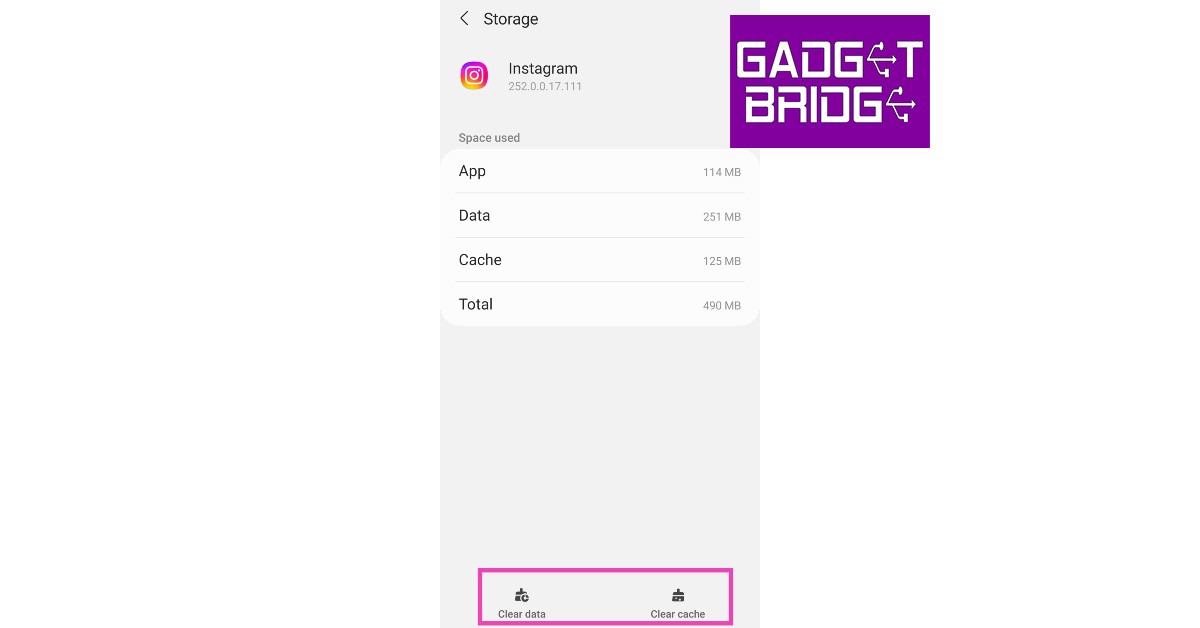
Step 1: Go to Settings and select Apps.Step 2: Scroll down and select Instagram.Step 3: Tap on Storage.Step 4: Select Clear Cache from the bottom of the screen.
Force Stop Instagram
Step 1: Go to Settings.Step 2: Scroll down and select Apps.Step 3: Scroll down and select Instagram.Step 4: Select Force Stop from the bottom menu.
Clean your phone’s screen
In order to pause an Instagram Video or Reel, you need to tap and hold it. This gesture won’t register if there’s something wrong with your phone’s touchscreen. It is common for the touchscreen to malfunction when there’s some moisture or dirt on it. Wipe it clean using a micro fibre cloth and try again. Additionally, make sure your hands aren’t wet as well.
Remove the screen protector
A faulty screen protector can create problems on the touchscreen. Some parts of the screen may become unresponsive. This may lead to Instagram Reels and videos not pausing when you press and hold the touchscreen. Remove the screen protector from your phone and try again.
Increase touch sensitivity
If you don’t want to remove the screen protector, you can simply increase your screen’s touch sensitivity in order to make it work. With heightened sensitivity, your phone’s touchscreen can pick up the faint touches that would otherwise go unnoticed because of the screen protector getting in the way. Go to Settings>Display and switch on the toggle bar for Touch sensitivity.
Restart your phone
Restarting your phone can fix any minor background issues on the OS or any one of the apps. Simply press and hold the side key and volume down key and select ‘Restart’ from the power options. Once your phone has rebooted, launch the Instagram app and check if you are able to pause Reels and videos again.
Update the Instagram app
If you are using an older version of the Instagram app, chances are that the issue you are facing has already been fixed with an update. Simply go to the Google Play Store, search for Instagram, and hit the ‘Update’ option. Once the app has been updated, you will be able to pause the Reels and videos again.
Use Instagram Lite
Instagram Lite is the stripped-down version of the Instagram app that uses considerably less data. If you’re facing issues on the main app, use the Lite app until the developers patch the problem. The browsing experience on Instagram Lite is identical to the main app side from one key difference. The Lite app doesn’t pre-load the Reels. This means every Reel will take a couple of seconds to buffer before loading on the screen.
Why are Instagram Reels and videos not pausing on my phone?
A faulty touchscreen and an older version of the app may be the reason why you are not able to pause the Reels and videos on Instagram.
How do I fix the ‘Reels won’t pause’ issue on Instagram?
Force stop the Instagram app and clear its cache. Additionally, make sure the screen protector isn’t impeding the performance of the touchscreen. Give the touchscreen a good wipe as well.Read Also:Samsung Galaxy M34 Review: Ticks all the essential boxes
Conclusion
This is how you can fix the ‘Reels and videos not pausing’ issue on Instagram. These methods should fix the issue you’re facing. You should also know that some ads that you come across while browsing Reels cannot be paused. If you found this article helpful, let us know in the comments!
Acer has unveiled the Nitro 16, its latest gaming laptop in India. The machine comes with a 16-inch display paired with customizable 4-Zone RGB backlight keyboards. The device features the most recent AMD Ryzen 7 7840HS octa-core processor and is available in two configurations: one with the NVIDIA GeForce RTX 4060, which offers 8 GB of dedicated GDDR6 VRAM, and the other with the 4050, which offers 6 GB.
Acer Nitro 16 price in India and sale details
As mentioned earlier the Acer Nitro 16 is available in two models, the price of the Acer Nitro 16 with an AMD Ryzen 7 7840HS processor with an Nvidia GeForce RTX 4050 6GB GPU is set at Rs 1,14,990. Whereas Nitro 16 with AMD GeForce RTX 4050 8GB GPU will be available with a price tag of Rs 1,43,550. The laptop can be purchased from any Acer exclusive shop nationwide, as well as from the Acer E-store, Amazon, and Flipkart. It will be offered in a single Obsidian Black colour variant.
Acer Nitro 16 specifications
The 16-inch WUXGA LED-backlit TFT IPS LCD screen of the Acer Nitro 16 has a resolution of 1920 x 1200 pixels. The display can support a refresh rate of up to 165Hz and has a quick Overdrive Grey to Grey reaction time of 3ms. Additionally, it has a 400-nit peak brightness. Gamers may customise their gaming environment and enhance their gameplay with the keyboard’s 4-Zone RGB lighting with Nitro Sense.Also Read:Comments on YouTube Shorts may now be converted to a separate YouTube ShortsThe gaming laptop is available in two different configurations- GeForce RTX 4060 and 8 GB of dedicated GDDR6 VRAM or Nvidia GeForce RTX 4050 graphics and 6 GB of GDDR6 VRAM. It has a 512GB PCIe Gen4 NVMe storage drive and an octa-core AMD Ryzen 7 7840HS processor with up to 32GB of DDR5 RAM. The Gen 4 memory slots on the laptop can be used to boost system performance for gamers, while the DDR5 storage slots allow for faster data access and transfer rates. Windows 11 64-bit is already installed on the laptop.To minimise overheating during prolonged gaming sessions Acer Nitro 16 includes Dual fans, dual intake, quad exhaust, and liquid metal grease to effectively dissipate heat and keep the laptop cool even during strenuous gaming sessions. The Nitro 16 provides a variety of connectivity choices, including HDMI 2.1, a MicroSD card reader, USB 4, Killer Ethernet E2600, and Wi-Fi 6E.
For the latest gadget and tech news, and gadget reviews, follow us on Twitter, Facebook and Instagram. For newest tech & gadget videos subscribe to our YouTube Channel. You can also stay up to date using the Gadget Bridge Android App. You can find the latest car and bike news here.
Microsoft offers subscription-based services known as Xbox Live Gold on its Xbox Gaming platform. However, on September 14, 2023, Xbox Live Gold is going to become Xbox Game Pass Core. This subscription offers several benefits to users such as:
Online Multiplayer: With Xbox Live Gold players can access various features. They can play games with their friends and other people over the Internet.
Free Games: Xbox Live Gold subscribers get enrolled in the “Games with Gold” program. Under this program, they get free games every month. These games can be downloaded and played until the subscription lasts.
Deals & Discounts: Xbox Live Gold members get additional discounts on add-ons, digital games and other content available in the store.
Messaging: Xbox Live Gold members can use the party chat feature to interact with their friends while gaming. They can also send and receive text messages.
As on September 14, 2023, Xbox Live Gold will become Xbox Game Pass Core. It will be launched for gaming consoles like Xbox One, Xbox Series S and Xbox Series X. As per reports, Xbox Live Gold will shut down on September 1 and existing members will automatically become Xbox Game Pass Core members. Xbox Game Pass Core is priced the same as Xbox Live Gold. Users get the option of paying $9.99 per month or $59.99 for an entire year. According to the announcement, Games with Gold will be removed along with Xbox Live Gold. However, any games you played while using the service will not be gone anywhere. Xbox Game Pass Core will bring along with it 25 new free games for its subscribers. There isn’t going to be any substantial change for the gaming community at the moment. Although over time there is speculation that the price of the Xbox Game Pass Core could be increased. Original Xbox and Xbox 360 games will be thee till perpetuity. However just like Xbox Live Gold gave access to a couple of games every month this will not be the case for Xbox Game Pass Core. Read Also: Comments on YouTube Shorts may now be converted to a separate YouTube ShortsThe list of games included in the Xbox Game Pass Core is as follows:
Among Us
Descenders
Dishonored 2
DOOM Eternal
Fable Anniversary
Fallout 4
Fallout 76
Forza Horizon 4
Gears 5
Grounded
Halo 5: Guardian
Halo Wars 2
Hellblade: Senua’s Sacrifice
Human Fall Flat
INSIDE
Ori & the Will of the Wisps
Psychonauts 2
State of Decay 2
The Elder Scrolls Online: Tamriel Unlimited
Conclusion
It is obvious to feel a little doubtful regarding any new introduction. However, the introduction of Game Pass Core will be beneficial to gamers as it would mean access to more games. Microsoft has also announced that two to three games will be added every year. Stay tuned to Gadget Bridge as we will bring you more developments happening in the field within the next few weeks
For the latest gadget and tech news, and gadget reviews, follow us on Twitter, Facebook and Instagram. For newest tech & gadget videos subscribe to our YouTube Channel. You can also stay up to date using the Gadget Bridge Android App. You can find the latest car and bike news here.
If you didn’t put much thought into your Fortnite username and are now regretting your choice, you can easily change it in just a few simple steps. The process to change your Fortnite username varies between different platforms and consoles. For example, on Xbox and PlayStation, your Fortnite username is linked to your Gamertag and PSN Name. In this article, we bring you the best 3 ways to change your Fortnite name on a smartphone, Xbox, and PlayStation.Read Also:Samsung Galaxy M34 Review: Ticks all the essential boxes
Change your Fortnite username using your smartphone
Step 1: Go to Fortnite’s official website on your phone’s web browser.Step 2: Tap the hamburger menu at the top right corner of the screen and select Sign In.Step 3:Sign in using your chosen method.Step 4: Enter your login credentials.Step 5: Tap the hamburger menu at the top right corner of the screen and select your username.Step 6: Select Account and scroll down to Account Settings.Step 7: Tap the pencil icon next to your display name.Step 8: Type the new display name and then type it again to confirm your choice.Step 9: Hit Confirm. Your Fortnite display name will be changed.
Change your Fortnite username on Xbox
Your Fortnite username is the same as your Xbox Gamertag. To change your name on Fortnite you will need to change your Gamertag. This change will apply to other games as well.Step 1: Press and hold the Xbox button on your controller.Step 2: Go to Profile & System and select your Gamertag.Step 3: Hit My Profile.Step 4: Select Customise Profile.Step 5: Scroll down to Choose New Gamertag and type in your new Gamertag.Step 6:Confirm your new Gamertag.Your Xbox Gamertag and Fortnite name will be changed.
Change your Fortnite username on PlayStation
On PlayStation, your Fortnite username is the same as your PSN Name. Changing your PSN Name will change the Fortnite username. This change will be made across all the games in your library.Step 1: Go to Settings and select Account Management.Step 2: Select Account Information, then scroll down and select Profile.Step 3: Select an Online ID. Hit I Accept and Continue.Step 4: Enter the new Online ID.Step 5: Hit Confirm.Your PSN Name and Fortnite name will be changed.
Frequently Asked Questions (FAQs)
How do I change my Fortnite username on my phone?
Go to the official Fortnite website and select Username>Account>Account Settings and hit the pencil icon next to the display name. Enter your new username and confirm your selection.
How do I change my Fortnite name on Xbox?
Press and hold the Xbox button on the controller and go to Profile & System>Gamertag>My Profile>Customise Profile>Choose new Gamertag and enter your new Gamertag.
How do I change my Fortnite username on PlayStation?
Google often tests new features in an effort to increase user engagement on its video streaming platform YouTube. In order to rival Instagram and TikTok the company is currently testing a new feature where the YouTube Shorts comments can be converted into a separate new Shorts video. This feature is currently in the development phase and is available to a select number of Android and iOS users.Soon, YouTube will be allowing users to take a comment from a video they’re watching and turn it into a Shorts video. This new feature is covered in more detail on the support page for the YouTube team.Also Read: Mivi DuoPods A650 Review: Should you buy them?“We’re running an experiment that enables mobile viewers to create Shorts featuring comments posted on videos they’re watching. While creators are already able to reply to comments (posted on their own content) with a Short, we want to explore offering viewers the opportunity to create content from comments as well. ” while explaining the feature the company said.According to the company, the created short video will show up in the Shorts feed and on the viewer’s channel page. Viewer-created Shorts won’t notify either the comment’s author or the creator whose video it is. Creators can’t prohibit their comments from being featured in a Short unless comments on their video(s) are disabled.As mentioned earlier the feature is under the developmental phase and the test feature (sometimes also called “betas” or “experiments”) is usually available for a short period of time and only for a small group of people. As per Google, the new YouTube Shorts feature is currently available to a small percentage of viewers on Android and iOS mobile devices across the globe.Earlier this month YouTube also announced that it is testing AI-generated quizzes on its mobile platform. A select group of users will be able to observe the emergence of these AI-generated tests on your app’s home page. The quizzes will evaluate how well you comprehend a topic that was addressed in a recent video that you viewed. If you decide to take a quiz, a link to the most recent video you viewed will show up underneath it so you can quickly go back and watch it again to learn more. For the latest gadget and tech news, and gadget reviews, follow us on Twitter, Facebook and Instagram. For newest tech & gadget videos subscribe to our YouTube Channel. You can also stay up to date using the Gadget Bridge Android App. You can find the latest car and bike news here.
After being banned for nearly ten months, Battleground Mobile India, aka BGMI, is officially available again in India. BGMI fans are looking for ways to improve their game experience and one such method is the usage of redemption codes, which offers a variety of rewards and advantages using BGMI redeem codes players can gain access to new skins, outfits, loot crates, weapons and free UC and diamonds.As mentioned earlier, these codes give users the chance to earn unique rewards and gain extra benefits while playing the game. This includes GUN SKINS (M4, AKM, M416, AWM, M24, UZI, KAR98K), free character voucher, Andy, Carlo, Sara, Victor character for free, free Anna Character on completing the mission and UC or Royal Pass Discount. So here we have gathered a list of the most recent BGMI redeem codes as of 24 July 2023. Also, redeem these codes asap as these are only valid for a limited duration.
Garena Free Fire is a battle royale game with regular awards and tournaments to keep players interested. If you play Garena Free Fire, you should be aware of the redeem codes that are released on a daily basis. However, because the battle royale game is banned in India, players from other countries can use the Free Fire Redeem codes daily. If you’re unfamiliar with the Garena Free Fire redeem codes or don’t know how to get them, we’ve put together a step-by-step guide to help you redeem them. Check out Garena Free Fire Redeem Codes for 24 July 2023.The Free Fire redeem codes are a great way to get free stuff. These are 12-digit codes that contain alphabets and numbers, as well as an expiration date and time. Because the Garena FF redeem codes cannot be used more than once, you should hurry to the redemption page to claim your free reward before someone else does. To get a free reward, all you have to do is go to reward.ff.garena.com/en, which is the official redemption page. Also, keep an eye on this space for daily updates on Garena Free Fire redemption codes and rewards.
Threads has been the biggest thing on the Internet this month. The text-based social media platform owned by Meta is one of the better alternatives to Twitter. To sign up for Threads, all you need is an Instagram account. But what should you do once you’ve made a Threads profile? Look for your friends, of course! In this article, we bring you the top 4 ways to find and follow your Instagram friends on Threads.Read Also:How to install the Google Photos app on Android TV?
Find Instagram friends while setting up Threads
While setting up your Threads profile, the app gives you the option to follow all the people that you are currently following on your Instagram account. This list only consists of the people who have made a Threads profile. You can scroll through the list and follow any account you want. This list does not display your followers on Instagram but the people that you follow on there. You can also choose to follow all the accounts at once.
Find Instagram friends on Threads from Settings
If you forgot to follow your Instagram contacts while setting up your Threads profile, you can always do it later from your profile settings. Here’s how.Step 1: Launch the Threads app and hit the profile icon at the bottom right corner of the screen.Step 2: Tap the hamburger menu icon at the top right corner of the screen.Step 3: Select Follow and invite friends.Step 4: Select Follow accounts from Instagram.Step 5: You will be presented with a list of people you follow on Instagram that also have a Threads account. Scroll through this list and follow the people you want.
Find Instagram friends on Threads from your following tab
Step 1:Launch the Threads app and hit the profile icon at the bottom right corner of the screen.Step 2: Tap on followers and switch to the following tab.Step 3: Tap on See all.
Step 4: You will be able to see the people you follow on Instagram that also have a Threads account.Step 5: Hit the follow icon next to the profile you want to follow on Threads. Or simply select Follow all to follow all of the profiles at once.
Search a contact’s Instagram handle on Threads
Since you need an Instagram account to make a Threads profile, your Threads username is the same as your Instagram username. If you know someone from Instagram that you want to connect with on Threads, simply hit the search icon in the bottom menu and look up their Instagram username. If the user has a Threads profile, it will show up in search results.
Frequently Asked Questions
How do I find my Instagram contacts on Threads?
To find your Instagram contacts on Threads, go to Profile>Menu>Follow and invite friends>Follow accounts from Instagram or Profile>Followers>Following>See all.
How do I search for a profile on Threads?
To search for a profile on Threads, hit the search icon at the bottom menu and type the username of the profile you are looking for.
Samsung’s M-series is known for its big battery smartphones that can easily last you more than a day. Back in May, we reviewed the Galaxy M14, which proved to be a solid smartphone under Rs 15,000. Now Samsung is back with another addition to the M-series lineup. The Galaxy M34 is slightly pricier than its younger sibling, M14. With a 6,000 mAh battery, this smartphone promises to last for 2 days. But how does it perform in other aspects? Read our Samsung Galaxy M34 review to find out.Read Also:5 Superhero movies you should not miss releasing in the next few months
Samsung Galaxy M34 review: Design and Display
Samsung has brought uniformity to their smartphone releases this year. This isn’t just restricted to the design language of the phones, but also their retail boxes. The Samsung Galaxy M34 ships inside a sleek rectangular box, as opposed to the bulky M Series boxes of the past. While sleek is almost always good, this is certainly one of the exceptions. Upon unboxing the package you will realise that it doesn’t ship with a power adapter. A sad trend which has now found its way to affordable smartphones as well. Nevertheless, inside the box, you get the smartphone, some reading material, a SIM ejector tool, and a USB Type-C charging cable.The Samsung Galaxy M34 retains the all-too-familiar design of the flagship S Series. The plastic back panel horses the vertically arranged triple camera setup. While we like that an affordable smartphone gets the same design as the company’s flagship release, we do miss every smartphone having its own unique personality.The plastic back of this smartphone attracts fingerprints and smudges very easily. Using this smartphone in the thick of the monsoons when humidity levels are at their highest meant constantly wiping the back to get rid of any unwanted smudges. You can also bypass this problem by slapping a case on the phone. The right edge of the curved frame houses the volume rocker and the side button. The side button also doubles as a fingerprint scanner. The hybrid SIM slot has been positioned on the left side of the frame. At the bottom, you get the 3.5mm headphone jack, a USB Type-C port, a primary microphone, and the speaker grille. The secondary microphone has been placed at the top edge of the frame.The highlight of this smartphone is its 6.5-inch Super AMOLED display that has a maximum refresh rate of 120Hz. With a peak brightness of 1,000 nits, this display is perfectly legible under direct sunlight. The touch response is phenomenal, something that we’ve come to expect from Samsung smartphones. We’d suggest splurging some extra cash and going for the M34 over the M14 for this display alone.We played HD content on the M14 across different OTT services. The quality of images relayed on the screen left no room for complaint. If you’re upgrading from a smartphone with an LCD display, you’ll immediately notice the richness in colour that this display produces along with those deep deep blacks. While this smartphone is great for media consumption, the only thing that keeps it from being ideal is the single-speaker grille. If there’s a loud fan running in the background, you will need to plug in a pair of headphones. The single speaker unit simply isn’t powerful enough to overcome the noisy environment.
Samsung Galaxy M34 review: Performance and Cameras
Samsung Galaxy M34 is available in a storage capacity of 128GB with two RAM variants – 6GB and 8GB. Powering this smartphone is Samsung’s in-house Exynos 1280 SoC. OS duties are handled by Android 13 with One UI 5.1 on top. The 6GB RAM variant is priced at Rs 18,000 while the 8GB variant costs Rs 19,000.We used the M34 for a range of tasks and it didn’t display any gaping flaws in its performance. The smartphone managed to handle basic tasks like media playback, instant messaging, social media browsing, and more with absolute ease. We ran a dozen apps in the background, and the smartphone did a good job of optimising their usage without affecting the overall performance. We did not experience any lags or jitters in everyday use.However, the smartphone did get warm and presented a few hiccups while carrying out heavy tasks like video recording and editing, navigation, and rigorous gaming. We played Call of Duty Mobile on this smartphone and were left a bit underwhelmed. Simply put, the Exynos SoC is just not good enough to carry seamless gameplay. Framedrops were a little too common and the experience lacked the ideal level of fluidity. On the Geekbench 6 test, this smartphone got a single-core score of 943 points and a multi-core score of 2,033 points. This isn’t too far from Galaxy M14’s score of 921 and 2,056 points.While the M34’s performance may have left a little more to be desired, it did not let us down on the OS front. You get the full One UI experience on this smartphone, while its younger sibling, M14, has to settle for the Core version of the OS. Another reason to go for the M34 over the M14. You get special features like Secure folder, Knox security, Bixby routine, Link to Windows, Samsung Health, Samsung Pay, and more on the Galaxy M34.The 6,000 mAh battery on this device is one of its major selling points. We were easily able to push the battery backup on this smartphone to two days on moderate usage. This even included watching a couple of hour-long episodes on Netflix and twenty-minute gaming sessions. At the end of the second day, we had about 10% charge left. If you cut down on gaming and media consumption, you can easily push this smartphone to the third day. With 25W charging, the M34 takes a little over 90 minutes to charge.We did not have high hopes for the Galaxy M34 when it came to the camera performance. After all, this smartphone is known for its battery. But the results from the 50MP primary camera left us pleasantly surprised.The images taken in outdoor conditions had the perfect balance of colour richness and saturation. In some cases, we felt the sky was left underexposed when it formed the background of the image, but overall, we were quite happy with the results. The colours truly ‘popped’ in the images and the level of detail was quite impressive.Images taken from the 8MP ultrawide lens are on the softer side, but they still retain the richness in colour. Most smartphones in this price range don’t offer an ultrawide lens at all, so its inclusion in the camera array is good to see. You certainly won’t be ignoring this lens while taking images from the M34.Ultrawide LensUltrawide lensThe camera app on this smartphone also has a Portrait Mode. The M34 does a good job of edge detection and subject separation. Again, the colours in this mode were tuned to near perfection. We also took some shots in Night Mode, but it failed to leave a mark. The phone relies on a good amount of artificial lighting to take passable shots.Portrait ModeNight Mode vs Without Night ModeThe 13MP selfie camera produces decent results. We like that there’s no overt skin tone correction. The selfies we took managed to capture a good amount of detail. The Portrait Mode produced good results for the front camera as well. The ‘Fun’ mode built into the camera lets you play around with different Snapchat filters.Read Also:What is the difference between the Home Screen and Lock Screen on iPhone?
Verdict
If you’re looking for an affordable smartphone for everyday use, the Samsung Galaxy M34 fits the bill nicely. It offers a tremendous display, a monstrous battery unit, and a remarkable camera setup. Sure, the Exynos 1280 SoC is not the most powerful processor out there, but if your smartphone usage does not exceed routine tasks, you won’t notice its limitations. At Rs 18,000 the Samsung Galaxy M34 ticks all the essential boxes.
Now that Netflix has put an end to password sharing in India, you may be looking to create a new account for yourself. Since Netflix still allows users one account to be shared in a household, you can choose to share your roommate’s or family’s account instead of creating a new one. You may be wondering what happens to your watchlist, saved watch history, and curated movie/TV suggestions that were built up after all those years of rating movies and TV shows. Well, the good news is that you can take your profile with you to another account. This way you can preserve your data and not miss a single beat after switching accounts. In this article, we show you how to transfer your Netflix profile to a new or existing account.Read Also:What is the difference between the Home Screen and Lock Screen on iPhone?
Here’s how you can transfer your Netflix profile to another account
Step 1:Launch Netflix on your PC’s web browser.Step 2: Click on your profile picture at the top right corner of the screen.Step 3: Select Transfer Profile.Step 4: Click on Allow.Step 5: Select Start Profile Transfer.Step 6: Choose whether you want to transfer your profile to an existing account or a new account.Step 7:Sign in to the account you are transferring to by entering the appropriate credentials.Step 8: Click on Transfer Profile.Your profile will be transferred to the new account.
Frequently Asked Questions (FAQs)
Will I lose my suggestions when I make a new Netflix account?
You will lose your suggestions and watch history upon making a new Netflix account. But you can easily restore them by transferring your old profile to the new account.
How do I transfer my Netflix profile to a new account?
Click on your profile picture and select Transfer Profile>Allow>Start Profile Transfer>Existing/New account>Transfer Profile.
Telegram may not be as popular as WhatsApp, but it offers some features that WhatsApp doesn’t. If you run a book or movie discussion group, you may already be aware of how hard it is to keep spoilers from unwitting members of the group. Telegram offers a very useful spoiler tag which lets you hide your messages with ease. This makes it the preferred app for book clubs and discussion groups. In this article, we show you how to add a spoiler tag to your messages in Telegram.Read Also:How to Test Your Windows PC for Failing Hardware?
Use the Spoiler Tag in the Telegram app
Step 1:Launch the Telegram app on your smartphone.Step 2: Select a chat thread.Step 3: Type the message you want to send.Step 4: Select the text your want to hide. You can do this by long pressing a word to highlight it, then moving the borders.Step 5: Tap the ellipses in the popup menu.Step 6: Select Spoiler.Step 7: Hit Send.Step 8: The highlighted text will be hidden. To view the hidden text, simply tap on it once.
How to use the Spoiler Tag on Telegram Web
Step 1: Go to web.telegram.org and log into your Telegram account using the QR code or your phone number.Step 2:Select a conversation.Step 3: Type the message you want to send.Step 4:Highlight the text you want to hide.Step 5: Click on the eye icon in the formatting menu.Step 6: Hit Enter to send your message.The highlighted text will be hidden. It can be viewed by clicking on it.
Frequently Asked Questions (FAQs)
What does the spoiler tag in Telegram do?
The spoiler tag in Telegram hides the selected text in your message. It can be viewed only when you or the receiver tap on it.
How do I use the spoiler tag in the Telegram app?
Simply long press the text you want to highlight, hit the ellipses in the formatting menu, and select ‘Spoiler’.
This is how you can add a spoiler tag to your Telegram messages. This tag is incredibly useful in book and movie discussion groups. Once you click on the spoiler tag, only you will be able to view the underlying message. It will remain hidden from the rest of the group. The spoiler tag restores itself when you exit the chat.For the latest gadget and tech news, and gadget reviews, follow us on Twitter, Facebook and Instagram. For newest tech & gadget videos subscribe to our YouTube Channel. You can also stay up to date using the Gadget Bridge Android App. You can find the latest car and bike news here.
Garena Free Fire is a battle royale game with regular awards and tournaments to keep players interested. If you play Garena Free Fire, you should be aware of the redeem codes that are released on a daily basis. However, because the battle royale game is banned in India, players from other countries can use the Free Fire Redeem codes daily. If you’re unfamiliar with the Garena Free Fire redeem codes or don’t know how to get them, we’ve put together a step-by-step guide to help you redeem them. Check out Garena Free Fire Redeem Codes for 22 July 2023.The Free Fire redeem codes are a great way to get free stuff. These are 12-digit codes that contain alphabets and numbers, as well as an expiration date and time. Because the Garena FF redeem codes cannot be used more than once, you should hurry to the redemption page to claim your free reward before someone else does. To get a free reward, all you have to do is go to reward.ff.garena.com/en, which is the official redemption page. Also, keep an eye on this space for daily updates on Garena Free Fire redemption codes and rewards.
If you want to view the pictures on your phone on your TV, there are a couple of ways you can go about it. You can either mirror your phone’s display on the TV or directly cast the pictures from the Google Photos app. Since Google Photos is not available for Android TV, there is no legitimate way to view your photos on the bigger screen without Chromecast. However, there is one workaround to this issue. In this article, we show you how to install the Google Photos app on your Android TV.Read Also:Vivo Y27 with MediaTek Helio G85 SoC launched in India
Here’s how you can install the Google Photos app on your Android TV
Step 1: Download the Google Photos APK on your smartphone using a third-party app marketplace.Step 2:Sideload the app on your Android TV. The easiest way to sideload apps on your Android TV is by using the ‘Send Files to TV’ app.Step 3: Install the Send Files to TV app on your Android TV and smartphone from Google Play Store.Step 4:Launch the app on your TV and smartphone. Select Receive on TV and Send on your phone.Step 5: Send the Google Photos APK from your phone to your TV.Step 6: Open the APK file on your TV and install it.Step 7: To access the app, go to Settings and select Apps.Step 8: Scroll down and select See all apps.Step 9: Select Google Photos.
Frequently Asked Questions (FAQs)
Is there a Google Photos app for Android TV?
There is no official app for Google Photos on Android TV. You will need to sideload the app on your TV in order to use it.
How do I install Google Photos on my Android TV?
To install Google Photos on your TV, download its APK file on your phone, send it to your TV, and then install it.
Why can’t I see the Google Photos app on my Android TV home screen?
Since Google Photos is not officially available for Android TV, it does not show up on the home screen. You can access it from Settings>Apps>See all apps.Read Also:Apple Races to Build Its Own Generative AI Framework
Conclusion
This is how you can install the Google Photos app on your Android TV. Since Google Photos is not optimised for TVs, it can be pretty hard to navigate and use on the big screen. The biggest drawback of using Google Photos on your TV is that it doesn’t display all the albums and pictures saved on your account. You will only be able to browse and open the shared albums on your TV. If you want to display your phone’s camera roll on your TV, we’d suggest using the Chromecast option on the Google Photos app.For the latest gadget and tech news, and gadget reviews, follow us on Twitter, Facebook and Instagram. For newest tech & gadget videos subscribe to our YouTube Channel. You can also stay up to date using the Gadget Bridge Android App. You can find the latest car and bike news here.
A Superhero is a fictional character with extraordinary abilities and a strong sense of justice. Superhero movies are an exciting genre of the film industry. Superhero movies have dominated the film industry since the 20th century. However, it was in the 21st century that they achieved success both critically and commercially in Hollywood. Some of the popular superhero movies are: Spider-Man, Avengers, Black Widow etc.
Features of Superhero movies
Iconic Characters: The characters of Superhero movies are well-known. These characters are loved by audiences globally and we love them to see on big screens!
Special Effects: With the advancement in VFX and special effects technology, filmmakers can create fantastic superpowers and epic battles, which enhance the overall cinematic experience.
Complex Storytelling: Superhero movies are going beyond the usual narrative of good vs evil. They are now exploring deeper themes of identity, responsibility and sacrifice. Viewers can now resonate with such emotional storylines.
Diverse Audience: These movies appeal to diverse audiences ranging from comic lovers to casual cinema-goers. This factor makes them a lucrative option for studios.
Franchising: As we have seen with Marvel Studio’s Avengers, successful superhero films have the potential to become a franchise. They can have spin-offs, sequels, and prequels, thus expanding the cinematic universe.
Upcoming Superhero movies that you cannot miss in 2023
1. The Marvels: The Marvels will be released in theatres on July 28, 2023. The Marvels earlier known as Captain Marvel 2 is the sequel of Captain Marvel. Directed by Candyman’s Nia Da Costa, it will star Brie Larson as Carol Denvers (Captain Marvel), Monica Rambeau and Kamla Khan as Ms Marvel. Zawe Ashton will be playing the role of the villain.2. Kraven the Hunter: Seeing Venom’s incredible success Sony is all set to bring another villain Kraven the Hunter from the Spider-Man universe to the big screen. Sony has tried to introduce him before in Marvel movies but it failed. The cast includes Aaron Taylor Jackson as Kraven, Ariana DeBose as Kraven’s love interest, Fred Hechinger, Christopher Abbott etc. The movie will be released in theatres on October 6, 2023.3. Aquaman and the Lost Kingdom: Another exciting upcoming movie is the second instalment of Aquaman and the Lost Kingdom. Jason Momoa will be returning as Arthur Curry, the King of Atlantis. The cast includes Amber Heard and Nicola Kidman among others. This superhero film will hit the theatres on December 25, 2023.4. El Muerto: Releasing on January 12, 2024, El Muerto will be another rendition of the villain from the Spider-Man universe. Grammy-winning rapper Bad Bunny has been roped in to play the lead role. This movie is about a superpower wrestler who gets his power from a mask passed down by his father and he must fight his oppressor to keep his superpowers alive.5. Blue Beetle: DC is all set to bring in a new face in its upcoming movie Blue Beetles. DC’s first Latino superhero will be played by Cobra Kai’s Xolo Marriduena. He will portray the role of Jaime Reyes a youngster who gains superpower after discovering an electric blue beetle inside a takeout box. Blue Beetle is all set to hit the screens on August 18, 2023.Bonus suggestion for next yearCaptain America-New World Order: Expected to be released in May 2024 this movie is going to be the fourth edition of Captain America. Directed by Julius Onah, this movie will feature Anthony Mackie as Captain America. Read Also: YouTube Premium and YouTube Music have gone up
While fiddling with your iPhone’s appearance and customisation, you may have come across different wallpaper settings for the home screen and the lock screen. You can choose to set different wallpapers for the two screens or just settle with one wallpaper to maintain uniformity. But what exactly do the two screens mean? And what is the difference between them? Let’s take a closer look.Read Also:How to Monitor an iPhone: Top 5 iPhone Monitoring Apps
iPhone Home Screen vs Lock Screen: Key Differences
Your iPhone’s home screen is like the front page of your device. This is where you’ll find all your installed apps and the system widgets. The home screen has different pages that can be accessed using right and left swipes. You can choose to rearrange the apps and even group them together in a folder. You can add new pages to the home screen and dedicate them to a set of apps. Unlike Android, iOS does not have an ‘app drawer’. Instead, it has an App Library, which is always the last page of the home screen. This is where you’ll find all the installed apps on your iPhone. Once you remove an app from the home screen, it can still be accessed from the App Library.The lock screen is what you’re greeted with when you wake up your iPhone. As the name suggests, the lock screen keeps the contents of your iPhone locked until it is provided with the password, Face ID, or the appropriate fingerprint. While its functionality can be pretty limited, there is a lot of stuff you can do on the lock screen. You can check your phone’s notifications, check the time, play the next song, and play around with other widgets on the lock screen. You can even use your iPhone’s camera directly from the lock screen without unlocking the device. You will be able to take pictures and check out the previews, but the camera app will prevent you from viewing the entire media library until your iPhone has been unlocked.When you’re customising your iPhone, you can add different wallpapers and widgets to both screens in order to make your device more unique. While settings single wallpaper for the two screens is easy, it can get pretty boring really quickly. Read this article to find out how you can set a different wallpaper for the home screen and lock screen on iOS 16. While customising the lock screen, you should remember to add the widgets that cut down your reliance on the home screen. For example, you don’t always need to unlock your phone to check the weather, battery status, and time. Add these widgets to the lock screen to make things smoother.
Frequently Asked Questions (FAQs)
What is the difference between the home screen and the lock screen on iPhone?
The home screen is the main page of your iPhone while the lock screen is the page you are greeted with when you wake up the phone. In order to access the home screen you have to enter the device password on the lock screen.
Can I set different wallpapers for the lock screen and home screen on iPhone?
Yes, your iPhone allows you to set different passwords for the home screen and lock screen. Go to Settings>Wallpaper to browse and set wallpapers.
Reportedly the price of YouTube Premium has been revised. The company has increased the cost by $2 to $13.99. In addition to this, the price of YouTube Music Premium has also gone up by $1 to $10.99. To recall the Family Premium plans went up to $22.99 a month last year. So the price of it remains unchanged. Given that Apple and Amazon have recently made similar measures, this is not surprising.According to 9 to 5 Google individual YouTube Premium subscriptions in the USA will cost $2 more each month, or $13.99, for both new and existing users. Additionally, YouTube is raising the cost of Music Premium from $9.99 to $10.99 per month.New subscribers can observe this price hike in real-time at youtube.com/premium. YouTube Premium now costs $13.99 per month instead of $11.99 per month. If you choose to subscribe using the iOS YouTube app, the cost is $18.99.Image Courtesy: 9to5 GoogleCurrent members will also be subject to the new rate, which YouTube says will take effect with the upcoming subscription cycle.Also Read:Google testing AI tool to write news articles and save time, begun pitching to mediaYouTube Spokesperson said, “We’re updating the price for YouTube Premium and YouTube Music Premium subscribers in the US to continue delivering great service and features. We believe this new price reflects the value of YouTube Premium which allows subscribers to enjoy ad-free YouTube with background and offline play and uninterrupted access to over 100M songs with the YouTube Music app.”There will be a three-month grace period for legacy subscribers who have been using the service since 2018, afterwards which their fees will rise to new levels. Current subscribers will also get an email letting them know about the price changes.Image Courtesy: 9to5 GoogleAs per the report, the new pricing will become effective for existing consumers with their next subscription period. An upcoming email will explain the changes. Those who were grandfathered in five years ago (with Google Play Music and/or YouTube Red) will get three additional months at their current rate.Also Read:Vivo Y27 with MediaTek Helio G85 SoC launched in India Reportedly YouTube is not announcing any revision to the global pricing at this time. A 30-day notice will be given prior to any future increases.Family Premium plans experienced a significant increase to $22.99/month towards the end of the previous year. That is still applicable to the date of publication.
For the latest gadget and tech news, and gadget reviews, follow us on Twitter, Facebook and Instagram. For newest tech & gadget videos subscribe to our YouTube Channel. You can also stay up to date using the Gadget Bridge Android App. You can find the latest car and bike news here.
If you own an old PC, you must have noticed a drop in its performance levels. Older computers generally tend to be laggy and are more likely to crash than newer machines. If you don’t want to upgrade the entire PC, you can perform certain tests to check the status of its essential components. Then you can easily replace the parts that are malfunctioning. In this article, we bring you the essential tests you can perform to check your Windows PC or laptop for failing hardware.Read Also:Redmi Watch 3 Active India launch to take place on August 1
Test your PC’s RAM
Windows has a native Memory Diagnostic Tool that you can use to check if the RAM on your PC is malfunctioning. Your PC uses the RAM to read and write temporary information. If you observe frequent app crashes on your PC, the RAM may be the culprit. The Windows Memory Diagnostic Tool performs a thorough reading and writing test on your PC’s RAM to determine its health status. Here’s how you can run the tool on your PC.Step 1: Press Windows + R to launch the Run box.Step 2: Type mdsched.exe and hit Enter.Step 3: You will be asked to restart your PC. Go through with the request.Step 3: Windows will perform a RAM test on your PC. You will be able to see the results when your PC starts up again.Step 4: If Windows does not automatically load the results, right-click on the Start icon and select Event Viewer.Step 5: Expand the Windows Logs section in the side menu and select System.Step 6: Open the MemoryDiagnostic file.
Use Performance Monitor
Windows Performance Monitor is another native tool that can be used to view real-time performance statistics of your PC as well as the overall usage data. You can also use the Resource Monitor from Monitoring Tools to see how the system resources are being used. Here’s how you can access Performance Monitor on your PC.Step 1: Click the search box on the taskbar and type Performance Monitor. Open the app from the search results.Step 2: You will be able to view the real-time system summary (memory usage, network usage, disk usage) on the first page itself.Step 3: Use Reliability Monitor to check the history of critical events.Step 4: Click on Resource Monitor to check how system resources are being utilised.
Use CrystalDiskInfo to check your PC’s hard drive
CrystalDiskInfo’s S.M.A.R.T. test gives you a detailed status report of your PC’s hard drive. SMART stands for Self-Monitoring, Analysis, and Reporting Technology. Using this feature, you can check attributes like read error rate, spin-up time, seek error rate, seek time performance, and more. CrystalDiskInfo also lets you know about the temperature of your PC’s hard drive in real-time
Use Command Prompt to get battery report
If you own a Windows laptop, there’s a very quick way to check its battery health using Command Prompt. Here’s how you can go about the process.Step 1: Click on the search bar at the bottom toolbar and search for Command Prompt.Step 2: Right-click on the Command Prompt icon and select Run as Administrator.Step 3: Type the following command and hit Enter.powercfg /batteryreportStep 4: Your laptop’s battery report will be saved to the System32 folder in the C drive. Locate the report and open it.Step 5: Check the original and current battery capacity under the Installed Batteries section.
Frequently Asked Questions (FAQs)
How do I check my PC’s RAM health?
To check the condition of your PC’s RAM, press Windows + R, type mdsched.exe, and hit enter. Your PC will restart to run a RAM test and show you the results upon startup.
How do I check the performance of my PC?
Search for the Performance Monitor app to check the performance stats in real-time.
How do I check my laptop’s battery health?
Launch Command Prompt and enter the powercfg /batteryreport command to generate a battery report. Go to the System 32 folder in C drive to access the report.Read Also:7 things to do at home to kill time using technology
Conclusion
These are the essential tests you can perform on your Windows PC or laptop to check it for failing hardware. Apart from the tests mentioned in this article, there are several other third-party applications like BatteryCat, HWinfo, and RWEverything that perform deep checkups on your PC and generate thorough status reports.For the latest gadget and tech news, and gadget reviews, follow us on Twitter, Facebook and Instagram. For newest tech & gadget videos subscribe to our YouTube Channel. You can also stay up to date using the Gadget Bridge Android App. You can find the latest car and bike news here.
Battlegrounds Mobile India (BGMI) is a popular battle royale game that is developed byKrafton. BGMI is the Indian version of the popular battle royale game PUBG Mobile. BGMI was launched in India after the Indian Government’s decision of banning PUBG over security and data concerns. Krafton has specifically tailored Battleground Mobile India to the Indian market. It features similar gameplay mechanics with a few modifications to comply with Indian regulations and data privacy norms. Krafton now unveils Battleground Mobile India Series 2023.
What is Battleground Mobile India Series 2023?
On July 20th, 2023 Krafton announced the first-ever BGMI tournament known as Battleground Mobile India Series (BGIS) 2023 with a LAN event finale. BGIS is seen as the biggest royale Esports tournament in India. Thousands of teams will be competing against each other for prize money of Rs 2 crores. BGIS 2023 commenced on July 20, 2023, and its finals will be played on October 14, 2023.Read Also:BGMI redeem codes for 21 July 2023, claim and receive rewards and benefits Apart from participants, BGIS 2023 will be an amazing event for fans as well. Its grand finals will be broadcasted in over 10 languages which include English, Hindi and over 8 regional languages making sure the excitement reaches every corner. The tournament is divided into two phases: Online qualifiers and offline Grand Final. The offline grand finals will be held between October 12, 2023, to October 14, 2023, on the ground. Sean Hyunil Sohn, India CEO, Krafton said, “We are thrilled to announce BGIS 2023 as our latest esports tournament. Here at KRAFTON, we dedicate our efforts to provide a platform for amateur and professional players to showcase their talent and develop their skillset and BGIS is a pivotal stepping-stone in this journey. Our commitment lies in bringing forth new and innovative gaming events and tournaments for our community, providing them invaluable opportunities to establish their presence in the gaming world. BGIS 2023 is just the beginning of a thriving gaming community.”BGMI 2023 commenced on 20 July 2023 with The Grind. 256 invited teams are competing against one another to be in the Top 64 and will then go to Round 2 and Round 3 of the tournament. The Grind is being broadcasted on Krafton India Esports Youtube channel from July 20, 2023, at 12 pm. Registration for the tournament starts on July 24, 2023, and will end on August 2, 2023. The registration website will go live on July 24, 2023, and participants are requested to make sure that they are entering the correct details to avoid any elimination in the verification process. A total of 2048 teams will be qualifying for Round 1, who will then play in a group of 16 from Round 1 to Round 6 with qualifying teams proceeding to the next round. Read Also: Garena Free Fire Redeem Codes Today 21 July 2023: Here is how to claim them
Conclusion
Battlegrounds Mobile India since its comeback is ensuring to brighten the future of players across the country. Krafton is fully dedicated towards this vision and is constantly releasing new content and organising tournaments. BGIS 2023 is one such event and is expected to be the biggest battle royale tournament in India. So gear up and start registering for this exciting tournament beginning July 24, 2023.
For the latest gadget and tech news, and gadget reviews, follow us on Twitter, Facebook and Instagram. For newest tech & gadget videos subscribe to our YouTube Channel. You can also stay up to date using the Gadget Bridge Android App. You can find the latest car and bike news here.
Vivo seems to be on a launch spree, the company has launched yet another new smartphone under its Y-Series. The company has launched Vivo Y27 in India under its budget segment. The device comes with a 2.5D glass body design. It also features an FHD+ sunlight display and offers 6 GB + 6 GB Extended RAM support with 44W FlashCharge.
Vivo Y27 price in India, sale details
The Vivo Y27 has been launched in a single 6GB RAM with 128GB storage variant priced at Rs 14,999. The device is being offered in two colour options of Burgundy Black and Garden Green. It will be available for purchase starting today across Flipkart, Amazon, vivo India e-store, and partner retail stores in the country.Also Read:Mivi DuoPods A650 Review: Should you buy them?
Vivo Y27 specifications
The Vivo Y27 has a 2.5D flat frame design, a choice of shine or matte glass finishes, and displays a subdued diamond pattern. The matte Glitter AG surface, which deters scratches and fingerprints, increases the phone’s longevity. A 6.64-inch FHD+ LCD Sunlight display with a resolution of 2388 1080 pixels is included on the recently released phone. The screen’s maximum brightness is 600 nits.FunTouch OS 13 is used to operate the device, which is based on the Android 13 operating system and has new and better personalisation, privacy, and security capabilities. A MediaTek Helio G85 chipset and its Extended RAM 3.0 functionality, which adds 6 GB of RAM, are found within the device. So that seamless app switching is possible, it effectively increases the number of background apps that are running.Also Read:Meta brings a new update to Threads, to impose rate limits to combat spamA side fingerprint scanner is included with the Vivo Y27 for improved security and quick unlocking. It includes a 5000mAh battery and a quick 44W FlashCharge. With fast charging capabilities, thorough 24-Dimension Security Protection, and anti-scald protection, the vivo Y27’s AI-powered safe charging avoids overcharging, increases battery life, and ensures worry-free nighttime charging.The smartphone features two cameras: a 50 MP primary camera and a 2 MP bokeh camera. It has a variety of camera functions, including Bokeh Flare Portrait, Super Night Mode, and Super Night Selfie mode. It has an 8 MP front camera with the Aura Screen Light function for selfies, ensuring sharp, high-resolution selfies in any setting.There are dual SIM, dual-band WiFi, Bluetooth 5.0, GPS, USB OTG, and a USB Type-C port in terms of connectivity. An accelerometer, ambient light sensor, and proximity sensor are among the sensors on board. For the latest gadget and tech news, and gadget reviews, follow us on Twitter, Facebook and Instagram. For newest tech & gadget videos subscribe to our YouTube Channel. You can also stay up to date using the Gadget Bridge Android App. You can find the latest car and bike news here.
Artificial Intelligence has taken the world by storm. Every company is in a race to build its own Generative AI Framework to stay ahead of the competition. After Snapchat’s AI, Meta’s Llama 2, Apple Inc is also about to enter the AI market by launching its own generative AI framework that can be known as Apple GPT. Artificial Intelligence refers to human intelligence in a machine. Artificial Intelligence is built with the help of machine learning, deep learning, natural language processing, computer vision and robotics.
Read more: How to Monitor an iPhone: Top 5 iPhone Monitoring Apps
What to know about Apple GPT
Apple’s Generative AI Framework is still in the development stages and is not ready to be launched anytime soon. Apple is currently building its own Generative AI that will be competing with Open AI’s Chat GPT, Google Bard and Microsoft Bing’s AI. Reports suggest that Apple has generated its own AI framework known as Ajax that will be creating large language models for the organisation. Ajax runs on Google Cloud and was built with the help of Google JAX. According to a report by Mark Gurman in Bloomberg News, Apple is testing its chatbot within the organization and will be rolling it out in 2024. The chatbot is developed by skilled engineers and is being widely used within the organisation but only for selected employees. This may not be the first instance that Apple will be experimenting with AI. Before this, in 2023 Apple introduced iOS 17 which comes packed with AI-infused elements. Apple has already incorporated Artificial Intelligence in its devices ranging from FaceTime to the all-new Personal Voice feature in which you train the AI to replicate your voice on iPhone. Apple’s main Artificial Intelligence product Siri was an instant hit when first launched. Later this year, Apple will also be launching the much-awaited Apple Watch which will be having several AI-based health elements. However, Apple has still not joined the AI chatbot race yet. In a recent interview, Apple’s CEO Tim Cook stated that AI chatbot technology might e having potential but there are several issues that need to be addressed. He also said that Apple will be incorporating AI in its products but that will be done on a very thoughtful basis. Reports suggest that Apple is soon going to launch a new health coaching service that uses Artificial intelligence to personalise plans by collecting data from Apple Watch
Read Also: 7 things to do at home to kill time using technology
Conclusion
Generative Artificial Intelligence tools are used to create essays, images and even videos based on prompts. Apple might have progressed in Artificial Intelligence but it is yet to enter the race of generative AI framework. There are only speculations regarding this matter that Apple has been using self-developed generative AI internally but confirmation is yet awaited regarding the same. Stay tuned to Gadget Bridge as we will bring you more developments happening in the field within the next few weeks.
For the latest gadget and tech news, and gadget reviews, follow us on Twitter, Facebook and Instagram. For newest tech & gadget videos subscribe to our YouTube Channel. You can also stay up to date using the Gadget Bridge Android App. You can find the latest car and bike news here.
iPhones are known for their state-of-the-art security features but it does not mean they are impenetrable. Once a monitoring app has been installed on an iPhone, it can silently collect data in stealth mode and report back to the person that installed it. While this is highly unethical, some parents prefer these apps to keep tabs on their kids. Here are the top 5 monitoring apps for iPhone that you can download right now.Read Also:Redmi Watch 3 Active India launch to take place on August 1
mSpy
One of the most powerful phone monitoring apps around, mSpy gives you complete access to an iPhone once it is installed on it. The best part is that it does not require jailbreaking your phone. Through mSpy, you can monitor an iPhone’s call history, texts, social media usage, location history, and more. mSpy also lets you record the target device’s screen. If you can’t access ephemeral messages, simply record the iPhone’s screen when they are being sent.
uMobix
Like mSpy, uMobix does not require jailbreak access to work on an iPhone. Once it has been installed on an iPhone, you can use it to view call and message history along with monitoring the social media usage and app activity on the device. uMobix has a couple of unique features that parents will find helpful. The app alerts you whenever the name of a contact is changed on the target device. It also allows you to block any app and restrict access to certain features. If you want to keep tabs on your kids’ smartphone activity, uMobix is a good entry-level app.
FlexiSpy
Unlike other apps so far, FlexiSpy only works on iPhones that have been jailbroken. You may be able to use the basic features of the app on regular iPhones, but the advanced features require jailbreak access. Once installed, this app gives you absolute control over an iPhone. Some functions of the app certainly lie in the unethical category, but if the situation absolutely demands it, this app will carry out the task for you. Apart from basic monitoring features, FlexiSpy lets you listen to live calls and trigger the camera or microphone at any given time.
Cocospy
Cocospy can carry out the basic monitoring tasks that every other spy app can, but it also has the added feature of tracking Discord activity. Most monitoring apps fail to log Discord activity, creating a blind spot for the user. The app goes undetected in the target iPhone and silently does all the work. The only downside is that it requires jailbreak access to work on an iPhone. Prices for Cocospy start at $10.83 per month.
Spyic
Spyic does not require a jailbreak to work on an iPhone. The app has a very helpful geofencing feature, which lets you know when the target device has entered a restricted area. You can also program this feature to carry out certain tasks whenever the device reaches the marked area. Apart from that, Spyic carries out all the important monitoring tasks. You can view the messages, social media activity, call history of the user, and more with absolute ease. Prices for Spyic start at $9.99 per month.Read Also:7 things to do at home to kill time using technology
Google is looking into utilising artificial intelligence capabilities to write news articles. Reportedly the tech giant has recently demonstrated the AI technology to new organisations like The New York Times, and The Washington Post owned by The Wall Street Journal to support journalists generate news pieces using the AI tool while saving time.According to a report, Google’s new AI tool for generating new articles is internally known as “Genesis”. The tools are capable of gathering data and producing news content.“The tool, known internally by the working title Genesis, can take in information — details of current events, for example — and generate news content, the people said, speaking on the condition of anonymity to discuss the product,” the stated NY Times.Google believes that this tech tool will responsibly help steer the publishing industry away from the pitfalls of generative AI. The company also thought it could act as a sort of personal assistant for journalists, automating some tasks to free up time for others.Google has spoken with a number of publications, including The New York Times, The Washington Post and News Corp, which owns The Wall Street Journal. As per the report by NY Times, a few company executives who looked at Google’s offer described it as alarming, asking not to be identified discussing a confidential matter. While two people said it seemed to take for granted the effort that went into producing accurate and artful news stories.Google’s spokeswoman Jenn Crider stated, “in partnership with news publishers, especially smaller publishers, we’re in the earliest stages of exploring ideas to potentially provide A.I.-enabled tools to help their journalists with their work.”She further added, “Quite simply, these tools are not intended to, and cannot, replace the essential role journalists have in reporting, creating and fact-checking their articles.” On the contrary, they might offer alternatives for headlines and other writing ese.While some organisations are already using AI to generate news stories, Google’s new AI tool for creating new articles will probably raise concerns because articles produced by AI that haven’t been meticulously fact-checked or corrected have the potential for spreading false information. Also, it will be difficult for readers to distinguish between content created by humans and AI tech.
For the latest gadget and tech news, and gadget reviews, follow us on Twitter, Facebook and Instagram. For newest tech & gadget videos subscribe to our YouTube Channel. You can also stay up to date using the Gadget Bridge Android App. You can find the latest car and bike news here.








 A faulty screen protector can create problems on the touchscreen. Some parts of the screen may become unresponsive. This may lead to Instagram Reels and videos not pausing when you press and hold the touchscreen. Remove the screen protector from your phone and try again.
 Step 2: Scroll down and select Instagram.
 Step 3: Tap on Storage.
 Step 4: Select Clear Cache from the bottom of the screen.

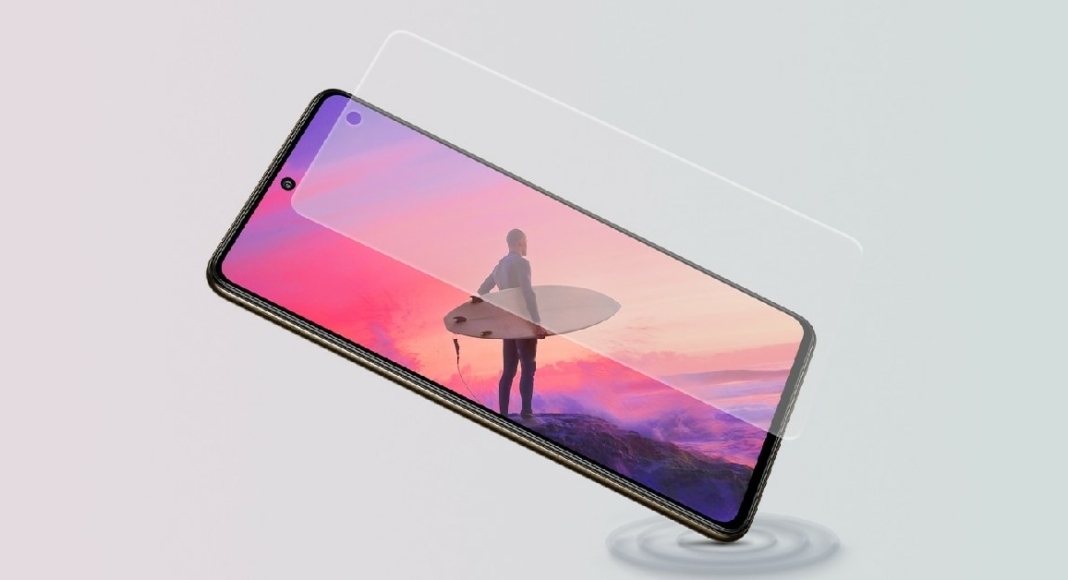 A faulty screen protector can create problems on the touchscreen. Some parts of the screen may become unresponsive. This may lead to Instagram Reels and videos not pausing when you press and hold the touchscreen. Remove the screen protector from your phone and try again.
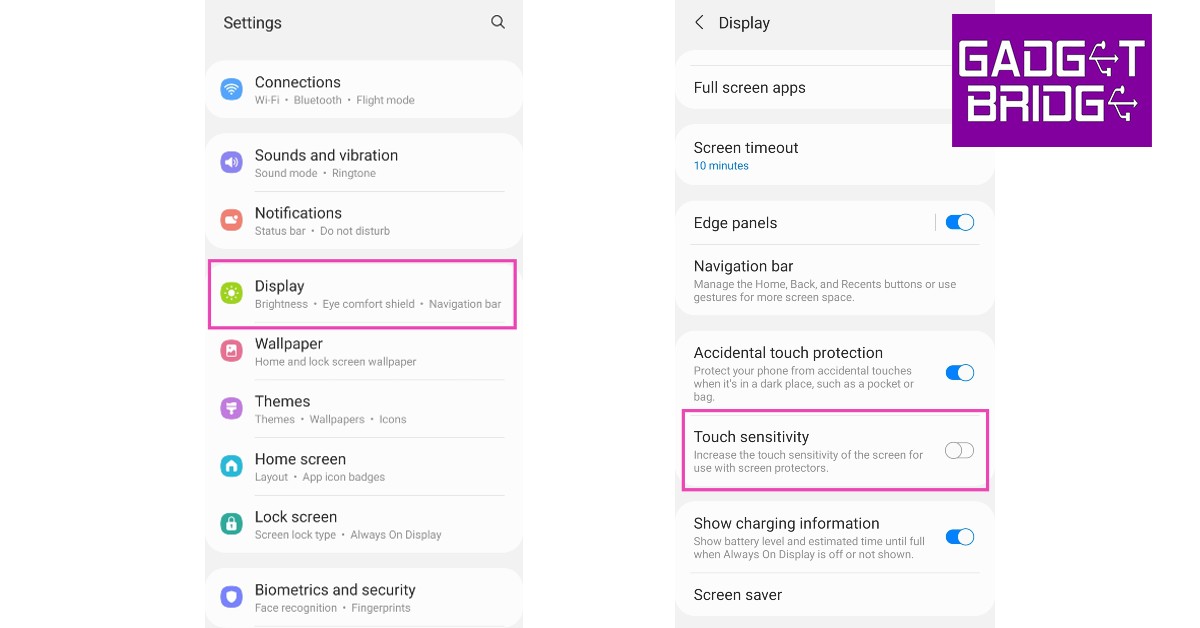 If you don’t want to remove the screen protector, you can simply increase your screen’s touch sensitivity in order to make it work. With heightened sensitivity, your phone’s touchscreen can pick up the faint touches that would otherwise go unnoticed because of the screen protector getting in the way. Go to Settings>Display and switch on the toggle bar for Touch sensitivity.
 Restarting your phone can fix any minor background issues on the OS or any one of the apps. Simply press and hold the side key and volume down key and select ‘Restart’ from the power options. Once your phone has rebooted, launch the Instagram app and check if you are able to pause Reels and videos again.



 The list of games included in the Xbox Game Pass Core is as follows:

 Step 1: Go to Fortnite’s official website on your phone’s web browser.
Step 2: Tap the hamburger menu at the top right corner of the screen and select Sign In.
Step 3: Sign in using your chosen method.
Step 4: Enter your login credentials.
Step 5: Tap the hamburger menu at the top right corner of the screen and select your username.
Step 6: Select Account and scroll down to Account Settings.
Step 7: Tap the pencil icon next to your display name.
Step 8: Type the new display name and then type it again to confirm your choice.
Step 9: Hit Confirm. Your Fortnite display name will be changed.
Step 1: Go to Fortnite’s official website on your phone’s web browser.
Step 2: Tap the hamburger menu at the top right corner of the screen and select Sign In.
Step 3: Sign in using your chosen method.
Step 4: Enter your login credentials.
Step 5: Tap the hamburger menu at the top right corner of the screen and select your username.
Step 6: Select Account and scroll down to Account Settings.
Step 7: Tap the pencil icon next to your display name.
Step 8: Type the new display name and then type it again to confirm your choice.
Step 9: Hit Confirm. Your Fortnite display name will be changed.
 Your Fortnite username is the same as your Xbox Gamertag. To change your name on Fortnite you will need to change your Gamertag. This change will apply to other games as well.
Step 1: Press and hold the Xbox button on your controller.
Step 2: Go to Profile & System and select your Gamertag.
Step 3: Hit My Profile.
Step 4: Select Customise Profile.
Step 5: Scroll down to Choose New Gamertag and type in your new Gamertag.
Step 6: Confirm your new Gamertag.
Your Xbox Gamertag and Fortnite name will be changed.
Your Fortnite username is the same as your Xbox Gamertag. To change your name on Fortnite you will need to change your Gamertag. This change will apply to other games as well.
Step 1: Press and hold the Xbox button on your controller.
Step 2: Go to Profile & System and select your Gamertag.
Step 3: Hit My Profile.
Step 4: Select Customise Profile.
Step 5: Scroll down to Choose New Gamertag and type in your new Gamertag.
Step 6: Confirm your new Gamertag.
Your Xbox Gamertag and Fortnite name will be changed.
 On PlayStation, your Fortnite username is the same as your PSN Name. Changing your PSN Name will change the Fortnite username. This change will be made across all the games in your library.
Step 1: Go to Settings and select Account Management.
Step 2: Select Account Information, then scroll down and select Profile.
Step 3: Select an Online ID. Hit I Accept and Continue.
Step 4: Enter the new Online ID.
Step 5: Hit Confirm.
Your PSN Name and Fortnite name will be changed.
On PlayStation, your Fortnite username is the same as your PSN Name. Changing your PSN Name will change the Fortnite username. This change will be made across all the games in your library.
Step 1: Go to Settings and select Account Management.
Step 2: Select Account Information, then scroll down and select Profile.
Step 3: Select an Online ID. Hit I Accept and Continue.
Step 4: Enter the new Online ID.
Step 5: Hit Confirm.
Your PSN Name and Fortnite name will be changed.


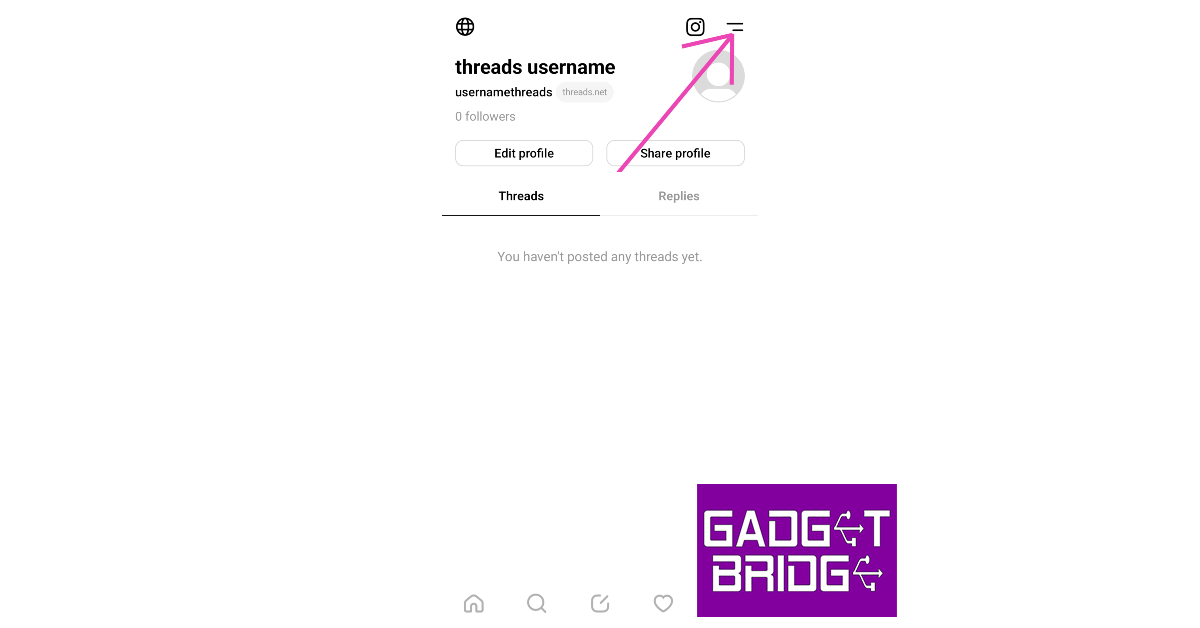
 Step 2: Tap the hamburger menu icon at the top right corner of the screen.
 Step 3: Select Follow and invite friends.
 Step 4: Select Follow accounts from Instagram.
 Step 5: You will be presented with a list of people you follow on Instagram that also have a Threads account. Scroll through this list and follow the people you want.

 Step 3: Tap on See all.
 Step 4: You will be able to see the people you follow on Instagram that also have a Threads account.
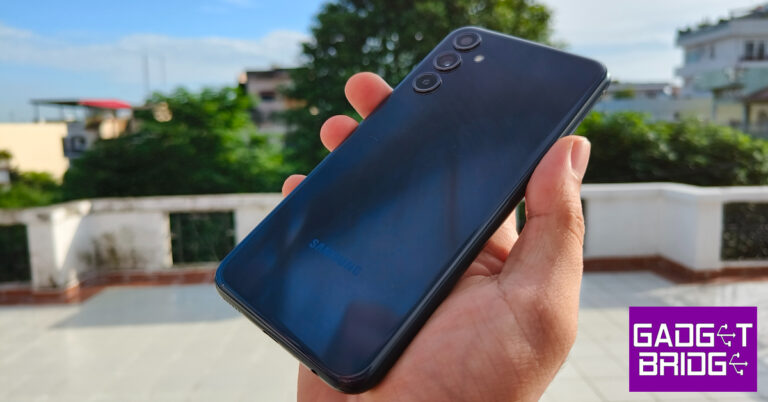
 The Samsung Galaxy M34 retains the all-too-familiar design of the flagship S Series. The plastic back panel horses the vertically arranged triple camera setup. While we like that an affordable smartphone gets the same design as the company’s flagship release, we do miss every smartphone having its own unique personality.
The plastic back of this smartphone attracts fingerprints and smudges very easily. Using this smartphone in the thick of the monsoons when humidity levels are at their highest meant constantly wiping the back to get rid of any unwanted smudges. You can also bypass this problem by slapping a case on the phone. The right edge of the curved frame houses the volume rocker and the side button. The side button also doubles as a fingerprint scanner. The hybrid SIM slot has been positioned on the left side of the frame. At the bottom, you get the 3.5mm headphone jack, a USB Type-C port, a primary microphone, and the speaker grille. The secondary microphone has been placed at the top edge of the frame.
The Samsung Galaxy M34 retains the all-too-familiar design of the flagship S Series. The plastic back panel horses the vertically arranged triple camera setup. While we like that an affordable smartphone gets the same design as the company’s flagship release, we do miss every smartphone having its own unique personality.
The plastic back of this smartphone attracts fingerprints and smudges very easily. Using this smartphone in the thick of the monsoons when humidity levels are at their highest meant constantly wiping the back to get rid of any unwanted smudges. You can also bypass this problem by slapping a case on the phone. The right edge of the curved frame houses the volume rocker and the side button. The side button also doubles as a fingerprint scanner. The hybrid SIM slot has been positioned on the left side of the frame. At the bottom, you get the 3.5mm headphone jack, a USB Type-C port, a primary microphone, and the speaker grille. The secondary microphone has been placed at the top edge of the frame.
 The highlight of this smartphone is its 6.5-inch Super AMOLED display that has a maximum refresh rate of 120Hz. With a peak brightness of 1,000 nits, this display is perfectly legible under direct sunlight. The touch response is phenomenal, something that we’ve come to expect from Samsung smartphones. We’d suggest splurging some extra cash and going for the M34 over the M14 for this display alone.
 We played HD content on the M14 across different OTT services. The quality of images relayed on the screen left no room for complaint. If you’re upgrading from a smartphone with an LCD display, you’ll immediately notice the richness in colour that this display produces along with those deep deep blacks. While this smartphone is great for media consumption, the only thing that keeps it from being ideal is the single-speaker grille. If there’s a loud fan running in the background, you will need to plug in a pair of headphones. The single speaker unit simply isn’t powerful enough to overcome the noisy environment.
 We used the M34 for a range of tasks and it didn’t display any gaping flaws in its performance. The smartphone managed to handle basic tasks like media playback, instant messaging, social media browsing, and more with absolute ease. We ran a dozen apps in the background, and the smartphone did a good job of optimising their usage without affecting the overall performance. We did not experience any lags or jitters in everyday use.
However, the smartphone did get warm and presented a few hiccups while carrying out heavy tasks like video recording and editing, navigation, and rigorous gaming. We played Call of Duty Mobile on this smartphone and were left a bit underwhelmed. Simply put, the Exynos SoC is just not good enough to carry seamless gameplay. Framedrops were a little too common and the experience lacked the ideal level of fluidity. On the Geekbench 6 test, this smartphone got a single-core score of 943 points and a multi-core score of 2,033 points. This isn’t too far from Galaxy M14’s score of 921 and 2,056 points.
We used the M34 for a range of tasks and it didn’t display any gaping flaws in its performance. The smartphone managed to handle basic tasks like media playback, instant messaging, social media browsing, and more with absolute ease. We ran a dozen apps in the background, and the smartphone did a good job of optimising their usage without affecting the overall performance. We did not experience any lags or jitters in everyday use.
However, the smartphone did get warm and presented a few hiccups while carrying out heavy tasks like video recording and editing, navigation, and rigorous gaming. We played Call of Duty Mobile on this smartphone and were left a bit underwhelmed. Simply put, the Exynos SoC is just not good enough to carry seamless gameplay. Framedrops were a little too common and the experience lacked the ideal level of fluidity. On the Geekbench 6 test, this smartphone got a single-core score of 943 points and a multi-core score of 2,033 points. This isn’t too far from Galaxy M14’s score of 921 and 2,056 points.
 While the M34’s performance may have left a little more to be desired, it did not let us down on the OS front. You get the full One UI experience on this smartphone, while its younger sibling, M14, has to settle for the Core version of the OS. Another reason to go for the M34 over the M14. You get special features like Secure folder, Knox security, Bixby routine, Link to Windows, Samsung Health, Samsung Pay, and more on the Galaxy M34.
The 6,000 mAh battery on this device is one of its major selling points. We were easily able to push the battery backup on this smartphone to two days on moderate usage. This even included watching a couple of hour-long episodes on Netflix and twenty-minute gaming sessions. At the end of the second day, we had about 10% charge left. If you cut down on gaming and media consumption, you can easily push this smartphone to the third day. With 25W charging, the M34 takes a little over 90 minutes to charge.
While the M34’s performance may have left a little more to be desired, it did not let us down on the OS front. You get the full One UI experience on this smartphone, while its younger sibling, M14, has to settle for the Core version of the OS. Another reason to go for the M34 over the M14. You get special features like Secure folder, Knox security, Bixby routine, Link to Windows, Samsung Health, Samsung Pay, and more on the Galaxy M34.
The 6,000 mAh battery on this device is one of its major selling points. We were easily able to push the battery backup on this smartphone to two days on moderate usage. This even included watching a couple of hour-long episodes on Netflix and twenty-minute gaming sessions. At the end of the second day, we had about 10% charge left. If you cut down on gaming and media consumption, you can easily push this smartphone to the third day. With 25W charging, the M34 takes a little over 90 minutes to charge.
 We did not have high hopes for the Galaxy M34 when it came to the camera performance. After all, this smartphone is known for its battery. But the results from the 50MP primary camera left us pleasantly surprised.
 The images taken in outdoor conditions had the perfect balance of colour richness and saturation. In some cases, we felt the sky was left underexposed when it formed the background of the image, but overall, we were quite happy with the results. The colours truly ‘popped’ in the images and the level of detail was quite impressive.
 Images taken from the 8MP ultrawide lens are on the softer side, but they still retain the richness in colour. Most smartphones in this price range don’t offer an ultrawide lens at all, so its inclusion in the camera array is good to see. You certainly won’t be ignoring this lens while taking images from the M34.


 Step 4: Click on Allow.
Step 5: Select Start Profile Transfer.
Step 4: Click on Allow.
Step 5: Select Start Profile Transfer.
 Step 6: Choose whether you want to transfer your profile to an existing account or a new account.
 Step 7: Sign in to the account you are transferring to by entering the appropriate credentials.
Step 8: Click on Transfer Profile.
Step 7: Sign in to the account you are transferring to by entering the appropriate credentials.
Step 8: Click on Transfer Profile.
 Your profile will be transferred to the new account.
 Step 6: Select Spoiler.
 Step 7: Hit Send.
 Step 8: The highlighted text will be hidden. To view the hidden text, simply tap on it once.

 Step 2: Select a conversation.
Step 3: Type the message you want to send.
Step 4: Highlight the text you want to hide.
Step 5: Click on the eye icon in the formatting menu.
Step 2: Select a conversation.
Step 3: Type the message you want to send.
Step 4: Highlight the text you want to hide.
Step 5: Click on the eye icon in the formatting menu.
 Step 6: Hit Enter to send your message.
 The highlighted text will be hidden. It can be viewed by clicking on it.

 Step 1: Download the Google Photos APK on your smartphone using a third-party app marketplace.
Step 2: Sideload the app on your Android TV. The easiest way to sideload apps on your Android TV is by using the ‘Send Files to TV’ app.
Step 3: Install the Send Files to TV app on your Android TV and smartphone from Google Play Store.
Step 4: Launch the app on your TV and smartphone. Select Receive on TV and Send on your phone.
Step 5: Send the Google Photos APK from your phone to your TV.
Step 6: Open the APK file on your TV and install it.
Step 7: To access the app, go to Settings and select Apps.
Step 8: Scroll down and select See all apps.
Step 9: Select Google Photos.
Step 1: Download the Google Photos APK on your smartphone using a third-party app marketplace.
Step 2: Sideload the app on your Android TV. The easiest way to sideload apps on your Android TV is by using the ‘Send Files to TV’ app.
Step 3: Install the Send Files to TV app on your Android TV and smartphone from Google Play Store.
Step 4: Launch the app on your TV and smartphone. Select Receive on TV and Send on your phone.
Step 5: Send the Google Photos APK from your phone to your TV.
Step 6: Open the APK file on your TV and install it.
Step 7: To access the app, go to Settings and select Apps.
Step 8: Scroll down and select See all apps.
Step 9: Select Google Photos.

 2. Kraven the Hunter: Seeing Venom’s incredible success Sony is all set to bring another villain Kraven the Hunter from the Spider-Man universe to the big screen. Sony has tried to introduce him before in Marvel movies but it failed. The cast includes Aaron Taylor Jackson as Kraven, Ariana DeBose as Kraven’s love interest, Fred Hechinger, Christopher Abbott etc. The movie will be released in theatres on October 6, 2023.
 3. Aquaman and the Lost Kingdom: Another exciting upcoming movie is the second instalment of Aquaman and the Lost Kingdom. Jason Momoa will be returning as Arthur Curry, the King of Atlantis. The cast includes Amber Heard and Nicola Kidman among others. This superhero film will hit the theatres on December 25, 2023.
 4. El Muerto: Releasing on January 12, 2024, El Muerto will be another rendition of the villain from the Spider-Man universe. Grammy-winning rapper Bad Bunny has been roped in to play the lead role. This movie is about a superpower wrestler who gets his power from a mask passed down by his father and he must fight his oppressor to keep his superpowers alive.
 5. Blue Beetle: DC is all set to bring in a new face in its upcoming movie Blue Beetles. DC’s first Latino superhero will be played by Cobra Kai’s Xolo Marriduena. He will portray the role of Jaime Reyes a youngster who gains superpower after discovering an electric blue beetle inside a takeout box. Blue Beetle is all set to hit the screens on August 18, 2023.
 Bonus suggestion for next year
 Captain America-New World Order: Expected to be released in May 2024 this movie is going to be the fourth edition of Captain America. Directed by Julius Onah, this movie will feature Anthony Mackie as Captain America.
Read Also: YouTube Premium and YouTube Music have gone up
Captain America-New World Order: Expected to be released in May 2024 this movie is going to be the fourth edition of Captain America. Directed by Julius Onah, this movie will feature Anthony Mackie as Captain America.
Read Also: YouTube Premium and YouTube Music have gone up
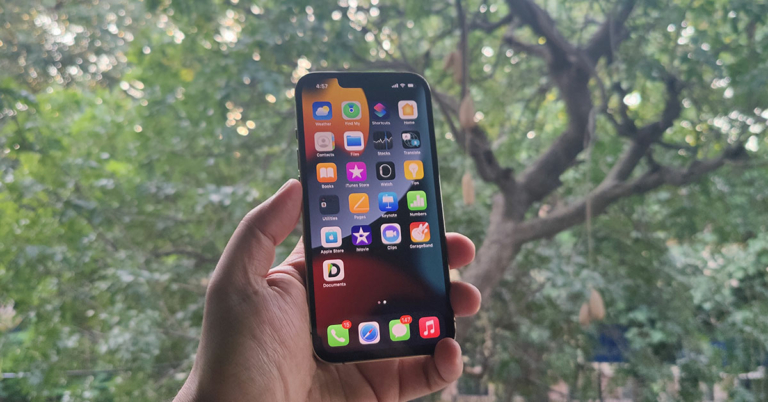
 Your iPhone’s home screen is like the front page of your device. This is where you’ll find all your installed apps and the system widgets. The home screen has different pages that can be accessed using right and left swipes. You can choose to rearrange the apps and even group them together in a folder. You can add new pages to the home screen and dedicate them to a set of apps. Unlike Android, iOS does not have an ‘app drawer’. Instead, it has an App Library, which is always the last page of the home screen. This is where you’ll find all the installed apps on your iPhone. Once you remove an app from the home screen, it can still be accessed from the App Library.
The lock screen is what you’re greeted with when you wake up your iPhone. As the name suggests, the lock screen keeps the contents of your iPhone locked until it is provided with the password, Face ID, or the appropriate fingerprint. While its functionality can be pretty limited, there is a lot of stuff you can do on the lock screen. You can check your phone’s notifications, check the time, play the next song, and play around with other widgets on the lock screen. You can even use your iPhone’s camera directly from the lock screen without unlocking the device. You will be able to take pictures and check out the previews, but the camera app will prevent you from viewing the entire media library until your iPhone has been unlocked.
When you’re customising your iPhone, you can add different wallpapers and widgets to both screens in order to make your device more unique. While settings single wallpaper for the two screens is easy, it can get pretty boring really quickly. Read this article to find out how you can set a different wallpaper for the home screen and lock screen on iOS 16. While customising the lock screen, you should remember to add the widgets that cut down your reliance on the home screen. For example, you don’t always need to unlock your phone to check the weather, battery status, and time. Add these widgets to the lock screen to make things smoother.
Your iPhone’s home screen is like the front page of your device. This is where you’ll find all your installed apps and the system widgets. The home screen has different pages that can be accessed using right and left swipes. You can choose to rearrange the apps and even group them together in a folder. You can add new pages to the home screen and dedicate them to a set of apps. Unlike Android, iOS does not have an ‘app drawer’. Instead, it has an App Library, which is always the last page of the home screen. This is where you’ll find all the installed apps on your iPhone. Once you remove an app from the home screen, it can still be accessed from the App Library.
The lock screen is what you’re greeted with when you wake up your iPhone. As the name suggests, the lock screen keeps the contents of your iPhone locked until it is provided with the password, Face ID, or the appropriate fingerprint. While its functionality can be pretty limited, there is a lot of stuff you can do on the lock screen. You can check your phone’s notifications, check the time, play the next song, and play around with other widgets on the lock screen. You can even use your iPhone’s camera directly from the lock screen without unlocking the device. You will be able to take pictures and check out the previews, but the camera app will prevent you from viewing the entire media library until your iPhone has been unlocked.
When you’re customising your iPhone, you can add different wallpapers and widgets to both screens in order to make your device more unique. While settings single wallpaper for the two screens is easy, it can get pretty boring really quickly. Read this article to find out how you can set a different wallpaper for the home screen and lock screen on iOS 16. While customising the lock screen, you should remember to add the widgets that cut down your reliance on the home screen. For example, you don’t always need to unlock your phone to check the weather, battery status, and time. Add these widgets to the lock screen to make things smoother.





 Step 3: You will be asked to restart your PC. Go through with the request.
 Step 3: Windows will perform a RAM test on your PC. You will be able to see the results when your PC starts up again.
Step 4: If Windows does not automatically load the results, right-click on the Start icon and select Event Viewer.
Step 3: Windows will perform a RAM test on your PC. You will be able to see the results when your PC starts up again.
Step 4: If Windows does not automatically load the results, right-click on the Start icon and select Event Viewer.
 Step 5: Expand the Windows Logs section in the side menu and select System.
 Step 6: Open the MemoryDiagnostic file.
 Windows Performance Monitor is another native tool that can be used to view real-time performance statistics of your PC as well as the overall usage data. You can also use the Resource Monitor from Monitoring Tools to see how the system resources are being used. Here’s how you can access Performance Monitor on your PC.
Step 1: Click the search box on the taskbar and type Performance Monitor. Open the app from the search results.
Step 2: You will be able to view the real-time system summary (memory usage, network usage, disk usage) on the first page itself.
Step 3: Use Reliability Monitor to check the history of critical events.
Step 4: Click on Resource Monitor to check how system resources are being utilised.
Windows Performance Monitor is another native tool that can be used to view real-time performance statistics of your PC as well as the overall usage data. You can also use the Resource Monitor from Monitoring Tools to see how the system resources are being used. Here’s how you can access Performance Monitor on your PC.
Step 1: Click the search box on the taskbar and type Performance Monitor. Open the app from the search results.
Step 2: You will be able to view the real-time system summary (memory usage, network usage, disk usage) on the first page itself.
Step 3: Use Reliability Monitor to check the history of critical events.
Step 4: Click on Resource Monitor to check how system resources are being utilised.
 CrystalDiskInfo’s S.M.A.R.T. test gives you a detailed status report of your PC’s hard drive. SMART stands for Self-Monitoring, Analysis, and Reporting Technology. Using this feature, you can check attributes like read error rate, spin-up time, seek error rate, seek time performance, and more. CrystalDiskInfo also lets you know about the temperature of your PC’s hard drive in real-time
 Step 4: Your laptop’s battery report will be saved to the System32 folder in the C drive. Locate the report and open it.
Step 5: Check the original and current battery capacity under the Installed Batteries section.
Step 4: Your laptop’s battery report will be saved to the System32 folder in the C drive. Locate the report and open it.
Step 5: Check the original and current battery capacity under the Installed Batteries section.


 BGMI 2023 commenced on 20 July 2023 with The Grind. 256 invited teams are competing against one another to be in the Top 64 and will then go to Round 2 and Round 3 of the tournament. The Grind is being broadcasted on Krafton India Esports Youtube channel from July 20, 2023, at 12 pm. Registration for the tournament starts on July 24, 2023, and will end on August 2, 2023.
The registration website will go live on July 24, 2023, and participants are requested to make sure that they are entering the correct details to avoid any elimination in the verification process. A total of 2048 teams will be qualifying for Round 1, who will then play in a group of 16 from Round 1 to Round 6 with qualifying teams proceeding to the next round.
Read Also: Garena Free Fire Redeem Codes Today 21 July 2023: Here is how to claim them
BGMI 2023 commenced on 20 July 2023 with The Grind. 256 invited teams are competing against one another to be in the Top 64 and will then go to Round 2 and Round 3 of the tournament. The Grind is being broadcasted on Krafton India Esports Youtube channel from July 20, 2023, at 12 pm. Registration for the tournament starts on July 24, 2023, and will end on August 2, 2023.
The registration website will go live on July 24, 2023, and participants are requested to make sure that they are entering the correct details to avoid any elimination in the verification process. A total of 2048 teams will be qualifying for Round 1, who will then play in a group of 16 from Round 1 to Round 6 with qualifying teams proceeding to the next round.
Read Also: Garena Free Fire Redeem Codes Today 21 July 2023: Here is how to claim them
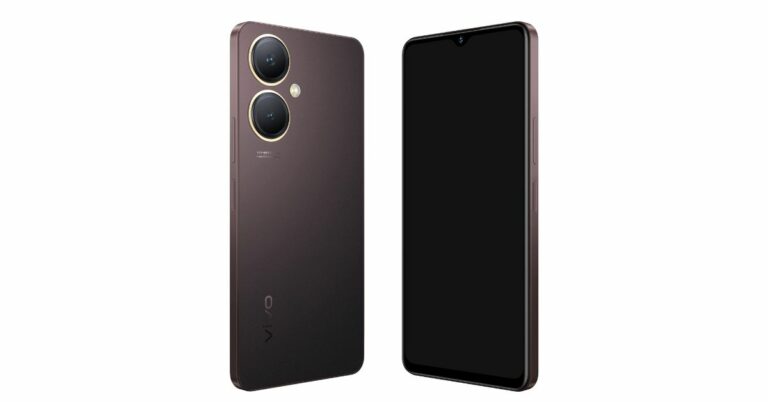


 The chatbot is developed by skilled engineers and is being widely used within the organisation but only for selected employees. This may not be the first instance that Apple will be experimenting with AI. Before this, in 2023 Apple introduced iOS 17 which comes packed with AI-infused elements.
Apple has already incorporated Artificial Intelligence in its devices ranging from FaceTime to the all-new Personal Voice feature in which you train the AI to replicate your voice on iPhone. Apple’s main Artificial Intelligence product Siri was an instant hit when first launched. Later this year, Apple will also be launching the much-awaited Apple Watch which will be having several AI-based health elements. However, Apple has still not joined the AI chatbot race yet.
In a recent interview, Apple’s CEO Tim Cook stated that AI chatbot technology might e having potential but there are several issues that need to be addressed. He also said that Apple will be incorporating AI in its products but that will be done on a very thoughtful basis. Reports suggest that Apple is soon going to launch a new health coaching service that uses Artificial intelligence to personalise plans by collecting data from Apple Watch
Read Also: 7 things to do at home to kill time using technology
The chatbot is developed by skilled engineers and is being widely used within the organisation but only for selected employees. This may not be the first instance that Apple will be experimenting with AI. Before this, in 2023 Apple introduced iOS 17 which comes packed with AI-infused elements.
Apple has already incorporated Artificial Intelligence in its devices ranging from FaceTime to the all-new Personal Voice feature in which you train the AI to replicate your voice on iPhone. Apple’s main Artificial Intelligence product Siri was an instant hit when first launched. Later this year, Apple will also be launching the much-awaited Apple Watch which will be having several AI-based health elements. However, Apple has still not joined the AI chatbot race yet.
In a recent interview, Apple’s CEO Tim Cook stated that AI chatbot technology might e having potential but there are several issues that need to be addressed. He also said that Apple will be incorporating AI in its products but that will be done on a very thoughtful basis. Reports suggest that Apple is soon going to launch a new health coaching service that uses Artificial intelligence to personalise plans by collecting data from Apple Watch
Read Also: 7 things to do at home to kill time using technology

 One of the most powerful phone monitoring apps around, mSpy gives you complete access to an iPhone once it is installed on it. The best part is that it does not require jailbreaking your phone. Through mSpy, you can monitor an iPhone’s call history, texts, social media usage, location history, and more. mSpy also lets you record the target device’s screen. If you can’t access ephemeral messages, simply record the iPhone’s screen when they are being sent.
 Like mSpy, uMobix does not require jailbreak access to work on an iPhone. Once it has been installed on an iPhone, you can use it to view call and message history along with monitoring the social media usage and app activity on the device. uMobix has a couple of unique features that parents will find helpful. The app alerts you whenever the name of a contact is changed on the target device. It also allows you to block any app and restrict access to certain features. If you want to keep tabs on your kids’ smartphone activity, uMobix is a good entry-level app.
 Unlike other apps so far, FlexiSpy only works on iPhones that have been jailbroken. You may be able to use the basic features of the app on regular iPhones, but the advanced features require jailbreak access. Once installed, this app gives you absolute control over an iPhone. Some functions of the app certainly lie in the unethical category, but if the situation absolutely demands it, this app will carry out the task for you. Apart from basic monitoring features, FlexiSpy lets you listen to live calls and trigger the camera or microphone at any given time.
 Cocospy can carry out the basic monitoring tasks that every other spy app can, but it also has the added feature of tracking Discord activity. Most monitoring apps fail to log Discord activity, creating a blind spot for the user. The app goes undetected in the target iPhone and silently does all the work. The only downside is that it requires jailbreak access to work on an iPhone. Prices for Cocospy start at $10.83 per month.
 Spyic does not require a jailbreak to work on an iPhone. The app has a very helpful geofencing feature, which lets you know when the target device has entered a restricted area. You can also program this feature to carry out certain tasks whenever the device reaches the marked area. Apart from that, Spyic carries out all the important monitoring tasks. You can view the messages, social media activity, call history of the user, and more with absolute ease. Prices for Spyic start at $9.99 per month.
Read Also: 7 things to do at home to kill time using technology
Spyic does not require a jailbreak to work on an iPhone. The app has a very helpful geofencing feature, which lets you know when the target device has entered a restricted area. You can also program this feature to carry out certain tasks whenever the device reaches the marked area. Apart from that, Spyic carries out all the important monitoring tasks. You can view the messages, social media activity, call history of the user, and more with absolute ease. Prices for Spyic start at $9.99 per month.
Read Also: 7 things to do at home to kill time using technology

 Google believes that this tech tool will responsibly help steer the publishing industry away from the pitfalls of generative AI. The company also thought it could act as a sort of personal assistant for journalists, automating some tasks to free up time for others.
Google has spoken with a number of publications, including The New York Times, The Washington Post and News Corp, which owns The Wall Street Journal. As per the report by NY Times, a few company executives who looked at Google’s offer described it as alarming, asking not to be identified discussing a confidential matter. While two people said it seemed to take for granted the effort that went into producing accurate and artful news stories.
Google’s spokeswoman Jenn Crider stated, “in partnership with news publishers, especially smaller publishers, we’re in the earliest stages of exploring ideas to potentially provide A.I.-enabled tools to help their journalists with their work.”
She further added, “Quite simply, these tools are not intended to, and cannot, replace the essential role journalists have in reporting, creating and fact-checking their articles.” On the contrary, they might offer alternatives for headlines and other writing ese.
While some organisations are already using AI to generate news stories, Google’s new AI tool for creating new articles will probably raise concerns because articles produced by AI that haven’t been meticulously fact-checked or corrected have the potential for spreading false information. Also, it will be difficult for readers to distinguish between content created by humans and AI tech.
For the latest gadget and tech news, and gadget reviews, follow us on Twitter, Facebook and Instagram. For newest tech & gadget videos subscribe to our YouTube Channel. You can also stay up to date using the Gadget Bridge Android App. You can find the latest car and bike news here.
Google believes that this tech tool will responsibly help steer the publishing industry away from the pitfalls of generative AI. The company also thought it could act as a sort of personal assistant for journalists, automating some tasks to free up time for others.
Google has spoken with a number of publications, including The New York Times, The Washington Post and News Corp, which owns The Wall Street Journal. As per the report by NY Times, a few company executives who looked at Google’s offer described it as alarming, asking not to be identified discussing a confidential matter. While two people said it seemed to take for granted the effort that went into producing accurate and artful news stories.
Google’s spokeswoman Jenn Crider stated, “in partnership with news publishers, especially smaller publishers, we’re in the earliest stages of exploring ideas to potentially provide A.I.-enabled tools to help their journalists with their work.”
She further added, “Quite simply, these tools are not intended to, and cannot, replace the essential role journalists have in reporting, creating and fact-checking their articles.” On the contrary, they might offer alternatives for headlines and other writing ese.
While some organisations are already using AI to generate news stories, Google’s new AI tool for creating new articles will probably raise concerns because articles produced by AI that haven’t been meticulously fact-checked or corrected have the potential for spreading false information. Also, it will be difficult for readers to distinguish between content created by humans and AI tech.
For the latest gadget and tech news, and gadget reviews, follow us on Twitter, Facebook and Instagram. For newest tech & gadget videos subscribe to our YouTube Channel. You can also stay up to date using the Gadget Bridge Android App. You can find the latest car and bike news here.  Google believes that this tech tool will responsibly help steer the publishing industry away from the pitfalls of generative AI. The company also thought it could act as a sort of personal assistant for journalists, automating some tasks to free up time for others.
Google has spoken with a number of publications, including The New York Times, The Washington Post and News Corp, which owns The Wall Street Journal. As per the report by NY Times, a few company executives who looked at Google’s offer described it as alarming, asking not to be identified discussing a confidential matter. While two people said it seemed to take for granted the effort that went into producing accurate and artful news stories.
Google’s spokeswoman Jenn Crider stated, “in partnership with news publishers, especially smaller publishers, we’re in the earliest stages of exploring ideas to potentially provide A.I.-enabled tools to help their journalists with their work.”
She further added, “Quite simply, these tools are not intended to, and cannot, replace the essential role journalists have in reporting, creating and fact-checking their articles.” On the contrary, they might offer alternatives for headlines and other writing ese.
While some organisations are already using AI to generate news stories, Google’s new AI tool for creating new articles will probably raise concerns because articles produced by AI that haven’t been meticulously fact-checked or corrected have the potential for spreading false information. Also, it will be difficult for readers to distinguish between content created by humans and AI tech.
For the latest gadget and tech news, and gadget reviews, follow us on Twitter, Facebook and Instagram. For newest tech & gadget videos subscribe to our YouTube Channel. You can also stay up to date using the Gadget Bridge Android App. You can find the latest car and bike news here.
Google believes that this tech tool will responsibly help steer the publishing industry away from the pitfalls of generative AI. The company also thought it could act as a sort of personal assistant for journalists, automating some tasks to free up time for others.
Google has spoken with a number of publications, including The New York Times, The Washington Post and News Corp, which owns The Wall Street Journal. As per the report by NY Times, a few company executives who looked at Google’s offer described it as alarming, asking not to be identified discussing a confidential matter. While two people said it seemed to take for granted the effort that went into producing accurate and artful news stories.
Google’s spokeswoman Jenn Crider stated, “in partnership with news publishers, especially smaller publishers, we’re in the earliest stages of exploring ideas to potentially provide A.I.-enabled tools to help their journalists with their work.”
She further added, “Quite simply, these tools are not intended to, and cannot, replace the essential role journalists have in reporting, creating and fact-checking their articles.” On the contrary, they might offer alternatives for headlines and other writing ese.
While some organisations are already using AI to generate news stories, Google’s new AI tool for creating new articles will probably raise concerns because articles produced by AI that haven’t been meticulously fact-checked or corrected have the potential for spreading false information. Also, it will be difficult for readers to distinguish between content created by humans and AI tech.
For the latest gadget and tech news, and gadget reviews, follow us on Twitter, Facebook and Instagram. For newest tech & gadget videos subscribe to our YouTube Channel. You can also stay up to date using the Gadget Bridge Android App. You can find the latest car and bike news here.