In a new development of India’s leading esports and game streaming platform and esports platform, Loco today announced its partnership with the tech giant Logitech G to host India’s largest PC tournament that is said to deliver unrivaled entertainment to the strong PC gaming ecosystem in the country. The tournament will see skilled PC gamers competing across four of the most popular and exciting PC games – Valorant, CS: GO, Rainbow 6 Siege, and DOTA2. Commenting on the partnership, Dhiraj Soni, Head of marketing and gaming category, Logitech India said, “Logitech G has been constantly innovating for the vibrant and young community of gamers to have an immersive and seamless gaming experience. We carry a legacy when it comes to gaming peripherals and we are thrilled to partner with Loco to reach out to the gaming community through the esports tournament.” He further added, “We have been contributing significantly towards building a robust gaming ecosystem. We have a wide portfolio of products, enabling first-time gamers with G102 mouse and G213 keyboard, enhancing performance for gaming enthusiasts with G502 mouse series and G733 wireless headsets, and appealing to pro gamers with the highly successful GProX headset.” Both Loco and Logitech G have teamed up to host one of India’s largest PC gaming tournaments. With the announcement, both the brands aim to provide a seamless streaming experience for players and viewers across the globe. The most popular PC games are organised by Loco to create an enhanced experience with Logitech G’s gaming accessories. The esports tournament is going to seePC gamers competing across games like Valorant, CS: GO, Rainbow 6 Siege, and DOTA2.This partnership will help create a unique value proposition for both the brands, showcasing Logitech G’s gaming peripherals/ gear/ accessories, as premium products along with Loco hosting an undoubted seamless streaming experience for players and viewers. This is not the first time that Pocket Aces Loco has collaborated with a hardware Giant like Logitech. The company has also teamed with India’s top competitive gamers and streamers such as Jonathan, Ghatak, IND Snax, and Xyaa, who, along with top teams like Fnatic, IND, 8bit, and Team Tamilas among others. Also Loco has strengthened its position in the constantly growing gaming ecosystem, which comprises over 300 million gamers and is estimated to be worth USD 1 billion by 2021.To recall in September 2020 it hosted a five-month-long tournament that received a good response with over 96 gaming teams including A-lister teams and pro players competing for top honors. Live-streamed on the Loco app, viewers can follow their favourite players, and see first-hand how Logitech G products can improve their play, apart from learning a new skill set to better their game.
For the latest gadget and tech news, and gadget reviews, follow us on Twitter, Facebook and Instagram. For newest tech & gadget videos subscribe to our YouTube Channel. You can also stay up to date using the Gadget Bridge Android App.
The South Korean smartphone company, Samsung, has announced Samsung Days Sale in India. The sale has gone live on the company’s official online store and will run until February 15. During the sale, the company will be offering discounts on select Galaxy smartphones and tablets for consumers looking to celebrate Valentine’s Day. The e-retailer has also listed offers, discounts, as well as no-cost EMI options.Samsung is hosting a four days sale across Samsung.com, e-commerce portals and leading retail outlets. It will be offering exclusive offers and discounts on select Galaxy smartphones and tablets for consumers looking to celebrate Valentine’s Day. These offers will be valid from February 9 to February 15. We have listed down some devices that are offered at discounted prices or you here.The exclusive discounts and offers will be applicable to popular smartphones including Galaxy Note 10 Lite, Galaxy S10 Lite, Galaxy A71, Galaxy A51, Galaxy A31, Galaxy A21s, Galaxy M51, Galaxy M31s, Galaxy M31, Galaxy M21, Galaxy F41 and Galaxy M11. The company will be offering flat 10% bank cashback to buyers on the purchase of the smartphones. The offers will be applicable on all credit card transactions. For debit cards, the offers will be valid on EMI transactions using debit cards of ICICI Bank (on Samsung.com and all offline channels) and Kotak Bank (all channels).In addition to this during the Samsung Days Sale, one can also avail offers on Samsung Tablets. The buyers can save up to Rs 10,000 on the purchase of Galaxy Tabs during the four days sale. As per the company, there will be attractive cashback offers on HDFC Bank debit and credit cards. In addition to this, customers can get additional benefits of up to INR 10000 through ecosystem bundle offers.On the purchase of Samsung Galaxy Tab S7+ and Galaxy Tab S7 there will be up to Rs 10,000 and Rs 9,000 cashback to HDFC bank customers. Furthermore, there will be Rs 10,000 off on the Keyboard cover and Rs 7,000 off on Galaxy Buds when purchased with the S7 series Tabs.There will be up to Rs 3,000 and Rs 2,000 bank cashback to Tab S6 Lite and Tab A7 respectively. In addition to Rs 3500 off on Book cover or Rs 7,000 off on Galaxy Buds when bought with both the tabs.
For the latest gadget and tech news, and gadget reviews, follow us on Twitter, Facebook and Instagram. For newest tech & gadget videos subscribe to our YouTube Channel. You can also stay up to date using the Gadget Bridge Android App.
There are thousands of Android Camera apps available on the Play Store. These Camera apps enhance the quality of your photographs and selfies that the stock camera of your smartphone may not offer. You don’t need expensive apps to make your photographs look perfect. The following are the best free camera apps for Android smartphones that will take your photographs and selfies to a new level.
In This Article
Google Camera
If you’re engrossed in finding the most fascinating features that Google wants to include in Android photography, you must choose the Google Camera app. It lets you click sharp pictures improved with a variety of modes such as HDR+, Night Sight, and Super Res Zoom. You can also find some Google-exclusive functionalities like lens support for photo-enabled searches and effects.
Google Camera
Camera MX
Camera MX is a freely available point-and-shoot camera app that offers you extra features like special effects and photo-editing tools. The camera dashboard is loaded with focus-on-tap, zoom, timer, and FX along with filters, overlays, and frames. You get filters and effects that can be previewed and applied on the go to the pictures and video shots. For advanced enhancements, you can go to the editing tools section for correcting white balance, contrast, and straightening the image.
Camera MX
Candy Camera
Candy Camera has been one of the most popular Android camera apps for taking selfies. Candy Camera is comes loaded with a lot of filters and features to enhance your photographs like makeup tools, face slimming effects, and stickers. Candy Camera goes one step ahead and allows you to make a collage of multiple photos, selfies, and snapshots you take. The app is available on the Play Store for free but contains ads.
Candy Camera
Camera360
Camera360 is one of the most preferred Android camera apps offering you some of the pro-photography features. The app allows you to integrate the filters directly into the photographs while capturing them. It offers a variety of shot modes, tools, and settings for enhancing your photographs including tilt-shift blurs. Camera360 has got some advanced functionalities like an in-house photo editor, in-app photo gallery, and motion stickers. However, the app does not have a very user-friendly interface so initially, you may struggle to navigate features.
Camera360
Cymera Camera
Cymera is one of the most popular Android camera apps offering a variety of features like camera lenses, camera stabilizer, timer, and a silent mode. Just like Candy Camera, it is loaded with all the filters to take your selfies to the next level. Moreover, the app comes with advanced features like an in-built photo editor, auto-focus on tap, zoom-on-pinch. You can also tweak the shot settings like anti-shake, a shot timer, and touch shooting. The transformation tools for post-editing really makes this app stand out of the crowd.
Cymera Camera
For the latest gadget and tech news, and gadget reviews, follow us on Twitter, Facebook and Instagram. For newest tech & gadget videos subscribe to our YouTube Channel. You can also stay up to date with the Gadget Bridge Android App.
The e-commerce platform is back with another new quiz on its platform. The Amazon Quiz can be played daily on the mobile app that goes live via the mobile app. All you need to do is answer all the questions correctly and win free products and goodies such as gadgets and Amazon Pay Balance up to Rs 50,000, today you have a chance to win Rs 20,000 Amazon Pay Balance.
February 10 Amazon Quiz has gone live and a new set of questions have also been updated. The daily quiz on the Amazon app has become the hottest topic as it gives a chance to win exciting free gifts. In today’s Amazon quiz you have a chance to win Rs 20,000 Amazon Pay Balance. The quiz contains only five questions that are based on current affairs and general knowledge. Answering all the questions correctly will get your name selected for a lucky draw. Only one person will be selected as the winner and the results are announced at the end of every month. The lucky ones might win something by answering all the questions correctly, and the wrong answers will get you eliminated from the quiz. To participate and win check out today’s answers of the Amazon Quiz.
February 10 Amazon Quiz Answers
Question 1: In January 2021, India sent its 40th scientific expedition to which destination?
The answer is- Antarctica
Question 2: Buta Singh, who recently passed away, held which of these posts in the Union Cabinet from 1986- 1989?
The answer is- Minister of Home Affairs
Question 3: In December 2020, Zhong Shanshan became Asia’s ______ man?
The answer is- Richest
Question 4: Name this genus of herbivorous lizards that are native to the tropical areas of Mexico.
The answer is- Iguana
Question 5: Which popular Italian astronomer’s statue is this?
The answer is- Galileo Galilei
For the latest gadget and tech news, and gadget reviews, follow us on Twitter, Facebook and Instagram. For newest tech & gadget videos subscribe to our YouTube Channel. You can also stay up to date using the Gadget Bridge Android App.
The e-commerce website Flipkart is hosting Daily Trivia Quiz. Every day it brings a bunch of new questions for its users. By answering them correctly you can win exciting prizes. The questionnaire is based on questions related to general knowledge. Also, the users can win free vouchers and super coins, among other offers via the daily quiz. February 10 Flipkart Daily Trivia Quiz Answers has already gone live on its platform.
The participant should be at least 18 years old and should have a valid login ID. The Quiz is available on the mobile platform and not the web version. E-commerce conducts the quiz on daily basis and goes live at 12:00 AM IST and runs till 11:59 PM IST. The winners are announced within 15 days from the date of participation that can be viewed under the Gems/Rewards section in the app.
In This Article
How to participate in the Flipkart Daily Trivia Quiz
To participate download the Flipkart app on your phone. Then open the Flipkart app then head to Game Zone. Now click on the Daily Trivia Banner or search for Daily Trivia. Enter the game and answer all 5 questions with correct answers.
February 10 Flipkart Daily Trivia Quiz Answers
Question 1: Which football club contests the Kolkata Derby with long-time rival East Bengal?
Answer: Mohun Bagan
Question 2: Who gives the points for the fair play award in the IPL?
Answer: Umpires
Question 3: Who is the first Indian woman to win an Olympic medal?
Answer: Karnam Malleswari
Question 4: Which swimmer from West Bengal was the first Indian to cross the English Channel
Answer: Mihir Sen
Question 5: Which Australian bowler gave the nickname Jinx to cricketer Ajinkya Rahane?
Answer: Shane Warne
Transsion group holdings brand Infinix is now teasing its new smartphone in India. Infinix Smart 5 has now been listed on Flipkart and is slated to launch in the country on February 11. The device is the successor of Infinix Smart 4 that was launched in the Indian market last year. As per Flipkart’s landing page, the upcoming smartphone will have a 6.82-inch notch display. There will be dual rear cameras for photography. To recall the smartphone has already made its global debut in August 2020. Infinix Smart 5 is confirmed to launch in India on February 11. The company has announced the arrival of its latest mobile phone via Flipkart. As per the dedicated landing page of the smartphone, the will make its debut at 12 noon. To recall Infinix Smart 5 was launched globally in August 2020. In Nigeria, the device was introduced in two different variants 3GB and 2GB RAM option priced at NGN 39,500 that translates to Rs 7,800. The phone comes in three colour options – Ice Blue, Midnight Black, and Quetzal Cyan.
Infinix Smart 5 specifications
Speaking of the specification the Indian variant of the Infinix Smart 5 might come with few changes to the global variant. In India, the device is said to have a bigger 6.82-inch HD+ display along with a notch for the selfie camera. The phone runs on Android 10 (Go edition) with XOS 6 on topMoreover, it will feature a dual-rear camera setup whereas the global variant, setup includes a 13-megapixel primary sensor with two QVGA sensors. While on the front there is an 8-megapixel sensor. In addition to this, there will be a 6,000mAh battery with support for 10W charging. Under the hood, there is an unnamed 1.8GHz processor with 3GB of RAM. The Infinix smartphone is supposed to have Wi-Fi, 4G, GPS, Bluetooth, 3.5mm headphone jack, and a Micro-USB port as connectivity options. The sensor onboard to includes an ambient light sensor, proximity sensor, and a fingerprint scanner.On the other hand the global variant there is a smaller 6.6-inch IPS display with 720×1,600 pixels of resolution. There is a triple rear camera setup that includes a 13-megapixel primary sensor with two QVGA sensors. Moreover, it has a 5,000mAh battery with support for 10W charging.
For the latest gadget and tech news, and gadget reviews, follow us on Twitter, Facebook and Instagram. For newest tech & gadget videos subscribe to our YouTube Channel. You can also stay up to date using the Gadget Bridge Android App.
Whether you are a professional movie-maker or a beginner YouTuber, at some point in time you feel the need for stock videos to elevate the quality of your project. Videos come under the category of the intellectual property thus you can’t easily get them without paying the royalty. The following list presents the best websites from where you can download royalty-free websites.
In This Article
1) Pixabay
Pixabay offers a huge collection of over 1.2 million stock videos. All these videos are available under the Creative Commons Zero (CC0) License. Thus, even if you use the content for commercial purposes, you will not require any permission. In Pixabay, you can find HD stock videos ranging from 12-seconds to a minute-long.
Pixabay
2) Pexels
Pexels originally began as a photo library but now it has accumulated a lot of free HD stock videos. All videos that you find on Pexels have enough pixel resolution to look great on HD and 4K screens. Their collection also comes under the Creative Commons Zero (CC0) license. Thus, you can modify and use the content for personal and commercial purposes without demanding permission.
Pexels
3) Videvo
Videvo offers a library of free stock videos created by their community of users spread across the globe. The video clips that you find on Videvo are licensed either through the Videvo Standard License or the Creative Commons (CCO) license. You can find the information related to licensing on the download page.
Life of Vids
4) Life of Vids
Life of Vids is a compilation of free stock videos, clips, and loops. The good thing about this website is that there are no copyright restrictions on the videos whereas redistribution on other websites is limited to only 10 videos. You can download high-quality videos simply by clicking on the Vimeo icon located at the bottom-right corner of the player.
Life of Vids
5) Splitshire
Splitshire offers a wide range of videos that are primarily shot using drones. The collection consists of videos of outdoor scenes, DIY, and space that you can download by clicking on the title under each video. You can freely use the content in your social media posts and YouTube channel. However, you can’t use them in your projects dealing with inappropriate topics like violence and racism.
Splitshire
6) Distill
Distill is a free collection of highly curated HD videos and stock footage that you can download just by entering your email address. You need to note that every 10 days, you get only 10 free videos that are sent to your inbox. The quality that you get on this website is comparable to that of the cinematic videos that will enhance as the video clips are selected by a team of professionals.
Distill
7) Stock Footage 4 Free
Stock Footage 4 Free offers you a diverse range of videos and footage that you can post on your social accounts. The website adds new videos every day. You just need to sign up to get access to the videos available on the portal. All the videos that you find on Stock Footage 4 Free are royalty-free, so you will not be charged for using them.
Stock Footage 4 Free
8) Videezy
Videezy has a giant collection of royalty-free videos that you can use for personal as well as commercial use. Although you will never be asked to credit the website, you can still buy credits to use the videos without attribution. Videezy offers a wide variety of high-quality content including HD and 4K. The website labels some of the premium videos as ‘Pro’ that are only available when you credit the website.
Videezy
9) Coverr
Coverr is another free stock video website that offers handpicked videos at absolutely no cost. The website is quite straight-forward and simple to use. You just need to click on the desired video to get it secured into your webpage. It does not demand any fees, sign-up formality, or any attribution. The platform gives you a decent collection of aerial, time-lapse, and cinematic videos for your projects.
Coverr
10) Vidsplay
Vidsplay is a website that adds new videos on a weekly basis making it a perfect resource for keeping yourself updated with the latest content. The best part is that you can download the videos and use any of them without paying any royalty. To download a video, you just need to right-click the download link followed by choosing the ‘Save Link As option.
Vidsplay
For the latest gadget and tech news, and gadget reviews, follow us on Twitter, Facebook and Instagram. For newest tech & gadget videos subscribe to our YouTube Channel. You can also stay up to date with the Gadget Bridge Android App.
Royalty-free soundtracks nowadays are in great demand. Thousands of YouTube and film creators need audio clips to mix them into their videos. Music producers who have recently begun their journey require pieces of music to add them to their songs. So, if you are or want to be one among them, you don’t need to be apprehensive about getting royalty-free music. The following are the best websites to download license-free soundtracks for your projects.
In This Article
1) YouTube Audio Library
In the YouTube Audio Library, you can get royalty-free music and audio effects to mix in your videos. You can find the audio library exclusively in the YouTube Studio of your channel. You can find a track just by entering the name of the artist, or keyword in the search bar.
YouTube Audio Library
2) SoundCloud
Soundcloud provides an awesome collection of background music for videos. Most of the tracks on SoundCloud are licensed under Creative Commons, so you can freely use them as long as you obey the guidelines placed by the artist. The website may require work upfront to utilize the search feature, but once you get used to it, you’ll discover an enormous collection of music from artists globally.
SoundCloud
3) Facebook Sounds Collection
The Facebook sound collection comes under the Creator Studio. It has a striking resemblance with the YouTube audio library. The website provides a range of soundtracks from established artists and songwriters. You can e explore a collection of songs, vocals, and instrumental tracks of different genres like hip hop, pop, jazz, and country.
Facebook Sounds Collection
4) Storyblocks
Storyblocks offers a huge collection of royalty-free music for your videos or podcast projects. You can create more with infinite stock soundtrack downloads. Whether you’re looking for a pop song to set a tone or upbeat EDM music to add energy and inspire, Storyblocks has got them all. Most of the soundtracks on Storyblocks are free to download. However, there are also premium soundtracks that you can unlock with a subscription.
Storyblocks
5) Wave.video
Wave.video is a huge audio library where you can get more than 300,000 royalty-free sound clips. These audio tracks come from premium as well as free providers. The unique thing about Wave.video is that you can freely preview each royalty-free soundtrack along with your video. It also allows you to cut, mix, and edit them right in your web browser.
Wave.video
6) Free Music Archive
Free Music Archive is one of the most diverse websites for finding highly curated soundtracks and audio effects for all types of video content. They also have a dedicated ‘Spoken Word’ genre. All the soundtracks are legal to use in diverse situations. FMA provides around 1,500 public domain tracks that are licensed for commercial use and thousands of audio clips under Creative Commons for marketers and creators.
Free Music Archive
7) Audiojungle
Audiojungle, also known as Envato Market, has an international community of artists and sound engineers that manage the stock of the best music in all genres. It is a website where you can find royalty-free music that you can use to customize your music to your taste. Be careful, some of them do require you to buy or credit the author.
Audiojungle
8) Bensound
Bensound offers a great compilation of royalty-free soundtracks from diverse collections including cinematic, folk, and EDM. The website operates under the Creative Commons license, so you can use the music your YouTube videos and Facebook posts. But to download the soundtracks, you will have to credit Bensound. The website is free with attribution, but you can get 1-year unlimited downloads for $129.
Bensound
9) ccMixter
ccMixter is one of the most reliable websites for exploring license-free soundtracks. Unlike other websites that are run by single artists, ccMixter is a website maintained by a community taking contributions from several artists around the globe. It offers thousands of royalty-free audio-tracks for commercial use under Creative Commons.
ccMixter
10) IncompeTech
IncompeTech is an artist-run website offering an enormous library of free music in all genres. All the soundtracks that you’ll get on IncompeTech are produced and uploaded by Kevin MacLeod. With attribution, you can download music for a variety of projects free of cost.
IncompeTech
For the latest gadget and tech news, and gadget reviews, follow us on Twitter, Facebook and Instagram. For newest tech & gadget videos subscribe to our YouTube Channel. You can also stay up to date with the Gadget Bridge Android App.
Android 11 operating system looks and feels much like Android 10. So, at first glance, you ignore the new features it comes with. You might not notice the intricate differences when you first boot it up. Well yes, Android 11 does have a lot of good hidden features, which will help you in your daily life. This guide will let you know about the unique features of Android 11 that make this operating system the best yet. Read on to know more.
In This Article
1) Built-in screen recording
Until Android 11 was released, recording the screen on Android smartphones had been a bit complex, demanding you to use third-party applications that are often malicious. Now on Android 11, you can record content on your device like audio and video without the use of a third-party app. This can be accessed formed the drop-down navigation menu found on most Android smartphones.
2) Quick access to smart devices
A person who uses multiple smart devices sometimes feels terrible to manage them all. Now, you can access controls over all your smart devices using the power button menu. When you long-press the power button, you’ll get the controls for all the smart devices including lights, locks, and thermostats.
3) Permissions need not be forever
Android 10 and older operating systems allowed their users to limit location access to be functional only while using the app. Android 11 lets you give the applications one-time permission to some features like your camera or microphone. Moreover, Google will automatically reset the permissions given to an app if you don’t use it for a long time.
4)Pin ‘n’ Share
If you have a habit of keeping a lot of apps, you might need to scroll through an array of options before you can reach the one you want to share. With Android 11, this process becomes simple as it allows you to pin your favorite sharing apps to the face of the pack. This will save you time that you can invest in other tasks.
5) Revamped media controls
Android 11 offers enhanced media controls that are much less interfering than previous versions. You can now find the media controls in the Quick Settings bar having the title of what you’re playing, play/pause, previous and next track options.
6) Dark theme scheduling
Android 11 users can schedule the dark theme utilising one of two different methods. The first way is to schedule it to turn on or off when the sun rises or sets. You can also establish the desired schedule for dark mode activation.
7) Android 11 updates via Play Store
Android 11 provides more flexibility when it comes to updates on the Google Play Store. This is a very useful feature as it will keep your phone updated and safe even if the Original Equipment Manufacturer (OEM) has discontinued the phone.
8) Conversations and Bubbles
Android 11 comes with a feature by which the conversations with people are represented at the top of the notification bar. This keeps them aloof from other kinds of notifications like news and shopping. The conversations can also be converted into Bubbles that appear as floating circular buttons that get enlarged or minimized into a floating box when tapped.
9) Emoji
Android 11 comes with new 117 emojis that include Smiling Face with Tear, Ninja, Disguised Face, anatomically correct Heart and Lungs, and Bubble Tea. Apart from new emojis, Google has also re-designed a majority of the existing emojis. The existing symbols now appear along with shading and outlines.
10) Notification history
This new feature in Android 11 offers you the option of saving all the notifications that you received over the past 24 hours. You can also check the list and search for the notification you unintentionally removed. However, this feature is not enabled by default. You will need to go through the following steps to activate it.
Settings > Apps & notifications > Notifications > Notification history.
For the latest gadget and tech news, and gadget reviews, follow us on Twitter, Facebook and Instagram. For newest tech & gadget videos subscribe to our YouTube Channel. You can also stay up to date with the Gadget Bridge Android App.
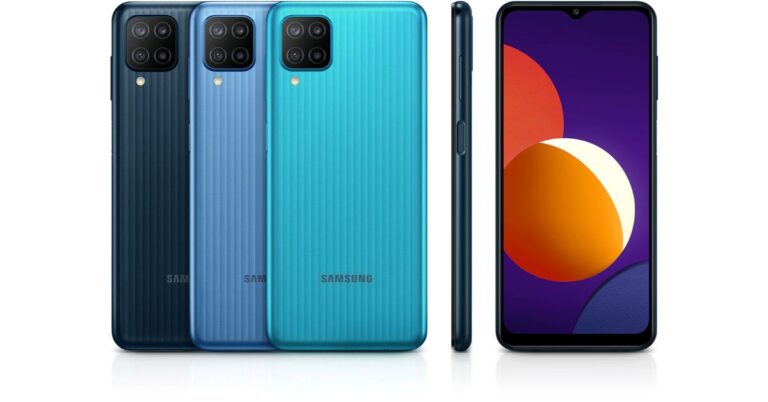
The South Korean company Samsung will soon launch a new budget smartphone in India. As per a tipster, Samsung Galaxy A12 is tipped to launch in the country by next week. To recall the device has already been announced in the European market last year and will soon make its way to the Indian market. Reportedly last month it also appeared on the Bureau of Indian Standards (BIS) certification website indicating the launch. Additionally, the launch date has also been tipped by a publisher citing information from tipster Ishan Agarwal.As per the popular tipster, Ishan Agarwal Samsung will launch Galaxy A12 in India by next week. The phone also received Bureau of Indian Standards (BIS) certification last month hinting at the launch however the company has not yet confirmed anything on the launch but is expected to start teasing its arrival in the country very soon.To recall the mid-ranger has already made its debut in the European market which is a base 3GB with 32GB storage variant and the 4GB with 6GB variant priced at EUR 179 that translates to Rs 15,800 while the 4GB RAM and 64GB storage and 6GB with 128GB is priced at EUR 189 and EUR 199 that translates to Rs 16,700 and 17,500 respectively.Samsung Galaxy A12 tech specificationsSamsung Galaxy A12 comes with a 6.5-inch HD+ TFT display. Under the hood, there is an octa-core MediaTek Helio P35 SoC paired with up to 6GB of RAM and up to 128GB of storage. The internal storage can be expanded up to 1TB using a microSD card.For optics, there is a quad rear camera setup on the Samsung Galaxy A12 that includes a 48-megapixel primary sensor with f/2.0 aperture. In addition to this, there is a 5-megapixel ultra-wide-angle lens with f/2.2 aperture, a 2-megapixel macro lens with f/2.4 aperture and lastly a 2-megapixel depth sensor with an f/2.4 aperture. Upfront there is an 8-megapixel selfie sensor with an f/2.2 aperture.The upcoming smartphone by Samsung will come with a 5,000mAh battery with 15W fast-charging via a USB Type-C port. For connectivity, there is LTE, Wi-Fi, Bluetooth, GPS, and a 3.5mm headphone jack. There is a side-mounted fingerprint scanner that also doubles as the power button.
For the latest gadget and tech news, and gadget reviews, follow us on Twitter, Facebook and Instagram. For newest tech & gadget videos subscribe to our YouTube Channel. You can also stay up to date using the Gadget Bridge Android App.
The Indian fashion accessories Titan has expanded its smartwatches portfolio with the launch of its new fitness watches in India under its new brand TraQ. The company has introduced a total of three fitness gears namely Titan TraQ Lite, Titan TraQ Cardio, and Titan TraQ Triathlon. All the three variants of the new lineup features in-built GPS, transflective display, ANT+ compatibility, heart rate monitoring, and more. In addition to this Titan TraQ smartwatches are multi-sport enabled with running, cycling and swimming modes. Titan TraQ smartwatches price TraQ by Titan is the company’s latest brand to include three variants – TraQ Lite, TraQ Triathlon and TraQ Cardio. TraQ Lite comes with a price tag of Rs 3,999 and will be offered in four colour options of Green, Orange, Red, and Yellow. Whereas Titan TraQ Cardio price in India has been set at Rs 16,999 and comes in three colour variants of green, orange, and yellow. Lastly, TraQ Triathlon is priced at Rs. 17,999 and will be available in Blue, Green, and Red colour options.Titan TraQ Lite, Titan TraQ Cardio, and Titan TraQ Triathlon specificationsOut of the three TraQ Lite is the most affordable and comes with entry-level activity-tracking features. There is a chest strap that allows the user to accurately measure heart rates as well as use heart rate zones for workout based training. The smartwatch is capable of recording up to 25 fitness sessions for one to refer to.Titan TraQ LiteOn the other hand, TraQ Triathlon and TraQ Cardio comes with top of line smartwatch functions that help the users to stay on track, with call and message alerts on the go, to the latest weather updates before heading out for training. The smartwatches also offer other clock features like alarm, stopwatch, and timer. Both the wearables music control feature and comes with a 290mAh battery on board that delivers up to 13 Hrs of battery life with GPS on and almost a week on standby mode with Active HRM disabled. While working out the hands get sweaty as well as greasy, therefore, operating a touchscreen watch becomes extremely cumbersome and keeping this in mind Titan has provided 5 physical buttons for better operation. Both of the Traq fitness gears are 5ATM certified for water and dust resistance. Titan TraQ Cardio, and Titan TraQ TriathlonIn addition to this all the three Titan smartwatches can be connected to the TRAQ app to keep a track on performance data, pace measurement, setting goals, connecting with friends, and much more. The app can be downloaded from Google Play Store or Apple App Store. Speaking about the brand announcement and launch, Suparna Mitra, CEO, Watches Division, Titan Company Limited said, “An increasing number of Indians are taking up sports like running, cycling and swimming aiming for a healthy and active lifestyle. The pandemic has accentuated this trend creating demand for a dedicated gear for tracking performance in these sports. While there are many sports accessories brand, there are very limited players who offer products to track the performance in various sports. So we are very excited to launch a new brand of performance gear catering to this growing need.”
For the latest gadget and tech news, and gadget reviews, follow us on Twitter, Facebook and Instagram. For newest tech & gadget videos subscribe to our YouTube Channel. You can also stay up to date using the Gadget Bridge Android App.
Working with Microsoft Excel can be a daunting experience for some people. Prior knowledge of Tables and Mathematics is required before you can handle any task on MS Excel. Without using keyboard shortcuts, handling tables can become troublesome. Here is a list of 15 MS Excel keyboard shortcuts that you should get handy with to make working with MS Excel hassle-free.
1) To create or open an existing MS Excel workbook, you can use the following shortcuts rather than going to the File Menu.
Ctrl+N: Create a new workbook
Ctrl+O: Open an existing workbook
2) Saving a workbook cannot be easier than using the following shortcuts.
Ctrl+S: Save a workbook
F12: Open the Save As dialog box
3) As soon as you close a workbook, you will get a dialog box to choose to save or discard the workbook.
Ctrl+W: Close a workbook
Ctrl+F4: Close Excel
4) F4: It’s the shortcut to repeat the last command. For instance, if the last action you did was to type in a cell, clicking another cell and pressing F4 repeats that action in the new cell.
5) Shift+F11: This keyboard shortcut allows you to insert a new worksheet within the same workbook.
6) The Undo and Redo shortcuts give you flexibility while correcting errors done on your part.
Ctrl+Z: Undo an action
Ctrl+Y: Redo an action
7) Ctrl+F2: By this shortcut, you can switch to the Print Preview
8) F1: This keyboard shortcut will open the Help pane to know about the features and how to use them in your workbook.
9) Alt+Q: It will take you to the “Tell me what you want to do” where you can search for a feature you want to use but can’t locate.
10) F7: By this shortcut, you can check the spelling by comparing it with the suggestions
11) F9: This keyboard shortcut allows you to calculate all worksheets in all open workbooks.
Shift+F9: By this, you can calculate only in the active worksheets.
12) Alt or F10: Utilizing this shortcut, you can simply turn the tips on or off.
13) Ctrl+F1: Using this keyboard shortcut, you can show or hide the ribbon
14) Ctrl+Shift+U: You can expand or collapse the formula bar
15) F11: It enables you to make a bar chart on the selected data in a separate sheet.
Alt+F1: By this, you can make an embedded bar chart on select data in the same sheet.
For the latest gadget and tech news, and gadget reviews, follow us on Twitter, Facebook and Instagram. For newest tech & gadget videos subscribe to our YouTube Channel. You can also stay up to date with the Gadget Bridge Android App.
The Chinese smartphone company has launched its next generation of Mi flagship internationally. Xiaomi Mi 11 has made its official debut globally. The device was launched in China late in December last year. The company was first to bring Qualcomm’s top of the line Qualcomm Snapdragon 888 SoC with the launch of this smartphone series in addition to the global rollout of MIUI 12.5. The flagship series was launched via an online event. Unlike its predecessor, the company has only introduced a single device to the series. The key highlights of the smartphone include a hole-punch design display, Harman Kardon-tuned dual stereo speakers, a triple-camera setup on the back of the phones and a 55W fast charging support.Xiaomi Mi 11 price and availabilityXiaomi Mi 11 has been introduced globally in two different variants. The price of the 8GB with 128GB storage has been set at EUR 749 that translates to Rs 65,800 while the 8GB RAM with 256GB storage version will come with a price tag of EUR 799 that translates to Rs 70,100. The flagship will be offered in three colour options of Cloud White, Horizon Blue, and Midnight Grey. The company is yet to reveal the pricing and the availability details for the Indian market but when Xiaomi Mi 11 made its debut in China the price of the base model which is 8GB RAM with 128GB storage is priced at CNY 3,999. The 8GB RAM with 256GB storage comes at CNY 4,299 and the 12GB RAM with 256GB storage option has been priced at CNY 4,699. Apart from this the company also announced that there will be two retail boxes one with a charger and one without the charger, however, this change will not affect the pricing of the phone as this move is to achieve the environmental goals. Xiaomi Mi 11 SpecificationsThe specification of the global model of Xiaomi Mi 11 remains as the Chinese version. There is a 6.81-inch AMOLED QHD+ display with nits and protected with Gorilla Glass Victus. The phone offers a 120Hz of refresh rate and a 480Hz touch sampling rate support. The device runs on Xiaomi’s MIUI 12.5 out of the box and is powered by Snapdragon 888 SoC paired with 12GB of RAM with up to 256GB of storage. There are also Harman Kardon-powered dual stereo speakers and also includes an in-display fingerprint sensor on the smartphone.In terms of specifications, Xiaomi M11 features a triple rear camera setup that includes a 108-megapixel primary sensor with Optical Image Stabilisation and f/1.85 aperture. In addition to this, there is a 13-megapixel ultra-wide-angle lens with f/2.4 aperture and a 5-megapixel Macro lens with f/2.4 aperture. The camera setup is supported by 8K video recording and night video mode for low light images, MEMC video frame technology, real-time SDR to HDR, and video super-resolution support. On the front, there is a single punch-hole camera consisting of a 20-megapixel selfie camera sensor.Additionally, the phone packs a 6000mAh battery on the phone with a Mi Charge Turbo system and 55W fast charging support along with 10W reverse wireless charging. In terms of connectivity, there is 5G, 4G LTE, Wi-Fi 6, Bluetooth 5.2, GPS, and USB Type-C port.
For the latest gadget and tech news, and gadget reviews, follow us on Twitter, Facebook and Instagram. For newest tech & gadget videos subscribe to our YouTube Channel. You can also stay up to date using the Gadget Bridge Android App.
We use the keyboard shortcuts several times while working on a computer or a document. Some people use them more frequently than others. Keyboard shortcuts make a task happen faster for which we might need to go to the menu and click a few options. Thus, Keyboard shortcuts are factors of speed and convenience. The following are the 15 Microsoft Word keyboard shortcuts that every beginner should know and use.
1) Ctrl+N Opens new, blank document window. This is the simplest and used most.
2) Shift+Arrows = Highlighting text.
By using this shortcut, you can select the text by pressing down the Shift key followed by using the arrows to go up, down, left, or right. Once you highlight the text, you can do the following tasks.
3) Ctrl+B = Bold
Ctrl+I = Italicize
This shortcut allows you to turn your normal text into bold or italics format.
4) Ctrl+Shift+> Increases the selected text size by one font size.
Ctrl+Shift+< Decreases the selected text size by one font size.
5) Shift+F3: By using this shortcut, you can change the text from uppercase to lowercase or to the capitalised case where capital letters are at the beginning of every word.
6) Ctrl+X = Cut
Ctrl+C = Copy
Ctrl+V = Paste.
By using the above shortcut, you can easily copy or extract a part of the text to place it somewhere else.
7) Ctrl+Z = Undo. While working on a document, if you delete some part of the text accidentally, you can undo the changes with this shortcut.
8) Ctrl+home = To go to the beginning of the page or document. Ctrl+end = End of page or document.
9) Ctrl+F = It will allow you to access the ‘Find’ tool where you can look for a word or phrase without needing to read the entire text.
10) Ctrl+S = Save. To save your document. As you progress to make changes after you choose ‘Save As’, you can press the Ctrl+S to save whatever modifications you’ve made.
11) Ctrl+P = To print the document. A window will be open where you can select the printer properties.
12) Ctrl+Enter = Page break. This shortcut allows you to enter a page break wherever you wish in the document.
13) Ctrl+L Aligns the line or selected text to the left of the screen.
Ctrl+E Aligns the line or selected text to the center of the screen.
Ctrl+J Aligns the selected text or line to justify the screen.
14) Ctrl+Alt+1 Changes text to heading 1.
Ctrl+Alt+2 Changes text to heading 2.
Ctrl+Alt+3 Changes text to heading 3.
15) Ctrl+W = Close the currently open document. If your document is not saved, you will be prompted with a dialog box to save it.
For the latest gadget and tech news, and gadget reviews, follow us on Twitter, Facebook and Instagram. For newest tech & gadget videos subscribe to our YouTube Channel. You can also stay up to date with the Gadget Bridge Android App.
The e-commerce website Flipkart is hosting Daily Trivia Quiz. Every day it brings a bunch of new questions for its users. By answering them correctly you can win exciting prizes. The questionnaire is based on questions related to general knowledge. Also, the users can win free vouchers and super coins, among other offers via the daily quiz. February 9 Flipkart Daily Trivia Quiz Answers has already gone live on its platform.
The participant should be at least 18 years old and should have a valid login ID. The Quiz is available on the mobile platform and not the web version. E-commerce conducts the quiz on daily basis and goes live at 12:00 AM IST and runs till 11:59 PM IST. The winners are announced within 15 days from the date of participation that can be viewed under the Gems/Rewards section in the app.
In This Article
How to participate in the Flipkart Daily Trivia Quiz
To participate download the Flipkart app on your phone. Then open the Flipkart app then head to Game Zone. Now click on the Daily Trivia Banner or search for Daily Trivia. Enter the game and answer all 5 questions with correct answers.
February 9 Flipkart Daily Trivia Quiz Answers
Question 1: Slumdog Millionaire, that sweeped the Oscars, was based on whose novel?
Answer: Vikas Swarup
Question 2: Which Bollywood classic was dubbed into Tamil and renamed as ‘Akbar’?
Answer: Mughal-e-Azam
Question 3: Three films of which film series are set in the fictional island of Isla Nublar?
Answer: Jurassic Park
Question 4: The song ‘Man Kyon Bahka’ from the film Utsav is a rare duet by Lata Mangeshkar and…
Answer: Asha Bhosle
Question 5: Originally which of these famous characters from Hollywood films had the first name Minch?
Answer: Yoda
February 9 Amazon Quiz has gone live on its Mobile app platform. The quiz can be played from 8 AM which runs till 12 noon. To participate log in to the e-commerce app and then answer 5 questions based on general knowledge and current affairs. You have to answer all the questions correctly otherwise the wrong answer will eliminate you from the quiz. After clearing the daily quiz you will get selected for a lucky draw. The winner’s name will be announced at the end of the month. To make sure you answer all the questions correctly Gadget Bridge everyday updates all the correct answers to all 5 questions to win Vivitar Telescope Refractor. Check out today’s answers:
February 9 Amazon Quiz Answers
Question 1: Which organisation has recently launched the Digital Payments Index (DPI) to capture the extent of digitisation of payments in the country?
The answer is- RBI
Question 2: Maharana Pratap Sagar, also known as Pong Dam Lake, is located in which Indian state?
The answer is- Himachal Pradesh
Question 3: Which French fashion designer, known for his avant-garde style and Space Age designs, passed away in late December 2020?
The answer is- Pierre Cardin
Question 4: What is the name of this structure, said to be built by Pharoah Khafre and built out of only one block of limestone?
The answer is- Sphinx
Question 5: In which country would you come across the ‘highland pipers’?
The answer is- Scotland
Biometric security options like fingerprints and facial ID have become popular nowadays. However, when it comes to getting assured data security, strong passwords can never lose significance. Creating and remembering passwords can sometimes be frustrating. We tend to either create passwords that are too easy to break or too hard to remember.
How to create bulletproof passwords?
In This Article
Don’t look for simplicity
The length and complexity play an important role in providing strength to a password as it makes them unpredictable and harder to crack. The passwords that consist of less than 8 simple characters can be easily broken through brute force attack algorithms. Thus, make sure that your passwords are at least 10 characters long having numbers, symbols, upper and lowercase letters.
Never include personal details
Passwords that include bits of personal information, such as your name, phone number, or address make them easier to break. Since this kind of information is available on the internet, it is easy to guess them. It is especially true when we share a lot of personal information online. While creating a password, choose a phrase with random numbers and characters. For example, if you like ice cream you may choose the phrase: ILikeIceCream. Now, you need to replace some alphabets with numbers to make it an unobvious phrase, like, 1LIK3icE(R3@m!
Remember, simple is not safe.
Avoid using old passwords
Using old or reused passwords increases the chance of guessing by someone. Thus, try to use unique passwords for each account, including those accounts that don’t hold your personal information. Once this account is compromised, it can pose threat to sensitive accounts. If you feel that any website is monitoring or warning you that your details have been revealed, immediately change your password.
How to keep your passwords secure?
Never save your passwords in your web browser
Most of the commonly used web browsers ask you to save your login credentials. Giving consent to them may appear convenient but it increases the chances of breaking your passwords. The situation is riskier if you are on a shared/public device or when the device itself is not safe with its login. Although web browsers claim to be highly secure, a person who gets the login credentials or knows how to fetch from the web browser may cause serious data security threats. Thus, if you’ve saved your passwords within your web browsers, immediately delete them.
Always logout
We have developed a comfort level with our most frequently used devices. We don’t want to enter the waste time entering the login credentials each time we are using an application. Not logging out seems an easy way to resume your task later. In case your device gets stolen, the thief could easily access the application or tasks you were using. Thus, signing out becomes essential to keep your data saved even if you lose your device.
Change your password after 3 months
Many people have a habit of using a password for years. The older the password, the more susceptible it gets against attacks. It is due to the use of passwords across different devices and applications. Thus, you must update your password every 3 months. Note that your new password should not relate to or is similar to your old password.
Use two-factor authentication
Two-factor authentication, also known as two-step verification, is an extra sheet of security for your accounts. As soon as you enable it, you will require a secondary confirmation or a physical security key. Thus, even if someone gets your password, it shall not be possible to break through it.
The internet is accumulating an enormous amount of data each second. While enjoying the convenience and speed the internet offers us, we neglect the security of our data. Our passwords are the only line between our information being private or public. Hence, it’s our responsibility to keep our passwords safe.
For the latest gadget and tech news, and gadget reviews, follow us on Twitter, Facebook and Instagram. For newest tech & gadget videos subscribe to our YouTube Channel. You can also stay up to date with the Gadget Bridge Android App.
Windows 10 has been the most preferred operating system for many people for a long time. But it is possible that the users might not know some of the most important features of Windows 10 that have appeared in the recent updates or have existed for long. The following list presents those features of Windows 10 that are useful in our everyday use. These will cut your time in half.
In This Article
1) Snip & Sketch
You might know of the Print Screen feature of Windows 10 for years. But the Snip & Sketch utility gives you more flexibility while capturing the screen. You need to press Shift+Windows+S to begin your screen capture. The unique thing about Snip & Sketch is that you can take non-standard areas if you like by selecting the freehand tool first. After getting the screen captured, you can edit or mark it up with the desired sketches or notes.
Snip & Sketch
2)Type with Your Voice
Earlier you had to purchase the voice dictation software but now you can do the same job in Windows 10 for free as the speech recognition and voice typing comes built-in the operating system.
To enable it, you need to go to the Settings, click Speech, and activate Online speech recognition. Once enabled, you can press Windows+H to type with your voice in any application that needs text-typing.
Type with Your Voice
3)Task View
The Task View icon is located on your taskbar just to the right side of the Cortana search bar. Once you click on it, you’ll get a list of all running applications. You can also scroll down to see all the files and applications you had opened earlier. To switch to any previously open app, just click in the task view.
Task View
4)Notifications Area
Just like you receive notifications on your smartphone, you can access desktop notifications by clicking the comments icon located in the bottom right corner of the screen. The pop-up displays notifications from your apps like your calendar, your mobile recent notifications, and buttons to immediately enable your Wi-Fi network, and Bluetooth.
Notifications Area
5 Limit Download Speed of Windows 10 Updates
Microsoft has now added an option to limit the bandwidth of Windows update that occurs in the background.
Once you set a download limit, windows will not siphon your internet bandwidth over that limit. You can find this feature in the following step:
Windows Settings -> Update and Security -> Delivery Optimization -> Advanced Option -> Download Settings. Limit Download Speed of Windows 10 Updates
6 Cast Windows 10 to Smart TVs
Windows 10 allows you to cast to your smart TV just like you do with your smartphone. This feature of Windows 10 works on a variety of TVs like Android TVs, LG, Sony, and Samsung. Windows 10 utilises the Miracast technology to cast the screen.
Cast Windows 10 to Smart TVs
7) Virtual Desktop
Windows 10 after its 10 May 2020 update allows you to create and rename your virtual desktops to your own preference for easier navigation across different virtual desktops. You just need to double-click on the Desktop name to give it a desired name below the overview panel.
Virtual Desktop
8) Clipboard History
Cloud Clipboard is a significant improvement in Windows 10. You can now preserve the 26 most recent tasks you copied to the clipboard history. You can access these tasks by pressing Windows+V. You may also sync the copied tasks to other PCs connected to the same Microsoft account. To make the best use of this feature, follow the step: Settings -> System -> Clipboard. You need to make sure that the Clipboard history and Sync across devices are configured.
Clipboard History
9) Linking Your Phone
By using the Your Phone app, you can get notifications and messages with the facility to reply from other social media apps. Now, you can easily attend calls on your PC and access Android apps on your it. This feature of Windows 10 presents a seamless experience across different platforms. So, go ahead and use the Your Phone app on Windows 10. This functionality comes pre-installed with the newest version of Windows 10.
Linking Your Phone
10)Share with Skype
Whenever buying a new Windows 10 PC or laptop, Skype comes pre-installed on it. When you press the right-click button on a file, Windows 10 gives you an option to Share with Skype. Once you select this option, a pop-window will appear where you can search for the contact with who you want to share the file.
Share with Skype
For the latest gadget and tech news, and gadget reviews, follow us on Twitter, Facebook and Instagram. For newest tech & gadget videos subscribe to our YouTube Channel. You can also stay up to date with the Gadget Bridge Android App.
Valentine’s day is a great opportunity for you to express affection for him. However, you can be confused about what can be the perfect gift for him this Valentine’s Day. No need to worry. We have prepared a list of the best gadgets that you can gift him to make this Valentine’s Day memorable. Choose from the below gadgets and am sure he will go gaga over you.
In This Article
1) Canon EOS 1500D DSLR Camera
What can be a better gift for him than a DSLR to click great pictures. This camera is handy allowing its users including beginners to capture stunning images and videos. This DSLR is equipped with a 24.1-megapixel APS-C-size CMOS sensor and an optical viewfinder for a genuine pro shooting experience. Capturing sharp images is easy as it has a fast and accurate AF with a firm, steady grip on the camera.
Canon EOS 1500D DSLR Camera
Price: ₹ 30,990
Buy at Amazon
2) OPPO Enco X
If your better half is more of an audiophile, then this could be the perfect gift for him this V-day. These OPPO Enco X earphones have a coaxial dual-driver design that is usually found in superior audio gadgets. You can enjoy music and movies without any disturbance with its highly optimised noise cancellation. It has a dual-core chip and a dual-microphone design to ensure that you enjoy comfort and stability while the earphones are plugged into your ears.
OPPO Enco X
Price: ₹9,990
Buy at Amazon
3) Razer DeathAdder Essential gaming mouse
The Razer DeathAdder Essential comes with a 6,400 DPI optical sensor that would enable him fast and precise control for extended hours of gaming. The mouse features 5 Hyperesponse switches that can last up to 10 million clicks. The Razer DeathAdder Essential is crafted with high durability to sustain outstanding performance quality through intensive gaming sessions.
Razer DeathAdder Essential gaming mouse
Price: ₹2,499
Buy at Amazon
4) Echo Dot (3rd Gen) Smart Speaker with Alexa
Echo Dot is a voice-enabled smart speaker with Alexa that comes with a new design for any room. It can be a perfect gift for him this Valentine’s day. He just needs to ask Alexa for music, news, and information and the speaker will take care of the rest. Alexa, the AI behind Echo Dot, is set up in the cloud, so it is always learning. Alexa adapts to your speech and vocabulary, too.
Echo Dot (3rd Gen) Smart Speaker with Alexa
Price: ₹ 3,499
Buy at Amazon
5) Philips 3000 Series corded & cordless Beard Trimmer with Fast Charge
If you want him to look good, Philips BT3211/15 is the perfect gift this Valentine’s Day. The new Philips 3000 series trimmers take more low-lying hair efficiently. It has an innovative Lift and Trim system enabling it to cut up to 30 percent faster. The trimmer is easy to use and designed to last long. He can use it as a cordless or while plugged in. The travel pouch that comes along with it protects the trimmer while traveling and is good for convenient storage.
Philips 3000 Series corded & cordless Beard Trimmer with Fast Charge
Price: ₹ 1,599
Buy at Amazon
6) Fitbit Versa 2 Health & Fitness Smartwatch
Meet Fitbit versa 2, which is a water-resistant smartwatch that takes your voice to create alarms, set bedtime notifications, and tell the weather along with built-in voice control. He can wear it to the gym as well as the office owing to its modern and versatile design. He can even download several apps, and receive notifications for calls, texts, and calendar when his phone is nearby.
Fitbit Versa 2 Health & Fitness Smartwatch
Price: ₹ 13,235
Buy at Amazon
7) Xiaomi 10T
The Xiaomi 10T is a great smartphone choice for gifting him this Valentine’s Day. It comes with a flagship performance of Qualcomm Snapdragon 865 processor with 5G support. The smartphone is loaded with a 64 MP triple-rear-camera setup and a 20-megapixel front camera. The mobile also has built-in features like 8K Ultra-HD video recording, 6 Long Exposure Modes, Magic Clone Video, and Timed Burst that will allow him to capture amazing pictures and videos.
Xiaomi 10T
Price: ₹ 39,999
Buy at Amazon
For the latest gadget and tech news, and gadget reviews, follow us on Twitter, Facebook and Instagram. For newest tech & gadget videos subscribe to our YouTube Channel. You can also stay up to date with the Gadget Bridge Android App.
You can make Valentine’s day interesting by veering away from the old convention of gifting chocolates and roses to your loved one. Although there are a plethora of gifts that you can offer her, she would be happy if you opt for something more personal. If your valentine is a techie or just generally like gadgets, you can find the perfect gift for her from the following list:
1) PopSockets
PopSocket Grip shall make for her easy to hold even the biggest of smartphones irrespective of how small her hands may be. The PopSockets sticks perfectly onto almost all phone cases. She needs to pop it out two times to give a superb grip. It can also be used as a stand when she wishes to watch videos. PopSockets come in different colours and styles.
PopSockets
Price: Rs. 1150
Buy at Amazon
2) Bellabeat Leaf Urban Smart Jewelry Health Tracker
Bellabeat has been famous for creating gorgeous pieces of smart jewelry for years now. The Leaf Urban and new Leaf Chakra manufactured by them make perfect gifts. Bellabeat’s smart jewelry not only looks wonderful as a necklace, bracelet, or brooch, it also carries a lot of smart functionalities. The Leaf Urban and Chakra can monitor activity, breathing exercises, and sleep patterns.
Bellabeat Leaf Urban Smart Jewelry Health Tracker
Price: Rs. 20,282
Buy at Amazon
3) AeroGarden Harvest 360
AeroGarden’s Harvest herb garden is a gadget that will utilise hydroponics to grow beautiful herbs and other products fast without demanding effort from her. She just needs to pop the seed pods in the vase, water regularly, and add the plant food regularly. The planter will do the rest like providing light as per the schedule, moving the water, and notifying her when it requires more.
AeroGarden Harvest 360
Price: Rs. 27,489
Buy at Amazon
4) Fitbit Charge 4 Fitness and Activity Tracker
Fitness is very important these days. With Fitbit Charge 4, there shall be no limits to how far she can reach. It is stylish and swim-proof packed with features like built-in GPS, Active Zone Minutes, new exercise modes, and sleep tracking. It comes with a 7-day battery so that she can get inspired to conveniently reach her fitness goals. Over that, she can get call, text, and smartphone app notifications right on her wrist.
Fitbit Charge 4 Fitness and Activity Tracker
Price: ₹ 11,639
Buy at Amazon
5) Fujifilm INSTAX Square SQ 20 Camera
Instant cameras shall make an adorable and fun gift for her. The new Fujifilm Instax Square SQ20 is the latest one you can gift her. It comes with a useful screen on the back so that she can preview any photos before she prints them. The camera also offers 16 unique filters for her to get artistic with her shots.
Fujifilm INSTAX Square SQ 20 Camera
Price: ₹ 13,999
Buy at Amazon
6) Kindle Paperwhite (10th gen) – with Built-in Light
Amazon’s new Kindle Paperwhite comes with waterproof technology. Thus, she can take it with her during the rainy season. The text appears clear and sharp owing to its high contrast backlight and high-quality E-INK screen. Amazon offers an unrivaled collection of ebooks that are available for her to download. She can also get free ebooks or borrow them on the Kindle.
Kindle Paperwhite (10th gen) – with Built-in Light
Price: ₹ 12,999
Buy at Amazon
7) Apple iPhone 12
The Apple iPhone 12 can be a perfect Valentine’s gift for her. It comes with a 6.1-inch Super Retina XDR display with Ceramic Shield making it tougher than any other smartphone glass. The A14 Bionic chip is the fastest chip ever installed in a smartphone. it has an advanced dual-camera system accompanied with 12MP Ultra Wide and Wide cameras that provide exceptional Night mode, Deep Fusion, Smart HDR 3, and 4K Dolby Vision HDR recording.
Apple iPhone 12
Price: Rs. 79,900
Buy at Amazon
For the latest gadget and tech news, and gadget reviews, follow us on Twitter, Facebook and Instagram. For newest tech & gadget videos subscribe to our YouTube Channel. You can also stay up to date with the Gadget Bridge Android App.
Cleaning the house is a frequent and cumbersome task. And at times, it becomes more of a burden during festive seasons, especially if you are a working professional. Thankfully there are plenty of gadgets now available in the market which will keep your house super clean. These range from a smart cleaning robot to a self-cleaning litter box. The following are the top 10 gadgets that shall keep your house clean and help you save a lot of time.
In This Article
1) iRobot: A vacuum cleaner that connects to Wi-Fi
iRobot is a three-stage cleaning system that cleans several floor types, drives around objects, answers to voice commands with Alexa or Google Assistant, and works for an hour of constant cleaning. Its powerful suction and efficient spinning side brush along with its capability to be programmed and regulated from an app make it a reliable competitor to modern robots.
iRobot: A vacuum cleaner that connects to Wi-FI
Price: ₹ 29,900
Buy at Amazon
2) PetSafe ScoopFree Original Self-Cleaning Cat Litter Box
PetSafe ScoopFree Original Self-Cleaning Cat Litter Box eliminates one of the more obnoxious tasks connected with being a cat owner by separating the clean litter from the clumps and dropping the garbage into a carbon-filtered drawer. It has a wide entry for cats of all proportions and is perfect for multi-cat homes.
PetSafe ScoopFree Original Self-Cleaning Cat Litter Box
Price: ₹ 33,205
Buy at Amazon
3) BrilliantPad Self-Cleaning, Automatic Indoor Dog Potty for Puppies and Small Dogs
With the pandemic, most people are not going outdoors and the same is the case for their pets. This gadget is an automatic potty for dogs under 25 pounds that will make washing up after your pets less of a trouble. Its adaptable timer cleans the highly absorptive pad several times a day. it comes with a sensor that guarantees the timer will never begin while the dog is on the gadget.
BrilliantPad Self-Cleaning, Automatic Indoor Dog Potty for Puppies and Small DogsBuy at Amazon
4) Philips AC1215/20 Air purifier
With the bad air we live in, a home air purifier is a must-have gadget to keep the air clean at home. Philips AC1215/20 Air purifier is capable of removing 99.97% airborne pollutants with 4-stage filtration. It also captures allergens ranging as small as 0.3 microns in size. It utilises UV-C light to kill germs and carbon filters to catch odors. It’s one of the most useful gadgets for anyone who’s severely affected by allergies and is sensitive to impurities.
Philips AC1215/20 Air purifier
Price: ₹10,010
Buy at Amazon
5) Mi Robot Vacuum-Mop P
The Mi Robot Vacuum-Mop P is ideal for hard floors made of hardwood and tile as it can get into hard-to-reach locations. It automatically selects the correct cleaning method like wet mopping, damp sweeping, and dry sweeping depending on the kind of pad you connect to it. It is one of the cheapest ones available in India by a known company with good after-sales service.
Mi Robot Vacuum-Mop P
Price: ₹24,999
Buy at Mi Online Store
Turbo Scrub – 360 is a super-fast scrubber that like an electric toothbrush reduces the manual effort for cleaning, making the process more comfortable and much quicker. It comes with multiple brush heads to use on a variety of surfaces including stovetop and bathroom tiles. A good gadget to have around the house, especially the kitchen.
Turbo Scrub – 360 Cordless, Rechargeable Floor Scrubber, and Tile Cleaning Machine
Price: ₹ 6,999
Buy at Amazon
Fluidmaster 8300P8 Flush ‘N’ Sparkle Bleach Kit is a toilet bowl cleaning system that unlike a bleach tablet that gets drained into the tank and can ruin the septic arrangement puts a cleaning liquid directly into the overflow pipe of the flushing valve. It ensures that chemicals don’t touch the fill valve. The cartridges can last up to more than three months and can be easily replaced.
Fluidmaster 8300P8 Flush ‘N’ Sparkle Bleach Kit
Price: ₹ 2,860
Buy at Amazon
8) SUKHAD Angry Mama Microwave Cleaner
We usually don’t clean our microwave as frequently as required given way for microbes to attack the stuck food and beverage stains. SUKHAD Angry Mama Microwave Cleaner is a gadget that doesn’t employ any chemicals. you just need to fill the body of the microwave with water, vinegar, and lemon juice followed by microwaving it at a high setting for about 10 minutes. The steam generated from the solution breaks down tough food stains so that you can easily wipe them by using a cloth.
SUKHAD Angry Mama Microwave Cleaner
Price: ₹249
Buy at Amazon
Carpets do get stained but are difficult to clean. Hoover SmartWash Automatic Carpet Cleaner is a useful gadget especially for pet owners as it uses automatic sprays, brushes, and suctions to eliminate pet spots and tough, set-in spots with just a press of the button.
Hoover SmartWash Automatic Carpet Cleaner, FH52000Buy at Amazon
10) Milagrow Winbot 370 Window Cleaning Robot
Window cleaning is a difficult task and can sometimes be dangerous. Instead of standing on a tall ladder, you can go for the Milagrow Winbot 370 Window Cleaning Robot that comes with a remote to control its movements. It has washable microfiber pads that effectively clean glass surfaces eradicating all the spots, dirt, and dust gathered over the years.
Milagrow Winbot 370 Window Cleaning RobotBuy at Amazon
For the latest gadget and tech news, and gadget reviews, follow us on Twitter, Facebook and Instagram. For newest tech & gadget videos subscribe to our YouTube Channel. You can also stay up to date with the Gadget Bridge Android App.
The online ticket booking website BookMyShow has announced the launch of its own video streaming platform. The in-house online streaming platform namely BookMyShow Stream will allow the users to buy or rent the movies they want to see. Additionally, it will also include the recent blockbusters which are still running in the theatres without having to go to the theatres. Movies such as Tenet and Wonder Woman 1984 will be available to be streamed via Apple TV and Google Play in India. To offer the service the company has partnered with Sony Pictures, Warner Brothers, and Universal Pictures for international content and with major Indian production houses namely Viacom18, Shemaroo, Rajshri Productions, Divo, and Sillymonks to offer Indian content.BookMyShow has launched BookMyShow Stream that is its in-house new video-on-demand streaming platform. This new online ticketing platform will be offering more than 600 movie titles along with 72,000+ hours of content viewing. The users will be able to buy or rent from a curated catalog of exclusive titles, including the best of classics, award-winning movies, select premiers, and never-seen-before festival favourites. Due to the COVID-19 pandemic, the entertainment business has been hugely affected and till the cinema halls become fully functional the BookMyShow Stream video-on-demand streaming service will also allow the users to buy and rent recent blockbusters that are still running in the cinemas.The new video-on-demand streaming platform by BookMyShow will feature multiple marquee premieres every Friday. Movies such as Tenet, Wonder Woman 1984, Yes God Yes, The Craft: Legacy will be available on rent or purchase on Apple TV and Google Play, BookMyShow website, Android TV, Fire Stick, and Chromecast for streaming in India. If a user buys a movie then it can be watched anytime but if they choose to rent it then not only will it cost you less but you have access to the movie for only 30 days and once the playback begins you have to finish it within two days. One can rent Wonder Woman 1984 at Rs 549 and can be bought at Rs 799.As per the listing, all the movies will be viewable in HD quality. You can watch them online on any platform, including your phone, laptop, desktop or TV. It will offer services like Friday Premieres, Exclusives, World Cinema, Missed in Theatres, Festival Favourites along with multiple titles.
For the latest gadget and tech news, and gadget reviews, follow us on Twitter, Facebook and Instagram. For newest tech & gadget videos subscribe to our YouTube Channel. You can also stay up to date using the Gadget Bridge Android App.
The tech giant Google has announced the release of new health features to its Fit app for the Pixel smartphone. The phones can now read your heart rate and respiratory rate using their cameras. However, Google Fit already uses the Android phone’s camera sensor to keep a tab on activities such as walking or how many calories the users have burned. But the newly upgraded fitness app will be able to measure heart rate and respiration using Google Pixel phones camera sensors. Both of the features will help people take control of their health with the help of information and insights it will provide. While announcing the upgrade to Google Fit the company said, “Heart rate and respiratory rate are two vital signs commonly used to assess your health and wellness. Starting next month, Google Fit will allow you to measure your heart rate and respiratory rate using just your phone’s camera. These features will be available in the Google Fit app for Pixel phones, with plans to expand to more Android devices.”These interesting features will be rolled out to Google Fit starting next month and the company also plans to expand to more Android devices other than Pixel phones. According to the blog post, one only needs to place their head and upper torso in view of your phone’s front-facing camera and breathe normally to measure the respiratory rate. On the other hand, to read your heart rate all one needs to do is simply place their finger on the rear-facing camera lens. Once the measurements are made, you can choose to save them in the app to monitor trends over time, alongside other health and wellness information.However, it should be noted that these readings are not meant for any medical diagnosis or to evaluate medical conditions but to use these features to track and improve day-to-day wellness using the Google Fit app. As per the blog post, “Thanks to increasingly powerful sensors and advances in computer vision, these features let you use your smartphone’s camera to track tiny physical signals at the pixel level — like chest movements to measure your respiratory rate and subtle changes in the colour of your fingers for your heart rate.”Google has developed and the initial clinical studies of both the features have been performed in order to be sure if they work in a variety of real-world conditions and for as many people as possible. As it is mentioned above a slight change in the colour of fingers will help to monitor heart rate the company further explained that since our heart rate algorithm relies on approximating blood flow from colour changes in someone’s fingertip, it has to account for factors such as lighting, skin tone, age and more in order to work for everyone.
For the latest gadget and tech news, and gadget reviews, follow us on Twitter, Facebook and Instagram. For newest tech & gadget videos subscribe to our YouTube Channel. You can also stay up to date using the Gadget Bridge Android App.
The Chinese smartphone company Oppo announced the launch of its latest budget smartphone Oppo A15s in India last year in December. Then the smartphone was introduced in a single configuration of 4GB RAM with a 64GB storage option. Now the smartphone will be available in a new variant which is 4GB RAM with 128GB storage option hence expanding its more storage models it will be available in. The device comes with a triple rear camera set up, a rear-mounted fingerprint scanner and is backed by a 4,230mAh battery.Oppo A15s 4GB RAM with 128GB storage option price and sale detailsOppo A15s 4GB RAM with 128GB storage option is priced at 12,490. The new variant is now available for sale in the country via Amazon and other offline retailers. To recall the smartphone was launched in India in December last year in 4GB RAM with a 64GB storage option that now retails at Rs 11,490. The device will be offered in three colour options of Dynamic Black, Fancy White, and Rainbow Silver.Oppo A15s specificationsOppo A15s features a 6.52-inch waterdrop display with an 89% screen-to-body ratio and an HD+ resolution. The budget smartphone runs ColorOS 7.2 based on Android 10. It is powered by an octa-core MediaTek Helio P35 SoC paired with up to 4GB RAM with a 128GB storage option. The storage can be further expanded up to 256GB using a microSD card.Speaking of the camera capabilities, Oppo A15s comes with an AI triple-rear camera setup that includes a 13-megapixel primary sensor. In addition to this, there is a 2-megapixel macro lens and a 2-megapixel depth sensor. The setup includes features such as Night mode, Time-lapse, slow-motion and more. For taking selfies and video chatting on the front there is an 8-megapixel sensor.Oppo A15s is backed by a 4,230mAh battery with 10W charging support. In terms of connectivity, there is Wi-Fi, Bluetooth 5.0, GPS, and a Micro-USB port Wi-Fi, Bluetooth 5.0, GPS, and a Micro-USB port. In addition to this, there is a rear-mounted fingerprint scanner on the phone too
For the latest gadget and tech news, and gadget reviews, follow us on Twitter, Facebook and Instagram. For newest tech & gadget videos subscribe to our YouTube Channel. You can also stay up to date using the Gadget Bridge Android App.
Samsung has finally unveiled the much rumoured Samsung Galaxy M12 smartphone in the market, The device has been leaked and rumoured for a long long time and has now been officially launched. It is the successor of Samsung Galaxy M11 that was introduced last year in March. However, the phone has debuted in Vietnam but the speculations suggest that the company has already begun the mass production of M12 in India. The device will be available in distinct colour options and it features a 6,000mAh battery, waterdrop-style display and comes with a quad rear camera set up. Samsung Galaxy M12 smartphone price and availabilityThe South Korean company is yet to reveal the pricing and configuration options of the Samsung Galaxy M12 smartphone. However, Samsung Vietnam site listing suggests it will be offered in three colour options of Attractive Black, Elegant Blue, and Trendy Emerald Green. Previously the phone appeared on various certifications and benchmarking websites that suggested that it will also be launched in India soon. The Samsung Galaxy M12 has reportedly gone into mass production in India at its Noida factory. Although the company has not yet revealed the launch date but the report suggests a launch could be expected soon. Samsung Galaxy M12 specificationsSamsung Galaxy M12 comes with a 6.5-inch HD+ TFT Infinity-V Display. The screen offers 720×1,600 pixels of resolution and 20:9 aspect ratio. The device runs One UI Core on top of Android OS. Under the hood, there is an octa-core SoC whereas the speculations suggest it could be powered by Exynos 850 SoC paired with 3GB, 4GB, and 6GB RAM options. For storing contents the phone will be available in 32GB, 64GB, and 128GB of storage options that can be expanded up to 1TB using a microSD card. For the photos and videos, the Samsung Galaxy M12 features a quad rear camera setup that includes a 48-megapixel primary sensor with f/2.0 aperture. Furthermore, there is a 5-megapixel ultra-wide-angle with f/2.2 aperture with 123-degree of field-of-view (FoV), a 2-megapixel macro lens and a 2-megapixel depth sensor. While on the front there is an 8-megapixel camera sensor for taking selfies and video calling with f/2.2 aperture.The smartphone is backed by a 6,000mAh battery and is touted to offer up to 58 hours of talk time on a 4G network. In terms of connectivity, there is 4G LTE, Wi-Fi 802.11 b/g/n, Bluetooth v5.0, GPS/ A-GPS, USB Type-C, and a 3.5mm audio jack. The sensors on the phone include a side-mounted fingerprint sensor, an accelerometer, ambient light and a proximity sensor.
For the latest gadget and tech news, and gadget reviews, follow us on Twitter, Facebook and Instagram. For newest tech & gadget videos subscribe to our YouTube Channel. You can also stay up to date using the Gadget Bridge Android App.




 The exclusive discounts and offers will be applicable to popular smartphones including Galaxy Note 10 Lite, Galaxy S10 Lite, Galaxy A71, Galaxy A51, Galaxy A31, Galaxy A21s, Galaxy M51, Galaxy M31s, Galaxy M31, Galaxy M21, Galaxy F41 and Galaxy M11. The company will be offering flat 10% bank cashback to buyers on the purchase of the smartphones. The offers will be applicable on all credit card transactions. For debit cards, the offers will be valid on EMI transactions using debit cards of ICICI Bank (on Samsung.com and all offline channels) and Kotak Bank (all channels).
In addition to this during the Samsung Days Sale, one can also avail offers on Samsung Tablets. The buyers can save up to Rs 10,000 on the purchase of Galaxy Tabs during the four days sale. As per the company, there will be attractive cashback offers on HDFC Bank debit and credit cards. In addition to this, customers can get additional benefits of up to INR 10000 through ecosystem bundle offers.
On the purchase of Samsung Galaxy Tab S7+ and Galaxy Tab S7 there will be up to Rs 10,000 and Rs 9,000 cashback to HDFC bank customers. Furthermore, there will be Rs 10,000 off on the Keyboard cover and Rs 7,000 off on Galaxy Buds when purchased with the S7 series Tabs.
There will be up to Rs 3,000 and Rs 2,000 bank cashback to Tab S6 Lite and Tab A7 respectively. In addition to Rs 3500 off on Book cover or Rs 7,000 off on Galaxy Buds when bought with both the tabs.
For the latest gadget and tech news, and gadget reviews, follow us on Twitter, Facebook and Instagram. For newest tech & gadget videos subscribe to our YouTube Channel. You can also stay up to date using the Gadget Bridge Android App.
The exclusive discounts and offers will be applicable to popular smartphones including Galaxy Note 10 Lite, Galaxy S10 Lite, Galaxy A71, Galaxy A51, Galaxy A31, Galaxy A21s, Galaxy M51, Galaxy M31s, Galaxy M31, Galaxy M21, Galaxy F41 and Galaxy M11. The company will be offering flat 10% bank cashback to buyers on the purchase of the smartphones. The offers will be applicable on all credit card transactions. For debit cards, the offers will be valid on EMI transactions using debit cards of ICICI Bank (on Samsung.com and all offline channels) and Kotak Bank (all channels).
In addition to this during the Samsung Days Sale, one can also avail offers on Samsung Tablets. The buyers can save up to Rs 10,000 on the purchase of Galaxy Tabs during the four days sale. As per the company, there will be attractive cashback offers on HDFC Bank debit and credit cards. In addition to this, customers can get additional benefits of up to INR 10000 through ecosystem bundle offers.
On the purchase of Samsung Galaxy Tab S7+ and Galaxy Tab S7 there will be up to Rs 10,000 and Rs 9,000 cashback to HDFC bank customers. Furthermore, there will be Rs 10,000 off on the Keyboard cover and Rs 7,000 off on Galaxy Buds when purchased with the S7 series Tabs.
There will be up to Rs 3,000 and Rs 2,000 bank cashback to Tab S6 Lite and Tab A7 respectively. In addition to Rs 3500 off on Book cover or Rs 7,000 off on Galaxy Buds when bought with both the tabs.
For the latest gadget and tech news, and gadget reviews, follow us on Twitter, Facebook and Instagram. For newest tech & gadget videos subscribe to our YouTube Channel. You can also stay up to date using the Gadget Bridge Android App.  The exclusive discounts and offers will be applicable to popular smartphones including Galaxy Note 10 Lite, Galaxy S10 Lite, Galaxy A71, Galaxy A51, Galaxy A31, Galaxy A21s, Galaxy M51, Galaxy M31s, Galaxy M31, Galaxy M21, Galaxy F41 and Galaxy M11. The company will be offering flat 10% bank cashback to buyers on the purchase of the smartphones. The offers will be applicable on all credit card transactions. For debit cards, the offers will be valid on EMI transactions using debit cards of ICICI Bank (on Samsung.com and all offline channels) and Kotak Bank (all channels).
In addition to this during the Samsung Days Sale, one can also avail offers on Samsung Tablets. The buyers can save up to Rs 10,000 on the purchase of Galaxy Tabs during the four days sale. As per the company, there will be attractive cashback offers on HDFC Bank debit and credit cards. In addition to this, customers can get additional benefits of up to INR 10000 through ecosystem bundle offers.
On the purchase of Samsung Galaxy Tab S7+ and Galaxy Tab S7 there will be up to Rs 10,000 and Rs 9,000 cashback to HDFC bank customers. Furthermore, there will be Rs 10,000 off on the Keyboard cover and Rs 7,000 off on Galaxy Buds when purchased with the S7 series Tabs.
There will be up to Rs 3,000 and Rs 2,000 bank cashback to Tab S6 Lite and Tab A7 respectively. In addition to Rs 3500 off on Book cover or Rs 7,000 off on Galaxy Buds when bought with both the tabs.
For the latest gadget and tech news, and gadget reviews, follow us on Twitter, Facebook and Instagram. For newest tech & gadget videos subscribe to our YouTube Channel. You can also stay up to date using the Gadget Bridge Android App.
The exclusive discounts and offers will be applicable to popular smartphones including Galaxy Note 10 Lite, Galaxy S10 Lite, Galaxy A71, Galaxy A51, Galaxy A31, Galaxy A21s, Galaxy M51, Galaxy M31s, Galaxy M31, Galaxy M21, Galaxy F41 and Galaxy M11. The company will be offering flat 10% bank cashback to buyers on the purchase of the smartphones. The offers will be applicable on all credit card transactions. For debit cards, the offers will be valid on EMI transactions using debit cards of ICICI Bank (on Samsung.com and all offline channels) and Kotak Bank (all channels).
In addition to this during the Samsung Days Sale, one can also avail offers on Samsung Tablets. The buyers can save up to Rs 10,000 on the purchase of Galaxy Tabs during the four days sale. As per the company, there will be attractive cashback offers on HDFC Bank debit and credit cards. In addition to this, customers can get additional benefits of up to INR 10000 through ecosystem bundle offers.
On the purchase of Samsung Galaxy Tab S7+ and Galaxy Tab S7 there will be up to Rs 10,000 and Rs 9,000 cashback to HDFC bank customers. Furthermore, there will be Rs 10,000 off on the Keyboard cover and Rs 7,000 off on Galaxy Buds when purchased with the S7 series Tabs.
There will be up to Rs 3,000 and Rs 2,000 bank cashback to Tab S6 Lite and Tab A7 respectively. In addition to Rs 3500 off on Book cover or Rs 7,000 off on Galaxy Buds when bought with both the tabs.
For the latest gadget and tech news, and gadget reviews, follow us on Twitter, Facebook and Instagram. For newest tech & gadget videos subscribe to our YouTube Channel. You can also stay up to date using the Gadget Bridge Android App. 















 Settings > Apps & notifications > Notifications > Notification history.
For the latest gadget and tech news, and gadget reviews, follow us on Twitter, Facebook and Instagram. For newest tech & gadget videos subscribe to our YouTube Channel. You can also stay up to date with the Gadget Bridge Android App.
Settings > Apps & notifications > Notifications > Notification history.
For the latest gadget and tech news, and gadget reviews, follow us on Twitter, Facebook and Instagram. For newest tech & gadget videos subscribe to our YouTube Channel. You can also stay up to date with the Gadget Bridge Android App. 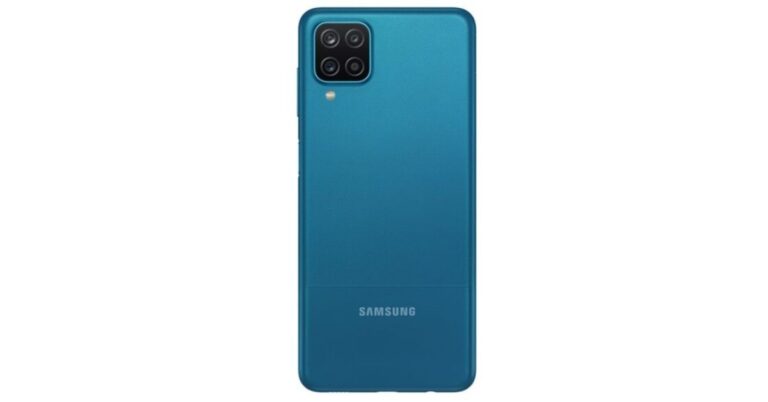
 To recall the mid-ranger has already made its debut in the European market which is a base 3GB with 32GB storage variant and the 4GB with 6GB variant priced at EUR 179 that translates to Rs 15,800 while the 4GB RAM and 64GB storage and 6GB with 128GB is priced at EUR 189 and EUR 199 that translates to Rs 16,700 and 17,500 respectively.
Samsung Galaxy A12 tech specifications
Samsung Galaxy A12 comes with a 6.5-inch HD+ TFT display. Under the hood, there is an octa-core MediaTek Helio P35 SoC paired with up to 6GB of RAM and up to 128GB of storage. The internal storage can be expanded up to 1TB using a microSD card.
For optics, there is a quad rear camera setup on the Samsung Galaxy A12 that includes a 48-megapixel primary sensor with f/2.0 aperture. In addition to this, there is a 5-megapixel ultra-wide-angle lens with f/2.2 aperture, a 2-megapixel macro lens with f/2.4 aperture and lastly a 2-megapixel depth sensor with an f/2.4 aperture. Upfront there is an 8-megapixel selfie sensor with an f/2.2 aperture.
The upcoming smartphone by Samsung will come with a 5,000mAh battery with 15W fast-charging via a USB Type-C port. For connectivity, there is LTE, Wi-Fi, Bluetooth, GPS, and a 3.5mm headphone jack. There is a side-mounted fingerprint scanner that also doubles as the power button.
For the latest gadget and tech news, and gadget reviews, follow us on Twitter, Facebook and Instagram. For newest tech & gadget videos subscribe to our YouTube Channel. You can also stay up to date using the Gadget Bridge Android App.
To recall the mid-ranger has already made its debut in the European market which is a base 3GB with 32GB storage variant and the 4GB with 6GB variant priced at EUR 179 that translates to Rs 15,800 while the 4GB RAM and 64GB storage and 6GB with 128GB is priced at EUR 189 and EUR 199 that translates to Rs 16,700 and 17,500 respectively.
Samsung Galaxy A12 tech specifications
Samsung Galaxy A12 comes with a 6.5-inch HD+ TFT display. Under the hood, there is an octa-core MediaTek Helio P35 SoC paired with up to 6GB of RAM and up to 128GB of storage. The internal storage can be expanded up to 1TB using a microSD card.
For optics, there is a quad rear camera setup on the Samsung Galaxy A12 that includes a 48-megapixel primary sensor with f/2.0 aperture. In addition to this, there is a 5-megapixel ultra-wide-angle lens with f/2.2 aperture, a 2-megapixel macro lens with f/2.4 aperture and lastly a 2-megapixel depth sensor with an f/2.4 aperture. Upfront there is an 8-megapixel selfie sensor with an f/2.2 aperture.
The upcoming smartphone by Samsung will come with a 5,000mAh battery with 15W fast-charging via a USB Type-C port. For connectivity, there is LTE, Wi-Fi, Bluetooth, GPS, and a 3.5mm headphone jack. There is a side-mounted fingerprint scanner that also doubles as the power button.
For the latest gadget and tech news, and gadget reviews, follow us on Twitter, Facebook and Instagram. For newest tech & gadget videos subscribe to our YouTube Channel. You can also stay up to date using the Gadget Bridge Android App.  To recall the mid-ranger has already made its debut in the European market which is a base 3GB with 32GB storage variant and the 4GB with 6GB variant priced at EUR 179 that translates to Rs 15,800 while the 4GB RAM and 64GB storage and 6GB with 128GB is priced at EUR 189 and EUR 199 that translates to Rs 16,700 and 17,500 respectively.
Samsung Galaxy A12 tech specifications
Samsung Galaxy A12 comes with a 6.5-inch HD+ TFT display. Under the hood, there is an octa-core MediaTek Helio P35 SoC paired with up to 6GB of RAM and up to 128GB of storage. The internal storage can be expanded up to 1TB using a microSD card.
For optics, there is a quad rear camera setup on the Samsung Galaxy A12 that includes a 48-megapixel primary sensor with f/2.0 aperture. In addition to this, there is a 5-megapixel ultra-wide-angle lens with f/2.2 aperture, a 2-megapixel macro lens with f/2.4 aperture and lastly a 2-megapixel depth sensor with an f/2.4 aperture. Upfront there is an 8-megapixel selfie sensor with an f/2.2 aperture.
The upcoming smartphone by Samsung will come with a 5,000mAh battery with 15W fast-charging via a USB Type-C port. For connectivity, there is LTE, Wi-Fi, Bluetooth, GPS, and a 3.5mm headphone jack. There is a side-mounted fingerprint scanner that also doubles as the power button.
For the latest gadget and tech news, and gadget reviews, follow us on Twitter, Facebook and Instagram. For newest tech & gadget videos subscribe to our YouTube Channel. You can also stay up to date using the Gadget Bridge Android App.
To recall the mid-ranger has already made its debut in the European market which is a base 3GB with 32GB storage variant and the 4GB with 6GB variant priced at EUR 179 that translates to Rs 15,800 while the 4GB RAM and 64GB storage and 6GB with 128GB is priced at EUR 189 and EUR 199 that translates to Rs 16,700 and 17,500 respectively.
Samsung Galaxy A12 tech specifications
Samsung Galaxy A12 comes with a 6.5-inch HD+ TFT display. Under the hood, there is an octa-core MediaTek Helio P35 SoC paired with up to 6GB of RAM and up to 128GB of storage. The internal storage can be expanded up to 1TB using a microSD card.
For optics, there is a quad rear camera setup on the Samsung Galaxy A12 that includes a 48-megapixel primary sensor with f/2.0 aperture. In addition to this, there is a 5-megapixel ultra-wide-angle lens with f/2.2 aperture, a 2-megapixel macro lens with f/2.4 aperture and lastly a 2-megapixel depth sensor with an f/2.4 aperture. Upfront there is an 8-megapixel selfie sensor with an f/2.2 aperture.
The upcoming smartphone by Samsung will come with a 5,000mAh battery with 15W fast-charging via a USB Type-C port. For connectivity, there is LTE, Wi-Fi, Bluetooth, GPS, and a 3.5mm headphone jack. There is a side-mounted fingerprint scanner that also doubles as the power button.
For the latest gadget and tech news, and gadget reviews, follow us on Twitter, Facebook and Instagram. For newest tech & gadget videos subscribe to our YouTube Channel. You can also stay up to date using the Gadget Bridge Android App. 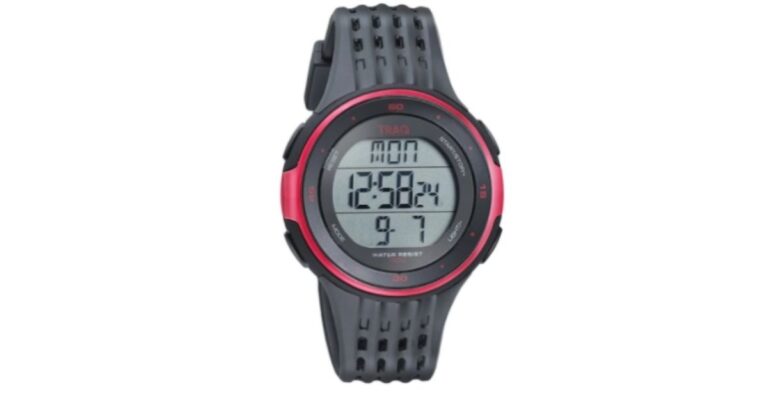


 11) F9: This keyboard shortcut allows you to calculate all worksheets in all open workbooks.
Shift+F9: By this, you can calculate only in the active worksheets.
12) Alt or F10: Utilizing this shortcut, you can simply turn the tips on or off.
13) Ctrl+F1: Using this keyboard shortcut, you can show or hide the ribbon
14) Ctrl+Shift+U: You can expand or collapse the formula bar
15) F11: It enables you to make a bar chart on the selected data in a separate sheet.
Alt+F1: By this, you can make an embedded bar chart on select data in the same sheet.
11) F9: This keyboard shortcut allows you to calculate all worksheets in all open workbooks.
Shift+F9: By this, you can calculate only in the active worksheets.
12) Alt or F10: Utilizing this shortcut, you can simply turn the tips on or off.
13) Ctrl+F1: Using this keyboard shortcut, you can show or hide the ribbon
14) Ctrl+Shift+U: You can expand or collapse the formula bar
15) F11: It enables you to make a bar chart on the selected data in a separate sheet.
Alt+F1: By this, you can make an embedded bar chart on select data in the same sheet.
 3) As soon as you close a workbook, you will get a dialog box to choose to save or discard the workbook.
Ctrl+W: Close a workbook
Ctrl+F4: Close Excel
3) As soon as you close a workbook, you will get a dialog box to choose to save or discard the workbook.
Ctrl+W: Close a workbook
Ctrl+F4: Close Excel
 4) F4: It’s the shortcut to repeat the last command. For instance, if the last action you did was to type in a cell, clicking another cell and pressing F4 repeats that action in the new cell.
5) Shift+F11: This keyboard shortcut allows you to insert a new worksheet within the same workbook.
4) F4: It’s the shortcut to repeat the last command. For instance, if the last action you did was to type in a cell, clicking another cell and pressing F4 repeats that action in the new cell.
5) Shift+F11: This keyboard shortcut allows you to insert a new worksheet within the same workbook.
 6) The Undo and Redo shortcuts give you flexibility while correcting errors done on your part.
Ctrl+Z: Undo an action
Ctrl+Y: Redo an action
7) Ctrl+F2: By this shortcut, you can switch to the Print Preview
6) The Undo and Redo shortcuts give you flexibility while correcting errors done on your part.
Ctrl+Z: Undo an action
Ctrl+Y: Redo an action
7) Ctrl+F2: By this shortcut, you can switch to the Print Preview
 8) F1: This keyboard shortcut will open the Help pane to know about the features and how to use them in your workbook.
9) Alt+Q: It will take you to the “Tell me what you want to do” where you can search for a feature you want to use but can’t locate.
10) F7: By this shortcut, you can check the spelling by comparing it with the suggestions
8) F1: This keyboard shortcut will open the Help pane to know about the features and how to use them in your workbook.
9) Alt+Q: It will take you to the “Tell me what you want to do” where you can search for a feature you want to use but can’t locate.
10) F7: By this shortcut, you can check the spelling by comparing it with the suggestions
 11) F9: This keyboard shortcut allows you to calculate all worksheets in all open workbooks.
Shift+F9: By this, you can calculate only in the active worksheets.
12) Alt or F10: Utilizing this shortcut, you can simply turn the tips on or off.
13) Ctrl+F1: Using this keyboard shortcut, you can show or hide the ribbon
14) Ctrl+Shift+U: You can expand or collapse the formula bar
15) F11: It enables you to make a bar chart on the selected data in a separate sheet.
Alt+F1: By this, you can make an embedded bar chart on select data in the same sheet.
11) F9: This keyboard shortcut allows you to calculate all worksheets in all open workbooks.
Shift+F9: By this, you can calculate only in the active worksheets.
12) Alt or F10: Utilizing this shortcut, you can simply turn the tips on or off.
13) Ctrl+F1: Using this keyboard shortcut, you can show or hide the ribbon
14) Ctrl+Shift+U: You can expand or collapse the formula bar
15) F11: It enables you to make a bar chart on the selected data in a separate sheet.
Alt+F1: By this, you can make an embedded bar chart on select data in the same sheet.
 For the latest gadget and tech news, and gadget reviews, follow us on Twitter, Facebook and Instagram. For newest tech & gadget videos subscribe to our YouTube Channel. You can also stay up to date with the Gadget Bridge Android App.
 The company is yet to reveal the pricing and the availability details for the Indian market but when Xiaomi Mi 11 made its debut in China the price of the base model which is 8GB RAM with 128GB storage is priced at CNY 3,999. The 8GB RAM with 256GB storage comes at CNY 4,299 and the 12GB RAM with 256GB storage option has been priced at CNY 4,699. Apart from this the company also announced that there will be two retail boxes one with a charger and one without the charger, however, this change will not affect the pricing of the phone as this move is to achieve the environmental goals.
Xiaomi Mi 11 Specifications
The specification of the global model of Xiaomi Mi 11 remains as the Chinese version. There is a 6.81-inch AMOLED QHD+ display with nits and protected with Gorilla Glass Victus. The phone offers a 120Hz of refresh rate and a 480Hz touch sampling rate support. The device runs on Xiaomi’s MIUI 12.5 out of the box and is powered by Snapdragon 888 SoC paired with 12GB of RAM with up to 256GB of storage. There are also Harman Kardon-powered dual stereo speakers and also includes an in-display fingerprint sensor on the smartphone.
In terms of specifications, Xiaomi M11 features a triple rear camera setup that includes a 108-megapixel primary sensor with Optical Image Stabilisation and f/1.85 aperture. In addition to this, there is a 13-megapixel ultra-wide-angle lens with f/2.4 aperture and a 5-megapixel Macro lens with f/2.4 aperture. The camera setup is supported by 8K video recording and night video mode for low light images, MEMC video frame technology, real-time SDR to HDR, and video super-resolution support. On the front, there is a single punch-hole camera consisting of a 20-megapixel selfie camera sensor.
Additionally, the phone packs a 6000mAh battery on the phone with a Mi Charge Turbo system and 55W fast charging support along with 10W reverse wireless charging. In terms of connectivity, there is 5G, 4G LTE, Wi-Fi 6, Bluetooth 5.2, GPS, and USB Type-C port.
For the latest gadget and tech news, and gadget reviews, follow us on Twitter, Facebook and Instagram. For newest tech & gadget videos subscribe to our YouTube Channel. You can also stay up to date using the Gadget Bridge Android App.
The company is yet to reveal the pricing and the availability details for the Indian market but when Xiaomi Mi 11 made its debut in China the price of the base model which is 8GB RAM with 128GB storage is priced at CNY 3,999. The 8GB RAM with 256GB storage comes at CNY 4,299 and the 12GB RAM with 256GB storage option has been priced at CNY 4,699. Apart from this the company also announced that there will be two retail boxes one with a charger and one without the charger, however, this change will not affect the pricing of the phone as this move is to achieve the environmental goals.
Xiaomi Mi 11 Specifications
The specification of the global model of Xiaomi Mi 11 remains as the Chinese version. There is a 6.81-inch AMOLED QHD+ display with nits and protected with Gorilla Glass Victus. The phone offers a 120Hz of refresh rate and a 480Hz touch sampling rate support. The device runs on Xiaomi’s MIUI 12.5 out of the box and is powered by Snapdragon 888 SoC paired with 12GB of RAM with up to 256GB of storage. There are also Harman Kardon-powered dual stereo speakers and also includes an in-display fingerprint sensor on the smartphone.
In terms of specifications, Xiaomi M11 features a triple rear camera setup that includes a 108-megapixel primary sensor with Optical Image Stabilisation and f/1.85 aperture. In addition to this, there is a 13-megapixel ultra-wide-angle lens with f/2.4 aperture and a 5-megapixel Macro lens with f/2.4 aperture. The camera setup is supported by 8K video recording and night video mode for low light images, MEMC video frame technology, real-time SDR to HDR, and video super-resolution support. On the front, there is a single punch-hole camera consisting of a 20-megapixel selfie camera sensor.
Additionally, the phone packs a 6000mAh battery on the phone with a Mi Charge Turbo system and 55W fast charging support along with 10W reverse wireless charging. In terms of connectivity, there is 5G, 4G LTE, Wi-Fi 6, Bluetooth 5.2, GPS, and USB Type-C port.
For the latest gadget and tech news, and gadget reviews, follow us on Twitter, Facebook and Instagram. For newest tech & gadget videos subscribe to our YouTube Channel. You can also stay up to date using the Gadget Bridge Android App.  The company is yet to reveal the pricing and the availability details for the Indian market but when Xiaomi Mi 11 made its debut in China the price of the base model which is 8GB RAM with 128GB storage is priced at CNY 3,999. The 8GB RAM with 256GB storage comes at CNY 4,299 and the 12GB RAM with 256GB storage option has been priced at CNY 4,699. Apart from this the company also announced that there will be two retail boxes one with a charger and one without the charger, however, this change will not affect the pricing of the phone as this move is to achieve the environmental goals.
Xiaomi Mi 11 Specifications
The specification of the global model of Xiaomi Mi 11 remains as the Chinese version. There is a 6.81-inch AMOLED QHD+ display with nits and protected with Gorilla Glass Victus. The phone offers a 120Hz of refresh rate and a 480Hz touch sampling rate support. The device runs on Xiaomi’s MIUI 12.5 out of the box and is powered by Snapdragon 888 SoC paired with 12GB of RAM with up to 256GB of storage. There are also Harman Kardon-powered dual stereo speakers and also includes an in-display fingerprint sensor on the smartphone.
In terms of specifications, Xiaomi M11 features a triple rear camera setup that includes a 108-megapixel primary sensor with Optical Image Stabilisation and f/1.85 aperture. In addition to this, there is a 13-megapixel ultra-wide-angle lens with f/2.4 aperture and a 5-megapixel Macro lens with f/2.4 aperture. The camera setup is supported by 8K video recording and night video mode for low light images, MEMC video frame technology, real-time SDR to HDR, and video super-resolution support. On the front, there is a single punch-hole camera consisting of a 20-megapixel selfie camera sensor.
Additionally, the phone packs a 6000mAh battery on the phone with a Mi Charge Turbo system and 55W fast charging support along with 10W reverse wireless charging. In terms of connectivity, there is 5G, 4G LTE, Wi-Fi 6, Bluetooth 5.2, GPS, and USB Type-C port.
For the latest gadget and tech news, and gadget reviews, follow us on Twitter, Facebook and Instagram. For newest tech & gadget videos subscribe to our YouTube Channel. You can also stay up to date using the Gadget Bridge Android App.
The company is yet to reveal the pricing and the availability details for the Indian market but when Xiaomi Mi 11 made its debut in China the price of the base model which is 8GB RAM with 128GB storage is priced at CNY 3,999. The 8GB RAM with 256GB storage comes at CNY 4,299 and the 12GB RAM with 256GB storage option has been priced at CNY 4,699. Apart from this the company also announced that there will be two retail boxes one with a charger and one without the charger, however, this change will not affect the pricing of the phone as this move is to achieve the environmental goals.
Xiaomi Mi 11 Specifications
The specification of the global model of Xiaomi Mi 11 remains as the Chinese version. There is a 6.81-inch AMOLED QHD+ display with nits and protected with Gorilla Glass Victus. The phone offers a 120Hz of refresh rate and a 480Hz touch sampling rate support. The device runs on Xiaomi’s MIUI 12.5 out of the box and is powered by Snapdragon 888 SoC paired with 12GB of RAM with up to 256GB of storage. There are also Harman Kardon-powered dual stereo speakers and also includes an in-display fingerprint sensor on the smartphone.
In terms of specifications, Xiaomi M11 features a triple rear camera setup that includes a 108-megapixel primary sensor with Optical Image Stabilisation and f/1.85 aperture. In addition to this, there is a 13-megapixel ultra-wide-angle lens with f/2.4 aperture and a 5-megapixel Macro lens with f/2.4 aperture. The camera setup is supported by 8K video recording and night video mode for low light images, MEMC video frame technology, real-time SDR to HDR, and video super-resolution support. On the front, there is a single punch-hole camera consisting of a 20-megapixel selfie camera sensor.
Additionally, the phone packs a 6000mAh battery on the phone with a Mi Charge Turbo system and 55W fast charging support along with 10W reverse wireless charging. In terms of connectivity, there is 5G, 4G LTE, Wi-Fi 6, Bluetooth 5.2, GPS, and USB Type-C port.
For the latest gadget and tech news, and gadget reviews, follow us on Twitter, Facebook and Instagram. For newest tech & gadget videos subscribe to our YouTube Channel. You can also stay up to date using the Gadget Bridge Android App. 
 5) Shift+F3: By using this shortcut, you can change the text from uppercase to lowercase or to the capitalised case where capital letters are at the beginning of every word.
6) Ctrl+X = Cut
Ctrl+C = Copy
Ctrl+V = Paste.
By using the above shortcut, you can easily copy or extract a part of the text to place it somewhere else.
7) Ctrl+Z = Undo. While working on a document, if you delete some part of the text accidentally, you can undo the changes with this shortcut.
8) Ctrl+home = To go to the beginning of the page or document. Ctrl+end = End of page or document.
9) Ctrl+F = It will allow you to access the ‘Find’ tool where you can look for a word or phrase without needing to read the entire text.
5) Shift+F3: By using this shortcut, you can change the text from uppercase to lowercase or to the capitalised case where capital letters are at the beginning of every word.
6) Ctrl+X = Cut
Ctrl+C = Copy
Ctrl+V = Paste.
By using the above shortcut, you can easily copy or extract a part of the text to place it somewhere else.
7) Ctrl+Z = Undo. While working on a document, if you delete some part of the text accidentally, you can undo the changes with this shortcut.
8) Ctrl+home = To go to the beginning of the page or document. Ctrl+end = End of page or document.
9) Ctrl+F = It will allow you to access the ‘Find’ tool where you can look for a word or phrase without needing to read the entire text.
 5) Shift+F3: By using this shortcut, you can change the text from uppercase to lowercase or to the capitalised case where capital letters are at the beginning of every word.
6) Ctrl+X = Cut
Ctrl+C = Copy
Ctrl+V = Paste.
By using the above shortcut, you can easily copy or extract a part of the text to place it somewhere else.
7) Ctrl+Z = Undo. While working on a document, if you delete some part of the text accidentally, you can undo the changes with this shortcut.
8) Ctrl+home = To go to the beginning of the page or document. Ctrl+end = End of page or document.
9) Ctrl+F = It will allow you to access the ‘Find’ tool where you can look for a word or phrase without needing to read the entire text.
5) Shift+F3: By using this shortcut, you can change the text from uppercase to lowercase or to the capitalised case where capital letters are at the beginning of every word.
6) Ctrl+X = Cut
Ctrl+C = Copy
Ctrl+V = Paste.
By using the above shortcut, you can easily copy or extract a part of the text to place it somewhere else.
7) Ctrl+Z = Undo. While working on a document, if you delete some part of the text accidentally, you can undo the changes with this shortcut.
8) Ctrl+home = To go to the beginning of the page or document. Ctrl+end = End of page or document.
9) Ctrl+F = It will allow you to access the ‘Find’ tool where you can look for a word or phrase without needing to read the entire text.
 10) Ctrl+S = Save. To save your document. As you progress to make changes after you choose ‘Save As’, you can press the Ctrl+S to save whatever modifications you’ve made.
 11) Ctrl+P = To print the document. A window will be open where you can select the printer properties.
 12) Ctrl+Enter = Page break. This shortcut allows you to enter a page break wherever you wish in the document.
 13) Ctrl+L Aligns the line or selected text to the left of the screen.
Ctrl+E Aligns the line or selected text to the center of the screen.
Ctrl+J Aligns the selected text or line to justify the screen.
14) Ctrl+Alt+1 Changes text to heading 1.
Ctrl+Alt+2 Changes text to heading 2.
Ctrl+Alt+3 Changes text to heading 3.
13) Ctrl+L Aligns the line or selected text to the left of the screen.
Ctrl+E Aligns the line or selected text to the center of the screen.
Ctrl+J Aligns the selected text or line to justify the screen.
14) Ctrl+Alt+1 Changes text to heading 1.
Ctrl+Alt+2 Changes text to heading 2.
Ctrl+Alt+3 Changes text to heading 3.
 15) Ctrl+W = Close the currently open document. If your document is not saved, you will be prompted with a dialog box to save it.
 For the latest gadget and tech news, and gadget reviews, follow us on Twitter, Facebook and Instagram. For newest tech & gadget videos subscribe to our YouTube Channel. You can also stay up to date with the Gadget Bridge Android App.






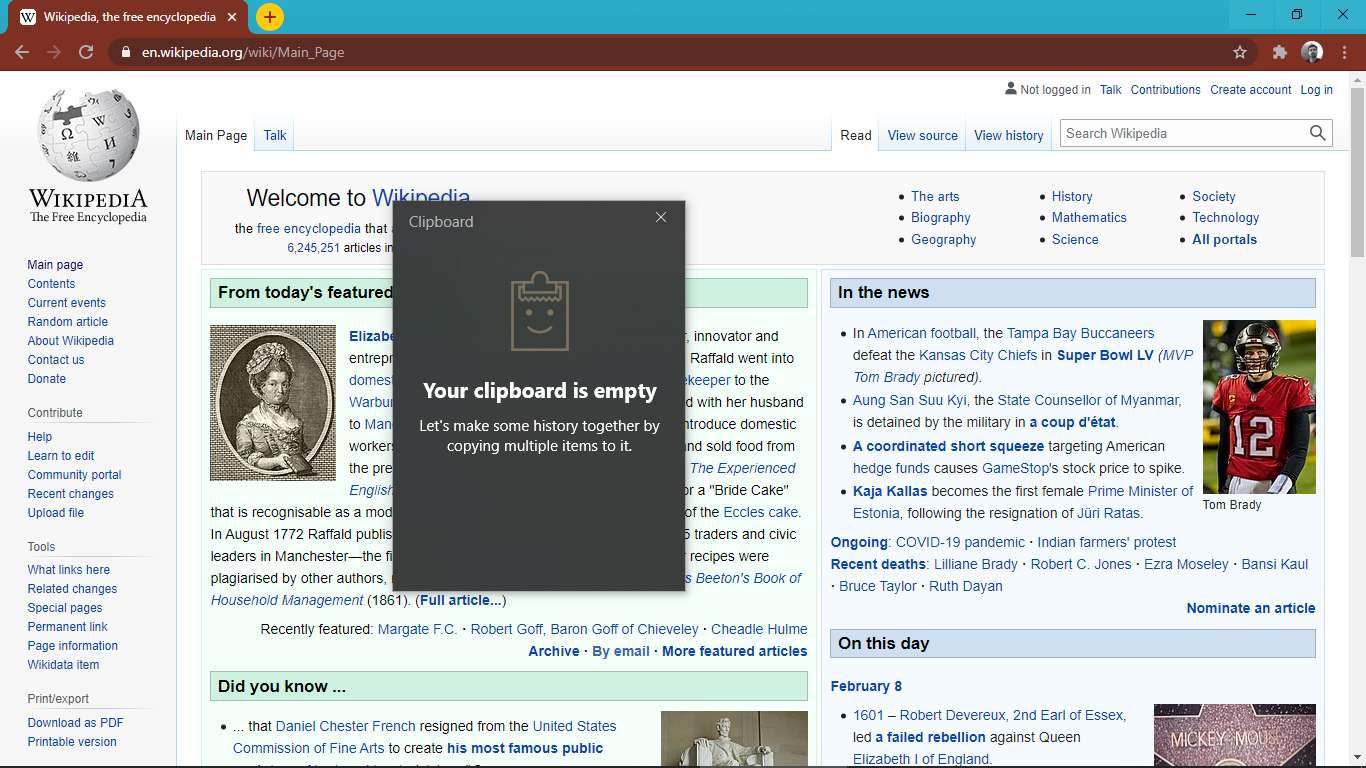

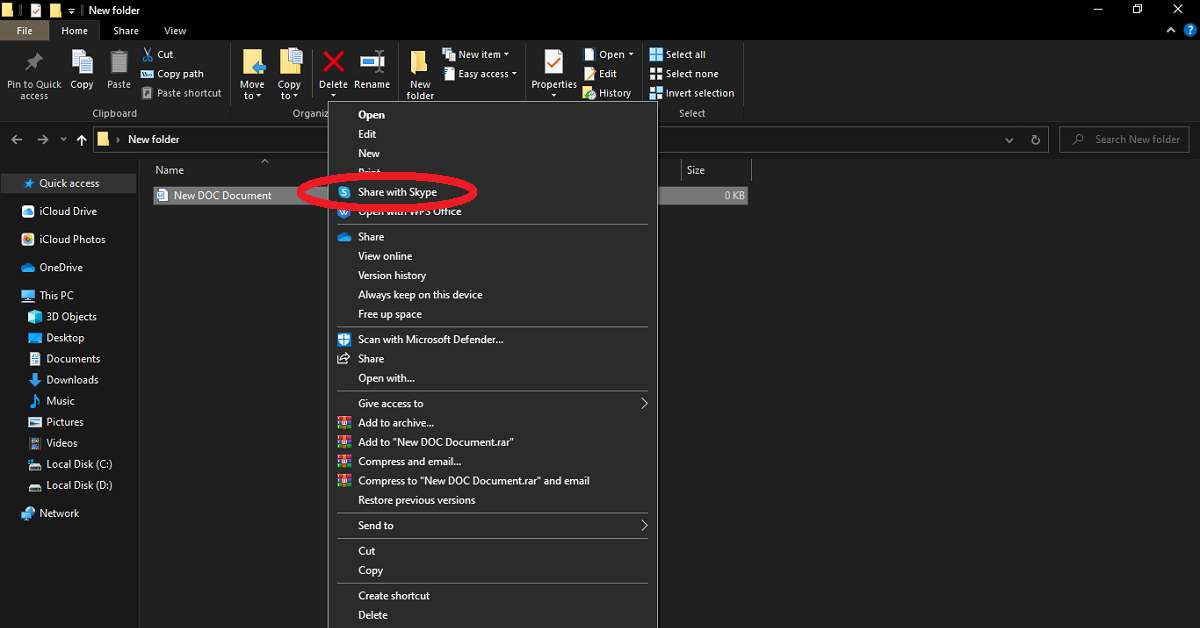




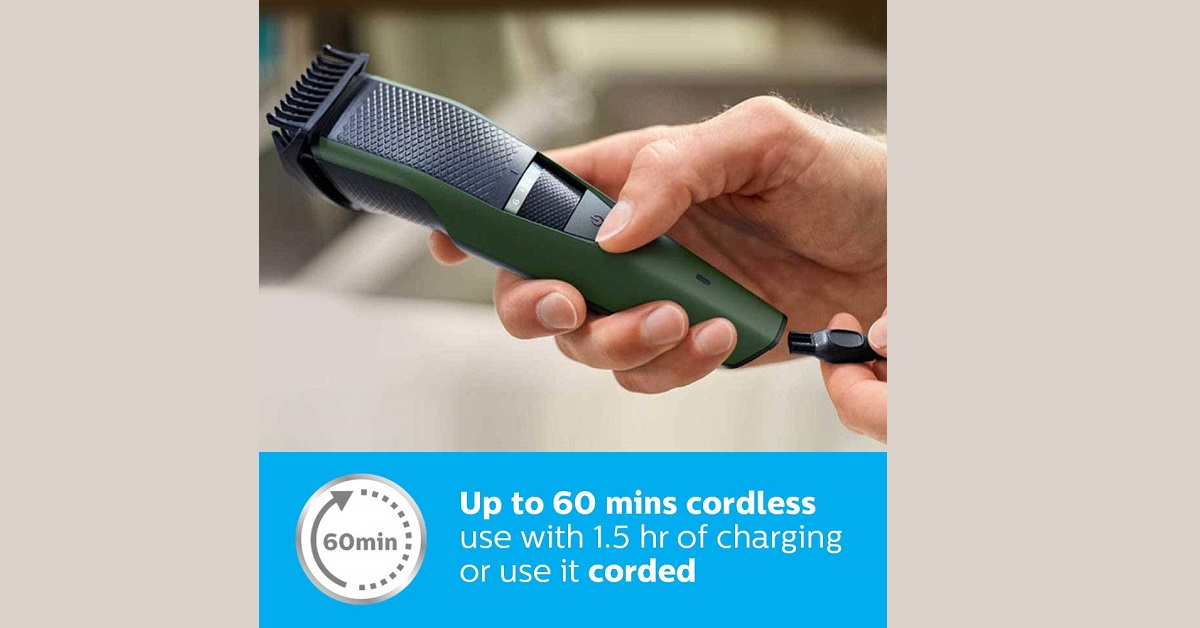









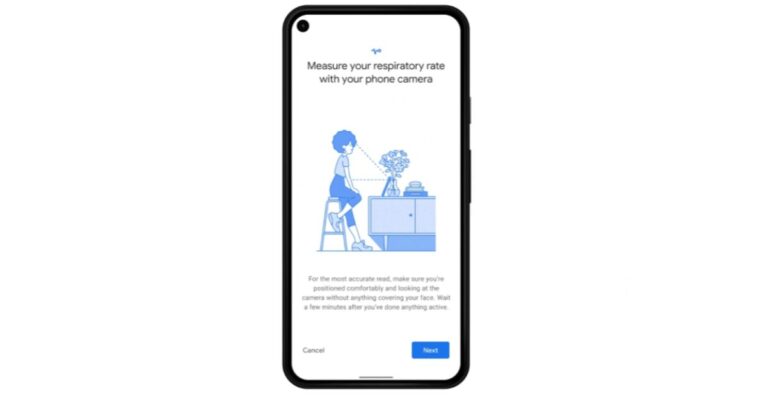
 These interesting features will be rolled out to Google Fit starting next month and the company also plans to expand to more Android devices other than Pixel phones. According to the blog post, one only needs to place their head and upper torso in view of your phone’s front-facing camera and breathe normally to measure the respiratory rate. On the other hand, to read your heart rate all one needs to do is simply place their finger on the rear-facing camera lens. Once the measurements are made, you can choose to save them in the app to monitor trends over time, alongside other health and wellness information.
However, it should be noted that these readings are not meant for any medical diagnosis or to evaluate medical conditions but to use these features to track and improve day-to-day wellness using the Google Fit app.
As per the blog post, “Thanks to increasingly powerful sensors and advances in computer vision, these features let you use your smartphone’s camera to track tiny physical signals at the pixel level — like chest movements to measure your respiratory rate and subtle changes in the colour of your fingers for your heart rate.”
Google has developed and the initial clinical studies of both the features have been performed in order to be sure if they work in a variety of real-world conditions and for as many people as possible. As it is mentioned above a slight change in the colour of fingers will help to monitor heart rate the company further explained that since our heart rate algorithm relies on approximating blood flow from colour changes in someone’s fingertip, it has to account for factors such as lighting, skin tone, age and more in order to work for everyone.
For the latest gadget and tech news, and gadget reviews, follow us on Twitter, Facebook and Instagram. For newest tech & gadget videos subscribe to our YouTube Channel. You can also stay up to date using the Gadget Bridge Android App.
These interesting features will be rolled out to Google Fit starting next month and the company also plans to expand to more Android devices other than Pixel phones. According to the blog post, one only needs to place their head and upper torso in view of your phone’s front-facing camera and breathe normally to measure the respiratory rate. On the other hand, to read your heart rate all one needs to do is simply place their finger on the rear-facing camera lens. Once the measurements are made, you can choose to save them in the app to monitor trends over time, alongside other health and wellness information.
However, it should be noted that these readings are not meant for any medical diagnosis or to evaluate medical conditions but to use these features to track and improve day-to-day wellness using the Google Fit app.
As per the blog post, “Thanks to increasingly powerful sensors and advances in computer vision, these features let you use your smartphone’s camera to track tiny physical signals at the pixel level — like chest movements to measure your respiratory rate and subtle changes in the colour of your fingers for your heart rate.”
Google has developed and the initial clinical studies of both the features have been performed in order to be sure if they work in a variety of real-world conditions and for as many people as possible. As it is mentioned above a slight change in the colour of fingers will help to monitor heart rate the company further explained that since our heart rate algorithm relies on approximating blood flow from colour changes in someone’s fingertip, it has to account for factors such as lighting, skin tone, age and more in order to work for everyone.
For the latest gadget and tech news, and gadget reviews, follow us on Twitter, Facebook and Instagram. For newest tech & gadget videos subscribe to our YouTube Channel. You can also stay up to date using the Gadget Bridge Android App. 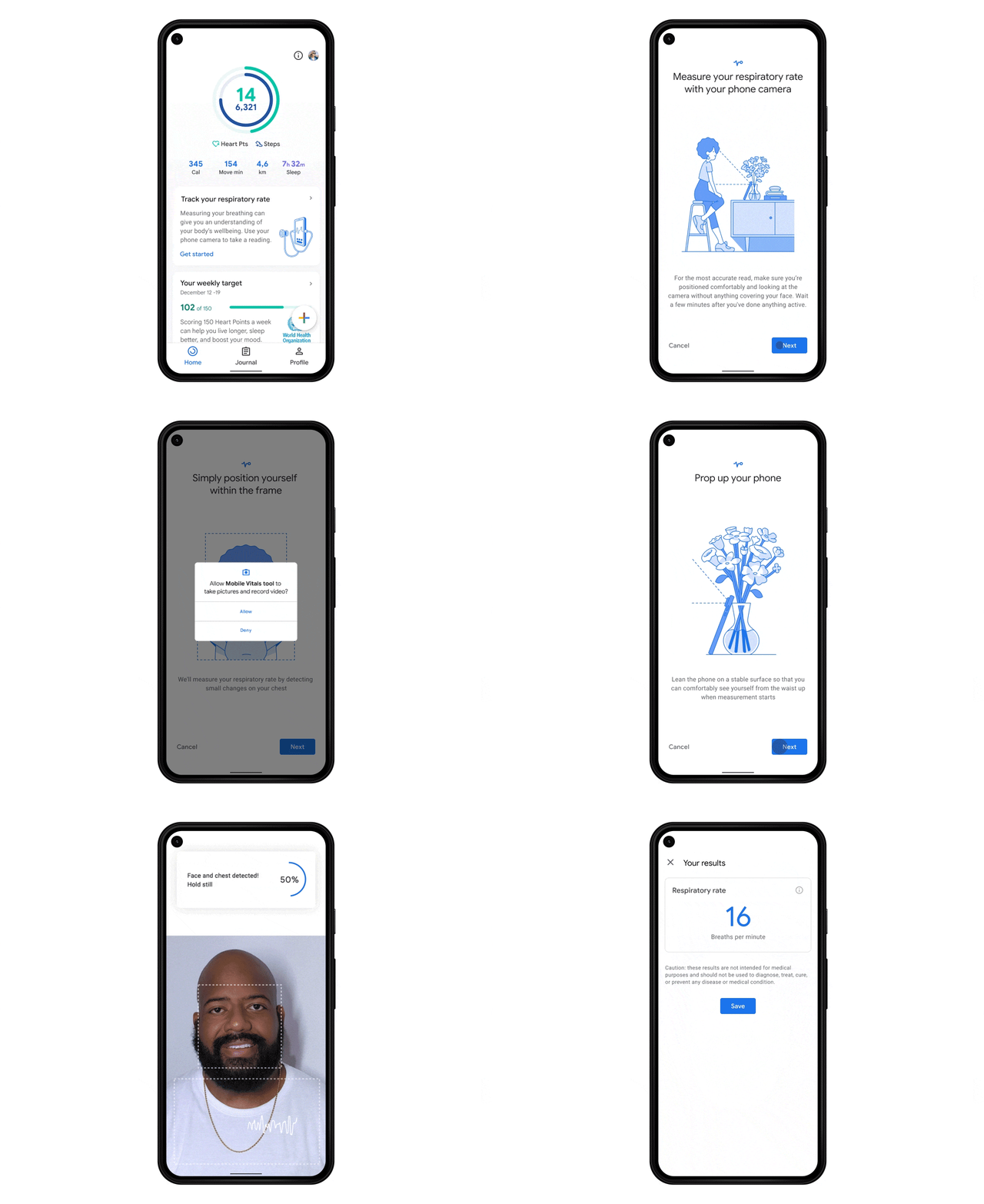 These interesting features will be rolled out to Google Fit starting next month and the company also plans to expand to more Android devices other than Pixel phones. According to the blog post, one only needs to place their head and upper torso in view of your phone’s front-facing camera and breathe normally to measure the respiratory rate. On the other hand, to read your heart rate all one needs to do is simply place their finger on the rear-facing camera lens. Once the measurements are made, you can choose to save them in the app to monitor trends over time, alongside other health and wellness information.
However, it should be noted that these readings are not meant for any medical diagnosis or to evaluate medical conditions but to use these features to track and improve day-to-day wellness using the Google Fit app.
As per the blog post, “Thanks to increasingly powerful sensors and advances in computer vision, these features let you use your smartphone’s camera to track tiny physical signals at the pixel level — like chest movements to measure your respiratory rate and subtle changes in the colour of your fingers for your heart rate.”
Google has developed and the initial clinical studies of both the features have been performed in order to be sure if they work in a variety of real-world conditions and for as many people as possible. As it is mentioned above a slight change in the colour of fingers will help to monitor heart rate the company further explained that since our heart rate algorithm relies on approximating blood flow from colour changes in someone’s fingertip, it has to account for factors such as lighting, skin tone, age and more in order to work for everyone.
For the latest gadget and tech news, and gadget reviews, follow us on Twitter, Facebook and Instagram. For newest tech & gadget videos subscribe to our YouTube Channel. You can also stay up to date using the Gadget Bridge Android App.
These interesting features will be rolled out to Google Fit starting next month and the company also plans to expand to more Android devices other than Pixel phones. According to the blog post, one only needs to place their head and upper torso in view of your phone’s front-facing camera and breathe normally to measure the respiratory rate. On the other hand, to read your heart rate all one needs to do is simply place their finger on the rear-facing camera lens. Once the measurements are made, you can choose to save them in the app to monitor trends over time, alongside other health and wellness information.
However, it should be noted that these readings are not meant for any medical diagnosis or to evaluate medical conditions but to use these features to track and improve day-to-day wellness using the Google Fit app.
As per the blog post, “Thanks to increasingly powerful sensors and advances in computer vision, these features let you use your smartphone’s camera to track tiny physical signals at the pixel level — like chest movements to measure your respiratory rate and subtle changes in the colour of your fingers for your heart rate.”
Google has developed and the initial clinical studies of both the features have been performed in order to be sure if they work in a variety of real-world conditions and for as many people as possible. As it is mentioned above a slight change in the colour of fingers will help to monitor heart rate the company further explained that since our heart rate algorithm relies on approximating blood flow from colour changes in someone’s fingertip, it has to account for factors such as lighting, skin tone, age and more in order to work for everyone.
For the latest gadget and tech news, and gadget reviews, follow us on Twitter, Facebook and Instagram. For newest tech & gadget videos subscribe to our YouTube Channel. You can also stay up to date using the Gadget Bridge Android App. 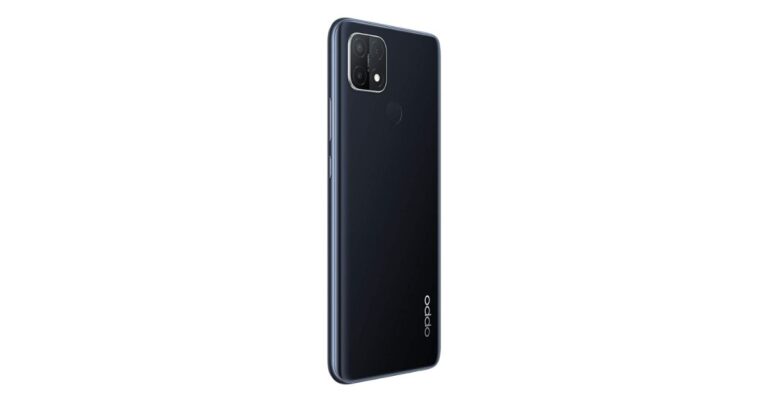
 Oppo A15s specifications
Oppo A15s features a 6.52-inch waterdrop display with an 89% screen-to-body ratio and an HD+ resolution. The budget smartphone runs ColorOS 7.2 based on Android 10. It is powered by an octa-core MediaTek Helio P35 SoC paired with up to 4GB RAM with a 128GB storage option. The storage can be further expanded up to 256GB using a microSD card.
Speaking of the camera capabilities, Oppo A15s comes with an AI triple-rear camera setup that includes a 13-megapixel primary sensor. In addition to this, there is a 2-megapixel macro lens and a 2-megapixel depth sensor. The setup includes features such as Night mode, Time-lapse, slow-motion and more. For taking selfies and video chatting on the front there is an 8-megapixel sensor.
Oppo A15s is backed by a 4,230mAh battery with 10W charging support. In terms of connectivity, there is Wi-Fi, Bluetooth 5.0, GPS, and a Micro-USB port Wi-Fi, Bluetooth 5.0, GPS, and a Micro-USB port. In addition to this, there is a rear-mounted fingerprint scanner on the phone too
For the latest gadget and tech news, and gadget reviews, follow us on Twitter, Facebook and Instagram. For newest tech & gadget videos subscribe to our YouTube Channel. You can also stay up to date using the Gadget Bridge Android App.
Oppo A15s specifications
Oppo A15s features a 6.52-inch waterdrop display with an 89% screen-to-body ratio and an HD+ resolution. The budget smartphone runs ColorOS 7.2 based on Android 10. It is powered by an octa-core MediaTek Helio P35 SoC paired with up to 4GB RAM with a 128GB storage option. The storage can be further expanded up to 256GB using a microSD card.
Speaking of the camera capabilities, Oppo A15s comes with an AI triple-rear camera setup that includes a 13-megapixel primary sensor. In addition to this, there is a 2-megapixel macro lens and a 2-megapixel depth sensor. The setup includes features such as Night mode, Time-lapse, slow-motion and more. For taking selfies and video chatting on the front there is an 8-megapixel sensor.
Oppo A15s is backed by a 4,230mAh battery with 10W charging support. In terms of connectivity, there is Wi-Fi, Bluetooth 5.0, GPS, and a Micro-USB port Wi-Fi, Bluetooth 5.0, GPS, and a Micro-USB port. In addition to this, there is a rear-mounted fingerprint scanner on the phone too
For the latest gadget and tech news, and gadget reviews, follow us on Twitter, Facebook and Instagram. For newest tech & gadget videos subscribe to our YouTube Channel. You can also stay up to date using the Gadget Bridge Android App.  Oppo A15s specifications
Oppo A15s features a 6.52-inch waterdrop display with an 89% screen-to-body ratio and an HD+ resolution. The budget smartphone runs ColorOS 7.2 based on Android 10. It is powered by an octa-core MediaTek Helio P35 SoC paired with up to 4GB RAM with a 128GB storage option. The storage can be further expanded up to 256GB using a microSD card.
Speaking of the camera capabilities, Oppo A15s comes with an AI triple-rear camera setup that includes a 13-megapixel primary sensor. In addition to this, there is a 2-megapixel macro lens and a 2-megapixel depth sensor. The setup includes features such as Night mode, Time-lapse, slow-motion and more. For taking selfies and video chatting on the front there is an 8-megapixel sensor.
Oppo A15s is backed by a 4,230mAh battery with 10W charging support. In terms of connectivity, there is Wi-Fi, Bluetooth 5.0, GPS, and a Micro-USB port Wi-Fi, Bluetooth 5.0, GPS, and a Micro-USB port. In addition to this, there is a rear-mounted fingerprint scanner on the phone too
For the latest gadget and tech news, and gadget reviews, follow us on Twitter, Facebook and Instagram. For newest tech & gadget videos subscribe to our YouTube Channel. You can also stay up to date using the Gadget Bridge Android App.
Oppo A15s specifications
Oppo A15s features a 6.52-inch waterdrop display with an 89% screen-to-body ratio and an HD+ resolution. The budget smartphone runs ColorOS 7.2 based on Android 10. It is powered by an octa-core MediaTek Helio P35 SoC paired with up to 4GB RAM with a 128GB storage option. The storage can be further expanded up to 256GB using a microSD card.
Speaking of the camera capabilities, Oppo A15s comes with an AI triple-rear camera setup that includes a 13-megapixel primary sensor. In addition to this, there is a 2-megapixel macro lens and a 2-megapixel depth sensor. The setup includes features such as Night mode, Time-lapse, slow-motion and more. For taking selfies and video chatting on the front there is an 8-megapixel sensor.
Oppo A15s is backed by a 4,230mAh battery with 10W charging support. In terms of connectivity, there is Wi-Fi, Bluetooth 5.0, GPS, and a Micro-USB port Wi-Fi, Bluetooth 5.0, GPS, and a Micro-USB port. In addition to this, there is a rear-mounted fingerprint scanner on the phone too
For the latest gadget and tech news, and gadget reviews, follow us on Twitter, Facebook and Instagram. For newest tech & gadget videos subscribe to our YouTube Channel. You can also stay up to date using the Gadget Bridge Android App.