Apple introduces iOS and iPad0S 13.4: Know what’s in offer

0

Apple is taking all measures to keep it users updated as it has now introduced iOS and iPadOS 13.4. According to MacRumours, this new update comes after the release of iOS and iPadOS 13.3.1 with Screen Time Communication Limits.

You can gain access to the iOS and ‌iPadOS‌ 13.4 updates by following the simple path in the Settings app:

  • Go to Settings
  • Click on General
  • Now, select Software Update

It must be noted that iOS and iPadOS 13.4 update gives access of new features to the iPhone and the iPad like mouse and trackpad support for the iPad.

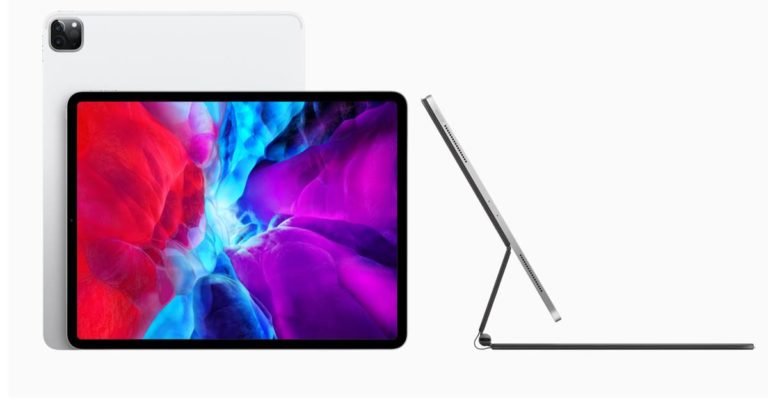
Apple iPadOS 13.4 brings mouse trackpad support to iPad for the first time for a more natural typing experience and added precision for tasks such as writing and selecting text, working with spreadsheets and pro workflows. The cursor appears as a circle that highlights user interface elements, text fields and apps on the Home screen and Dock, giving a clear indication of what users can click on. Fluid gestures on the trackpad make it easy to switch between apps, access the app switcher and activate the Dock, Control Center and apps in Slide Over.

Apple has also revealed that “Most third-party apps work with no change at all, and developers can go even further with new APIs that let them deliver unique experiences in their apps.”

Additional new features that iPadOS 13.4 includes new templates in Pages and Keynote. For the first time in iWork, users can add a drop cap to make a paragraph stand out with a large, decorative first letter. Collaboration will also become easier than ever with support for iCloud folder sharing and the ability to edit shared documents while offline.

Meanwhile, Apple has also released watchOS 6.2 update in order to help in-app purchase support to Apple Watch apps. According to the tech giant, the watchOS 6.2 also comes with a bug fix that could create some impact while playing music if a user moves from Wi-Fi option to Bluetooth connectivity.

According to a 9to5 Mac report, Apple watchOS 6.2 has even introduced the ECG app that enables users to keep count of the electrical pulses of their heart in Chile, New Zealand, and Turkey.

Apart from introducing iOS and ‌iPadOS‌ 13.4 as well as watchOS 6.2, Apple has also lifted curtains off macOS Catalina 10.15.4 for the Mac users. This new update includes support for sharing files via iCloud Drive folder, time-bound Screen Time communication, a scrolling lyrics mode for Apple Music.

For the latest gadget and tech news, and gadget reviews, follow us on TwitterFacebook and Instagram. For newest tech & gadget videos subscribe to our YouTube Channel. You can also stay up to date with the Gadget Bridge Android App.
Government of India to launch CoWin-20 app to track people and to curb the spread of coronavirus in the country

The Government of India will soon launch a new app to track people suffering from coronavirus in the country. The app is known as CoWin-20 that can track people using their smartphone locations in order to stop the spread of COVID-19.

CoWin-20 app will track those people who have travel histories. This allows the government to figure out people who have come in contact with the affected person. Besides this CoWin-20 app is also going to monitor the status of the community spread of the pandemic. One can also use the app to get the locations of coronavirus testing labs available nearby or in which cities in the country.

At the moment the app is under beta testing mode for both iOS as well as Android soon a stable version of the app will be available on Google Play Store and Apple’s App Store. 

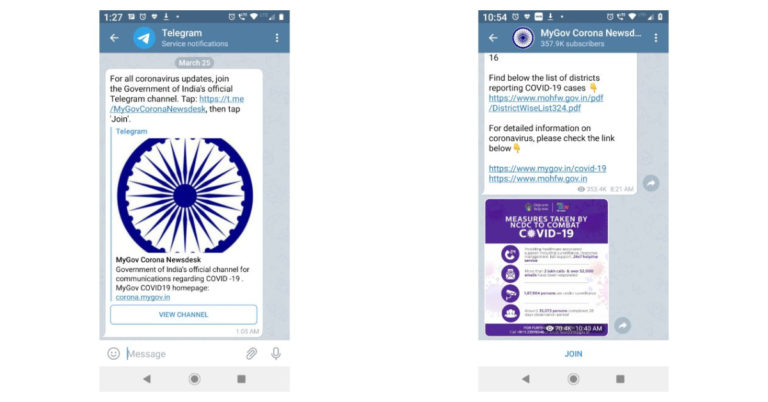
MyGov Corona Newsdesk channel has now been launched on the popular instant messaging app Telegram. It is a kind of discussion group similar to the one which was also launched on WhatsApp a few days back. Those who are unknown MyGov Corona Newsdesk is a Government of India’s official channel for communication regarding COVID-19.

In order to curb the spread of fake news, rumours and misinformation the Government of India is taking all the necessary steps to ensure the safety and health of the people due to the threat posed by growing cases of coronavirus in the country. An app has been created known as MyGov Corona Newsdesk that will provide the latest updates as well as official information with regard to the current state of pandemic spread in the country. The dedicated channel has been launched both on WhatsApp as well as Telegram as these two are the most popular instant messaging apps. People are also spreading fake news and rumours on these apps so this channel might somehow minimize the spread of the misinformation among the people in the country which is also responsible for creating panic among the citizens.

On WhatsApp, the users are allowed to ask their queries related to the coronavirus and its current situation in the country. Whereas the channel which has been launched on Telegram allows you to only read about the latest updates. Unlike WhatsApp, Telegram users cannot interact and get answers to their questions. 

For the latest gadget and tech news, and gadget reviews, follow us on TwitterFacebook and Instagram. For newest tech & gadget videos subscribe to our YouTube Channel. You can also stay up to date using the Gadget Bridge Android App.

COVID-19: Here’s how Instagram helps people stay connected and informed

0

In order to help people stay connected while being in quarantine to fight the COVID-19 pandemic, Instagram has now introduced media sharing feature that enables users to view Instagram posts together with your friends over video chat. “You can start a video chat by tapping the video chat icon in the Direct inbox or in an existing Direct thread, then view saved, liked and suggested photos/videos by tapping the photo icon in the bottom left corner in an ongoing video chat,” as revealed on an Instagram blog post.

Other than media sharing feature, Instagram has also launched a “Stay Home” sticker. The Facebook-owned photo-sharing app has announced that any accounts you follow who use the sticker will be added to a shared Instagram story. This will enable Instagram users to see how people across the world are practicing social distancing to keep COVID-19 at a bay.

Moreover, Instagram has also been helping its users gain access to accurate information related to the coronavirus or COVID-19 outbreak. Wondering how? Well, Instagram users get an educational message connecting them to resources from the World Health Organization (WHO) and local health ministries.

Besides these features, Instagram has also come up with reminders to wash your hands, distance yourself from others to brace up for the fight against COVID-19 virus. The Facebook-owned app will be making this feature available in the camera in the coming days.

Apart from promoting credible information throughout Instagram app, it is also making several changes to reduce the spread of misinformation. According to the official blog post, Instagram will “remove COVID-19 accounts from account recommendations, and we are working to remove some COVID-19 related content from Explore, unless posted by a credible health organization. We will also start to down rank content in feed and Stories that has been rated false by third-party-fact checkers.”

In addition to this, the posts which are rated false by third-party-fact checkers will be removed from Explore and hashtag pages. Instagram will also remove false claims or conspiracy theories based on COVID-19 that have been flagged by leading global health organizations and local health authorities as having the potential to cause harm to people who believe them.

Instagram has also prohibited misleading ads for products that refer to COVID-19 in ways intended to create urgency, guarantee cures or prevent people from contracting it. It has also temporarily banned advertisements and branded content that promote certain medical supplies which even comprises of face masks.

Do let us know how you are contributing to the society in fighting this COVID-19 pandemic in the comments section below.

For the latest gadget and tech news, and gadget reviews, follow us on TwitterFacebook and Instagram. For newest tech & gadget videos subscribe to our YouTube Channel. You can also stay up to date with the Gadget Bridge Android App.

India’s E-comm websites Flipkart and Amazon have suspended services in the country during the 21 days lockdown

Due to health concerns, the e-commerce website Flipkart and Amazon has decided to temporarily suspend their services in India. On Tuesday, India’s Prime Minister Narendra Modi announced a complete lockdown in the country so as to prevent the spread of coronavirus.  

Resultant to this order, Flipkart issued a statement via a blog post suspending their services for a period of 21 days however all other services such as video streaming, payment, recharges, online games, etc will still remain accessible via Flipkart app. 


The blog post says, “Consequent to the order issued on March 24 by the Ministry of Home Affairs announcing a 21-day lockdown across India to contain the spread of the novel coronavirus causing COVID-19, we are temporarily suspending our services.” It further says, “Your needs have always been our priority, and our promise is that we will be back to serve you as soon as possible. We urge you to stay at home to be safe.” This means the Walmart-owned e-commerce giant will not take any orders during the 21-day lockdown.

In the meantime, its biggest competitor Amazon has decided to temporarily stop taking orders and also disabled shipments for lower-priority products to ensure safety. According to the company from now onwards the company is going to only take high priority products orders such as households, healthcare, hygiene products, etc. The changes will be effective from March 24th and will be updated when the company resumes normal operations.

The company said, “To serve our customers’ most urgent needs while also ensuring the safety of our employees, we are temporarily prioritizing our available fulfillment and logistics capacity to serve products that are currently critical for our customers such as Household Staples, Packaged Food, Health Care, Hygiene, Personal safety and other high priority products.” 

Pending orders which are on low priority can be canceled and the users who have already made payments will also receive a refund.

It further added, “Amazon and our network of partners are helping communities around the world and in India to deliver much-needed supplies directly to the doorsteps of people who need them. We will remain focused on providing this vital service to people in India, especially to those most vulnerable, like the elderly or those without access.”

For the latest gadget and tech news, and gadget reviews, follow us on TwitterFacebook and Instagram. For newest tech & gadget videos subscribe to our YouTube Channel. You can also stay up to date with the Gadget Bridge Android App.

March 25 Amazon Quiz: play the quiz and you could get a chance to win Oppo Reno 2F

Amazon is back with another set of new questions today. Every day the e-commerce company brings Amazon Quiz for its customers that gives them an opportunity to win exciting prizes. The quiz can be played every day on its mobile app platform from 8 AM to 12 noon, Today Amazon Quiz gives you a chance to win Oppo Reno 2F.

Million of Amazon customers are participating in the quiz from different parts of the country to win various prizes. The quiz is not available for the desktop platform you can only participate in the quiz from 8 AM to 12 noon via mobile app only. The winners will get a chance to win gadgets, mobile phones and even Amazon Pay balance and other prizes such as iPhone X, iPhone Xs, Seagate HDD, GoPro Hero 8 Camera, LG Smartphones,  Bose Sound Touch 20 Speakers, OnePlus 7T among others. Check out today’s answers for the Amazon quiz.

March 25 Amazon Quiz Answers

Question 1- The astronauts aboard the International Space Station (ISS) have managed to successfully cultivate which nutritious salad crop?

Answer – Lettuce

Question 2- On March 8th, 2020, who become the first captain to lead a side in any ICC Cricket World Cup event final on his or her birthday?

Answer– Harmanpreet Kaur

Question 3- The Kimberley Process is an international certification scheme that regulates trade in which product?

Answer– Diamond

Question 4-  A newly discovered grasshopper species has been named ‘Kaikaia __’ after which singer known for her ‘wacky fashion sense’?

Answer– Lady Gaga

Question 5- Which actress has been roped in to star in film-maker Anurag Kashyap’s first international project titled ‘Talkh’?

Answer– Anigra Dhar

You can follow these instructions to participate in Amazon Quiz:

  • Download the Amazon app from Google Play Store.
  • Fill in the required information through the Sign Up option.
  • Now log in to the Amazon app and scroll down on the home screen to find the Amazon Quiz banner. 
  • Tap on the Amazon Quiz banner and then tap on the Start button to begin the Quiz.
  • Now you will get 5 questions and you need to answer them correctly. One wrong answer will eliminate you from the Quiz.
  • After answering all the questions correctly you are now eligible for a Lucky Draw.
  • The winner’s name will be announced on the 30th of every month.

For the latest gadget and tech news, and gadget reviews, follow us on TwitterFacebook and Instagram. For newest tech & gadget videos subscribe to our YouTube Channel. You can also stay up to date with the Gadget Bridge Android App.

The Chinese smartphone company Vivo to donate surgical and N95 masks in India for doctors and healthcare workers

The Chinese smartphone manufacturer Vivo on Tuesday announced that it is going to donate N95 as well as surgical masks in India in a bid to control coronavirus spread. The company took to Twitter to announce the news. 

“During these tough times, the well-being of our customers, partners, employees, and fellow citizens is our number one priority. Hence, we have decided to suspend all our new product launches starting from V19, while we fight this crisis and focus our time and resources towards COVID-19 relief efforts” Vivo wrote.

The company also revealed that it has been in touch with the Indian government as well as authorities to verify the need for essential supplies. The company also assures to work closely with the Indian authorities over the next few weeks to provide help whenever there is a need. The company has decided to donate surgical as well as N95 for the doctors as well as the healthcare workers who are working hard in the tough times. The company in its statement said, “As a first step we are in the process of procuring and donating surgical and N95 masks for doctors and healthcare workers.”

The company has also postponed the launch of Vivo V19 in India due to the coronavirus outbreak. The smartphone was scheduled to launch in the country on March 26th. According to some reports the device is said to make its debut in two colour options Mystic Silver and Piano Black. It is expected to come with a price tag of Rs 25,000 for the base 8GB of RAM with 128GB of storage variant.

Talking about the specifications, the device is said to make its debut in the country as a rebranded variant of the smartphone recently launched in Indonesia earlier this month. The device is said to feature a 6.44-inch FHD+ Dual iView E3 Super AMOLED display with a 20:9 aspect ratio and 409ppi. There will be an in-display fingerprint sensor for biometrics. It is expected to be powered by octa-core Snapdragon 712 SoC paired with 8GB of RAM and up to 256GB of storage. 

It is stated to come with a quad rear camera setup consisting of an 8MP primary sensor, an 8MP super wide-angle lens, a 2MP macro lens and a 2MP depth sensor. In Indian variant is said to come with a dual selfie camera setup instead of a single one that is present on the Indonesian variant.  The selfie camera set up will include a 32MP main sensor and an 8MP wide-angle lens. Moreover, it will house a 4,500mAh battery with a 33W Vivo Flash Charge 2.0 support i

For the latest gadget and tech news, and gadget reviews, follow us on TwitterFacebook and Instagram. For newest tech & gadget videos subscribe to our YouTube Channel. You can also stay up to date with the Gadget Bridge Android App.

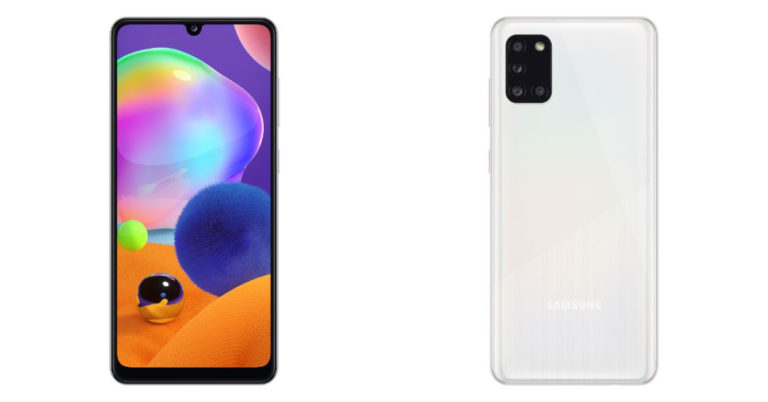
Samsung Galaxy A31 with quad rear cameras and 5,000mAh battery introduced: Specifications and features

The South Korean company Samsung seems to be on a launching spree despite the Coronavirus outbreak. While every other company is busy rescheduling its launch event Samsung today announced a new smartphone Samsung Galaxy A31. The company recently launched Galaxy M21 as well as M31 in the market despite the ongoing pandemic crisis. 

The newly introduced smartphone Samsung Galaxy M31 key highlights include a 5,000mAh battery, MediaTek Helio P65 processor along with an Infinity-U design display. The company announced the smartphone press release. However, there is no word on the pricing of the smartphone. Check out the full specifications and features of the Samsung Galaxy A31 smartphone.

Samsung Galaxy A31 specifications and Features

Samsung Galaxy A31 smartphone comes with a 6.4-inch Full HD+ Super AMOLED display offering 1,080 x 2,400 pixels of resolution. It comes with an Infinity-U design display that is often referred to as dewdrop or waterdrop notch along with an in-display fingerprint sensor.  Under the hood, there is an octa-core processor with two cores clocked at 2.0GHz, and six at a 1.7GHz frequency. The Samsung smartphone will be offered in two variants 4GB of RAM with 64GB of storage and 6GB of RAM with 128GB of internal storage. The storage can be expanded up to  512GB using an external SD card. It will run on One UI 2.0 skinned on top of Android 10 and will also include Samsung Pay.

Samsung Galaxy A31

In terms of imaging, Samsung Galaxy A31 features a quad rear camera setup that includes a 48-megapixel primary sensor with f/2.0 aperture. Further assisted by an 8-megapixel ultra-wide lens with f/2.2 aperture, a 5megapixel depth sensor with /2.4 aperture and lastly a 5megapixel macro lens with f/2.4 aperture. While on the front there will be a 20megapixel selfie camera with f/2.2 aperture.

The company will make Galaxy A31 available in four colour variants Prism Crush Black, Prism Crush Blue, Prism Crush Red, and Prism Crush White. The smartphone houses a 5,000mAh battery with 15W fast charging support. It measures 73.1 x 159.3 x 8.6 mm and weighs in at 185 grams.

For the latest gadget and tech news, and gadget reviews, follow us on TwitterFacebook and Instagram. For newest tech & gadget videos subscribe to our YouTube Channel. You can also stay up to date with the Gadget Bridge Android App.

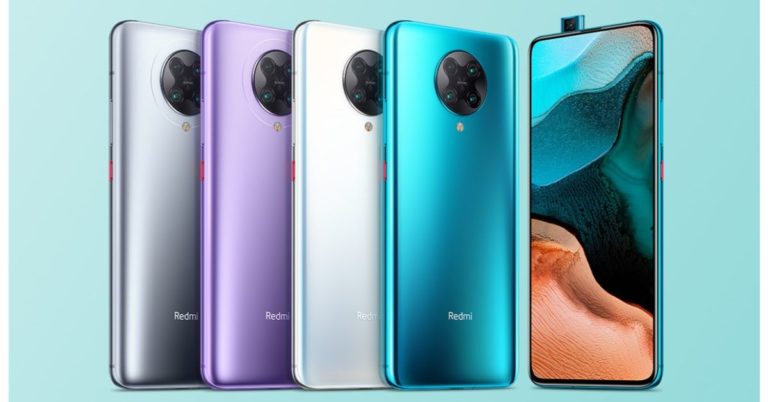
Redmi K30 Pro and Redmi K30 Pro Zoom Edition launched with a circular quad-camera module and pop up selfie camera: Details

Redmi K30 Pro and Redmi K30 Pro Zoom Edition have finally been unveiled. Xiaomi sub-brand has launched both the smartphones in China on Tuesday via an online presentation. The key highlight of the smartphones includes Qualcomm’s Snapdragon 865 processor, quad rear camera and a pop-up selfie camera. Read to know more about its specifications as well as its pricing.

Redmi K30 Pro and Redmi K30 Pro Zoom Edition Pricing

Redmi K30 Pro has been launched with a price tag of CNY 2,999 (around Rs 32,500) for the  6GB with 128GB variant while the 8GB with 128GB option and the 8GB + 256GB model comes at 3,399 CNY (around Rs 36,000) and CNY 3,699 (around Rs 40,000) respectively . While on the other hand, Redmi K30 Pro Zoom Edition price starts at CNY 3,799 (around Rs 41,000) for the 8GB with 128GB storage, 8GB with a 256GB variant has been priced at CNY 3,999 (around Rs 43,000).

Redmi K30 Pro launched

Both the devices will be available in Moonlight White, Sky Blue, Star Ring Purple, and Space Gray colour options from March 27 onwards in China.

Redmi K30 Pro and  Redmi K30 Pro Zoom Edition specifications

The newly launched devices Redmi K30 Pro and  K30 Pro Zoom Edition runs on MIUI 11 based on top of Android 10 OS. Both the smartphones come with a large 6.67-inch full-HD+ HDR10+ AMOLED display with 1080 x 2400 pixels of resolution and  1,200 nits of peak brightness. Under the hood, there is an octa-core Qualcomm Snapdragon 865 combined with up to 8GB of RAM and 256GB of storage.

In terms of camera, Redmi K30 Pro features a quad rear camera setup consisting of a 64-megapixel primary sensor with Optical Image Stabilisation. The camera system is assisted by a 5-megapixel macro lens,  a 13-megapixel wide-angle sensor with 123-degrees of Field of View and a 2-megapixel depth sensor.

Whereas Redmi K30 Pro Zoom Edition also comes with a quad-camera system consisting of a 64-megapixel primary camera, a 2-megapixel depth sensor, a 13-megapixel wide-angle sensor and an 8-megapixel telephoto lens offering 3X optical zoom and 30X digital zoom. Both the mobile handsets sports a 20-megapixel pop-up selfie camera. They boost a 4,700mAh battery with support for 33W fast charging.

For the latest gadget and tech news, and gadget reviews, follow us on TwitterFacebook and Instagram. For newest tech & gadget videos subscribe to our YouTube Channel. You can also stay up to date with the Gadget Bridge Android App.

Infinix Hot 9 with 5,000mAh battery launched: Specification details

Infinix Hot 9 smartphone has been officially launched. The company has launched the device in the Indonesian market before any other market. The device is the successor of Infinix Hot 8 that was launched last year. The key specifications of the smartphone include a triple rear camera set up, a 6.6-inch hole punch design display and a 5000mAh battery for longer battery life.

Infinix Hot 9 pricing

The Chinese company has launched Infinix Hot 9 in Indonesia in a single variant of 4 GB of RAM and 128 GB of built-in storage. It has been introduced with a price tag of Rp 1,699,000 that translates to Rs, 7,863 as per Indian currency. The device will be available in four colour variants of Ocean Wave, Violet, Quetzal Cyan and Midnight Black. There is no word from the company when the other markets will be receiving Infinix Hot 9.

Infinix Hot 9 specifications and features

Infinix Hot 9 comes with a 6.6-inch HD+ IPS LCD display panel with a hole-punch display. Under the hood, there is an octa-core MediaTek Helio P35 processor with PowerVR GE8320 GPU for graphics combined with 4GB RAM and 128GB storage. The smartphone runs on Android 10-based XOS 6.0. 

The device comes with a polycarbonate material built rear panel that sports a rear-mounted fingerprint sensor along with a vertically placed camera module. The device features a quad rear camera setup that includes a 16-megapixel primary sensor with f/1.8 aperture. The other sensors on the phone include a 2-megapixel macro lens and a 2-megapixel low light camera sensor. While on the front it comes with an 8-megapixel selfie shooter.

For longer battery life Infinix Hot 9 houses a 5,000mAh battery with 10W charging support. In terms of connectivity, it includes dual-SIM support, 4G VoLTE, Bluetooth 5.0, Wi-Fi, a 3.5mm headphone jack, and a micro USB port.

For the latest gadget and tech news, and gadget reviews, follow us on TwitterFacebook and Instagram. For newest tech & gadget videos subscribe to our YouTube Channel. You can also stay up to date using the Gadget Bridge Android App.

WHO launched a dedicated bot for WhatsApp to put a stop to fake coronavirus news and rumours: How to get access to WHO bot

The World Health Organization (WHO) and WhatsApp have collaborated to hold back the spread of fake news and wrong information on social media. A bot (software application) has been launched that will provide accurate and latest coronavirus updates to the WhatsApp users. In the vested interest of the public, the WHO has introduced the bot that is going to curb the spread of fake news. This bot will let you stay away from getting misled by the wrong information and will also prevent public fears and cause mass panic. Similarly, the Government of India has also rolled out MyGov Corona Helpdesk on WhatsApp that will provide correct information to the app users related to Coronavirus spread in India.

Who bot also provides information on the latest number of cases reported, news, precautions, travel advice, Mythbusters, etc related to the coronavirus outbreak. To get access to the WHO bot on your WhatsApp all you need to do is save  +41-79-893-18-92 to your contacts on your phone. Then send a WhatsApp message to the bot to connect. Once you get registered you are eligible to receive updates. In addition to this, the users will also get options to ask for more information related to coronavirus. You can reply with a number or emoji mentioned alongside the list of options as it is an automated system. And you will automatically start getting all the information on a particular topic that you choose from the options list.

The list includes a total of seven topics on which WHO bot will provide information:

  1. Latest numbers
  2. Protect yourself
  3. Your questions answered
  4. Mythbusters
  5. Travel advice
  6. News and Press
  7. Share

These days Several fake news, videos, as well as recordings, have been spreading related to the deadly disease which is responsible for creating panic among people. Recently WhatsApp in association with the World Health Organization (WHO), UNICEF and UNDP launched a messaging app The WhatsApp Coronavirus Information Hubhealth for the people seeking information, guidance for health workers, educators NGOs, local governments as well as businesses. The instant messaging app has also invested a $1 million grant in Poynter Institute’s International Fact-Checking Network (IFCN) to stop rumour mills from spreading misinformation about the disease. 

For the latest gadget and tech news, and gadget reviews, follow us on TwitterFacebook and Instagram. For newest tech & gadget videos subscribe to our YouTube Channel. You can also stay up to date using the Gadget Bridge Android App.

COVID-19: Apple fans can now buy more than 10 iPhones

0

As the countries across the world are bracing themselves up to fight the COVID-19 outbreak, Apple has come up a new strategy to make life of its users easy. The Cupertino-based tech giant has reduced the limit on online purchase of iPhones.

Once users choose the iPhone as per specifications they desire, they get an option to check out. On reviewing the shopping bag on Apple’s online store, one can then select the range from the drop-down menu that shows one can buy more than 10 iPhone.

However, the Reuters report has revealed that Apple hasn’t lifted the limit on some of its iPad and Macbook range.

Recently, Apple has updated MacBook Air with faster performance, the new Magic Keyboard, twice the storage and a new lower price of Rs 92,990. The new MacBook Air delivers up to two times faster CPU performance2 and up to 80 percent faster graphics performance allowing customers breeze through daily activities and play more games.

The new MacBook Air, which comes with storage capacity of 256GB, also houses 13-inch Retina display, Touch ID, spacious trackpad, and all-day battery life combined with the power of macOS Catalina.

Meanwhile, Apple has introduced its Siri users with a questionnaire related to the COVID-19 virus. If an iPhone user asks Siri whether or not they have Coronavirus pandemic, Apple’s voice assistant starts shooting a couple of questions to them. Several news reports have Siri will ask the users if they have come in close contact with someone who is tested positive for COVID-19 virus.

Apple’s Siri also tells them to watch out for symptoms like fever, dry cough, or shortness of breath. They may appear up to 14 days after exposure. If COVID-19 symptoms are shown one should separate themselves from others and take help of the medical experts immediately. It also states that in case someone is unable to reach a provider, they may use telehealth apps for help.

So far, Apple has donated $15 million worldwide to help treat coronavirus patients as well as to help lessen the economic and community impacts of the COVID-19 pandemic. “We’re also announcing that we are matching our employee donations two-to-one to support COVID-19 response efforts locally, nationally and internationally,” as revealed in the official statement issued by Apple.

For the latest gadget and tech news, and gadget reviews, follow us on TwitterFacebook and Instagram. For newest tech & gadget videos subscribe to our YouTube Channel. You can also stay up to date using the Gadget Bridge Android App.

Know how Facebook is helping health organisations battle COVID-19 outbreak

0

In order to help countries across the globe combat the coronavirus pandemic, Facebook has collaborated with its developer community to provide free services to government health organisations and UN health agencies so that they can use Messenger to scale their response to the COVID-19 crisis. The need to share timely information about this outbreak plays a pivotal role in keeping communities safe.

Asserting that communities around the world are dealing with quarantines and other disruptions to daily life because of the coronavirus outbreak, Facebook aims to help people connect and be closer together is more important than ever. Moreover, the social networking platform’s mission is to provide people with full access to the latest and most reliable information.

“Our developer partners have offered to provide their services free of charge to these organisations during this crisis. Developers will help with things like automating responses to commonly asked questions, which can take some of the burden off of overwhelmed staff. They’ll also show these organizations how to share updates with their audience most effectively and how to seamlessly transition from automated conversations to chatting with a live person when necessary,” said Stan Chudnovsky, VP of Facebook Messenger.

Argentina’s Ministry of Health is launching a Messenger experience, with support from Botmaker.com, to answer questions from the public about the coronavirus, and to provide fast, reliable and official advice 24 hours a day. Organisations like UNICEF and Pakistan’s Ministry of National Health Services, Regulations & Coordination (NHSRC) are also using Messenger to ensure people have the latest information about COVID-19.

Besides this, Facebook is also creating an online hackathon and inviting developers to build messaging solutions that address challenges related to the coronavirus such as social distancing and keeping people educated and informed.

According to a blog post on Facebook, The social media platform is “also partnering with hackathon provider Devpost to invite developers around the world to participate in an online hackathon leveraging the Messenger platform to build messaging solutions that address COVID-19 issues like social distancing and keeping people educated and informed.”

Developers who are interested in participating can subscribe to the Facebook for Developers newsletter for updates.

Meanwhile, Facebook has almost doubled server capacity for WhatsApp to provide reliable communication to people across the countries. Apart from this, Facebook has also launched an information hub with tips on how healthcare workers, educators and local businesses can stay connected using WhatsApp. It has also donated $1 million to the International Fact-Checking Network (IFCN) to expand the presence of local fact-checkers on WhatsApp.

For the latest gadget and tech news, and gadget reviews, follow us on TwitterFacebook and Instagram. For newest tech & gadget videos subscribe to our YouTube Channel. You can also stay up to date using the Gadget Bridge Android App.

(Image credit: Facebook)

Redmi K30 Pro and K30 pro Zoom Edition all set to launch today: How to watch the Livestream

Xiaomi’s sub-brand is all set to launch a new smartphone Redmi K30 Pro in the market. Due to coronavirus, the company has to plan an online launch event to unveil the device. Before it makes its way to the other markets the company is going to Launch Redmi K30 pro in its home market China. Alongside the smartphone, the company is also going to bring a refreshed version of  RedmiBook 14 Ryzen Edition along with Mi Air Purifier F1 and Redmi x Keith Haring accessories that are said to include a set of headphones and phone case.

Redmi K30 Pro expected pricing and how to watch the live stream

The Redmi K30 Pro is going to get unwrapped through an online launch. The launch event will be live-streamed via the company’s official Weibo account that will begin at 2 PM CST (11.30 AM IST).

Today the company will be launching two devices Redmi K30 Pro and Redmi K30 Pro Zoom Edition. The pricing of the upcoming smartphones are still not known but is tipped to come with a price tag of CNY 3,299 (around Rs 35,200) whereas the pricing of the other model is yet to be known. 

Redmi K30 Pro and Redmi K30 Pro Zoom Edition specification

Redmi K30 Pro is confirmed to feature an HDR10+ display with a Super AMOLED panel. Moreover, it is going to offer 1200 nits of peak brightness and a 180Hz touch sampling rate. According to some reports, both K30 pro and K30 Pro Zoom will be powered by the Snapdragon 865 processor combined with UFS 3.1 storage. Redmi K30 Pro is expected to be offered in two variants 6GB with 128GB internal storage and 8GB with 128GB internal storage. Whereas, the Zoom Edition is said to be offered in 8GB RAM with 128GB storage, 8GB RAM with 256GB storage, and 12GB RAM with 512GB storage option. Both are also expected to be offered in Moonlight White, Sky Blue, Purple, and Space Grey colour options.

The teasers suggest that Redmi K30 Pro will be featuring a pop-up selfie camera setup, unlike its predecessor which comes with a hole-punch camera. Additionally, there is going to be a circular camera module to house four rear cameras that include a Sony IMX686  64-megapixel sensor assisted by 3x optical zoom, and dual optical image stabilisation (OIS). Other camera details will be revealed during the launch.

According to some rumours the device will come with the largest vapour chamber (VC) liquid cooling. For connectivity, there is going to be a  3.5mm headphones jack, a dual-mode 5G, and Wi-Fi 6. Rest of the details will be updated after both the devices get launched.

For the latest gadget and tech news, and gadget reviews, follow us on TwitterFacebook and Instagram. For newest tech & gadget videos subscribe to our YouTube Channel. You can also stay up to date using the Gadget Bridge Android App.

Microsoft exposed to a new Windows vulnerability: Attacking Windows supporting devices including Windows 10

The software technology giant Microsoft has revealed a new Windows vulnerability to be found in all the devices supported by previous Windows OS as well as Windows 10. According to a new security advisory released by the company, the attackers are exploiting a previously undisclosed security vulnerability. However, the company has also disclosed that at the current moment no patch is available for the vulnerability.

According to the company, the front parsing remote code execution vulnerability is present in the Adobe Type Manager Library allowing apps to manage and render fonts available from Adobe Systems. The attacker could exploit the vulnerability by tricking and convincing the user to open a specially crafted document or viewing it in the Windows Preview pane. This allows it to run malware on the Windows device.

However, the company is working on a fix and it promised to release a security patch for the vulnerability by next month. Updates that address security vulnerabilities in Microsoft software are typically released on Update Tuesday, the second Tuesday of each month. This predictable schedule allows for partner quality assurance and IT planning, which helps maintain the Windows ecosystem as a reliable, secure choice for our customers. The company has also listed some OS versions that are exposed to this bug. By the time you can follow a few workarounds explained by the company that will reduce the risk.

Disable the Preview Pane as well as details pane in Windows Explorer. This will prevent the automatic display of OTF fonts in Windows Explorer and also prevents malicious files from being viewed in Windows Explorer. However, this will not prevent a local, authenticated user from running a specially crafted program to exploit this vulnerability. 

Follow the steps to disable these panes in Windows Server 2008, Windows 7, Windows Server 2008 R2, Windows Server 2012, Windows Server 2012 R2, and Windows 8.1

  • Open Windows Explorer, click Organize and then click Layout.
  • Clear both the Details pane and Preview pane menu options.
  • Click Organize, and then click Folder and search options.
  • Click the View tab.
  • Under Advanced settings, check the Always show icons, never thumbnails box.
  • Close all open instances of Windows Explorer for the change to take effect.

Perform the following steps for  Windows Server 2016, Windows 10, and Windows Server 2019:

  • Open Windows Explorer, click the View tab.
  • Clear both the Details pane and Preview pane menu options.
  • Click Options, and then click the Change folder and search options.
  • Click the View tab.
  • Under Advanced settings, check the Always show icons, never thumbnails box.
  • Close all open instances of Windows Explorer for the change to take effect.

For the latest gadget and tech news, and gadget reviews, follow us on TwitterFacebook and Instagram. For newest tech & gadget videos subscribe to our YouTube Channel. You can also stay up to date using the Gadget Bridge Android App.

Apps that can help you stay on task while you are working home

Due to concerns for coronavirus (COVID-19) many cities have been locked down or curfew has been implemented and the employees have to shift to the home office. That is quite a trouble for some as the companies rolled out mandatory work-from-home policies.

Some of the newbies will be working from home for the first time as they are not very much aware of how to stay on task while at home. There are so many apps to help them work from home to stay productive without going crazy from setting up a new workstation at home to the way they communicate with your team. We have listed quite a few popular apps so that you can work efficiently.

Zoom

Zoom is a video conferencing tool to allow people to meet and work together face to face even when meeting in person is not possible during the lockdown. This makes it easier for employees to work from home while staying connected. During the ongoing crisis, the company has also added 2.22 million active users this year. 

Zoom s a cloud-based video conferencing platform that can be used for video conferencing meetings, audio conferencing, webinars, meeting recordings, and live chat. A “Zoom Meeting” simply refers to a meeting that’s hosted using Zoom, and attendees can join the meeting in-person, via webcam or video conferencing camera, or via phone. Zoom offers four different pricing tiers for your business subscription such as Zoom free, Pro, Business, Enterprise. You can choose the right plan for your team as per your needs.

Slack

Slack allows you to communicate with multiple people as well as organise your conversations according to topics or projects. 

You can create different channels for team projects, office locations, or anything else that’s relevant to your organisation. Also, you can create private channels for conversations that shouldn’t be open to all members. 

You can also use shared channels to collaborate with the other organisations to send messages or share files in public channels, information flows transparently throughout Slack. It can also be used to make video or voice calls with any other members of your workspace

Trello

Trello is a collaboration tool that organizes your projects into boards. It can tell what’s being worked on, who’s working on what, and where something is in a process. It is a list-making application to create task boards with several columns and move the tasks between them. 

The columns include tasks such as task boards with several columns and move the tasks between them. This tool can be used both for personal as well as business. It is best suitable for real estate management, software project management, school bulletin boards, lesson planning, accounting, web design, gaming, and law office case management.

Chrome remote desktop

It is a remote desktop software tool developed by Google. It allows its users to remotely control another computer through Chromoting. Chrome Remote Desktop is available on the web on your computer. You will need to download the Chrome Remote Desktop app to use your mobile device for remote access. You can also set up remote access to your Mac, Windows, or Linux computer. Follow the steps to set  up remote access

  1. On your computer, open Chrome.
  2. In the address bar, type remotedesktop.google.com/access.
  3. Under “Set up Remote Access,” click Download. 
  4. Follow the on-screen directions to download and install Chrome Remote Desktop.

You may have to enter your computer password to give Chrome Remote Desktop access. You may also be prompted to change security settings in Preferences.

For the latest gadget and tech news, and gadget reviews, follow us on TwitterFacebook and Instagram. For newest tech & gadget videos subscribe to our YouTube Channel. You can also stay up to date with the Gadget Bridge Android App.
March 24 Amazon Quiz- Participate and win Bose Sound Touch 20 Speakers

Nowadays Amazon Quiz is getting more popular as more and more people are participating in the quiz daily. The participants have to just give the right answers and they can stand a chance to win free gadgets as well as Amazon Pay Balance. Today you have a chance to win-win Bose Sound Touch 20 Speakers.

Amazon Brings a set of 5 questions every day to which people have to answer them correctly. If you got lucky your name will be selected for a lucky draw then the final results will be announced at the end of the month. Today’s Amazon Quiz winner’s name will be announced on April 30. To help our readers to clear the Amazon Quiz successfully, every day we update all the Amazon Quiz questions with their correct answers on our website. To increase more chances of winning prizes we request you to participate in the quiz daily from 8 AM to 12 noon. As it is based on luck you might win something by answering all the questions correctly. Check out today’s answers for the Amazon quiz.

March 23 Amazon Quiz Answers

Question 1. In the movie Onward, if Tom Holland is the voice for Ian Lightfoot, which fellow MCU star is the voice for Ian’s brother Barley?

Answer- Chris Pratt

Question 2. President Ram Nath Kovind recently administered the oath of office to Mr. Bimal Julka for which post?

Answer- Chief Information Commissioner

Question 3. The World Boxing Council has created a championship belt, embellished with purple and gold colors, in honour of which NBA legend?

Answer- Kobe Bryant

Question 4. To whom did Mukesh Ambani lose the tag of Asia’s richest man, after a $5 billion-plus loss, in part due to the collapse of oil prices?

Answer- Jack Ma

Question 5. Which is the name of the dedicated storefront on Amazon.in to display ‘women entrepreneurs’ products to customers across the country?

Answer- Saheli

How to Play Amazon Quiz

  • Sign in to Amazon App. We urge you to download the app if you have not as the quiz is not available on the desktop platform.
  • Now sign up by filling the required information.
  • Now you will be directed to sign-in on the page. 
  • By signing in and then scroll down on the home screen to find the Amazon Quiz banner. 
  • Tap on the Amazon Quiz banner and then tap on the Start button to begin the Quiz.
  • There will be a total of 5 questions and you need to answer them correctly to enter the lucky draw. One wrong answer will eliminate you from the Quiz.
  • The winner’s name will be announced on the 30th of every month.

For the latest gadget and tech news, and gadget reviews, follow us on TwitterFacebook and Instagram. For newest tech & gadget videos subscribe to our YouTube Channel. You can also stay up to date with the Gadget Bridge Android App.

COVID-19: Apple users can now turn to Siri for information

1

If you are an Apple iPhone user and feeling overwhelmed due to the ongoing Coronavirus pandemic, you can now seek more information from Siri. The Cupertino-based tech giant has introduced its Siri users with a questionnaire related to the COVID-19 virus.

The moment iPhone user asks Siri whether or not they have Coronavirus pandemic, Apple’s voice assistant starts shooting a couple of questions to them. According to a CNBC report, Siri will ask the users if they have come in close contact with someone who is tested positive for COVID-19 virus.

Apple’s Siri also tells them to watch out for symptoms like fever, dry cough, or shortness of breath. They may appear up to 14 days after exposure. If COVID-19 symptoms are shown one should separate themselves from others and take help of the medical experts immediately. It also states that in case someone is unable to reach a provider, they may use telehealth apps for help.

Mind you, the answers that Siri is providing to its user about COVID-19 disease are from experts at the US Public Health Service (a part of the Department of Health and Human Services) and the Centers for Disease Control and Prevention.

In an official address by Apple, the tech giant has said, “The global spread of COVID-19 is affecting every one of us. At Apple, we are people first, and we do what we do with the belief that technology can change lives and the hope that it can be a valuable tool in a moment like this. Teachers are innovating to make remote lessons come alive. Companies are experimenting with new ways to stay productive. And medical experts can diagnose illnesses and reach millions with critical updates in the blink of an eye.”

Moreover, Apple’s committed donations to the global COVID-19 in order to help treat those who are sick and to help lessen the economic and community impacts of the pandemic has reached $15 million worldwide.

“We’re also announcing that we are matching our employee donations two-to-one to support COVID-19 response efforts locally, nationally and internationally,” as revealed in the official statement issued by Apple.

Besides this, Apple News has rolled out a new COVID-19 section, where users can be sure that they can find the latest verified reporting from trusted news outlets.

For the latest gadget and tech news, and gadget reviews, follow us on TwitterFacebook and Instagram. For newest tech & gadget videos subscribe to our YouTube Channel. You can also stay up to date using the Gadget Bridge Android App.

How to boost your WiFi signal while you are working from home

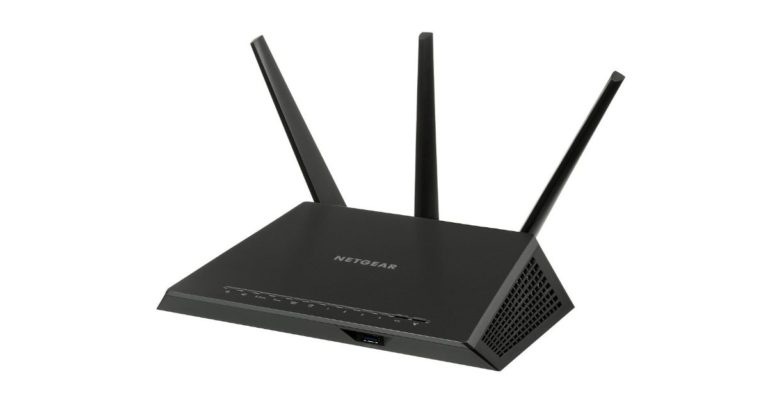
Our Government is taking several measures in the wake to control the coronavirus pandemic in India. Due to lockdown in several parts of the country, the offices have been shut down and the employees are being asked to work from home for health concerns. In the need of the hour, it is very important that your Wi-Fi should be fast as well as reliable so that it does not cause any hindrance while you perform work duties sitting at your home, studying, your kids attending online school classes or just self-quarantining.

Some time despite choosing a good high-speed data plan either your Wi-Fi struggle with poor internet connections or weak signal strength. So, in this case, follow some tips to fix your Wi-Fi speed to ensure the best possible speed for your laptop or any other work device.

  • Firstly disconnect all the devices which have been connected to your Wi-Fi router. These devices unnecessarily slow down the internet speed.
  • Sometimes placing your router in a better place helps in speeding up your internet. Try placing up the Wi-Fi router slightly away from walls and other electrical appliances. Keep the router somewhere in the center of your house or in open space. Sometimes people cover up the device inside a cabinet or at a hidden place. For best results, Wifi routers should be kept away from heavy electronics such as refrigerators which also impact its coverage.
  • For optimum results use multiple service set identifiers (SSID) with definite bandwidth. Allocating a limited amount of speed to the devices, allocating more bandwidth to your work devices such as laptops or phones will at least help in delivering proper required speed to each of your devices.
  • Also, use a dual-band router to ensure it offers both 2.4GHz and 5GHz frequency. Also, connect your working device to a separate frequency and also ensure no other device is connected to that frequency. This trick helps to speed up the WiFi while reducing interference with other devices.
  • If your Wifi is placed somewhere near your working device try using a LAN cable because wired ethernet connections work best and one of the best options.

follow some tips to fix your WI-Fi speed to ensure the best possible speed for your laptop or any other work device.

  • You can also choose to go for 5GHz frequency in your dual-band router instead of 2.4GHz for the best possible speed if the proximity is close to the router.
  •  Or if your work station is at a far distance, for instance, more than 10 feet then you can opt for 2.4GHz frequency in the dual-band router for better signal strength.
  • Try searching and avoid working from Wi-Fi dead zones which is now possible via a third-party app. These apps help you identify those spots.
  • Or you can also use repeaters and extenders to boost wireless coverage. If there are too many obstructions such as walls to penetrate the Wi-Fi signal will eventually drop. So you can use repeaters and extenders so that the signal strength never drops while boosting Wi-Fi coverage.

For the latest gadget and tech news, and gadget reviews, follow us on TwitterFacebook and Instagram. For newest tech & gadget videos subscribe to our YouTube Channel. You can also stay up to date using the Gadget Bridge Android App.

MTNL offering double data on all Broadband plans amid Coronavirus crisis

State-run telecom company MTNL has now launched double data benefits on all of its broadband plans in Delhi as well as Mumbai. The Plan includes both landlines as well as mobile broadband users in both the cities. The new MTNL offer will be available for a period of one month only to encourage its customers to work from home. 

“MTNL has doubled free data in all the broadband plans of landline as well as mobile for one month will effect from today so that people are encouraged to work from home,” MTNL Chairman and Managing Director Sunil Kumar told PTI.

The MTNL double data offer is applicable in Delhi and Mumbai where the organization currently operates. According to the MTNL, the new clients opting for copper cable-based connection will not have to pay even installation charges but will need to buy a modem for the service.

Recently the organisation also launched a free broadband plan for its landline users and new customers for a month in the wake of coronavirus spread. Another Government-run organisation Bharat Sanchar Nigam Limited (BSNL) also rolled out the “Work@Home” broadband plan for its users in the country. The company will now offer free Internet access to its existing landline customers to support work from home. The new plan comes with 10Mbps download speeds with a cap of 5GB per day. On exceeding the limit the users will be able to access the internet at 1Mbps speed. There is no download as well as upload limits and no installation charges. Moreover, the plan is also going to provide email ID access with 1GB storage space free of cost. This plan is applicable to all the BSNL landline subscribers in the country including Andaman and Nicobar circle for a period of one month from the date of activation. To activate the plan dial toll-free number 1800-345-1504.

For the latest gadget and tech news, and gadget reviews, follow us on TwitterFacebook and Instagram. For newest tech & gadget videos subscribe to our YouTube Channel. You can also stay up to date using the Gadget Bridge Android App.

COVID-19: 5 best software-based conference rooms for Remote meetings

0

As the different countries of world is under a lockdown due to the COVID-19 pandemic, Gadget Bridge brings to you list of five best software-based conference rooms to have a meeting with your team-mates while working from home. Check it out!

Zoom

The Zoom platform brings HD video and audio to your meetings with support for up to 1000 video participants and 49 videos on screen. It comes with built-in collaboration tools that allows multiple participants to share their screens simultaneously and co-annotate for a more interactive meeting. Moreover, there is end-to-end encryption for all meetings, role-based user security, password protection, waiting rooms, and place attendee on hold. You can even record your meetings locally or to the cloud, with searchable transcripts. It also helps you in scheduling or starting meetings from Outlook, Gmail, or iCal. You can even chat with groups, get access to searchable history as well as integrated file sharing and 10 year archive.

“It’s our goal to make Zoom easy to use and accessible for everyone, and we’re committed to streamlining the experience for our educational users amid the global coronavirus (COVID-19) outbreak. Zoom’s teams are working to provide teachers, administrators, and students around the world with the resources they need to quickly spin up virtual classrooms, participate in online classes, and continue their studies online,” as revealed by an official blog post.

Google Hangout Meet

Connect with your team from anywhere. With easy-to-join video calls, you can meet face to face without the added cost of travel. All you need to do is just set up a meeting and share a link. No worrying about whether teammates, clients, or customers have the right accounts or plug-ins. With a fast, lightweight interface and smart participant management, multi-person video calls are a breeze.

FaceTime

If you are using an Apple iPhone, iPod Touch or the iPad, FaceTime allows you to make video calls over Wi-Fi or mobile networks with just a click. FaceTime is a great app if users wish to socialize with their friends & family. All that they need is a decent internet connection to allow the connectivity. Note that the app does not charge its users any amount for usage but the users will face data charges from their respective network providers.

Skype

skype video call

Now generate your free unique link with one click, share it with participants and enjoy effortless meetings with Skype. If you don’t have Skype app, we will open our web client web.skype.com for your comfort. Join online meeting as a visitor, no log in needed. One can access chat after your meeting is over as the link is accessible for up to 30 days.

Facebook Messenger

Facebook's new app Study will pay you to let it track your smartphone activity


Facebook Messenger has redesigned the app to provide a faster start time when you open an app many times a day to respond to messages from the people who matter most. Facebook has made the app smaller app which means the messenger starts, downloads and updates faster for everyone, that includes people who use the app on older devices or in areas with lower connectivity where every kilobyte counts. So now leverage the benefits of these feature for an easy way out to connect with your colleagues remotely.

For the latest gadget and tech news, and gadget reviews, follow us on TwitterFacebook and Instagram. For newest tech & gadget videos subscribe to our YouTube Channel. You can also stay up to date using the Gadget Bridge Android App.

Xiaomi’s non-NFC smartphones now support Mi Pay

The Chinese smartphone manufacturer Xiaomi released Mi Pay last year in 2019. It is a specially designed UPI app (Unified Payments Interface) that comes pre-loaded in all Xiaomi phones. It can be used to quickly transfer money to friends and family, pay your local grocer or pay for your utilities. The payment service has now worked on phones without NFC to use Mi Pay. The app can be downloaded on Android devices through Google Play or Mi Apps Store.

Mi Wallet often referred to as Mi pay now also supports non-NFC phones. The company announced the availability via a Weibo post. Currently, this feature is available for three Xiaomi devices such as Redmi Note 7, Redmi Note 5, and Redmi 6. Mi Pay on these devices can be accessed after installing the latest beta version of the app. After this, the user needs to open the Xiaomi Wallet APP in the MIUI system and click “Mi Pay ”to add bank card details and further complete other authentication information. To launch the app one needs to double click the power button and then the app generates a QR code for payment. At the moment the feature is under beta testing and will reach Xiaomi devices after the completion of testing.

Mi Pay

Last year the company rolled out Mi Pay to counter Google Pay,  Paytm, BHIM among others. It can be used to make recharge payments for both prepaid as well as postpaid, landline, broadband and DTH bills under one roof. It also has support for paying utility bills or making transactions at offline stores accepting UPI payments. You can also generate your personal static or dynamic QR code for receiving payments. Further, the Mi Pay app allows you to view your transaction history. Another feature of this app is the smart card selection that has support for smart selection to switch between bus cards and door cards.

For the latest gadget and tech news, and gadget reviews, follow us on TwitterFacebook and Instagram. For newest tech & gadget videos subscribe to our YouTube Channel. You can also stay up to date with the Gadget Bridge Android App.
8 things you should know about Apple’s new iPad Pro

1

Apple has recently unveiled its most advanced iPad Pro 11-inch and 12-inch variants that it claims is faster and more powerful than most Windows PC laptops. While the 11-inch iPad Pro starts at Rs 71,900 for the Wi-Fi model and Rs 85,900 for the Wi-Fi + Cellular model, the 12.9-inch iPad Pro starts at Rs 89,900 for the Wi-Fi model and Rs 103,900 for the Wi-Fi + Cellular model. It must be noted that iPad Pro is currently unavailable in the Indian market and would go on sale soon.

Let’s check out what new features Apple is introducing in its iPad Pro 11-inch and 12-inch variants

iPad Pro gets performance boost with the new A12Z Bionic chip

With the new A12Z Bionic chip, editing 4K video or designing 3D models becomes much easier for a user. The eight-core GPU in the A12Z Bionic gives iPad Pro the highest performance ever in an iPad. This means the new Apple iPad Pro works faster than any PC laptops. It wouldn’t be wrong to say that with great battery life lasting up to 10 hours, users can stay productive and creative all day.

iPad Pro comes with Liquid Retina display

Apple has claimed that the Liquid Retina display — in both 11-inch and 12.9-inch sizes — is the world’s most advanced mobile display. Featuring P3 wide color support, it enable a user see photos, videos, apps and games in vivid, true-to-life detail. The tech giant has added that the ProMotion technology automatically adjusts the display refresh rate up to 120 Hz for ultra-smooth scrolling and responsiveness.

iPad Pro houses advanced Camera technology

The Pro camera system on iPad Pro come with a 12MP wide camera for capturing stunning photos and 4K video along with a 10MP ultra-wide camera that zooms out two times to capture a much wider field of view. Adding a second camera that doubles the photo and video possibilities in order to allow different perspectives and multi-camera use.

iPad Pro features five studio-quality microphones

The new Apple iPad Pro comprises of five studio-quality microphones for capturing the quietest details. It wouldn’t be wrong to say that the combination of pro cameras, pro audio and the large display make iPad Pro a versatile mobile studio for filmmakers, video professionals, podcasters and other content creators.

iPad Pro is equipped with Breakthrough LiDAR Scanner

Asserting that the breakthrough LiDAR (Light Detection and Ranging) Scanner enables capabilities never before possible on any mobile device, Apple claims, “LiDAR is used to determine distance by measuring how long it takes light to reach an object and reflect back. It’s so advanced, it’s being used by NASA for the next Mars landing mission. And it’s now been engineered to fit in the thin and light iPad Pro.”

Therefore, it seems that the LiDAR Scanner has upgraded the Measure app, making it faster and easier to automatically calculate someone’s height, while helpful vertical and edge guides automatically appear to let users more quickly and accurately measure objects. Isn’t that interesting?

iPad Pro gets the new Magic Keyboard

Apple has also launched the new Magic Keyboard for iPad Pro. With a floating design and smooth angle adjustment along with a backlit keyboard as well as trackpad, the tech major claims that the Magic Keyboard delivers the best typing experience ever on iPad. The Magic Keyboard for iPad Pro will be available for purchase in May for Rs 27,900 for the 11-inch iPad Pro and Rs 31,900 for the 12.9-inch iPad Pro with layouts for over 30 languages, including simplified Chinese, French, German, Japanese and Spanish.

iPad Pro gets trackpad support

With iPadOS 13.4, Apple’s trackpad support opens up new ways to use your iPad. Rather than copying the experience from macOS, trackpad support has been completely reimagined for iPad. As per Apple, “As users move their finger across the trackpad, the pointer elegantly transforms to highlight user interface elements. Multi-Touch gestures on the trackpad make it fast and easy to navigate the entire system without users ever lifting their hand.”

Mind you, the iPadOS 13.4 with trackpad support will be available on March 24 as a free software update for all iPad Pro models, iPad Air 2 and later, iPad 5th generation and later, and iPad mini 4 and later.

iPad Pro gets second generation Apple Pencil

Whether you are an artists, a student or a just a simple iPad user, the second-generation Apple Pencil enables retouching a photo or illustrating a birthday card with much ease. It attaches magnetically to the side of your iPad Pro and automatically pairs and charges on the go. This accessory for iPad Pro is available for Rs 10,900.

What’s more amazing about this second generation Apple Pencil is that you can take a screenshot, then mark it up. Scan a document, then sign it right on your iPad.

For the latest gadget and tech news, and gadget reviews, follow us on TwitterFacebook and Instagram. For newest tech & gadget videos subscribe to our YouTube Channel. You can also stay up to date using the Gadget Bridge Android App.

Vivo pushed the launch date for Vivo V19 to April 3 as per some reports

According to some reports the Chinese smartphone company has postponed the launch of Vivo V19 in India to April  3. Earlier the device was scheduled to launch in the country on March 26 but in view of the ongoing crisis, the company has decided to push the launch date a few days further. The handset is an update to the Vivo V17 that was launched in the country last year. V19 is also supposed to be a redesigned variant of the model which was launched in Indonesia earlier this month. However, there are going to be slight changes in the design factor as well as specifications.  

First reported by 91Mobiles, the new launch date for Vivo V19 is April 3. However, the company has not officially confirmed the new launch date but it has removed the old poster which mentioned the March 26th unveiling. On the same day, its Chinese counterpart Realme has also announced to launch Realme Narzo 10 series in India that is March 26.

The upcoming Vivo’s smartphone is a rebranded variant of the smartphone recently launched in Indonesia. But the Indian variant will have some changes as per some reports.

Reportedly the Indian variant of Vivo V19 will arrive with a 6.44-inch FHD+ Dual iView E3 Super AMOLED display with a 20:9 aspect ratio and 409ppi. Under the hood, there will be 2.3GHz octa-core Snapdragon 712 SoC paired with 8GB of RAM and two storage variants – 128GB and 256GB. Whereas the Indonesian variant comes with  Snapdragon 675 chipset.

It will go with an all-glass body rather than a plastic body. It will be available in two colour options  Mystic Silver and Piano Black. The display is expected to have support for an in-display fingerprint sensor. It will run on FunTouch OS 10 based on the top of Android 10.

In terms of cameras, Vivo V19 will be featuring an L shaped camera module consisting of four rear cameras. The camera set up will include a 48MP primary sensor, an 8MP super wide-angle lens, a 2MP macro lens and a 2MP depth sensor. In addition to this, the Indian variant will come with an additional selfie camera. Instead of a single front camera, there is going to be a dual punch-hole selfie camera that is going to include a 32MP main sensor and an 8MP wide-angle lens.

It is likely to come with a 4,500mAh battery with a 33W Vivo Flash Charge 2.0 support instead of an 18W fast charger that bundles with the Indonesian model.

In terms of connectivity, it will include Wi-Fi 802.11 a/b/g/n, Bluetooth 5.0, 4G and Type-C port. It is expected to measure 159.64×75.04×8.5mm and weigh 186.5 grams. 

For the latest gadget and tech news, and gadget reviews, follow us on TwitterFacebook and Instagram. For newest tech & gadget videos subscribe to our YouTube Channel. You can also stay up to date with the Gadget Bridge Android App.

Samsung Galaxy M21 with 6,000mAh battery to go on sale in India today via Amazon: Pricing, specifications and other details

Last week the South Korean Company, Samsung, unveiled Galaxy M21 in India under its affordable budget smartphone range. Today the device is going on its first sale in the country via e-commerce website Amazon. To recall the handset is the successor of Galaxy M20 that was launched last year. For longer battery life, it comes with a massive 6,000mAh battery. It further includes an Infinity-U display and a triple rear camera setup.

Samsung Galaxy M21 pricing and availability

Samsung launched its budget phone Samsung Galaxy M21 in two different configurations 4GB RAM with 64GB storage and 6GB RAM with a 128GB storage option. The 4GB RAM variant will be available at Rs 12,999 whereas the pricing of the 6GB RAM model will be Rs 15,499. Both the RAM options will be available in two colour options Midnight Blue and Raven Black. As said, the smartphone will be available for purchase via e-commerce platform Amazon today and the sale will begin at 12 noon onwards. On the purchase of the smartphone the company will be offering an introductory discount of  Rs 500 valid till March 31st.

Samsung Galaxy M21 sale

Samsung Galaxy M21 specifications

Samsung Galaxy M21 features a 6.4-inch full-HD+ Infinity-U Super AMOLED display with 1,080×2,340 pixels of resolution and 19.5:9 aspect ratio. The display has been protected with a layer of Corning Gorilla Glass 3. The mobile handset runs on One UI 2.0 on top of Android 10. Under the hood, there is an octa-core Exynos 9611 processor along with Mali-G72 MP3 GPU for graphics. The processor has been paired with up to 6GB of RAM and 128GB of storage. The storage can be expanded up to 512GB using a microSD card.

In terms of camera capabilities, the Samsung Galaxy M21 comes with a triple rear camera set up that includes a 48-megapixel primary sensor. The camera set up is further aided by an 8-megapixel ultra-wide-angle lens with 123-degrees of Field of View and a 5-megapixel depth sensor for portraits. For selfies and video calling it features a 20-megapixel selfie camera on the front.

For connectivity it offers 4G, VoLTE, 3G, WiFi, Bluetooth, GPS, and USB Type C. The sensors on the phone includes a fingerprint sensor, an accelerometer, ambient light, gyro, magnetometer, and a proximity sensor. For longer battery life, Galaxy M21 houses a massive 6,000mAh battery with 15W fast charging support. 

For the latest gadget and tech news, and gadget reviews, follow us on TwitterFacebook and Instagram. For newest tech & gadget videos subscribe to our YouTube Channel. You can also stay up to date with the Gadget Bridge Android App.

March 23 Amazon Quiz- Answer these five questions and you could win Rs 50,000 Amazon Pay balance

Amazon is back with another set of questions on its platform. The Amazon Quiz has gone live on its Amazon app and today you have a chance to win a Rs 50,000 Amazon Pay balance. The quiz allows millions of customers to participate in the quiz every day from 8 AM which continues till 12 noon. 

Amazon brings a daily quiz that includes a set of five questions related to general knowledge and current affairs. The participants need to answer all the five questions correctly then their name will be shortlisted for a lucky draw. One wrong answer could eliminate you from the quiz. The results are announced at the end of the month. Today you can stand a chance to win Rs 50,000 in Amazon Pay balance. Only app users are eligible to participate in the Quiz. Check out today’s answers for the Amazon quiz.

March 23 Amazon Quiz Answers

Question 1: The Union Civil Aviation ministry has lifted up restrictions to allow Indian airlines to provide what service to all its passengers?

Answer – In-Flight Wi-Fi

Question 2: Tintin Eleonora Emman is the middle name of which famous activist?

Answer – Greta Thunberg

Question 3: After PM Narendra Modi and Rajinikanth, which actor is set to feature in an edition of ace adventurer Bear Grylls’s ‘Man Vs Wild’ show?

Answer – Akshay Kumar

Question 4: Which English Premier League Team’s 44-game unbeaten run came to an end after suffering a 3-0 defeat at Watford on February 29th?

Answer – Liverpool

Question 5: Indian Tycoon Yusuff Ali, has become the first Indian to receive Saudi Arabia’s premium residency. He is which company’s chairman?

Answer – Lulu Group

Amazon Quiz gives a chance to its customers from across the country to win products such as OnePlus 7T, Apple iPhone X, iPhone Xs, iPhone XR, Go Pro Hero 8 and many more gadgets as well as Pay Balance. Today’s result is going to be announced through a lucky draw on April 30.

You can follow these instructions to participate in Amazon Quiz:

  • Download the Amazon app from Google Play Store.
  • Fill in the required information through the Sign Up option.
  • Now log in to the Amazon app and scroll down on the home screen to find the Amazon Quiz banner. 
  • Tap on the Amazon Quiz banner and then tap on the Start button to begin the Quiz.
  • Now you will get 5 questions and you need to answer them correctly. One wrong answer will eliminate you from the Quiz.
  • After answering all the questions correctly you are now eligible for a Lucky Draw.
  • The winner’s name will be announced on the 30th of every month.

For the latest gadget and tech news, and gadget reviews, follow us on TwitterFacebook and Instagram. For newest tech & gadget videos subscribe to our YouTube Channel. You can also stay up to date with the Gadget Bridge Android App.