The e-commerce website Amazon is back with another daily quiz on its platform. The e-retailer conducts Amazon quiz sessions every day for its customers. The customers from different parts of the country can win exciting prizes and today’s quiz will let you win Rs 25,000 Pay Balance by answering all the questions correctly.
April 7 Amazon Quiz is live now and the participants can stand a chance to win Rs 25,000 Pay Balance. By participating in the daily quiz the customers can win products such as OnePlus 7T, Apple iPhone x, iPhone Xs, Go Pro Hero 8, Galaxy Watch Active, and many more gadgets as well as Pay Balance. You can play the quiz from 12 AM to 11:59 PM every day and the winner’s names will be announced at the end of every month. Check out April 7 Amazon Quiz answers.
April 7 Amazon Quiz Answers
Question 1: Which Indian state is the host of Indian Women’s League 2021 football tournament?
The answer is- Odisha
Question 2: Which film won the 2021 Golden Globe Award for Best Drama film?
The answer is- Nomadland
Question 3: Who has developed and launched a secure messaging application named Secure Application for the Internet (SAI)?
The answer is- Indian Army
Question 4: In which place will you find this important American building?
The answer is- Washington D.C
Question 5: With which festival is this candy associated with?
The answer is- Christmas
Apple AirPods are wireless Bluetooth earbuds created by Apple. Although they work best with Apple devices, they can be paired with Android devices and PC as well. This is because the principle for pairing the Airpods with other devices is Bluetooth connection which is a standard method for pairing all wireless devices.
In This Article
How to connect Apple AirPods to an Android smartphone?
To connect Apple AirPods to an Android smartphone, follow these steps.
Press and hold the white button given on the backside of the AirPods case until the LED starts glowing white.
Go to the Bluetooth Settings on your Android smartphone.
Search for the available Bluetooth connections
Find Bluetooth connections via Settings. If the Airpods are still flashing white, they will appear in the Bluetooth Settings.
Tap Pair to allow the connection to be established between your smartphone and Airpods.
Once your smartphone identifies the Airpods, it will connect with it automatically provided the Bluetooth of your smartphone is enabled.
How to troubleshoot if Airpods don’t get paired with your Android smartphone?
If the smartphone fails to establish a Bluetooth connection with the Airpods, follow these steps.
Verify that the Airpods are not connected to any other device
Ensure that the Airpods are charged otherwise they will not get paired with any device.
In your smartphone, toggle the Bluetooth feature off and on once. You might also feel the need to reboot your smartphone.
Keep the Airpods within a range of 10 meters from the Android device.
How to troubleshoot if Airpods don’t get paired with your Android smartphone?
What to do if troubleshoot does not work?
If the troubleshooting methods don’t work out, you may need to reset your Airpods. When you reset your Airpods, they will get disconnected from other devices and iCloud account. Follow these steps.
Open the case of the AirPods while taking them outside.
Open the Bluetooth Settings on your smartphone.
Tap the Settings icon of the AirPods, and tap Forget this device.
Press and hold the button given at the backside of the AirPods case until it flashes red.
Don’t release the button until the LED flashes white.
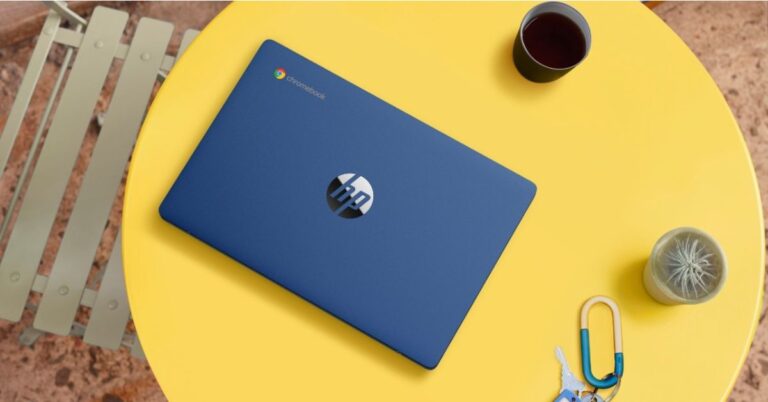
The American multinational information technology company, HP, has expanded its Chromebook laptop series with the addition of the new Chromebook 11a in India. With the launch of this laptop, the company aims to cater personalized, interactive, cloud-based learning experience for students. The HP Chromebook 11a has been introduced at the same time when the Government has recently announced a lockdown in some regions of the country due to a surge in Coronavirus cases.Seeing the online classes trend and for the student’s comfort, the new HP Chromebook features a slim form factor with a long battery life that offers easy mobility to learn and play from anywhere. Powered by MediaTek MT8183 Octa-core Processor the device further includes voice-enabled Google Assistant support and free Google One subscription for one year.HP Chromebook 11a price and availabilityHP Chromebook 11ahas been launched in India at an affordable price of Rs 21,999. This laptop is now available exclusively via the e-commerce website Flipkart. The device is being offered in a single Indigo Blue colour option.HP Chromebook 11a tech specsStarting with the design first, the HP Chromebook 11a comes in a single Indigo Blue colour option having a matte finish and a colour-coordinated keyboard deck to match the device’s lid cover. The laptop is designed for students and is slim, compact as well as less bulky, it weighs just 1.05kgs. The 11a features an 11.6-inch HD touch display with 1,366×768 pixels of resolution. The HD anti-glare display offers 220 nits of peak brightness, 45 percent colour gamut, and 73.8 percent screen-to-body ratio. Under the chassis, there is a MediaTek MT8183 Octa-core processor up to 64GB of storage and 100 GB of cloud storage, also with 256GB expandable storage. It has dual speakers and an HD camera which is a must for attending online classes. For connectivity, there is USB Type-A and Type-C, along with an audio jack and a Micro SD slot. In addition to this, there is Bluetooth v5 and Wi-Fi 5 for wireless connectivity.Over that, the HP Chromebook 11a offers Chrome OS and Android apps included in Google Play Store. Like we said earlier the company will be offering Google One subscription with 110GB of storage for one year. For a hands-free experience, the laptop also includes Google Voice Assistant support.
For the latest gadget and tech news, and gadget reviews, follow us on Twitter, Facebook and Instagram. For newest tech & gadget videos subscribe to our YouTube Channel. You can also stay up to date using the Gadget Bridge Android App.
YouTube is the most popular video streaming service with over 2 billion logged-in monthly users. It offers a seamless video search engine and recommendation engine along with a friendly interface. There are several ways to download a YouTube. However, the most preferred methods are given below.
In This Article
Method 1: Using the iTubeGo YouTube Downloader
iTubeGo enables you to download YouTube videos of up to 8K resolution at high speeds. Apart from YouTube, this software downloads from other video-streaming websites as well including Vimeo, Metacafe, and Dailymotion. The tool enables you to download YouTube videos in all standard formats including MP3, MP4, AVI, and MOV.
To download a YouTube video using iTuebeGo, follow these steps.
Click the Paste URL button located on the top-right to open the dialogue box.
Go to YouTube and copy the URL of the video that you want to download.
Paste the URL in the iTubeGo dialogue box.
Click on the Download button to start downloading the video file.
Method 1: Using the iTubeGo YouTube Downloader
Method 2: Using the VLC Media Player
The VLC is a very popular open-source video player for Windows PC, Mac. This tool can play almost all multimedia file formats as well as Audio CDs, VCDs, and DVDs. The software supports a wide range of audio compression methods.
To download a YouTube video using the VLC Media Player, follow these steps.
Go to the website, (https://www.videolan.org/) and install VLC Media Player.
Launch the VlC Media Player on your PC.
Go to the Media > Open Network Stream to open a tab with a message, “Please enter a network URL”.
Go to YouTube and copy the URL of the video that you want to download.
Paste the URL in the VLC MEdia PLayer dialogue box.
Click on the Play button.
Go to Tools > Codec Information.
Copy the link given in the location textbox and paste it into a web browser. Press Enter.
Right-click on the video and click ‘save video as’ to download the video.
Xiaomi, the Chinese multinational electronics company, announced to celebrate its annual Mi Fan Festival (MFF) starting from April 6, 2021. In this event, the company will release online campaigns and discussions on how Xiaomi products influenced the lives of their users. The upcoming event will be the seventh edition of the Mi Fan Festival (MFF) with the theme of “Explore the possibilities”. Google and Qualcomm Technologies are also celebrating Xiaomi’s founding day together via Mi Fan Festival (MFF) 2021 co-created posters.
According to Muralikrishnan B, COO, Mi India, “At Mi India, we have always put Mi Fans and consumers at the core of everything we do. Mi Fan Festival is an iconic representation of our Mi Fan culture. This year marks the 7th year of Mi Fan Festival celebrations in India & what makes it more exciting is that this year, it is coinciding with the 4th year anniversary of our flagship showrooms in India – Mi Homes.”
In This Article
What will be the Mi Fan Festival (MFF) all about?
The Mi Fan Festival (MFF) will come with new launches and heavy discounts on existing Mi products. Here is the complete breakdown of offers.
Heavy discounts on Mi products
The Mi Fan Festival will bring huge discounts on a variety of Mi products like smartphones and smart TVs. The consumers will be able to avail themselves of the special sale on Mi.com. The company will provide a whooping discount of ₹ 13,000 on its Mo 10T Pro that has an MRP of ₹ 35,999. The Mi Notebook 14 Horizon will also be available at a discount of up to ₹ 13,000.
What will be the Mi Fan Festival (MFF) all about?
Gift Vouchers and 100% cashback offers
The customers will get a voucher worth more than ₹ 10,000 for buying products from Mi Home. These vouchers will be offered by famous brands including Zoomcar, Cultfit, The Man Company, and MakeMyTrip. The event will culminate into a lucky draw in which one lucky customer will be offered 100% cashback on his/her entire shopping during the festival.
According to Muralikrishnan B, COO, Mi India, “As we look back to reminisce, we started our Mi Home journey in 2017 with the intent of providing the best in class retail experience for our Mi Fans. Over the last 4 years, we have strived to bring that concept to reality. Today, we are happy to share that Mi Homes are recognised as Best Premium Exclusive Stores by UNOMER, a leading market research firm. With 75+ Mi Homes spread across 19 cities, these showrooms make for a unique space wherein Mi Fans can engage, experience, experiment with our products”.
Opportunity to showcase talent
In the Mi Fan Festival, Mi Home will conduct a series of talent hunt programs like #UnboxWithMi and #HumourMi. In these contests, Mi Fans can showcase their talent like stand-up comedy, singing, and blogging. Winners of these programs will be rewarded with exciting prizes. There will also be a service camp to offer services to all Xiaomi products free of cost.
Redmi Note 10 Pro Mi Fan Festival Special Edition
This year’s Mi Fan Festival will witness the launch of the Redmi Note 10 Pro MFF Special Edition. The smartphone will serve as a special souvenir for the festival and will be sold in limited quantities. The launch event will feature the slogan “Explore Infinite Possibilities” that will be depicted by the space theme on the smartphone box.
Redmi Note 10 Pro Mi Fan Festival Special Edition
According to Raghu Reddy, CBO, Mi India said, “With the 7th edition of Mi Fan Festival, our excitement has grown seven-fold with all the offers we have in store for our fans. Every year during MFF we celebrate with Mi Fans, users, and partners around the world to express our gratitude for their support — which is one of our key drivers to continue exploring and innovating. We are thrilled to extend exciting offers to our Mi Fans this year as well. From discounts worth INR 13,000 to INR 1 flash sale, consumers can purchase their favourite products across categories such as smartphones, laptops, smart home products, etc. We are hopeful that our fans would be able to make the most of this sale and get a hold of their favourite gadgets.”
For the latest gadget and tech news, and gadget reviews, follow us on Twitter, Facebook and Instagram. For newest tech & gadget videos subscribe to our YouTube Channel. You can also stay up to date with the Gadget Bridge Android App.
Facebook is the most widely used social media platform with around 2.6 billion monthly active users globally. Owing to its handy features to connect and share with the people and secure platform, Facebook has emerged as the face of social media in India as well as other countries.
Despite offering enormous socialising capabilities, some people may want to permanently delete their Facebook account. The reason for account deletion may vary from person to person. However, the company provides a straightforward method to permanently delete your account.
In This Article
How permanent deletion affects your Facebook account?
When you delete your Facebook account, the data associated is also erased. Here is the list of things that will be affected by the account deletion.
Once deleted, Facebook does not provide any provision to recover your account.
The entire data associated with your profile like posts, comments and chats on your Facebook Messenger are erased permanently.
Since your Facebook account will no longer exist, you will not be able to log into other websites using your deleted Facebook account.
If you own an Oculus, you will not be able to use the deleted account to log into Oculus. Since your app purchases are erased, you will not be able to return any applications.
It must be noted that some data like messages sent to your friends may remain even after you delete your account. This is because the copy of the messages is saved in your friends’ inboxes.
How permanent deletion affects your Facebook account?
How can you permanently delete your Facebook account?
To permanently delete your Facebook account, follow these steps.
Open a web browser on your device and log into your Facebook account.
Click the account down arrow button located on the top-right.
Go to Settings & Privacy > Settings.
Click the ‘Your Facebook Information’ option given on the side menu.
Click Download Your Information. Choose the data that you want to download.
Click Create File to create a file of your data in the desired format.
Once the file is saved on your device, click ‘Delete Account’.
Can you cancel your account deletion?
You can cancel your account deletion within thirty days. To cancel your account deletion, follow these steps.
Log in to your Facebook account within 30 days of your account deletion.
Click Cancel Deletion.
After thirty days of your account deletion, you won’t be able to cancel the deletion process. Facebook usually takes up to ninety days to completely erase the data of your account. During the account deletion process, the data remains hidden to your friends and other Facebook users.
For the latest gadget and tech news, and gadget reviews, follow us on Twitter, Facebook and Instagram. For newest tech & gadget videos subscribe to our YouTube Channel. You can also stay up to date with the Gadget Bridge Android App.
Western Digital, which provides storage solutions, has announced the launch of its new Pendrive-SanDisk iXpand Flash Drive Luxe in India. This is the company’s first 2-in-1 Flash Drive for convenient file transfer between devices. In addition to this, it can also be used with iPhone devices and Mac computers. It comes with an all-metal casing with a slim design. As per the company, the SanDisk iXpand Flash Drive Luxe provides a sleek way for users to seamlessly access and move files between iPhone, iPad Pro, Mac and other USB Type-C devices, including Android phones.Commenting on the launch, Mr. Jaganathan Chelliah, Director – Marketing, India, Western Digital, said, “Today’s consumers are always on-the-go – working from remote locations, travelling, and switching from place to place while creating content on their iPhones and transferring it to multiple other devices for editing, sharing and back up. Data transfer and storage should be the last thing that they should worry about. This is exactly where the SanDisk iXpand Flash Drive Luxe comes into play which enables you to work seamlessly across your iPhone and other devices. SanDisk iXpand Flash Drive Luxe offers the dependability of a brand that’s trusted by millions of consumers around the world”.With the launch of the new SanDisk iXpand Flash Drive Luxe, Western DIgital is trying to solve the hassle of moving files between devices with different connectors. It is claimed to be the company’s first flash drive with dual Lightning and USB Type-C connectors that enables a quick move of files, eliminating the need to email content from one device to another in order to upload or save. When the files are saved on the drive, they can be transferred using the high-speed USB 3.0 connector to a USB Type-C-compatible computer. Privacy has also been taken care of as with this Pendrive, one can enable password to protect their files and personal stuff using the iXpand Drive app. Similarly, this app can also be used to free up space on an iPhone or to automatically back up photos, videos, documents and contacts without the hassle of a slow internet connection. Other than having an all-metal casing it has a dual-purpose swivel design that protects connectors and features a keyring hole.The SanDisk iXpand Flash Drive Luxe comes in 64GB, 128GB and 256GB storage options. These come with a 2-year limited warranty and is available now at the Western Digital Store, Amazon and other select retailers. The price of the 64GB storage is priced at Rs 4,449 while the 128GB variant at Rs 5,919 and Rs 8,999 for the 256GB model.
For the latest gadget and tech news, and gadget reviews, follow us on Twitter, Facebook and Instagram. For newest tech & gadget videos subscribe to our YouTube Channel. You can also stay up to date using the Gadget Bridge Android App.
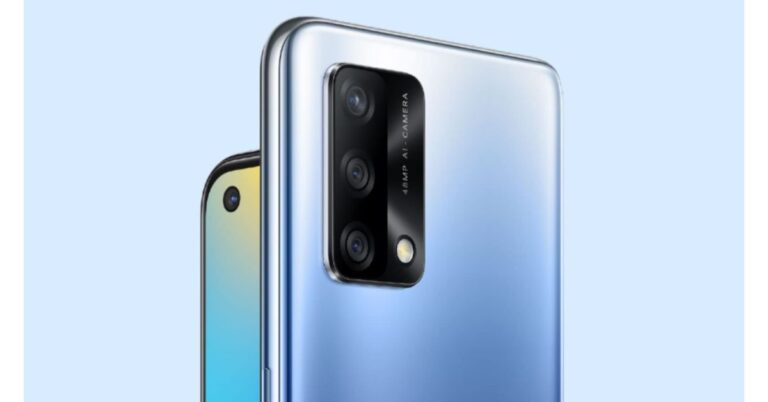
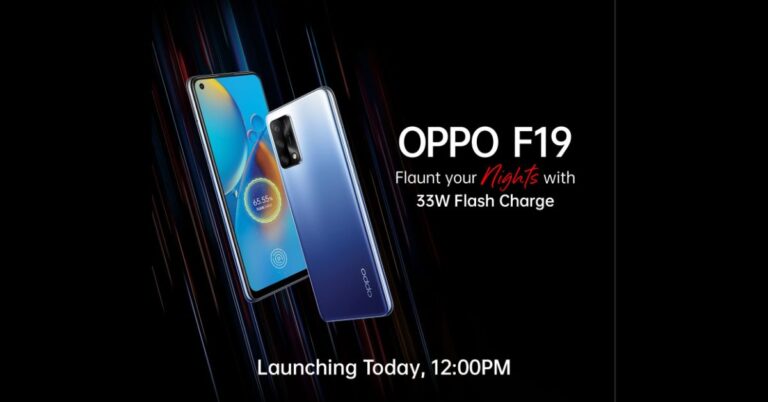
The Oppo F19 series just got bigger. The company today added another new smartphone to the lineup by introducing Oppo F19 smartphone. The series already includes two phones, Oppo F19 Pro+ and Oppo F19 Pro. The phone is claimed to be the slimmest with a 5,000mAh battery onboard. The key highlights of the phone include a triple rear camera set up featuring a 48-megapixel primary sensor. In addition to this, the device is powered by Qualcomm Snapdragon 662 SoC and runs Android 11 out of the box.Oppo F19: Price and availability detailsOppo F19 has been introduced in India in a single 6GB of RAM and 128GB of storage option. The phone is priced at Rs 18,990. The device will be offered in two colour options of Midnight Blue and Prism Black. It will be available for purchase through Amazon and other online as well as offline channels starting April 9. The launch offers for the smartphone include 7.5 percent cashback to buyers making transactions through HDFC Bank, ICICI Bank, Kotak, and Standard Chartered bank debt as well as credit cards. There will be 11 percent instant cashback if payment is made through Paytm. There will be zero down payment on EMI offered by Home Credit, HDFC Bank, and Kotak. Also, the company will be offering Oppo F19 buyers Oppo Enco W11 TWS earbuds and Oppo W31 wireless headphones at a discounted price of Rs 1,299 and Rs 2,499 respectively.Oppo F19 tech specsAs for the specifications, Oppo F19 features a 6.43-inch fullHD+ AMOLED display with 1,080×2,400 pixels of resolution. It offers a 20:9 aspect ratio, 800 nits of peak brightness, 409ppi pixel density, and there is a standard 60Hz refresh rate panel. The phone runs on Android 11 with ColorOS 11.1 on top. Under the hood, there is an octa-core Qualcomm Snapdragon 662 SoC, paired with Adreno 610 GPU. It is offered in a single 6GB of RAM and 128GB of storage. The onboard storage supports expansion via a microSD card. In terms of imaging, the newly launched Oppo F19 comes with a triple rear camera setup headlined with a 48-megapixel primary sensor with an f/1.7 aperture. Furthermore, there is a 2-megapixel depth sensor and a 2-megapixel macro lens. The front notch holds a 16-megapixel sensor for taking selfies and video calling.The connectivity options on the phone include 4G LTE, Wi-Fi, Bluetooth v5.0, GPS/ A-GPS, USB Type-F, and a 3.5mm audio jack. The smartphone houses a 5,000mAh battery that’s paired with a33W Flash Charge, which runs on a 11V3A solution. The phone is claimed to fully charge in 72 minutes and up to 54 percent in just 30 minutes. As per the company, with 5 minutes of charging you can enjoy 5.5 hours of calling and around 2 hours of YouTube use.
For the latest gadget and tech news, and gadget reviews, follow us on Twitter, Facebook and Instagram. For newest tech & gadget videos subscribe to our YouTube Channel. You can also stay up to date using the Gadget Bridge Android App.
Yahoo Answers, a community-driven Q&A website will be shut down effective from May 4, 2021. Yahoo Answers was release in 2005 to cover discussions on a variety of topics including news, health, education, and entertainment. The portal gradually evolved to accommodate questions and answers related to politics.
In This Article
Why did Yahoo decide to shut down Yahoo Answers?
The platform was created with an intention to cover diverse topics. However, politics seemed to dominate other aspects. As a result, the platform began to be used as a tool to give fuel to far-right conspiracy hypotheses. Recent events like the US elections were also taken advantage of to spread miscommunication.
Earlier, Yahoo Answers used to consist of thought-provoking explanations on science, literature, and political science. In the later stage, it turned into an accumulation of trivial objective questions like “Will America survive 4 years of Joe Biden?” and “Was Stalin right about everything?”
Yahoo sent a note to the existing Yahoo Answers users giving the details about the shutdown of the service. The note reads as follows.
Dear Yahoo Answers Community,
We launched Yahoo Answers sixteen years ago to help people around the world connect and share information. With you and millions of other users, we built the best place on the web to ask and answer questions on a variety of topics, creating a community of global knowledge sharing. While we could not have been prouder of what we accomplished together, we are reaching out today to let you know that we have decided to shut down Yahoo Answers on May 4th, 2021.
While Yahoo Answers was once a key part of Yahoo’s products and services, it has become less popular over the years as the needs of our members have changed. To that end, we have decided to shift our resources away from Yahoo Answers to focus on products that better serve our members and deliver on Yahoo’s promise of providing premium trusted content.
Starting on April 20th you will no longer be able to post any new questions or answers. However, you can still view any posted questions and answers until May 4th. On May 4th the site will be shutting down. If you would like to download a copy of your questions and answers you have posted, you can do this by signing into Your Privacy Dashboard and requesting a download. You will be able to do this until June 30th, 2021 after which your Yahoo Answers data will be securely deleted and no longer available. The closure of Yahoo Answers will not affect your Yahoo account or other Yahoo services. For further information and instructions on how to download your data, please visit our Frequently Asked Questions or copy and paste this URL into your browser: https://help.yahoo.com/kb/SLN35642.html
Thank you for contributing to Yahoo Answers — we’re proud and honoured to have helped you connect with and learn from the Yahoo community these past sixteen years. If you’d like to provide feedback, please feel free to reach out to our team at yahoo_answers_sunset@verizonmedia.com.
Sincerely, The Yahoo Answers team
Why did Yahoo decide to shut down Yahoo Answers?
Yahoo has set a deadline of June 30, 2021, for users to get the data associate with their questions and answers. After the deadline, the entire data will be deleted permanently with no provision for the user to recover it.
How will the shutdown of yahoo Answers impact other platforms?
Yahoo Answers has been serving as a platform for several users to feed their curiosity for the past fifteen years. The shutdown of the website will induce its users to shift to other Q&A platforms like Quora and Reddit.
Websites like Yahoo Answers, Quora, and Reddit are all the same in their basic forms. All of them just provide a stage for people to carry out discussions. Shutting down a website may not appear justified to some people. Instead, bringing strict policies for posting comments and using Artificial Intelligence to filter out offensive posts can be taken as a long-term solution.
For the latest gadget and tech news, and gadget reviews, follow us on Twitter, Facebook and Instagram. For newest tech & gadget videos subscribe to our YouTube Channel. You can also stay up to date with the Gadget Bridge Android App.
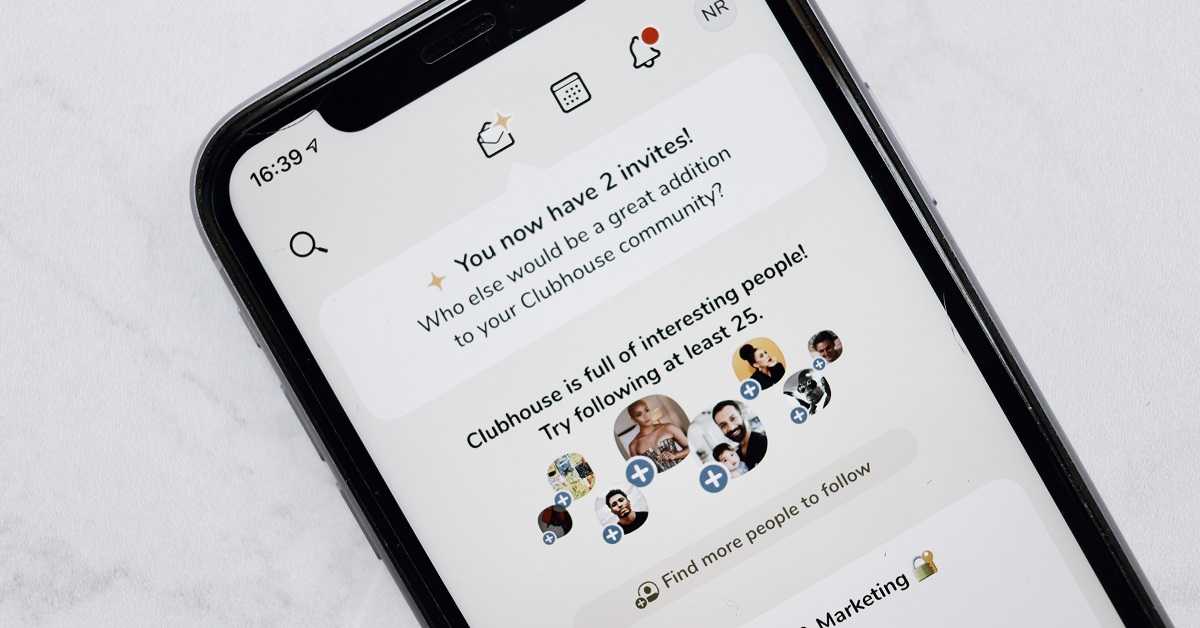
Clubhouse, an invitation-only audio-chat service, announced a new feature in the application. This feature will allow content creators to pay to each other within the Clubhouse application. The company took this decision to stand out from the rising competition with other social media services like Linked In, Twitter, and Spotify that are working on social audio media platforms.
In This Article
What is the new ‘Clubhouse Payments’ feature in the Clubhouse application?
Clubhouse is a social networking application that works on the concept of audio chats. It brings opportunities for content creators to come live and conduct interviews and discussion on various topics. It helps them find people with co-coinciding interests. According to the company, the new ‘Clubhouse Payments’ feature will enable content creators to monetise their content. Earlier, the service only provided an environment to promote their content but not monetise them.
How can the content creators benefit from the new ‘Clubhouse Payments’ feature?
The new ‘Clubhouse Payments’ feature will allow all the users to send money to the desired content creator. However, only certain users will be eligible to receive the funds. The company is optimistic with regards to the new feature. The ‘Clubhouse payments’ will allow users to express their appreciation and applause by making a desires payment to their favourite content creator.
The ‘Clubhouse payments’ will also help expand the community of the content creators. Other content services including Youtube and Twitch become highly popular as soon as they allowed their users to monetise their content. The payment feature of the Clubhouse will serve as an incentive to come up with innovative content. Moreover, it will attract emerging content creators to the platform.
How can you pay a content creator in Clubhouse?
To send a payment to other users on Clubhouse, follow these steps.
Launch the Clubhouse application
Go to the profile of the desired content creator.
Tap Send Money.
Type the amount you want to pay. You may be required to register your credit or debit card.
Clubhouse transfers the complete payment offered by you without any commission. However, you’ll have to pay a small fee for processing the transaction.
How can you pay a content creator in Clubhouse?
How will the new feature help Clubhouse against its competitors?
The chain reaction of featuring an audio-only setup has already started. This is evident because major social media and streaming platforms like Facebook, Twitter, and Spotify are working on the live audio feature that was popularised by Clubhouse.
The new Payments feature will give Clubhouse an edge over other players including Facebook, Twitter, and Spotify that have just started working on the audio-only setups. This will also help the company to keep its unique identity secure while other platforms are trying to replicate it. Since Clubhouse is coming up with innovative features, it will be hard for other social media platforms to surpass its popularity and relevance.
For the latest gadget and tech news, and gadget reviews, follow us on Twitter, Facebook and Instagram. For newest tech & gadget videos subscribe to our YouTube Channel. You can also stay up to date with the Gadget Bridge Android App.
Since the outbreak of the COVID-19 pandemic, Google has rolled out several services that have helped enterprise users to connect conveniently while sitting at their homes. These services include the integration of Chat messaging with the Google Meet in the Google Workspace. Now, the company wants to extend its support to personal accounts in the form of Chat and Rooms tab.
In This Article
How will the new feature work?
The new feature will work just like a standalone application. Earlier the Chat, Mail, Meet, and Rooms options used were independent. After the rollout, these features will be integrated into the Gmail application.
Until you get the feature in your Gmail application, you will have to manually enable the options in the Settings. It must be noted that the integration of the Chat tab into the Gmail application is currently in early access. As a result, you may experience some issues with the feature. You will have to wait for a stable release to have a bug-free experience. You may disable the feature in the Settings to get back to your existing Gmail interface.
How to enable the Chat tab in your Gmail app?
To enable the Chat tab using the Gmail app, follow these steps.
Launch the Play Store application.
Update your Gmail application if a new update is available.
Open the Gmail application.
Go to the Settings.
Choose your account and scroll down until you see the Chat (early access) option.
Check the box against the Chat (early access) option.
Tap the ‘Try it’ option in the ‘Try Google Chat in Gmail’ pop-up window.
Get back to the Gmail interface and you’ll find the Chat.
How to enable the Chat tab in your Gmail app?
How will the personal accounts get benefitted?
The new feature will bring convenience to personal Gmail users. Once the new feature is rolled out, users will find four tabs under Gmail, namely, Chat, Mail, Meet, and Rooms. Currently, this feature is available only on the desktop versions of the Gmail desktop application and Gmail accounts. On the Gmail application, the above options are present in the bottom section. The new feature will enable these options by default with liberty to users to turn them off in the Settings. This seems like another great feature that will help users work better from home.
For the latest gadget and tech news, and gadget reviews, follow us on Twitter, Facebook and Instagram. For newest tech & gadget videos subscribe to our YouTube Channel. You can also stay up to date with the Gadget Bridge Android App.
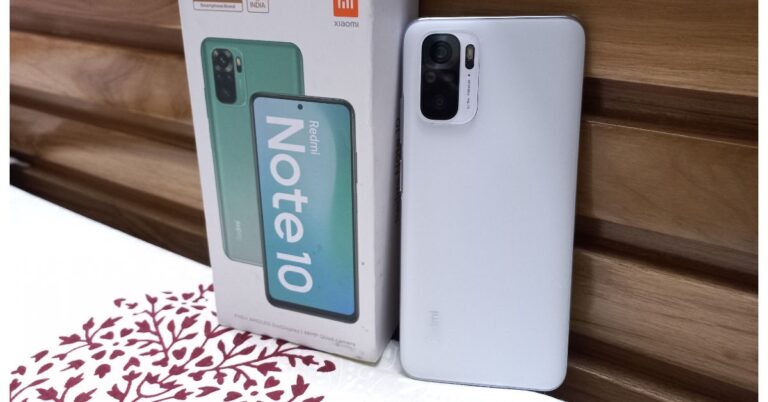
Redmi Note 10 is one of the three smartphones launched by the company recently. So there is a pro and a Pro Max variant launched by Xiaomi in India, as well besides this one. We have already reviewed the Redmi Note 9 series and today’s review is about the regular Redmi Note 10. In this review, we have covered all the important aspects of the smartphone with respect to its design, display, performance, battery et al. So, without further delay, let’s start the Redmi Note 10 review.But before we begin, let’s go over the key highlights of the Redmi Note 10. This smartphone features a Super AMOLED display. Moreover, there is a quad rear camera set up and is powered by an octa-core Qualcomm Snapdragon 678 SoC, along with Adreno 612 GPU. The device is quite economical in price starting at Rs 11,999 for the 4GB RAM and Rs 13,999 for the 6GB RAM model. So, let’s talk in detail about the younger and the more affordable Redmi Note 10.
In This Article
Design and Display
On the specs sheet, the device looks impressive and in terms of design, it is quite good looking too, different from its predecessors. Yes, Redmi Note 10 is an entry-level smartphone in the Redmi Note 10 series, which comes with a lot of changes in design and features in contrast with the older generation of the Note series. The phone comes with a refreshed design, the next generation of the Note series looks exquisite. It seems like the company has worked hard on its form factor. The phone is less bulky, slim and very comfortable to hold.As far as the built quality is concerned, to cut the cost this phone does not have a glass panel on the rear but we are ok with it, as it is a budget phone. The rear panel does give a premium look and seems to be sturdy. The review unit which we have is the Frost White colour. However, you can also choose from either Aqua Green or the Shadow Black colour variants. But, we have to say, the phone in Frost White colour looks absolutely beautiful and is matte as well. Hence, no fingerprint smudges on it.Talking more about the design, the rear panel features a quad rear camera set up arranged in a squarish module with rounded edges. The front camera is firmly fixed on the front display at the top centre of the screen. The sensor has a silver ring around it, which is quite reflective. The fingerprint sensor is embedded in the power button on the right side. Just above the power button, a volume rocker key is given and on the left side, a SIM tray slot is placed for two Nano-SIMs and a microSD card. The 3.5mm audio jack is given at the bottom next to the USB Type-C port. There are dual speakers on the phone one on the top and the other at the bottom and we quite liked the audio quality these can produce.The next major upgrade is in terms of its display. This smartphone comes with a 6.43-inch full-HD+ Super AMOLED display offering 1,080×2,400 pixels of resolution. It comes with a 20:9 aspect ratio along with a 100 percent DCI-P3 wide colour gamut and can also hit a peak brightness of up to 1,100 nits under direct sunlight. So, outdoor visibility will not be an issue. The screen is Widevine L1 certified too, which means you can enjoy HD content and is protected with a layer of Corning Gorilla Glass 3. At this price point, a full HD+ AMOLED display is just fantastic. There are companies out there that offer costlier phones than this one without it. It is good to see that Xiaomi has brought an AMOLED display at this price.As for the display quality, it’s excellent, the colours you get are on point. Brightness is great too, so our overall media viewing activity on Redmi Note 10 was incredible. In case you binge-watch a lot of videos or movies on Netflix, YouTube or generally scroll through Instagram feeds then this smartphone is perfect for you. It gives you an immersive experience because of the great display quality. 60Hz refresh rate is there as it is the standard variant, while the other two variants offer a 120Hz refresh rate display. However, this is completely ok for the price point.
Performance and Cameras
On the performance front, Redmi Note 10 has not got a major update as compared to Redmi Note 9. This phone comes with a new and improved octa-core Qualcomm Snapdragon 678 SoC, along with Adreno 612 GPU and up to 6GB of LPDDR4x RAM options.When it comes to benchmark numbers, well these are results. In our Geekbench 5 test, the single-core score it achieved is 537 while the multi-core score is 1,646.We have got the 6GB RAM with a 128GB storage variant of the Redmi Note 10. More on performance, the apps take a little bit long to launch, but that’s not a deal-breaker as multitasking is handled well. There was no visible lag while scrolling. Besides regular usage, gaming is quite good on this smartphone. On high graphics and max frame rates, while playing Call of Duty Mobile we experienced few stutters. But dialling down the graphics you will be able to retain smooth gameplay. So, the gaming performance is acceptable given the price of the phone.Coming to the software, the regular Redmi Note 10 comes with MIUI 12 on top of Android 11 out of the box. Like we said earlier, this phone is pretty decent for day-to-day usage. But we are waiting for the company to roll out MIUI 12.5 that is slated to be coming soon for the experience to become even better. Because when it lands on your device would be able to remove the annoying advertisement notifications, lock screen ads and unwanted pre-installed apps on it. This phone has some bloatware added to it such as Mi Remote, Mi Credit, Mi Store, Netflix, Facebook and some more. While some can be uninstalled easily, you cannot get rid of other apps such as Mi Pay, Music, and ShareMe.Moving on, there are some essential functionalities that MIUI offers on the device such as floating windows, Game Turbo mode and home screen customisation options with gesture navigation options and more.Alright, the audio performance of the phone is impressive (as said before). The stereo speakers are very loud with high-resolution audio support. The phone calls sound clear also through them.Now it’s time to talk about the cameras. This phone features a quad rear camera setup that includes a 48-megapixel primary sensor. In addition, an 8-megapixel ultra-wide-angle lens, a 2-megapixel macro lens and a 2-megapixel depth sensor are also there. Upfront there is a 13-megapixel selfie camera sensor.standard camera48-megapixel primary sensorThe Redmi Note 10 shoots warm pictures, which at times look unnatural. However, the device produces more detailed and sharper images than before. For noise reduction, the camera set up compensates by over-sharpening the images, which works well.Wide Angle SampleIn the case of the Ultra wide-angle sensor, it brings down the warmer hue to a more digestible level. The end results are very detailed and less grainy too. So, we clicked mostly using this sensor.Ultra wide-angle sensorThe micro shots are relatively sharper but the phone is unable to achieve Instagramable photos. The night time images are better, the sharpness, exposure control, highlights are on point.micro shotsNow coming to the front, its 13-megapixel selfie camera gives out detailed selfies. Portrait selfies with perfect edge detection can be achieved easily.For the videos, you can record stable videos in 1080P at 30fps thanks to the EIS in it. Similarly, you can also record 1080P at 60fps and 4K footages at 30fps but only the former one lived up to our expectations.The Redmi Note 10 gets its juice from a massive 5,000mAh battery. If you are a heavy user then it could deliver a full one day of battery life. In contrast, the regular users will be able to hit up to a day and a half of battery life. Whereas if you are light user and your on-screen usage in a whole day is 4 to 5 hours then the mobile phone can definitely last up to 2 days.
Verdict
Redmi Note 10 is the most inexpensive Redmi Note phone of 2021. It comes with really good specs under Rs 15,000. To be honest the sAMOLED screen steals the spotlight. The device is quite slim and light to hold. If you are looking to buy a budget phone with all the superb and latest ingredients, we would definitely recommend you to go for it, since it is that good.
For the latest gadget and tech news, and gadget reviews, follow us on Twitter, Facebook and Instagram. For newest tech & gadget videos subscribe to our YouTube Channel. You can also stay up to date using the Gadget Bridge Android App.
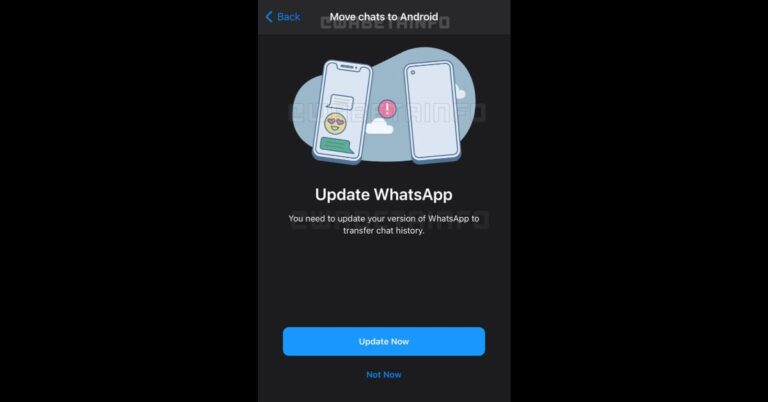
The new multi-device support is one of the most demanded and awaited feature on WhatsApp, which is under testings for a very long time. Another demanded feature for WhatsApp is the chats migration from Android to iOS devices, which reportedly is being tested by the Messaging app. A news report has emerged stating that the company is working on the functionality that will be released in the coming future. Until now there is no official way to transfer your WhatsApp chats from Android to the iPhone. The users have to take support of third-party apps to migrate their chats history from iOS to Android and vice versa. In order to eliminate the use of third-party apps, WhatsApp is reportedly working on the development of a feature that will make the chats migration easier. As per WhatsApp, the unsupported apps such as WhatsApp Plus, GB WhatsApp, or apps that claim to move your WhatsApp chats between phones, are altered versions of WhatsApp. These unofficial apps are developed by third parties and violate ourTerms of Service. WhatsApp doesn’t support these third-party apps because we can’t validate their security practices.According to a report by WABetaInfo, the instant messaging service is developing the feature, and it will be released in a future update when it’s ready enabling the possibility to transfer chat history between iOS and Android. The leaker has also shared a screenshot that soon the feature will be released in a future update. The report says, “When the user tries to link a device having a different operating system to his WhatsApp account, it’s always needed to update to the latest WhatsApp update available on the App Store or TestFlight, in order to avoid any compatibility error with the Android version. Unfortunately, there is no date available for the release, but stay tuned to discover more new features and announcements!”In the past, WhatsApp was also seen working on bringing an option to change the playback speed for voice message. This feature is under development and will be available in a future iOS/Android update. The messaging app is working on 3 different playback speeds for voice messages with a fresh UI. The playback speed can be simply changed by tapping the speed label: 1.0X, 1.5X and 2.0X are the available options. The app is also expected to support lower playback speeds. The feature is under development and there are no further details at the time.
For the latest gadget and tech news, and gadget reviews, follow us on Twitter, Facebook and Instagram. For newest tech & gadget videos subscribe to our YouTube Channel. You can also stay up to date using the Gadget Bridge Android App.
Oppo F19 is all set to make its official debut today in India. This device is going to be the third smartphone to join the Oppo F19 series. The lineup already includes Oppo F19 Pro and the Oppo F19 Pro+, and now the standard model will join the mix. Ahead of the India launch, the company has already launched the phone in Sri Lanka and the official listing has revealed the detailed specifications.How to watch the Livestream of Oppo F19The Chinese smartphone company Oppo today will officially introduce Oppo F19 to its latest smartphone series. To launch the phone the firm will be hosting the Fastest Launch Event with Zakir Khan, the famous stand-up comedian via virtual event. The Livestream will take place through the company’s social media channels from 12 noon onwards. Besides this, the company has also listed the Oppo F19 on Amazon to suggest its online availability following the launch.
Oppo F19 expected specificationsAs far as the specs are concerned, the company has not yet completely revealed the specification for the Oppo F19 in India. The phone is expected to include a 5,000mAh battery witha 33W Flash Charge, which runs on a 11V3A solution. The phone is claimed to fully charge in 72 minutes and up to 54 percent in just 30 minutes. As per the company, with 5 minutes of charging you can enjoy 5.5 hours of calling and around 2 hours of YouTube use. Oppo has also confirmed that the device will feature an AMOLED FHD+ punch-hole display with all-day eye care.Meanwhile, when the company was announcing the official launch date for India, the Oppo F19 got listed on the Oppo Sri Lanka site with detailed specifications. According to the listing, the smartphone will sport a 6.43-inch fullHD+ AMOLED display offering 800 nits’ peak brightness, 409ppi pixel density, and standard 60Hz refresh rate.Under the hood, there is a Qualcomm Snapdragon 662 SoC coupled with 6GB LPDDR4x RAM and 128GB internal storage. For the cameras, there will be a triple rear camera setup that includes a 48-megapixel primary sensor. Additionally, there is a 2-megapixel depth sensor and a 2-megapixel macro camera. On the front, it sports a 16-megapixel selfie camera.The Sri Lankan listing also reveals that for connectivity the regular F19 will include 4G LTE, Wi-Fi, Bluetooth v5.0, GPS/ A-GPS, USB Type-F, and a 3.5mm audio jack.
For the latest gadget and tech news, and gadget reviews, follow us on Twitter, Facebook and Instagram. For newest tech & gadget videos subscribe to our YouTube Channel. You can also stay up to date using the Gadget Bridge Android App.
LG, the South Korean multinational electronics company, recently stated that it will no longer continue its smartphone business.
According to LG, the decision to exit the smartphone domain shall “enable the company to focus resources in growth areas such as electric vehicle components, connected devices, smart homes, robotics, artificial intelligence and business-to-business solutions, as well as platforms and services”.
In This Article
Was ending the smartphone business the last resort?
The possible reason for the company to end its smartphone business is that it lost its share to rivals. Recently, LG launched smartphones with attractive designs with unique form factors. The company marketed the latest technologies like dual-screen and multiple camera lens setups. The LG Wing was quite popular in the market due to its unique display that can be rotated to expose a secondary screen.
According to reports, LG had been planning to end its smartphone business since the beginning of the year 2021. A statement made by a company spokesperson rendered the idea of the potential exit as “completely false and without merit”. Finally, LG officially clarified its position by confirming its exit from the smartphone domain. According to LG, this was “a cold judgment” regarding the division. The company further stated that the future steps taken by the company would include “sale, withdrawal and downsizing of the smartphone business”.
What about the existing LG smartphones?
LG has been known for providing excellent customer services. As a result, the sudden resolution of LG to quit smartphone designing may be bad news for its customers. However, LG has taken care of the possible aftermath. As a result, it decided to continue the sale and customer support of the existing smartphones “for a period of time which will vary by region.” The company confirms that the smartphone business would finally come to an end by the end of July this year.
What about the existing LG smartphones?
What are the consequences of LG’s decision to withdraw from smartphone making?
As per the 2019 reports, LG Electronics employed around forty thousand people. Among them, around one-quarter were employed in the home appliances and air solutions (H&A) department. The global revenue of the company amounted to around 56.5 trillion South Korean won (about USD 55.76 billion).
The company’s stand to exit the smartphone business may bring turmoil in the lives of several employees. These employees belong to a range of profiles including sales, marketing, manufacturing, engineering, design, service, and business support. However, LG seems to address this issue although it has not made an official announcement regarding the layoffs.
According to LG, the “details related to employment will be determined at the local level.”
For the latest gadget and tech news, and gadget reviews, follow us on Twitter, Facebook and Instagram. For newest tech & gadget videos subscribe to our YouTube Channel. You can also stay up to date with the Gadget Bridge Android App.
The e-commerce website Flipkart is hosting Daily Trivia Quiz. Every day it brings a bunch of new questions for its users. By answering them correctly you can win exciting prizes. The questionnaire is based on questions related to general knowledge. Also, the users can win free vouchers and super coins, among other offers via the daily quiz. April 6 Flipkart Daily Trivia Quiz Answers has already gone live on its platform.
The participant should be at least 18 years old and should have a valid login ID. The Quiz is available on the mobile platform and not the web version. E-commerce conducts the quiz on daily basis and goes live at 12:00 AM IST and runs till 11:59 PM IST. The winners are announced within 15 days from the date of participation that can be viewed under the Gems/Rewards section in the app.
In This Article
How to participate in the Flipkart Daily Trivia Quiz
To participate download the Flipkart app on your phone. Then open the Flipkart app then head to Game Zone. Now click on the Daily Trivia Banner or search for Daily Trivia. Enter the game and answer all 5 questions with correct answers.
April 6 Flipkart Daily Trivia Quiz Answers
Question 1: Which small, light cakes are crunchy outside and soft inside?
Answer: Macaroons
Question 2: With which company would one associate the tagline ‘The Selfie Expert’?
Answer: Oppo
Question 3:Which clothing item has been named after British general James Brudenell?
Answer: Cardigan
Question 4:A meal from which cuisine is supervised by a vaste and served on a traem?
Answer: Wazwan
Question 5: World War I led to the invention of which of these?
Answer: Modern Plastic Surgery
The e-commerce platform is back with another new quiz on its platform. The Amazon Quiz can be played daily on the mobile app that goes live via the mobile app. All you need to do is answer all the questions correctly and win free products and goodies such as gadgets and Amazon Pay Balance up to Rs 50,000, today you have a chance to win JBL In-Ear Headphones.
April 6 Amazon Quiz has gone live and a new set of questions have also been updated. The daily quiz on the Amazon app has become the hottest topic as it gives a chance to win exciting free gifts. In today’s Amazon quiz you have a chance to win JBL In-Ear Headphones. The quiz contains only five questions that are based on current affairs and general knowledge. Answering all the questions correctly will get your name selected for a lucky draw. Only one person will be selected as the winner and the results are announced at the end of every month. The lucky ones might win something by answering all the questions correctly, and the wrong answers will get you eliminated from the quiz. To participate and win check out today’s answers of the Amazon Quiz.
April 6 Amazon Quiz Answers
Question 1: Dulanga Coal Mine recently became operational in which state of India?
The answer is- Odisha
Question 2: IAF jets participated in the 70th-anniversary celebrations of which country’s Air Force?
The answer is- Sri Lanka
Question 3: Which organisation has issued a Purple Notice to its 194 member countries outlining a specific modus operandi on dating applications?
The answer is- INTERPOL
Question 4: What is the name of this character from the Narnia book series?
The answer is- Mr Tumnus
Question 5: This player recently made his comeback to the tennis court after a year, playing in which Asian country?
The answer is- Qatar
Nokia today expanded its wireless headsets portfolio with the addition of two audio products in India. The company has launched as their latest Bluetooth devices. Both the products come with an IP rating for dust and water resistance. Over that, they are powered by a Qualcomm audio chipset. Both the Nokia audio devices are now listed on Flipkart. Read on to know their features and price for India
In This Article
Nokia Bluetooth Headset T2000 features and pricing
Nokia Bluetooth Headset T2000 is a wireless neckband style earphone. The audio drive features 11mm drivers and a single microphone for calls. Powered by the Qualcomm QCC3034 Bluetooth Audio SoC this Nokia Bluetooth headset is also supported by SBC, AAC, Qualcomm apt X, and aptX HD. With just 10 minutes of charging the earphones are claimed to provide up to 9 hours of playtime otherwise it delivers 14 hours of playback when fully charged. Nokia Bluetooth Headset T2000The price of the Nokia Bluetooth Headset T2000 in India is set at Rs 2,999 but is now being offered at Rs 1,999. It will be offered in two colour options of Midnight Black and Twilight Blue. The device is said to be available for sale via Flipkart starting April 9.
Nokia True Wireless Earphones ANC T3110 features and pricing
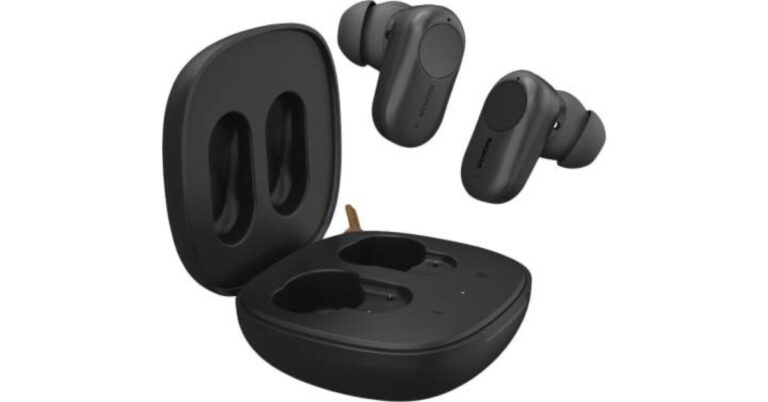
The Nokia True Wireless Earphones ANC T3110 are True Wireless earphones. These are powered by 12.5mm drivers with a total of three microphones along with active noise cancellation (ANC). These come with Bluetooth v5.1 for connectivity and an IPX7 rating for water and dust resistance. The earphones are claimed to provide 5.5 hours of playback with an extra 22 hours with the charging case when ANC is turned off. When active noise cancellation is active it can last for 4.5 hours and the charging case delivers an additional 18 hours of battery life.The Nokia True Wireless Earphones ANC T3110 comes with a price tag of Rs 5,999. The device is listed to be available at a reduced price of Rs 3,999 via Flipkart. The sale of the TWS earphones is scheduled from April 9 onwards. The earphones will be offered in a single Charcoal Black colour option.
For the latest gadget and tech news, and gadget reviews, follow us on Twitter, Facebook and Instagram. For newest tech & gadget videos subscribe to our YouTube Channel. You can also stay up to date using the Gadget Bridge Android App.
Windows 10 offers multiple ways to take screenshots. You can capture a part of the screen or the entire screen in simple steps. Moreover, Windows 10 enables you to edit your screenshot and save it to the desired location.
In This Article
Why would you take a screenshot?
Screenshots are the best ways to capture the entire information displayed on your screen at any time. This feature is essentially useful when you want to take a snapshot of a graph, video, or gameplay. However, since the entire frame is captured as an image, you can’t easily edit the text in the screenshot.
Method 1: Screenshot of the entire screen
To take a screenshot of the entire screen on Windows 10, follow these steps.
Open the Screenshots folder. Screenshots folder stores all your screenshots.
Alternatively, you can open the MS Paint and click the Paste option located on the top left. Once you get the screenshot on the canvas, you can save it to the desired location.
Method 2: Screenshot of the current window only
To take a screenshot of the current window only on Windows 10, follow these steps.
Click the running application window of which you want to take the screenshot.
Press the Alt + Print Screen key combination.
Open MS Paint and click the Paste option located on the top left.
Once you get the screenshot on the canvas, you can save it to the desired location.
Method 3: Screenshot of a part of the screen
To take the screenshot of a part of the screen, follow these steps.
Go to Start and search for the Snipping Tool.
Click the Mode button to select the kind of snip you want to take such as Rectangular, Free-form, Window, or Full-Screen.
Click New to freeze the screen.
Select the part of the screen you want to capture and save it to the desired location.
Method 3: Screenshot of a part of the screen
Method 4: Screenshot using the Xbox Game Bar?
To take the screenshot using the Xbox Game Bar, follow these steps.
Press the Windows key + G key combination.
To take the screenshot, click the Camera button. The notification “Screenshot Saved” will appear
Facebook-owned photo and video-sharing social networking service, Instagram enables you to permanently delete your account. And also, one of the most common questions asked to us is – How to permanently delete your Instagram account on smartphone or PC? So, to make our reader’s and askers’ life easy we bring you a comprehensive article.
As soon as you delete your Instagram account, the data associated with your profile including your photos, videos, likes, and comments are permanently removed.
In This Article
What happens when you permanently delete an Instagram account?
Once your Instagram account is deleted, you can’t use the same username and password to sign in. After thirty days of deletion, the data associated with your profile is erased that can’t be recovered. Throughout the deletion process, the account and the associated information remains hidden from other users.
It must be noted that there is no feature within the Instagram Android or iOS application to permanently delete your account. Hence, you will have to use a web browser on a PC or your smartphone.
How to permanently delete your Instagram account?
To permanently delete your Instagram account, follow these steps.
Log in to your Instagram account by entering your username and password.
You will be required to select an option from the dropdown next to the question, Why are you deleting your account? It is compulsory to select a reason from the dropdown otherwise the button to delete your account Instagram account will not appear.
Enter your password once again and click Permanently delete my account.
How to permanently delete your Instagram account?
How to permanently delete a different Instagram account?
To permanently delete a different Instagram account, follow these steps.
Click or tap next to the Edit Profile option and choose Log Out.
Log into the Instagram account that you want to delete and follow the procedure listed above.
According to Instagram’s Data Policy (https://help.instagram.com/519522125107875), the copies of the data associated with your profile may remain in the servers even after 91 days o retrieve them in case of software loss or disaster. The company also keeps some data for legal issues, harm prevention efforts, or terms violations.
If you know of any more ways how to permanently delete your Instagram account on smartphone or PC, do let us know below in the comments section.
For the latest gadget and tech news, and gadget reviews, follow us on Twitter, Facebook and Instagram. For newest tech & gadget videos subscribe to our YouTube Channel. You can also stay up to date with the Gadget Bridge Android App.
Samsung is reportedly planning to extend its mid-range smartphone A-series. The new 5G smartphone will be called Galaxy A82. The device is expected to come with a new design and several cool features.
In This Article
What are the expected design and features of the Samsung Galaxy A82?
The Samsung Galaxy A82 may run a Qualcomm Snapdragon 855+ processor accompanied by 6GB of RAM. The exterior design is expected to be quite similar to that of Galaxy A72. The device will have a full HD OLED display with 2400×1080 pixel resolution. The screen might be capable of rendering pixels with a 90Hz refresh rate. The smartphone may feature at least a 4500mAh battery. the smartphone will be resistant to dust and is expected to come with an IP67 rating.
The Galaxy A82 is expected to be a high-performance smartphone featuring a powerful Qualcomm Snapdragon 860 processor. The chipset may be accompanied by 6GB of RAM. Owing to its features, the device is expected to give tough competition to other mid-range smartphones like the recently released Poco X3 Pro. With 5G connectivity, the Galaxy A82 may be one of the most awaited smartphones.
What is the expected camera setup in the Samsung Galaxy A82?
The Samsung Galaxy A82 shall be the successor of the Galaxy A80 that became quite popular due to its unique camera. The smartphone had a rotating camera that could serve the purpose of the rear as well as the selfie camera. It will be a 5G smartphone with a rotating camera feature.
According to reports, the Galaxy A82 may sport a 64MP camera as we find in A72 and A52. The smartphone is expected to sport a Sony IM686 lens instead of one manufactured by the Samsung itself.
The Samsung Galaxy A82 shall be the successor of the Galaxy A80.Buy Samsung Galaxy A80 on Flipkart
When will the Samsung Galaxy A82 launch? What is the expected price?
The Samsung Galaxy A82 is expected to launch first in the South followed by other parts of the world. The South Korean version is likely to sport a quantum random number generator chip. The Samsung Galaxy A82 along with its quantum variant is expected to launch at the beginning of the third quarter. Considering the design and comparing the features with its predecessors, the Galaxy A82 is expected to cost around USD 500 (approx ₹ 36,667).
For the latest gadget and tech news, and gadget reviews, follow us on Twitter, Facebook and Instagram. For newest tech & gadget videos subscribe to our YouTube Channel. You can also stay up to date with the Gadget Bridge Android App.
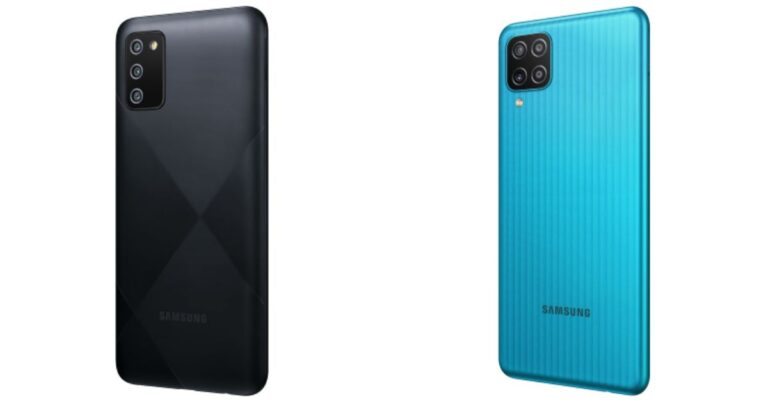
Samsung today officially unveiled Samsung Galaxy F02s and Galaxy F12 in India today. Both the devices have been launched in the budget segment. The Samsung Galaxy F02s comes with a triple rear camera setup whereas the Samsung Galaxy F12 features a quad rear camera system. Both the phones sport a waterdrop-style display, however, the former one has a standard 60Hz display while the latter refreshes at 90Hz. Read on to know more about smartphones.Pricing in India and availabilityThe price of the Samsung Galaxy F02s has been set at Rs 8,999 for the base 3GB RAM with 32GB storage variant and at Rs 9,999 for the 4GB RAM with 64GB storage model. This phone will be available in three colour options of Diamond Black, Diamond Blue, and Diamond White. The sale for the device will commence from April 9 at 12 noon onwards via Flipkart and Samsung.comOn the other hand, the Samsung Galaxy F12 will be available with a price tag of Rs 10,999 for the 4GB RAM with 64GB storage variant and the 4GB RAM with 128GB storage model at Rs 11,999. It will be offered in Celestial Black, Sea Green, and Sky Blue colour options. It is scheduled to go on sale in the country on April 12 at 12 noon onwards via Flipkart, Samsung.com and select retail stores.Samsung Galaxy F02s tech specificationsSamsung Galaxy F02s features a 6.5-inch HD+ HD+ Infinity-V Display with 720×1,600 pixels of resolution offering a 20:9 aspect ratio. It runs on One UI based on Android 10 OS. The phone is powered by an octa-core Qualcomm Snapdragon 450 SoC with 4GB of RAM and 64GB of storage. It can be expanded up to 1TB using a microSD card.Samsung Galaxy F02s comes with a triple rear camera setup that includes a 13-megapixel primary sensor. Moreover, there is a 2-megapixel depth sensor and a 2-megapixel macro lens. While on the front, there is a 5-megapixel selfie camera.The device is backed by a 5,000mAh battery with 15W fast charging support. In terms of connectivity, there is 4G LTE, Wi-Fi, Bluetooth, GPS/ A-GPS, USB Type-C and a 3.5mm audio jack.Samsung Galaxy F12 tech specificationsSamsung Galaxy F12 comes with a 6.5-inch HD+ Infinity-V Display with 720×1,600 pixels and refreshes at 90Hz. Under the hood, there is an octa-core Exynos 850 SoC paired with 4GB of RAM and 128GB of storage. The phone runs One UI 3.1 Core on top of Android 11.There is a quad rear camera setup that includes a 48-megapixel primary sensor with f/2.0 aperture. In addition to this, there is a 5-megapixel ultra-wide-angle with f/2.2 aperture, a 2-megapixel macro lens with f/2.4 aperture and a 2-megapixel depth sensor with f/2.4 aperture. Upfront, there is an 8-megapixel camera sensor for taking selfies and video calling.The phone packs a massive 6,000mAh battery that comes with 15W fast charging support. The device contains all the necessary connectivity options.
For the latest gadget and tech news, and gadget reviews, follow us on Twitter, Facebook and Instagram. For newest tech & gadget videos subscribe to our YouTube Channel. You can also stay up to date using the Gadget Bridge Android App.
iQOO is expected to launch a new smartphone with Qualcomm Snapdragon 888 processor soon. The upcoming smartphone will be known as the iQOO 7 BMW M Motorsport edition or iQOO 7 Legend Edition. The iQOO is known for developing high-performance gaming smartphone. Although the smartphone is expected to be a mid-range player, it offers features of a high-end device.
In This Article
What are the expected features of the IQOO 7 BMW M Motorsport edition?
The IQOO 7 BMW M Motorsport edition is expected to come packed with the latest features like 5G connectivity, Bluetooth version 5.2, and WI-Fi 6. Here is the complete breakdown of specifications.
Display
The iQOO 7 Legend Edition may come with will feature a 6.62inch Full HD+ AMOLED display. The smartphone display may achieve a refresh rate of 120Hz and a resolution of 1080×2,400 pixels. The screen will consist of a punch hole to accommodate the selfie camera.
Performance
The IQOO 7 BMW M Motorsport edition will run a powerful octa-core Snapdragon 888 chip making it one of the most awaited gaming smartphones. The device is expected to arrive in two internal storage variants i.e., 8GB RAM + 128GB of internal storage and 12GB RAM + 256GB of internal storage.
Camera and sensors
The iQOO 7 Legend Edition will carry a triple rear camera setup. It will have a 48MPprimary lens, a 13MP ultra-wide-angle lens, and a 13MP depth sensor. You will also get a 16MP front camera for clicking selfies. The smartphone will sport an in-display fingerprint sensor for convenient unlocking.
Battery and OS
The smartphone may house a 4,000mAh battery supported by a 120W fast charging technology. Although the battery may not be as massive as offered by other gaming smartphones, the charging pace is expected to be outstanding. The iQOO 7 will run the OriginOS over the Android 11 operating system.
When will the IQOO 7 BMW M Motorsport edition launch in India?
The smartphone was launched in China in January 2021. In India, it will probably be released in a month. Although the company has not confirmed the launch date, the leaks suggest that the smartphone may be released in April 2021. The official teaser only says that the smartphone is “Coming Soon”.
According to a tweet by iQOO India, “What’s better than Bang For The Buck? More Bang, Less Bucks! Put your seat belts on, this ride is going to be faster than we have done ever. Unleashing Soon with Qualcomm Snapdragon 888!”.
When will the IQOO 7 BMW M Motorsport edition launch in India?
What is the expected price of the IQOO 7 BMW M Motorsport edition?
The iQOO 7 will be launched in India in three colour variants, namely, Latent Blue, Blackland, and BMW M Motorsport edition. The current converted price of the 8GB RAM + 128GB version is ₹43,000 while that of the 12GB RAM + 256GB model is ₹ 47,600. However, the actual price may be lesser than the converted ones as the company has already revealed that the price would be ₹ 3×990. Thus, we can expect the price of the iQOO 7 to lie between ₹ 30,990 to ₹ 39,990. If that is the case and with some bank cards offers, iQOO 7 could really be a game-changer.
For the latest gadget and tech news, and gadget reviews, follow us on Twitter, Facebook and Instagram. For newest tech & gadget videos subscribe to our YouTube Channel. You can also stay up to date with the Gadget Bridge Android App.
Spyware is nothing but a group of malware that spies and collects your personal and sensitive information without your consent. Often the data collected is sold or sent to the individual or a particular organisation, which is used as per their wish. So today we are here to make you understand how Spywares are used to steal your information and what you can do to keep yourself protected from this broad category of malware.Spywares are often used by cybercriminals to gain access to your personal and sensitive data. This information will further be used to track your online activity and can also be sold to an organization or individual. Furthermore, Spyware is a group of malware designed to steal your personal data such as passwords as well as your credit card numbers that leads to theft and online banking frauds. This method of stealing your private information is on the rise and used by many cybercriminals, banking Trojans, companies and ad networks.Types of Spyware and how they work?Spyware can be seen in the form of Adware, tracking cookies, Trojans, keyloggers, stalkerware, stealware and system monitors. Adware and tracking cookies work similarly they keep an eye on your online activity and displays ads in which you might be interested. Adwares are highly intrusive while the latter one is less also the former one impacts the performance of your device.While Torjans steal all your sensitive information that includes your passwords and bank account information and further sell it to third-party. This results in making fraudulent purchases, thefts and frauds.As the name suggests Keyloggers capture every stroke from your keyboard. So basically it eyes on when you log into your online accounts. Stalkerware only works for mobile phones to track the owners personal as well as professional activities to read your text messages or listen to their conversations. This method is often used by jealous spouses or by a third party. Stealware is the most common form of spyware designed to make use of online shopping sites awarding credits to websites that assigns traffic to their product pages.The system monitors records of all the activities of your device from keystrokes, emails and chat-room dialogues to websites hit, programs started, and phone calls made.All these spyware are distributed in the form of links that can be received via emails, text messages, pop-up windows in a browser, and ads on web pages. When the user clicks on the link it redirects to malicious websites. This activity is popularly known as malvertising. Sometimes an infected file is often distributed pretending to be originating with a trusted source such as a bank or any government organisation. The infected file can be deleted though, but it leaves behind the spyware that continues to snoop.Spyware is also distributed through malicious apps, however, Google and Apple keep an eye on such apps therefore by removing them from time to time. How to prevent spyware and stay safe?
Try using a built-in antivirus to protect yourself from spyware. If you are a Windows user try Windows Defender antivirus, which is free antivirus tool created by Microsoft. While Mac owners can use XProtect, which the Apple own version of Defender antivirus.
Avoid visiting unscrupulous websites as most of them spread malware by installing spyware through ads pop-ups or by a drive-by download.
The third-party professional antivirus also tries to keep you stay safe from all types of online threats that also includes spyware. Many of them are free to install but you should not hesitate to buy a subscription.
Avoid opening or downloading attachments from unknown emails.
Torrents downloads of course not. Torrent sites are the biggest hub of distributing malicious programs like malware, worms, viruses, and other malicious programs.
Say yes to periodical system updates. The manufacturers release new updates to fix common bugs and security vulnerabilities. It’s better to be safe than sorry.
Avoid downloading apps from third-party websites. Paid software cost you more so we often look for more feasible options and downloads free pirated versions from third-party websites. To make money these free websites install spyware or adware along with the free app.
Google’s upcoming flagship smartphone, Pixel 6 will reportedly feature a GS101 processor. According to reports, Google is designing a new smartphone, probably the sixth edition in the Pixel series. The device is expected to come with an Arm-based GS101 processor. The Pixel 6 shall succeed the Pixel 5 and the pixel 4A 5G. The company is expected to release the smartphone in the fourth quarter this year.
In This Article
Why does Google want to feature a GS101 processor in its next flagship smartphone?
The degree of integration between the hardware and software predominantly determines the device’s performance. Apple’s devices are known to deliver highly optimised performance owing to a higher level of binding of the hardware with its firmware. Apple’s Bionic chips are designed keeping specifically in mind the iOS operating system.
Android runs on Qualcomm’s Snapdragon. Since the Snapdragon processor is used by a majority of Android devices, there is not much room left for Pixel’s firmware to get dedicated support from the chip. The Google-designed GS101 processor will help the Pixel synergise the performance of its individual components to achieve a higher performance and battery efficiency.
Are custom TPU new for Google?
It’s not the first time when Google will launch a custom TPU based smartphone. The company has been using custom TPUs in its servers. Moreover, the Pixel 4 extensively used TPUs in its Neural Core. However, the implementation of the TPUs in the GS101 processor will be at a more sophisticated level as compared to the existing Pixel smartphones.
Are custom TPU new for Google?
What will be the features of the new GS101 processor?
The GS101 SoC will be the most advanced processor even installed in a Pixel smartphone. The chipset will consist of a triple cluster set up along with a TPU (Tensor Processing Unit). Moreover, the new processor will get an integrated security chip. Google extensively used Titan M in its smartphones that is an enterprise-grade security chip. The new Pixel is expected to house a similar chip.
How long have been the rumours existing regarding the GS101 processor?
Rumours regarding the GS101 “Whitechapel” SoC began to surface when Google started planning to design processors for its Chromebooks and Pixel smartphones. It was evident that the company will be implementing Machine Learning technology to optimise its chips. The Pixel would be the first device in the Whitechapel project to house a GS101 SoC.
Although Google may take a few more releases until it achieves chips customised specifically for the Pixel’s hardware and the Android operating system. The company will join Apple in the domain of customised processors. The step of Google has also induced Qualcomm to develop custom Kryo cores build on the semi-customized variants of Arm’s base Cortex architecture.
For the latest gadget and tech news, and gadget reviews, follow us on Twitter, Facebook and Instagram. For newest tech & gadget videos subscribe to our YouTube Channel. You can also stay up to date with the Gadget Bridge Android App.





 HP Chromebook 11a tech specs