In This Article
Dell G15 AMD edition (5525) laptops specifications
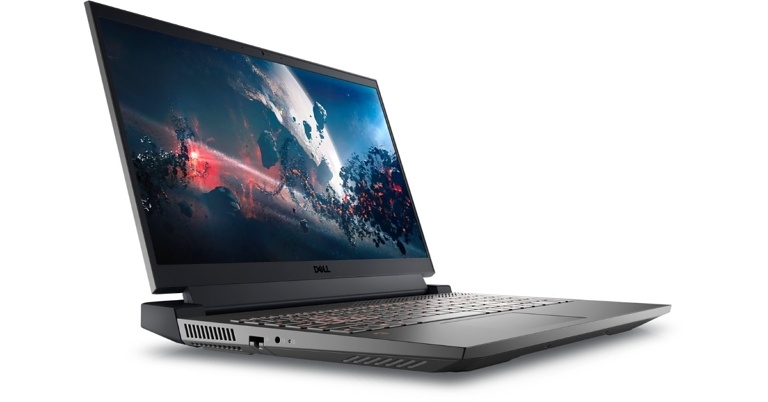
Most of the specifications and design of all the 5 G15 AMD edition (5525) laptops are the same except for the processors and graphics. The laptop has a 15.6-inch Full-HD (1080×1920 pixels) LCD display with a refresh rate of up to 165Hz and a peak brightness of 250 nits. Gamers can enjoy a powerful and consistent high-end performance during every gaming session with next-gen AMD Ryzen CPUs up to 6800H R7 and customised settings. The G15 AMD version, like its siblings, features an Alienware-inspired thermal design with excellent cooling owing to dual air intakes, ultra-thin fan blades, copper pipes, and four strategically positioned vents. Users experience seamless, continuous gameplay and beautiful visuals with discrete graphics up to NVIDIA GeForce RTXTM 3060 and a new optional FHD 165Hz display panel with a 2-sided low bezel. Players can also choose dedicated RAM of up to 6GB GDDR6, which results in faster loading times and a quieter system.
The Dell G15 AMD laptops’ Game Shift capability may be accessed by pressing FN + Game Shift (F9), which launches a dynamic performance mode. As a result, the Alienware Command Center increases the speed of the fans to keep the system cool as the CPUs work harder.
Not only can one customise the hardware for each game with the Alienware Command Center on Dell G Series, but they can also personalise the area and set up to make the software look and feel exactly how they want it. The user-friendly interface connects numerous system settings with a gaming library, making it easy to obtain game data. The command centre allows you to quickly access games and fine-tunes settings for each one.
Users experience seamless, continuous gameplay and beautiful visuals with discrete graphics up to NVIDIA GeForce RTXTM 3060 and a new optional FHD 165Hz display panel with a 2-sided low bezel. Players can also choose dedicated RAM of up to 6GB GDDR6, which results in faster loading times and a quieter system.
The Dell G15 AMD laptops’ Game Shift capability may be accessed by pressing FN + Game Shift (F9), which launches a dynamic performance mode. As a result, the Alienware Command Center increases the speed of the fans to keep the system cool as the CPUs work harder.
Not only can one customise the hardware for each game with the Alienware Command Center on Dell G Series, but they can also personalise the area and set up to make the software look and feel exactly how they want it. The user-friendly interface connects numerous system settings with a gaming library, making it easy to obtain game data. The command centre allows you to quickly access games and fine-tunes settings for each one.
 Additional features like Dolby Audio for Gamers and an orange backlit keyboard with WASD are designed to make every gaming experience more enjoyable.
Windows 11 is installed on the device. Up to 16GB of RAM and 512GB of SSD storage are available.
Three Type-A ports, one Type-C port, an HDMI 2.1 slot, and a 3.5mm audio jack are included in the I/O.
Additional features like Dolby Audio for Gamers and an orange backlit keyboard with WASD are designed to make every gaming experience more enjoyable.
Windows 11 is installed on the device. Up to 16GB of RAM and 512GB of SSD storage are available.
Three Type-A ports, one Type-C port, an HDMI 2.1 slot, and a 3.5mm audio jack are included in the I/O.
Dell G15 AMD edition (5525) laptops Pricing and Availability
The new Dell G15 AMD variant will cost Rs 83,990 when it goes on sale. The most expensive option, with 6GB RTX 3060, would set you back Rs 1,27,990. Dark Shadow Grey and Phantom Grey with speckles will be the two colour options for the laptops. Dell.com, Dell Exclusive Stores (DES), big format retail, and multi-brand outlets all have the new Dell G15 available for purchase. Please see the table below for the complete cost of the laptop series.| Configurations | Price (Inc. taxes) |
| 15.6″ FHD Narrow 120Hz 250 nits 45% / AMD Rembrandt R5 / 8GB, 1x8GB, DDR5, 4800MHz / 512GB CL35 M.2 Gen 4 SSD / NVIDIA RTX 3050 4GB GDDR6 (GN20-P0) / Win 11 / MSO / 1Yr Premium / Orange Backlit / Gaming / | INR 83,990/- |
| 15.6″ FHD Narrow 120Hz 250 nits 45% / AMD Rembrandt R5 / 16GB, 2x8GB, DDR5, 4800MHz / 512GB CL35 M.2 Gen 4 SSD / NVIDIA RTX 3050 4GB GDDR6 (GN20-P0) / Win 11 / MSO / 1Yr Premium / Orange Backlit / Gaming / | INR 89,990/- |
| 15.6″ FHD Narrow 120Hz 250 nits 45% / AMD Rembrandt R7 / 16GB, 2x8GB, DDR5, 4800MHz / 512GB CL35 M.2 Gen 4 SSD / NVIDIA RTX 3050 4GB GDDR6 (GN20-P0) / Win 11 / MSO / 1Yr Premium / Orange Backlit / Gaming / | INR 1,02,990/- |
| 15.6″ FHD Narrow 120Hz 250 nits 45% / AMD Rembrandt R7 / 16GB, 2x8GB, DDR5, 4800MHz / 512GB CL35 M.2 Gen 4 SSD / NVIDIA RTX 3050 Ti 4GB GDDR6 (GN20-P1) / Win 11 / MSO / 1Yr Premium / Orange Backlit / Gaming / | INR 1,07,990/- |
| 15.6″ FHD Narrow 120Hz 250 nits 45% / AMD Rembrandt R7 / 16GB, 2x8GB, DDR5, 4800MHz / 512GB CL35 M.2 Gen 4 SSD / NVIDIA RTX 3060 6GB GDDR6 (GN20-E3) / Win 11 / MSO / 1Yr Premium / Orange Backlit / Gaming / | INR 1,27,990/- |
 Step 2:
 Step 3:
 Step 4:
 Step 5:

 Step 2:
 Step 4:
 Step 5:
 Step 4:
 Step 5:
 Step 6:



 Step 2:
 Step 3:
 Step 4:
 Step 3: Tap on the ear icon named ‘Play sound with screen off’.
 The YouTube video will continue playing with the screen locked. If you don’t see the sidebar on the screen go to Settings>Additional Settings>Floating Windows>Sidebar and enable the toggle bar for ‘Show while playing videos’.
 Step 3:
 Step 4:
 Step 5:
 Step 7:
 Step 3:
 Step 4:
 Step 3:
 Step 2:
 Step 3:
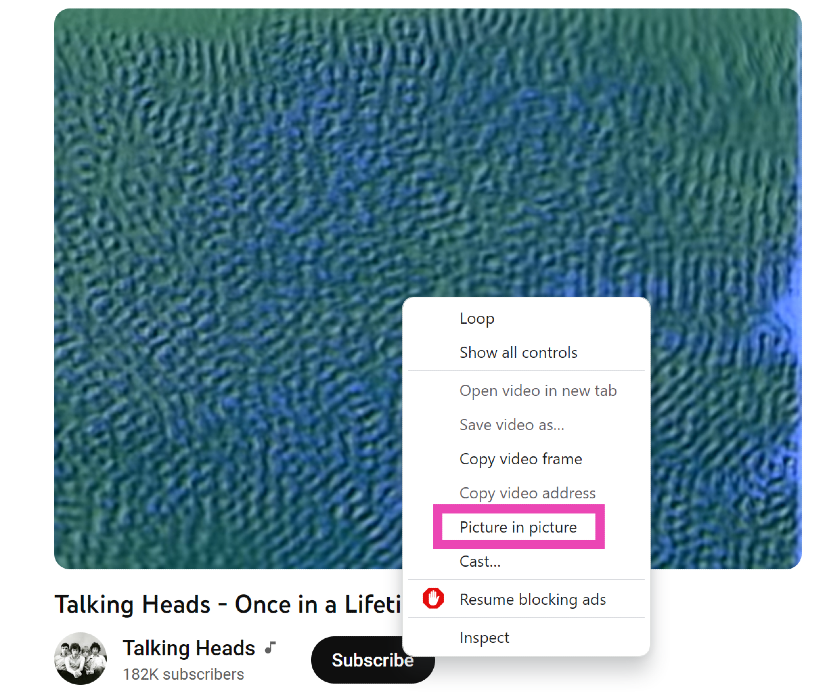 If you ever need to watch a quick YouTube video on your PC while also handling another task, you should know how to play it in Picture-in-Picture mode. For those who don’t know, P-i-P mode allows you to watch a YouTube video in a small window when you switch to other tabs. To achieve this, simply open the video, right-click on it, right-click again, and select ‘Picture in Picture’.

 Step 2:
 Step 2:
 Step 3:
 Step 4:







 Step 1:
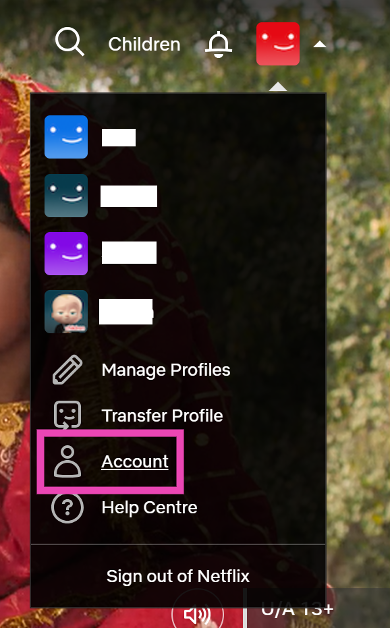
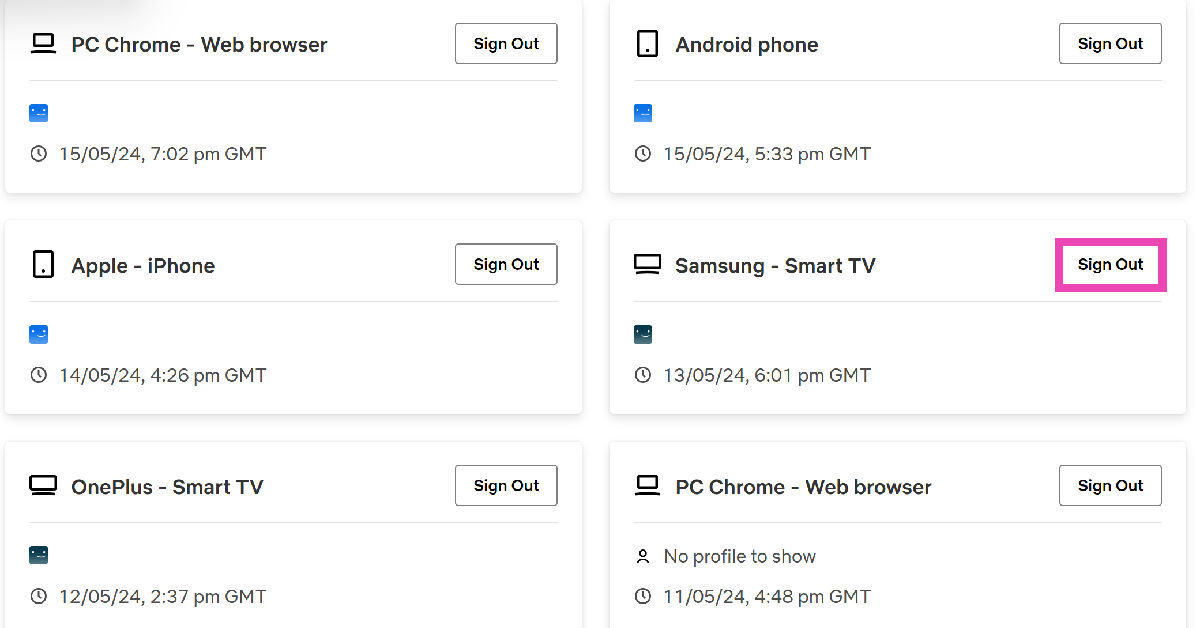
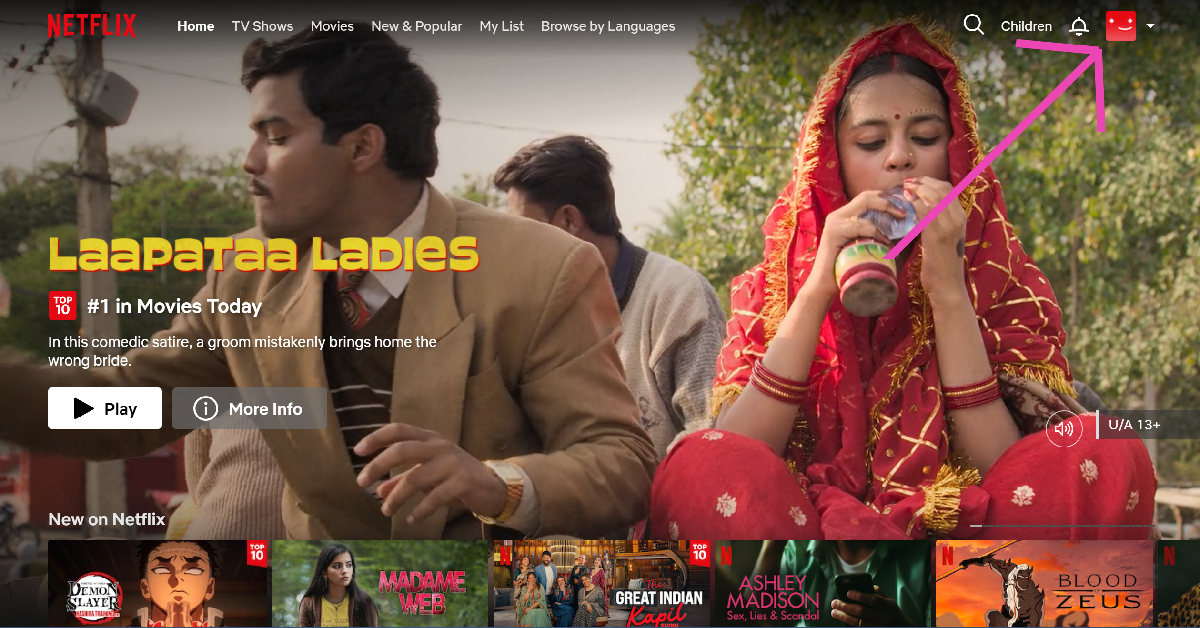 Step 2: Hover the cursor on your profile picture at the top right corner of the screen and select Account.
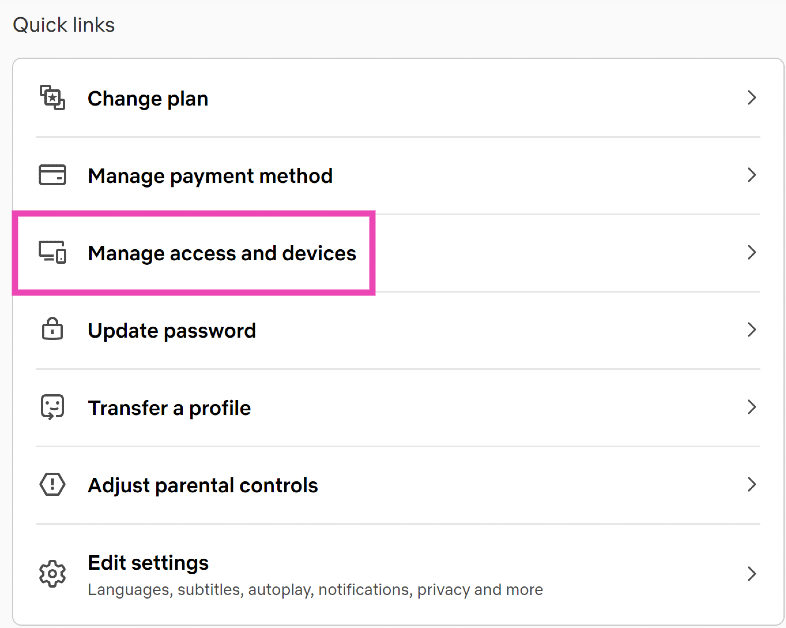
 Step 3: Scroll down and select Manage access and devices.
 Step 4: Hit Sign Out next to your Smart TV.



 Step 4:
 Step 5:
 Step 6:

 Step 7:
 Step 6:



 There are several benefits to using ChatHub. The interface is quite similar to Omegle and very easy to use. You can filter participants by language and gender, making it easy to find your preferred matches. The website is optimised for mobile, allowing you to browse through users without any hiccups. Its special algorithm ensures you don’t match with the same partner twice. There is a smartphone app available for ChatHub as well. All you need to do is open ChatHub in Chrome, press the three dots up top and select ‘Add to Home Screen’.
 Bazoocam keeps things simple, light, and fun, without being too bland. The website follows the typical method of matching two users together from across the world. To move to the next person, all you have to do is press ‘Next’. What’s unique about Bazoocam is that it allows you to play fun games like Tetris, Tic Tac Toe, and 4 In A Row with the person you have matched in order to break the ice.
 As the name implies, Chatrandom connects you with random users to chat with. You can either turn on your webcam for a video chat or enter a text chat with a stranger. Chatrandom has accessible filters for gender and country. Chatrandom is also available as an app on Google Play Store. Click on
  With its large user base, you will never run out of people to talk to at ChatSpin. The website connects you with a stranger within seconds and makes sure you keep on getting matched with new people. ChatSpin encourages users to display their talents and creativity to the person they are matched with. If you want to keep your anonymity intact, there are plenty of face and voice filters you can use.
 FaceFlow follows the Omegle formula of matching you with random people for a text or video conversation but also brings something of its own into the mix. You can create profiles on FaceFlow so that the people you match with can add you after the conversation is over. You can upload a picture to your profile, add a bio and share stuff with your friends. Have a clique going? FaceFlow also lets you host group calls on its platform.
Read Also:
FaceFlow follows the Omegle formula of matching you with random people for a text or video conversation but also brings something of its own into the mix. You can create profiles on FaceFlow so that the people you match with can add you after the conversation is over. You can upload a picture to your profile, add a bio and share stuff with your friends. Have a clique going? FaceFlow also lets you host group calls on its platform.
Read Also: