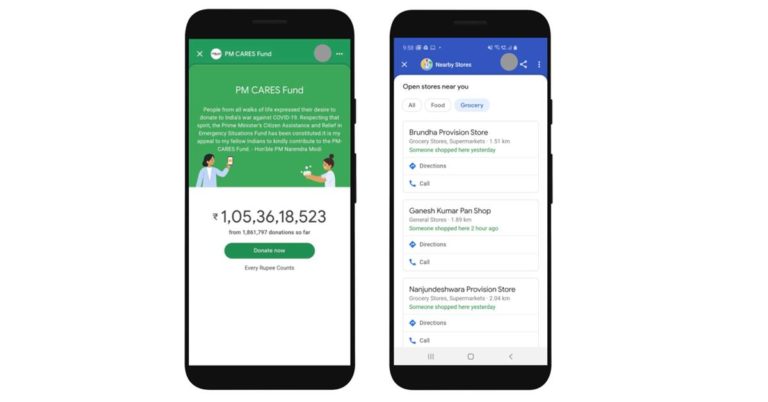
As people across India are currently under a lockdown and practising social distancing due to the COVID-19 pandemic, digital payments have gain a centre stage. Now even Google has introduced the ‘Nearby Spot’ on Google Pay to help users see local stores providing essentials like groceries, which are currently open.
Google Pay believes this information will help users to contact the appropriate business, pay digitally and aid social distancing efforts. The ‘Nearby Spot’ has been rolled out in Bengaluru and will be launching in Hyderabad, Chennai, Mumbai, Pune, and Delhi soon.
Besides this ‘Nearby Spot’, the tech giant has also rolled out the COVID-19 Spot feature on Google Pay that provides all pertinent information on the topic, sourced directly from the Ministry of Health and Family Welfare (MoHFW).
“The Spot also helps users donate to PM-CARES or to NGOs such as SEEDS, Give India, United Way and Charities Aid Foundation, which are working towards procurement of protective equipment for medical workers and relief for lockdown-impacted daily wagers. Donations to PM-CARES on Google Pay have thus far collected over ₹105 crores and continue to grow,” an official Google India blogpost revealed.
Moreover, Google is working to support those whose livelihoods and access to basic sustenance are at risk dur to COVID-19 — especially the millions of migrant workers returning to their hometowns, or stranded in the cities without a source of income or food.
For this, Google has started indicating the locations of hundreds of food and night shelters set up by the government across the country, accessible through Google Maps, Search, and Google Assistant. Up until now, this includes more than 33 cities with over 1,500 food and night shelters identified. An official blogpost has clarified that users can put forth query in both English and Hindi as of now, and efforts are on to bring this to other Indian languages over the coming weeks.
Besides this, the information on COVID-19 can also be accessed via Google Assistant on KaiOS in both Hindi and English. All one need to do is simply take the name of location and ask ‘ में भोजन केंद्र’ and ‘ में रैन बसेरा’, or ‘Food shelters in ’ and ‘Night shelters in ’.
In addition, Vodafone-Idea subscribers can also use the Phone Line offering that enables 2G feature phone users to get details of nearby food and night shelters by dialing the toll-free number 000 800 9191 000, and using the queries above.
The COVID-19 pandemic continues to impact the health and lives of many across India as it necessary to introduce fundamental changes to our routine life in this unprecedented situation.
For the latest gadget and tech news, and gadget reviews, follow us on Twitter, Facebook and Instagram. For newest tech & gadget videos subscribe to our YouTube Channel. You can also stay up to date using the Gadget Bridge Android App.
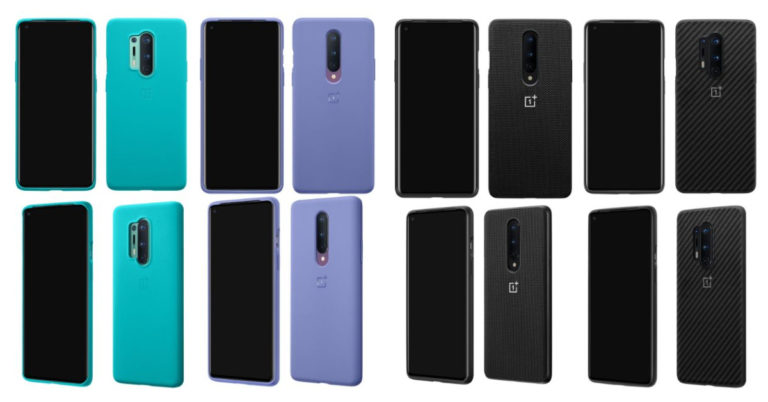
The Chinese smartphone maker OnePlus is finally going to unveil its new series OnePlus 8 on April 14 which is tomorrow. The series is going to include OnePlus 8 and OnePlus 8 Pro. The smartphones will get unveiled through an online launch event. Ahead of the launch lots of rumours and leaks have been floating on the web that is developing more and more curiosity among the fans about what the company is going to bring on the table. And to maintain that the company has also revealed few important details about its upcoming series.Just ahead of the official launch event, alleged official cases for the OnePlus 8 and OnePlus 8 Pro have now been leaked on the web in different finishes such as the Sandstone black variant. The renders have also revealed the design details of the smartphone. Alongside an image of the retail box has also been spotted online.
Starting with the leaked alleged official cases for the OnePlus 8 and OnePlus 8 Pro which has been shared by tipster Ishan Agarwal via a Twitter post. The shared images show that the forthcoming OnePlus 8 series is going to include the company’s traditional Sandstone black case along with three different colours Black, Cyan, and Smoky Purple. In his post, he also mentioned other bumper cases such as transparent one, a nylon and Karbon bumper case. The alleged images have also revealed the design of the back panel which shows the vertically placed triple rear camera setup along with a flashlight that sits just below the cameras. Whereas the Pro variant of the line up also has a similar-looking camera set up but it includes an additional fourth sensor that is placed just beside the camera module on the left along with a flashlight. The fourth sensor is expected to be laser autofocus. All the logos have a similar new OnePlus logo which the company has just unveiled last month. Besides this, a Chinese tipster has also shared an image of the About phone page of the OnePlus 8 Pro on the Chinese website Weibo. According to the alleged OnePlus 8 Pro image, the device will be powered by a Snapdragon 865 processor paired with 12GB RAM and 256GB of storage and will run on Android 10 out of the box. Moreover, it is going to feature a 6.78-inch 120Hz Fluid AMOLED display. Image Courtesy: ITHomesA Chinese publisher ITHomes has spotted the retail Box having the OnePlus 8 Pro branding on the side. Just like its predecessor, it is a tall red box with 8 written on the top front. Over that pricing has also been leaked on the web of both OnePlus 8 devices. As per the leak, OnePlus 8 price will start at Euro 719 for the 8GB RAM and 128GB storage model that translates to Rs 60,000. Whereas the 12GB RAM with 256GB storage variant is stated to come with a price tag of Euro 819 that translates to Rs 68,000.The OnePlus 8 Pro model will be a pricier one and is likely to be priced at Euro 919 that translates to Rs 75,000 for the 8GB RAM and 128GB storage. Whereas the 12GB RAM and 256GB storage is tipped to come with a price tag of Euro 1,009 that translates to Rs 83,000.
For the latest gadget and tech news, and gadget reviews, follow us on Twitter, Facebook and Instagram. For newest tech & gadget videos subscribe to our YouTube Channel. You can also stay up to date using the Gadget Bridge Android App.
The popular mobile game PUBG has announced that soon it will release the “Cold Front Survival” mode for its mobile platform. The new mode for PUBG Mobile will be rolled out on April 16. The company took to Twitter to announce the new mode.PUBG Mobile “Cold Front Survival” mode is all set to launch on April 16. The company has shared a teaser for the upcoming mode for the game that was earlier spotted on a beta version of Game For Peace which is the Chinese version of PUBG Mobile. Until now the company has not shared any specific detail other than the launch date, The company in its tweet said, “Any guesses on what this new item is? #ColdFrontSurvival #pubgm #ComingSoon”
In another tweet, the company said, “Out there in the cold, stories of battles won in extreme conditions, will be written… #ComingSoon #pubgm”. This tweet clearly indicates that the new mode will be more of a survival mode. As per a report, the new mode is expected to be set in Vikendi and the players will have to survive in an extremely cold environment while searching for wood to set a bonfire, hunt for animals to survive in the chilly situations. Additionally, a timer will also be added to the mode that will alert the players of the approaching chilly winds to find shelter as well as assemble things for their survival.
In one of the shared poster images, a drone is seen which could also be expected to be a part of the new gaming mode which Call of Duty: Mobile game already has. The addition of drones to the mode could be used as a to keep a watch or as a following tool which might be useful for searching enemies, weapons as well as equipment in the map.
For the latest gadget and tech news, and gadget reviews, follow us on Twitter, Facebook and Instagram. For newest tech & gadget videos subscribe to our YouTube Channel. You can also stay up to date using the Gadget Bridge Android App.
Most of the countries have imposed lockdown in their regions to control the spread of coronavirus. Many people are stuck at home during this time due to health concerns so are the kids. Instead of playing in the playground, they have to spend most of their time either watching TV, playing games or watching videos on Netflix. If you too have kids then the new parental control will allow you to keep a watch on your kids what they are watching, block a show or you can also set your profile so that they can only watch kids related content on the platform.The popular video streaming platform Netflix has rolled out a bundle of new parental control based on the user’s feedback. According to the company it has added improved controls on its service to help parents, guardians and elders make the right viewing decisions for their families. Earlier it only had a “Kids” that was meant to limit content specifically to kids-friendly only.
Following new controls will now be available for the parent to:
PIN protect individual profiles to prevent kids from using them;
Tailor their kids’ Netflix experience by filtering out titles that are not appropriate for their age;
Remove individual series or films by title. When this filter is used, the blocked title(s) won’t show up anywhere in that profile;
Easily review each profile’s setting using the “Profile and Parental Controls” hub within account settings;
See what their kids have been watching within the profile created for them; and
Turn off autoplay of episodes in kids’s profiles.
You can customise the settings according to your needs by going to account settings on a laptop or a mobile browser. This allows every family different family more viewing choices. The video streaming platform offers a huge variety of kids as well as family films and TV shows from all over the world, including award-winning animated films like Klaus, interactive shows like Carmen Sandiego: To Steal or Not to Steal and kids’ series such as Boss Baby. The Indian kids series Mighty Little Bheem is the most-watched preschool series on Netflix globally, and the second-most-watched kids’ series for Netflix worldwide.
How to set up parental control on Netflix:
Go to account settings
From the drop-down menu select a profile for your child or it can also be created by going to Manage profile.
Now select Change next to Viewing Restrictions option
Then enter your Netflix password. Now you can choose the viewing restriction for your kid from the level TV-Y (young kids) to NC-17.
You can also block specific movies or content by selecting “profile maturity rating” options, and entering the name of a particular show or a movie which you don’t want your kids to watch and then click Save.
In the same settings, you will find a Viewing Activity option which will allow you to keep a check on your kids that what they are watching.
The coronavirus cases in India are increasing like wildfire and to contain the spread of the deadly virus the Government of India has taken a huge step by announcing countrywide lockdown. In this situation, Amazon has now rolled out a new update for its Voice Assistant Alexa. The new update brings skills to help the Indian users to identify if they have COVID-19 symptoms or not. Additionally, the update will also provide the latest updates and information related to coronavirus, which will be supported both in Hindi as well as English languages.In order to find out if you have the symptoms of coronavirus you can simply ask Alexa, what do I do if I think I have COVID-19? You can also ask Alexa for a series of questions about your travel history, symptoms, and possible exposure. Based on your responses, Alexa will provide CDC guidance given your risk level and symptoms.Moreover, you can also request by asking “Alexa, give me an update on COVID-19“ or “Alexa, how do you prevent COVID-19?“ Users can also ask these same questions in Hindi also and Alexa will provide about Coronavirus symptoms keeping in mind the ICMR guidelines also suggesting you wash your hands regularly. As advised by the health experts the Alexa will also help you to wash your hands for at least 20 seconds by asking it to sing a song for a duration of 20 seconds. Just say, Alexa, sing a song for 20 seconds.Amazon in its statement said, “Using the Ministry of Health and Family Welfare and Indian Council for Medical Research guidance, our Alexa team built an Indian specific experience that lets you use Alexa to check your symptoms for COVID-19 at home.”Besides this, you can also ask Alexa to give you the latest update on the number of infected viruses and lockdown information and a lot more. Just ask, Alexa, until now how many cases have been reported in Delhi?According to the e-commerce platform Amazon, “Alexa can now answer questions related to COVID-19, and we are working to provide accurate and timely information from news and official government sources such as Indian Council of Medical Research and Ministry of Health and Family Welfare in India.”
For the latest gadget and tech news, and gadget reviews, follow us on Twitter, Facebook and Instagram. For newest tech & gadget videos subscribe to our YouTube Channel. You can also stay up to date with the Gadget Bridge Android App.
With the COVID-19 outbreak, governments and health authorities are working day-and-night to find out solutions in order to protect people and get society back up and running. Now, tech giants Google and Apple have also announced a joint effort to enable the use of Bluetooth technology to assist governments and health agencies in containing the spread of Coronavirus virus.
Several health organizations have found contact tracing as a pivotal tool to enable the medics contain the spread of COVID-19 outbreak as it can be transmitted through close proximity to affected individuals.
Apple and Google will be launching a comprehensive solution that includes application programming interfaces (APIs) and operating system-level technology to help the government and health agencies use contact tracing as a tool to combat COVID-19 pandemic.
Mind you! Apple and Google’s plan is to implement this solution in two steps while maintaining strong protections around user privacy:
First, in May, both Google and Apple will release APIs that enable interoperability between Android and iOS devices using apps from public health authorities. These official apps will be available for users to download via their respective app stores.
Second phase will start post May. During this time, Apple and Google will work to enable a broader Bluetooth-based contact tracing platform by building this functionality into the underlying platforms. The companies claims, “This is a more robust solution than an API and would allow more individuals to participate, if they choose to opt in, as well as enable interaction with a broader ecosystem of apps and government health authorities.”
However, emphasis have been put on the fact that privacy, transparency, and consent are of utmost importance in this effort. Both Google and Apple hope to create this contact tracing technology after consulting with interested stakeholders. Moreover, the information will be made transparent for others to analyse what’s happening.
Asserting that there has never been a more important moment to work together to solve one of the world’s most pressing problems COVID-19 pandemic, Apple and Google believe that “through close cooperation and collaboration with developers, governments and public health providers, we hope to harness the power of technology to help countries around the world slow the spread of COVID-19 and accelerate the return of everyday life.”
For the latest gadget and tech news, and gadget reviews, follow us on Twitter, Facebook and Instagram. For newest tech & gadget videos subscribe to our YouTube Channel. You can also stay up to date using the Gadget Bridge Android App.
Later in the month of January this year, Unicode Consortium approved the emojis for the year 2020. But now the next generation of emoji for 2021 seems to get delayed due to the ongoing coronavirus crisis in the whole world. The Mountain View, California based organisation approved 117 new emojis along with new colour options for this year. The company has also revealed that emojis for 2020 doesn’t impact the release.The next generation of emojis for the year 2021 was scheduled to debut in the month of March, which has now been delayed by another six months. This means the 2021 emoji will now debut in September. The organization’s President Mark Davis has informed the public about the postponement via a blog post.Mark Davis, president of the Consortium, said in a statement, “Under the current circumstances we’ve heard that our contributors have a lot on their plates at the moment and decided it was in the best interests of our volunteers and the organizations that depend on the standard to push out our release date,” he further added, “This year we simply can’t commit to the same schedule we’ve adhered to in the past.”For the year 2020, the company approved 117 new emojis which includes 62 brand-new emojis and 55 new gender and skin-tone options. The list of the next generation of emojis also includes the transgender flag that has been proposed by Google and Microsoft. Once Unicode Consortium releases its new emojis other companies such as Google, Apple, Twitter among others will also bring their own versions of the new emojis. The update will bring emojis such as smiling face with a tear, disguised face, pinched fingers with skin tones, anatomical heart, lungs, ninjas with skin tones, women feeding a baby with skin tones as well as a man feeding a baby with skin tones. The lineup will also include options for animals such as a black cat, mammoth, beaver, beetle, roach, fly, polar bear, dodo, bison, seal and worm.
For the latest gadget and tech news, and gadget reviews, follow us on Twitter, Facebook and Instagram. For newest tech & gadget videos subscribe to our YouTube Channel. You can also stay up to date with the Gadget Bridge Android App.
The season of harvest is here but as you are aware of the ongoing coronavirus crisis in India everyone will be celebrating it indoors due to nationwide lockdown. And to mark the commencement of spring as well as harvest season in India Snapchat has added some localised lenses for its users in the country to wish their loved ones while staying at their homes this year. The spring season in India is celebrated throughout the country on April 13 and is called with different names in the different regions on India such as in the north and west we call it Vaisakhi, in the south, it is known as Puthandu or Vishu and in the East, it is called Pana Sankranti, Bihu and Pahela Baisakh. And for each state, the company has introduced a special filter along with a code attached below.While launching the new special filter the Snapchat stated, “Celebrating India’s cultural diversity and the rich heritage, Snapchat has introduced localized lenses to mark the onset of Spring and Harvest season across the country. Though physically distant yet united in our efforts to keep the country safe, each one of us can welcome new beginnings and wish our friends and family abundance this year. The beautiful Spring festival is celebrated throughout the country, in the north and west we call it Vaisakhi, in the south – Puthandu or Vishu and in the East – Pana Sankranti, Bihu and Pahela Baisakh. For each state, there is a special filter that can be accessed through the Snapchat app or the code attached below.”Vaisakhi is celebrated in the Northern and Western parts of India. But in Punjab, it is traditionally celebrated with a lot of energy and feeling. On this day traditional Punjabi delicacies are cooked. Snapchat has introduced a special filter for Vaishakhi to mark the festival.To mark the beginning of the New Year, in Odisha Pana Sankranti is celebrated, there it is called Odia new year. This day is also commemorated as the onset of the ensuing summer season in the country with much enthusiasm. As this year due to the spread of coronavirus, everyone will be staying at home Snapchat has added a special filter to celebrate the Odia new year.Similarly, there are special Snapchat filters for Puthandu the Tamil New Year, Vishu in Kerala, Bihu in Assam and Pahela Baishakh or Bangla Noboborsho of Bengal.
For the latest gadget and tech news, and gadget reviews, follow us on Twitter, Facebook and Instagram. For newest tech & gadget videos subscribe to our YouTube Channel. You can also stay up to date with the Gadget Bridge Android App.
In what seems like LG Electronics has taken a break from launching similar-looking smartphone, the company has now provided a glimpse of it upcoming smartphone that features a “Raindrop” camera and front-back symmetrical curves, among other evolutionary design departures from previous LG mobile devices.
“Our upcoming smartphone will draw on the rich history of classic LG designs which have always been distinctive at first touch. This handset will be a first-look at the competitive edge we will be bringing to every LG smartphone going forward,” said vice president Cha Yong-duk, head of LG’s Mobile Communications Design Lab.
As per the company, “This a new minimalistic design language for LG next smartphone is a nod to the natural world with a visual form factor that differs from the industry trend.”
Usually we see that many high-end smartphones come fitted with the squarish camera bump, but now the upper-left corner of the LG phone’s backside hosts three rear cameras and an LED flash in descending order by size that aims at capturing even images of falling raindrops.
Mind you! The main camera sits slightly above the surface while the other two lens lie seamlessly under the smooth glass. This tactilely pleasing design layout offers the added benefit of taking up less space on the rear of the phone for a cleaner, sleeker overall look.
Beside the Raindrop camera feature, another new design element that will be making its debut in the upcoming device is 3D Arc Design, where the edges of the display and rear are symmetrically curved. This will provide a much more natural feeling in the hand than previously-launched LG phones. As per the company, “This artful design touch means less sharp edges and angles that makes the phone not only more pleasing to the eye, but also more pleasing to touch.”
Recently, LG reported tentative consolidated revenues of KRW 14.7 trillion in the first quarter of 2020 with an operating profit of KRW 1.1 trillion. Sales are expected to be 1.2 percent lower than the same quarter last year with operating income increasing 21.1 percent year-on-year. These figures are the tentative consolidated earnings based on K-IFRS provided as a service to investors prior to LG Electronics’ final earnings results including net profit.
For the latest gadget and tech news, and gadget reviews, follow us on Twitter, Facebook and Instagram. For newest tech & gadget videos subscribe to our YouTube Channel.
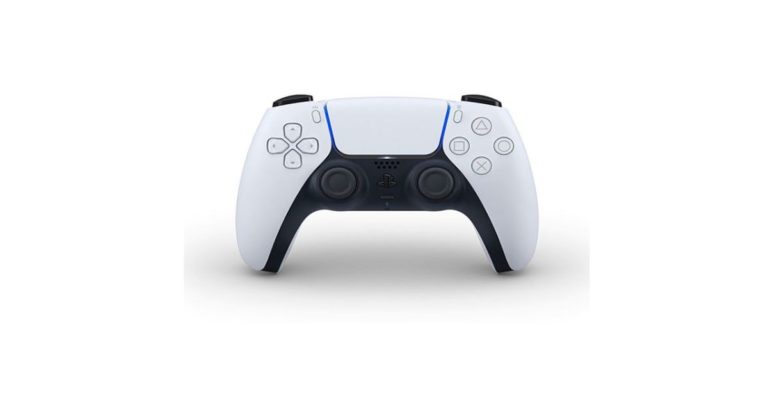
Bidding goodbye to the DualShock 4 wireless controller that was launched along with PS4 in 2013, Sony has now showcased the first look of the DualSense wireless controller for PlayStation5 to the gaming community. Asserting that the new controller will deliver a new feeling of immersion to players, a blog post by PlayStation claimed that the DualSense comes with the PS5’s Tempest 3D AudioTech, Powerful sensations, Strong-battery life, Built-in microphone array, Adaptive Triggers and Create Button feature.
“DualSense marks a radical departure from our previous controller offerings and captures just how strongly we feel about making a generational leap with PS5. The new controller, along with the many innovative features in PS5, will be transformative for games – continuing our mission at PlayStation to push the boundaries of play, now and in the future,” said Jim Ryan, President & CEO, Sony Interactive Entertainment.
Now let’s take a detailed look at the features of the DualSense wireless controller for PlayStation5. Check it out:
Powerful sensations
After thoughtful consideration, Sony decided to keep much of what gamers love about DualShock 4 intact, while also adding new functionality and refining the design. Based on the discussions with developers, PlayStation makers found that the sense of touch within gameplay, much like audio, hasn’t been a big focus for many games. Therefore, Sony leveraged on the opportunity with PS5 to innovate by offering game creators the ability to explore how they can heighten that feeling of immersion through the new controller. That is why it added a variety of powerful sensations which one can feel when playing, such as the slow grittiness of driving a car through mud.
Adaptive Triggers
Sony has also incorporated adaptive triggers into the L2 and R2 buttons of DualSense so the gamers can truly feel the tension of their actions, like when drawing a bow to shoot an arrow. According to Hideaki Nishino, Senior Vice President, Platform Planning & Management at PlayStation, “With adaptive triggers, we had to consider how the components would fit into the hardware, without giving it a bulky feeling. Our design team worked closely with our hardware engineers to place the triggers and actuators. The designers were then able to draw the lines of how the exterior of the controller would look and feel, with a challenge of making the controller feel smaller than it really looks. In the end, we changed the angle of the hand triggers and also made some subtle updates to the grip.”
Strong battery life
In order to provide the gamers with a strong battery life for a flawless gaming experience, PlayStation has revealed that the DualSense wireless for PS5 comes fitted with rechargeable battery in order to lessen the weight of the controller as much as possible.
Create button feature
As far as buttons are concerned, users will notice there is no longer a “Share” button as they must have seen in the DualShock 4. This time, PlayStation makers have come out with a new “Create” button feature for players to create epic gameplay content to share with the world, or just to enjoy for themselves. More details about this newly-added feature will be revealed once we inch closer to the official launch.
Built-in microphone array
DualSense also adds a built-in microphone array, which will enable players to easily chat with friends without a headset – ideal for jumping into a quick conversation. However, if you intent to chat for a longer period, it’s advisable to keep your headset handy.
Color and design
Moving on to the colour aspect, it was found that Sony took a different direction by deciding on a two-toned design. Besides this, the position of the light bar was also changed as it now sits at each side of the touch pad, giving it a slightly larger look and feel as against what was seen in the DualShock 4.
The DualSense wireless controller for PlayStation5 has been tested by a wide range of gamers with a variety of hand sizes in order to provide great ergonomics. According to the official blog post, Sony claims that “Our goal with DualSense is to give gamers the feeling of being transported into the game world as soon as they open the box. We want gamers to feel like the controller is an extension of themselves when they’re playing – so much so that they forget that it’s even in their hands!”
It was further hinted that Sony could share more information about PS5, including the console design, ahead of the official launch in Holiday 2020.
For the latest gadget and tech news, and gadget reviews, follow us on Twitter, Facebook and Instagram. For newest tech & gadget videos subscribe to our YouTube Channel.
Today’s Amazon Quiz has gone live now and the e-commerce platform Amazon is back with another set of new questions that gives you a chance to win Rs 15,000 Amazon Pay Balance. It can be played daily from 8 AM to 12 noon. Millions of its customers are trying their luck by participating in the daily quiz to win free gadgets as well as Amazon Pay Balance. All you need to do is log in to your Amazon app on your device and participate in today’s quiz.Every day Amazon brings a fresh questionnaire that consists of five easy questions based on general knowledge and current affairs. By submitting correct answers the contestants can win exciting prizes such as iPhone X, iPhone Xs, Seagate HDD, GoPro Hero 8 Camera, LG Smartphones, Bose Sound Touch 20 Speakers, OnePlus 7T among others. One thing to note is that the quiz is not available for the desktop platform, you can only participate in the quiz from 8 AM to 12 noon via mobile app. After giving all the correct answers to the question you will get shortlisted for a lucky draw to select a winner. The results will be announced at the end of the month. Check out today’s answers for the Amazon Quiz to win Rs 15,000 Amazon Pay Balance.
April 13 Amazon Quiz Answers
Question 1: Which international multi-sport event is meant for sports or disciplines that are not contested in the Olympic Games?The Answer is- World GamesQuestion 2: Kamarajar Port is situated on which coast of India?The Answer is- Coromandel CoastQuestion 3: The Gateway is a proposed NASA space station in orbit around which space object?The Answer is- MoonQuestion 4: Which global institution releases The Global Economic Prospects – a publication on the state of the world economy?The Answer is- World BankQuestion 5: Which recently launched web series is set in the remote village of Phulera in Uttar Pradesh?The Answer is- Panchayat
Follow the steps to know how to participate in the Amazon Quiz:
As more and more people are staying at home during the Coronavirus outbreak, Kaspersky experts have investigated nearly 1300 files that have names similar to popular virtual-meeting applications like Zoom, Webex, and Slack.
The researchers at Kaspersky probed the threat aspect of these virtual-meeting platform to ensure that users enjoy a safe and protected environment on Zoom, Webex, and Slack. It was discovered that cyber criminals have been promoting cyber-threats under the guise of popular apps. The researchers also discovered that these threats often disguised as .lnk files for social meeting platforms.
Besides this, the researchers at Kaspersky found that DealPly and DownloadSponsor are the two most common adware and malware families. Mind you! Both DealPly and DownloadSponsor softwares can be usually seen on the screen of a user after it gets downloaded via unauthentic source. They also identified an old malicious code known as Exploit.Win32.CVE-2010-2568 that enables cyber criminals to carryout phishing attacks.
Even earlier Kaspersky had stated that not everything on the internet is suitable for younger audiences as the amount of harmful content online is increasing rapidly. To minimize the risks of their kids stumbling on inappropriate content, almost 28 percent of parents try to regulate the time children spend online. Nearly 58 percent feel that they need to control or oversee their kids’ online browsing and internet usage. Children may access such content by accident, and parental control software can minimize the risks of encountering harmful content while online.
However, Kaspersky experts also revealed that it is also the case that each parental control solution performs differently and it is not an easy task for parents to choose the right one for them. To find the best tool to protect kids using the internet, every year AV-Comparatives carries out certification tests for various parental control software vendors. To be certified, an analysed product must block at least 98 percent of pornographic websites, have no more than a few false alarms on child-friendly websites, and have no severe unresolved bugs (or design flaws) discovered during the review, the experts added.
Kaspersky Safe Kids has gained a competitive advantage over other participating vendors due to its improved content filtering technology. The technology combines several approaches that enable a high level of recognition of inappropriate content: it includes both heuristic approaches and machine learning (ML). Heuristic approaches are used when it is necessary to analyze the HTML code of a website (tables, headings, paragraphs, etc.). While with the help of machine learning, the filtering technology is enriched by the most precise heuristics.
For the latest gadget and tech news, and gadget reviews, follow us on Twitter, Facebook and Instagram. For newest tech & gadget videos subscribe to our YouTube Channel. You can also stay up to date using the Gadget Bridge Android App.
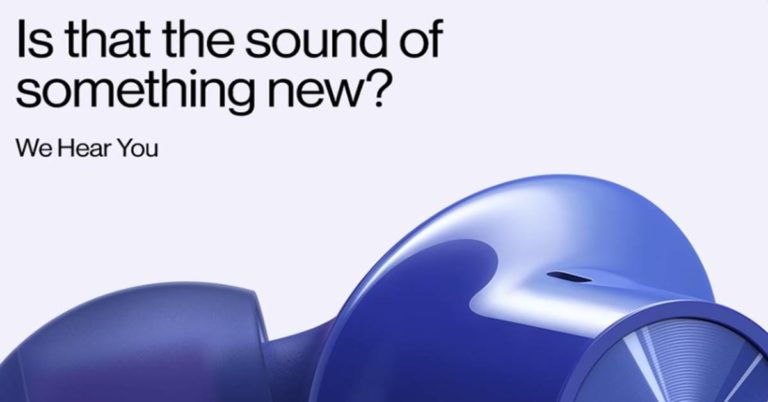
With the April 14 OnePlus launch event inching closer, the Chinese smartphone maker has now released a teaser image of the Bullets Wireless Z earbuds on its official Twitter handle. As per the leaked image, it appears that OnePlus Bullets Wireless Z audio gear is made up of glossy ‘Ultramarine blue’ material while earbuds have silicon covering.
The teaser image throws light that the much-anticipated gadget could be called the Bullets Wireless Z as the tweet says, “Got something up our zleeves,.” the text reads. The “S” of sleeves is replaced by “Z”. Therefore, it goes in synchronisation with what rumour mills have hinted.
Earlier, an image shared by popular tipster Evan Blass through his Patreon account has revealed that the company is likely to lift curtains off its OnePlus Bullets Wireless Z earphones in all colours. A tweet by Evleaks has suggested that OnePlus Bullets Wireless Z, which will be a successor to OnePlus Bullets Wireless 2, will come in 4 colours— Green, Blue, Black and Silver. The same finish is also rumoured for the OnePlus 8 series phones.
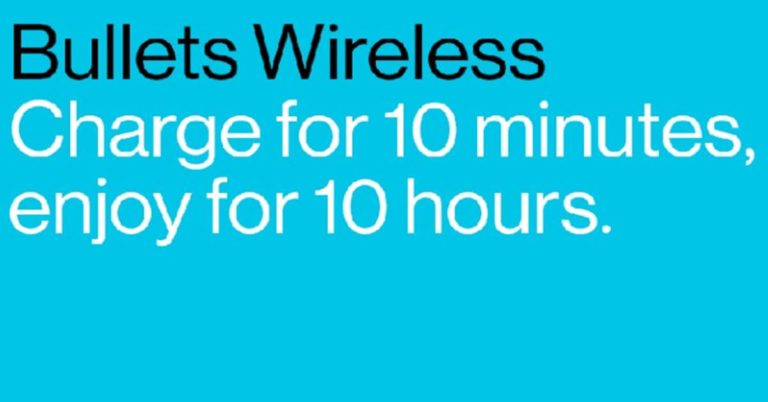
Besides this, OnePlus has now taken to Twitter to announce that a new version of the Bullets Wireless headset is coming soon to give the OnePlus users 10 hours charge in just 10 minutes.
According to OnePlus, this fast-charging audio gear delivers a 10-hour of listening time with just plugging them for 10 minutes. This feature goes in line with the current Bullets Wireless 2 that gives users 10 hours of listening time with just 10 minutes of charging, while a full charge gives 14 hours. However, the rumour mills have stated that the new Bullets Wireless will be equipped better battery life. If we believe the reports, the all-new Bullets Wireless headset will deliver 20-hour playtime once it is charged completely.
As far as OnePlus 8 Pro is concerned, we could see this handset in an exclusive ‘Ultramarine Blue’ colour besides the Glacial Green and Onxy Black colours catering the smartphone users who love to flaunt their phones. According to Winfuture, while the ‘Ultramarine Blue’, which wasn’t seen ever before, is exclusively for OnePlus 8 Pro smartphone, the ‘Interstellar Glow’ is reserved for the OnePlus 8 at least for the time being.
So get set to witness the online launch of the OnePlus Bullets Wireless Z alongside the OnePlus 8 Pro smartphone on April 14.
For the latest gadget and tech news, and gadget reviews, follow us on Twitter, Facebook and Instagram. For newest tech & gadget videos subscribe to our YouTube Channel. You can also stay up to date using the Gadget Bridge Android App.
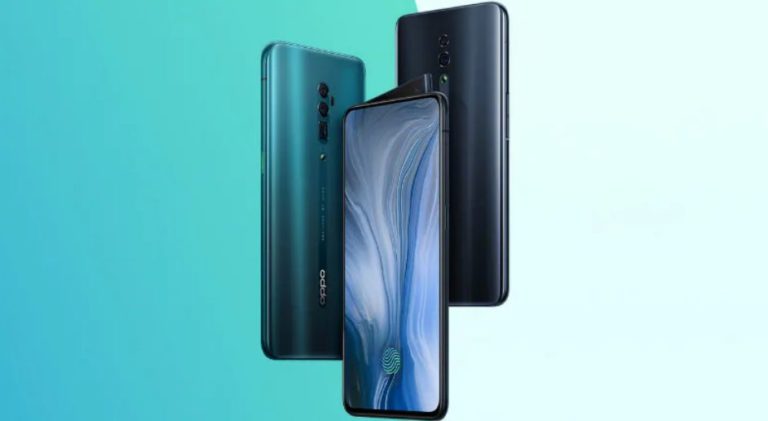
Voice over Wi-Fi (VoWiFi) or Wi-Fi calling is a buzzing word in the smartphone market. This VoWiFi features aims to provide proper calling service where cellular networks aren’t strong. Recently, Asus 6Z and Honor 10 Lite smartphones have received this update. Now, a latest report has revealed that the feature will be fully introduced in Oppo Reno 10x Zoom.
Oppo Reno 10x Zoom smartphone, which was launched last year, will soon get VOWiFi calling feature in the upcoming updates, as revealed by a Tweet by Oppo customer care. The VoWiFi feature is not yet been introduced in Oppo devices.
However, an earlier tweet by the customer care service of Chinese smartphone maker has confirmed revealed that “the VoWiFi feature will be rolled out along with the next release of ColorOS for the OPPO F11 Pro. Request you to stay tuned to our social media channels for updates on the same.”
Mind you! The news report has revealed that the VoWiFi support has also been introduced to Oppo Reno2 Z on the Jio and Airtel networks. This means, using your Jio or Airtel SIM, you can connect to any broadband network and make unlimited calling without incurring extra charges. In order to use Wi-Fi calling, you will need to activate VOWiFi feature on your smartphone and connect to your broadband network. You are now all set to make VoWiFi calls like you normally make calls.
What has to be noted is that the option to activate Wi-Fi calling in a smartphone is only limited to some specific models. To enable this feature, head on to the Wi-Fi calling page of your service provider to see if your smartphone is compatible with their VoWiFi service.
Once it is confirmed that your device is compatible, Android users can go to Settings > Click on Connection Settings > Open Wi-Fi calling in Android while iOS users need to open Settings > then, click on Phone > select Wi-Fi calling.
OPPO has recently launched the next rendition in the Reno series: the Reno3 Pro that comes with the 44MP dual-punch-hole camera setup and a 64MP Zoom quad-camera setup to capture clear images under any lighting conditions.
Backed by OPPO’s innovative streak, the global smart device brand was able to garner a solid market share of 26.8 percent in the Indian smartphone mid-premium segment in Q4 2019.
For the latest gadget and tech news, and gadget reviews, follow us on Twitter, Facebook and Instagram. For newest tech & gadget videos subscribe to our YouTube Channel. You can also stay up to date using the Gadget Bridge Android App.
The e-commerce platform Amazon is back with another set of new questions today.back with another set of new questions today. Every day it brings a fresh Amazon Quiz for its customers that gives them an opportunity to win exciting prizes. You can play the quiz from 8 AM to 12 noon every day on its mobile app platform. Today Amazon Quiz gives you a chance to win Xbox One S Gaming Console.The winners will get a chance to win gadgets, mobile phones and even Amazon Pay balance and other prizes such as iPhone X, iPhone Xs, Seagate HDD, GoPro Hero 8 Camera, LG Smartphones, Bose Sound Touch 20 Speakers, OnePlus 7T among others. Millions of people are participating in the quiz from different parts of the country to win such gift items.The quiz is not available for the desktop platform you can only participate in the quiz from 8 AM to 12 noon via mobile app only. The Amazon Quiz contains five easy questions based on general knowledge and current affairs. After giving all the correct answers to the question you will get shortlisted for a lucky draw to select a winner. The results will be announced at the end of the month.
April 11 Amazon Quiz Answers
Question 1: The daughter of Gokuladas and Vrajkunwerba Kapadia born on this date (11 April) in 1869 was the mother to Harilal, Manilal, Ramdas and Devdas. Who was she?The Answer is- Kasturba GandhiQuestion 2: Dr. Balram Bhargava is the current Director-General of which Government of India institution?The Answer is- ICMRQuestion 3: Which group video chatting app, which has recently had a sudden burst of popularity was launched by Life on Air, Inc. in 2016?The Answer is- HousepartyQuestion 4: Dzongkha is the national and official language of which neighbouring country of India?The Answer is- BhutanQuestion 5: Which global institution recently issued ‘Pandemic Bonds’ for the first time to raise money for the COVID-19 crisis?The Answer is- World Bank
You can follow these instructions to participate in Amazon Quiz:
The Oppo Ace 2 has been in the news for quite a long time now. Ahead of its official launch many leaks, rumours and reports have been floating on the web. The device is officially going to be unwrapped in the coming week on April 13 a day before when the OnePlus 8 series gets official. The company recently revealed via image teaser that the device will be powered by Qualcomm’s Snapdragon 865 chipset also giving us the first glimpse of the smartphone which also confirmed a circular-shaped camera module. In a new development, the Chinese company has now confirmed that the Oppo Ace 2 will get 65W SuperVOOC 2.0 fast charging technology support and a display with a 90Hz refresh rate.Oppo has now shared on the Chinese microblogging website Weibo that its upcoming Oppo Ace 2 smartphone will come with its own 65W SuperVOOC 2.0 fast charging technology. In addition to this Oppo has also left a hint via its another battery feature that it might also get wireless charging support. If this is to be believed then it might receive a 40W wireless charging option that in the recent past got certification for its new wireless charger.Image Courtesy: WeiboThe rumours suggest that the company’s proprietary will be known as Oppo 40W ‘AirVOOC’ Wireless Charger. Recently Oppo’s new wireless charger was certified by the Wireless Power Consortium (WPC) that is yet to hit the market and is expected to make its debut even before Oppo Ace 2 launch. In addition to this, the Chinese tech company will also introduce its latest Oppo Enco 31 TWS earbuds at the same event alongside Ace 2 smartphone in China.A short while ago the company released another new poster of Oppo Ace 2. It is going to assist a 90Hz refresh fee, 180Hz contact sampling fee, 4D fixed cooling, and 4D gaming vibration 2.0. Moreover, it is also going to equip twin stereo audio systems and Dolby Atmos.Also, the Chinese regulatory has also revealed the specs of Ace 2 which says that it will be powered by a Snapdragon 865 chipset with a 5G modem and will run on Android 10 out-of-the-box. The device will come with a punch-hole AMOLED display. Moreover, the listing suggests that Oppo’s upcoming smartphone will feature a circular pattern quad-rear camera setup consisting of a 48MP main camera. Further assisted by an 8MP camera, a 2MP lens and a 2MP camera sensor. As per the listing, Oppo Ace 2 will come with a 6.5-inch display with 2,400 × 1,080 pixels of resolution. It is going to be offered in 8Gb and 12GB of RAM with 128GB and 256GB of storage options. It would weigh 185g and the thickness is 8.6mm. It will pack a 4,000 mAh battery, which supports 65W SuperVOOC super flash charging and VOOC wireless flash charging. For the latest gadget and tech news, and gadget reviews, follow us on Twitter, Facebook and Instagram. For newest tech & gadget videos subscribe to our YouTube Channel. You can also stay up to date with the Gadget Bridge Android App.
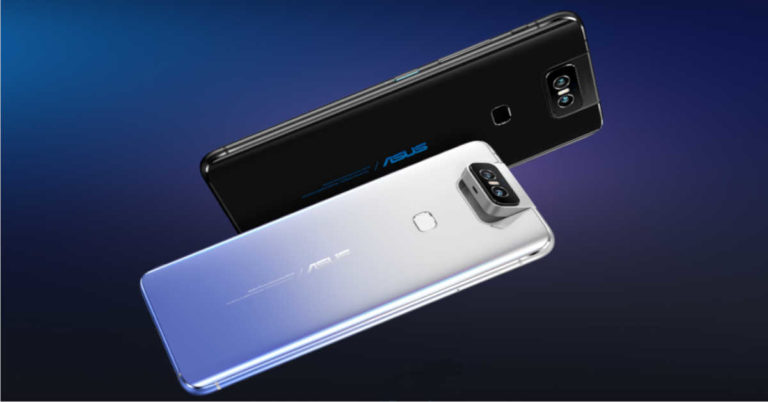
Last year in November the Taiwanese electronics brand Asus rolled out a stable Android 10 update to the ZenFone 6 series and the first to receive the new operating system is Asus 6Z in India. In a new development. The company has now begun rolling out its latest software update to the smartphone. Asus 6Z devices are now receiving a new software update with firmware version 17.1810.2003.144. The latest update brings the March security patch for Android as well as Jio Wi-Fi calling (VoWiFi) support in India. The update is being rolled out over-the-air (OTA) and the impatiens can download it manually via Asus’s Zentalk forum. The company stated, “We are constantly working towards ensuring improved performance on all ASUS smartphones. Here is the new FOTA update note for ASUS 6z.”In addition to this, the firmware update also includes pop-up confirmation dialog whenever a third party application requests access to the front camera in the background. Moreover, system stability has also been optimised.Below you can check out the latest Asus 6Z software update:
VoWiFi enabled for Reliance Jio in India – Users can now enjoy your HD calls over your Wi-Fi with Reliance Jio SIM cards, seamlessly.
March Google Security update – The security patches have been updated to March 2020. Now stay secured against the latest security threats that might come along.
Better system stability and performance – The UI software now offers better system stability and performance.
Asus 6Z comes with a 6.4-inch full-HD+ IPS display with a 19.5:9 of aspect ratio. The device is powered by Qualcomm’s Snapdragon 855 chipset paired with Adreno 640 GPU and up to 8GB of RAM and 256GB of expandable storage (up to 2TB). The device boasts a 5,000mAh battery that is supported by Quick Charge 4.0 technology. It features dual rear cameras that are placed in a flip module. The setup consists of a 48MP primary sensor that has an f/1.79 aperture and a 13MP ultra-wide-angle sensor.
For the latest gadget and tech news, and gadget reviews, follow us on Twitter, Facebook and Instagram. For newest tech & gadget videos subscribe to our YouTube Channel. You can also stay up to date with the Gadget Bridge Android App
The Indian telecom operator Reliance Jio has launched a JioPOS Lite app for its users in the country. The community recharge app is now available for download via Google Play Store for the android users however it’s not available for the iOS users in India. The best thing about the app is that it lets you earn money by doing prepaid recharges for other Jio subscribers. All they need to do is register to become a Jio Partner. It can be easily accessed and does not require any hardcopy of documents or physical verification to become a partner. JioPOS Lite community recharge app allows the Jio subscribers to become Jio Partners using the app. Any user can become a partner by going through a registrations process on this app easily. They can then recharge the accounts of other Jio customers to earn a commission. However other prepaid accounts can also be recharged either using MyJio app or Reliance Jio’s official website but they don’t offer you a commission. Here on each recharge, the company offers 4.16 percent commission to Jio Partners for recharging other numbers.The JioPOS Lite app comes with a passbook feature to allow the Jio Partners to keep track of their earnings and check their transactions in the last 20 days. You can add money to the denominations of Rs 500, Rs 1000 and Rs 2,000. On every Rs 100 spent on the recharge, you will receive Rs 4.166 that is 4.16 percent commission. Know how to become Jio Partner using JioPOS Lite community recharge app:
First things first, open Google Play Store on your Android smartphone and download the JioPOS Lite app.
Launch the app and tap on Allow All to grant permission.
The tap on the Sign-up option and provide your email as well as your Jio mobile number.
Now, tap on the Generate OTP option and enter the OTP received.
Click on Validate OTP
After selecting your location click on Done
Now sign in and enter your number
After entering a 4-digit mPIN of your choice, confirm to move ahead.
Click on Setup
Now the users can view all the details like earnings, passbook, load money to your account and more.
The Load Money option allows you to add money to your account.
Also, it will reflect the earned commission
Whereas the passbook option will let you view the transactions made during the last 20 days.
All iPhone and MacBook owners are well aware of Apple’s video calling app FaceTime. The app is pre-installed in iPhones, iPads and MacBooks running iOS 12.1.4 or macOS Mojave 10.14.3 and higher and hence, it is immensely popular with Apple fans. Now that most people, regardless of where they are living, are practicing social distance, video calling apps have become extremely useful. While we can stay connected to our loved ones with voice calls too, video calling apps certainly enhance the experience. Since users can see each other while having conversations on video-calling apps, they get a feeling of digitally meeting someone.
If you have been using FaceTime app, you would certainly know how to use it. However, what’s not very commonly known is the fact that you can add up to 32 people on a FaceTime call. If you are one among those who still have not tried using the FaceTime app for group video calling, here’s our step-by-step guide on how can do it. Take a look:
Press on the ‘+’ icon that is placed on the top right of the app.
Type the names of the people in your contact list whom you want to add. When their names pop up, just press on them to add the people to the call. You can also type the number of the person you wish to add to the call.
Alternatively, click on ‘+’ icon with a circle around it to access your contact list. Then select people’s names to open their contact card. Here, click on their number to add them to the call.
Once this is done, just press on the green button to begin your group video call.
It is worth mentioning that you can also start group video call via the Messages app. Just head to an existing group conversation in the app and click on the contacts icon on the top. Then, just press the FaceTime icon to begin the video call with all the participants of the group.
ADD SOMEONE TO AN EXISTING FACETIME CALL
Click on the screen of your device and swipe up to access the menu.
Press on the ‘Add Person’ icon.
Click ‘+’ to add a person whose name is in your contact list. You can even type their name or phone number on the search bar to look for the person in your contacts.
Then, click on the option of ‘Add Person to FaceTime’.
For Mac
TO START A GROUP VIDEO CALL ON FACETIME APP
In order to make group video calls using your Mac, you need to be logged in using your Apple ID.
Then, go to FaceTime app.
Type the phone numbers, email IDs or contact names in the search bar.
Then, press on the video call icon.
On doing this, all the participants you have added will get a notification to join the call.
If you wish to start a group video call on your Mac via the Messages app, follow these steps:
Open a Group conversation in the Messages app.
Press on the ‘Details’ button.
Tap on the video icon.
Tap on the sidebar button on the lower-left corner of your Mac‘s screen.
Click on the ‘Add Person’ button.
Type the email ID, name or number of the person you wish to add.
The OnePlus 8 Series launch is already in our knowledge. The Chinese Smartphone company is all set to launch its new upcoming series despite the coronavirus pandemic. The tech industry has been majorly hit due to the COVID-19 outbreak. As most of the smartphone companies have to either delay launches or have to rely on online launches, OnePlus is going ahead with its launch event for the OnePlus 8 smartphones on April 14.OnePlus 8 series is confirmed to launch earlier next week globally. The company’s CEO Pete Lau took to Twitter to officially confirm the Pro variant in the series. In addition to this, he also confirmed that presence on ultra-wide cameras on the upcoming lineup. He also shared some camera samples of the OnePlus 8 Pro. In total he shared two pictures that were clicked using the upcoming smartphone being compared with another flagship phone, however, Lau did not mention the name of the smartphone used to click the pictures. But we doubt that these must be clicked using an Apple iPhone or a Samsung’s smartphone because these two companies are its biggest competitors. The pictures were taken under the dark condition using the night mode feature to get a perfect click. Pete Lau’s tweet reads, “Ultra wide that can get ultra close. One side here was taken with a OnePlus 8 Pro, the other with another flagship phone (I think you can probably tell which is which).”
Ultra wide that can get ultra close.
One side here was taken with a OnePlus 8 Pro, the other with another flagship phone (I think you can probably tell which is which). pic.twitter.com/qOR1OiNod0
Until now the company has not yet disclosed many details about the OnePlus 8 smartphones but many leaks have hinted that the OnePlus 8 Pro is likely to boast a quad rear camera setup. The camera module is slated to include a 48-megapixel Sony IMX689 sensor with an f/1.78 aperture lens, another 48-megapixel Sony IMX586 sensor with an f/2.2 aperture lens offering 120 degrees of field-of-view. It would further include a tertiary 8-megapixel sensor with an f/2.4 aperture lens and a 5-megapixel camera sensor. It is rumoured to consist of a 16-megapixel selfie camera on the front.In the meanwhile, OnePlus’s CEO released the first teaser image of the OnePlus 8 series that only the bottom back panel of the upcoming lineup. He teased an image of the green colour variant of the series. This is the first time that the company would bring its latest devices in the green colour option. To recall the predecessor OnePlus 7 lineup is being offered in three colour options Frosted Silver, Glacier Blue and Haze Blue colour( OnePlus 7T Pro).
For the latest gadget and tech news, and gadget reviews, follow us on Twitter, Facebook and Instagram. For newest tech & gadget videos subscribe to our YouTube Channel. You can also stay up to date with the Gadget Bridge Android App.
The American online video-sharing platform YouTube has now unlocked a collection of more than a dozen free content videos on its platform for people during their stay at home due to the coronavirus crisis. The company will be hosting a collection of free YouTube original series without having to pay for the subscription. The popular video streaming platform YouTube has a massive collection of free videos and now the company has decided to make available free access to the YouTube Originals outside the paywall. The company is not the only one that has come up with free content streaming on its platform even before it could announce the video streaming platforms such as HBO, Amazon Prime Video, Sling TV among others has already taken the initiative to encourage people to stay at home due to health concerns.The YouTube originals will be available to stream for a limited period of time as part of YouTube’s #StayAtHome initiative. The initiative will also be featuring PSAs with YouTube creators, music artists, athletes as well as celebrities such as Shawn Mendes, Markiplier, J Balvin, Venus Williams, Sam Smith, Emma Chamberlain, Karlie Kloss and the Dolan Twins.At the moment YouTube will make available more than a dozen YouTube Originals such as:
Escape the Night
Matpat’s Game Lab
Step Up: High Water (Seasons 1-2)
Impulse (Seasons 1-2)
Sherwood
Sideswiped
The Sidemen Show
Foursome
Me and My Grandma
F2 Finding Football
Overthinking with Kat & June
The Fake Show
Escape the Night (Seasons 1-4)
Re:Set
Various kids and family series will also be made available as free-to-stream on YouTube and YouTube Kids over the coming weeks. Sherwood is now available and other series will also begin to release such as We Are Savvy from April 13, Hyperlinked from May 4, Fruit Ninja Frenzy Force from June 1 and Kings of Atlantis from June 29. According to the company, all the episodes of the Sherwood, Fruit Ninja Frenzy Force and Kings of Atlantis also will be available in multiple languages.
For the latest gadget and tech news, and gadget reviews, follow us on Twitter, Facebook and Instagram. For newest tech & gadget videos subscribe to our YouTube Channel. You can also stay up to date with the Gadget Bridge Android App.
Amazon Quiz for April 10 has gone live. It is becoming more popular as people have to stay at home during the coronavirus lockdown. Daily the e-commerce platform brings a new quiz that gives a chance to its millions of users to win exciting prizes being offered by the company. The quiz contains 5 general questions to which you have to answer correctly. Today you can stand a chance to win Win Bose 700 Bluetooth Headphones.Daily the e-commerce platform brings a fresh questionnaire to which the contestants have to answer correctly to enter into a lucky draw. The quiz can be played daily from 8 AM to 12 noon. The quiz contains a total of five questions, all the questions are based on general knowledge and current affairs. Only one person will be declared a winner. Amazon will announce the result of the quiz at the end of the month. Only app users are eligible to participate in the Quiz. If you don’t know the answers, every day we update all the Amazon Quiz questions with their correct answers on our website. Check out today’s answers for the Amazon Quiz to win Bose 700 Bluetooth Headphones.
April 10 Amazon Quiz Answers:
Question 1: Which activist referred to as Mahatma born on 11th April, formed the Satyashodhak Samaj to attain equal rights for the unprivileged?The Answer is- Jyotirao PhuleQuestion 2: The Dumurjala stadium was recently converted into a 150-bed quarantine facility. In which state is it located?The Answer is- West BengalQuestion 3: Which of these is one of the stages in the Men’s 2020 ICC T20 World Cup, as per the initial tournament schedule?The Answer is- Super 12sQuestion 4: Which of these is the theme for World Health Day 2020 observed on April 7?The Answer is- Support Nurses and midwivesQuestion 5: Which of these social reformers born on 14th April was posthumously awarded the Bharat Ratna in the same year as Nelson Mandela?The Answer is- BR Ambedkar
After a lot rumours, Huawei has finally unveiled its first OLED TV with a 65-inch OLED panel and 120Hz refresh rate. Known as Huawei Vision X65 comes, the smart TV comes at price point of CNY 24,999 (which translates to approximately Rs 2,70,800).
As far as specifications are concerned, Huawei Vision X65 is equipped with a 24.9mm ultra-thin body that’s just 24.9mm thick and supports a 120 Hz refresh rate. This first OLED TV from Huawei comes with HDR. Moreover, the Vision X65’s panel can produce brightness up to 1,000 nits and is German TUV Rheinland certified, claims Huawei.
Moving on to the audio experience, Huawei Vision X65 carries a total of 14 speakers. Mind you! These speakers come fitted underneath the display. Besides the 14 speakers, the Vision X65 is equipped with six full-range drivers, six tweeters along with two woofers.
Huawei claims that the company has equipped its new OLED TV with a HiSilicon Honghu 898 smart chip that fixes the colour and speed of the screen through advanced multichannel sensors. Moreover, one can also make the video on the screen appear more realistic via support that allows Huawei Vision X65 adapts to ambient light. If reports are to be believed, the Vision X65 will also run on HarmonyOS. Therefore, we could see this device to be working with a variety of smart home products.
The icing on the cake is that Huawei Vision X65 TV features a 24-megapixel ultra-wide-angle camera that comes with pop-up mechanism on the top of the TV frame. It is also comprises of HiSilicon Hi3559C chip that is capable of AI computing using an NPU. The camera of this smart TV enables a user to gain access to video calling as well as it supports Air gesture control.
As per the reports, Huawei Vision X65 will go on sale in China starting April 26. However, we are yet to see when the company will plan a global launch of this smart TV as there is no information as of now.
Meanwhile, Huawei Cloud announced that they launched a global action plan to help customers around the world to fight COVID-19 with cloud and AI services. As part of this international action plan against the coronavirus, Huawei Cloud will be providing free AI and cloud services and will be recruiting partners around the world to help fight this pandemic together.
(Image: Via)
For the latest gadget and tech news, and gadget reviews, follow us on Twitter, Facebook and Instagram. For newest tech & gadget videos subscribe to our YouTube Channel.
After lifting the curtains of the new Warp Charge 30 Wireless charger that delivers a peak output of up to 30W, OnePlus has now taken to Twitter to announce that a new version of the Bullets Wireless headset is coming soon to give the OnePlus users 10 hours charge in just 10 minutes.
An all-new Bullets Wireless experience is coming soon, still giving you 10 hours charge in just 10 minutes, which got us thinking…
Share your own Spotify playlist in the comments and discover 10 of your new favourite songs in the other playlists. #LeadwithSpeed
According to OnePlus, this fast-charging audio gear delivers a 10-hour of listening time with just plugging them for 10 minutes. This feature goes in line with the current Bullets Wireless 2 that gives users 10 hours of listening time with just 10 minutes of charging, while a full charge gives 14 hours. However, the rumour mills have stated that the new Bullets Wireless will be equipped better battery life. If we believe the reports, the all-new Bullets Wireless headset will deliver 20-hour playtime once it is charged completely.
This latest tweet by OnePlus has not yet made any announcement about its official name as there are speculations that this new headphone will be called “Bullets Wireless Z”. It will be confirmed once the audio gadget is officially released by OnePlus along with the 8 Pro handset on April 14.
Recently, an image shared by popular tipster Evan Blass through his Patreon account has revealed that the company is likely to lift curtains off its OnePlus Bullets Wireless Z earphones in all colours. According to the leaked image by Evleaks suggests that OnePlus Bullets Wireless Z, which will be a successor to OnePlus Bullets Wireless 2, will come in 4 colours— Green, Blue, Black and Silver.
Earlier, it was rumoured that OnePlus Wireless Z could come with noise cancellation, Bluetooth 5.0 connectivity, Type-C port, and easy pairing with OnePlus smartphones. However, we are yet to find out details about the design as well as specifications of the OnePlus wireless charger but earlier leaks have suggested that it will provide a 30W charging output. Moving on the price, it is likely that the Bullets Wireless Z will be available at a price point of $100 (approx. Rs 7,599).
OnePlus has also offered a chance to win Bullets Wireless 2 earphones by simply subscribing to get the latest OnePlus news, product information, and updates. According to the company, “Winners will be randomly selected and announced online every Tuesday starting March 30 to April 13.”
For the latest gadget and tech news, and gadget reviews, follow us on Twitter, Facebook and Instagram. For newest tech & gadget videos subscribe to our YouTube Channel.
As people are talking to doctors, teachers, and isolated loved ones via WhatsApp during this Coronavirus outbreak. The Facebook-owned instant messaging app has now unveiled a new update for its application to make it easier for its users to initiate video calling through the app.
This new update allows the WhatsApp users to start the call as soon as they clicks on the video call button without showing any pop-up message to add group members. Mind you! This new update can be enjoyed only on the group of four or even less members.
“We’ve made it easier than ever to start a group call from WhatsApp for groups of 4 or less. From your group chat tap the video or voice call icon to directly start a call with everyone in the chat! ” as per a tweet by WhatsApp.
Prior to this new update, WhatsApp users had to first tap on the video call icon and then had to choose the group members they want to strike a conversation with.
Recently, WhatsApp has also put a limit on such message so that it can only be forwarded to one chat at a time. WhatsApp has also announced that all the messages and calls on its platform are end-to-end encrypted by default to give its users a secure place to carry out most personal conversations. The announcement has been made at a time when WhatsApp is bridging the gap in communication as billions of people are practising social distancing due to COVID-19 outbreak.
“We’ve taken several steps over the years to help keep conversations intimate. For example, we previously set limits on forwarded messages to constrain virality, which led to a 25% decrease in message forwards globally at the time,” as per a blog post by WhatsApp.
Asserting that not all forwarding is bad, WhatsApp revealed that many of its users forward helpful information, as well as funny videos, memes, and reflections or prayers they find meaningful. On the contrary, WhatsApp also registered a drastic increase in the amount of forwarding which users can feel overwhelming and can contribute to the spread of misinformation. WhatsApp believes it’s important to slow the spread of these messages down to keep its platform a place for personal conversation.
Moreover, WhatsApp has also directly collaborated with NGOs and governments, including the World Health Organization (WHO) and more than 20 national health ministries, to help connect people with accurate information. Together these trusted authorities have sent hundreds of millions of messages directly to people requesting information and advice.
For the latest gadget and tech news, and gadget reviews, follow us on Twitter, Facebook and Instagram. For newest tech & gadget videos subscribe to our YouTube Channel. You can also stay up to date using the Gadget Bridge Android App.



















 The JioPOS Lite app comes with a passbook feature to allow the Jio Partners to keep track of their earnings and check their transactions in the last 20 days. You can add money to the denominations of Rs 500, Rs 1000 and Rs 2,000. On every Rs 100 spent on the recharge, you will receive Rs 4.166 that is 4.16 percent commission.
Know how to become Jio Partner using JioPOS Lite community recharge app:
The JioPOS Lite app comes with a passbook feature to allow the Jio Partners to keep track of their earnings and check their transactions in the last 20 days. You can add money to the denominations of Rs 500, Rs 1000 and Rs 2,000. On every Rs 100 spent on the recharge, you will receive Rs 4.166 that is 4.16 percent commission.
Know how to become Jio Partner using JioPOS Lite community recharge app:
 The JioPOS Lite app comes with a passbook feature to allow the Jio Partners to keep track of their earnings and check their transactions in the last 20 days. You can add money to the denominations of Rs 500, Rs 1000 and Rs 2,000. On every Rs 100 spent on the recharge, you will receive Rs 4.166 that is 4.16 percent commission.
Know how to become Jio Partner using JioPOS Lite community recharge app:
The JioPOS Lite app comes with a passbook feature to allow the Jio Partners to keep track of their earnings and check their transactions in the last 20 days. You can add money to the denominations of Rs 500, Rs 1000 and Rs 2,000. On every Rs 100 spent on the recharge, you will receive Rs 4.166 that is 4.16 percent commission.
Know how to become Jio Partner using JioPOS Lite community recharge app: