When it first debuted, the Ford EcoSport rocked the Indian auto sector. The white Ford EcoSport, which just a few days ago came off the assembly line, departed the manufacturing grounds. As a result, Ford India would no longer produce vehicles and SUVs in India for both domestic and international markets.
Ford startled the industry by launching it at a price of 5.59 lakh after it was initially introduced in 2012 in New Delhi. The SUV earned a great deal of positive feedback for its appearance. The final EcoSport compact SUV, designed for export markets, left Ford’s Maraimalai Nagar facility, bringing an end to the production of cars that were made in India. The future ownership of this factory will go to Tata Motors.
Those who are unaware of Ford had declared that it would stop producing cars in the Indian market, although it would keep building cars for its commitments to overseas markets. Ford continued to produce the EcoSport for export markets long after it stopped selling cars and SUVs in India. It stated that the reason for leaving our auto market was due to subpar results. Ford’s unsuccessful alliance with Mahindra, which was launched in 2019 but terminated on December 31, 2020, was another reason for its downfall. Ford India is the third major automaker to join General Motors and Daewoo, although it would keep building cars for its commitments to overseas markets.
With the release of the EcoSport’s final unit, Figo and Aspire models, which were built in the Sanand factory in Gujarat, were gradually pulled off the shelves not only in India but also abroad as a result of declining demand.
One of the main production sites for the Ford EcoSport was the Maraimalai Nagar facility in Tamil Nadu, which was Ford’s first plant in India. The EcoSport, which was produced in India, was exported to a number of nations, including the US. So the final and the last white Ford EcoSport that recently departed the Maramalainagar manufacturing site near Chennai is an export-spec model that will be transported to the USA from outside of our borders.
Ford also acknowledged that the brand had accrued operating losses of over $2 billion which is about Rs 16,000 crore during the previous ten years.
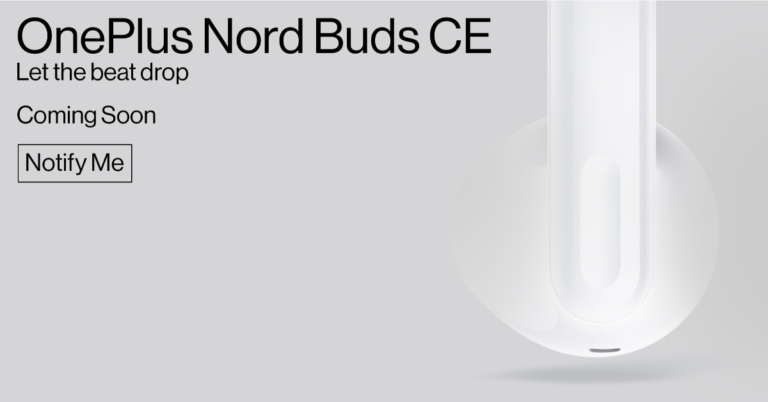
It is official that the OnePlus Nord Buds CE will debut on August 1 in India. The Nord Buds CE is said to strengthen Nord’s position in the entry-level TWS category. OnePlus, regrettably, hasn’t provided any additional information as of yet and has simply confirmed the launch date in India. Ahead of the official launch, the TWS earbuds have been spotted on several certification sites including BIS.
With the introduction of the soon-to-be-released OnePlus Nord Buds CE in India, OnePlus is prepared to broaden its Nord Ecosystem and further increase Nord’s market position in the audio sector. There are currently no known details about the future earbuds but they will be arriving in the nation on August 1. The Bluetooth SIG database has them listed as having the model number E506A when they were supposedly first discovered. As per the website, the earbuds’ connectivity will most likely use Bluetooth version 5.2. The Bureau of Indian Standards (BIS) database was also where it was discovered with the same model code, according to the investigation.
With the release of the OnePlus Nord Buds earlier this year, OnePlus Nord made its foray into the entry-level TWS segment. “This has successfully established OnePlus as one of the key players in the entry-level TWS segment, offering rich features and high-end design to provide a burdenless user experience, complemented with unparalleled audio features amongst the entry-level hearables.” the company noted.
OnePlus Nord Buds
The 12.4mm Titanium drivers of the OnePlus Nord Buds have a frequency response range of 20Hz to 20,000Hz and a maximum sound pressure level of 102 dB. There are four microphones in total on the earphones. These include Bluetooth v5.2 connectivity and a maximum operating range of 10 metres. The earphones feature an IP55 rating for water and dust resistance. With the earbuds is an oval charging case.
The gaming pro mode on the OnePlus Nord Buds, when activated, can offer a latency rate of up to 94 milliseconds. They work with iOS and Android devices alike. The earbuds pair with a partnered OnePlus device as soon as the charging case is opened thanks to the rapid pairing feature.
The charging case includes a 480mAh battery, while each earbud has a 41mAh battery. The case can be charged using the USB Type-C connector that is provided. According to the manufacturer, the OnePlus Nord Buds have seven-hour battery life. According to the manufacturer, when used together, the charging case can extend playtime by up to 30 hours. Additionally, OnePlus Nord Buds assert that a single 10-minute charge will allow you five hours of listening duration.
Ever since Facebook’s acquisition of Instagram, the two platforms have been slowly becoming more integrated. You can now add your Facebook profile to your Instagram account and share your Stories and Reels on Facebook. While there are many cross-platform features, in this article, we discuss how you can log into your Facebook account using Instagram.
Your Facebook account will be linked to your Instagram profile. You will also get the option to sync your profile picture between the two platforms.
How to share Instagram posts and stories on Facebook
You can share your Instagram posts on Facebook by selecting ‘Also post to Facebook’ every time you create a post on Instagram. You can also automatically share every post to Facebook by going to Meta Accounts Centre in your Settings and turning on ‘Automatically share’.
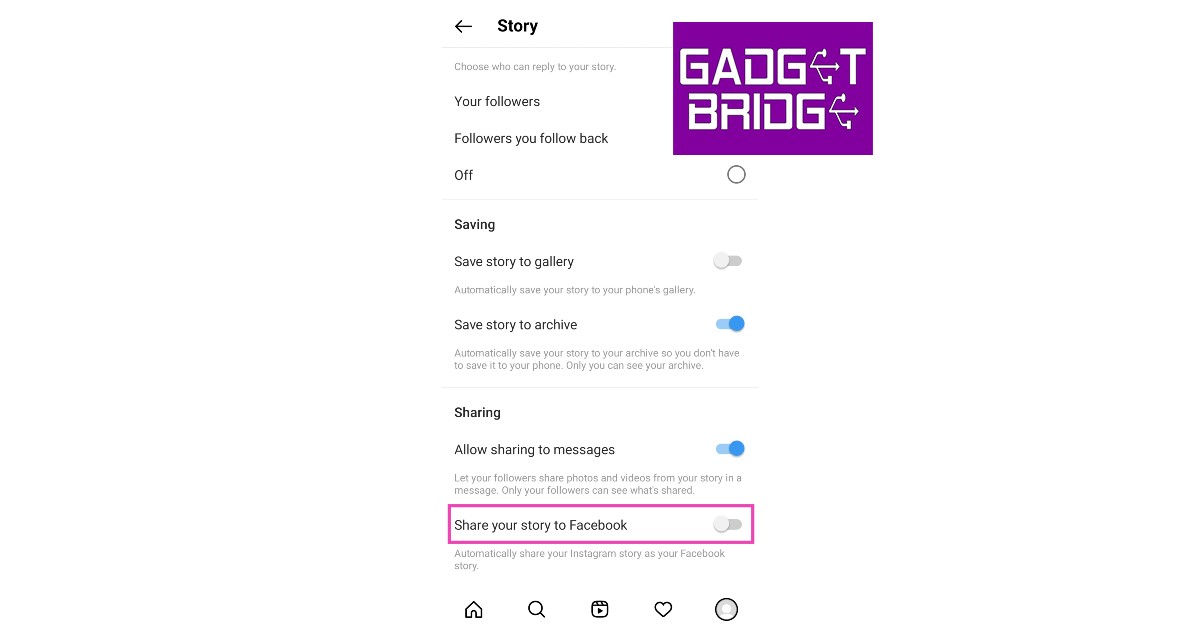
Here’s how you can share your stories on your Facebook account
Step 1: Go to Settings by tapping the hamburger menu on your Instagram profile.
Step 2: Go to Privacy and select Story.
Step 3: Turn on the toggle bar for ‘Share your story on Facebook’.
All your stories will be automatically shared to Facebook.
Can I log into my Facebook using Instagram?
For the longest time, you couldn’t log into Facebook using your Instagram account. However, now it has been made possible by a more unified Accounts Centre. Meta recent added the option to let users sign into their Facebook account using their Instagram profile and vice-versa. Before you begin, you need to make sure that your Accounts Centre has access to your Instagram and Facebook accounts, and that the two are linked together. Once that’s taken care of, go to Accounts Center>Logging in with accounts and select ‘Allow all accounts to log into each other’. Now you can log into your Facebook using your Instagram.
Frequently Asked Questions (FAQs)
How do I sign into my Facebook account using my Instagram account?
Go to Accounts Center>Logging in with accounts and select ‘Allow all accounts to log into each other’.
How many email IDs can I add to my Instagram account?
Your Instagram account can only be linked to one email address at a time.
How do I automatically share my Instagram posts and stories on Facebook?
Go to Profile>Menu>Settings and privacy>Accounts Centre>Connected Experiences>Sharing Across Profiles>Instagram Profile, select your Facebook profile in the ‘Share to’ category and turn on the toggle switch for Stories and Posts.
This is how you can log into your Facebook account using your Instagram profile. The two platforms have slowly been coming together and using Meta Business Suite, you can seamlessly manage both your profiles together. Meta Suite allows you to manage your Instagram and Facebook DMs in one place and makes cross-posting easy.
Garena Free Fire is a battle royale game with regular awards and tournaments to keep players interested. If you play Garena Free Fire, you should be aware of the redeem codes that are released on a daily basis. However, because the battle royale game is banned in India, players from other countries can use the Free Fire Redeem codes daily. If you’re unfamiliar with the Garena Free Fire redeem codes or don’t know how to get them, we’ve put together a step-by-step guide to help you redeem them. Check out Garena Free Fire Redeem Codes for July 25.
The Free Fire redeem codes are a great way to get free stuff. These are 12-digit codes that contain alphabets and numbers, as well as an expiration date and time. Because the Garena FF redeem codes cannot be used more than once, you should hurry to the redemption page to claim your free reward before someone else does. To get a free reward, all you have to do is go to reward.ff.garena.com/en, which is the official redemption page. Also, keep an eye on this space for daily updates on Garena Free Fire redemption codes and rewards.
In This Article
Garena Free Fire Redeem Codes Today 25 July 2022
Updating Soon…
How to Get Free Fire Redeem Codes for Garena on July 25?
25 July 2022 Amazon Quiz has gone live on its platform. The quiz timings are 12 AM to 11:59 PM. The Amazon App users can participate in the quiz daily and all they have to do is submit correct answers to the questions asked on the e-commerce platform. Today’s participants can get a chance to win Rs 1,000 Amazon Pay Balance.
By participating in the Amazon Quiz the participants can win Amazon Pay Balance ranging from Rs 1,000 to Rs 50,000 every day while sitting at home. To win the participants must answer five questions correctly that are based on current events and general knowledge. One wrong answer can eliminate you from the quiz. The results will be announced at the end of the month. Today’s question will let you win Rs 1,000 Amazon Pay Balance. Check below for today’s Amazon quiz answers.
Question 1: Bartholomew Ogbeche, winner of the ISL 2021-22 Golden Boot, represented which side this season?
Answer: Hyderabad FC
Question 2: The Tom Holland starrer ‘Unchartered’, also stars which famous actor in the role of Victor Sullivan?
Answer: Mark Wahlberg
Question 3: BA.2 is the subvariant of which strain of the SARS-CoV-2 virus that causes COVID-19?
Answer: Omicron
Question 4: This company is headquartered in which German city?
Answer: Munich
Question 5: This famous scientist won the Nobel Prize for _______ in 1921. Fill in the blanks
Answer: Physics
How To Play Amazon Quiz
Only app users are eligible to play the Amazon quiz every morning from 12 AM to 11:59 PM. The quiz is not available on the desktop. For those who are unaware of how to play the Amazon quiz below are the steps, you can follow to take the quiz.
Firstly download the Amazon app from Google Play Store or App Store
Now fill in the required information through the Sign Up option.
You need to log in to the Amazon app and scroll down on the home screen to find the Amazon Quiz banner.
Tap on the Amazon Quiz banner and tap on the Start button to start the Quiz.
Now you will get 5 questions and you need to answer them correctly. One wrong answer will eliminate you from the Quiz.
After answering all the questions correctly you are now eligible for a Lucky Draw.
The winner’s name will be announced today at 12 PM.
Modern smartphones are capable of storing a tremendous amount of personal data, be it pictures, videos, or even online activity. This also makes them a primary target if someone wants to spy on you. Through the years, spyware has also evolved, to the point where it can now function in the background and the victim may not even be aware of it. Luckily, there are some ways to spot spyware, along with certain measures you can take to keep your phone protected. In this article, we show you how to tell if someone monitors your phone. We also list some measures you can take to safeguard your phone from being spied on.
Spyware installed on your phone can cause a sudden decline in battery life. Since the spyware apps run in the background, your smartphone’s battery is constantly being utilised to keep them active. Any decline in battery life that seems out of the ordinary should be further inspected. In order to check the battery usage of specific apps go to Settings>Battery>Battery Usage and check if any app is using excessive battery power. Also, look for any unknown apps. If no app shows any excessive usage, there may be some hidden spyware installed on your phone.
Check the data usage
Any spyware needs to send data back to the source that installed it. In order to do this, the spyware will need to use your phone’s internet data. If you notice that you’re running out of data quickly without using the internet that often, check the data usage of your phone. Go to Settings>Connections>Data Usage and check the data usage for the different apps on your phone. If the data usage seems consistent with your activity, there is nothing to worry about. However, if there is unaccounted data utilised by your smartphone, it warrants further inspection.
Phone overheating
One of the more visible signs of spyware installed on your phone is your smartphone overheating even when you’re not using it. As we mentioned earlier, spyware constantly runs in the background and sends data back to the source. It also monitors your location, so your GPS is turned on at all times. This would certainly have an effect on your phone and it might overheat even when you’re not actively using it.
Disturbance during phone calls
If you notice any weird background noise or echo during your phone calls, it is possible they are being monitored. It is a cause for alarm if it happens even when your phone receives good network reception.
Drop in phone performance
If the level of your smartphone’s performance drops off abruptly, it is a secondary sign of some malicious spyware. While it may not confirm that your phone is being spied on, it certainly warrants further inspection.
How to safeguard your phone from being spied on?
If you notice your smartphone showing multiple signs listed above, it is better to be on the side of caution and safeguard your phone from being spied on. Here are some techniques you can use:
Try to find the spyware app manually: Go to the file explorer on your phone and look through the installed files. Be on the lookout for any strange names or duplicates. Sometimes a spying app can be disguised with an inconspicuous name like ‘Calculator’ or ‘Gallery’. Always be mindful of any unusual activity.
Perform a factory reset: Performing a factory reset will delete all data from your phone, including any hidden spyware. This is the quickest way to secure your phone, but you will lose your personal data.
Install an antivirus app: There are several antivirus apps on the Play Store that are equipped to detect any malicious files or spyware on your phone. Once you install an antivirus app, schedule routine checks for your phone.
If you look out for these signs you will be able to tell if someone monitors your phone. If you have a strong suspicion that it is, taking appropriate safety measures should be the next logical step. To be on the side of extreme caution, do not download any apps from outside the Play Store. If it is absolutely necessary, use a secure marketplace that flags any fake developers.
Over the last few years, Apple and Samsung have dominated the category of best camera phones with their flagship products. However, there are other smartphones that also deserve to be in the conversation for the best camera phone title. With Apple yet to come out with its flagship iPhones this year, we take a look at the best camera phones released so far in 2022 across all categories.
Samsung Galaxy S22 Ultra has a remarkable camera unit, making it the best camera phone released in 2022 so far. While we’re still waiting for the iPhone 14 Pro Max to decide on the best camera phone of 2022, so far the S22 Ultra is comfortably head and shoulders above any other smartphone.
The main 108MP camera on S22 Ultra has a large sensor which lets in more light, making it perfect for low-light photography. Flare correction on the S22 Ultra is also remarkable, with pictures coming out clear and sharp under any lighting conditions, be it overcast or bright.
The 40MP front camera produces fantastic results in portrait mode and offers noise reduction for selfies taken in night mode. It is also capable of 8k video capture at 24fps. To top it off, the 6.8-inch AMOLED display with a resolution of 1440 x 3088 pixels produces vivid colours and smooth motion.
With one of the better-looking rear camera units on this list, the camera quality of the OnePlus 10 Pro isn’t too far behind either. Many long-time OnePlus users consider this to be the best camera phone the company has released so far, but the real test would be how it fares against the S22 and iPhone 14. The ultrawide camera records excellent details and vibrant colours with high HDR resolution in daylight photography. Capturing photos in low light is also a pleasant experience with the OnePlus Pro 10, but it is still not quite on the level of the S22 Ultra and iPhone 13 Pro Max. The telephoto lens can capture detailed and crisp images with up to 10x zoom. The 32MP front camera takes excellent selfies and can record videos in 4k resolution. The OnePlus 10 Pro will definitely feature in a lot of year-end lists of the best camera phones in 2022.
iPhone SE
Camera Specifications
Rear Camera: 12MP (f/1.8)
Front Camera: 7MP (f/2.2)
Display: 4.7-inch LCD
Resolution: 1334 x 750 pixels
The iPhone SE may not be a flagship iPhone, but it still carries forward the legacy of the incredible iPhone cameras through the years. Apple went for a single camera design for the iPhone SE, with a 12MP rear camera. While it may not seem impressive on paper, the A15 Bionic chipset accentuates the quality of images with Smart HDR4 and Deep Fusion. The iPhone SE certainly punches above its weight, being priced at only Rs 43,900.
The only significant drawback in iPhone SE’s camera is the lack of Night Mode. It comes as a surprise since the iPhone SE is more than capable of supporting a Night Mode, but it seems that Apple wants to reserve that feature for its flagship iPhones.
Xiaomi continues to deliver high-performance cameras, with the Xiaomi 12 Pro being the latest in line to receive an outstanding camera unit that can deliver high-quality images in any surroundings. The Xiaomi 12 Pro comes with a 50MP + 50MP + 50MP triple camera unit along with a 32MP selfie camera. The rear camera provides six zoom modes: 0.6x, 1x, 2x, 5x, 10x, 20x. The image quality remains intact up to 5x zoom, which is quite impressive. What’s more impressive is that the zoom modes also function in Night Mode. It can also record 8k videos at 24fps and 4k videos at 30 and 60fps. The front camera can record 1080p videos at a frame rate of 30fps and 60fps. Xiaomi 12 Pro also does a great job of colour adjustment in daylight mode, resulting in vivid images. Overall, Xiaomi 12 Pro is one of the best camera phones you can buy in 2022.
This pick may surprise some, but the iQOO 9 Pro, with its brilliant camera performance, is definitely worthy of being on this list. Often written off as a gaming smartphone, the exceptional camera unit of the iQOO 9 Pro flies under the radar. The Samsung ISOCELL GN5 main sensor paired with the ‘Gimbal’ tech and optical image stabilisation produces excellent images even when the camera is in motion, something not many smartphones can boast about. The five-axis video image stabilisation produces the same results for videos captured by the iQOO 9 Pro. The rear camera can record videos in 8k resolution at 30fps, while the front camera can record in 1080p at 30fps. The HDR enables the front camera to produce excellent, detailed selfies. If your main priority is a gaming smartphone, the additional high-performance camera of the iQOO 9 Pro will certainly set it apart from the rest.
The camera unit Samsung Galaxy A73 is equipped to handle whatever you throw at it. The primary camera supports optical image stabilisation and comes with features like Object Eraser, AI Photo Remaster, Portrait Mode and more. What impressed us the most about Galaxy A73 was its macro mode. With a 5MP macro lens with an f/2.4 aperture, the A73 delivers excellent photos of an up-close subject. The selfie camera takes detailed images in daylight but low-light pictures could be a little better. But at a price of just over Rs 40,000, the Samsung Galaxy A73 provides the best bang for the buck.
The Vivo T1 Pro provides a 64MP + 8MP + 2MP rear camera along with a 16MP selfie camera. The zoom modes are only available for the rear camera. Images taken from the rear camera remain intact till 3x zoom after which they start degrading slightly. The rear camera can record videos in 4k resolution at a frame rate of 30fps, while the front camera records 1080p videos at 30fps. The Vivo T1 Pro stands out in offering greater camera accessibility to its users. Most tools are available right away on the camera window, without needing to open any further settings. It also offers a Level Tool, which lets you level your pictures in case the camera was tilted or unstable while taking the photograph. The main 64MP camera captures beautiful vivid pictures with incredible details. The portrait mode in the front camera is also impressive, producing just the right tones for selfies. Overall, the Vivo T1 Pro is an excellent camera phone in its category.
For a smartphone at Rs 16,499, Redmi Note 11S certainly provides one of the best cameras in its category. The 108MP + 8MP + 2MP + 2MP quad camera setup provides 7 zoom modes. The quality of images remains intact till 4x zoom, after which a slight pixelation is noticeable. The 108MP main camera does most of the heavy lifting, with the ultra HD mode capturing incredible, detailed images registering all the fine details and producing an excellent end product. The images taken with this camera strike a good balance between balance and contrast. The AI mode does well to detect in-frame scenarios and optimise camera settings. For example, the AI mode adjusts the brightness depending on whether the picture is being taken indoors or outdoors. The Night Mode works pretty well too but is not available for the front camera. Overall, the Redmi Note 11S is an excellent camera phone in its category, something we’ve come to expect from Xiaomi.
The Poco M4 Pro sports a 64MP + 8MP + 2MP rear camera unit along with a 16MP front camera. The rear camera can record videos up to 1080p at 60fps, with the front camera recording the same resolution at 30fps. There are three zoom modes on offer: 0.6x, 1x, and 2x. The rear camera unit has a diverse colour range and is well equipped to capture good images in different surroundings. The front camera is quite impressive, and possibly the best in this category. The selfies captured with the front camera are vivid with a nice balance of colours. The AI camera does well to adjust according to the scene and enhance the image output. All in all, for Rs 12, 449, the Poco M4 is one of the best options for consumers looking for a good camera phone on a budget.
Closing out this list is the Samsung F23 with its 50MP + 8MP + 2MP rear camera and 8MP front camera. The F23 provides one of the best camera configurations in its price range. The image signal processor and colour optimisation elevate the pictures taken with the F23 camera to another level. The auto HDR works brilliantly, producing consistent results for the primary and ultrawide lenses. The portrait mode does a good job of background separation and focussing on the subject. If you’re looking for a good camera phone under Rs 15k, the Samsung F23 should be your first pick.
So, this was our list of the best camera phones released so far in 2022. There will be a few changes to this list later in the year, as Apple is yet to come out with its latest range of iPhones. If you think a smartphone deserves a shout in this list, let us know in the comments!
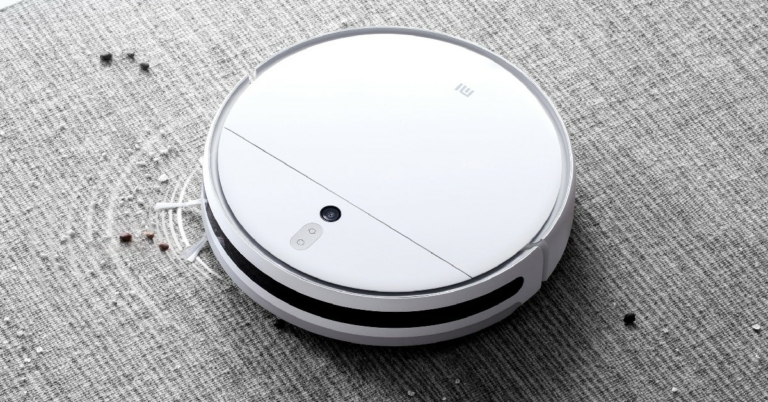
Xiaomi has announced the launch of Xiaomi Robot Vacuum-Mop 2 in India. The Robot Vacuum comes with a 3,000Pa powerful suction, next-gen LDS navigation system, and customised room cleaning. It also features a built-in voice assistant and offers a 2-in-1 vacuum and mop combo. The Xiaomi Robot Vacuum-Mop 2 is available for Rs 29,999 at mi.com, Amazon, Mi Home, and across retail stores.
Xiaomi Robot Vacuum-Mop 2: Features and Specifications
With a 3,000Pa suction and 2-in-1 vacuum and mop combo, the Xiaomi Robot Vacuum-Mop 2 covers all your cleaning needs. With its incredible suction power, the Robot Vacuum-Mop ensures deep cleaning of various types of floors and carpets. With 10,000 vibrations/minute, the mop functions can take care of any lasting stains.
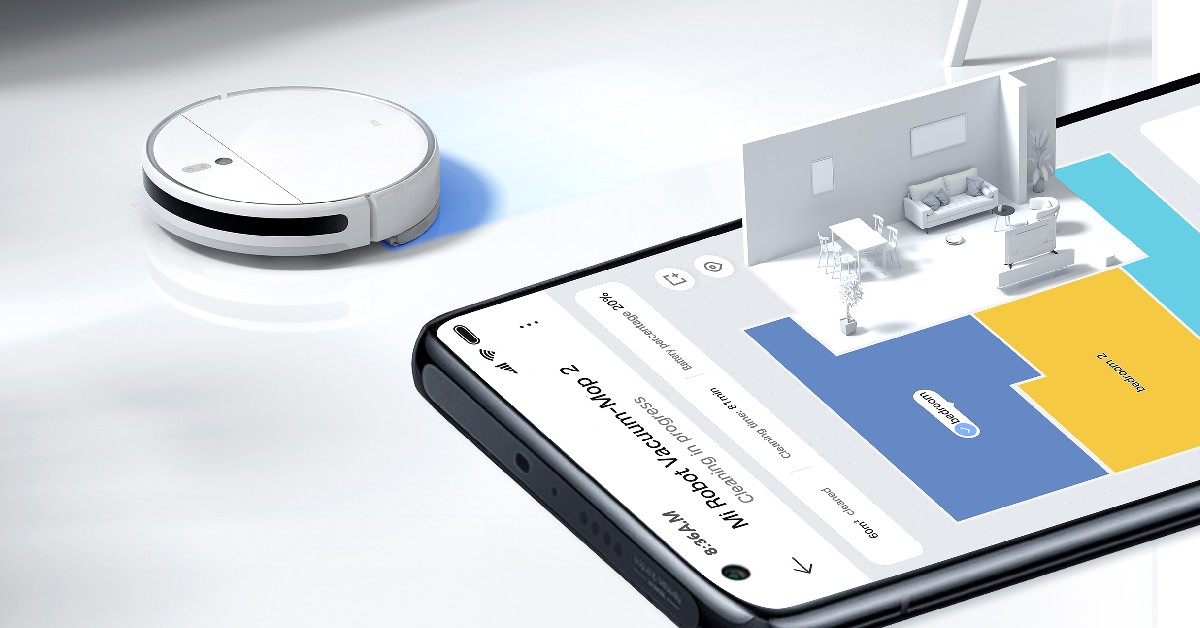
With LDS laser navigation, the Xiaomi Robot Vacuum-Mop 2 can scan and map the environment of your home to plan the most efficient cleaning route. The vacuum-mop can also simulate manual cleaning with its left-right motions and works surprisingly well even in low light conditions. The microfibers on the mop ensure equal distribution of water and effective removal of stains when the robot vacuum is set on mopping mode. The 250ml smart water tank is electronically controlled and is essential in removing floor stains.
The Xiaomi Robot Vacuum Mop-2 comes equipped with an impressive 5200mAh big volume battery, enabling it to clean areas of more than 2,000 sq ft with a runtime of around 170 minutes. The robot vacuum can also be customised according to your liking. The user can set the cleaning order of different rooms and set the mopping modes according to the needs of every location. The suction power and volume of water used for cleaning can be controlled by the user.
The Xiaomi Robot Vacuum Mop-2 can be controlled through the Xiaomi Home App. Users can track the device location, monitor water level, and customise cleaning modes using the home app. The device is also compatible with Google Assistant and Amazon Alexa.
Xiaomi Robot Vacuum Mop-2 will be available for Rs 29,999 at mi.com, Amazon, Mi Home, and retail stores across the country. Consumers can buy the device at an introductory offer of Rs 25,999 until July 24.
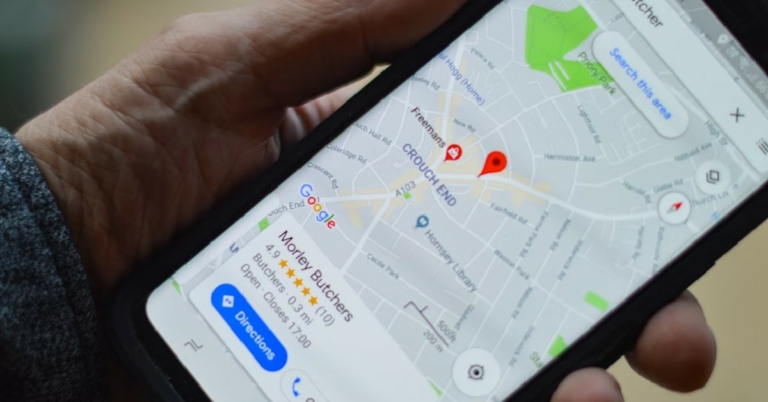
Tracking someone’s location can be really convenient if you’re trying to reach them but aren’t sure of the directions. You can ask them to simply share their location on Google Maps, which you can then follow. Using this feature you can also keep a tab on your kids’ whereabouts, just to ensure greater safety. It’s now possible to find someone’s location on Google Maps by phone number with no installation required. This approach enables anonymous tracking and fast geolocation results. You cannot track someone without their consent. In order to gain access to someone’s location, they would have to share their location with you. In this article, we show you how to track someone using their phone number on Google Maps.
Following these steps, you will be able to share your location with your phone contacts. If you want to track someone’s location, have them follow these steps and send their map location to you.
Step 1: Go to Google Maps and tap on your profile picture at the top right corner.
Step 2: Select ‘Location Sharing’.
Step 3: Select ‘Share Location’.
Step 4: You can share your location for a certain period of time or until you turn the tracker off. Select the contact you want to share your location with.
Your location will be shared with the contact. If you want to track someone, have them share their location with you, and you will be able to track them on Google Maps.
This is how you can track someone using their phone number on Google Maps. You can also use WhatsApp to share your location with a contact. Simply tap the Attachments icon on the message box and select location.
23 July 2022 Amazon Quiz has gone live on its platform. The quiz timings are 12 AM to 11:59 PM. The Amazon App users can participate in the quiz daily and all they have to do is submit correct answers to the questions asked on the e-commerce platform. Today’s participants can get a chance to win Rs 5,000 Amazon Pay Balance.
By participating in the Amazon Quiz the participants can win Amazon Pay Balance ranging from Rs 1,000 to Rs 50,000 every day while sitting at home. To win the participants must answer five questions correctly that are based on current events and general knowledge. One wrong answer can eliminate you from the quiz. The results will be announced at the end of the month. Today’s question will let you win Rs 5,000 Amazon Pay Balance. Check below for today’s Amazon quiz answers.
Question 1: Who among these recently became the fastest to reach 8000 runs in Test cricket (in terms of number of innings)?
Answer: Steve Smith
Question 2: Palak Tiwari, seen in the music video for Harrdy Sandhu’s song ‘Bijlee Bijlee’ is the daughter of which famous television actress?
Answer: Shweta Tiwari
Question 3: EKI Energy Services and which famous company floated a joint venture company for nature based solutions in India?
Answer: Shell
Question 4: This is the flag of which country?
Answer: Mauritius
Question 5: On what site is the source code of this cryptocurrency hosted?
Answer: GitHub
How To Play Amazon Quiz
Only app users are eligible to play the Amazon quiz every morning from 12 AM to 11:59 PM. The quiz is not available on the desktop. For those who are unaware of how to play the Amazon quiz below are the steps, you can follow to take the quiz.
Firstly download the Amazon app from Google Play Store or App Store
Now fill in the required information through the Sign Up option.
You need to log in to the Amazon app and scroll down on the home screen to find the Amazon Quiz banner.
Tap on the Amazon Quiz banner and tap on the Start button to start the Quiz.
Now you will get 5 questions and you need to answer them correctly. One wrong answer will eliminate you from the Quiz.
After answering all the questions correctly you are now eligible for a Lucky Draw.
The winner’s name will be announced today at 12 PM.
At midnight tonight, the Amazon Prime Day 2022 sale starts in India. Exclusive to Prime members, the two-day event promises thrilling discounts and deals on hundreds of items, including new product debuts. Tech enthusiasts, now is the time to purchase your preferred gadgets. Customers may take advantage of discounts of up to 75% on the newest products from leading manufacturers like Intel Evo, boAt, HP, LG Gram, Canon, Noise, and more, including audio, laptop, camera, wearables, tablets, and PC accessories.
Amazon India’s annual two-day shopping event for Prime members will begin tonight on July 23 and 24, 2022, to meet all of your buying needs. Only Prime members may shop during the Prime Day sale. This year, Amazon will offer hundreds of discounts on goods like smartphones, laptops, TVs, smart wearables, and other gadgets. Additionally, clients can save a lot by receiving a 10 percent discount on payments made using ICICI Bank credit/debit cards, SBI credit cards, and EMI transactions made with these cards.
We’ve put together this easy guide to help you get ready for Amazon’s big sale event. Here are a few items that may be found on Amazon. During Prime Day 2022, sellers will be offering discounts and deals.
In This Article
boAt Airdopes 141 TWS
boAt Airdopes 141 TWS can be purchased for Rs 999 during the Amazon Prime Day sale. It comes with a playback period of up to 42 hours, including the 6 hours of nonstop gameplay for earbuds. There is a BEAST mode, which offers reduced latency and real-time audio. It has an integrated microphone on each earbud and uses our ENx Environmental Noise Cancellation technology to ensure a clear speech delivery during voice calls.
HP 15s 12th Gen Intel Core i5 Laptop
HP 15s laptop will be available for Rs 52,990. It comes armed with a 12th Generation Intel Core i5-1235U processor that offers lightning-fast computing speed. With its 512GB SSD storage, enjoy plenty of built-in space and lightning-fast speed.
Lenovo Ideapad Gaming i5 11th Gen GTX 1650
Lenovo Ideapad Gaming i5 will be offered at Rs 52,990 during the Amazon Sale. The 11th Gen Intel Core i5-11300H CPU in the Lenovo Ideapad Gaming i5 has a speed range of 3.1 GHz (Base) to 4.4 GHz (Max). It features a 15.6-inch FHD (1920×1080) display. It has a Military Grade MIL-STD-810G Qualified Design (4-32Hz over 2 hrs).
Noise ColorFit Pulse 2 and Sony WH-1000XM4
During Amazon Prime Day 2022, the Noise ColorFit Pulse 2 can be bought for 1,799. Whereas Sony WH-1000XM4 headphones will be available for 17,990. Additional microphones built into these headphones help isolate sound when chatting on the phone, improving call quality and reducing even more high and mid-frequency noises. Two microphones are located on each ear cup as part of its Dual Noise Sensor technology, which records background noise and transmits the information to the HD Noise Cancelling Processor QN1.
Norton 360 Deluxe
The users can save up to 70 percent on Norton 360 Deluxe on Prime Day. You will receive a 12-month prepaid subscription for up to 3 devices when you purchase the Norton 360 Deluxe. Strong levels of security are offered by Norton 360 for your devices and online privacy. Additionally, Norton 360 comes with PC Cloud Backup, Password Manager to help you manage your logins and passwords, and Parental Control to ensure that your kids are using the internet safely.
Redmi 43-inch X43 4K Ultra HD Smart TV
Redmi 43-inch X43 TV is currently available for Rs. 25,999. The discounts on Prime total Rs 2,000.00. It has a 4K ultra-HD (3,840×2,160 pixels) display, 30W Dolby Audio speakers, Wi-Fi, and Bluetooth v5.0.
Fire TV Stick 4K
After a 50% reduction, the Fire TV Stick 4K is available for Rs. 2,999. It includes Dolby Vision, HDR, and HDR10+ support. Select titles with suitable home audio systems also feature immersive Dolby Atmos audio.
Instagram is launching new Instagram capabilities that make working together, creating and sharing reels more enjoyable and simple. According to these new features, reels will be provided for new video posts that are less than 15 minutes long. Moreover, the photo-sharing app is also expanding Remix, Templates for Reels tools to help users build stories on Instagram when working with their favourite creators and friends. This will include a picture-in-picture reaction view to add video commentary to current reels, and Dual, which enables users to simultaneously shoot video with both the front and back cameras.
While announcing the new features Instagram said, “We are announcing new features to Instagram that make it more fun and easy to collaborate, create and share reels. We’re expanding our tools for Remix to help enhance the way you tell stories on Instagram when collaborating with your favourite creators and friends as well as we want everyone to be able to easily express their creative ideas, so we’re adding more features that allow you to capture, edit and share them — right from your phone.”
In This Article
Videos shorter than 15 minutes will be shared as reels
Instagram is adding creative tools and the full-screen experience to your video posts as well because reels on Instagram provide a more immersive and engaging way to watch and create videos. New videos that are less than 15 minutes long will be presented as reels in the upcoming weeks. Videos published before this modification won’t transform to reels; they’ll stay as videos.
Your new videos, which are now reels, may be eligible to be suggested and seen by more people on Instagram if you have a public account. Right now, this only applies to reels that are less than 90 seconds. Your reels will still only be visible to your followers if your account is private. There will be a single location for all of your videos thanks to Instagram’s consolidation of the video and Reels tabs on your profile.
Enhanced Remix Features
Users can now make reels from remixed public images by selecting from a variety of layouts, such as a green screen, a horizontal split-screen, or a vertical split-screen. Even better, you may use a picture-in-picture reaction view to supplement pre existing reels with your own video commentary. You can now add your clip after the original reel so it plays sequentially, as opposed to having your remix show at the same time as the original reel.
Create Reels With Templates and Dual
Additionally, Instagram will provide new templates that streamline the creation of reels by preloading audio, placing placeholder clips, and including images or video clips. After they are released, these templates can be located by tapping the camera symbol on the Reels page to obtain template inspiration.
Another choice is to use the Dual function in the Instagram camera, you may simultaneously record with your phone’s front and back cameras to provide a different viewpoint.
At the renowned Samsung Opera store in Bengaluru, Samsung India staged a roadshow with the slogan “Solve for Tomorrow.” More than 200 students from different Bengaluru institutions attended this roadshow on education and CSR. These students took part in the discussion and presented their ideas on how they wished to address pressing issues that the nation and its citizens are currently experiencing.
According to the company, over 10,000 people have registered for the Samsung Solve for Tomorrow innovation and education programme from towns, cities, and rural India, demonstrating the growing desire among Indian youth to find cutting-edge technological solutions to solve real-world problems that will have a positive social impact on the lives of people nearby. Among those who registered, 32% of young people want to address healthcare-related concerns, 28% want to address educational issues, including improving student learning possibilities, 24% want to address environmental issues, and 16% want to address agricultural difficulties.
Young students said they want to solve issues with a safe waste collection for recycling, job security for daily wage earners, language barriers that young students from remote areas face during e-learning, safe disposal of sanitary napkins, the mental health of school students, reusing agricultural waste, as well as reusing plastics at roadshows that Samsung conducted in cities like Bengaluru, Hyderabad, Delhi, Guwahati, and Bhubaneswar.
Until July 31, 2022, young people between the ages of 16 and 22 may apply for Solve for Tomorrow. They may do so here
A boot camp at IIT Delhi, a certificate of participation, and vouchers worth INR 100,000 for online courses in design thinking, STEM, innovation, and leadership, among other topics, will be given to the top 50 teams, who will thereafter be mentored by industry experts and other experts.
The top 10 teams will have the chance to visit Samsung India’s offices and R&D facilities, where they may meet and mingle with the company’s young employees and researchers. At Bengaluru’s renowned Samsung Opera House, they will also get a taste of the Samsung product ecosystem.
Three winning teams have the opportunity to receive massive funding from IIT Delhi of up to INR 1 crore and mentoring help for six months to put their ideas into practise.
On July 31, 2022, at 5 p.m., registration for Solve for Tomorrow closes.
Optoma has quickly grown to become a brand that has made a name for itself here in India and overseas. The latest to come from the brand is a True 4K projector that might look like a simpleton in the world of projectors but provides serious imagery. This is the Optoma UHD55 projector review you should not miss in case you are in the market to buy a very good high-end projector.
In This Article
Optoma UHD55 projector review: Design
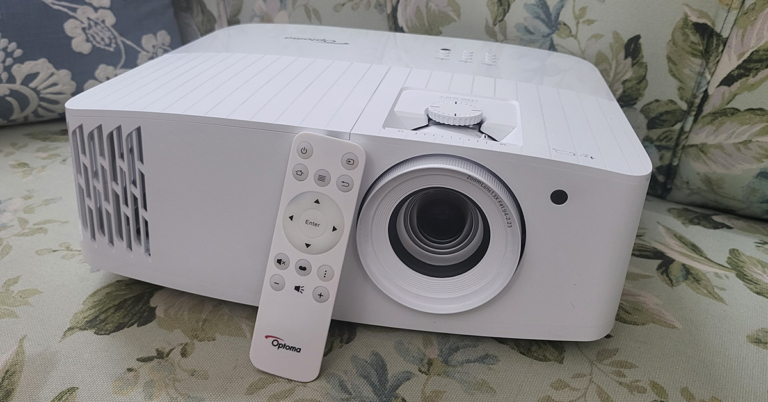
Let’s quickly get the design aspects of the Optoma UHD55 projector out of the way. Out of the box, the projector might look simple, but it actually is not. Adorning the usual pearly white colours you see most projectors dressed in, this one has subtle differences. For starters, the mesh grille is cut out in a different angular manner. This does add to a bit of a show.
You get the lens zoom, lens shift knobs on the top along with the power, keystone correction and other useful buttons. To raise the Optoma UHD55 projector a bit (when kept on flat surfaces) the company has put a raise stand below it. Up front, you will find the large lens along with an IR receiver.
Turn it around and you will get to see a plethora of ports. These include a couple of HDMI, a few USB 2.0, Ethernet, VGA, audio in and audio out ports. The power-in port is also available here. A unique feature of the Optoma UHD55 projector is that the first USB port is a power OUT (5V) port, which can also be used to charge your gaming console’s gamepads. With that, a 10W speaker is also hidden behind the grille of this projector. More about this in the next section.
A minimalistic-looking IR remote also comes with this projector with all the essential buttons and it works from as far as 50 feet, when we tested it out. All in all, the Optoma UHD55 projector is a very decent-looking device that can easily be placed on a flat surface or roof mounted.
Optoma UHD55 projector review: Performance
Moving to the fun part, it’s performance. We had a lot of fun reviewing the Optoma UHD55 projector. As the name suggests it truly is UHD and can hex out some great graphics and moving pictures no matter what type of wall or screen you are watching on. The projector supports 4K videos with HDR10 support and HLG. This enhances the colours of the videos and everything including sports and video games look vibrant.
Talking about which, we connected our gaming consoles to the Optoma UHD55 projector via HDMI and we loved every bit of it. However, the 4MS input lag and 240Hz refresh rate is available only in 1080p mode. If you bump the imagery to 4K the refresh rate drops to 60Hz, which is a bit unsatisfactory, but the graphics become much better. For casual gaming it is fine, in case you want to play pro, then we suggest playing in 1080P mode.
Setting it up was child’s play and we were up and running in 5 minutes. Up to 302-inch screen size is supported. We kept ours at 120-inch and oh boy! everything looks very good. The Optoma UHD55 projector comes with a 10W speaker also inside, which is decent for small rooms, but you will need extra speakers if you want to feast on the full power of this projector. The throw distance is also not very high, and the keystone correction works flawlessly. You can easily control it through the onboard button panel or with the supplied remote.
Over that, the Optoma UHD55 projector also has its own OS running, which has an app store, file manager and more. We did not use it much as the connected gaming console and our HDMI Chrome cast provided us with flawless options. In case you do not have it, you can easily use the Android-based UI Optoma provides.
We played Netflix as well as YouTube shows and videos on the Optoma UHD55 projector and it never gave us a chance to bicker. We were surprised by how deep the blacks are on the projection and the colours stayed vibrant even on an off-white wall. Digital zoom of 125% is also available on this projection, however, we do not recommend it, just place the projector a little farther away from the wall and you will be fine.
In addition to that, Optoma claims that the projector has high durability of 15,000 hours, which is great. It can be your partner in the living room for years to come. The power consumption of the Optoma UHD55 projector is 210W, which basically most good 4K projectors consume these days. 3D imagery is also supported via this projector, however, the 3D glasses are not part of the package. With extra ports on its back, you can connect multiple devices to it easily, too.
Verdict
Overall, we were very happy with the Optoma UHD55 projector. We found the contrast ratio of 1,200,000:1 also works well in its favour. Yes, a few things could have been better like a higher frame rate in 4K gaming mode, but we had no complaints with the 1080p mode. So, is worth picking at Rs 2,95,000? If you have a large wall in the living room or are building a home theatre, you can easily get this one, it will not disappoint you for years to come. Just add good speakers to the mix and you will be very happy.
Keyboard shortcuts are an easy and efficient way to save time while you’re working on your PC. They come in very handy especially when you’re editing a document or a multimedia file. It can be really arduous to go back to using the mouse if the keyboard shortcuts stop functioning. In this article, we show you how to fix keyboard shortcuts in Windows 10.
Step 3: Select ‘Troubleshoot’ from the left menu and then click on ‘Additional Troubleshooters’.
Step 4: Select ‘Keyboard’ from the ‘Find and fix other problems’ section and run the troubleshooter.
The troubleshooter will scan any problems related to your keyboard and come up with a solution.
Check if Sticky Keys are enabled
If the key combinations for shortcuts are not working, check if Sticky Keys are enabled on your desktop.
Step 1: Open Settings from the Start menu and go to ‘Ease of Access’.
Step 2: Scroll down on the left menu and select Keyboard from the Interaction section.
Step 3: Turn the toggle bar on for Sticky Keys.
Connect your keyboard to a different USB Port
If you’re facing difficulty using keyboard shortcuts on your desktop, it may be because due to a faulty USB port. All you need to do is detach the keyboard and plug it into another USB port. You can also try cleaning the USB port you’re currently using and reconnecting the keyboard.
Clean your keyboard
It is common for some keys to stop working when dirt accumulates under them. You can read our complete guide to cleaning a mechanical keyboard here and follow the instructions to clean your keyboard.
These are some of the easy ways to fix keyboard shortcuts not working in Windows 10. You can also try restarting your PC. Updating your keyboard drivers may also work, but this step is only recommended when the keyboard doesn’t work in its entirety. You can also try plugging in another keyboard to check if the issue lies with your keyboard or Windows.
Apple announced iOS 16 at its WWDC event in June 2022. Since then, Apple users have been excited about the launch of the new operating system, as Apple has promised to bring exciting new updates. While the beta version for iOS 16 has been out for a while now, the full version will be released soon after the launch of the new iPhones. In this article, we explore what you can expect from iOS 16 and when it might be launched.
Apple hasn’t scheduled a specific date for the launch of iOS 16 yet. So far, the only formal announcement has been that it will come out in the fall. We expect a release soon after the iPhone event. Last year, the iOS 15 was launched in September, so we wouldn’t be surprised if Apple schedules the launch along that timeline again.So, in simple terms, the full version of iOS 16 is slated to come in September 2022.
If you cannot wait to use the iOS 16, you can always try out the Beta version. We explain how you can download iOS 16 Beta on your iPhone in this article. Initially launched for Apple Developers on June 22, the beta version of iOS 16 is now available to the general public. Apple has released 3 beta versions o far. The iOS 16 is available for Apple devices from iPhone 8 and up.
What can you expect from iOS 16?
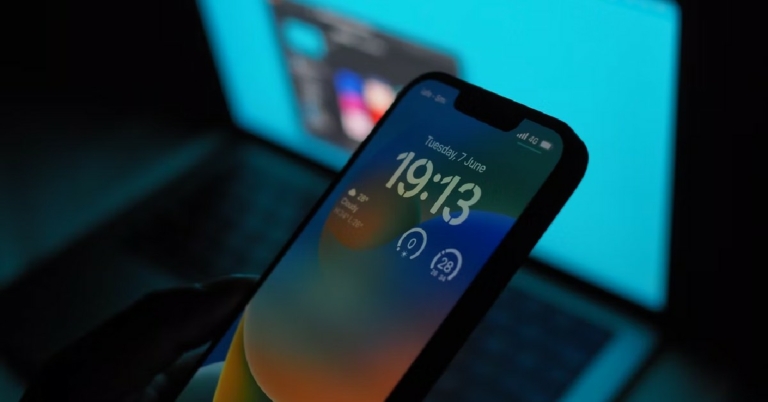
As with every software upgrade, Apple is looking to introduce new features that will significantly improve your iPhone experience. The biggest change in the iOS 16 is the lock screen customisation. This is possibly the biggest upgrade the lock screen has gotten in a successive software update. In the new software update, the lock screen of your iPhone is heavily customisable, with the user having the option to change fonts and layout, and even add live widgets. You can even create multiple lock screens to suit different themes and switch between them with a single swipe, quite similar to the Apple Watch.
The notifications bar also undergoes a slight change, as it will now be located at the bottom of the lock screen. It will also include ‘Live Activities’ where you can monitor things like live scores, Uber drive status, Food delivery status, and other activities that require live tracking.
When it comes to Messages, you will now be able to edit texts you’ve already sent, and even unsend them. On top of that, you will be able to mark a thread as unread after you’ve opened them.
Outside of these major updates, iOS 16 will have hundreds of other minor tweaks and improvements that will make your experience all the more smooth. You can expect improvements to Maps, Apple Pay, iCloud, and Live Texts.
Which devices can support iOS 16?
Here is the list of devices compatible with iOS 16:
With the release of iOS 16 around the corner, you can download the Beta version now if you cannot wait for the full version. Apple encourages users to try out the Beta version so they can report bugs that can be patched for the full release. You can always go back to using iOS 15 on your phone if you’re bored using the Beta version and want to wait for the full version release.
Garena Free Fire is a battle royale game with regular awards and tournaments to keep players interested. If you play Garena Free Fire, you should be aware of the redeem codes that are released on a daily basis. However, because the battle royale game is banned in India, players from other countries can use the Free Fire Redeem codes daily. If you’re unfamiliar with the Garena Free Fire redeem codes or don’t know how to get them, we’ve put together a step-by-step guide to help you redeem them. Check out Garena Free Fire Redeem Codes for July 22.
The Free Fire redeem codes are a great way to get free stuff. These are 12-digit codes that contain alphabets and numbers, as well as an expiration date and time. Because the Garena FF redeem codes cannot be used more than once, you should hurry to the redemption page to claim your free reward before someone else does. To get a free reward, all you have to do is go to reward.ff.garena.com/en, which is the official redemption page. Also, keep an eye on this space for daily updates on Garena Free Fire redemption codes and rewards.
In This Article
Garena Free Fire Redeem Codes Today 22 July 2022
F87HZMZGHJ97
T6YGR7634HIU
VKNBO98JEG9F
56DQIFVYVU98
Y56U98MIO6YH
JB6F5XEFE2SH
UJJ9TR3FTV39
8HB5UB8NHIUY
76F542J4H98N
42TIOD6FR7BN
JHFCR5F6DT4V
YGD5OPIK304U
7XGCT56E4IHC
NT4I2NCSOSJH
AYXFSG6HHI0O
UP90JGH6NB6A
How to Get Free Fire Redeem Codes for Garena on July 22?
Known for its ephemeral messaging, Snapchat is one of the most popular messaging apps today. Users flock to Snapchat, not only because of self-destructing messages and images but also because of a range of filters and photo editing tools on offer. You can use Snapchat on your iOS and Android devices, but a macOS app is not available yet. A Snapchat app for macOS has been in the pipeline for quite a while now, and we may see one in future. Luckily there is one workaround to this issue. Today, we show you how you can download and use Snapchat on your Mac device.
Download Snapchat on your Mac device using the Bluestacks emulator
Step 1: Download the Bluestacks Android emulator on your Mac device. You can find the emulator on Bluestacks’ official website here. Bluestacks emulates an Android device on your Mac, so you’ll be able to use any Android app through Bluestacks.
Step 2: Install Bluestacks on your Mac device and sign in using your Google account. If you do not have a Google account, you will have to create one.
Step 3: Open the Play Store on Bluestacks and search for Snapchat. Download and install the app on the emulator.
Using this technique you will be able to use Snapchat on your Mac device.
Since you would be downloading Bluestacks from a third-party source, you will need to change security permissions on your Mac device before you install it. Simply open the System Preferences app and click on the ‘Security and Privacy’ option. Under the General tab, select the option to ‘Allow apps downloaded from App Store and identified developers’.
Once you’ve installed Bluestacks, you can use it to install any Android app from the Google Play Store. If you do not wish to install Bluestacks you can install other emulators like Nox and Android Studio emulator.
The ability for all users to move their chat history from Android to iOS has been officially pushed by WhatsApp. The instant messaging app is also allowing to transfer entire chat history from iOS to Android. Unfortunately, WhatsApp call history transfer is not supported by the new feature.
The rollout of chat history transfer from Android to iOS and vice versa has been formally confirmed by WhatsApp. The Meta-owned instant messaging took to Twitter to formally make the announcement of the rollout.
At the Galaxy Unpacked presentation earlier in August last year, the Meta-owned platform made the feature announcement. The feature, which was previously accessible for beta testers to test, has been included in the messaging app in a beta version.
Through its website’s FAQ page, WhatsApp has also emphasised how to transfer the chat history. The section on the company’s website also includes information on how to move your chat history from an Android phone to an iPhone or from an iOS device to an Android device.
Apart from transferring chat history users cannot transfer their WhatsApp call history or peer-to-peer payment history with this functionality; they can only transfer their chat history.
How to transfer WhatsApp chats from Android to iPhone
You can move your account information, profile photo, one-on-one and group chats, chat histories, media, and settings from an Android phone to an iPhone. Your call history and display name cannot be transferred.
On your Android phone, launch the Move to iOS app and follow the on-screen instructions.
Your iPhone will show you a code. On your Android phone, input the code when prompted.
Then, adhere to the instructions by tapping Continue.
On the Transfer Data page, choose WhatsApp.
On your Android device, tap START, and wait while WhatsApp prepares the data for export. Once the data is ready, you’ll be signed out of your Android phone.
To return to the Move to iOS app, tap NEXT.
To transfer data from your Android device to your iPhone, tap CONTINUE. When Move to iOS appears, the transfer is complete.
Download WhatsApp’s most recent version from the App Store.
Use the same phone number you used to sign up for WhatsApp on your previous device.
When prompted, select Start, and then wait for the procedure to finish.
Your chats will be waiting for you once you’ve finished activating your new device.
Tracking your smartphone when it’s switched on is an easy and straightforward task. If your phone is connected to the internet, it just takes a few steps to find out its exact location. This process can get a bit tricky if your phone is switched off or not connected to the internet. While it may be tough to locate your phone in this scenario, it is not impossible. Most services still let you know the last tracked location of your device when it was still switched on. In this article, we show you how to track your mobile phone when it’s switched off.
Can my phone be tracked even when it is switched off?
It is very unlikely for your phone to be actively tracked when it’s switched off, but it is possible. Certain authorities are known to use trojans and other malicious malware to track the phones of certain suspects. These trojans can enable a device to emit a signal even when it’s switched off. The signal can be used to track the location of the phone. This process is extremely unethical and is only used in very rare conditions. So while it is technically possible for your phone to be tracked when it’s switched off, it is still very unlikely.
The silver lining here is that you can still view your phone’s last recorded location right before it died due to battery drainage. Google’s Find My Device service shows your phone’s last known location on the off chance that it isn’t turned on. This comes in very handy when your phone is lost instead of stolen. If you dropped your phone somewhere without realising it, chances are that it is still lying there. Simply view its location on the Find My Device app or webpage and visit the location to retrieve it.
Find My Device
If you’re logged in to your phone using a Google Account, you can track your phone’s last known location even when it’s switched off. Your phone needs to be connected to the internet in order to use this service. Simply log on to the Find My Device webpage and log in using your Google account. Your device will be tracked and if it is connected to the internet, its exact location will be revealed. If your phone is switched off, Find My Device will show you the last known location of your device before it lost connection to the internet.
Find My iPhone
If you’re an iPhone user, you can log in to iCloud using a web browser and track the location of your iPhone using Find My iPhone. If your phone is switched off, select ‘Lost Mode’ and Find My iPhone will let you know the last known location of your device. You can also remotely lock your iPhone using this feature.
Use Samsung’s SmartThings Find
Samsung smartphone owners can also use the SmartThings Find feature on their devices to track it if it gets lost. Here’s how.
On your Samsung smartphone
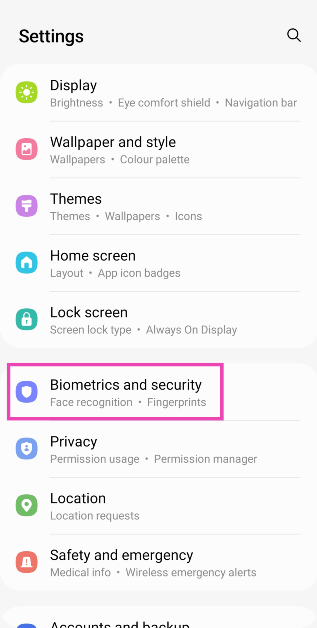
Step 1: Go to Settings and select Biometrics and Security.
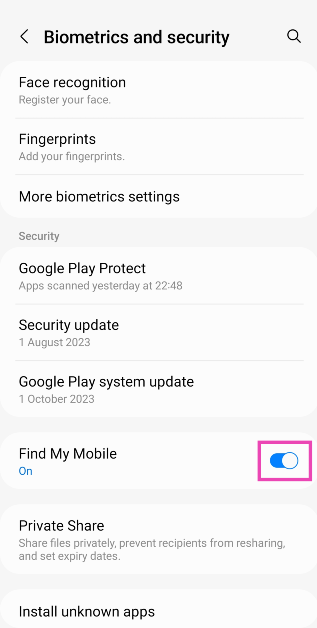
Step 2: Scroll down and turn on the toggle switch for Find My Mobile.
On your PC
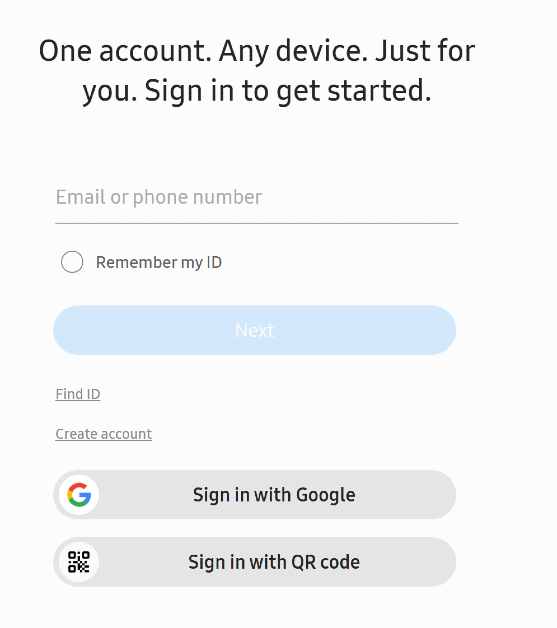
Step 1: Go to the SmartThings Find page and log in using your phone number or the registered email.
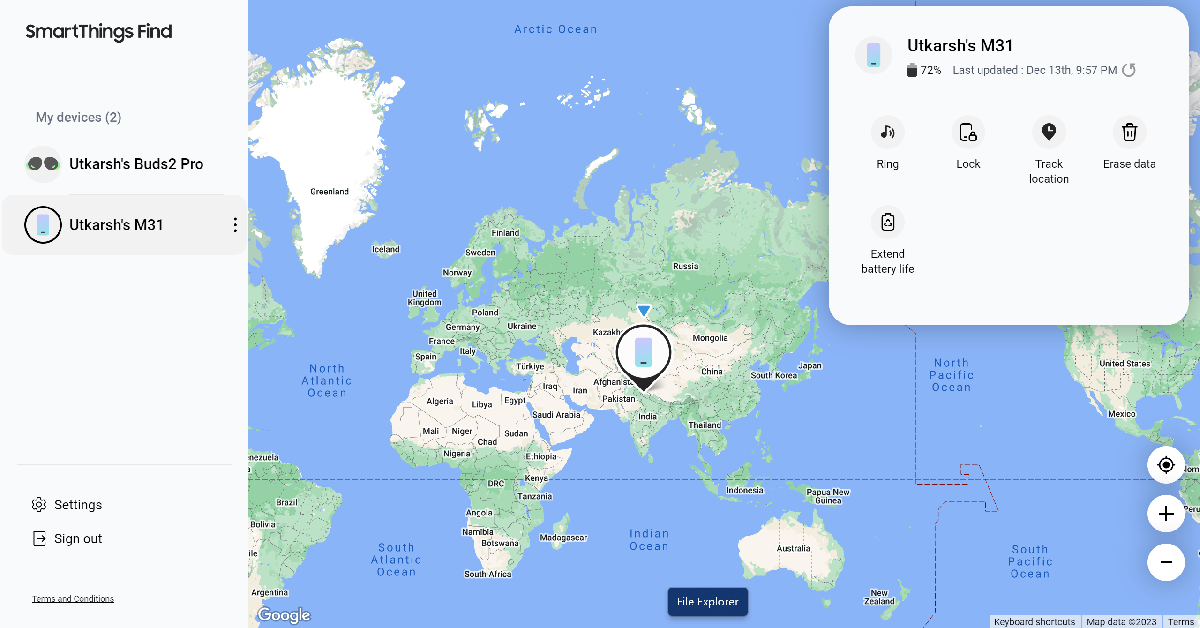
Step 2: Your device’s location will be marked on the map.
Find your smartphone using the IMEI number
Every smartphone comes with its own unique IMEI number. This number can be used to track your device in case it gets lost or stolen. Your device does not need to be connected to the internet in order to be tracked using IMEI. All you need to do is file a complaint with the police, and they will monitor your phone using IMEI. As soon as your phone establishes a network connection with the carrier, its location will be triangulated using the nearest cell tower. Even if the SIM card on your phone gets changed, it can still be tracked using its IMEI number.
Frequently Asked Questions (FAQs)
Is it possible to track a phone when it is switched off?
Certain spyware apps can track the location of a phone even when it is switched off. However, if you are trying to track a lost phone, it is nearly impossible to track its current location.
How do I find my lost phone?
Use Google’s Find My Device to find your lost Android phone and Apple’s Find My iPhone to retrieve your lost iPhone.
Can I locate my phone using its IMEI number?
While you can’t track your phone using its IMEI number, police authorities have the tools to do so. File a report for your missing phone and give them the IMEI number of the device to help them track it.
This is how you can track your mobile phone when it’s switched off. You can use Find My Device and Find My iPhone to remotely erase all data from your device in case it gets lost or stolen. Regular feature phones can only be tracked using their IMEI. In any case, it is advised to file a complaint with the police if your phone gets lost.
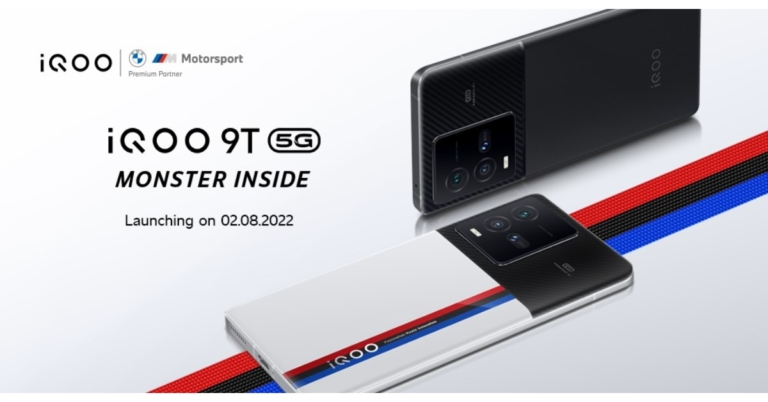
The iQoo 9T 5G launch in India is scheduled for August 2, according to the smartphone’s Amazon page. iQoo 9T 5G has the highest AnTuTu score of over 1.1 million in the market. In addition to this, it will be launching with 12GB RAM with 256GB internal storage model of the phone. The Qualcomm Snapdragon 8+ Gen 1 SoC will undoubtedly power the gadget, according to the listing.
In This Article
iQoo 9T 5G India launch details and price in India expected
On August 2, the smartphone maker will introduce the iQoo 9T 5G in India. Prior to that, iQoo India had tweeted the same launch date, which was later deleted. The device will be available for purchase via Amazon and iQoo’s online shop in the country.
According to a recent report, the iQoo 9T 5G would cost Rs 55,000 when it is released in India. Additionally, Alpha and Legend colour options are anticipated to be offered.
iQoo 9T 5G specifications expected
Additionally, iQoo India announced the AnTuTu benchmark results and launch date for the 12GB RAM with 256GB internal storage edition via its official Twitter account. Soon after, the aforementioned Tweet was published once more, but this time without the launch date just listed the smartphone’s AnTuTu score.
According to an internal study cited by iQoo India, the iQoo 9T 5G, in its form with 12GB with 256GB storage. It is said to have achieved the highest AnTuTu score of over 1.1 million in the sub Rs 55,000 sector. The business claims that AnTuTu Benchmark version 9.4.1 was used to evaluate the smartphone.
Recently, the iQoo 9T 5G landing page went live on Amazon, revealing the features of the smartphone. According to the listing, the Qualcomm Snapdragon 8+ Gen 1 SoC would definitely power the device.
The smartphone will include a triple rear camera configuration that supports digital zoom at a 40x magnification. A V1+ imaging chip will also be included in the smartphone. A 120Hz refresh rate Samsung E5 AMOLED display will also be available on the 9T 5G. A 4,700mAh battery with 120W Flash Charge capability will also be included.
Amazon hosts a Quiz session for its customers daily. Its app platform brings a quiz on a daily basis, which begins at 12 AM and ends at 11:59 PM daily. The participants stand a chance to win cash prizes on a daily basis. Today’s 22 July 2022 Amazon Quiz will let you win Rs 2,000 Amazon Pay Balance.
By participating in the Amazon Quiz the participants can win Amazon Pay Balance ranging from Rs 1,000 to Rs 50,000 every day while sitting at home. To win the participants must answer five questions correctly that are based on current events and general knowledge. One wrong answer can eliminate you from the quiz. The results will be announced at the end of the month. Today’s question will let you win Rs 2,000 Amazon Pay Balance. Check below for today’s Amazon quiz answers.
Question 1: Who won the women’s singles title at the recently concluded All England Badminton Championships?
Answer: Akane Yamaguchi
Question 2: The movie ‘Attack’ shows which Bollywood actor playing the role of a ‘super soldier’?
Answer: John Abraham
Question 3: Which platform recently bagged the rights to be the exclusive ticketing partner for IPL 2022?
Answer: TicketGenie
Question 4: Where is this company headquartered?
Answer: Los Gatos
Question 5: Name this animal
Answer: Tapir
How To Play Amazon Quiz
Only app users are eligible to play the Amazon quiz every morning from 12 AM to 11:59 PM. The quiz is not available on the desktop. For those who are unaware of how to play the Amazon quiz below are the steps, you can follow to take the quiz.
Firstly download the Amazon app from Google Play Store or App Store
Now fill in the required information through the Sign Up option.
You need to log in to the Amazon app and scroll down on the home screen to find the Amazon Quiz banner.
Tap on the Amazon Quiz banner and tap on the Start button to start the Quiz.
Now you will get 5 questions and you need to answer them correctly. One wrong answer will eliminate you from the Quiz.
After answering all the questions correctly you are now eligible for a Lucky Draw.
The winner’s name will be announced today at 12 PM.
Instagram Reels was launched in 2020 as a short-form video content platform, with a Reel lasting from 15 to 30 seconds. With TikTok ushering in the age of vertical video platforms, Instagram didn’t take long to adapt to the new trend, and quickly rose to popularity with Reels. While TikTok still remains the hotbed of new social trends, Instagram Reels isn’t too far behind, with thousands of original content creators. In this article, we show you how to increase the time limit of Instagram Reels.
Initially, Reels lasted up to 60 seconds. But with later updates, Instagram changed the time limit to 90 seconds. Meanwhile, TikTok now lets you make videos up to 10 minutes in duration.
How to increase the time limit for Instagram Reels
Step 1: Open the Instagram app on your phone.
Step 2: Tap on the Reels icon at the bottom of your screen.
Step 3: Tap on the camera icon at the top right corner of your screen to create a Reel.
Step 4: Tap on the timer at the left side of your screen.
Step 5: Select the duration you want for your video. Instagram allows Reels to be 15, 30, 60, or 90 seconds long.
Once you’ve set the duration, you can begin creating your Reel.
This is how you can change the time limit for Instagram Reels. If you want to download a Reel or an IGTV video directly to the internal storage of your smartphone, read our instructional article here.
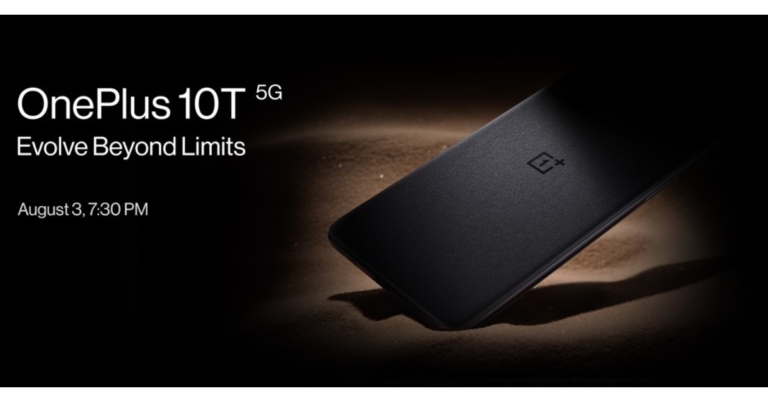
The OnePlus 10T 5G, the company’s forthcoming flagship, will be launched in India on August 3. Alongside India, the launch event will also take place in New York City.
The forthcoming OnePlus flagship will be powered by a Qualcomm Snapdragon 8+ Gen 1 processor, according to a recent leak claim. According to the company’s announcement, the OxygenOS 13 will also be unveiled at the same time as the OnePlus 10T.
OnePlus took to Twitter to announce the launch date of the upcoming OnePlus 10T 5G smartphone. As previously mentioned, a launch event for the OnePlus 10T 5G is scheduled on August 3 at 10:00am ET at Gotham Hall in New York City and in India at 7.30 PM. The OnePlus 10T is anticipated to be the OnePlus 10 Pro’s replacement, which debuted earlier this year. In addition to the OnePlus 10 Pro and OnePlus 10R, this will be the company’s third product in the OnePlus 10 series.
Ahead of the official announcement, the smartphone has also been listed on the Amazon India website to tease its availability in the nation.
The business claims that this would be the first in-person presentation of the forthcoming 10T 5G smartphone. According to the firm, those who buy tickets to the live launch event in NYC will receive premium goods as well as OnePlus Nord Buds. Tickets for the event may be purchased from this page, or you can watch the live unveiling on the OnePlus website and YouTube channel.
In This Article
OnePlus 10T price in India expected
According to rumours, the OnePlus 10T will retail for roughly Rs 40,000 in India and come in Jade Green and Moonstone Black colour options.
OnePlus 10T design and specifications expected
According to the rumours, the 10T 5G will have a similar design aesthetic to the OnePlus 10 Pro. The OnePlus 10T 5G poster, which displays the phone’s back design, was also revealed by the Chinese smartphone maker. However, the ad merely depicts a portion of the device’s back. The OnePlus 10T is depicted in a poster with a sandstone-like surface and the OnePlus logo.
A recent discovery of the OnePlus 10T’s Qualcomm Snapdragon 8+ Gen 1 processor and 16GB of RAM on Geekbench. In contrast, it has been found that the OnePlus 10T will offer 160W fast charging through another certification database. There are rumours that it could include up to 512GB of UFS 3.1 storage and 16GB of LPDDR5 RAM.
According to reports, the OnePlus 10T 5G has a 6.7-inch full-HD+ AMOLED screen with a 120Hz refresh rate. It will undoubtedly run on Qualcomm’s Snapdragon 8+ Gen 1.
In terms of cameras a 50-megapixel main sensor, an 8-megapixel secondary sensor, and a 2-megapixel camera are rumoured to make up its triple rear camera system.
The phone may have a 4,800mAh battery with 150W rapid charging capability.
After taking a look at the best smartphones released in 2022 so far, we thought we’d do the same for tablets. While there are a lot more releases slated for the latter half of 2022, some of the tablets released so far will definitely find their way into the year-end list. In this article, we bring you the 5 best tablets seen so far in 2022 across all categories.
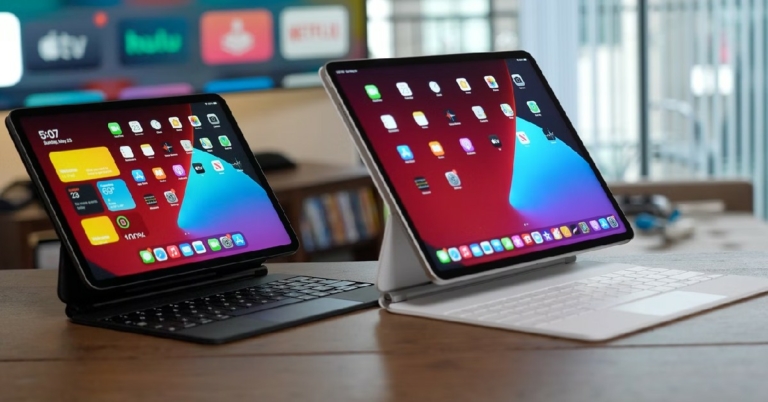
With its M1 chipset, the iPad Air 5 is not only a stark improvement on its predecessor but also one of the best premium tablets you can buy today, even rivalling the iPad Pro. The unique sleek design of the iPad Air draws consumers that prioritise portability and compactness over everything else. The iPad Air may also be an attractive option for buyers that don’t want to splurge on the iPad Pro but also expect their tablet to deliver a high performance.
The Samsung Galaxy Tab S8 Ultra pushes the boundaries of size and performance for a premium tablet. While it is more expensive than a high-end laptop, the Galaxy Tab S8 Ultra has absolutely everything you can ask of a tablet. Its 15.6-inch display dwarfs every other tablet in its category and rivals most laptops. Needless to say, if you’re looking for portability, the S8 Ultra isn’t the tablet for you. However, if you’re looking for a device that seamlessly converges work and leisure, you may want to check this one out. The S8 Ultra tab is designed to cater to people who work from home and want a fun hybrid device to replace their laptop. The 12MP dual front cameras are equipped to support up to 4k resolution for video calls. It also comes with a low-latency S Pen that blends perfectly with the tablet’s functioning. The Samsung Galaxy Tab S8 Ultra will rightfully seem like a gamble to some, but the end product will change your expectations from a tablet.
Samsung Galaxy Tab S6 Lite
Specifications
Display: 10.4-inch TFT LCD
CPU: Snapdragon 720G
Camera: Rear – 8MP Front – 5MP
Storage: 64GB, 128GB (4GB RAM)
Weight: 465g
Price: Rs 30,999
Launched in May 2022, the Samsung Galaxy Tab S6 Lite comes with significant upgrades over its predecessor. The Snapdragon 720G replaces the 10nm Exynos 9611 chipset, and the Android 12-based One UI 4.1 is a marked improvement over Android 10 on the original model. With these upgrades, the S6 Lite is one of the best tablets on offer in the mid-premium segment. Samsung also offers the S Pen along with S6 Lite, and the stylus may be a deciding factor for some when choosing between the S6 Lite and the iPad.
Xiaomi Pad 5
Specifications
Display: 11-inch LCD
CPU: Snapdragon 860
Camera: Rear – 13MP Front – 8MP
Storage: 128GB, 256GB (6GB RAM)
Weight: 511g
Price: Rs 26,999
Priced at Rs 26,999, the Xiaomi Pad 5 is one of the best tablet releases in the mid-premium category this year. With a screen size of 11 inches, the Xiaomi Pad 5 is perfect for binge-watching. The Xiaomi Pad 5 is packed with features for a tablet in this category and is clearly punching above its weight. The only downside is that it doesn’t offer any cellular connectivity. This means you will need a WiFi connection to access all of its functions.
Motorola Moto G70 Tab
Specifications
Display: 11-inch LCD
CPU: MediaTek Helio 690T
Camera: Rear – 13MP Front – 8MP
Storage: 64GB (4GB RAM)
Weight: 500g
Price: Rs 22,999
Released in January 2022, the Motorola Moto G70 Tab is a worthy addition to this list. Just when the entry-level tablet segment seemed stagnant (or dominated by Samsung), Motorola dropped this entertainment tablet to provide much-needed diversity in this category. The G70 Tab offers everything you need from a mid-range tablet. With 4 speakers and a 2k display, the G70 is meant for users who use a tablet exclusively to stream movies and TV. Priced at Rs 22,999, the G70 tab will rival the Realme Pad X as well as the Samsung S6 Lite.
These are the 5 best tablets we’ve seen so far in 2022. With new releases from Apple, Xiaomi, Lenovo, and Huawei scheduled for the latter half of the year, we will certainly see more additions to this list by the end of the year. If you think there’s a tablet we missed out on, let us know in the comments!