AOC India has announced the launch of new G2 series gaming monitors in the Indian market. The new range of gaming monitors includes 3 models 24G2U/BK, 24G2E5, and G2490VX. These displays are for professional gamers looking for a diverse gaming experience. All the AOC G2 Series gaming monitors feature VA and IPS display with HDR mode, Adaptive-Sync Anti-tearing Technology, 144Hz refresh rate, 1ms reaction time.The AOC has introduced new models to its G2 Gaming Series. The AOC 24G2U/BK, 24G2E5 and G2490VX are priced at Rs 28,990, Rs 22,990 and Rs 21,990 respectively. During the current Republic Day Sale, monitors will be offered at low rates in all major online and offline businesses.
In This Article
AOC 24G2U/BK gaming monitor
The AOC 24G2U/BK gaming monitor has a 23.8-inch IPS display that provides 178/178-degree viewing angles. It has AMD FreeSync Premium, a 144Hz frame rate, and a 1ms reaction time, and it improves colour and clarity for various gaming genres. It also has an HDR mode, which converts non-HDR video into HDR-like graphics using three separate approaches. This model includes an adjustable stand that lets you tilt, twist, swivel, and alter the height for a more comfortable and ergonomic viewing experience.
AOC 24G2E5 gaming monitor
AOC 24G2E5 gaming monitor also features a 23.8-inch IPS display. It has a Dial Point feature that is specifically built for first-person shooting (FPS) with AMD FreeSync. It features a 1ms reaction time, which decreases blurring or ghosting. This model also has an HDR mode, which converts non-HDR video into HDR-like graphics using three separate algorithms. It has four filtering modes: reading, online surfing, multimedia, and office.
AOC G2490VX gaming monitor
G2490VX 23.8-inch display with VA panel offers Full HD 1920 x 1080 resolution. This VA panel gaming monitor has handy features such as a 144Hz refresh rate, a 1ms response time, and Adaptive-Sync Anti-Tearing technology. It also has an HDR mode, which converts non-HDR video into HDR-like graphics using three separate approaches. The HDR mode assures HDR visuals while watching a standard quality video by improving RGBCMY colour (through better saturation and range), increasing dynamic contrast for clarity and image sharpness.This also has Flicker-free technology for a more pleasant gaming experience. The AOC flicker-free technology employs a DC (Direct Current) lighting system to deliver a more pleasant and healthy viewing experience, reducing the impacts of eye fatigue during working hours.
For the latest gadget and tech news, and gadget reviews, follow us on Twitter, Facebook and Instagram. For newest tech & gadget videos subscribe to our YouTube Channel. You can also stay up to date using the Gadget Bridge Android App. You can find the latest car and bike news here.
Xiaomi, the Chinese smartphone manufacturer, appears to be on a launch binge since the start of the new year. Following the Xiaomi 11i HyperCharge 5G, Xiaomi 11i 5G and Xiaomi 11T Pro launch the company is preparing to launch a new smartphone under its Redmi sub-brand. As announced by the company, the Redmi Note 11S India launch is set for February 9. The official Redmi India account on Twitter tweeted a teaser to herald the smartphone’s debut. Recently, the phone was identified on a variety of certification websites.The Redmi Note 11S has been circulating for quite some time. The company began teasing the Redmi Note 11S’s arrival in the nation earlier this month. As per the launch teasers, the device will come with a quad rear camera configuration. In addition to this, the renderings suggested that the phone will include a hole-punch camera in the centre of the front.The latest teaser as released by the company suggests a quad rear camera arrangement with a 108-megapixel main sensor on the back of the Redmi Note 11S. The teaser also implies that the upcoming Redmi phone would have a 4G connection and may not feature 5G capabilities.Xiaomi has not revealed many details regarding the smartphone, however, depending on the country, the Redmi Note 11S is believed to be powered by a MediaTek SoC and include a 108-megapixel Samsung HM2 camera or a 64-megapixel OmniVision OV6480 as the primary camera. An 8-megapixel Sony IMX355 ultra-wide camera and a 2-megapixel OV02A macro camera will also be included in the future device.As previously said, the phone was discovered on multiple certification websites. At the same time, the gadget received BIS certification, indicating an impending introduction. The model number of the phone was 220111TSI. A smartphone with the model number 2201117SG was also spotted on the NTBC certification authority website, which also listed the Redmi Note 11S. On the EEC certification page, another smartphone with the model numbers 2201117TG, 2201117TY, and 2201117SY was discovered.
For the latest gadget and tech news, and gadget reviews, follow us on Twitter, Facebook and Instagram. For newest tech & gadget videos subscribe to our YouTube Channel. You can also stay up to date using the Gadget Bridge Android App. You can find the latest car and bike news here.
25 January 2022 Amazon Quiz has gone live on its mobile app platform. Customers from different parts of the country are participating in the daily quiz. The daily quiz is conducted by the company brings an opportunity for the customers to win exciting prizes. The quiz begins from 12 AM to 11:59 PM. In today’s quiz participants have a chance to win Rs 25,000 Amazon Pay Balance by answering all the questions correctly.Every day Amazon brings a fresh set of questions for its customers that contains five easy questions. Amazon quiz brings an opportunity for its customers to win Amazon Pay Balance ranging from Rs 1,000 to Rs 50,000. which consists of five questions related to general knowledge and current affairs.The participants need to answer all the questions correctly and their names will be selected for a lucky draw. The winner will be announced at the end of the month. One wrong answer could eliminate you from the quiz. If you manage to answer all the questions correctly you can stand a chance to win Rs 25,000 Amazon Pay Balance today. Only app users are eligible to participate in the Quiz. Check Out 25 January 2022 Amazon Quiz Answers.
In This Article
25 January 2022 Amazon Quiz Answers
Question 1: Former world leader F.W. de Klerk, who died Thursday at age 85, shared the 1993 Nobel Peace Prize with which other person?
Answer: Nelson Mandela
Question 2: A Guinness World Record for the largest orchestra was set by which country’s National System of Youth and Children’s Orchestra “El Sistema”?
Answer: Venezuela
Question 3: Which word has become Collins Dictionary’s word of the year for 2021?
Answer: NFT
Question 4: In which city would you find this clock?
Answer: Kolkata
Question 5: This tower exists in which Mediterranean city?
The Samsung Galaxy S22 series is set to launch next month as the company prepares to showcase its flagship smartphones for 2022. Samsung has also started teasing the device’s release and now it has begun taking pre-orders for the upcoming Galaxy S22 smartphone series ahead of the Galaxy Unpacked event in February. Not just that, the price details of the upcoming flagship has been leaked. The South Korean company plans to unveil the Samsung Galaxy S22, Galaxy S22+, and Galaxy S22 Ultra.Samsung has begun accepting pre-orders for the next Galaxy S22 smartphone series, ahead of the handsets’ release. Customers in the United States may already pre-order the next Samsung flagship smartphone and the next Galaxy Tab S8 even before they went official. According to Samsung’s website, consumers who pre-order the smartphone will receive $50 which translates to Rs 7,000 be used to purchase other things on the company’s website.According to a report by the Verge, Roland Quandt a credible leaker has revealed potential European price details for the forthcoming Samsung Galaxy S22 series. As per the leaks, the vanilla S22 price will start at 849€ which translates to Rs 71,644, the S22 Plus at 1,049€ (Rs 88521), and the basic S22 Ultra at 1,249€ (Rs 1,05,375). While all of the base versions in the series appear to feature 8GB of RAM and 128GB of storage. The regular S22 and S22 Plus have a higher-priced option with 8GB of RAM and 128GB of storage, while the S22 Ultra has two further tiers with 12GB of RAM and either 256GB or 512GB of storage.
Whoever said S22 series was to be cheaper, didn't think of Covid, parts shortages and inflation.
Samsung appears to have retained the prices from the previous S21 series, with the only exception being an identically priced S22 Ultra model with supposedly smaller RAM than its S21 predecessor.In terms of specifications depending on the location, the Samsung Galaxy S22 series is expected to be powered by a Snapdragon 8 Gen 1 or an Exynos 2200 processor. The handsets are believed to have up to 12GB of RAM and 512GB of storage, with the high-end Samsung Galaxy S22 Ultra, rumoured to include a built-in S Pen. The date of the forthcoming Galaxy Unpacked event has not been officially revealed by Samsung, but reports claim it will take place on February 8.
For the latest gadget and tech news, and gadget reviews, follow us on Twitter, Facebook and Instagram. For newest tech & gadget videos subscribe to our YouTube Channel. You can also stay up to date using the Gadget Bridge Android App. You can find the latest car and bike news here.
Vivo Y21A has officially launched in India. The device is the latest addition by the company to its popular Y-Series lineup. Last week the company also introduced Vivo Y21e in the country and now its successor has arrived in the market. The phone is powered by MediaTek Helio P22 SoC. The phone also comes equipped with a 5,000mAh battery and dual camera set up on its back.
In This Article
Vivo Y21A price in India and availability
The Vivo Y21A is already featured on Vivo India’s official website, but no pricing or availability information has been provided. But as per the listing, this budget offering will be available in only a single 4GB RAM with a 64GB storage option. We will update you on this after the information is received. The smartphone will come in two colour options Diamond Glow and Midnight Blue.
Vivo Y21A specifications
The Vivo Y21A is powered by Android 11 with Funtouch OS 11.1 on top. Under the hood, there is an octa-core MediaTek Helio P22 SoC, 4GB of RAM, and 64GB of internal storage. The device can also expand the RAM by 1GB by using free inbuilt storage. While the internal storage can be expanded using a microSD card. The budget handset features a 6.51-inch HD+ display with 720×1,600 pixels of resolution and a 20:9 aspect ratio.The Vivo Y21A has two rear cameras: a 13-megapixel main camera with an f/2.2 aperture lens and a 2-megapixel macro camera with an f/2.4 aperture. The smartphone has an 8-megapixel front-facing camera with an f/2.0 aperture lens.In terms of connectivity, the Vivo Y21A supports 4G LTE, Wi-Fi, Bluetooth 5, and GPS. An accelerometer, ambient light sensor, proximity sensor, e-compass, and virtual gyroscope are among the sensor options on the phone. The smartphone is powered by a 5,000mAh battery and supports 18W charging through USB Type-C.
For the latest gadget and tech news, and gadget reviews, follow us on Twitter, Facebook and Instagram. For newest tech & gadget videos subscribe to our YouTube Channel. You can also stay up to date using the Gadget Bridge Android App. You can find the latest car and bike news here.
Collaborative robots are transforming the manufacturing industry in the 21st century. Robots are a popular choice for manufacturing companies because of their flexibility and ease of use. The vehicle industry is one such industry that robots have revolutionized.
Robots are a middle ground between human work and traditional machines. Learn in this article the benefits they bring and how they give an edge to businesses and make them more efficient.
In This Article
What are Collaborative Robots in Automotive Manufacturing?
Robots are computer-controlled machines that perform specific tasks in a factory environment. Collaborative Robots (Cobots) are operable by human beings in a work cell, and they resemble human motion with their articulated arms and hands. Collaborative robots design lets them work alongside humans in the workplace using sensors and safety protocols and work without posing a threat. Automotive robots perform tasks considered dangerous for humans.
The latest robots use a suite of special sensors to navigate the factory and communicate with their human counterparts. The most impressive thing about automotive robots is that they can detect humans and stop or slow down instantly when they sense movement. Thus, they are much safer than traditional industrial robots that move very fast and don’t always know if they are in the path of humans.
How Collaborative robots Work in automotive manufacturing?
The automobile manufacturing industry integrates robots in almost every aspect of an automobile’s manufacture. Auto companies worldwide use collaborative automotive robots for many tasks like welding, painting, and assembly.
Automotive robots play a crucial role in the development of autonomous cars. These robots help in many ways within each stage of vehicle production—from designing and machining prototypes to assembling.
Welding
In welding, robots eliminate human error and increase quality by completing precise welds in a highly productive manner. The automotive robots accomplish these tasks by using cameras that provide visual inspection and sophisticated scanning technology that eliminates the possibility of a missed spot on the part that needs welding. As such, the combination allows the robot to use precise movements to mimic those made by an experienced welder with years of experience.
Painting
Robots now play a more significant role in painting tasks. Moreover, instead of having workers stand for long hours and work with harmful solvents to paint car parts, robots spray paint onto the parts at high speed. As a result, they produce better quality work while allowing the workers to focus on other tasks.
Automotive robots paint all kinds of automobiles and perform other tasks of the process, including sanding, buffing, and polishing. The tasks are dangerous to humans, but robots accomplish them faster without endangering workers’ lives.
Quality Inspection
Automotive robots are already playing a role in quality inspection thus, eliminating human error by detecting defects more efficiently than humans. In addition, advances in technology have made it possible for robots to perform their duties with precision. For example, infrared cameras can detect defects that are invisible to the human eye. These cameras send data on defects directly to a computer or mobile device. And when combined with machine learning software, this data can be used to teach robots how to detect different types of defects in the future.
Assembly
The assembly of cars or other vehicles typically involves attaching parts and components. Assembly is one step in a production line, and its tasks are organized by the type of vehicle or the part being worked on. The tools and machinery used for assembly are highly specialized, with some designed for specific tasks such as car doors, windshields, and several other tasks.
Benefits of Automotive Robots in Car Manufacturing
The use of automotive robots has been increasing in the manufacturing of vehicles in recent times. Here are some benefits of using industrial robots in car manufacturing.
Efficiency
Automotive robots increase efficiency in car manufacturing processes by performing multiple tasks at the same time. The application of such robots has helped major car companies in boosting efficiency.
Quality
Automotive Robots help improve the quality of vehicles by reducing opportunities for human errors. Robots detect and repair defects on car parts and help manufacturers ensure their customers receive high-quality products.
Safety
Automotive robots enhance safety when working around heavy machinery or other dangerous environments. The robot’s programming has increased awareness of potential threats that may prove fatal to humans, such as moving parts or molten metal.
Handle difficult and complex tasks
Robots eliminate repetitive stress injuries due to performing the same task repeatedly, which is a common problem in manufacturing facilities that use human labor. In addition, they handle more complex tasks than humans can and allow the employees to focus on specific tasks that need urgent attention.
There are robots for lifting both heavy and small components, hence the flexibility to work with different types of machinery and perform various tasks. Robots are strong and can lift heavy objects without hurting their back or hurting themselves in any way. If a human worker manually picks up each object and places it onto the conveyor belt, he would need several weeks to complete one task.
The Future of Automotive Robots
The auto industry is undergoing rapid changes. As the popularity of autonomous driving increases and the world becomes increasingly digitized, auto manufacturers are facing some challenges.
There are many exciting happenings in the world of robotics, particularly in the automotive industry. As a result, there’s a lot on the horizon for vehicle automation, from self-driving cars to robot valets.
Many are investing in new technologies to meet customer demands, including artificial intelligence (AI), machine learning (ML), computer vision, and deep learning. With the increasing demand for vehicles and the growing number of accidents, future robots will efficiently produce safer cars.
Final Submission
In the auto industry, robots help in different aspects of the manufacturing process. They play a crucial role in final assembly, working alongside human workers to produce car parts. They also prepare and paint vehicle bodies and weld pieces together.
Collaborative robots, also known as Cobots, are semi-autonomous, interactive robots designed to work side-by-side with human workers. Employing robots in automotive manufacturing is the best way to move the industry forward. As expected, the future robots would be social and appealing to humans.
Industrial robots apply throughout the world in the manufacturing of automobiles. Such robots can perform a variety of tasks, including welding, painting, riveting, and assembling. Automotive robots can be programmed to continuously handle a wide variety of tasks for extended periods without getting tired or fatigued. In addition to this, these robots can be easily supervised by an employee when necessary because they have built-in safety and warning devices.
For the latest gadget and tech news, and gadget reviews, follow us on Twitter, Facebook and Instagram. For newest tech & gadget videos subscribe to our YouTube Channel. You can also stay up to date using the Gadget Bridge Android App. You can find the latest car and bike news here.
24 January 2022 Amazon Quiz has gone live. Customers from different parts of the country are participating in the daily quiz. The quiz begins from 12 AM to 11:59 PM. Those participating in the quiz can win exciting prizes by answering all the questions correctly. Today participants have a chance to win Rs 20,000 Amazon Pay Balance.Amazon quiz brings an opportunity for its customers to win Amazon Pay Balance ranging from Rs 1,000 to Rs 50,000. The Quiz can be played from 12 AM to 11:59 PM. The e-commerce platform brings a fresh quiz on a daily basis which consists of five questions related to general knowledge and current affairs. The participants need to answer all the questions correctly and their names will be selected for a lucky draw. The winner will be announced at the end of the month.One wrong answer could eliminate you from the quiz. If you manage to answer all the questions correctly you can stand a chance to win Rs 20,000 Amazon Pay Balance today. Only app users are eligible to participate in the Quiz. Check Out 24 January 2022 Amazon Quiz Answers.
In This Article
24 January 2022 Amazon Quiz Answers
Question 1: In November 2021 more than 500 people in Egypt were attacked by which creatures during a period of heavy rain and flooding?
Answer: Scorpions
Question 2: The Kangxiwar Martyrs’ Cemetery is the highest cemetery located in which country?
Answer: China
Question 3: Which driver won the inaugural Qatar Grand Prix 2021?
Answer: Lewis Hamilton
Question 4: This is a sculpture made by which famous artist?
Answer: Pablo Picasso
Question 5: A shoe company that shares its name with this animal, was founded in which country?
Screenshots are like evidence for every person right now. They act as the ultimate proof. Not just evidence, but many of us use the feature to capture photos from paid photo editing apps and much more. However, with advancing technology, the restriction over the same increases. A lot of apps now have started to restrict the permission to take screenshots. Yet, whenever there is a restriction, there is also a loophole (jugaad), so here are some of the ways to take screenshots in restricted apps or the ones that don’t allow it.Read Also:CES 2024: AMD Ryzen 8000G desktop processor with dedicated AI neural processing unit announced
In This Article
Use Google Assistant to take screenshots in restricted apps
Most apps take the standard approach to blocking screenshots on their platforms — blocking the screenshot key combinations. So, the only thing you need to do is avoid these combinations to take a screenshot. The easiest way to go about this is by asking your phone’s voice assistant to take a screenshot. Simply say “Hey Google, take a screenshot”, and the job will be done.
Use scrcpy to take screenshots in restricted apps
Screen copy or ‘scrcpy‘ is a great tool for mirroring your phone’s display on your PC. If you have exhausted all options for taking a screenshot on your smartphone, you can take a screenshot of the app after mirroring it on your PC. Use the PrtScn key or the Snipping Tool to take a screenshot on your Windows PC. The best thing about using this option is that you can directly transfer the screenshot to your phone right away. Read this article to learn how to use scrcpy.
Use AZ Screen Recorder to take screenshots if an app doesn’t allow it
Another way to take screenshots on restricted apps is through AZ Recorder is a wonderful screen recording software that can also be used to take screenshots. The nicest part about this app is that it is completely free, with fewer annoying advertisements and no time limits.This screen recorder tool can also be used to take screenshots in password-protected apps. Follow the steps below to do so:Step 1: From the Play Store, download and install the AZ Screen Recorder.Step 2: Open AZ Screen Recorder and grant it the rights it needs.Step 3: On your screen, you’ll now see a floating button with numerous alternatives.Step 4: Open the Restricted app where the screenshot will be taken.Step 5: Select the Settings icon that looks like a toolbox from the floating button on your screen.Step 6: Select the Screenshot option from the drop-down menu and shut the drop-down menu.Step 7: A second floating button, a left-hand camera icon, will appear on your screen.Step 8: Tap the Allow button after clicking the Camera icon. It will take a screenshot and save it to your gallery. After tapping on the floating window that appears, you can preview/edit the screenshot.Read Also: How to take a screenshot in Google Chrome incognito mode
Taking a picture of your screen on a different phone
While the above two methods might not be compatible with iOS as they are with Android. Here’s a way you can take screenshots of a restricted app from Android and iOS. As long as you have a spare phone, this is arguably the simplest way to take a screenshot of a restricted app. Simply take a screenshot of the screen you wish to capture. To secure any important data from prying eyes, remember to erase the photo from the other phone.
Take a screenshot in Google Chrome’s Incognito Mode
Google Chrome has an experimental feature that lets you take a screenshot in its incognito mode. To enable this feature type chrome://flags in the address flag and hit Enter. Search for ‘Incognito’ and enable the ‘Incognito screenshot’ feature.
Read Also:4 Ways To Set an Animated GIF as a Wallpaper (2024)
Frequently Asked Questions (FAQs)
How do I take a screenshot in an app that doesn’t allow it?
To take a screenshot in a restricted app, cast your phone’s display to your PC using scrcpy and take a screenshot. You can also ask Google Assistant to take a screenshot.
Why can’t I take a screenshot on Netflix?
Netflix and other streaming platforms do not allow users to take screenshots or record the screen within the app because it is in direct violation of their copyright laws.
How do I take a screenshot in Chrome’s incognito mode?
To take a screenshot in incognito mode on Chrome, go to chrome://flags and turn on the ‘Incognito Screenshot’ feature.
Conclusion
So, these were some of the ways one can take a screenshot of those restricted apps. Some apps like PayTM do not allow you to take a screenshot by default, but let the user change their preference from app settings. You will find this feature on most financial apps but not streaming platforms.
Nowadays, uploading statuses has become a sign of creativity. The more innovative you get, the more followers you have. Thus, it has become quite necessary to add your tunes to your WhatsApp status as well. Today we bring you some of the best ways to add background music to your WhatsApp status. Follow the below hacks and you will be able to add your favourite tunes in no time to your WhatsApp statuses.
In This Article
Manually via the phone speaker
This is the most straightforward method to add music to your WhatsApp status. You can do this without involving any third-party editing software. Follow the steps below:Step 1: Use any music app on your phone to play the music of your choice.Step 2: Go to the status option on your WhatsApp app while the music is playing.Step 3: Now hold the capture button for a long time to record a video while music plays in the background.This will include the current music on your phone on your WhatsApp status video, which you can quickly share with your friends and family.Read Also :3 brilliant methods to view someone’s WhatsApp status without letting them know
Using a video-editing app
InShot Video Editor (download the app from here) is a popular video editing programme on Android smartphones. It provides the proper number of capabilities for creating bespoke videos and does so quickly. To use this software to add music to your WhatsApp statuses, follow these steps:Step 1: Record the status video on your phone. It might be anything you want to share with your pals. We’ll add the tune separately, so don’t bother about playing the music in this one.Step 2: Once you’ve finished recording the video, go to the InShot Video Editor app and import it.Step 3: Select the proper music volume level after deciding on the song you wish to use. It would be wise to mute the original video volume at this point because it might add unwanted noise. Then Save it.Step 4: Open WhatsApp, go to your profile and add the video you just generated to your status. It’s best to watch the video before sharing it and only share it if everything appears to be in order.
Youcut app
YouCut is a free app (download the app from here) that you can download and install on your phone. You can follow these steps to add music to WhatsApp status:Step 1: Open the app and go to the bottom of the screen to the Plus button.Step 2: Now choose the video to which you wish to add music as background music. You can also combine several photographs and videos into a single clip. Tap the Music option on the editing screen.Step 3: From the many options available, to add music from your local gallery, go to the My Music tab and find the song you want.Step 4: You will find some featured tracks by the YouCut app within the ‘Featured’ section. To mute the video’s audio, click on the video clip from the bottom and drag the volume to the lowest setting.Step 5: Also, enable the Fade in and Fade Out buttons by clicking on the music clip from the button. This will add a fading effect to the video’s beginning and end.Step 6: Tap the Save button in the top right corner of the screen once you’ve completed editing. After that, choose the video quality (High) and push the Compress button. That is all there is to it. Your video is now complete with background music, and you can share it on WhatsApp.
Use Instagram
If you don’t wanna go through the trouble of using a dedicated video editing app to add background music to your WhatsApp Status, you can simply use Instagram instead. The only catch is that you will need to post the update as a Reel on Instagram in order to download it on your device. Instagram does not let you download a Reel with background music unless it has been posted to your profile. Here’s how you can go about it.
Step 1: Record the WhatsApp status on your phone.
Step 2: Launch the Instagram app, switch over to the ‘Create’ page and go to the Reels tab.
Step 3: Upload the video from your device’s gallery.
Step 4: Hit the music note icon at the top of the editing page.
Step 5: Tap the search bar and enter the name of the song that you want to use on your Reel.
Step 6: Use the seek bar to select the portion of the song that you want as background music for your Reel.
Step 7: Hit Done and post the Reel to your profile.
Step 8: Open the Reel and tap the Share arrow.
Step 9: Select Download.
Go to the ‘Instagram’ folder on your device’s gallery app to access the video.
Frequently Asked Questions (FAQs)
How do I add background music to my WhatsApp status update?
Simply play the music of your choice on your device and shoot a video from the ‘status’ tab on WhatsApp. The recorded video for the status update will incorporate the background music.
How do I add background music to a picture for WhatsApp status?
Use a third-party editing app like YouCut or Canva to add background music to a picture.
What is the time limit for videos on WhatsApp status?
Now that you have so many tricks up your sleeve, power up your creative instincts and let’s start uploading the best WhatsApp statuses with your favourite background music. If you’ve got any other method that you’d like to share with us, let us know in the comments!
Technology has brought a lot of ease to our society. However, a lot of times we do take it for granted. Because of our clumsiness, our phone suffers a lot. At least ours does! So, when our phone’s power button broke, we had to find some ways to make it work without pressing it. Thus, we bring to you 8 ways you can turn on an Android phone without using the power button.
In This Article
Use recovery mode
This approach only works on Android devices, and you must switch off your Android phone to use it. To enter recovery mode, simply connect in your USB cord while holding down the volume down/volume up buttons. When the menus display, simply tap exit and the device will reboot. Different manufacturers may use different Android versions; therefore, this may vary.Read Also: How to use Android apps on Windows 10
Using voice control – Bixby
Bixby may be used to turn on and lock Samsung devices.
If you have a Samsung phone or Galaxy Tab, you can use Bixby instructions to turn off and lock your device without touching the power button. Unfortunately, Google Assistant commands are ineffective in this situation.
To lock or unlock your device, open the Samsung Bixby app and select “Unlock my phone” or “Lock my phone.”
Bixby will activate the screen, which you may unlock with your PIN, pattern, or biometrics.
Set a power timer
If the power button on your Android phone is broken and you need to switch it on or off, you can schedule the power on and off time.
Tap on the search bar or icon under Settings.
Select Schedule power on/off after typing “schedule” into the search box.
You can program your phone to turn on and off automatically without having to press the power button.
Quick ball to lock and unlock Xiaomi and Redmi phones
Quick Ball is a useful function found on all Xiaomi and Redmi devices running MIUI. Home, Recents, Back, screenshot, and Lock are among the shortcuts.
Select Quick ball from the drop-down menu under Settings > Additional settings.
Now, in front of Turn on Quick ball, tap the toggle symbol.
You can now lock your phone by tapping the Lock shortcut in Quick ball, then wake it up and unlock it with a double-tap without having to use the power button.
Accessibility menu
To assist physically disabled persons using their phones, Android smartphones offer an Accessibility or Assistant menu. After you’ve enabled it, you’ll be able to access the Power Menu screen and turn on or lock your Android phone without having to use the power button. Follow the steps below:
On your device, go to Settings > Accessibility. Accessibility can be found under Additional options for Chinese phones such as Xiaomi, Google Pixel, Huawei, Oppo, Realme, OnePlus, Vivo, and so on. The Accessibility or Assistant Menu must now be enabled.
Samsung gadgets: Enable the Assistant menu by tapping on Interaction and dexterity. At the right border of the screen, a floating will appear. Simply press it and choose the Power off option from the menu.
Other brands: Enable the Accessibility Menu under Accessibility > Accessibility Menu. On your phone’s navigation bar, look for the Accessibility Menu symbol. To lock or restart your phone without using the power button, simply hit the Accessibility Menu icon and select the Power or Lock screen.
Use the Quick Settings Panel
Most smartphones allow users to access the power menu from the Quick Settings panel. If your smartphone’s power key is not working at all, you may need to connect it to a charger or activate the ‘double tap to wake up’ option in order to activate the lock screen. Once you’ve unlocked your phone, swipe down from the status bar and tap the power button at the top right section of the screen to access the power menu. You can now choose to turn off or reboot your phone.
Use the Buttons Remapper app
Using the Buttons Remapper app, you can assign custom controls to any button on your phone. If your phone’s power key isn’t working, you can customise either volume key to trigger the power menu when you long-press it. Buttons Remapper also allows you to perform certain actions using a specific key combination, but you will need to pay for a premium subscription to gain access to this functionality.
Use the Phone Lock + Volume app
The Phone Lock + Volume app allows you to reassign the power and volume controls to an app icon on your phone’s home page. This app will come in handy if none of the physical buttons are working on your phone. Long-pressing the specialised icon also lets you take a quick screenshot. This app is also useful for people who use very thick cases for their devices.
Frequently Asked Questions (FAQs)
How do I lock my phone if the power button isn’t working?
Samsung users can enable the ‘tap to lock/wake’ function in their device settings if the power button stops working. Other smartphone users can use the assistive ball for this task. Certain smartphones can also be locked using the Quick Settings Panel.
How do I power off my phone if the power key isn’t working?
You can tap the power button on the Quick Settings Panel to trigger the power menu. This works when the side key on your phone isn’t working.
How do I use the volume key to turn off my phone?
The Button Remapper app allows you to assign certain functions to specific keys on your phone. Using this app you can customise the volume key to trigger the power menu.
Read Also:Top 3 Ways To Clone or Install the Same App Twice On Android
Conclusion
This is how you can turn off or turn on your Android phone without using the power button. If your phone’s power button isn’t working, try dipping a cotton swab in isopropyl alcohol and rubbing it along the button. If there’s dirt stuck around the power button, this fix will help in removing it.
For the latest gadget and tech news, and gadget reviews, follow us on Twitter, Facebook and Instagram. For the newest tech & gadget, videos subscribe to our YouTube Channel. You can also stay up to date using the Gadget Bridge Android App. You can find the latest car and bike news here.
Sometimes, we want to check out a contact’s status message or image without letting them know. We want to quietly watch and see but do not feel the need to let them know. Yes, many of us want to do that at times, so in case you are in the same boat, we have got some good to great ways to just do that. Follow the processes below to view someone’s WhatsApp status without letting them know.Read Also:Redmi 13C 5G spotted listed on Amazon and mi.com, India launch imminent
In This Article
Status folder
Even before you touch on a particular status to view it, WhatsApp may pre-download the photographs uploaded to it. Using a file manager on Android, you may view these photos under WhatsApp’s>Statuses directory.Step 1: Go to the Updates tab on WhatsApp. WhatsApp will be able to download some of the statuses as a result of this.Step 2: Install a file manager app on your Android phone, such as ES File Explorer.Step 3: Activate the option to display hidden files. This may be done in ES File Explorer by touching on Menu in the upper left corner and selecting Show Hidden Files.Step 4: Go to Internal Storage>WhatsApp>Media>Statuses.
Step 5:Copy the photographs to a separate location and check out the statuses.Read Also:How to download an image or video from WhatsApp status using an Android device?
Turn off read receipts
Disabling read receipts hides the double-blue ticks for your messages. WhatsApp statuses work in a similar way.To turn off read receipts, follow these steps:Step 1: On your iPhone or Android phone, open WhatsApp.Step 2: Select Settings from the three-dot menu in the top right corner.Step 3: Select Privacy from the Accounts menu.Step 4: Disable the Read Receipts toggle here.Read Also:Elon Musk launched its first AI chatbot, Grok
Go Offline
Another option to view someone’s WhatsApp status without letting them know is to unplug from Wifi or switch off your mobile data. You can then check on the status of any contact without letting them know you’ve done so.You are, however, just concealed while you are offline. When you go online, the other person will notice that you have looked at their status.This technique should be used minutes before the status is set to expire. You won’t have to be offline for long this way. Android users can also force-stop WhatsApp, which means you won’t show up in the viewer’s list even if you go online.
Use GB WhatsApp
GB WhatsApp is a modded version of the instant messenger. It has a host of new features which aren’t available in the regular WhatsApp app. Using GB WhatsApp, you can choose to discreetly view someone’s status update without needing to hide the receipts on your updates too. Apart from that, GB WhatsApp lets you send large files, hide online and typing status, schedule messages, read deleted messages and more. It goes without saying that this app isn’t legal to use. WhatsApp has a strict policy of banning users who are found using this app.
Frequently Asked Questions (FAQs)
How do I view someone’s WhatsApp status update without them knowing?
Go to Settings>Privacy and turn off the toggle switch for Read Receipts.
Is there a way to view someone’s status discreetly without turning off read receipts?
You can check the WhatsApp status folder in your phone’s internal storage for any new updates. Tapping on an update with the internet connectivity turned off does not send the user read receipts as long as your device isn’t connected to the internet.
What is GB WhatsApp?
GB WhatsApp is a modded version of the messenger which unlocks features that aren’t present on the regular app. These features include an increased file size limit, the ability to read deleted messages, and more.
Read Also:After a three-month trial, the Indian government approves Krafton’s BGMI
Conclusion
These are the top 4 ways to view someone’s WhatsApp status without letting them know. GB WhatsApp is an exceptional app that gives you this option, but it also carries the risk of account suspension. If you know any other way to go about this task, let us know in the comments!
Amazon is back with another quiz on its mobile platform. The Amazon Quiz is conducted every day for its customers. Customers from different parts of the country are participating in the daily quiz. Today’s Amazon quiz is now live on the Amazon App. The customers who participate in the 22 January 2022 Amazon Quiz will get a chance to win Rs 1,000 Amazon pay Balance.The Amazon Quiz can be played from 12 AM to 11:59 PM. For those who are unaware of the quiz, the e-commerce platform brings a fresh quiz on a daily basis which consists of five questions related to general knowledge and current affairs. The participants need to answer all the questions correctly and their names will be selected for a lucky draw. The winner will be announced at the end of the month. One wrong answer could eliminate you from the quiz. Only app users are eligible to participate in the Quiz. Check Out 22 January 2022 Amazon Quiz Answers.
In This Article
22 January 2022 Amazon Quiz Answers
Question 1: A magnitude 7.5 earthquake recently hit which country, about 25 miles northwest of the coastal city of Barranca?
Answer: Peru
Question 2: Where did the Sagar Shakti Exercise recently take place to test combat readiness?
Answer: Kutch
Question 3: NASA’s Hubble space telescope has recently captured an image of which massive stellar nursery, also known as Gum 56?
Answer: Prawn Nebula
Question 4: This breed of dog originated in which continent?
South Korean company Samsung has announced a bunch of attractive offers for those customers buying its flagship devices Galaxy Z Fold 3 5G and Galaxy Z Flip 3 5G. Both the foldable devices by Samsung are now seeing massive benefits of up to Rs 17,000. Also, the buyers can avail cashback of Rs 5,000 on the purchase of the smartphones. Continue reading to find out how to take advantage of the country’s best discounts and deals on premium foldable smartphones.Samsung today announced exciting offers on Galaxy Z Fold 3 5G and Galaxy Z Flip 3 5G. Customers may get a rebate of Rs 5000 on Samsung Finance+ when they buy a Galaxy Z Fold 3 5G or Galaxy Z Flip 3 5G starting today.In addition to this buyers will also get an upgrade incentive of Rs 7000 or an immediate rebate of Rs 7000 when they buy the Galaxy Z Fold3 5G with any bank debit or credit card. Customers who purchase the Galaxy Z Flip3 5G will receive a bank rebate of Rs 7000 or a Rs 10,000 upgrade incentive.Furthermore, Galaxy Z Series customers may purchase Galaxy Buds 2 for Rs 1999, which is worth Rs 11999. According to the company all of these deals are available until January 31, 2022. All of the deals are available on Samsung’s official website, Samsung Exclusive Stores, and the country’s main offline and online retailers.
In This Article
Samsung Galaxy Z Flip 3
The Samsung Galaxy Z Flip 3 has a 6.7-inch full-HD+ dynamic display with 1,0802,640 pixels of resolution, HDR10+ capability, and a 120Hz refresh rate. A 1.9-inch AMOLED display with a resolution of 512260 pixels is located on the lid.The smartphone is powered by a 5nm octa-core SoC with up to 8GB RAM and 256GB UFS 3.1 storage. Images are captured using a dual back camera system that includes a 12-megapixel primary sensor with an f/1.8 aperture and a 12-megapixel wide-angle lens. For selfies, there’s a 10-megapixel front-facing camera with an f/2.4 aperture.A 3,300mAh battery powers the device, which enables wireless and reverse charging as well as 15W quick charging.
Samsung Galaxy Z Fold 3
A 7.6-inch foldable QXGA AMOLED 2X Infinity Flex main display with a resolution of 2,2081,768 pixels, a 22.5:18 aspect ratio, and a pixel density of 374 pixels per inch is featured on the Samsung Galaxy Z Fold 3. A 6.2-inch HD AMOLED display with a resolution of 832,268 pixels, a 24.5:9 aspect ratio, and a pixel density of 387 pixels per inch is visible on the surface. Both screens include a 120Hz refresh rate, HDR10+ support, with Gorilla Glass Victus protection on top.A 5nm octa-core SoC powers the phone, which can accommodate up to 12 GB of RAM and 512GB of storage. It’s based on Android 11 and has One UI on top of it. On the side, there’s a fingerprint sensor. The triple back camera setup consists of a 12-megapixel primary sensor, a 12-megapixel secondary telephoto lens, and a 12-megapixel ultra-wide lens. The Galaxy Z Fold 3 sports a 4-megapixel under-display camera with an f/1.8 aperture, as well as a 10-megapixel selfie camera on the cover with an f/2.2 aperture. There’s also a 4,400mAh battery, as well as 25W wireless and reverse charging capabilities.
For the latest gadget and tech news, and gadget reviews, follow us on Twitter, Facebook and Instagram. For newest tech & gadget videos subscribe to our YouTube Channel. You can also stay up to date using the Gadget Bridge Android App. You can find the latest car and bike news here.
Instagram released Reels Remix, a feature similar to TikTok’s Duet to its platform, in April last year. In a new development, the Meta-owned photo-sharing app has now announced that it is expanding Instagram’s ‘Remix’ function for Reels to any video published on the network. This ability will enable users to make a reaction video to normal videos on the platform. Besides this, Instagram is now also allowing creators to charge subscriptions. Initially, it will be enabling the features of a limited number of curators in the US who can charge subscriptions to fans to make money on the platform.Following the community’s enthusiasm for the ‘Remix’ moment on Reels, Instagram is launching a feature that will allow users to Remix any new public video on the site. The social media platform took to Twitter to declare the same. Earlier the Remix feature was only exclusive to Reels but now is available for all videos on the platform, offering more content for curators to choose from. Note that any video uploaded before the function went live will not be affected. In addition to this, the remixed videos may then be shared on Reels.Now onwards Instagrammers will get to Remix this video option in the menu on any videos published to Instagram after the feature goes live.To try out the feature, which allows you to ‘remix the video’ and post it on your profile:
Choose your favourite video on the platform.
Hit the three dots in the upper right corner of eligible videos.
You’ll see the ‘Remix this video’ option there.
Check it out!
Meanwhile, Instagram has also announced “Subscriptions for creators”. This feature was announced by Instagram head Adam Mosseri via a video posted on Twitter. This functionality will enable creators to select content producers in the United States to charge fans for subscriptions, which means they can generate consistent money on the platform. The meta-owned app also plans to expand the feature over time since it’s important that subscriptions are incorporated into the Instagram experience as a whole.
For the latest gadget and tech news, and gadget reviews, follow us on Twitter, Facebook and Instagram. For newest tech & gadget videos subscribe to our YouTube Channel. You can also stay up to date using the Gadget Bridge Android App. You can find the latest car and bike news here.
WhatsApp for iOS will be able to transfer their chat history from an Android smartphone to an iPhone soon. As of now, there is no way to migrate Android WhatsApp chats to iPhone but the instant messaging app will be making this possible as it is currently working on developing the ability. According to the report, the forthcoming upgrade will allow you to move your chat history from Android to iOS.A fresh report by WABetaInfo mentions the possibility to transfer conversation history from an Android smartphone. As of now users can only migrate their chats from iPhone to iPhone and they can’t move their chat history from an Android device. Your conversation history may already be transferred from iOS to Samsung devices. Your conversation history may already be transferred from iOS to Samsung devices.Image Courtesy: WABetaInfoWhatsApp has now released a new update via the TestFlight beta programme, bringing the current version to 22.2.74. WhatsApp’s version number is 2.22.2.74, which can be found in the Settings menu. The insider posted an image of WhatsApp requesting users for permission to import chat history. The ability to migrate your conversation history from iOS to Pixel phones has already been enabled by WhatsApp and Google. At a later point, Android 12 smartphones will be able to get the conversation history from iOS.“In the WhatsApp beta for Android 2.21.20.11 update, we have already spotted the ability to move your chat history from Android to iOS, available in a future update, but there was no news on iOS. Today, the new WhatsApp beta for iOS 22.2.74 offers more important details: the ability to import your chat history from Android,” the report noted.Head of WhatsApp Will Cathcart last year announced via Twitter that your conversation history may be transferred from Android to iOS as well.Sadly the feature to move your chat history from Android to iOS is under development. Also, Beta testers have not yet been given access to the new experience. As a result, it may take some time for it to become a reality for end consumers. As a result, consumers may have to wait a while for it to become a reality.
For the latest gadget and tech news, and gadget reviews, follow us on Twitter, Facebook and Instagram. For newest tech & gadget videos subscribe to our YouTube Channel. You can also stay up to date using the Gadget Bridge Android App. You can find the latest car and bike news here.
Oppo has confirmed the debut of the Oppo Reno 7 series in India. The company has also created a dedicated microsite for the new lineup. The Oppo Reno 7 5G, Oppo Reno 7 Pro 5G, and Oppo Reno 7SE 5G were all released in China last year. However, the company is expected to introduce the former two devices in the nation. The phones are powered by Qualcomm and Mediatek processors. Ahead of the launch, the Indian pricing of the upcoming series was leaked.Oppo India took to Twitter to announce its upcoming Oppo Reno 7 Series in India. The lineup is said to be available in the country shortly as the Chinese smartphone company has not yet confirmed the exact launch day and time. However, it has listed the phone on the e-Commerce Flipkart, to tease its availability. The dedicated microsite also teases the key highlights of the upcoming series. As per the listing, the phone will have a 1/1.56-inch Flagship Sony IMX766 Sensor and the World’s first Sony IMX709 Ultra-Sensing Sensor.Oppo Reno 7 Series has also been listed on the company official website where you get a glimpse of the phone’s design and camera capabilities. The lineup is said to offer a flagship camera system.As we mentioned earlier the Oppo Reno 7 series price in India was tipped last month. The Oppo Reno 7 5G is estimated to be priced between Rs 28,000 and Rs 31,000. Whereas the Oppo Reno 7 Pro 5G is expected to cost between Rs 41,000 and Rs 43,000 in India. Along with the smartphone, the Chinese smartphone manufacturer is anticipated to unveil its newest TWS earphones and the Oppo Watch Free. The TWS earbuds are rumoured to cost approximately Rs 9,990 in price.
In This Article
Oppo Reno 7 5G specifications
A 6.42-inch FHD+ AMOLED display is included on the Oppo Reno 7 5G. The aspect ratio is 20:9, and the refresh rate is 90Hz. The phone is powered by the Snapdragon 778G chipset and runs ColorOS 12 on top of Android 11. The gadget features a triple back camera system with a 64MP main sensor, an 8MP wide-angle lens, and a 2MP macro lens.There’s also a 32MP front-facing camera for selfies and video calls. A 4,500mAh battery with 60W lash charge capability is also included.
Oppo Reno 7 Pro 5G specifications
The Oppo Reno 7 Pro 5G has a 6.55-inch display, which is somewhat larger than the Reno 7 Pro 5G. A MediaTek Dimensity 1200 Max chipset is found within. A triple back camera system with a 50MP main sensor, a wide-angle, and a 2MP macro lens is also included. The selfie camera is identical to its older sister. A 4,500mAh dual-cell battery with 65W rapid charging capabilities is also included. There’s also a 32MP front-facing camera for selfies and video calls. A 4,500mAh battery with 60W lash charge capability is also included.
For the latest gadget and tech news, and gadget reviews, follow us on Twitter, Facebook and Instagram. For newest tech & gadget videos subscribe to our YouTube Channel. You can also stay up to date using the Gadget Bridge Android App. You can find the latest car and bike news here.
The Samsung Galaxy S22 series is confirmed to debut next month as the company prepares to unveil its flagship smartphones for 2022. Samsung has begun teasing the smartphones’ release at its forthcoming Galaxy Unpacked event in February. The South Korean brand is likely to unveil the Galaxy S22, Galaxy S22+, and Galaxy S22 Ultra at its forthcoming event.A video teaser has also been released to confirm however not much has been revealed through the teaser. In addition to this Samsung President and Head of MX Business TM Roh previewed the introduction of the company’s new Galaxy S22 series in a blog post. While speaking upon the Unpacked in February 2022 he also referred to the upcoming Galaxy S-series as the company’s most notable device. “At Unpacked in February 2022, we’ll introduce you to the most noteworthy S series device we’ve ever created. The next generation of Galaxy S is here, bringing together the greatest experiences of our Samsung Galaxy into one ultimate device, Roh noted in his blog post.
Ready to break the rules of what’s possible? The new epic standard of smartphones is almost here, experience it soon. pic.twitter.com/WCJyDU8tF0
The company’s executive did not say much but he did mention that Samsung Galaxy S22 Series will get improved photography capabilities especially at night. Moreover, the upcoming flagship smartphone will also see a bigger display and stylus support. “Whether it’s a screen that’s too big, a stylus no one knew they needed or a pro-grade camera that could truly bring mobile photography out of the dark.”Note that speculation is already suggesting the inbuilt S Pen support for Samsung Galaxy S22 Ultra replacing the Note series.The phones are said to be more sustainable with faster performance. “With it, you will own the night – taking the best and brightest photos and videos you’ve ever captured with a phone. You will also dominate the day with power, speed and tools that can’t be found elsewhere. You will enjoy cutting edge-innovations made possible thanks to the smartest Galaxy experience yet. All while feeling good about being part of the most sustainable Galaxy ecosystem. And, yes, you will help Samsung rewrite the future of smartphones once again,” the blog post noted.Samsung has yet to announce an official date for the forthcoming Galaxy Unpacked event but speculations suggest that it will take place on February 8, with a Chinese launch date of February 9.Gadget Bridge will keep you up to date on the Samsung Galaxy S22 Series’ features and cost. So keep an eye on our website.
For the latest gadget and tech news, and gadget reviews, follow us on Twitter, Facebook and Instagram. For newest tech & gadget videos subscribe to our YouTube Channel. You can also stay up to date using the Gadget Bridge Android App. You can find the latest car and bike news here.
Snapchat has revealed that it is developing a bunch of new parental controls that will help users limit how they can communicate with children on the social media platform to protect users of the app who are between the ages of 13 and 17. The company has brought a new Quick Add feature to the app that will be restricted to prevent strangers from finding kids on the app and adding them as friends.Snapchat is taking this measure to prevent fentanyl and narcotic content from spreading on its platform. Snapchat also claims to be focusing on building its systems for identifying drug-related activity and helping law enforcement in probes.The Centers for Disease Control and Prevention (CDC) stated late last year that over 100,000 individuals died in the United States from drug overdoses in the previous year, with fentanyl being a major contributor.“We also know that drug dealers are constantly searching for ways to exploit messaging and social media apps, including trying to find new ways to abuse Snapchat and our community, to conduct their illegal and deadly commerce,” the company said in its blog post.According to the corporation, their policy has always been clear: they have zero tolerance for drug dealing on Snapchat. It’s still working on new ways to keep the Snapchat community safe, and have made substantial progress toward our goal of removing drug traffickers off the platform over the last year.Previously Snapchat also provided updates on its work in cracking down on drug-related activity and raising public awareness about the dangers of illicit narcotics. It has deployed tools that proactively detect drug-related content, collaborating with law enforcement to aid investigations, and providing in-app information and support to Snapchatters who search for drug-related terms through Heads Up, a new education portal.Now Snapchat has expanded its work first by bringing two new partners to the Heads Up portal, which will provide Snapchatters with important in-app resources: Community Anti-Drug Coalitions of America (CADCA), a nonprofit dedicated to creating safe, healthy, and drug-free communities, and Truth Initiative, a nonprofit dedicated to achieving a culture where all young people reject smoking, vaping, and nicotine.As per the firm, it will also be introducing the second part of our special Good Luck America series on fentanyl in the coming days, which will be available on the Discover multimedia platform.It has also boosted its proactive detection rates by 390 percent, a 50 percent improvement. “We have grown our law enforcement operations team by 74%.” The company says that it will continue to collaborate with experts to keep the list of slang and drug-related phrases that are not displayed in Snapchat up to date.In order to improve the safety of underlying goods for children, Snapchat has created a network for close friends to make it difficult for outsiders to locate and interact with kids. For example, Snapchatters can’t access each other’s friend lists, we don’t allow anybody under the age of 18 to have browsable public profiles, and you can’t receive a message from someone who isn’t already a friend by default.To further protect 13 to 17-year-olds the social media platform added a new feature Quick Add Users under the age of 18 will require a set number of friends in common with someone else in order to be discovered in Quick Add by someone else, guaranteeing that it is a friend they know in real life.
For the latest gadget and tech news, and gadget reviews, follow us on Twitter, Facebook and Instagram. For newest tech & gadget videos subscribe to our YouTube Channel. You can also stay up to date using the Gadget Bridge Android App. You can find the latest car and bike news here.
Have you participated in the Amazon Quiz today? If not then participate in the 21 January 2022 Amazon Quiz as it has already gone live on the app. The daily quiz can be played from 12 AM to 11:59 every day on the mobile app platform. Today e-commerce is giving the chance to win Rs 40,000 Amazon Pay Balance.Every day Amazon brings a fresh quiz for its customers. By participating in the quiz the participants can win an Amazon Pay Balance of up to Rs 50,000. The quiz can only be played on the mobile app as it is not available for the desktop platform. The quiz contains five easy questions and you have to answer all the questions correctly. The participants will then be shortlisted for a lucky draw to select a winner. Whereas the results are declared at the end of the month. Check out today Amazon quiz answers to win Rs 40,000.
In This Article
21 January 2022 Amazon Quiz Answers
Question 1: An Airbnb listing went live recently to rent the original Illinois house featured in which popular Christmas movie?
Answer: Home Alone
Question 2: Who won his second Nitto ATP Finals in 2021?
Answer: Alexander Zverev
Question 3: Chaudhary Harmohan Singh Yadav, whose birth centenary was celebrated in 2021, was a political leader in which state?
Answer: Uttar Pradesh
Question 4: This is a road in which famous city?
Answer: Dubai
Question 5: This is a memorial to a president of which country?
Japanese camera maker Panasonic today expanded its mirrorless camera lineup in India with the introduction of the LUMIX Digital Single Lens Mirrorless Camera BS1H. As the name suggests the device offers cinema-quality video recording. The camera features a 24-megapixel full-frame sensor with Dual Native ISO that can make films in up to 6K resolution. The Panasonic LUMIX BS1H mirrorless camera is intended for professionals in filmmaking, videography and digital content curators.
In This Article
Panasonic LUMIX BS1H mirrorless camera specs, features
The Panasonic LUMIX BS1H camera has an easy-to-deploy box-style profile. It is a high-end professional image camera designed to meet the needs of cinematographers, live-streamers, and other multi-camera users. According to the company, users can customise their setup for higher-end productions, as well as a better continuous recording/streaming camera for live video and other longer-form video productions, with features such as 6K video, multiple recording modes, high connectivity, and mobility.The LUMIX BS1H can deliver 6K resolution at a frame rate of 30 frames per second and also offers a variety of recording settings as it features a 24.2-megapixel full-frame sensor, Also On an APS-C crop, the camera can capture 4K videos at a frame rate of 60 frames per second(FPS). It also provides ISO range of ISO 100-51200, which is extendable up to ISO 50 – 204800.There is a Dual Native ISO feature on the camera that allows users to choose between two ISO levels, as well as a 14+ stops V-Log/V-Gamut which allows users to record photographs with more than 14 stops of dynamic range in a very wide colour spectrum while keeping Panasonic’s V-Log format. Additionally, Blackmagic Video Assist 12G HDR enables high-image-quality recording with less noise, even in low-light environments such as indoors or at night. It also has RAW video capabilities.According to the company the Panasonic LUMIX Digital Single Lens Mirrorless Camera BS1H has a limitless recording time that is only limited by your available storage. The device is also well-equipped with heat management that ensures long-hour usability without having to worry about quick pack-ups during shoots.With features like HDMI/SDI Output, Genlock IN/Timecode IN/OUT the new Panasonic camera is designed to give precise output. The camera features Double SD Card Slots, a 3.5 Audio (in/out) port, USB 3.1 Type-C, 3G-SDI (BNC), HDMI Type-A, Wi-Fi, Bluetooth, tally lighting (front/rear), and XLR microphone compatibility.
Panasonic LUMIX BS1H mirrorless camera price in India and availability
Remember the time we shared two extra candies on our birthday in school? Well, we might have grown up but the concept hasn’t. The dynamics of friendships and relationships are determined by followers. Instagram has become a prerequisite to any friendship. However, what happens when you are aware that someone has unfollowed you secretly? Thus, to find out who are your friends, here are some ways you can find out who follows you on Instagram.
In This Article
Directly through the Person’s Profile
It is one of the easiest ways to find out if a person is following you on Instagram or not with these simple steps:
Navigate to the profile of the person whom you want to check if they follow you or not.
Click on the “three dots” menu that appears in the top right corner of the screen.
A pop-up menu will appear on the screen. If the menu entails the option of “Remove Follower” that implies that the person is following you on your Instagram account.
Their following list
Another way to figure out if someone is following is through their profile. As soon you open the said person’s Instagram profile, you might see a ‘follow back’ tab. If this is the case then you have the answer. However, if you are someone who is already following and are curious to know if they do too. You can find that out by:
Tapping on their following list.
Type your username in the search bar.
If your name pops up then that person follows you.
Snoopreport
Another way is this one. Discover who follows who on Instagram with the help of Snoopreport Instagram activity tracker. The tool monitors user activity such as likes, comments, follows, and unfollows, providing insights into user behaviour and engagement. Snoopreport is useful for businesses, influencers, and individuals who want to track their own or other users’ Instagram activity for marketing or personal reasons. The platform offers a range of subscription options, and the reports generated by Snoopreport are easy to read and understand.
The follower lists
Another way to find out if someone follows you is that you can check if someone follows you or not directly from your profile.
Open your profile page.
Tap the button which shows your followers.
Search the required person’s name in the search bar of your follower’s list. If the person’s name pops up then he/she follows you but if it doesn’t you know they are not following you.
Frequently Asked Questions (FAQs)
How do I find out if someone is following me on Instagram?
The simplest way of finding out if someone follows you on Instagram is by tapping on the ‘Followers’ list on your profile and typing their name in the search bar. If their profile shows up on the list, it means they followed you on Instagram.
Does Instagram notify you if someone unfollows your profile?
No, Instagram does not send any notification when someone unfollows your profile.
How do I find out if someone blocked me on Instagram?
If you cannot see the posts on someone’s profile and their post, follower, and following count is not displayed on the profile, it is likely because they blocked you on the platform.
Read Also:OnePlus 12 could launch in January 2024, company confirms
Conclusion
These were some of the best and simplest ways to check who follows you and who doesn’t so that you can be the one filtering your following. There are a lot of third-party apps and services that claim to notify you every time you get unfollowed by someone on Instagram. Since these tools require your Instagram credentials, you should proceed with caution.
Sony India today announced the launch of two new premium audio devices in the Indian market. The company has introduced the HT-A9 home theatre system and HT-A7000 soundbar. The specifications and features of both the gadgets are similar and feature 360 Spatial Sound Mapping Technology. In addition to this, they support Dolby Atmos and DTS:X technology. They have up-firing X-Balanced Speaker Units and 8K/4K HDR support. Both the premium audio devices offer Bluetooth and WiFi connectivity and come with Alexa and Google Assistant compatibility.
In This Article
Sony HT-A9 home theatre system and HT-A7000 soundbar features
Both the Sony HT-A9 home theatre system and HT-A7000 soundbar come with 360 Spatial Sound and Sound Field Optimization. The A9 employs twin microphones in each speaker to cleverly estimate their relative height and location, allowing the system to produce twelve phantom speakers that entirely surround the room in realistic spatial sound. All it takes is a couple of clicks on the remote to enable Sound Field Optimization, and it’ll be auto-calibrated in seconds. There are no cords flowing across the living room since the four speakers link wirelessly.Sony’s newest Omnidirectional Block Design is featured in the HT-A9 to produce a 7.1.4ch surround sound experience. The cylindrical design resembles a single solid block that emits 360-degree sound. It has a flat back surface that fits neatly against the wall, and its light pearl grey colour is meant to blend in with the décor. While the HT-A7000 has a 7.1.2ch soundbar.The HT-A9 and HT-A7000 generate a virtual sound field with Dolby Atmos and DTS:X. With a sound output of 804W for the HT-A9 and 900W for the HT-A7000, the user may experience improved visuals. DSEE Extreme, which upscales compressed digital music in real-time, is now available on both audio devices. Using Chromecast, Apple AirPlay 2, or Spotify Connect, the user may simply access famous music services like Spotify and stream their favourite albums and playlists over Bluetooth.For overhead sound, the HT-A9 has four up-firing speakers and the HT-A7000 has two up-firing speakers. The speakers’ insides have two rectangular X-Balanced Speaker Units to optimise the diaphragm area for fuller bass and sound pressure. Both soundbars support all formats, including 8K HDR, 4K 120fps, and Dolby Vision, so you can enjoy the best-in-class entertainment. Also, Voice activation is available on the HT-A9 and HT-A7000 soundbars, which operate with both Google Assistant and Amazon Alexa.Both the HT-A9 and the HT-A7000 allow you to select the type of wireless subwoofer you want to use with them. Add the SA-SW5 wireless subwoofer, which features a 180mm driver with a passive radiator and 300W of deep bass. Alternatively, the SA-SW3 wireless subwoofer is a tiny bass reflex subwoofer with a 160mm driver that produces 200W of sound. Add the SA-RS3S wireless rear speakers with 100W of broader surround sound and wall mount capabilities
Sony HT-A9 home theatre system and HT-A7000 soundbar price in India
The Sony HT-A9 with the SW3 subwoofer will set you back at Rs 1,70,980. The pricing of the HT-A9 is Rs 1,97,980. The Sony HT-A7000, when connected with the SW3 subwoofer, costs Rs 1,50,980, while the HT-A7000 when paired with the SW5 subwoofer costs Rs 1,77,980. The pricing of the SA-RS3S surround speakers is Rs 30,990.
The new HT-A9 and HT-A7000 home theatre systems will be available across all Sony Center, e-commerce portals, www.ShopatSC.com portal and major electronic stores across India
For the latest gadget and tech news, and gadget reviews, follow us on Twitter, Facebook and Instagram. For newest tech & gadget videos subscribe to our YouTube Channel. You can also stay up to date using the Gadget Bridge Android App. You can find the latest car and bike news here.
Gen Z is all about personalisation and customization. We like things according to our unique way. We all try to add that touch to make it more personal and relatable. From our wallpapers to WhatsApp background. But what about the fonts? Are we going to remain stuck in the age-old Calibri or Times New Roman? Well, worry not my fellow Gen Z’s, we can easily tweak our WhatsApp font with just a few clicks. Here is how Change font style on WhatsApp; –
In This Article
If you want a bold text
Place the content of your message within the asterisk (*) marks. When you’ll hit send, the text would turn bold.
If you want to italicizePlace the text within the underscore ‘_’ and your text will italicize.
Another way to change font style on WhatsApp is by Typing the text you want in a typewriter or monospace font within the three backticks ‘“`’However, backticks are not available in standard iPhone/Android keyboards so there is a second method iOS users can do.In the text area where you’re composing your message, tap it. Select the text you want in Monospace font by tapping the ‘Select’ option from the pop-up menu bar. If you’re using an iPhone, go to the [B I U] pop-up menu and choose ‘Monospace.’ Alternatively, on an Android phone, pick the ‘three-dots’ icon and then ‘Monospace’.These were some of the ways one can easily customise or change font style on WhatsApp. You can also mix the above styles. For instance, writing in bold and italics together. The thing you need to keep in mind is the opening and closing of the text bracket and the space between the two.
For the latest gadget and tech news, and gadget reviews, follow us on Twitter, Facebook and Instagram. For the newest tech & gadget, videos subscribe to our YouTube Channel. You can also stay up to date using the Gadget Bridge Android App. You can find the latest car and bike news here.
Tecno Pova Neo has officially made its debut in the Indian market today. The device comes with a 6,000mAh battery and a 120Hz touch sampling rate display. In addition to this, the budget smartphone includes two back cameras and a dual selfie flash. Also, the phone features a waterdrop-style display notch. To recall, last month, the smartphone was released in Nigeria.
In This Article
Tecno Pova Neo price in India and sale details
The single 6GB RAM with 128GB storage option of the Tecno Pova Neo is priced at Rs 12,999. The device will be available in three colours: Geek Blue, Obsidian Black, and Power Black. The phone is scheduled to go on sale in shops on January 22. Additionally, the buyers will receive a free set of Tecno earphones worth Rs 1,499 with their purchase.
Tecno Pova Neo specifications
The 6.8-inch HD+ display on the Tecno Pova Neo has a resolution of 720 x 1,640 pixels. The screen has a 120Hz touch sampling rate, 262ppi pixel density, and a screen-to-body ratio of 84.8 percent. Moreover, the screen offers a 20.5:9 aspect ratio and 480 nits of peak brightness.Android 11 is used in conjunction with HiOS 7.6 to power the device. An octa-core MediaTek Helio G25 processor, 6GB of RAM, and 128GB of internal storage are included in the smartphone. The brand’s exclusive MemFusion function also allows you to virtually extend the RAM by 5GB. While the internal storage can be expanded up to 512GB using a microSD card. It also has a splash-resistant certification of up to IPX2 to protect it from water damage.The Pova Neo’s twin rear camera array is led by a 13-megapixel primary sensor with f/1.8 aperture. A quad flash is also included. The 8-megapixel selfie camera with f/1.8 aperture and dual flash is housed in a hole-punch design in the display.Tecno Pova Neo Battery and ConnectivityThe Tecno Pova Neo smartphone’s battery is its main selling point. It includes a 6,000mAh battery with 18W fast charging support. When listening to music, the battery can last up to 24 hours, 20 hours when watching videos, and 40 hours when making phone calls.The Tecno Pova Neo has Bluetooth, Wi-Fi, GPS, GPRS, FM radio, and USB OTG. A fingerprint scanner, G-sensor, ambient light sensor, and proximity sensor are among the sensors onboard.
For the latest gadget and tech news, and gadget reviews, follow us on Twitter, Facebook and Instagram. For newest tech & gadget videos subscribe to our YouTube Channel. You can also stay up to date using the Gadget Bridge Android App. You can find the latest car and bike news here.
Social media has provided us with many tools to engage with people. At the same time, it allows us to disengage with people too. As bitter as it may sound, we are sometimes at the latter end of the table. While the blocking game is quite common now, we might not have cracked the code yet. So, put on your detective hats to find out if someone has blocked you on Instagram. Below are some of the ways to find out if someone has blocked you on Instagram.Read Also:Top 4 Ways to Make Your Apple Watch Vibrate for Notifications
In This Article
Search Profile
As much as we are keen to use outsourced links, it is best to check everything manually. Just try searching for the name of the person you suspect has blocked you. If the profile is private and you are not able to find it then it is likely you have been blocked. If the profile is public and shows the post count without the posts then you have been blocked.
Another way to find out if someone has blocked you on Instagram is to check their profile by tapping on the previous comments they have added to your profile. If you can only see the follow button and not the message button then it is likely that you have been blocked.
Browser check
Open any web browser and type the link Instagram.com/ username. Replace ‘username’ with the person’s username that you suspect has blocked you. If the page that opens reads “Sorry, this page isn’t available,” then it’s possible that you have been blocked. However, there is a slight chance that the person might have deleted their account.
Read Also: Top best methods to stop autoplay videos on Facebook, Twitter, YouTube, and Instagram
Direct Messages
Whenever someone blocks you, your private chats will disappear. Thus, try searching for their name in direct messages. If you can’t find them, then check your mutual groups. If you are able to see their messages in the group chat. In that case, you have probably been blocked.
Ask a mutual friend for help
One of the best ways to find out if someone has blocked you on Instagram is by asking a mutual follower you have with the person to check if they are able to access the person’s profile. The reason why you should only ask a mutual follower for help is that a throwaway account won’t work if the person’s profile is private. If the mutual follower is able to view the person’s profile while you are not, it is very likely that you have been blocked.
Use an alternate account to check if you’ve been restricted
If the person has not blocked you on Instagram, it is possible they may have restricted you instead. To confirm this, make a throwaway account and check if your recent comments show up on their posts. When you’re restricted, your comments have to be approved by the user before being visible to everyone else. Unit then, your comments will only be visible to you. If you’re unable to see your comments from an alternate account, the Instagram user has restricted you.
Frequently Asked Questions (FAQs)
How do I view someone’s Instagram posts without making an account?
Use the Imginn website to view the posts on someone’s Instagram profile without needing to make an account.
How do I find out if someone has blocked me on Instagram?
If you are unable to view a user’s profile but your mutual followers with them are able to do it, it is possible you have been blocked by the user. To confirm this, load their Instagram page on the web browser. If it says ‘This page isn’t available’, you have been blocked.


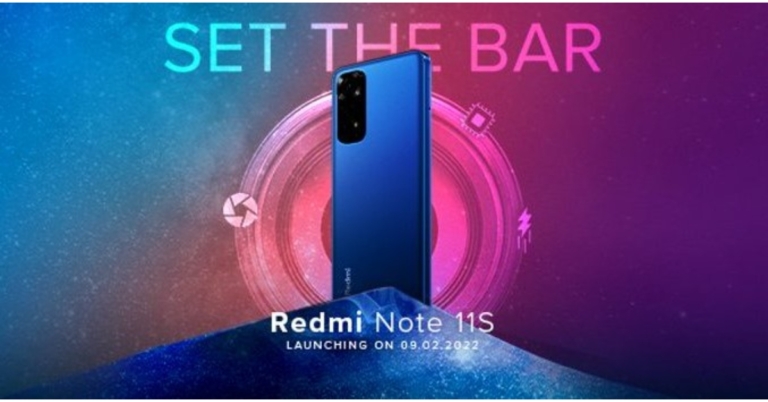
 The latest teaser as released by the company suggests a quad rear camera arrangement with a 108-megapixel main sensor on the back of the Redmi Note 11S. The teaser also implies that the upcoming Redmi phone would have a 4G connection and may not feature 5G capabilities.
Xiaomi has not revealed many details regarding the smartphone, however, depending on the country, the Redmi Note 11S is believed to be powered by a MediaTek SoC and include a 108-megapixel Samsung HM2 camera or a 64-megapixel OmniVision OV6480 as the primary camera. An 8-megapixel Sony IMX355 ultra-wide camera and a 2-megapixel OV02A macro camera will also be included in the future device.
As previously said, the phone was discovered on multiple certification websites. At the same time, the gadget received BIS certification, indicating an impending introduction. The model number of the phone was 220111TSI. A smartphone with the model number 2201117SG was also spotted on the NTBC certification authority website, which also listed the Redmi Note 11S. On the EEC certification page, another smartphone with the model numbers 2201117TG, 2201117TY, and 2201117SY was discovered.
For the latest gadget and tech news, and gadget reviews, follow us on Twitter, Facebook and Instagram. For newest tech & gadget videos subscribe to our YouTube Channel. You can also stay up to date using the Gadget Bridge Android App. You can find the latest car and bike news here.
The latest teaser as released by the company suggests a quad rear camera arrangement with a 108-megapixel main sensor on the back of the Redmi Note 11S. The teaser also implies that the upcoming Redmi phone would have a 4G connection and may not feature 5G capabilities.
Xiaomi has not revealed many details regarding the smartphone, however, depending on the country, the Redmi Note 11S is believed to be powered by a MediaTek SoC and include a 108-megapixel Samsung HM2 camera or a 64-megapixel OmniVision OV6480 as the primary camera. An 8-megapixel Sony IMX355 ultra-wide camera and a 2-megapixel OV02A macro camera will also be included in the future device.
As previously said, the phone was discovered on multiple certification websites. At the same time, the gadget received BIS certification, indicating an impending introduction. The model number of the phone was 220111TSI. A smartphone with the model number 2201117SG was also spotted on the NTBC certification authority website, which also listed the Redmi Note 11S. On the EEC certification page, another smartphone with the model numbers 2201117TG, 2201117TY, and 2201117SY was discovered.
For the latest gadget and tech news, and gadget reviews, follow us on Twitter, Facebook and Instagram. For newest tech & gadget videos subscribe to our YouTube Channel. You can also stay up to date using the Gadget Bridge Android App. You can find the latest car and bike news here.  The latest teaser as released by the company suggests a quad rear camera arrangement with a 108-megapixel main sensor on the back of the Redmi Note 11S. The teaser also implies that the upcoming Redmi phone would have a 4G connection and may not feature 5G capabilities.
Xiaomi has not revealed many details regarding the smartphone, however, depending on the country, the Redmi Note 11S is believed to be powered by a MediaTek SoC and include a 108-megapixel Samsung HM2 camera or a 64-megapixel OmniVision OV6480 as the primary camera. An 8-megapixel Sony IMX355 ultra-wide camera and a 2-megapixel OV02A macro camera will also be included in the future device.
As previously said, the phone was discovered on multiple certification websites. At the same time, the gadget received BIS certification, indicating an impending introduction. The model number of the phone was 220111TSI. A smartphone with the model number 2201117SG was also spotted on the NTBC certification authority website, which also listed the Redmi Note 11S. On the EEC certification page, another smartphone with the model numbers 2201117TG, 2201117TY, and 2201117SY was discovered.
For the latest gadget and tech news, and gadget reviews, follow us on Twitter, Facebook and Instagram. For newest tech & gadget videos subscribe to our YouTube Channel. You can also stay up to date using the Gadget Bridge Android App. You can find the latest car and bike news here.
The latest teaser as released by the company suggests a quad rear camera arrangement with a 108-megapixel main sensor on the back of the Redmi Note 11S. The teaser also implies that the upcoming Redmi phone would have a 4G connection and may not feature 5G capabilities.
Xiaomi has not revealed many details regarding the smartphone, however, depending on the country, the Redmi Note 11S is believed to be powered by a MediaTek SoC and include a 108-megapixel Samsung HM2 camera or a 64-megapixel OmniVision OV6480 as the primary camera. An 8-megapixel Sony IMX355 ultra-wide camera and a 2-megapixel OV02A macro camera will also be included in the future device.
As previously said, the phone was discovered on multiple certification websites. At the same time, the gadget received BIS certification, indicating an impending introduction. The model number of the phone was 220111TSI. A smartphone with the model number 2201117SG was also spotted on the NTBC certification authority website, which also listed the Redmi Note 11S. On the EEC certification page, another smartphone with the model numbers 2201117TG, 2201117TY, and 2201117SY was discovered.
For the latest gadget and tech news, and gadget reviews, follow us on Twitter, Facebook and Instagram. For newest tech & gadget videos subscribe to our YouTube Channel. You can also stay up to date using the Gadget Bridge Android App. You can find the latest car and bike news here. 

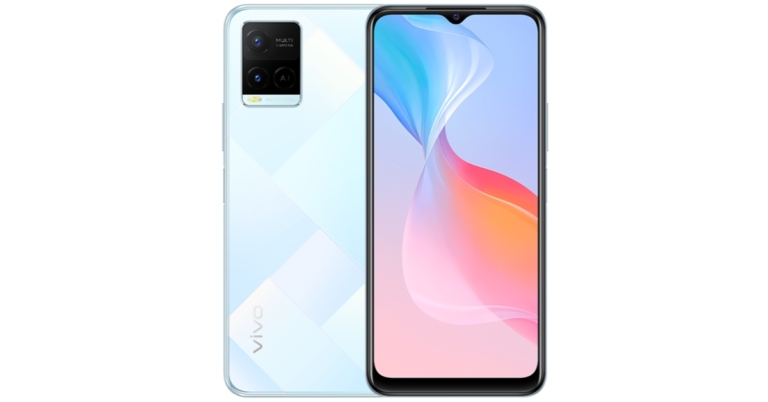




 Screen copy or ‘scrcpy‘ is a great tool for mirroring your phone’s display on your PC. If you have exhausted all options for taking a screenshot on your smartphone, you can take a screenshot of the app after mirroring it on your PC. Use the PrtScn key or the Snipping Tool to take a screenshot on your Windows PC. The best thing about using this option is that you can directly transfer the screenshot to your phone right away. Read this article to learn how to use scrcpy.
 Screen copy or ‘scrcpy‘ is a great tool for mirroring your phone’s display on your PC. If you have exhausted all options for taking a screenshot on your smartphone, you can take a screenshot of the app after mirroring it on your PC. Use the PrtScn key or the Snipping Tool to take a screenshot on your Windows PC. The best thing about using this option is that you can directly transfer the screenshot to your phone right away. Read this article to learn how to use scrcpy.
 Step 4: Open the Restricted app where the screenshot will be taken.
Step 5: Select the Settings icon that looks like a toolbox from the floating button on your screen.
Step 6: Select the Screenshot option from the drop-down menu and shut the drop-down menu.
Step 7: A second floating button, a left-hand camera icon, will appear on your screen.
Step 4: Open the Restricted app where the screenshot will be taken.
Step 5: Select the Settings icon that looks like a toolbox from the floating button on your screen.
Step 6: Select the Screenshot option from the drop-down menu and shut the drop-down menu.
Step 7: A second floating button, a left-hand camera icon, will appear on your screen.
 Step 8: Tap the Allow button after clicking the Camera icon. It will take a screenshot and save it to your gallery. After tapping on the floating window that appears, you can preview/edit the screenshot.
Read Also: How to take a screenshot in Google Chrome incognito mode
Step 8: Tap the Allow button after clicking the Camera icon. It will take a screenshot and save it to your gallery. After tapping on the floating window that appears, you can preview/edit the screenshot.
Read Also: How to take a screenshot in Google Chrome incognito mode
 Step 5: Tap the search bar and enter the name of the song that you want to use on your Reel.
 Step 6: Use the seek bar to select the portion of the song that you want as background music for your Reel.
 Step 7: Hit Done and post the Reel to your profile.
Step 8: Open the Reel and tap the Share arrow.
Step 7: Hit Done and post the Reel to your profile.
Step 8: Open the Reel and tap the Share arrow.
 Step 9: Select Download.
 Go to the ‘Instagram’ folder on your device’s gallery app to access the video.
 Step 3: Select the proper music volume level after deciding on the song you wish to use. It would be wise to mute the original video volume at this point because it might add unwanted noise. Then Save it.
 Step 4: Open WhatsApp, go to your profile and add the video you just generated to your status. It’s best to watch the video before sharing it and only share it if everything appears to be in order.
 Step 3: From the many options available, to add music from your local gallery, go to the My Music tab and find the song you want.
Step 4: You will find some featured tracks by the YouCut app within the ‘Featured’ section. To mute the video’s audio, click on the video clip from the bottom and drag the volume to the lowest setting.
Step 5: Also, enable the Fade in and Fade Out buttons by clicking on the music clip from the button. This will add a fading effect to the video’s beginning and end.
Step 3: From the many options available, to add music from your local gallery, go to the My Music tab and find the song you want.
Step 4: You will find some featured tracks by the YouCut app within the ‘Featured’ section. To mute the video’s audio, click on the video clip from the bottom and drag the volume to the lowest setting.
Step 5: Also, enable the Fade in and Fade Out buttons by clicking on the music clip from the button. This will add a fading effect to the video’s beginning and end.
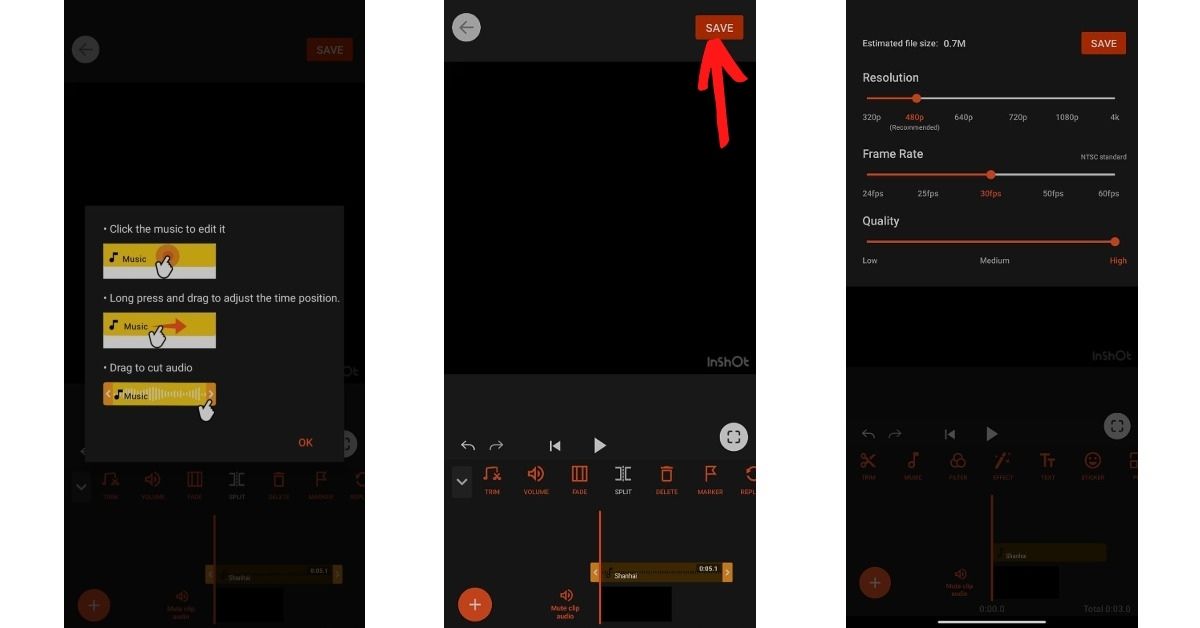 Step 6: Tap the Save button in the top right corner of the screen once you’ve completed editing. After that, choose the video quality (High) and push the Compress button. That is all there is to it. Your video is now complete with background music, and you can share it on WhatsApp.
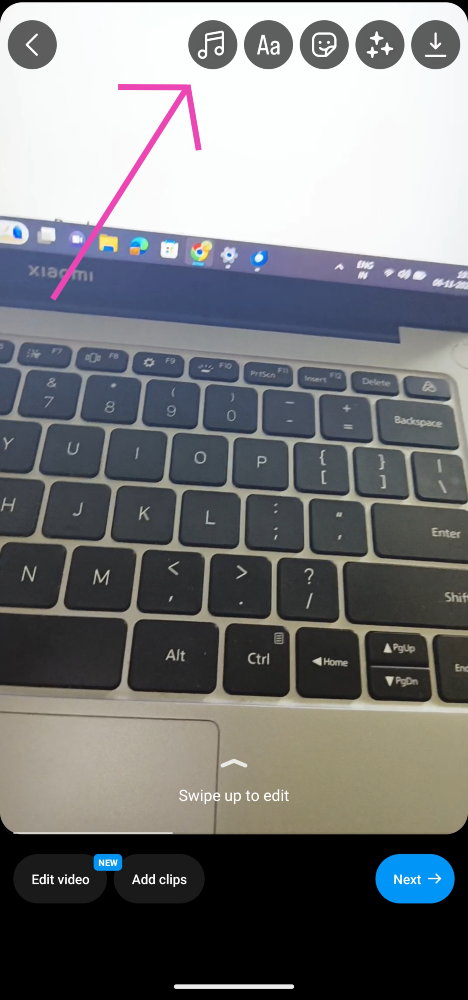 Step 5: Tap the search bar and enter the name of the song that you want to use on your Reel.
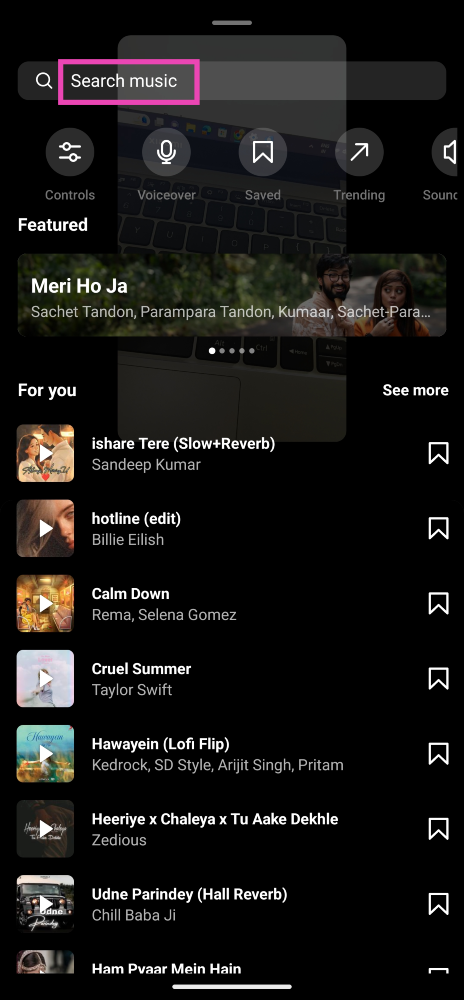 Step 6: Use the seek bar to select the portion of the song that you want as background music for your Reel.
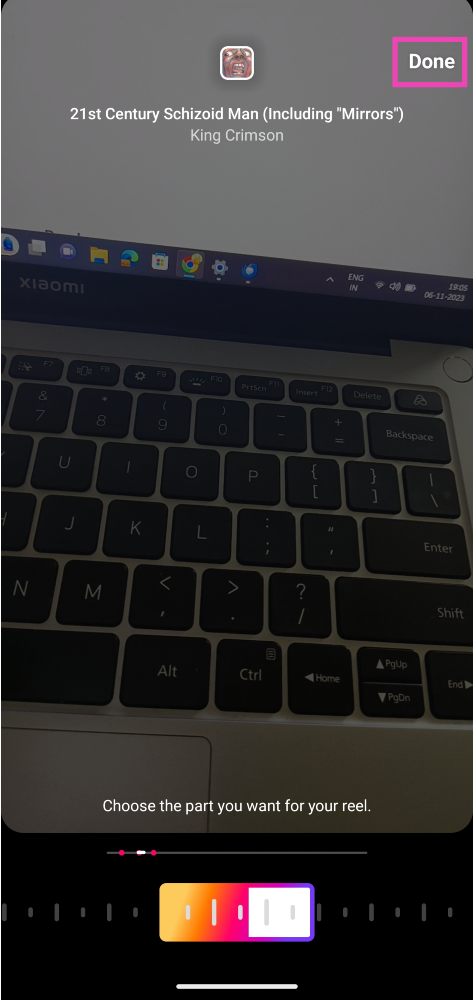 Step 7: Hit Done and post the Reel to your profile.
Step 8: Open the Reel and tap the Share arrow.
Step 7: Hit Done and post the Reel to your profile.
Step 8: Open the Reel and tap the Share arrow.
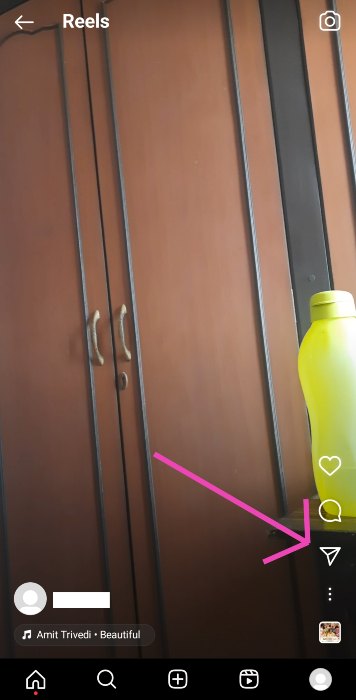 Step 9: Select Download.
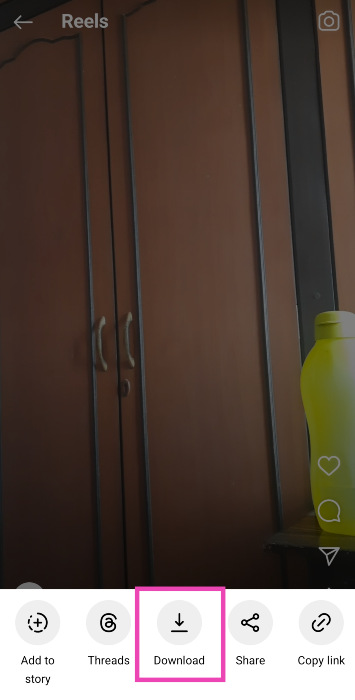 Go to the ‘Instagram’ folder on your device’s gallery app to access the video.



 Most smartphones allow users to access the power menu from the Quick Settings panel. If your smartphone’s power key is not working at all, you may need to connect it to a charger or activate the ‘double tap to wake up’ option in order to activate the lock screen. Once you’ve unlocked your phone, swipe down from the status bar and tap the power button at the top right section of the screen to access the power menu. You can now choose to turn off or reboot your phone.
 Using the Buttons Remapper app, you can assign custom controls to any button on your phone. If your phone’s power key isn’t working, you can customise either volume key to trigger the power menu when you long-press it. Buttons Remapper also allows you to perform certain actions using a specific key combination, but you will need to pay for a premium subscription to gain access to this functionality.
 The Phone Lock + Volume app allows you to reassign the power and volume controls to an app icon on your phone’s home page. This app will come in handy if none of the physical buttons are working on your phone. Long-pressing the specialised icon also lets you take a quick screenshot. This app is also useful for people who use very thick cases for their devices.

 Step 4: Go to Internal Storage>WhatsApp>Media>Statuses.
 Step 5: Copy the photographs to a separate location and check out the statuses.
Read Also: How to download an image or video from WhatsApp status using an Android device?
Step 5: Copy the photographs to a separate location and check out the statuses.
Read Also: How to download an image or video from WhatsApp status using an Android device?
 Step 4: Disable the Read Receipts toggle here.
 Read Also: Elon Musk launched its first AI chatbot, Grok
 GB WhatsApp is a modded version of the instant messenger. It has a host of new features which aren’t available in the regular WhatsApp app. Using GB WhatsApp, you can choose to discreetly view someone’s status update without needing to hide the receipts on your updates too. Apart from that, GB WhatsApp lets you send large files, hide online and typing status, schedule messages, read deleted messages and more. It goes without saying that this app isn’t legal to use. WhatsApp has a strict policy of banning users who are found using this app.

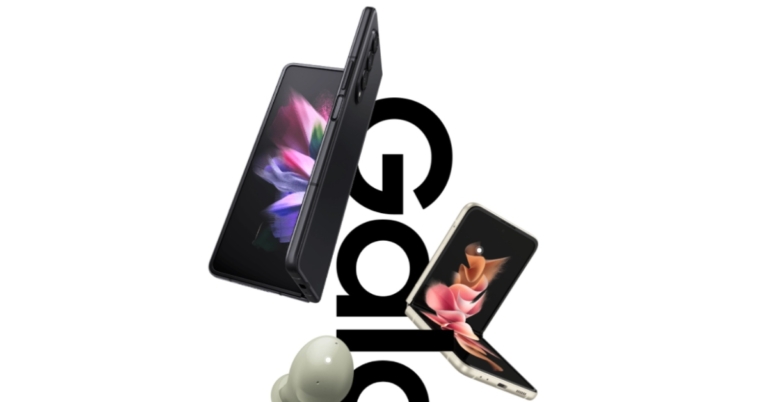
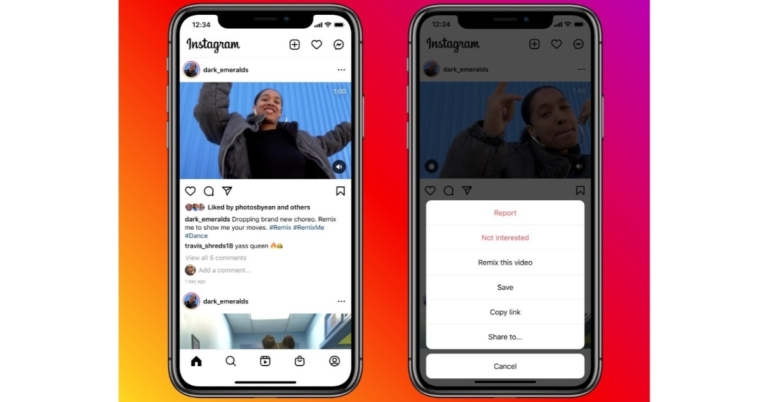
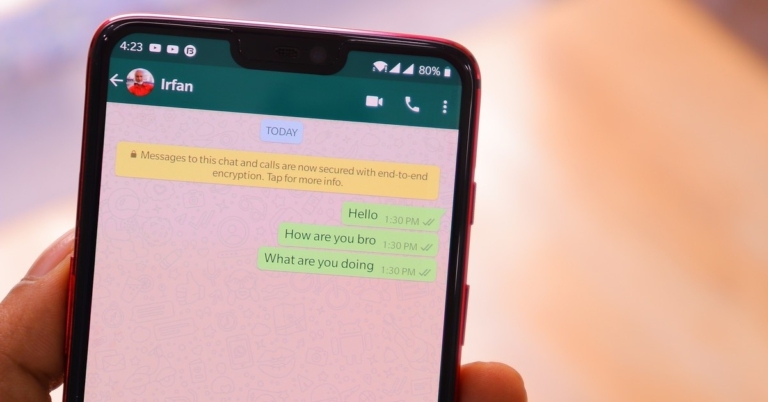



 As we mentioned earlier the Oppo Reno 7 series price in India was tipped last month. The Oppo Reno 7 5G is estimated to be priced between Rs 28,000 and Rs 31,000. Whereas the Oppo Reno 7 Pro 5G is expected to cost between Rs 41,000 and Rs 43,000 in India. Along with the smartphone, the Chinese smartphone manufacturer is anticipated to unveil its newest TWS earphones and the Oppo Watch Free. The TWS earbuds are rumoured to cost approximately Rs 9,990 in price.
 As we mentioned earlier the Oppo Reno 7 series price in India was tipped last month. The Oppo Reno 7 5G is estimated to be priced between Rs 28,000 and Rs 31,000. Whereas the Oppo Reno 7 Pro 5G is expected to cost between Rs 41,000 and Rs 43,000 in India. Along with the smartphone, the Chinese smartphone manufacturer is anticipated to unveil its newest TWS earphones and the Oppo Watch Free. The TWS earbuds are rumoured to cost approximately Rs 9,990 in price.
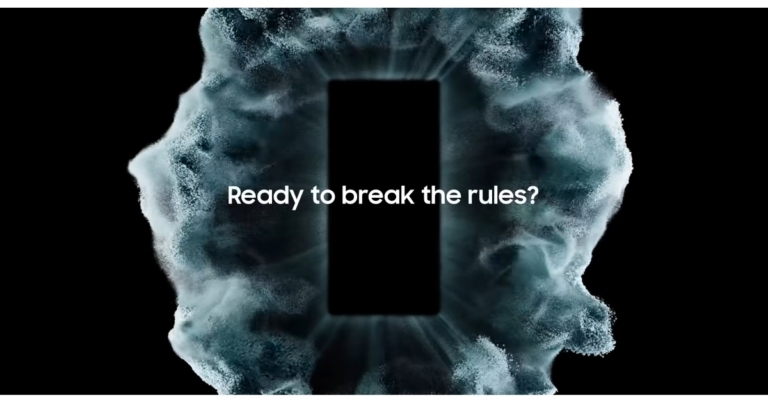
 The phones are said to be more sustainable with faster performance. “With it, you will own the night – taking the best and brightest photos and videos you’ve ever captured with a phone. You will also dominate the day with power, speed and tools that can’t be found elsewhere. You will enjoy cutting edge-innovations made possible thanks to the smartest Galaxy experience yet. All while feeling good about being part of the most sustainable Galaxy ecosystem. And, yes, you will help Samsung rewrite the future of smartphones once again,” the blog post noted.
Samsung has yet to announce an official date for the forthcoming Galaxy Unpacked event but speculations suggest that it will take place on February 8, with a Chinese launch date of February 9.
Gadget Bridge will keep you up to date on the Samsung Galaxy S22 Series’ features and cost. So keep an eye on our website.
For the latest gadget and tech news, and gadget reviews, follow us on Twitter, Facebook and Instagram. For newest tech & gadget videos subscribe to our YouTube Channel. You can also stay up to date using the Gadget Bridge Android App. You can find the latest car and bike news here.
The phones are said to be more sustainable with faster performance. “With it, you will own the night – taking the best and brightest photos and videos you’ve ever captured with a phone. You will also dominate the day with power, speed and tools that can’t be found elsewhere. You will enjoy cutting edge-innovations made possible thanks to the smartest Galaxy experience yet. All while feeling good about being part of the most sustainable Galaxy ecosystem. And, yes, you will help Samsung rewrite the future of smartphones once again,” the blog post noted.
Samsung has yet to announce an official date for the forthcoming Galaxy Unpacked event but speculations suggest that it will take place on February 8, with a Chinese launch date of February 9.
Gadget Bridge will keep you up to date on the Samsung Galaxy S22 Series’ features and cost. So keep an eye on our website.
For the latest gadget and tech news, and gadget reviews, follow us on Twitter, Facebook and Instagram. For newest tech & gadget videos subscribe to our YouTube Channel. You can also stay up to date using the Gadget Bridge Android App. You can find the latest car and bike news here.  The phones are said to be more sustainable with faster performance. “With it, you will own the night – taking the best and brightest photos and videos you’ve ever captured with a phone. You will also dominate the day with power, speed and tools that can’t be found elsewhere. You will enjoy cutting edge-innovations made possible thanks to the smartest Galaxy experience yet. All while feeling good about being part of the most sustainable Galaxy ecosystem. And, yes, you will help Samsung rewrite the future of smartphones once again,” the blog post noted.
Samsung has yet to announce an official date for the forthcoming Galaxy Unpacked event but speculations suggest that it will take place on February 8, with a Chinese launch date of February 9.
Gadget Bridge will keep you up to date on the Samsung Galaxy S22 Series’ features and cost. So keep an eye on our website.
For the latest gadget and tech news, and gadget reviews, follow us on Twitter, Facebook and Instagram. For newest tech & gadget videos subscribe to our YouTube Channel. You can also stay up to date using the Gadget Bridge Android App. You can find the latest car and bike news here.
The phones are said to be more sustainable with faster performance. “With it, you will own the night – taking the best and brightest photos and videos you’ve ever captured with a phone. You will also dominate the day with power, speed and tools that can’t be found elsewhere. You will enjoy cutting edge-innovations made possible thanks to the smartest Galaxy experience yet. All while feeling good about being part of the most sustainable Galaxy ecosystem. And, yes, you will help Samsung rewrite the future of smartphones once again,” the blog post noted.
Samsung has yet to announce an official date for the forthcoming Galaxy Unpacked event but speculations suggest that it will take place on February 8, with a Chinese launch date of February 9.
Gadget Bridge will keep you up to date on the Samsung Galaxy S22 Series’ features and cost. So keep an eye on our website.
For the latest gadget and tech news, and gadget reviews, follow us on Twitter, Facebook and Instagram. For newest tech & gadget videos subscribe to our YouTube Channel. You can also stay up to date using the Gadget Bridge Android App. You can find the latest car and bike news here. 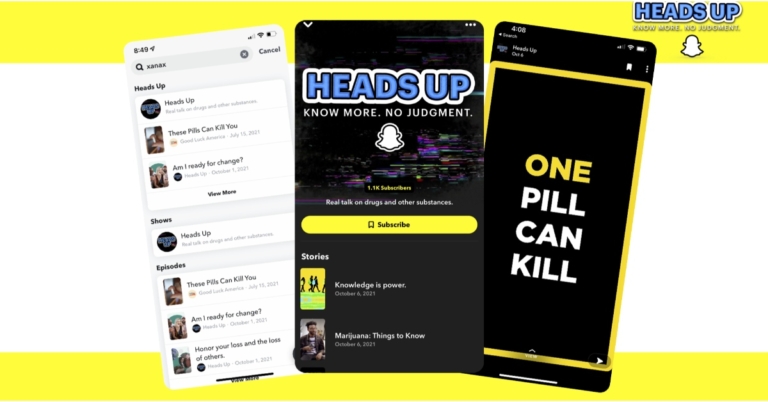

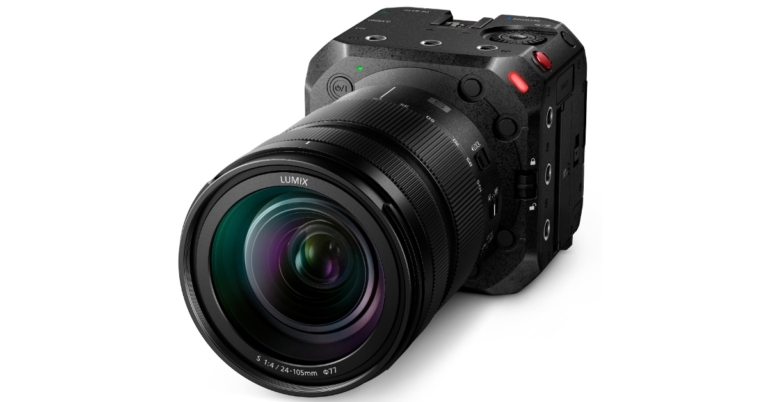
 There is a Dual Native ISO feature on the camera that allows users to choose between two ISO levels, as well as a 14+ stops V-Log/V-Gamut which allows users to record photographs with more than 14 stops of dynamic range in a very wide colour spectrum while keeping Panasonic’s V-Log format. Additionally, Blackmagic Video Assist 12G HDR enables high-image-quality recording with less noise, even in low-light environments such as indoors or at night. It also has RAW video capabilities.
According to the company the Panasonic LUMIX Digital Single Lens Mirrorless Camera BS1H has a limitless recording time that is only limited by your available storage. The device is also well-equipped with heat management that ensures long-hour usability without having to worry about quick pack-ups during shoots.
With features like HDMI/SDI Output, Genlock IN/Timecode IN/OUT the new Panasonic camera is designed to give precise output. The camera features Double SD Card Slots, a 3.5 Audio (in/out) port, USB 3.1 Type-C, 3G-SDI (BNC), HDMI Type-A, Wi-Fi, Bluetooth, tally lighting (front/rear), and XLR microphone compatibility.
There is a Dual Native ISO feature on the camera that allows users to choose between two ISO levels, as well as a 14+ stops V-Log/V-Gamut which allows users to record photographs with more than 14 stops of dynamic range in a very wide colour spectrum while keeping Panasonic’s V-Log format. Additionally, Blackmagic Video Assist 12G HDR enables high-image-quality recording with less noise, even in low-light environments such as indoors or at night. It also has RAW video capabilities.
According to the company the Panasonic LUMIX Digital Single Lens Mirrorless Camera BS1H has a limitless recording time that is only limited by your available storage. The device is also well-equipped with heat management that ensures long-hour usability without having to worry about quick pack-ups during shoots.
With features like HDMI/SDI Output, Genlock IN/Timecode IN/OUT the new Panasonic camera is designed to give precise output. The camera features Double SD Card Slots, a 3.5 Audio (in/out) port, USB 3.1 Type-C, 3G-SDI (BNC), HDMI Type-A, Wi-Fi, Bluetooth, tally lighting (front/rear), and XLR microphone compatibility.
 There is a Dual Native ISO feature on the camera that allows users to choose between two ISO levels, as well as a 14+ stops V-Log/V-Gamut which allows users to record photographs with more than 14 stops of dynamic range in a very wide colour spectrum while keeping Panasonic’s V-Log format. Additionally, Blackmagic Video Assist 12G HDR enables high-image-quality recording with less noise, even in low-light environments such as indoors or at night. It also has RAW video capabilities.
According to the company the Panasonic LUMIX Digital Single Lens Mirrorless Camera BS1H has a limitless recording time that is only limited by your available storage. The device is also well-equipped with heat management that ensures long-hour usability without having to worry about quick pack-ups during shoots.
With features like HDMI/SDI Output, Genlock IN/Timecode IN/OUT the new Panasonic camera is designed to give precise output. The camera features Double SD Card Slots, a 3.5 Audio (in/out) port, USB 3.1 Type-C, 3G-SDI (BNC), HDMI Type-A, Wi-Fi, Bluetooth, tally lighting (front/rear), and XLR microphone compatibility.
There is a Dual Native ISO feature on the camera that allows users to choose between two ISO levels, as well as a 14+ stops V-Log/V-Gamut which allows users to record photographs with more than 14 stops of dynamic range in a very wide colour spectrum while keeping Panasonic’s V-Log format. Additionally, Blackmagic Video Assist 12G HDR enables high-image-quality recording with less noise, even in low-light environments such as indoors or at night. It also has RAW video capabilities.
According to the company the Panasonic LUMIX Digital Single Lens Mirrorless Camera BS1H has a limitless recording time that is only limited by your available storage. The device is also well-equipped with heat management that ensures long-hour usability without having to worry about quick pack-ups during shoots.
With features like HDMI/SDI Output, Genlock IN/Timecode IN/OUT the new Panasonic camera is designed to give precise output. The camera features Double SD Card Slots, a 3.5 Audio (in/out) port, USB 3.1 Type-C, 3G-SDI (BNC), HDMI Type-A, Wi-Fi, Bluetooth, tally lighting (front/rear), and XLR microphone compatibility.






 Read Also: WhatsApp to soon provide the option to contact the service via in-app support chat
 For the latest gadget and tech news, and gadget reviews, follow us on Twitter, Facebook and Instagram. For the newest tech & gadget, videos subscribe to our YouTube Channel. You can also stay up to date using the Gadget Bridge Android App. You can find the latest car and bike news here.


 If the person has not blocked you on Instagram, it is possible they may have restricted you instead. To confirm this, make a throwaway account and check if your recent comments show up on their posts. When you’re restricted, your comments have to be approved by the user before being visible to everyone else. Unit then, your comments will only be visible to you. If you’re unable to see your comments from an alternate account, the Instagram user has restricted you.

 Read Also: Top best methods to stop autoplay videos on Facebook, Twitter, YouTube, and Instagram

 If the person has not blocked you on Instagram, it is possible they may have restricted you instead. To confirm this, make a throwaway account and check if your recent comments show up on their posts. When you’re restricted, your comments have to be approved by the user before being visible to everyone else. Unit then, your comments will only be visible to you. If you’re unable to see your comments from an alternate account, the Instagram user has restricted you.